FHW40300 - Safe SentrySafe - Free user manual and instructions
Find the device manual for free FHW40300 SentrySafe in PDF.


User questions about FHW40300 SentrySafe
0 question about this device. Answer the ones you know or ask your own.
Ask a new question about this device
Download the instructions for your Safe in PDF format for free! Find your manual FHW40300 - SentrySafe and take your electronic device back in hand. On this page are published all the documents necessary for the use of your device. FHW40300 by SentrySafe.
USER MANUAL FHW40300 SentrySafe
Digital Chest and File Owner's Manual
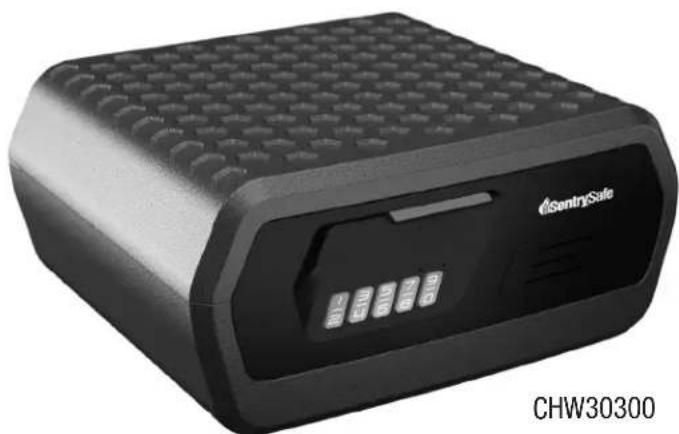
CHW30300
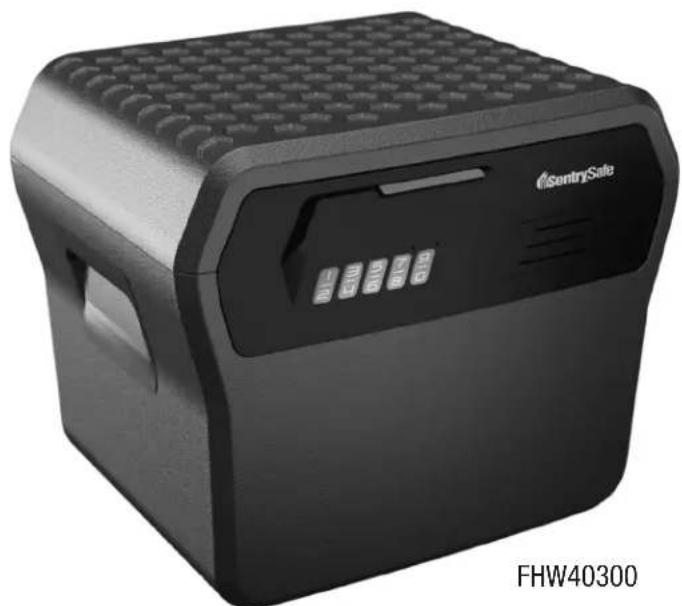
FHW40300
©SentrySafe
Warnings

WARNING
Gun warning
This product is not intended for the secure storage of all materials. Items such as firearms, other weapons, combustible materials, or medication should NOT be stored in this unit.
NOTICE
Do NOT store delicate items directly in your safe.
SentrySafe products which offer fire protection have a proprietary insulation that has a high moisture content. In addition, the SentrySafe advanced safes close airtight to offer water resistance, which may also cause moisture to accumulate inside your safe.
If you choose to store delicate items such as jewelry with working parts, watches, stamps, or photos in your safe, we recommend putting them in an air-tight container, prior to placing them in the safe for storage.
NOTE: SentrySafe will not be responsible for any damage or loss of items placed in the unit due to moisture.
Do NOT store pearls in this safe.
In the event of a fire, potential damage to delicate pearls occurs at temperatures much lower than the 350^ interior performance measure which the UL classification performance standard indicated guarantees. Therefore, DO NOT store pearls in your SentrySafe product.
Do NOT store computer disks, audio-visual cassettes or photo negatives.
This product is not intended to protect computer floppy or diskettes, cartridges and tapes, audio or video cassettes or photo negatives.
Your safe is only part of your total security protection.
SentrySafe recommends that you store your safe in closets, offices, basements, bedrooms and any other locations that are convenient for you but out of direct line of sight from frying eyes. The location of the safe does not affect the safe's ability to protect your valuables inside.
Table of Contents
Thank you for your purchase of a SentrySafe Product. SentrySafe is committed to securing, organizing and protecting your most important documents, valuables and keepsakes.
Francais 11
Espanol. 19
English
Warnings 2
Registration 3
Battery Installation / Opening 4
Programming Your Safe 5
Enabling/Disabling Beeper 6
Troubleshooting / Customer Sevice 7
After-Fire Replacement Program 8
IMPORTANT
If you experience problems or challenges with your safe, please contact us.
Many issues can be quickly resolved without the product being returned.
Registration:
www.registmysafe.com
Reasons to register
By registering your SentrySafe product you can easily retrieve forgotten codes and combinations.
By registering your SenilitySafe product you can be sure that in the unfortunate circumstance of a fire you will be guaranteed your replacement safe (provided official paperwork has been completed).
For videos, instructions & FAQs, visit: www.sertysafe.com
©SentrySafe
Battery Installation / Opening
NOTE: Store code in a secure location (other than in the safe).
NOTE: SentrySafe offers a secure on-line location for the entry and retrieval of your code. Go to www.registermysafe.com and register your safe.
Battery Installation
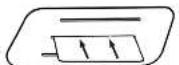
Insert a credit card, identification card, or another card of a similar size in the center slot of the battery cover. Once inserted, Remove the card, the battery cover will pop out attached to your card.
Insert a new 9 volt Alkaline battery in the indicated area.
Reinstall the battery cover by inserting the left side with the two tabs first.
NOTE: Do not use rechargeable batteries or any other type of non-alkaline battery.
To Open

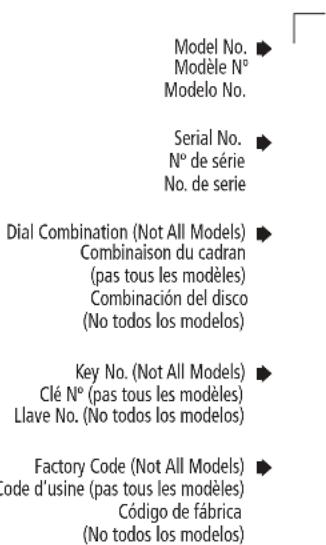
For first time use, enter the factory code, located on the back of this owners manual, on the keypad. A green LED light will flash to indicate acceptance of entry. Please allow for a brief delay for the lock to actuate.
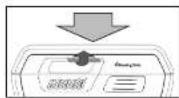
Press down on lid and pull up on latch.
NOTE: If an incorrect code is entered three times, the safe will enter lockout mode. (Red LED blinks slowly for two minutes.) Please refer to troubleshooting.
Programming Your Safe
Programming or Resetting Your Personal Code
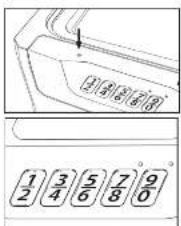
Open the safe, then press and hold the reset button, located on the top of the keypad, until the green LED flashes.
Enter a new 4-6 digit personal code on the key pad. The sale will acknowledge each acceptable keypress when green LED flashes.
Note: The safe will time out if there is no key entry within 10 seconds.
If the new personal code is 6 digits, the safe will accept immediately. If the new personal code is 4 or 5 digits, the code will be accepted 10 seconds after the last key press. The safe will go into Standby mode if fewer than 4 digits are entered.
Once the new personal code is accepted, the safe will automatically save and exit to Standby mode without additional indication.
Test the personal code before closing the safe. If the code is invalid, Repeat steps 1-4.
Confidential - Write down personal code, and keep it in a secure location. Or visit www.registermysafe.com to store your personal code.
NOTE: The personal code programmed will not be erased when the battery power is removed.
To Close
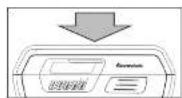
Press down on lid. Your safe is now securely locked.
©SentrySafe
Enabling / Disabling Beeper
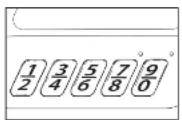
Press and hold the 1 and 9 on the keypad simultaneously for 3 seconds.
If the beeper is enabled, the green LED light will flash and the beeper will sound. If the beeper is disabled, the green LED will flash but have no sound.
Troubleshooting / Customer Service
| The Problem: Why It Is Happening: The Solution: | ||
| Red LED blinks three times | Incorrect code has been entered/ programming error | Verify the code and re-enter or reprogram |
| Programming error | ||
| Red LED slowly blinks for two minutes | An incorrect code has been entered three times, safe is in lockout mode | Wait for two minutes, re-enter personal or factory code |
| Yellow LED blinks once every thirty seconds | Battery power is low Replace with 9 volt alkaline batteries (do not use rechargeable or any other type of non-alkaline battery) | |
| No LED indication when pressing key pad buttons | Power failure Replace with 9 volt alkaline batteries (do not use rechargeable or any other type of non-alkaline battery) | |
| Customer Service | ||
Customer Service
www.sentrysafe.com
Phone Number: 1-800-828-1438
©SentrySafe
Replacement & Fire Specifications
Limited Lifetime After-Fire Replacement Program
If this product is damaged by fire at any time while still owned by you, the original, registered owner (the original purchaser), Master Lock will either ship a replacement or provide a credit or refund equal to the purchase price paid, at Master Lock's own and sole discretion.
To be eligible for this Limited Lifetime After Fire Replacement Program, the original purchaser must have registered the product within 30 days of purchase, online at www.registermysafe.com or using the Registration Card included with the product. Do not ship your product back to Master Lock.
To obtain service under the Limited Lifetime After-Fire Replacement Program, please contact Master Lock Customer Care by phone at 1-800-828-1438 or via www.sentrysafe.com. Do not ship your product back to Master Lock.
When contacting Master Lock Customer Care, you should have the following information available:
1) A description of the fire event; 2) unit model number; 3) serial number; 4) a photo of the burned unit; and 5) a copy of the report from the fire department, insurance or police.
THIS AFTER-FIRE REPLACEMENT PROGRAM IS LIMITED TO REPAIR OR REPLACEMENT ONLY. The limited warranty does not cover labor for removing, reinstalling or refinishing the product or part, or other materials removed, reinstalled or refinished in order to repair or replace the product or part. TO THE EXTENT PERMITTED BY LAW, MASTER LOCK DISCLAIMS ALL OTHER IMPLIED OR EXPRESS WARRANTY INCLUDING ALL WARRANTY OF MERCHANTABILITY AND/OR FITNESS FOR A PARTICULAR PURPOSE. TO THE EXTENT THAT ANY IMPLIED WARRANTY MAY NONETHELESS EXIST BY OPERATION OF LAW, SUCH WARRANTY ARE LIMITED TO THE DURATION PROVIDED BY LAW.
Fire specifications
Fire Endurance:
(UI Classified protection) Subjected to temperatures up to 1550^ (843^) for a duration of 1/2 hour, the safe interior will remain below 350^ (177^) .
Explosion Hazard:
(UL Classified protection) Subjected to a flash fire in a 2000^ (1093^) furnace for 30 minutes the unit will not explode or rupture.
Data Protection:
(ETL Verified) 1/2 hour fire protection of CDs, DVDs, memory sticks and USB drives up to 1550^ (843^) . This product is NOT intended to protect computer floppy or 2/4" diskettes, cartridges, tapes, audio or video cassettes, or photo negatives. For fire-resistant storage of these materials, ask your retailer for the SentrySafe Fire-Safe media storage products.
SentrySafe
www.registmysafe.com
www.registmysafe.com
Master Lock Company LLC
Milwaukee, Wisconsin 53210 U.S.A.
www.masterlock.com