
STW123DUBML - Safe SentrySafe - Free user manual and instructions
Find the device manual for free STW123DUBML SentrySafe in PDF.


| Product Type | Fire-resistant safe |
| Brand | SentrySafe (Master Lock) |
| Model | STW123DUBML |
| Fire Resistance | 2 hours up to 1010°C (1850°F) - UL rated |
| Water Resistance | 24 hours submerged up to 20.3 cm of water |
| Power Supply | 4 AAA alkaline batteries (not included) - electronic models |
| Lock Type | Dual lock: mechanical or electronic combination + backup key |
| Code Capacity | 1 factory code (non-erasable) + 2 programmable user codes |
| Light Function | Built-in LED, adjustable (off, 30 s, 60 s) |
| Sound Functions | Beeps can be turned on/off |
| Delay Mode | 2 minutes after 3 incorrect codes |
| Bolting | Can be bolted to floor (kit included on some models) |
| Material | Steel with fireproof insulation |
| Maintenance | Keep desiccant packet, open every 2 weeks |
| Warranty | Limited lifetime warranty (registration required within 30 days) |
| Customer Service | 1-800-828-1438 (USA / Canada) |
Frequently Asked Questions - STW123DUBML SentrySafe
User questions about STW123DUBML SentrySafe
0 question about this device. Answer the ones you know or ask your own.
Ask a new question about this device
Download the instructions for your Safe in PDF format for free! Find your manual STW123DUBML - SentrySafe and take your electronic device back in hand. On this page are published all the documents necessary for the use of your device. STW123DUBML by SentrySafe.
USER MANUAL STW123DUBML SentrySafe
If you experience any problems or challenges with your safe, please contact us. Many issues can be resolved quickly.
IMPORTANT
Master Lock Company LLC
www.masterlock.com
Master Lock.
2 Hour Fire-Safe® Owner's Manual
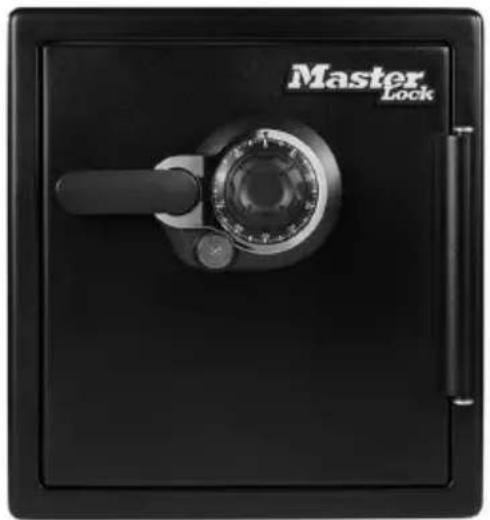
natural_image
Black hard bank safe with 'Master Lock' branding and a rotary dial (no additional text or symbols visible)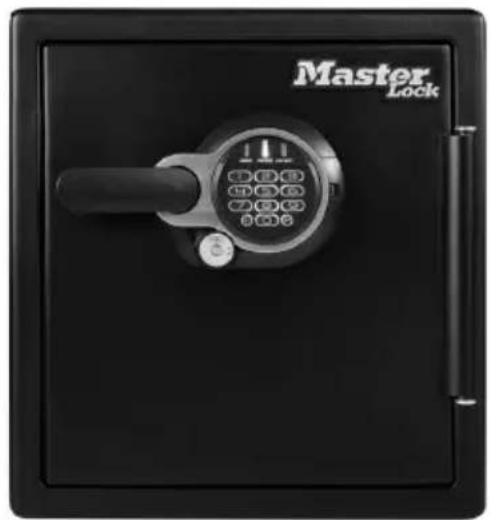
natural_image
Black self-lock device with a rotary keypad and handle, labeled 'Master Lock' (no additional text or symbols visible)
WARNING
Gun warning
This product is not intended for the secure storage of all materials. Items such as firearms, other weapons, combustible materials, or medication should NOT be stored in this unit.
NOTICE
Do NOT store delicate items directly in your safe.
Master Lock products which offer fire protection have a proprietary insulation that has a high moisture content. In addition, the Master Lock advanced safes close airtight to offer water resistance, which may also cause moisture to accumulate inside your safe. The desiccant packet included in your safe during shipment should be left in your safe. DO NOT DISCARD IT. It is intended to help absorb moisture which may accumulate inside your safe. Please open your unit once every two weeks to avoid moisture accumulation.
If you choose to store delicate items such as jewelry with working parts, watches, stamps, or photos in your safe, we recommend putting them in an air-tight container, prior to placing them in the safe for storage.
NOTE: Master Lock will not be responsible for any damage or loss of items placed in the unit due to moisture.
Do NOT store pearls in this safe.
In the event of a fire, potential damage to delicate pearls occurs at temperatures much lower than the 350°F interior performance measure which the UL classification performance standard indicated guarantees. Therefore, DO NOT store pearls in your Master Lock product.
Do NOT store computer disks, audio-visual cassettes or photo negatives.
This product is not intended to protect computer floppy or diskettes, cartridges and tapes, audio or video cassettes or photo negatives.
Your safe is only part of your total security protection.
Master Lock recommends that you store your safe in closets, offices, basements, bedrooms and any other locations that are convenient for you but out of direct line of sight from prying eyes. The location of the safe does not affect the safe's ability to protect your valuables inside.
Table of Contents
English
Warnings....2
Registration....3
Mechanical Combination Lock 4-5
Programmable Electronic Lock 6-9
Operating the Light....9
Operating Sound Features....10
Bolting Down Your Safe....11-12
Troubleshooting....13
Limited Lifetime Warranty....14
Fire/Water Specifications & Customer Service 15
Français ....17
Español....33
IMPORTANT
If you experience any problems or challenges with your safe, please contact us.
Many issues can be resolved quickly without the product being returned.
Our customer care team is available at 1-800-828-1438 to answer your questions.
Registration:
www.registermysafe.com
Reasons to register
By registering your Master Lock product you can easily retrieve forgotten codes and combinations.
By registering your Master Lock product you can be sure that in the unfortunate circumstance of a fire you will be guaranteed your replacement safe (provided official paperwork).
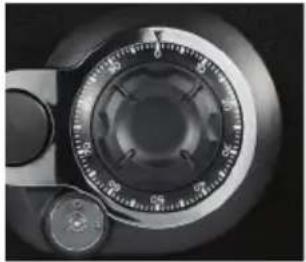
natural_image
Close-up of a mechanical dial caliper with no visible text or symbolsNOTE: • Store combination (and keys if equipped) in a secure location (other than in the safe).
- Combination can not be changed.
Preparing your safe for first time use

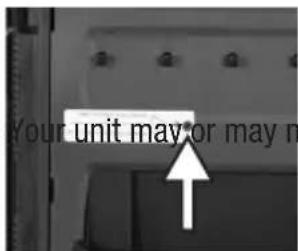
Ensure any shipping screws have been removed. Located on the inside of the door.
NOTE:
Your unit may or may not have a shipping screw.
- DO NOT RETURN! Questions or concerns, call us at 1-800-828-1438.

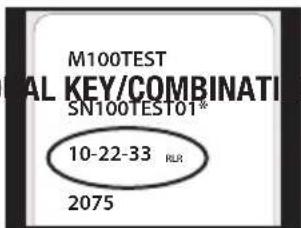
Find your combination on the back of this owner's manual.
N LOCKS ONLY
Keys are located inside your safe. Be sure to remove them before locking your safe.

WARNING
Test your combination several times before putting valuables inside.
Unlocking your safe

natural_image
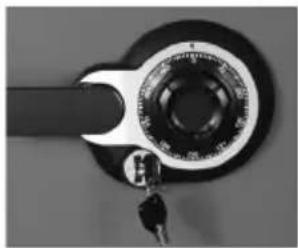
Close-up of a mechanical switch with a circular dial and key (no visible text or symbols)FOR DUAL KEY/COMBINATION LOCKS ONLY, insert key into the lock, turn to the "unlocked" position, then remove the key. This is a secondary locking feature not an override key.

natural_image
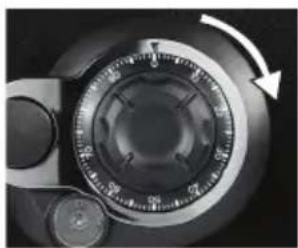
Close-up of a mechanical dial with a circular dial and arrow indicating rotation (no text or symbols)Rotate dial to "0", then rotate right (clockwise) passing "0" three times, continue rotating until you reach the first number in your combination.

natural_image
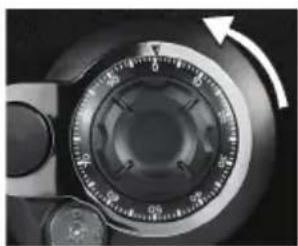
Close-up of a mechanical dial with rotary knob and pointer (no visible text or symbols)Rotate dial to the left (counterclockwise). Go PAST the second number of your combination ONCE and stop the SECOND time the dial reaches the number.
natural_image
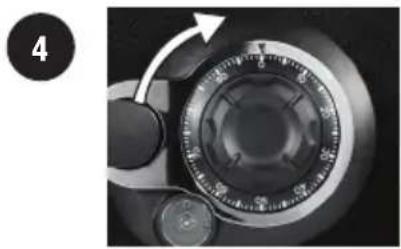
Close-up of a camera dial with an arrow indicating rotation (no text or symbols visible)Rotate the dial to the right (clockwise), stop when you reach the third number in your combination.
natural_image
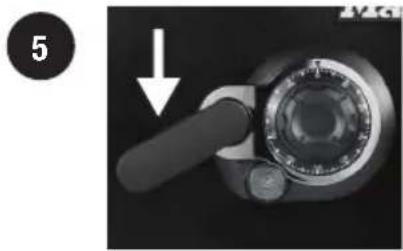
Close-up of a mechanical component with a hand holding a circular dial and a black handle, showing a downward arrow (no text or symbols visible)Rotate the handle downward to open the door.
This may take a limited amount of force if you have a water-resistant safe.
NOTE: • Make sure the handle is rotated all the way up in the horizontal position before unlocking the safe.
- If the door does not open easily, repeat steps 1-5.
- If you exert too much force on the handle, the handle will move without moving the bolts. If this happens, you will hear a “click”. DO NOT be alarmed. This feature is designed to protect the bolts from being overpowered by force. If this occurs, simply exert force in the opposite direction (lifting up) until the handles “clicks” back into place and repeat steps 1-5 to open your safe.
Locking your safe
natural_image
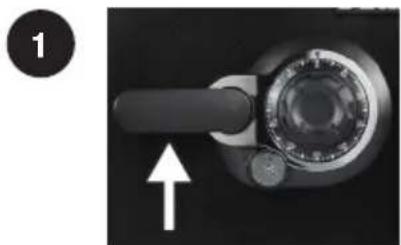
Close-up of a mechanical knob or dial with a white arrow pointing to the handle (no text or symbols visible)Close the door and pull the handle upward until the handle is horizontal.
For water-resistant units, additional pressure to the front, left side of the door may need to be applied prior to rotating the handle.

natural_image
Close-up of a camera dial with an arrow indicating rotation (no text or symbols visible)Spin the dial at least 2x to the right (clockwise).
natural_image
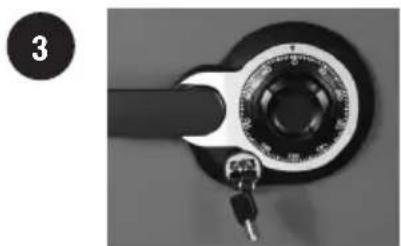
Close-up of a mechanical wrench handle with key and dial (no text or symbols visible)FOR DUAL KEY/COMBINATION LOCKS ONLY, insert key into the lock, turn to the "locked" position, then remove the key.
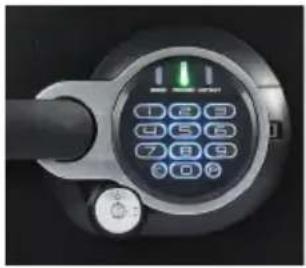
natural_image
Close-up of a digital pressure sensor dial with numeric keypad (no visible text or symbols)NOTE: • Store code (and keys if equipped) in a secure location (other than in the safe).
Preparing your safe for first time use
1
NOTE:
• DO
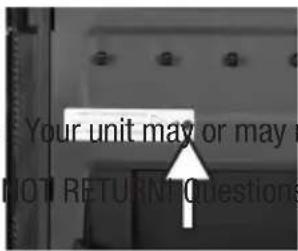
Ensure any shipping screws have been removed. Located on the inside of the door.
not have a shipping screw.
s or concerns, call us at 1-800-828-1438.
2
NOTE:
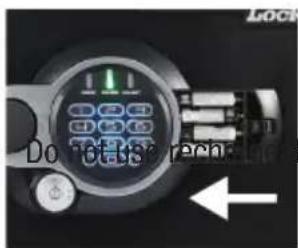
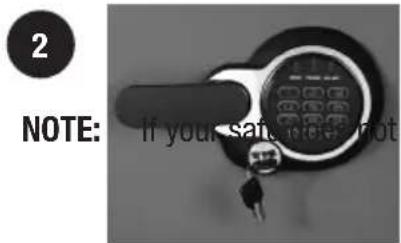
A Slide out the battery drawer on the side of the keypad.
B Insert 4 AAA alkaline batteries (not included).
ole batteries or any other type of
non-alkaline battery. Do not mix old and new batteries. Do not mix alkaline and standard batteries.
© Slide battery drawer back into keypad.
3
FOR D
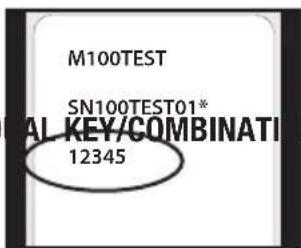
Find your code on the back of this owner's manual.
N LOCKS ONLY
Keys are located inside your safe. Be sure to remove them before locking your safe.

WARNING
Test your combination several times before putting valuables inside.
Unlocking your safe
1
natural_image
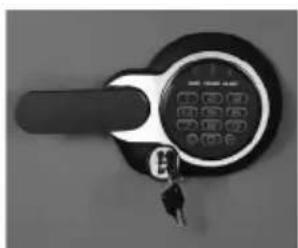
Close-up of a black key inserted into a digital lock (no visible text or symbols)FOR DUAL KEY/ELECTRONIC LOCKS ONLY, insert key into
the lock, turn to the "unlocked" position to open the safe, then remove the key.
This is a secondary locking feature not an override key.
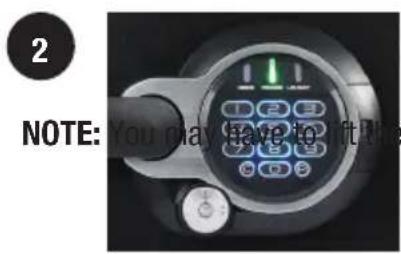
A Enter the 5 digit factory code found on the back of the owner's manual.
handle while entering the combination.
B A green light will indicate the code is correct. You will have 4 seconds to turn the handle to unlock your safe.
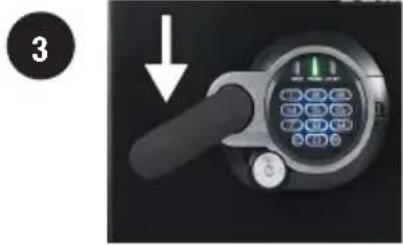
Rotate the handle downward to open the door.
This may take a limited amount of force if you have a water-resistant safe.
NOTE: • Make sure the handle is rotated all the way up in the horizontal position before unlocking the safe.
- If you exert too much force on the handle, the handle will move without moving the bolts. If not when this happens, you will hear a “click”. DO NOT be alarmed. This feature is designed to protect the bolts from being over powered by force. If this occurs, simply exert force in the opposite direction (lifting up) until the handles “clicks” back into place and repeat steps 1-3 to open your safe.
- Delay mode will occur if three consecutive invalid entries have been tried. Red LED will blink on and off to let you know the safe is in delay mode. This will cause the system to shutdown for two minutes. DO NOT remove the batteries to restart the system it will only increase the length of time for the system shutdown.
Locking your safe
natural_image
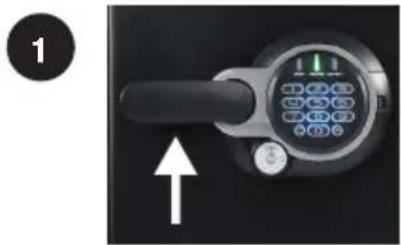
Close-up of a digital doorbell with control buttons and a white arrow pointing to the handle (no text or symbols visible)Close the door and pull the handle upward until the handle is horizontal.
For water-resistant units, additional pressure to the front, left side of the door may need to be applied prior to rotating the handle.
FOR DUAL KEY/ELECTRONIC LOCKS ONLY, insert key into the lock, turn to the "locked" position, then remove the key.
appear to be working
properly, please check to make sure you are using NEW alkaline batteries before contacting Customer Service.
Programming information
natural_image
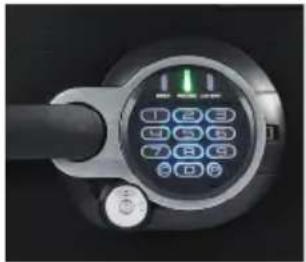
Close-up of a black electronic device with a circular control panel and indicator lights (no readable text or symbols)Three code options:
Factory code: The safe will ALWAYS unlock using this 5 digit code (found on the back of the owner's manual). This code cannot be deleted.
User code: A 5 digit programmable code of your choosing that can be changed or deleted.
Secondary code: A second 5 digit programmable code of your choosing that can be changed or deleted. Can only be programmed after a user code has been activated.
NOTE: • The “C” key is a clear key. This can be used at anytime to clear the system and return to standby mode – unless you are in delay mode (3 consecutive invalid entries).
- The 5 digit factory code cannot be deleted. However, you may add and delete additional codes.
This safe can store up to three codes at one time. One factory code and two additional programmable codes.
Programming the user code
To ADD a user code:
1 Press the "P" key.
② Enter the 5 digit factory code found on the back of your owner's manual.
3 The light will flash green and then you will have five seconds to enter your own personal 5 digit user code.
To DELETE a user code:
1 Press the "P" key.
2 Enter the 5 digit factory code.
③ Enter 0,0,0,0,0.
NOTE: • The electronic lock will NOT indicate that it has deleted the user code – please test the code to make sure it has been deleted.
Programming the secondary code
To ADD a secondary code:
1 Press the "P" key two times.
② Enter the 5 digit user code previously programmed.
3 The light will flash green and then you will have five seconds to enter your own personal 5 digit secondary code.
To DELETE a secondary code:
1 Press the "P" key two times.
2 Enter the 5 digit user code.
3 Enter 0,0,0,0,0.
NOTE: • The electronic lock will NOT indicate that it has deleted the secondary code – please test the code to make sure it has been deleted.
How to operate the light
natural_image
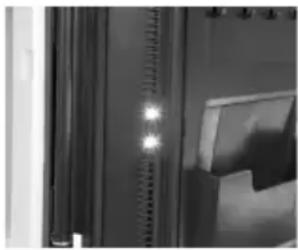
Close-up of a server rack with ventilation grilles and a cabinet (no visible text or symbols)The safe you have purchased may include a light. This is a long-lasting LED light. Not all safes include a light.
The batteries that operate the keypad are the same batteries that operate the light. If the light in your unit does not turn on, please change your batteries. Refer to page 6 to change the batteries.
The light will turn on every time you enter your code and will remain on for 30 seconds. The light duration has three options – off, 30 seconds, and 60 seconds.
To turn the light off:
1 Press the "0" button.
2 Press the "P" button.
③ Press the "3" button.
To turn the light on for 30 seconds:
1 Press the "0" button.
2 Press the "P" button.
3 Press the "4" button.
To turn the light on for 60 seconds:
1 Press the "0" button.
2 Press the "P" button.
3 Press the "5" button.
NOTE: • If the light duration is 60 seconds, the battery life will be reduced at a faster rate.
Operating sound features
For Programmable Electronic Lock Only
The tones of the key pad may be turned on and off depending on user preference.
Turn sound on:
1 Press "0".
2 Press "P" key.
3 Press "1".
Turn sound off:
1 Press "0".
2 Press "P" key.
3 Press "2".
Bolt-down instructions
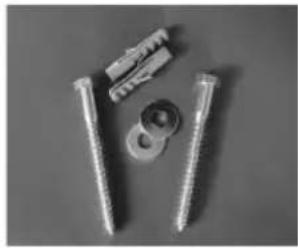
Bolt-down kit contents (in select models only):
- 2 lag screws
• 2 gasket washers
- 2 masonry anchors
natural_image
Close-up of four metal fasteners and bolts on a plain surface (no text or symbols visible)Tools needed to bolt safe to the floor:
-
Drill
• Wrench -
7/16 ” (11 mm) drill bit – for drilling into the safe
- 9/32'' (7 mm) drill bit – for drilling into a wood floor
- 1/2'' (13 mm) drill bit – for drilling into a masonry floor
Warning: • DO NOT drill from any location inside the safe.
• DO NOT bolt through the walls.
1 Tip the safe onto its right side (door hinges horizontal with the floor).
2
natural_image
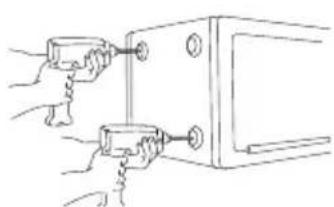
Line drawing of two hands inserting a small mechanical component into a larger housing (no text or symbols)Unlock the safe and open the door. Look to the bottom of the safe for two indentations on the feet in opposite corners. Using the 716 " (11 mm) bit; drill a hole through each indentation perpendicular to the bottom of the safe. DO NOT drill from any location inside the safe.
3 Tip the safe upright, place the safe in the desired location and open the door.
4
natural_image
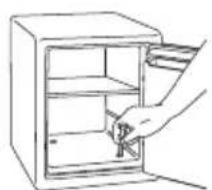
Line drawing of a hand opening a refrigerator with shelves open (no text or symbols)Use a screw or pencil to mark the floor through both holes.
Bolt-down instructions... continued
5 Move the safe aside to clear both marked spots for drilling.
6
natural_image
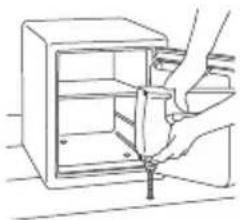
Line drawing of a hand using a tool to adjust or install an open cabinet (no text or symbols present)Drill into the floor:
A For wood: Using the 932 drill bit, drill a hole 212 (64 mm) deep in each marked spot.
B For masonry: Using the 12 " drill bit, drill a hole 212 " (60 mm) deep in each marked spot. Install a masonry anchor in each hole.
7
Replace the safe in the desired position, with the holes in safe aligned with those in the floor.
8
natural_image
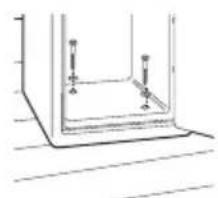
Simple line drawing of a rectangular frame with four vertical posts and a base, no text or symbols present.Securing the safe:
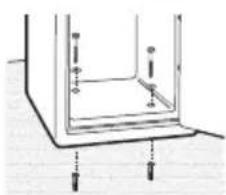
A For wood: Pass each lag screw through a washer, then through the safe and into a hole. Tighten with the wrench.
natural_image
Pure technical diagram of a structural component with no text, numbers, or symbolsB For masonry: Pass each lag screw through a washer, then through the safe and into a masonry anchor. Tighten with the wrench. Place masonry anchors into the holes in the floor.
NOTE: • The safe should not be bolted to a wall, this will compromise the fire rating. Drill holes through the feet only. DO NOT drill through the back or sides.
- Bolting/unbolting the unit is at the consumer's expense and discretion.
-
SentrySafe / Master Lock is not responsible for any costs incurred if the unit is to be replaced.
-
When bolting down, ensure the gasket washer is facing down.
• If rubber pads are in place, remove them before drilling.
Not all products come with a bolt-down kit.
Please go to www.masterlock.com to learn more about the recommended hardware for your safe.
| The Problem: Why it is Happening: The Solution: | ||
| The door will not lock. 1. | Shipping screw is in place.2. Confirm that there is no obstruction in the door.3. Bolted down incorrectly. | 1. Remove the screw on the back inside of the door.2. Remove all items and accessories from inside the safe. If this resolves the issue, re-set the accessories and organize items to properly fit.3. See pages 11 for proper bolt-down instructions. |
| The handle is not in the horizontal position when the safe is locked. | The clutch mechanism has been engaged. | Rotate the handle up or down until it clicks into the horizontal position. |
| Cannot open door after inputting the combination or electronic code. | 1. Safe doors equipped with a water-resistant gasket may initially be tight.2. Key lock is in the locked position. (select models only) | 1. Hold the handle up while inputting the code or dialing the combination and then pull down on the handle..2. If your safe is equipped with a key lock ensure that the key is in the unlocked position. (select models only) |
| The dial does not turn. | 1. Shipping screw is still in place.2. Locking bolts are not fully extended. | 1. Remove the screw from the back of the door.2. Ensure the handle is in the horizontal position. |
| Red indicator light blinks three times and there are three beeps. | An incorrect code has been entered. | Verify code and re-enter. If the programmable code you are using doesn't work then use the factory code. If successful re-program your programmable code. |
| Red indicator light blinks five times and there are five beeps. | Keypad communication error. Please call our Customer Service center. | |
| Red indicator light blinks once and there is one beep. | Program button is pressed out of sequence.-or-5 seconds has lapsed between button entries. | Start over. |
| Red indicator light is blinking. | An incorrect code has been entered three times and system has entered delay mode. | Wait two minutes and start over. |
| Yellow indicator light is on. | Battery power is low. -or- Battery may be the wrong type. | Replace with new alkaline batteries. |
Limited Lifetime Warranty
If this product or any part of the product fails due to a defect in materials or workmanship at any time during the life of the product, Master Lock will, at its own discretion, repair or replace the product or part free of charge. Simply contact Master Lock for instructions on obtaining repair or replacement. Return of the defective product or part at the customer's expense, along with proof of purchase, may be required. This warranty applies only to defects in materials and workmanship, and does not cover products which have been abused, altered, damaged, misused, cut, or excessively worn. THIS WARRANTY IS LIMITED TO REPAIR OR REPLACEMENT ONLY. This warranty does not cover labor for removing, reinstalling, or refinishing the product or part, or other materials removed, reinstalled, or refinished in order to repair or replace the Product or part. This warranty does not cover reimbursement for locksmith or any other paid service to open your product. TO THE EXTENT PERMITTED BY LAW, MASTER LOCK DISCLAIMS ALL OTHER IMPLIED OR EXPRESS WARRANTIES INCLUDING ALL WARRANTIES OF MERCHANTABILITY AND/OR FITNESS FOR A PARTICULAR PURPOSE. TO THE EXTENT THAT ANY IMPLIED WARRANTIES MAY NONETHELESS EXIST BY OPERATION OF LAW, SUCH WARRANTIES ARE LIMITED TO THE DURATION PROVIDED BY LAW.
To be eligible for this warranty the original owner of the product must register their safe within the first 30 days of purchase, online at www.registermysafe.com. Do not ship your product back to Master Lock. If you do not register your product within the first 30 days after the purchase window, your product will fall under the limited 1-year warranty.
LIMITATION OF LIABILITY: This Warranty is your sole and exclusive remedy against Master Lock and Master Lock shall not be liable for any damages, whether direct, indirect, incidental, special, consequential, exemplary, or otherwise, including property damage, lost revenues, and lost profits, arising out of any theory of recovery, including statutory, contract or tort. Notwithstanding the term of any limited or implied warranty, or in the event that this warranty fails of its essential purpose, in no event will Master Lock's entire liability exceed the purchase price of this product. Some states and provinces do not allow the exclusion or limitation of incidental or consequential damages so the above limitations or exclusions may not apply to you. Some states and provinces do not allow limitation on how long a limited warranty lasts, so the above limitation may not apply to you. This limited warranty gives you specific legal rights, and you may also have other rights which vary from state to state and province to province.
Products purchased in the EU are governed by consumer laws which provide statutory guaranty rights in addition to the warranty stated on any packaging or website associated with this product.
Any warranty stated on any packaging or website associated with this product is not valid in Australia. Product sold in Australia is governed by the consumer warranty contained in the Australian Consumer Law.
Fire/Water Specifications
Fire Endurance:
Advanced fire protection (UL Classified protection) subjected to temperatures up to 1850°F (1010°C), for a duration of 2 hours to protect documents, records and valuables against catastrophic loss due to fire.
Fire Impact:
(ETL Verified) After being heated to 1850°F (1010°C) the safe is dropped 30 ft. (9.1 m) into rubble, then cooled, inverted and reheated to 1850°F (1010°C) for 45 minutes..
Data Protection:
(ETL Verified) 2 hour fire protection of CDs, DVDs, memory sticks and USB drives up to 1850°F (1010°C).
Water Protection:
(ETL Verified) 24 hour water protection for valuables in up to 8 inches of water.
Customer Service
Master Lock and SentrySafe Customer Service
www.sentrysafe.com
Customer Service: 1-800-828-1438
How to order replacement key/combo
To order replacement keys and/or combinations, we must have the correct model and serial number of your safe. Find your safe's Serial Number on the small label located on the outside of your safe and on the original owner's manual. Once you locate this information, please visit www.sentrysafe.com or call customer service at 1-800-828-1438.
How to order accessories
To optimize your safe's organization consider purchasing Master Lock accessories for your safe. Available accessories include a locking drawer, tray, shelf, and file rack. For more items please go to www.sentrysafe.com or call our customer service number 1-800-828-1438.
Master Lock.
natural_image
Black hard bank safe with 'Master Lock' branding and a rotary dial (no additional text or symbols visible)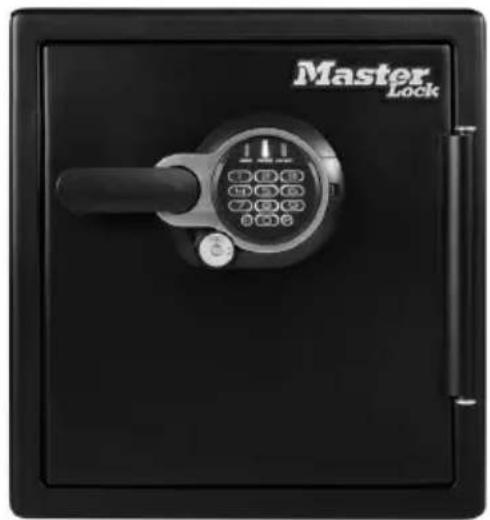
natural_image
Black self-lock device with a rotary keypad and handle, labeled 'Master Lock' (no additional text or symbols visible)
AVERTISSEMENT
www.registermysafe.com
natural_image
Close-up of a mechanical dial with a rotary knob and handle (no visible text or symbols)REMARQUE: • Store combination (and keys if equipped) in a secure location (other than in the safe).
- Combination can not be changed.
natural_image
Close-up of a mechanical switch with a circular dial and key (no visible text or symbols)POUR LES SERRURES DOUBLES À COMBINAISON OU À CLÉ
natural_image
Close-up of a mechanical dial caliper with a rotary knob and arrow indicator (no text or symbols)natural_image
Close-up of a mechanical dial with a rotary knob and pointer (no visible text or symbols)natural_image
Close-up of a rotary dial with an arrow indicating clockwise motion (no text or symbols visible)natural_image
Close-up of a mechanical component with a handle and circular housing, showing a downward arrow (no text or symbols visible)natural_image
Close-up of a mechanical knob or dial with a handle and arrow indicator (no text or symbols)natural_image
Close-up of a mechanical dial with an arrow indicating rotation (no text or symbols visible)natural_image
Close-up of a mechanical switch with a dial and key (no visible text or symbols)natural_image
Close-up of a digital payment terminal with a keypad and control knob (no visible text or symbols)REMARQUE:
natural_image
Close-up of a black and white digital lock with a keypad and key (no visible text or symbols)POUR LES SERRURES DOUBLES À CLÉ OU ÉLECTRONIQUE,
natural_image
Close-up of a handheld device with a black handle and control panel, showing a white arrow pointing to the left (no text or symbols visible)natural_image
Close-up of a digital pressure sensor or control panel with a numeric keypad and indicator lights (no readable text or symbols)Trois options de code:
natural_image
Close-up of a vertical metallic panel with three glowing spots, no visible text or symbolsnatural_image
Close-up of four metal screws with different screw fasteners, arranged in a 2x2 grid (no text or symbols visible)natural_image
Line drawing of a hand opening a refrigerator with shelves and a handle (no text or symbols)natural_image
Line drawing of a hand using a screwdriver to adjust or install an open shelf inside a cabinet (no text or symbols)natural_image
Simple line drawing of a rectangular container with two vertical posts and a base, no text or symbols present.To order replacement keys and/or combinations, we must have the correct model and serial number of your safe. Find your safe's Serial Number on the small label located on the outside of your safe and on the original owner's manual. Once you locate this information, please visit www.sentrysafe.com or call customer service at 1-800-828-1438.
Commander des accessoires
To optimize your safe's organization consider purchasing Master Lock accessories for your safe. Available accessories include a locking drawer, tray, shelf, and file rack. For more items please go to www.sentrysafe.com or call our customer service number 1-800-828-1438.
Master Lock.
natural_image
Black hard bank safe with 'Master Lock' branding and a rotary dial (no additional text or symbols visible)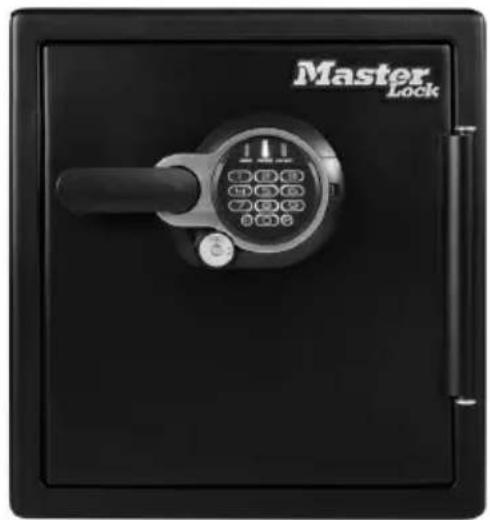
natural_image
Black self-lock device with a rotary keypad and handle, labeled 'Master Lock' (no additional text or symbols visible)
ADVERTENCIA
www.registermysafe.com
natural_image
Close-up of a circular mechanical dial with central hub and side knob (no visible text or symbols)natural_image
Close-up of a mechanical switch with a circular dial and key inserted (no visible text or symbols)natural_image
Close-up of a mechanical dial with a circular dial and directional arrow (no text or symbols visible)natural_image
Close-up of a mechanical dial with a rotary knob and adjustment knob (no text or symbols visible)natural_image
Close-up of a mechanical dial with a rotary knob and pointer (no visible text or symbols)natural_image
Close-up of a mechanical dial with a hand pointing to the dial (no visible text or symbols)natural_image
Close-up of a mechanical knob or dial with a black handle and circular head, showing a white arrow pointing upward (no text or symbols visible)natural_image
Close-up of a mechanical dial with a knob and pointer (no visible text or symbols)natural_image
Close-up of a mechanical dial with a knob and handle (no visible text or symbols)natural_image
Close-up of a digital lock device with control buttons and indicator lights (no readable text or symbols)natural_image
Close-up of a black key inserted into a digital lock (no visible text or symbols)PARA CERRADURAS DOBLES ELECTRÓNICAS/CON LLAVE
natural_image
Close-up of a handheld device with a black handle and control panel, showing a green indicator light and an upward arrow (no text or symbols visible)natural_image
Close-up of a black circular electronic device with a keypad and control buttons (no visible text or symbols)natural_image
Interior view of a room with curtains and a window (no visible text or symbols)natural_image
Close-up of four metal fasteners and a screw with a central washer (no text or symbols visible)natural_image
Pure mechanical assembly diagram showing two components with bolts and connecting rods (no text or symbols)natural_image
Line drawing of a hand opening a refrigerator with a handle (no text or symbols)natural_image
Line drawing of a hand using a tool to adjust or install an open refrigerator (no text or symbols present)natural_image
Simple line drawing of a rectangular frame with internal supports and a small rod, no text or symbols present.- IMPORTANT
- Master Lock Company LLC
- Master Lock.
- Hour Fire-Safe® Owner's Manual
- WARNING
- Gun warning
- NOTICE
- Do NOT store delicate items directly in your safe.
- Do NOT store pearls in this safe.
- Do NOT store computer disks, audio-visual cassettes or photo negatives.
- Your safe is only part of your total security protection.
- Table of Contents
- English
- Registration:
- www.registermysafe.com
- Reasons to register
- Preparing your safe for first time use
- N LOCKS ONLY
- Unlocking your safe
- Locking your safe
- Programming information
- Programming the user code
- To ADD a user code:
- To DELETE a user code:
- Programming the secondary code
- To ADD a secondary code:
- To DELETE a secondary code:
- How to operate the light
- To turn the light off:
- To turn the light on for 30 seconds:
- To turn the light on for 60 seconds:
- Operating sound features
- For Programmable Electronic Lock Only
- Turn sound on:
- Turn sound off:
- Bolt-down instructions
- Bolt-down kit contents (in select models only):
- Tools needed to bolt safe to the floor:
- Bolt-down instructions... continued
- Not all products come with a bolt-down kit.
- Limited Lifetime Warranty
- Fire/Water Specifications
- Fire Endurance:
- Fire Impact:
- Data Protection:
- Water Protection:
- Customer Service
- How to order replacement key/combo
- How to order accessories
- AVERTISSEMENT
- POUR LES SERRURES DOUBLES À COMBINAISON OU À CLÉ
- POUR LES SERRURES DOUBLES À CLÉ OU ÉLECTRONIQUE,
- Commander des accessoires
- ADVERTENCIA
- PARA CERRADURAS DOBLES ELECTRÓNICAS/CON LLAVE
Brand : SentrySafe
Model : STW123DUBML
Category : Safe