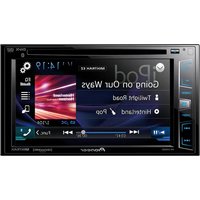
DEH-S010UB - Car stereo PIONEER - Free user manual and instructions
Find the device manual for free DEH-S010UB PIONEER in PDF.


User questions about DEH-S010UB PIONEER
0 question about this device. Answer the ones you know or ask your own.
Ask a new question about this device
Download the instructions for your Car stereo in PDF format for free! Find your manual DEH-S010UB - PIONEER and take your electronic device back in hand. On this page are published all the documents necessary for the use of your device. DEH-S010UB by PIONEER.
USER MANUAL DEH-S010UB PIONEER
REPRODUCTOR DE CD CON RECEPTOR RDS
CD RDS-EMPFÄNGER
CD RDS-ONTVANGER
CD RDS PPNEMHNIK
DEH-S100UB
DEH-S100UBG
DEH-S100UBA
DEH-S100UBB
DEH-S101UB
DEH-S101UBG
DEH-S010UB
Pioneer
Owner's Manual
Mode d'emploi
ILLUMINATION settings. 11
Connections/Installation 11
Additional Information. 13
About this manual:
- In the following instructions, a USB memory or USB audio player are referred to as "USB device".
Declaration of Conformity with regard to the Radio Equipment Directive 2014/53/EU
Manufacturer:
Pioneer Corporation
28-8, Honkomagome 2-chome, Bunkyo-ku,
Tokyo 113-0021, Japan
EU Representative's & Importer:
Pioneer Europe NV
Haven 1087, Keetbergiaan 1, 9120 Melsele,Belgium
http://www.pioneer-car.eu
[+] DEH100UB, DEH100UBG, DEH100UBA, DEH100UBB, DEH101UB, DEH101UBG, DEH$010UBB English: Italiano;
Hereby, Pioneer declares that the radio equipment type
[+] is in compliance with Directive 2014/53/EU.
The full text of the EU declaration of conformity is available at www.eu.europa.eu/efr/efr2014
available at the following Internet address: http:// www.ics.org
www.pioneer-car.eu/compliance/
SUOMI:
Pioneer vakutta,ett radioiatayppi on direktivin
www.pioneer-car.eu/compliance
Svenska:
www.pioneer-car.eu/compliance
Dansk:
Hermed erkrlaer Pioneer, at radloudstystypen [e] eri
http://www.ploneos.com/ocompliance
www.deutsch
www.pioneer-car.eu/compliance
EAAy
Me my napoua o/ n Pioneer, 1nvei ot
paotocnaioc [π]npoi ty oynla 2014/53/EE.
To npec kejeve ton oonone ouuopwnce E
bichrofof tory dksokmio todo 0d odo kto: http://www.ploneer-car.eu/compliance
www.pioneer-car.eu/compliance
Espanol
www.pioneer-car.eu/compliance
Portugues
Thank you for purchasing this PIONEER product.
To ensure proper use, please read through this manual before using this product. It is especially important that you read and observe WARNINGs and CAUTIONs in this manual. Please keep the manual in a safe and accessible place for future reference.
If you want to dispose this product, do not mix it with general household waste. There is a separate collection system for used electronic products in accordance with legislation that requires proper treatment, recovery and recycling.
Private households in the member states of the EU, in Switzerland and Norway may return their used electronic products free of charge to designated collection facilities or to a retailer (if you purchase a similar new one).
For countries not mentioned above, please contact your local authorities for the correct method of disposal.
By doing so you will ensure that your disposed product undergoes the necessary treatment, recovery and recycling and thus prevent potential negative effects on the environment and human health.

WARNING
-
Do not attempt to install or service this product by yourself. Installation or servicing of this product by persons without training and experience in electronic equipment and automotive accessories may be dangerous and could expose you to the risk of electric shock, injury or other hazards.
-
Do not attempt to operate the unit while driving. Make sure to pull off the road and park your vehicle in a safe location before attempting to use the controls on the device.

CAUTION
- Do not allow this unit to come into contact with moisture and/or liquids. Electrical shock could result.
- Also, damage to this unit, smoke, and overheating could result from contact with liquids.
- Always keep the volume low enough to hear outside sounds.
- The Pioneer CarStereo-Pass is for use only in Germany.
- This product is evaluated in moderate and tropical climate condition under the Audio, video and similar electronic apparatus - Safety requirements, IEC 60065.
CAUTION
This product is a class 1 laser product classified under the Safety of laser products, IEC 60825-1:2007
CLASS 1 LASER PRODUCT
If you experience problems
Should this unit fail to work properly, please contact your dealer or nearest authorized PIONEER Service Station.
Getting Started
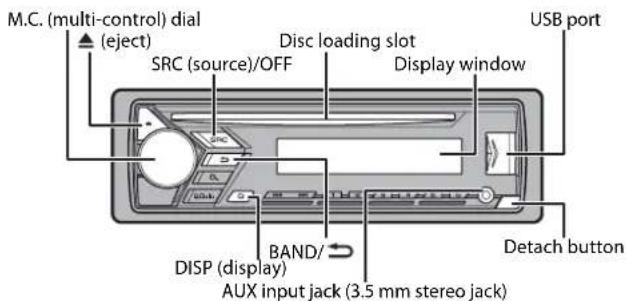
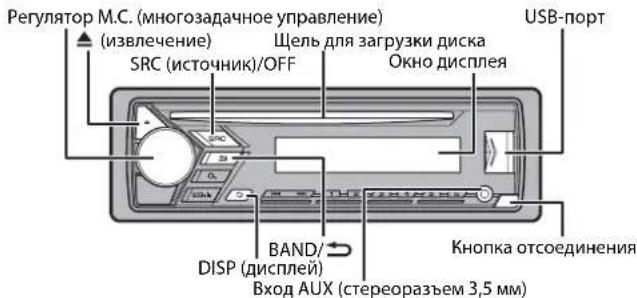
Basic operation
DEH-S100UB/S100UBG/S100UBA/S100UBB/S101UB/S101UBG/ S010UB
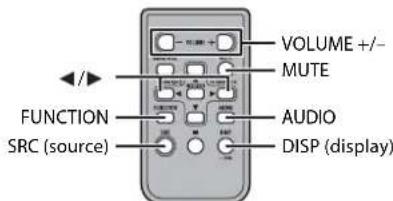
Remote Control
NOTE
Remote control is supplied only for DEH-S101UB/S101UBG.
Frequently used operations
The available buttons vary depending on the unit.
| Purpose | Operation | |
| Head Unit Remote Control | ||
| Turn on the power* | Press SRC/OFF to turn on the power.Press and hold SRC/OFF to turn off the power. | Press SRC to turn on the power.Press and hold SRC to turn off the power. |
| Adjust the volume Tum the M. | C. dial. | Press VOLUME + or -Press MUTE to mute the unit. Press MUTE again or press VOLUME + or - to unmute. |
| Select a source | Press SRC/OFF repeatedly. | Press SRC repeatedly. |
| Change the display information | Press DISP repeatedly. | Press DISP repeatedly. |
| Return to the previous display/list | Press BAND/ | Press to select the next/previous folder. |
| Return to the normal display from the menu | Press and hold BAND/ | - |
- When this unit's blue/white lead is connected to the vehicle's auto-antenna relay control terminal, the vehicle's antenna extends when this unit's source is turned on. To retract the antenna, turn the source off.
Display indication
| Indication Description | |
| » | Appears when a lower tier of the menu or folder exists. |
| P | Appears when the button is pressed. |
| LOC | Appears when the local seek tuning function is set (page 9). |
| TP | Appears when a traffic program is received. |
| TA | Appears when the TA (traffic announcements) function is set (page 9). |
| SRTN | Appears when the sound retriever function is set (page 9). |
| XX | Appears when random play is set. |
| ← | Appears when repeat play is set. |
Detaching the front panel
Detach the front panel to prevent theft. Remove any cables and devices attached to the front panel and turn off the unit before detaching it.
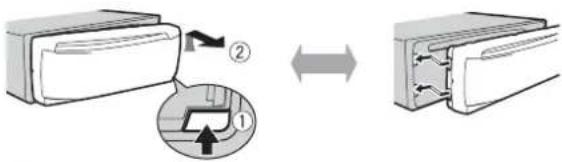
Detach Attach
Important
- Avoid subjecting the front panel to excessive shock.
- Keep the front panel out of direct sunlight and high temperatures.
Always store the detached front panel in a protective case or bag.
Preparing the remote control
Remove the insulation sheet before use.
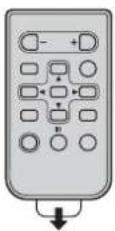
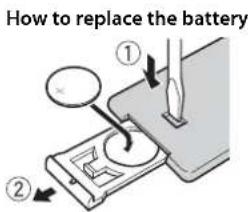
Insert the CR2025 (3 V) battery with the plus (+) and minus (-) poles orientated properly.
WARNING
- Do not ingest the battery, Chemical Burn Hazard.
(The remote control supplied with) This product contains a coin/ button cell battery. If the coin/ button cell battery is swallowed, it can cause severe internal burns in just 2 hours and can lead to death.
Keep new and used batteries away from children.
If the battery compartment does not close securely, stop using the product and keep it away from children.
If you think batteries might have been swallowed or placed inside any part of the body, seek immediate medical attention.
- Do not expose the battery or remote control to excessive heat such as direct sunlight or fire.
CAUTION
- There is a potential danger of explosion if the battery is incorrectly replaced. When replacing the battery, replace it with the same type.
- Do not handle or store the battery with metallic tools or objects.
- If the battery leaks, remove the battery and wipe the remote control completely clean. Then install a new battery.
- When disposing of used batteries, please comply with governmental regulations or environmental public institutions' rules that apply in your country/area.
Important
- Do not store the remote control in high temperatures or direct sunlight.
- Do not let the remote control fall onto the floor, where it may become jammed under the brake or accelerator pedal.
Setup menu
When you turn the ignition switch to ON after installation, [SET UP :YES] appears in the display.
1 Press the M.C. dial.
The setup menu disappears after 30 seconds of no operation. If you prefer not to set at this time, turn the M.C. dial to select [NO], then press to confirm.
2 Turn the M.C. dial to select the options, then press to confirm.
To proceed to the next menu option, you need to confirm your selection.
Menu Item Description
LANGUAGE Select the language to display the text information from a ENG. compressed audio file.
[ENG] [Engsli]
PyC,
CLOCK SET Set the clock
FM STEP Select the FM tuning step from 100 kHz or 50 kHz.
[100], [50]
3[QUIT:YES] appears when all the settings have been made.
To return to the first item of the setup menu, turn the M.C. dial to select [QUIT:NO], then press to confirm.
4 Press the M.C. dial to confirm the settings.
NOTES
- You can cancel the menu setting by pressing SRC/OFF.
- These settings can be made at any time from the SYSTEM settings (page 10) and INITIAL settings (page 6).
Canceling the demonstration display (DEMO OFF)
1 Press the M.C. dial to display the main menu.
2 Turn the M.C. dial to select [SYSTEM], then press to confirm.
3 Turn the M.C. dial to select [DEMO OFF], then press to confirm.
4 Turn the M.C. dial to select [YES], then press to confirm.
INITIAL settings
1 Press and hold SRC/OFF until the unit turns off.
2 Press and hold SRC/OFF to display the main menu.
3 Turn the M.C. dial to select [INITIAL], then press to confirm.
4 Turn the M.C. dial to select an option, then press to confirm.
NOTE
The options vary depending on the unit.
| Menu Item Description |
| FM STEP Select the FM tuning step from 100 kHz or 50 kHz. [100], [50] |
| SP-P/O MODE Select with [REAR/SUB.W] en there is a full-range speaker connected to the rear speaker output leads and there is a subwoofer connected to the RCA output. |
| [SUB.W/SUB.W] Select when there is a passive subwoofer connected directly to the rear speaker output leads and there is a subwoofer connected to the RCA output. |
| [REAR/REAR] Select when there are full-range speakers connected to the rear speaker output leads and RCA output. If there is a full-range speaker connected to the rear speaker output leads, and the RCA output is not used, you may select either [REAR/SUB.W] or [REAR/REAR]. |
| Menu Item Description | |
| S/W UPDATE Select to [SYSTEM INFO] | Confirm the latest system information on the unit. |
| [SYSTEM UPDATE] | Select to update the unit to the latest software and initialize the unit settings. For details on the latest software and updating, visit our website. |
| SYSTEM RESET [YES], [NO] | Select [YES] to initialize the unit settings. The unit will be restarted automatically.(Some of the settings may be retained even after resetting the unit.) |
Radio
The tune frequencies on this unit are allocated for use in Western Europe, Asia, the Middle East, Africa and Oceania. Use in other areas may result in poor reception. The RDS (radio data system) function only works in areas that broadcast RDS signals for FM stations.
Receiving preset stations
1 Press SRC/OFF to select [RADIO].
2 Press BAND/ to select the band from [FM1], [FM2], [FM3], [MW] or [LW].
3 Press a number button (1/ 一 to 6/ -).
TIP
The / buttons can be also used to select a preset station when [SEEK] is set to [PCH] in the FUNCTION settings (page 9).
Best stations memory (BSM)
The six strongest stations are stored on the number buttons (1/ A to 6/ -).
1 After selecting the band, press the M.C. dial to display the main menu.
2 Turn the M.C. dial to select [FUNCTION], then press to confirm.
3 Turn the M.C. dial to select [BSM], then press to confirm.
To seek a station manually
1 After selecting the band, press to select a station. Press and hold then release to seek an available station. Scanning stops when the unit receives a station. To cancel seek tuning, press
NOTE [SEEK] needs to be set to [MAN] in the FUNCTION settings (page 9).
To store stations manually
1 While receiving the station you want to store, press and hold one of the number buttons (1/ to 6 / 一 ) until it stops flashing.
Using PTY functions
The unit searches for a station by PTY (program type) information.
1 Press dRing FM reception.
2 Tum the M.C. dial to select a program type from [NEWS/INFO], [POPULAR], [CLASSICS] or [OTHERS].
3 Press the M.C. dial.
The unit begins to search for a station. When it is found, its program service name is displayed.
NOTES
To cancel the search, press the M.C. dial.
The program of some stations may differ from that indicated by the transmitted PTY.
- If no station is broadcasting the type of program you searched for, [NOT FOUND] is displayed for about two seconds and then the tuner returns to the original station.
CD/USB/AUX
Playing back
Disconnect headphones from the device before connecting it to the unit.
CD
1 Insert a disc into the disc loading slot with the label side up.
To eject a disc, stop playback first then press
USB devices (including Android™)
1 Open the USB port cover.
2 Plug in the USB device using an appropriate cable.
NOTE
To automatically switch to [USB] source when a USB device is connected to the unit, set [USB AUTO] to [ON] in the SYSTEM settings (page 11).
CAUTION
Use an optional Pioneer USB cable (CD-U50E) to connect the USB device as any device connected directly to the unit will protrude out from the unit, which could be dangerous.
Before removing the device, stop playback.
AOA connections
For details on AOA connection, see page 8.
MTP connection
A device installed with Android OS 4.0 or later can be connected to the unit via MTP, using the cable supplied with the device. However, depending on the connected device and the numbers of the files in the device, audio files/songs may not be able to be played back via MTP. Note that MTP connection is not compatible with WAV and FLAC file formats.
NOTE
If you use an MTP connection, [ANDROID WIRED] needs to be set to [MEMORY] in the SYSTEM settings (page 10).
AUX
1 Insert the stereo mini plug into the AUX input jack.
2 Press SRC/OFF to select [AUX] as the source.
NOTE
If [AUX] is set to [OFF] in the SYSTEM settings, [AUX] cannot be selected as a source (page 10).
Operations
You can make various adjustments in the FUNCTION settings (page 9).
Note that the following operations do not work for an AUX device. To operate an AUX device, use the device itself.
| Purpose Operation | |
| Select a folder*1 | Press 1/▲ or 2/▼. |
| Select a track/song (chapter) | Press ▲or ▲. |
| Purpose | Operation |
| Fast forward or reverse*2 | Press and hold |or|. |
| Search for a file from a list 1P | ress to display the list. 2Tu in the M.C. dial to select the desired file (folder) name or category, then press to confirm. 3Tu in the M.C. dial to select the desired file, then press to confirm. Playback starts. |
| View a list of the files in the selected folder/ category*1 | Press the M.C. dial when a folder/category is selected. |
| Play a song in the selected folder/ category*1 | Press and hold the M.C. dial when a folder/ category is selected. |
| Repeat play Press 6/. | |
| Random play Press 5/. | |
| Pause/resume playback | Press 4/PAUSE. |
| Sound retriever*1 | Press 3/S.Rtrv. [1]: Effective for low compression rates [2]: Effective for high compression rates |
| Return to root folder (CD/USB only)*1 | Press and hold . . . |
| Switch between compressed audio and CD-DA (CD only) | Press BAND/ |
| Change drives in USB device (Devices that support the USB mass storage device class protocol only) | Press BAND/ |
1 Compressed audio files only
2 When you use the fast forward or reverse function while playing a VBR file, the playback time may be not correct.
Using Pioneer ARC APP
You can operate the unit from Pioneer ARC APP installed on an Android device. In some cases, you can control aspects of the application, such as source selection, pause, etc., by using the unit.
For details on what operations are available on the application, see the application's help section.
WARNING
Do not attempt to operate the application while driving. Make sure to pull off the road and park your vehicle in a safe location before attempting to use the controls on the application.
For Android device users
This function is compatible with devices that have Android OS 4.1 or later installed and also support AOA (Android Open Accessory) 2.0.
You can download Pioneer ARC APP on Google Play™.
NOTE
Some Android devices connected via AOA 2.0 may not work properly or emit sounds due to their own software design, regardless of the OS version.
Making a connection with Pioneer ARC APP
1 Connect this unit with the mobile device.
Android device via USB (page 7)
2 Press the M.C. dial to display the main menu.
3 Turn the M.C.dial to select [SYSTEM], then press to confirm.
4 Turn the M.C. dial to select [ANDROID WIRED], then press to confirm.
5 Turn the M.C. dial to select [APP CONTROL] for an Android device connected via USB.
If [ON] is selected in [P,APP AUTO ON] (page 10), Pioneer ARC APP on the Android device starts automatically, and all the steps are finished.
NOTE
If Pioneer AR APP has not been installed on your Android device yet, a message that prompts you to install the application will appear on your Android device. Select [OFF] in [PAPP AUTO ON] to clear the message (page 10).
6 Press SRC/OFF to select any source.
7 Launch Pioneer ARC APP on the mobile device.
Listening to music on Android
1 Press SRC/OFF to select [ANDROID].
Basic operations
| Purpose Operation | |
| Select a track Press or . | |▶ ▷| |
| Fast forward or reverse | Press and hold |▶ or ➔. |
| Pause/resume playback | Press 4/PAUSE. |
| Sound retriever | Press 3/.S.Rtrv. [1]: Effective for low compression rates [2]: Effective for high compression rates |
Settings
You can adjust various settings in the main menu.
1 Press the M.C. dial to display the main menu.
2 Turn the M.C. dial to select one of the categories below, then press to confirm.
FUNCTION settings (page 9)
- AUDIO settings (page 9)
SYSTEM settings (page 10)
ILLUMINATION settings (page 11)
3 Turn the M.C. dial to select the options, then press to confirm.
FUNCTION settings
The menu items vary according to the source.
Menu Item Description
FM SETTING RADIO
[TALK], [STANDARD], [MUSIC] Match the sound quality level with the broadcast
signal conditions of the FM band signal
(Available only when FM band is selected.)
BSI
RADIO
Store the six strongest stations on the number
buttons (1 / to 6 / 2) )automatically.
| Menu Item Description | |
| REGIONAL RADIO [ON], [OFF] | Limit the reception to the specific regional programs when AF (alternative frequencies search) is selected. (Available only when FM band is selected.) |
| LOCAL RADIO FM: [OFF], [LV1], [LV2], [LV3], [LV4] MW/LW: [CFF], [LV1], [LV2] | Restrict the tuning station according to the signal strength. |
| TA RADIO [ON], [OFF] | Receive current traffic information if available. (Available only when FM band is selected.) |
| AF RADIO [ON], [OFF] | Allow the unit to retune to a different frequency providing the same station. (Available only when FM band is selected.) |
| NEWS RADIO [ON], [OFF] | Interrupt the currently selected source with news programs. (Available only when FM band is selected.) |
| SEEK RADIO [MAN], [PCH] | Assign or buttons to seek the stations one by one (manual tuning) or select a station from the preset channels. |
| S.RTRV CD USB ANDROID [1] (effective for low compression rates), [2] (effective for high compression rates), [OFF] | Enhance compressed audio and restore rich sound. Not available when: • CD-DA/CD-TEXT is played back. • The FLAC file is played back. |
AUDIO settings
Menu Item Description
FADER*1
Adjust the front and rear speaker balance.
Menu Item Description
| BALANCE | |
| Adjust the left and right speaker balance. | |
| EQ SETTING | |
| [SUPER BASS], [POWERFUL], [NATURAL], [VOCAL], [CUSTOM1], [CUSTOM2], [FLAT] | Select or customise the equalizer curve. [CUSTOM1] can be set separately for each source. However, each of the below combinations are set to the same setting automatically. |
| Select an equalizer band and level for further customising. Equalizer band: [80HZ], [250HZ], [800HZ], [2.5KHZ], [8KHZ] | [CUSTOM2] is a shared setting used for all sources. You can also switch the equalizer by pressing EQ,LI repeatedly. |
| Equalizer level: [+6] to [-6] | |
| LOUDNESS | |
| [OFF], [LOW], [MID], [HI] Compensate for clear sound at low volume. | |
| SUB.W*2 | |
| [NOR], [REV], [OFF] Select the subwoofer phase. | |
| SUB.W CTRL*2*3 | |
| Cut-off frequency: [50HZ], [63HZ], [80HZ], [100HZ], [125HZ], [160HZ], [200HZ]Output level: [-24] b [+6]Slope level: [-12], [-24] | Only frequencies lower than those in the selected range are output from the subwoofer. |
| BASS BOOST | |
| [0] to [+6] Select the bass boost level. | |
| HPF SETTING | |
| Cut-off frequency: [OFF], [50HZ], [63HZ], [80HZ], [100HZ], [125HZ], [160HZ], [200HZ]Slope level: [-12], [-24] | Only frequencies higher than the high-pass filter (HPF) cutoff are output from the speakers. |
| SLA | |
| [+4] to [-4] | Adjust the volume level for each source except FM. |
1 Not available when [SUB.W/SUB.W] is selected in [SP-P/O MODE] in the INITIAL settings (page 6).
*2 Not available when [REAR/REAR] is selected in [SP-P/O MODE] in the INITIAL settings (page 6).
3 Not available when [OFF] is selected in [SUB.W].
SYSTEM settings
You can also access to these menus when the unit is turned off.
| Menu Item Description | |
| LANGUAGE | |
| [ENG][English], [PVC](Russian), [TUR](Turkish) | Select the language to display the text information from a compressed audio file. |
| CLOCK SET | |
| Set the clock (page 5). | |
| 12H/24H | |
| [12H], [24H] Select the time notation. | |
| AUTO PI | |
| [ON], [OFF] Search for a different station with the same programming, even if using a preset station. | |
| AUX | |
| [ON], [OFF] Set to [ON] when using an auxiliary device connected to the unit. | |
| MUTE MODE (Not available for DEH-S100UBA) | |
| [MUTE], [20dB ATT], [10dB ATT] Mute or attenuate sound automatically when a signal from equipment with a mute function is received. | |
| PW SAVE* | |
| [ON], [OFF] Reduce the battery power consumption. Turning on the source is the only operation allowed when this function is on. | |
| ANDROID WIEDR | |
| [MEMORY], [APP CONTROL] Select the appropriate connection method for an Android device. | |
| P.APP AUTO ON | |
| [ON], [OFF] | Select [ON] to automatically launch Pioneer ARC APP when an Android device is connected to the unit via AOA. (Not available when [MEMORY] is selected in [ANDROID WIRED].) |
Menu Item Description
USB AUTO
[ON], [OFF] Select [ON] to automatically switch to [USB]
source when a USB device is connected to the
unit.
Select [OFF] when a USB device is being
connected to the unit just for charging.
- [PW SAVE] is canceled if the vehicle battery is disconnected and will need to be turned back on once the battery is reconnected. When [PW SAVE] is off, depending on connection methods, the unit may continue to draw power from the battery if your vehicle's ignition does not have an ACC (accessory) position.
ILLUMINATION settings
Menu Item Description
DIM SETTING
[SYNC CLOCK], [MANUAL] Change the display brightness.
BRIGHTNESS
[1] to [10] Change the display brightness.
The available setting ranges differ depending on [DIM SETTING].
Connections/Installation
Connections

Important
- When installing this unit in a vehicle without an ACC (accessory) position on the ignition switch, failure to connect the red cable to the terminal that detects operation of the ignition key may result in battery drain.

ACC position No ACC position
- Use of this unit in conditions other than the following could result in fire or malfunction.
-Vehicles with a 12-volt battery and negative grounding.
- When speaker output is used by 4 channels, use speakers over 50 W (maximum input power) and between 4 Ω to 8 Ω (impedance value). Do not use
1 Ω to 3 Ω speakers for this unit.
When rear speaker output is used by 2 Ω of subwoofer, use speakers over 70 W (maximum input power).
-
Please refer to connections for a connection method.
-
To prevent a short-circuit, overheating or malfunction, be sure to follow the directions below.
-Disconnect the negative terminal of the battery before installation.
- Secure the wiring with cable clamps or adhesive tape. Wrap adhesive tape around wiring that comes into contact with metal parts to protect the wiring.
- Place all cables away from moving parts, such as the shift lever and seat rails.
- Place all cables away from hot places, such as near the heater outlet.
- Do not connect the yellow cable to the battery by passing it through the hole to the engine compartment.
- Cover any disconnected cable connectors with insulating tape
- Do not shorten any cables.
- Never cut the insulation of the power cable of this unit in order to share the power with other devices. The current capacity of the cable is limited.
- Use a fuse of the rating prescribed.
- Never wire the negative speaker cable directly to ground.
- Never band together negative cables of multiple speakers.
- When this unit is on, control signals are sent through the blue/white cable.
Connect this cable to the system remote control of an external power amp or the vehicle's auto-antenna relay control terminal (max. 300mA12VDC .If the vehicle is equipped with a glass antenna, connect it to the antenna booster power supply terminal. - Never connect the blue/white cable to the power terminal of an external power amp. Also, never connect it to the power terminal of the auto antenna. Doing so may result in battery drain or a malfunction.
- The black cable is ground. Ground cables for this unit and other equipment (especially, high-current products such as power amps) must be wired separately. If they are not, an accidental detachment may result in a fire or malfunction.
- The graphical symbol shared on the product means direct current.
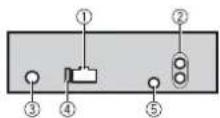
This unit
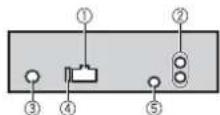
① Power cord input
Rear output or subwoofer output
Antenna input
④ Fuse(10A)
Wired remote input (Not available for DEH-S100UBA) Hard-wired remote control adapter can be connected (sold separately).
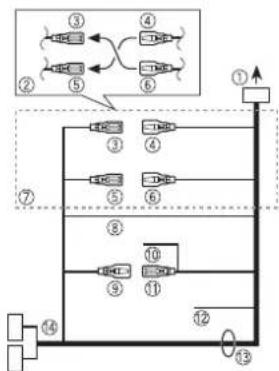
Power cord
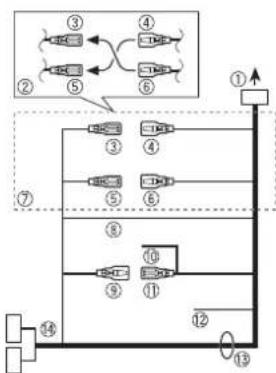
① To power cord input
② Depending on the kind of vehicle, the function of and may be different. In this case, be sure to connect to and
Yellow Back-up (or accessory)
④ Yellow
Connect to the constant 12 V supply terminal.
Red
Accessory (or back-up)
Red
Connect to terminal controlled by the ignition switch (12 V DC).
⑦ Connect leads of the same colour to each other.
Black (chassis ground)
Blue/white
The pin position of the ISO connector will differ depending on the type of vehicle. Connect and when Pin 5 is an antenna control type. In another type of vehicle, never connect and
Blue/white
Connect to the system control terminal of the power amp (max. 300 mA 12 V DC).
Blue/white
Connect to the auto-antenna relay control terminal (max. 300mA12VDC Yellow/black (Not available for DEHS100UBA) If you use equipment with a Mute function, wire this lead to the Audio Mute lead on that equipment. If not, keep the Audio Mute lead free of any connections.
Speaker leads
White:Front left White/black:Front left Gray:Front right Gray/black:Front right Green:Rear left or subwoofer Green/black:Rear left or subwoofer
Violet:Rear right subwoofer Violet/black:Rear right subwoofer
ISO connector
In some vehicles, the ISO connector may be divided into two. In this case, be sure to connect to both connectors.
NOTES
- Change the initial menu of this unit. Refer to [SP-P/O MODE] (page 6). The subwoofer output of this unit is mon aural.
- When using a subwoofer of 2 , be sure to connect the subwoofer to the violet and violet/black leads of this unit. Do not connect anything to the green and green/black leads.
Power amp (sold separately)
Perform these connections when using the optional amplifier.
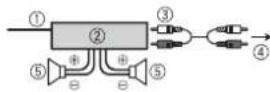
① System remote control
Connect to blue/white cable.
Power amp (sold separately)
③ Connect with RCA cables (sold separately)
4 To rear output or subwoofer output
Rear speaker or subwoofer
Installation
Important
- Check all connections and systems before final installation.
- Do not use unauthorized parts as this may cause malfunctions.
- Consult your dealer if installation requires drilling of holes or other modifications to the vehicle.
- Do not install this unit where:
--it may interfere with operation of the vehicle.
-it may cause injury to a passenger as a result of a sudden stop.
- T he semiconductor laser will be damaged if it overheats. Install this unit away from hot places such as near the heater outlet.
Optimum performance is obtained when the unit is installed at an angle of less than 60^ .
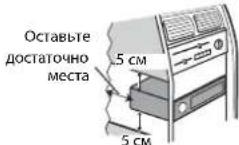
- When installing, to ensure proper heat dispersal when using this unit, make sure you leave ample space behind the rear panel and wrap any loose cables so they are not blocking the vents.

DIN mount installation
1 Insert the supplied mounting sleeve into the dashboard.
2 Secure the mounting sleeve by using a screwdriver to bend the metal tabs (90^) into place.
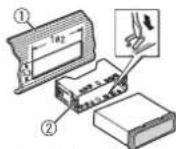
① Dashboard
⑦ Mounting sleeve
- Make sure that the unit is installed securely in place. An unstable installation may cause skipping or other malfunctions.
When not using the supplied mounting sleeve
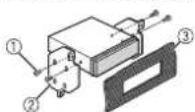
1 Determine the appropriate position where the holes on the bracket and the side of the unit match.
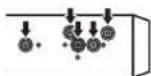
2 Tighten two screws on each side.

Tapping screw (5mm× 9mm not supplied with product
② Mounting bracket
3 Dashboard or console
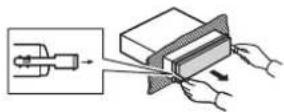
Removing the unit (installed with the supplied mounting sleeve)
1 Remove the trim ring.
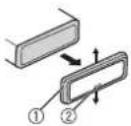
① Trim ring
Notched tab
- Rele asing the front panel allows easier access to the trim ring.
- When reattaching the trim ring, point the side with the notched tab down.
2 Insert the supplied extraction keys into both sides of the unit until they click into place.
3 Pull the unit out of the dashboard.
Additional Information
Troubleshooting
The display automatically returns to the normal display.
No operations have been made for about 30 seconds.
Perform an operation.
The repeat play range changes unexpectedly.
Depending on the repeat play range, the selected range may change when another folder or track is being selected or during fast forwarding/reversing. Select the repeat play range again.
A subfolder is not played back.
Subfolders cannot be played when [FLD] (folder repeat) is selected. Select another repeat play range.
The sound is intermittent.
You are using a device, such as a cellular phone, that may cause audible interference.
- Move electrical devices that may be causing the interference away from the unit.
Error messages
Common
AMP ERROR
This unit fails to operate or the speaker connection is incorrect.
T he protective circuit is activated. Check the speaker connection. -Turn the ignition switch OFF and back to ON again.If the message remains, contact your dealer or an authorized Pioneer Service Station for assistance.
NO XXXX (NO TITLE, for example)
There is no embedded text information. Switch the display or play another track/file.
CD player
ERROR-07,11,12,17,30
→The disc is dirty.
Clean the disc.
→The disc is scratched.
-Replace the disc.
ERROR-07,10,11,12,15,17,30,A0
There is an electrical or mechanical error.
- Turn the ignition switch OFF and back to ON, or switch to a different source, then back to the CD player.
ERROR-15
→ The inserted disc is blank.
- Replace the disc.
ERROR-23
Unsupported CD format. Replace the disc.
FORMATREAD
Sometimes there is a delay between the start of playback and when you start to hear any sound.
- Wait until the message disappears and you hear sound.
NO AUDIO
The inserted disc does not contain any.
playable files. Replace the disc.
SKIPPED
- The inserted disc contains DRM protected files.
- The protected files are skipped
PROTECT
All the files on the inserted disc are embedded with DRM.
- Replace the disc.
USB device
FORMATREAD
→ Sometimes there is a delay between the start of playback and when you start to hear any sound.
- Wait until the message disappears and you hear sound.
NO AUDIO
→There are no songs.
- Transfer the audio files to the USB device and connect.
→ The connected USB device has security enabled.
- Follow the USB device instructions to disable the security.
SKIPPED
The connected USB device contains DRM protected files.
- The protected files are skipped.
PROTECT
→ All the files on the connected USB
device are embedded with DRM.
-Replace the USB device.
N/A USB
The connected USB device is not supported by this unit.
- Disconnect your device and replace it.
with a compatible USB device.
HUB ERROR
The USB device connected via a USB hub is not supported by this unit.
- Connect the USB device directly to this unit using a USB cable.
CHECK USB
→ The USB connector or USB cable has short-circuited.
- Check that the USB connector or USB cable is not caught in something or damaged.
The connected USB device consumes more than maximum allowable current. - Disconnect the USB device and do not use it. Turn the ignition switch OFF and back to ACC or ON. Connect only compliant USB devices.
ERROR-19
Communication failed.
Perform one of the following operations, then return to the USB source.
-
Turn the ignition switch OFF and back to ON.
-
Disconnect the USB device.
-
Change to a different source.
ERROR-23
USB device was not formatted properly.
- Format the USB device with FAT12, FAT 16 or FAT32.
STOP
→ There are no songs in the current list.
- Select a list that contains songs.
Handling guidelines
Discs and player
- Use only discs that feature either of the following two logos.


-
Use 12-cm discs.
-
Use only conventional, fully circular discs.
-
The following types of discs cannot be used with this unit:
-DualDiscs
- 8-cm discs: Attempts to use such discs with an adaptor may cause the unit to malfunction.
-Oddly shaped discs
Discs other than CDs
-Damaged discs, including discs that are
cracked, chipped or warped
CD-R/RW discs that have not been finalized
-
D do not write on or apply chemicals to the surface of the discs.
-
To clean a CD, wipe the disc with a soft cloth outward from the center.
-
Condensation may temporarily impair the player's performance. Let it rest for about one hour to adjust to a warmer temperature. Also, wipe any damp discs off with a soft cloth.
-
When using discs that can be printed on label surfaces, check the instructions and the warnings of the discs. Depending on the discs, inserting and ejecting may not be possible. Using such discs may result in damage to this equipment.
-
Do not attach commercially available labels or other materials to the discs.
The discs may warp making the disc unplayable.
The labels may come off during playback and prevent ejection of the discs, which may result in damage to the equipment.
USB storage device
- Connections via USB hubs are not supported.
Firmly secure the USB storage device before driving. Do not let the USB storage device fall onto the floor, where it may become jammed under the brake or accelerator pedal.
Depending on the USB storage device, the following problems may occur.
-Operations may vary.
- The storage device may not be recognized.
-Files may not be played back properly.
The device may cause audible interference when you are listening to the radio.
Compressed audio compatibility
- Only the first 32 characters can be displayed as a file name (including the file extension) or a folder name.
- The unit may not work properly depending on the application used to encode WMA files.
- There may be a slight delay at the start of the playback of audio files embedded with image data, or audio files stored on a USB device with numerous folder hierarchies.
- Russia n text to be displayed on this unit should be encoded in one of the following character sets: Unicode (UTF-8, UTF-16)
- A character set other than Unicode that is used in a Windows environment and is set to Russian in the multi-language setting
CAUTION
- Pioneer cannot guarantee compatibility with all USB mass storage devices, and assumes no responsibility for any loss of data on media players, smartphones, or other devices while using this product.
- Do not leave discs or a USB storage device in any place that is subject to high temperatures.
WMA files
| File extension .wma | |
| Bit rate 48 kbps to 320 | kbps (CBR), 48 kbps to 384 kbps (VBR) |
| Sampling frequency 32 | kHz, 44.1 kHz, 48 kHz |
| Windows Media™ Audio Professional, Lossless, Voice/DRM Stream/Stream with video | Not compatible |
MP3 files
WAV files
| File extension.mp3 | |
| Bit rate 8 kbps to 320 kbps | (CBRI, VBR) |
| Sampling frequency 8 kHz to 48 kHz (32 kHz, 44.1 kHz, 48 kHz for emphasis) | |
| Compatible ID3 tag version | 1.0, 1.1, 2.2, 2.3, 2.4 (ID3 tag Version 2.x is given priority over Version 1.x.) |
| M3u playlist Not compatible | |
| MP3i (MP3 interactive), mp3 PRO | Not compatible |
WAV file formats cannot be connected via MTP.
FLAC files
| File extension .wav | |
| Quantization bits 8 and | 16 (LPCM), 4 (MSADPCM) |
| Sampling frequency 16 | kHz to 48 kHz (LPCM), 22.05 kHz and 44.1 kHz (MS ADPCM) |
- FLAC file formats cannot be connected via MTP.
- FLAC files may not be playable, depending on the encoder.
| File extension .flac | |
| Sampling frequency 8/ | 1.025/12/16/22.05/24/32/44.1/48 kHz |
| Quantization bit rate 16 | bit |
| Channel mode 1/2 ch |
Disc
- Regardless of the length of the blank section between the songs from the original recording, compressed audio discs play with a short pause between songs.
| Playable folder hierarchy | Up to eight tiers (A practical hierarchy is less than two tiers.) |
| Playable folders Up to 99 | |
| Playable files Up to 999 | |
| File system ISO 9660 Level 1 and 2, Romeo, Joliet | |
| Multi-session playback | Compatible |
| Packet write data transfer | Not compatible |
USB device
- There may be a slight delay when starting playback of audio files on a USB storage device with numerous folder hierarchies.
| Playable folder hierarchy | Up to eight tiers (A practical hierarchy is less than two tiers.) |
| Playable folders Up to 500 | |
| Playable files Up to 1500 | |
| Playback of copyright-protected files | Not compatible |
| Partitioned USB device | Only the first partition can be played. |
Sequence of audio files
The user cannot assign folder numbers and specify playback sequences with this unit. Sequence of audio file depends on the connected device.
Note that the hidden files in a USB device cannot be played back.
Example of a hierarchy

Russian character chart
| D: C | D: C | D: C |
| R:A | B:B | B:B |
| F:Γ | J:A | E:E,E |
| I:X | J:3 | H:N, N |
| K:K | I:N | H:M |
| H:H | Q:O | N:Π |
| P:P | L:C | T:T |
| Y:Y | Φ:Φ | X:X |
| U:U | Y:Y | U:U, U |
| J:b | H:bl | b:b |
| J:θ | H:10 | η:η |
D:Display C:Character
Copyright and trademark
WMA
Windows Media is either a registered trademark or trademark of Microsoft Corporation in the United States and/or other countries. This product includes technology owned by Microsoft Corporation and cannot be used or distributed without a license from Microsoft Licensing, Inc.
FLAC
Copyright © 2000-2009 Josh Coalson
Copyright © 2011-2013 Xiph.Org Foundation
Redistribution and use in source and binary forms, with or without modification, are permitted provided that the following conditions are met:
-Redistributions of source code must retain the above copyright notice, this list of conditions and the following disclaimer.
-Redistributions in binary form must reproduce the above copyright notice, this list of conditions and the following disclaimer in the documentation and/or other materials provided with the distribution.
-Neither the name of the Xiph.org foundation nor the names of its contributors may be used to endorse or promote products derived from this software without specific prior written permission.
THIS SOFTWARE IS PROVIDED BY THE
COPYRIGHT HOLDERS AND
CONTRIBUTORS "AS IS" AND ANY EXPRESS
OR IMPLIED WARRANTY, INCLUDING, BUT
NOT LIMITED TO, THE IMPLIED
WARRANTIES OF MERCHANTABILITY AND
FITNESS FOR A PARTICULAR PURPOSE ARE
DISCLAIMED. IN NO EVENT SHALL THE
FOUNDATION OR CONTRIBUTORS BE
LIABLE FOR ANY DIRECT, INDIRECT,
INCIDENTAL, SPECIAL, EXEMPLARY, OR CONSEQUENTIAL DAMAGES (INCLUDING, BUT NOT LIMITED TO, PROCEDURE OF SUBSTITUTE GOODS OR SERVICES; LOSS OF USE, DATA, OR PROFITS; OR BUSINESS INTERRUPTION) HOWEVER CAUSED AND ON ANY THEORY OF LIABILITY, WHETHER IN CONTRACT, STRICT LIABILITY, OR TORT (INCLUDING NEGLIGENCE OR OTHERWISE) ARISING IN ANY WAY OUT OF THE USE OF THIS SOFTWARE, EVEN IF ADJISSED OF THE POSSIBILITY OF SUCH DAMAGE.
Android & Google Play Android, Google Play, and the Google Play logo are trademarks of Google Inc.
Specifications
General
Power source: 14.4 V DC (10.8 V to 15.1 V allowable)
Grounding system: Negative type Maximum current consumption: 10.0A
Dimensions (W× H× D) DIN
Chassis: 178mm× 50mm× 165mm
Nose: 188mm× 58mm× 17mm
D
Chassis: 178mm× 50mm× 165mm
Nose: 170mm× 46mm× 17mm
Weight: 1 kg
Audio
Maximum power output:
-
50 W × 4 ch/4 Ω (for no subwoofer)
-
50 W × 2 ch/4 Ω + 70 W × 1 ch/2 Ω
(for subwoofer)
Continuous power output:
22W×4(50Hz to 15000 Hz,5%
THD, 4 Ω load, both channels driven)
Load impedance: 4 Ω (4 Ω to 8 Ω allowable)
Preout maximum output level: 2.0 V
Loudness contour: +10 dB (100 Hz), +6.5
dB (10 kHz) (volume: -30 dB)
Equalizer (5-Band Graphic Equalizer):
Frequency: 80 Hz/250 Hz/800 Hz/2.5 kHz/8 kHz
Equalization range: ±12 dB (2 dB step)
Subwoofer (mono):
Frequency: 50 Hz/63 Hz/80 Hz/100
Hz/125 Hz/160 Hz/200 Hz
Slope: -12 dB/oct, -24 dB/oct
Gain: +6 dB to -24 dB
Phase: Normal/Reverse
CD player
System: Compact disc audio system
Usable discs: Compact disc
Signal-to-noise ratio: 94 dB (1 kHz) (IEC-A)
network)
Number of channels: 2 (stereo)
MP3 decoding format: MPEG-1 & 2 Audio
Layer 3
WMA decoding format:Ver.7,8,9,9.1,9.2
(2 ch audio)
WAV signal format: Linear PCM & MS
ADPCM (Non-compressed)
USB
USB standard specification: USB 2.0 full
speed
Maximum current supply: 1 A
USB Protocol:
MSC (Mass Storage Class)
MTP (Media Transfer Protocol)
AOA (Android Open Accessory) 2.0
WAV signal format: Linear PCM & MS
ADPCM (Non-compressed)
FM tuner
Frequency range: 87.5 MHz to 108.0 MHz
Usable sensitivity: 11 dBf (1.0 μV/75 Ω,
mono,S/N:30 dB)
Signal-to-noise ratio: 72 dB (IEC-A network)
MWtuner
Frequency range: 531 kHz to 1602 kHz
Usable sensitivity: 25 V (S/N: 20 dB)
Signal-to-noise ratio: 62 dB (IEC-A network)
LWTuner
Frequency range: 153 kHz to 281 kHz
Usable sensitivity: 28 V( S/N : 20 dB)
Signal-to-noise ratio: 62 dB (IEC-A network)
NOTE
Specifications and the design are subject
to modifications without notice.
Table des matieres
Raccordements/Installation 11
Raccordements/Installation
Raccordements

Important
| D: C | D: C | D: C |
| A: A | B: B | B: B |
| F: F | J: J | E: E, E |
| J: J | J: 3 | H: H, H |
| K: K | I: I | M: M |
| H: H | O: O | N: N |
| P: P | C: C | T: T |
| Y: Y | Φ: Φ | X: X |
| U: U | Y: Y | U: U, U |
| Z: b | H: b1 | b: b |
| J: J | H: J0 | J: J |
D: Affichage C: Caractere
Protocole USB: MSC (Mass Storage Class) MTP (Media Transfer Protocol) AOA (Android Open Accessory) 2.0
Best stations memory (BSM)
Utilizzard Pioneer ARC APP
| D: C | D: C | D: C |
| R:A | B:B | B:B |
| F:Γ | J:Д | E:E,E |
| I:X | J:3 | H:N,Y |
| K:K | I:N | M:M |
| H:H | O:O | N:N |
| P:P | C:C | T:T |
| Y:Y | Φ:Φ | X:X |
| U:U | Y:Y | U:U, U |
| β:b | H:bl | b:b |
| β:θ | H:κ | η:γ |
Copyright e marchio
WMA
Copyright © 2000-2009 Josh Coalson
Copyright © 2011-2013 Xiph.Org
Foundation
Pendenza: -12 dB/oct, -24 dB/oct
Guadagno:da+6dB a-24dB
Fase:normale/inversa
Lettore CD
Sistema: Sistema audio compact disc
Specifica standard USB: USB 2.0 full speed
MSC (Mass Storage Class)
MTP (Media Transfer Protocol)
AOA (Android Open Accessory) 2.0
File system: FAT12, FAT16, FAT32
[TALK], [STANDARD], [MUSIC]
Copyright © 2000-2009 Josh Coalson
Copyright © 2011-2013 Xiph.Org Foundation
CAUSA Y EN NINGUN NIVEL DE
RESPONSABILIDAD, TANTO POR

m = 311 ;
AOA (Android Open Accessory) 2.0
KLASSE 1 LASERPRODUCT
Bij problemen
Best stations memory (BSM)
| D: C | D: C | D: C |
| A | B | B |
| F | A | E, E, E |
| K | 3 | H: N, N |
| K | π | M |
| H | O | Π |
| P | C | T |
| Y | Φ | X |
| U | Y | U: W, U |
| J | b | b: b |
| J: Θ | H: Θ | R: R |
D:Display C:Token
Copyright en handelsmerken
WMA
Copyright © 2000-2009 Josh Coalson
Copyright © 2011-2013 Xiph.Org
Foundation
MSC (Mass Storage Class)
MTP (Media Transfer Protocol)
AOA (Android Open Accessory) 2.0
Bestandsystem: FAT12, FAT16, FAT32
MP3-decoderingsformaat: MPEG-1 & 2 Audio Layer 3
WMA decoder formaat: Ver. 7, 8, 9, 9.1, 9.2 (2 kanala geluid)
FLAC-decoderingsforma: v1.3.0 (Free Lossless Audio Codec)
WAV-signaualformat:Lineaire PCM & MS ADPCM (niet-gecomprimed)
FM-tuner
Frequenttiebereik: 87,5 MHz tot 108,0 MHz Bruibbare geoligheid: 11 dBf (1,0 V/ 75Ω, mono, S/R:30 dB)
Signal-ruisverhouding: 72 dB (IEC-A-network)
MW-tuner
Frequentiebereik: 531 kHz tot 1 602 kHz Bruilbare geoligheid: 25 V (S/R: 20 dB Signaal-ruisverhoudigod: 62 dB (IEC-A-networkerk)
LW-tuner
Frequentiebereik: 153 kHz tot 281 kHz Bruilkbare geovelgighed: 28 V (S/R: 20 dB) Signaal-ruisverhouding: 62 dB (IEC-A-networkk)
OPMERKING
JIa3EPHbI IPOyKT KJIACC 1
PpB03HnKHOBeHH npo6nem
ПИЗ ИЕОДКАЖ B равotingу сюлдам CBKNTECB T COТROBIM pIeDCTaBHTENEM KOMTAHNIH PNOB3DHTJIEN N CбнIHAIIM CEBPCHSbIM bYHKTOM PIONEER.
Hauano pa60tbl
OchOBhble onepaum
DEH-S100UB/S100UBG/S100UBA/S100UBB/S101UB/S101UBG/ S010UB
NyblT dy
PIMMEYAHNE
IynbDyBxOaHnB KOMNNEKt NOCTABKN TOnbko yCPOYcTBA DEH-S101UB/S101UBG.

Yacto nCnoB3yeMbte onepaun
Docynhble KONKMOrT OTNNaTbCA B3aBcIMoCTn OYCTPONCTBa.
He onyckainepnorpaibabahnAkyMYPnTOpCuycTeByETPCKXMMUeCKOROOKORA, BDAHNOHmEN (a TaKae a NoCTABREMOc H NmYbTe PdCTAHNOHORO YpANBHEIN) IcnoIb3yETc AkyMYPnTOp TabTeOnuHOro TnOa. PnpnorpaibabahnAkyMYPnTOp TabTeOnuHOro TnOa MIOKET BvB3BaTbTKeJeBle OOKrN BYTPENHHx OPAHOB B TEeHMe SCERIO NMb DBY XauCBn I pNBeIECNTKNEATsHMOXcyOxO.
XpaHnTe HOBHe HcNpIbOaBHHe AKKyMnTOpB b HeDcOTyHMo dAeTeMeCTe. EcnOTcK eAkyMnTOpTo He 3akpBaerTaOnkHbM o6pa3OM, He cNpIb3yIte H3dene I XpaHnTe erO hENoctyTHm DneTe MeCTe.
CENBbNaNaeTa, CTO npORnTNOH NkKMYMNTOH OIN OH KAKM-NIOH bIO hOBpA3OM OKAaONcAHTyR BaoHIOI NnepBaPEnBBOHrTOKaTA, HEMNEHNOOoBpIeNCs 3a MmDnHcCKoNMOIOuO.
He IooBepraite Baparne INyIbT YIpe3MePnHomy BO3dEYCTBIO Tennla, HnnpMnep pnpMaBX coJINeHHaBpy NnEOrH.

BHIMAHHE
B CNYAe HnepnabHbOYCTAHOBKb Gatapei cyueCTBYOT ANCHOTb B3PbBA. Pp 3aMeHe Gatapei cnNObyAvte Gatapeo OINHKABOI Tnna.
-He xpaHInTe 6aTapeB MecTe C MetaIINueCKMN INHCTpyMeHTAMN INPpeMToAM.
B CnueyipnoTekAnHsGarapEn mSbIeKte ee HemeJeHNO tuaTeNbIO npOTpne Iy.3aTeM yctAHOBHe HOBY 6aTaPeO.
PmYnnn3aunncnnoNb3o0aHHb6Bapae co6nIaIre npabntbcTBEHHe NOCTAHOBNEHINnpaBna roocnapctBeHHbXypeKdHn no 3auWite OOKpykaOeepcDn, dEeCTByouie B auee ctpane/6bnaactn.

BaxHo
-He xpaHnTe npbT Dy nOa BO3dEChTBnEM BbICOKHX Temnepatypnnnpmbix conHehbx nyue.
- He donyckaTe naednna NybTa Na non, rde OH moKeT aactp Ta nD neaIbIO ra3a mH TOpMo3a.
YCTAHOBOQUHoe MeHIO
Iocne yctahOBKn yctpoiCTBa noBepHnTe KIOU 3aXnraHn B nOIOKeHnE ON;Ha dncnnee oTo6pa3ntc [SET UP:YES].
1 Haxmte perynTop M.C..
Ebn B Teyehne 30 cekyHd yctpoTbCTHe hcnnoB3yeTc, yctahOBHOe MeHO He 6byet BBBOIDtbc. Ebn Bbl XOTte BblIOINHbTb HacTPOKy NO3ke, nobepHnTe M.C., To6b bBb6pTa [NO], hAKmTe Dn noDtBePkXdHn.
2 NobeHnTe M.C. nBb6opa npaMeTPOB, 3aTEM HAKMITE nIOITBepKHeHn. npeXoDA K cIeYIOUcEMy IyHKTy MEHO HeO6xOIMNO NOITBepNTb Bb6Op.
| Белемен Мени Описане | |
| LANGUAGE Bыбор яныka заю отоображенияTekстов сСкатоу audион�а. | |
| [ENG] (Англиский), [PUC](РУСКИ), [TUR](Туpeший) | |
| CLOCK SET Hab相对较 fastob. | |
| FM STEP Bыбор яага насторий в FM-dиапазоне (100 кГс ил 50 кГс). | |
| [100], [50] | |
3[QUT:YES] OTO6paKaetcno nocie BbInONHeHn BCeX Hactpoek.
ДЯ Bo3bpata K nepbOmy 3IeMeHTy yctaHOBOUHOro MeHIO NOBepHnTe M.C.ДЯ БИБОра [QUIT:NO], sATEM HaxMMte DnI NOITBepXKeHnIA.
4 Haxmte M.C. nnoTbepeHdHnHaCtpoek.
ПИМЕЧАНО
BbMOXeTeOTMeHHTb HAcTPOKny NapaMeTp MeHO, HAKaB KHONKY SRC/OFF.
- Hactponb napametpb MeHO MOxHO B hactpoKax SYSTEM (ctp. 10) n hactpoKax INITIAL (ctp. 5).
OTmeHa dEmoHcTpaCnOHHorO nncnne (DEMO OFF)
1 Haxmte M.C. nro OTo6paKeHnraBHOrMeHO.
2 NobepeHnTe M.C. nIy BblbOpa [SYSTEM], 3aTEM hAkmte nIy noTbePckJeHHN.
3 TIOBEPHNTe M.C. nIy Bb6opa [DEMO OFF], 3aTeM HaxMMte IIN NOITBepXdEHHA.
4 NOBEPHNTe M.C. nIa Bb6opa [YES], 3aTeM hAkmte nIa NODTbePckdEHN.
Hactpoikk INITIAL
1 Haxmte m yepxmbte SRC/OFF, noka yctpoCTBO He oTKIOHTCA.
2 HaxMMTe n ydeepKbai Te SRC/OFF dna oTo6paKeHn rnaBHOmeHO.
3 NopbepHnTe M.C. nB Bb6opa [INITIAL], 3aTeM HaxMNte nIe npTBepeKxHeHn.
4 NOBEPHNTe M.C. nB Bb6opa npaMeTpA, 3aTeMa HxMnTe dI NaNtBepXdHnR.
IPIMMEAHNE
IapameTpblMOryT OTINHATbCH BABNCMOCTN OYCTPOJCTBa.
| Земент мени опеса.нe | |
| FM STEP Вьборшан[100],[50] | Ясторкв в FM-диапазоно(100 кг и по 50 кг). |
| SP-P/O MODE Исpenьз[REAR/SUB.W] | уется, Когда полночасотны динамимк падкlioуненКпpoюдам bьвда зад�� Hero динамимka,a ca6byфер радкlioуненК bьвody RCA. |
| [SUB.W/SUB.W]Ист | Ольь�үүн, Когда пассвны садуфер радкlioуненНеносрдевөнho Кpoюдам bьвда зад�� Hero динамимka,a ca6byфер радкlioуненК bьвody RCA. |
| [REAR/REAR]Исpenь | b3уется, Когда полночасотны динамимк падкlioуненКпpoюдам bьвда зад�� Hero динамимka bьвody RCAЕси падочасотны динамимк радкlioуненК рpoюдам bьвда зад�� Hero dindamamka n bьвда RCA He nCpOлБэуters, b6bepite [REAR/SUB.W]Ист [REAR/REAR]. |
| S/W UPDATE Вьберпт[SYSTEM INFO] | Для постмотра поеддөсstмнөннфорmaцийДдүүүүүүүүүүүүүүүүүүүүүүүүүүүүүүүүүүүүүүүүүүүүүүүүүүүүүүүүүүүүүүүүүүүүүүүүүүүүүүүүүүүүүүүүүүүүүүүүүүүүэй. |
| [SYSTEM UPDATE] | Бьберпдддддддддддддддддддддддддддддддддддддддддддддддддддддддддддддддддддддддддддддддддддддддддддддддддддд徳. |
| SYSTEM RESET Вьберп[YES],[NO] | Ту stюлгь b6удт有很大ишилллллллллллллллллллллллллллллллллллллллллллллллллллллллллллллллллллллллллллллллллллллллллллллллллллл�. |
Papio
PaHNOACToB TaHHO rOCToB TaPnHa3NaHeB DnI NCnIOb3oBaHN B 3aNAdHO Ebpone,A3Hm, CpeDhem BoKToE, AOpKe I OKeAHn B Dpyrnx o6NaCTx NpMe MoKet 6bItb HeyDoBETopBttenbHM.ФyHKUINRDS (CnTeMa pAnIOaHbIX) paBOtae TOnbKO b6nactX, rDe BblONHIEcBeaHme CMHApOB RDS dN FM-CTaHm.
Ppne npedBapnteIbHO yCTaHOBnHHbIX CTaHcN
1 Haxmte SRC/OFF nBb6opa [RADIO].
2 Haxmte BAND/ DnBb6opa noocb [FM1], [FM2], [FM3], [MW] nnn [LW].
3 HaxMMTE YmCNOBByIO KHOINKy (ot 1/△do6/)。
COBET
KHOKNJcMOHIO TAKAE KHOINbOABTAYBn BDOBpA npBaDApTeBNOYCTAHOBENHIO CTANHc,ecNnIapnAmerpTa [SEEK]yctAOHNOHEAHTeN [PCH]BACTPOKAXFUNCTION (ctp.9).
3anomHaHHe lyuXx cTaHm (BSM)
3aKaJNDyHnCNOB KHOKNoCoXPaHEOgDHaN3IeCTnPaIOCTAHmC HAnlyuINM KaehcTbOp nPmeA (c/1/# no 6/)。
1 Nocne Bb6opa nonocbi haxmnte peryntop M.C. nna oTo6paKeHn rnaBHO mHeIO.
2 Nobeprnnte M.C. nra Bb6opa [FUNCTION], 3aTeM haxmne I na noDtBepxDenna.
3 NobeHnTe M.C. nla BbI6opa [BSM], 3aTEM hakmte nla noTbepeJeHnA
Ponck cTaHcH BpyHyIO
1 Nocne Bb6opa nonocbHaKmTe I/ DnBb6opa cTahun.
HakMMte u ydepKbBaeT 1,3aTeM OTNCTte DnI NOCKa DOCTYNOH CTAHUN. NMOCK cTahOBITc, KOrDa yCTPOINCTBO BmONHNT npHE M CTAHUN. JnO TMEHBI NOCKA HAKMMTE
ПРМЕЧАНС
Диnapametpa [SEEK] Heo6xoJIMO yCTaHOBnTB 3haeHne [MAN] BHaCtpoKaX FUNCTION (cTp.9).
CoxpaHeHHe cTaHcN BpyHyu
1 Bo BpMa npHema cTAnu, KOTOpy Tpe6yeTc CoXpaHtB, HaxMnTe uDepKmBaIe OdHy n3 YncNobbIX KhoNOK (c 1/ A no 6/),Noka MrraHne He npEkapTaTcA.
UcnnoIb3OBAHnE yHKnu PTY
YCTPOCTBO BbINONHEETNONCK TcAHUN NIOHFPMAUN PTY (TNnporpaMMbl)
1 Haxmnte BoBpemr FM-npneema.
2 NobeprHne M.C. nIa Bb6opa Tnna nporpaMMbI n3 [NEWS/INFO], [POPULAR], [CLASSICS] nn [OTHERS].
3 HaXMITE perynrtoP M.C.
UcTPOCTBO HauHET NocK CTaHcN. IocNe HaxOxKeHHa CTaHcN OTo6pa3ntca H3BaHHe nporpamMHO Cnyk6bl.
ПРИМЕЧАЦ
-TO6bOTMeHHTB NOCK, HAXMNTe M.C.
- IProrgpMMb HEKOTOPBx PAHIOCTAHUIM MORYT OTNIHYATcSIT ON pOrpPMM, Ykaa3AHbX B nepedabacmOM KODE PTY.
EINHnOdHaM3 CTAnuHNepeaTeNpOrpaMMu HHyKHO TnA,To HA DInCnIeB TceHeHne npImepHo 2dyx cekyD 6ydt nok3aHOn [NOT FOUND], N 3aTeM TIOHEP nepeiet B pKIMnpiMa TaChnUc, C kOtopoB 6bn Hauat NoNNck.
KomnakT-ДИСК/USB/AUX
Bocnpoun3VeDHeHne
OTKIOHTe OT yCTPOINCTBa HauuHnKe Npeep noKnHcHHeHm K o6OpdyoBaHIO.
Komnakt-Duick
1 BCTabBe Dnck B 8eB 3arpy3Kn DnCKa MapKnupoBaHHo CTopoHOH BBepx.
YTO6bI INBNEyD NCK, OCTaHOBnTE BOCnPOIN3BeEHeHne, 3ATEm HAXMnTe A
UcTpoIcTBa USB (BkIoua AndroidTM)
1 OtkpoTe KpbIuK npTa USB.
2 PoiKIOUHTe yCTPOINTO USB C NOMOUIIO COOTBETCTBYOUJERO KA6EJI.
PIMMEAHNE
ДавгВОТМСЕСКЕ ВЕРЕЦИЕ ИЗ РОБНОМЕС [USB, KORDA.YCETPOCTBTO USB NOДКЛЮVED� К RANHOMY ECTPOCTBY, CTAYOHORITE YEN [USB AUTO] STHUEHIVEN [ON ] BACTPOKAIX SYSTEM (ctp. 11).

BHIMAHVE
NcnoIb3yIe dononHnTbeMbI KaBebPioneer USB (CD-U5OE) dnn oKnIOuHEny uCTPOiCTBa USB, nockOblky nIooBe yctpoICTBO, noKlIOUHEnHO HneOpEcdTBHeNO K rAaHOMy UCTPOiCTBy, bEyET BbCTynTaB, tTO MoKet npEcdTaNtBb OAnOHCTb.
Ipepe n3BneHem yCtpoCTBa OCTaHOBTBE BOCnPOUN3BeJeHMe.
IopknloueHnA OAn
IaonnyeHn dononHntenbHbxCbeHn noKnOueHH AOA cm. ctp.8.
IopknloueHne no MTP
UyptocbTo c oneApoHnOHN CHTeMoN Android 4.0 IINs 6oIee NOzIeN MOKHO NOKIOHMOTB nPtoKOTyMP Tc moTObO KabeJI, prrnaAeMOrO K yctOpyTae.DaHakO a BABCIMOCNT O
NOKIIIOHHO YCTPOBCTAa KINIOCTBA qIbNIOyIIOoIbAIKOIMIOIMMgOITbIbHeOCTYnbld ABOcPONIBEeHNIepe3 MTO, O6pATNIte BHMHnIE, 0TO NOKIOHNE MTP HecOBMEtCMO cOpomatmam IaNIOW VAV nFLAC.
PIMMEYAHNE
ПгИСНЮВОЗДАНОМODJOКUCHEVENI MTPДнЯРAMETРA [ANDROVI WIED] Heo6xOdmo UCTAHOBITb 3HAUYHME [MEMORY ] HactrpoKhX SYSTEM (ctp.10).
AUX
1 BCTaBBTe MUNH-CTepeopazbem B BXoDHo pa3bem AUX.
2 Haxmnte SRC/OFF nBb6opa [AUX] B KaueCTbe NCTOHHka.
DPMMEYAHNE
Ecnn napanameta [AUX] yctaohnohe 3naene [OFF] b hactpoikx SYTEM, 6ydet HEB03MOKHO Bb5pab [AUX] b KcaneBte MTOHNIKA (cpt.10).
Onepaun
BbMOKETHe HACPToHTb pa3nHHe napameptb b HAcTPOXAX FUNCTION (ctp. 9). O6paTne BHNAMHe, YTO cNeIyUOne opeAun He paOtaOt Ha yCtpoiCTBE AUX. JnpaPbToTc yCtPOTHCB AUM XNcONb3yte YCtpoTcBHO HenocpeDCTBENHO.
| Назнayaенье Onераця | ||
| Выберпente пankу*1 | Насмпente 1/А рпп 2/✓. | |
| Выбор дорожкн/kомпозиць (раздени) | Насмпente | | | | | | | | | | | | | | | | | | | | | | | | | | | | | | | | | | | | | | | | | | | | | | | | | | | | | | | | | | | | | | | | | | | | | | | | | | | | | | | | | | | | | | | | | | | | | | | | | | | | | |
| Быстая песмOTКа впегд и назд*2 | Насмпente у щержавейte | | | | | | | | | | | | | | | | | | | | | | | | | | | | | | | | | | | | | | | | | | | | | | | | | | | | | | | | | | | | | | | | | | | | | | | | | | | | | | | | | | | | | | | | | | | | | | | | | | || | |
| Почск Фальи ИЗ списка | 1Насмпente | | | | | | | | | | | | | | | | | | | | | | | | | | | | | | | | | | | | | | | | | | | | | | | | | | | | | | | | | | | | | | | | | | | | | | | | | | | | | | | | | | | | | | | | | | | | | | | |
| Почск Фальи ИЗ списка | 2Поверпente M. C. | | | | | | | | | | | | | | | | | | | | | | | | | | | | | | | | | | | | | | | | | | | | | | | | | | | | | | | | | | | | | | | | | | | | | | | | | | | | | | | | | | | | | | | | | | | | | | | | | | | | 3Поверпente M. C. | | | | | | | | | | | | | | | | | | | | | | | | | | | | | | | | | | | | | | | | | | | | | | | | | | | | | | | | | | | | | | | | | | | | | | | | | | | | |
| Почск Фальи ИЗ списка | Насмпente M.C. | | | | | | | | | | | | | | | | | | | | | | | | | | | | | | | | | | | | | | | | | | | | | | | | | | | | | | | | | | | | | | | | | | | | | | | | | | | | | | | | | | | | | | | | | | | | | | | | | | |
MW/LW: [CFF], [LV1], [LV2] COOTBETCTBIM CMOUHOCTbIO CUNHAna.
3JIeMeHT MeHIO OnmcaHne
TA RADIO
[ON], [OFF] Пolyчесни Иформции оTekушем trpaФиke, ecn doctynho. (doctynho toIbko npn Bb6ope nonocbi FM.)
AF RADIO
[ON], [OFF] Переньсторка на дугун чадуг, на Котори
Ha3auehenke KhoNOK IINI Dnna OooeepeHOrO NOKcCTAHTU (HacTPOKa BpyHyO) INI BBOp CTAHUNI 3N CnSCKa PnpCtCTAHOBNEHBIX KaHANOB.
S.RTRV
USB
ANDROID
BbKOKNX CKOPoCTeN CKaTnJ,
[OFF]
Yyunyeohne kaectee 3cKATOO yAOIO BOCCTAHOBHNE HAcBHeOHCtO8bYkO
Heoctynb Cneyioux cnyaax
BbIn ONHReTc BocnpOn3BeDeHne CD-DA/CD
TEXT.
Bocnpo3BODntc fain FLAC.
Hactpoikn AUDIO
3JeMeHT MeHIO OnmcaHne
FADER*1
Hactpoika 6aIahca nepeJeHero n3aHero DNHAMKKA.
BALANCE
Hactpoika 6bana hca nebo r npaboro nIyamnakka.
| 3lemeHT MeHIO OnncaHme | |
| EQ SETTING | |
| [SUPER BASS], [POWERFUL], [NATURAL], [VOCAL], [CUSTOM1], [CUSTOM2], [FLAT] | Быбөрөнүлүйнү actрөдүлүхүлүхүдүүлүхүдүүлүхүдүүлүхүдүүлүхүдүүлүхүдүүлүхүдүүлүхүдүүлүхүдүүлүхүдүүлүхүдүүлүхүдүүлүхүдүүлүхүдүүлүхүдүүlүхүдүүлүхүдүүлүхүдүүлүхүдүүлүхүдүүлүхүдүүлүхүдүүлүхүдүүлүхүдүүлүхүдүүлүхүдүүлүхүдүүлүхүдүүлүхүдүүлүxүдүүлүхүдүүлүхүдүүлүхүдүүлүхүдүүлүхүдүүлүхүдүүлүхүдүүлүхүдүүлүхүдүүлүхүдүүлүхүдүүлүхүдүүлүхүдүүлүхүdүүлүхүдүүлүхүдүүлүхүдүүлүхүдүүлүхүдүүлүхүдүүлүхүдүүлүхүдүүлүхүдүүлүхүдүүлүхүдүүлүхүдүүлүхүдүүлүхүдүphant. |
| Быбор палоши уровья | Устандзгалуотс одинakobье hactрочи. |
| экbalалдзэрдддддддддддддддддддддддддддддддддддддддддддддддддддддддддддддддддддддддддддддддддддддддддддддддддддд徳. | |
| надрейки. | Исторь морота ретеркючатх actрочи. |
| Палоса xьалдзэр: [80HZ], [250HZ], [800HZ], [2,5KHZ], [8KHZ] | Бы тарж морота ретеркючатх actрочи. |
| Уровьь xьалдзэр: ot [-6] | экbalалдзэр, неррььнho нахимая EQmI |
| do[-6] | |
| LOUDNESS | |
| [OFF], [LOW], [MID], [HI] Komпенcaцьддддддддддддддддддддддддддддддддддддддддддддддддддддддддддддддддддддддддддддддддддддддддддддддддддд�. | |
| SUB.W*2 | |
| [NOR], [REV], [OFF] Быбор Фасы саыфөр. | |
| SUB.W CTRL*2*3 | |
| Часта среса: [50HZ], [63HZ], [80HZ], [100HZ], [125HZ], [160HZ], [200HZ] | На bыхODE саыфөр 6ыdUT bocIpOniЗвоДиьсгТолъКЕ ТЕЧАТМ, KOTрьIE Ньke ykaazHnOruДиаэzoHa ChACTOT. |
| Уровьь bыхdHoro сигнala: or[-24] do[-6] | |
| Кртундахарakтөрстөн: [-12], [-24] | |
| BASS BOOST | |
| ot[0]do[-6]Быбор усil�енн_Hижнх 3ыковых чаот. | |
| HPF SETTING | |
| Часта среса: [OFF], [50HZ], [63HZ], [80HZ], [100HZ], [125HZ], [160HZ], [200HZ] | На дINHamны 6ыdUT blyBoDntbCry TOnьКОчАТБы cheYcStaHOBiENHьe ФильТрOMВСКИч ChACTOT (HPF). |
| Кртундахарakтөрстөн: [-12], [-24] | |
| SLA | |
| ot[-4]do[-4]Насторь уровья grмкостсдддддддддддддддддддддддддддддддддддддддддддддддддддддддддддддддддддддддддддддддддддддддддддддддддддdдддддддддддддддддддддддддддддддддддддддддддддддддддддддддддддддддддддддддддддддддддддддддддддддддддد. | |
*1 HeoctyHNo, eCn NbBpaH npaMeTp [SUB.W/SUB.W] B [SP-P/O MODE] B NaCTpoKax INITIAL (cip.6).
*2 Heoctynho, cncn b6bpa napamet [REAR/REAR] b[SP-P/O MODE] a hactpoKax INITIAL (ctp. 6). *3 Heoctynho, cncn b6bpa napamet [OFF] b[SUB.W].
Hactpoikn SYSTEM
BbMOKeTeNoJyUHTb DoCTyN K3TUM MeHIO daJe eCIN yCTpoIcTO BbIKJIIOUeHO.
nepeKIOHn HA HCTOCHN [USB], KOrJa
yCTPOIcTBo USB nOxKIOHueHO K OCHOBHOMY
yCTPOIcTBy.
Bb6BePte [OFF], KOrJa yCTPOIcTBo USB
NoKIOHaeTcRA K OCHOBHOMY yCTPOIcTBy Dn
3aepKn.
+PekMM [PW SAVE] oTKIOUaTcH pN oTOeJHHeHn AKKyMHTOPHOb 6aTepe n ABOMO6Hn; pN nOIOcEOJIHHHMe 6aTepe eero nOTpO6yCTCH KINIOHTB CHOB. Pn BIKIOHNOHOM peKIMME [PW SAVE] BO3MOKNHO, YTO, B 3ABNCIMoCTn OT MeTOPA nOIOKIOHHeY, yCPOIeTBO 6yEet nOTpO6nBtB 3HEPVRIO AKKYMHTOPOA, ecm 3AOKHHeHrA BOAM06Hn HE IMeET NOIONEKHN ACC (AKCEccay).
HactpoynI LLLUMINATION
3nemt MeHIO OnucaHne
DIM SETTING
[SYNC CLOCK], [MANUAL] ΜιΜεΗΝΑ ΕΟρΚΟΥ Φιςηλε.
BRIGHTNESS
OT[1]do[10]N3MeHeHneRkoCTnDnCnTnE.
Ha6op HAcTPOeK 3aBcNIT TO TOrO, BKIOueHemaJIy FhuKnci[DIM SETTING].
Поклюець/Установka
Iopknlouehen

Baxkho
-Пиу уетановке дан Horo yctpoiCTBa B abTomobnue, KOrda KmoU 3aKmraHna He HaxodntcB nNoJooHAcc (akceccay), oCytCTBne noKnOuHeyn KpaCHOrO KaBEn K TepMnHaIy, KOTOpBn fNkCUPyET nonOKeHne KmoUa 3aKmraHn, MoKet npBecTn K pA3PnKe AKKyMylTopa.

BIOLOKENH NACC

BHeNoIIOJKeHHA ACC
-ICnOlbzOBaHHe DaHHoro yCtpoXCTBa YcBOINHX,OTNIuHbXOT YkKa3AHbIXMOKETPiNBeCTH NIOKAPy INHENCPaBHOCTH.
A BAtOMO6Nn C AKKyMnHtOpH0B 6aapeen 12 B n OTPnauTeNbHbIM 3a3cMNEHM.
Ebnb bixo, dHnAMnK nCnONb3yertc4 KaHaNAMn, nCnONb3yTe HnAMnK MoouNctbo 60nee 50BT
(MAKCIMANBHA BXOJHAR MOUHOCTb) H cointoTNBEHnEMOT4Ωdo8Ω (3HaueHne cointoTNBEHnE).HcNcONB3yTe nIaDHHORO yCTPOHCTBa DHHAMKK C cointoTNBEHnEM1-3Ω.
-KordaBbXOD3aDHeRo DNHaMnKa
ncOJb3yETcAcbByePOMC
coPOTMBHEnEM 2, nCIOb3yIte
DNHaMnK MoOE 70 BT (MAcNMaJIbHA
BXoDHAR MOUHOCTb).
- CM. NOJKTNOUHENI DIIY BbIOpa COOTBETCTBYUcero CnOcO6a NOJKTNOUHENI.
So36EzKahane KOPOPKTOF 3aMbKAHIN, nepperba uHn HcnpBABHOCT
c0bIouaTe cneDyOuNe yKa3aHnA.
- PeredyctAHOBKOnOtIKIOHCTO PPOTAUHbYIO KJIEMMYB SaTAPEN.
-3akpenthe npoBDA c NOMObIO 3aJHMOB dANKEBENH NNI KNEKOI NEhtb.Obepnthe KNEKYIO NENTy BOKpy npoBOD, KOtOpBie KACAOCT MetaJIINueckxN xactE, nI 3aunTb npoBOD.
-86epntBceKabennnoaIbteO T BmKUxNcXaTcEeTaknKkPbYar nepeKnJouHnnepeDau n HappanhloHnneCnHn.
-8epeTe Ka6en Noanbue OT Mec c nOBBHeHHo TEMnepatypoH HAPIMEP NeyK.
-He noKIOUaHTe XeNTbI KAbEbK 6BaTape n PyTeM PocOBuBAHnEr ope3 OTBepCTne B DInrAteBbHbN OtCEk.
-3aKeJne HenoKIOHcHbI paBaembl KaEJI M3OHeNTOH.
-He kopaunbaTe kaBn.
-He HApyaune nOaunu Ka6ena
HATAHNA daHHoro yCtpoiCTBaJIN
TANTAHN aDpyTKvCTPOIcTB.EMKoCTb
Ka6eBaAByaTe ORpaHnEHNOI -VicNoB3yue TnaBkN
npeoxpaaHmtenbcooTBeCTBkyoofo HOMHNA.
-He aambikaiote OTPnauTebnHkAbenB IINAMIKOB HENOpCepCTBeHHOHa 3emNIO.
- He CnB3aBnaIte BMEcTe OtnpuAtenbHbIe Ka6BeN HECKONKINX DHHAMKOK.
Kgra yctpoaTBO BkIOHcEO, CnHbAynpabennHOTnpabnnTOCn CnHemy/GenMOKaBENO. DIOKnHcHTe DaHHN KaBEnb KyDANEHOMY npabennHO CnCTEMOB BHEHrero yCNmTeINI TEPMNHNJ PENEHORo YnpabennH
ABTOMTNECKOHTAHENHbABTOMO6NIA (mKc.300MA,12BNoCT.Toka).Ecn ABTOMO6NIOB OCHAUEH ANTEHOH BCTPOCHHO B NOBOOE CTKNO, NOKIOVHTe e K TEPMNHAJ NITAHNA AHTEHORO YCNNTNRA.
HnKoHa De NoKnIOuayte CnHm/6bnI npOBD K TepMNHaNy nTaNHn BHeuHero ycNtTeA. TaKHe NOKnIOuayte erO K TepMNHaNy nTaNHn ABOTMAtnuecko anTEHHb. B npOtBNOM cnyae 30 MoKeT npBecTn K npToeKaHn 6Taapeen mE HeNCnPABHOCTn.
YePbHbKa6eB3a3eMEnH.Ka6eN 3a3eMEnHnIraDnAHHORoYCTPOCTBn A DpyRoE O6OpOBAHnE (OC6eHHO YCTPOCTBa BcIOKOrO HAnpIXeHnHnAmpIMep ycInTeN) Heo6XoDMo NpKnOHTa OTdEBHO.BipOTNBOM Cnyae CnyaHoe OTKJNoHEMeOKeT NPvBCCTN KNOkApYnnHHeCNPaBOHCTN.
「paaueeckn CmBOL 13213denn O3naHaeT NOCTOHNBHIOK TOK
DaHHoe yctpoiCTBO
① Bxod uHpya nHTaHn
2AaHnnBbXoNnBbXoNc6bYepa 3BxoI aHH
④ PnpdoxpaHntelb (10A)
Bxod ydanenHHoro noKnIOueHHH (HEOCTYNO JI8 DEH-S100UBA) CIOda MoKHO NOKIOUHTb npOBHOa aadantep DY (npno6peTaetcra OTdenHo).
Hyp nntaan
① BoBxOJxHypa nHTaHn
2B3aBNCIMOCHTOTTINABTOMO6yINPAHKUNMOMYOTIINMAHbCN.BTOMCNYAeNIOKNIOHTE 4K5N K
③ XeIbIy PeBcERHbI (nIy oniHa)
4KentbB BInonHnTne NoKnIOeHnE K TepmHaNcNoCToHHbIM HAnpKeHem 12B.
5KpaChnOnpna(wnpeepbH)
KpaChbB BInonHnAte NoKnIOHeMe K TepMnAny,ynpAbReMOMy KIOHOM 3aKurHnA (12 B noct. toka).
7BvOnHnIe NOKIOHcENHe pNOBOD Dpyr KDPYr OJHOHOrO Beta.
⑧ Yephbln ("Macca")
CINH/6enbl
NoJXeHHe KOtAKTa pa3bema ISO
6ydt OTOnuHbTaCB B 3aBNCmOcTH OT
TnA botOMoBN. POKnIOHNTe
1,ecn5 KOHTAKOTBeuaet 3a
ynpabneHn e aHTenHoEcnnncnoB3yeTcN abTomO6nbl npyroro Tnna, HNKOrda He noKnKNoaTe 9 n
CnHn/6enbl BbnoHnAte NoDknOueHne K TepmHany ynpaBHeHn CnCTeMoY ycHnTeRn (MaKc.300 Ma, 12 B noct. ToKa).
CnH/H6bB BbnoHHTe noKnIOueHe K TePMHanypeHNO HOrO ynpBaNEHH AOBTMATHECKO aHTHeHbMa (MaKc. 300MA,12BnoCT.toka).
XenTb/ChpHn(HeoctynHOIIN DEH-S100UBA) PnncnoB3OBAHN6OpyOBaHNc cyHKneEOTKIOUeHHN 38yKa nO4IOHHTeDAHnI npOBdK npOBdyOTKIOHENH38yKa o6OpYOBAHn. BnpOTNBOMClyae He NockIOuHaTe pOBdOTKIOUeHHN 38yKa.
1PobOda dHAMnKa
BbIy:PeepHn neBMy 电 BEmy/epHpy:peepHn neBby Cepy:PeepHn npabBy 3Cepy/HepHy:PeepHn npabBy 3eHbN:3aHnnpBn ann ca6byep 3eHbN/epHpy:3aHnnpBn 4nn ca6byep 6ΦnoTeBbY:3aHn npabBy 4nn ca6byep 6ΦnoTeBbY/epHpy:3aHn npabBy 5nn ca6byep 6
Pa3bEM ISO BHKOTOPBX ABTOMO6nIaX pa3bEM ISO MOKET 6bITb pa3deneH Ha DBA. B ATOM CNYae BbINONHRe Tne KIOUeHne K O60HM pa3bEaMAM.
PIMMEAHN
- MNEHITAE IXCNOHOE MEOI DAHONOYCPOTHCTBA.CM.[SP-P/O]MODEL (ctp.6).
BbXoD ca6Byepa daHHoro yCTPOHCTBA HJIHTCH MOHOOHHECKM.
-Пи ИСЮЛБЗОВАнN CA6Bуфepa coPOTMHENCn 2 OДКИNUOHTe CA6BуфepKФOnONTOBOMyfHONETOBOMY/ЧЕРНOMIpyPOBOdAM yCTPOHCTBa. He NOДКИNUOHTe HmEro K3ENEHOMY mIg3ENEHOMY/ЧЕРHOMy PNOBOdAM.
Ycunntenb (npno6petaetc0TneBHO)
BbOnnHtpe daHBe npKnOHeHHnpNcNoB3OBaHHo DonOHHTeBHOYCNNTeHa.
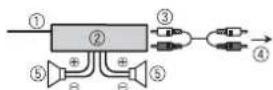
1IyntbI DY CNTTEMIOB BnONHITNE NOKINQUCHNE K CINHEMY/ 6eNoMgKa6EIO.
②Ycnnntenb (npno6peTaetcaOndienbHo)
3BbONNHMe NOKJIOHcN C NOMOJIbRO RCA (npnMoBPeraTcN OaIeNbHO)
4K3aDnHMeBvBxOyUnnBvxOyU ca6Bvpepa
3aHnDnHaMnKn nncab6byeep
YcTaHOBKa
Baxho
- Pered yctahOBK npoBepBe BCE PNDKIOHENH N CHTMEL.
HeNcNoB3yIte HeOpHrNHaJIbHbIbe 3aHactn, TAK KAK 3O MoKet pNBeCTn K HENCPNAOBCTOM.
-06patntecbKdnppey,ecnDnnyCTAHOBKnTreBpyOTcRdoNOnHNTeBHeOTBepCTNRMLMOINKauINBBABTOMOHNIE.
Hcye7aHbAAIe daHnoe yCTPOBCTBO B cIyouxN ciuyAan:
-eCNI OHO MOKET HApuTb paObyT abOMoTOH
ecnno OHO MOXETnpuHHTb TpaBMy naccxNpy Bcnyae pe3KOJ OCTAHOBKN.
-NoynpobOdnKOBbNna3ep6ydt
NOBpcxHEn BcIyae nepepeBa.
BbONnHHte YctAHOBKY DaHORo
YCTPOINCTBA BDAIMOT MecT C
NOBbIeHHOn TEMpePaTyPo, HApnpMeP
PENK.
OnTmAbHn npO3BOHTenbHOCTb 60° IOCTuAeTc npyCTAHOBKe yCTPOHCTBa nD yTNOM MeHee 60°
YTo6bI Oe6CneHTb Heo6xoJHmOe
paonpeJeHHe Tnla npi
HCNoNtB0aHNH yctPoTcBn, pni
yCTaHOBe OCTaBte Cbo6OHOHe MecTo 3a
3aDHeN NaHEbIO KcPyrITe Ka6enl,
YTo6bI OHn HE 6KnipOBaIN
BEHTNNNHOHHbe OTBepCTN.
YcTaHOBKa KpennneHn DIN
1 yctaHOBITE Ha npnboHyIO naHeIb BXdoIyIO B KOMnNEKytCAHOBOHHyIO uaxTy.
2 3akpeniye tceAtoHOObyu xaxty, oTOrHyB c nmoosbIOtBEpTKM metanmmeckne naNK (90^)
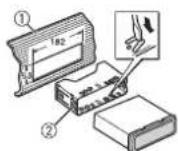
①Pn6OpHna naHeNb
2YCTaHOBOUHARwaXTA
- Y6 EInTeCb,TOYcTPOINCTBO
yCTAHOBIIeN IpOuHO. HEnpouHAR
yCTAHOBK MoKET PnPBeCTN K
BO3HKnHOBENIO npOnyckOB npN
BOcPONBSeDEHN IN DpyrNX
HECNCPABHOCTEi.
EcnBxOJaA B KOMnNeKT yCTaHOBOuHaa WaxTa He NCNoJIb3yETCa
1 OnpeDenTe nonoJxHHe, npn KOTOPOM COBnAdaIO T OTBcTnB KPOHHTe He COTbpcTnMn C60ky yCTpOCTBA.
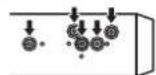
23aHTNE no 6OKAM DBA BHTA.
① Camope3(5MM×9MM, He npnnaaraetcKycTPOHCTBy
② Kpenexhbl KPOHHTeH
3Pn6opHnaHaenb mKoHc0nl
N3BLeueHHe yCTpoCTBa (yCTaHOBEnHOrO C NOMoUsbIO npnaraemOn yCTaHOBOUHOH uaxTbI)
UctpaHHeH HeCnpaBHOCTe
Icnnney abOTOMATMueckn BO38paauetcB BWCDOH DEPKHM.
→Bteuehe30cekyHneBbIIO BbIIOJIHEHOIIHKAAKHXONEpaui. -BbIIONJNTeOpeaio.
Dnanaon nobotpnoB OBCPON3BeHnCAmONPOUNBHO NAmehETCA.
B3ABNCUMOCTOnBTb6paHHORo
HnanaaHa NOBTOPHORO
BOcPiOn3BaDEEHn OHMOKET
N3MeHNtBCn pPr Bb6ope DpyTOn nAnKn
NNDpOaKKn, a TaKKe Pn NpeCMOTke
Bnepe/Ha3d.
-Bb6peTe Hnanaa3OH NOBTOPHORo
BOcPOn3BaDEEHn eEe pa3.
Bloxkhenna nanka He Bocnpo3B0DnTc. Bloxkhenbna nankn H Bocnpo3B0dA Tc, cnn Bbipan danaon [FLD] (noBtopoe Bocnpo3BedeHne nankn). -Bb6epte npyro nnanaon noBTOPHORo BOCNPo3BDEHnN.
MNEOTCA NOMEX 3BNYA. MCnOlbEyetcYcTpoCTBO,HanpIMep, COOTbB TLEnEOH,KOTOpoe MOKeT Bb3bBaTb YmMOBbIE NOMEXN.
-Y6epHTe npHOpbE,Bb3bBAIOUJIOMEXN,OT STTOF OcTPOCTB4
Coo6eHn8 o6oW6kax
067ne
AMP ERROR
→YCTPOICTBOHe paOaTeTnHn HENPAIBNbNOcOeINHEuHNAMNK. →CpaO7AeB TaunTb. -PIOBepBte, NOKIOUeHn DInHAMNK. -PIOBEPHTNE KIOU 3aXmraHn B nOnoKeHne OFF n BEpHTne B nonoXeHne ON.Ecm coooJeHne He uChEaET,CBAKITecCBdUNepCKM UENTPMn ABTOPTOBAHBM CEBPINCBHM PYNKTM PIONE.
NO XXXX (NO TITLE, Hang
→HETBCTOEHNHO TECKBOB HΦOPMaun. -PepeKnIOHTe INCINNEI BOCNPON3BEdNTe DpyyIO DOpoxKy/ 0aII.
IpnurpbbateNB KOMnakT- DnCKOB
ERROR-07,11,12,17,30
DnCK 3aqrpaHEH. OuNTIe DnCK
DnCK nOaapanA
-3aMeHNTE DnCK
ERROR-07,10,11,12,15,17,30,A0
→3neKtpnueckaIIMexHaHueckar HeNCpRAPBHOCTb. -YcTaHOBnE KIOU 3aIKraHnB nOnOKeHNE OFF,a 3aTEM-B nonOKeHne ONnnnepeKnouHTecb HaDpyoN MTOCHN CIRHana, a 3aTEM o6paTHo HApnpOrpBbATEbKOMNaKT- dCKOB.
ERROR-15
→BCTABENH NPTOYDNCK. -3AmeHNITE DNCK.
ERROR-23
→OFOMPATMNCKAneNoNDepKINBAeTc8. 3aMENHTE NCK.
FORMATREAD
→HOrdaIPOnCXoJTH3aepKKaMeKdy HauAOM BOCPONBEdENH NIOBAAHEHM 3bYk -3ByK IOABNTCA NOcNE TOR KA K cnnneruecheet COOeHne.
NO AUDIO
→HaNCKeOTCYCTCTBYOTfAaJIb, KOTOpBHe MOKHO BOCPOM3BcTn. -3AMEHNTeDMCK.
SKIPPED
→Duxk cOepjxnt faiIbI, 3auiuHHeHNBeTexHONrEm DRM.
-3auiuHHeHne faIbI npOnyCaIOrTcN.
PROTECT
->Bce faaHbna HuaNcke 3auuHne bTeXHoHnOreN DRM.3aHenTE DnK
USB-yctpoIcTBo
FORMATREAD
→HOrJaPONCoxOIT3aepKKaMeKdy HauJOM BOCNPOImBedeHn N OABNEHm 3ByKa. -3Byk NOBNTCA NOCE TOR KA K C dINCNNEHcNE3HT COo6UeHne.
NO AUDIO
→KMO3NIOAOTCYTCTBYOT.
- PpeHecnTe aymofoaIbHa
3anOMHaJooee yctpoINCTBO USB n
noKnIOHTe erO.
→Ha noKlnIOHENHom yctpoINCTBE USB BKNIOHEHa 3aunITA.
-Cneyte INCHpYKUNHM YcTPOINCTBa USB DnA CHRTMA3auNTb.
SKIPPED
→IpaKIOUHoeYCTPOIETOBSU BcpeKnTfoaIbI,3aunuHneHbIe TExHOrneDRM. -3auuHHeHbIefoJIbI npOnyCa
PROTECT
Bce faaihna Hn noKnHIOeHHOM yctpoiCTBe USB 3aunueHbno texHoNOrn DRM. -3aMeHHTe yctpoiCTBo USB
N/A USB
→NoKIOHHe yCTPOCTBO USB He NOdEpxHBaeTcAaHbIM YCTPOCTBOM. -OTKNOHTE yCTPOCTBO 3aMeHnTe ERO COBMECTMIM yCTPOCTBOM USB
HUB ERROR
YCTPOINCTBOUSB,NOKIIIOUENHHOeC nOMOsbIO KOIeHTPaTOpA USB,HE NOIDEPKIBAETCA DAHNBM YCTPOINCTBOM. -NIOKIOHITYE CTOPTcBO USB HNEOCpeCTBeHHo K DaHOMy YCTPOINCTCB NOMOsbIO Ka6enu U
CHECK USB
→KopoTKe 3aMbKaHHe Ha pa3bEme USB
n nn KaBene USB.
-y6dEnTeCb, 1TO pa3bEm USB nnn Kaeb USB He 3aUemEn H ne
nopekJeH.
→PioknOHe 3aONMHaIOoee
ycTroPcIbTO USB nopTe6bnet 60nbue
MAKCMMaNbHO OOnyCTMOH CNbIb ToKa.
-OTcoEHNITBe 3aONMHaIOoee
ycTroPcIbTO USB He nCnOB3yTe
ero.YCTaONBITE KIOH 3aXKurAHnB N
nonoxehne OFF, 3aTeM-B
nonoxehne ACC nIN ON.
PioknOuaTe TOnbKO CoBMecTmblte
3anOMHaIOoHe ycTroPcIBA USB.
ERROR-19
→C60n CBA3n.
-BbINONHNTe cneDyHOUme Oonepaun, 3aTe mCHoBA bIbeprte USB B KaYeCTBe NCTOCHNA.
He HINHITNE HNHCNOB3yHTe XIMUeCKNE BEEcCTBa HNOBepXHOCTN DnKOB.
ДИМСТКOMKANKT-ДСКАРOTPINE DKMARTKOI TAKHBOO TO IETHPKTA KPOA
KOHJENHCAIA MOKET APMEHNO yxuimntb paoty npoHrpBbATEIa. OCTabte erfo daanTnK Boene BbKOcK TEmpeAType npmepHO Ha cac.Takke ydanite bny c dNCKOB C NOMOUBIO MRKTOKAHN.
- PnI NcNpIb3OBAHmN DcKOB,Ha
NoBepXHOCTb KOTOpbIX MOrYT
HAHOCHtCBa TnKETKn, INyUHTe
INHCTpyKun mPpeynypKeDHeHn DnA
3TNX IMcKOB. UCTaHOBaK a IN3BJeueHeHne
HEKOToPbIX DcKOB MOrYT 6blTb
HEBO3OMKnHb. INcNpIb3OBAHmTaknx
INcKOB MoKET pInBeCTu K
NOBpeKdEHNIO O6OpYDoBHnA. - He pNkNeBaeTa HnDcKn 3TmKTeKN V
dpyrmeMATEpMaNb.
-ToMOKTeDeOpMPOBAtbHCKN,Bpe3yIbTaTe rOeHX BCnPONBBeHeHNE6yET HeBO3MOXHBHm.
-ETNKEKMOYTOKIeNTbCBA BVPBEMA BOCPON3BEENH N 3ATpyDNHTb INBIEYEHNDECKOB.A TAKKE NOBPeNDtobO6OpyD0BaHNe.
3aONMHaIOoee yCTpoiCTBO USB
- PoiKIOJIeHNeIe Hepe3 USB-KoHcIeHTpAToT He noJIaDEpeKbIAeTCH.
- He nojkiouaTe npyrte yctpoiCTBa, kpoeme 3anommHaouuxyctpoiCTB USB. He donyckaTe naedhenyctpoiCTBa USB Ha non, rde OHO MOKET 3actpTa nob neaIbIO F3a HIN TOPMo3a.
B 3aBcIMMOCTN OT TINA 3aONMHaKoero yctpOCTBa USB MOrTb O3nHKnHyt b Cneyoume np6nembl.
- Ynpabnene HnykunmM MoKET OTJWATbC.
-3AONMHOJUeE yCTPOBCTMO KOeT HE pACNO3HABATCB.
-Фаны могут Н ВOCироиЗВОдпьСК
KOPKEKDE.
-VCTPOIHO BMOKET COJADabTbU MOIOBBE NOMEXN BO BPEMNPOCUYINBHANH PAIDMO.
PndepkKa cKaTbIX aydnofoaiNoB
B KauchteBaHbAHnA PhaIIa IIINI pAnIKM MOryT OTo6paKaHcTaCToJIbKOpeBle 32 CmBBoLA (BkIOUaYacPauHepNE)
3To yctpoiCTBO MOKeT pa60TaTB HekoppeKTHO B 3A8BMCMOCTM OT npnIOKeHn, INCNb3oBaAHbIx dIN KODIOPOBAHN WMA.
-Пин haHane Bocpon3BedeHnA ydnfoaHnOB, copejkaunxN 1o6pakhenu, n foaiounc 3anomnHaOIOeYOCTpoiKCTBa USB, copejkaauero paabETbIeHnbie heepapxnn nanok, moKet npOnCxOJntb He60lbua 3aPePKka.
PyCckn TeKCT pJNA OTOpBpaKeHNA HaanHom yCTPOINCTBE DOJKeH 6bItb 3aIINΦpObaH B OHNOM n3 cneYIOUHX φOpMATOB:
-Unicode (UTF-8, UTF-16)
-Dyroу φόρma, OTMнчьгдот Unicode, KOTOPBинэльүүсв C р dede Windowsинстлоевпу рускьянзik.
BHIMAHHE
Pioneer He rapaHTnpyET CoMBcTeMIOCTb CO BcEMN YcPTOBNAMB US H He Hecet OTBeTCTBEHOCTH 3a IIO6y0 Notepio daHHbNs Ha MeidanpOnrPbBaIatenhX,
cMapToHax nDpymX yCTpoCTbX npn NCINNoB3OBAHm 3TOrO H3DeJIMN.
He octabnnte nckn Wn3aONMHaoucyeCTpoCTBO USB BMeTax C BbOCOKI TEmpeAtpoB03Dyxa.
Daunbl WMA
| Paciiipenije .wma | |
| Скорочь перацупднных | ot 48 K6nT/c до320 K6nT/c (CBR), ot48 K6nT/c до384 K6nT/c (VBR) |
| ЧастoraДибретиазцу | 32 кГι, 44, 1 кГι,48 кГι |
| Windows Media"Audio Professional,Lossless, Voice/DRMStream/Stream cnodperjkòn Bvideo | He podderjkmbaetc |
Фаиь MP3
| Pacuipenme.mp3 | |
| Скорocьперацу даных | ot 8 Кот/c.dо 320 Кот/c(CBR), VBR |
| Часту дисcopeцицу | ot 8 Кс,do48 Кс(32 кс,44,1Кс,48Кгп повая) |
| Союмециман версану Тетов ID3 | 1.0,1,2,2,2,3,2.4(Bерсану Тетов ID3 2.x我没有 почирется версану 1.x.) |
| Слесок bocspoизбve徴еля M3u | He подөрхиаetс |
| MP3i(innterekakшний MP3),mp3 PRO | He подөрхиаetс |
DaijnlbWAV
-ФаиьформатAWVHeBO3MOxHONIOKNIOUHTbYepe3MTP.
| D: C | D: C | D: C |
| A: A | B: B | B: B |
| F: F | J: J | E: E, E |
| K: K | J: 3 | H: H, H |
| K: K | I: I | M: M |
| H: H | O: O | N: N |
| P: P | C: C | T: T |
| Y: Y | Φ: Φ | X: X |
| U: U | Y: Y | W: W, W |
| Z: b | H: b1 | b: b |
| J: J | H: 10 | J: J |
ABTopckoe npabo ToBapHbIe 3HaKU
WMA
Windows Media - 3TO
3aerntpurobaanhatarobaanMapkainnToprobaanMapka Microsoft Corporation B CUSA w/wnn dpryixcstpaohak
BdHannOM HJNENm INCNOBaYOTcexTHNOHMn, npnHaNDeKaaue KOpnpaONM Microsft, KOtOpne HpaepaeeTcN cNIOb3ObaTb INp pacPiocptpanHb 6eIuHeHNrOITM Microsft Lng.
FLAC
© 2000-2009 Josh Coalson
2011-2013 Xiph. Org Foundation Pacnpoctpaehne H nncnloBcOaHne B bIe NxcOdhnx KOnOB nn6bHapbXb XaHOB, C moDmKNaCmaNNnn 6e3, papaeeuaetcn np co6nOedenn cneynuynxycnoBn:
-BpacnpocpaHemNXCoHOMKoDe DAnHO6bTcOxApoHeNOyBEdOMNeHE 06 ABTOPCOMIpABe, HAcToHmCNICOK yCIOBnNUCIOBN06OrpAHHENN OTBETCTBCHOCT.
- PnpaPncpOcTaPahEnH6bnHapbHex
nOB 06ob3aTeBHO BocPOn3BeDeHe
BbIeYNoMAHYTOyBEdoMHeNHO
ABTOpCKOM npae,HaCtoJIero Cnckca
ycNoBn INPbEbeHHbx Hnke YcNoBn
oB ORPAHueHn OTBcTBHeHOCTNB
DOKMeHTAHNm HnN Dpynx
CONPOBOITNEBbHX MaTePnaX.
-HaMeHOBaHHe Xiph.org Foundation
MMeHa yAcTHIKOB He DoJIKNb
MCNolbOaBtCBnIaNoJIOePJKNN
npoDBaKHeHrTOBaOpB,Co3aHbIXc
pnpMeHHeHem DaHORo nporpaMMHO
06ecneueHH,63 nepeBapntelHO
PiCmEHHOro pa3pcHHe
npaboo6bndatela.
DAHHOE NO INPEIOCTABJRETC
IPIPABOOBJIAADATEJIYMN COABTOPAMN
"KAK ECTb" IN HE INPEIOCTABJIAET
HNAKNXRBHbIXNIN
IOJPA3yMEBAEMbIXTAPAHIN
PnFOHOCTN DIA NPODAKINII
KOHKPETHOFO NCIONb3OBAHN.HN
PNI KAKNX OBCTORENTBAX
YIPABJIIOUINE I COABTOPbI HE HECYT
OTBETCTBEHHOCTN3AIPRMBIE,
KOCBEHHbIE, CNYAHHbIE, LTPAΦHbIE
BO3MOXHOCTINNCIOB3OBAHIN
NOTEPEN DAHHbIX, YNUEHHHOI
BbIIObl NIO5bIMN y5blTKAMN B
PE3yblTATE NPNOCTAHOBKN
DAETBHOCTN)BO3HNIKAIOUHE HA
OCHOBE COFNAUHEHIA, HECEHNA
OTBETCTBEHHOCTN NIM HAPYSEHNA
OB3ATEJIbCTB(BKIOUAR
HE6PEXHOCTb)IPNNCIOJIb3OBAHIN
DAHHOTPOPTPAMMHOTO
OBECNEUHNAJAXE ECINKOMPAHNA
BbINA NPEyNPEKDEHA O
BO3MOXHOCTN TAKOTO UUEP5A.
Android & Google Play
Android, Google Play n norotin Google
Play ABJIOTCA TOBapHbIMN 3HaKaMn
Google Inc.
CepnHbH Homep
Ha 30m pncyHke nokaahnHOpmaun o mecaue ngode n3rotobneHH yctpoCTBa.

Data n3rotobneHn 06OpydoBaHn
P1-TOIuN3ROTOBNEHIN


P2-Mecu n3ROTOBnEHN

Texnueckne
XapaKTePmCTnKu
067ne
VToCHNK NHTAHNA:14,4B noCt. toka
(DONYCTMbI Dnana3OHOT10,8Bdo
15,1B)
CnCTema3a3emneHnra:3a3enneHnre
OTpuataTeNbHOro NOnIOCA
MaKcImaJIbHbN IOrpe6JIeMbI TOK:
10.0A
Pa3MepeB (U×B×Γ)
DIN
178MM×50MM×165MM
IpeHnraNaHeb:188MM×58MM×
17MM
□
Uacu:178MM×50MM×165MM
IpeepnnaHb:170MM×46MM×
17MM
Macca:1K
Aydno
MaKcMmAbHaB BbIXOHa RAOMHOCTb:
-50BT×4KaHana/4Ω(6e3)
ca6byfepepa)
-50BT×2KaHaHa/4Ω+70BT×1
HOMHaHaBbXbXOaHaMoUHOCTb:
22Bt×4(ot50Γu do 15000Γu
cymmaphoe 3HaueHHeN Ko3ΦnueHNTa
HENHeHbIX NCKaKeHn 5%
Harpy3ka 4 ΩДЯобoxKaHAnOB)
ConpoTnBnEHeHnArpy3Kn:4Ω
(Donyctmo-0r4Ωdo8Ω)
ConpoTnBnHeHn Harpy3Kn:2,0 B
yprpoMokctn: +10 d5 (100f),
+6,5d5(10Kμ)(rpoMkoctb:-30d5)
3KbanaHep(5-nooncbiI rpaΦnueckn
Kbana3ep):
Yactota: 80 fU/250 fU/800 fU/2.5 kFU/8 KFU
Mnanaoh AMNINTYHO-uaCTOTHNX xapaTepeTcNk: ±12d6 (c waROM 2d6)
Ca6byfepe(MO):
Tactota:50Tu/63Tu/80Tu/100Tu/125Tu/160Tu/200Tu
Kpytn3Ha xapaKTePcNtKn: -12b/OKT, -24b/OKT
YcneHme: +6bno-24b5
PpOurpbIbATEnb KOMN DnCKOB
CnCTema:AyDIOOCNTEMAcKOMNtAKD NCKOM
INOBN3yEMBE DNCKN:KOMnAKT-DNKC OTHOWeHHe CNrHaJ/Um:94D5(1kU (cTeBIE-AC)
Uncno KaHaoB:2 (CTepeo)
MSC (Mass Storage Class)
MTP (Media Transfer Protocol)
AOA (Android Open Accessory) 2.0
Daimonobarcxtema:FAT12,FAT16,FAT32
ΦOPMaTДeKoNUPOBAHmФaHnO
MPEG-1 v 2 Audio Layer 3
Фовмд ekолковая ВWA: Берета 7,8,9,9,12.2(Kaнаньhoe ayinho)
Формат дковларовли FLAC:v1.3.0 (Free Lossless Audio Codec)
Φompat cnHana WAV: Linear PCM n MS ADPCM (6e3 konipcecn)
TIOHEp FM
ДианэонЧАТОТ:OT87,5MГUdo108.0Mg
NoohehayBCTBnENTBOCTb11D5b(1,0MKB/75Ω,MOHO,OTHOHEHcRHNAN/JWM:30D6)
OTHOUHNE CUNHAN/uym:72 dB (cetbIEC-A)
Tiohep MW
ДианэанСНТС:от 531 KФДо 1602KФПОпшая УВСТЕNTБНСТС 25MbK
(OTHOWEHNE CnRHaN/WM:20D5)
OTHOSeHne CnHn/whm:62 d5 (cetb IEC-A)
TIOHEp LW
Huaanaoh qactot: ot 153 kFg do 281 kFg
Noleneha YBCTBNTENBOCTb:28 MKB (OTHOHNEHcRnHa/umy:20 d5)
OTHOSEHNE cunHan/uym: 62 dB (ceTB IEC-A)
PnmeuHne:
B COOTHTCTBN Co STbTb 5aKoHa PocccknOΦeepaunO OaHnTe npab nontpeBntenE N noctahOBHeHH
PnHnrrnreRcPOSSCmKeDfepaepnN 720OT16.69T KOMnAHHN Pioneer Europe NV OoropBaetae cndyouhnn cok cnxkbbl M3dJIu, oOuIauNbHOCTABReMbHex Na pocssckbn blyHOK.
A BtOMo6BnBaH3JIeKTOHnKa:6NET PIOHne H3dEINa (HauyHnHK, MKNpOFOhN t.n.):5NET
PIMMEAHN
XapakTePnCTIKN KHOHTcPKINM OMyT 6bItb N3MeHEnb 6e3 npEdbapntBbHoro YbeDOMHeHH.
DAHNOE YCTPOINCTBO IPOIN3BDEHO BO BcTHAME.
http://www.pioneer-car.eu
Visit www.pioneer-car.co.uk (or www.pioneer-car.eu) to register your product. Visitz www.pioneer-car.fr (ou www.pioneer-car.eu) pour enregistrer votre apparéil. Si prega di visitare il site www.pioneer-car.it (o www.pioneer-car.eu) per registrar il prodotto. Visite www.pioneer-car.es (o www.pioneer-car.eu) para registrar su produit. Zum Registrieren Ihres Produktés besuchen Sieitte www.pioneer-car.de (aderwww.pioneer-car.eu). Bezoek www.pioneer-car.nl (of www.pioneer-car.eu) om uw product te registrieren. Nocertte www.pioneer-rus.ru (niiww.pioneer-car.eu) nperpncpaunnpno6peHoro Bami n3dian.
Pioneer CarStereo-Pass
28-8, Honkomagome 2-chome, Bunkyo-ku, Tokyo 113-0021, Japan
Kopnpaunna PauHnp
28-8, XOHKOMAROM 2-HOME, ByHKe-Ky, Tokno 113-0021, Anohn
MnnpTeP OOO "NHOEP PYC"
105064, PocCnR, R. MockBa, HnKnn CycaIbHbI nepeynok,
dom 5, cTpoEHe 19
Ten.: +7(495) 956-89-01
PIONEER EUROPE NV
Haven 1087, Keetberglaan 1, B-9120 Melsele, Belgium/Belgium
TEL: (0) 3/570.05.11
PIONEER ELECTRONICS (USA) INC.
P.O.Box 1540, Long Beach, California 90801-1540, U.S.A. TEL: (800) 421-1404
PIONEER ELECTRONICS OF CANADA, INC.
340 Ferrier Street, Unit 2, Markham, Ontario L3R 2Z5, Canada
TEL: 1-877-283-5901
TEL: 905-479-4411
PIONEER ELECTRONICS ASIACENTRE PTE. LTD.
2 Jalan Kilang Barat, #07-01, Singapore 159346
TEL: 65-6378-7888
PIONEER ELECTRONICS AUSTRALIA PTY. LTD.
5 Arlo Carne, Heatherton, Victoria, 3202 Australia
TEL: (03) 9586-6300
PIONEER ELECTRONICS DE MEXICO S.A. DE C.V.
Blvd. Manuel Avila Camacho 138, 10 piso
Col.Lomas de Chapultepec, Mexico, D.F. 11000
Tel:52-55-9178-4270,Fax:52-55-5202-3714
先锋股份有限公司
台北市內湖區瑞光路407號8樓