
SU-WL905 - Wall mount SONY - Free user manual and instructions
Find the device manual for free SU-WL905 SONY in PDF.
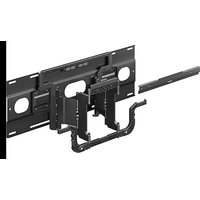


| Product Type | Wall Mount |
| Brand | Sony |
| Model | SU-WL905 |
| VESA Compatibility | 300 × 300 mm and 400 × 400 mm |
| Dimensions (W × H × D) | 860 × 573 × 13 mm (approx.) |
| Weight (depending on configuration) | from 0.5 kg to 5.1 kg |
| Material | Steel (likely) |
| Color | Black (typical) |
| Mounting Type | Wall mount with screws and anchors supplied |
| Professional installation required | Yes, mandatory |
| Included accessories | Brackets WM4, WM1, WM5, screws and anchors |
| Intended use | Mounting compatible Sony televisions |
| Safety precautions | Do not modify parts, do not overload, keep out of reach of children |
| Maintenance and cleaning | Clean with a soft dry cloth, avoid abrasive products |
| Repairability | Not user repairable, replace if damaged |
Frequently Asked Questions - SU-WL905 SONY
User questions about SU-WL905 SONY
0 question about this device. Answer the ones you know or ask your own.
Ask a new question about this device
Download the instructions for your Wall mount in PDF format for free! Find your manual SU-WL905 - SONY and take your electronic device back in hand. On this page are published all the documents necessary for the use of your device. SU-WL905 by SONY.
USER MANUAL SU-WL905 SONY
FOR CUSTOMERS IN CANADA (INCLUDING IN THE PROVINCE OF QUEBEC)
ALL INSTRUCTIONS AND STATEMENTS WHICH ARE NECESSARY FOR CANADIAN CUSTOMERS ARE PROVIDED IN ENGLISH AND FRENCH. OTHER INSTRUCTIONS AND STATEMENTS NOT PROVIDED IN ENGLISH AND FRENCH ARE NOT FOR CANADIAN CUSTOMERS (INCLUDING IN THE PROVINCE OF QUEBEC).
POUR LES CLIENTS AU CANADA (Y COMPRIS DANS LA PROVINCE DE QUÉBEC)
TOUTES LES INSTRUCTIONS ET DÉCLARATIONS NÉCESSAIRES POUR LES CLIENTS CANADIENS SONT FOURNIES EN ANGLAIS ET EN FRANÇAIS. LES AUTRES INSTRUCTIONS ET ÉNONCÉS NON FOURNIS EN ANGLAIS ET EN FRANÇAIS NE SONT PAS DESTINÉS AUX CLIENTS CANADIENS (Y COMPRIS AU QUÉBEC).
PARA CLIENTES EN CANADÁ (INCLUIDA EN LA PROVINCIA DE QUEBEC)
TODAS LAS INSTRUCCIONES Y DECLARACIONES QUE SON NECESARIAS PARA LOS CLIENTES CANADIENSES SE PROPORCIONAN EN INGLÉS Y FRANCÉS. OTRAS INSTRUCCIONES Y DECLARACIONES QUE NO SE PROPORCIONAN EN INGLÉS Y FRANCÉS NO SON PARA CLIENTES CANADIENSES (INCLUYENDO EN LA PROVINCIA DE QUEBEC).
Thank you for purchasing this product.
To Customers
Installing the TV or LCD Display to the Wall

WARNING
PROFESSIONAL INSTALLATION REQUIRED
This product should only be installed by a professional installer who is trained to determine the strength of the wall for withstanding the TV's or LCD Display's weight. If it is not properly secured during installation, the TV or LCD Display may fall and cause serious injury. Sony is not liable for any damage or injury caused by mishandling or improper installation, or installing any other than the installable product. Your Statutory Rights (if any) are not affected.
To Sony dealers
Sufficient expertise is required for installing this product. Be sure to read this instruction manual thoroughly to do the installation work safely. Sony is not liable for any damages or injury caused by mishandling or improper installation. Please give this manual to the customer after installation.
This instruction manual shows the correct handling of the product and important precautions necessary to prevent accidents. It is your responsibility to read, thoroughly understand, and follow all instructions in this instruction manual. Failure to do so may result in serious personal injury or property damage, and may void the warranty. Keep this manual available for future reference.
Products by Sony are designed with safety in mind. If the products are used incorrectly, however, it may result in a serious injury through fire, electric shock, the product toppling over, or the product dropping. Be sure to observe the precautions for safety to prevent such accidents.
To Customers

WARNING
If the following precautions are not observed, serious injury or death through fire, electric shock, or the product dropping can result.
Be sure to subcontract the installation to licensed contractors and keep small children away during the installation.
If the Wall-Mount Bracket or the TV or LCD Display is not installed correctly, the following accidents may occur. Be sure licensed contractors carry out installation.
- The TV or LCD Display may fall and cause a serious injury such as a bruise or a fracture.
- If the wall on which the Wall-Mount Bracket is installed is unstable, uneven, or not perpendicular to the floor, the unit may fall and cause injury or property damage. The wall should be capable of supporting a weight of at least four times the TV or LCD Display weight. (Refer to your TV's or LCD Display's Reference Guide for its weight.)
- If the installation of the Wall-Mount Bracket on the wall is not sufficiently sturdy, the unit may fall and cause injury or property damage.
Be sure to subcontract moving or dismounting of the TV or LCD Display to licensed contractors.
If persons other than licensed contractors transport or dismount the TV or LCD Display, it may fall and cause injury or property damage. Two or more persons (three or more persons for 189.3 cm (75 inches) and above TV or LCD Display) are needed to transport a large TV or LCD Display.
Do not remove screws, etc., after mounting the TV or LCD Display.
If you do so, the TV or LCD Display may fall and cause injury or property damage.
Do not make alterations to the parts of the Wall-Mount Bracket.
If you do so, the Wall-Mount Bracket may fall and cause injury or property damage.
Do not mount any equipment other than the installable product.
This Wall-Mount Bracket is designed for use with the installable product only. If you mount equipment other than specified, it may fall or break, and cause injury or property damage.
Do not apply any load other than the TV or LCD Display on the Wall-Mount Bracket. Do not shake the TV or LCD Display left/right, up/down.
If you do so, the TV or LCD Display may fall and cause injury or property damage.
Do not lean on or hang from the TV or LCD Display.
Do not lean on or hang from the TV or LCD Display as it may fall on you and cause serious injury.
ALWAYS keep small accessories out of the reach of children, so that they are not mistakenly swallowed.

CAUTION
If the following precautions are not observed, injury or property damage may occur.
- Be careful to not pinch your fingers while handling the Wall-Mount Bracket or swiveling the TV or LCD Display set.
- While swiveling the TV or LCD Display set, handle it with caution and take care not to hit any people nearby.
- Be sure to store the unused parts in a safe place for future use. Keep them away from children.
Do not handle the product with excessive force during cleaning or maintenance.
Do not apply excessive force on the topside of the TV or LCD Display. If you do so, the TV or LCD Display may fall and cause injury or property damage.
Do not place this product close to medical devices.
This product (including accessories) has magnet(s) which may interfere with pacemakers, programmable shunt valves for hydrocephalus treatment, or other medical devices. Do not place this product close to persons who use such medical devices. Consult your doctor before using this product if you use any such medical device.
Keep out of the reach of children or the supervised individuals.
This product (including accessories) has magnet(s). Swallowing magnet(s) could cause serious harm, such as choking hazard or intestinal injuries. If magnets (or a magnet) were swallowed, consult a doctor immediately.
Notice
- If you use the TV or LCD Display installed on the Wall-Mount Bracket for a long time, the wall behind or above the TV or LCD Display may become discolored or the wallpaper may come unstuck, depending on the material of the wall.
- If the Wall-Mount Bracket is removed after installing it on the wall, the screw holes are left.
- Do not use the Wall-Mount Bracket in a place where it is subjected to mechanical vibrations.
Installing the Wall-Mount Bracket
To Sony Dealers
WARNING
The following instructions are for Sony dealers only. Be sure to read safety precautions described above and pay special attention to safety during the installation, maintenance and checking of this product.
Do not install the Wall-Mount Bracket on wall surfaces where the corners or the sides of the TV or LCD Display protrude away from the wall surface.
Do not install the Wall-Mount Bracket on wall surfaces such as a pillar, where the corners or the sides of the TV or LCD Display protrude away from the wall surface. If a person or object happens to hit the protruded corner or side of the TV or LCD Display, it may cause injury or property damage.
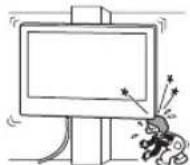
Do not install the TV or LCD Display over or under an air-conditioner.
If the TV or LCD Display is exposed to water leaks or air current from an air conditioner for a long time, it may cause a fire, an electric shock or a malfunction of the TV or LCD Display.
Be sure to install the Wall-Mount Bracket securely to the wall following the instructions in this instruction manual.
If any of the screws are loose or fall out, the Wall-Mount Bracket may fall and cause injury or property damage. Be sure to use the appropriate screws for the material of the wall and install the unit securely, using supplied screw and anchors.
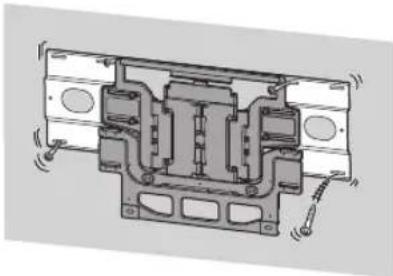
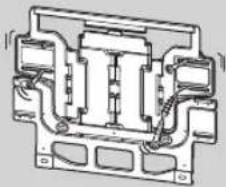
Be sure to use the supplied screws and attachment parts properly following the instructions given in this instruction manual. If you use substitute items, the TV or LCD Display may fall and cause bodily injury to someone or damage to the TV or LCD Display.
Be sure to assemble the bracket properly following the instructed procedure explained in this instruction manual.
If any of the screws are loose or fall out, the TV or LCD Display may fall and cause bodily injury to someone or damage to the TV or LCD Display.
Be sure to tighten the screws securely in the designated position.
If you fail to do so, the TV or LCD Display may fall and cause bodily injury to someone or damage to the TV or LCD Display.
Be careful not to subject the TV or LCD Display to shock during installation.
If the TV or LCD Display is exposed to shock, it may fall or break apart. This may cause injury.
Be sure to install the TV or LCD Display on a wall that is both perpendicular and flat.
If you fail to do so, the TV or LCD Display may fall and cause injury.
After proper installation of the TV or LCD Display, secure the cables properly.
If people or objects get tangled with cables, this may result in injury or damage to the TV or LCD Display.
Do not allow the AC power cord or the connecting cable to be pinched.
If the AC power cord or the connecting cable is pinched between the unit and the wall or is bent or twisted by force, the internal conductors may become exposed and cause a short circuit or an electrical break. This may cause a fire or an electric shock.
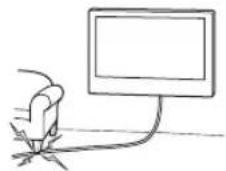
Before installing the TV or LCD Display to the Wall
Your TV or LCD Display can be mounted to a wall using this Wall-Mount Bracket. If the Table-Top Stand is not attached to the TV or LCD Display, the TV or LCD Display may require attaching the Table-Top Stand first. See TV's or LCD Display's Setup Guide.
Prepare the TV or LCD Display for the Wall-Mount Bracket before making cable connections.
Wall-Mount Bracket Installation Instruction
The instructions for installing the TV or LCD Display on a wall using a Sony Wall-Mount Bracket can be found on the TV's or LCD Display's model page.
https://www.sony.com/am/support
For product protection and safety reasons, Sony strongly recommends that installation of your TV or LCD Display on the wall be performed by qualified professionals. Do not attempt to install it yourself.
Preparing for Wall-Mount Installation
- Sufficient expertise is required in installing the TV or LCD Display, especially to determine the strength of the wall for withstanding the TV's or LCD Display's weight.
- Refer to the following table for wall-mount hole pattern.
| Wall-mount hole pattern |
| a × b |
| 300 × 300 mm |
| 400 × 400 mm |
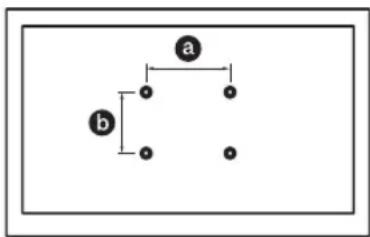
- Be sure to store the unused screws and Table-Top Stand in a safe place until you are ready to attach the Table-Top Stand. Keep the screws away from small children.
Specifications
WM4
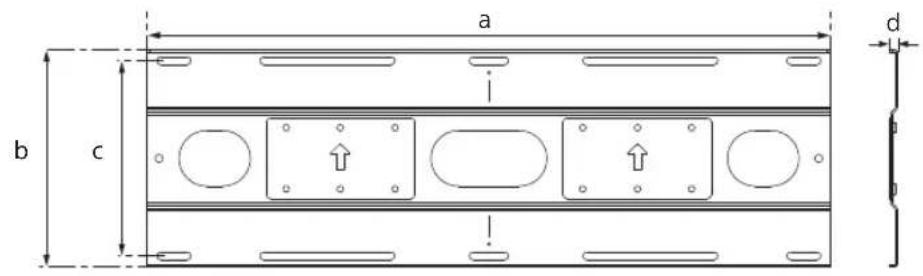
WM1
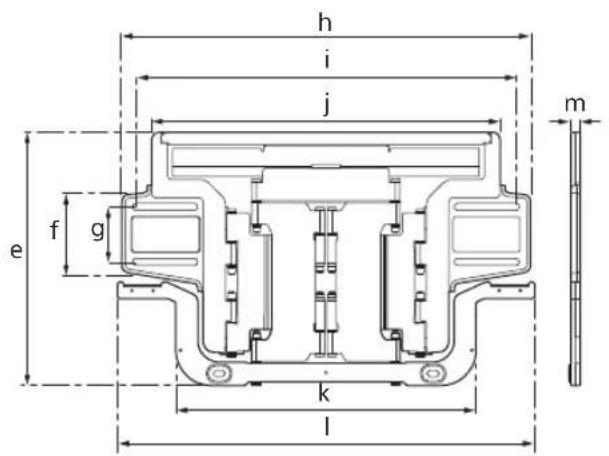
WM5
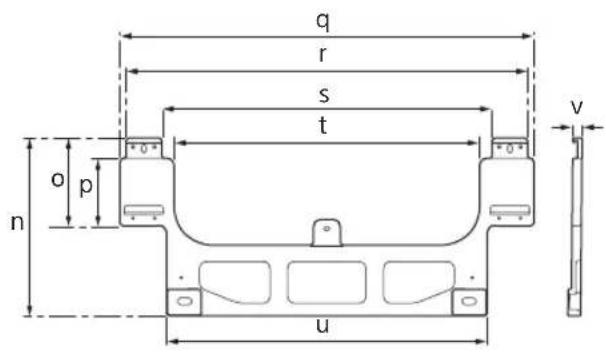
Dimensions: (Approx.) (mm (inch))
Mass (base only): (Approx.) (kg (lb.))
WM4 4.4 (9.7)
WM1 5.1 (11.3)
WM5 0.5 (1.1)
Design and specifications are subject to change without notice.
Support de fixation murale
Sécurité
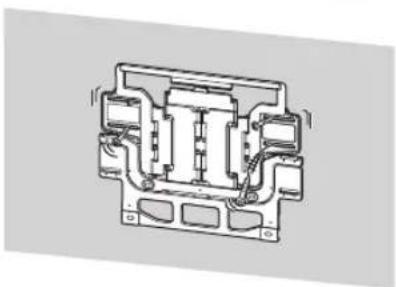
https://www.sony.com/am/support
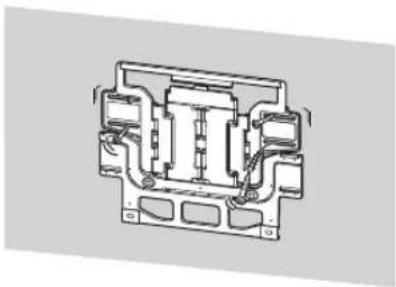
https://www.sony.com/am/support

- FOR CUSTOMERS IN CANADA (INCLUDING IN THE PROVINCE OF QUEBEC)
- POUR LES CLIENTS AU CANADA (Y COMPRIS DANS LA PROVINCE DE QUÉBEC)
- PARA CLIENTES EN CANADÁ (INCLUIDA EN LA PROVINCIA DE QUEBEC)
- TO CUSTOMERS
- WARNING
- PROFESSIONAL INSTALLATION REQUIRED
- TO SONY DEALERS
- BE SURE TO SUBCONTRACT THE INSTALLATION TO LICENSED CONTRACTORS AND KEEP SMALL CHILDREN AWAY DURING THE INSTALLATION
- BE SURE TO SUBCONTRACT MOVING OR DISMOUNTING OF THE TV OR LCD DISPLAY TO LICENSED CONTRACTORS
- DO NOT REMOVE SCREWS, ETC., AFTER MOUNTING THE TV OR LCD DISPLAY
- DO NOT MAKE ALTERATIONS TO THE PARTS OF THE WALL-MOUNT BRACKET
- DO NOT MOUNT ANY EQUIPMENT OTHER THAN THE INSTALLABLE PRODUCT
- DO NOT APPLY ANY LOAD OTHER THAN THE TV OR LCD DISPLAY ON THE WALL-MOUNT BRACKET. DO NOT SHAKE THE TV OR LCD DISPLAY LEFT/RIGHT, UP/DOWN
- DO NOT LEAN ON OR HANG FROM THE TV OR LCD DISPLAY
- ALWAYS KEEP SMALL ACCESSORIES OUT OF THE REACH OF CHILDREN, SO THAT THEY ARE NOT MISTAKENLY SWALLOWED
- CAUTION
- DO NOT HANDLE THE PRODUCT WITH EXCESSIVE FORCE DURING CLEANING OR MAINTENANCE
- DO NOT PLACE THIS PRODUCT CLOSE TO MEDICAL DEVICES
- KEEP OUT OF THE REACH OF CHILDREN OR THE SUPERVISED INDIVIDUALS
- NOTICE
- INSTALLING THE WALL-MOUNT BRACKET
- DO NOT INSTALL THE WALL-MOUNT BRACKET ON WALL SURFACES WHERE THE CORNERS OR THE SIDES OF THE TV OR LCD DISPLAY PROTRUDE AWAY FROM THE WALL SURFACE
- DO NOT INSTALL THE TV OR LCD DISPLAY OVER OR UNDER AN AIR-CONDITIONER
- BE SURE TO INSTALL THE WALL-MOUNT BRACKET SECURELY TO THE WALL FOLLOWING THE INSTRUCTIONS IN THIS INSTRUCTION MANUAL
- BE SURE TO ASSEMBLE THE BRACKET PROPERLY FOLLOWING THE INSTRUCTED PROCEDURE EXPLAINED IN THIS INSTRUCTION MANUAL
- BE SURE TO TIGHTEN THE SCREWS SECURELY IN THE DESIGNATED POSITION
- BE CAREFUL NOT TO SUBJECT THE TV OR LCD DISPLAY TO SHOCK DURING INSTALLATION
- BE SURE TO INSTALL THE TV OR LCD DISPLAY ON A WALL THAT IS BOTH PERPENDICULAR AND FLAT
- AFTER PROPER INSTALLATION OF THE TV OR LCD DISPLAY, SECURE THE CABLES PROPERLY
- DO NOT ALLOW THE AC POWER CORD OR THE CONNECTING CABLE TO BE PINCHED
- BEFORE INSTALLING THE TV OR LCD DISPLAY TO THE WALL
- WALL-MOUNT BRACKET INSTALLATION INSTRUCTION
- PREPARING FOR WALL-MOUNT INSTALLATION
- SPECIFICATIONS
- DIMENSIONS: (APPROX.) (MM (INCH))
- MASS (BASE ONLY): (APPROX.) (KG (LB.))
- SUPPORT DE FIXATION MURALE
- SÉCURITÉ
Brand : SONY
Model : SU-WL905
Category : Wall mount