
SU-WL855 - Wall mount SONY - Free user manual and instructions
Find the device manual for free SU-WL855 SONY in PDF.


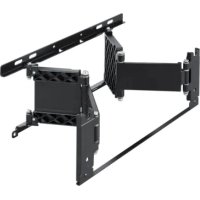
| Product Type | Wall Mount |
| Brand | Sony |
| Model | SU-WL855 |
| TV Compatibility | Sony 55 to 85 inches |
| VESA Standard | Up to 600 x 400 mm |
| Maximum Load | 50 kg |
| Material | Robust Steel |
| Mount Dimensions (W x H x D) | 76 x 41 x 3 cm |
| Mount Weight | 5.2 kg |
| Color | Black |
| Power Supply | None (mechanical mount) |
| Mount Type | Fixed or tiltable wall mount |
| Tilt | 0° to 15° forward |
| Rotation | Not applicable (fixed) |
| Integrated Spirit Level | Yes |
| Main Functions | Secure fixation, cable management, easy installation |
| Maintenance and Cleaning | Clean with a soft, dry cloth. Do not use abrasive products. |
| Safety | Check the wall's capacity to support the weight. Use the provided wall plugs and screws. |
| Spare Parts and Repairability | Replacement screws available from Sony. Mount not repairable by user. |
| Warranty | 2 years |
Frequently Asked Questions - SU-WL855 SONY
User questions about SU-WL855 SONY
0 question about this device. Answer the ones you know or ask your own.
Ask a new question about this device
Download the instructions for your Wall mount in PDF format for free! Find your manual SU-WL855 - SONY and take your electronic device back in hand. On this page are published all the documents necessary for the use of your device. SU-WL855 by SONY.
USER MANUAL SU-WL855 SONY
Thank you for purchasing this product.
To Customers
Installing the TV to the Wall

WARNING
PROFESSIONAL INSTALLATION REQUIRED
This product should only be installed by a professional installer who is trained to determine the strength of the wall for withstanding the TV's weight. If it is not properly secured during installation, the TV may fall and cause serious injury. Sony is not liable for any damage or injury caused by mishandling or improper installation, or installing any other than the specified product. Your Statutory Rights (if any) are not affected.
To Sony dealers
Sufficient expertise is required for installing this product. Be sure to read this instruction manual thoroughly to do the installation work safely. Sony is not liable for any damages or injury caused by mishandling or improper installation. Please give this manual to the customer after installation.
This instruction manual shows the correct handling of the product and important precautions necessary to prevent accidents. It is your responsibility to read, thoroughly understand, and follow all instructions in this instruction manual. Failure to do so may result in serious personal injury or property damage, and may void the warranty. Keep this manual available for future reference.
Products by Sony are designed with safety in mind. If the products are used incorrectly, however, it may result in a serious injury through fire, electric shock, the product toppling over, or the product dropping. Be sure to observe the precautions for safety to prevent such accidents.

CAUTION
Specified products
This Wall-Mount Bracket is designed for use with the products specified TVs. For TVs, refer to their "Reference Guide" to verify that the Wall-Mount Bracket can be used.
To Customers

WARNING
If the following precautions are not observed, serious injury or death through fire, electric shock, or the product dropping can result.
Be sure to subcontract the installation to licensed contractors and keep small children away during the installation.
If the Wall-Mount Bracket or the TV is not installed correctly, the following accidents may occur. Be sure licensed contractors carry out installation.
- The TV may fall and cause a serious injury such as a bruise or a fracture.
- If the wall on which the Wall-Mount Bracket is installed is unstable, uneven, or not perpendicular to the floor, the unit may fall and cause injury or property damage. The wall should be capable of supporting a weight of at least six times the TV weight. (Refer to your TV's "Reference Guide" for its weight.)
- If the installation of the Wall-Mount Bracket on the wall is not sufficiently sturdy, the unit may fall and cause injury or property damage.
Be sure to subcontract moving or dismounting of the TV to licensed contractors.
If persons other than licensed contractors transport or dismount the TV, it may fall and cause injury or property damage. Be sure that two or more persons carry or dismount the TV.
Do not remove screws, etc., after mounting the TV.
If you do so, the TV may fall and cause injury or property damage.
Do not make alterations to the parts of the Wall-Mount Bracket.
If you do so, the Wall-Mount Bracket may fall and cause injury or property damage.
Do not mount any equipment other than the specified product.
This Wall-Mount Bracket is designed for use with the specified product only. If you mount equipment other than specified, it may fall or break, and cause injury or property damage.
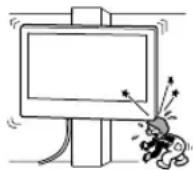
Do not apply any load other than the TV on the Wall-Mount Bracket. Do not shake the TV left/right, up/down.
If you do so, the TV may fall and cause injury or property damage.
Do not lean on or hang from the TV.
Do not lean on or hang from the TV as it may fall on you and cause serious injury.

CAUTION
If the following precautions are not observed, injury or property damage may occur.
- Be careful to not pinch your fingers while handling the Wall-Mount Bracket or swiveling the TV set.
- While swiveling the TV set, handle it with caution and take care not to hit any people nearby.
- Be sure to store the unused parts in a safe place for future use. Keep them away from children.
Do not handle the product with excessive force during cleaning or maintenance.
Do not apply excessive force on the topside of the TV. If you do so, the TV may fall and cause injury or property damage.
Notice
- If you use the TV installed on the Wall-Mount Bracket for a long time, the wall behind or above the TV may become discolored or the wallpaper may come unstuck, depending on the material of the wall.
- If the Wall-Mount Bracket is removed after installing it on the wall, the screw holes are left.
- Do not use the Wall-Mount Bracket in a place where it is subjected to mechanical vibrations.
Installing the Wall-Mount Bracket
To Sony Dealers
WARNING
The following instructions are for Sony dealers only. Be sure to read safety precautions described above and pay special attention to safety during the installation, maintenance and checking of this product.
Do not install the Wall-Mount Bracket on wall surfaces where the corners or the sides of the TV protrude away from the wall surface.
Do not install the Wall-Mount Bracket on wall surfaces such as a pillar, where the corners or the sides of the TV protrude away from the wall surface. If a person or object happens to hit the protruded corner or side of the TV, it may cause injury or property damage.
Do not install the TV over or under an air-conditioner.
If the TV is exposed to water leaks or air current from an air conditioner for a long time, it may cause a fire, an electric shock or a malfunction of the TV.
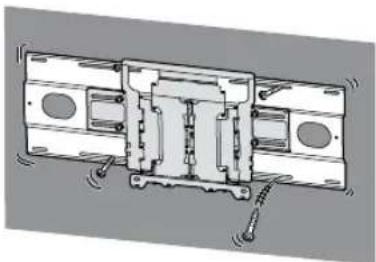
Be sure to install the Wall-Mount Bracket securely to the wall following the instructions in this instruction manual.
If any of the screws are loose or fall out, the Wall-Mount Bracket may fall and cause injury or property damage. Be sure to use the appropriate screws for the material of the wall and install the unit securely, using supplied screw and anchors.
natural_image
Technical line drawing of a mechanical assembly with no visible text or symbols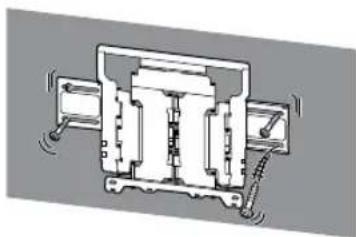
natural_image
Pure mechanical assembly diagram without any text, numbers, or symbolsBe sure to use the supplied screws and attachment parts properly following the instructions given in this instruction manual. If you use substitute items, the TV may fall and cause bodily injury to someone or damage to the TV.
Be sure to assemble the bracket properly following the instructed procedure explained in this instruction manual.
If any of the screws are loose or fall out, the TV may fall and cause bodily injury to someone or damage to the TV.
Be sure to tighten the screws securely in the designated position.
If you fail to do so, the TV may fall and cause bodily injury to someone or damage to the TV.
Be careful not to subject the TV to shock during installation.
If the TV is exposed to shock, it may fall or break apart. This may cause injury.
Be sure to install the TV on a wall that is both perpendicular and flat.
If you fail to do so, the TV may fall and cause injury.
After proper installation of the TV, secure the cables properly.
If people or objects get tangled with cables, this may result in injury or damage to the TV.
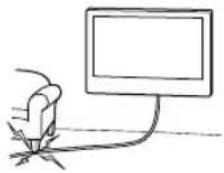
Do not allow the AC power cord or the connecting cable to be pinched.
If the AC power cord or the connecting cable is pinched between the unit and the wall or is bent or twisted by force, the internal conductors may become exposed and cause a short circuit or an electrical break. This may cause a fire or an electric shock.
Before installing the TV to the Wall
Your TV can be mounted to a wall using this Wall-Mount Bracket. If the Table-Top Stand is not attached to the TV, the TV may require attaching the Table-Top Stand first. See TV's Setup Guide.
Prepare the TV for the Wall-Mount Bracket before making cable connections.
Wall-Mount Bracket Installation Instruction
The instructions for installing the TV on a wall using a Sony Wall-Mount Bracket can be found on the TV's model page.
https://www.sony.com/am/support
For product protection and safety reasons, Sony strongly recommends that installation of your TV on the wall be performed by qualified professionals. Do not attempt to install it yourself.
Preparing for Wall-Mount Installation
- Sufficient expertise is required in installing the TV, especially to determine the strength of the wall for withstanding the TV's weight.
- Refer to TV's Reference Guide or website about applied TV model.
- Refer to the following table for wall-mount hole pattern.

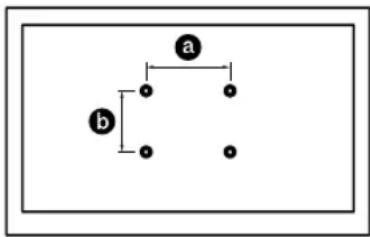
flowchart
graph TD
    a --> b
    b --> a
    a --> b
    b --> a
- Be sure to store the unused screws and Table-Top Stand in a safe place until you are ready to attach the Table-Top Stand. Keep the screws away from small children.
Before getting started
Firstly, check the type of the wall to install the TV.
The Wall-Mount Bracket differs depending on the type of the wall.
What is your wall made of?
Dry wall with studs
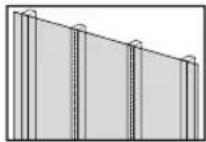
Precautions
• Maximum dry wall thickness: 16 mm (5/8 inch).
- Ensure that the inner wood stud size is at least 51 x 102 mm (2 x 4 inch) for common or 38 x 89 mm (1 1/2 x 3 1/2 inch) for nominal.
- Keep minimum 406 mm (16 inch) horizontal space between fasteners.

Use the Lateral Shift Bracket.
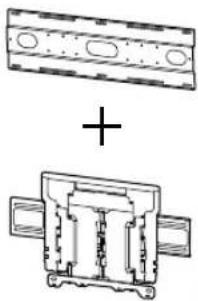
natural_image
Technical diagram showing two mechanical components with cross-sectional views and a plus sign (no text or symbols present)Solid Concrete or Concrete Block
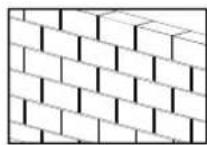
Precautions
- Mount the Wall-Mount Bracket directly onto the solid concrete wall.
- Ensure that the thickness of solid concrete wall is at least 203 mm (8 inch).
- Ensure that the size of each concrete block is at least 203 x 203 x 406 mm (8 x 8 x 16 inch).

Use the Wall-Mount Bracket.

Specifications
WM4

WM1
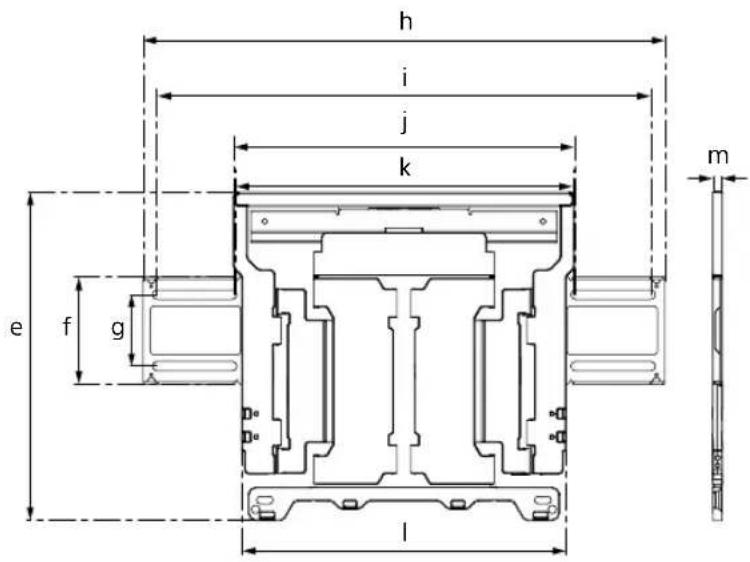
Dimension: (Approx.) (mm (inch))
a : 860 mm (33 7/8 inch)
b : 272 mm (10 3/4 inch)
c : 245 mm (9 3/4 inch)
d : 11 mm (7/16 inch)
e : 354 mm (14 inch)
f : 116 mm (4 5/8 inch)
g : 77 mm (3 1/8 inch)
h : 563 mm (22 1/4 inch)
i : 533 mm (21 inch)
j : 370 mm (14 5/8 inch)
k : 368 mm (14 1/2 inch)
1 : 350 mm (13 7/8 inch)
m : 11 mm (7/16 inch)
Mass (base only): (Approx.)
WM4 4.2 kg / 9.3 lb.
WM1 3.0 kg / 6.6 lb.
Design and specifications are subject to change without notice.
Support de fixation murale
Sécurité
natural_image
Technical line drawing of a mechanical assembly with no visible text or symbols
natural_image
Technical line drawing of a mechanical assembly with no visible text or symbolshttps://www.sony.com/am/support
natural_image
Technical line drawing of a mechanical assembly with no visible text or symbols
natural_image
Technical line drawing of a mechanical or electrical component with no visible text or symbolshttps://www.sony.com/am/support
Peso (solo de la base): (Aprox.)
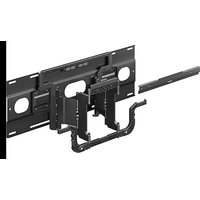
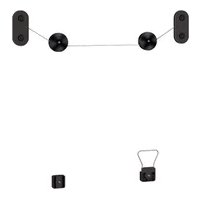
- To Customers
- PROFESSIONAL INSTALLATION REQUIRED
- To Sony dealers
- Specified products
- Be sure to subcontract the installation to licensed contractors and keep small children away during the installation.
- Be sure to subcontract moving or dismounting of the TV to licensed contractors.
- Do not remove screws, etc., after mounting the TV.
- Do not make alterations to the parts of the Wall-Mount Bracket.
- Do not mount any equipment other than the specified product.
- Do not apply any load other than the TV on the Wall-Mount Bracket. Do not shake the TV left/right, up/down.
- Do not lean on or hang from the TV.
- Do not handle the product with excessive force during cleaning or maintenance.
- Notice
- Installing the Wall-Mount Bracket
- WARNING
- Do not install the Wall-Mount Bracket on wall surfaces where the corners or the sides of the TV protrude away from the wall surface.
- Do not install the TV over or under an air-conditioner.
- Be sure to install the Wall-Mount Bracket securely to the wall following the instructions in this instruction manual.
- Be sure to assemble the bracket properly following the instructed procedure explained in this instruction manual.
- Be sure to tighten the screws securely in the designated position.
- Be careful not to subject the TV to shock during installation.
- Be sure to install the TV on a wall that is both perpendicular and flat.
- After proper installation of the TV, secure the cables properly.
- Do not allow the AC power cord or the connecting cable to be pinched.
- Before installing the TV to the Wall
- Wall-Mount Bracket Installation Instruction
- Preparing for Wall-Mount Installation
- Before getting started
- What is your wall made of?
- Precautions
- Specifications
- Dimension: (Approx.) (mm (inch))
- Mass (base only): (Approx.)
- Support de fixation murale
- Sécurité
- Peso (solo de la base): (Aprox.)
Brand : SONY
Model : SU-WL855
Category : Wall mount