
RT850BT - Alarm Clock THOMSON - Free user manual and instructions
Find the device manual for free RT850BT THOMSON in PDF.


| Product type | Bluetooth alarm clock radio |
| Brand | Thomson |
| Model | RT850BT |
| Dimensions (L x W x H) | 430 x 220 x 135 mm |
| Power supply | AC adapter 100-240V (50/60 Hz) – Output 5V 3A |
| Power consumption | 0.6 W standby |
| Speakers | 2 x 3 inches (5 W), RMS power 6 W, peak power 30 W |
| Main functions | FM radio, Bluetooth 5.3, AUX, alarm, snooze, sleep timer, brightness dimmer, USB charging (5V/1A) |
| Wireless connectivity | Bluetooth 5.3 – Range 10 meters – Pairing name: RT850BT |
| FM band | 88.8 – 108 MHz |
| Bluetooth frequency | 2402 – 2480 MHz |
| Maximum output power (EIRP) | 2.75 dBm |
| Speaker impedance | 4 Ω |
| Signal-to-noise ratio | ≥ 80 dB |
| Distortion | < 1 % |
| Ports | AUX input (3.5 mm jack), USB-A port (output 5V/1A), DC input (USB-C) |
| Clock setting | 12h/24h formats, button setting |
| Alarms | 1 alarm with source selection (buzzer or FM), volume and duration settings (15/30/45/60 min) |
| Snooze function | Alarm repeats every 9 minutes |
| Sleep timer | 15/30/45/75/90 minutes or off |
| Brightness dimmer | 3 levels (high, medium, low) |
| Auto standby | After 10 minutes without audio playback or button action |
| Maintenance and cleaning | Unplug before cleaning – use a soft, dry cloth – do not use abrasive products |
| Safety | Do not expose to water or heat – indoor use only – class II |
| Warranty | 2 years (unless longer period in the EEA) – support: www.bigben.fr/support |
| Repairability | Have repairs carried out by qualified personnel – no spare parts provided |
Frequently Asked Questions - RT850BT THOMSON
User questions about RT850BT THOMSON
0 question about this device. Answer the ones you know or ask your own.
Ask a new question about this device
Download the instructions for your Alarm Clock in PDF format for free! Find your manual RT850BT - THOMSON and take your electronic device back in hand. On this page are published all the documents necessary for the use of your device. RT850BT by THOMSON.
USER MANUAL RT850BT THOMSON
INSTRUCTIONS FOR USE
BEFORE USING THIS DEVICE, PLEASE READ THESE INSTRUCTIONS FOR USE CAREFULLY AND KEEP THEM FOR FUTURE REFERENCE.
Getting started
BELGIUM, customerservice@bigben-interactive.be
NETHERLANDS, customerservice@bigben-interactive.nl
SPAIN, soporte@metronic.com
Tel.: 93 713 26 25
Alarm clock radio and wireless speaker
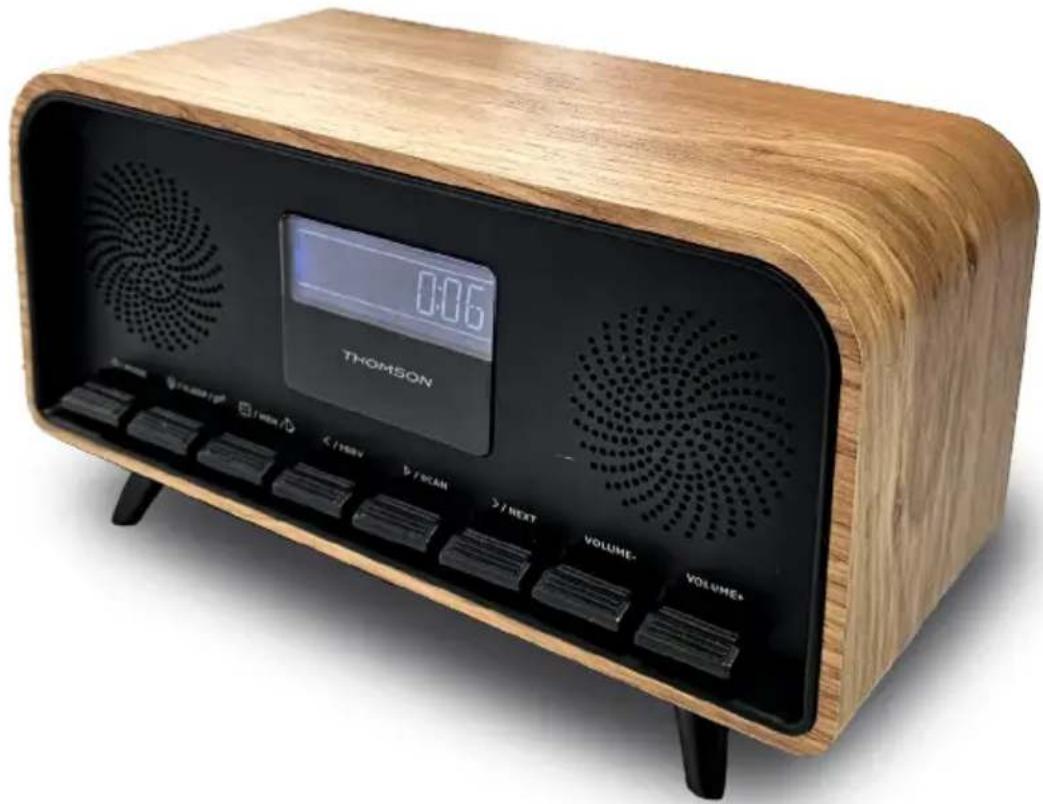
USER GUIDE
PLEASE READ THIS USER GUIDE CAREFULLY BEFORE OPERATING THE UNIT AND RETAIN FOR FUTURE REFERENCE.
Getting started 13
Safety warning and notice 13
Contents of the box 15
Description of parts 15
Use
19
Technical specifications 20
Environmental protection 21
Additional information 21
Declaration of conformity 22
Warranty 22
Getting started
• Take the device out of the box. - Remove all the packaging from the product. - Place the packaging inside the box or dispose of it safely in compliance with the waste sorting instructions shown on the outside.
Safety warning and notice
You must read and understand all the instructions before using this device. The warranty will not apply if damage is caused by failure to follow the instructions.

- Never remove the device casing.
- Never place this device on top of other electrical equipment.
- Protect the power cable from being stepped on or pinched, particularly at the plugs, sockets, and the point where it exits the device. Make sure that the power rating corresponds to the voltage shown on the rating plate at the rear of the device. Always pull the plug from the socket when disconnecting from the mains. Never pull on the cable. Ensure you have completed all the other connections before connecting the mains plug.
- Only use attachments/accessories that are recommended by the manufacturer.
- Entrust all device repairs to qualified repairers. Repair is needed when the device has been damaged in any fashion, and in particular:
- if the power cable is damaged;
- in the event of a liquid spill or objects being inserted into the device;
- if the device is exposed to rain or dampness;
- if the device does not operate normally;
- or if the device has been dropped or impacted.
- The series panel is located on the bottom of the device.
- Never block the air vents.
- Make sure you have enough space for ventilation. Place the product on a stable surface.
- This device must be used in a moderate climate, away from direct sunlight, naked flames or sources of heat, heaters, cookers or any other devices (including amplifiers) that generate heat. Do not install near a heat source.
- The batteries (battery pack or inserted batteries) must not be exposed to excessive heat, such as sunshine, fire, etc.
- Always unplug the device before cleaning it. Never lubricate any part of this device. Clean it using a soft cloth. Do not use abrasive products or harsh cleaners.
- Ensure that you always have easy access to the power cable, plug or adapter to disconnect this device from the mains if necessary.
- Do not use this device near water. It must not be dripped on or splashed. Do not use this device in a damp or wet environment.
- Disconnect this device in the event of a storm, or if you intend not to use it for a long period of time.
- This device can be used by children aged 8 and over, and by persons with a physical or sensory disability, learning difficulties or a lack of experience and knowledge, provided they are supervised or have received instructions on the safe use of the device, and understand the risks involved. Children must not play with the device or power cable (risk of strangulation). Children must not clean or maintain the device without supervision.
- This device must only be supplied with very low safety voltage as indicated on the device.
- The battery should be removed from the device before disposal. The device must be disconnected from the power supply when removing the battery.
- The product must be at a minimal distance of 20 cm from the human body when working.
- This device is for household use only; do not use outdoors.
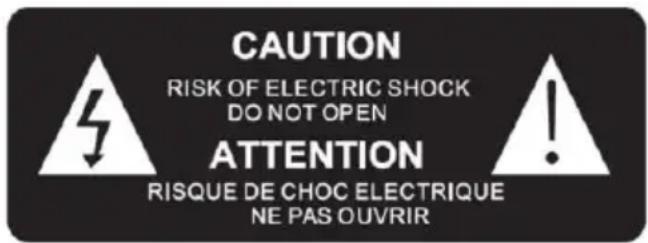

The lightning bolt symbol within an equilateral triangle alerts users to the presence of dangerous uninsulated voltages, inside the device, that may present a risk of electric shock.
The exclamation mark inside a triangle indicates the presence of important operating and maintenance (repair) instructions in the literature accompanying the device.
| Class II material |  |
| Direct current |  |
| Alternating current |  |
| For indoor use only |  |
Contents of the box
Check and identify the contents of your box:
- Device
- Mains adapter
- User manual
Description of parts
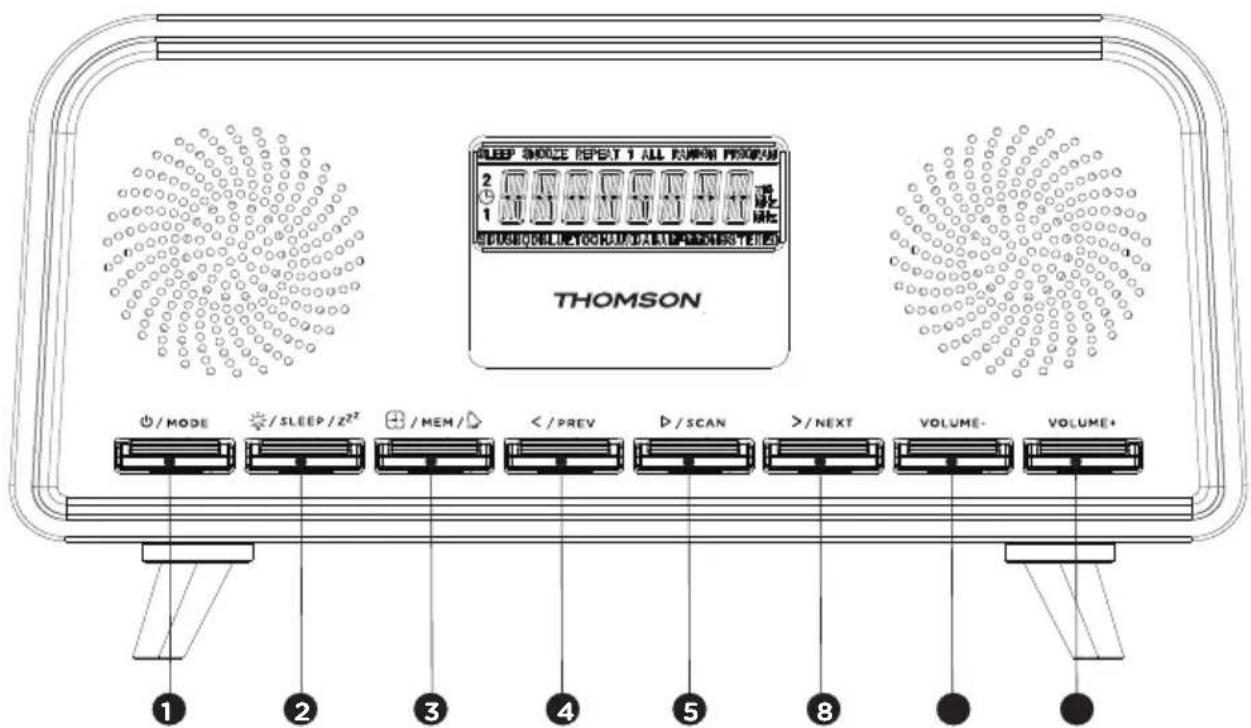
Controls
- Power On/Off / Mode
- Brightness adjuster / Sleep / Alarm repeat (Snooze)
- Clock / Mem / Alarm
- < / Previous
- Play/Scan
- / Next
- Volume down
- Volume up
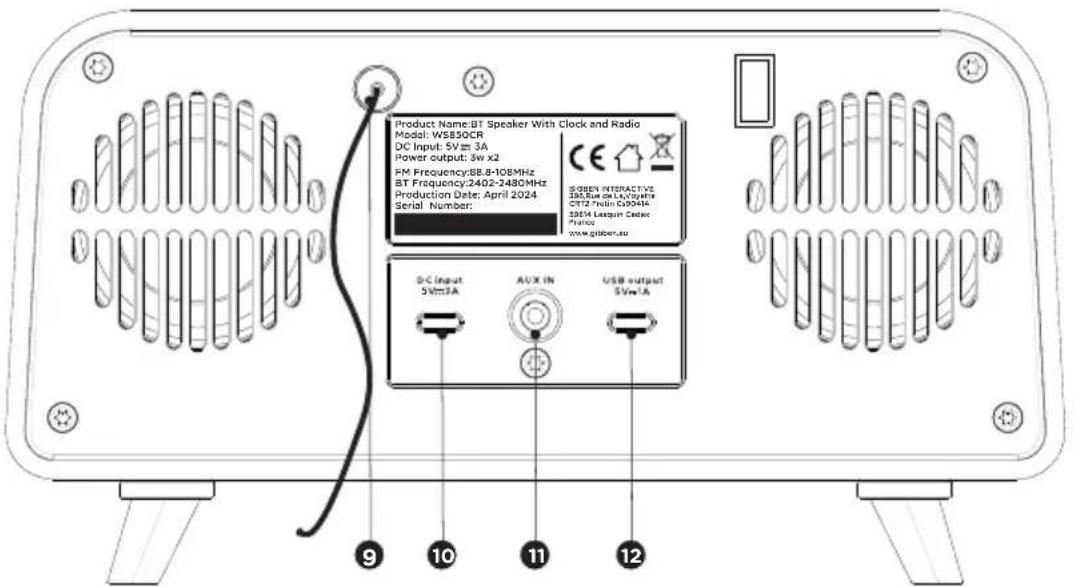
Input/Output
- FM aerial
- Power input
- Input line
- 5V/1A USB charging port
Control functions
- Power On/Off / Mode
- Press to turn on the device
- Press and hold to turn off the device
- Press between the inputs above: FM-Bluetooth-AUX
- Brightness adjuster / Sleep / Alarm repeat (Snooze)
- Press to adjust the display intensity
- Press to set sleep time: 90/75/45/30/15/OFF
- Press to activate the Snooze function when the alarm is activated
- MEM / Alarm / Time
- Press to save the current station
- Press to set the time in sleep mode
- Press to set the alarm in sleep mode
- "</Prev" button
- Press to return to the previous track.
- Go back through the saved radio stations in FM mode.
- Decrease the hours/minutes in clock/alarm setting mode.
- “▷/scan” button: Play/Scan/Enter
- Press once for Bluetooth playback.
- FM mode. Press and hold > for 2 seconds for the automatic FM search.
- Press Enter to set the clock in standby mode.
- "> / Next" button
- Press to move to the next track.
- Switch to the next preset radio station in FM mode.
- Increase the number of hours / minutes in clock setting mode.
- "Volume-" button
- Press to decrease the volume.
- "Volume+" button
- Press to increase the volume.
Before starting
Place the device in the required position, insert the USB-C cable into the back of the radio and plug the adapter into a wall socket.
Unit power supply DC 5V 3A.
Warning:
- Before using the device, check that the power supply is compatible with the device.
- Do not plug or unplug the power cord with wet hands.
- When you are planning not to use the appliance for a prolonged period (holiday, etc.), disconnect the plug from the mains outlet.
- When you disconnect the plug from the power outlet, hold the end of the plug.
Automatic standby
When playing a file from a connected device, the device automatically goes to sleep if:
- you don't press any buttons for 10 minutes:
- the connected accessory has not sent any audio data for 10 minutes.
Operation
Press the POWER button to turn the device on and hold it down to turn it off.
Volume adjustment
Press the Volume + button to increase the volume and the Volume - button to reduce the volume.
Check the screen display, which should confirm the volume adjustment.
Setting the clock (In Sleep mode)
- Press "SETUP CLOCK", press to confirm and the "24H" symbol will flash.
- Press < or > to choose the 24hr or 12hr format, then press to confirm.
- Press < or > to set the current time, press to confirm, and the minutes will flash.
- Press < or > to set the current minutes, press to confirm, and "SAVE YES" will flash.
- Press to save the time setting.
Set the alarm (In Sleep mode)
- When you need to set your clock, press and hold to set your Alarm.
- "Alarm Setup" is displayed. Press the button to make your choice.
- Press < or > to set the current time, press to confirm and the minutes will flash.
- Press < or > to set the current minutes and press to confirm.
- Press < / > to set the alarm volume, press to confirm.
- Press < / > to select the Alarm source (Buzzer-FM), and press to confirm.
- Press </> to adjust the alarm duration. You can choose between 15, 30, 45 and 60 minutes. Press to confirm.
- Press </> to save the alarm settings.
Snooze
- Once the alarm sounds, it can be temporarily stopped, for a period of approximately 9 minutes, by pressing the SNOOZE button once.
- The alarm goes off automatically again after approximately 9 minutes.
- The "Zz" symbol appears on the display to remind you that the snooze function is activated.
- To deactivate the snooze function, press the POWER button once and release.
Sleep Timer
- By pressing the SLEEP button several times, you can choose between 90/75/45/30/15/OFF minutes. After that, the device will go into sleep mode. This function is useful for falling asleep to music at night.
- If you want to cancel sleep mode, press SLEEP repeatedly until OFF appears on the screen
Screen backlighting
You can press the DIMMER button to adjust the brightness of the screen backlight. 3 options are available: high, medium and low.
Use
Use
Bluetooth mode
You need to carry out several steps to connect your mobile phone:
- Activate Bluetooth on your mobile phone (refer to the instructions for your phone).
- Press the POWER button to turn on the unit, then press the MODE button repeatedly until the LCD screen displays "Bluetooth". It will then be ready to be paired automatically.
- Using your mobile phone, search for the Bluetooth device called "RT850BT".
- Your mobile phone will detect "RT850BT" and ask if you want to connect.
To connect, enter the password 0000 (if applicable). Once the connection is made, the "BT" symbol will appear on the LCD screen.
Automatic connection with your smartphone
Pairing is only necessary when you first use the appliance with the phone. Once the device has been paired with the phone, it will connect to the appliance automatically when it is turned on and Bluetooth is activated on the phone. The next time you turn on the appliance, it will automatically connect to the mobile phone it was last connected to.
Press and hold the Bluetooth button to disconnect the Bluetooth function.
Playing from a Bluetooth device
Once Bluetooth has been paired, press the ▷ button to play. Press the “/ NEXT” button to move to the previous or next track. To pause or resume play, press the ▷ button again.
FM mode
Automatic search for all available radio stations:
In FM radio mode, press and hold the “▷/SCAN” button to start the auto search function. When the search finds a sufficiently strong radio signal, it is automatically saved. When the end of the waveband is reached, the first station stored is played. Press “/NEXT” to browse and select the radio stations saved.
Automatic search for the previous or next radio station:
Press and hold the “/NEXT” button for 2 seconds. The radio searches and stops automatically when it finds a station with sufficient signal strength.
Manual search:
Press and hold the “/NEXT” button. Once you find the station you want to save, press and hold the “MEM” button, and the screen will show the memory locations to save.
Press “/ NEXT” to move between locations, and press “MEM” to select the required location.
Aux-in
Aux-in jack
- Press the MODE button repeatedly to choose the Aux-in mode, and the screen will display "AUX-IN".
- Plug the Aux jack cord from your personal player (e.g. portable MP3 player) into the Aux-in jack socket.
- Start playback from your personal player.
USB charging port (5V output)
The USB port is designed to charge external devices, such as a smartphone. Its output power is 5V 1.0 A.
Technical specifications
| Type | Technical specifications | Type | Technical specifications |
| Broadband loudspeaker | 3" (5W)*2 | Wireless frequency | 2,402 - 2,480 MHz |
| Peak power 30 W | FM frequency 88.8 - 108 MHz | ||
| RMS power 6 W | |||
| Energy consumption | 0.6 W | Bluetooth version | 5.3 |
| Input power 100-2 | 30 V, 50/60 Hz | Transmission range | 10 m |
| Speaker resistance | 4 Ω | Maximum output power (EIRP) | 2.75 dBm |
| Speaker frequency | 60 Hz - 20 kHz Input/Output | Bluetooth, Input line, FM | |
| S/B ratio ≥ 80dB | Distortion < 1% | ||
| Bluetooth pairing name | RT850BT Dimensions 430 | x 220 x 135 mm | |
NB: the maximum connection distance is approximately 10 metres. Place your Bluetooth speaker as close as possible to the device to avoid any interference with the connection.
The device may turn off in an environment with electrostatic discharge. The user must then recharge the battery and reset the device.
Technical specifications of the adapter
• Manufacturer name or adapter brand: THX - Adapter model number: THX-050300KDB - Input voltage and frequency: mains power 100-240 V 50/60 Hz 0.65 A max • Output voltage, current, supply: 5.0 V, 3 A, 15.0 W • Average efficiency in active mode: 86.66% • Low-load efficiency (10%): 75.36% - No-load power consumption: ≤ 0.1 W
Environmental protection

Your product has been designed and manufactured using high-quality materials and components that can be recycled and reused.
Attention should be drawn to the environmental aspects of battery disposal.

When the crossed-out wheelie bin symbol appears on a product, it means that the product is covered by European Directive 2002/96/EC. Please find out about the local sorting and collection system for electrical and electronic products. Please act according to local rules and do not dispose of your old products in your household waste. By ensuring this product is disposed of correctly, you are helping to prevent potentially negative consequences for the environment and human health.
Additional information
- When the device does not transmit audio output for a certain amount of time, it will automatically go into standby mode to save energy. It can then be switched back on using the power button
- If an incoming call is received while the RT850BT system is connected to your mobile phone during music playback, the music will immediately pause when you answer the call, and start again once the call is finished (depending on the type of mobile phone, playback may sometimes remain paused after the end of the call).
- The word Bluetooth® , the brand and logo are registered trademarks owned by Bluetooth SIG, Inc., and any use of such marks by Bigben Interactive is under licence. All other brands and trade names are the property of their respective owners.
- THOMSON is a trademark of Talisman Brands, Inc. used under licence by Bigben Interactive.
- This product is manufactured and sold under the responsibility of Bigben Interactive.
- THOMSON and the THOMSON logo are trademarks operated under licence by Bigben Interactive – for more information: www.thomson-brand.com.
- All other products, services, corporate names, trademarks, trade names, and logos referenced herein are the property of their respective owners.
Declaration of conformity
- Bigben Interactive hereby declares that the RT850BT-type radio equipment is in compliance with Directive 2014/53/EU. The full text of the EU declaration of conformity is available at the following internet address: https://www.bigben-interactive.co.uk/support/
Warranty
This product is guaranteed by Bigben for a period of 2 years from the date of purchase, except in countries of the European Economic Area, which offer a longer warranty period. We recommend that you keep your receipt for any claims. The warranty covers breakdowns due to defective material, a missing element or manufacturing defect. In this case, contact our technical support. For any problem with a defective product, contact your point of purchase with your receipt. The warranty does not cover problems of improper use.
Support
www.bigben-interactive.co.uk/support
support@bigben.fr
Made in China
Manufactured by BIGBEN INTERACTIVE SA
396, Rue de la Voyette
CRT2 - FRETIN
CS 90414
59814 LESQUIN Cedex - France
www.bigben.eu
![graph LR A["EN"] --> B["This product can be recycled"] B --> C["TO DROP OFF IN STORE"] C --> D["TO DROP OFF IN A RECYCLING CENTER"] D --> E["or"]](/content/2026/04/706455/images/8acba161186d32cd0f6c2d2814a8be50baa4a449442878890d7888b4dce98db6.jpg)



Manufacturer: Bigben Interactive FRANCE
396, Rue de la Voyette, C.R.T. 2, Fretin,
CS90414 - 59814 Lesquin Cedex, France
BELGIUM, customerservice@bigben-interactive.be
NETHERLANDS, customerservice@bigben-interactive.nl
SPAIN, soporte@metronic.com
Tel.: 93 713 26 25
BELGIUM, customerservice@bigben-interactive.be
NETHERLANDS, customerservice@bigben-interactive.nl
SPAIN, soporte@metronic.com
Tel.: 93 713 26 25
INSTRUCTIONS FOR USE
READ THIS MANUAL CAREFULLY BEFORE OPERATING THE DEVICE AND KEEP IT FOR FUTURE REFERENCE.
INSTRUCTION MANUAL
BEFORE USING THIS DEVICE, READ THIS INSTRUCTION MANUAL CAREFULLY AND KEEP IT FOR FUTURE REFERENCE.
Input/Output
OPERATING INSTRUCTIONS
Input/Output
Clock radio and wireless speaker
USER MANUAL
BEFORE USING THIS DEVICE, READ THESE INSTRUCTIONS CAREFULLY AND KEEP THEM FOR FUTURE REFERENCE.
Input/Output
9. FM antenna 10. Power input 11. Aux-In 12. USB charging port 5V/1A
Operating functions
BELGIUM, customerservice@bigben-interactive.be
NETHERLANDS, customerservice@bigben-interactive.nl
SPAIN, soporte@metronic.com
Tel.: 93 713 26 25
INSTRUCTION MANUAL
Input/Output
BELGIUM, customerservice@bigben-interactive.be
NETHERLANDS, customerservice@bigben-interactive.nl
SPAIN, soporte@metronic.com
Tel.: 93 713 26 25
- INSTRUCTIONS FOR USE
- GETTING STARTED
- ALARM CLOCK RADIO AND WIRELESS SPEAKER
- USER GUIDE
- SAFETY WARNING AND NOTICE
- CONTENTS OF THE BOX
- DESCRIPTION OF PARTS
- CONTROLS
- INPUT/OUTPUT
- CONTROL FUNCTIONS
- BEFORE STARTING
- WARNING
- AUTOMATIC STANDBY
- OPERATION
- VOLUME ADJUSTMENT
- SETTING THE CLOCK (IN SLEEP MODE)
- SET THE ALARM (IN SLEEP MODE)
- SNOOZE
- SLEEP TIMER
- SCREEN BACKLIGHTING
- USE
- BLUETOOTH MODE
- AUTOMATIC CONNECTION WITH YOUR SMARTPHONE
- PLAYING FROM A BLUETOOTH DEVICE
- FM MODE
- AUTOMATIC SEARCH FOR ALL AVAILABLE RADIO STATIONS
- MANUAL SEARCH
- AUX-IN
- AUX-IN JACK
- USB CHARGING PORT (5V OUTPUT)
- TECHNICAL SPECIFICATIONS OF THE ADAPTER
- ENVIRONMENTAL PROTECTION
- ADDITIONAL INFORMATION
- DECLARATION OF CONFORMITY
- WARRANTY
- INSTRUCTION MANUAL
- OPERATING INSTRUCTIONS
- CLOCK RADIO AND WIRELESS SPEAKER
- USER MANUAL
- OPERATING FUNCTIONS
Brand : THOMSON
Model : RT850BT
Category : Alarm Clock