A200 - Receiver SCANSONIC - Free user manual and instructions
Find the device manual for free A200 SCANSONIC in PDF.


User questions about A200 SCANSONIC
0 question about this device. Answer the ones you know or ask your own.
Ask a new question about this device
Download the instructions for your Receiver in PDF format for free! Find your manual A200 - SCANSONIC and take your electronic device back in hand. On this page are published all the documents necessary for the use of your device. A200 by SCANSONIC.
USER MANUAL A200 SCANSONIC
natural_image
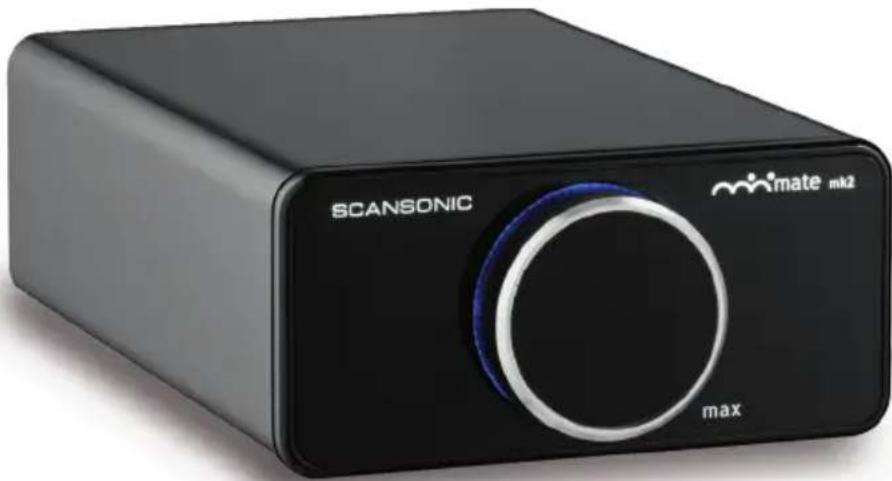
Black Scansonic device with max knob and brand logo (no readable text beyond branding)UK User Manual
DE Bedienungsanleitung
DK Brugervejledning
FR Guide d'instructions
IT Manuale di istruzioni
FI Käyttöohje
S Bruksanvisning
Owner's manual
Introduction
Thank you for choosing A200, we hope our product will bring you many years of enjoyment.
Please read this manual fully before unpacking and installing the product.
Carton contents
During production and packing we have carefully checked and inspected this amplifier.
After unpacking please check for any damage from transport. We recommend that you keep the original cartonbox and packing material for any future shipping.
In the cartonbox you will find:
1 Input cable, RCA phono type, stereo
1 Input cable 3.5mm jack type, stereo
1 Mains cable
A200 installation
The amplifier requires connection to the mains power supply, so for your safety it is important that you read this manual carefully.
A200 positioning
Place the amplifier on a solid and plane surface, avoid placement on carpets and other soft surfaces.
Secure that there is plenty of ventilation around the amplifier, minimum 4" (100mm) free space behind and above the amplifier.
Do not cover the ventilation holes on the backside of the amplifier.
Connecting the A200
First switch off all equipment when connecting your A200.
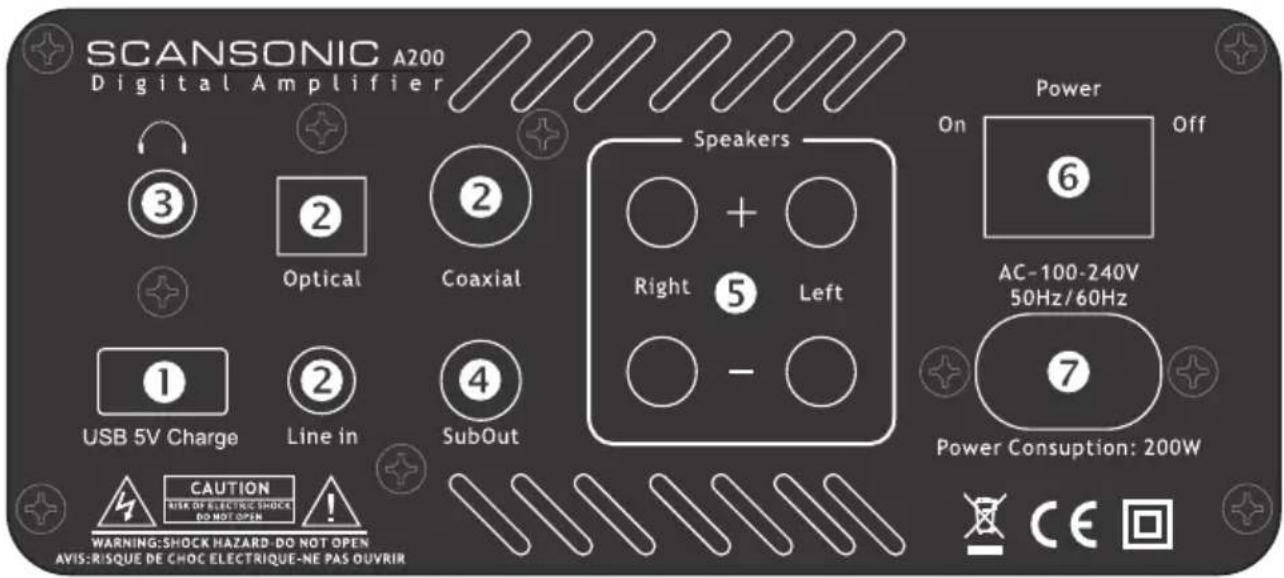
Connect the A200 line-in, optical or coaxial (2) with your TV, smart phone, dockingstation, labtop etc.
Only connect one source.
Do not use use more than one input (line-in, optical or coaxial) at the same time.
Connect the A200 SUBWOOFER LINE OUTPUT (4) to a active subwoofer using a mono RCA phono cable (optional).
Connect the A200 power cable (7) to the mains voltage, and switch the POWER ON/OFF button (6) to ON position.
Then turn the knob clockwise to turn on the A200. For standby mode turn the knob counter clockwise
until you see the red 'off' text on the frontpanel of your minimate.
The 5VDC CHARGE input (1) allow you to charge your iPod, iPhone and other USB powered products through the USB port – please note that the port is only for charging, and not for transmitting of data.
Connecting the A200 to you loudspeakers
First switch off the A200 on the POWER ON/OFF (6) button on the rearpanel when connecting the A200 to your loudspeakers.
The binding posts on the output terminals (5) accepts wire up to ∅ 4mm or cables with bananaplugs.
Make sure that positive terminal binding posts on the A200 (marked + and coloured red) are connected to the positive output terminal binding posts on the loudspeaker and that the negative terminals on the A200 (marked – and coloured black) are connected to the negative output terminal on the loudspeakers.
Operating the A200
The A200 is very easy to operate – after connection of input source and loudspeakers switch on the A200 on the POWER ON/OFF (6) button on the rearpanel and turn the VOLUME knob on the front panel clockwise to switch ON the amplifier.
Adjust the volume by turning the VOLUME knob.
To switch OFF the A200 turn the VOLUME knob counter clockwise.
Care and cleaning
We don't recommend use of any solvents or cleaners on A200 lacquered cabinets, the cabinet surface usually only requires dusting or cleaning with a soft cloth (do not use water).
Disconnect the unit from the mains supply if taken out of use for a longer period.
Environmental information
The A200 comply with international directives on the Restriction of Hazardous Substances (RoHS) in electrical and electronic equipment and the disposal of Waste Electrical and Electronic Equipment (WEEE) - the crossed bin symbol indicates compliance and that the products must be appropriately recycled or processed in accordance with these directives.
text_image
SCANSONIC A200 Digital Amplifier Speakers 3 Optical Coaxial Right 5 Left - USB 5V Charge Line in SubOut CAUTION RISK OF ELECTRIC SHOCK DO NOT OPEN WARNING:SHOCK HAZARD-DO NOT OPEN AVIS:RIQUE DE CHOC ELECTRIQUE-NE PAS OUVRIR Power On 6 AC-100-240V 50Hz/60Hz 7 Power Consuption: 200W CETroubleshooting
Basic troubleshooting
If the red 'off' indicator lamp does not light up, check...
• that the power cord is firmly plugged into the wall outlet
• that the POWER switch on the rear panel is ON
• that the mains voltage is correct and matching the amplifier
If no sound, check...
- that the Minimate™ is turned on (blue glow around knob)
• that the VOLUME control on the front panel is not all the way down
• that the line in, optical or coaxial input cable is firmly plugged in
• that the loudspeaker cables has been connected properly
If sound is distorted, check...
• that speaker cables are not contacting each other
• that volume is too high
• that input cables are not damaged
- that speakers are not damaged – try switch left and right speaker
Important safety instructions
CAUTION, read this first
READ, FOLLOW, HEED, AND KEEP ALL INSTRUCTIONS AND WARNINGS.
DO NOT OPERATE NEAR ANY HEAT SOURCE.
DO NOT BLOCK ANY VENTILATION OPENINGS ON THIS APPARATUS.
FOR PROPER OPERATION, THIS UNIT REQUIRES MINIMUM 4" (100mm) OF WELL VENTILATED SPACE AROUND HEATSINKS AND OTHER AIR FLOW PROVISIONS IN THE CABINET.
DO NOT USE THIS APPARATUS NEAR SPLASHING, FALLING, SPRAYING, OR STANDING LIQUIDS.
CLEAN ONLY WITH LINT-FREE DAMP CLOTH AND DO NOT USE CLEANING AGENTS.
ONLY CONNECT POWER CORD TO A POLARIZED, SAFETY GROUNDED OUTLET WIRED TO CURRENT ELECTRICAL CODES AND COMPATIBLE WITH VOLTAGE, POWER, AND FREQUENCY REQUIREMENTS STATED ON THE REAR PANEL OF THE APPARATUS.
PROTECT THE POWER CORD FROM DAMAGE DUE TO BEING WALKED ON, PINCHED, OR STRAINED.
UNPLUG THE APPARATUS DURING LIGHTNING STORMS OR WHEN UNUSED FOR LONG PERIODS OF TIME.
ONLY USE ATTACHMENTS AND ACCESSORIES SPECIFIED BY THE MANUFACTURER FOR SAFE OPERATION AND TO AVOID INJURY.
WARNING: TO REDUCE THE RISK OF ELECTRIC SHOCK OR FIRE.
DO NOT EXPOSE THIS UNIT TO RAIN OR MOISTURE.
SERVICE MUST BE PERFORMED BY QUALIFIED PERSONNEL.

CAUTION
RISK OF ELECTRIC SHOCK DO NOT OPEN


The lightning flash with arrowhead symbol within an equilateral triangle, is intended to alert the user to the presence of uninsulated "dangerous voltage" within the products enclosure that may be of sufficient magnitude to constitute a risk of electric shock to persons.

The exclamation point within an equilateral triangle is intended to alert the user to the presence of important operating and maintenance (servicing) instructions in the literature accompanying the product.
Limited Warranty
Dear Customer,
This product has been designed and manufactured to the highest quality standards, however if something goes wrong with this product, Scansonic and the country distributor warrants free replacement parts or repair by the official Scansonic distributor.
This limited warranty is valid for the original owner for a period of two years from the date of purchase, it is not transferable.
What is covered by the limited warranty:
- The limited warranty covers all production and material defects of the product, except for the damages slated below.
What is not covered by the limited warranty:
• Damages caused by packing and transport.
• Defects caused by accidents, misuse, normal wear and tear, mis-maintenance, voltage variation and overloading.
- Damages caused by incorrect installation or operation.
- Damages caused by modification or repair by a nonauthorised service centre and use of non-original spare parts.
- Other damages due to conditions beyond the supplier's control such as fire, rain, stroke of lightning, war and other force majeure events.
How to claim parts or repair under warranty:
To have your product serviced under warranty, you must contact the dealer from where you bought the product.
You will need to produce this warranty booklet completed and stamped by your dealer on the date of purchase. Alternatively, you will need the original sales invoice or other proof of ownership and date of purchase.
The supplier is liable only to repair or replace defective parts or products and the supplier is not responsible for indirect losses or damages arising from the use of the product.
Transportation costs for servicing are not covered by the warranty.
A service repair or replacement cannot exceed the value of the product under warranty, in no event shall the supplier be responsible or liable for special, incidental, consequential or indirect damages.
Dealer name and stamp: Date of purchase:
natural_image
Black Scansonic device with max knob and brand logo (no readable text beyond branding)natural_image
Black Scansonic device with max knob and brand logo (no readable text beyond branding)DK Brugervejledning
Brugermanual
Introduktion
BESKYT STR∅MKABLET MOD SKADE SOM F∅LGE AF AT BLIVE TRÅDT PÅ, KLEMT ELLER BELASTET.
TAG STIKKET UD UNDER TORDENVEJR ELLER HVIS ENHEDEN IKKE BRUGES I LÄNGERE TID.
BRUG KUN UDSTYR OG TILBEH∅R GODKENDT AF PRODUCENTEN, FOR SIKKER ANVENDELSE OG FOR AT UNDGÅ SKADER.
ADVARSEL: FOR AT REDUCERE RISIKOEN FOR ELEKTRISK ST∅D ELLER BRAND. UDSÆT IKKE DENNE ENHED FOR REGN ELLER FUGT.
REPARATION SKAL UDF∅RES AF KVALIFICERET PERSONALE.

text_image
FORSIGTIG RISIKO FOR ELEKTRISK STÖD MÅ IKKE ÅBNES
natural_image
Black Scansonic device with max knob and brand logo (no readable text beyond branding)natural_image
Black Scansonic device with max knob and brand logo (no readable text beyond branding)natural_image
Black Scansonic device with max knob and brand logo (no readable text beyond branding)FI Käyttöohje
Käyttöopas
Johdanto
natural_image
Black Scansonic device with max knob and brand logo (no readable text beyond branding)S Bruksanvisning