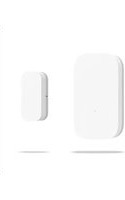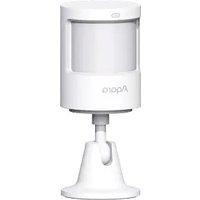
Motion Sensor P1 - Smart Home Aqara - Free user manual and instructions
Find the device manual for free Motion Sensor P1 Aqara in PDF.


User questions about Motion Sensor P1 Aqara
0 question about this device. Answer the ones you know or ask your own.
Ask a new question about this device
Download the instructions for your Smart Home in PDF format for free! Find your manual Motion Sensor P1 - Aqara and take your electronic device back in hand. On this page are published all the documents necessary for the use of your device. Motion Sensor P1 by Aqara.
USER MANUAL Motion Sensor P1 Aqara
Motion Sensor P1 detects body motion and the state of ambient light.
If there are any people moving or any change in the ambient light state in the areas under detection, the motion sensor will send notice to the Aqara Home app through the connected Aqara Zigbee 3.0 Hub or link to other devices.
* An Aqara Zigbee 3.0 Hub or device with the function of Zigbee 3.0 Hub is required for use.
* If using with Apple HomeKit, an Apple Home Hub is required. Please visit www.aqara.com/support for more details.
text_image
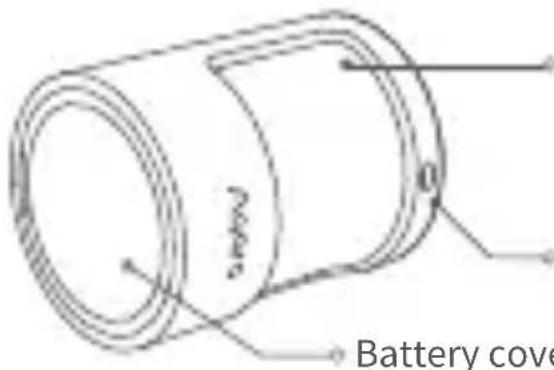
Battery Battery coverLens (with red/blue dual-color indicator light inside)
Light detection window
Battery cover

natural_image
Simple line drawing of a cylindrical object with a marked point O (no text or symbols)Reset button
Long press 5s: Reset/Pairing mode Click: Verification of effective communication distance/device searching
Quick Setup
-
Before activating the accessory, please make sure you have the Aqara Home app downloaded and an Aqara Zigbee 3.0 hub installed.
-
Remove the insulating pull tab.
Pull the tab out from under the battery contact to the direction of the arrow to activate the product.
-
Please open the app, tap “Home” and then tap “+” in the top right corner to enter the “Add Device (Accessory)” page. Select “Motion Sensor P1” and add it according to instructions in the Aqara Home app.
-
Please see www.aqara.com/support for additional information.
*If adding fails, please move the product closer to the hub and try again.
Installation and Usage
Please confirm that communication between the motion sensor and the Aqara Zigbee 3.0 Hub works normally, and then install and fix it in position.
Installation Instructions:
- Please do not install on tile, glass, marble, or other smooth and easy-to-moisten objects to avoid the sticker from loosening.
- Please do not install on the surface of a lighting tube or other high-temperature and heating objects to avoid the sticker from loosening.
- Please do not install on the surface of wall coverings and other rough and uneven objects to avoid the sticker from loosening.
- Please do not face it against electrical appliances and other heating sources to prevent infrared jamming from causing a false trigger.
text_image
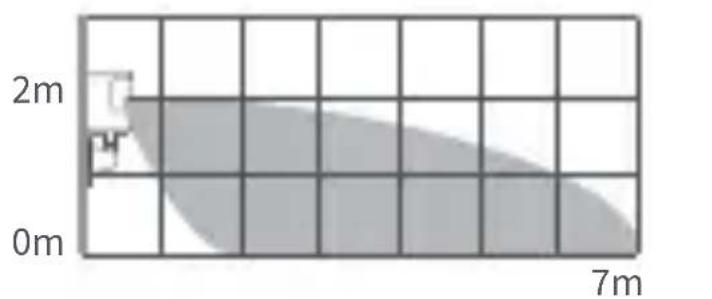
2m 0m 7mEffective detection area: Lateral view
text_image
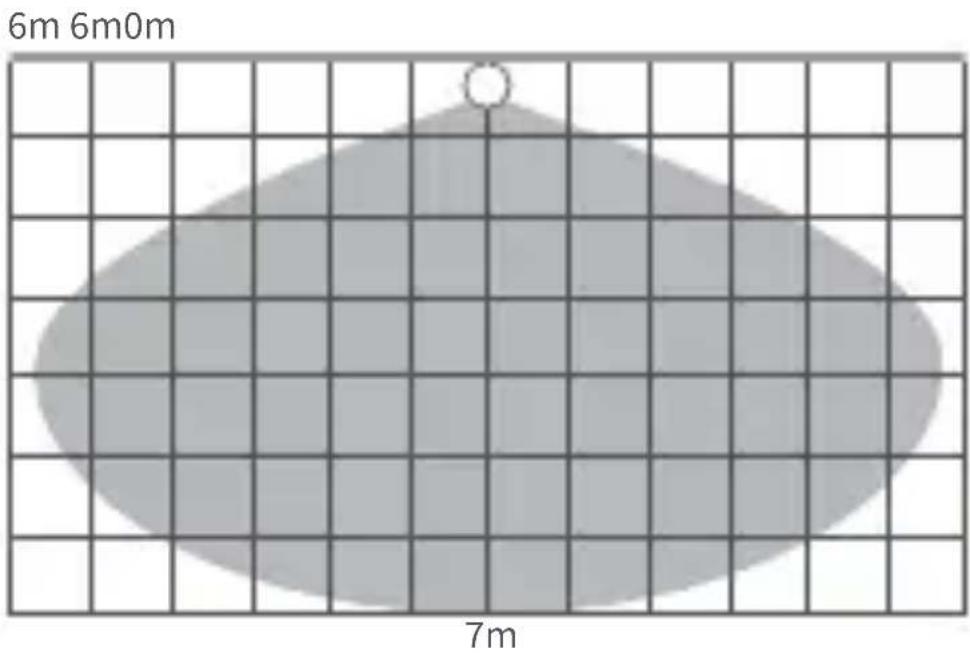
6m 6m0m 7mEffective detection area: Top view
*Recommended installation height is 1.2-2 m. The detection scope gets smaller if it is lower than 1.2 m. There will be a blind zone at the bottom of the motion sensor if it is installed higher than 2 m.
Direct Installation
-
Choose an appropriate installation position and make sure the installation surface is clean and flat.
-
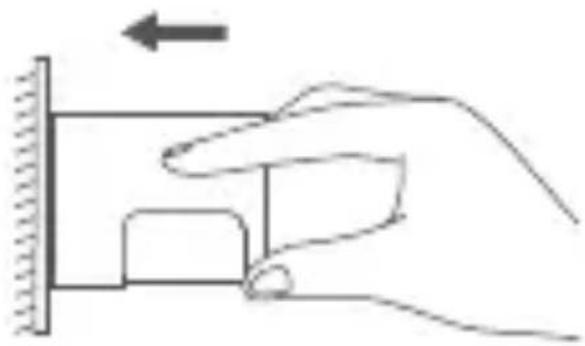
Put the sticker on the bottom of the battery cover, determine the detection direction, stick it to the desired installation position, and press hard and evenly for 30 s to make sure it sticks firmly.
natural_image
Hand holding a mechanical component with an arrow indicating upward motion (no text or symbols)Installation with Holder
-
Choose an appropriate installation position and make sure installation surface is clean and flat.
-
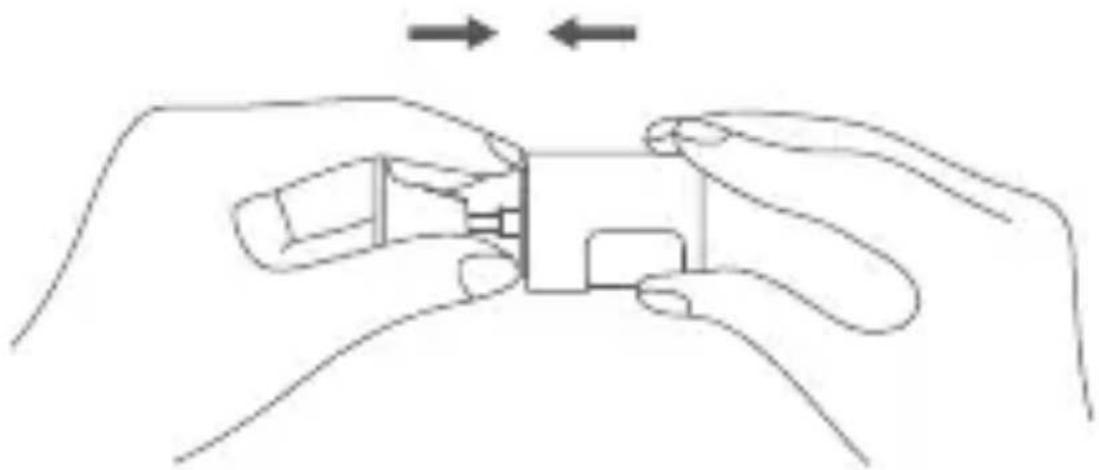
Stick the sensor to the installation pedestal, and press hard and evenly for 30 s to make sure it sticks firmly.
natural_image
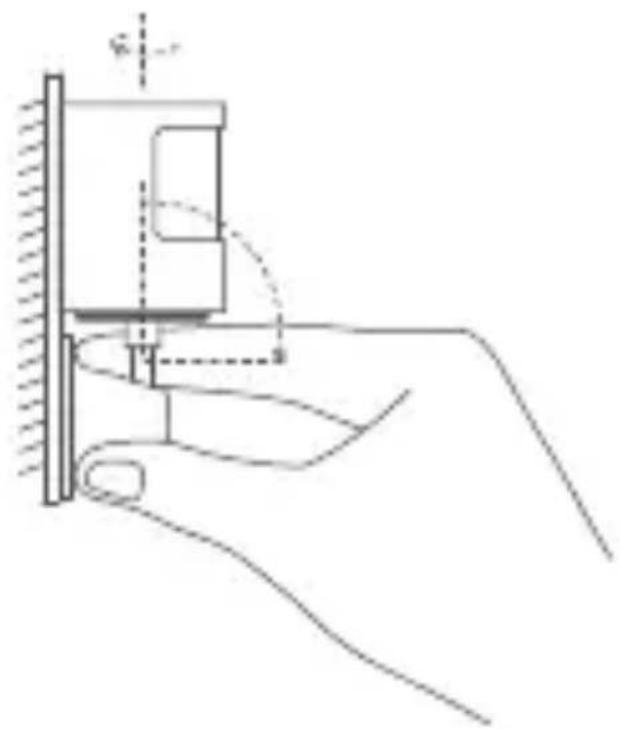
Line drawing of two hands assembling a small electronic component (no text or symbols)- Stick holder pedestal in the required area, and press hard and evenly for 30 s to make sure it sticks firmly. In the case of installing on a wall surface, it is recommended that the holder gap faces upward to facilitate adjusting detection direction.
natural_image
Diagram of a hand holding a mechanical component with a tool, showing alignment and adjustment (no text or symbols)Battery Replacement
- Take off the battery cover from its gap with screw driver, and stretch the screw driver into battery compartment lever opening and take off the battery compartment.
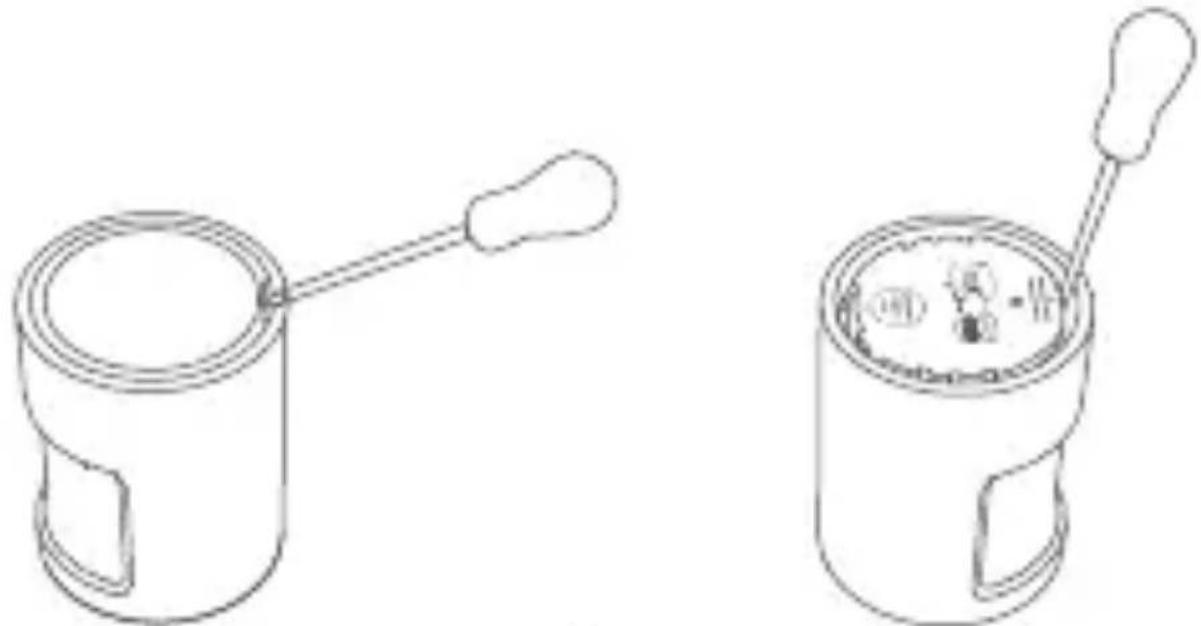
natural_image
Two line drawings of mechanical components with no visible text or symbols- Install two brand-new CR2450 button batteries into the battery compartment, with one firmly sticking the compartment top on the polar front and the other firmly sticking to the compartment bottom on the polar front.
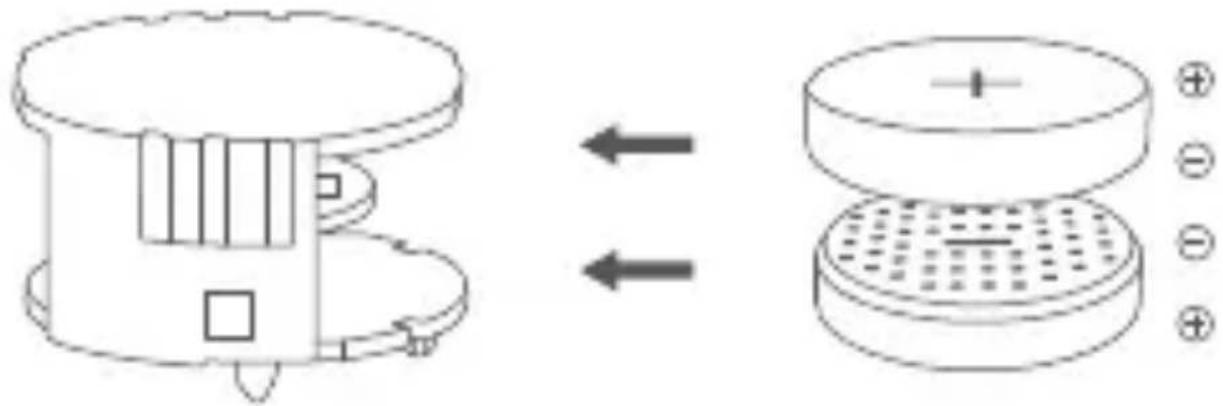
text_image
Diagram showing a device with internal components before and after charge transfer, illustrating the process from external to internal state.- Align to and install the battery compartment based on arrow directions, and then put on the battery cover.
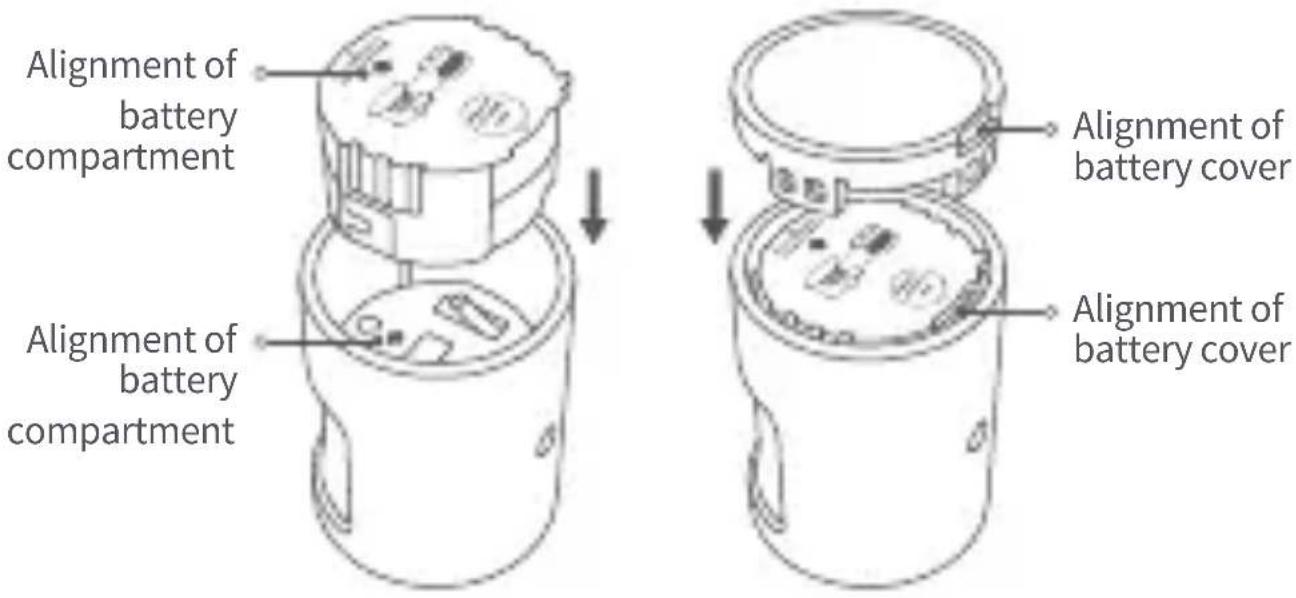
text_image
Alignment of battery compartment Alignment of battery compartment Alignment of battery cover Alignment of battery coverProduct Specifications
Model: MS-S02
Battery: CR2450
Wireless Protocols: Zigbee 3.0
Dimensions: 33.1×33.1×41.6 mm
Operating Temperature: -10^ 55^ ( 14^ 131^ )
Operating Humidity: 0 \~ 95%RH, no condensation
Zigbee Operation Frequency: 2405-2480 MHz
Zigbee Maximum Output Power ≤ 13 dBm
What is in the Box: Motion Sensor P1 × 1, Holder × 1, Sticker × 1, User Manual × 1
Online Customer Service: www.aqara.com/support
Manufacturer: Lumi United Technology Co., Ltd.
Address: Room 801-804, Building 1, Chongwen Park,
Nanshan iPark, No. 3370, Liuxian Avenue, Fuguang
Community, Taoyuan Residential District, Nanshan District,
Shenzhen, China.
Warnings
-
This product is not a toy, please keep children away from this product.
-
This product is designed for indoor use only. Do NOT use in humid environments or outdoors.
-
Beware of moisture, do NOT spill water or other liquids onto the product.
- Do not place this product near a heat source.
- Do not attempt to repair the product by yourself. All repairs should be performed by authorized personnel.
- This product is designed only for improving the convenience of household life, and for status notifications. If the user violates the product instructions and this warning, the manufacturer is not responsible for any risks and property losses caused thereby.
Under normal use of condition, this equipment should be kept a separation distance of at least 20cm between the antenna and the body of the user.
CAUTION
- Risk of explosion if the battery is replaced by an incorrect type.
- Dispose of used batteries according to the instructions.
- Do not ingest battery, Chemical Burn Hazard.
-
This product contains a coin / button cell battery. If the coin / button cell battery is swallowed, it can cause severe internal burns in just 2 hours and can lead to death.
-
Keep new and used batteries away from children.
- If the battery compartment does not close securely, stop using the product and keep it away from children.
- If you think batteries might have been swallowed or placed inside any part of the body, seek immediate medical attention.
- Disposal of a battery into fire or a hot oven, or mechanically crushing or cutting of a battery, that can result in an explosion.
- Leaving a battery in an extremely high temperature surrounding environment that can result in an explosion or the leakage of flammable liquid or gas
10.A battery subjected to extremely low air pressure that may result in an explosion or the leakage of flammable liquid or gas. - Disposal of a battery into fire or a hot oven, or mechanically crushing or cutting of a battery, that can result in an explosion.
- Leaving a battery in an extremely high temperature surrounding environment that can result in an explosion or the leakage of flammable liquid or gas.
13.A battery subjected to extremely low air pressure that may result in an explosion or the leakage of flammable
liquid or gas.
- The equipment is only suitable for mounting at heights ≤ 2 m.

EU Declaration of Conformity
Hereby, [Lumi United Technology Co., Ltd] declares that the radio equipment type [Motion Sensor P1,MS-S02] is in compliance with Directive 2014/53/EU. The full text of the EU declaration of conformity is available at the following internet address: https://www.aqara.com/DoC/

UK Declaration of Conformity
Hereby, [Lumi United Technology Co., Ltd]
declares that the radio equipment type [Motion Sensor P1,MS-S02] is in compliance with Directive 2017 (SI 2017 No. 1206, as amended by SI 2019 No. 696).
The full text of the UK declaration of conformity is available at the following internet address: http://www.aqara.com/DoC/.
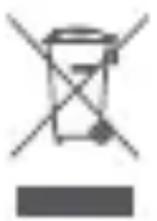
WEEE Disposal and Recycling Information
All products bearing this symbol are waste electrical and electronic equipment (WEEE as in
directive 2012/19/EU) which should not be mixed with unsorted household waste. Instead, you should protect human health and the environment by handing over your
waste equipment to a designated collection point for the recycling of waste electrical and electronic equipment, appointed by the government or local authorities. Correct disposal and recycling will help prevent potential negative consequences to the environment and human health.
Please contact the installer or local authorities for more information about the location as well as terms and conditions of such collection points.
FCC ID:2AKIT-MSS02
Federal Communications Commission (FCC) compliance statement:
- This device complies with part 15 of the FCC Rules.
Operation is subject to the following two conditions:
(1) This device may not cause harmful interference, and
(2) this device must accept any interference received,
including interference that may cause undesired operation.
- Changes or modifications not expressly approved by the party responsible for compliance could void the user's authority to operate the equipment.
Note: This equipment has been tested and found to comply with the limits for a Class B digital device, pursuant to part 15 of the FCC Rules. These limits are designed to provide reasonable protection against harmful interference in a
residential installation. This equipment generates, uses and can radiate radio frequency energy and, if not installed and used in accordance with the instructions, may cause harmful interference to radio communications. However, there is no guarantee that interference will not occur in a particular installation. If this equipment does cause harmful interference to radio or television reception, which can be determined by turning the equipment off and on, the user is encouraged to try to correct the interference by one or more of the following measures:
—Reorient or relocate the receiving antenna.
—Increase the separation between the equipment and receiver.
—Connect the equipment into an outlet on a circuit different from that to which the receiver is connected.
—Consult the dealer or an experienced radio/TV technician for help.
RF Exposure statement:
This equipment complies with FCC radiation exposure limits set forth for an uncontrolled environment. This equipment should be installed and operated with minimum distance of 20 cm between the radiator and your body. This transmitter must not be co-located or operating in conjunction with any other antenna or transmitter.
IC:22635-MSS02
IC NOTICE TO CANADIAN USERS
This device contains licence-exempt transmitter(s)/receiver(s) that comply with Innovation, Science and Economic Development Canada's licence-exempt RSS(s). Operation is subject to the following two conditions:
(1) This device may not cause interference.
(2) This device must accept any interference, including interference that may cause undesired operation of the device. This Class B digital apparatus complies with Canadian ICES - 003.
This device complies with RSS - 247 of Industry Canada. Operation is subject to the condition that this device does not cause harmful interference.
This equipment complies with IC radiation exposure limits set forth for an uncontrolled environment. This equipment should be installed and operated with minimum distance of 20 cm between the radiator and your body. This transmitter must not be co-located or operating in conjunction with any other antenna or transmitter.
Scan to get the Zigbee 3.0 Install Code on the last page of the manual.
* Please read this manual carefully and keep it in a safe place.
* If necessary, the contents of this manual will be modified or adjusted without special notice.

zigbee
certified
product
Produktbeschreibung
natural_image
Simple line drawing of a cylindrical object with a small circular feature and an arrow pointing to it (no text or symbols)text_image
6m 6m0m 7mnatural_image
Hand pressing a block on a wall with an arrow indicating left motion (no text or symbols)natural_image
Line drawing of two hands holding a small object, with arrows indicating movement or force direction (no text or symbols)natural_image
Line drawing of a hand holding a mechanical component with a tool, no text or symbols presentnatural_image
Two line drawings of mechanical components with no visible text or symbolstext_image
Diagram showing a device with internal components before and after transformation, with polarity indicators on the right panel.Adresse: Room 801-804, Building 1, Chongwen Park,
Nanshan iPark, No. 3370, Liuxian Avenue, Fuguang
Community, Taoyuan Residential District, Nanshan District,
Shenzhen, China.
Warnhinweise
natural_image
Simple line drawing of a cylindrical object with a small circular feature and an arrow pointing to it (no text or symbols)text_image
6m 6m0m 7mnatural_image
Hand pressing a block on a wall with an arrow indicating left motion (no text or symbols)Installation du support
natural_image
Line drawing of a hand holding a small electronic device with an arrow indicating rotation (no text or symbols)natural_image
Line drawing of a hand holding a mechanical component with a tool, no text or symbols presentnatural_image
Two line drawings of a cylindrical device with two handles, one open and one with a handle (no text or symbols)text_image
Diagram showing a device with internal components before and after transformation, with labeled parts and directional arrows.Dimensions: 33.1×33.1×41.6 mm
Fabricant: Lumi United Technology Co., Ltd.
Adresse: Room 801-804, Building 1, Chongwen Park,
Nanshan iPark, No. 3370, Liuxian Avenue, Fuguang
Community, Taoyuan Residential District, Nanshan District,
Shenzhen, China.
Avertissements
WEEE Disposal and Recycling Information
natural_image
Simple line drawing of a cylindrical object with a labeled point O and an arrow pointing to it (no text or symbols beyond the label)Tecla de reinicio
Pulsar prolongadamente durante 5 s:
text_image
6m 6m0m 7mnatural_image
Hand holding a mechanical component with an arrow indicating upward motion (no text or symbols)natural_image
Line drawing of two hands holding a small electronic component, with no visible text or symbolsnatural_image
Hand holding a mechanical component with a tool, no visible text or symbolsnatural_image
Two line drawings of a hand-painted cylindrical device with a bulb and handle, shown from different angles (no text or symbols)text_image
Diagram showing a device with internal components before and after charge transfer, illustrating the process from external to internal state.natural_image
Diagram showing two views of a cylindrical device with internal components and labeled parts, no text or symbols present.Nanshan iPark, No. 3370, Liuxian Avenue, Fuguang
Community, Taoyuan Residential District, Nanshan District,
Shenzhen, China.
Advertencias
text_image
Paprio Coperchio dnatural_image
Simple line drawing of a cylindrical object with a small circular feature and an arrow pointing to it (no text or symbols)text_image
6m 6m0m 7mnatural_image
Hand pressing a button on a wall, with an arrow indicating left motion (no text or symbols)natural_image
Line drawing of a hand holding a small electronic component, with no visible text or symbolsnatural_image
Line drawing of a hand holding a mechanical component with a dashed arc indicating motion (no text or symbols)natural_image
Two line drawings of a hand-painted cylindrical device with a handle and a spool, showing internal components (no text or symbols)natural_image
Diagram showing a device with internal components and a cross-sectional view of a multi-tiered container (no text or symbols)Nanshan iPark, No. 3370, Liuxian Avenue, Fuguang
Community, Taoyuan Residential District, Nanshan District,
Shenzhen, China.
Avvertenze!
natural_image
Simple line drawing of a cylindrical object with a labeled point O and an arrow pointing to it (no text or symbols beyond the label)Кнопка сброса
text_image
6m 6m0m 7mnatural_image
Hand pressing a block on a wall with an arrow indicating left motion (no text or symbols)natural_image
Line drawing of two hands holding a small electronic component, with no visible text or symbolsnatural_image
Line drawing of a hand holding a mechanical component with a tool, no text or symbols presentЗамена батареек
natural_image
Two line drawings of a mechanical device with a handle and internal components, no text or symbols present.text_image
Diagram showing a device with internal components before and after transformation, with polarity indicators on the right panel.Адрес: Room 801-804, Building 1, Chongwen Park, Nanshan iPark, No. 3370, Liuxian Avenue, Fuguang Community,
Taoyuan Residential District, Nanshan District, Shenzhen, China.
Сделано в Китае
Внимание!
natural_image
Simple line drawing of a cylindrical object with a small circular mark and an arrow pointing to it (no text or symbols)리셋 버튼
5초간 길게 누르기:연결/초기화
text_image
6m 6m0m 7m유효 감지 영역:평면 View
natural_image
Hand pressing a button on a wall, with an arrow indicating left motion (no text or symbols)설치 옵션 2
natural_image
Line drawing of a hand holding a small electronic component, with no visible text or symbolsnatural_image
Diagram of a hand holding a mechanical device with a tool, showing alignment and adjustment (no text or symbols)배터리 교체 방법
natural_image
Two line drawings of a cylindrical device with a handle and a dial, showing internal components (no text or symbols)text_image
Diagram showing a device with internal components before and after transformation, with polarity indicators on the right panel.주소:Room 801-804, Building 1, Chongwen Park, Nanshan iPark, No. 3370, Liuxian Avenue, Fuguang Community, Taoyuan Residential District, Nanshan District, Shenzhen, China.
경고
text_image
zigbee certified product產品介紹
natural_image
Simple line drawing of a cylindrical object with a small circular feature and an arrow pointing to it (no text or symbols)復位鍵
長按5s: 重置/入網
按一下:有效通訊距離驗證/設備查找功能
快速設定
text_image
6m 6m0m 7m有效探測區域:頂視圖
natural_image
Hand pressing a button on a wall, with an arrow indicating left motion (no text or symbols)支架安裝
natural_image
Line drawing of a hand holding a small electronic component, with no visible text or symbolsnatural_image
Line drawing of a hand holding a mechanical component with a spring and shaft (no text or symbols)更換電池
natural_image
Two line drawings of a hand-painted cylindrical device with a handle, showing internal components (no text or symbols)natural_image
Diagram showing a device with internal components and a cross-sectional view of a circular component (no text or symbols)Scan to get the Zigbee 3.0 Install Code
* Please read this manual carefully and keep it in a safe place.
* If necessary, the contents of this manual will be modified or adjusted without special notice.