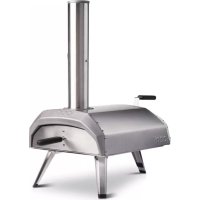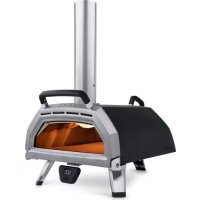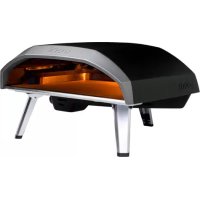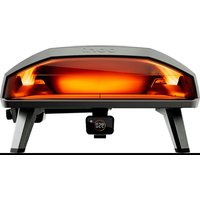
Koda 2 Max - Pizza oven OONI - Free user manual and instructions
Find the device manual for free Koda 2 Max OONI in PDF.


User questions about Koda 2 Max OONI
0 question about this device. Answer the ones you know or ask your own.
Ask a new question about this device
Download the instructions for your Pizza oven in PDF format for free! Find your manual Koda 2 Max - OONI and take your electronic device back in hand. On this page are published all the documents necessary for the use of your device. Koda 2 Max by OONI.
USER MANUAL Koda 2 Max OONI
text_image
ooni Digital Temperature Hub Manual Bluetooth®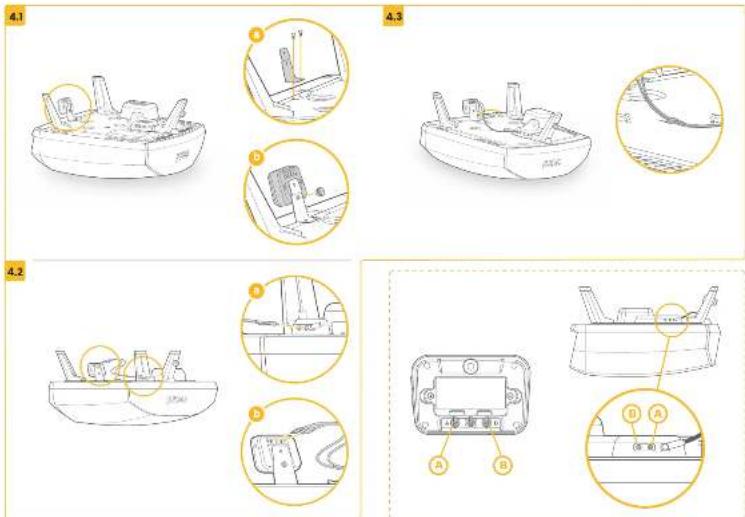
text_image
4.1 4.3 4.2 A B C D A B D A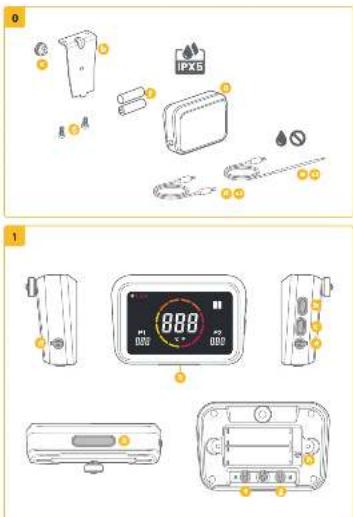
text_image
Diagram showing two views of household air conditioner unit with labeled parts and a digital display showing 888 mp.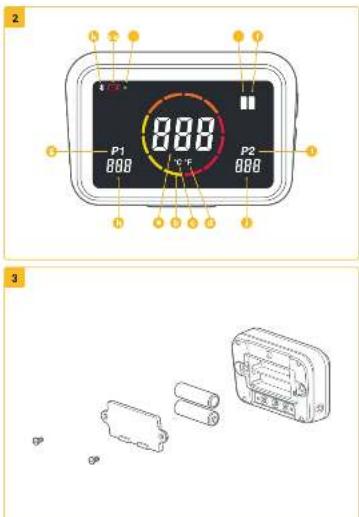
text_image
2 P1 888 888 0℃ P2 888 3All telomerees in "Doral" in the commercial industry. Committed and/or selected subsidiaries and holding companies as stated in section 153 of the Company as Act 2018.
COM DOES NOT ACCEPT ANY RESPONSIBILITY, LEGAL OR OTHERWISE, FOR THE INCENTAL OR
CONSOLVENT A DAMAGE TO PROPERTY OR PERSONS RESULTING FROM THE USE OF YOUR OWN
WITH WHICH LOGISTICS NOT COMPLETE WITH ANY OF THE PROVISION OF THIS MANUAL.
CONSHUT IS NO EVENT AT END FOR ANY SPECIAL INJECT CONSEQUENTE OR OTHER
EXAMIES OF ANY NAME WHASSEER IN EXCESS OF THE ORIGINAL SALE PRICE OF YOUR DON OVER
Some time or duration do not reach the stock or limit of shareholder
consecuical damage, therefore to such limitations or exclusions may not apply to you.
Коду-Санна Субл. 18-реполня Коду-Санна Субл.
on the user is
Company is the user to build a new, and will get to make an account. It is required to operate its party responsible for compliance could void the user's authority to operate the equipment.
The device contains a series-to-empt information [a] to secure [b], that comply with manufacturer, Science and Economic Development Company, approved 255(a) and 48 (at the 201
No. 6. Operation is subject to the following two conditions.
[1] this device may not cause interference.
(2) This device must accept any interference, including interference that may cause
In the case of the case.
L'Américité d'écrédu récempl de science contentions le présent opontel est commune, que C&P d'innovation, Sciences et Développement économique Canada civiloches.
под перотида телю конирю и д'єктах. Ворізя-стіон телі оцілення одів чаю конфіта з
Ji Chen
(1) Cappam's first part published the article.
(3) The report of the company's performance is not limited to the actual results of any judgment.
NOTE: this equipment has been available one (found to comp
device pursuant to Part II of the FOG Rules. These I'm is one designed to provide reasonable protection to contact the following: a residential transfer on. This is important as
proceed of equivalent 0 mm x 100 cm, or 10000 mm x 10000 mm x 10000 mm x 10000 mm x 10000 mm x 10000 mm x 10000 mm x 10000 mm x 10000 mm x 10000 mm x 10000 mm x 10000 mm x 10000 mm x 10
Alters instructions, may ensure harmful medications in media communications. There is no longer than hydrocarbidity or in particular instructions.
I have been given these on an award in advance to make or also receive
The recommendation by having the equipment all and on, the work is encouraged in (p) in none:
The information by the third critic for continuing investigation
• «Исторе» (в Europe)
- Connect the equipment into an outlet on a circuit different from
a connection
- Consult the dealer or an experienced radio TV technician for help
FECEC Radiation Exposure Statement
that_formula—will consider the A -C, in Conson matrix of the solution (this is, there is the every-numbered one element. This seen parallel should be outlined and interpolated with a mean
distance of 20cm between the red laser and your body.
this has similar must not be co-oculated or operating in conjunction with any other under no
Prescription d
Declaration is the sur exposée aux Équations.
Cet equipement del conelme e don'tes 30 de los 1015 Pasciolo, 30 m/s por lo Gancalo por la de la contrapertura non contratos. En equipement del 60 m/s por el 2015 a la
Historie minimum de 30 cm entre l'habitation en vinte corps.
Cvt. In-stressi ne dsk pesa alve matele cu meme endral in clll s2 over une maire interne
cu en un la insallant.

natural_image
Solid dark gray image with no visible content, text, or symbols.
text_image
ooniSafety legal disclaimers 1
What's in the box 2
Set up and assembly 2
Troubleshooting 6
Assembly translations
| DA 9 | IL | 129 | |
| DE 17 | HR | 137 | |
| ES 25 | HU | 145 | |
| FI 33 | IS | 153 | |
| FR CA 41 | KR | 161 | |
| FR 49 | LT | 169 | |
| IT 57 | LVL 177 | ||
| SE 65 | PL | 185 | |
| NO 73 | PT | 193 | |
| NL 81 | RO 201 | ||
| SA | 89 | SK | 209 |
| BG 97 | SI 217 | ||
| CZ 105 | TR | 225 | |
| GR 113 | CN | 233 | |
| EE 121 |

WARNING
Read the instructions before using the Digital Temperature Hub and retain them for future reference.
Food probes and other accessible parts may be hot and sharp. Keep young children away.
Only use the Digital Temperature Hub as instructed by this manual.
To avoid damage, only mount the Digital Temperature Hub and route the cables in the locations instructed in this manual.
The food probes are suitable for use at temperatures of up to 842 °F (450 °C). Do not use at temperatures exceeding this or on open flames.
Do not modify the Digital Temperature Hub.

CAUTION
Hand wash and dry the food probes before first use.
The food probes are not dishwasher safe.
Do not use chemicals or abrasive detergents to clean the food probes.
Risk of explosion if the battery is replaced by an incorrect type.
The Digital Temperature Hub works with Ooni Food Probes; other accessories may be inaccurate, not work, or potentially cause damage.
Use the Digital Temperature Hub for accurate and immediate temperature measurements in Celsius (°C) or Fahrenheit (°F). Connect the food probes to get the perfect slow roast or seared steak, and connect to the Ooni app to monitor all of this without having to touch your oven.
0. What's in the box
a. Digital Temperature Hub
b. Mounting bracket
c. Thumb nut
d. Ambient temperature cable (x2)
e. Food probe (x2)
f. AA Batteries (x2)
g. Bracket screws
1. Buttons and inputs:
a. Power button
b. Temperature cycle button
c. Back-light button
d. Food probe input 1
e. Food probe input 2
f. Ambient temperature input A
g. Ambient temperature input B
h. Factory reset button
2. Screen
a. Main temperature display
b. Temperature ring
c. °C indicator
d. °F indicator
e. Left ambient Indicator
f. Right ambient Indicator
g. Food probe 1 Indicator
h. Food probe 1 display
i. Food probe 2 indicator
j. Food probe 2 display
k. Bluetooth status indicator
I. Low battery indicator
m. Eco mode indicator
3. Install batteries
Remove screws using a screwdriver and remove hatch. Insert 2 x AA batteries. Replace hatch and secure screws.
If you are storing the oven for more than a month, remove the batteries.
4. Set up and assembly
4.1 | Attaching Digital Temperature Hub
a. Using 2x bracket screws, attach the mounting bracket to the underside of the oven.
b. Attach the Digital Temperature Hub to the bracket using the thumb nut.
4.2 | Attaching the ambient temperature cables
a. Plug ambient temperature cable A into input A on the underside of the oven.
b. Plug the opposite end in to the corresponding input on the back of the Digital Temperature Hub.
c. Repeat for ambient temperature cable input B.
4.3 | Securing the thermocouple cables
Use the clip on the underside of the oven to keep the cables neat and prevent them from trailing.
5. Using the Digital Temperature Hub
5.1 | Download the Ooni app
Setting up your Digital Temperature Hub is simple, and the Ooni app will walk you through each step.
Scan this QR code to download or open the Ooni app. If you already have the Ooni app, be sure to update to the latest version.
Scan to download the Ooni app.
5.2 | Powering On/Off device
a. Turn on the device with a short press of the power button.
b. Turn off the device with a long press on the power button.
i Turn off your device when not in use to save battery. The device will automatically switch off after 45 minutes.
5.3 | Activating Bluetooth pairing
Open the Ooni app.
Press the temperature cycle button for 3 seconds until the Bluetooth status indicator starts flashing. Follow the instruction in the Ooni app to connect your device.
A successful connection will cause the Bluetooth status indicator to stop flashing and remain illuminated.
If the Bluetooth status indicator starts flashing quickly it means there is a problem with the connection. Try restarting the pairing process if the problem persists.
i If a connection is not made, the Bluetooth will turn off after a short period of time.
5.4 | Reading and cycling between ambient temperatures
Press the temperature cycle button to cycle between display options.
This represents the average ambient temperature of your oven. It is the recommended default setting.
The ambient temperature of the left side of the oven is displayed
The ambient temperature of the right side of the oven is displayed
5.5 | Read food probe
Check that the food probes are plugged into the correct inputs, and then the temperatures will appear on the display.
When using the food probes, ensure they are inserted into the thickest part of the meat, and make sure to avoid bones or fat.
i The part of the food probe that goes into the meat should not be exposed to temperatures above 480 °F (250 °C)
WARNING
Before and after use, clean the food probes with hot, soapy water, taking care not to submerge the wire in the water, and dry immediately.
Take care when handling the Food Probes as they are sharp.
Always wear heat resistant gloves if handling the Food Probes when they are hot.
Do not use the food probes at temperatures exceeding 842 °F (450 °C).
5.6 | Change unit of measurement
Use a short, single press of the power button to cycle between Celsius (C) and Fahrenheit (F).
5.7 | Eco Mode
Use a long press of the back-light button to cycle between full brightness and Eco mode. When in Eco mode a short press of any button will fully illuminate the display for a short period of time.
5.8 | Low battery warning
When the batteries are running out, the low battery warning will come on indicating you should change batteries at next available opportunity.
WARNING
Always ensure the oven and temperature hub are fully cool before replacing the batteries.
5.9 | High (Hi) or Low (Lo) Temperature
The Digital Temperature Hub is designed to read cooking temperatures between -22^ (-30^) and 999^ (550^) and food probe temperatures between 0^ (32^) and 100^ (212^) .
i If the temperatures are outside this range the relevant display will show either Hi or Lo.
6. Care and maintenance
Digital Temperature Hub: Wipe down with a damp cloth and dry immediately. Food probes: Before and after every use, clean with hot, soapy water, taking care not to submerge the wire in the water and dry immediately. Not dishwasher safe. Store your Digital Temperature Hub inside and for extended periods without use; remove the battery to prolong battery life and prevent damage.
Never submerge the Digital Temperature Hub, food probes or wiring in water.
Troubleshooting
| Issue Possible Cause Solution | ||
| Ambient temperature / food probe temperature is not showing on the display | 1. The connection could be dirty.2. The ambient temperature cable is not plugged into the oven.3. The probes / sensor may be connected to the wrong input.4. The probe may be damaged. | 1. Remove the probe / sensor from the Digital Temperature Hub and from the oven. Gently clean with a damp cloth. Allow to fully dry and re-insert into the device.2. Check the ambient temperature cable is plugged into the correct port on the oven. Try removing and re-installing even if it is.3. Check you have the correct ambient sensor and food probe plugged into the correct input.4. Try plugging the probe into the other input, if it works there may be a problem with the device, if it doesn't there may be a problem with probe. Contact Ooni support. |
| Ambient temperature sensor readings aren't accurate. | 1. The probes may be connected to the wrong input.2. The average or opposite ambient temperature is being displayed.3. The sensor in the oven could be dirty.4. The calibration settings of the device have been changed. | 1. Check you have the correct ambient sensor plugged into the correct input.2. Cycle through the individual temperature readings to ensure the desired reading is being displayed.3. Ensuring the oven is completely cold, carefully reach inside and gently clean the temperature sensor with a damp cloth.4. Use the factory reset button to return the device to its original calibration. |
| Display is faint or won't turn on at all. | 1. The battery is nearly or is already flat.2. The Digital Temperature Hub is in Eco mode. | 1. Ensuring the oven is completely cold follow the steps outlined in this manual to replace the batteries.2. A long press of the back-light button will return the product to full brightness. |
| Ambient temperature reading is high but my food isn't cooking properly. | Stone may not be warm enough. The stone will take longer to preheat than the oven's ambient temperature. | Give your stone more time to preheat. Use an Ooni Digital infrared Thermometer to get an accurate reading of stone temperature. |
| My Digital Temperature Hub will not connect to my device. | 1. Your device was not one of the most recent connections.2. Too far away for the device.3. Unknown reason. | 1. Follow the Bluetooth pairing steps to reconnect your device.2. Ensure you are within 10m (33ft) of the device with a clear line of sight.3. Try using the factory reset button to remove all existing Bluetooth connections then follow the steps to start again. |
| I have a problem that isn't listed here. | I've discovered a new problem! | Contact support. ooni.com |
This marking indicates that this product should not be disposed of with other household wastes throughout the EU and UK. To prevent possible harm to the environment or human health from uncontrolled waste disposal, recycle it responsibly to promote the sustainable reuse of material sources. To return your used device, please use the return and collection systems or contact the retailer where this product was purchased. They can take this product for environmentally safe recycling.
You must have a live internet connection in order for the Ooni app to work.
We recommend you update to the latest version of iOS and Android to operate the Ooni app.
Your mobile device must have Bluetooth wireless technology 4.0 support (Bluetooth® wireless technology Low Energy) in order to set up a connection with the appliance. Check your device specification for compatibility.
- BLE 2.4GHz
- 2.4GHz, 2.5mW
The Bluetooth ^® word mark and logos are registered trademarks owned by Bluetooth SIG, Inc. and any use of such marks by Ooni Limited is under license. Other trademarks and trade names are those of their respective owners.
ADVARSEL:
Scan for at downloade Ooni-appen.
5.9 | High (Hi) of Low (Lo) Temperature
Digital Temperature Hub-7
Digital Temperature Hub-ה, 70
Digital Temperature Hub ,N
תְרָה בַרִי, נְרָה
7112018.
• Software is useful.
הכלה.3
3. Instale as baterias
- BLE 2.4GHz
- 2.4GHz, 2.5mW