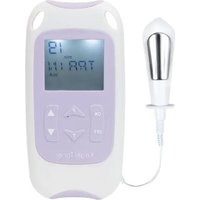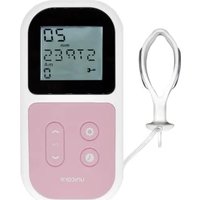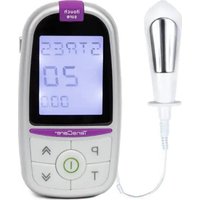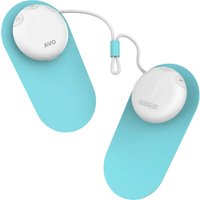
Ova 3 - Pain therapy device TensCare - Free user manual and instructions
Find the device manual for free Ova 3 TensCare in PDF.


User questions about Ova 3 TensCare
0 question about this device. Answer the ones you know or ask your own.
Ask a new question about this device
Download the instructions for your Pain therapy device in PDF format for free! Find your manual Ova 3 - TensCare and take your electronic device back in hand. On this page are published all the documents necessary for the use of your device. Ova 3 by TensCare.
USER MANUAL Ova 3 TensCare
natural_image
Diagram of a medical device with red arrows indicating movement or force, no visible text or symbols- Apply hydrogels to the electrodes.
- Aplique hidrogeles a los electrodos.
- Appliquer des hydrogels sur les électrodes.
- Tragen Sie Hydrogele auf die Elektroden auf.
- Applicare gli idrogel agli elettrodi.
text_image
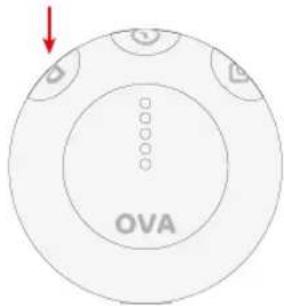
OVA- Select your desired programme by pressing the P button.
- Seleccione el programa deseado pulsando el botón P.
- Sélectionnez le programme de votre choix en appuyant sur le bouton P.
- Wählen Sie Ihr gewünschtes Programm, indem Sie die Taste P drücken.
- Selezionare il programma desiderato premendo il tasto P
natural_image
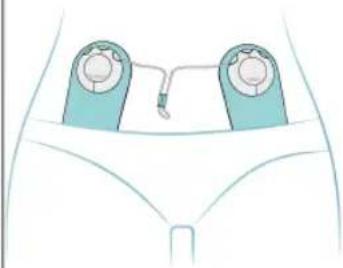
Illustration of a medical device with two circular components and a connecting rod, placed on a human torso (no text or symbols)- Place the electrodes in position.
- Coloque los electrodos en su posición.
- Placez les électrodes en position.
- Bringen Sie die Elektroden in Position.
- Posizionare gli elettrodi.
text_image
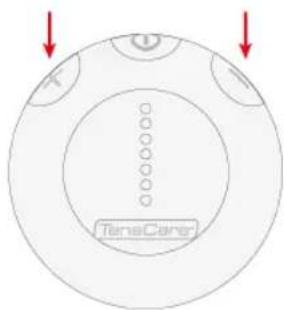
TeneCare- Regulate intensity with the + and - buttons.
- Regule la intensidad con los botones + y -.
- Réglez l'intensité à l'aide des boutons + et -.
- Regeln Sie die Intensität mit den Tasten + und -.
- Regolare l'intensità con i pulsanti + e -.
text_image
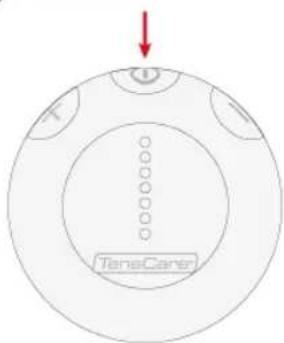
TanaCane- Hold the power button for 1 second.
- Mantén presionado el botón de encendido durante 1 segundo.
- Maintenez le bouton d'alimentation enfoncé pendant 1 seconde.
- Halten Sie die Ein-/Austaste 1 Sekunde lang gedrückt.
- Tieni premuto il pulsante di accensione per 1 secondo.
text_image
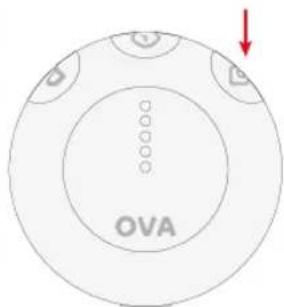
OVA- Activate heat mode by pressing the heat button.
- Active el modo calor pulsando el botón calor.
- Activez le mode chaleur en appuyant sur le bouton chaleur.
- Aktivieren Sie den Heizmodus, indem Sie die Heiztaste drücken.
- Attivare la modalità calore premendo il tasto calore.
Contents
| 1. | Introduction | 5 | |
| 2. | Intended | use | |
| 3. | Contents | ||
| 4. | Safety | guidelines | |
| 5. | Using Ova 3 | 10 | |
| 6. | Pain relief programmes | 20 | |
| 7. | Hydrogels | Advice | |
| 8. | Charging Ova 3 | 22 | |
| 9. | Cleaning | 25 | |
| 10. | Troubleshooting | 25 | |
| 11. | Accessories | 27 | |
| 12. | Warranty | 27 | |
| 13. | EMC | 29 | |
| 14. | Disposal of waste electrical and electronic products (WEEE) | 29 | |
| 15. | Technical specifications | 30 |
1. Introduction
The Ova 3 Menstrual Pain Relief device uses TENS technology to provide instant and lasting pain relief. Small and discreet, the device can be worn all day under clothing to provide safe and effective period pain relief whilst maintaining a normal, active lifestyle.
7
Ova 3 also combines soothing heat therapy alongside pain relief programmes. Heat therapy helps to improve blood circulation and relaxes muscles for soothing relief.
21
Clinical benefits of using the Ova 3 include:
Improvement in quality of life in relation to menstrual pain.
Pain reduction in pain associated with primary dysmenorrhoea.
2. Intended use
Ova 3 has been designed to be used in the home healthcare environment to treat symptoms of primary menstrual pain (dysmenorrhoea).
The Ova 3 may also help to relieve the pain of secondary menstrual pain due to conditions such as endometriosis, fibroids, or pelvic inflammatory disease.
Ova 3 is suitable for use by adults (18+) who can control the device and understand the instructions.
The device is suitable for use with children (12+) under supervision.
Do not use the device for any purpose other than this intended use.

Warning: If you are unsure of the cause of the pain, then you should seek medical advice to establish the pain and identify the correct treatment.
3. Contents
1x Pair of Ova 3 stimulators
2 x Electrodes
1x Ova 3 Hydrogel pack (pack of 2)
1x Micro-USB cable
1 x Storage case
1 x User manual

text_image
Diagram showing OVA medical device components including a medical device with ports and a separate view of the OVA device.4. Safety guidelines
Contraindications
Do not use if you have a pacemaker (or if you have a heart rhythm problem) or with any electronic medical devices. Using this unit with electronic medical devices may cause erroneous operation of the device. Stimulation in the direct vicinity of an implanted device may affect some models. Stimulation on the front of the neck can affect your heart rate. Very strong stimulation across the chest may cause an extra heartbeat.
Do not use if you are or may be pregnant. It is not known whether TENS may affect foetal development.
Do not use on the abdomen in the later stages of pregnancy. Stop using immediately if you experience unexpected contractions.
Warnings
Do NOT use when driving, operating machinery, or similar actions needing muscular control. Loose electrodes, or sudden changes in contact may cause brief involuntary muscle movements.
Do NOT use to mask or relieve undiagnosed pain. This may delay diagnosis of a progressive condition.
Do NOT use if you have, in the area being treated: active or suspected cancer or undiagnosed pain with a history of cancer. Stimulation directly through a confirmed or suspected malignancy should be avoided as it may stimulate growth and promote spread of cancer cells.
Do NOT use electrodes on the front of the neck. Stimulation on the front of the neck can affect your heart rate or cause contraction of the throat.
Do NOT use electrodes across the chest. Very strong stimulation across the chest may cause an extra heartbeat and/or rhythm disturbances to your heart, which could be lethal.
Do NOT use while simultaneously connected to high frequency surgical equipment as it may result in burns at the site of stimulator electrodes and possible damage to the stimulator.
Do NOT use in close proximity (e.g. 1 m) to a shortwave or microwave as this may produce instability in the stimulator output.
Do NOT use electrodes near the thorax as this may increase the risk of cardiac fibrillation.
Do not use the heat function if you cannot sense temperature.
Do not use the heat function on any muscle or joint which has swelling or oedema. Heat may worsen the pain and/or condition.
Do not use if you have poor sensation in the pelvic region. You may not be able to control the intensity of stimulation safely.
Do not use if you experience any adverse reactions from the device and consult a healthcare professional immediately.
! Cautions
Caution should be used if you have a bleeding disorder as stimulation may increase blood flow to the stimulated region.
Caution should be used if you have suspected or diagnosed epilepsy as electrical stimulation may affect seizure threshold.
Caution should be observed when using the device at the same time as being connected to monitoring equipment with body worn electrodes. It may interfere with the signals being monitored.
Caution should be used following recent surgical procedures. Stimulation may disrupt the healing process.
Not intended for use in an oxygen rich environment.
Not intended for use in conjunction with flammable anaesthetics or flammable agents.
The patient is an intended operator.
Do not service and maintain the device while in use.
Maintenance and all repairs should only be carried out by an authorized agency. The manufacturer will not be held responsible for the results of maintenance or repairs by unauthorized persons.
If necessary, we will provide circuit diagrams, component part lists or other information that will assist authorized service personnel to repair the device.
Do not permit use by children unable to understand the instructions or persons with cognitive disabilities, i.e.; Alzheimer's disease or dementia.
Keep away from children under 5 years of age. Long cable risk of strangulation in infants.
If the heat function feels too hot stop treatment immediately. You can continue to use TENS programmes without heat.
The output temperature may vary depending on the condition of your skin, age, environment of use etc.
Keep the device away from sunlight, as long-term exposure to sunlight may affect the rubber causing it to become less elastic and crack.
Temperature & Relative Humidity of storage: -25°C to +70°C, 0 to 93% R.H. Temperature & Relative Humidity of transportation: -25°C to +70°C, 0% to 93% R.H.
There are no serviceable user parts. Do not attempt to open or modify the TENS unit. This may affect the safe operation of the unit and will invalidate the warranty.

Note: There are no known side effect to TENS use and long-term TENS use is not harmful.

Note: The Ova 3 has no essential performance characteristics. Device failure will not cause acceptable clinical risk for the user.
5. Using Ova 3
Preparing for a session
Applying the hydrogels
For best results, wipe clean and dry the targeted area of the body.
Remove the hydrogels from their plastic bag.
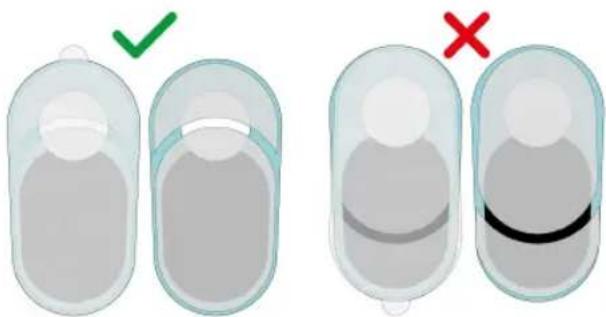
Remove the coloured plastic liners first and apply to the bottom face of the electrodes.

Note: Ensure to align the Hydrogel correctly before applying to the bottom face of the electrodes.
Leave the transparent plastic liners on the gels until you are ready to place the pads on the body.

Note: It is important the liners are removed in this order. Ensure to keep one of the liners to re-apply onto the gel your session is complete.
natural_image
Two identical medical or anatomical diagrams showing a cross-section with green checkmark and red X mark, no text or symbols present.Applying the electrodes
Remove the transparent plastic liners labelled 2 and apply the electrodes to the body.
We recommend placing the electrodes in one of three positions.
TENS stimulation will work differently depending on the location of your nerves therefore it is important to try all these positions to find what provides you with the most pain relief.
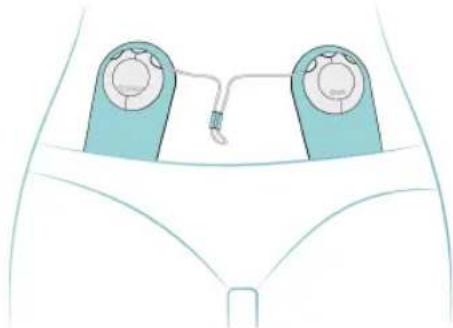
On the front, in a vertical format
natural_image
Diagram of a medical device with two identical devices and a connecting rod, placed on a human pelvis (no text or labels)In the vicinity of your groin, place the pads vertically, about 10cm (4 inches) apart.
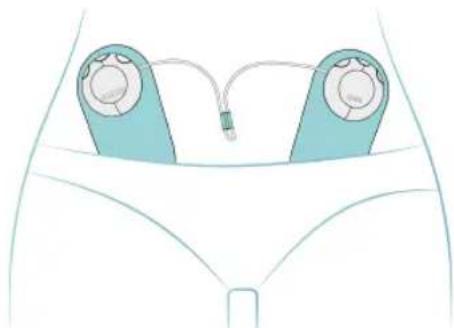
On the front, in a diagonal format
natural_image
Diagram of a medical device with two blue devices and a connector, enclosed in a white anatomical outline (no text or labels)In the vicinity of your groin, place the pads in a V-shape, narrowing to about 10cms (4 inches) apart at the lower end of the pads.
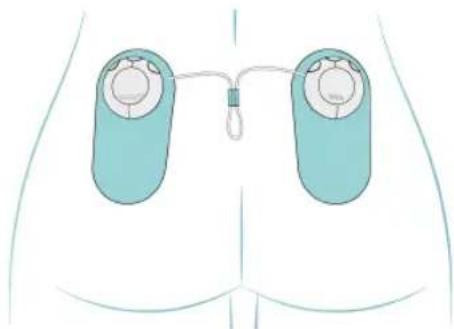
On the lower back
natural_image
Diagram of a human torso with two medical electrodes and a connecting rod, no text or symbols presentPlace the pads vertically either side of the spine, approximately 10cms (4 inches) apart, with the bottom of the electrodes no higher than the top of your buttocks.
As each person's body is different, the Ova 3 is supplied with electrodes which are large enough to be effective even if not located exactly over all three dermatomes. When the pads are placed correctly the Ova 3 will work well.
Therefore, if after thirty minutes considerable relief has not been achieved, either move the electrodes slightly or try an alternative position.
Connecting the stimulators
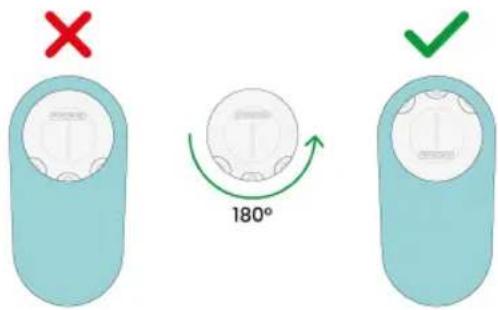
Once the electrodes have been attached to the body, connect both stimulators via the magnetic fixing point.
Note: The stimulator must be connected to the electrode in the correct orientation. If you feel magnetic resistance, rotate the stimulator 180^ and try connecting again.
text_image
X 180° ✓Controls and Interface
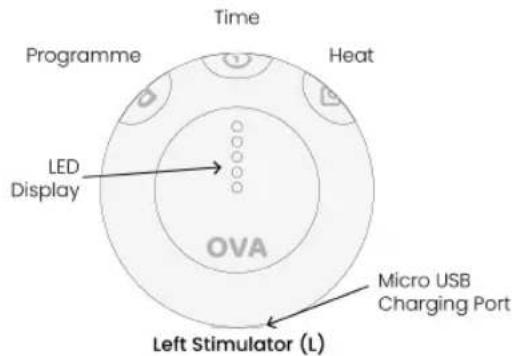
Ova 3 comes with two stimulators both with separate LED displays.
text_image
Time Programme Heat LED Display OVA Micro USB Charging Port Left Stimulator (L)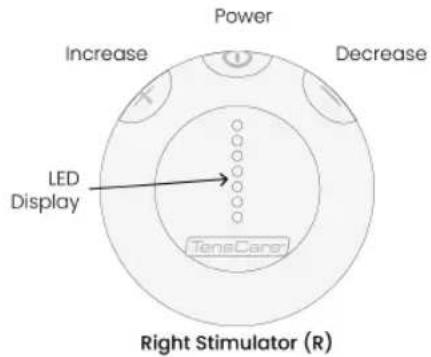
text_image
Power Increase Decrease LED Display TeneCare Right Stimulator (R)The LED displays are specific to the buttons on each stimulator.
i Note: When switching between modes to adjust programme parameters the white LEDs will flash once.
Note: All LED'S on both stimulators will automatically turn off after 10 seconds if no buttons are pressed. To re-activate the LED's, press any button.
Completing a session
1) Turning Ova 3 on
text_image
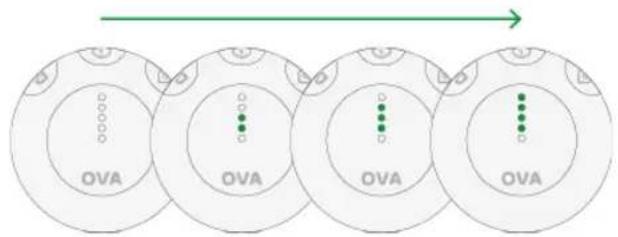
OVA OVA OVA OVATo turn the unit on, press the Power button on the device for approximately 1 second until the LED display shows. The unit will start with the programme you used last.
Note: Ova 3 will automatically turn off if both strength controls are set to zero for 1 minute.
2) Programme Selection
text_image
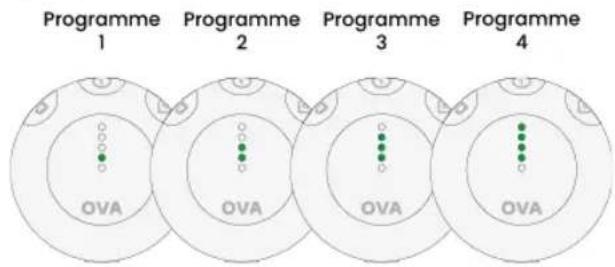
Programme 1 Programme 2 Programme 3 Programme 4 OVA OVA OVA OVATo select your desired programme, press the programme button once to enter programme selection mode. (See section 6 Pain Relief Programmes)
Once in programme selection mode, repeatedly press the programme button to cycle between available programmes.
This is indicated by a short beep as well as shown on the LED display.
Note: When turning on Ova 3, the last programme and timer settings will be set as default.
Note: If the programme button is pressed during a session, the selected programme will change, and intensity will be reset to 0.
3) Treatment time selection
text_image
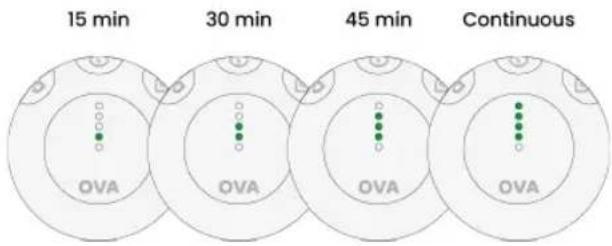
15 min 30 min 45 min Continuous OVA OVA OVA OVATo adjust the treatment time of the session, press the treatment time button once to enter treatment time selection mode.
Once in treatment time selection mode, repeatedly press the treatment time button to cycle between available treatment times.
Note: Ova 3 is set to a continuous treatment time by default.
4) Setting the intensity
text_image
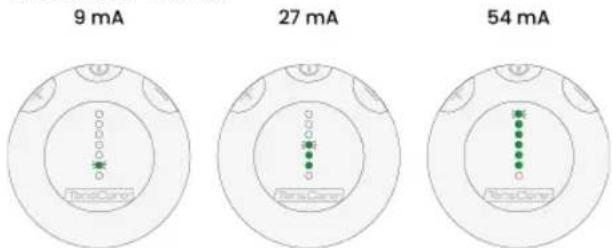
9 mA 27 mA 54 mAWhen adjusting intensity, ensure to reach a sensation that feels strong but comfortable.
Adjust intensity by repeatedly pressing the + or - buttons. To increase the intensity quickly, hold the + or - buttons.
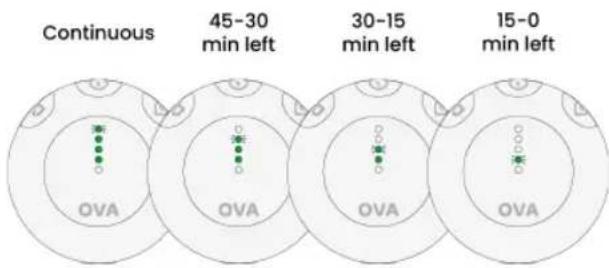
Once you have increased the intensity, the session will begin. The 4 white LEDs on the left stimulator will flash once and then display treatment time remaining.
LED's will turn off at 15-minute intervals in descending order.
If continuous treatment time is selected, the upper most LED will flash for the duration of the session.
text_image
Continuous 45-30 min left 30-15 min left 15-0 min left OVA OVA OVA OVANote: At low intensity levels, it is common for no sensation to be felt. Your body can also become used to the sensation. Continue to increase the intensity until the sensation is strong but comfortable.
Note: You may feel more sensation in one pad than the other. This is normal – it depends on where the electrodes are in relation to your nerves.
Connection error display
When attaching the stimulators to the electrode, intensity is always reverted to 0.
If a stimulator is removed from an electrode whilst it is active or if there is poor contact with the skin, a connection error will occur, and intensity will be reverted to 0.
A connection error is indicated by 3 beeps and the LED display; all white LED's will flash quickly.
To restart the session, ensure the stimulators and electrodes are attached correctly and increase the intensity within 10 seconds to resume the session.
Note: During a connection error, all controls will not operate unless the Ova 3 electrodes and stimulators have been properly re-connected.
Note: If a connection error occurs and no action has been taken after 1 minute, the device will automatically turn off.
5) Activating heat therapy
text_image
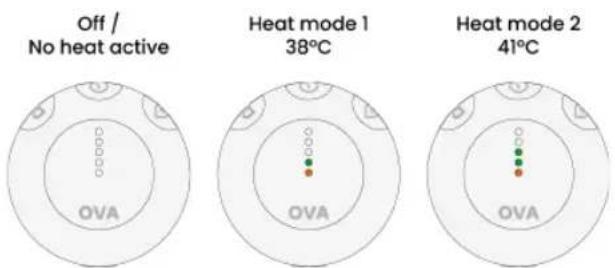
Off / No heat active Heat mode 1 38°C Heat mode 2 41°C OVA OVA OVAHeat therapy can be used in parallel with TENS pain relief programmes.
To activate heat therapy, press the heat button once to enter heat therapy mode.
Once in heat therapy mode, repeatedly press the heat button to cycle between the available heat modes.
This is indicated by a short beep as well as shown on the LED display.
Ova 3 has two heat modes, low and high.
Note: Ensure to allow sufficient time for the device to heat up before increasing temperature further.
Heat therapy will run for 10 minutes before automatically deactivating. If the TENS programme being used has a
remaining treatment time of less than 10 minutes, the heat therapy will deactivate when the TENS session ends.
It is recommended to use heat therapy once at the beginning of your session for soothing relief.
Caution: If at any time during use the heat therapy feels painful or uncomfortable, deactivate the heat.
Note: Heat mode may not be able to be turned on due to overheating or not enough battery life. If heat mode cannot be turned on, the orange LEDs on each stimulator will quickly flash 3 times. This will occur repeatedly until the device has reached a suitable temperature or the device has been recharged.
After your session
Upon completion of the session Ova 3 will automatically switch off.
To turn the device off manually hold the power button for 3 seconds.
Remove the stimulators from the electrodes by carefully lifting the stimulator from its magnetic port.
Remove the electrodes from your skin by peeling from the corner of the electrode. Make sure the hydrogel is removed from the body and remains attached to the electrodes.
Re-apply the liners onto the hydrogels on the rear of the electrodes. Return the electrodes and stimulators to the storage case. Good storage will help maximise the life of the gel.
Ensure to replace the Hydrogel pads when they lose their stickiness.
Remove the Hydrogels from the electrodes by peeling them away carefully. Poor connection to the body may cause ineffective treatment, discomfort, and skin irritation.
6. Pain relief programmes
Transcutaneous Electrical Nerve Stimulation (TENS) provides a natural solution to pain relief in one of two ways:
Pain Gate
Stimulates sensory nerves to block pain signals from being received from the brain. Pain Gate stimulation provides pain relief whilst being used.
Endorphin Release
Low frequency TENS promotes the release of endorphins, the body's natural pain killer. Endorphin Release builds up over 40 minutes and will last several hours after stimulation is ended.
The Ova 3 offers four pre-set clinically tested programmes. It is important to try all four programmes to find which suits you the best.

Note: It is sensible to change from one programme to another regularly to prevent your body
accommodating to one programme.
| Programme Type of Relief Sensation | |
| 1 Pain Gate Smooth, constant | sensation |
| 2 Pain Gate Smooth, constant | sensation |
| 3 Pain Gate + Endorphin Pulsing | |
| 4 Endorphin Tapping | |
Frequency of use
TENS can be used for as long as it is necessary. Continuous treatment is safe, but electrodes should be repositioned regularly (at least every 12 hours) to allow the skin to breathe.
7. Hydrogels advice
The electrodes and hydrogels supplied are reusable but for single patient use. The hydrogels should provide 10-20 applications per gel. However, this will vary depending on the user's skin condition and how the hydrogels are stored between use. Try to limit the amount of time the gels are exposed to the air.
The adhesive is a peelable hydrogel (water based).
It is possible to restore some of the adhesion of the hydrogel by adding a tiny drop of water on each gel and spreading it around with your finger. If too much water is added, the hydrogel will become too soft. If that happens, place the electrodes and hydrogels sticky side up in a refrigerator for a few hours. This should help restore some adhesion.
The hydrogels provided are latex-free.
The shelf life of an unopened pack of hydrogel pads is 3 years. This can be affected by very high temperatures or very low humidity.
Hydrogels Cautions:
Do not ignore any allergic reaction to the hydrogel pads: If a skin irritation develops, stop using TENS, as this type of electrode may not be suitable for you.
Do not use this device with gels or electrodes other than those recommended by the manufacturer. Performance may vary from specification. Electrodes with smaller surface area may cause tissue irritation.
Do not use hydrogels if they have lost their adhesion. Treatment effectiveness may be reduced.
DO NOT PLACE ELECTRODES:
In any position other than those recommended in this manual.

20 21

On skin, which does not have normal sensation. If the skin is numb too great a strength may be used, which could result in skin inflammation.
On broken skin. The electrodes could encourage infection.
8. Charging Ova 3
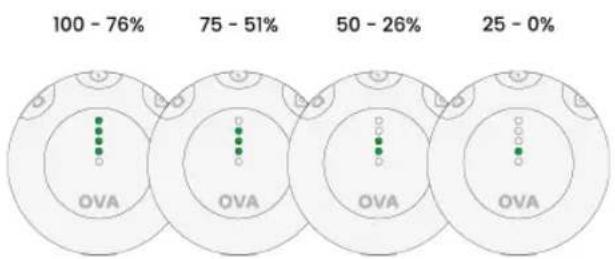
Check battery life
pie
| Range | Percentage (%) | |---|---| | 100 - 76 | 100 - 76 | | 75 - 51 | 75 - 51 | | 50 - 26 | 50 - 26 | | 25 - 0 | 25 - 0 | The chart displays four segments with green dots (OVA) at each position, indicating the proportion of OVA within each segment. The first segment is labeled 'OVA', while the second is 'OVA'.Press and hold the treatment time button for 3 seconds to display remaining battery life.
The Left stimulator white LEDs will flash once and then enter battery life remaining mode.
Battery life is displayed for 5 seconds before returning to the previous display.
When battery is 20% and 10%, a low battery alert will play and all white LEDs that are active will flash.
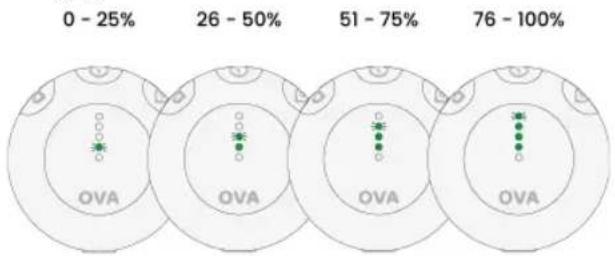
Charging
pie
| Range | Percentage (%) | |---|---| | 0 - 25% | 0 | | 26 - 50% | 26 | | 51 - 75% | 51 | | 76 - 100% | 76 |It is recommended to charge the device daily.
To charge Ova 3 connect the supplied charger to the unit and plug it into a USB socket.
Battery life during charging is displayed on the left (L) stimulator using 4 white LED's.
As battery level increases LED's will flash and appear in ascending order.
i Note: The device cannot be used during charging.
Each Ova 3 stimulator houses a rechargeable li-ion battery (300mAh) which are charged simultaneously via one micro-USB charging port.
A charging adapter is included in the kit.
Warning: Only use the charging cable supplied. Use of other cables could be hazardous and will negate the warranty.
The time required for a full charge from 0% will take around 3 hours.
Charge the device until the battery level is 100%.
The battery life of Ova 3 with heat therapy constantly active will last around 30 minutes.
The battery life of Ova 3 without heat therapy active at 50% intensity will last up to 30 hours.
Note: The device should be charged at least once every 3 months to ensure the battery life is maintained.
i Note: Charging voltage: DC 5V, charging current: 90mA.
i Note: Use adapters of the following specifications.
Output: DC 5 V; IA
Rated input voltage shall not exceed 240 V
Classification of protection against electric shock: Class II
IP classification: at least IP21
The adapter needs to comply with IEC 60601-1 or IEC 60950-1
Battery Warnings
This product is equipped with a Lithium-ion battery. Failure to follow these instructions could cause the lithium-ion battery to leak acid, become hot, explode or ignite and cause injury and/or damage:
Do not expose to temperatures over 60^ C(140F).
Do not put, store or leave near sources of heat, in direct strong sunlight, in a high temperature location, in a pressurized container or in a microwave oven.
Do not immerse in water or sea water, or get wet.
To avoid the risk of electric shock, this equipment must only be connected to a supply mains with protective earth.
If battery leakage occurs and comes in contact with the skin or eyes, wash thoroughly with lots of water and immediately seek medical attention.
Battery Cautions
Do not use in a location where there is a large amount of static electricity, otherwise, the safety devices in the battery pack may be compromised.
If the device creates an odour, becomes discoloured or deformed, or in any way appears abnormal during use, recharging or storage, immediately stop using it and contact the supplier.
Disposal: Always dispose the device responsibly according to local government guidelines. Do not throw the device onto a fire. Risk of explosion due to internal lithium batteries.
9. Cleaning
Clean the device at least once a week by wiping with a damp cloth and a solution of mild soap and water. Be careful to avoid contact with the black sheet on the rear of the electrodes. Wipe dry.
Do not immerse your Ova 3 device or electrodes in water.
Do not use any other cleaning solution other than soap and water.
10. Troubleshooting
If your Ova 3 is not working properly, please check the following:
No LED display
Battery is empty Charge battery. See section 8 Charging Ova 3.
Damaged device Contact supplier.
Damaged battery Contact supplier. There is no maintenance or calibration other than replacement of gel pads and battery charging. Do not modify the device as this may reduce safety or effectiveness.
Display is flashing
Battery is low Charge battery. See section 8 Charging Ova 3.
Connection error Disconnect & reconnect the between stimulator stimulator and increase intensity and electrode.
| Connection error between electrode and body. | Ensure the electrode and hydrogels are applied effectively to the body. Replace hydrogels if necessary. |
No sensation
| Intensity is not strong enough | Increase the intensity until you feel a strong but comfortable sensation. |
| Incorrect connection between electrode, stimulator and body | Ensure the electrodes are effectively attached to the body.Ensure good connection between stimulator and electrode.If electrodes will not easily adhere to the body for a full session you may be using old hydrogels and need to purchase replacements. |
Electrode won't stick to the body
| Hydrogels are old and have lost their adhesion | Purchase replacement hydrogels. |
| Incorrect electrode placement | Place electrodes as per the electrode placement guide. |
Intensity setting returns to 0mA.
| There is a connection error leading to an open circuit. | Ensure the pads are correctly attached to your body. |
Unusually low or inconsistent sensation
| Hydrogels are old and have lost their adhesion | Purchase replacement hydrogels. |
If the above review has failed to resolve your problem, or
to report unexpected operation or events, or to provide feedback call TensCare or your local supplier or distributor (address on back cover) for advice.
Contact TensCare customer service on +44 (0) 1372 723 434. Our staff are trained to assist you with most issues you may have experienced, without the need to send your product in for service.
European Medical Device Regulation requires that any serious incident that has occurred in relation to this device should be reported to the manufacturer and the competent authority in your country. This can be found at:
https://ec.europa.eu/docsroom/documents/36683/attachments/1/translations/en/renditions/pdf
11. Accessories
Replacement hydrogels are available from your supplier or distributor (see back cover for contact details), by mail order from TensCare, by telephone using a credit or debit card, or through the TensCare website.
The following replacement parts may be ordered from TensCare at www.tenscare.co.uk or +44(0) 1372 723434.
E-OVA3 Pack of 3 pairs of Ova 3 hydrogels
E-OHE Replacement Ova 3 Heat TENS electrode
L-MUSB Micro-USB Charging cable
12. Warranty
This warranty refers to the device and electrodes. It does not cover the hydrogels and charging cable.
This product is warranted to be free from manufacturing
defects for 1 year from date of purchase.
This warranty is void if the product is modified or altered, is subject to misuse or abuse; damaged in transit; lack of responsible care; is dropped; if incorrect battery has been fitted; if the unit has been immersed in water; if damage occurs by reason of failure to follow the written instruction booklet enclosed; or if product repairs are carried out without authority from TensCare Ltd.
We will repair, or at our option replace free of charge, any parts necessary to correct material or workmanship, or replace the entire unit and return to you during the period of the warranty. Otherwise, we will quote for any repair which will be carried out on acceptance of our quotation. The benefits conferred by this warranty are in addition to all other rights and remedies in respect of the product, which the consumer has under the Consumer Protection Act 1987.
Our goods come with guarantees that cannot be excluded under the UK consumer Law. You are entitled to have the goods repaired or replaced if the goods fail to be of acceptable quality.
Before sending in your unit for service, please make sure you have reviewed the troubleshooting section, read the manual fully and followed all the instructions.
Returning your unit for service
Please ensure all relevant details are completed and your purchase receipt is included before sending your unit in for service.
Name: Date of purchase:
(Attach proof of purchase)
Address: Retailers name:
Postcode: Retailers address:
Telephone: Retailers postcode:
Email: Brief description of the
Model:
problem you are experiencing:
For hygiene reasons, please do not include used hydrogels. Send only the Ova 3 device and electrodes.
Returns should be sent to:
TensCare Ltd, 9 Blenheim Road, Epsom, Surrey, KT19 9BE, U.K.
Should you require any further information please do not hesitate to contact us by calling our number: +44 (0) 1372 723 434.
WARRANTY IS VOID UNLESS THE ABOVE INFORMATION IS COMPLETED AND CORRECT.
13. EMC
Wireless communications equipment such as wireless home network devices, mobile phones, cordless telephones and their base stations, walkie-talkies can affect this equipment and should be used no closer than 30cm (12 inches) to any part of the device.
(Note. As indicated in 5.2.1.1(f) of IEC 60601-1-2 for ME EQUIPMENT).

Note: For hospital use, full EMC advice tables are available on request.
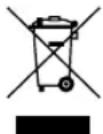
14. Disposal of waste electrical and electronic products (WEEE)
One of the provisions of the European Directive 2012/19/EU is that anything electrical or electronic should not be treated
as domestic waste and simply thrown away. To remind you of this Directive all affected products are now being marked with a crossed-out wheelie bin symbol, as depicted below.
To comply with the Directive, you can return your old electrotherapy unit to us for disposal. Simply print a postage paid PACKETPOST RETURNS label from our website www.tenscare.
co.uk, attach this to an envelope or padded bag with the unit enclosed, and post it back to us. Upon receipt, we will process your old device for components recovery and recycling to help conserve the world's resources and minimise adverse effects on the environment.
15. Technical specifications
Heat Therapy
Level 1 - 38°C
Level 2 - 41°C
Frequency range - 10-110 Hz
Pulse width range - 50–200 μs
Treatment time range - 15-45 minutes or Constant
Waveform Symmetrical Rectangular
Biphasic
Output 54mA (1mA for step) zero to
peak (over 500 Ohm load)
Max Pulse Energy 9.5μC
Output plug Fully shielded: touch proof
Channels Single channel
Battery 3.7V/550mAh
Weight Left Stimulator: 39g
Right Stimulator: 37g
Total: 76g
Dimensions 54 x 54 x 18 mm
Safety Classification Internal power source.
Designed for continuous use.
No special moisture protection.
Software Version R4_01
Environmental Specifications:
Operating: Temperature range: 5 to 40°C
Humidity: 15% to 90% RH non-condensing
Atmospheric pressure: 700hPa to 1060hPa
Storage: Temperature range: -10 to 60°C
Humidity: 15% to 75% RH non-condensing
Atmospheric pressure: 700hPa to 1060hPa
Note: The electrical specifications are nominal and subject to variation from the listed values due to normal production tolerances of at least 5%.
Note: At least 30min required for the device to warm / cool from the minimum / maximum storage temperature between uses until it is ready for intended use.
Storage life
Storage life of an unopened pack of self-adhesive hydrogels is 3 years. This may be affected by very high temperatures or very low humidity.
The machine will often last for more than 5 years.
Symbols Used

TYPE BF APPLIED PART: Equipment providing a degree of protection against electric shock, with isolated applied part. Indicates that this device has conductive contact with the end user.

This symbol on the unit means "Refer to instructions for use".

Temperature Limitation: indicates the temperature limits to which the medical device can be safely exposed.

Humidity Limitation: indicates the humidity limits to which the medical device can be safely exposed.

Atmospheric Pressure: indicates the atmospheric limits to which the medical device can be safely exposed.

Lot Number: indicates the manufacturer's batch code so that the batch or lot can be identified.

Serial Number: indicates the manufacturer's serial number so that a specific medical device can be identified.

Catalogue Number: indicates the manufacturer's catalogue number so that the device can be identified.

Do not dispose in household waste.

Manufacturer Symbol

Date of Manufacture: indicates the date which the medical device was manufactured. This is included within the serial number found on the device (usually on the back of the device), either as "E/Year/Number" (YY/123456) or "E/Month/Year/Number" (MM/YY/123456).

CE Mark

Medical Device

This medical device is indicated for home use.

Importer Symbol
IP22
This medical device is not water resistant and should be protected from liquids.
The first number 2: Protected against access to hazardous parts with a finger, and the jointed test finger of 12 mm ø, 80 mm length, shall have adequate clearance from hazardous parts, and protected against solid foreign objects of 12.5 mm ø and greater.
The second number 2: Protected against vertically falling water drops when enclosure is tilted up to 15°. Vertically falling drops shall have no harmful effects when the enclosure is tilted at any angle up to 15° on either side of the vertical.

Authorized representative in the European Community / European Union

Unique Device Identified : Indicates a carrier that contains Unique Device Indentifie information

Notes are used to provide clarification or recommendation.

A Warning is used when failure to follow the instructions may result in serious injury or death.

A Caution is used when failure to follow the instructions may result in a minor or moderate injury, or damage to the device or other property.

A Contraindication is used when a device should not be used because the risk of use clearly outweighs any foreseeable benefits and may result in serious injury or death.
Contenido
text_image
Diagram showing two pill-shaped containers with checkmark and cross symbols indicating approval or rejection statusnatural_image
Diagram of a medical device with two circular components and a connecting rod, placed on a human pelvis (no text or labels)natural_image
Illustration of a medical device with two blue circular components and a white connector, placed on a white background (no text or symbols)natural_image
Diagram of a human torso with two medical electrodes and a connecting rod, no text or symbols presentflowchart
graph LR
    A["OVA"] --> B["OVA"]
    B --> C["OVA"]
    C --> D["OVA"]
https://ec.europa.eu/docsroom/documents/36683/attachments/1/translations/en/renditions/pdf
11. Accesorios
Note: The electrical specifications are nominal and subject to variation from the listed values due to normal production tolerances of at least 5%.
i Note: At least 30min required for the device to warm / cool from the minimum / maximum storage
temperature between uses until it is ready for intended use.
Storage life
Storage life of an unopened pack of self-adhesive hydrogels is 3 years. This may be affected by very high temperatures or very low humidity.
The machine will often last for more than 5 years.
Symbols Used

text_image
Technical diagram showing various medical or electronic device components with labels like 'OVA' and 'CVA'natural_image
Illustration of two transparent capsule-shaped objects with checkmark and cross symbols, no text or labels presentnatural_image
Illustration of a medical device with two identical devices and a catheter, placed on a human body (no text or symbols)natural_image
Diagram of a medical device with two blue circular components and a connector, placed on a white background (no text or symbols)natural_image
Diagram of a human torso with two medical devices on the chest, no text or symbols presentflowchart
graph LR
    A["OVA"] --> B["OVA"]
    B --> C["OVA"]
    C --> D["OVA"]
pie
| Range | Percentage (%) | |---|---| | 100 - 76% | 100 - 76 | | 75 - 51% | 75 - 51 | | 50 - 26% | 50 - 26 | | 25 - 0% | 25 - 0 | The chart displays four circular gauges with green dots indicating specific OVA values within each gauge. The percentage labels above each gauge represent the proportion of each gauge's value.https://ec.europa.eu/docsroom/documents/36683/attachments/1/translations/en/renditions/pdf
11. Accessories
L-MUSB Câble de charge micro-USB
12. Garantie
text_image
Ours on the right Ours on the right
natural_image
Simple line drawing of an oval-shaped structure with a horizontal bar at the top (no text or symbols)natural_image
Illustration of two transparent domes with checkmarks and red X marks, no text or symbols presentnatural_image
Illustration of a medical device with two circular components and a connecting rod, placed on a human pelvis (no text or symbols)natural_image
Illustration of a medical device with two blue circular components and a connecting rod, placed on a white surface (no text or symbols)natural_image
Diagram of a human torso with two medical electrodes and a connecting rod (no text or labels)https://ec.europa.eu/docsroom/documents/36683/attachments/1/translations/en/renditions/pdf
11. Zubehör
TensCare Ltd, 9 Blenheim Road, Epsom, Surrey, KT19 9BE, U.K.
text_image
Diagram showing two identical pill-shaped containers with checkmark and cross symbols indicating approval or rejection status.natural_image
Diagram of a human pelvic device with two sensors and a connecting rod (no text or labels)natural_image
Illustration of a medical device with two blue electrodes and a connecting rod, placed on a white surface (no text or symbols)natural_image
Diagram of a human torso with two medical electrodes and a connecting rod, no text or symbols presentflowchart
graph LR
    A["OVA"] --> B["OVA"]
    B --> C["OVA"]
    C --> D["OVA"]
https://ec.europa.eu/docsroom/documents/36683/attachments/1/translations/en/renditions/pdf
11. Accessori
TensCare Ltd, 9 Blenheim Road, Epsom, Surrey, KT19 9BE, U.K.
TensCare aim to give you the best possible product and service. We listen to your suggestions and are constantly trying to improve our products. We also want to learn about the way our products are used, and the benefits they give. If you have anything you would like to share with us, please get in touch.
www.tenscare.co.uk
EC Declaration of Conformity
Tenscare Ltd herewith declare that the product meets the provisions of REGULATION (EU) 2017/745 which apply to it. The medical device has been assigned to class IIa according to Annex IV of the REGULATION (EU) 2017/745. The product concerned has been designed and manufactured under a quality management system according to Annex IX, of REGULATION (EU) 2017/745. This EU declaration of conformity is issued under the sole responsibility of the manufacturer. No "Common Specification" is applicable.

TensCare Ltd.
9 Blenheim Rd, Epsom,
Surrey, KT19 9BE, UK
+44 (0)1372 723 434.
EC REP
Advena Ltd.
Tower Business Centre,
2nd Flr, Tower Street,
Swatar, BKR 4013, Malta
I-OVA3-ML [UK,ES,FR,DE,IT]
Rev 1.0 06/24

2797
Complies with Medical
Device Regulation (EU)
2017/745.

TensCare Europe BV
Beukenlaan 23-033,