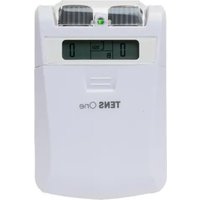
TENS One - Pain therapy device TensCare - Free user manual and instructions
Find the device manual for free TENS One TensCare in PDF.


User questions about TENS One TensCare
0 question about this device. Answer the ones you know or ask your own.
Ask a new question about this device
Download the instructions for your Pain therapy device in PDF format for free! Find your manual TENS One - TensCare and take your electronic device back in hand. On this page are published all the documents necessary for the use of your device. TENS One by TensCare.
USER MANUAL TENS One TensCare
text_image
TENS One TensCare.co.uk Feel better naturally TensCare www.tenscare.co.uk TensCare.co.uk Feel better naturally TensCare.co.uk Feel better naturally TensCare.co.uk Feel better naturally TensCare.co.uk Feel better naturally TensCare.co.uk Feel better naturally TensCare.co.uk Feel better naturally TensCare.co.uk Feel better naturally TensCare.co.uk Feel better naturally TensCare.co.uk Feel better naturally TensCare.co.uk Feel better naturally TensCare.co.uk Feel better naturally TensCare.co.uk Feel better naturallyQUICKSTART GUIDE
natural_image
Diagram of a device with four labeled compartments and curved lines indicating connections (no text or symbols)natural_image
Diagram of a vehicle air vent with labeled components and directional arrows (no text or symbols)Rotate one of the top control knobs to switch on
Gire una de las perillas de control superior para encenderla
natural_image
Diagram of a device rear panel with two circular ports and directional arrows indicating flow or movement (no text or symbols)Adjust the settings by rotating the pulse rate and pulse width control knobs
Ajuste los ajustes girando las perillas de control de frecuencia y anchura de pulso
Réglez les paramètres en tournant les boutons de réglage de la fréquence et de la largeur
Passen Sie die Einstellungen an, indem Sie die Regler für Pulsfrequenz und Pulsweite drehen.d'impulsion.
natural_image
Line drawing of a medical device connected to a human body via wires, showing electrical connections (no text or symbols)natural_image
Diagram of a device rear panel with control buttons and an arrow pointing to a button (no text or symbols)natural_image
Diagram of a car air conditioner unit with two arrows pointing to the top panel (no text or symbols)Regulate the output intensity with the top control knobs
Regule la intensidad de salida para cada canal con las
perillas de control superiores
Réglez l'intensité de sortie pour chaque canal à l'aide des boutons de commande supérieurs
Stellen Sie die Ausgangsintensität für jeden Kanal mit den oberen Drehreglern ein
Dear Customer,
Thank you for choosing TENS One. TensCare stands for high-quality, thoroughly tested products for the applications in the areas of gentle electrotherapy, muscle toning, continence management and pain relief during labour.
Please read these instructions for use carefully and keep them for later use, be sure to make them accessible to other users and observe the information they contain.
Best regards,
Your TensCare Team

CONTENTS
- INTRODUCTION 5
- INTENDED USE 5
- TENS ONE FEATURES 5
- HOW "TENS" WORKS 5
- CONTRAINDICATIONS, WARNINGS & CAUTIONS....7
- INFORMATION ABOUT THE PROGRAMME SETTINGS 10
- MODES 11
7.1. PARAMETERS ...... 11
7.2. SELECTING THE PARAMETERS....11
7.3. RECOMMENDED SETTINGS 12
7.4. MODE USAGE....12
- ELECTRODE PADS....12
8.1. PAD POSITIONING 12
8.2. PAD ADVICE 13
-
CONTENT 14
-
UNIT INFORMATION.... 15
10.1. CONTROLS & DISPLAY 15
10.2. OPERATING INSTRUCTIONS.... 16
- SETTING UP AND USING THE TENS ONE.... 17
11.1. INSTALLATION OF BATTERIES.... 17
11.2. CONNECTING LEAD WIRES.... 18
11.3. PREPARING FOR SESSION 19
11.4. TREATMENT SESSION.... 19
11.5. AFTER YOUR TREATMENT SESSION.... 19
- CLEANING & STORAGE 20
- EMC 20
- DISPOSAL OF WASTE ELECTRICAL AND ELECTRONIC PRODUCTS (WEEE) 20
- ACCESSORIES 20
- WARRANTY....21
- TROUBLESHOOTING 23
- GENERAL SPECIFICATION....24
SYMBOLS USED
 | TYPE BF APPLIED PART: Equipment providing a degree of protection against electric shock, with isolated applied part. Indicates that this device has conductive contact with the end user. |
 | This symbol on the unit means “Refer to instructions for use”. |
| [WWHM] | Temperature Limitation: indicates the temperature limits to which the medical device can be safely exposed. |
 | Lot Number: indicates the manufacturer's batch code so that the batch or lot can be identified. |
| [0BH8] | Humidity Limitation: indicates the humidity limits to which the medical device can be safely exposed. |
 | Serial Number: indicates the manufacturer's serial number so that a specific medical device can be identified. |
 | Do not dispose in household waste. |
 | Catalogue Number: indicates the manufacturer's catalogue number so that the device can be identified. |
 | Atmospheric Pressure: indicates the atmospheric limits to which the medical device can be safely exposed. |
 | Manufacturer Symbol |
 | Date of Manufacture: indicates the date which the medical device was manufactured. This is included within the serial number found on the device (usually in the battery compartment), either as “E/Year/Number” (YY/123456) or “E/Month/Year/Number” (MM/YY/123456). |
 | This medical device is indicated for home use. |
| IP22 | This medical device is not water resistant and should be protected from liquids.The first number 2: Protected against access to hazardous parts with a finger, and the jointed test finger of 12 mm ø, 80 mm length, shall have adequate clearance from hazardous parts, and protected against solid foreign objects of 12.5 mm ø and greaterThe second number 2: Protected against vertically falling water drops when enclosure is tilted up to 15°. Vertically falling drops shall have no harmful effects when the enclosure is tilted at any angle up to 15° on either side of the vertical. |
 | CE Mark |
 | Medical Device |
| [2227] | Importer Symbol |
1. INTRODUCTION
Device Description & Principles of Design
The TENS One is an accurate and versatile, digital TENS unit that is easy to use, with simple settings and rotating strength control knobs. It can help manage the pain from a wide range of conditions.
Chronic pain: Back pain. Lumbago, sciatica pain and arthritic pain.
Musculoskeletal pain: fibromyalgia and injuries (sprains, tears, fractures, muscle strain).
Acute pain: Dental and facial pain, postoperative pain and neuropathic pain (and neuralgias).
TENS machines can be used alone for pain relief or be combined with other treatments.
2. INTENDED USE

TENS One is intended for the relief of pain associated with sore or aching muscles of the lower back, arms, or legs due to strain from exercise or normal household and work activities.
The device is suitable for use by all who can control the device and understand the instructions.
Do not use the device for any purpose other than this intended use.

Warning: Not suitable for use in children without medical supervision.
3. TENS ONE FEATURES
- Dual Channel
Two independent channels with four electrode pads to treat two areas at the same time.
• Comfortable Stimulation
Gentle TENS stimulation with 20 steps of intensity. The multi-turn rotary digital control reduces the risk of sudden changes normally associated with this type of control.
- Manual TENS with 3 Modes
Including Burst mode (B), Normal/Constant mode (N) and Modulation mode (M).
- LCD Screen
Clearly shows the operation of the unit and the programme and intensity being used.
- Treatment Timer
The user can manually select a treatment time of C (Continuous) or 15, 30, 45, 60 or 90 minutes.
- Easy Start Mode Memory
Automatically starts in the last mode and setting used.
- Detachable Belt Clip
Enables the user to clip the unit onto a belt.
4. HOW "TENS" WORKS
T.E.N.S. stands for Transcutaneous Electrical Nerve Stimulation. T.E.N.S. stimulates your body's own natural defences against pain, namely the release of endorphins. TENS is totally
safe and has been used successfully by thousands of pain sufferers.
TENS sends a gentle stimulation through the skin which works in TWO ways:
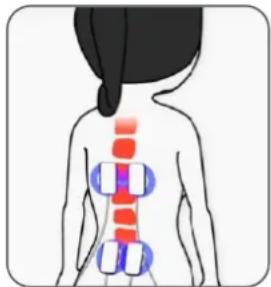
Pain Gate
It stimulates the sensory nerves, which carry touch and temperature signals. These nerves go to the same connections in the spine as the nerves carrying pain. A strong sensory signal will block the pain signal travelling up the spine to the brain. This is known as closing the "Pain Gate" and takes effect quite quickly after the unit is switched on. When the gate is open, pain messages get through to the brain and we feel pain. When the gate is closed, these pain messages are blocked and we do not feel pain.
natural_image
Illustration of a person's back with colored anatomical markers (no text or symbols)Evidence suggests that TENS produce pain relief in a similar way to ‘rubbing the pain better’. The pain gate can be closed by activation of mechanoreceptors through ‘rubbing the skin’.
Scientifically, the pain gate works by release of chemical in the synapse at spinal level that inhibits transmission of pain signal.
Endorphin Release
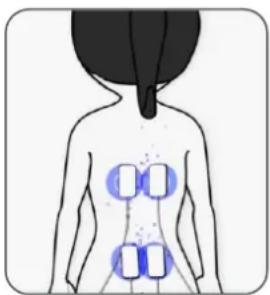
At low frequency settings, and slightly stronger outputs, TENS drives the motor nerves to produce a small repetitive muscle
natural_image
Human back with four blue rectangular markers on the chest area, no text or symbols presentcontraction. This is seen by the brain as exercise, and this promotes the release of endorphins - your body's own natural pain killer. The relief builds up and normally takes about 40 minutes to reach a maximum level which can last for hours after the machine is switched off.
By using TENS, you can expect to achieve a significant reduction in pain - if not complete relief from pain.
- TENS is effective for pain from a very wide range of causes.
- TENS machines can be used to help reduce pain from problems in muscles, joints and nerves.
- It can be also used for people with musculoskeletal pain such as long-term (chronic) back pain or knee joint arthritis. They are also often used for pain relief in the early stages of labour (see perfect mamaTENS), particularly whilst a pregnant woman remains at home.
- TENS may also be used to treat many types of pain, such as period pain and endometriosis (see Ova+), cystitis, sports injuries, fibromyalgia and neuralgia, plantar fasciitis, post-operative pain, TMJ disorder, diabetic neuropathy, osteo-arthritis and sometimes non-painful conditions such as travel sickness.

- You can use low frequency (<10 Hz) programmes on acupuncture points, to achieve similar effects to acupuncture.
- With neurogenic pain (caused by inflamed nerves) such as neuralgia, TENS may start by increasing the pain. We recommend that you only use TENS for these conditions under medical supervision.
- You can safely use TENS as long as it gives you pain relief. The effect may wear off after a few hours (this is called “accommodation”). If this happens, take a break of an hour or so before trying again. If you use settings that cause muscle movement for more than 40 minutes, you may experience aching muscles a few hours later.
5. CONTRAINDICATIONS, WARNINGS & CAUTIONS
In this manual:

A Contraindication is used when a device should not be used because the risk of use clearly outweighs any foreseeable benefits and may result in serious injury or death.

A Warning is used when failure to follow the instructions may result in serious injury or
death.

A Caution is used when failure to follow the instructions may result in a minor or moderate injury, or damage to the device or other property.

Notes are used to provide clarification or recommendation.

CONTRAINDICATIONS:
Do NOT use if you have a pacemaker (or if you have a heart rhythm problem) or with any electronic medical devices. Using this unit with electronic medical devices may cause erroneous operation of the device. Stimulation in the direct vicinity of an implanted device may affect some models.
Do NOT use during the first three months of pregnancy. It is not known whether TENS may affect foetal development.
Do NOT use on the abdomen in the later stages of pregnancy. Stop using immediately if you experience unexpected contractions.

WARNINGS:
Do NOT use to mask or relieve undiagnosed pain. This may delay diagnosis of a progressive condition.
Do NOT use if you have, in the area being treated: active or suspected cancer or undiagnosed pain with a history of cancer. Stimulation directly through a confirmed or suspected malignancy should be avoided as it may stimulate growth and promote spread of cancer cells.
If you are in the care of a physician, consult with your physician before using this device.
If you have had medical or physical treatment for your pain, consult with your physician before using this device.
If your pain does not improve, becomes more than mild, or continues for more than five days, stop using the device and consult with your physician.
Do NOT use electrodes on the front of the neck. Stimulation on the front of the neck can affect your heart rate or cause contraction of the throat.
Do NOT use electrodes across the chest. Very strong stimulation across the chest may cause an extra heartbeat and/or rhythm disturbances to your heart, which could be lethal.
Do NOT use Tens One while simultaneously connected to high frequency surgical equipment as it may result in burns at the site of stimulator electrodes and possible damage to the stimulator.
Do NOT use Tens One in close proximity (e.g. 1 m) to a shortwave or microwave as this may produce instability in the stimulator output.
Do NOT use electrodes near the thorax as this may increase the risk of cardiac fibrillation.
Do not apply stimulation when in the bath or shower.
Do not apply stimulation while sleeping.
Do NOT use when driving, operating machinery, or similar actions needing muscular control. Loose electrode pads, damaged leads, or sudden changes in contact may cause brief involuntary muscle movements.
Consult with your physician before using this device because the device may cause lethal rhythm disturbances to the heart in susceptible individuals.

CAUTIONS:

TENS is not a substitute for pain medications and other pain management therapies.
TENS devices have no curative value.
TENS is a symptomatic treatment and, as such, suppresses the sensation of pain that would otherwise serve as a protective mechanism.
Effectiveness is highly dependent upon patient selection by a practitioner qualified in the management of pain patients.
The long-term effects of electrical stimulation are unknown.
The safety of electrical stimulation during pregnancy has not been established.
If you have suspected or diagnosed heart disease, you should follow precautions recommended by your physician.
Use caution if stimulation is applied over the menstruating or pregnant uterus.
Caution should be used if you have a bleeding disorder as stimulation may increase blood flow to the stimulated region.
Caution should be used if you have suspected or diagnosed epilepsy as electrical stimulation may affect seizure threshold.
Caution should be observed when using the device at the same time as being connected to monitoring equipment with body worn electrode pads. It may interfere with the signals being monitored.

Caution should be used following recent surgical procedures. Stimulation may disrupt the healing process.
Caution Simultaneous connection to high frequency surgical equipment may result in burns and damage to the stimulator.
Caution Not intended for use in an oxygen rich environment.
Caution Not intended for use in conjunction with flammable anaesthetics or flammable agents.
Caution The patient is an intended operator.
Caution Do not service and maintain the device while in use.
Caution Maintenance and all repairs should only be carried out by an authorized agency. The manufacturer will not be held responsible for the results of maintenance or repairs by unauthorized persons.
If necessary, we will provide circuit diagrams, component part lists or other information that will assist authorized service personnel to repair the device.
Caution The operator should not touch the patient at the same time when touching the battery output.
Caution Keep away from pets and pests
Caution Do not permit use by children unable to understand the instructions or persons with cognitive disabilities, i.e.; Alzheimer's disease or dementia.
Caution Keep away from children under 5 years of age. Long cord - risk of strangulation in infants.
DO NOT PLACE ELECTRODE PADS:
- On skin, which does not have normal sensation. If the skin is numb too
great a strength may be used, which could result in skin inflammation.
- On broken skin. The electrode pads could encourage infection.
- On the front of the neck. This could cause the airway to close, giving breathing problems. May cause sudden drop in blood pressure (vasovagal response).
• Over the eyes. May affect eyesight or cause headaches. - Across the front of the head. Effect on patients who have had strokes or seizures is not known. May affect your sense of balance. The effects of stimulation on the brain are unknown.
ELECTRODE PADS CAUTION:
Caution: Do not ignore any allergic reaction to the electrode pads: If a skin irritation develops, stop using TENS, as this type of electrodes may not be suitable for you. Alternative electrode pads specially made for sensitive skin are available.
Caution: Do not use this device with leads or electrode pads other than those recommended by the manufacturer. Performance may vary from specification. Electrodes with smaller surface area may cause tissue irritation.
Caution: Do not use high intensity settings if electrodes are smaller than 50x50mm.
TO KEEP YOUR DEVICE IN GOOD WORKING ORDER, OBSERVE THE FOLLOWING ADDITIONAL CAUTIONS:
Caution: Do not immerse your device in water or place it close to excessive heat such as a fireplace or radiant
heater or sources of high humidity such as a nebulizer or kettle as this may cause it to cease to operate correctly.
Caution: Keep the device away from sunlight, as long-term exposure to sunlight may affect the rubber causing it to become less elastic and crack.
Caution: Keep the device away from lint and dust, as long-term exposure to lint or dust may affect the sockets or cause the battery connector to develop a bad contact.
Caution: Temperature & Relative Humidity of storage: -25°C to +70°C, up to 93% R.H. Temperature & Relative Humidity of transportation: -25°C to +70°C, up to 93% R.H.
Caution: There are no serviceable user parts. Do not attempt to open or modify the TENS unit. This may affect the safe operation of the unit and will invalidate the warranty.
6. INFORMATION ABOUT THE PROGRAMME SETTINGS
The Frequency and Pulse Width settings can be adjusted which allow for different sensations through the electrode pads and suppress pain in different ways.
- Frequency (measured in Hz - pulses per second)
PAIN GATE: A high frequency of 110 Hz is good at blocking pain signals.
ENDORPHINE RELEASE: A low frequency of 4 or 10 Hz allows for the release of endorphins, the body's natural morphine-like substances.
- Pulse Width (measured in s - millionths of a second)
The TENS One unit has pulse widths of 50 to 250 s. Generally speaking, the higher the pulse width, the more "aggressive" the stimulation feels, and eventually, if the pulse width is set high enough, it will usually elicit a muscle contraction, which is typically not the desired result with a TENS unit. However, if the pulse width is too low, the patient may not perceive the stimulation. Pulse Rate is important because different frequency settings target different nerve groups and the setting will determine if the "Gate Theory" or "Endorphin Theory" of TENS will be used.
- Constant and Burst Modes
Constant mode is when the sensation is continuous versus Burst mode when the sensation, as its name implies, is one of on and off. Constant mode is often used for acute pain via Pain Gate Effect whereas Burst mode is useful in chronic pain relief. Burst gives a combination of Pain Gate and Endorphin Release, but the squeezing feeling may not be as comfortable. The sensation in Burst is more of a 'grabbing', 'clawing' type and usually more by way of muscle twitching than with the high or low frequency modes. The stimulation intensity will need to be relatively high. In Constant mode, the sensation is continuous and is more of a tingling pins and needles type.
- Modulation Mode
Modulation is when either the frequency or pulse width sweep across range of settings. In modulation mode, the machine delivers a less regular pattern of TENS stimulation in an attempt to reduce or minimise the


accommodation effects of regular, patterned stimulation. This is potentially most useful for patients who use TENS for several hours a day, if for no other reason than accommodation occurs at a slower rate and therefore less intensity adjustment may be required.

Note: If you are using TENS for the first time, it is recommended that you start with a setting of 110 Hz and 50 s.
For more information about which settings to choose for the different type of pain, refer to section 7.3.
7. MODES
TENS One has three different modes:
- N: Constant/Normal stimulation with adjustable parameters
- B: Burst stimulation with adjustable settings.
Two stimulations per second, 250 ms on, 250 ms off; pulse width and pulse rate are selectable. - M: Stimulation with modulated pulse width and modulated frequency. Pulse rate modulates from PR1 to PR2 or PR2 to PR1 while pulse width modulates from PW1 to PW2 or PW2 to PW1 within 6 seconds. PR1 and PW1 are adjustable. PR2 is 50 Hz fixed, PW2 is 200 μs fixed.
To choose a mode, press the button MODE, until you reach the desired mode.
7.1. PARAMETERS
Professor Han did research that showed that P increased as the frequency increased – but only tested up to 100 Hz.
And that E decreases as the frequency increases.
So, E is less effective when the frequency is >10 Hz and P is less effective when the frequency is <80 Hz. Most clinical research on P has been done at 80 Hz or 100 Hz.
Many professional users believe that the response to TENS varies between individuals, and that you can get the best response by choosing the frequency that suits your nervous system the best. They suggest that you start at 80 Hz or 110 Hz, then try different the frequency until you find one that gives you better pain relief.
7.2. SELECTING THE PARAMETERS
Before adjusting the parameters, select the mode of your choice.
- Frequency: To increase the frequency (or pulse rate), rotate the pulse rate knob clockwise. To decrease, rotate the knob anti-clockwise. You can select a frequency from 1 to 150 Hz.
- Pulse Width: To increase the pulse width, rotate the pulse width knob clockwise. To decrease, rotate the knob anti-clockwise. You can select a pulse width from 50 to 250~ s in steps of 10~ s .
- Timer: For each mode, you can select a treatment duration with the timer button. You can select a duration of C (Continuous), 15, 30, 45, 60 and 90 minutes.
See section 6 for more information on the choice of settings.
7.3. RECOMMENDED SETTINGS
The tables opposite are only recommendations.
There is not one programme for a particular condition, and the best choice varies from one person to another, even if they have the same type of pain. Therefore, the selection of both the settings and the positioning of the electrode pads should be performed on an individual basis. You may need to try a few positions/programmes before finding the one that suits you.
7.4. MODE USAGE
TENS can be used for as long as it is necessary. Continuous treatment is fine, but the electrode pads should be repositioned regularly (at least every 12 hours) to allow the skin to be exposed to the air.
The Endorphin Release programmes work better when the strength is high enough to cause small muscle contractions. Best results are achieved with a session duration between 15 and 45 minutes. Longer use may cause muscle ache.
8. ELECTRODE PADS
8.1. PAD POSITIONING
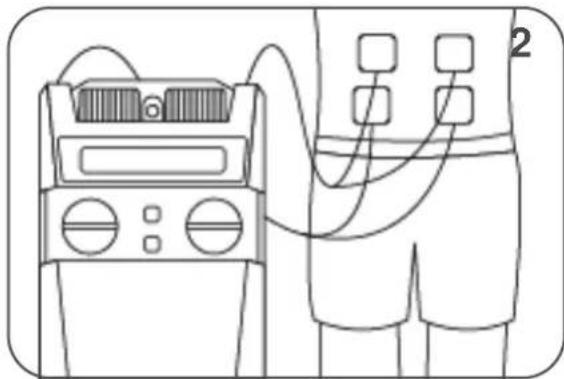
The electrode pads must always be used in pairs (two electrode pads on each channel), so that the signal can flow in a circuit.
- TENS works one vertebra at a time. You need to stimulate the sensory
Long term pain 1
| Pain area | Pulse rate | Pulse width | Mode | Timer (min) |
| Lower back | 80 | 200 | B | C |
| Sciatica | 120 | 200 | B | C |
| Shoulder / Deltoid | 90 | 150 | B | C |
| Hip &Thigh | 90 | 200 | B | C |
| Wrist pain | 110 | 100 | B | C |
| Knee | 100 | 100 | B | C |
| Calf | 110 | 150 | B | C |
| Ankle / Foot | 80 | 100 | B | C |
Long term pain 2
| Lower back | 2 | 250 | M | 45 |
| Sciatica | 4 | 250 | C | 45 |
| Shoulder / Deltoid | 6 | 250 | C | 45 |
| Hip & Thigh | 8 | 250 | M | 45 |
| Wrist pain | 10 | 250 | C | 45 |
| Knee | 5 | 250 | M | 45 |
| Calf | 4 | 250 | C | 45 |
| Ankle / Foot | 3 | 250 | C | 45 |
Acute pain
| Lower back | 80 | 200 | N | C |
| Sciatica | 120 | 200 | N | C |
| Shoulder / Deltoid | 90 | 150 | N | C |
| Hip &Thigh | 90 | 200 | N | C |
| Wrist pain | 110 | 100 | N | C |
| Knee | 100 | 100 | N | C |
| Calf | 110 | 150 | N | C |
| Ankle / Foot | 80 | 100 | N | C |

nerves that enter the spine at the same level as the nerve carrying your pain. Since you don't know exactly where your nerves are, the easiest way is to apply the electrode pads around/near the source of the pain.
- TENS activates the nerves best if it travels along the nerve rather than across it. So place one pad further from the spine than the source of the pain, and one closer.
- The nerves wrap around the limbs and torso, so you may have to try a few positions before you get the best effect.
- If the pain is in, or close to, your spine you can place one pad either side of the spine.
- You may feel more sensation in one pad than the other. This is normal – it depends on where the electrode pads are in relation to your nerves.
For areas that are difficult to reach, why not ask a friend to help you attach the electrode pads?
Always check that the unit is OFF before attaching or removing electrode pads.

Note: See examples of positioning in the instructions enclosed with your electrode pads.
8.2. PAD ADVICE
- The electrode pads supplied are reusable but for single patient use. The adhesive is a peelable hydrogel (water based).
- In order to obtain the best conductivity through the electrode pads always ensure that they are in good condition and tacky.
- Before use make sure your skin is clean and dry.
- Peel the electrode pads from their protective plastic shield by holding and lifting one corner of the pad and pulling. Do not pull on the pigtail wire of the pad.
- After use always replace the electrode pads on the plastic liner and replace them in the re-sealable plastic bag.
- If the electrode pads dry out, then it is best to buy a replacement pack. In an emergency, it may be possible to restore some of the tackiness of the pad by adding a tiny drop of water on each pad and spreading around. If too much water is added, the electrode pad will become too soft. If that happens then it is suggested in order to try and re-establish some adhesiveness, to place them sticky side up in a refrigerator for a few hours.
- In very hot weather the gel on the electrode pads may become soft. In such cases place them, still on their plastic liners and in their pouch into a fridge until they return to their normal condition.
- The electrode pads provided are latex-free.
- Replace the electrode pads when they lose their stickiness. Poor connection may cause discomfort and skin irritation.
- Storage life of an unopened pack of electrode pads is 2 years. This may be affected by very high temperatures or very low humidity.
9. CONTENT
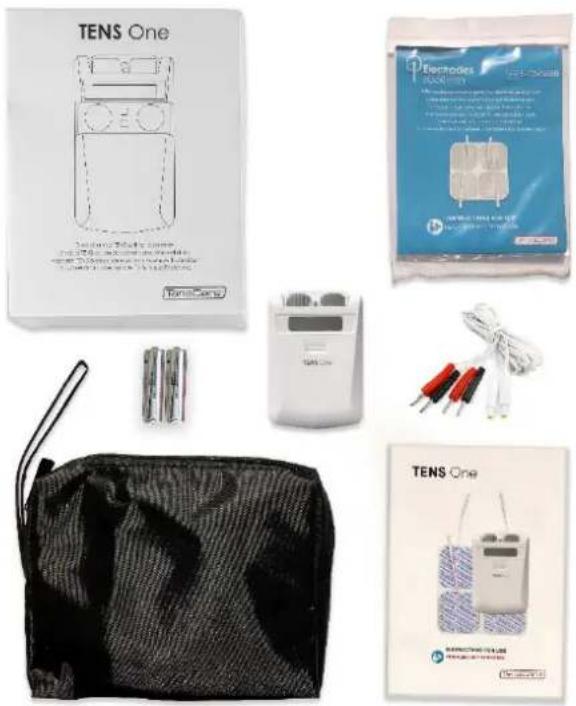
The pack contains:
• 1 x TENS One pain relief unit
- 2 x Lead wires (L-CPT)
- 4 x 50x50 mm electrode pads (E-CM5050)
- 2 x AA 1.5V alkaline batteries
- 1 x Detachable belt clip
- 1 x Storage pouch
• 1 x Manual instruction
natural_image
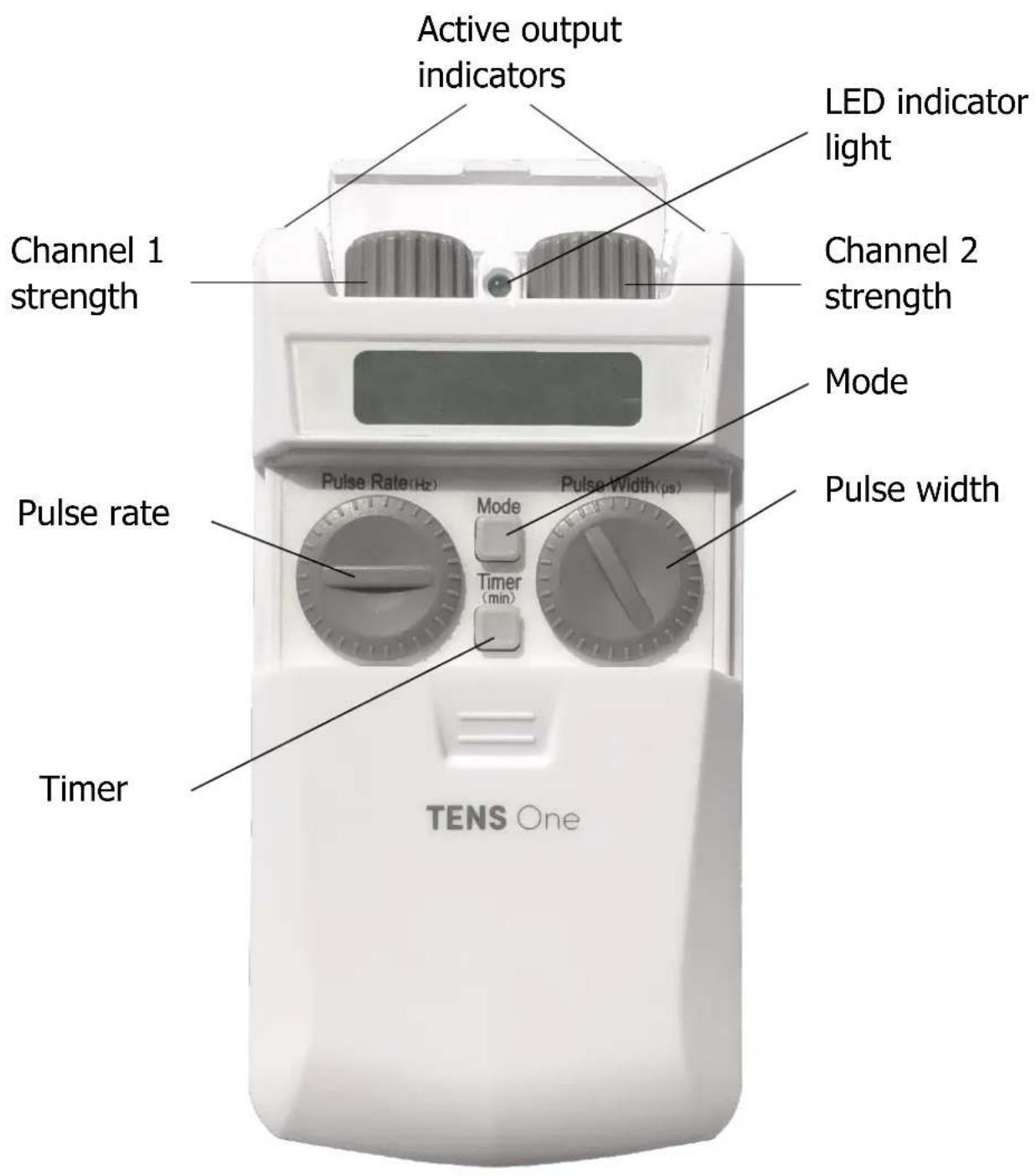
Product display of TENS One device components including battery pack, charging case, and electrical modules (no visible text or labels)10.1. CONTROLS & DISPLAY
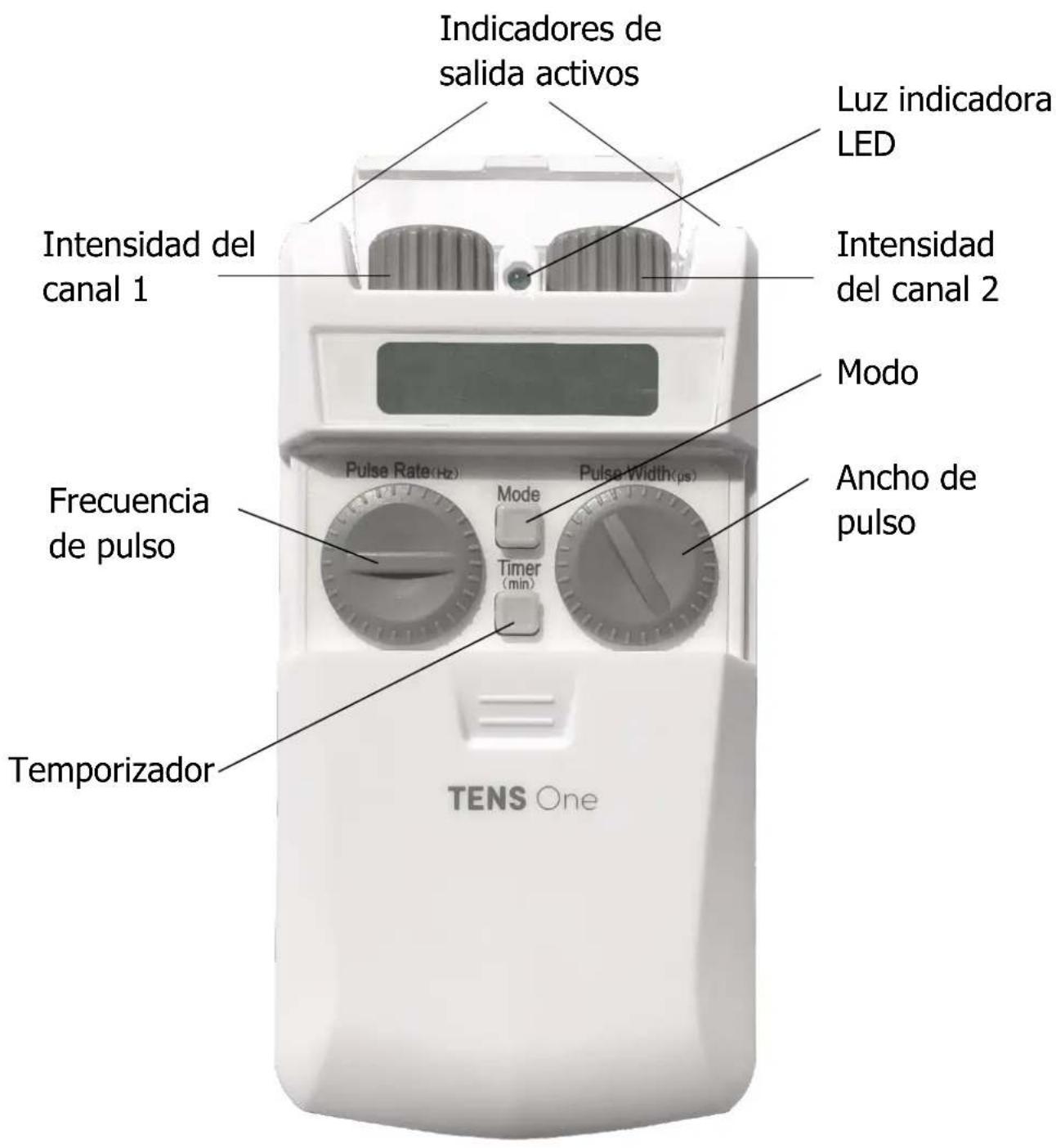
text_image
Active output indicators LED indicator light Channel 1 strength Channel 2 strength Mode Pulse rate Pulse rate(Hz) Mode Timer (min) Pulse width(pS) TENS One10.2. OPERATING INSTRUCTIONS
ON/OFF

To turn the unit ON, rotate on of the control knobs clockwise until you hear a click, the LED indicator will light up (green colour).
To turn the unit OFF, rotate one of the control knobs anti-clockwise until you hear a click, the display will stop.
The unit will start with the mode you used last.

Note: Always check unit is OFF before applying or removing electrode pads.
MODE CONTROL
The button marked MODE is the mode control. The TENS
One has three different modes. When the unit is first switched on it automatically enters mode N.
Each time you press and release the MODE button, the mode changes and the letter is shown on the LCD.
Before changing the mode, it is strongly recommended to bring the intensity back to zero.
Each time you change the mode, the strength level reverts back to zero for three second before ramping back up to the previous level of intensity.
TREATMENT TIMER
The TIMER button can be used to set the session duration. Press and release to change the session time. You can set session
times of C (Continuous) or 15, 30, 45, 60 or 90 minutes.
The LCD shows the session duration next to the min symbol. The unit automatically counts down the minutes set, once it reaches 0 the display will flash until the device is manually switched off.
PULSE RATE CONTROLS
To increase the frequency (or pulse rate), rotate the pulse rate knob clockwise. To decrease, rotate the knob anti-clockwise.
PULSE WIDTH CONTROLS
To increase the pulse width, rotate the pulse width knob clockwise. To decrease, rotate the knob anti-clockwise.
STRENGTH CONTROLS

On the top of the unit, there are two rotating control knobs.
The left-hand knob change strength in the left-hand lead and the right-hand knob change the right-hand lead.
To increase the strength, turn the knobs clockwise.
To decrease the strength, turn the knobs counter-clockwise.
The strength levels are shown on the LCD.
The unit has 20 levels of strength, each step is 4mA. You may feel nothing over the first few levels. Continue turning the knobs carefully until the sensation is strong but comfortable. Further increases during use may be necessary


if your body becomes used to the sensation.
The orange LED on the output socket indicates that there is an active output. The LED will remain on as long as the intensity is above 0.
LOW BATTERY
The LED indicator will flash when you need to change the batteries. The unit will
shut down about 2 minutes after this.
OPEN CIRCUIT CUTOUT
If the TENS One is not correctly connected to your body, the strength in the channel which is not properly connected will automatically reset to zero for 3 seconds and the display will flash. After 3 seconds, the intensity will start ramping back up to the intensity selected. This also happens when changing the mode. This is to prevent sudden changes in sensations.
11. SETTING UP AND USING THE TENS ONE
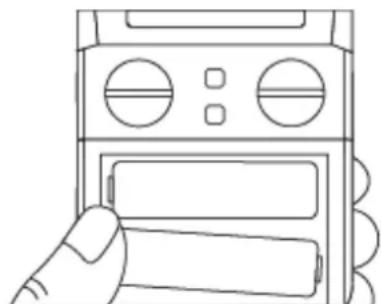
11.1. INSTALLATION OF BATTERIES
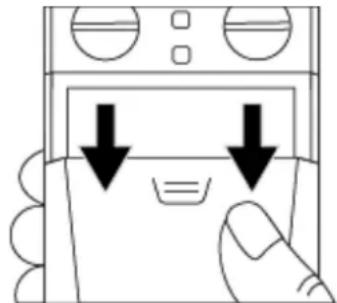
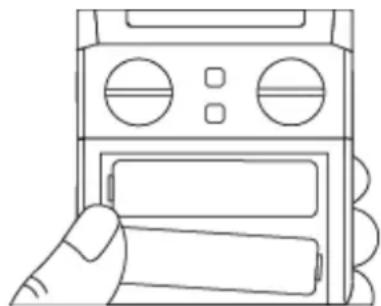
1) Remove the battery cover.
natural_image
Simple line drawing of a hand pressing down on a device with two downward arrows indicating compression or disassembly (no text or symbols)2) Insert batteries.
natural_image
Line drawing of a hand holding a device with buttons and a display panel (no text or symbols)Ensure that the batteries are inserted the right way as shown in battery compartment and that the ribbon is behind them.
4) Replace the battery cover.
Caution: Remove batteries from your TENS One if the unit is unlikely to be used for a long period. Some types of batteries may leak corrosive fluid.
Battery Life
Batteries should last at least 15 hours (whilst using mode M, 100Hz/50us (500Ω).
Unused batteries have a nominal shelf life of 3 years, but will usually last longer than this.

Battery Warnings
Do NOT pierce, open, disassemble, or use in a humid and/or corrosive environment.
Do NOT expose to temperatures over 60°C(140F).
Do NOT put, store or leave near sources of heat, in direct strong sunlight, in a high temperature location, in a pressurized container or in a microwave oven.
Do NOT immerse in water or sea water, or get wet.
Do NOT short-circuit.
Do NOT connect the device unless the battery cover is in place.
If battery leakage occurs and comes in contact with the skin or eyes, wash thoroughly with lots of water and immediately seek medical attention.
Warning: Keep batteries out of the reach of children to prevent them from swallowing them by mistake. If swallowed by child, contact doctor immediately.

Caution NEVER attempt to recharge an alkaline battery. Risk of explosion.

Caution Do not mix old, new or different types of batteries as
this may lead to battery leakage or low battery indication.
Disposal: Always dispose of batteries and device responsibly according to local government guidelines. Do not
throw batteries onto a fire. Risk of explosion.

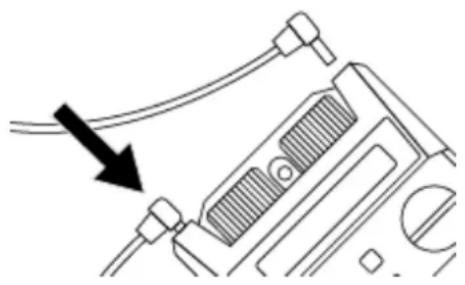
11.2. CONNECTING LEAD WIRES
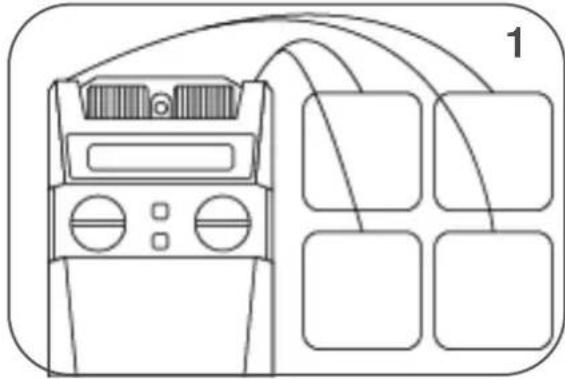
You can choose to use one or two lead wires (two or four electrode pads). Insert the lead wire plug(s) into the socket(s) on the top of the unit.
natural_image
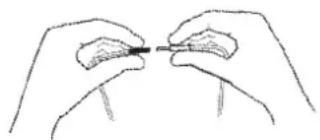
Diagram of a device with cable and connector, showing a black arrow pointing to a component (no text or symbols present)Attaching the electrode pads to the lead wire.
natural_image
Line drawing of two hands holding a small object, possibly a tool or component (no text or symbols present)Push the pin ends firmly into the pigtail ends of the electrode pads.
The lead wires may be damaged by rough handling, and should be treated with care.
Lead wire colour coding
The ends of the lead wires are coloured black or red. This coding is provided for some professional uses. For most purposes, the orientation makes no difference, and you can ignore this colour coding.

11.3. PREPARING FOR SESSION
1) Before use make sure your skin is clean and dry.
2) Place the electrode pads on the skin, see section 8.
3) You can use your TENS for several hours, you can attach the unit to your belt using the belt clip.
4) You can safely lean on the electrode pads. The sensation might change.

Warning: Ensure the TENS One is switched OFF before applying the electrode pads on the skin.
11.4. TREATMENT SESSION
1) To turn the unit ON, rotate one of the control knobs clockwise until you hear a click, the LED indicator will light up (green colour).
When switched on for the first time, the TENS One will automatically select the mode N. Next time, it will automatically select the mode you were using the last time it was switched off.
2) You can select from the 3 preset modes. Details in section 7 will help you identify the best mode and parameters to suit you.
3) With the required mode and parameters selected, you can adjust the intensity of the stimulation with the two rotating control knobs on the top of the unit until you reach a comfortable level. The LCD display shows the strength of intensity used for each channel.

Note: If the sensation becomes uncomfortable, reduce the intensity.
11.5. AFTER YOUR TREATMENT SESSION
When the timer reaches 0, the display will flash until the device is manually switched off.
1) To turn the unit OFF, rotate one of the control knobs anti-clockwise until you hear a click, the display will stop. Then remove the electrode pads from your skin by holding the pad itself and gently pulling. Be careful not to pull the wires as this may damage them.
2) Replace the electrode pads to their protective plastic shield and return them to the re-sealable plastic bag.

Note: When removing the electrode pads, DO NOT PULL ON LEAD WIRES.
12. CLEANING & STORAGE
Clean the case and lead wires at least once a week by wiping with a damp cloth and a solution of mild soap and water. Wipe dry.
- Do not immerse your TENS machine in water.
- Do not use any other cleaning solution than soap and water.
Storage life
- Storage life of an unopened pack of self-adhesive electrode pads is 2 years. This may be affected by very high temperatures or very low humidity.
- The unit has no fixed shelf life.
13. EMC
Wireless communications equipment such as wireless home network devices, mobile phones, cordless telephones and their base stations, walkie-talkies can affect this equipment and should be kept at least a distance d = 3,3 m away from the equipment.
(Note. As indicated in Table 6 of IEC 60601-1-2:2007 for ME EQUIPMENT, a typical cell phone with a maximum output power of 2 W yields d = 3,3 m at an IMMUNITY LEVEL of 3 V/m).

Note: For hospital use, full EMC advice tables are available on request.
14. DISPOSAL OF WASTE ELECTRICAL AND ELECTRONIC PRODUCTS (WEEE)

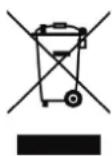
One of the provisions of the European Directive 2002/96/CE is that anything electrical or electronic should not be treated as domestic waste and simply thrown away. To remind you of this Directive all affected products are now being marked with a crossed-out wheelie bin symbol, as depicted below.
To comply with the Directive, you can return your old electro-therapy unit to us for disposal. Simply print a postage-paid PACKETPOST RETURNS label from our website www.tenscare.co.uk, attach this to an envelope or padded bag with the unit enclosed, and post it back to us. Upon receipt, we will process your old device for components recovery and recycling to help conserve the world's resources and minimise adverse effects on the environment.
15. ACCESSORIES
Expected Service Life
- The machine will often last for more than 5 years, but is warranted for 2 years. Accessories (lead wires, electrode pads, and batteries) are not covered by the warranty.
- Lead life depends greatly on use. Always handle the leads with care. We recommend to replace the lead

wires regularly (about every 6 months).
- Electrode pads should last 12 to 20 applications, depending on skin condition and humidity.
- Batteries should last at least 15 hours at 50 ~mA, 300 s, 50 ~Hz .
Replacement electrode pads, new batteries and lead wires are available from your supplier or distributor (see back cover for contact details), by mail order from TensCare, by telephone using a credit or debit card, or through the TensCare website.
The following replacement parts may be ordered from TensCare at www.tenscare.co.uk or +44(0) 1372 723434.
E-CM5050 Pack of 4 50x50 mm electrode pads
L-CPT Lead wire B-AA 1.5V AA batteries
16. WARRANTY
This warranty refers to the unit only. It does not cover, electrode pads, battery, or lead wires.
PRODUCT WARRANTY INFORMATION
This product is warranted to be free from manufacturing defects for 2 years from date of purchase.
This warranty is void if the product is modified or altered, is subject to misuse or abuse; damaged in transit; lack of responsible care; is dropped; if incorrect battery has been fitted; if the unit has been immersed in water; if damage occurs by reason of failure to follow the written instructions for use booklet enclosed; or if product repairs are carried out without authority from TensCare Ltd.
We will repair, or at our option replace free of charge, any parts necessary to correct material or workmanship, or replace the entire unit and return to you during the period of the warranty. Otherwise, we will quote for any repair which will be carried out on acceptance of our quotation. The benefits conferred by this warranty are in addition to all other rights and remedies in respect of the product, which the consumer has under the Consumer Protection Act 1987.
Our goods come with warranties that cannot be excluded under the UK consumer Law. You are entitled to have the goods repaired or replaced if the goods fail to be of acceptable quality.
Before you send your unit for service
Before sending in your unit for service, please take a few minutes to do the following:
Read your manual and make sure you follow all the instructions for use.
Returning your unit for service
Should repair be needed within the warranty period, enclose the tear off section of the warranty card (see page 25) and your proof of purchase receipt. Please ensure all relevant details are completed before sending your unit in for service. Please ensure your contact details are still current and include a brief description of the problem you are experiencing together with your purchase receipt.
For hygiene reasons, please do not include used electrode pads. Send only the unit and lead wires.
Please return the unit and warranty card (see page 25) at your cost to:
TensCare Ltd
PainAway House, 9 Blenheim Road, Longmead Business Park, Epsom, Surrey KT19 9BE, UK
Should you require any further information please do not hesitate to contact us by calling our number:
+44 (0) 1372 723 434.

If your TENS machine is not working properly, please check the following:
| Problem | Possible causes | Solution |
| No display | Flat batteries. | Replace batteries. |
| Batteries inserted incorrectly. | Remove plastic wrap.Check + / - . | |
| Damaged springs in battery compartment. | Contact supplier. | |
| Low battery display | Low batteries. | Replace batteries. |
| No sensation | Intensity is not strong enough. | Increase strength. |
| No sensation and the display flashes | Open circuit cut-out operating.Lead not connected to body or faulty/damaged. | Ensure machine is attached to your body correctly.Try using the second lead wire.Purchase replacement if necessary. |
| (Lead wires can break at the bend where they leave the machine giving no, or intermittent, output). | ||
| Sudden change in sensation | If you disconnect and re-connect a few minutes later, the signal will feel quite a lot stronger. | Always return strength to zero after disconnecting the leads or electrode pads. |
If the above review has failed to resolve your problem, or to report unexpected operation or events, or to provide feedback call TensCare or your local supplier or distributor (address on back cover) for advice.
Contact TensCare customer service on +44 (0) 1372 723 434. Our staff are trained to assist you with most issues you may have experienced, without the need to send your product in for service.
European Medical Device Regulation requires that any serious incident that has occurred in relation to this device should be reported to the manufacturer and the competent authority in your country. This can be found at: https://ec.europa.eu/docsroom/documents/3683/attachments/1/translations/en/renditions/pdf
18. GENERAL SPECIFICATION
| Waveform | Symmetrical biphasic or monophasic rectangular |
| Amplitude (over 500 Ohm load) | 80 mA zero to peak +ve in 20 steps. +/- 10% |
| Output plug | Fully shielded: touch proof |
| Channels | Dual channel |
| Batteries | 2 x AA alkaline (two AA batteries) |
| Weight | 140 g without batteries |
| Dimensions | 100 x 67 x 32 mm |
| Safety Classification | Internal power source. Designed for continuous use. No special moisture protection. |
| Environmental specifications: | |
| Operating: | Temperature range: 5 to 40°C Humidity: 15 to 93% RH non-condensing Atmospheric pressure: 70 kPa to 106 kPa Temperature range: -25 to +70°C Humidity: Up to 93% RH non-condensing |
| Storage: | |
| TYPE BF EQUIPMENT | Equipment providing a degree of protection against electric shock, with isolated applied part. |
| This symbol on the unit means “Refer to Instructions for use”. | |
| IP22 | The unit is not water resistant, and should be protected from liquids. |
| Complies with EU WEEE regulations | |

Note: The electrical specifications are nominal and subject to variation from the listed values due to normal production tolerances of at least 5%.

Note: At least 30min required for the device to warm / cool from the minimum / maximum storage temperature between uses until it is ready for intended use.
PLEASE RETAIN THIS WARRANTY CARD.
RETURN THIS PORTION ONLY WHEN YOU RETURN YOUR PRODUCT FOR REPAIR UNDER WARRANTY.
NAME:
ADDRESS:
POSTCODE:
DAYTIME TELEPHONE: ____
E-MAIL:
MODEL:
DATE OF PURCHASE: ____
ATTACH PROOF OF PURCHASE DO NOT SEND IN ELECTRODE PADS OR LEADS
RETAILERS NAME: ____
RETAILERS ADDRESS: ____
RETAILERS POSTCODE:
BRIEF DESCRIPTION OF PROBLEM YOU ARE EXPERIENCING: ____
WARRANTY IS VOID UNLESS THE ABOVE INFORMATION IS COMPLETED AND CORRECT.
Estimado cliente,
natural_image
Illustration of a human back with colored rectangular blocks on the spine (no text or symbols)natural_image
Human back with four blue rectangular markers on the back surface, no text or symbols presenttext_image
TENS One Schematic of the first 12 months and the first 12 months of the first 12 months TENS One Electrolates TENS One TENS One10.1. CONTROLES Y PANTALLA
natural_image
Simple line drawing of a hand pressing down on a device with two downward arrows indicating compression or disassembly (no text or symbols)natural_image
Line drawing of a hand inserting a device into a panel (no text or symbols)natural_image
Diagram of a mechanical component with wires and connectors, no text or symbols presentPainAway House, 9 Blenheim Road, Longmead Business Park, Epsom, Surrey KT19 9BE, UK
https://ec.europa.eu/docsroom/documents/36683/attachments/1/translations/en/renditions/pdf
• Stimulation comfortable
natural_image
Illustration of a human back with colored anatomical markers (no text or symbols)natural_image
Human back with four blue rectangular markers on the spine (no text or symbols)natural_image
Simple line drawing of a hand pressing down on a device with two downward arrows indicating compression or disassembly (no text or symbols)2) Insérez les piles.
natural_image
Line drawing of a hand inserting a device into a panel (no text or symbols)natural_image
Diagram of a mechanical component with wires and connectors, no text or symbols presentLongmead Business Park,
Epsom, Surrey
KT19 9BE, ROYAUME-UNI
https://ec.europa.eu/docsroom/documents/36683/attachments/1/translations/en/renditions/pdf
18. SPÉCIFICATION GÉNÉRALE
natural_image
Illustration of a person's back with colored anatomical markers (no text or symbols)natural_image
Human back with four blue rectangular markers on the chest area, no text or symbols presentnatural_image
Simple line drawing of a device with two downward arrows pointing to a screen (no text or symbols)natural_image
Line drawing of a hand inserting a device into a panel (no text or symbols)natural_image
Diagram of a device with cable and connectors, showing a black arrow pointing to a component (no text or symbols present)natural_image
Illustration of two hands holding a small object, possibly a tool or component (no text or symbols visible)INFORMATIONEN ZUR PRODUKTGARANTIE
Longmead Business Park,
Epsom, Surrey
KT19 9BE, GROßBRITANNIEN
https://ec.europa.eu/docsroom/documents/36683/attachments/1/translations/en/renditions/pdf
18. ALLGEMEINE SPEZIFIKATION
TensCare aim to give you the best possible product and service. We listen to your suggestions and are constantly trying to improve our products. We also want to learn about the way our products are used, and the benefits they give. If you have anything you would like to share with us, please get in touch.
www.tenscare.co.uk
Follow us:

TensCare Ltd

@TensCareLtd

TensCare Limited

@tenscareltd
CE
2797
EC Declaration of Conformity
Tenscare Ltd herewith declare that the product meets the provisions of REGULATION (EU) 2017/745 which apply to it. The medical device has been assigned to class IIa according to Annex IV of the REGULATION (EU) 2017/745. The product concerned has been designed and manufactured under a quality management system according to Annex IX, of REGULATION (EU) 2017/745. This EU declaration of conformity is issued under the sole responsibility of the manufacturer. No “Common Specification” is applicable.
Distributed by:
CE
2797

TensCare Ltd
9 Blenheim Road, Epsom,
Surrey, KT19 9BE, UK
Tel: +44(0) 1372 723434
www.tenscare.co.uk
EC
REP
Advena Ltd
Tower Business Centre
2 ^nd Flr, Tower Street
Swatar, BKR 4013, Malta

TensCare Europe BV
I-TENSONE-ML [UK,ES,FR,DE] Rev 2.2 10/22
TensCare™