301846 - Computer accessory Aplic - Free user manual and instructions
Find the device manual for free 301846 Aplic in PDF.


| Product Type | USB 3.2 Gen1 to SATA / IDE Converter |
| Brand | Aplic |
| Model | 301846 |
| Category | Computer Accessory |
| System Compatibility | Windows 7 / 8 / 10 / 11, Linux |
| Connections | USB 3.0, SATA, IDE, DC power jack (5.5mm / 2.5mm), floppy drive connector |
| Compatible Devices | SATA I / II / III 2.5" and 3.5", IDE 40-pin, IDE 44-pin |
| Power Supply | 12 V / 2 A via external power adapter |
| Main Functions | SATA/IDE to USB conversion, automatic backup with dedicated button |
| Included Software | AI-OTB v1.3.0.5 for backup and restore |
| Package Contents | Converter, 12V/2A power adapter, USB 3.0 cable, Molex adapter cable, software CD, user manual |
| Supported Disk Types | 2.5" and 3.5" (SATA and IDE) |
| Host Interface | USB 3.2 Gen1 (USB 3.0) |
| Backup Button | Yes, on the top of the device |
| Safety | Do not open, avoid moisture, do not expose to high temperatures |
| Maintenance | Clean with a dry cloth, do not use chemical products |
| Recycling | WEEE compliant, eco-participation included |
Frequently Asked Questions - 301846 Aplic
User questions about 301846 Aplic
0 question about this device. Answer the ones you know or ask your own.
Ask a new question about this device
Download the instructions for your Computer accessory in PDF format for free! Find your manual 301846 - Aplic and take your electronic device back in hand. On this page are published all the documents necessary for the use of your device. 301846 by Aplic.
USER MANUAL 301846 Aplic
natural_image
Abstract geometric logo design with a stylized letter 'Q' inside a circular frame (no text or symbols)BEDIENUNGSANLEITUNG
USER MANUAL
USB 3.2 GEN1. TO
SATA / IDE CONVERTER
Mod.-Nr.: 301846
Table of contents
- Deutsch....3
- English....9
- Français....15
- Italiano....22
- Español....28

ENG: Current drivers, user manuals and other relevant documents for this product can be found on our homepage.
natural_image
Abstract black-and-white graphic with a white icon of a computer monitor and curved lines, no text or symbols present.Welcome to the AI-OTB Setup Wizard
This will install AJ-OTB version 1.3.0.5 on your computer.
It is recommended that you dose all other applications before continuing.
Click Next to continue, or Cancel to exit Setup.

Cancel
Thank you for choosing an aplic product. Please read the following user manual carefully to have an enjoyable experience with your purchased product. Before using the delivered product, check that it is complete, faultless and undamaged.
1. Scope of supply
• USB 3.2 Gen1. to SATA / IDE Converter
• DC coaxial connector Power supply 12V / 2A (5.5mm / 2.5mm)
- USB 3.2 Gen1. connection cable
- Molex to Floppy Adapter Cable
- Software CD
- User manual
2. Technical data
| Power supply 12V / 2A via power supply unit | |
| System compatibility Windows | 7 / 8 / 10 / 11, Linux |
| Ports | • USB 3.2 Gen1.• SATA• IDE• DC coaxial plug connection• Floppy connection |
| Compatible devices • 2.5"/ 3.5" SATA I / II / III• IDE 40pin / IDE 44pin | |
3. Initial use
When the device is put into operation for the first time, check the intactness of the product or components and their function again. Take the device out of the package and remove all the packaging material. Connect the provided 12V DC power supply with coaxial connector to a properly wired socket and to the converter. Then connect the USB 3.2 Gen1. cable to your computer or notebook and the device. You can then connect the desired hard drives via SATA or IDE to the converter.
4. Software installation
Insert the software CD into your computer or notebook drive. Start the software installation.

AI-OTB v1.3.0.5
A confirmation prompt is displayed that needs to be accepted with "Yes".

The installation wizard then starts. Click the "Next" button.

natural_image
Silhouette of a computer monitor with a small icon above it, no visible text or symbolsWelcome to the AI-OTB Setup Wizard
This will install AJ-OTB version 1.3.0.5 on your computer.
It is recommended that you dose all other applications before continuing.
Click Next to continue, or Cancel to exit Setup.

Cancel
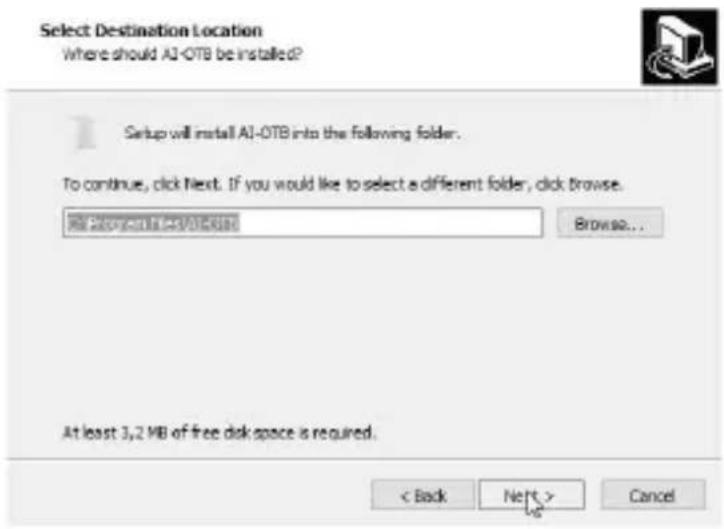
Then you need to specify the desired installation directory. Press "Next" after doing this.
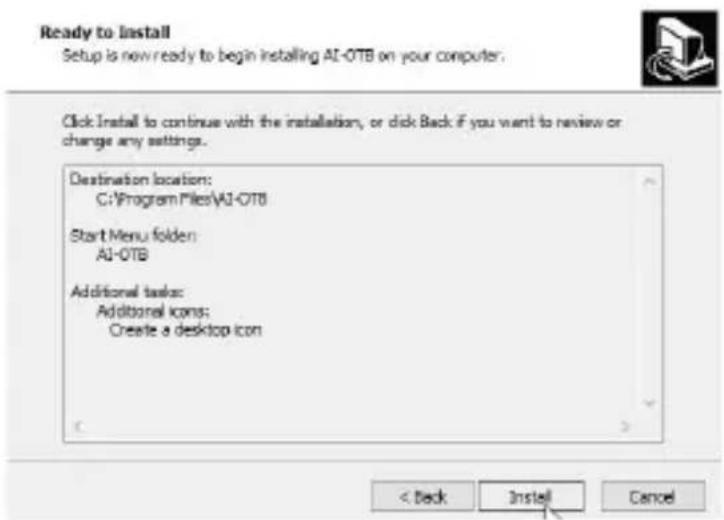
Then click on "Install" and follow the remaining steps of the installation wizard.
The software has been successfully installed.
Select the target device where you want to save the backup under "Device".
The program is used to create a backup. For data backup, you need to select the desired data in the sub-menu item "OTB Path" from which you want to create the backup.
You need to configure the PC as "Original PC" in the "Config" sub-menu item.
You can start the backup by clicking the "Start" button. Alternatively, you can press the "BACK UP" button on the top of the device.
Click on the "Restore" sub-menu to restore the les. In this menu, you have the op on of restoring the data to the source path or a path selected by you.
5. Connection example
flowchart
graph TD
    A["PC Monitor"] --> B["Server"]
    B --> C["Central Unit"]
    C --> D["SATA"]
    C --> E["IDE"]
    C --> F["IDE"]
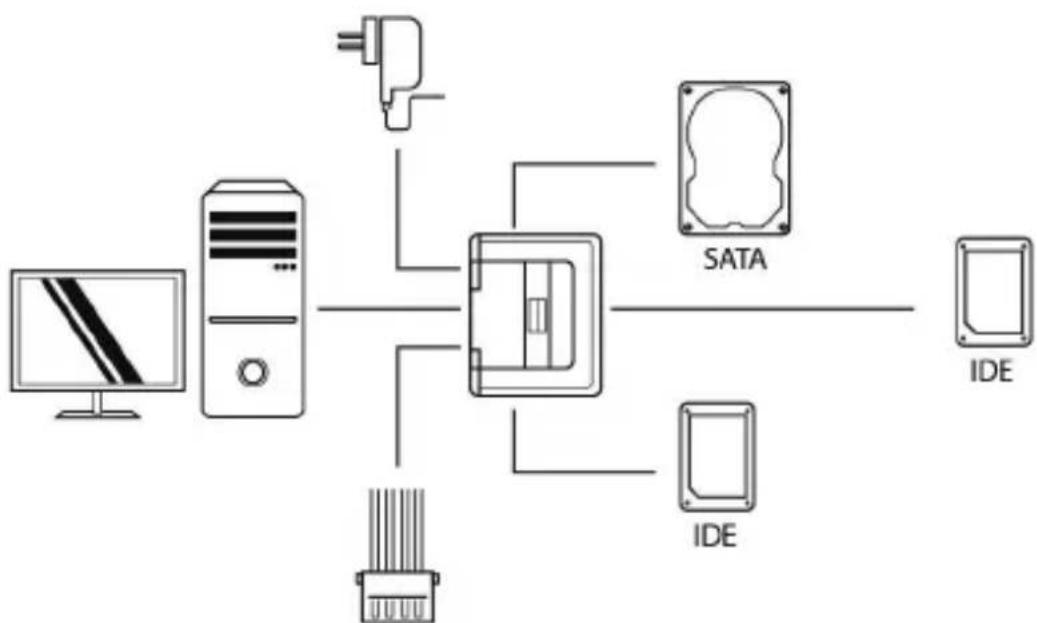
You can connect a 3.5" IDE device (like for e.g. 3.5" IDE HDD, DVD-ROM, CD-RW, etc.), a 2.5" IDE HDD and a 2.5" / 3.5" SATA HDD to the converter. If necessary, you can supply power to one of the disks using the Molex adapter.
6. Safety instructions and disclaimer
Do not a ‘empt to service this product by yourself as opening or removing covers may result in re, electric shock or equipment damage. Please avoid any contact to the electric current. This product is only licensed for indoor use and dry areas. Please protect it from water, rain, snow or high humidity and keep it away from high temperatures and direct sunlight. Do not expose this product to extreme and sudden changes of temperature or heavy vibra ons; this may lead to damage of the internal electronic part of this unit. Check this product for signs of damage before pu ng it in opera on. In case the device received any damage, it should not be used. Please contact our customer support. Please observe the relevant na olal provisions and legal restric ons. Do not use this product for anything
other than intended and as described in the manual. Any a empt of repairs or altera ons by someone other than the original supplier will invalidate the guarantee and result in refusal of warranty claims. Persons who are familiar with the opera ng manual and the applicable regula ons concerning working safety and accident preven on may only use the network card. This unit is not intended to be used by persons (including children) with limited physical, sensory or mental ap tude or lack of experience and/or knowledge unless they are supervised by a person responsible for their safety or have received instruc ons as to how the device is used properly. The technical speci ca ons of this product may change without prior no ce.
7. Disposal Instructions
The European Direc ve (WEEE) requires that old electrical and electronic appliances shall be disposed of separately from normal household garbage for op mal recycling. The component parts must be separated, collected and sent for recycling or disposal in an environment-friendly manner. Otherwise, toxic and dangerous substances could cause enduring damage to the environment if disposed of incorrectly. As a consumer you are legally obligated (Electrical and Electronic Equipment Act-ElektroG) to return electronic equipment at the end of its life me to their manufacturer, point of sale, public collec on points or importer free of charge. The relevant local laws apply here. The symbol on the product, in the instruc ons or on its packing indicates these regula ons. The reuse or recycling of materials and old units makes an important contribu on towards protec ng the environment.

WEEE guideline: 2012/19/EU WEEE register number: DE 67896761
WD Plus GmbH, herewith declares that this product 301846 conforms to the principle requirements and other relevant s pula ons. The complete Declara on of Conformity can be obtained from: WD Plus GmbH, Wohlenbergstraße 16, 30719 Hanover
natural_image
Silhouette of a computer monitor with a small icon above it, no visible text or symbolsWelcome to the AI-OTB Setup Wizard
This will install AJ-OTB version 1.3.0.5 on your computer.
It is recommended that you dose all other applications before continuing.
Click Next to continue, or Cancel to exit Setup.

Cancel
Service product • prix appel.
www.ecosystem.eco

FR
natural_image
Silhouette of a computer monitor with a small icon above it, no visible text or symbolsWelcome to the AI-OTB Setup Wizard
This will install AJ-OTB version 1.3.0.5 on your computer.
It is recommended that you dose all other applications before continuing.
Click Next to continue, or Cancel to exit Setup.

Cancel
natural_image
Silhouette of a computer monitor with a small icon above it, no visible text or symbolsWelcome to the AI-OTB Setup Wizard
This will install AJ-OTB version 1.3.0.5 on your computer.
It is recommended that you dose all other applications before continuing.
Click Next to continue, or Cancel to exit Setup.

Cancel
MO-FR 9:30am - 18pm CET

Brand : Aplic
Model : 301846
Category : Computer accessory