Kidzi - Smartwatch Xplora - Free user manual and instructions
Find the device manual for free Kidzi Xplora in PDF.


| Product Type | Connected watch for children |
| Brand | Xplora |
| Model | Kidzi |
| Box Content | Kidzi watch, USB cable, user manual |
| Power Supply | Integrated battery not replaceable by user |
| Charging Type | Magnetic via included cable |
| Charging Voltage | 5.0 V (USB adapter, min. 0.55 A) |
| Mobile Connectivity | LTE (bands B1/B3/B7/B8/B20), GSM 900, DCS1800, WCDMA B1/B8 |
| Wireless Connectivity | Bluetooth, Bluetooth LE, Wi-Fi |
| Main Button | Power/Home/SOS |
| SOS Function | Yes, by long press of 5 seconds |
| Force Reset | Press power button for >10 seconds |
| Operating Temperature Range | -10°C to 45°C |
| SAR Value (face) | 1.12 W/kg (10g) |
| SAR Value (limbs) | 2.3 W/kg (10g) |
| Management App | Xplora (available on Google Play and App Store) |
| Activation | By scanning the QR code in the Xplora app |
| Recycling | WEEE compliant, do not dispose with household waste |
| Compliance | RoHS Directive |
| Customer Support | kidzi.support@xplora.com |
Frequently Asked Questions - Kidzi Xplora
User questions about Kidzi Xplora
0 question about this device. Answer the ones you know or ask your own.
Ask a new question about this device
Download the instructions for your Smartwatch in PDF format for free! Find your manual Kidzi - Xplora and take your electronic device back in hand. On this page are published all the documents necessary for the use of your device. Kidzi by Xplora.
USER MANUAL Kidzi Xplora
Thank you for choosing Xplora. We hope that you and your child enjoy this new and more exciting way of exploring the world.
For further information, please visit https://start.xplora.com/kidzi
EN
BOX CONTENTS
Check the box contents: Kidzi Smartwatch, USB cable, User manual.
NOTE: Please use Xplora authorized accessories.
CAUTION: Risk of explosion if battery is replaced with a different type.
Do not remove or attempt to remove the non-user-replaceable battery. If you have a problem with the battery, please contact the customer support service.
EN
HOW TO ACTIVATE
Here are the 3 key steps to get your Kidzi up and running
-
Set up your SIM plan
-
Go to https://start.xplora.com/kidzi
- Select desired SIM plan.
-
Complete the order and wait for the confirmation e-mail.
-
Download the Xplora App to your phone
• Available on Google Play and App Store.
- Signup and login to your Xplora account.
-
Activate your Kidzi watch
-
Select Add New Device in the Xplora app.
- Scan the QR code available on your Kidzi watch.
-
Enter the phone number as received in step 1, followed by the preferred device name.
-
The watch is now activated and is ready to use
EN
Scan the QR code below to get detailed instructions and customer support:
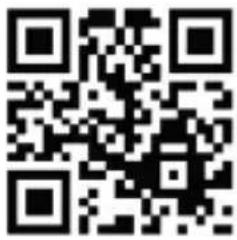
Or visit: https://start.xplora.com/kidzi
Or send an e-mail to kidzi.support@xplora.com
XPLORA APP
Available on:
EN
7
EN
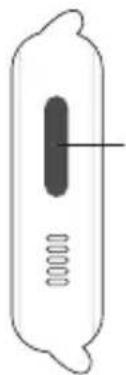
WATCH BUTTON
Power / Home / SOS Button
- Press and hold for 3 sec to turn on.
- Short press to return to the home screen.
- Press and hold for 5 sec to initiate SOS.
NOTE: If the watch is not working, press the Power Button for more than 10 sec to perform a forced reboot.
natural_image
Simple line drawing of a cylindrical object with internal components and a central vertical bar (no text or symbols)Power/ Home/ SOS Button
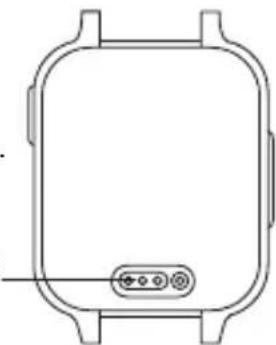
CHARGING THE WATCH
- Use only Xplora authorised magnetic charging cable.
- Connect the magnetic charger as shown below.
- Charge the watch for more than 15 minutes before use.
Please charge the battery using the charging cable and a USB power adapter with an output of minimum 5.0V=0.55A.
Charging Port
natural_image
Front view line drawing of a rectangular device with internal components and a small indicator button (no text or symbols)EN
9
EN
CORRECT DISPOSAL OF THIS PRODUCT
(Waste Electrical & Electronic Equipment)
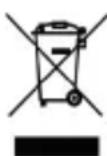
This marking on the product, accessories or literature indicates that the product and its electronic accessories (e.g. charger, headset, USB cable) should not be disposed of with other household waste. To prevent possible harm to the environment or human health from uncontrolled waste disposal, please separate these items from other types of waste and recycle them responsibly to promote the sustainable reuse of material resources. Household users should contact either the retailer where they purchased this product, or their local government office, for details of where and how they can take these items for environmentally safe recycling. Business users should contact their supplier and check the terms and conditions of the purchase contract. This product and its electronic accessories should not be mixed with other commercial wastes for disposal. This product is RoHS compliant.
EN
DECLARATION OF CONFORMITY
Xplora Technologies AS hereby declares that this Xplora smartwatch phone for kids (Model name: Kidzi) satisfies all the technical regulations applicable to the product within the scope of UK Radio Equipment Regulations 2017, UK Electrical Equipment (Safety) Regulations 2016, and UK Electromagnetic Compatibility Regulations 2016.
It complies with the RF standards when used next to mouth at distance of 10mm and properly worn on the body. The highest SAR value reported for this device type when tested next to the mouth is 1,12 W/kg (legal limit: 2.0W/kg (10g)) and when properly worn on the body is 2,3 W/kg (legal limit: 4.0W/kg (10g)).
EN
A copy of the original declaration of conformity can be found at https://start.xplora.com/kidzi
Alternatively, you may contact Xplora customer support via kidzi.support@xplora.com
| Frequency Power | Frequency Power | ||
| Bluetooth | 1.88dBm | LTE B7 22.11dBm | |
| Bluetooth LE 1.45dBm | LTE B8 22.53dBm | ||
| WIFI 14.84dBm | LTE B20 22.74dBm | ||
| GSM 900 32.65dBm | EUT operating temperature range -10°C to 45°C | ||
| DCS1800 | 29.87dBm | ||
| WCDMA B1 23.64dBm | Hight SAR value (W/kg) 10g- Front of face 1,12 W/kg | ||
| WCDMA B8 23.25dBm | |||
| LTE B1 22.19dBm | Hight SAR value (W/kg) 10g- Limbs 2,3 W/kg | ||
| LTE B3 22.84dBm |
DE
WILLKOMMEN
Besuche alternativ: https://start.xplora.com/kidzi
O visite: https://start.xplora.com/kidzi
natural_image
Simple line drawing of a vertical object with internal components, no text or symbols presentnatural_image
Simple line drawing of a rounded rectangular object with two side legs and a small circular button at the bottom (no text or symbols)ES
ES
Ou visitez : https://start.xplora.com/kidzi
natural_image
Simple line drawing of a device with a central vertical bar and two springs (no text or symbols)Bouton Marche/Accueil/SOS
CHARGEMENT DE LA MONTRE
natural_image
Simple line drawing of a rounded rectangular object with two side supports and a small circular button at the bottom (no text or symbols)FR
FR
ÉLIMINATION CORRECTE DE CE PRODUIT
DÉCLARATION DE CONFORMITÉ
Eller besök: https://start.xplora.com/kidzi
kidzi.support@xplora.com
XPLORA APP
Tillgänglig på:
SE
SE
KLOCKANS KNAPP
Ström / Hem / SOS-knapp
natural_image
Simple line drawing of a vertical object with internal components, no text or symbols presentStröm / Hem / SOS-knapp
LADDA KLOCKAN
natural_image
Simple line drawing of a rounded rectangular container with a small internal button (no text or symbols)SE
SE
KORREKT KASSERING AV DENNA PRODUKT
kidzi.support@xplora.com
| Frequency Power | Frequency Power | ||
| Bluetooth | 1.88dBm | LTE B7 22.11dBm | |
| Bluetooth LE 1.45dBm | LTE B8 22.53dBm | ||
| WIFI 14.84dBm | LTE B20 22.74dBm | ||
| GSM 900 32.65dBm | EUT operating temperature range -10°C to 45°C | ||
| DCS1800 | 29.87dBm | ||
| WCDMA B1 23.64dBm | Hight SAR value (W/kg) 10g- Front of face 1,12 W/kg | ||
| WCDMA B8 23.25dBm | |||
| LTE B1 22.19dBm | Hight SAR value (W/kg) 10g- Limbs 2,3 W/kg | ||
| LTE B3 22.84dBm |

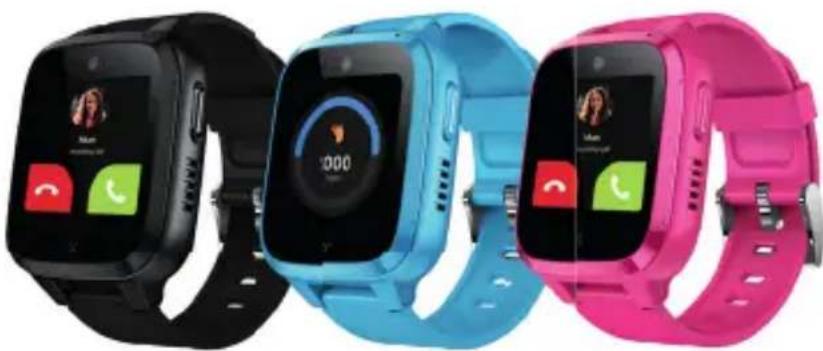
X Kidzi
natural_image
Three smartwatches in black, blue, and pink colors with app interface displays (no readable text or symbols)X Kidzi
Xplora Technologies AS
Nedre Slottsgate 8, 0157 Oslo, Norway
https://start.xplora.com/kidzi
kidzi.support@xplora.com


AGE:4+
- BOX CONTENTS
- EN
- HOW TO ACTIVATE
- WATCH BUTTON
- Power / Home / SOS Button
- CHARGING THE WATCH
- CORRECT DISPOSAL OF THIS PRODUCT
- DECLARATION OF CONFORMITY
- DE
- WILLKOMMEN
- CHARGEMENT DE LA MONTRE
- ÉLIMINATION CORRECTE DE CE PRODUIT
- DÉCLARATION DE CONFORMITÉ
- KLOCKANS KNAPP
- Ström / Hem / SOS-knapp
- LADDA KLOCKAN
- SE
- KORREKT KASSERING AV DENNA PRODUKT
- X Kidzi
Brand : Xplora
Model : Kidzi
Category : Smartwatch