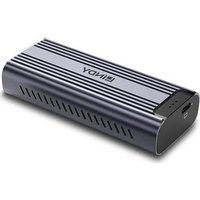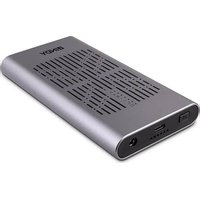
43382 - External hard drive Lindy - Free user manual and instructions
Find the device manual for free 43382 Lindy in PDF.


User questions about 43382 Lindy
0 question about this device. Answer the ones you know or ask your own.
Ask a new question about this device
Download the instructions for your External hard drive in PDF format for free! Find your manual 43382 - Lindy and take your electronic device back in hand. On this page are published all the documents necessary for the use of your device. 43382 by Lindy.
USER MANUAL 43382 Lindy
USB 3.2 Gen 2x2 Dual M.2 NVMe SSD Enclosure with Clone Feature
User Manual English
Please read the following safety information carefully and always keep this document with the product.
Failure to follow these precautions can result in serious injuries or death from electric shock, fire or damage to the product.
Touching the internal components or a damaged cable may cause electric shock, which may result in death.
text_image
DANGER ELECTRIC SHOCK RISKThis device is a switching type power supply and can work with supply voltages in the range 100 - 240 VAC For worldwide usability four different AC adapters are enclosed: Euro type, UK type, US/Japan type and Australia/New Zealand type. Use the appropriate AC adapter as shown in the picture and ensure it is firmly secured in place and does not detach by pulling before installing into a power socket.
To reduce risk of fire, electric shocks or damage:
- Do not open the product nor its power supply. There are no user serviceable parts inside.
- Only qualified servicing personnel may carry out any repairs or maintenance.
■ Never use damaged cables. - Do not expose the product to water or places of moisture.
- Do not use this product outdoors it is intended for indoor use only.
- Do not place the product near direct heat sources. Always place it in a well-ventilated place.
- Do not place heavy items on the product or the cables.
- Please ensure any adapters are firmly secured and locked in place before inserting into a wall socket
Instructions for Use of Power Supply
Attach the required country adapter to the plug:
Place the country adapter on the power supply unit so that the 2 lugs on the lower end of the adapter fit into the corresponding recesses on the power supply unit. Then slide the adapter down until it clicks into place.
To remove, push the button and slide the adapter upwards.
Introduction
Thank you for purchasing the USB 3.2 Gen 2x2 Dual M.2 NVMe SSD Enclosure. This product has been designed to provide trouble free, reliable operation. It benefits from both a LINDY 2 year warranty and free lifetime technical support. To ensure correct use, please read this manual carefully and retain it for future reference.
The Lindy USB 3.2 Gen 2x2 Dual M.2 NVMe SSD Enclosure allows the user to install two PCIe/NVMe based M.2 SSDs as an external drive to USB hosts like laptops or PCs. The additional Clone feature enables duplicating M.2 NVMe SSDs - even without connection to a computer ("offline cloning"). Support for the USB 3.2 Gen 2x2 standard guarantees SuperSpeed 20Gbps data transfer rates. UASP support also ensures faster speeds for UASP enabled computers.
Package Contents
■ USB 3.2 Gen 2x2 Dual M.2 NVMe SSD Enclosure
■ 0.25m USB 3.2 Gen 2x2 Type C to C cable
■ Multi-Country Power Supply 12VDC 2A with country adapters (EU, UK; US, AUS)
■ 2x thermal conductive pad
■ 2x thermal conductive plate
■ 4x M.2 rubber plug
■ Lindy Manual
Specification
■ Interface: USB to 2x PCIe/NVMe M.2 SSD
■ Interface Standard: USB 3.2 Gen 2x2, PCIe 3.0 x2
■ Supported Bandwidth: 20Gbps (USB), 32Gbps - each up to 16Gbps (PCI 3.0 x2)
Chipset: JMS586U
- Compatibility: USB Type C equipped computers
■ Special Features: supports 42/60/80mm SSDs, UASP & TRIM, LED indicator for Clone process
■ Inputs: 1 x USB Type C (Female)
■ Outputs: 2 x PCIe based M.2 (Female), M key and B+M key
■ Power: 5.5/2.5mm DC socket
■ Product Dimensions WxDxH: 143x77x17.5mm (5.63x3.03x0.69in)
■ Housing Material: Aluminium and ABS
■ Net Weight: 0.174kg (0.38lb)
■ Operating Temperature: 5°C - 35°C (41°F - 95°F)
■ Storage Temperature: -10°C - 90°C (-14°F - 122°F)
■ Humidity: 10 - 90% RH (non-condensing)
Overview
text_image
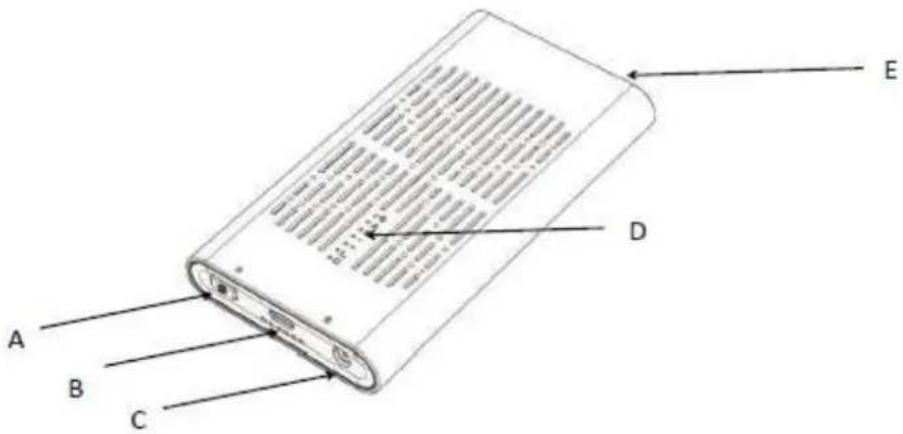
A B C D EA: Offline Clone Button
B: Upstream Port: USB 3.2 Gen 2x2 20Gbps Type C Female
C: Power Port: 12V DC 5.5x2.5mm
D: LED Indicators for Power, M.2 NVMe SSD and Offline Clone Progress
E: Secure-Lock: Lock & Unlock
Installation & Operation
Please follow the steps below for installation:
text_image
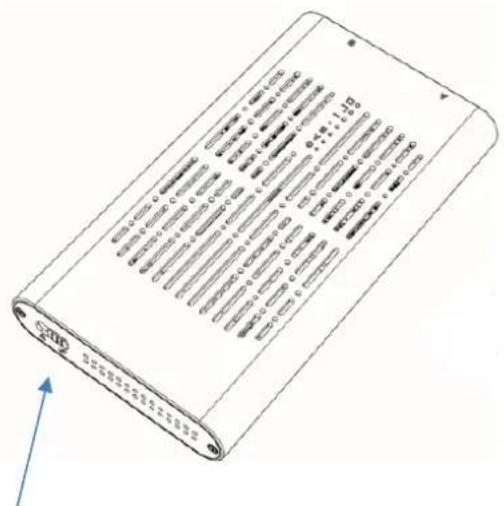
Technical diagram of a battery pack with labeled specifications and an upward arrow indicating orientation.Unlock the secure lock E by sliding the switch to the right.
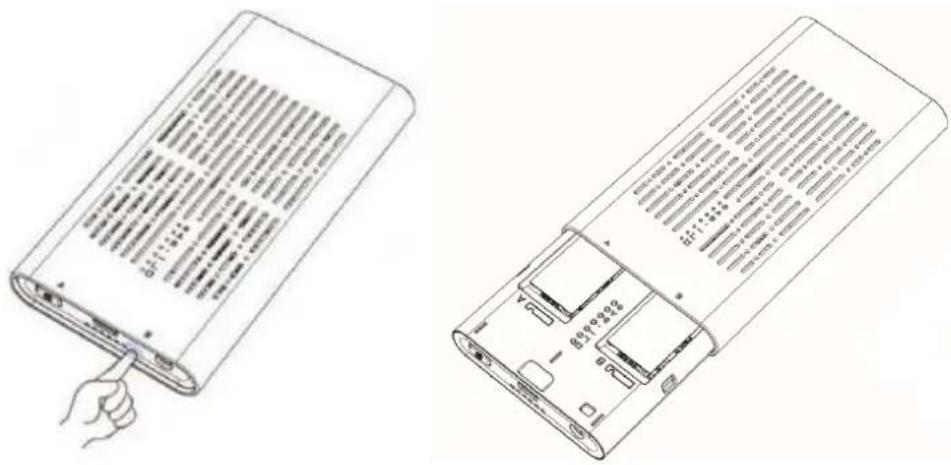
Press once on the plastic inner frame at the other side of the housing until it pops out:
text_image
Technical line drawing showing two views of a device with text labels and internal components, including a hand pointing to a component.Insert the M.2 NVMe SSD(s) into the product, gently press down the M.2 SSD(s) and snap it into the rubber plug.
natural_image
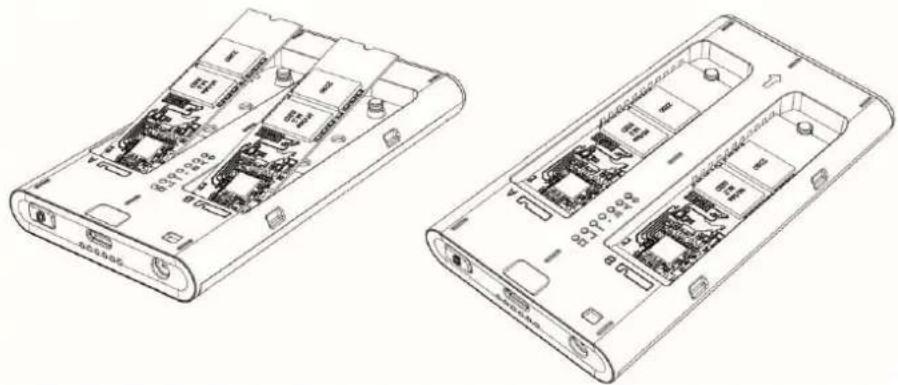
Technical line drawings of two electronic devices with internal circuitry and ports (no text or symbols)Paste the thermal conductive pad on the SSD and finally the thermal conductive plate on top (please remove the surface layers on both sides first). Finally push the plastic frame back into the Aluminium housing and lock the secure lock E by sliding the switch to the left.
Please note: If you want to clone SSDs, do not connect the USB 3.2 Dual M.2 NVMe SSD Enclosure to your computer
Offline Clone Operation
- Install two M.2 NVMe SSDs* (the storage capacity of disk B (target disk) should be larger or equal to disk A (source disk), then connect the power supply to the enclosure.
- Press and hold the clone button A for about 3 seconds until all 4 blue LEDs light up, then release the button and quickly press it again, offline clone begins.
- 4 indicators of progress light up in blue when offline cloning is in progress, 25% > 50% > 75% > 100% flickers in turn, all 4 indicators light up when offline clone is done.
Read and Write Access to SSDs* (no cloning)
Please connect the included power supply and the USB Type C cable to the USB 3.2 Dual M.2 NVMe SSD Enclosure. The operating system will install necessary drivers automatically and the Enclosure is now ready for use.
Reading of and writing on two SSDs simultaneously is supported.
Before unplugging the USB 3.2 Dual M.2 NVMe SSD Enclosure make sure data transfer processes are completed to avoid data loss.
LED Indicators (from top to bottom)
- Power Indicator: lights up in green when the power is on.
- M.2 NVMe SSD Indicators: Light up in yellow when the M.2 NVMe SSD is inserted, flickers while reading and writing; the indicator is off in sleep mode.
- Offline Clone Progress Indicators:
Light up in blue when offline cloning is in progress: 25% > 50% > 75% > 100% flicker in turn, all 4 indicators light up when the clone process is finished;
- The LED of disk A flickers to report an error while the storage capacity of target disk (disk B) is less than source disk (disk A) during offline cloning.
*If you are using a new M.2 SSD, it must first be initialized, formatted and partitioned.
Sicherheitshinweise
! GEFAHR !
text_image
GEFAHR GEFAHR EINES STROMSCHLAGSEinführung
text_image
Technical diagram of a battery pack with printed specifications and polarity indicatorstext_image
Technical line drawing showing two views of a device with text labels, one pointing to a button and the other showing internal components.natural_image
Technical line drawings of two electronic devices with internal circuitry and ports (no text or symbols)text_image
Technical diagram of a battery pack with printed specifications and polarity indicatorstext_image
Technical line drawing showing two views of a device with text labels and internal components, including a hand pointing to a component.natural_image
Technical line drawings of two electronic device modules with internal circuitry and ports (no text or symbols)text_image
Technical diagram of a rectangular electronic device with printed specifications and a blue arrow indicating direction.text_image
Technical line drawing showing two views of a device with internal components and text labels, including a hand pointing to the component.natural_image
Technical line drawings of two electronic devices with internal circuitry and ports (no text or symbols)text_image
Technical diagram of a battery pack with labeled specifications and an upward arrow indicating orientation.text_image
Technical line drawing showing two views of a device with text labels and internal components, including a hand pointing to a component.natural_image
Technical line drawings of two electronic device modules with internal circuitry and ports (no text or symbols)WEEE (Waste of Electrical and Electronic Equipment), Recycling of Electronic Products
Europe, United Kingdom
In 2006 the European Union introduced regulations (WEEE) for the collection and recycling of all waste electrical and electronic equipment. It is no longer allowable to simply throw away electrical and electronic equipment. Instead, these products must enter the recycling process. Each individual EU member state, as well as the UK, has implemented the WEEE regulations into national law in slightly different ways. Please follow your national law when you want to dispose of any electrical or electronic products. More details can be obtained from your national WEEE recycling agency.
LINDY declares that this equipment complies with relevant European CE requirements.
LINDY declares that this equipment complies with relevant UKCA requirements.
FCC Certification
This equipment has been tested and found to comply with the limits for a Class B digital device, pursuant to part 15 of the FCC Rules. These limits are designed to provide reasonable protection against harmful interference in a residential installation.
You are cautioned that changes or modification not expressly approved by the party responsible for compliance could void your authority to operate the equipment.
This device complies with part 15 of the FCC Rules.
Operation is subject to the following two conditions:
- This device may not cause harmful interference, and
- This device must accept any interference received, including interference that may cause undesired operation.
The enclosed power supply has passed Safety test requirements, conforming to the US American versions of the international Standard IEC 60950-1 or 60065 or 62368-1.
Tested to comply with
FCC standards.
For home and office use.
No. 43382
nd Edition, August 2023
lindy.com