
EG-UPS-PS2000-01 - Uninterruptible power supply EnerGenie - Free user manual and instructions
Find the device manual for free EG-UPS-PS2000-01 EnerGenie in PDF.


| Brand | EnerGenie |
| Model | EG-UPS-PS2000-01 |
| Product type | Uninterruptible Power Supply (UPS) |
| Apparent power (VA) | 2000 VA |
| Active power (W) | 1200 W |
| Inverter type | Line-interactive |
| Input voltage | 230 V AC, 50 Hz |
| Regulated output voltage | 230 V AC ± 10% |
| Number of output sockets | 4 sockets |
| Battery type | Maintenance-free lead-acid, 12 V |
| Number of batteries | 2 |
| Typical battery backup time | Approximately 10 minutes at full load |
| Recharge time | 4 to 6 hours |
| Surge protection | Yes (built-in surge protector) |
| Telephone/RJ45 protection | Yes |
| Dimensions (L x D x H) | Approximately 390 x 145 x 220 mm |
| Weight | Approximately 12 kg |
| Noise level | < 40 dB |
| Warranty | 24 months |
| Included accessories | Power cable, user manual |
| Maintenance | Clean with a dry cloth, do not use liquid or abrasive products |
| Operating temperature | 0 °C to 40 °C |
Frequently Asked Questions - EG-UPS-PS2000-01 EnerGenie
User questions about EG-UPS-PS2000-01 EnerGenie
0 question about this device. Answer the ones you know or ask your own.
Ask a new question about this device
Download the instructions for your Uninterruptible power supply in PDF format for free! Find your manual EG-UPS-PS2000-01 - EnerGenie and take your electronic device back in hand. On this page are published all the documents necessary for the use of your device. EG-UPS-PS2000-01 by EnerGenie.
USER MANUAL EG-UPS-PS2000-01 EnerGenie
natural_image
Exterior view of a black industrial power supply unit with ventilation grilles and a digital display (no visible text or symbols)EG-UPS-PS2000-01
EG-UPS-PS3000-01
PURE SINE WAVE UPS, LCD DISPLAY, USB
USER MANUAL
HANDBUCH
HANDLEIDING
MANUEL DESCRIPTIF
Features EG-UPS-PS2000-01 (EG-UPS-PS3000-01)
- Uninterruptable power supply with pure sine wave output
- USB interface
• Automatic AC voltage regulation (AVR) - Intelligent overload- and short-circuit protection
• Audible and visual alarms
• LCD display and LED status indication - Internal battery with overcharge and over-discharge protection
Specifications EG-UPS-PS2000-01 (EG-UPS-PS3000-01)
- Type: line interactive
• Waveform: sine, 5% distortion at linear load, PF > 0.8 (on battery)
• Input: AC 220V±25%, 50Hz/60Hz ±10% - Output: AC 220V±12%, 50Hz/60Hz ±1% (AC 220V±5% at inverter mode)
- Switching time: u to 10 ms
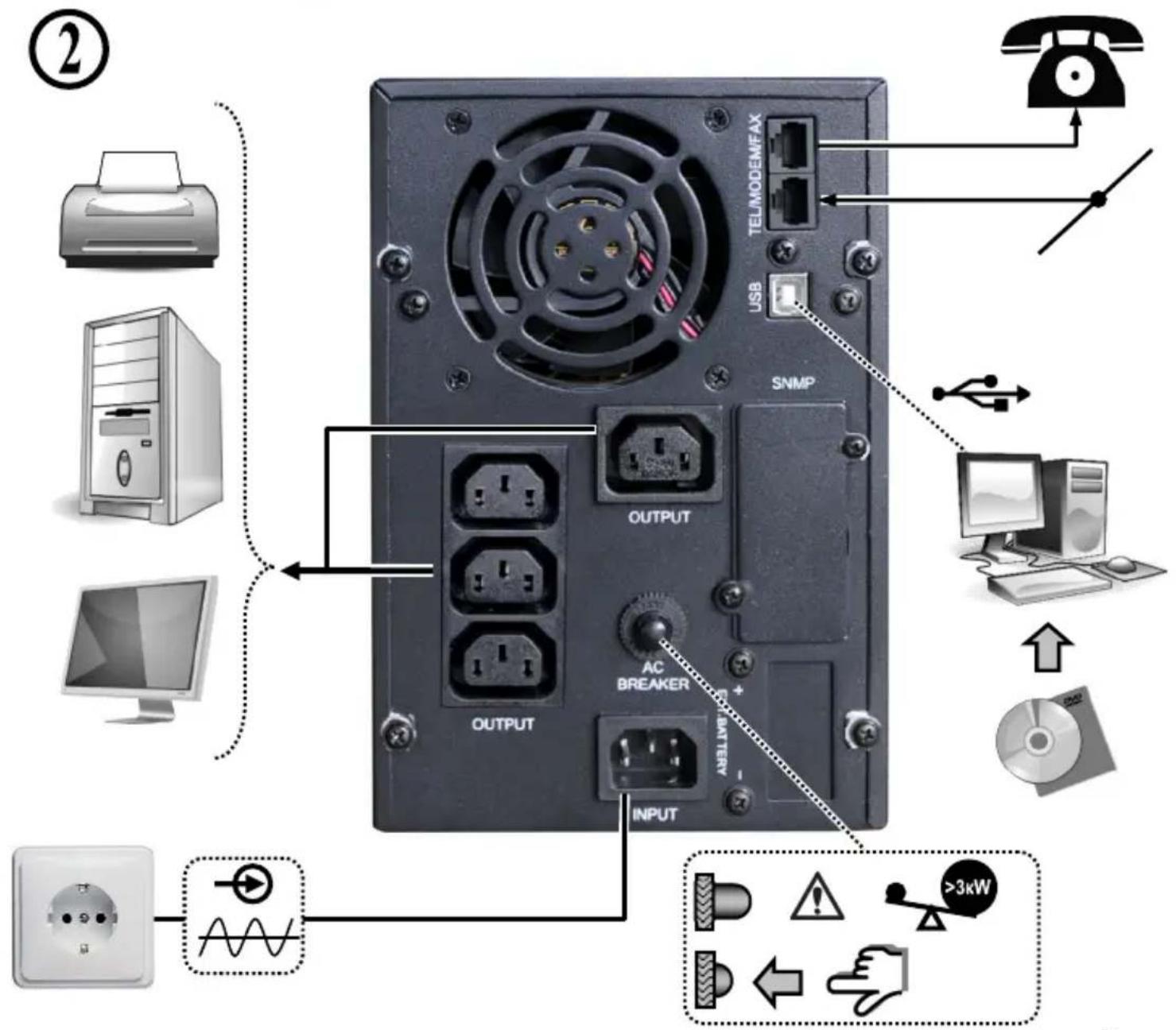
• Backup time: 10...30 mins (depends on the load) - Battery: 151 x 65 x 94 mm, sealed lead-acid 12V/9Ah, F2 terminals x 3 pcs (4 pcs for EG-UPS-PS3000-01)
• Charge time: up to 12 hours - Sockets: C14 input, 4 outputs x C13; USB-BF connector
- Operating conditions: 0°C\~40°C, at humidity 10\~90%RH non condensing
• Power: 2000VA (1600 W) (3000VA (2400 W) for EG-UPS-PS3000-01)
• Charging current: up to 1.2 A (up to 1.7 A for EG-UPS-PS3000-01)
• Noise: < 50 dB at 1 m distance - Dimensions: 412 x 215 x 144 mm (467 x 336 x 190 mm for EG-UPS-PS3000-01)
• Product weight: 18.5 kg (28.1 kg for EG-UPS-PS3000-01)




energenie
EG-UPS-PS2000-01
EG-UPS-PS3000-01
PURE SINE WAVE UPS, LCD DISPLAY, USB
flowchart
graph TD
    A["Server"] --> B["Data Bus"]
    B --> C{Data Flow}
    C -->|3 sec| D["Power icon"]
    C -->|5 sec| E["Circle icon"]
    C -->|1 sec| F["Battery icon"]
    C -->|2 sec| G["Warning icon"]
    C -->|4 sec| H["Document icon"]
    C -->|5 sec| I["Feedback icon"]
    style A fill:#f9f,stroke:#333
    style B fill:#ccf,stroke:#333
    style C fill:#cfc,stroke:#333
    style D fill:#fcc,stroke:#333
    style E fill:#cff,stroke:#333
    style F fill:#ffc,stroke:#333
    style G fill:#fcc,stroke:#333
    style H fill:#fcc,stroke:#333
    style I fill:#fcc,stroke:#333
All brands and logos are registered trademarks of their respective owners
energenie
EG-UPS-PS2000-01
EG-UPS-PS3000-01
PURE SINE WAVE UPS, LCD DISPLAY, USB
All brands and logos are registered trademarks of their respective owners
energenie
EG-UPS-PS2000-01
EG-UPS-PS3000-01
PURE SINE WAVE UPS, LCD DISPLAY, USB
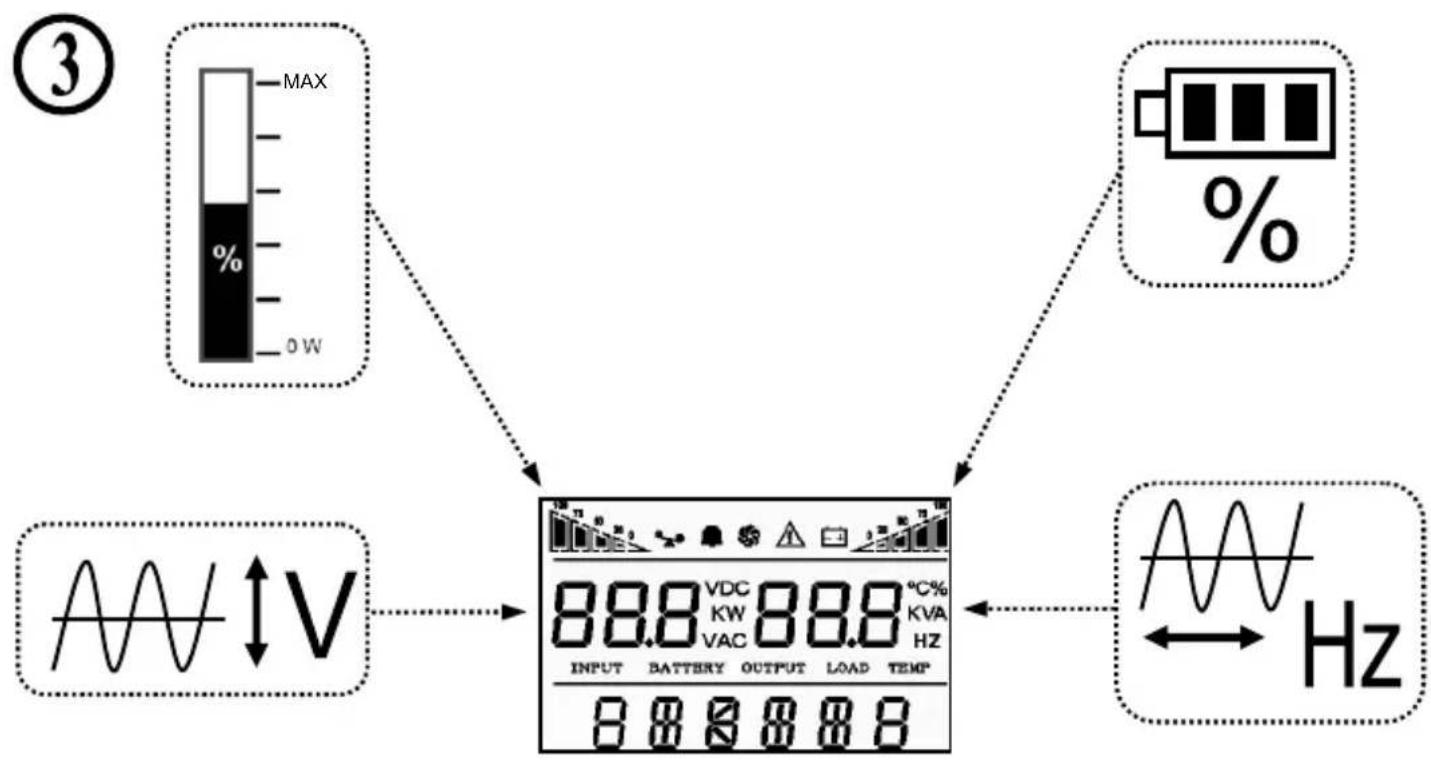
flowchart
graph TD
    A["③ MAX 0W"] --> B["88.8 VDC KV 88.8 °C% KVA HZ INPUT BATTERY OUTPUT LOAD TEMP 8 8 8 8"]
    C["%"] --> B
    D["Waveform"] --> B
    B --> E["Hz ↔ Hz"]

flowchart
graph LR
    A["Battery"] --> B["Speaker"]
    B --> C["O/O"]
    style A fill:#f9f,stroke:#333
    style C fill:#bbf,stroke:#333

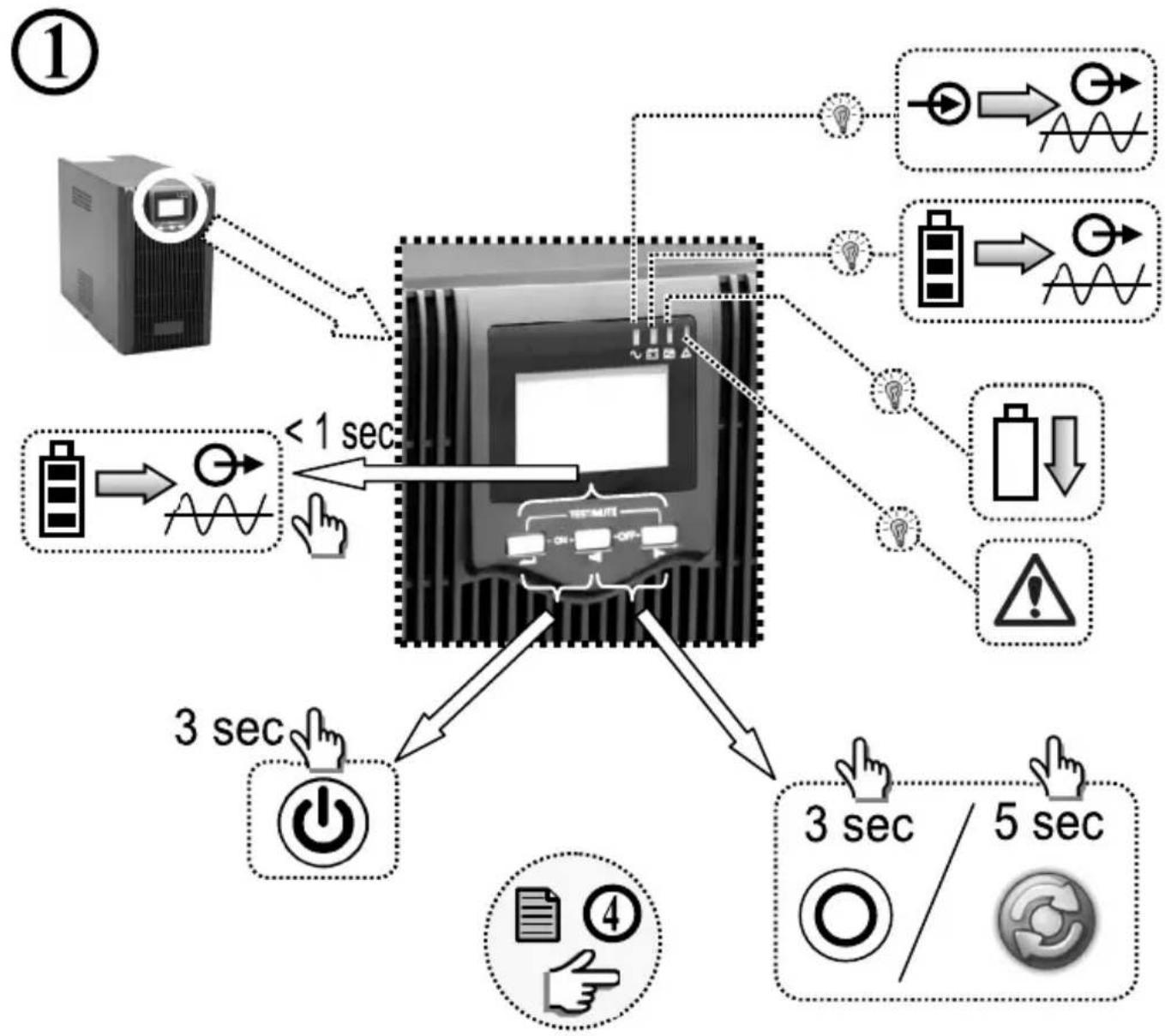
| Key combination | Function introduction |
| Press the two keys for 3 seconds to start up. | |
| Press the two keys for 3 seconds to shut down.Press the setting interface for 5 seconds to restore factory settings and exit the setting interface. | |
| Press “ ” momentarily to enable inverter mute.In the utility power mode, press “ ” momentarily to enable the battery discharge testing for 15 seconds. | |
| Press the key for 5 seconds to enter the setting interface.Press the key momentarily in the setting interface to turn the page.Press the key for 3 seconds to exit the setting interface without saving data.Select the item to be set in the setting interface. After selecting the required setting, page down to “save and exit” page. Choose “Yes”, press “ ” momentarily to save the date and exit the setting mode.In non-setting mode, momentarily press the key twice, and the LCD display content rotates.In setting mode, when it goes to SAVE page, press “ ” or “ ” momentarily, choose “Yes”, press “ ” to complete the setting and exit the mode. | |
| In non-setting mode, press the key momentarily to turn the page (page up).In setting mode, the parameter decreasing iterates. | |
| In non-setting mode, press the key momentarily to turn the page (page down).In setting mode, the parameter decreasing iterates.In non-setting mode, press the key for 2 seconds to enter the state of automatic page up/down and re-press the key for 2 seconds to exit the state of automatic page up/down. |
This product is tested and complies with the essential requirements of the laws of member states concerning LVD(2006/95/EC), EMC(2004/108/EC). The CE declaration can be found under www.gembird.eu
All brands and logos are registered trademarks of their respective owners
Waste disposal:

Do not deposit this equipment with the household waste. Improper disposal can harm both the environment and human health. For Information about waste collection facilities for used electrical and electronic devices, please contact your city council or an authorized company for the disposal of electrical and electronic equipment.



Brand : EnerGenie
Model : EG-UPS-PS2000-01
Category : Uninterruptible power supply