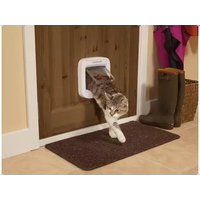
PPA19-16145 - Pets PETSAFE - Free user manual and instructions
Find the device manual for free PPA19-16145 PETSAFE in PDF.


| Product type | Electronic cat door |
| Brand | PetSafe |
| Model | PPA19-16145 |
| Reading technology | FDX-B 15-digit microchip |
| Power source | 4 AA (LR6) alkaline batteries |
| Number of cats programmable | Up to 40 |
| Manual lock modes | In & out, in only, out only, locked |
| Minimum passage height | 100 to 150 mm (depending on cat) |
| Operating temperature | -25°C to 55°C |
| Warranty | 3-year limited non-transferable |
| Certifications | CE, FCC, IC |
| Installation compatibility | Wood, PVC, uPVC, metal (with adapter), walls (with adapter), single/double glazing (with adapter) |
| Box contents | Cat door, inner/outer frames, cutting template, screws, finishing caps, user manual |
| Maintenance | Remove batteries if not in use for long periods; do not cut the tunnel |
| Safety | Adult supervision required; do not use as a safety device |
| Repairability | Contact customer service; installation adapter sold separately |
| Available accessories | Adapter for metal/wall/double glazing, tunnel extensions |
| Recommended cutout (wood door) | 168 mm horizontal, height per template |
| Cutout for single glazing | Circular hole Ø 215 mm |
| Cutout for double glazing | Circular hole Ø 260 mm (with adapter) |
Frequently Asked Questions - PPA19-16145 PETSAFE
User questions about PPA19-16145 PETSAFE
0 question about this device. Answer the ones you know or ask your own.
Ask a new question about this device
Download the instructions for your Pets in PDF format for free! Find your manual PPA19-16145 - PETSAFE and take your electronic device back in hand. On this page are published all the documents necessary for the use of your device. PPA19-16145 by PETSAFE.
USER MANUAL PPA19-16145 PETSAFE
protect. teach. love:
Quick Start Guide
natural_image
White portable air conditioner unit with a square frame and a circular border (no visible text or symbols)Microchip Cat Flap
Please read this entire guide before beginning as additional accessories may be required.
Hereinafter Radio Systems Corporation, Radio Systems PetSafe Europe Ltd., Radio Systems Australia Pty Ltd. and any other affiliate or Brand of Radio Systems Corporation may be referred to collectively as "We" or "Us".
IMPORTANT SAFETY INFORMATION
Explanation of Attention Words and Symbols used in this guide

This is the safety alert symbol. It is used to alert you to potential personal injury hazards. Obey all safety messages that follow this symbol to avoid possible injury or death.

WARNING indicates a hazardous situation which, if not avoided, could result in death or serious injury.
CAUTION, used with the safety alert symbol, indicates a hazardous situation which, if not avoided, could result in minor or moderate injury.

NOTICE is used to address practices not related to personal injury.
⚠ WARNING
When children are present in the home, it is important to consider the pet door during child proofing activities, the pet door may be misused by a child resulting in the child accessing parental hazards that may be on the other side of the pet door. Purchasers/Homeowners with swimming pools should ensure that the pet door is monitored at all times and that the swimming pool has adequate barriers to entry. If a new hazard is created inside or outside of your home, which may be accessed through the pet door, Radio Systems Corporation recommends that you properly guard access to the hazard or remove the pet door. The closing panel or lock, if applicable, is provided for aesthetic and energy efficiency purposes and is not intended as a security device. Radio Systems Corporation will not be liable for unintended use and the purchaser of this product accepts full responsibility for oversight at the opening it creates.
- In keeping with accepted standards of parental care, children should be supervised at all times.
• Power Tools. Risk of severe injury; follow all safety instructions for your power tools. - Be sure to always wear your safety goggles.
CAUTION
The user, prior to installation, must become familiar with all building codes that may affect the installation of the pet door and determine, along with a licensed contractor, its suitability in a given installation. This pet door is not a fire door. It is important for the owner and contractor to consider any risks that may be present inside or outside of the pet door, and any risks that may be created by subsequent changes to your property and how they may relate to the existence and use, including misuse of the pet door.
- If cutting a metal surface, be aware of sharp edges to prevent injury.
- Working with glass is a skilled job and should be carried out by a professional glazier. It is not possible to cut holes in toughened glass or double glazed units except at the time of manufacture. Please consult a glazier.
NOTICE
- Keep these instructions with important papers; be sure to transfer these instructions to the new owner of the property.
- Please read these instructions fully prior to forming or modifying an opening in your selected door or wall. We strongly recommend that your microchip cat flap is programmed for your cat and a check made that it works with the microchip in your cat first.
- This unit only operates properly when outside temperatures are greater than 25^ C (-13°F) and less than 55^ C (131°F).
- PerSafe ^® per doors are suitable for most doors, walls or partitions although additional materials may be required. This product is designed for the convenience of you and your pet. It is not possible to fully guarantee the exclusion of all other animals in all circumstances. Radio Systems Corporation will not accept liability for any damage or inconvenience caused by unwanted animals who may goin access to your home.
Thank you for choosing the PetSafe ^® Brand. You and your pet deserve a companionship that includes memorable moments and a shared understanding together. Our products and training tools enhance the relationship between pets and their owners. If you have any questions about our products or training your pet, please visit our website at www.petsafe.com or contact our Customer Care Centre. For a listing of Customer Care Centre telephone numbers, visit our website at www.petsafe.com.
Programming Cats into the PetSafe ^® Microchip Cat Flap
Your PetSafe® Microchip Cat Flap is designed to work with most 15-digit microchips (FDX-B) used for pets. Before you begin setup or installation of the cat flap, please ensure your cat has the correct type of microchip.
To begin operation, the cat flap must learn the unique microchip Identification Number (ID) of your cat. Please follow the steps below to begin the setup of your cat flap:
- The cat flap will be factory pre-set in the locked position. Ensure the manual lock is set to the In and Out position (See Fig. H on page 7).
- Remove the battery cover, set aside the provided hardware pack, and install 4 high quality alkaline AA batteries (LR6). The green LED light will flash three (3) times which indicates that the cat flap is in Automatic Mode.
- To enter Learn Mode, press and hold the button in the battery compartment until the red LED light appears (about 5 seconds). You will have 60 seconds to position the cat's head in the tunnel to learn the microchip ID. Once the cat flap has learned the microchip ID, it will unlatch and the red LED will turn off. The cat flap will stay in Automatic Mode and will re-latch after 3 seconds.
- After successfully learning the cat's microchip ID, you will be ready to install the cat flap into your door.
Note: To learn more than one cat, please follow the same steps starting with step No. 3. The microchip cat flap can store up to 40 microchipped cats. Replace the battery cover when the process is complete for all cats.
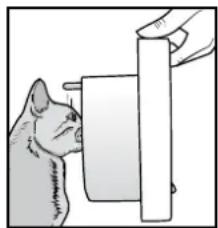
Helpful Tip: Program your cat's microchip ID before installation to prevent having to hold your cat in the cat flap once it is installed. If you are having trouble programming your cat's microchip ID, please ensure that their head is extended into the tunnel with the microchip cat flap oriented as shown. You should hear the cat flap unlatch once it has learned your cat's microchip ID.
natural_image
Illustration of a cat interacting with a wall-mounted device (no text or symbols visible)Note: If your cat's head touches the clear flap prior to unlatching, then the microchip is not located for best use of this product. Please contact PetSafe ^® Customer Service for additional options for operation.
The PetSafe® Microchip Cat Flap is suitable to fit most doors or partitions although additional materials and competent DIY skills may be required. This cat flap is designed to adapt easily to cut-out sizes for Staywell ^® 200, 300, 400, 500, 900 and Petporte smartflap™ series cat flops. Some simple DIY skills are required and minor adjustments to the cut-out or additional accessories might be needed.
Installation-Measurement and Marking
Measure the belly height of your cat. This is usually 100 mm (3 ^5 / 16 ) - 150 mm (5 ^15 / 16 ) (Fig. A).
Mark this measurement on the outside of your door and draw
a straight horizontal line 168 mm (6 5/4") long, preferably in the center of the door (Fig. B).
Please keep in mind that this horizontal line will eventually be the bottom of the hole you will cut in your door. The frame of the cat flap will be 25 mm lower. If an installation adaptor is used, then the frame will be lower.
Note: This line may have to be raised slightly to allow for at least 50 mm (2") from the bottom of the door.

Important: Do not cut the tunnel. Key components are contained in the tunnel and any alteration to the tunnel will affect functionality.
Installation - Wooden, PVC, or uPVC Doors without Metal
Before beginning, please check if your door has a metal core. If a metal core
or metal plate is found, follow the Installation - Metal or Metal Core Doors instructions.
- Attach the supplied Cutting Template to the outside of your door in the correct position ensuring that it is the right way up and level (Fig. C).
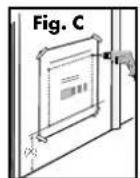
- Drill four corner holes with a 12 mm (½") diameter drill bit as marked on the Cutting Template through the door. Ensure that the drill remains straight and level.
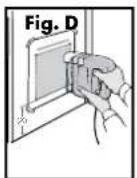
- Using a jig or key-hole saw, cut along the appropriate line as indicated on the Cutting Template. (Fig. D).
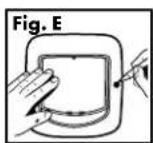
- Temporarily place the interior frame into the cutout. Level the cat flap until it is in the proper position in the center of the cutout. On the outside install the exterior frame. Use a pencil to mark screw holes through the mounting holes on the exterior frame (Fig. E).
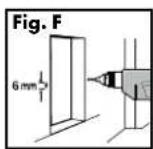
- Remove the interior and exterior frame and drill the screw holes with a 6mm (1/4") drill bit (Fig. F). Ensure that the drill remains straight and level.
- Clean the area from any dust, dirt or debris.
- From the interior of the home, insert the cat flap interior frame into the opening.
- From the exterior of the home, place the exterior frame onto the interior frame.
- Making sure to center the cat flap in the hole. Three (3) different lengths of screws have been provided with this cat flap. Select the appropriate length. Using a manual screw driver, screw the exterior frame to the interior frame.
- Insert the two blanking plugs over the screws on the exterior frame.
- Remove the batteries from the cat flap and wait for 30 seconds. Re-install the batteries and battery cover. The cat flap is ready to use.
Installation - Metal or Metal Core Doors
Installation of the cat flap into a door containing metal will require an Installation Adaptor (sold separately) to ensure proper performance. Once this has been purchased, follow the instructions below.
- Attach the supplied Cutting Template to the outside of your door in the correct position ensuring that it is the right way up and level (Fig. C).
- Drill four corner holes with a 12 mm (½") diameter drill bit as marked on the Cutting Template through the door. Ensure that the drill remains straight and level.
- Using a jig or key-hole saw, cut along the appropriate line as indicated on the Cutting Template. (Fig. D).
- Clean the area of any dust, dirt or debris.
- Slide one installation adaptor plate over the tunnel on the interior frame of the cat flap.
- From the interior of the home, insert the cat flap interior frame with installation adaptor into the opening.
- From the exterior of the home, place the remaining installation adaptor plate onto the interior frame tunnel followed by the exterior frame of the cat flap.
- Making sure to center the cat flap in the hole. Three (3) different lengths of screws have been provided with this cat flap. Select the appropriate length. Using a manual screw driver, screw the exterior frame to the interior frame.
- Insert the 8 blanking plugs into the exterior and interior installation adaptor plates and 2 blanking plugs into the exterior frame.
- Remove the batteries from the cat flap and wait for 30 seconds. Re-install the batteries and battery cover. The cat flap is ready to use.
Optional: For additional support use screws that are less than half the thickness of your door to attach the installation adaptors to the door.
Installation - Walls
Installation of the cat flap into a wall will require an Installation Adaptor (sold separately) to ensure performance. Extension Tunnels may also need to be purchased to ensure that the flap extends completely through the wall. Once this has been purchased, follow the instructions below.
Important: Check for electrical and plumbing that could be in the wall where you wish to place the pet door.
- Attach the supplied Cutting Template to the inside of your wall in the correct position ensuring that it is the right way up and level (Fig. C) Note: Depending on the presence of metal, there are two (2) options on the cutting template. Please use the appropriate line for your wall construction.
- Drill four corner holes with a 12 mm (½") diameter drill bit as marked on the Cutting Template through the wall. Ensure that the drill remains straight and level.
- Using the appropriate tool for your home construction, such as a jig saw, cut along the appropriate line as indicated on the Cutting Template. (Fig. D)
- From the exterior of the home, finish cutting the hole through the wall using the four corner holes drilled through the wall as a guide.
- Clean the area of any dust, dirt or debris.
- Slide one installation adaptor plate over the tunnel on the interior frame and attach it to the back of the frame using the two (2) pan headed screws (included).
- From the interior of the home, position the interior assembly on the wall and mark the four (4) screw holes on the installation adaptor plate attached to the cat flap. Remove the assembly.
- Using the proper hardware for your wall construction (not included), drill the appropriate size holes for your hardware and attach the interior frame with installation adaptor to the wall.
Optional: Add tunnel extensions (sold separately) to extend the tunnels through your wall.
-
Attach the two (2) included metal clips into the rectangular recesses on the remaining adaptor plate with the flat side of the clip flush with the outer face of the plate.
-
Set the exterior frame on top of the remaining adaptor plate and attach using the two (2) 16mm (5/8") flat head screws (included).
- From the exterior of the home, place the exterior frame with installation adaptor attached onto the tunnel of the interior frame and mark the four (4) screw holes on the installation adaptor plate. Remove the exterior frame.
- Using the proper hardware for your wall construction (not included), drill the appropriate size holes for your hardware, and attach the exterior frame assembly to the wall.
- Insert the 8 blanking plugs into the exterior and interior installation adaptor plates and 2 blanking plugs into the exterior frame.
- Remove the batteries from the cat flap and wait for 30 seconds. Re-install the batteries and battery cover. The cat flap is ready to use.
Installation - Single-Glazed Glass
The PerSafe® Microchip Cat Flap is designed for installation into single-glazed glass and requires a circular hole with a diameter of 215 mm (8 7/16"). Your glazier will need to cut a circular hole of diameter 215 mm (8 7/16") as per the cutting template. Once a glazier has cut the hole in your glass door or window please follow the instructions below for installation.
- From the interior of the home, insert the cat flap interior frame into the opening.
- From the exterior of the home, place the exterior frame onto the tunnel of the interior frame.
- Make sure to center the cat flap in the hole. Three (3) different lengths of screws have been provided with this cat flap. Select the appropriate length. Using a manual screw driver, screw the exterior frame to the interior frame.
- Insert the two blanking plugs over the screws on the exterior frame.
- Remove the batteries from the cat flap and wait for 30 seconds. Re-install the batteries and battery cover. The cat flap is ready to use.
⚠️ CAUTION Working with glass is a skilled job and should be carried out by a professional glazier. It is not possible to cut holes in toughened glass or double glazed units except at the time of manufacture. Please consult a glazier.
Installation - Double-Glazed Glass
The PetSafe® Microchip Cat Flap is designed for installation into double glazed glass and requires a circular hole with a diameter of 260 mm (10 ^1/4 ) and an Installation Adaptor (sold separately.) If possible, have your glazier use non-metal materials when sealing the glass to prevent the cat flap's read range from being reduced. Once your glazier has installed the new glass panel with a 260 mm hole, please follow the instructions below for installation.
- Slide one installation adaptor plate over the tunnel on the interior frame of the cat flap.
- From the interior of the home, insert the cat flap interior frame with installation adapter into the opening.
- From the exterior of the home, place the remaining installation adaptor plate onto the tunnel of the interior frame followed by the exterior frame of the cat flap.
- Make sure to enter the installation adaptor in the hole. Three (3) different lengths of screws have been provided with this cat flap. Select the appropriate length. Using a manual screw driver, screw the exterior frame to the interior frame.
- Insert the eight (8) blanking plugs into the exterior and interior installation plates and two (2) into the exterior frame.
- Remove the batteries from the cat flap and wait for 30 seconds. Re-install the batteries and battery cover. The cat flap is ready to use.
⚠️CAUTION Working with glass is a skilled job and should be carried out by a professional glazier. It is not possible to cut holes in toughened glass or double glazed units except at the time of manufacture. Please consult a glazier.
Basic Operation - Guide
| FUNCTION | BUTTON ACTIVATION | LED INDICATOR ACTION | ON |
| Manual Mode | Press & Release Red - Solid for 5 seconds | - Solid for 5 seconds | Latch will unlock. Use 4-Way Lock options for pet access. |
| Automatic Mode | Press & Release Green - Solid for 5 seconds | - Solid for 5 seconds | Latch will lock and will only be activated by reading a "programmed" microchip ID. |
| Learn Mode Press & Hold for 5 Seconds until LED is activated | Red - Solid for up to 60 seconds | Cat flap will exit Learn Mode once microchip ID is programmed. Latch will unlock after successful programming. Repeat for additional cats. | |
| Motion Sensor | N/A Green - Solid for 100 length of activation | Motion is detected outside and the cat flap is locking for a microchip to read. | |
| Low Battery N/A Red - Flashes every | 10 seconds | Replace batteries soon | |
| Batteries Replaced | N/A Green - 3 quick flashes | Cat flap will enter Automatic mode | |
| Factory Reset Press | Press & Hold 15 Seconds until LED is activated | Red - 5 quick flashes Cat flap will enter back into Automatic Mode and be locked. AI programmed microchip IDs will be erased from the memory. | |
| Error N/A Red | Continuous | quick flashing | Remove batteries, wait 30 seconds then replace batteries. If Red light continues, contact the Customer Care Centre. Latch will attempt to unlock for cat flap to be used in Manual Mode. |
4-Way Manual Lock
The 4-Way Manual lock allows you to control your cat's access in and out of your home in either direction. Until your pet is thoroughly familiar with using the cat flap, it is a good idea to only use the 4-Way Manual lock in the In or Out position only (Fig. H).
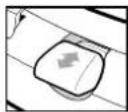
In or Out
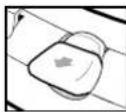
In only
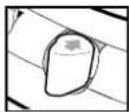
Out only
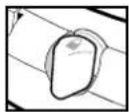
Fully locked
Fig. H
Additional Information
For extended information on your PetSafe ^® Microchip Cat Flap including glass and wall installation, helpful training tips, and available accessories, please visit www.petsafe.com to download the full product Installation Guide.

Important Recycling Advice
Please resecite the Waste Electrical and Electrical Equipment regulations in your country. This equipment must be recycled. If you no longer require this equipment, do not place it in the nominal municipal waste system. Please return it to where it was purchased in order that it can be placed in our recycling system. If this is not possible, please contact PetSafe® Customer Care Centre for further information.

Battery Disposal
Separate collection of spent batteries is required in many regions; check the regulations in your area before discarding spent batteries. At the end of the product life, please contact one of our Customer Care Canires to receive instructions on proper disposal of the battery. Please do not dispose of the battery in household or municipal waste.
Compliance
CE
Radio Systems Corporation declares under its own responsibility, that the following product is in compliance with the essential requirements under article 3 of the RED (2014/53/EU) and the Re-HS Directive (2011/65/EU). Another see changes or modifications to the equipment that are not approved by Radio Systems Corporation may violate EU RED regulations, could void the user's authority to operate the equipment, and will void the warranty.
Hereby, Radio Systems Corporation, declares that this PFA19-16145 product is in compliance with the essential requirements and other relevant provisions. The Declaration of Conformity can be found at: http://www.pesafe.net/customercare/eu_docs.php.
IC: Canada
This device complies with Industry Canada license-exempt RSS standards(s). Operation is subject to the following two conditions: (1) this device may not cause interference, and (2) this device must accept any interference, including interference that may cause undesired operation of the device.
FCC: USA
This device complies with part 1.5 of the FCC Rules. Operation is subject to the following two conditions: (1) This device may not cause harmful interference, and (2) this device must accept any interference received, including interference that may cause undesired operation.
NOTE: This equipment has been tested and found to comply with the limits for a Class 3 digital device, pursuant to part 1.5 of the FCC Rules. These limits are designed to provide reasonable protection against harmful interference in a residential installation. This equipment genera as, uses, and can radiate radio frequency energy and, if not installed and used in accordance with the instructions, may cause harmful interference to radio communications. However, there is no guarantee that interference will not occur in a specific installation. If interference does occur to radio or television reception, which can be determined by turning the equipment off and on, the user is encouraged to try to correct the interference by one or more of the following measures:
• Reorient or relocate the receiving antenna.
- Increase the separation between the equipment and the receiver.
- Connect the equipment to an outlet on a circuit different from that to which the receiver is connected.
- Consult customer care, the dealer, or an experienced radio/TV technician for help
CAUTON: Modification or changes to this equipment not expressly approved by Radio Systems Corporation may void the user's authority to operate the equipment.
Australia
This device complies with the applicable EMC requirements specified by the ACMA (Australian Communications and Media Authority).
Warranty
Three Year Non-Transferable Limited Warranty
This Product has the benefit of a limited manufacturer's warranty. Complete details of the warranty applicable to this Product and its terms can be found at www.pcbsafe.com and/or are available by contacting your local Customer Care Centre.
Europe - Radio Systems PetSafe Europe Ltd., 2nd Floor, Elges Building, Market Square, Dundalk, Co. Loum, A91 YR9X Ireland
USA/Canada - Radio Systems Corporation, 10427 Pe Sole Way, Knoxville, TN 37932 USA
Australia/New Zealand - In compliance with the Australian Consumer Low, Warranties Against Defects, effective January 1, 2012, warranty details of this Product are as follows: Radio Systems Australia Pty Ltd, thereafter referred to as "Radio Systems" warrants to the original retail purchaser, and nor any other purchaser or subsequent owner, that its Product, when subject to normal and proper residential use, will be free from defects in material or workmanship for a period of three [3] years from the purchase date. An "original retail consumer purchase" is a person or entity who originally purchases the Product, or a gift recipient of a new Product that is unopened and in its original packaging. When serviced by Radio Systems Customer Service, Radio Systems covers labour and parts for the first three years of ownership, after the first three years, a service or upgrade charge will apply relative to replacement of the Product with raw or refurbished items at Radio Systems' size discretion.
The limited warranty is non-transferable and shall automatically terminate if the original retail consumer purchaser resels the Radio Systems Product or transfers the property on which the Radio Systems Product is installed. This Limited Warranty excludes occidental damage due to dog chews, lightning damper, or neglect, alteration, and misuse. Consumers who purchase products outside of Australia, New Zealand, or from an unauthorised dealer will need to return the Product to the original place of purchase for any warranty issues.
Please note that Radio Systems does not provide refunds, replacements, or upgrades for change of mind, or for any other reason outside of these Warranty terms.
Claims Procedure: Any claim made under this Warranty should be made directly to Radio Systems Australia Pty Ltd. Customer Care Centre at
Radio Systems Australia Pty Ltd.
PO Box 3442, Australia For, QLD 4215, Australia Australia Residents: 1800 786 608
New Zealand Residents: 0800 543 054
Email: a.s.info@petsafe.net
To file a claim, a proof of purchase must be provided. Without a proof of purchase, Radio Systems will not repair or replace faulty components. Radio Systems requests the Consumer to contact the Radio Systems Customer Care Centre to obtain a Warranty Return number, prior to sending the Product. Failure to do so may delay in the repair or replacement of the Product.
I the Product is deemed to be faulty within 30 days from date of original purchase, Radio Systems will organise for a replacement to be sent in advance of returning the faulty Product. A Post Bag will be included with the replacement Product for the return of the faulty Product. The Product must be returned
within 7 days of receiving the replacement. If the Product is deemed to be faulty after 30 days from the date of original purchase, the consumer will be required to return the Product to Radio Systems at the consumer's own expense. Radio Systems will test and replace the faulty unit or its components and return to the consumer tree of charge, provided the Product is within its sold warranty period. This warranty is in addition to other rights and remedies available to you under the law. Radio Systems goods come with guarantees that cannot be excluded under the Australia Consumer Law. You are entitled to a replacement or refund for a major failure and for compensation for any other reasonably foreseeable loss or damage. You are also entitled to have the goods repaired or replaced if the goods fail to be of acceptable quality and the failure does not amount to a major failure.
Should you have any queries or require any further information, please contact our Customer Core Centre on 1800 786 608 (Australia) or 0800 543 054 (New Zealand).
Terms of Use and Limitation of Liability
1. Terms of Use
Use of this Product is subject to your acceptance without modification of the terms, conditions and notices contained herein. Use of this Product implies acceptance of all such terms, conditions and notices. If you do not wish to accept those terms, conditions, and notices, please return the Product; unused, in its original packaging and at your own cost and risk to the relevant Customer Care Centre together with proof of purchase for a full refund.
2. Proper Use
If you are unsure whether this Product is appropriate for your pet, please consult your veterinarian or certified trainer prior to use. Proper use includes, without limitation, reviewing the entire manual and any specific safety information statements.
3. No Unlawful or Prohibited Use
This Product is designed for use with pets only. Using this Product in a way that is not intended could result in violation of Federal, State or local laws.
4. Limitation of Liability
In no event shall Radio Systems Corporation or any of its associated companies be liable for (i) any indirect, punitive, incidental, special or consequential damage and/or (ii) any loss or damages whatsoever arising out of or connected with the misuse of his Product. The Purchaser assumes all risks and liability from the use of this Product to the fullest extent permissible by law.
5. Modification of Terms and Conditions
Radio Systems Corporation reserves the right to change the terms, conditions and notices governing this Product from time to time. If such changes have been notified to you prior to your use of this Product, they shall be binding on you as if incorporated herein.
natural_image
Illustration of a cat feeding a cylindrical object (no text or symbols)Europe - Rad c Systems PetSafe Europe Ltd., 2nd Floor, Elges Building, Market Square, Dundalk Co. Louis, A91 YR9X Ireland
USA/Canada - Radio Systems Corporation, 10427 PetSafe Way, Knoxville, TN 37932 USA
natural_image
Illustration of a mouse interacting with a cylindrical object (no text or symbols)Europa - Radio Systems Pe Safe Europe Ltd., 2nd Floor, Egee Building, Marke Square, Dundolk, Co. South, A91 YR9X Ireland
natural_image
Illustration of a cat interacting with a cylindrical object (no text or symbols)Europa – Radio Systems Pe Safe Europa Ltd., 2nd Floor, Egeo Building, Marke Square, Dundalk, Co. Lourh, A91 YR9X Ireland
natural_image
Illustration of a cat interacting with a wall-mounted device (no text or symbols)Europa - Radio Systems Pe Safe Europe Ltd., 2nd Floor, Egee Building, Market Square, Dundolk, Co. Louh, A91 YR9X Ireland
natural_image
Illustration of a cat interacting with a cylindrical object (no text or symbols)Europa – Radio Systems Pe Safe Europe Ltd., 2nd Floor, Eyee Building, Marke Square, Dundolk, Co. Lourh, A91 YR9X Ireland
protect. teach. love:
All PetSafe® pet doors are suitable for any door, wall or partition although additional materials may be required. This product is designed for the convenience of you and your pet. It is not possible to fully guarantee the exclusion of all other animals in all circumstances. Radio SystemsCorporation will not accept liability for any damage or inconvenience caused by unwanted animals who may gain access to your home. In keeping with accepted standards of parental care, children should be supervised at all times.
2nd Floor, Elgee Building, Market Square
Dundalk, Co. Louth, A91 YR9X Ireland
+353 (0) 76 892 0427
Radio Systems Corporation
10427 PetSafe Way
Knoxville, TN 37932 USA
+1 (865) 777-5404
petsafe.com
L400-2125-19/4
©2017 Radio Systems Corporation
RADIO SYSTEMS
CORPORATION
Packaging Documentation and Approval Form
DOCUMENT INFORMATION
Part Number / Revision: 400-2125-19-4 Revision Description: Update all installation information
Created by: Tina King Category Contact: Nick Frank
Initial Release to Production ECO Number: RSC17318
PRINTING SPECIFICATIONS
Material: 100gsm Wood Free Paper
Printing/Ink Colors: Black
Finishing: Die Cut, Fold, 2 Saddle Stitch, and Bulk Pack
APPROVAL
Vendor Name: Le Submolecular Co., Ltd. Cherry Pan 07 /20 /2018
RSC Evaluator: Tina King 07 /20 /2018
COMMENTS (IF APPLICABLE)
- IMPORTANT SAFETY INFORMATION
- ⚠ WARNING
- CAUTION
- NOTICE
- Programming Cats into the PetSafe ® Microchip Cat Flap
- Installation-Measurement and Marking
- Installation - Wooden, PVC, or uPVC Doors without Metal
- Installation - Metal or Metal Core Doors
- Installation - Walls
- Important: Check for electrical and plumbing that could be in the wall where you wish to place the pet door.
- Installation - Single-Glazed Glass
- Installation - Double-Glazed Glass
- 4-Way Manual Lock
- Additional Information
- Important Recycling Advice
- Battery Disposal
- Compliance
- CE
- IC: Canada
- FCC: USA
- Australia
- Warranty
- Three Year Non-Transferable Limited Warranty
- Terms of Use and Limitation of Liability
- Terms of Use
- Proper Use
- No Unlawful or Prohibited Use
- Limitation of Liability
- Modification of Terms and Conditions
- RADIO SYSTEMS
- CORPORATION
- DOCUMENT INFORMATION
- PRINTING SPECIFICATIONS
- APPROVAL
- COMMENTS (IF APPLICABLE)
Brand : PETSAFE
Model : PPA19-16145
Category : Pets