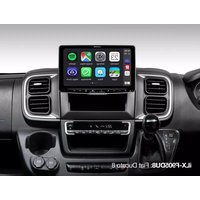
iLX-F905DU8 - Browser ALPINE - Free user manual and instructions
Find the device manual for free iLX-F905DU8 ALPINE in PDF.


| Product type | Vehicle multimedia navigator |
| Brand | Alpine |
| Model | iLX-F905DU8 |
| Screen size | 9 inches (diagonal) |
| Screen resolution | 1280 x 720 pixels |
| Chassis dimensions (W x H x D) | 178 x 50 x 149.6 mm |
| Weight | 2.3 kg |
| Power supply | 14.4 V DC (11-16 V allowed), 15 A fuse |
| Audio output power | 50 W x 4 (max.) |
| Main features | Apple CarPlay, Android Auto, Radio/RDS, DAB/DAB+/DMB, USB player (audio/video), Hands-free Bluetooth, GPS, HDMI, Wi-Fi |
| Bluetooth connectivity | Bluetooth V4.2, profiles HFP, A2DP, AVRCP, etc. |
| Wi-Fi connectivity | IEEE 802.11 b/g/n (2.4 GHz) and a/n/ac (5 GHz) |
| Supported audio formats (USB) | MP3, WMA, AAC, FLAC, WAV, APE |
| Supported video formats (USB) | MP4, MOV, FLV, MKV |
| Video inputs | HDMI (input and output), rear camera, front/side camera |
| Maintenance and cleaning | Clean with a soft, dry cloth. Do not use chemical or abrasive products. |
| Safety | Installation by a professional. Do not watch video while driving. Use moderate volume to hear outside noises. |
| Spare parts and repairability | Contact an authorized Alpine dealer for any repair or replacement part. |
| General information | LED backlit TFT LCD screen. Compatible with iPhone 6s and later. Designed for installation in 12 V negative ground vehicles. |
Frequently Asked Questions - iLX-F905DU8 ALPINE
User questions about iLX-F905DU8 ALPINE
0 question about this device. Answer the ones you know or ask your own.
Ask a new question about this device
Download the instructions for your Browser in PDF format for free! Find your manual iLX-F905DU8 - ALPINE and take your electronic device back in hand. On this page are published all the documents necessary for the use of your device. iLX-F905DU8 by ALPINE.
USER MANUAL iLX-F905DU8 ALPINE
7-INCH DIGITAL MEDIA STATION
iLX-705D
HALO9 9-INCH DIGITAL MEDIA STATION
iLX-F905D
HALO11 11-INCH DIGITAL MEDIA STATION
iLX-F115D
9-INCH SEPARATE DIGITAL MEDIA STATION
i905
QUICK REFERENCE GUIDE
KURZANLEITUNG
GUIDE DE RÉFERENCE RAPIDE
KPATKOE CINPABOUHOO PYKOBOJCTBO









Contents
WARNING 2
CAUTION 3
Getting Started 4
Apple CarPlay Operation (Optional) 8
Android AutoTM (Optional) 8
Radio/RDS Operation 9
DAB/DAB+/DMB Operation 9
USB Flash drive Operation (Optional) 10
iPod mode on iPhone (Optional) 11
Hands-Free Phone Control 12
Installation 13
Connections 18
Specifications 21
IMPORTANT
Please record the serial number of your unit in the space provided below and keep it as a permanent record.
SERIAL NUMBER:
ISO SERIAL NUMBER: AL
INSTALLATION DATE:
INSTALLATION TECHNICIAN:
PLACE OF PURCHASE:
For details on all functions, refer to the Owner's Manual published on our website at https://www.alpine-europe.com/alpine-europe.html If required, an ALPINE dealer will readily provide you with a print out of the Owner's Manual published on the website.

WARNING
This symbol means important instructions. Failure to heed them can result in serious injury or death.
INSTALL THE PRODUCT CORRECTLY SO THAT THE DRIVER CANNOT WATCH TV/VIDEO UNLESS THE VEHICLE IS STOPPED AND THE PARKING BRAKE IS APPLIED.
It is dangerous for the driver to watch TV/Video while driving a vehicle. Installing this product incorrectly enables the driver to watch TV/Video while driving. This may cause a distraction, preventing the driver from looking ahead, thus causing an accident. The driver or other people could be severely injured.
DO NOT WATCH VIDEO WHILE DRIVING.
Watching the video may distract the driver from looking ahead of the vehicle and cause an accident.
DO NOT OPERATE ANY FUNCTION THAT TAKES YOUR ATTENTION AWAY FROM SAFELY DRIVING YOUR VEHICLE.
Any function that requires your prolonged attention should only be performed after coming to a complete stop. Always stop the vehicle in a safe location before performing these functions. Failure to do so may result in an accident.
KEEP THE VOLUME AT A LEVEL WHERE YOU CAN STILL HEAR OUTSIDE NOISES WHILE DRIVING.
Excessive volume levels that obscure sounds such as emergency vehicle sirens or road warning signals (train crossings, etc.) can be dangerous and may result in an accident. LISTENING AT LOUD VOLUME LEVELS IN A CAR MAY ALSO CAUSE HEARING DAMAGE.
MINIMIZE DISPLAY VIEWING WHILE DRIVING.
Viewing the display may distract the driver from looking ahead of the vehicle and cause an accident.
DO NOT DISASSEMBLE OR ALTER.
Doing so may result in an accident, fire or electric shock.
USE ONLY IN CARS WITH A 12 VOLT NEGATIVE GROUND.
(Check with your dealer if you are not sure.) Failure to do so may result in fire, etc.
KEEP SMALL OBJECTS SUCH AS SCREWS OUT OF THE REACH OF CHILDREN.
Swallowing them may result in serious injury. If swallowed, consult a physician immediately.
USE THE CORRECT AMPERE RATING WHEN REPLACING FUSES.
Failure to do so may result in fire or electric shock.
DO NOT BLOCK VENTS OR RADIATOR PANELS.
Doing so may cause heat to build up inside and may result in fire.
USE THIS PRODUCT FOR MOBILE 12V APPLICATIONS.
Use for other than its designed application may result in fire, electric shock or other injury.
MAKE THE CORRECT CONNECTIONS.
Failure to make the proper connections may result in fire or product damage.
BEFORE WIRING, DISCONNECT THE CABLE FROM THE NEGATIVE BATTERY TERMINAL.
Failure to do so may result in electric shock or injury due to electrical shorts.
DO NOT ALLOW CABLES TO BECOME ENTANGLED IN SURROUNDING OBJECTS.
Arrange wiring and cables in compliance with the manual to prevent obstructions when driving. Cables or wiring that obstruct or hang up on places such as the steering wheel, gear lever, brake pedals, etc. can be extremely hazardous.
DO NOT SPLICE INTO ELECTRICAL CABLES.
Never cut away cable insulation to supply power to other equipment. Doing so will exceed the current carrying capacity of the wire and result in fire or electric shock.
DO NOT DAMAGE PIPE OR WIRING WHEN DRILLING HOLES.
When drilling holes in the chassis for installation, take precautions so as not to contact, damage or obstruct pipes, fuel lines, tanks or electrical wiring. Failure to take such precautions may result in fire.
DO NOT USE BOLTS OR NUTS IN THE BRAKE OR STEERING SYSTEMS TO MAKE GROUND CONNECTIONS.
Bolts or nuts used for the brake or steering systems (or any other safety-related system), or tanks should NEVER be used for installations or ground connections. Using such parts could disable control of the vehicle and cause fire etc.
DO NOT INSTALL IN LOCATIONS WHICH MIGHT HINDER VEHICLE OPERATION, SUCH AS THE STEERING WHEEL OR SHIFT LEVER.
Doing so may obstruct forward vision or hamper movement etc. and results in serious accident.

CAUTION
This symbol means important instructions. Failure to heed them can result in injury or material property damage.
HALT USE IMMEDIATELY IF A PROBLEM APPEARS.
Failure to do so may cause personal injury or damage to the product. Return it to your authorized Alpine dealer or the nearest Alpine Service Center for repairing.
HAVETHEWIRINGANDINSTALLATIONDONEBYEXPERTS.
The wiring and installation of this unit requires special technical skill and experience. To ensure safety, always contact the dealer where you purchased this product to have the work done.
USE SPECIFIED ACCESSORY PARTS AND INSTALL THEM SECURELY.
Be sure to use only the specified accessory parts. Use of other than designated parts may damage this unit internally or may not securely install the unit in place. This may cause parts to become loose resulting in hazards or product failure.
ARRANGE THE WIRING SO IT IS NOT CRIMPED OR PINCHED BY A SHARP METAL EDGE.
Route the cables and wiring away from moving parts (like the seat rails) or sharp or pointed edges. This will prevent crimping and damage to the wiring. If wiring passes through a hole in metal, use a rubber grommet to prevent the wire's insulation from being cut by the metal edge of the hole.
DO NOT INSTALL IN LOCATIONS WITH HIGH MOISTURE OR DUST.
Avoid installing the unit in locations with high incidence of moisture or dust. Moisture or dust that penetrates into this unit may result in product failure.
Getting Started
Controls Position
The screen design used in the Quick Reference Guide may differ from the actual screen.
iLX-705D
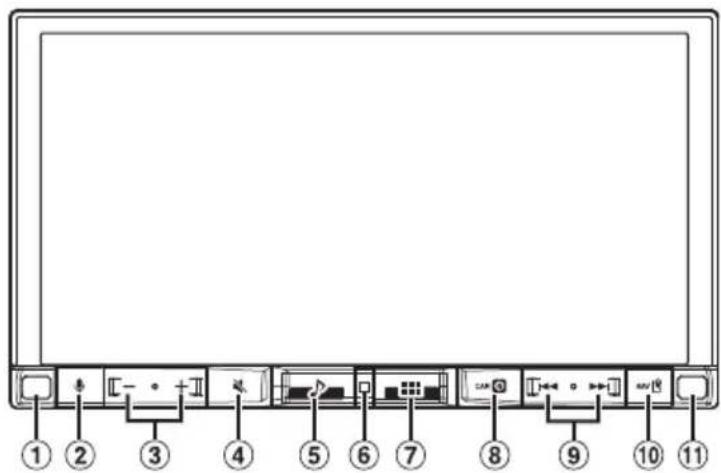
iLX-F905D/iLX-F115D

① Dimmer Sensor
Sense the brightness of the car interior.
② button
Activate Siri function or voice recognition mode while Apple CarPlay or Android Auto is connected.
③ -/DOWN/UP) button
Adjusts the volume.
MUTE button
Activates/deactivates MUTE mode.
Press and hold this button for at least 2 seconds to turn off the screen/button illumination.
⑤ Audio button
Displays the Audio playback screen.
Audio sources can be switched while the Audio playback screen is displayed.
⑥ Power indicator
⑦ ⑧ (HOME) button
Activates the HOME screen.
The Sound Setup screen is displayed while the HOME screen is displayed.
Press and hold this button for at least 2 seconds to turn the power off.
8 (CAM) button
Displays the image of Camera2 (Front/Side/Other) or Camera1 (Rear).
Press for 1 second or more to return to the previous screen.
9
Press to seek up/down a station in radio mode or up/ down a track, etc., in other audio/visual sources.
10 (MAP) button
Displays the map screen for Apple CarPlay / Android Auto when Apple CarPlay or Android Auto is connected.
Remote Sensor
Point the remote control transmitter towards the remote sensor within a range of 2 meters.
Turning Power On or Off
1 Turn the ignition key to the ACC or ON position.
The system is turned on.
- When using the system for the first time, the HOME screen is displayed.

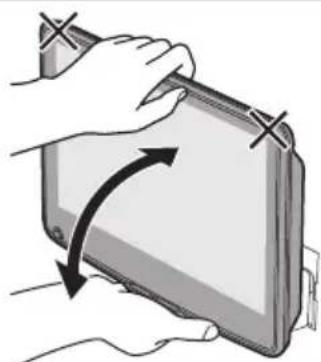
CAUTION (iLX-F905D/iLX-F115D only)
To adjust the display angle, hold the center of the top and bottom of the display to move it. To protect the display, do not hold the left and right ends to move it.
Select the audio source on the HOME screen to perform various settings and operations of the function.
1 Press the (HOME) button.
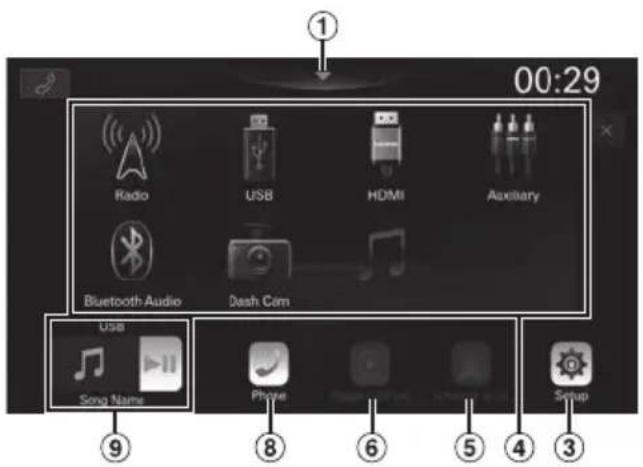
The HOME screen is displayed.
Normal mode screen example
Enhanced Text mode screen example
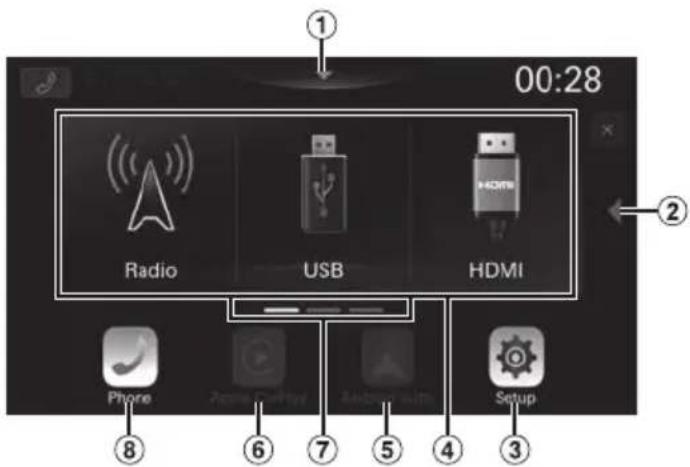
① Touch to display the Sound Setup screen.
② Touch to change the page.
Pages can also be changed by swiping the HOME screen horizontally with your finger.
③ Setup button
Displays the Setup screen.
Audio source select area
Touch your desired source icon to change the audio source.
5 Android Auto button
Displays the Android Auto screen, high light displayed when an Android Smartphone installed Android Auto App is connected.
⑥ Apple CarPlay button
Displays the Apple CarPlay screen, high light displayed when Apple CarPlay is turned on and an iPhone 6s or later is connected.
⑦ HOME screen navigation
Phone button
Displays the Phone menu screen.
The Device List screen is displayed when a Hands-free Phone, Apple CarPlay or Android Auto device is not connected.
9 Thumbnail window for the current source
Source name, artwork and title information are displayed. Touch the artwork to display the source screen. Touch [▶] to play/pause a track or video.
The Home screen can be changed to the Enhanced Text mode.
1 Press the (HOME) button.
The HOME screen is displayed.
2 Touch [Setup].
The Setup screen is displayed.
3 Touch [System].
![ALPINE iLX-F905DU8 - Touch [System]. - 1](/content/2026/04/694020/images/7de5f5d402f58b59c32555064aec1317c196354860fa40d5dabcf34b8d99e64b.jpg)
4 Touch [Home Screen Type].
![ALPINE iLX-F905DU8 - Touch [Home Screen Type]. - 1](/content/2026/04/694020/images/818b4de1662ee03e2d8a589a7732592b2d588db861b24ce701453902399e94b3.jpg)
5 Touch [Normal] or [Enhanced Text].
![ALPINE iLX-F905DU8 - Touch [Normal] or [Enhanced Text]. - 1](/content/2026/04/694020/images/c8487e7e3b48ae12ed9bca20ab52704c47019a792323567a0a065147a1ace39d.jpg)
Apple CarPlay Operation (Optional)
Apple CarPlay is a smarter, safer way to use your iPhone in the car. Apple CarPlay takes the things you want to do with your iPhone while driving and puts them right on this unit. You can get directions, make calls, send and receive messages, and listen to music, all in a way that allows you to stay focused on the road.
1 Press the (HOME) button.
The HOME screen is displayed.
2 Touch [Apple CarPlay].
The Apple CarPlay screen is displayed.
Refer to "Apple CarPlay" in the Owner's Manual for information on how to operate Apple CarPlay.
Owner's manual Android AutoTM (Optional)
Android Auto™ (Optional)
Android Auto brings your favorite smartphone apps into one place, making it easier for drivers to access their favorite navigation, media, and communication apps on the road while minimizing the distractions. Talk to Google on Android Auto™ and get things done with your voice so you can keep your eyes on the road and hands on the wheel. Easily send messages, get directions, control media and more. Just short-press or long-press the voice control button on your steering wheel.
1 Press the (HOME) button.
The HOME screen is displayed.
2 Touch [Android Auto].
The Android Auto screen is displayed.
- Refer to "Android Auto" in the Owner's Manual for information on how to operate Android Auto.
Radio/RDS Operation
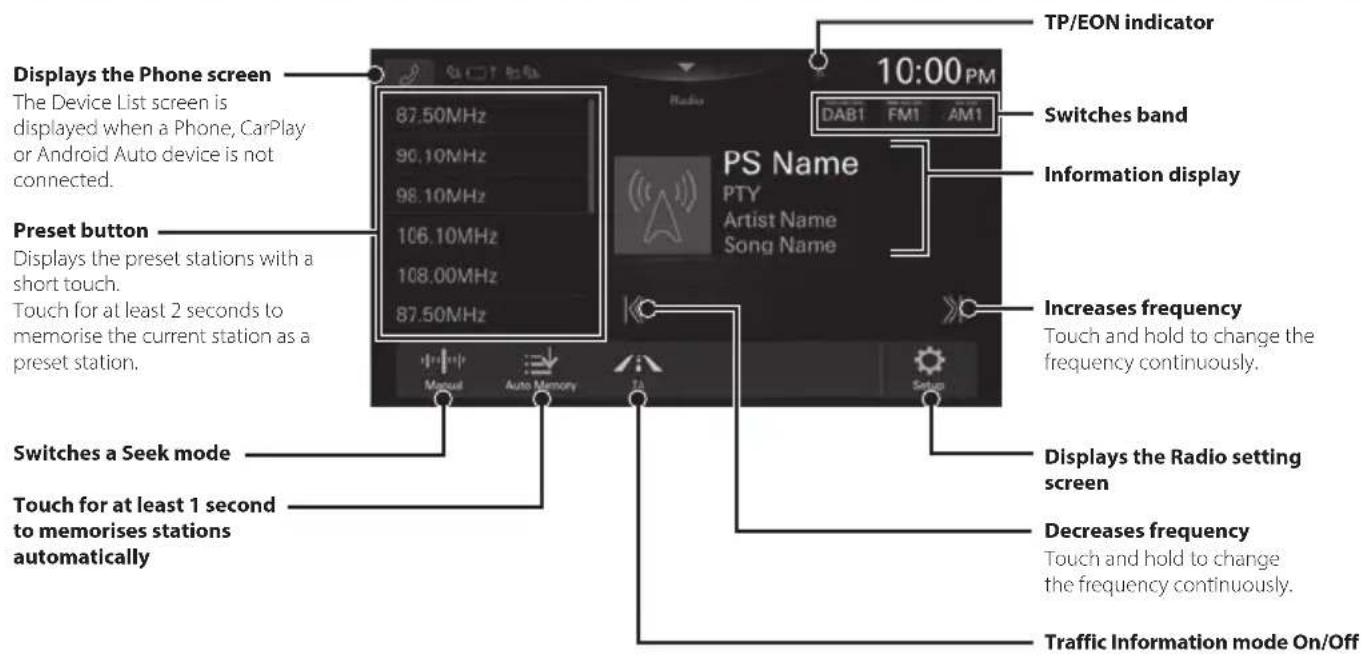
- The patterns of some keys in the Quick Reference Guide may differ from the actual screen.
Owner's manual DAB/DAB+/DMB
DAB/DAB+/DMB Operation
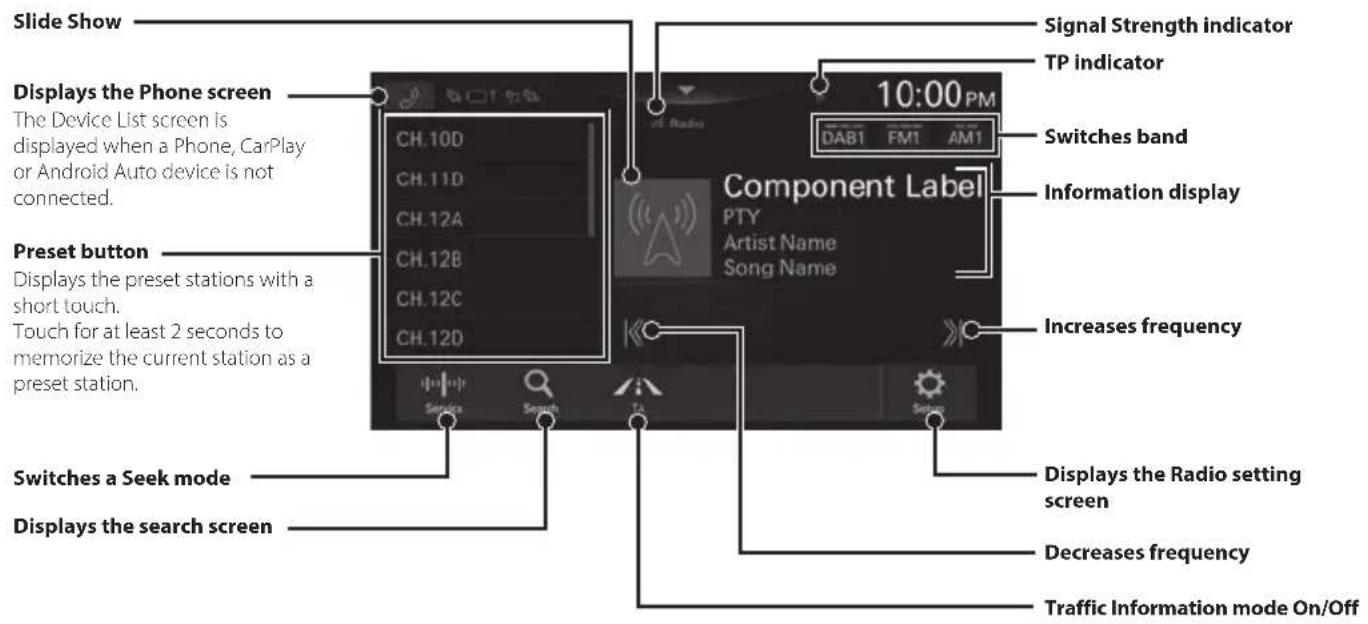
- The patterns of some keys in the Quick Reference Guide may differ from the actual screen.
USB Flash drive Operation (Optional)
You can play back music files (MP3/WMA/AAC/FLAC/WAV/APE) and video files (MP4/MOV/FLV/MKV) stored in a USB flash drive on the internal player of this system.
USB Audio main screen example
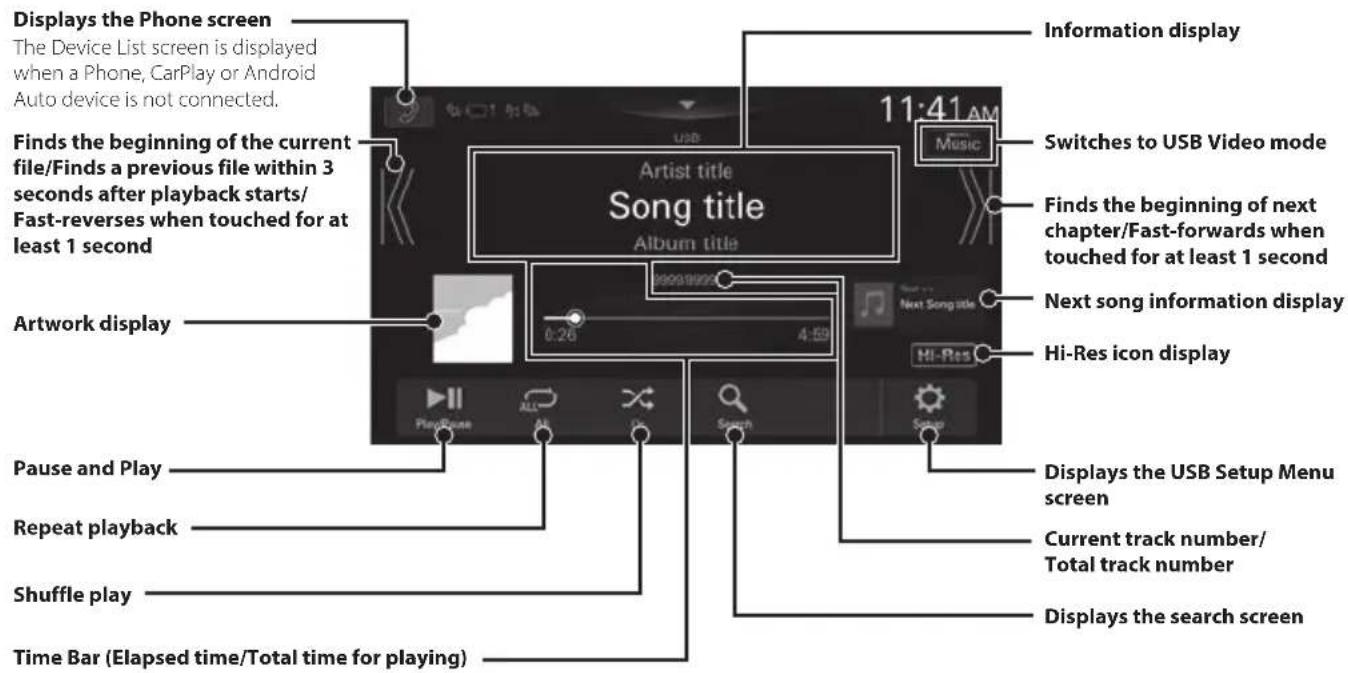
- The patterns of some keys in the Quick Reference Guide may differ from the actual screen.
Searching for a Music File
For example: Searching by Artist name
1 Touch [ (Search)] during playback.
2 Touch [Artists].
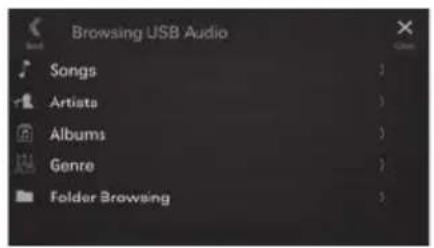
3 Touch the desired artist's name.
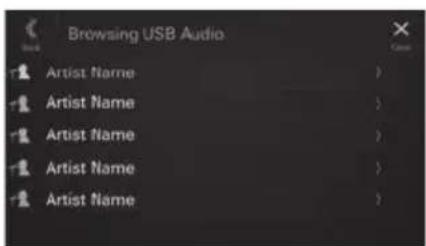
4 Touch the desired album's name.
5 Touch the desired song's name. The selected song is played back.
iPod mode on iPhone (Optional)
A separately sold Lightning to USB cable is required depending on the type of iPhone.
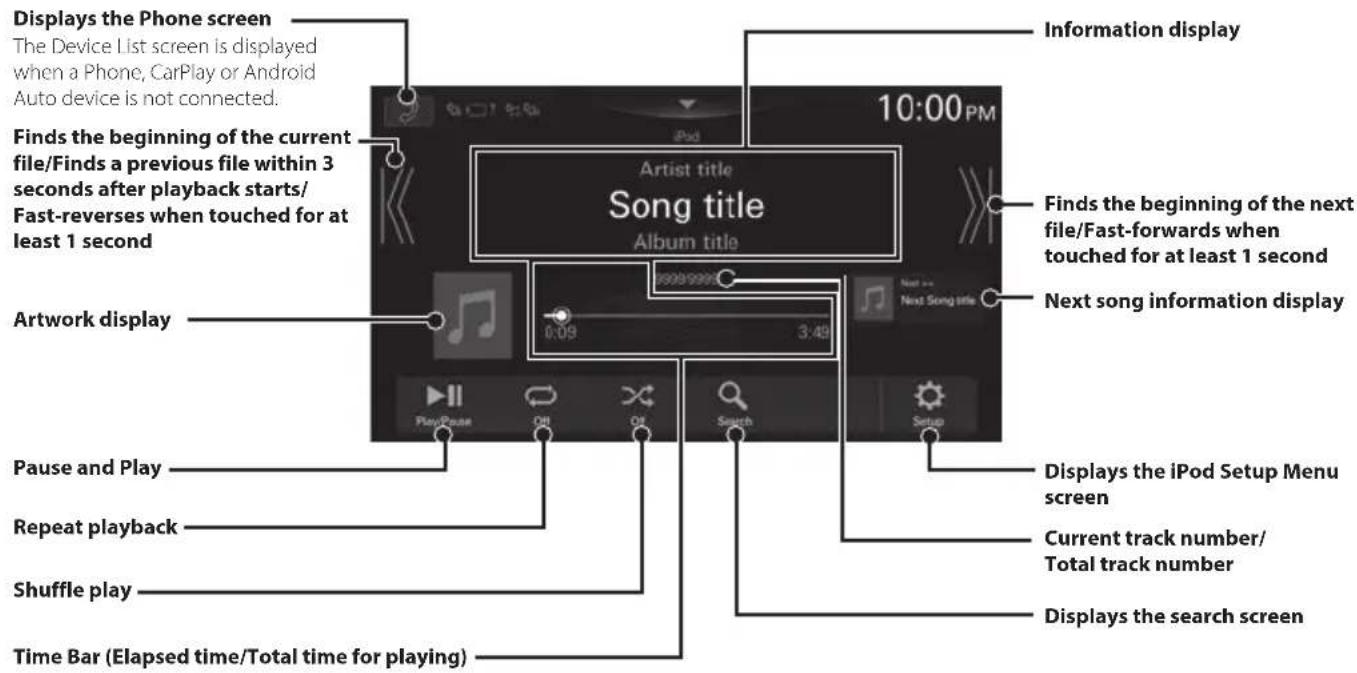
- This unit supports iPhone (iPhone 6s or later) only. For using music playback only, set the "Apple CarPlay" setting to "Off" before connecting with your iPhone.
The patterns of some keys in the Quick Reference Guide may differ from the actual screen.
Searching for a Music File
For example: Searching by Artist name
1 Touch [ (Search)] during playback.
2 Touch [Artists].
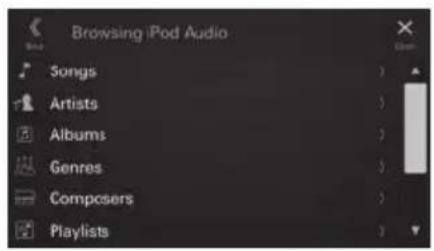
3 Touch the desired artist's name.

4 Touch the desired album's name.
5 Touch the desired song's name.
The selected song is played back.
Hands-Free Phone Control
The unit can connect with up to two hands-free phones.
How to connect to a Bluetooth compatible device (Pairing)
To display the Setup HOME screen:
- Bring your vehicle to a complete stop at a safe location. Engage the parking brake.
1 Touch [Setup] on the HOME screen.
2 Touch [Device].
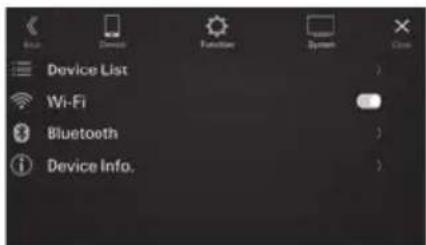
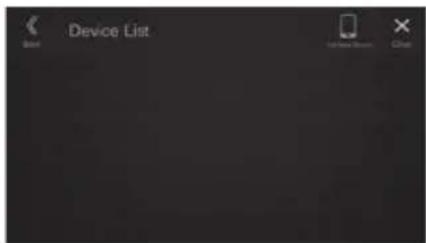
3 Touch [Device List].
4 Touch [Add New Device] to search for a new device.
The Select Function screen is displayed.
5 Select the function of the connecting device on the Select Function screen, and touch [OK].
A check mark is displayed for the selected function.
- Hands Free1: The device is used as the first hands-free phone.
- Hands Free2: The device is used as the second hands-free phone.
- Bluetooth Audio: The device is used as an Bluetooth Audio device.
- Apple CarPlay*: The device is used as Apple CarPlay.
- If you want to use Apple CarPlay mode without displaying [Apple CarPlay] on the Select Function screen, select [Hands Free1] or [Hands Free2] to connect your device.
6 When a code is displayed on the device, check that the code is the same as the one on the screen of the unit, and touch [Yes].
7 When the device connection is complete, a message appears and the device returns to normal mode.
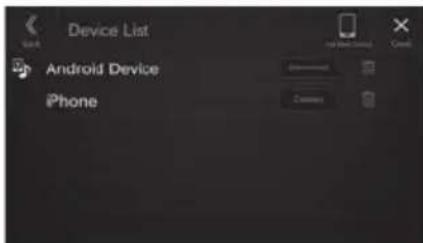
- You can register up to 10 Bluetooth compatible mobile phones.
Answering a Call
1 An incoming call triggers the ringtone and an incoming call display.
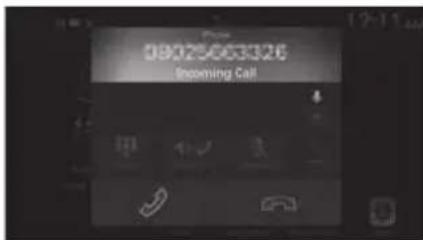
2 Touch[].
The call starts.
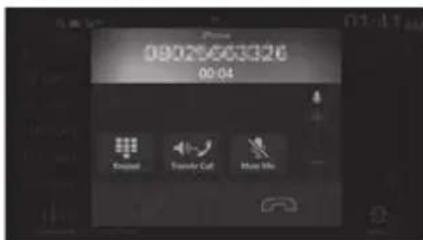
Hanging up the Telephone
1 Touch [ ] (End Call).
The call finishes.
Installation
Note on installation
Install at an angle between horizontal and 30^ Note that installing at an angle outside of this range will result in a loss of performance and possible damage.
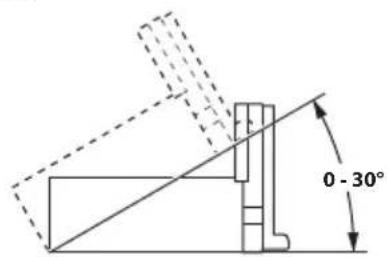
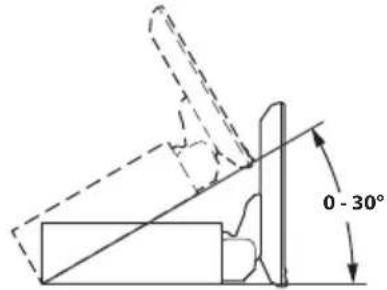
- Do not block the unit's heat sink, which would prevent air circulation. If blocked, heat will accumulate inside the unit and may cause a fire.
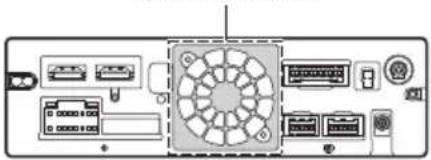
Air ventilation hole
Rear of the Unit
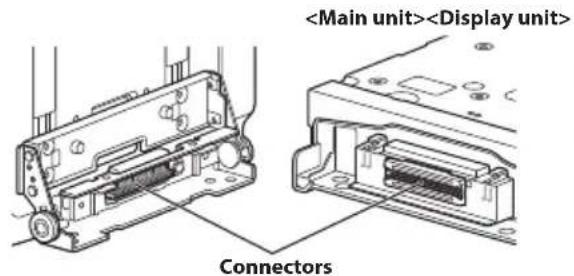
- When installing the display unit and main unit, do not touch the connectors with your hands. (iLX-F905D/iLX-F115D only)
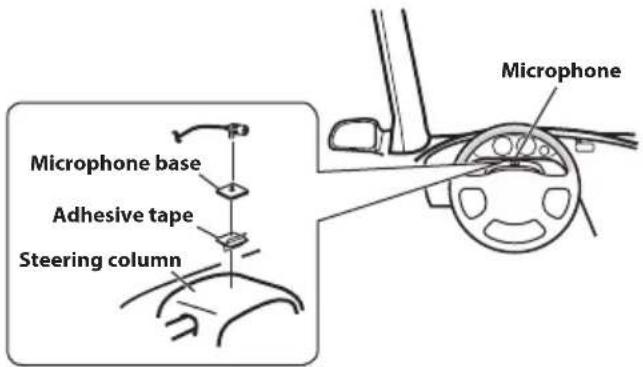
Mounting the Microphone
For safe use, make sure of the following:
- Location is stable and firm.
- Driver's view and operations are not obstructed.
- Microphone is located where the driver's voice can be easily picked up.
When you speak into the microphone, you should not have to change your driving posture. This may cause a distraction, taking your attention away from safely driving your vehicle. Carefully consider direction and distance while mounting the microphone. Confirm that the driver's voice can be easily picked up at the selected location.
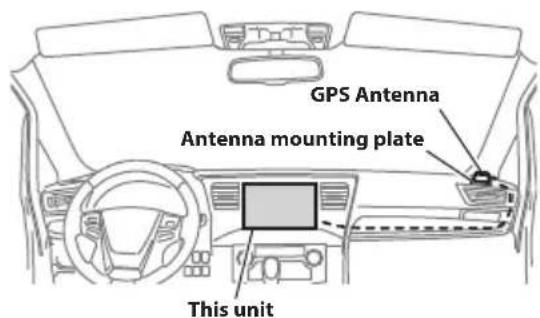
Mounting the GPS Antenna inside the vehicle
1 Clean the mounting location.
2 Put on the GPS Antenna mounting plate.
3 Mount the GPS Antenna.
-
Do not mount the GPS Antenna inside the centre console.
-
Mount the GPS Antenna on a flat plane of the dash board or rear tray.
-
Make sure the GPS Antenna is not covered (obstructed) by any metallic surface or object.
-
If the GPS Antenna is mounted near the unit, the reception becomes poor, and the location of your vehicle may not be displayed correctly.
- Mount the GPS Antenna far away enough from the unit.
- Bundle the GPS Antenna cable away from the rear of the unit.
- Some thermal reflection type or thermal absorption type glass may interrupt high frequency waves. If reception is poor with the antenna installed inside the car, try to mount the antenna outside the car.
Note on using HDMI Connection Cables
When using HDMI connection cables, secure the cables to the HDMI Terminals with the supplied HDMI Fixation Bracket.
1 Secure the HDMI Fixation Bracket with the screw (A).
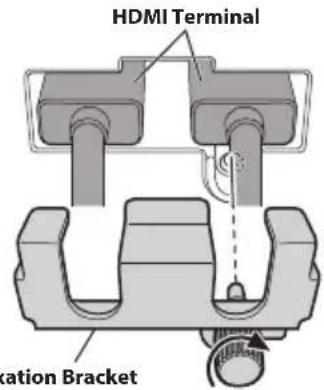
HDMI Fixation Bracket (Included)
Adjusting the display position (iLX-F905D/iLX-F115D)
Depending on the vehicle, the front-back display position differs. To adjust the front-back position, set the slider to the forward position.
Default setting: Back position
Front-back position
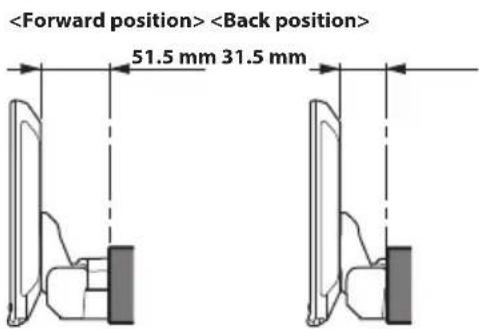
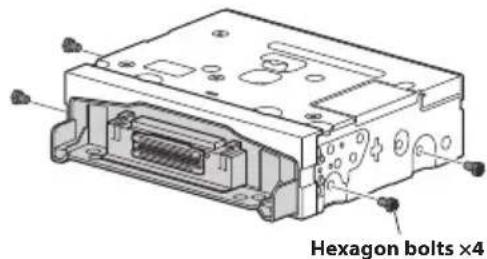
1 Remove 4 hexagon bolts from both sides of the unit.
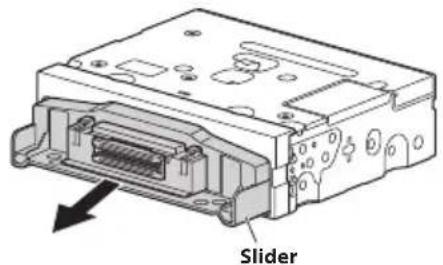
2 Pull out the slider to the forward position. (To return the slider to the back position, push it in.)
3 Install 4 hexagon bolts to secure the slider.
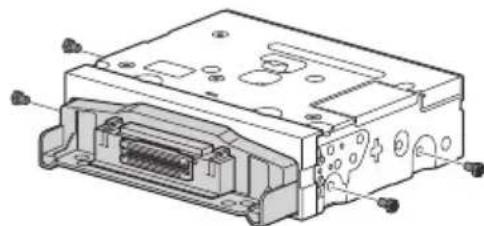
Installing the Unit (iLX-705D)
1 Mount the original mounting bracket to the unit using the supplied screws.
If you do not have the original mounting bracket, mount the Double din KIT* (provided with the side mounting bracket), etc. to the main unit.
- Sold separately.

2 Connect all other leads of the unit according to details described in the "Connections" (page 18).
3 Mounting the unit in a car.
Fix the cables carefully. Do not damage them by tucking them into movable parts, such as a seat rail, or by locating them against sharp or pointed edges.
Installing the Unit (iLX-F905D/ iLX-F115D)
1 Mount the original mounting bracket to the main unit using the supplied screws.
If you do not have the original mounting bracket, mount the Double din KIT (provided with the side mounting bracket), etc. to the main unit.
Sold separately.
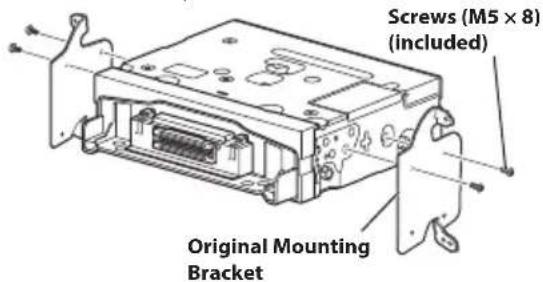
2 Connect all other leads of the main unit according to details described in the "Connections" (page 18).
3 Mount the unit in a car.
Fix the cables carefully. Do not damage them by mounting them into movable parts, such as the seat rail, or by locating them against sharp or pointed edges.
Adjust the up-down position of the Display unit (iLX-F905D/iLX-F115D)
Adjust the up-down position of the display according to the mounting position on the vehicle before mounting the display unit. Default setting: 0 mm
1 Remove the 4 screws on the rear of the display unit, then adjust the up-down position.
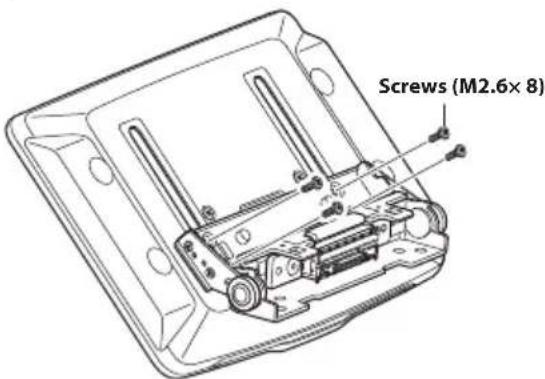
2 Attach the Sheet Rear in a position that aligns with the up-down position of the display unit.
| Sheet Rear (Included) | up-down position |
| 2×50 mm: for up-down position 0 mm or -60mm | |
| 2×35 mm: for up-down position -15 mm or -45mm | |
| 2×20 mm: for up-down position -30 mm | |
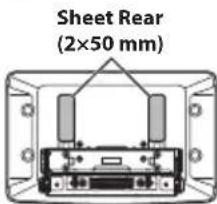
0mm
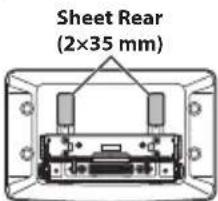
-15mm
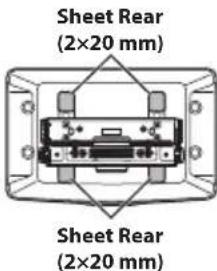
-30mm
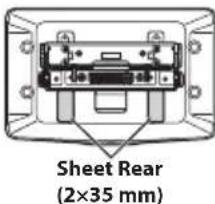
-45mm
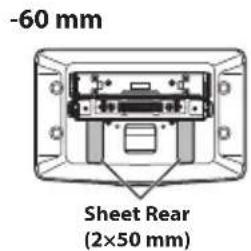
3 Attach the Cover Rear to the rear of the display unit using 2 screws (M2.6×6). Secure the screws, then attach the Sheet caps.
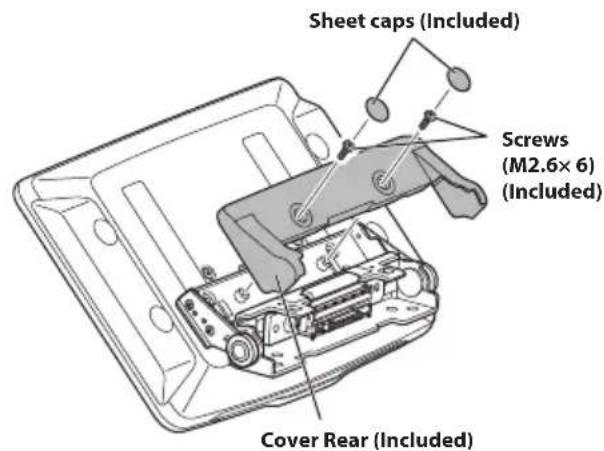
Install the display unit (iLX-F905D/ iLX-F115D)
Fix the Display unit to the slider of the main unit using 4 screws (M5× 8)
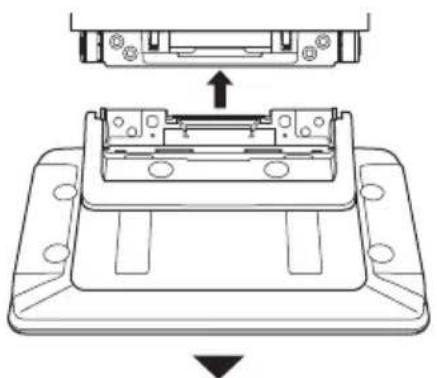
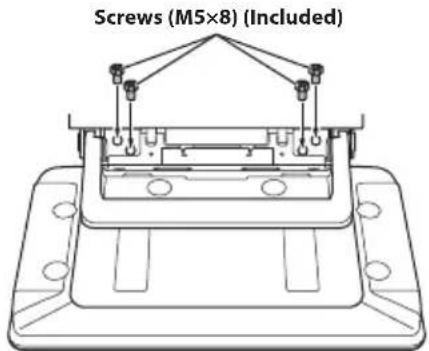
CAUTION
Do not adjust the display angle when the display unit is not fixed to the slider of the main unit using 4 screws (M5× 8) . Doing so may not turn power on.
2 Mount the Power Plate.
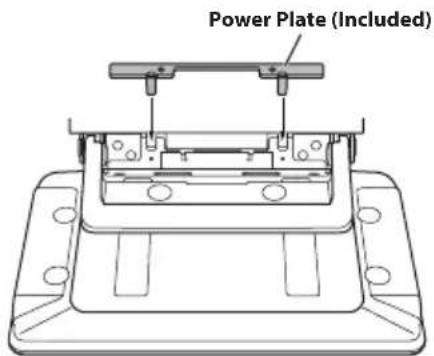
- If the Power Plate is not mounted, the display unit may not be turned power on. Make sure to mount it.
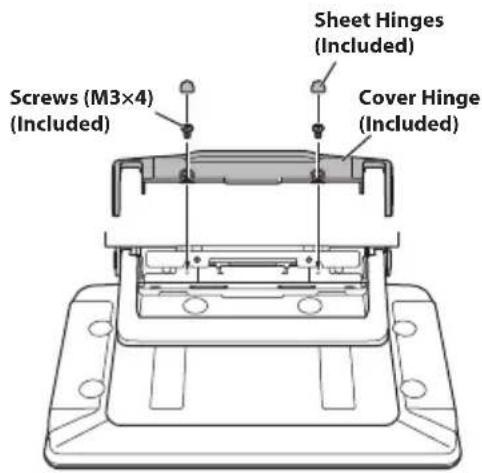
3 Mount the Cover Hinge using 2 screws (M3× 4) Secure the screws, then attach the Sheet Hinges.
(If the ACC power supply is not available)
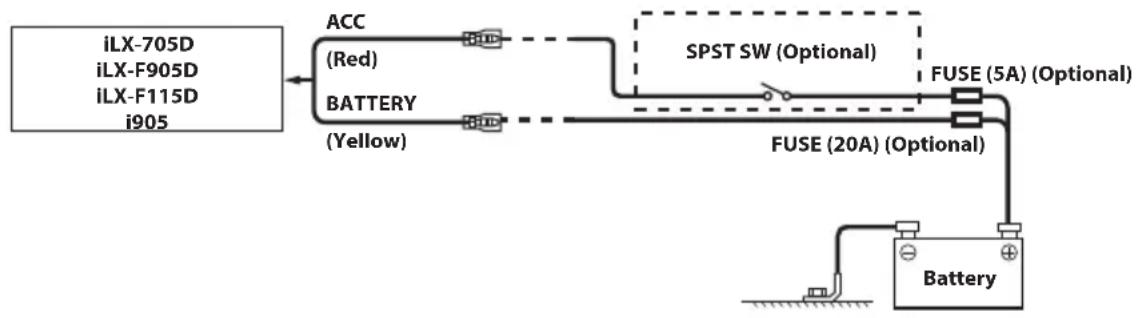
If your vehicle has no ACC power supply, add an SPST (Single-Pole, Single-Throw) switch (sold separately) and fuse (sold separately).
- The diagram and the fuse amperage shown above are in the case when the unit is used individually.
- If the switched power (ignition) lead of the unit is connected directly to the positive (+) post of the vehicle's battery, the unit draws some current (several hundred milliamperes) even when its switch is placed in the OFF position, and the battery may be discharged.
Connections
Connection 1
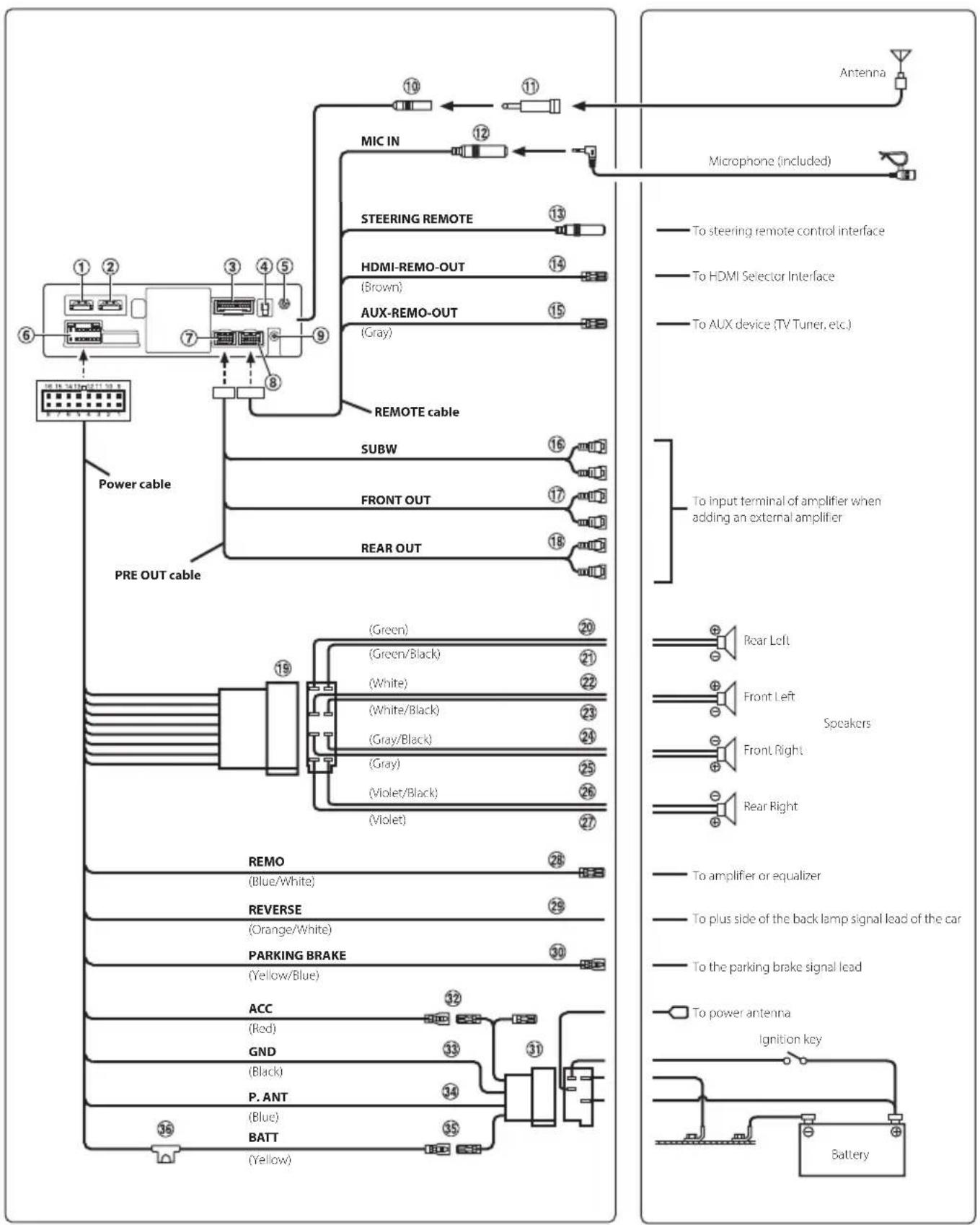
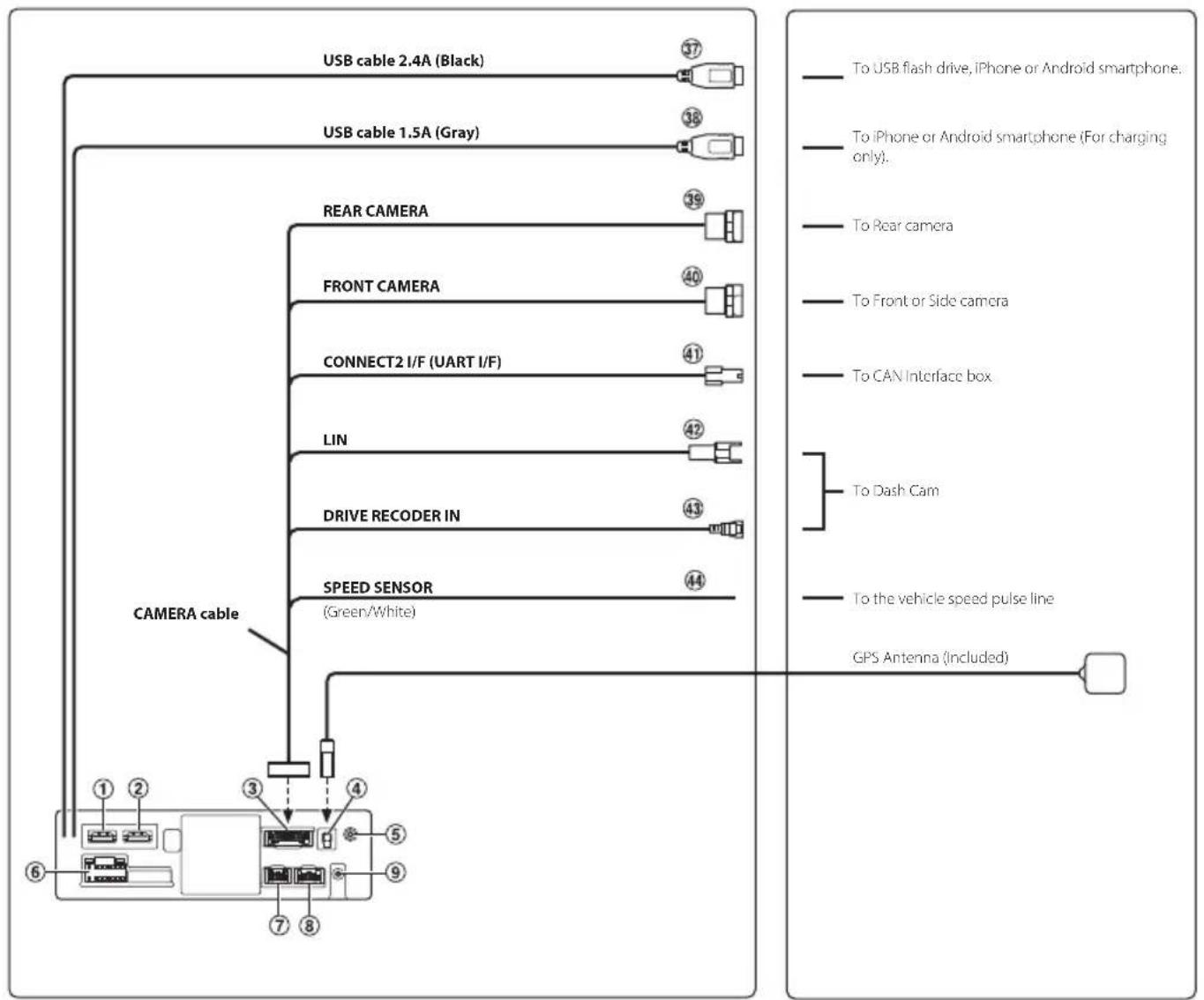
① HDMI Input Connector
HDMI Output Connector
③ CAMERA Connector
GPS Antenna Receptacle Connect to GPS antenna (Included).
AUX Input Connector Input lead for AUX audio signal.
6 Power Supply Connector
PRE OUT Connector
⑧ REM Connector
DAB Antenna Connector To DAB Antenna (sold separately).
10 Radio Antenna Receptacle
ISO/JASO Antenna Adapter (sold separately) ISO/JASO Antenna Adapter may be required, depending on the vehicle.
MIC Input Connector To microphone (included).
13 Steering Remote Control Interface Connector To steering remote control interface. For details about connections, consult your nearest Alpine dealer.
HDMI-REM-OUT Lead (Brown) Connect this lead to the remote input lead of your HDMI Selector Interface.
15 AUX-REM-OUT Lead (Gray) Connect this lead to the remote input lead of your AUX device.
16 Subwoofer RCA Connectors
RED is right and WHITE is left.
17 Front Output RCA Connectors
Can be used as Front Output RCA Connectors. RED is right and WHITE is left.
18 Rear Output RCA Connectors
Can be used as Rear Output RCA Connectors. RED is right and WHITE is left.
ISO Connector (Speaker Output)
20 Left Rear (+) Speaker Output Lead (Green)
21 Left Rear (-) Speaker Output Lead (Green/Black)
22 Left Front (+) Speaker Output Lead (White)
23 Left Front (-) Speaker Output Lead (White/Black)
Right Front (-) Speaker Output Lead (Gray/Black)
Right Front (+) Speaker Output Lead (Gray)
Right Rear (-) Speaker Output Lead (Violet/Black)
Right Rear (+) Speaker Output Lead (Violet)
Remote Turn-On Lead (Blue/White)
Connect this lead to the remote turn-on lead of your amplifier or signal processor.
29 Reverse Lead (Orange/White)
30 Parking Brake Lead (Yellow/Blue)
Connect this lead to the power supply side of parking brake switch to transmit the parking brake status signals to the unit.
ISO Power Supply Connector
Switched Power Lead (Ignition) (Red)
Connect this lead to an open terminal on the vehicle's fuse box or another unused power source that provides (+) 12V only when the ignition is turned on or in the accessory position.
33 Ground Lead (Black)
Connect this lead to a good chassis ground on the vehicle.
Make sure the connection is made to bare metal and is securely fastened using the sheet metal screw provided.
34 Power Antenna Lead (Blue)
Connect this lead to the + terminal of your power antenna, if applicable.
- This lead should be used only for controlling the vehicle's power antenna. Do not use this lead to turn on an amplifier or a signal processor, etc.
35 Battery Lead (Yellow)
Connect this lead to the positive (+) post of the vehicle's battery.
36 Fuse Holder (15A)
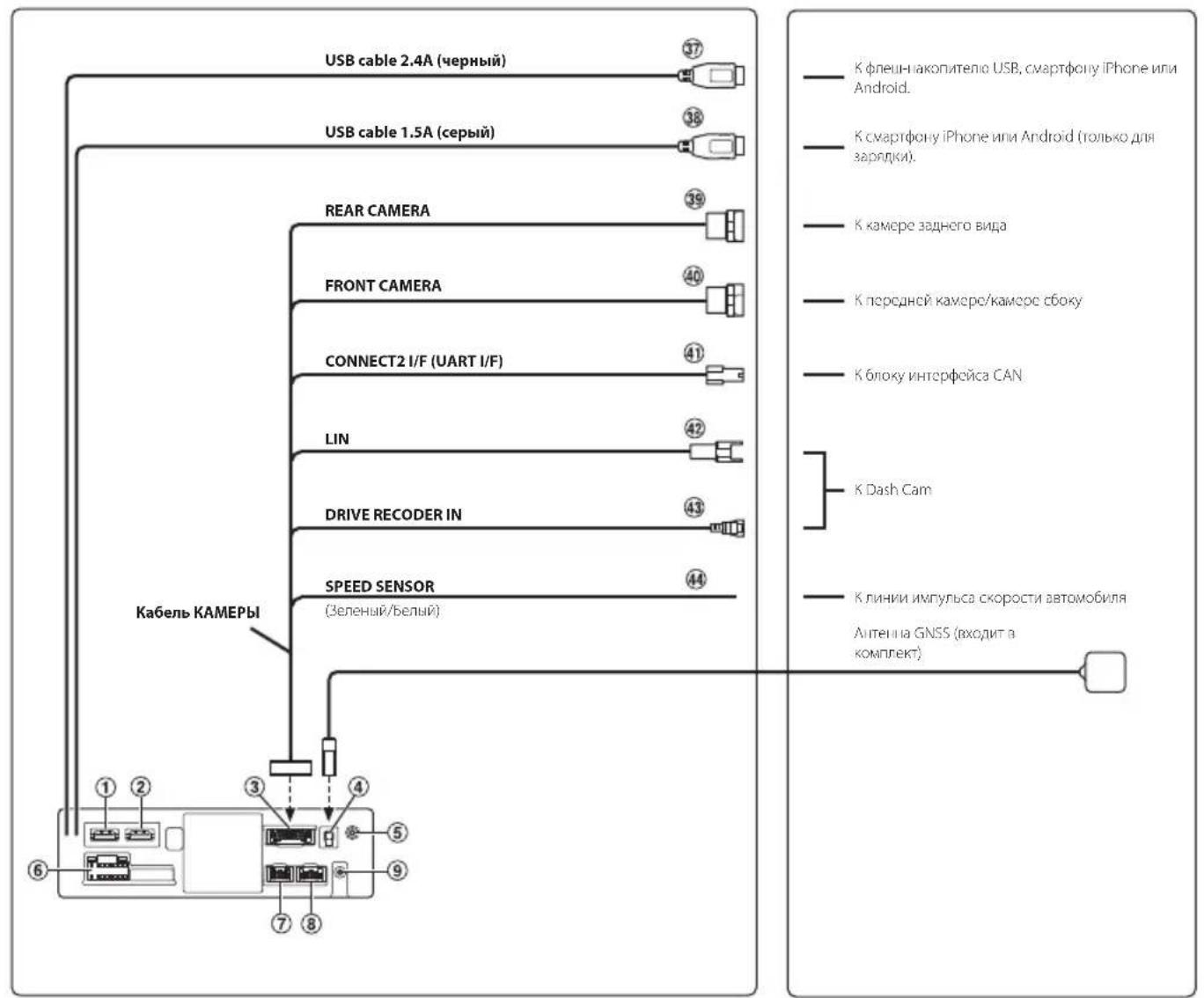
37 USB Connector (2.4A)
To USB flash drive, iPhone or Android smartphone.
38 USB Connector (1.5A)
To iPhone or Android smartphone (For charging only).
39 REAR CAMERA Input Connector
Use when connecting a rear camera.
40 FRONT CAMERA Input Connector
Use when connecting a front camera or side camera.
41 Connect2 (UART) Connector
To Interface Box.
42 LIN Connector
Connect this lead to the LIN connector of the Dash Cam.
43 Drive Recoder Input Connector
Input lead for Dash Cam video signal.
4 Speed Sensor Lead (Green/White)
Improper connection of the speed pulse line may cause important safety features of the vehicle to fail (such as the brakes or air bags). Such failures may result in an accident and loss of life. We strongly recommend that the installation be performed by a trained, authorized Alpine dealer.
Specifications
MONITOR SECTION
Screen Size 7^th (iLX-705D)
9" (iLX-F905D)
11" (iLX-F115D)
9" (1905)
Operation System TFT active matrix
Number of Picture Elements 2,764,800 pcs.
(1280× 720× RGB)
Effective Number of Picture Elements
99% or more
Color system NTSC/PAL
Illumination System LED
FM TUNER SECTION
Tuning Range 87.5 - 108.0 MHz
Mono Usable Sensitivity 8.1 dBf (0.7 V/75 ohms)
50 dB Quieting Sensitivity 12 dBf (1.1 V/75 ohms)
Alternate Channel Selectivity 80 dB
Signal-to-Noise Ratio 65 dB
Stereo Separation 35 dB
AM TUNER SECTION
Tuning Range 531 - 1,602 kHz
Usable Sensitivity 25.1 V / 28 dBf
DAB SECTION
Tuning Range 174.928 - 239.2 MHz
Usable Sensitivity -100 dBm
Signal-to-Noise Ratio 90 dB
USB1 SECTION
USB requirements USB 2.0
Max. Power Consumption 2,400 mA
USB Class USB (Mass Storage)
File System FAT16/32,exFAT
Number of Channels 2-Channels (Stereo)
Frequency Response* 5 - 40,000Hz (±1 dB)
Total Harmonic Distortion 0.005% (at 1 kHz)
Dynamic Range 95 dB (at 1 kHz)
Signal-to-Noise Ratio 95 dB
Channel Separation 90 dB (at 1 kHz)
*1 Frequency response may differ depending on the encoder software/bit rate.
USB2 SECTION
Max. Power Consumption 1,500 mA (CDP Support)
USB Class Charge only
HDMI SECTION
Input Format 720p/480p/VGA
Output Format 720p/480p
Bluetooth SECTION
Bluetooth Specification Bluetooth V4.2 (2,402 - 2,480 MHz)
Output Power +4.0 dBm/2.51 mW Ave.
(Power class 2)
Profile HFP (Hands-Free Profile)
OPP (Object Push Profile)
PBAP (Phone Book Access Profile)
SPP (Serial Port Profile)
A2DP (Advanced Audio
Distribution Profile)
AVRCP (Audio/Video Remote
Control Profile)
GPS SECTION
Reception Frequency 1575.42 +/ - 1.023 MHz
Reception sensitivity (Search) -136 dB max.
Wi-Fi SECTION
Frequency Ranges IEEE 802.11 b/g/n (2.4 GHz)
IEEE 802.11 a/n/ac (5 GHz)
Channels 1-13 ch (2.4 GHz)
149-165 ch (5 GHz)
Frequency Band 2401-2483 MHz (2.4 GHz)
5725-5850MHz(5GHz)
Output Power (2.4 GHz) Max. 18 dBm
Output Power (5 GHz) Max. 13 dBm (11 a)
Max. 12 dBm (11 n/ac)
Security Protocols WPA3/WPA2-PSK (TKIP, AES)
GENERAL
Power Requirement 14.4 VDC
(11-16 Vallowable)
Operating temperature -20°C to +60°C
Power Output 50Wx4
Maximum Current Consumption
15A
Audio output level
Preout (Front, Rear): 4V/10k ohms (max.)
Preout (Subwoofer): 4V/10k ohms (max.)
Weight 1.4 kg (iLX-705D)
2.3 kg (iLX-F905D)
2.6 kg (iLX-F115D)
1.7 kg (i905)
CHASSIS SIZE
| iLX-705D | iLX-F905D | iLX-F115D i905 | ||
| Width | 178 mm | 178 mm | 178 mm | 178 mm |
| Height | 50 mm | 50 mm | 50 mm | 50 mm |
| Depth | 149.6 mm | 149.6 mm | 149.6 mm | 142 mm |
DISPLAY SIZE
| iLX-705D | iLX-F905D | iLX-F115D | i905 | |
| Width | 171 mm | 232.5 mm | 268.9 mm | 214.7 mm |
| Height | 96 mm | 151.1 mm | 178 mm | 136.6 mm |
| Depth | 17.7 mm | 54.7 mm | 54.7 mm | 29.9 mm |
- Due to continuous product improvement, specifications and design are subject to change without notice.
-
The LCD panel is manufactured using an extremely high precision manufacturing technology. Its effective pixel ratio is over 99.99% . This means that there is a possibility that 0.01% of the pixels could be either always ON or OFF.
-
Windows Media, and the Windows logo are trademarks, or registered trademarks of Microsoft Corporation in the United States and/or other countries.
- Apple, iPhone, iPod, Lightning and Siri are trademarks of Apple Inc., registered in the U.S. and other countries. App Store is a service mark of Apple Inc.
- Use of the Made for Apple and Works with Apple badges means that an accessory has been designed to connect specifically to the Apple product(s) identified in the Made for Apple badge and to work specifically with the technology identified in the Works with Apple badge, and has been certified by the developer to meet Apple performance standards. Apple is not responsible for the operation of this device or its compliance with safety and regulatory standards. Please note that the use of this accessory with an Apple product may affect wireless performance.
- Use of the Apple CarPlay logo means that a vehicle user interface meets Apple performance standards. Apple is not responsible for the operation of this vehicle or its compliance with safety and regulatory standards. Please note that the use of this product with iPhone may affect wireless performance.
- Google, Android, Google Play and Android Auto are trademarks of Google LLC. To use Android Auto on your car display, you'll need an Android phone running Android 6.0 or higher, an active data plan, and the Android Auto app.
- The terms HDMI and HDMI High-Definition Multimedia Interface, and the HDMI Logo are trademarks or registered trademarks of HDMI Licensing Administrator, Inc. in the United States and other countries.
- The Bluetooth® word mark and logos are registered trademarks owned by the Bluetooth SIG, Inc. and any use of such marks by ALPS ALPINE CO., LTD. is under license.
- The Wi-Fi CERTIFIED™ Logo is a registered trademark of Wi-Fi Alliance®.
- LDAC and LDAC logo are trademarks of Sony Corporation.
The product with this logo is conformed to HighResolution Audio standard defined by Japan Audio Society. This logo is used under license from Japan Audio Society.
Made for iPhone SE (2nd generation), iPhone 11 Pro Max, iPhone 11 Pro, iPhone 11, iPhone XS Max, iPhone XS, iPhone XR, iPhone X, iPhone 8 Plus, iPhone 8, iPhone 7 Plus, iPhone 7, iPhone SE, iPhone 6s Plus, iPhone 6s.
Inhalt
PBAP (Phone Book Access Profile)
SPP (Serial Port Profile)
A2DP (Advanced Audio
Distribution Profile)
AVRCP (Audio/Video Remote
Control Profile)
GNSS
Empfangsfrequency 1.575,42 + / - 1,023 MHz
DATE D'INSTALLATION:
TECHNICIEN D'INSTALLATION :
LIEU D'ACHAT:
Au microphone (fourni).
DIMENSIONS DE L'ECRAN
| iLX-705D | iLX-F905D iLX-F115D | i905 | |
| Largeur | 171 mm | 232,5 mm | 268,9 mm |
| Hauteur | 96 mm | 151,1 mm | 178 mm |
| Profondeur | 17,7 mm | 54,7 mm | 54,7 mm |
37 Conector USB (2.4A)
A la unidad flash USB, iPhone o smartphone Android.
38 Conector USB (1.5A)
Al iPhone o smartphone Android (solo para carga).
39 Conector de entrada CAMARA TRASERA
Utilíce lo when conecte una camarara trasera.
40 Conector de entrada FRONT CAMERA
41 Conector Connect2 (UART)
PBAP (Phone Book Access Profile)
SPP (Serial Port Profile)
A2DP (Advanced Audio
Distribution Profile)
AVRCP (Audio/Video Remote
Control Profile)
SECCION GPS
Frecuencia de recepcion 1575,42+/-1.023 MHz
Sensibilitad de recepcion (buseseda)
-136 dB max.
SECCION Wi-Fi
Rangos de Frequencia IEEE 802.11 b/g/n (2,4 GHz)
IEEE 802.11 a/n/ac (5 GHz)
Canales
1-13 canales (2,4 GHz)
149-165 canales (5 GHz)
Banda de Frequencia
2.401-2.483 MHz (2,4 GHz)
5.725-5.850MHz(5GHz)
PBAP (Phone Book Access Profile)
SPP (Serial Port Profile)
A2DP (Advanced Audio
Distribution Profile)
AVRCP (Audio/Video Remote
Control Profile)
SEZIONEGPS
Pre-out (subwoofer): 4V/10k ohms (max.)
Peso 1,4 kg (iLX-705D)
2,3 kg (iLX-F905D)
2,6 kg (iLX-F115D)
1,7 kg (i905)
DIMENSIONI DEL TELAIO
| iLX-705D | iLX-F905D | iLX-F115D | i905 | |
| Larghezza | 178 mm | 178 mm | 178 mm | 178 mm |
| Altezza | 50 mm | 50 mm | 50 mm | 50 mm |
| Profondità | 149,6 mm | 149,6 mm | 149,6 mm | 142 mm |
DIMENSIONDELDISPLAY
| iLX-705D | iLX-F905D | iLX-F115D | i905 | |
| Larghezza | 171 mm | 232,5 mm | 268,9 mm | 214,7 mm |
| Altezza | 96 mm | 151,1 mm | 178 mm | 136,6 mm |
| Profondità | 17,7 mm | 54,7 mm | 54,7 mm | 29,9 mm |
④ 06NaCTb BbIbOpa nCToHnKa 3ByKa
HaxMMTe 3HaQK Heo6xOJIMORO ICTOCHNka nI3MeHeHH NCTOCHNka 3Byka.
5 Khonka Android Auto
OTo6paXeHne 3KpaHa Android Auto npn
IOaIKIoueHH cMaPTfOHa Android cyCTaHOBHeHHbIM
npInIOXeHHeM Android Auto.
6 Khonka Apple CarPlay
OTo6paKeHne 3KpaHa Apple CarPlay,ecnBKnUoyeHa
fynKuApE Apple CarPlay n noDknUoyen iPhone 6s nn
cMapTfoh 6oJee no3dHeBepnn.
7 Haburaqua no HaayalbHomy 3KpaHy
8 Khonka"TenefoH
OTo6paKeHHe 3KpaHa MeHIO "TenefoH". OTo6pa3ntcA kpaH "CnncOK yCTpoiCTB",ecnn He noKnIueH TenefoH c fynKuJe "Cbo6oHbIe pyKn", ycTpoiCTBO Apple CarPlay nIa Android Auto.
9 OkHO 3CKN3OB DnRA TeKyuero MCTOCHMa
OTo6paKaetcHMaNCTOChHnKa,06NoKKa n CBeJeHn O Ha3BaHn. KocHTecb N3o6paKeHn O6NoKKn IJra oTo6paKeHn 3KpaHa NCTOChHnKa.HaxMTe [II]I JnBocPOn3BeHn/NpNOCTaHOBKn DOpOxKn IIN BVDeO.
PexKIM HaayalbHoro 3kpaHa MoXHO N3MeHHTb Ha peXIM "BbIeJIeHHb TeKT".
1 HaXMMTe KhONKy (HaTAAJIbHbI IN 3KPAH).
OTo6pa3nTc HauAJIbHbI 3KPAH.
2 KocHTecb [HactpoKa].
ÖkpoeTcŋ ឃkpən "Hactpoɪka".
3 Kochntecb [Cnctema].
![ALPINE iLX-F905DU8 - Kochntecb [Cnctema]. - 1](/content/2026/04/694020/images/0ff0cb72c549e8ff3d0f1f18ffad04ae4ed1590287058d4b01bc1736b2b91cb3.jpg)
4 KocHTecb [Tn rnaBHoro 3KpaHa].
![ALPINE iLX-F905DU8 - KocHTecb [Tn rnaBHoro 3KpaHa]. - 1](/content/2026/04/694020/images/6657faa4b244fda9766d753a75701d27edf9c10b406b5ea2248527d99ba9336e.jpg)
5 KocHTecb [HopMaIbHo] nII [BbIeJIeHHbI TeKCT].
![ALPINE iLX-F905DU8 - KocHTecb [HopMaIbHo] nII [BbIeJIeHHbI TeKCT]. - 1](/content/2026/04/694020/images/0273548b8f843dd185af44d72203252d343d66f975fe4f712fc3db88c43eef9c.jpg)
Pa6ota c Apple CarPlay (onця)
CnCTema Apple CarPlay denaet 6oonee 300fektnbim n 6e3oNaChbIM npimeHene yctpoiCTBa iPhone b aTOMobnne. C nomoou Apple CarPlay BO BpeM RAoxdHn moXHO Bb6paTb Heo6xOaMbIe 3JemeHTb C yCTpoiCTBa iPhone n nepeDaTB nX HnocpeDCTBeHHo Ha daHHoe yctpoiCTBO. MoXHO npOKnaBbA Tb MapwpyT, DeNaTb TeNefoHHbte 3BOHKn, NocBnA Tb nOnyauTb COo6uHn, a TAKKe CnyuTaB My3bIKy n Pn EToM OCTaBaTbCa COpeDoTOUeHHbIM Ha dopore.
1 HaxmTe KhoNky (HauJIbHbI INKPAH).
OTo6pa3ntcHAAJIbHbI 3KPAH.
2 KocHTecb [Apple CarPlay].
OTo6pa3nTc3 ekpaH Apple CarPlay.
- Infpopmaua no ucnno3obauu no fyHKuuu Apple CarPlay npedcmaaeneha 8 pa3dene "Apple CarPlay" pykoobodcma nonb3obameia.
PykoBocTOBO nonb3OBaTeNa Android AutoTM (onu)
Android Auto™ (onця)
CnCTema Android Auto no3B0JAE T BODIeJIIO NOJIb3OBAiBCa CmblIM NOnyIaRbIMN fYHKUHMI cMaprfoHa,
ObecneuBaB 6e3oNaChbI IOCTyN K PpINIOXeHNAM HABnIaCInM, MyIbTImMeJaN i CpeIcTBaM CBa3N BO BPeMa
DBVKeHHN I He OTBNeKAB BODITeJIOT DOpOrN. ObpaTIeCb K Google Ha Android AutoTM uynpaBnIte
PpINIOXeHNAM C NOMOeIBO rOLOCOBbIX KOMaHd, He OTBLeKaIcB OT DOpOrN I He OTpbIBaR pyk OT pyJIeBOrO
KoneCa. Bbl MoKeTe 6e3 Tpyda OTnpabJIaTb COo6eHNIA, IpOKlaDbIbA Tb MapIpytB I HABnIraTope, ynpabJIaTb
MyIbTImeDInHOH CNCTeMOI MHORe dpyRoE. IpocTo HaxMtTE I DOJIro ydePxNBaIte KhoNky rOLOcoBOrO
ynpabHeHNA pynEBOM KONEce.
1 HaxmTe KhoNky (HbHbHbI 3KPAH).
OTo6pa3ntcHauAJIbHbI 3KPAH.
2 KocHTecb [Android Auto].
ОтобразИСТЯКран Android Auto.
- Infopmau no ucnolb3obauho fyHKuu Android Auto npedcmaaeneha 6 pa3dene "Android Auto" pykoobocma noIb3obameia.
Функця"Радио"/RDS
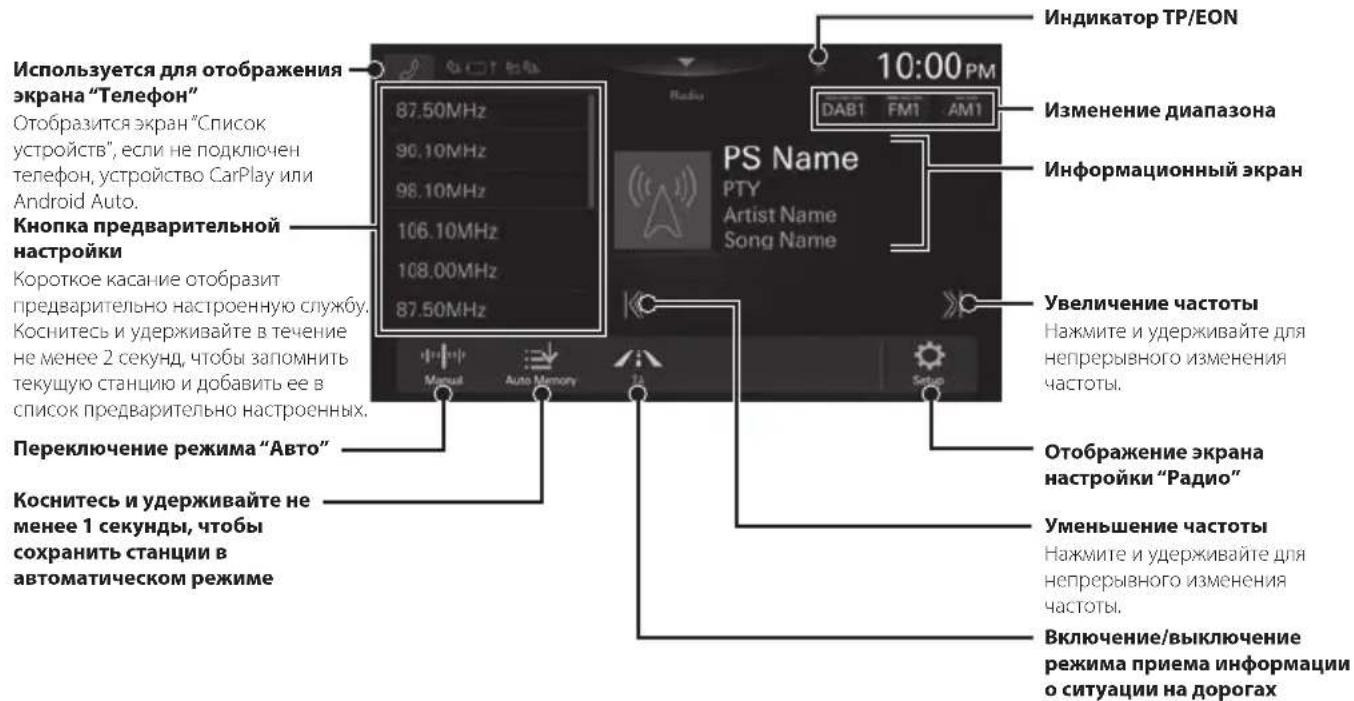
Bneunu bud hekomopbix 3eMehmob, ucnonb3yembix 6 "Kpamkom cnpabouHom pykoobodcmbe", moxem omnuambc on peanbix 3eMehmob na ekpane.
PykoBocBo nonb3oBaTeNa DAB/DAB+/DMB
Pa6oTa C DAB/DAB+/DMB
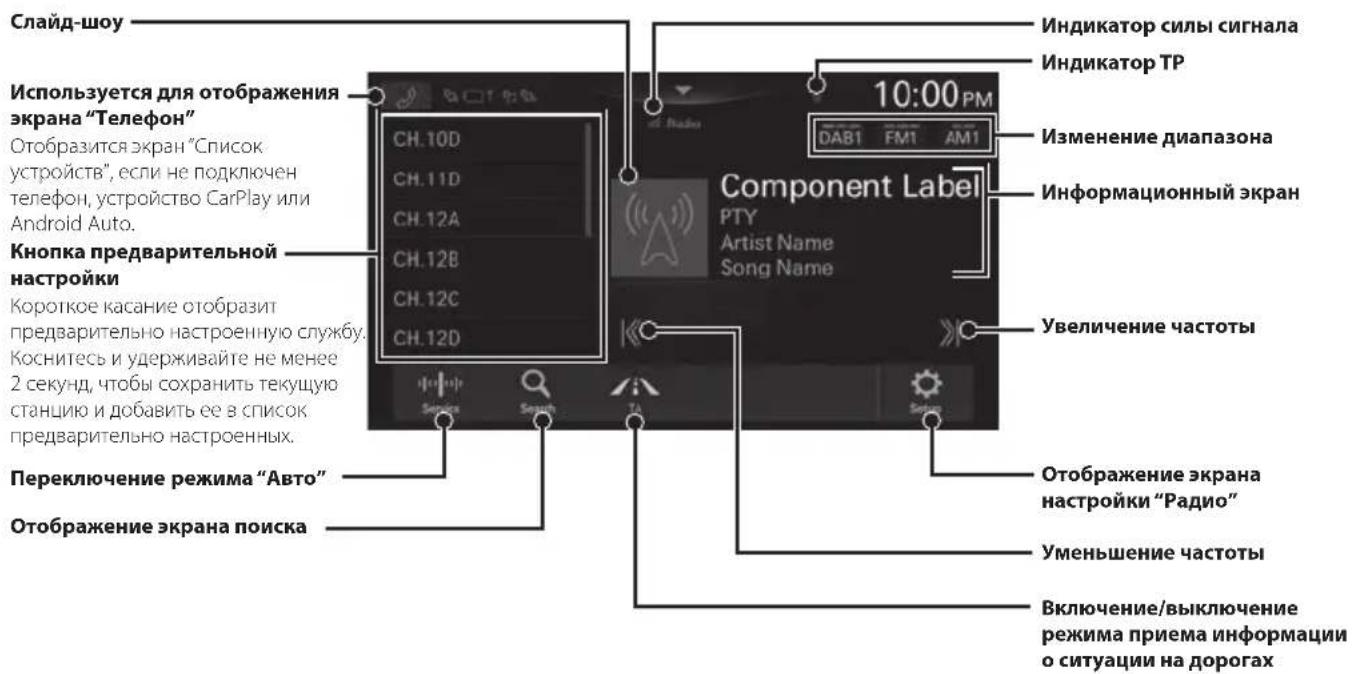
Bneunu bud hekomopbix 3nemehmo6, ucnonb3yembix b "KpamkOM cnpabouHOM pykoobodmee", moekem omnuambc on peanbix 3nemehmo6 na ekpane.
Pa6oTa cфnei-haKoIITeIeM USB (onu)
(Ecnn nctouhNk nntaHnA ACC HeoctyneH)
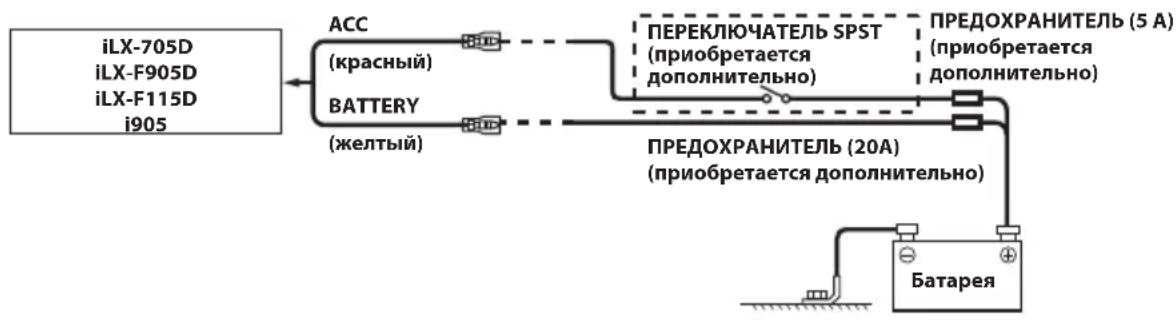
- Ecnu 6 abmomohe ycmaHOEN ucmouHn k numaHua ACC, ycmaHOme npuo6pemaembe dononHumeNo nepeKIOUamEnb SPST (Single-Pole, Single-Throw) u npedoxpanumenb.
- Iokaahhhe biiue cxema nodknoeHua u cuna moka npedoxpahumene npumehromc 6 cnyae uhdubuyanbho20 ucnoib3oabun ycmpoucmba.
- Ecnu nepeknioaemb bbood numanue (3aKuzaHue) ycmpoicmba Hanpmyo nodKnouen K noIOKumelbHomy (+) nonocy abmomoobnbHO2O aKKymnnapo, nompebnem Heobbuoi moK (heckoBko comeMuIuaamnp) daKe npu bblknoehuu nepeknouameJn numahua, u aKKymnnapo moKem pa3pduumbcra.
CoeHHen
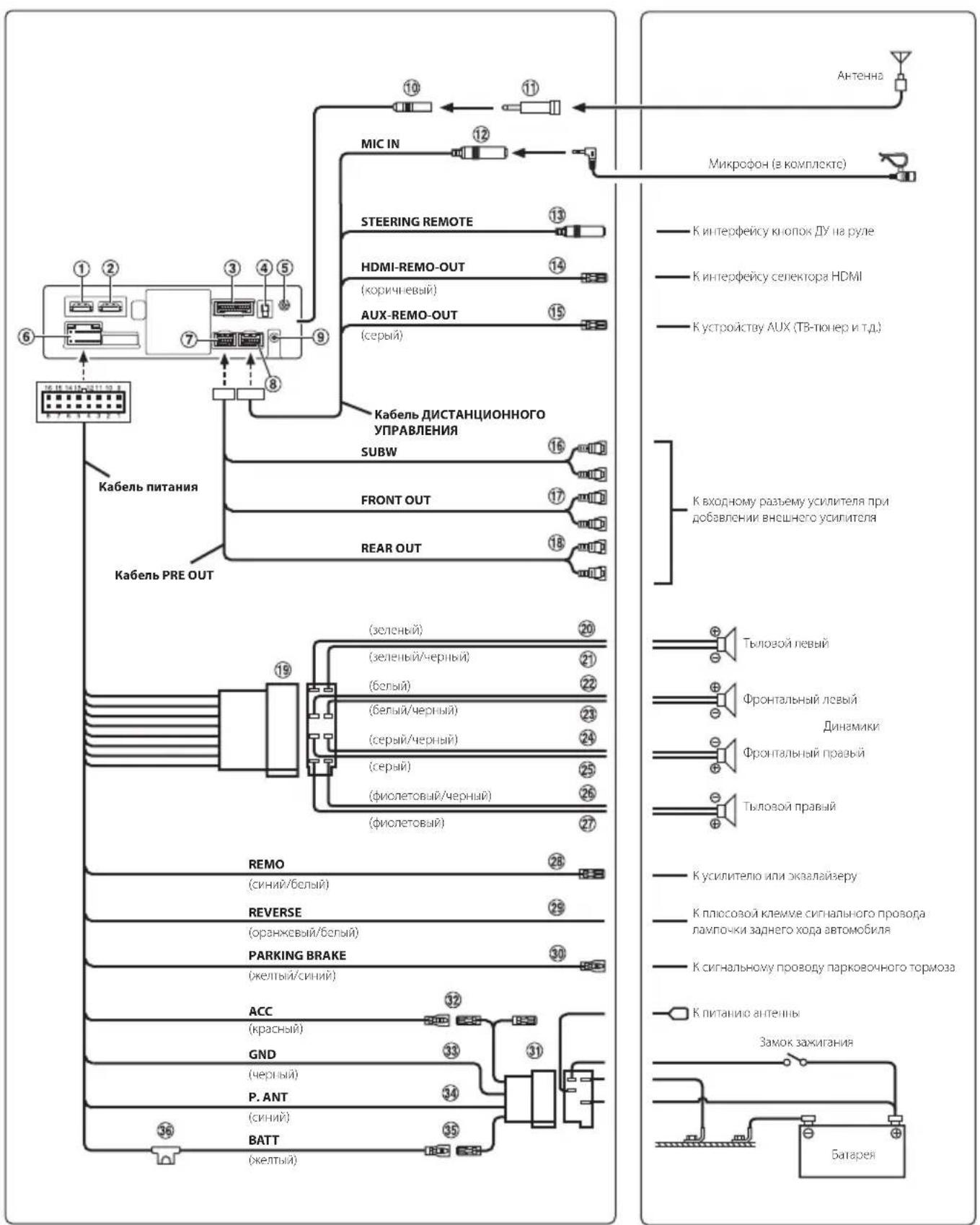
CoeHHneHne 1
1 Bxodno pa3bem HDMI
② BbIXoHNo pa3bem HDMI
3 Pa3bem KAMEPA
4 Pa3bem aHTehHbI GNSS
PoiKJIIOUHTe aHTeHHy GNSS (npunaraetc).
5 BxoHoi pa3bem AUX
BxOД ayDnOscnHana AUX.
6 Pa3bem mCTOuHnka nHTaHn
⑦ Pa3bEM PRE OUT
8 Pa3bEM REM
Pa3bem aHTeHHbDAB
KaHTeHHe DAB (nPno6peaetc IOnIOJIHNTeIbHO).
10 Pa3bemahTeHHbI"PaHNO
11 AnteHHbI aanTep ISO/JASO (npno6peTaetcdoonHHTebHO)
B 3aBNCMOCTN OT aBTOMO6nI MOKeT nOTpe6oBaTbCA aHTeHHb aanTep ISO/JASO.
12 Bxodno pa3bem MIC
K MUKPOFOHy (B KOMNJIeKeTe).
13 INHTepfeiChbI coeHHntB nI npKIOUeHn IHTbIX KHOJOK YHa pyne
K INTEPfeCy KHOPOK DyHa pyne.
IINyueHn DOONHHTeBHO INHOpMaun O
BO3MOXHOCTx NODKNIOUeHn O6paaeTeCb K
CBOEmy 6bnkaiWemy dInepy Alpine.
14 BbIOd HDMI-REM-OUT (kopnueBbI)
IIOKJIIOHTe 3TOT BbIOJ KO BXOy DuctaHcUHOHHoro ynpabneHn HDMI ceneKtopa.
15 BbIOAUX-REM-OUT (cepbl)
IIOKJIIOHHTe 3OT BbBOJ KO BXOy IINCTaHUNOHHO ynpabHeHH yCTpOJCTBa AUX.
Pa3beMbI RCA ca6ByΦepa
KPACHblI -dna npaboro, BENbl- nla neboro.
17 BbIXoHbIe pa3beMbI RCA φpoHTaJIbHbIX dHaMnKOB
Moryt nOJb3OBaTbC B KaueCTBe BbIXoHbIX pa3bEmOB RCA pOHTaJIbHbIX dINHAMKOB. KPACHbl -nnpaboro, BELbl -nna neBoro.
18 BbIXoHbIe pa3bEmbl RCA tbIOBbIX dmHaMKOB
Moryt nCnoB3oBaTbC8 B KauEcTBe 3aDnHx BbXoDhBix pa3bEmOB RCA. KPACHbl - nn npaboro, EJIbl - nna neBOrO.
ISO-pa3bem(BbIXoHa dHaAMnKn)
20 BbIOaHa neBbI TbIOBOu DNHAMK (+) (3eHbI)
21 BbIOJ Ha neBbI TbIOBOI dHAMNK (-) (3eHbI/YepHbI)
22 BbIOHaJIeBbIΦpoHTaJIbHbIДnHaMUK(+) (6eJIbI)
23 BbIOd Ha IeBbI φpoHTaJIbHbI dINHaMnK (-) (6eNbI/YepHbI)
24 BbIOd Ha npaBbI φpoHTaBbHbI dHAmK (-) (cepbi/uepbbl)
25 BbIOHa npaBbIΦpoHTaHbI dHAmK(+) (cepbl)
26 BbIBoHa npaBbI TbIOBOI dHAMK (-) (moneTob/ephbl)
27 BbIOd Ha npaBbI TbIOBOI dHAmK (+) (fmonetobbl)
BbIBoD nCTaHIOHOHorO BKnIOueHnra (CNnn/ 6eJIbI)
IIOKIOHHTe 3OT BIBOD K BXOy ydaJIeHHORBKKIOUeyHnY CUNITEnI INI npouecoppa cnHAnOB.
29 BbIOd Ia KaMepbI 3aHrero Bua (opaHKeBbI/6enbl)
30 BbIBoN napKOBOHbI TOPMO3a (KENTbI/CnHN)
IopknIOUHTe 3OT BbIOJ K pa3bemy NITAHnnepeKnIOuATeJI napKOBOUHORO TOPMO3dI nepeDAcNCHHaIOB COCToHHN NapKOBOUHORO TOPMO3aYCTPOINCTBY.
ISO-pa3bem MCTOCHNKA NITAHNA
32 BbIOJ npepbIbaTeJI NITAHN (3aXnraHne) (KpaCHbI)
IopKIOUHTe 3OT BbBOD K OTKpBToN KJIEMMe 6JOKa IJIABKINX PpeOxpaHNTeNE ABTOMO6NJN INIK DpyrOMy CBO6OHOMy NCTOCHNY NITAHN, OBeCneuBAIOeMу 3aKnraHnE c HaprrKeHnEM 12 B
(+) TOIbKO npn BkJIIOueHHOM 3aXJrHaHIN ININB DONONHHTeJIbHOM NOJOKeHHN.
33 BbIbO 3a3eMneHn (epHybI)
TuatelbHO 3a3eMMITE 3OT BbBOH Ha Maccy. y6eINTEcB TOM, UTO COeHNHeHne BbIOJIHeHO Ha ORoJIeHHo METaJIInueCKO NOBepxHOCTN HAdEJHO 3aΦNKcnpoBaHO C NOMouI ppeIOCTABJIeHHOrO BnHTa DnI INCTOBORo MetaIIa.
34 BbIBoNNTAHnAHTEHHb(CNHn)
PnKIOHTe 3OT BbBOK K KneMMe +B nHTAHn aHTEHbI (ecnn npmehmo).
3TOT BbBOD CnEpyET NcONb3OBaTB TOnbKO DnY npabHeHnN nHTaHnEM aHTeHHb. He nCnONb3yTe 3TOT BBOD DnB KKnOueHnYcNInTeNnn npoecccopa CnHaIOB N T.D.
35 BbIO4 6atapen (xentby)
CnCTema LiBeTOBOCpON3BcEHHa NTSC/PAL
CnCTema nOcBETKINLED
FM-TIOHEP
Dnana3OHnAepon87,5-108,O M
NoporOBaYyBCTBnTeBHOCTbOHHoKaHaJa
8.1 έBΦBΓ(0,7 MKB/75 OM)
Ioporobar yBCTBntenbHocb 50 dB 12dbΦBT(1,1MKB/75OM)
U36npaTeJIbHOCTaJIbTePHaTbHBOKaHaJa
80d
OTHOWEHNE CnHnAn/7yM 65D6
PepexoHoe 3aTyxahne Mekjy CtepeokHaHaAM
356
AM-TIOHEP
Dnanaoh NahtpOkn 531-1602K
Ioporobar yBCTBtEnbHocTh 25,1MKB/28 dΦMBT
DAB
Диапазоннскгоркn 174,928-239,2Mf
IloporOBa yBCTbntbHOCTb-100dM
OTHOWeHHe CnHaI/7yM 90 d6
USB1
Tpe6oBaHnK USB USB 2.0
MaKcImaJIbHaNoTpe6nIeMaI MoUHOCTb
2400 mA
Knacc USB USB (Knacc Maccoboi namrtn)
KoIueCTBO KaHaNoB 2-KaHaIbHbI 3Byk (cTepeo)
YactoTHaXapakTepeCTnka*1 5-40000Tu(±1d5)
CymmaHbIKoOxOuINeHTrapMOHNueCKNXNCKaXeHH
0.005% (npn 1 kU)
HnHaMueeckm Dnana30H 95b (npn1KfU)
OTHOWEHNE CINHAN/7yM 95D6
Pa3deneHne KaHaNoB 90n5 (npn1 KfU)
*1 TactoTHa XapaKTePncTnKa MoKeT OTnHaTbcB 3aBnCmOCTn OT IpoIpaMMHOrO O6ecHeueHn yCtpoNCTBa KOIMPOBaHN /CKOPcTN HepeJauH 6NTOB.
USB2
MaKcImaJIbHaNoTpe6nReMaMoUHocTb
1500 mA (noideprkka CDP)
Knacc USB TOnbko 3apraKa
HDMI
BxodnohΦopmat
720p/480p/VGA
BbIXoHNOHΦOpMaT
720p/480p
Bluetooth
TexHueckne xapaKTepeNCTnKn Bluetooth
Bluetooth Bercnn 4.2 (2402-2480 Mf)
BbIXOHHaMOUHOCb+4,0D5M/2,51MBTcpeH
(KNaCCMOUHOCTN2)
PpOoHnB
HFP (npoΦnIb raphNtypbl)
UyBCTBNTeBHOCTb npHEma (NONCK)
-136 AB MaKc.
Wi-Fi
Dnana3OHBYaCTOT
IEEE 802.11 b/g/n (2,4 ITU)
IEEE 802.11 a/n/ac (5 ITU)
KaHaJIbI
1-13 KaHaIaIOB (2,4TtU)
149-165 KaHaoB(5TtL)
HnnaH3OHyACTOT
2401-2483MΓu(2,4Γu)
5725-5850Mf(5Mf)
BbIXoHnHa MOUHOCTb (2,4TfU)
MaKc.18bM
BbIXOHaHMAOHHOCtB(5TTL)
MaKc.13D5M(11a)
MaKc.12Bm(11n/ac)
Ppoedypbfoecepehen6e3oanachoctn
WPA3/WPA2-PSK (TKIP,AES)
OBSUE
Notpe6nma MOuHOCb
14.4B noctoHHoro HanpJxHn
(Donyckaetc11-16B)
BbIXoHnHa MoHnOCTb 50 Bt X4
MaKc. nontpeBHeHne 3eKtpOeHepn
YpOBeHb BbIXoHOra ayDIOcRHaHa
PpeBapntbHbBbXoN (pepeHne,3aHne):
4B/10KOM(MaKC.)
PepBbapntEnbHn BbXoJ (ca6byepe):
4 B/10 KOM (MaKc.)
Bec
1,4 Kr (iLX-705D)
2,3 Kr (iLX-F905D)
2,6 Kr (iLX-F115D)
1,7Kr (1905)
PA3MEP KOPNYCA
| iLX-705D | iLX-F905D | iLX-F115D | i905 | |
| ШирINA | 178 MM | 178 MM | 178 MM | 178 MM |
| Вы科协а | 50 MM | 50 MM | 50 MM | 50 MM |
| Пунбина | 149,6 MM | 149,6 MM | 149,6 MM | 142 MM |
PA3MEP DUCNIIER
| iLX-705D | iLX-F905D | iLX-F115D | i905 | |
| Ширupsа | 171 MM | 232,5 MM | 268,9 MM | 214,7 MM |
| Выкова | 96 MM | 151,1 MM | 178 MM | 136,6 MM |
| Глобина | 17,7 MM | 54,7 MM | 54,7 MM | 29,9 MM |
Cpok cnjxkb-3r0na.
- H3-3a HenpepbibH02o coBepueHcmbobau n npodykma e2o mexHuueckue xapakmepucmu u du3aun Moey mU3menMbca 63 npedabapumelbH02o yBedomienu.
IIaHeb LCD u3eomobena no cbepxmoohou mexhoouu. Kounuecmbo 0ffekemuubhx nuKceneu npebuaem 99,99% .Mo 03nauaem, umo cyuecmbyem bepoamnoctb 0,01% hauuur nuKceneu, komopbte bceda bkluenbu unu bceda bblkluenbI. - Windows Media 和 Windows 3.0 系统的 Windows 3.0 系统的 Windows 3.0 系统的 Windows 3.0 系统的 Windows 3.0 系统的 Windows 3.0 系统的 Windows 3.0 系统的 Windows 3.0 系统的 Windows 3.0 系统的 Windows 3.0 系统的 Windows 3.0 系统的 Windows 3.0 系统的
- Apple, iPhone, iPod, Lightning and Siri are not yet to be released.
TobaphtbIMN 3HaKaAMN Kopnpopauu Apple Inc., 3apeHnCTpnpoBaHHbIMN B CUSA and pyrnx cTpaHax.
Apple CarPlay are not yet to be released.
TobaphtbIMN 3HaKOM Kopnpopauu Apple Inc. - O6o3HaueHn Made for Apple n Works with Apple (Cobmectnmoctb c Apple) 03haaot, yTo daHHoe 3neKtpOHoe yCTPOINCTBO 6blno pa3pa6OtaHO CneuAInbHO dnn noNkIOUeHn K npOyKTam Apple, yKa3aHHbIM B 6o3HaueHn Made for Apple, n CneuAInbHO dnn pa6OtBI NO TEXHOIOnn, yKa3aHHoB BO6o3HaueHn Works with Apple, a TakKe 6blno ceTnФHnUPOBaHO pa3pa6OHTuKOM Ha COOTBeTCTBHe pa6OuNX xapaKTePncTnK CTaHdApTy Apple. KopnpaucnApple He Hecet OTBeTCTBeHHocTn 3a pa6Otu 3TO rO yCTPOINCTBa n 3a erO COOTBeTCTBne CTaHdApTaM TexHnKn 6e3ONaCHOCTn N HopMaTHNBHM aKTAm. O6paNTte BHHMaHHe Ha To, yTO nCNoJIb3OBaHne daHHoro yCTPOINCTBa C yCTPOINCTBom Apple moXe TOBnraTb Ha pa6Otu 6ecnpoBOJHO CETn.
- Hanuye Iorotuna Apple CarPlay 03hauaet, yTo nolb3OBateIbckn INhtepfecn B aBTOMObnJe OTBeuaet 3KcNlyataUHOHHbIM CTahdaptAm Apple. Kopnpaunr Apple He HecET OTBETCTBEHHOCHTn 3a pa6oTy 3TO r ABTOMObIIN 3a erO COOTBETCTBne CTAHdaptAm TexHNI 6e3OpanacHOCTn HOpMaTINBbIM AKTaM. ImeTe B BVdy, YTO NCNoIb3OBaHne DaHHoro yCTpOHTBa C iPhone MOxET NOBIIaTb Ha pa6oTy 6ecnpoBOJHO CB83N.
- Google, Android, Google Play n Android Auto Āνλίοιται TOBAPHBIMN 3HaKaAMn Google LLC. ὄTOБы ἐΝΟΝΙβδΟβΑΤb Android Auto ha ἀνεπημε αβTOMO6Mb, Bam ΜαHαOδικται TeleφοH Android πούγρανβένημε Android 6.0 έπι Εοηe Φοδην ευρενην, αKTIBHbI TApɪΦHbI ΠΠaH ΑπριλοχΕνne Android Auto.
- TepmnbHbHDMI n HDMI High-Definition Multimedia Interface n Lorotinn HDMI yBnIOTc TOBapMbIM 3HaKaMn nn 3apeRicTpnpoBaHHbIMn TOBapHBIMn 3HaKaMn HDMI Licensing Administrator, Inc. B CoeINHeHHbx UtaTax n npyInx cpaHax.
CenahoTannanhe
CNoBeChbI 3HaK IIOrOtnbI Bluetooth® ABJIaOTc 3apeHCTpnpoBaHHbIMN TOBapHbIMN 3HaKaAMN Kopnopaunn Bluetooth SIG, Inc. n cnoJb3yOTcR Kopnopauei ALPS ALPINE CO., LTD. no liuceH3nn.
- Ionotun Wi-Fi CERTIFIED™ RNAIETC3apeHCTpnpoBAHHbIM TOBapHBIM 3HaKOM Wi-Fi Alliance®.
- LDAC n IorotnLDAC aBIAOTcTobapHbIMN 3HaKaAMN Sony Corporation.
- Пюдукс с takим лоротиnom COOTBetCTByet CTaHdapTy High-Resolution Audio, установлениму Japan Audio Society. Этот лоротин Истовьется по лисип ot Japan Audio Society.
CdenaHOnIiPhone SE (2-ro nokolneH),iPhone 11 Pro Max,iPhone 11 Pro,iPhone 11,iPhone XS Max,iPhone XS, iPhone XR,iPhone X,iPhone 8 Plus,iPhone 8,iPhone 7 Plus,iPhone 7,iPhone SE,iPhone 6s Plus,iPhone 6s.
OOO «KoMaHnBaBoHaHa3a»
HhopmaunOcebpncbIXeHTpax
DocTyHa Ha caIe www.alpine.ru
SIMPLIFIED EU DECLARATION OF CONFORMITY
Hereby, ALPS ALPINE EUROPE GmbH (https://www.alpine.de/) declares that the radio equipment type ILX-705D/ iLX-F905D/iLX-F115D/i905 is in compliance with Directive 2014/53/EU.
The full text of the EU declaration of conformity is available at the following internet address: http://www.alpine.com/e/research/doc/
Compliant with UNECE Regulation 10 (E-Mark)

Hereby, ALPS ALPINE EUROPE GmbH (https://www.alpine.co.uk/) declares that the radio equipment type ILX-705D/ iLX-F905D/iLX-F115D/i905 is in compliance with Radio Equipment Regulations 2017.
The full text of the declaration of conformity is available at the following internet address:
http://www.alpine.com/e/research/doc/

| [EN] English | Hereby, ALPS ALPINE EUROPE GmbH declares that the radio equipment type ILX-705D/ iLX-F905D/ILX-F115D/i905 is in compliance with Directive 2014/53/EU. The full text of the EU declaration of conformity is available at the following internet address: http://www.alpine.com/e/research/doc/ |
| [BG] Bulgarian | С насточто ALPS ALPINE EUROPE GmbH декларира, чу тоши тин радиос воръжени ILX-705D/ILX-F905D/ILX-F115D/i905 в съотев��бVEе с Директува 2014/53/EC.Цалостни准备工作 на EC декларида за съотveстбVEе може за симерни на следни Internetnetадпес: http://www.alpine.com/e/research/doc/ |
| [CZ] Czech | Timto ALPS ALPINE EUROPE GmbH prohlasuje, ze typ rádiového zařizení ILX-705D/ILX-F905D/ iLX-F115D/i905 je v souladu se směrnici 2014/53/EU. Üplné zněné EU prohlášeni o shodě je k dispozici na tívo internetové adrese: http://www.alpine.com/e/research/doc/ |
| [DA] Danish | Hermed erklærer ALPS ALPINE EUROPE GmbH, at radioudystyrstypen ILX-705D/ILX-F905D/ iLX-F115D/i905 er i overensstemmelse med direktiv 2014/53/EU. EU-overensstemmelseserklaeringens fulde tekst kan findes på følgende internetadresse: http://www.alpine.com/e/research/doc/ |
| [DE] German | Hiermit erklärt ALPS ALPINE EUROPE GmbH, dass der Funkanlagentyp ILX-705D/ILX-F905D/ iLX-F115D/i905 der Richtlinie 2014/53/EU entspricht. Der vollständige Text der EU-Konformitätserkläringung ist unter der folgenden Internetadresse verfügbar: http://www.alpine.com/e/research/doc/ |
| [EL] Greek | Мέ την παρούσα o/η ALPS ALPINE EUROPE GmbH, δηλώνει ὄτι ο ραδιοεξοπλισμός ILX-705D/ iLX-F905D/ILX-F115D/i905 πληροί την σθηγία 2014/53/EE. To πλήρες κείμενο της δηλωσός συμμόρωσός EE διατιθεται στην ακόλουθηιο τοελίδα στο διαδίκτuo: http://www.alpine.com/e/research/doc/ |
| [ES] Spanish | Por la presente, ALPS ALPINE EUROPE GmbH declara que el tipo de equipo poradioelectrico ILX-705D/ILX-F905D/ILX-F115D/i905 es conforme con la Directiva 2014/53/UE. El texto completo de la declaración UE de conformidad está disponible en la direction InternetoSigueiente: http://www.alpine.com/e/research/doc/ |
| [ET] Estonian | Käesolevaga deklareerib ALPS ALPINE EUROPE GmbH et kääselev raadioseadme tüpp ILX-705D/ILX-F905D/ILX-F115D/i905 vastab direktiivi 2014/53/EL nõuetele. ELi vastavusdeklaratsiooni täielik tekst on kättesaadav järgmisel internetiaadressil: http://www.alpine.com/e/research/doc/ |
| [FI] Finnish | ALPS ALPINE EUROPE GmbH vakuuttaa,että radiolaitetyppi ILX-705D/ILX-F905D/ILX-F115D/ i905 on direktiivin 2014/53/EU mukainen. EU-vaatimustenmukaisuusvakuutuksen tãysimittainen teksti on saatavilla seuraavassa internetosoitteessa: http://www.alpine.com/e/research/doc/ |
| [FR] French | Le soussigné, ALPS ALPINE EUROPE GmbH, déclare que l'équipmentment radioé lectrique du type ILX-705D/ILX-F905D/ILX-F115D/ i905 est conforme à la directive 2014/53/UE. Le texte complèt de la déclaration UE de conformité est disponible à l'adresse internet suivante: http://www.alpine.com/e/research/doc/ |
| [HR] Croatian | ALPS ALPINE EUROPE GmbH ovime izjavljube da je radijska oprema tipa ILX-705D/ILX-F905D/ILX-F115D/ i905 u skladu s Direktivom 2014/53/EU. Cjeloviti tekst EU izjave o sukladnosti dostupan je na sljedećoj internetskoj adresi: http://www.alpine.com/e/research/doc/ |
| [HU] Hungarian | ALPS ALPINE EUROPE GmbH igazolja, hogy a ILX-705D/ILX-F905D/ILX-F115D/ i905 típusú rádióberendeze s megfelel a 2014/53/EU irányelvnek. Az EU-megfelelóségi nyilatkozat teljes szövege elérhető a következő internetes címen: http://www.alpine.com/e/research/doc/ |
| [IS] Icelandic | Hér, ALPS ALPINE EUROPE GmbH lýsjir yfir að radióbúnáður tegund ILX-705D/ILX-F905D/ILX-F115D/ i905 erí samræmi við tilskipun 2014/53/ESB. The fullur texti af ESB-samræmisfyfirlésing erí boði á aftirfarandi veffangi: http://www.alpine.com/e/research/doc/ |
| [IT] Italian | Il fabbricante, ALPS ALPINE EUROPE GmbH, dichiara che il tipo di apparecchiatura radio ILX-705D/ILX-F905D/ILX-F115D/ i905 è conforme alla direttiva 2014/53/UE. Il testo completo della dichiarazione di conformità UE è disponibile al segunte indirizzo Internet: http://www.alpine.com/e/research/doc/ |
| [LT] Lithuanian | Aš, ALPS ALPINE EUROPE GmbH, patvirtinu, kad radioj Žrenginiu tipas ILX-705D/ILX-F905D/ILX-F115D/ i905 atitinka Direktyvä 2014/53/ES. Visas ES atitikties deklaracijos tekstas prieinamas šiuo interneto adresu: http://www.alpine.com/e/research/doc/ |
| [LV] Latvian | Ar šo ALPS ALPINE EUROPE GmbH deklarē, ka radioiekārtä ILX-705D/ILX-F905D/ILX-F115D/ i905 atbilst Direktīvai 2014/53/ES. Pilns ES atbilstibas deklarācijas teksts ir pieejams šādā interneta vietnē: http://www.alpine.com/e/research/doc/ |
| [MT] Maltese | B'dan, ALPS ALPINE EUROPE GmbH, niddikjara li dan it-tip ta' taghmir tar-radju ILX-705D/ILX-F905D/ILX-F115D/ i905 huwa konformi mad-Direttiva 2014/53/UE. It-test kollu tad-dikjarazzjoni ta' konformità tal-UE huwa disponibbli f'dan l-indirizz tal-Internet li gej: http://www.alpine.com/e/research/doc/ |
| [NL] Dutch | Hierbij verklaar ik, ALPS ALPINE EUROPE GmbH, dat het type radioapparatuur ILX-705D/ILX-F905D/ILX-F115D/ i905 conform is met Richtlijn 2014/53/EU. De volledige tekst van de EU-conformiteitsverklaring kan worden geraadpleegd op het volgende internetadres: http://www.alpine.com/e/research/doc/ |
| [NO] Norwegian | Herved ALPS ALPINE EUROPE GmbH erkräerer at radioutstyr type ILX-705D/ILX-F905D/ILX-F115D/ i905 erì samsvar med direktiv 2014/53/EU. Den fullstendige teksten i EU-erklæring er tilgjengelig på følgende internettadresse: http://www.alpine.com/e/research/doc/ |
| [PL] Polish | ALPS ALPINE EUROPE GmbH ninejszym oświadczna, ze typ urzadzenia radiowego ILX-705D/ILX-F905D/ILX-F115D/ i905 jest zgodny z dyrektywą 2014/53/UE. Pełny tekst deklaraci zgodnosci UE jest dostepny pod następućnym adresem internetwym: http://www.alpine.com/e/research/doc/ |
| [PT] Portuguese | O(a) abaixo assinado(a) ALPS ALPINE EUROPE GmbH declares que o presente tipo de equipamento de rádio ILX-705D/iLX-F905D/iLX-F115D/i905 está em conformidade com a Diretiva 2014/53/UE. O texto integral da declaração de conformidade está disponível no segunte endereço de Internet: http://www.alpine.com/e/research/doc/ |
| [RO] Romanian | Prin prezenta, ALPS ALPINE EUROPE GmbH declaresça típul de echipamente radio ILX-705D/ iLX-F905D/iLX-F115D/i905 este în conformitate cu Diretiva 2014/53/UE. Textul integral al declarações UE de conformitate este disponible la următoarea adresă internet: http://www.alpine.com/e/research/doc/ |
| [SK] Slovak | ALPS ALPINE EUROPE GmbH támto vyhlasuje,Že rádiové zariadenie typu ILX-705D/iLX-F905D/ iLX-F115D/i905 je v súlade so smernicou 2014/53/EÜ. Üplné EU vyhlásenie o zhode je k disposzícii na tejto internetovej adrese: http://www.alpine.com/e/research/doc/ |
| [SL] Slovenian | ALPS ALPINE EUROPE GmbH potrjuje,da je tip radijske opreme ILX-705D/iLX-F905D/ iLX-F115D/i905 skladen z Direktivo 2014/53/EU. Celotno besedilo izjave EU o skladnosti je na voljo na naslednjem spljetnem naslovu: http://www.alpine.com/e/research/doc/ |
| [SV] Swedish | Härmed fösakrar ALPS ALPINE EUROPE GmbH attenna typ av radioutrustning ILX-705D/ iLX-F905D/iLX-F115D/i905 överensstämmer med direktiv 2014/53/EU. Den fullständiga texten till EU-fösakran om överensstammelse finns på följande webbadress: http://www.alpine.com/e/research/doc/ |
| [TR] Turkey | Işbu beyanca, ALPS ALPINE EUROPE GmbH radyo ekipmani tipinin ILX-705D/iLX-F905D/ iLX-F115D/i905, Directive 2014/53/EU yönergesine uyduğunu ilan eder. EU uyumluk ilanının tam metnine (Declaration of Conformity) aşağidaki internet adresinden ULAŞilabilir. http://www.alpine.com/e/research/doc/ |
ENGLISH
Information on Disposal of Old Electrical and Electronic Equipment and Battery (applicable for countries that have adopted spearate waste collection systems)
If you want to dispose this product, do not mix it with general household waste. There is a separate collection system for used electronic products in accordance with legislation that requires proper treatment, recovery and recycling. Contact your local authority for details in locating a recycle facility nearest to you. Proper recycling and waste disposal will help conserve resources whilst preventing detrimental effects on our health and the environment.
DEUTSCH
Auburn Hills, Michigan 48326, U.S.A.
Phone 1-800-ALPINE-1 (1-800-257-4631)
ALPINE ELECTRONICS OF AUSTRALIA PTY. LIMITED
161-165 Princes Highway,
Hallam Victoria 3803, Australia
Phone 03-8787-1200
ALPS ALPINE EUROPE GmbH
Ohmstrasse 4, 85716 Unterschleissheim, Germany
Phone: +49 (0) 89-32 42 640
For contact information on your respective country,
please visit www.alpine-europe.com.
ALPS ALPINE EUROPE GmbH
Aurora House, Deltic Avenue
Rooksley, Milton Keynes, MK13 8LW
United Kingdom
Phone: 0345-313-1640
The 9th Towers, Tower B, 24th Floor, Unit TNB01-03
33/4 Rama 9 road, Huay Kwang, Bangkok, 10310, Thailand
Phone +66 (2) 090 9596
20-1 Yoshima Industrial park,
Iwaki, Fukushima, Japan 970-1192
Phone 0246-36-4111