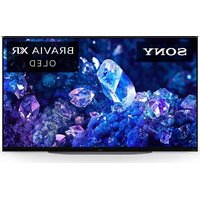
XR-42A90K - TV SONY - Free user manual and instructions
Find the device manual for free XR-42A90K SONY in PDF.


User questions about XR-42A90K SONY
0 question about this device. Answer the ones you know or ask your own.
Ask a new question about this device
Download the instructions for your TV in PDF format for free! Find your manual XR-42A90K - SONY and take your electronic device back in hand. On this page are published all the documents necessary for the use of your device. XR-42A90K by SONY.
USER MANUAL XR-42A90K SONY
natural_image
Illustration of a remote control with a house icon and a question mark on a grid screen (no text or symbols)BRAVIA XR
| Reference Guide | GB |
| Guide de référence | FR |
| Guía de referencia | ES |
| Referentiegids | NL |
| Referenzanleitung | DE |
| Guia de referência | PT |
| Guida di riferimento | IT |
| Referensmaterial | SE |
| Referencevejledning | DK |
| Viiteopas | FI |
| Referanseveiledning | NO |
| Przewodnik | PL |
| Referenční příručka | CZ |
| Referenčná príručka | SK |
| Felhasználói útmutató | HU |
| Ghid de referință | RO |
| Информация за продукта | BG |
| Обдньо́с аναфора́с | GR |
| Başvuru Kılavuzu | TR |
About Manuals
This TV comes with the following manuals. Please retain the manuals for future reference.
Setup Guide
• TV installation and setup.
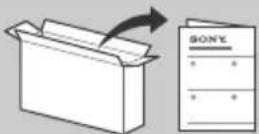
Reference Guide (this manual) / Safety Documentation
- Safety information, remote control, troubleshooting, wall-mount installation, specification, etc.
Help Guide (On screen Manual)
- Settings, functions, Internet connection, troubleshooting, etc.
- To open it, press (Input select) on the remote control and select [Help]. If [Help] does not exist, select [Edit] and add [Help].
- You can refer to the Help Guide with your smartphone.
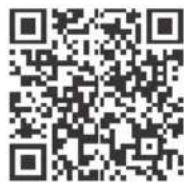
https://rd1.sony.net/help/tv/jaep1/h_aep/
Note
- Before operating the TV, please read the "Safety Information".
- Read the supplied safety documentation for additional safety information.
- Images and illustrations used in the Setup Guide and this manual are for reference only and may differ from the actual product.
- The "x"/"xx" that appears in the model name corresponds to a numeric digit, related to design, colour or TV system.
IMPORTANT NOTICE
Notice for Radio Equipment
Hereby, Sony Corporation declares that the radio equipment types XR-48A90K, XR-42A90K are in compliance with Directive 2014/53/EU. The full text of the EU declaration of conformity is available at the following internet address: https://compliance.sony.eu
Hereby, Sony Corporation declares that the radio equipment types XR-48A90K, XR-42A90K are in compliance with the UK relevant statutory requirements. The full text of the declaration of conformity is available at the following internet address: https://compliance.sony.co.uk
For this radio equipment, the following restrictions on putting into service or of requirements for authorization of use apply in AT, BE, HR, CY, CZ, DK, EE, FI, FR, DE, EL, HU, IE, IT, LV, LT, LU, MT, NL, PL, PT, SK, SI, ES, SE, UK, UK (NI), IS, LI, NO, CH, BG, RO, TR, AL, BA, MK, MD, RS, ME, Kosovo : 5150 - 5350 MHz band is restricted to indoor operations only.
Safety Information
Transporting
- Before transporting the TV set, disconnect all cables.
- Before transporting the TV set, remove the terminal covers.
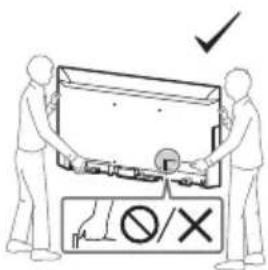
- Two or more persons are needed to transport a large TV set.
- When transporting the TV set by hand, hold it as shown below. Do not put stress on the panel and the frame around the screen.
- When lifting or moving the TV set, hold it firmly from the bottom.
text_image
Diagram showing two people handling a device with a checkmark and prohibition symbol below
text_image
∅/X- When handling or mounting the TV set, do not lay down the TV.
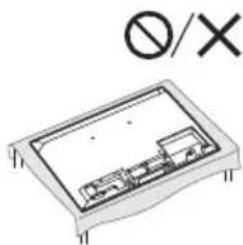
natural_image
Diagram of a rectangular electronic component with internal components and mounting holes, no text or symbols present.- When transporting the TV set, do not subject it to jolts or excessive vibration.
- When transporting the TV set for repairs or when moving, pack it using the original carton and packing material.
Topple prevention
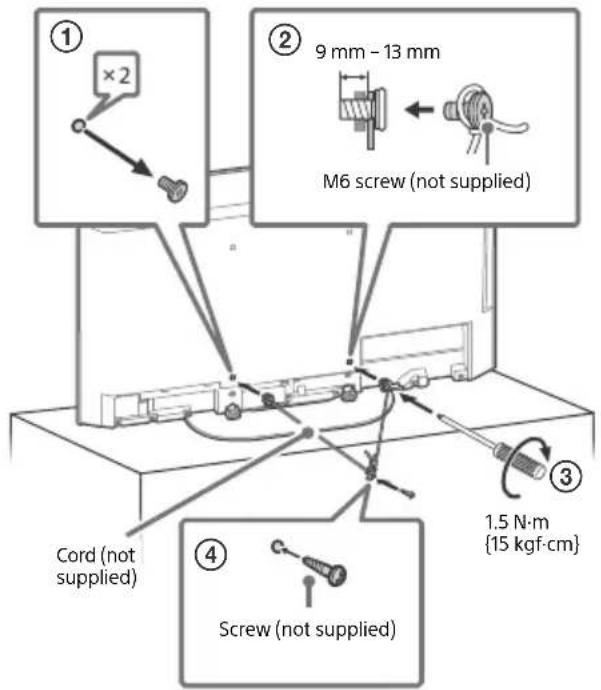
text_image
① ×2 ② 9 mm - 13 mm M6 screw (not supplied) ③ 1.5 N·m {15 kgf·cm} Cord (not supplied) ④ Screw (not supplied)Protecting the TV Screen (OLED TV)
Precautions to Protect the Screen from Damage
Image retention
OLED TV's are susceptible to image retention (burn-in) due to the characteristics of the materials used. Image retention may occur if images are displayed in the same location on the screen repeatedly or over extended periods of time. This is not a malfunction of the TV. Avoid displaying images that may cause image retention.
The following are examples of images that may cause image retention:
- Content with black bars either on the top and bottom and/or the left and right sides of the screen. (for example, Letterboxed, 4:3 screen, Standard definition)
• Static images such as photos. - On-screen menus, programme guides, channel logos etc.
• Static content from applications. - On-screen tickers, such as those used for news and headlines.
To reduce the risk of image retention:
- Sony recommends that you turn off the TV normally by pressing the power button on the remote control or the TV.
- Fill the screen by changing [Wide mode] to eliminate the black bars. Select [Wide mode] other than [Normal].
- Turn off the OSD (On Screen Display) by pressing 123 control menu) button and select [Info], and turn off the menus from connected equipment.
- Avoid displaying static images with bright colours (including white), clocks or logos on any portion of the screen.
- Set the picture settings based on the ambient conditions. The Standard Picture is recommended for home use and when viewing content that often displays the station logos, etc.
The TV has following features to help reduce/prevent image retention.
Panel refresh
A panel refresh will adjust the panel uniformity. Panel refresh can be performed and should only be used when image retention is very noticeable.
Caution:
- The Panel refresh function may affect the panel. Do not perform Panel refresh more than once a year as it may affect the usable life of the panel.
- Panel refresh takes about ten minutes to complete.
- The effectiveness of a panel refresh may vary depending on the image retention condition.
Pixel shift
Automatically moves the image on the screen to prevent image retention.
Other feature
The screen brightness is automatically reduced when displaying still images, clocks, bright colours or logos etc.
Using TV as Part of Audio System
Note
- Before connecting cables, disconnect the mains lead of both TV and AV receiver.
• Refer to the instruction manual of the Audio system with S-CENTER OUT terminal for detail.
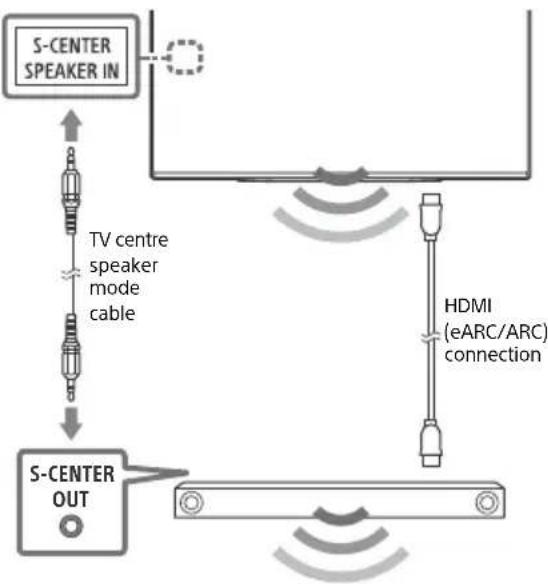
flowchart
graph TD
    A["S-CENTER SPEAKER IN"] -->|TV centre speaker mode cable| B["S-CENTER OUT"]
    B --> C["HDMI (eARC/ARC) connection"]
    C --> D["Output Signal"]
Remote Control and TV
The remote control shape, layout, availability and function of remote control buttons may vary depending on your region/country/TV model/TV settings*1.
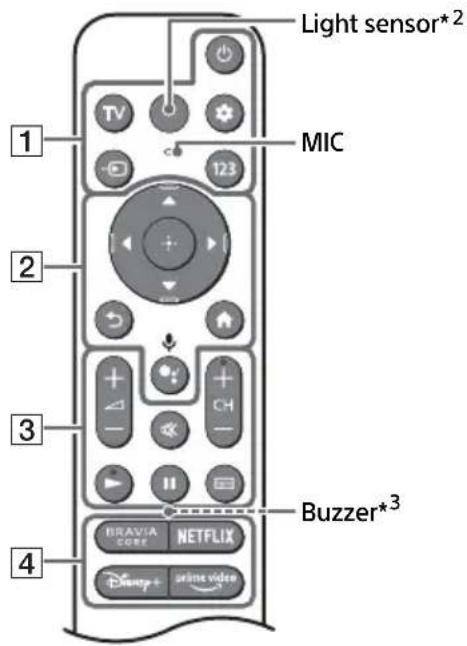
text_image
Light sensor*2 MIC 1 2 3 4 Buzzer*3 BRAVIA CORE NETFLIX Disney+ online video1 (Power)
TV: Display TV channel list or switch to input.
(Quck settings): Display Quick Settings.
→ (Input select): Display and select the input source, etc.
123 (Control menu): Display the Control menu.
2 ▲ / ▼ / ◀ / ▶ / ⏻: On screen menu navigation and selection.
(Back)
Home
•: (Google Assistant) / (Microphone): Use Google Assistant ^45 or voice search ^*5 .
3 +1 - (Volume)
Mute^*6
CH + / - (Channel)
/11
(Guide): Display the digital programme guide of TV or TV box ^4 .
4 App buttons
flowchart
graph TD
    A["5"] --> B["6"]
    B --> C["7"]
    C --> D["8"]
    E["1"] -.-> F["2"]
    G["3"] -.-> H["4"]
    I["5"] -.-> J["6"]
    K["7"] -.-> L["8"]
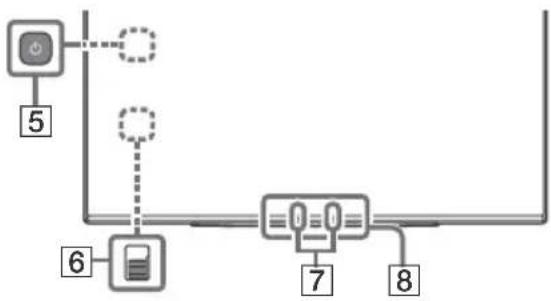
5 ⏻(Power)
6 BUILT-IN MIC SWITCH ^4 : Turn on/off the built-in MIC.
7 Built-in MIC ^458 : To enable the built-in MIC, press the Google Assistant/microphone button on the remote control and follow the on-screen instructions.
⑧ Remote Control sensor / Light sensor / LED
*1 For other remote control models, refer to the online Help Guide for details.
*2 The remote control backlight will illuminate when the light sensor detects the ambient light is low. Automatic illumination of the backlight can be turned off.
*3 The buzzer will emit a sound when you use the remote finder function. Refer to the online Help Guide for details.
*4 Only for limited region/country/model/language.
*5 Google Assistant or voice search requires an Internet connection.
*6 Accessibility shortcut is available by pressing and holding ⚙ (Mute).
*7 [TV box setup] setting is required.
*8 Power consumption will increase when the built-in MIC is enabled as it is always listening.

For more information, refer to the Help Guide.
Press (Input select) on the remote control and select [Help]. If [Help] does not exist, select [Edit] and add [Help].
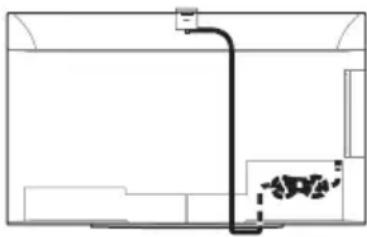
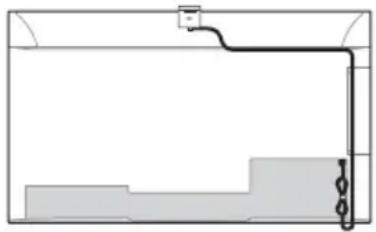
Optional Camera and Microphone Unit (not supplied) Cable Management
natural_image
Simple line drawing of a room interior with a pipe and wall-mounted equipment (no text or symbols)Table-Top Stand position
Note
- Do not attach a cable holder to the terminal cover to avoid any difficulty when removing the terminal cover.
natural_image
Pure diagram of a container with internal structure and no text or symbolsWall-mount position
Troubleshooting
General troubleshooting for issues like: black screen, no sound, frozen picture, TV does not respond, or network is lost, do the following steps.
1 Restart your TV by pressing the power button on the remote control for about five seconds. The TV will restart. If the TV does not recover, try unplugging the mains lead then press the power button on the TV and release it. Wait for two minutes, and plug in the mains lead. Or, press the power button on the TV for about 40 seconds until the TV turns off.
2 Refer to the Help menu shown below.
3 Connect your TV to the Internet and perform a software update. Sony recommends you to keep your TV software updated. Software updates provide new features and performance improvements.
4 Visit Sony support website (information provided at the end of this manual).
When you plug in the TV, the TV may not be able to turn on for a while even if you press the power button on the remote control or the TV.
It takes time to initialize the system. Wait for about one minute, then operate it again.
The remote control does not function.
- Replace the batteries.
The parental lock password has been forgotten.
- Enter 9999 for the PIN and enter the new PIN.
The screen becomes darker while watching TV.
- If the whole image or part of the image remains still, the screen brightness will be gradually reduced to prevent image retention. This is not a malfunction of the TV.
You are concerned about image retention.
If the same image is displayed repeatedly or for long periods of time, image retention may occur. To reduce image retention, we recommend that you turn off the TV normally by pressing the power button on the remote control or the TV.
Note
- Perform Panel refresh only when image retention is particularly noticeable. Avoid performing Panel refresh more than once a year because it may affect the usable life of the panel.
- Images that include clocks, logos and bright colours (including white) easily cause image retention. Avoid displaying these types of images for long periods of time, otherwise image retention may occur.
The message [Panel refresh did not finish...] is displayed.
When i) the TV is turned on or ii) the mains lead is unplugged during the Panel refresh, the Panel refresh is not completed. Please avoid the above two conditions during the Panel refresh.

For more information on troubleshooting, refer to the Help Guide.
Press (Input select) on the remote control and select [Help]. If [Help] does not exist, select [Edit] and add [Help].
Specifications
System
Panel system: OLED (Organic Light Emitting
Diode) Panel
TV system: Depend on your country/area
selection/TV model
Analogue: B/G, D/K, I
Digital: DVB-T/DVB-C/DVB-T2
Satellite: DVB-S/DVB-S2
Colour system: PAL/SECAM/NTSC3.58 (Video only)/NTSC4.43 (Video only)
Channel coverage: Depend on your country/area selection/TV model
Analogue: UHF/VHF/Cable
Digital: UHF/VHF/Cable
Satellite: Intermediate Frequency
950-2150 MHz
Sound output: 10 W + 10 W + 5 W
Wireless technology
Protocol IEEE 802.11a/b/g/n/ac
Bluetooth ^® Version 4.2
| Frequency range Output power | |
| Wireless LAN (TV) | |
| 2400-2483.5 MHz | < 20.0 dBm |
| 5150-5250 MHz | < 23.0 dBm |
| 5250-5350 MHz | < 20.0 dBm |
| 5470-5725 MHz | < 20.0 dBm |
| 5725-5850 MHz | < 13.9 dBm |
| Bluetooth® (TV) | |
| 2400-2483.5 MHz < 1 .0 dBm | |
| Bluetooth® (RMF-TX900U) | |
| 2400-2483.5 MHz < 1 .0 dBm | |
Input/Output jacks
Antenna (aerial)/cable
75 ohm external terminal for VHF/UHF
Satellite antenna
Female F Type Connector, 75 ohm.
DiSEqC 1.0, LNB 13 V/18 V & 22 kHz tone, Single
Cable Distribution EN50494.
/ AV IN / S-CENTER SPEAKER IN
Video/Audio input (mini jack)
S-centre speaker input (mini jack)
HDMI IN 1/2/3/4 (HDCP 2.3-compatible)
Video:
4096 × 2160p (50, 60 Hz)^^12, 4096 × 2160p
(24 Hz) ^1 , 3840 × 2160p (50, 60 Hz) ^2 , 3840 ×
2160p (24, 25, 30 Hz), 1080p (30, 50, 60, 100,
120 Hz), 1080/24p, 1080i (50, 60 Hz), 720p
(30, 50, 60 Hz), 720/24p, 576p, 480p, PC
Formats*3
3840 × 2160p (100, 120 Hz)* ^2*4
Audio:
In eARC (Enhanced Audio Return Channel) mode
Refer to the online Help Guide for details.
Except eARC mode
5.1 channel linear PCM: 32/44.1/48/88.2/
96/176.4/192 kHz 16/20/24 bits, Dolby
Audio, Dolby Atmos, DTS
eARC/ARC (Enhanced Audio Return Channel/
Audio Return Channel) (HDMI IN 3 only)*5
In eARC mode
Refer to the online Help Guide for details.
In ARC mode
Two channel linear PCM: 48 kHz 16 bits,
Dolby Audio, Dolby Atmos, DTS
→ DIGITAL AUDIO OUT (OPTICAL)
Digital optical jack (Two channel linear PCM:
48 kHz 16 bits, Dolby Audio, DTS)
1, 2 (HDD ^6 REC)*
USB device port (2 USB HDD device for REC feature)
USB port 1 supports High Speed USB (USB 2.0)
USB port 2 supports Super Speed USB (USB 3.2
Gen 1)

CAM (Conditional Access Module) slot

10BASE-T/100BASE-TX connector (Depending on the operating environment of the network, connection speed may differ. The communication rate and quality are not guaranteed.)
Power, Product Fiche and others
Power requirements
220 V - 240 V AC, 50 Hz
Screen size (measured diagonally) (Approx.)
XR-48A9xK: 120.7 cm / 48 inches
XR-42A9xK: 105.5 cm / 42 inches
Standby power consumption ^7*8
0.50 W
Display resolution (horizontal × vertical) (pixels)
3840 × 2160
Output rating
500 mA (for USB 1), 900 mA (for USB 2)
Dimensions (Approx.) (w × h × d) (cm)
with Table-Top Stand
Standard position:
XR-48A9xK: 106.9 × 62.9 × 22.5
XR-42A9xK: 93.3 × 55.1 × 22.5
Soundbar position:
XR-48A9xK: 106.9 × 69.7 × 22.5
XR-42A9xK: 93.3 × 62.0 × 22.5
without Table-Top Stand
XR-48A9xK: 106.9 × 62.4 × 5.9
XR-42A9xK: 93.3 × 54.6 × 5.7
Stand width (Approx.) (cm)
50.0
Mass (Approx.) (kg)
with Table-Top Stand
Standard position:
XR-48A9xK: 16.5
XR-42A9xK: 16.4
Soundbar position:
XR-48A9xK: 16.8
XR-42A9xK: 16.7
without Table-Top Stand
XR-48A9xK: 13.4
XR-42A9xK: 13.3
Others
Optional accessories
Wall-Mount Bracket: SU-WL850 (XR-48A9xK only)
Wall-Mount Bracket: SU-WL450
Screw diameter and length:
9 mm - 13 mm
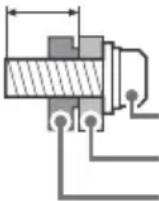
Screw (M6)
Wall-Mount Bracket
TV's rear cover
Camera and Microphone Unit: CMU-BC1
Operating temperature: 0 °C – 40 °C
Operating humidity: 10 % – 80 % RH
(non-condensing)
*1 When 4096 × 2160p is input and [Wide mode] is set to [Normal], the resolution is displayed as 3840 × 2160p . To display 4096 × 2160p , set [Wide mode] setting to [Full 1] or [Full 2].
*2 Refer to the on screen menu to set [HDMI signal format].
*3 Refer to the online Help Guide for details.
*4 HDMI IN 3 & 4 only. Use the Ultra High Speed HDMI Cable to connect.
*5 Connect your audio system to the HDMI IN 3 to route TV audio to your audio system.
*6 Function not available in Italy.
*7 Specified standby power is reached after the TV finishes necessary internal processes.
*8 Standby power consumption will increase when your TV is connected to the network.
Note
- Optional accessories availability depends on countries/region/TV model/stock.
- Design and specifications are subject to change without notice.
- Subscriptions for services and applications may be required and additional terms, conditions and/or charges may apply when using Google Assistant.
- Product fiche in this manual is for COMMISSION DELEGATED REGULATION (EU) 1062/2010. Refer to its website for (EU) 2019/2013 information.
Product registration number (COMMISSION DELEGATED REGULATION (EU) 2019/2013)
XR-48A90K (1034521), XR-42A90K (1034520).
https://rd1.sony.net/help/tv/jaep1/h_aep/
Remarque
text_image
Diagram showing two people handling a device with a checkmark and prohibition symbol below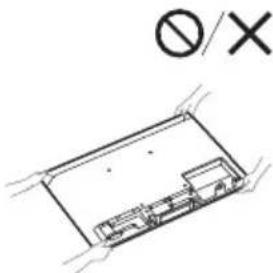
text_image
∅/Xnatural_image
Isometric diagram of a rectangular electronic component with internal compartments (no text or symbols)natural_image
Simple line drawing of a room interior with a pipe and wall-mounted equipment (no text or symbols)Position support de table
Remarque
natural_image
Pure diagram of a container with internal structure and no text or symbolsPosition fixation murale
Dépannage
2160p (24, 25, 30 Hz), 1080p (30, 50, 60, 100,
120 Hz), 1080/24p, 1080i (50, 60 Hz), 720p
(30, 50, 60 Hz), 720/24p, 576p, 480p,
Formats PC*3
3840 × 2160p (100, 120 Hz)*2*4
Audio :
En mode eARC (Enhanced Audio Return
Channel)
eARC/ARC (Enhanced Audio Return Channel/
Audio Return Channel) (HDMI IN 3
uniquement)*5
En mode eARC
→ DIGITAL AUDIO OUT (OPTICAL)
https://rd1.sony.net/help/tv/jaep1/h_aep/
Nota
text_image
Diagram showing two people handling a device with a checkmark and prohibition symbol below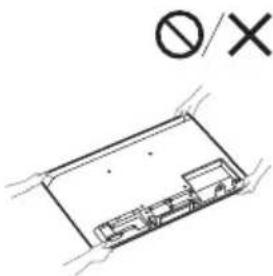
text_image
∅/Xnatural_image
Technical line drawing of a rectangular electronic component or enclosure with internal components (no text or symbols)natural_image
Simple line drawing of a room interior with a pipe and wall-mounted equipment (no text or symbols)natural_image
Pure diagram of a container with internal structure and no text or symbolsPosición de pared
Digital: UHF/VHF/Cable
2160p (24, 25, 30 Hz), 1080p (30, 50, 60, 100,
120 Hz), 1080/24p, 1080i (50, 60 Hz), 720p
(30, 50, 60 Hz), 720/24p, 576p, 480p,
Formatos de PC ^4
3840 × 2160p (100, 120 Hz)*2*4
Audio:
En el modo eARC (Enhanced Audio Return
Channel)
eARC/ARC (Enhanced Audio Return Channel/
Audio Return Channel) (solo HDMI IN 3)*5
En el modo eARC
DIGITAL AUDIO OUT (OPTICAL)
Toma digital óptica (PCM lineal de dos
canales: 48 kHz 16 bits, Dolby Audio, DTS)

1, 2 (HDD ^6 REC)*
https://rd1.sony.net/help/tv/jaep1/h_aep/
Opmerkingen
text_image
Diagram showing two people handling a device with a checkmark and prohibition symbol below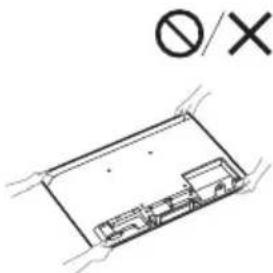
text_image
∅/Xnatural_image
Pure electrical circuit lines without any symbolsnatural_image
Pure technical line drawing of a room interior with no text, numbers, or symbolsnatural_image
Pure diagram of a container with internal structure and no text or symbolsWandmontagepositie
Problemen oplossen
2160p (24, 25, 30 Hz), 1080p (30, 50, 60, 100,
120 Hz), 1080/24p, 1080i (50, 60 Hz), 720p
(30, 50, 60 Hz), 720/24p, 576p, 480p,
Pc-formaten ^*3
3840 × 2160p (100, 120 Hz)*2*4
Audio:
In eARC (Enhanced Audio Return
Channel)-modus
eARC/ARC (Enhanced Audio Return Channel/
Audio Return Channel) (alleen HDMI IN 3)*5 In eARC-modus
Tweekanaals lineaire PCM: 48 kHz 16 bits,
Dolby Audio, Dolby Atmos, DTS

DIGITAL AUDIO OUT (OPTICAL)
Afmetingen (ong.) (b × h × d) (cm)
met tafelstandaard
Standaardpositie:
XR-48A9xK: 106,9 × 62,9 × 22,5
XR-42A9xK: 93,3 × 55,1 × 22,5
Geluidsbalkpositie:
XR-48A9xK: 106,9 × 69,7 × 22,5
XR-42A9xK: 93,3 × 62,0 × 22,5
https://rd1.sony.net/help/tv/jaep1/h_aep/
Hinweis
text_image
Diagram showing two people handling a device with a checkmark and prohibition symbol below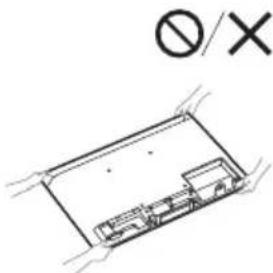
text_image
∅/Xnatural_image
Diagram of a rectangular electronic component with internal components and mounting holes, no text or symbols present.natural_image
Pure technical line drawing of a room interior with no text, numbers, or symbolsnatural_image
Pure diagram of a container with internal structure and no text or symbols2160p (24, 25, 30 Hz), 1080p (30, 50, 60, 100,
120 Hz), 1080/24p, 1080i (50, 60 Hz), 720p
(30, 50, 60 Hz), 720/24p, 576p, 480p,
Computerformate ^*3
3840 × 2160p (100, 120 Hz)*2*4
Audio:
Im eARC (Enhanced Audio Return
Channel)-Modus
eARC/ARC (Enhanced Audio Return Channel/
Audio Return Channel) (nur HDMI IN 3)*5
Im eARC-Modus
DIGITAL AUDIO OUT (OPTICAL)
https://rd1.sony.net/help/tv/jaep1/h_aep/
Nota
https://compliance.sony.eu
text_image
Diagram showing two people handling a device with a checkmark and a prohibition symbol below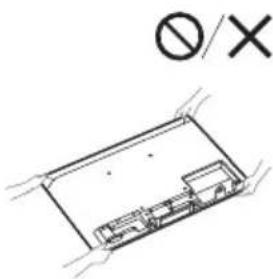
text_image
∅/Xnatural_image
Isometric technical drawing of a rectangular electronic component with internal components (no text or symbols)※ (Sem som)^*6 CH + / - (Canal)
/
(Guia): Apresenta o guia de programas digital de TV ou o TV box de cabo ^*7 .
natural_image
Simple line drawing of a room interior with a pipe and wall-mounted fixture (no text or symbols)natural_image
Pure diagram of a container with internal structure and no text or symbols2160p (24, 25, 30 Hz), 1080p (30, 50, 60, 100,
120 Hz), 1080/24p, 1080i (50, 60 Hz), 720p
(30, 50, 60 Hz), 720/24p, 576p, 480p,
Formatos PC ^*3
3840 × 2160p (100, 120 Hz)*2*4
Áudio:
No modo eARC (Enhanced Audio Return
Channel)
eARC/ARC (Enhanced Audio Return Channel/
Audio Return Channel) (Apenas HDMI IN 3)*5
No modo eARC
DIGITAL AUDIO OUT (OPTICAL)
Tomada digital ótica (PCM linear de dois canais: 48 kHz 16 bits, Dolby Audio, DTS)

1, 2 (HDD ^6 REC)*
https://rd1.sony.net/help/tv/jaep1/h_aep/
Nota
text_image
Diagram showing two people installing a device with a checkmark and prohibition symbolnatural_image
Pure electrical circuit lines without any symbolsnatural_image
Simple line drawing of a room interior with a pipe and wall-mounted equipment (no text or symbols)natural_image
Pure diagram of a container with internal structure and no text or symbols2160p (24, 25, 30 Hz), 1080p (30, 50, 60, 100,
120 Hz), 1080/24p, 1080i (50, 60 Hz), 720p
(30, 50, 60 Hz), 720/24p, 576p, 480p, Formati PC ^*3
3840 × 2160p (100, 120 Hz)*2*4
Audio:
eARC/ARC (Enhanced Audio Return Channel/
Audio Return Channel) (solo HDMI IN 3)*5
In modalità eARC
→ DIGITAL AUDIO OUT (OPTICAL)
https://rd1.sony.net/help/tv/jaep1/h_aep/
Obs!
text_image
Diagram showing two people exchanging a device with a checkmark and a prohibition symbol below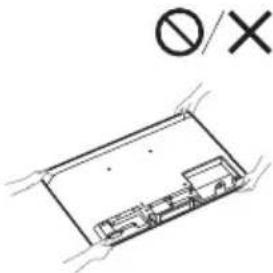
text_image
∅/Xnatural_image
Diagram of a rectangular electronic component with internal components and mounting holes, no text or symbols present.natural_image
Pure technical line drawing of a mechanical assembly without any text, numbers, or symbolsBordsplacering
Obs!
natural_image
Pure diagram of a container with internal structure and no text or symbolsVäggmontering
Felsökning
2160p (24, 25, 30 Hz), 1080p (30, 50, 60, 100,
120 Hz), 1080/24p, 1080i (50, 60 Hz), 720p
(30, 50, 60 Hz), 720/24p, 576p, 480p,
PC-format*3
3840 × 2160p (100, 120 Hz)* ^2*4
Ljud:
I eARC (Enhanced Audio Return
Channel)-läge
eARC/ARC (Enhanced Audio Return Channel/
Audio Return Channel) (Endast HDMI IN 3)*5
I eARC-läge
→ DIGITAL AUDIO OUT (OPTICAL)
Soundbar-enhetens position:
XR-48A9xK: 106,9 × 69,7 × 22,5
XR-42A9xK: 93,3 × 62,0 × 22,5
utan bordsstativ
Soundbar-enhetens position:
XR-48A9xK: 16,8
XR-42A9xK: 16,7
utan bordsstativ
XR-48A9xK: 13,4
XR-42A9xK: 13,3
Övrigt
Valfritt tillbehör
https://rd1.sony.net/help/tv/jaep1/h_aep/
Bemærk
text_image
Diagram showing two people handling a device with a checkmark and a prohibition symbol below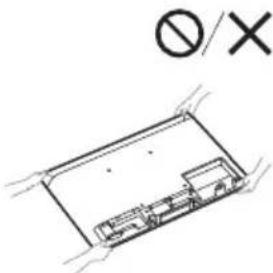
text_image
∅/Xnatural_image
Diagram of a rectangular electronic component with internal components and a prohibition symbol (no text or labels)natural_image
Simple line drawing of a room interior with a pipe and wall-mounted equipment (no text or symbols)Bordstandsposition
Bemærk
natural_image
Pure electrical circuit lines without any symbols2160p (24, 25, 30 Hz), 1080p (30, 50, 60, 100,
120 Hz), 1080/24p, 1080i (50, 60 Hz), 720p
(30, 50, 60 Hz), 720/24p, 576p, 480p,
Pc-formater*3
3840 × 2160p (100, 120 Hz)* ^2*4
Lyd:
I eARC (Enhanced Audio Return
Channel)-tilstand
eARC/ARC (Enhanced Audio Return Channel/
Audio Return Channel) (kun HDMI IN 3)*5
I eARC-tilstand
→ DIGITAL AUDIO OUT (OPTICAL)
Digitalt optisk stik (to-kanals lineær PCM:
48 kHz 16 bit, Dolby Audio, DTS)
1, 2 (HDD ^6 REC)*
USB-port (2 USB HDD-enhed for REC-funktion)
USB-port 1 understøtter High Speed USB (USB 2.0)
USB-port 2 understøtter Super Speed USB (USB 3.2 Gen 1)

CAM (Conditional Access Module)-holder

10BASE-T/100BASE-TX-stik
500 mA (for USB 1), 900 mA (for USB 2)
Mål (Ca.) (b × h × d) (cm)
Inkl. TV-fod
Standardposition:
XR-48A9xK: 106,9 × 62,9 × 22,5
XR-42A9xK: 93,3 × 55,1 × 22,5
Soundbar-position:
XR-48A9xK: 106,9 × 69,7 × 22,5
XR-42A9xK: 93,3 × 62,0 × 22,5
Uden TV-fod
https://rd1.sony.net/help/tv/jaep1/h_aep/
Huomautus
text_image
Diagram showing two people exchanging a device with a checkmark and prohibition symbol below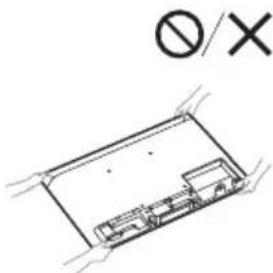
text_image
∅/Xnatural_image
Pure electrical circuit lines without any symbolsnatural_image
Pure technical line drawing of a room interior with pipes and fixtures (no text or symbols)Pöytäjalustan asento
Huomautus
natural_image
Pure technical diagram of a container with internal structure and no text or symbolsSeinäasennusasento
Vianmääritys
2160p (24, 25, 30 Hz), 1080p (30, 50, 60, 100,
120 Hz), 1080/24p, 1080i (50, 60 Hz), 720p
(30, 50, 60 Hz), 720/24p, 576p, 480p,
PC-muodot ^*3
3840 × 2160p (100, 120 Hz)* ^2*4
Audio:
eARC (Enhanced Audio Return
Channel)-tilassa
eARC/ARC (Enhanced Audio Return Channel/
Audio Return Channel) (Vain HDMI IN 3)*5
eARC-tilassa
→ DIGITAL AUDIO OUT (OPTICAL)
https://rd1.sony.net/help/tv/jaep1/h_aep/
Merknader
text_image
Diagram showing two people handling a device with a checkmark and a prohibition symbol below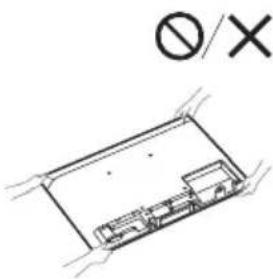
text_image
∅/Xnatural_image
Simple line drawing of a room interior with a pipe and wall-mounted equipment (no text or symbols)natural_image
Pure diagram of a container with internal structure and no text or symbols2160p (24, 25, 30 Hz), 1080p (30, 50, 60, 100,
120 Hz), 1080/24p, 1080i (50, 60 Hz), 720p
(30, 50, 60 Hz), 720/24p, 576p, 480p,
PC-formater*3
3840 × 2160p (100, 120 Hz)* ^2*4
Lyd:
I eARC (Enhanced Audio Return
Channel)-modus
eARC/ARC (Enhanced Audio Return Channel/
Audio Return Channel) (kun HDMI IN 3)*5
I eARC-modus
→ DIGITAL AUDIO OUT (OPTICAL)
Digital optisk kontakt (tokanals lineær PCM:
48 kHz 16 biter, Dolby Audio, DTS)
1, 2 (HDD ^6 REC)*
500 mA (for USB 1), 900 mA (for USB 2)
Mål (ca.) (b × h × d) (cm)
med bordstativ
Standardplassering:
XR-48A9xK: 106,9 × 62,9 × 22,5
XR-42A9xK: 93,3 × 55,1 × 22,5
Lydplankens plassering:
XR-48A9xK: 106,9 × 69,7 × 22,5
XR-42A9xK: 93,3 × 62,0 × 22,5
uten bordstativ
https://rd1.sony.net/help/tv/jaep1/h_aep/
Uwaga
text_image
Diagram showing two people handling a large electronic device with a 'No/Yes' sign, indicating no protection or disapproval.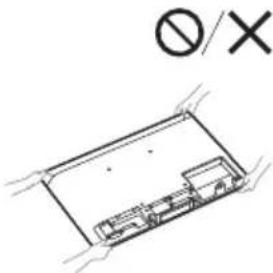
text_image
∅/Xnatural_image
Isometric line drawing of a rectangular electronic component or enclosure with internal components, no text or symbols present.natural_image
Simple line drawing of a room interior with a pipe and fixtures (no text or symbols)natural_image
Pure diagram of a container with internal structure and no text or symbols2160p (24, 25, 30 Hz), 1080p (30, 50, 60, 100,
120 Hz), 1080/24p, 1080i (50, 60 Hz), 720p
(30, 50, 60 Hz), 720/24p, 576p, 480p, formaty
komputerowe*3
3840 × 2160p (100, 120 Hz)*2*4
Audio:
W trybie eARC (Enhanced Audio Return Channel)
eARC/ARC (Enhanced Audio Return Channel/
Audio Return Channel) (tylko HDMI IN 3)*5
W trybie eARC
DIGITAL AUDIO OUT (OPTICAL)
https://rd1.sony.net/help/tv/jaep1/h_aep/
Poznámka
text_image
Diagram showing two people handling a device with a checkmark and a prohibition symbol below, indicating no protection or rejection.
text_image
∅/Xnatural_image
Diagram of a rectangular electronic component with internal components and mounting holes, marked with a prohibition symbol (no text or labels present)natural_image
Pure technical line drawing of a mechanical assembly without any text, numbers, or symbolsnatural_image
Pure electrical circuit lines without any symbols2160p (24, 25, 30 Hz), 1080p (30, 50, 60, 100,
120 Hz), 1080/24p, 1080i (50, 60 Hz), 720p
(30, 50, 60 Hz), 720/24p, 576p, 480p, PC formáty*3
3840 × 2160p (100, 120 Hz)* ^2*4
Audio:
V režimu eARC (Enhanced Audio Return
Channel)
eARC/ARC (Enhanced Audio Return Channel/
Audio Return Channel) (pouze HDMI IN 3)*5
V režimu eARC
→ DIGITAL AUDIO OUT (OPTICAL)
https://rd1.sony.net/help/tv/jaep1/h_aep/
Poznámka
text_image
Diagram showing two people handling a device with a checkmark and a prohibition symbol below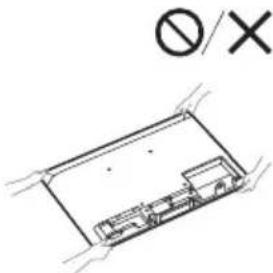
text_image
∅/Xnatural_image
Pure electrical circuit lines without any symbolsnatural_image
Simple line drawing of a room interior with a pipe and wall-mounted fixture (no text or symbols)Pozícia so stojanom na stôl
Poznámka
natural_image
Pure technical diagram of a container with internal structure and no text or symbols2160p (24, 25, 30 Hz), 1080p (30, 50, 60, 100,
120 Hz), 1080/24p, 1080i (50, 60 Hz), 720p
(30, 50, 60 Hz), 720/24p, 576p, 480p,
Formáty PC*3
3840 × 2160p (100, 120 Hz)* ^2*4
Audio:
V režime eARC (Enhanced Audio Return
Channel)
Podrobnosti nájdete v online Príručke.
Okrem režimu eARC
eARC/ARC (Enhanced Audio Return Channel/
Audio Return Channel) (Len model HDMI IN 3)*5
V režime eARC
Podrobnosti nájdete v online Príručke.
V režime ARC
Dvojkanálový lineárny PCM: 48 kHz 16 bitov,
Dolby Audio, Dolby Atmos, DTS
→ DIGITAL AUDIO OUT (OPTICAL)
https://rd1.sony.net/help/tv/jaep1/h_aep/
Megjegyzés
text_image
Diagram showing two people handling a device with a checkmark and prohibition symbol below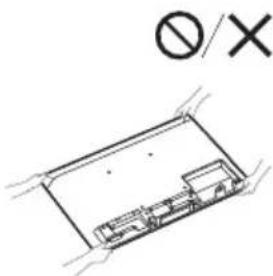
text_image
Ø/ Xnatural_image
Simple line drawing of a room interior with a pipe and wall-mounted equipment (no text or symbols)natural_image
Pure diagram of a container with internal structure and no text or symbolsFali pozíció
Hibaelhárítás
2160p (24, 25, 30 Hz), 1080p (30, 50, 60, 100,
120 Hz), 1080/24p, 1080i (50, 60 Hz), 720p
(30, 50, 60 Hz), 720/24p, 576p, 480p, PC formátumok*3
3840 × 2160p (100, 120 Hz) ^24
Audio:
eARC (Enhanced Audio Return Channel)
üzemmódban
eARC/ARC (Enhanced Audio Return Channel/
Audio Return Channel) (csak HDMI IN 3)*5
eARC üzemmódban
→ DIGITAL AUDIO OUT (OPTICAL)
https://rd1.sony.net/help/tv/jaep1/h_aep/
Notă
INFORMATIE IMPORTANTĂ
text_image
Diagram showing two people handling a device with a checkmark and a prohibition symbol below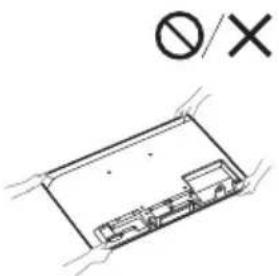
text_image
Ø/Xnatural_image
Pure electrical circuit lines without any symbolsnatural_image
Simple line drawing of a room interior with a pipe and wall-mounted equipment (no text or symbols)natural_image
Pure diagram of a container with internal structure and no text or symbolsAnalogic: B/G, D/K, I
Digital: DVB-T/DVB-C/DVB-T2
Satelit: DVB-S/DVB-S2
Sistem culoare: PAL/SECAM/NTSC3.58 (Numai video)/NTSC4.43 (Numai video)
Analogic: UHF/VHF/Cablu
Digital: UHF/VHF/Cablu
2160p (24, 25, 30 Hz), 1080p (30, 50, 60, 100,
120 Hz), 1080/24p, 1080i (50, 60 Hz), 720p
(30, 50, 60 Hz), 720/24p, 576p, 480p,
Formate PC ^*3
3840 × 2160p (100, 120 Hz)*2*4
Audio:
eARC/ARC (Enhanced Audio Return Channel/
Audio Return Channel) (Numai HDMI IN 3)*5
În modul eARC
DIGITAL AUDIO OUT (OPTICAL)
https://rd1.sony.net/help/tv/jaep1/h_aep/
Забележка
text_image
Diagram showing two people handling a device with a checkmark and prohibition symbol below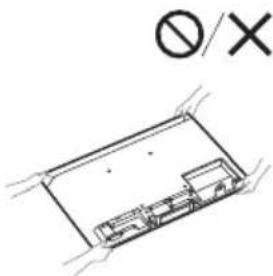
text_image
∅/Xnatural_image
Technical line drawing of a rectangular electronic component with internal components (no text or symbols)natural_image
Simple line drawing of a room interior with a pipe and fixtures (no text or symbols)natural_image
Pure electrical circuit lines without any symbols2160p (24, 25, 30 Hz), 1080p (30, 50, 60, 100,
120 Hz), 1080/24p, 1080i (50, 60 Hz), 720p
(30, 50, 60 Hz), 720/24p, 576p, 480p, PC
формати*3
3840 × 2160p (100, 120 Hz)* ^2*4
Аудио:
В режим eARC (Enhanced Audio Return
Channel)
eARC/ARC (Enhanced Audio Return Channel/
Audio Return Channel) (camo HDMI IN 3)*5
В режим eARC
→ DIGITAL AUDIO OUT (OPTICAL)
https://rd1.sony.net/help/tv/jaep1/h_aep/
Σημείωση
text_image
Diagram showing two people handling a large electronic device with a 'No/Yes' symbol below, indicating no readable function or prohibition.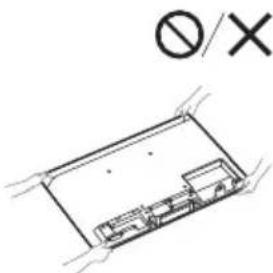
text_image
∅/Xnatural_image
Pure electrical circuit lines without any symbolsnatural_image
Simple line drawing of a room interior with a pipe and wall-mounted fixture (no text or symbols)natural_image
Pure electrical circuit lines without any symbolsΕπιτοίχια θέση
2160p (24, 25, 30 Hz), 1080p (30, 50, 60, 100,
120 Hz), 1080/24p, 1080i (50, 60 Hz), 720p
(30, 50, 60 Hz), 720/24p, 576p, 480p, PC
Μορφές υπολογιστή*³
3840 × 2160p (100, 120 Hz)* ^2*4
'Ηχος:
eARC/ARC (Enhanced Audio Return Channel/
→ DIGITAL AUDIO OUT (OPTICAL)
https://rd1.sony.net/help/tv/jaep1/h_aep/
Güvenlik Bilgileri
Nakliye
text_image
Diagram showing two people handling a device with a checkmark and a prohibition symbol below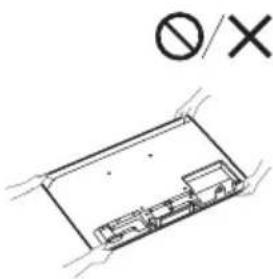
text_image
∅/Xnatural_image
Diagram of a rectangular electronic component with internal circuitry and mounting holes, marked with a prohibition symbol (no text or labels present)natural_image
Simple line drawing of a room interior with a pipe and wall-mounted equipment (no text or symbols)natural_image
Pure diagram of a container with internal structure and no text or symbolsDuvara askı konumu
Sorun Giderme
Dijital: UHF/VHF/Kablolu
Uydu: Ara Frekans 950-2150 MHz
2160p (24, 25, 30 Hz), 1080p (30, 50, 60, 100,
120 Hz), 1080/24p, 1080i (50, 60 Hz), 720p
(30, 50, 60 Hz), 720/24p, 576p, 480p, PC
Formatlari*3
3840 × 2160p (100, 120 Hz)* ^2*4
Ses:
eARC (Enhanced Audio Return Channel)
modunda
eARC/ARC (Enhanced Audio Return Channel/
Audio Return Channel) (sadece HDMI IN 3)*5
eARC modunda
→ DIGITAL AUDIO OUT (OPTICAL)
https://www.sony.eu/support