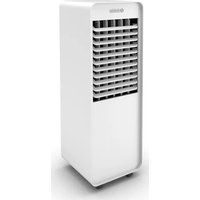
Pelèr 10 WiFi - Air Conditioning OLIMPIA SPLENDID - Free user manual and instructions
Find the device manual for free Pelèr 10 WiFi OLIMPIA SPLENDID in PDF.


| Brand | Olimpia Splendid |
| Model | Pelèr 10 WiFi |
| Product type | Evaporative air cooler with humidifier |
| Power supply | 220-240 V ~ 50 Hz |
| Power consumption | Refer to the rating plate (23) |
| Functions | Cooling, humidification, ventilation (3 speeds), automatic oscillation, timer (2/4/8 h), WiFi, remote control |
| Water tank | Removable, max capacity indicated on the gauge (12) |
| Ice tray | 1 tray provided, allows additional cooling of about 3 °C |
| Remote control | Infrared, max range 4 m, AAA batteries (2 x 3 V) |
| Timer | Automatic shut-off adjustable to 2 h, 4 h or 8 h |
| WiFi | Connectivity via Olimpia Splendid app (see website) |
| Tank cleaning | Every 2 days (empty and dry before storage) |
| Air filter replacement | Replaceable paper filter (16), clean the grill regularly |
| External cleaning | Dry or damp cloth (cold water), no abrasive products |
| Safety | Automatic shut-off in case of tipping not specified, overheat protection (unplug if anomaly) |
| Available spare parts | Air filter, ice tray, remote control, water pump, pump support |
| Installation advice | Flat, stable surface, minimum distance 15 cm sides/back, 30 cm above |
Frequently Asked Questions - Pelèr 10 WiFi OLIMPIA SPLENDID
User questions about Pelèr 10 WiFi OLIMPIA SPLENDID
0 question about this device. Answer the ones you know or ask your own.
Ask a new question about this device
Download the instructions for your Air Conditioning in PDF format for free! Find your manual Pelèr 10 WiFi - OLIMPIA SPLENDID and take your electronic device back in hand. On this page are published all the documents necessary for the use of your device. Pelèr 10 WiFi by OLIMPIA SPLENDID.
USER MANUAL Pelèr 10 WiFi OLIMPIA SPLENDID
natural_image
Line drawing of a portable air conditioner unit with cooling fins and ventilation slots (no text or symbols)PELER 10
WIFI
0 - AVVERTENZE....2
0.1 - INFORMAZIONI GENERALI....2
0.2 - SIMBOLOGIA....2
0.2.1 - Pittogrammi redazionali.....2
0.3 - AVVERTENZE GENERALI......3
0.4 - USO PREVISTO 7
0.5 - ZONE DI RISCHIO 8
1 - PRINCIPALI CARATTERISTICHE E FUNZIONAMENTO......8
1.1 - ELENCO COMPONENTI FORNITI A CORREDO ....8
2 - INSTALLAZIONE ......9
natural_image
Illustration of a hand inserting a plug into an electrical outlet (no text or symbols)A1 A2 A3 A4 A5/A6
A1. Tasto ON/OFF
natural_image
Line drawing of a hand holding a remote control with buttons and a plus button (no text or symbols)
natural_image
Hand inserting a plug into an electrical outlet socket (no text or symbols visible)
1 - MAIN FEATURES AND FUNCTIONING 8
1.1 - LIST OF SUPPLIED COMPONENTS ....8
2 - INSTALLATION....9
2.1 - APPLIANCE TRANSPORT....9
2.2 - APPLIANCE POSITIONING .....9
2.3 - ELECTRICAL CONNECTION......9
3 - USE OF THE APPLIANCE....10
3.1 - CONTROL PANEL AND REMOTE CONTROL....10
3.2 - USE OF THE REMOTE CONTROL..11
3.2.a - Insertion of batteries....11
3.2.b - Replacement of batteries .....11
3.2.c - Location of the remote control.....12
3.3 - USE OF THE APPLIANCE .....12
3.3.a - Preliminary operations....12
3.3.b - Filling....12
3.4 - INSTRUCTIONS FOR OPERATION ....13
3.4.a - ON/OFF key (A1) 13
3.4.b - Cooler / humidifier key (A2)....13
3.4.c - Oscillation key (A3) .....14
3.4.d - Air speed key (A4)....14
3.4.e - Timer key (A5)....14
3.4.f - WIFI key (A5/A6)....14
3.4.g - Use of ice box container .....14
4 - MAINTENANCE AND CLEANING......15
4.1 - CLEANING....15
4.1.a - Cleaning the appliance and the remote control .....15
4.1.b - Air grid cleaning....15
4.1.c - Air filter replacement .....15
4.1.d - Cleaning the reservoir .....16
5 - BEFORE STORING THE APPLIANCE AT THE END OF THE SEASON....16
6 - SPECIFICATIONS......16
DISPOSAL
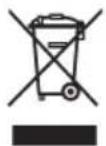
This symbol on the product or its packaging indicates that the appliance cannot be treated as normal domestic trash, but must be handed in at a collection point for recycling electric and electronic appliances.
Your contribution to the correct disposal of this product protects the environment and the health of your fellow men.
Health and the environment are endangered by incorrect disposal.
Further information about the recycling of this product can be obtained from your local town hall, your refuse collection service, or in the store at which you bought the product.
This regulation is valid only in EU member states.
EN - 1
PELER 10 WIFI
0 - WARNINGS
0.1 - GENERAL INFORMATION
First of all, we would like to thank you for choosing our appliance.
0.2 - SYMBOLS
The pictograms in the next chapter provide the necessary information for correct, safe use of the machine in a rapid, unmistakable way.
0.2.1 - Editorial pictograms
 | Indicates that this document must be read carefully before installing and/or using the appliance. |
| Indicates that this document must be read carefully before any maintenance and/or cleaning operation. | |
 | Indicates that there may be additional information in attached manuals. |
| Indicates that information is available in the user manual or in the installation manual. | |
 | Indicates that the assistance personnel must handle the appliance following the installation manual. |
 | Signals to the personnel that the operation described could cause electrocution if not performed according to the safety rules. |
 | It informs the personnel concerned that if the operation is not carried out in compliance with the safety regulations, it presents the risk of suffering physical damage. |
  | It informs the personnel concerned that if the operation is not carried out in compliance with the safety regulations, it presents the risk of burns due to contact with components at very high temperatures.Paragraphs marked with this symbol contain very important information and recommendations, particularly as regards safety. Failure to comply with them may result in:- danger of injury to the operators- loss of the warranty- refusal of liability by the manufacturer. |
| [c4cw] | Refers to actions that absolutely must not be performed. |
 | Indicates to the personnel concerned, that it is prohibited to cover the appliance, to prevent over-heating. |
0.3 - GENERAL WARNINGS
WHEN USING ELECTRICAL EQUIPMENT, BASIC SAFETY PRECAUTIONS MUST ALWAYS BE FOLLOWED IN ORDER TO REDUCE RISKS OF FIRE, ELECTRIC SHOCKS
AND INJURY, INCLUDING THE FOLLOWING:
- This document is restricted in use to the terms of the law and may not be copied or transferred to third parties without the express authorization of the manufacturer, OLIMPIA SPLENDID.
Our machines are subject to change and some parts may appear different from the ones shown here, without this affecting the text of the manual in any way.
Read this manual carefully before performing any operation (installation, maintenance, use) and follow the instructions contained in each chapter.

ep the manual carefully for future reference.
- After removing the packaging, check that the appliance is in perfect condition. The packaging materials must not be left within reach of children as they can be dangerous.
-
THE MANUFACTURER IS NOT RESPONSIBLE FOR DAMAGES TO PERSONS OR PROPERTY CAUSED BY FAILURE TO FOLLOW THE INSTRUCTIONS IN THIS MANUAL.
-
The manufacturer reserves the right to make any changes it deems advisable to its models, although the essential features described in this manual remain the same.
- Failing to comply with the instructions contained in this manual, and using the unit with temperatures exceeding the permissible temperature range will invalidate the warranty.
- Routine maintenance of the filters and general external cleaning can be done by the user as these operations are not difficult or dangerous.
- During assembly and at each maintenance operation, it is necessary to respect the precautions indicated in this manual and on the labels located inside or on the appliance, as well as to take all the precautions suggested by common sense and by the Safety Regulations in force in the country of installation.
- Unplug the appliance during filling and cleaning.

- In case of replacement of parts, use only original OLIMPIA SPLENDID parts.
- Do not use liquid or corrosive detergents to clean the unit, do not spray water or other liquids onto the unit, since they could damage the plastic components or even cause electric shocks.

- In case of functioning anomalies (for example: abnormal noise, bad smell, smoke, abnormal increase in temperature, electrical dispersions, etc.), immediately switch off the appliance and disconnect the plug from the power socket.
For repair work contact solely the technical service centres authorised by the manufacturer and ask for original spare parts to be used. Failure to do this can affect the safety of the appliance.
-
Do not disconnect the power plug during functioning. There or electrical shocks hazard.
-
Do not place heavy or hot objects on top of the appliance.
- Before electrically connecting the appliance, make sure the plate data correspond to those of the distribution network. The plate (23) is located on the sides of the appliance (Fig.C).
- Install the appliance according to the manufacturer's instructions. An incorrect installation can cause damage to people, animals or property for which the manufacturer accepts no responsibility.
- If the appliance's plug is incompatible with the socket, have the socket replaced with a suitable one by a qualified technician, who
must ascertain that the section of the socket cables is compatible with the power absorbed by the appliance. We do not recommend using adaptors and/or extension cables. If they cannot be avoided, however, they must comply with current safety regulations and their ampacity (A) must not be below the maximum ampacity of the appliance.
- This appliance is not intended to be run via an external timer or with a separate remote control system.
- Always and only use the appliance in a vertical position.
- Do not obstruct the air inlet and outlet grids in any manner.
- Do not insert extraneous items in the air inlet and outlet grids as this will create the risk of electrical shocks, fire or damages to the appliance.
- Do not use the appliance:
- with wet or damp hands;
- barefoot.
- Do not pull the power cable or the appliance itself to remove the plug from the socket.
- Do not use the unit in areas where the temperature is extremely high or low where it may be exposed to direct sunlight.

-
Do not operate the unit near flammable liquids or in explosive atmospheres.
-
Do not spray insecticide or flammable gasses near the appliance.
- Always place the appliance on a stable, plane and levelled surface.
- Leave at least 15cm of free space on both sides and behind the appliance and leave at least 30cm of free space above it (Fig.B).
- Do not place the appliance near a power socket.
- The socket must be easily accessible so that the plug can be removed easily in an emergency.
- Do not handle the plug with wet hands.
- Do not excessively bend, twist, pull or damage the power cord.
- Do not run the cord under carpeting, throw rugs or runners etc. Arrange cord away from traffic areas so that it will not be tripped over.
- Unplug the cord when unit is not in use for an extended period of time and/or when no one is home.
-
Do not use the appliance outdoors or on wet surfaces. Avoid dropping liquids on the appliance. Do not use the appliance near sinks and taps.
-
Do not immerse the appliance in water or in other liquids.
- Change the water frequently to keep it clean.
- This unit shall not be exposed to dripping or splashing water.
- Do not install the unit in a confined space, such as a bookcase or built-in cabinet.

-
Before proceeding with insertion of water, switch off the appliance and disconnect the plug from the power socket. Ensure not to exceed the maximum level.
-
The unit should not be adjusted or repaired by anyone except specialized technicians.
-
To reduce the risk of fire or electric shock, do not use this product near any other electronic device.
-
Avoid positioning the product outdoors. Do not blow air directly towards people, especially children and elderly.
-
Make sure the plug is always completely inserted in the power socket.
-
The water level in the tank (7) must not be lower than the minimum advised level when the cooling/humidifier is running.
- After filling the tank (7) with water, neither tilt nor bump into the appliance while moving in order to avoid water splashes.
- If the appliance has not been used for a prolonged period of time with water in the tank (7), disconnect the plug from the power socket, empty and clean the tank before reusing it.
- It is severely prohibited to remove or install the wet paper filter (16) during operation as humidifier.
- Clean the appliance with a damp cloth; do not use abrasive products or materials. See the appropriate paragraph for the filters cleaning.
- The most common cause of overheating is dust or lint deposit in the appliance. Regularly remove these accumulations by disconnecting the appliance from the power socket and vacuuming the grids.
-
Do not use the appliance in environments subject to significant temperature changes as condensation could form inside the appliance itself.
-
Install the appliance at least 2 meters from other electronic devices (TV, radio, computer, dvd player, etc.) in order to avoid disturbances.
- Do not use the appliance if insecticide gas has just been sprayed in the room or in the presence of burning incenses, chemical vapours or oily residues.
- Do not use the appliance if the filter is not positioned correctly.
- Disassembly, repair or reconversion performed by an unauthorized person could cause heavy damages and will cancel the manufacturer warranty.
- Do not use the appliance in case of malfunctioning or faults, if the cord or plug are damaged, or if it has been dropped or damaged in any manner. Turn the appliance off, disconnect the plug from the socket and let it be checked by professionally qualified personnel.
- Neither disassemble nor modify the appliance.
- Repairing the appliance by yourself is extremely dangerous.
- If you no longer wish to use this appliance, it must be made inoperative by cutting the power supply cable after removing the plug from the power socket. Hazardous parts of the appliance must be rendered harmless, especially as there is a risk of children playing with it.

- It is necessary to clean the water tank every 2 days. Make sure the tank is entirely dry before storing the appliance.
This product must be used exclusively according to the specifications indicated in this manual. Use different to that specified, could cause serious injuries.
THE MANUFACTURER IS NOT LIABLE FOR INJURY/DAMAGE TO PERSONS/OBJECTS DERIVING FROM FAILURE TO COMPLY WITH THE REGULATIONS CONTAINED IN THIS MANUAL.
0.4 - PROPER USE
- The appliance must only be used to refresh, cool down and humidify, with the single purpose of making the temperature in the room comfortable.
- This appliance is only intended for a domestic use or similar.
- An improper use of the appliance with possible damages caused
EN - 7
PELER 10 WIFI
to people, things or animals releases OLIMPIA SPLENDID from any responsibility.
0.5 - HAZARDOUS ZONES
- The appliance must not be installed in places with inflammable gases, explosive gases or excess humidity (laundries, greenhouses, etc.), or in places with other machines that generate a strong heat source, in proximity of a sources of salt water or sulphurous water.
- DO NOT use gas, gasoline or other inflammable liquids near the appliance.
- Only use supplied components. The use of non-standard parts may cause water leaks, electric shocks, fires and injuries or damages to things.
1 - MAIN FEATURES AND FUNCTIONING
• Cooling and humidifier functions;
• Timer function: 2h - 4h - 8h;
• Infrared remote control;
• Water loading or ice box through tank;
• Fan mode: low - medium - high;
- Touch controls;
• Manual vertical flow direction, automatic horizontal flow direction;
• Easy to move thanks to the pirouetting wheels;
- WIFI function;
- Keys press acoustic warning.
1.1 - LIST OF SUPPLIED COMPONENTS (Fig.A)
1 - Appliance
2 - Control panel
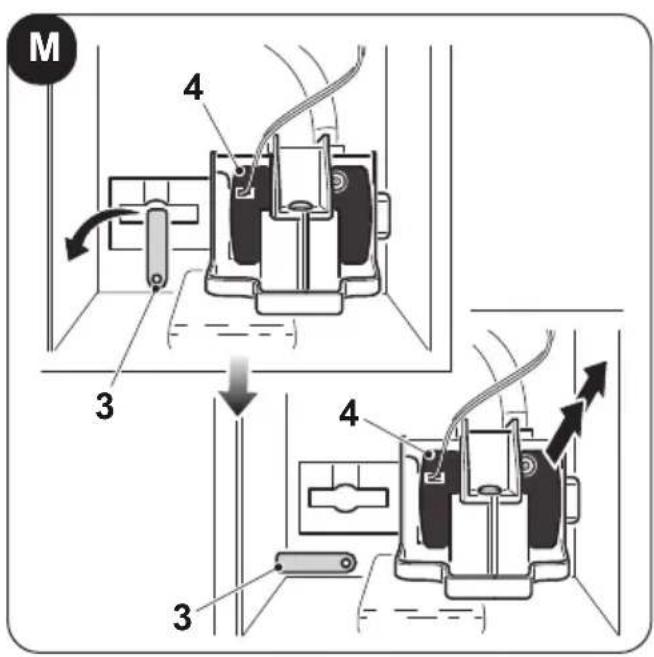
3 - Water pump support
4 - Water pump
5 - Power cord
6 - Handle for water tank extraction
7 - Water tank
8 - Wheels
9 - Remote control receiver
10 - Horizontal flap
11 - Vertical flap
12 - Water level gauge
13 - Instruction booklet
14 - Ice box (1)
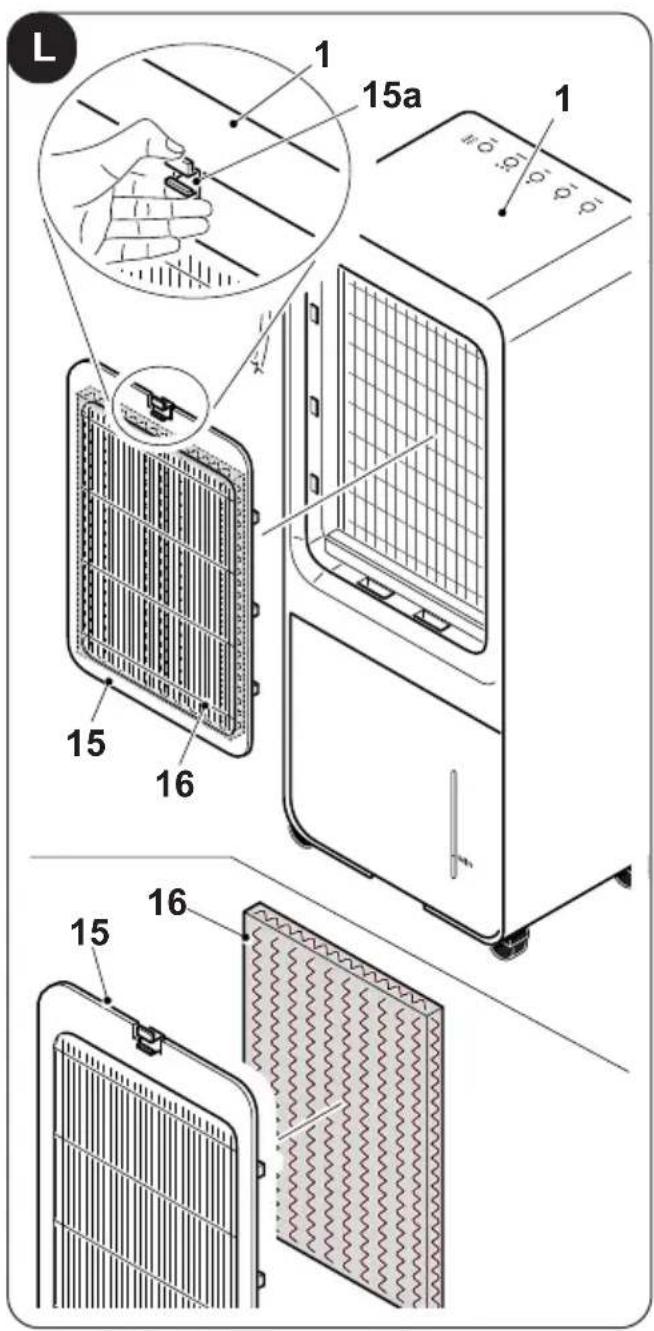
15 - Air grille
16 - Paper filter
17 - Remote control
2 - INSTALLATION
2.1 - APPLIANCE TRANSPORT

Transport and handling of the appliance must be carried out in vertical position.
CAUTION
ving the cooler on delicate flooring (e.g. wooden flooring): Empty the water tank.
• Take great care when moving the cooler as the wheels could mark the flooring. Although the wheels are made from a rigid material and are swivelling, they could get damaged by use or excessive dirt.
It is recommended to check that the wheels are clean and that they can move freely.
2.2 - APPLIANCE POSITIONING
A failure to respect what follows may cause damages appliance.
a. Position the appliance on flat, stable surfaces and on the floor.
b. The appliance must only be connected to earthed power outlets.
c. Make sure that curtains or other objects do not obstruct the air suction filters.
d. Make sure to keep a minimum distance of 15 cm (Fig.B) between the cooler and the adjacent figures.
e. The appliance must always be activated paying attention that there are no obstacles for air suction and output.
f. Do not use the appliance in places used as laundry rooms.
g. The appliance must only be installed in dry places.
h. The cooler must not be started in presence of dangerous materials, steams or liquids.
i. Clean the air filters at least once a week.
natural_image
Illustration of a hand inserting a plug into an electrical outlet (no text or symbols)2.3 - ELECTRICAL CONNECTION
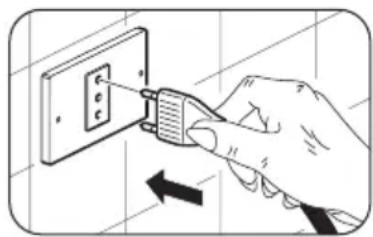
The appliance is fitted with a power cable with plug.
Before connecting the cooler ensure that:
- The voltage and power frequency values match those specified on appliance plate data.
- The power line is equipped with an effective earth connection and is correctly sized for maximum power consumption of the cooler.
3 - USE OF THE APPLIANCE
The appliance operating modes can be selected either using the remote control supplied or the control panel.
The reception of the selected function is confirmed by the emission of a "beep" by the buzzer.
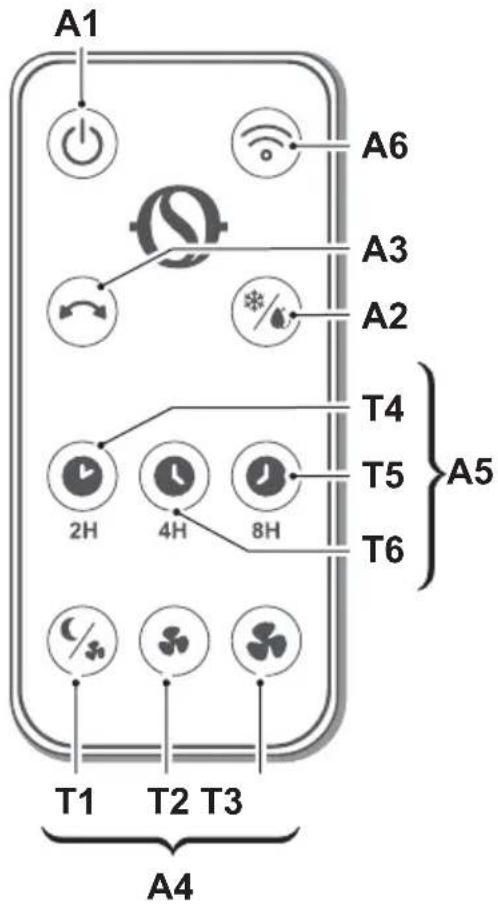
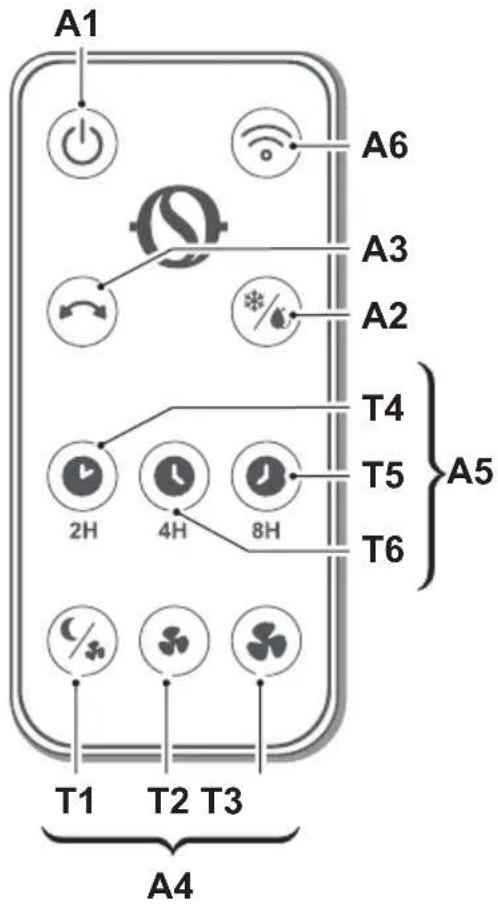
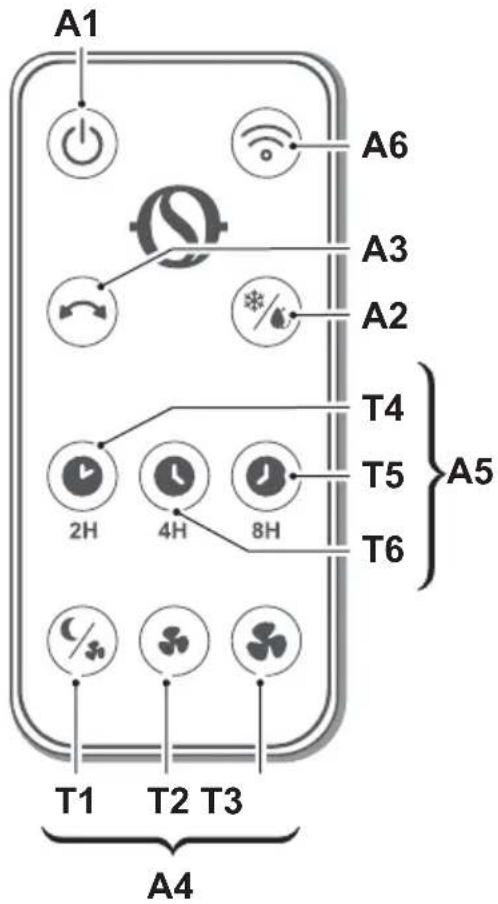
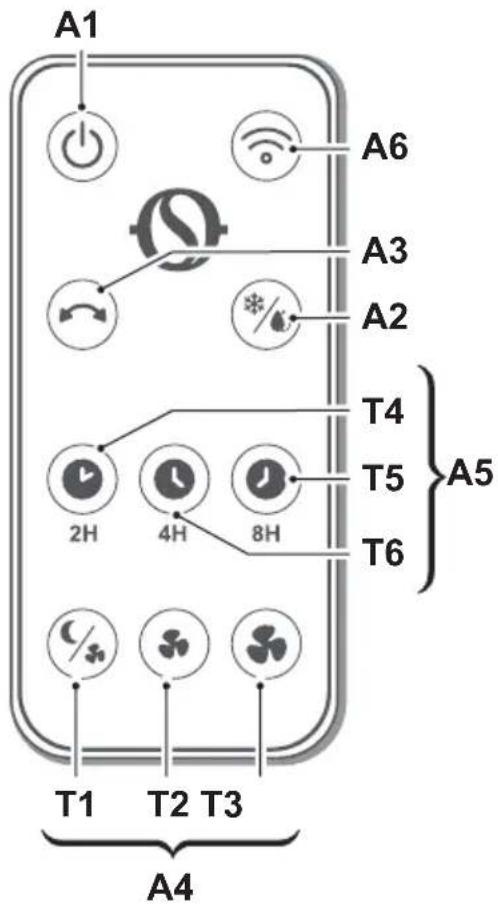
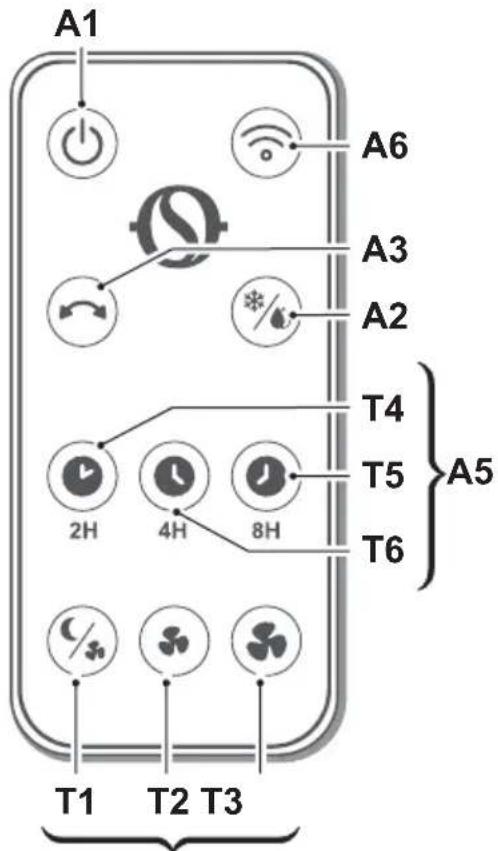
3.1 - CONTROL PANEL AND REMOTE CONTROL (Fig.1)
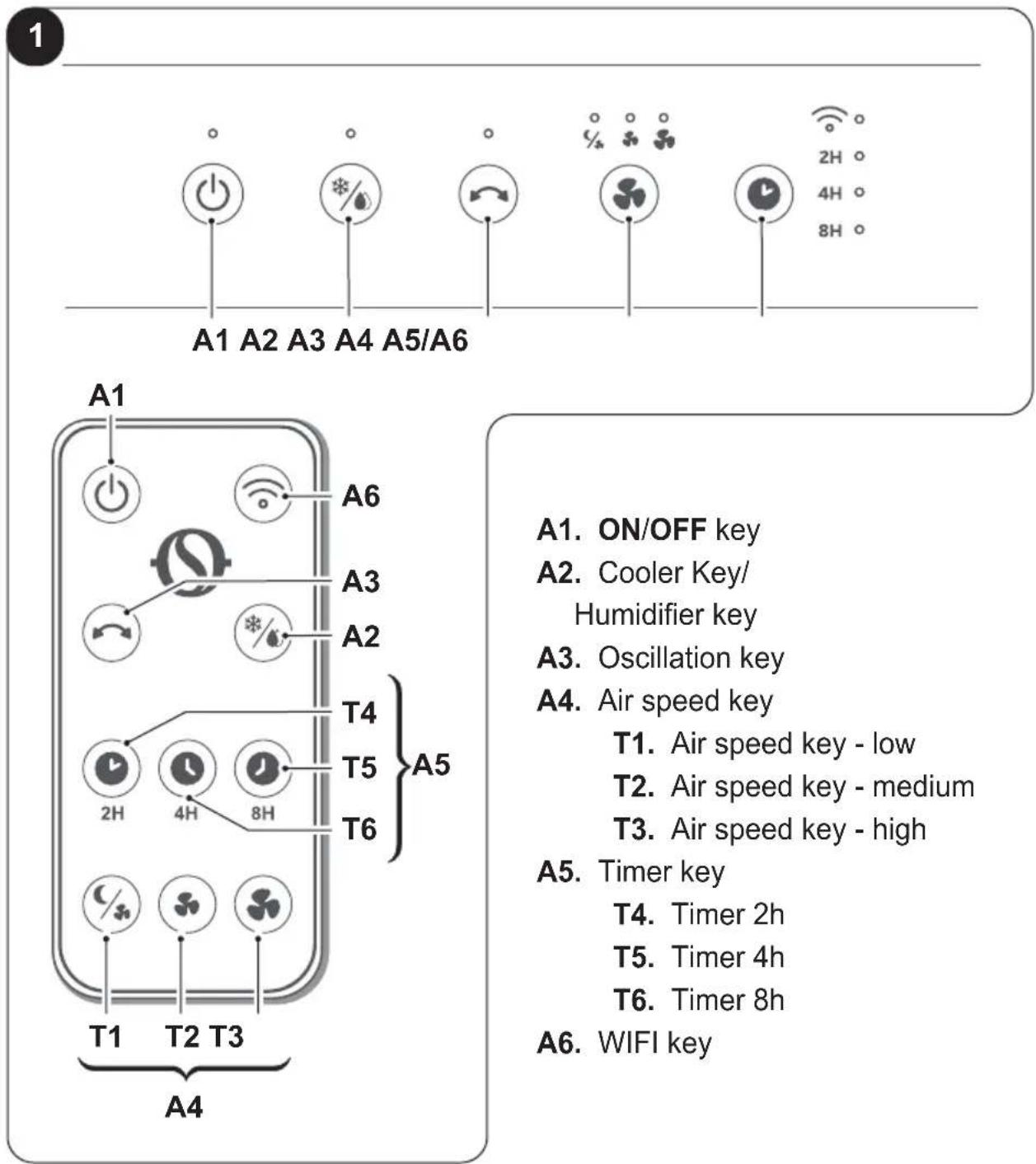
A1. ON/OFF key
A2. Cooler Key/ Humidifier key
A3. Oscillation key
A4. Air speed key
T1. Air speed key - low
T2. Air speed key - medium
T3. Air speed key - high
A5. Timer key
T4. Timer 2h
T5. Timer 4h
T6. Timer 8h
A6. WIFI key
3.2 - USE OF THE REMOTE CONTROL
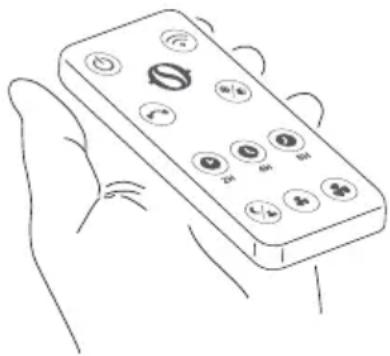
The remote control supplied with the appliance is the instrument that will allow you to use the appliance in the most comfortable way possible. It should be handled with care and in particular:
- Keep it dry (do not clean it with water or leave it outdoors in bad weather).
- Avoid dropping or bumping it.
- Keep it out of direct sunlight.
natural_image
Line drawing of a hand holding a remote control with buttons and a plus button (no text or symbols)
- The remote control operates by means of an infrared beam.
- Avoid obstacles between the remote control and the appliance during use.
- If other appliances in the room have remote controls (TV, stereo, etc...), there may be interference.
- Electronic and fluorescent lights may interfere with the transmissions between remote control and appliance.
- Remove the batteries in case of prolonged disuse of the remote control.
3.2.a - Insertion of batteries
The batteries are supplied with the machine.
To insert the batteries correctly:
a. Remove the batteries compartment cover (17a) (figure E).
b. Insert the batteries into the relevant compartment (Fig.E).
Check the polarity indicated on the bottom of the compartment.
c. Close the compartment correctly.
3.2.b - Replacement of batteries
Replace the batteries when you no longer hear a beep from the appliance when pressing any key on the remote control.
Always use new batteries.
The use of old or different batteries could generate malfunctioning of the remote control.
The remote control uses two dry alkaline 3.0V batteries (AAA.) (Fig.E).

When replacing batteries, replace both and dispose of the dead batteries in the appropriate collection centres and as required by law.
- If the remote control is not used for several weeks or longer, remove the batteries.
Any leaks from the batteries could damage the remote control.

Do not re-charge or disassemble the batteries. Do not throw the batteries into the fire.
They can burn and explode.

If the battery liquid falls onto the skin or clothes, wash well with clean water. Do not use the remote control with batteries that have leaked.
The chemical products contained in the batteries can cause burns or other risks to health.
3.2.c - Location of the remote control
Keep the remote control in a position from which the signal can reach the receiver of the appliance (maximum distance is approx. 4 metres - with charged batteries) (figure D).
The presence of obstacles (furniture, curtains, walls, etc.) between the remote control and the appliance reduces the remote control range.
3.3 - USE OF THE APPLIANCE
Work as follows in order to use the appliance.
3.3.a - Preliminary operations

- Place the appliance on a stable and not inclined base, at least 15 cm. from the wall or from any other object, in order to ensure the correct air circulation. Place it on a water-resistant surface since the possible water leakage could damage furniture or the floor.
- Do not place the appliance directly on carpets, towels, blankets or other absorbent surfaces.
- Insert the plug into the power socket; the appliance emits a "beep" and the led in correspondence of the key (A1) lights up.
3.3.b - Filling
It is necessary to add water inside the tank (7) before activating the humidifier function.
To fill the tank (7) proceed as described below:
- Place your hand underneath the tank (7) in the handle (6) as shown in figure "F";
• withdraw the tank (7) without extracting it from the appliance;
• pour water into the compartment (7); - replace the compartment (7) in the appliance.
- Check the water level in the tank (7) through the water level gauge (12) (fig.G).

- Do not fill the tank (7) beyond the maximum level. ways use clean water.
e appliance could produce a slight smell or the water in the tank (7) could be slightly coloured during first use; this events are normal and absolutely harmless for the user's health.
3.4 - INSTRUCTIONS FOR OPERATION
a. Insert the plug in the power socket.
When the appliance is switched on for the first time, you will hear a beep and it will go into stand-by. All buttons will be disabled, with the exception of the ON/OFF one.
The functions can be enabled or modified either from the control panel or from the remote control.
b. Switch on the appliance by pressing the ON/OFF key (A1).
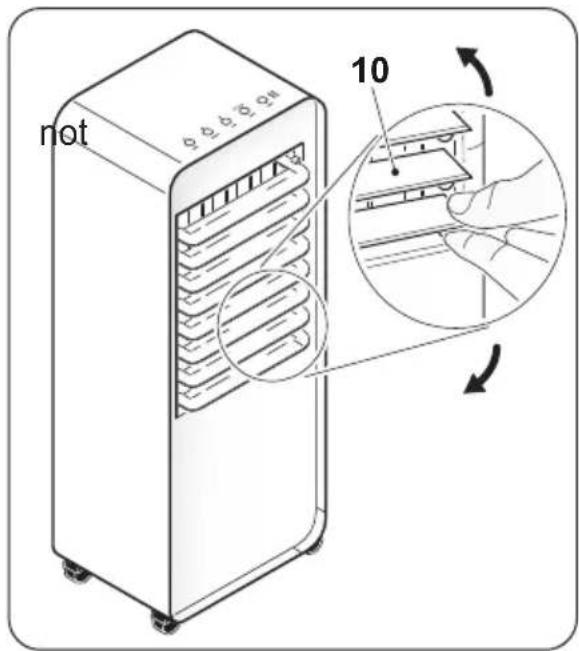
c. Manually lift the horizontal flaps as desired.
d. Select the desired mode.
3.4.a - ON/OFF key (A1)
When the appliance is in stand-by, all buttons are disabled, with the exception of the ON/OFF button.
Press the key (A1) to switch on/off the appliance.
The default initial fan speed is "low" and the default operating mode is "cooler"; All functions are available.
3.4.b - Cooler / humidifier key (A2)
Make sure that water is present inside the tank (7) before activating the humidifier function.
Press the key (A2) on the panel or through the remote controller to activate the function; the led in correspondence of the key (A2) lights up.
Press the key (A2) a second time to deactivate the function.
3.4.c - Oscillation key (A3)
Press the key (A3) on the panel or through the remote controller to activate the function; the led in correspondence of the key (A3) lights up.
When the oscillation function is active, the vertical flaps (11) will start to oscillate (right and left).
Press the key (A3) a second time to deactivate the function.
3.4.d - Air speed key (A4)
Press the key (A6) on the panel several times to select air speed according to this sequence:
$$ \text { Low (Sleep } \mathcal {Q} _ {*} - > \text { Medium } \dashrightarrow \text { High } \dashrightarrow \text { Low } \dashrightarrow > \dots $$
Press the keys (T1/T2/T3) on the remote controller depending on the desired air speed.
3.4.e - Timer key (A5)
Press the key (A5) on the panel several times to select the switch off timer according to this sequence:
$$ 2 h \dashrightarrow 4 h \dashrightarrow 8 h \dashrightarrow O F F \dashrightarrow 2 h \dashrightarrow \dots $$
Press the keys (T4/T5/T6) on the remote controller depending on the timer you want to set.
3.4.f - WIFI key (A5/A6)
Keep the key (A5) pressed for a few seconds on the panel to activate the function or press the key (A6) on the remote controller to activate the function.
When the appliance connects with the smartphone, the LED in correspondence of the key (A5) stops flashing and remains steady on on the display.

instructions for connection to the WiFi network and for the use of the App are available on the website www.olimpiasplendid.com in the download area.
3.4.g - Use of ice box container (14)
The appliance comes with an “Ice box” (14) that can be used to cool down the air it emits. The use of the “cooling” function with an ice box (14) placed in the water compartment quickly reduces the temperature of the air emitted by the appliance by 3^ C approximately.
Make sure the Ice box is full; fill it with water if necessary.
To use this function:
a. Put the ice box in the freezer and wait until it is frozen.
b. Position the frozen ice box in the water tank (7) (fig. H).
c. Pour water (preferably cold) into the tank without exceeding the maximum level.
d. Start the appliance and select the function by pressing the button (A2); the led in correspondence of the key lights up.
To exploit the function at its best, replace the Ice box when the latter is no longer frozen.
4 - MAINTENANCE AND CLEANING
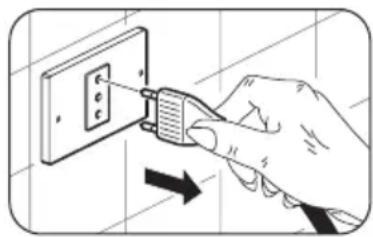
Before proceeding with any maintenance and cleaning intervention, always make sure you disconnected the power plug from the power socket.
natural_image
Illustration of a hand inserting a plug into an electrical outlet (no text or symbols)
Do not use water to clean the internal parts of the appliance; of electric shocks.
4.1 - CLEANING
4.1.a - Cleaning the appliance and the remote control
a. Use a dry cloth to clean the appliance and the remote control.
b. It is possible to use a cloth moistened with cold water to clean the appliance in case it's very dirty.

Do not use a chemically treated or antistatic cloth to clean the appliance.
Do not use gasoline, solvent, polish or similar solvents. Use products could cause the breakage or deformation of the plastic surface.
4.1.b - Air grille cleaning
It is possible to vacuum or use a soft-bristled brush to clean the air grille (15) (Fig. I).
4.1.c - Air filter replacement

Do not use the appliance if the filter is not positioned correc damaged or worn out.
Proceed as described to replace the filter (16) (fig. L):
a. Press the hook (15a) to remove the air grille (15) and the filter (16).
b. Extract the filter (16) from the grille (15) and replace it.
c. Make sure to have positioned the filter correctly (16) and reposition the grille (15) locking it with the hook (15a) to the appliance (1).
4.1.d - Cleaning the reservoir

It is necessary to clean the water tank every 2 days.
If the appliance is not going to be used for a long period of time:
a. Unplug it from the power outlet.
b. Extract the tank (7) through the handle (6) (fig. M).
c. Unhook the pump support (3) and remove the pump (4) from the reservoir (7) (fig.N).
d. Completely remove the reservoir (7) from the body of the appliance.
e. Carefully clean and dry the reservoir (7).
f. Replace the reservoir in the body of the appliance and make sure the pump (4) and its relative support (3) are positioned correctly.
g. Close the reservoir in the body of the appliance.
5 - BEFORE STORING THE APPLIANCE AT THE END OF THE SEASON
- Clean the air grille following the supplied instructions.
• Make sure the paper filter is damaged. - Clean the tank following the supplied instructions and check that it doesn't contain residual water.
- Manually close the horizontal flaps (10).
- Place the appliance in its original packaging and store it in a fresh and dry environment.
6 - SPECIFICATIONS
For the technical data, consult the characteristics plate (23) affixed to the product.
0 - MISES EN GARDE....2
0.1 - INFORMATIONS GÉNÉRALES......2
0.2 - SYMBOLES 2
natural_image
Illustration of a hand using a power tool to insert or install an electrical socket (no text or symbols present)A1 A2 A3 A4 A5/A6
natural_image
Line drawing of a hand holding a remote control with multiple function buttons (no text or symbols)
natural_image
Hand inserting a plug into an electrical outlet (no text or symbols visible)
natural_image
Hand inserting a plug into an electrical outlet, showing the power line (no text or symbols)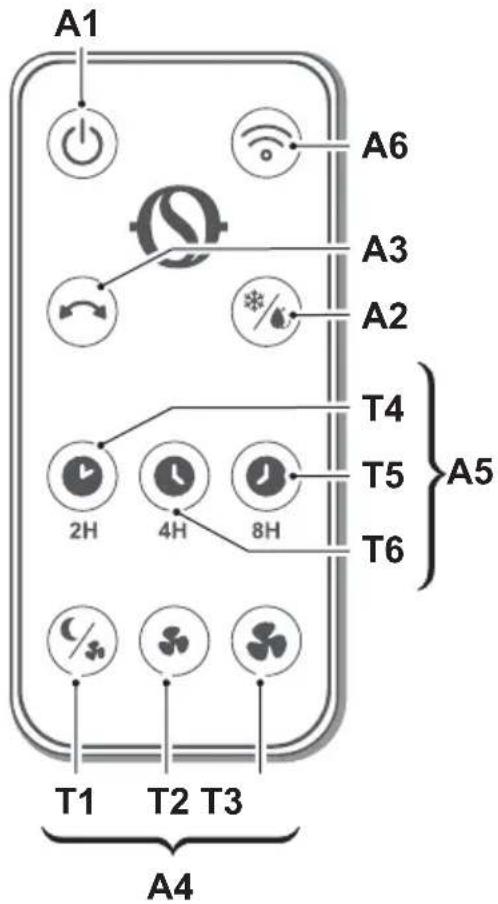
A1. Taste ON/OFF
natural_image
Line drawing of a hand holding a remote control with buttons and a scroll (no text or symbols)
natural_image
Illustration of a hand inserting a plug into an electrical outlet (no text or symbols)
natural_image
Illustration of a hand inserting a plug into an electrical outlet (no text or symbols)natural_image
Line drawing of a hand holding a remote control with buttons and a plus button (no text or symbols)
natural_image
Hand inserting a plug into an electrical outlet (no text or symbols visible)
natural_image
Illustration of a hand using a power tool to switch an electrical outlet (no text or symbols present)natural_image
Line drawing of a hand holding a remote control with buttons and a plus button (no text or symbols)
natural_image
Hand inserting a plug into an electrical outlet (no text or symbols visible)
0 - WAARSCHUWINGEN....2
0.1 - ALGEMENE INFORMATIE .....2
0.2 - SYMBOLLEN 2
0.2.1 - Pictogrammen 2
0.3 - ALGEMEEN ADVIES 3
0.4 - EIGENLIJK GEBRUIK 7
0.5 - RISICOZONES 8
1 - VOORNAAMSTE KENMERKEN EN WERKING ....8
1.1 - LIJST VAN DE MEEGELEVERDE ONDERDELEN....8
2 - INSTALLATIE 9
2.1 - VERVOER VAN HET APPARAAT......9
2.2 - POSITIONERING VAN HET APPARAAT.9
2.3 - ELEKTRISCHE AANSLUITING .....9
3 - GEBRUIK VAN HET APPARAAT......10
3.1 - BEDIENINGSPANEEL EN AFSTANDSBEDIENING ....10
3.2 - GEBRUIK VAN DE AFSTANDSBEDIENING ....11
natural_image
Illustration of a hand inserting a plug into an electrical outlet (no text or symbols)2.3 - ELEKTRISCHE AANSLUITING
A1 A2 A3 A4 A5/A6
A1. Toets ON/OFF
natural_image
Line drawing of a hand holding a remote control with buttons and a 'NING' text (no other symbols or text)
natural_image
Hand inserting a plug into an electrical outlet (no text or symbols visible)
natural_image
Hand inserting a plug into an electrical outlet (no text or symbols visible)A1 A2 A3 A4 A5/A6
A1. Κουμπί ON/OFF
natural_image
Line drawing of a hand holding a remote control with buttons and a switch (no text or symbols)
natural_image
Illustration of a hand inserting a plug into an electrical outlet (no text or symbols)
natural_image
Illustration of a hand inserting a plug into an electrical outlet (no text or symbols)natural_image
Line drawing of a hand holding a remote control with multiple function buttons (no text or symbols)
natural_image
Illustration of a hand using a power tool to insert or install an electrical outlet (no text or symbols present)2.3 - CONECTARE ELECTRICĂ
0.2 - SYMBOLER.....2
0.2.1 - Redaktionella piktogram....2
0.3 - ALLMÄNNA VARNINGSTEXTER .....3
0.4 - AVSEDD ANVÄNDNING....7
0.5 - RISKZONER 8
1 - HUVUDSAKLIGA EGENSKAPER OCH FUNKTION ....8
1.1 - LISTA ÖVER KOMPONENTER SOM LEVERERAS MED ENHETEN ..8
2 - INSTALLATION 9
2.1 - TRANSPORT AV UTRUSTNINGEN...9
2.2 - BESKRIVNING AV APPARATEN.....9
2.3 - ELEKTRISK ANSLUTNING .....9
3 - ANVÄNDNING AV APPARATEN....10
3.1 - MANÖVERPANEL OCH FJÄRRKONTROLL....10
3.2 - ANVÄNDNING AV FJÄRRKONTROLLEN....11
natural_image
Illustration of a hand inserting a plug into an electrical outlet (no text or symbols)2.3 - ELEKTRISK ANSLUTNING
natural_image
Line drawing of a hand holding a remote control with buttons and a 'EN' label (no text on device)
6 - TEKNISET TIEDOT ....16
HÄVITTÄMINEN
natural_image
Hand inserting a plug into an electrical outlet (no text or symbols visible)natural_image
Line drawing of a hand holding a remote control with buttons and a plus sign (no text or symbols)
natural_image
Illustration of a hand inserting a plug into an electrical outlet (no text or symbols)
0.2 - SYMBOLER.....2
natural_image
Illustration of a hand inserting a plug into an electrical outlet (no text or symbols)natural_image
Line drawing of a hand holding a remote control with buttons and a plus button (no text or symbols)
natural_image
Hand inserting a plug into an electrical outlet (no text or symbols visible)
A1 A2 A3 A4 A5/A6
A4
natural_image
Illustration of a hand inserting a plug into an electrical outlet (no text or symbols)natural_image
Line drawing of a hand holding a remote control with buttons and a 'U' label (no text or symbols on the device itself)
natural_image
Illustration of a hand using a power tool to switch an electrical outlet (no text or symbols present)natural_image
Hand inserting a plug into an electrical outlet (no text or symbols visible)
2.1 - TRANSPORT AF APPARATET....9
2.2 - OPSTILLING AF APPARATET......9
2.3 - ELEKTRISK TILSLUTNING......9
3 - BRUG AF APPARATET ....10
3.1 - BETJENINGSPANEL OG FJERNBETJENING....10
3.2 - BRUG AF FJERNBETJENINGEN ....11
2.1 - TRANSPORT AF APPARATET

2.2 - OPSTILLING AF APPARATET
natural_image
Illustration of a hand inserting a plug into an electrical outlet (no text or symbols)2.3 - ELEKTRISK TILSLUTNING
natural_image
Line drawing of a hand holding a remote control with buttons and a plus button (no text or symbols)
natural_image
Hand inserting a plug into an electrical outlet socket, with a black arrow indicating direction (no text or symbols)