300684 - Hi-fi system CSL - Free user manual and instructions
Find the device manual for free 300684 CSL in PDF.


| Product type | 2-in-1 Bluetooth transmitter/receiver |
| Brand | CSL |
| Model | 300684 |
| Bluetooth connection | V2.1 + EDR, A2DP support |
| Range | Up to 10 meters (Class 2) |
| Battery | Lithium-Polymer 270 mAh |
| Battery life (transmitter mode) | Up to 11 hours |
| Battery life (receiver mode) | Up to 6 hours |
| Dimensions | Approx. 51.4 x 34.7 x 8.6 mm |
| Weight | Not specified (estimated ~20 g) |
| Power supply | Rechargeable battery via micro USB port |
| Connectors | 3.5 mm jack, micro USB port |
| Main functions | Bluetooth receiver to stream music to a HiFi system; Bluetooth transmitter to send audio from a non-Bluetooth device to a Bluetooth speaker |
| Care and cleaning | Clean with a dry cloth; avoid moisture and extreme temperatures |
| Safety | Do not open or repair yourself; do not expose to water; keep out of reach of children |
| Spare parts and repairability | Built-in battery not user-replaceable; contact the manufacturer for repairs |
| General information | Compliant with WEEE directive 2012/19/EU; WEEE registration number: DE 94495668 |
Frequently Asked Questions - 300684 CSL
User questions about 300684 CSL
0 question about this device. Answer the ones you know or ask your own.
Ask a new question about this device
Download the instructions for your Hi-fi system in PDF format for free! Find your manual 300684 - CSL and take your electronic device back in hand. On this page are published all the documents necessary for the use of your device. 300684 by CSL.
USER MANUAL 300684 CSL
natural_image
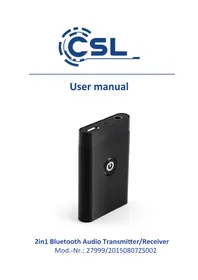
Black rectangular electronic device with a power button symbol on its side (no text or labels visible)2in1 Bluetooth Audio Transmitter/Receiver
Many thanks for purchasing a CSL product. Please read the following user manual carefully to ensure that the device you have purchased will give you many years of pleasure.
1 Scope of delivery
- Bluetooth 2in1 Transmitter / Receiver
- Stereo jack cable
- Micro USB charging cable
- User manual
2 Technical specifications
| Connection Bluetooth V2 | .1 + EDR, supports A2DP |
| Range Class 2, up to 10m | |
| Battery 270mAh lithium polymer | |
| Battery life • up to 11 hours (transmission)• up to 6 hours (reception) | |
| Product dimensions approx. | 51,4 x 34,7 x 8,6mm |
3 Product Details

4 Usage
Please charge the 2in1 Transmitter/Receiver completely before using it for the first time. Connect the device to a suitable power source such as a computer or USB charging adapter using the micro USB cable supplied. The LED will be red while charging. When the device is fully charged, please disconnect it from the power source to avoid constant recharging.
Press the On/Off button briefly to switch the device on or off. If you have already established a connection to a Bluetooth device, the connection with this device will be established automatically when you switch on.
Please continue with Chapter 5 or 6 if you have not yet established a connection. To save power, the 2in1 Transmitter/Receiver turns off automatically if no connection is established within 5 minutes. Please recharge the battery as soon as the LED starts flashing red.
5 Establishing a connection in "Reception mode"
In this mode you can transfer music signals transmitted via a Bluetooth device to other devices such as a hi-fi system or amplifier. First make sure that the 2in1 Transmitter/Receiver is switched off (the LED next to the 3.5 mm stereo socket is off). Set the switch to position RX to activate reception mode.
Now connect the 2in1 Transmitter/Receiver to the signal input of your output device (AUX) using the enclosed stereo jack cable. Hold the On/Off button on the 2in1 Transmitter/Receiver down for approx. 10 seconds until the LED starts to flash alternately red and blue.
Now activate Bluetooth on the transmitter with which you want to play your music. Next conduct a scan and connect to the "CSL-27999" device. A master code will be displayed on request for connecting. This code is not needed for the reception mode. Select: Establish link or connection.
The connection is established and the LED flashes blue. You can now start to play the music.
Note: Make sure that you have selected the correct signal input source on your hi-fi system. Please reduce the volume before you start to play the music.
6 Establishing a connection in "Transmission mode"
In this mode you can transmit music from devices without a Bluetooth interface to a Bluetooth player.
First make sure that the 2in1 Transmitter/Receiver is switched off (the LED next to the 3.5 mm stereo jack socket is off).
Set the switch to position TX to activate transmission mode.
Now connect the 2in1 Transmitter/Receiver to the signal output of your music player using the enclosed stereo jack cable.
Hold the On/Off button on the 2in1 Transmitter/Receiver down for approx. 10 seconds until the LED starts to flash blue. Now activate the Bluetooth link mode on your receiving device such as a Bluetooth speaker. The 2in1 Transmitter/Receiver will now automatically connect to the receiving unit.
Note: Please make sure that no other devices are in link mode when you make the connection. How you change your receiving device to link mode is described in the relevant operating instructions.
7 Safety instructions and liability disclaimer
Never try to open the device to carry out repairs or conversions. Avoid contact with mains voltages. Do not short-circuit the product. The device is not certified for use in the open air; only use it in dry conditions. Protect it from high humidity, water and snow. Keep it away from high temperatures. Do not subject the device to sudden changes in temperature or heavy vibration as this might damage electronic components. Examine the device for damage before using it. The unit should not be used if it has received an impact or has been damaged in any other way. Please observe national regulations and restrictions.
Do not use the device for purposes other than those described in the instructions. This product is not a toy. Keep it out of the reach of children or mentally impaired persons. Any repair or alteration to the device not carried out by the original supplier, will invalidate the warranty or guarantee. The product may only be used by persons who have read and understood these instructions. The device specifications may change without any separate prior notice to this effect.
8 Disposal instructions
Electrical and electronic devices may only be disposed of in accordance with the European WEEE Directive and not with household rubbish. Components must be disposed of or recycled separately as dangerous, toxic elements can inflict sustained damage on the environment if they are disposed of incorrectly.
As a consumer, you are bound by the Electrical and Electronic Devices Act (ElektroG) to return electrical and electronic goods free of charge at the end of their useful life to the manufacturer, the place of purchase or to specially set up, public collection points. The details in each case are governed by national law. The symbol on the product, the operating instructions and/or the packaging refers to these regulations.
By separating materials in this way, recycling and disposing of old devices, you are making an important contribution towards protecting our environment.
9 Instructions on the disposal of batteries
With regard to the sale of batteries or the supply of devices containing batteries, the supplier is obliged to draw the customer's attention to the following:
As the end user, the customer has a statutory obligation to return used batteries. He can return old batteries stocked or previously stocked by the supplier in the form of new batteries to the supplier's despatch warehouse (despatch address) free of charge.
The symbols shown on the batteries have the following meanings: Pb = battery contains more than 0.004 percent by mass of lead, Cd = battery contains more than 0.002 percent by mass of cadmium, Hg = battery contains more than 0.0005 percent by mass of quicksilver
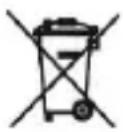
The symbol of the rubbish bin with a cross through it indicates that the battery may not be put in household waste.
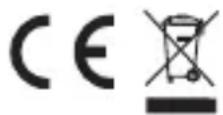
WEEE Directive 2012/19/EU WEEE Register No.: DE 94495668
CSL Computer GmbH & Co. KG hereby declares that device No. 27999/20150807ZS002 complies with the basic requirements and other relevant regulations contained in the 1999/5/EG Directive. You can obtain a complete declaration of conformity from: CSL Computer GmbH & Co. KG, Sokelantstraße 35, 30165 Hannover
Interruptor Receptor/Transmisor