300161 - Hi-fi system CSL - Free user manual and instructions
Find the device manual for free 300161 CSL in PDF.


| Product type | External USB sound card with virtual 5.1 surround sound |
| Dimensions | Approximately 5 x 2 x 1 cm |
| Weight | Approximately 20 g |
| Power supply | USB powered (bus) |
| Connectivity | USB type A, 3.5 mm audio output jack, 3.5 mm microphone input jack |
| Main functions | Virtual 5.1 surround sound, Plug and Play, support for headsets and microphones |
| Maintenance and cleaning | Clean with a dry cloth; avoid water and humidity |
| Safety | Do not open, avoid short circuits, use only in dry conditions, keep out of reach of children |
| Spare parts and repairability | No detachable parts; repair reserved for the manufacturer |
| General information | Brand CSL, model 300161, WEEE compliant manufacturing |
Frequently Asked Questions - 300161 CSL
User questions about 300161 CSL
0 question about this device. Answer the ones you know or ask your own.
Ask a new question about this device
Download the instructions for your Hi-fi system in PDF format for free! Find your manual 300161 - CSL and take your electronic device back in hand. On this page are published all the documents necessary for the use of your device. 300161 by CSL.
USER MANUAL 300161 CSL
natural_image
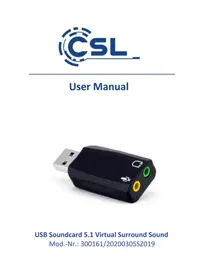
Black USB device with two connected ports and a yellow port, no visible text or symbolsUSB Soundcard 5.1 Virtual Surround Sound
Thank you for having chosen this CSL product and for placing your trust in our company. Please read this manual carefully before installation to ensure your long-term enjoyment of this product. For future reference, please keep this manual. Before using the delivered product, check that it is complete, faultless and undamaged.
1. Scope of delivery
• External USB Soundcard 5.1 Virtual Surround Sound
- User manual
2. Technical specifications
| Sound Virtual 5.1 Surround Sound | |
| Port USB type A | |
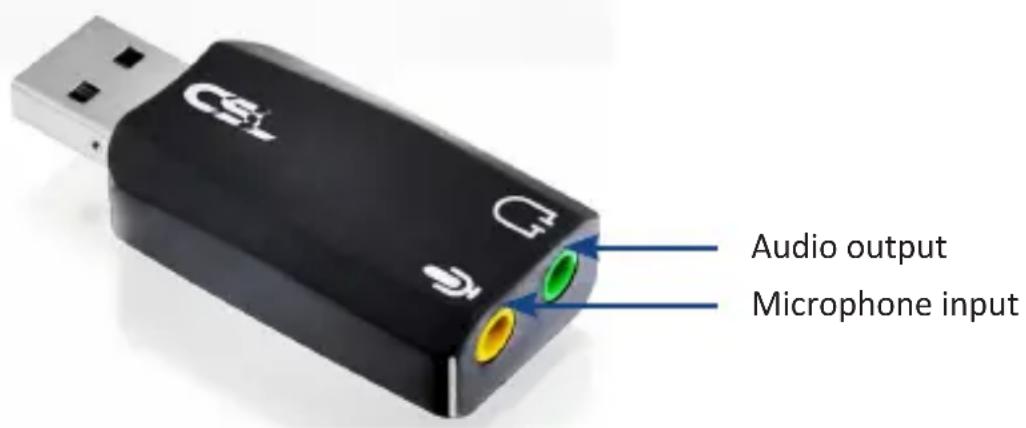
| Audio ports | • 1x 3,5mm audio jack output• 1x 3,5mm jack microphone input |
3. Product details
4 Functions
Depending on the audio signals, the system detects the direction from which the sound originates. It converts the sound into a more realistic 5.1 surround sound effect.
5. Getting started
When the device is put into operation for the first time, check the intactness of the product or components and their function again. Please remove the USB sound card from its packaging and connect it to an available USB port of your personal computer. Because of "Plug and Play" this can be even done during operation. The driver installation will complete automatically. In order to use the surround sound feature, please follow the instructions in the next chapter.
6. Activating 5.1 Surround Sound function
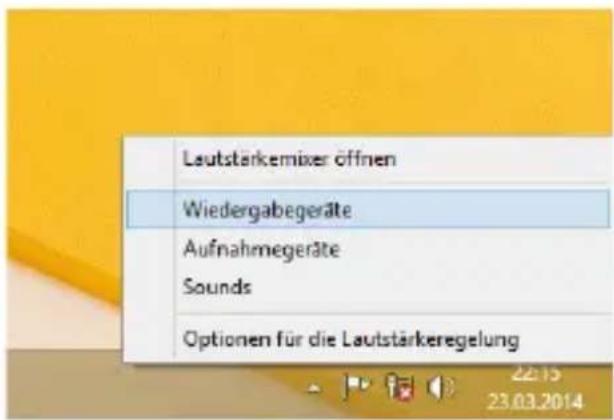
Open the sound setting by a right-click on the speaker icon in your taskbar and select " playback devices".
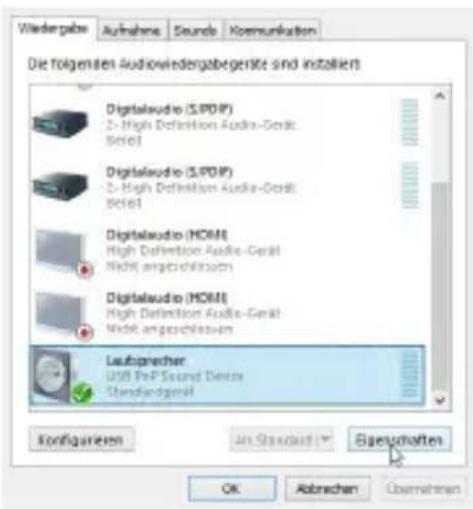
After that, please select "USB PnP Sound Device" and click on "properties".
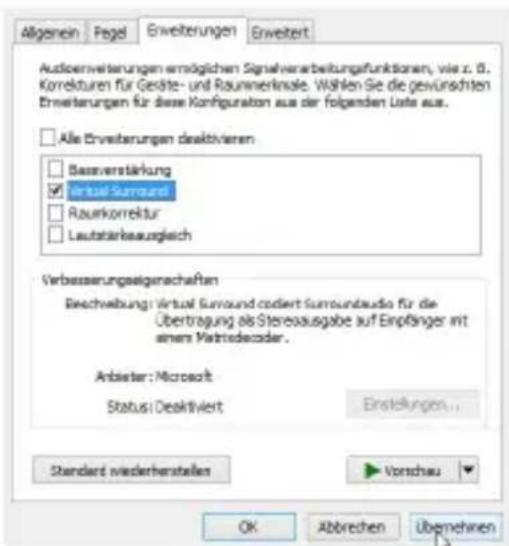
Please activate the option “virtual surround” in the menu “extensions” and confirm it by clicking “apply” in order to take full advantage of all of the functions of the sound card.
7. Safety instructions and liability disclaimer
Never try to open the device to carry out repairs or conversions. Avoid contact with mains voltages. Do not short-circuit the product. The device is not certified for use in the open air; only use it in dry conditions. Protect it from high humidity, water and snow. Keep it away from high temperatures. Do not subject the device to sudden changes in temperature or heavy vibration as this might damage electronic components.
Examine the device for damage before using it. The unit should not be used if it has received an impact or has been damaged in any other way. Please observe national regulations and restrictions. Do not use the device for purposes other than those described in the instructions. This product is not a toy. Keep it out of the reach of children or mentally impaired persons. Any repair or alteration to the device not carried out by the original supplier, will invalidate the warranty
or guarantee. The product may only be used by persons who have read and understood these instructions. The device specifications may change without any separate prior notice to this effect.
8. Disposal Instructions
The European Directive (WEEE) requires that old electrical and electronic appliances shall be disposed of separately from normal household garbage for optimal recycling. The component parts must be separated, collected and sent for recycling or disposal in an environment-friendly manner. Otherwise, toxic and dangerous substances could cause enduring damage to the environment if disposed of incorrectly.
As a consumer you are legally obligated (Electrical and Electronic Equipment Act-ElektroG) to return electronic equipment at the end of its lifetime to their manufacturer, point of sale, public collection points or importer free of charge. The relevant local laws apply here. The symbol on the product, in the instructions or on its packing indicates these regulations. The reuse or recycling of materials and old units makes an important contribution towards protecting the environment.


WEEE guideline: 2012/19/EU WEEE register number: DE 67896761
WD Plus GmbH, herewith declares that this product 300161/20200305SZ019 conforms to the principle requirements and other relevant stipulations. The complete Declaration of Conformity can be obtained from: WD Plus GmbH, Wohlenbergstraße 16, 30179 Hanover
natural_image
Close-up of a black USB device with two connected ports and a 'CSL' logo, showing internal color channels (no text beyond branding)Sortie audio
Entrée de micro- phone
4. Fonctions
natural_image
Close-up of a black USB device with 'CSI' and 'U' labels, showing audio interface elements (no readable text beyond labels)Salida de audio
Brand : CSL
Model : 300161
Category : Hi-fi system