303999 - Digital timer switch Bearware - Free user manual and instructions
Find the device manual for free 303999 Bearware in PDF.


| Product type | Digital timer switch (countdown timer) |
| Brand | Bearware |
| Model | 303999 |
| Power supply | 230 V AC, 50 Hz |
| Maximum load | 16 A / 3680 W |
| Operating temperature | +5 °C to +45 °C |
| Timing ranges | 15 min, 30 min, 1 h, 2 h, 4 h, 6 h |
| Daily repeat function | Yes (activation/deactivation via REPEAT button) |
| Always ON mode | Yes (permanent on) |
| Display | LED indicators for each duration and mode |
| Usage type | Dry indoor, domestic use only |
| Cleaning | Soft dry cloth, do not use water |
| Repairability | Do not open, repair by professional only |
| Safety | Do not connect in series, do not use with power strips or extension cords |
| Package contents | Countdown timer, instruction manual |
| Recycling | WEEE compliant, eco-participation included |
Frequently Asked Questions - 303999 Bearware
User questions about 303999 Bearware
0 question about this device. Answer the ones you know or ask your own.
Ask a new question about this device
Download the instructions for your Digital timer switch in PDF format for free! Find your manual 303999 - Bearware and take your electronic device back in hand. On this page are published all the documents necessary for the use of your device. 303999 by Bearware.
USER MANUAL 303999 Bearware
(IT) +49 511/13221740
(ES) +49 511 / 13221 750
MON-FRI 9:30am - 18pm CET

https://downloads.ganzeinfach.de/
Table of contents
- Deutsch .... 3
- English 12
- Italiano 21
- Français 30
- Español....40


ADDITIONAL SAFETY GUIDELINES FOR THIS DEVICE
- This device is designed only for domestic use. It is not intended for commercial use.
- Do not open the device. Do not insert any objects into the openings!
- This product is not intended to be used by individuals (including children) with reduced physical, sensory, or mental capabilities or lack of experience and/or knowledge unless they are supervised by a person responsible for their safety or have received instructions on how to use the device from any such authorised person.
• Children should be supervised to ensure that they do not play with the device.
- Using accessories and device components that are not expressly recommended by the manufacturer may result in injuries or damage and in loss of warranty.
- Never immerse the device in water or other liquids during cleaning or operation. Never hold it under running water!
- Do not attempt to repair the device yourself. Hand over the product for maintenance and repair to an authorised dealer or qualified customer service personnel.
- Use the device only in dry indoor areas!
- Never place the device near heat sources, such as a fireplace or a grill! Keep it away from fire.
- Avoid using in very humid climate or in a very dry surrounding!
- Do not expose the device to extreme heat and cold (under 5 °C) and to direct sunlight.
- The mains voltage has to match the specifications on the type plate.
- Ensure that the device and the mains plug are always easy to access and reach.
- Disconnect the mains plug in case of prolonged absence or severe thunderstorms in order to protect the electronics.
- Do not use the device if it has fallen down! Get it checked by a technician.
- Protect the housing from damage and do not open the product yourself. Never attempt to replace any parts or to repair the device by yourself.
- Connect the device only to a properly installed socket.
- CAUTION! Do not connect the timer in series!
- Do not use the device in combination with power strips or extension cords.
- The device is not suitable for inductive loads, such as electric motors.
Thank you for choosing a BEARWARE product. Please read the following user manual carefully so as to get the most from the product you have purchased.
1. Scope of delivery
- Countdown timer
- User manual
2. Technical data
| Electric voltage 230 V AC, 50 Hz | |
| Maximum load 16 A / 3680 W | |
| Operating temperature | + 5 °C to + 45 °C |
| Increments | Max: 6 hours15 min / 30 min / 1 hour / 2 hours / 4 hours / 6 hours |
3. Initial use
Take the device out of the packaging and remove any packaging material and check if the contents of the package are complete and for any damage.
3.1 Setting the countdown
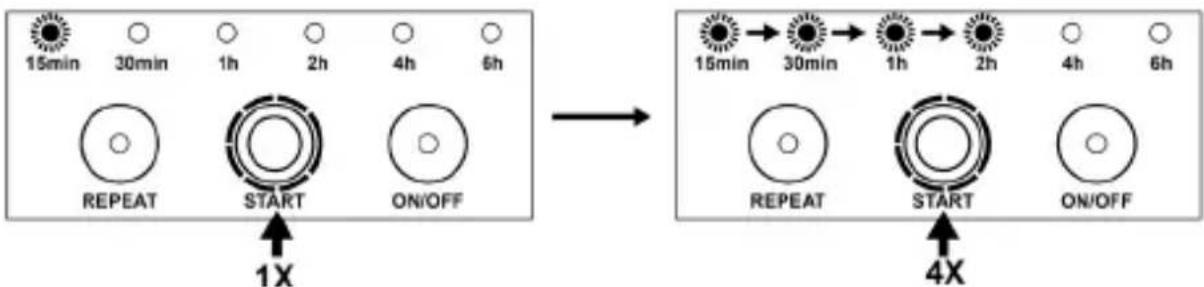
Just press the "START" button to select the countdown time. Press the "START" button repeatedly. The display showing the countdown time changes in the sequence of 15 minutes, 30 minutes, 1 hour, 2 hours, 4 hours and 6 hours. The timer passes current to the output until the countdown time is reached.
Example: If you want to switch off the power after 2 hours, please press the "START" button until the display shows "two hours". The timer then starts the countdown program.
3.2 Adjusting the countdown time subsequently
Press the "START" button to switch to a different countdown program. The display changes to the new countdown time. The timer then starts the new countdown program.
Example: A 30-minute countdown program is already being used, but you want to change to a one-hour program. Please press the "START" button once, the "30 minutes" display disappears and the "1 hour" display appears. The timer now switches off the output after one hour.
3.3 Activating the daily repeat function
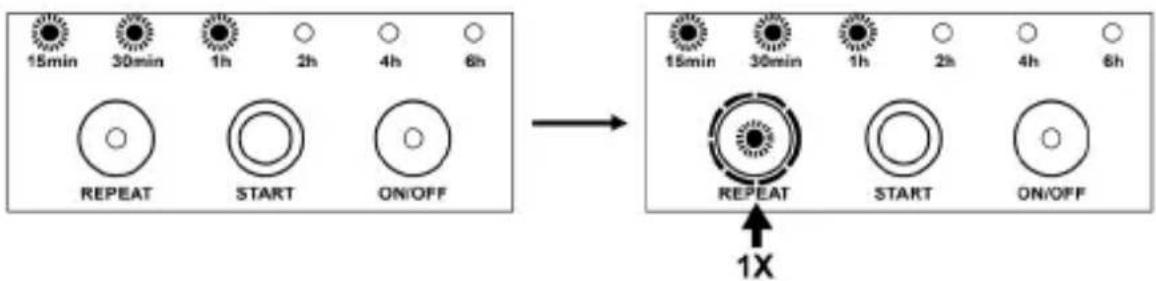
Press the "REPEAT" button when a countdown program is running. The "REPEAT" display appears indicating that the daily repeat function is now active. The current program will be repeated the next day at the same time.
Example: If you have set a 1-hour countdown program for 12:00 hrs, press the "REPEAT" button before the program ends. The 1-hour countdown program will be repeated every day at 12:00 hrs.
3.4 Deactivating the daily repeat function
Follow the instructions below to switch off the daily repeat function:
- Press the "REPEAT" button, the "REPEAT" display disappears indicating that the daily repeat function has been switched off. This operation does not affect the countdown program that is currently running.
- Press the "START" button, the "REPEAT" display disappears indicating that the daily repeat function has been switched off. This operation changes to another countdown program.
- Press the "ON / OFF" button to exit the current program and the daily repetition function, the output of the timer is switched off.
3.5 Terminating a countdown program
A countdown program is terminated under the following two conditions:
- When the countdown program is complete, the display disappears and the power to the output of the device is disconnected.
- Press the "ON / OFF" button at any time to terminate a countdown program. This operation also deactivated the daily repeat function.
3.6 Always ON (continuously switched on)
If a countdown is already running or the daily repeat function is active, press the "ON / OFF" button twice to set the timer to "ALWAYS ON".
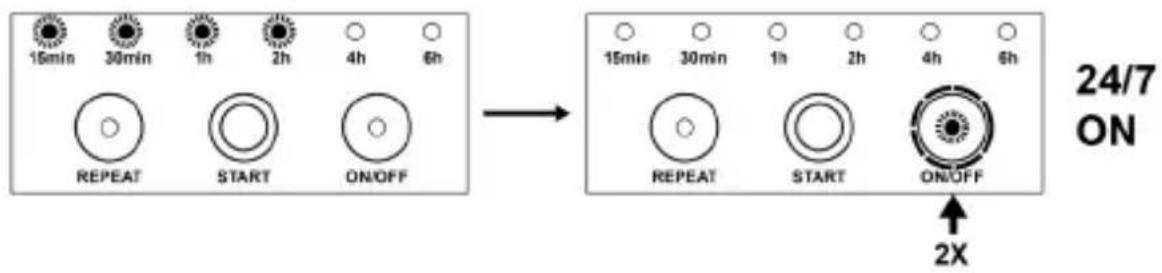
When the timer is in "OFF" mode, press the "ON / OFF" button once.
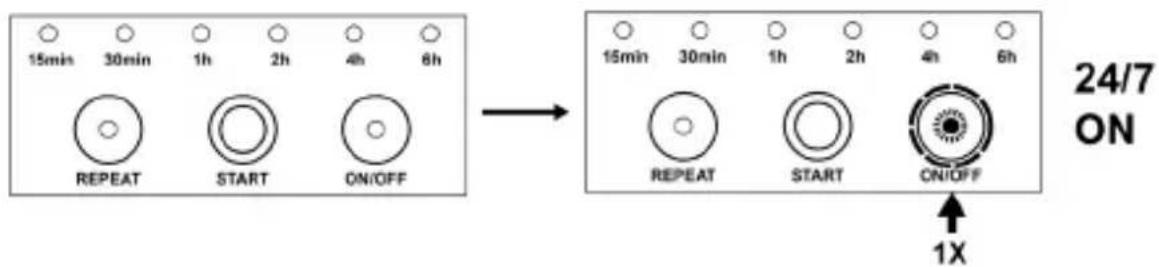

Note: In the ALWAYS ON mode, the "ON / OFF" display lights up and the power supply to the output of the device is continuously switched on.
3.7 Resetting the current countdown
Follow these two steps to reset to the current countdown.
- Press the "ON / OFF" button once to end the current countdown and then reset the countdown program, or
- Press the "START" button six times, the timer then starts the new count-down program.
4. Cleaning and Care
Before cleaning, disconnect all the connected devices and unplug the product from the socket. Clean the device with a soft dry cloth. Never use water for cleaning
Caution! Ensure that fluids do not get into the housing!

5. Safety instructions and disclaimer
Please do not try to open the device to carry out repairs or modifications by yourself. Avoid contact with the mains supply. The device does not carry current only when disconnected. Please do not short-circuit the product. Do not forget to disconnect the power cord when the device is not being used or during thunderstorms. Therefore, please use it only in dry surroundings. Protect it from high humidity, water and snow. Never expose the device to high outside temperatures. Please do not expose the device to sudden changes in temperature or strong vibrations, as this could damage the electronic components.
Check the device for any damage before using it. The device should not be used if it has been subject to impact or has been damaged in any other way.
Please follow the local regulations and restrictions.
Do not use the device for purposes other than those described in this manual. This product is not a toy. Keep it out of the reach of children or mentally disabled persons. Any repair or modifications to the device, which is not carried out by the original supplier will void any warranty and guarantee claims. The device should only be used by those who have read and understood this user manual. Use the device only for the intended purpose. Improper use could lead to hazards.
The specifications of the device may be changed without special prior notice. The device should only be used by those who have read and understood this user manual.
6. Disposal instructions
In line with the European WEEE directive, electrical and electronic devices should not be disposed of along with domestic waste. Their components have to be separately sent for recycling or disposal, because improper disposal of toxic and dangerous components may permanently damage the environment. According to the Electrical and Electronic Equipment Act (ElektroG), you are obliged (as a consumer) to return (free of charge) all electrical and electronic devices to the manufacturer, the point of sale, or public collection points at the end of their service life. The relevant local laws regulate the details in this regard. The symbol displayed on the product, in the user manual or/and on the packaging refers to these regulations. With this manner of sorting, recycling and disposal of used devices, you make an important contribution towards protecting our environment.

WEEE directive 2012/19/EU WEEE Register no.: DE 67896761
The company WD Plus GmbH hereby certifies that the device 303999 complies with the fundamental requirements and all other relevant stipulations. A complete conformity statement can be obtained from: WD Plus GmbH, Wohlenbergstraße 16, 30179 Hanover

ISTRUZIONI AGGIUNTIVE SULLA SICU- REZZA PER QUESTO APPARECCHIO


- Table of contents
- ADDITIONAL SAFETY GUIDELINES FOR THIS DEVICE
- Scope of delivery
- Technical data
- Initial use
- Setting the countdown
- Adjusting the countdown time subsequently
- Activating the daily repeat function
- Deactivating the daily repeat function
- Terminating a countdown program
- Always ON (continuously switched on)
- Resetting the current countdown
- Cleaning and Care
- Safety instructions and disclaimer
- Disposal instructions
- ISTRUZIONI AGGIUNTIVE SULLA SICU- REZZA PER QUESTO APPARECCHIO
Brand : Bearware
Model : 303999
Category : Digital timer switch