
303287 - Digital timer switch Bearware - Free user manual and instructions
Find the device manual for free 303287 Bearware in PDF.


| Product type | Digital timer switch (programmable timer) |
| Brand | Bearware |
| Model | 303287 |
| Power supply | 230 V ~50 Hz |
| Maximum load | 16 (2) A / 3600 W |
| Ambient temperature | -10°C to +40°C |
| Number of programs | 10 adjustable switching programs |
| Day combinations | 16 possible combinations (includes single days, weekends, etc.) |
| Manual on/off function | Yes (MANUAL key) |
| Random function | Random delay of 10 to 31 minutes between 6 PM and 6 AM |
| Countdown function | Yes (CD key) |
| 12/24 hour display | Yes (switchable via CD + SET) |
| Summer/winter time | Yes (switchable via SET + MANUAL) |
| Display | LCD screen with backlight, shows day of week and status |
| Backup battery | Yes (charge 12h for first use) |
| Protection rating | Indoor dry use only |
| Maintenance | Wipe with a dry cloth; do not immerse |
| Safety | Do not exceed 16(2)A; do not connect in series; not for outdoor use |
| Warranty | 2 years (manufacturing and materials) |
| Recycling | Compliant with WEEE; do not dispose of with household waste |
Frequently Asked Questions - 303287 Bearware
User questions about 303287 Bearware
0 question about this device. Answer the ones you know or ask your own.
Ask a new question about this device
Download the instructions for your Digital timer switch in PDF format for free! Find your manual 303287 - Bearware and take your electronic device back in hand. On this page are published all the documents necessary for the use of your device. 303287 by Bearware.
USER MANUAL 303287 Bearware
Thank you for choosing a BEARWARE product. Please read the following user manual carefully so that you can enjoy the purchased product for a long time.
1. Scope of delivery
- Digital timer
- User manual
2. Technical data
| Input voltage 230 V~50 Hz | |
| Maximum load 16 (2) A, μ 3600 W | |
| Operating temperature -10°C to +40°C |
3. Product details
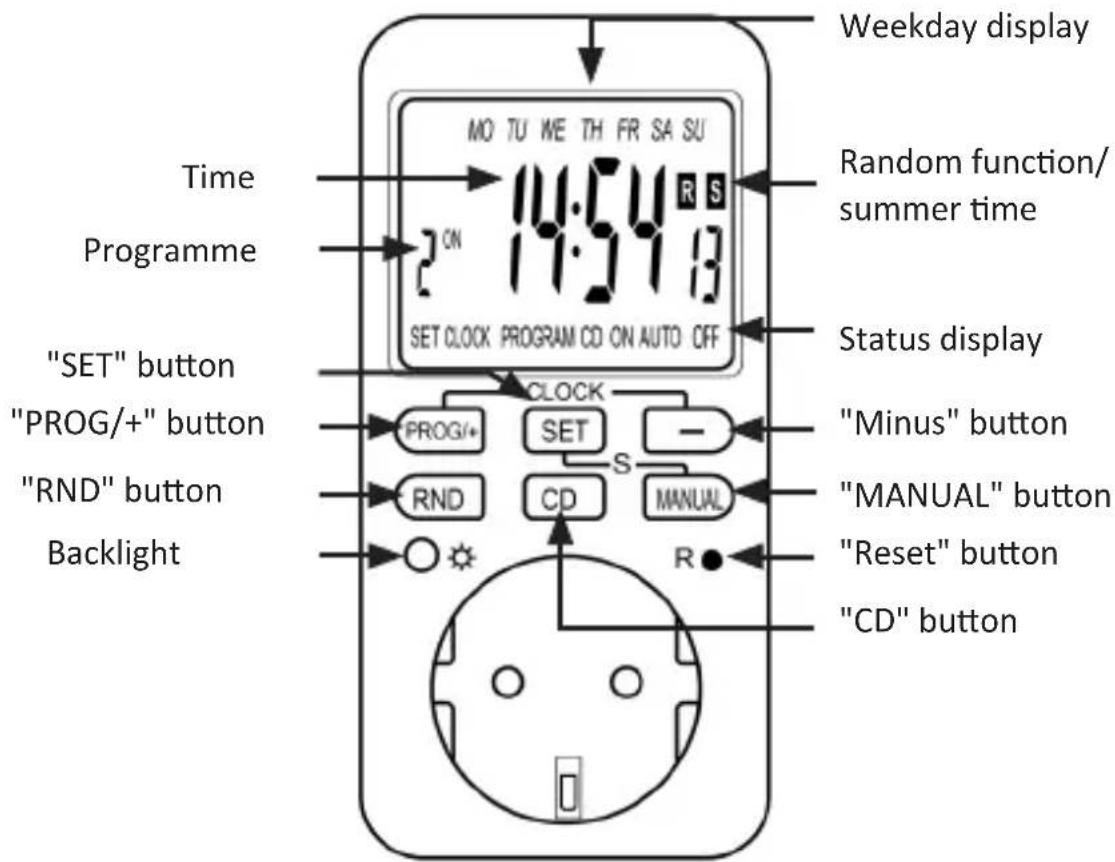
4. Important tips
Please do not connect any devices where the current is more than 16 (2) A. Make sure that the device plug is fully inserted into the timer port. If you need to clean the product, disconnect the timer from the mains completely and wipe the device using a dry cloth. Never immerse the timer in water or other liquids! Heaters and similar devices should never be left unattended during operation. The manufacturer recommends not connecting any such devices to the timer.

• Only for use in dry rooms
- Do not connect in series
• Free of electrical current only when the plug is removed
5. Functional overview
The timer provides the following functions and setting options:
• 10 configurable timer programmes
- Manual switch on/off
• Summer time function
- Random function for a random delay of timer between 10 and 32 minutes
• 16 different combinations of the weekdays can be set
The individual days of the week are shown in the timer display in the form of English abbreviations. The following table shows the abbreviations and the corresponding day of the week:
| Mo Monday |
| Tu Tuesday |
| We Wednesday |
| Th Thursday |
| Fr Friday |
| Sa Saturday |
| Su Sunday |
12 English
| No. Weekdays No. Weekdays | ||
| 1 Mo 9 Mo, Tu, We, Th, Fr | ||
| 2 Tu 10 Sa, Su | ||
| 3 We 11 Mo, Tu, We, Th, Fr, Sa | ||
| 4 Th 12 Mo, We, Fr | ||
| 5 Fr 13 Tu, Th, Sa | ||
| 6 Sa 14 Mo, Tu, We | ||
| 7 Su 15 Th, Fr, Sa | ||
| 8 Mo, Tu, We, Th, Fr, Sa, Su 16 MO, WE, FR, SU | ||
The above table shows an overview of the combinations that can be selected for the respective days of the week.
6. Commissioning
Take the product out of the package and remove all the packaging material. Then, plug the timer into any socket whose voltage matches the specifications of the timer.
Leave the timer plugged in for about 12 hours so that the backup battery charges fully. After charging, press the RESET button using a pointed object to clear or completely reset the current configuration of the timer.
The device is now ready to be used. The following sections of this manual describe how to configure the individual settings.
7. Setting the current time
Press the "PROG/+" and "Minus" buttons to view the time. Press and hold the "SET" button for about 3 seconds to adjust the time. First select the current weekday and confirm it using the "SET" button. Use the "PROG/+" and "Minus" buttons to adjust the corresponding values. Then adjust the hour and minute and confirm them using the "SET" button.
8. Setting the timer programmes
Briefly press the "PROG/+" button while you are in time display mode. The program menu is displayed. Then select a program (1-10). You can move between the individual switching on and off points using the "PROG/+" button and the "minus" button and select the desired switching point, which can be edited by pressing the "SET" button.
With the "PROG/+" button and the "Minus" button, it is possible to select the days of the week desired for the switching point and to confirm these using the "SET" button. Then select the desired time for the switching point via the same step and confirm it again using the "SET" button. Then you can again select the other switching points using the "PROG/+" button and the "Minus" button and configure the appropriate switch on/off time. Set the time and days of the week using the "SET", "PROG/+" and "-" buttons as described in the previous step.

Note: Please remember that the days of the week for switching on and switching off have to be configured separately. The selected combination is not automatically adopted for the entire timer programme.
A total of 10 timer programmes are available, all of which you can configure in this way. Once all the programs have been customised to your requirements, please press the "PROG/+" and "Minus" button simultaneously to display the time again. The display again shows the current time and the day of the week. The timer is now ready for use.

Note: Please ensure that the times of the individual timer programmes do not overlap in order to avoid unintentional switching on or off.
To disable a timer programme or to enable a disabled program again, press the "PROG/+" button until the desired program is shown in the display. You can now enable or disable the timer programme using the "MANUAL" button.
9. Switching on and off manually
You can manually switch on and switch off the device connected to the timer using the "MANUAL" button, or enable the automatic control according to the configured timer programmes again.
Press the "MANUAL" button briefly to change between the different modes. The display changes between "AUTO", "ON" and "OFF".
"AUTO" means that the timer switches on and off automatically within the enabled timer programs.
When "ON", the timer continuously supplies power to the connected device.
When "OFF", the timer does not supply power to the connected device.

Note: Please note that when changing from "ON" or "OFF" to "AUTO", the last timer state is retained until one of the configured timer programmes triggers a change.
10. Random function
The random function allows you to set random switch-on and switch-off times for the timer between 10 and 31 minutes in the time period from 6 pm to 6 am. Press the "RND" button to enable or disable the random function. When the function is enabled, this is indicated by the symbol "R" in the display.
11. Countdown function
Press the "Minus" button in time display mode to access the countdown function settings. Press the "SET" button to configure the settings. Enter the desired settings using the "PROG/+" and "Minus" buttons.
During the countdown, select whether the timer should supply power and switch off at the end of the countdown using the "ON" function. Alternatively, the timer can be set using the "OFF" function so that the power is switched on only at the end of the countdown.
Confirm your selection with the "SET" button and then select the desired hours, minutes, and seconds, which also have to be confirmed using the "SET" button.

Note: Please remember that the random function has to be disabled and the device has to be in "AUTO" mode.
12. Summer time and 12/24 hour display
Press the "CD" and "SET" buttons simultaneously to toggle between 12 and 24 hour display. You can toggle between summer and winter time by pressing the "SET" and "MANUAL" buttons simultaneously. If summer time is set, then the symbol "S" is shown in the timer display. In this case, the clock is put forward by one hour.

13. Safety instructions and disclaimer
Never try to open the device to carry out repairs or modifications. Avoid contact with the mains voltage. Do not short-circuit the product. The device is not approved for outdoor use. Therefore please use it only in dry surroundings. Protect it from high humidity, water and snow. Do not expose the device to high temperatures. Do not expose the device to sudden changes in temperature or strong vibrations, as this could damage the electronic components. Check the device for damage before using it. The device should not be used if it has been subject to impact or has been damaged in any other manner. Please comply with the local regulations and restrictions. Do not use the device for purposes other than those described in the user manual. This product is not a toy. Keep it out of the reach of children or mentally disabled persons. Any repair or modification to the device, which is not carried out by the original supplier, will void any warranty and guarantee claims. The device should only be used by those who have read and understood this user manual. The specifications of the device may be changed without special prior notification.
14. Disposal instructions
In line with the European WEEE directive, electrical and electronic devices should not be disposed of along with domestic waste. Their components have to be sent separately for recycling or disposal, as improper disposal of toxic and dangerous components may permanently damage the environment. According to the electrical and electronic equipment act (ElektroG), you are obliged (as a consumer) to return (free of charge) all electrical and electronic devices to the manufacturer, the point of sale, or public collection points at the end of their service life. The relevant local laws regulate the details in this regard. The symbol on the product, in the user manual or/and the packaging refers to these regulations. With this
manner of sorting, recycling and disposal of used devices, you make an important contribution towards protecting our environment.
15. Instructions for battery disposal
In conjunction with the sale of batteries along with the supply of devices that include batteries, the supplier is obliged to point out the following to the customer: The customer is legally obliged to return used batteries. He can return used batteries which the supplier offers or has offered as new batteries in his assortment free of charge to the supplier's dispatch warehouse (shipping address). The symbols shown on the batteries mean the following: Pb = battery contains more than 0.004 percent lead by weight, Cd = battery contains more than 0.002 percent cadmium by weight, Hg = battery contains more than 0.0005 percent mercury by weight.
16. Guarantee statement
The manufacturer grants a warranty of 2 years on processing and material for this product. Warranty repairs may only be carried out by an authorized customer service. The original sales receipt must be enclosed as proof.
Excluded from this warranty are: normal wear and tear, modifications, revisions, damage due to carelessness, external influences, areas of application for which the product is not designed, or completely or partially dismantled products.

The symbol of the crossed-out dustbin means that the battery must not be disposed of in household waste.


WEEE directive 2012/19/EU WEEE Register no.: DE 67896761
The company WD Plus GmbH hereby certifies that the device 303287 complies with the fundamental requirements and all other relevant stipulations. A complete conformity statement can be obtained from: WD Plus GmbH, Wohlenbergstraße 16, 30179 Hannover
MO-FR 9:30am - 18pm CET

downloads.ganzeinfach.de
WD Plus GmbH


- Scope of delivery
- Technical data
- Product details
- Important tips
- Functional overview
- English
- Commissioning
- Setting the current time
- Setting the timer programmes
- Switching on and off manually
- Random function
- Countdown function
- Summer time and 12/24 hour display
- Safety instructions and disclaimer
- Disposal instructions
- Instructions for battery disposal
- Guarantee statement
Brand : Bearware
Model : 303287
Category : Digital timer switch