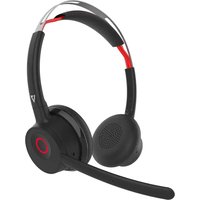
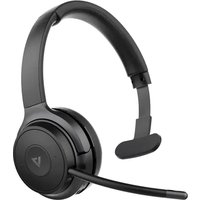
HB650S - Headphones V7 - Free user manual and instructions
Find the device manual for free HB650S V7 in PDF.


| Brand | V7 |
| Model | HB650S |
| Product type | Wireless headset |
| Form factor | Binaural stereo over-ear |
| Bluetooth version | 5.1, Class 2 |
| Bluetooth profiles | A2DP, AVRCP, HSP, HFP |
| Audio codecs | SBC, MPEG-2 AAC LC |
| Wireless range | Up to 30 m (with dongle), 10 m (built-in Bluetooth) |
| Noise reduction technology | Advanced hybrid ANC |
| Microphone noise cancellation | ENC (ambient noise cancellation) |
| Speaker size | 32 mm |
| Frequency response | 20 - 20,000 Hz |
| Maximum sound pressure level | 118 dB SPL at 1 kHz |
| Microphone sensitivity | -38 dBV/Pa |
| Microphone frequency response | 100 Hz - 10 kHz (PC wideband optimized up to 7 kHz) |
| Battery | Lithium-ion 380 mAh |
| Playback time (ANC off) | Up to 40 hours |
| Playback time (ANC on) | Up to 30 hours |
| Talk time | Up to 24 hours |
| Standby time | Up to 50 days |
| Charging time | 2 hours |
| Charging port | USB-C |
| Multipoint connectivity | Up to 2 devices |
| Boom rotation | 270° |
| Dimensions (L x W x H) | 171.5 x 69.9 x 194.3 mm |
| Weight | 166 g |
Frequently Asked Questions - HB650S V7
User questions about HB650S V7
0 question about this device. Answer the ones you know or ask your own.
Ask a new question about this device
Download the instructions for your Headphones in PDF format for free! Find your manual HB650S - V7 and take your electronic device back in hand. On this page are published all the documents necessary for the use of your device. HB650S by V7.
USER MANUAL HB650S V7
- HB650S Wireless Headset 5. USB-C Adapter
- USB-C Charging Cable 6. 3.5mm AUX Audio Cable
- V7 Link USB Dongle 7. User's Guide
- Drawstring Storage Bag 8. Warranty and Compliance
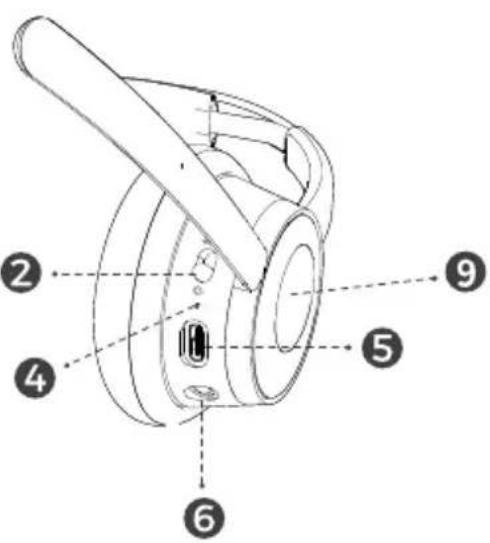
Product Overview
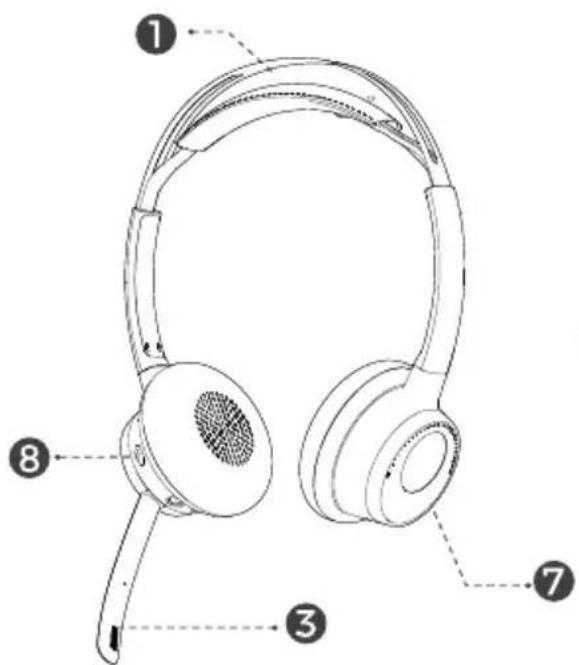
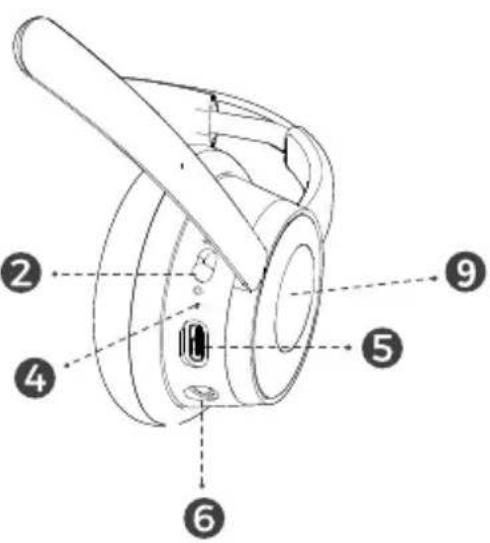
- Adjustable Headband
- Power On/Off/Pairing
- ENC Microphone
- LED Indicator
- USB-C Charging Port
- 3.5mm AUX Port
- Volume +/-
- ANC On/Off
- Call Busy Light
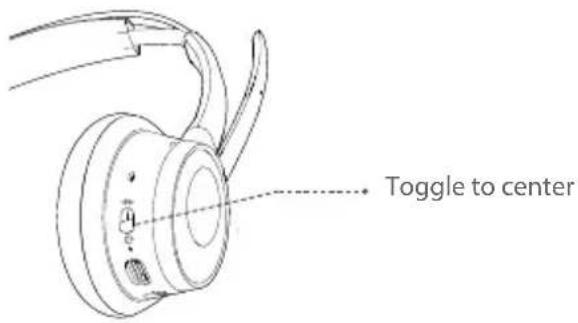
Powering ON
Toggle the power / pairing switch to the center position. The headset will power on.
Connecting to a PC using V7 Link Bluetooth USB Dongle
The V7 Link USB dongle and headset are pre-paired and ready for use. Plug the USB dongle into a USB port and power on the headset to establish an automatic connection. Enjoy voice and audio performance range of up to 30 meters (100') line-of-sight. If you are using the PC's integrated Bluetooth, your range may be limited to 10 meters (33') and you may need to select 'V7 HB650S' as the audio playback device in the operating system's settings.
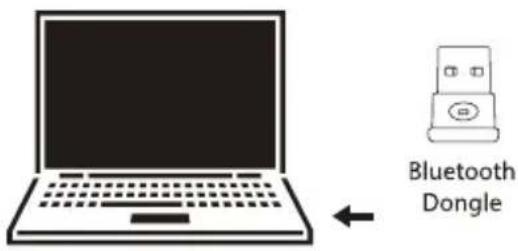
Connecting using the PC's integrated Bluetooth
Enable the PC's Bluetooth in settings. Push the Power switch towards the pairing position and the headset will enter pairing mode (LED quick flashes blue). Click on "Add Bluetooth or other device" on your PC. Click on "Bluetooth" and the Windows 10 (or later versions) will automatically install and add the headset.

Connecting to Bluetooth enabled mobile device
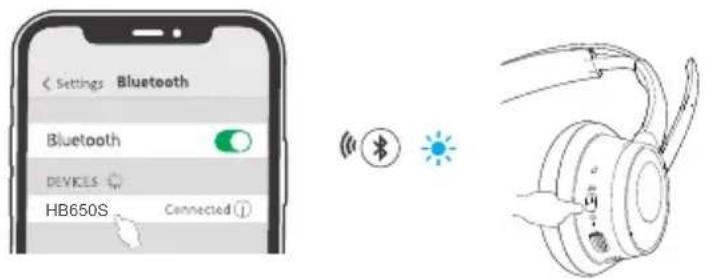
Enable the device's Bluetooth in settings. Toggle the Power switch towards the pairing position and the headset will enter pairing mode (LED quick flashes blue). Select 'V7 HB650S' in the device list and it will show as 'Connected.'
Lift-to-Mute
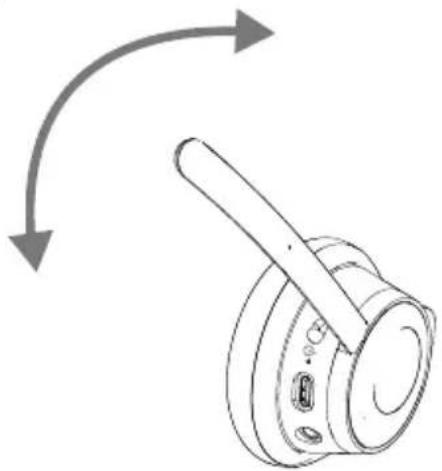
Moving the boom arm to the vertical position mutes the headset. To unmute the headset, return the boom arm to the horizontal position.
natural_image
Diagram of a mechanical component with directional arrows indicating motion (no text or symbols)ANC
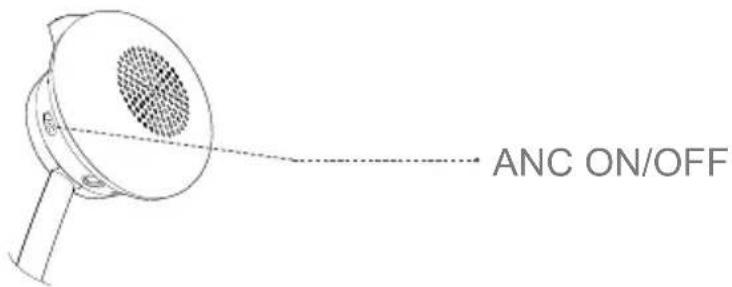
Press the ANC button for 2 seconds to turn on ANC. Press again to turn off.
| Action Control Result | ||||
| Call Control | Answer / End Call | Press Multifunction Button |  | Call is answered / ended |
| Reject Call | Hold Multifunction Button | Call is rejected | ||
| Voice Assistant | Launch Voice Assistant | Double Press Multifunction Button | Voice Assistant is activated | |
| Busy Light Manual operation | When idle, hold Play/ Pause 2 sec. until LEDs turn on / off | Busy light turns on / off | ||
| Media Control | Play / Pause | Press Multifunction Button | Music plays / pauses | |
| Track Forward | Turn and hold volume knob clockwise | 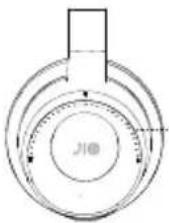 Volume Control Volume Control | Track advances | |
| Track Backward | Turn and hold volume knob counterclockwise | Previous track | ||
| Volume Control | Increase Volume | Toggle volume knob clockwise | Volume level increases | |
| Decrease Volume | Toggle volume knob counterclockwise | Volume level decreases | ||
| Battery Level Check Battery Level | Double press the ANC Button to hear current battery status |  | Headset reports current battery level | |
Voice Notifications and LEDs
| Action Voice (English) LED display | |||
| Power On | Slide toggle switch to center position | “Welcome to V7” | Blue LED indicator (see fig. 2, #6) flashes every second |
| Power Off | Slide toggle switch to off position | “Goodbye” LED turns off | |
| Connected to PC or mobile device | Power on the headset after initial pairing | “Connected” | Blue LED indicator (pg. 2) flashes every second |
| Lift to Mute | Lift boom arm “Muted” - | ||
| Lower boom arm “Unmuted” - | |||
| Pairing Mode | Slide toggle switch to pair-ing position | “Pairing” Blue LED indicator fast-flashes | |
| Battery level | Double pressing the ANC Button | “Battery xx%” - | |
| Clearing Pairing | Press and hold the ANC and volume knob simultaneously | Audible tone LED Indicator flashes Blue-Red | |
| Active Noise Cancellation | Press the ANC Button for 2 seconds | “ANC On” / “ANC Off” - | |
| Charging | Plug in charging cable or dock the headset | - Red LED lights while charging | |
| Call Answer | Incoming / Answered / Ended | - | Busy light LED (see fig. 2, #9) flashes RED on incoming calls, solid while on call. LED is off when disconnected |
| Low Battery | Under 20%, low battery level is reported every 10 minutes | “Battery Level” Red LED flashes 3 x every 10 minutes | |
Charging
Plug the USB charging cable into a 5V USB-A wall charger and the USB-C connector into the Headset. The headset can fully charge in approximately 3 hours or less.
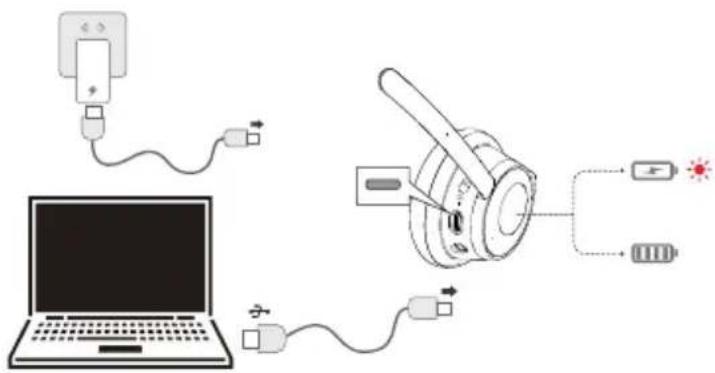
Using the Desktop Charging Cradle
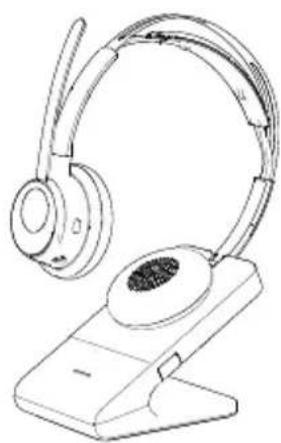
The optional V7 charging cradle, DTCRDL keeps the headset charged and at the ready as well. A built-in magnetic connection makes docking and charging easy and convenient. The cradle includes a USB cable to connect to any powered USB port.
natural_image
Line drawing of a pair of hard-band headphones on a stand (no text or symbols)| SPECIFICATIONS | |
| FORM FACTOR Binaural Stereo (on ear) | |
| WIRELESS | Bluetooth v5.1; Class 2 |
| Multipoint connectivity, headset can connect to two devices simultaneously | |
| BLUETOOTH PROFILES A2DP, AVRCP | HSP, HFP |
| CODECS | SBC, MPEG 2 AAC LC |
| RANGE Up to 30 meters/100-ft with Bluetooth Dongle | |
| BATTERY | Battery Capacity: 380 mAh; lithium-lon |
| Up to 24 hours talk time | |
| Listening time: up to 40 hours (ANC OFF) | |
| Listening time: up to 30 hours (ANC ON) | |
| Charge time: 2 hours for a full charge | |
| Standby time: up to 50 days | |
| ANC TECHNOLOGY Advanced Hybrid ANC | |
| SPEAKER SIZE 32 mm | |
| SPEAKER BANDWIDTH 20-20000Hz | |
| MAXIMUM ACOUSTIC OUTPUT 118dB SPL @ 1KHz | |
| MICROPHONE TECHNOLOGY ENC Noise canceling technology | |
| MICROPHONE FREQUENCY RESPONSE | 100 Hz to 10 kHz optimized for PC wideband audio up to 7 kHz |
| MICROPHONE SENSITIVITY -38dBV/Pa | |
| BOOM ROTATION 270° | |
| DIMENSIONS (L x W x H) 171.5 x 69.9 x 194.3 mm | |
| WEIGHT 166g | |
Technologies Explained
EN
ENC
Environmental Noise Cancellation. This technology attempts to cancel or suppress all ambient background noise while allowing the user's voice greater clarity. ENC only works when you are actively using the headset microphone. It requires input from you as well as the sounds around you. ENC benefits those you are speaking to, so your voice is heard with minimal interference.
ANC
Active noise cancelling headphones help block outside sound, making them ideal for commuters and people who work in busy office environment. ANC does this by adding counter frequencies, sound waves that push against your hearing, so when ANC is active, it can affect the clarity of the sounds you hear.
ANC effectiveness can vary with headset design. Over-ear headsets have the benefit of enclosing your ears, making a seal to help block out unwanted outside noise. On-ear headsets offer less of a seal but provide greater comfort with frequent and prolonged usage.
natural_image
Diagram of a mechanical component with directional arrows indicating motion (no text or symbols)ANC
natural_image
Line drawing of a pair of hard-band headphones on a stand (no text or symbols)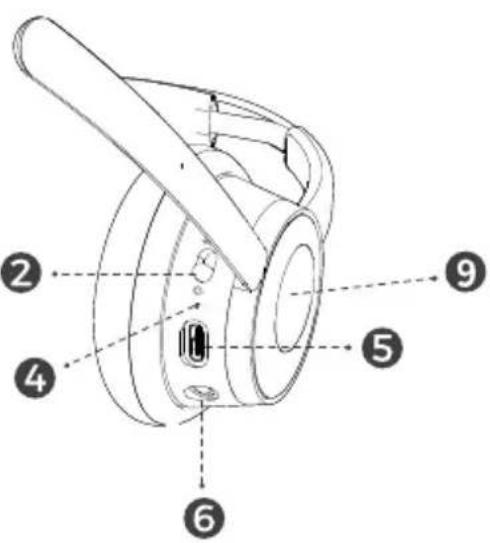
natural_image
Diagram of a mechanical component with directional arrows indicating motion (no text or symbols)ANC
natural_image
Line drawing of a pair of hard-band headphones on a stand (no text or symbols)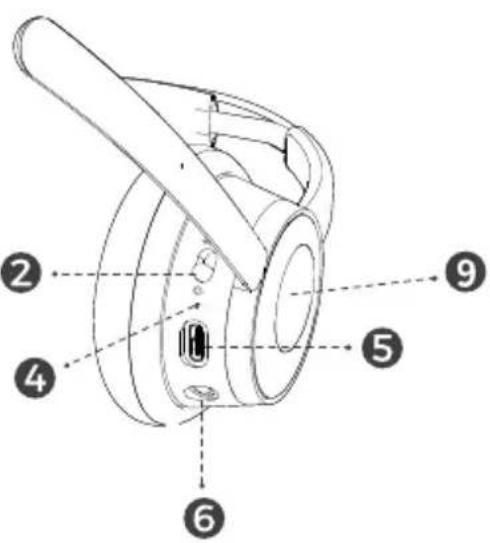
Disattivare l'audio
natural_image
Diagram of a mechanical component with directional arrows indicating motion (no text or symbols)natural_image
Line drawing of a pair of hard-band headphones on a stand (no text or symbols)natural_image
Diagram of a mechanical component with directional arrows indicating motion (no text or symbols)ANC
natural_image
Line drawing of a pair of hard head earchamps on a stand (no text or symbols)
Brand : V7
Model : HB650S
Category : Headphones