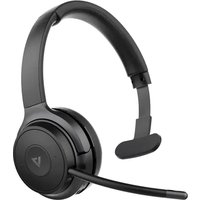
HB605M - Headphones V7 - Free user manual and instructions
Find the device manual for free HB605M V7 in PDF.


| Product type | Wireless headset with detachable external microphone |
| Brand | V7 |
| Model | HB605M |
| Bluetooth version | Bluetooth 5.0 |
| Bluetooth range | Up to 30 meters (with dongle), 10 meters (built-in Bluetooth) |
| Battery type | Lithium polymer, 410 mAh |
| Charging time | Approximately 3 hours |
| Talk time | Up to 18 hours |
| Standby time | Approximately 175 hours |
| Connectivity | Bluetooth, 3.5 mm audio cable, USB-C charging |
| Bluetooth profiles | A2DP, AVRCP, HFP, HSP, SPP, DID, HID, PXP, FMP, BAS |
| Frequency response | 99 ± 3 dB |
| Microphone sensitivity | -42 ± 3 dB (external microphone) |
| Speaker size | 30 mm |
| Weight | Approximately 150 g (estimated) |
| Compatibility | Windows 10, macOS, iOS, Android |
| Main functions | Play/pause, volume control, track skip, answer/end call, reject call, microphone mute, voice assistant |
| Care and cleaning | Wipe with a soft dry cloth; do not use harsh liquids |
| Safety | Do not disassemble, avoid moisture, do not use while driving |
| Spare parts and repairability | Built-in battery not user-replaceable; contact customer service for repair |
| Package contents | Headset, 3.5 mm audio cable, USB-C cable, external microphone, storage pouch, user guide |
Frequently Asked Questions - HB605M V7
User questions about HB605M V7
0 question about this device. Answer the ones you know or ask your own.
Ask a new question about this device
Download the instructions for your Headphones in PDF format for free! Find your manual HB605M - V7 and take your electronic device back in hand. On this page are published all the documents necessary for the use of your device. HB605M by V7.
USER MANUAL HB605M V7
WIRELESS MONO HEADSET
USER GUIDE

Bluetooth®
natural_image
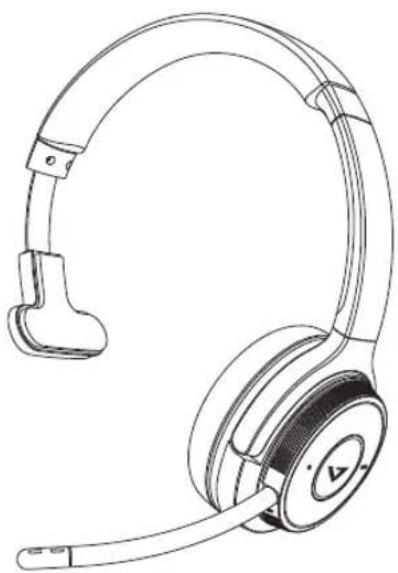
Line drawing of a pair of connected audio headsets (no text or symbols)In the Box
HB605M
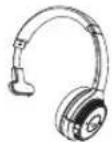
Mono Headset
V7 Link Bluetooth
Dongle
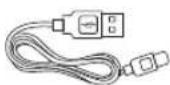
Type-C Charging Cable
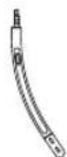
Boom Mic
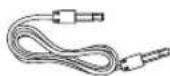
3.5mm Audio Cable
Storage Bag
User Guide
Warranty & Compliance
Overview
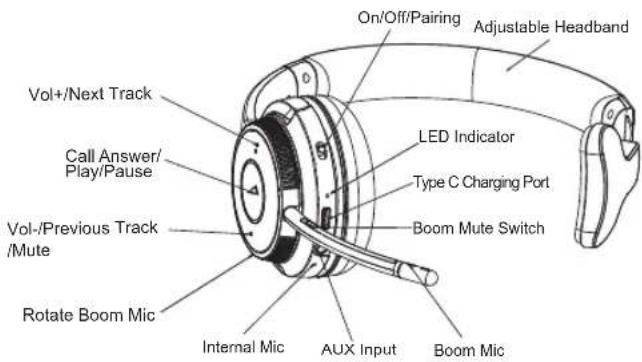
How to Wear
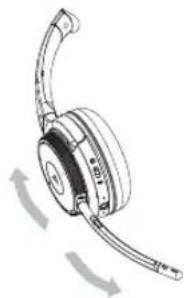
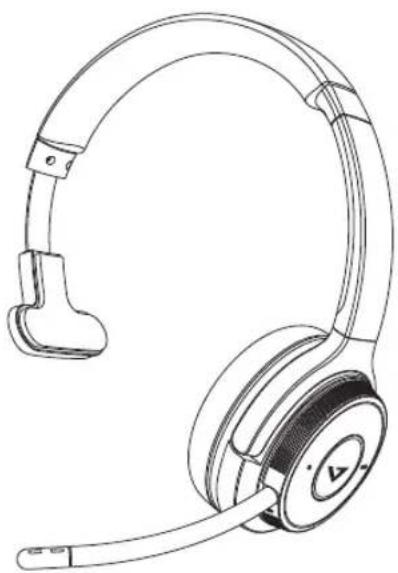
- Insert the detachable Boom Microphone into the 2.5mm receptacle located on the headset.
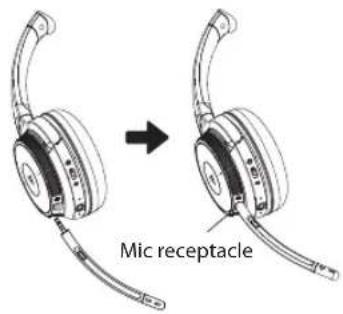
- The boom microphone can move to accommodate a user's preference for right side or left side wear.
natural_image
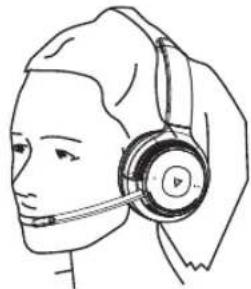
Line drawing of a pair of headphones with curved leads and motion arrows indicating rotation (no text or symbols)- Position the microphone to your preference.
natural_image
Line drawing of a person wearing a headset (no text or symbols)Operation
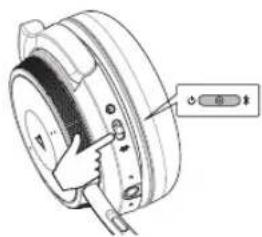
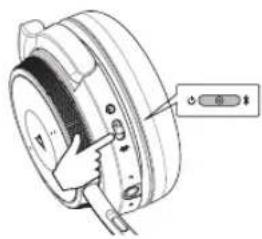
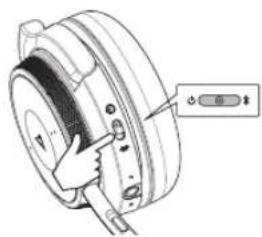
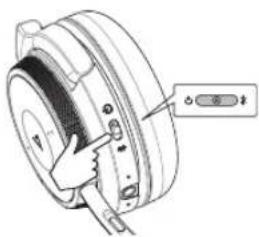
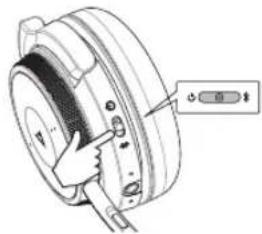
Power On
natural_image
Technical diagram of a mechanical component with a finger pointing to a button (no text or symbols present)Slide the switch to the CENTER position
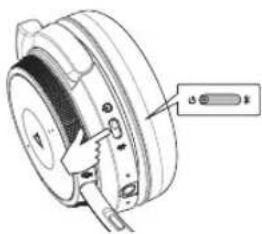
Power Off
natural_image
Technical diagram of a mechanical component with a handle and control knob (no text or symbols)Slide the switch to the ⏻ position
Connecting to a PC
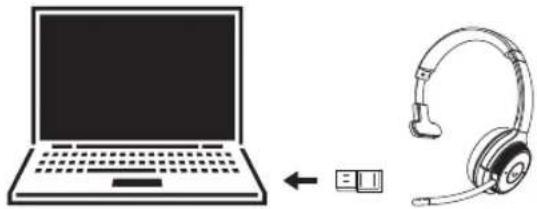
PC (W/V7's Bluetooth Dongle)
The V7 USB dongle and headset are pre-paired and ready for use. Plug in the USB dongle and power on the headset to enjoy voice and audio performance range of up to 30 meters (100') line-of-sight. If using the PC's integrated Bluetooth, your range may be limited to 10 meters (33') and you may need to select 'V7 HB605M' for the audio playback device in the operating system's settings.
natural_image
Illustration of a laptop connected to an earheart with a USB symbol (no text or symbols present)Connecting
How to connect with the first Bluetooth device.
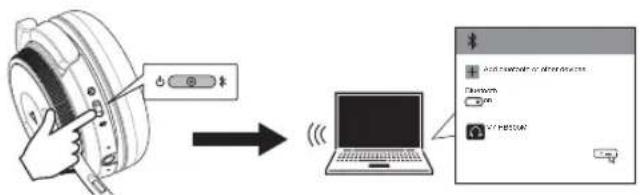
Slide the power switch to the "CENTER" position. The LED will flash red and blue when ready to connect.
Windows 10 PCs and Macs will automatically recognize and install drivers.
Connecting to the second Bluetooth device.
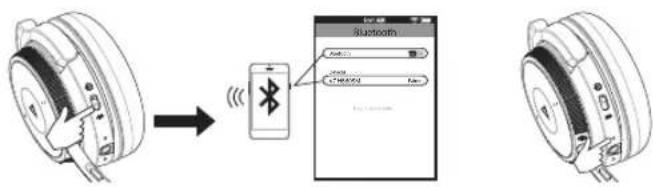
Slide the power switch to the “*” position and hold until 'pairing' heard or the pairing LED flashes, then select "V7 HB605M".
Activate "Bluetooth" in your device's settings and select "V7 HB605M".
The LED will flash blue to indicate the headphone is connected, and 'connected' is heard.
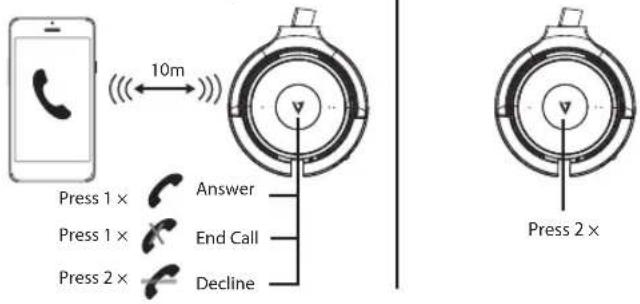
Calls with a Smartphone
Calls with a Smartphone Siri/Cortana/Assistance
Charging the Headset
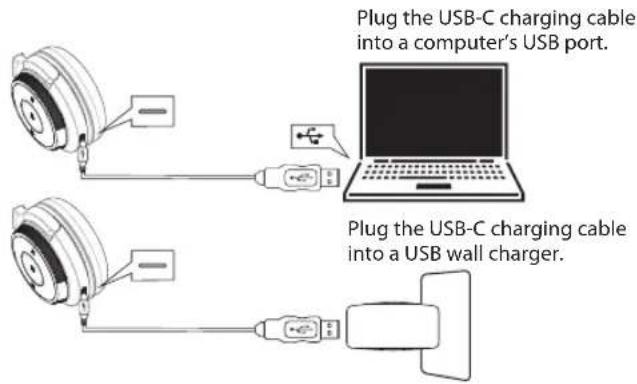
During charging the red LED will light. When fully charged, the LED will turn off. The headset remains on during charging.
To power off, the headset's power switch must be slid to the off position.
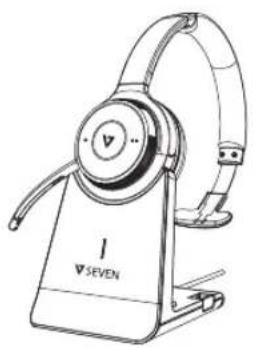
Using the charging stand
Plug the optional charging stand into a powered USB port on your PC, docking station or USB wall charger and then dock the headset. It takes approximately 3 hours to fully charge the headset.
natural_image
Line drawing of a V76EN hard hat with adjustable arms and base (no text or symbols on the device itself)Other Operations
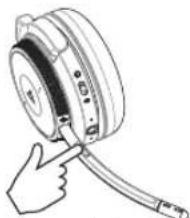
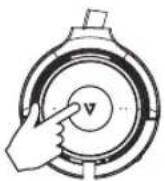
Muting the Boom Mic: Depress and hold the button for 2 seconds.
natural_image
Hand inserting a cable into a circular device (no text or symbols visible)Muting the internal Mic: (When boom mic is not in use) Depress and hold the Vol- key 2 seconds.
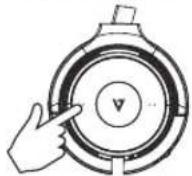
Battery Status: After the headset is powered on, press the call button briefly to hear the current battery status 100% -75%-50%-25%.
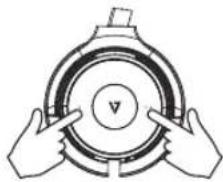
Clearing the pairing: While the headset is powered on, press and hold the previous and next track buttons simultaneously for 10 seconds. A pink LED will light for 2 seconds and the headset will then enter pairing mode.
natural_image
Illustration of two hands holding a circular mechanical component with a central v button (no text or symbols)Product Specifications
Bluetooth version: Bluetooth V5.0
Bluetooth Profile: A2DPv1.3.1; AVRCPv1.6; HFPv1.7;
HSPv1.2; SPP v1.2; DID v1.3; HID v1.1; PXP v1.0.1;
FMP v1.0; BAS v1.0
Working Frequency: 2.402GHz-2.480GHz
Frequency Response: 99±3dB
Receiving sensitivity: >-89dBm
Battery type: Lithium polymer
Mic type and sensitivity: Virtual Microphone -42±3dB
Headphone Driver Size: 30mm
Battery capacity: 410mAh
DC Input: 5V_500MA
Charging voltage: 5V/2A
Bluetooth working range: Up to 30m
Talk time: Up to 18 hours
Charging time: Approximately 3 hours
Standby time: Approximately 175 hours
Compatibility: Windows 10, mac OS, iOS and Android
WARNING
Headsets can deliver sounds at loud volumes and high-pitched tones. Avoid prolonged use of the headset at excessive sound pressure levels. Please read the safety guidelines below prior to using this headset.
Safety information
Use of a headset will impair your ability to hear other sounds. Use caution while using your headset when you are engaging in any activity that requires your full attention. This package contains small parts that may be hazardous to children and should be kept out of reach from children.
Do not attempt: To dismantle or service the product as this may cause a short circuits or other malfunction which could result in a fire or electric shock. Avoid exposing your product to rain, moisture or other liquids to avoid damage to the product or injury to you. Keep all products, cords, and cables away from operating machinery. Avoid use while operating a motor vehicle.
Built-in battery care: Please observe the following if the product contains a battery. Your product is powered by a rechargeable battery.
The full performance of a new battery is achieved only after two or three complete charge and discharge cycles. The battery can be charged and discharged hundreds of times but will eventually wear out.
Always try to keep the battery between 15^ C and 25^ C ( 59^ F and 77^ F). A product with a hot or cold battery may not work temporarily, even when the battery is fully charged. Battery performance is particularly limited in temperatures well below freezing.
Battery warning!
CAUTION – The battery used in this product may present a risk of fire or chemical burn if mistreated. Do not attempt to open the product or replace the battery. This will void the warranty.
Troubleshooting & Support
Headphones will not power on:
- Be sure the headphones are fully charged.
My mobile device is unable to find the Bluetooth headphones
- Confirm the headphones are in pairing mode (blue/red indicator lights flashing).
- Remove "V7 HB605M" from your phone's Bluetooth device list and try again.
- If the model still does not appear, restart the headset and phone, then try again.
After successfully pairing, the headphones disconnect
- Be sure the battery has adequate power and recharge.
- Headphones must be within 10m of most mobile devices.
- Connections may be affected by obstructions such as walls or other electronic devices. Try moving closer to the device you are connected to.
The sound is distorted when listening to music or there is no sound when receiving or making calls through my PC
- Press Call Answer twice or turn off the headset, remove and reinsert the Bluetooth dongle and turn on the headset.
When answering a call, I cannot hear anything
- Ensure the mobile device is connected to the V7 HB605M headphones and not on phone's speaker or other audio option.
- Increase the volume on your mobile device.
There is no sound when listening to music
- Increase the volume on your headphones or the mobile device.
- Reestablish the Bluetooth wireless connection between the headphones and your mobile device.
- Check if the audio app has paused or stopped playback.
Headphones will not charge
- Confirm that the charging cable is operational or undamaged.
- Ensure that the USB charging cable is fully seated in the headphones and wall charger ports.
- Confirm that the USB port is outputting power. Some USB ports shut off when the PC is off.
Find support for the V7 HB605M at v7world.com
7SEVEN
HB605M
WIRELESS MONO-HEADSET
GEBRAUCHSANLEITUNG

Bluetooth®
natural_image
Line drawing of a pair of connected audio headsets (no text or symbols)Lieferumfang
HB605M
Mono-Headset
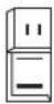
V7 Link
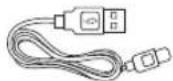
Bluetooth-Dongle USB-C-Ladekabel
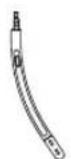
Bügel-
mikrofon
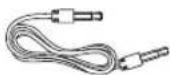
3,5 mm-
Audiokabel
natural_image
Line drawing of a pair of headphones with curved leads and directional arrows indicating rotation (no text or symbols)natural_image
Line drawing of a person wearing a headset (no text or symbols)Betrieb
Einschalten
natural_image
Technical diagram of a mechanical component with a labeled button (no text or symbols present)natural_image
Line drawing of a laptop connected to an ear headphones with a small device icon (no text or symbols)natural_image
Line drawing of a black-and-white hard hat with earbuds and a base labeled 'SEVEN' (no additional text or symbols)Weitere Funktionen
natural_image
Hand inserting a cable into a circular component (no text or symbols visible)natural_image
Illustration of two hands holding a circular mechanical component with a central v button (no text or symbols)Technische Daten
Bluetooth-Version: Bluetooth V5.0
Bluetooth-Profil: A2DPv1.3.1; AVRCPv1.6; HFPv1.7;
HSPv1.2; SPP v1.2; DID v1.3; HID v1.1; PXP v1.0.1;
FMP v1.0; BAS v1.0
natural_image
Line drawing of a pair of hard-band headphones with earbuds and headband (no text or symbols)natural_image
Line drawing of a pair of headphones with curved leads and directional arrows indicating rotation (no text or symbols)natural_image
Line drawing of a person wearing a headset (no text or symbols)Funcionamiento
Encendido
natural_image
Diagram of a mechanical component with a finger pointing to a circular feature, no text or symbols presentnatural_image
Technical line drawing of a mechanical component with a handle and control knob (no text or symbols)natural_image
Illustration of a laptop connected to an earphone with a USB flash icon (no text or symbols)Conexión
natural_image
Line drawing of a V76EN hard hat with earbuds and front-mounted stand (no text or symbols on the device itself)Otras operaciones
natural_image
Hand inserting a cable into a spoolie (no text or symbols visible)natural_image
Illustration of two hands holding a circular object with a central v label (no text or symbols beyond the label)natural_image
Line drawing of a pair of connected audio headsets (no text or symbols)Contenu de la boîte
Casque mono
HB605M
Dongle Bluetooth
Link V7
natural_image
Illustration of a pair of headphones with curved leads and directional arrows indicating rotation (no text or symbols)natural_image
Line drawing of a person wearing a headset (no text or symbols)Fonctionnement
Allumer
natural_image
Diagram of a mechanical component with a finger inserted, showing no text or symbolsnatural_image
Technical line drawing of a mechanical component with a handle and mounting bracket (no text or symbols)natural_image
Illustration of a laptop connected to an earphone with a separate icon (no text or symbols)Connexion
natural_image
Line drawing of a modern hard hat with adjustable arms and a base labeled 'SEVEN' (no additional text or symbols)natural_image
Hand inserting a cable into a ring-shaped device (no text or symbols visible)natural_image
Illustration of two hands holding a circular mechanical component with a central v-mark (no text or symbols)natural_image
Line drawing of a pair of connected audio headsets (no text or symbols)natural_image
Line drawing of a pair of hardcover headphones with curved leads and directional arrows indicating rotation (no text or symbols)natural_image
Line drawing of a person wearing a headset (no text or symbols)Utilizzo
Attivazione
natural_image
Technical illustration of a mechanical component with a hand operating a button (no text or symbols visible)natural_image
Line drawing of a laptop connected to an earphone with a USB flash icon (no text or symbols)Connessione
natural_image
Line drawing of a V7 SEVEN audio headset with adjustable earbuds and stand (no text or symbols on the device itself)Altre operazioni
natural_image
Hand inserting a cable into a spoolie (no text or symbols visible)natural_image
Illustration of two hands holding a circular mechanical component with a central v button (no text or symbols)Durata in standby: circa 175 ore
- In the Box
- Overview
- How to Wear
- Operation
- Connecting to a PC
- Connecting
- Calls with a Smartphone
- Charging the Headset
- Using the charging stand
- Other Operations
- Product Specifications
- WARNING
- Safety information
- Battery warning!
- Troubleshooting & Support
- Headphones will not power on:
- My mobile device is unable to find the Bluetooth headphones
- After successfully pairing, the headphones disconnect
- The sound is distorted when listening to music or there is no sound when receiving or making calls through my PC
- When answering a call, I cannot hear anything
- There is no sound when listening to music
- Headphones will not charge
- Find support for the V7 HB605M at v7world.com
- 7SEVEN
- Lieferumfang
- Betrieb
- Weitere Funktionen
- Technische Daten
- Funcionamiento
- Conexión
- Otras operaciones
- Contenu de la boîte
- Fonctionnement
- Connexion
- Utilizzo
- Connessione
- Altre operazioni
Brand : V7
Model : HB605M
Category : Headphones