303247 - Vacuum Cleaner Brandson - Free user manual and instructions
Find the device manual for free 303247 Brandson in PDF.


| Product Type | Cordless Handheld Vacuum |
| Brand | Brandson |
| Model | 303247 |
| Charger Input | 100-240 V AC, 50/60 Hz |
| Charger Output | 13.5 V DC, 500 mA |
| Battery Type | Lithium-ion 10.8 V, 2200 mAh |
| Charging Time | 4 to 5 hours |
| Runtime | 15 min (max 10 min continuous) |
| Suction Power | 70 W |
| Dust Tank Capacity (liquid) | Approx. 100 ml |
| Filtration | Removable filter unit, filter washable in cold or warm water |
| Included Accessories | Crevice tool, liquid nozzle, charging base, power adapter |
| Functions | Dry and wet vacuuming |
| Recommended Use | Domestic, short duration (max 10 min continuous) |
| Maintenance | Empty and dry the dust tank after wet vacuuming; clean the filter regularly |
| Safety | Do not use without filter; do not vacuum combustible substances; do not immerse in water |
Frequently Asked Questions - 303247 Brandson
User questions about 303247 Brandson
0 question about this device. Answer the ones you know or ask your own.
Ask a new question about this device
Download the instructions for your Vacuum Cleaner in PDF format for free! Find your manual 303247 - Brandson and take your electronic device back in hand. On this page are published all the documents necessary for the use of your device. 303247 by Brandson.
USER MANUAL 303247 Brandson
IMPORTANT SAFETY GUIDELINES FOR THIS APPLIANCE!
Please read this manual carefully before using the appliance!
- Never vacuum any flammable substances!
- Never immerse the appliance or the power adapter in water!
- This appliance is meant exclusively for personal use and for the intended purpose. This appliance is not intended for commercial use.
- Do not use the product with wet hands.
- Operate the appliance only with the voltage indicated on the appliance label.
-
Children should use or clean the appliance only under supervision or guidance.
-
If the power cable is damaged, then it should be replaced by the manufacturer, his specialist dealer or an equally qualified technician, so as to prevent any risk.
- In the interest of child safety, please do not leave any packaging material (plastic bags, cardboard, polystyrene, etc.) lying around.
- Children should be supervised to ensure that they do not play with the appliance.
- Unplug the power plug when the appliance is not being used or during cleaning.
-
Charge the handheld vacuum cleaner only with the charger provided. The adapter may become hot during the charging process!
-
Please do not tilt the appliance to one side when vacuuming fluids!
- Always switch off the handheld vacuum cleaner after use.
- Never block the exhaust openings while the product is being operated!
- Switch off the appliance when you charge it!
- Do not use the handheld vacuum cleaner without the filter unit in place.
- If you have vacuumed fluids using the appliance, empty and dry the dust compartment before placing it in the charging station.
Thank you for choosing a Brandon product. Please read the following user manual carefully so as to get the most from the product you have purchased.
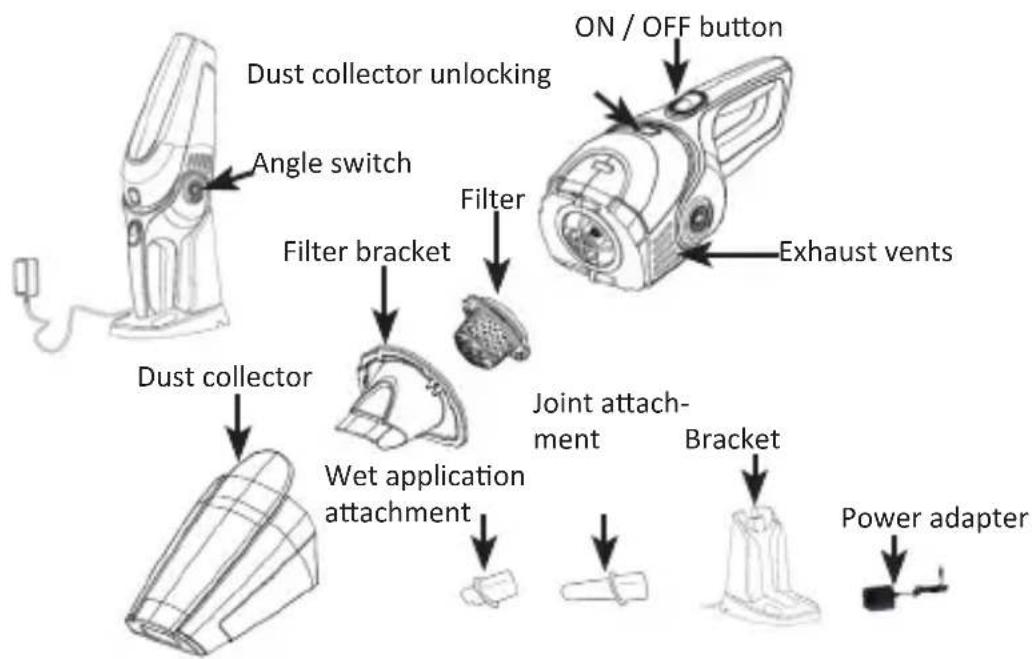
1. Scope of delivery
- Handheld vacuum cleaner
- Joint attachment
- Attachment for fluids
- Charging bracket
- Mains adapter 13.5V
2. Technical data
| Power supply • Power a | adapter: 100 - 240V AC • Vacuum cleaner: 13.5V DC, 500mA |
| Battery type 2200mAh | 10.8V Li-Ion battery |
| Charging time 4-5 hours | |
| Battery life 15min, max. | 10min Continuous operation |
| Output 70W: |
3. Product details
4. Charging the appliance
Charge the appliance for at least 5 hours as soon as the battery is empty.
-
Ensure that the appliance has been switched off.
-
Connect the power adapter to a properly installed socket.
-
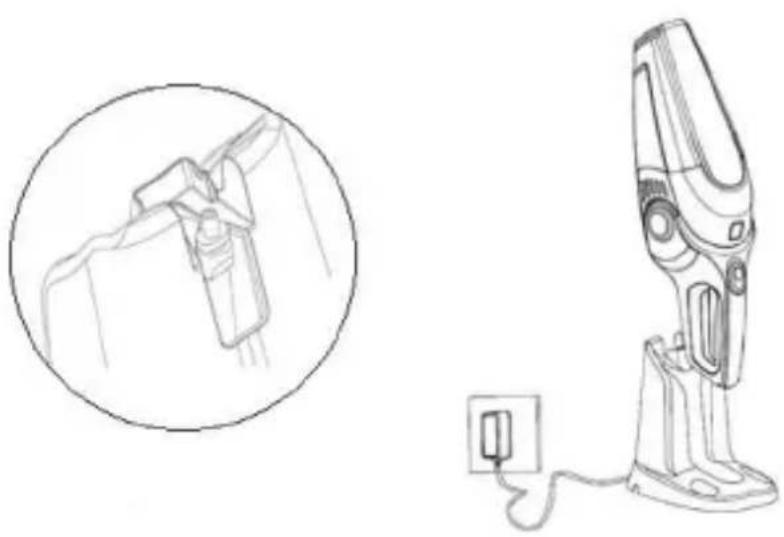
Insert the plug of the power adapter into the recess provided for this purpose in the charging bracket.
-
Ensure that the vacuum cleaner can still be placed upright and that the hollow plug does not protrude too much.
-
Place the handheld vacuum cleaner in the charging station. The charging LED flashes in red during the charging process. The appliance is fully charged when the LED goes off.
5. Usage
Press the "on/off" switch once to switch on. Press the switch again to switch off.
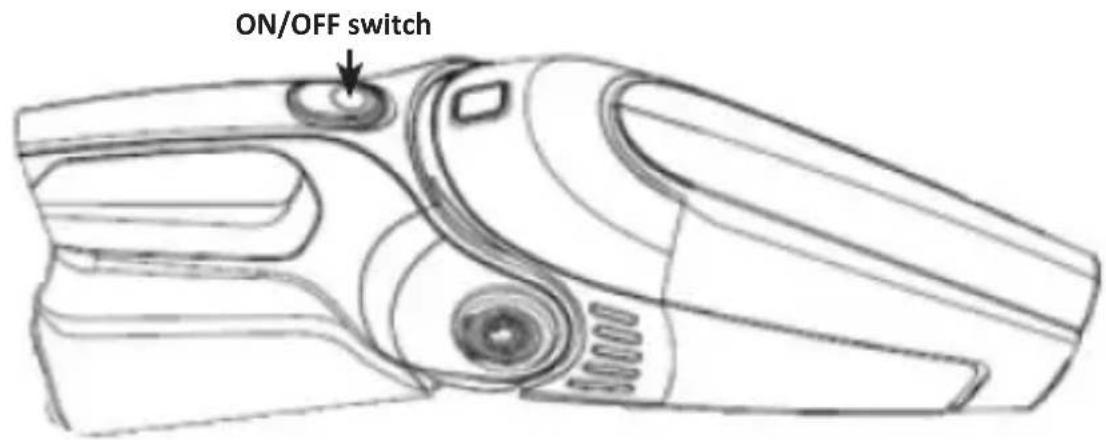

Caution! This device is designed to be operated for brief durations of 10 minutes. Then allow it to cool down completely.
6. Accessories
The product comes with the following accessories:
- A joint attachment for vacuuming corners or narrow gaps
- A fluid attachment for vacuuming liquids
Select the accessory that you want to use, and attach it to the nozzle of the handheld vacuum cleaner.
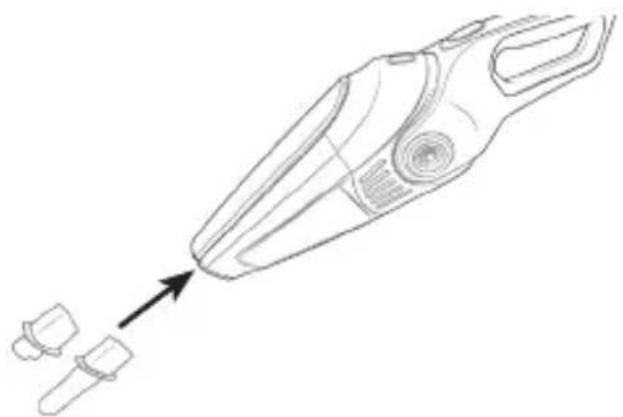
7. Vacuuming fluids
Mount the fluid attachment to the nozzle of the handheld vacuum cleaner. Hold the handheld vacuum cleaner at an angle of about 30^ facing downwards.
Note: Hold the appliance with the nozzle facing upwards if there is fluid in the dust collector. Never tilt it to the side or shake the handheld vacuum cleaner!
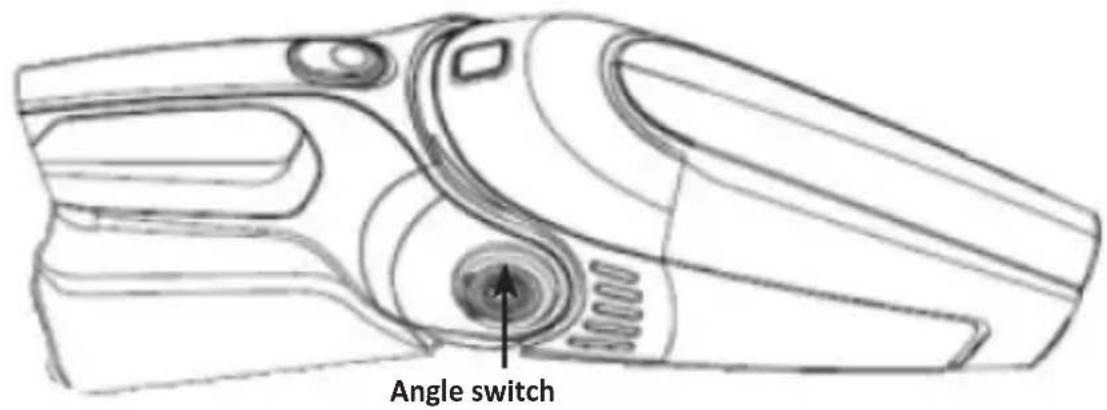
Hold the appliance with the fluid attachment facing downwards on the surface to be cleaned, so that the rubber wiper remains in contact with the surface. For this purpose, you can adjust the angle of the vacuum cleaner (see picture below). Then turn it on to start vacuuming.
Ensure that you never exceed the maximum fluid quantity of about 100ml!
Empty the dust collector after vacuuming and allow it to dry completely before reusing the appliance.
8. Cleaning and care
Disconnect the mains adapter from the socket before cleaning. If you have used the appliance for vacuuming fluids, you have to empty the dust collector after use and allow it to dry completely. Clean the product using a slightly moist cloth. To do this, hold it over a trash bin and open the dust compartment.
Remove the filter from the appliance and empty the dust compartment.
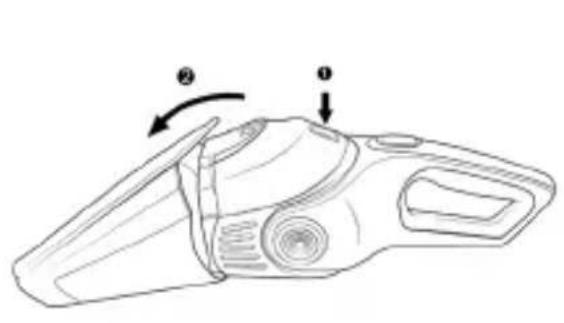
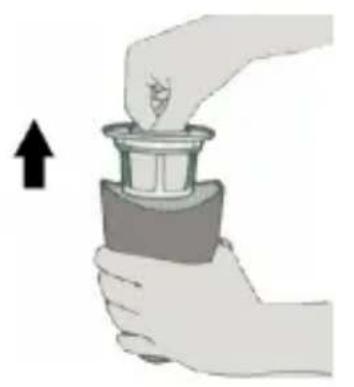
Cleaning the filter unit
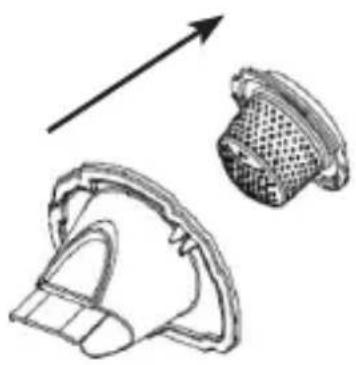
Remove the filter unit from the appliance. Remove the filter from the filter unit by unscrewing it, by turning it counter clockwise, from the holder. Then clean all the parts of the filter unit using a brush. If more dirt has accumulated, clean it using a vacuum cleaner.
Note: You can clean the filter using cold or lukewarm water if necessary. Dry the filter thoroughly before reusing it in the filter unit!
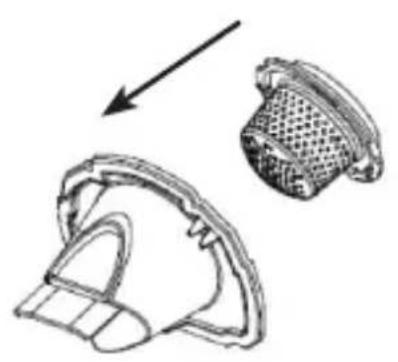
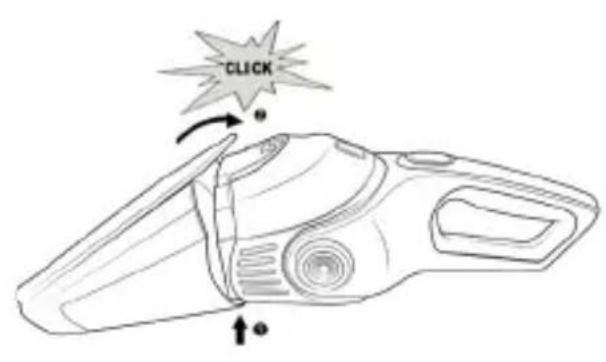
Then place the filter into the filter unit and secure it. Insert the filter unit back into the dust compartment properly.
- Troubleshooting
| Problem Solution | |
| The appliance is no longer working properly | ·The batteries could be empty. Charge the appliance on the charging station. ·Check the charging station and the charging process. The station has to be connected to the power socket and the status LED should glow. ·Ensure that the vacuum cleaner is turned off during the charging process. Otherwise, it will not be charged properly. |
| The charging LED is not glowing | ·Check whether the charging station is properly connected to the socket and the mains plug is appropriately connected to the charging station. |
| The vacuum cleaner is not vacuuming properly | ·The dust collector has to be properly installed. Otherwise the vacuuming capacity is severely restricted. ·The dust collector is full. Empty the dust collector. ·The filter unit is clogged. Clean the filter of the vacuum cleaner. |
| Dust is coming out of the vacuum cleaner | ·The dust collector has to be properly installed. Otherwise the dust collector is not sealed properly and dust may come out. ·The dust collector is full. Empty the dust collector. ·Check whether the filter and the filter unit are properly installed. |
| The vacuum cleaner does not work properly when the accessories are attached | ·The dust collector is full. Empty the dust collector. ·The relevant accessory is clogged, clean it. ·Check whether the filter and the filter unit are properly installed. |
| The surface is still very wet after vacuuming the fluid. | ·Ensure that the fluid attachment is fixed to the vacuum cleaner. ·Hold the vacuum cleaner at an angle of about 30° facing downwards properly onto the surface to be vac- uumed. Never tilt the appliance to one side and ensure that the fluid attachment is touching the surface. |
| Fluid is coming out of the vacuum cleaner. | ·The filter unit is wet. Ensure that the filter unit is dry before inserting the filter into the dust collector. ·Check whether the filter and the filter unit are properly installed. ·Never exceed the maximum level marking for liquids in the dust collector. |
10. Storage
For storage, you can place the handheld vacuum cleaner and the accessories on the charging station. Ensure that you disconnect the plug from the socket if you are not using the appliance.
11. Safety instructions and disclaimer
Never try to open the device to carry out repairs or modifications. Avoid contact with the mains voltage, the device does not carry current only when it is disconnected. Do not short-circuit the product. Please disconnect the power cord when not in use or during storms. The device is not approved for outdoor use. Therefore please use it only in dry surroundings. Protect it from high humidity, water and snow. Do not expose the device to high temperatures. Do not expose the device to sudden changes in temperature or heavy vibrations, as this could damage the electronic components. Check the device for damage before using it. The device should not be used if it has been subject to impact or has been damaged in some other manner. Please comply with the local regulations and restrictions. Do not use the device for purposes other than those described in the user manual. This product is not a toy. Keep it out of the reach of children or mentally disabled persons. Any repair or modification to the device not carried out by the original supplier will void any warranty and guarantee claims.
The device should be used only by persons who have read and understood this user manual. The specifications of the device may be changed without special prior notice.
12. Disposal instructions
In line with the European WEEE directive, electrical and electronic devices should not be disposed of along with domestic waste. Their components have to be sent separately for recycling or disposal, as improper disposal of toxic and dangerous components may permanently damage the environment. According to the electrical and electronic equipment act (ElektroG), you are obliged (as a consumer) to return (free of charge) all electrical and electronic devices to the manufacturer, the point of sale or public collection points at the end of their service life. The relevant local laws regulate the details in this regard. The symbol on the product, in the user manual or/and the packaging refers to these regulations. With this manner of sorting, recycling and disposal of used devices, you make an important contribution towards protecting our environment.
13. Instructions for battery disposal
In conjunction with the sale of batteries along with the supply of devices that include batteries, the supplier is obliged to point out the following to the customer: The customer is legally obliged to return used batteries. He can return used batteries which the supplier offers or has offered as new batteries in his assortment free of charge to the supplier's dispatch warehouse (shipping address). The symbols shown on the batteries mean the following: Pb = battery contains more than 0.004 percent lead by weight, Cd = battery contains more than 0.002 percent Cadmium by weight, Hg = battery contains more than 0.0005 percent mercury by weight.
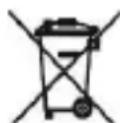
The symbol of the crossed-out dustbin means that the battery must not be placed in household waste.

WEEE Guideline: 2012/19/EU WEEE Register no.: DE 67896761
The company WD Plus GmbH hereby certifies that the device 303247/20180328JS003 complies with the fundamental requirements and the other relevant stipulations. A complete conformity statement can be obtained from: WD Plus GmbH, Wohlenbergstraße 16, 30179 Hanover, https://www.ganziinfach.de/