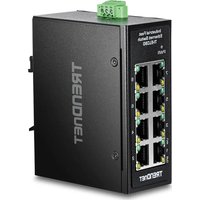
TI-ELC80 - Switch TRENDNET - Free user manual and instructions
Find the device manual for free TI-ELC80 TRENDNET in PDF.


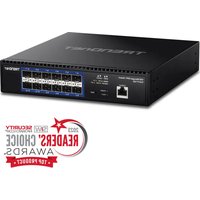
| Product Type | 8-Port Fast Ethernet Industrial Switch |
| Model | TI-ELC80 (v2.0R) |
| Brand | TRENDnet |
| Number of Ports | 8 RJ-45 Fast Ethernet Ports (10/100 Mbps) |
| Power Supply | DC 9-60 V, detachable terminal block |
| Power Consumption | 1.92 W |
| Mounting | DIN rail, wall, desktop |
| LED Indicators | Power, link/activity per port |
| Operating Temperature | -40 °C to +75 °C |
| Operating Humidity | 5% to 95% (non-condensing) |
| Dimensions (L x D x H) | 100 x 75 x 30 mm (estimated) |
| Weight | 200 g (estimated) |
| Safety Standards | EN IEC 62368-1:2020+A11:2020 |
| Electromagnetic Compatibility | EN 55032:2015/A1:2020, EN 55035:2017/A11:2020 |
| Protection Rating | IP30 (estimated) |
| Housing Material | Metal |
| Maintenance and Cleaning | Disconnect power before cleaning; use a dry, lint-free cloth |
| Safety | Disconnect power before servicing; observe polarity |
| Spare Parts and Repairability | Power supply and terminal block available; repair by qualified professional |
| General Information | Limited lifetime warranty; TRENDnet technical support |
Frequently Asked Questions - TI-ELC80 TRENDNET
User questions about TI-ELC80 TRENDNET
0 question about this device. Answer the ones you know or ask your own.
Ask a new question about this device
Download the instructions for your Switch in PDF format for free! Find your manual TI-ELC80 - TRENDNET and take your electronic device back in hand. On this page are published all the documents necessary for the use of your device. TI-ELC80 by TRENDNET.
USER MANUAL TI-ELC80 TRENDNET
natural_image
Four black industrial Ethernet switches (TRENDNET) with network ports and terminal labels, no visible text or symbols on the devices themselves.Quick Installation Guide
Unmanaged Industrial Mini Switch (v2.xR)
Table of Contents
1 English
- Before You Start
- Quick Reference
- Hardware Installation
8 Français
https://www.trendnet.com/qig/1775

1. Before You Start
Package Contents
• TI-GLC80 / TI-ELC80 / TL-GLC50 / TI-ELC50
• Quick Installation Guide
- Removable terminal block
- DIN-Rail mount
- Wall mount kit
Minimum Requirements
- Existing network
• Power Supply
Switch Power Consumption
| Switch Power Consumption Switch Model Voltage Range | ||
| TI-GLC80 | 4.72W | 9 – 60V |
| TI-ELC80 | 1.92W | 9 – 60V |
| TI-GLC50 | 3.21W | 9 – 60V |
| TI-ELC50 | 1.69W | 9 – 60V |
Compatible Power Supplies
| Power Supply Model | Max. Power Supplied DC Output | Type | |
| TI-M6024 60W | 24V / 2.5A | DIN-Rail | |
| TI-S12024 | 120W | 24V / 5A | DIN-Rail |
| TI-S12048 | 120W | 48V / 2.5A | DIN-Rail |
| TI-S24048 | 240W | 48V / 5A | DIN-Rail |
| TI-S48048 | 480W | 48V / 10A | DIN-Rail |
| TI-S15052 | 150W | 52V / 4.86A | DIN-Rail |
| TI-S24052 | 240W | 52V / 4.61A | DIN-Rail |
Note: Select the appropriate power supply according to the switch model your switch model.
Safety Note

- Turn off the power before connecting or disconnecting any module or wire. The correct power supply voltage is listed on the product label. Check the voltage of your power source to make sure that you are using the correct part. Do NOT use voltage greater than the maximum listed on the product label.
- Calculate the maximum possible current in each power wire and common wire. Observe all electrical codes dictating the maximum current allowable for each wire size. If the current surpasses the maximum ratings, the wiring could overheat, causing serious damage to your equipment.
2. Quick Reference
Note: The switch model and power supply may be different than the one shown in the example below.
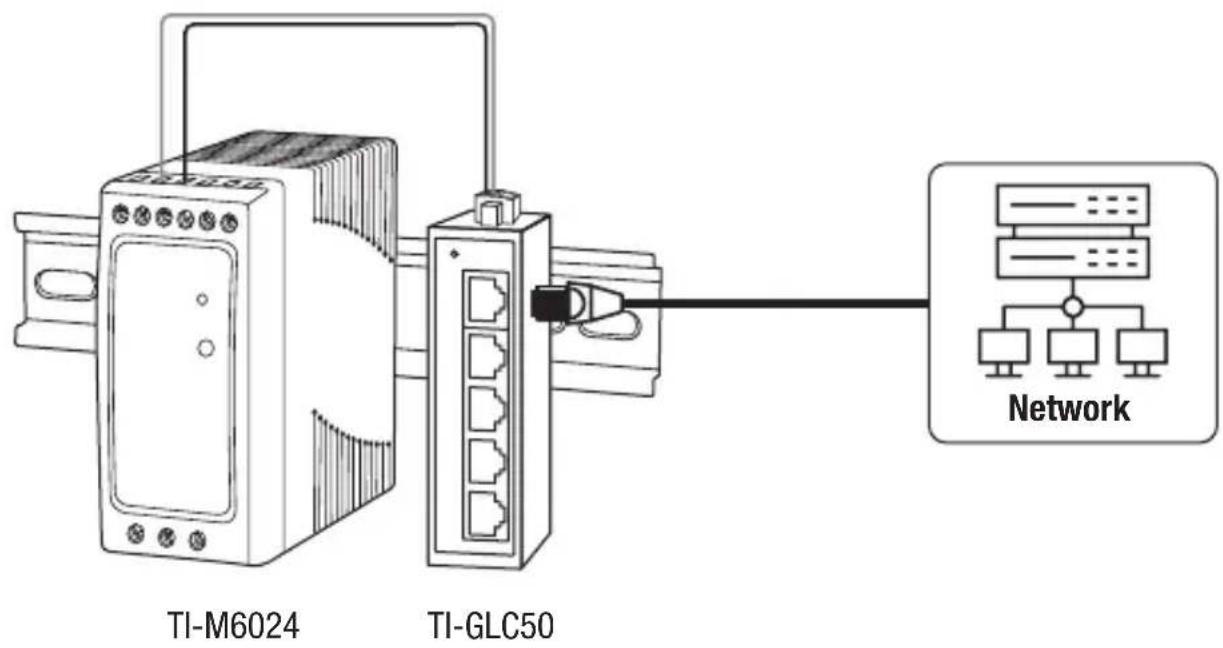
3. Hardware Installation
The switch can be placed on a desktop, wall mounted, or mounted to a DIN-Rail.
DIN-Rail Mounting Instructions
- Attach the DIN-rail mount bracket to the switch.
Note: The switch may be different than the one shown in the examples below.
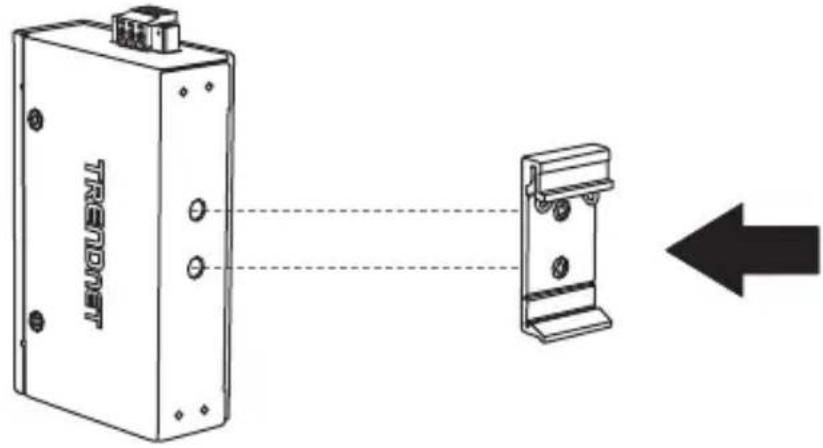
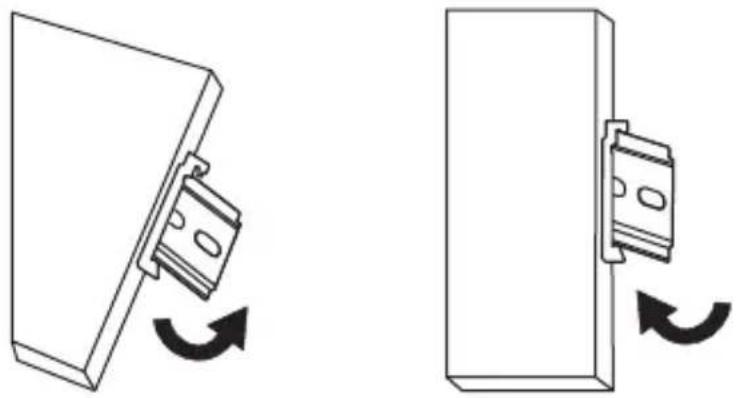
- Position the unit in front of the DIN-Rail and hook the mount bracket over the top of the rail.
- Rotate the unit downward towards the rail to lock it into place. You will know it is secure when you hear the click.
natural_image
Diagram showing two mechanical components with rotational arrows indicating movement (no text or symbols)Mounting the unit Releasing the unit
- To remove the unit, pull down to clear the bottom of the DIN-Rail and rotate up, away from the rail.
Wall Mounting Instructions
- Attach the wall mount plates to switch.
- Mount the switch.
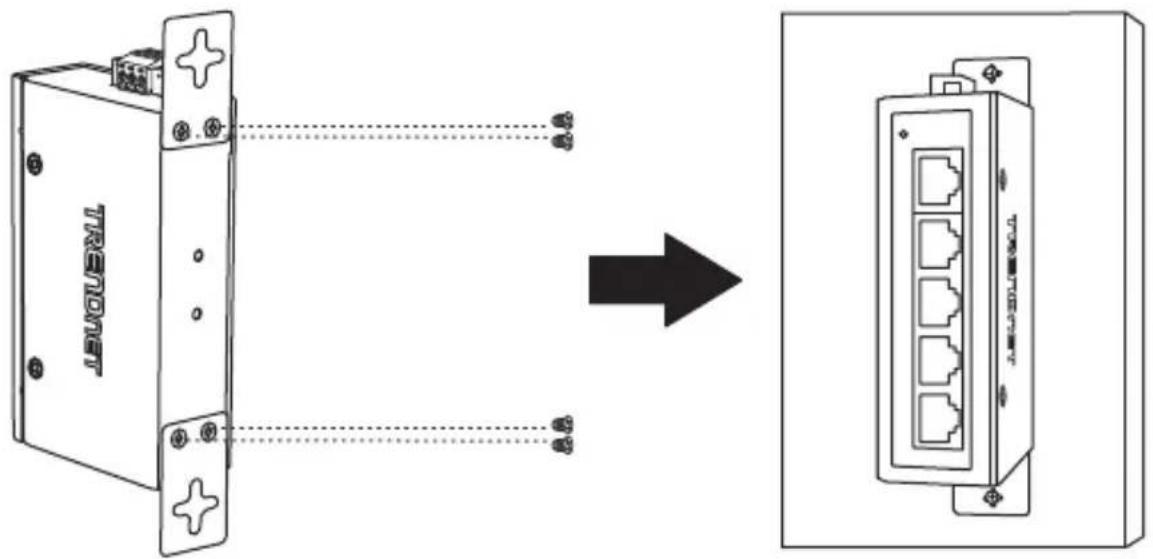
Applying Power
- Connect the power supply (sold separately) to the included terminal block (as shown below) and secure with the screws.
Note: Polarities must match.
- Attach the terminal block to the unit, connect the ground wire to the ground, and supply power to the power adapter.
Note: The switch model and power supply may be different than the one shown in the example below. Terminal blocks may be 3-pin (dual power input) or 6-pin (dual power input with alarm relay output) with differences in labeling.
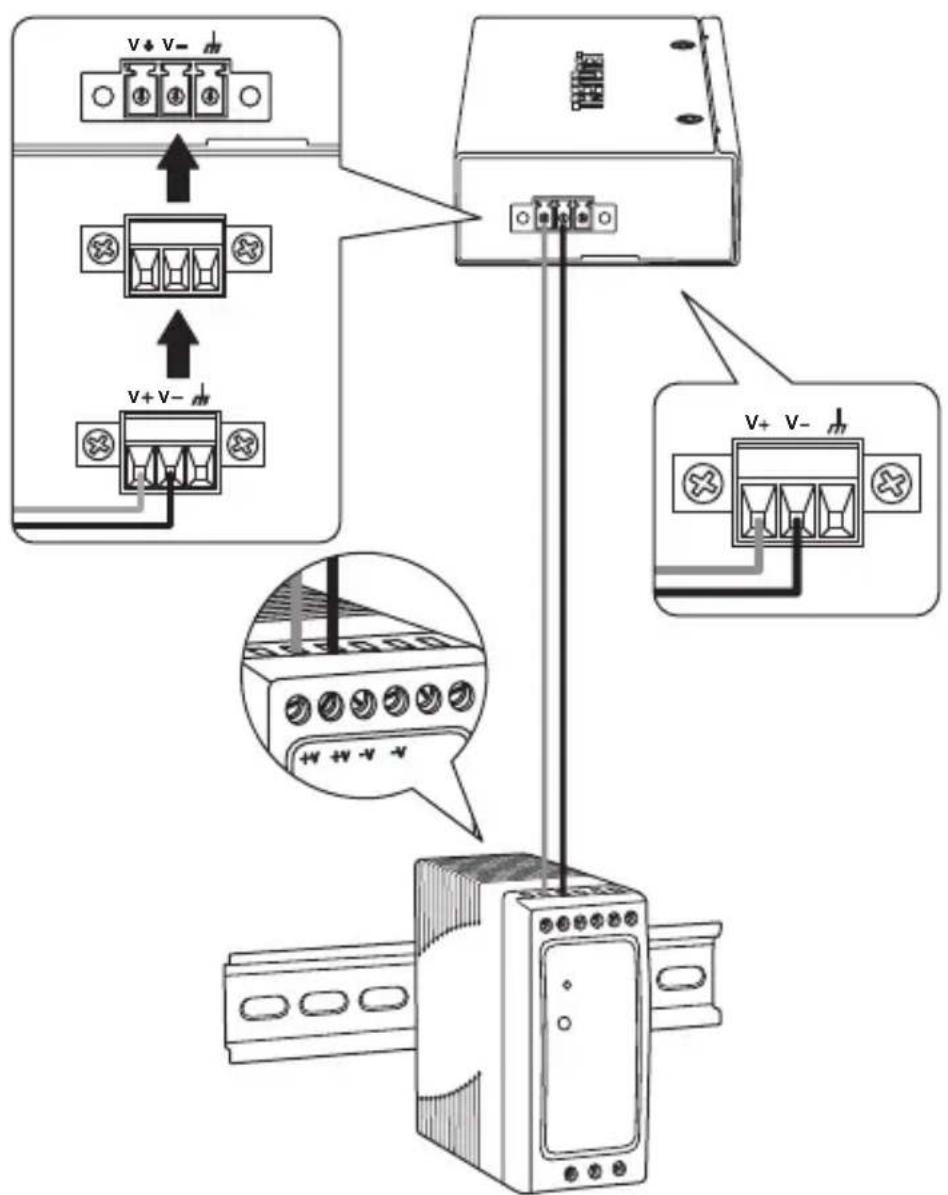
- Connect a network source and devices to the switch. Check the LEDs to confirm the connections are established. Your installation is completed.
Note: Please refer to the LED definition section on page 6-7 for reference to your switch model.
TI-GLC80 LED Indicators
| LED | Status Definition | |
| P1 | Solid Green | Power On |
| Off | Power Off or Fail | |
| P2 | Solid Green Power On | |
| Power Off or FailOff | ||
Alarm  | Solid Red | PW1 or PW2 Not Connected |
| Both PW1 And PW2 Are ConnectedOff | ||
| Ports 1-8 | Solid Green | Connected at 10/100/1000M |
| Data TransmitingBlinking Green | ||
| Off | No Connection |
TI-ELC80 LED Indicators
| LED | Status Definition | |
| P1 | Solid Green | Power On |
| Off | Power Off or Fail | |
| P2 | Solid Green Power On | |
| Power Off or FailOff | ||
Alarm  | Solid Red | PW1 or PW2 Not Connected |
| Both PW1 And PW2 Are ConnectedOff | ||
| Ports 1-8 | Solid Green | Connected at 10/100M |
| Data TransmitingBlinking Green | ||
| Off | No Connection |
TI-GLC50 LED Indicators
| LED | Status Definition | |
| P1 | Solid Green | Power On |
| Off | Power Off or Fail | |
| P2 | Solid Green Power On | |
| Power Off or FailOff | ||
| Alarm [WHWO] | Solid Red | PW1 or PW2 Not Connected |
| Both PW1 And PW2 Are ConnectedOff | ||
| Ports 1-5 | Solid Green | Connected at 10/100/1000M |
| Data TransmitingBlinking Green | ||
| Off | No Connection |
TI-ELC50 LED Indicators
| LED | Status Definition | |
| P1 | Solid Green | Power On |
| Off | Power Off or Fail | |
| P2 | Solid Green Power On | |
| Power Off or FailOff | ||
| Alarm ⚠️ | Solid Red | PW1 or PW2 Not Connected |
| Both PW1 And PW2 Are ConnectedOff | ||
| Ports 1-5 | Solid Green | Connected at 10/100M |
| Data TransmitingBlinking Green | ||
| Off | No Connection |
natural_image
Diagram showing two mechanical components with rotational arrows indicating movement (no text or symbols)natural_image
Diagram showing two mechanical components with rotational arrows indicating movement (no text or symbols)natural_image
Diagram showing two mechanical components with rotational arrows indicating movement (no text or symbols)natural_image
Diagram showing two mechanical components with rotational arrows indicating movement (no text or symbols)Switch Power Consumption
| Cambia il consumo energetico | Intervallo di tensione di Ingresso CC | |
| TI-GLC80 | 4.72W | 9 – 60V |
| TI-ELC80 | 1.92W | 9 – 60V |
| TI-GLC50 | 3.21W | 9 – 60V |
| TI-ELC50 | 1.69W | 9 – 60V |
natural_image
Diagram showing two mechanical components with rotational arrows indicating movement (no text or symbols)Manufacturer's Name and Address
TRENDnet, Inc. Zwolsestraat 156 2587 WB
20675 Manhattan Place The Hague The
Torrance, CA 90501 USA Netherlands

Product Information:
Model Number: TI-ELC80 (v2.0R) / TI-GLC80 (v2.0R) / TI-ELC50 (v2.0R) / TI-GLC50 (v2.0R)
Product Name: 8-Port Industrial Fast Ethernet DIN-Rail Mini Switch
8-Port Industrial Gigabit DIN-Rail Mini Switch
5-Port Industrial Fast Ethernet DIN-Rail Mini Switch
5-Port Industrial Gigabit DIN-Rail Mini Switch
Trade Name: TRENDnet
TRENDnet hereby declare that the product is in compliance with the essential requirements and other relevant provisions under our sole responsibility.
Safety EN IEC 62368-1:2020+A11:2020
EMC EN 55032:2015/A1:2020
EN 55035:2017/A11:2020
EN IEC 61000-6-2:2019
EN IEC 61000-6-4:2019
This product is herewith confirmed to comply with the Directives.
Directives: EMC Directive 2014/30/EU
RoHS Directive (EU) 2015/863
RoHS Directive 2011/65/EU
WEEE Directive 2012/19/EU
REACH Regulation (EC) No. 1907/2006
Low Voltage Directive 2014/35/EU
Person responsible for this declaration.
Place of Issue: Torrance, California, USA
Date: August 08, 2025
Name: Sonny Su
Title: VP of Technology
Signature:

Torrance, CA 90501 USA Netherlands

Détails du produit:
Directives: Directive CEM 2014/30/UE
Directive RoHS 2015/863/UE
Directive RoHS 2011/65/UE
Directive WEEE 2012/19/UE
REACH Réglement (CE) N° 1907/2006
Directive Basse Tension 2014/35/UE
Torrance, CA 90501 USA Netherlands

Manufacturer's Name and Address
TRENDnet, Inc.
20675 Manhattan Place
Torrance, CA 90501 USA
Authorized Representative:
Office: +44 (0) 1635 887 399
Unit 4 Rivermead Business Park,
Pipers Way, Thatcham, R 19 4EP EnglandG

Product Information:
Model Number: TI-ELC80 (v2.0R) / TI-GLC80 (v2.0R) / TI-ELC50 (v2.0R) / TI-GLC50 (v2.0R)
Product Name:
8-Port Industrial Fast Ethernet DIN-Rail Mini Switch
8-Port Industrial Gigabit DIN-Rail Mini Switch
5-Port Industrial Fast Ethernet DIN-Rail Mini Switch
5-Port Industrial Gigabit DIN-Rail Mini Switch
Trade Name: TRENDnet
TRENDnet hereby declare that the product is in compliance with the essential requirements and other relevant provisions under our sole responsibility.
Safety BS EN IEC 62368-1:2020+A11:2020
EMC BS EN 55032:2015/A1:2020
BS EN 55035:2017/A11:2020
BS EN IEC 61000-6-2:2019
BS EN IEC 61000-6-4:2019
This product is herewith confirmed to comply with the Directives.
Directives: Electromagnetic Compatibility Regulations 2016
The Restriction of Use of Certain Hazardous Substances in Electrical and
Electronic Equipment Regulations 2012
The Waste Electrical and Electronic Equipment Regulations 2013 (as amended)
The REACH Enforcement Regulations 2008 (as amended)
Electrical Equipment (Safety) Regulations 2016
Person responsible for this declaration.
Place of Issue: Torrance, California, USA
Date: August 08, 2025
Name: Sonny Su
Title: VP of Technology
Signature:

Certifications
This device complies with Part 15 of the FCC Rules.
Operation is subject to the following two conditions:
(1) This device may not cause harmful interference.
(2) This device must accept any interference received.
Including interference that may cause undesired operation.




Waste electrical an electronic products must not be disposed of with household waste. Please recycle where facilities exist. Check with your Local Authority or Retailer for recycling advice.
- FCC warning: This equipment has been tested and found to comply with the limits for a Class A digital device, pursuant to part 15 of the FCC Rules. These limits are designed to provide reasonable protection against harmful interference when the equipment is operated in a commercial environment. This equipment generates, uses, and can radiate radio frequency energy and, if not installed and used in accordance with the instruction manual, may cause harmful interference to radio communications. Operation of this equipment in a residential area is likely to cause harmful interference in which case the user will be required to correct the interference at his own expense.
- FCC Caution: Any changes or modification not expressly approved by the party responsible for compliance could void the user's authority to operate this equipment.
CAUTION: Double pole, neutral fusing. Disconnect mains before servicing.
If you have any questions regarding the product installation, please contact our Technical Support.
Toll free US/Canada: 1-855-373-4741
Regional phone numbers available at www.trendnet.com/support
TRENDnet
20675 Manhattan Place
Torrance, CA 90501
USA
Warning
Applies to PoE Products Only: This product is to be connected only to PoE networks without routing to the outside plant.
Avertissement
The Manufacturer is not responsible for any radio or TV interference caused by unauthorized modifications to this equipment. Such modifications could void the user's authority to operate the equipment.
Advertencia
Power supply connected caution
The equipment power supply cord shall be connected to a socket-outlet with earthing connection.
Advertencia
Fiber product warning note:
If the Optical Transceiver doesn't ship with the unit, the user manual shall have description as below or equivalent: "This product is intended to be use with a UL Listed Optical Transceiver product, Rated DC3.3V, Laser Class I."
Product Warranty Registration
Please take a moment to register your product online. Go to
TRENDnet's website at: www.trendnet.com/register
Certifications
This device complies with Part 15 of the FCC Rules.
Operation is subject to the following two conditions: (1) This device may not cause harmful interference. (2) This device must accept any interference received. Including interference that may cause undesired operation.

Waste electrical an electronic products must not be disposed of with household waste. Please recycle where facilities exist. Check with your Local Authority or Retailer for recycling advice.
- FCC warning: This equipment has been tested and found to comply with the limits for a Class A digital device, pursuant to part 15 of the FCC Rules. These limits are designed to provide reasonable protection against harmful interference when the equipment is operated in a commercial environment. This equipment generates, uses, and can radiate radio frequency energy and, if not installed and used in accordance with the instruction manual, may cause harmful interference to radio communications. Operation of this equipment in a residential area is likely to cause harmful interference in which case the user will be required to correct the interference at his own expense.
- FCC Caution: Any changes or modification not expressly approved by the party responsible for compliance could void the user's authority to operate this equipment.
Warning
Applies to PoE Products Only: This product is to be connected only to PoE networks without routing to the outside plant.
Avertissement
The Manufacturer is not responsible for any radio or TV interference caused by unauthorized modifications to this equipment. Such modifications could void the user's authority to operate the equipment.
Advertencia
Power supply connected caution
The equipment power supply cord shall be connected to a socket-outlet with earthing connection.
Advertencia
Fiber product warning note:
If the Optical Transceiver doesn't ship with the unit, the user manual shall have description as below or equivalent: "This product is intended to be use with a UL Listed Optical Transceiver product, Rated DC3.3V, Laser Class I."
CAUTION: Double pole, neutral fusing. Disconnect mains before servicing. ATTENTION: Double pôle/fusible sur le neutre.
Technical Support
If you have any questions regarding the product installation, please contact our Technical Support.
Toll free US/Canada: 1-855-373-4741 Regional phone numbers available at www.trendnet.com/support
TRENDnet
20675 Manhattan Place Torrance, CA 90501
USA
Product Warranty Registration
Please take a moment to register your product online.
Go to TRENDnet's website at: www.trendnet.com/register
- Table of Contents
- English
- Français
- Before You Start
- Package Contents
- Minimum Requirements
- Safety Note
- Quick Reference
- Hardware Installation
- DIN-Rail Mounting Instructions
- Wall Mounting Instructions
- Applying Power
- Manufacturer's Name and Address
- Product Information:
- Trade Name: TRENDnet
- Détails du produit:
- Certifications
- TRENDnet
- Warning
- Avertissement
- Advertencia
- Power supply connected caution
- Fiber product warning note:
- Product Warranty Registration
- Technical Support
Brand : TRENDNET
Model : TI-ELC80
Category : Switch