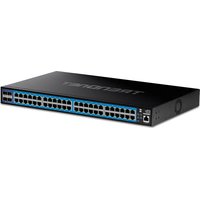
TEG-3524S - Switch TRENDNET - Free user manual and instructions
Find the device manual for free TEG-3524S TRENDNET in PDF.


Pick your language and provide your email: we'll send you a specifically translated version.
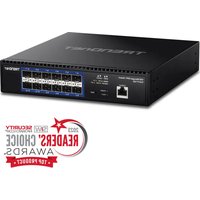
| Product Type | Managed Gigabit Switch |
| Model | TEG-3524S |
| Brand | TRENDnet |
| Ports | 24 x 10/100/1000 Mbps RJ-45 |
| SFP Slots | 2 x Gigabit SFP (mini-GBIC) |
| Switching Capacity | 48 Gbps |
| Forwarding Rate | 35.7 Mpps (64-byte packets) |
| MAC Address Table | 8K entries |
| Jumbo Frame Support | Up to 9K bytes |
| Management | Web-based GUI, SNMP, CLI |
| VLAN Support | 802.1Q VLAN, up to 256 groups |
| Dimensions (W x D x H) | 440 x 200 x 44 mm (17.3 x 7.9 x 1.7 in) |
| Weight | 2.5 kg (5.5 lbs) |
| Power Supply | 100-240 V AC, 50-60 Hz, internal |
| Power Consumption | 20 Watts (max) |
| Cooling | Fanless (silent operation) |
| Operating Temperature | 0°C to 40°C (32°F to 104°F) |
| Standards | IEEE 802.3, 802.3u, 802.3ab, 802.3z, 802.1Q, 802.1p |
| Safety & Emissions | CE, FCC Class A |
| Warranty | 3 years limited |
Frequently Asked Questions - TEG-3524S TRENDNET
How do I reset the TRENDnet TEG-3524S to factory defaults?
Press and hold the reset button on the front panel for about 10 seconds until the LEDs blink. The switch will reboot with factory settings. Note that all configurations will be lost.
What is the default IP address for the TEG-3524S?
The default IP address is 192.168.10.100. You can access the web interface by entering this address in a browser. Default login is usually 'admin' with blank password.
Does the TEG-3524S support VLAN configuration?
Yes, it supports 802.1Q VLAN with up to 256 groups. You can create tagged and untagged VLANs via the web interface or CLI.
How many SFP slots does the TEG-3524S have?
It has 2 Gigabit SFP slots (mini-GBIC) for fiber or copper uplinks, supporting 1000Base-SX/LX modules.
Can I use the TEG-3524S as a standalone unmanaged switch?
Yes, the switch works out of the box as a plug-and-play unmanaged switch. All ports are in default VLAN 1. However, you can configure advanced features if needed.
What is the maximum power consumption of the TEG-3524S?
The maximum power consumption is approximately 20 Watts. It has an internal power supply and is fanless for silent operation.
How do I update the firmware on the TEG-3524S?
Download the latest firmware from the TRENDnet support site. Access the web interface, go to 'System' > 'Firmware Upgrade', and upload the file. Do not power off during update.
Does the switch support link aggregation (LACP)?
Yes, it supports port trunking up to 8 groups with up to 8 ports per group, using IEEE 802.3ad LACP or static trunk.
What is the switching capacity of the TEG-3524S?
The switching capacity is 48 Gbps, with a forwarding rate of 35.7 million packets per second (Mpps) for 64-byte packets.
Is the TEG-3524S rack-mountable?
Yes, it comes with rack-mount brackets for standard 19-inch racks. The dimensions are 440 x 200 x 44 mm (1U height).
User questions about TEG-3524S TRENDNET
0 question about this device. Answer the ones you know or ask your own.
Ask a new question about this device
No questions yet. Be the first to ask one.
Download the instructions for your Switch in PDF format for free! Find your manual TEG-3524S - TRENDNET and take your electronic device back in hand. On this page are published all the documents necessary for the use of your device. TEG-3524S by TRENDNET.
USER MANUAL TEG-3524S TRENDNET
Manual assistant
Powered by Anthropic
Waiting for your message
Product information
Brand : TRENDNET
Model : TEG-3524S
Category : Switch