Francis Francis X7.1 - Coffee machine ILLY - Free user manual and instructions
Find the device manual for free Francis Francis X7.1 ILLY in PDF.


User questions about Francis Francis X7.1 ILLY
0 question about this device. Answer the ones you know or ask your own.
Ask a new question about this device
Download the instructions for your Coffee machine in PDF format for free! Find your manual Francis Francis X7.1 - ILLY and take your electronic device back in hand. On this page are published all the documents necessary for the use of your device. Francis Francis X7.1 by ILLY.
USER MANUAL Francis Francis X7.1 ILLY
Serbatoio acqua: 1,0 litri
Pompa: 15 bar
Potenza consumata in power off : <1W
IMPORTANTI MISURE DI SICU- REZZA
natural_image
Diagram of a car front view showing circular components with a pointer and a small object, no text or symbols present.natural_image
Line drawing of a coffee machine with a downward arrow indicating compression or usage (no text or symbols present)natural_image
Two-step illustration of a coffee machine being processed, showing the top and side views with arrows indicating motion (no text or symbols)natural_image
Line drawings of a two-part appliance showing the top view and side view of its water-filled container (no text or symbols)natural_image
Line drawing of a portable toaster with a visible intake manifold and control panel (no text or symbols)natural_image
Two identical line drawings of a refrigerator control panel with circular gauges and indicator lights (no text or symbols)natural_image
Line drawing of a coffee machine pouring liquid into a cup (no text or symbols)natural_image
Diagram of a camera or radar system with concentric circles and a pointer arrow (no text or symbols)natural_image
Line drawing of a washing machine fan with control panel and rotary dial (no text or symbols)natural_image
Two-step illustration of a coffee machine being opened, showing the press and side view (no text or symbols)natural_image
Two-step diagram showing a hand mixer with control panel and coffee cup pouring liquid (no text or symbols)natural_image
Line drawing of a kitchen mixer with a bucket (no text or symbols)natural_image
Line drawing of a hand using a blender with a cup and spatula (no text or symbols)natural_image
Line drawing of a hand holding a screwdriver next to a perforated base (no text or symbols)natural_image
Illustration of a hand using a kitchen mixer to handle a cup (no text or symbols visible)natural_image
Line drawing of a car air conditioner unit with dial and handle (no text or symbols)natural_image
Line drawing of a car air conditioner control panel with buttons and a dial (no text or symbols)natural_image
Illustration of a hand using a tool to brush a cup of food, with a kitchen mixer visible in the background (no text or symbols)natural_image
Diagram of a washing machine dial with a circular control knob and an arrow pointing to the dial (no text or symbols present)natural_image
Line drawing of a car air conditioner control panel with buttons and a dial (no text or symbols)natural_image
Line drawing of a car air conditioner control panel with rotary buttons and dials (no text or symbols)natural_image
Technical line drawings of a two-part appliance showing front and side views with control knobs and gauges (no text or symbols)natural_image
Technical line drawings of a two-part appliance control panel with buttons and gauges (no text or symbols)natural_image
Diagram of a surveillance camera with a dial and control knob (no text or symbols)natural_image
Technical line drawing of a mechanical valve assembly (no text or symbols)natural_image
Line drawings of two identical medical or laboratory equipment setups, showing front and side views with no text or symbols.natural_image
Two-step diagram showing a device being inserted into a base, with arrows indicating the process (no text or symbols present)natural_image
Two-step diagram showing a device with inserted pins and a foot, no text or symbols presentCarefully read the instruction manual and warranty limitations.
The machine must be connected to a grounded power outlet.
The machine must be kept clean by frequently washing the grill, the drip tray, the capsule holder, the tank and the steam wand.
EXTREMELY IMPORTANT: never immerse the machine in water or put it in the dishwasher.
The water contained in the tank must be replaced regularly.
Do not use the machine if the tank is empty.
After changing the water, place the tank back in the machine, making sure it is inserted all the way.
We recommend descaling the machine at least every 2 months using a descaling agent made especially for espresso machines.
See instructions in the DESCALING chapter.
The machine is outfitted with a valve that maintains constant pressure, for this
reason some water may drip from the capsule holder.
INDEX
■ MACHINE PARTS ....15
■ IMPORTANT SAFEGUARDS ....16
USING THE ESPRESSO MACHINE ....16
INSTALLATION OF THE ESPRESSO MACHINE ....16
CLEANING THE ESPRESSO MACHINE ....16
TROUBLESHOOTING 16
IMPROPER USE OF THE APPLIANCE....17
■ INSTALLATION AND START-UP OF ESPRESSO MACHINE .....17
■ TURNING ON/OFF....18
STAND-BY....18
■ MAKING COFFEE....18
■ SETTING THE QUANTITY OF COFFEE IN A CUP....19
■ PREPARING CAPPUCCINO....19
■ PREPARING HOT WATER 20
■ PREPARING COFFEE AFTER GENERATING STEAM .....21
■ DESCALING 21
■ CLEANING AND MAINTENANCE....23
■ RECOMMENDATIONS....25
■ TROUBLESHOOTING....24
■ WARRANTY LIMITATIONS 25
TECHNICAL DATA
Casing: PC+ABS (EU), PC (USA)
Internal thermo block: steel
Water tank: 1.0 liters (33.8 ounces)
Pump: 15 bar
Coffee pressure during extraction: 15 bar
Size: 200 x 340 x 350 mm (7.9 w x 13.4 d x 13.8 h")
2 solenoid valves
Electronic card with the following functions:
- automatic coffee shut off (volume programmable)
- high-precision temperature control (coffee and steam)
- descaling treatment indicator
- boiler temperature indicator
- beeper
- automatic descaling program
- power save
Steam wand
Cup warmer rail
Weight without packaging: 5 Kg
Voltage: 230 V, 50 Hz (EU); 120 V, 60 Hz (USA)
Power: 1200W (EU), 1200W (USA)
Power consumed in power off mode: <1W
The A-weighted sound pressure level is below 70 dB
The manufacturer reserves the right to make changes or improvements without notice.
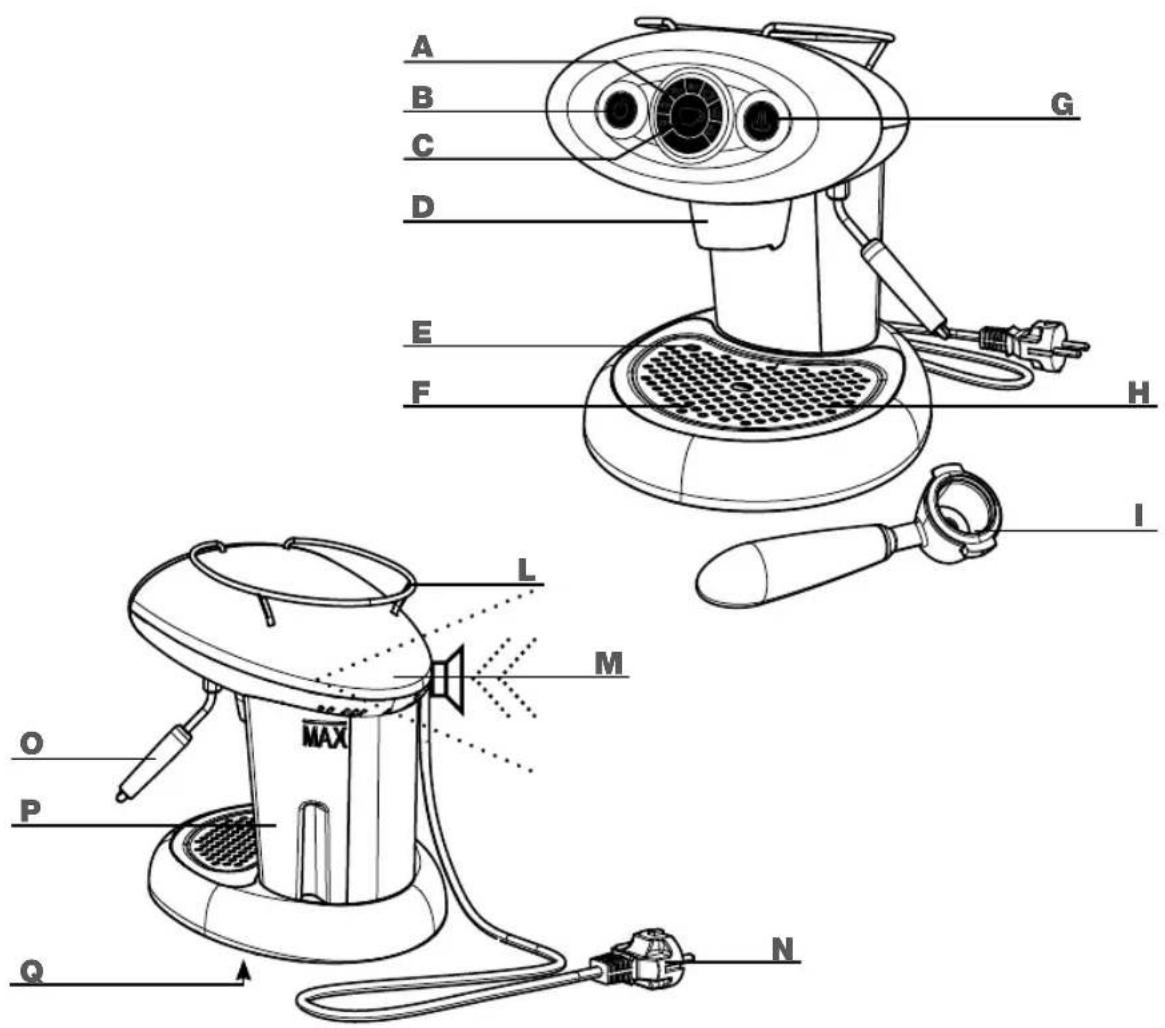
MACHINE PARTS
A TEMPERATURE INDICATOR LIGHT (indicates the machine status)
B MAIN ON/OFF SWITCH
C COFFEE BREW BUTTON (starts and stops coffee flow)
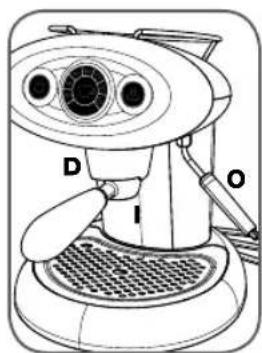
D COFFEE BREW HEAD
E TRAY FULL FLOAT
F CUP GRILL
G STEAM BUTTON
H DRIP TRAY (placed beneath cup grill)
I CAPSULE HOLDER (for "lperespresso" capsules)
L CUP HOLDER
M INTERNAL BEEPER (emits an audible signal to the user)
N POWER CORD
0 STEAM WAND
P WATER TANK
Q DATA PLATE (on bottom)
IMPORTANT SAFEGUARDS
When using electrical appliances always follow the safety precautions below.
Using the espresso machine
- Read all Instructions.
- This machine is intended for household use only. Any other use is considered improper and therefore dangerous.
- Unplug the power cord from the electrical socket when the machine is not in use.
- Do not touch hot surfaces. Use handles and knobs.
- This machine is manufactured to "make espresso coffee" and "prepare hot beverages": use care to prevent scalding due to water spray or any improper use of the machine.
- The machine is not designed to be used by people (including children) with limited physical, mental or sensory abilities or insufficient experience and/or skills, unless they are supervised by a person responsible for their safety, who provides instructions on how to use the appliance.
- Children must be kept under supervision to prevent them from playing with the appliance.
- Use the machine indoors only and away from atmospheric agents.
- To protect against fi re, electric shock or personal injury do not immerse the cord, plug or body of the machine in water or any other liquid.
- Do not use the machine for purposes other than those for which it was designed.
- Do not place the machine on, or near, electrical or gas burners or inside a hot oven.
- The machine must be turned on only when being used. After use it must be turned off by pressing the on/off button and unplugged from the power outlet.
- Before unplugging the machine make sure that the on/off button ⏻ off (unlit).
- Using attachments not recommended by the manufacturer may result in fi re electric shock or per-sonal injury.
- Do not let the cord hang over tables or countertops or touch hot surfaces.
- The appliance has to be placed in a horizontal position.

natural_image
Diagram of a car with circular components and an arrow pointing to a circular dial (no text or symbols)- The appliance is only to be installed in locations where it can be overseen by trained personnel.
- To reduce the risk of injury, do not drape cord over the counter top or table top where it can be pulled on by children or tripped over unintentionally.
Installation of the espresso machine
- Read the instructions carefully.
- Do not install the machine in an area where the temperature may reach 0^ C/30°F or lower (if water freezes, the appliance may be damaged) or higher than 40^ C/140°F.
- Check that the electrical voltage used corresponds to the requirements indicated on the machine data plate. Connect the machine only to a properly grounded power outlet with a minimum rating of 6 A for models powered at 230 Vac, and 12 A for models powered at 120 Vac.
- If the plug and the outlet are not compatible, have the plug replaced with a proper one by an authorized service center (applies to 208 volt machines).
- Place the machine on a countertop away from water taps and sinks.
- After removing the packaging, check that the appliance is in perfect condition before installation.
- Do not leave the packaging materials the machine within children's reach.
Cleaning the espresso machine
- Make sure the machine is off; the on/off button must be unlit.
- Unplug the machine.
- Wait until the machine is cool before cleaning.
- Clean the body and attachments with a wet cloth and then wipe with a non-abrasive dry cloth. It is recommended not to use detergents.
- Do not expose the machine to water spray or immerse it in water, partially or fully.
Troubleshooting
Do not use the appliance if the cord or plug are damaged, if the appliance shows signs of malfunctioning or has been damaged in any way. Take the machine to the nearest authorised service center for checks or repairs.
If the power cord is damaged it must be replaced by the manufacturer or an authorised service center.
In case of damage or malfunction, turn off the appliance and do not tamper with it. For repairs contact a service center authorised by the manufacturer and request the use of original spare parts only. Failure to comply with these instructions may compromise safe operation of the machine and will result in the forfeiture of warranty rights.
Improper use of the appliance
- This appliance is intended for household use only. Any other use is to be regarded as improper and therefore dangerous.
- The manufacturer is not liable for accidents caused by non-compliance with existing legislation on electrical grounding systems.
- The manufacturer is not liable for possible damage caused by improper, incorrect or unreasonable use.
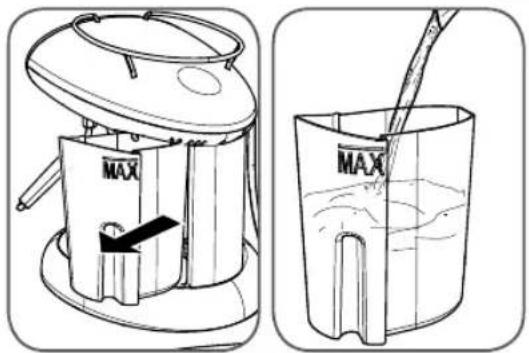
Pull the water tank out of the machine and fill it with fresh drinking water until the MAX mark is reached.
Caution: always fi ll the tank with fresh, still drinking water only. Hot water or other liquids may damage the tank. Do not use the machine without water.
INSTALLATION AND START-UP OF ESPRESSO MACHINE
Before connecting the machine to a power supply, carefully read the safety instructions given in the chapter: "IMPORTANT SAFEGUARDS".
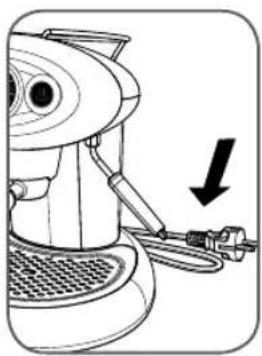
natural_image
Line drawing of a coffee machine with a downward arrow indicating a drop or adjustment (no text or symbols present)Make sure that the machine is unplugged.
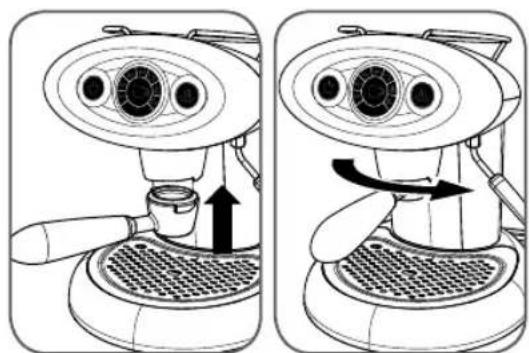
natural_image
Two-step diagram of a coffee machine with a side view showing the process from feeding into a tray (no text or symbols present)Insert the capsule holder from below and turn it to the right until it locks into place.
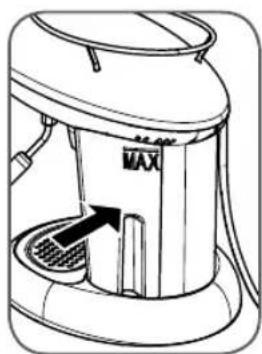
natural_image
Line drawing of a portable kitchen appliance with a MAX label and internal structure (no text or symbols)Fit the tank to the machine, making sure it is fully inserted in place. Insert the plug into the outlet. Consult the following chapter to switch on the appliance.
Note: it is advisable to keep the original packaging (at least for the duration of the warranty period) in order to ship the machine to an authorised service center for repair if necessary.
Caution.
While the machine is operating, contact with the brew head D, the steam wand O or the metal part of the capsule holder may cause burns.
TURNING ON/OFF
Before switching on the machine check the water level in the tank; if necessary add water as described previously.
Empty and rinse out the drip tray every time you fill the water tank.
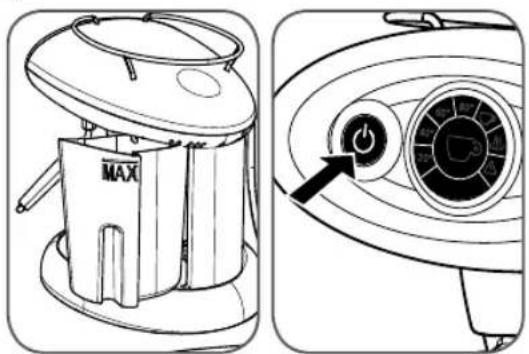
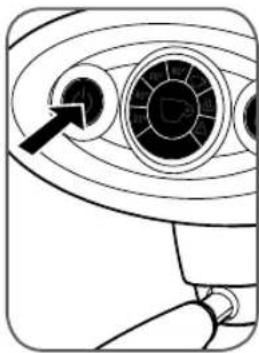
To switch the machine on, press the ⏻ button until it lights up.
natural_image
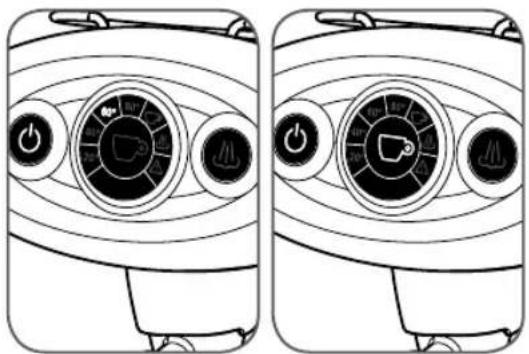
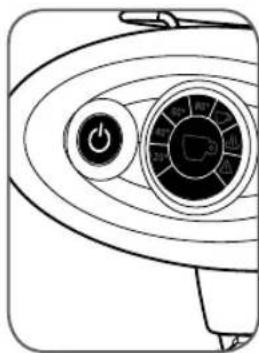
Line drawings of two identical air purifier enclosures showing dial gauges and control buttons (no text or symbols)The icons in the circle will light up progressively to indicate the increase in the boiler temperature.
After a few minutes, when the machine reaches the operating temperature, the brew button symbol will light up and a brief beep will be emitted.
If the triangular symbol ⚠ lights up and an intermittent beep is emitted, please consult the chapter: "PROBLEMS AND SOLUTIONS".
natural_image
Line drawing of a hand pouring liquid into a cup (no text or symbols)Note: When using the machine for the fi rst time or after a long period of disuse, we suggest dispensing a few cups of water without capsule.
natural_image
Diagram of a surveillance camera with concentric rings and a black arrow pointing to the lens (no text or symbols present)To switch the machine off, press the 📄 cotton until the front panel goes off; never disconnect the plug from the power outlet when the machine is switched on.
Stand-by
natural_image
Line drawing of a washing machine fan with control panel and rotary dial (no text or symbols)The machine has been programmed to respect the environment and reduce consumption when it is not being used.
When it is not in use, after 30 minutes the machine will switch off automatically.
5 minutes before automatic switch off, the ⏻ button will fl ash. If you want to machine to stay on, press the button.
MAKING COFFEE
The X7.1 machine is designed to function exclusively with illy "Iperespresso" capsules.
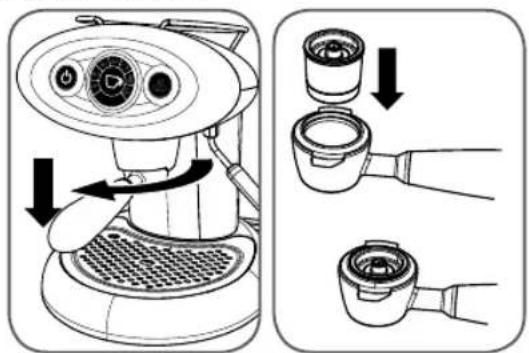
To make coffee, carry out the following steps:
- Turn the capsule holder to the left and remove it from the brew head.
- Insert the capsule as shown in the figure.
Note: the capsule should slide easily into place; if this is not the case take it out and reposition it correctly.
Note: coffee will start fl owing out a couple of seconds after you press the button; this is normal for the operation of the machine.
natural_image
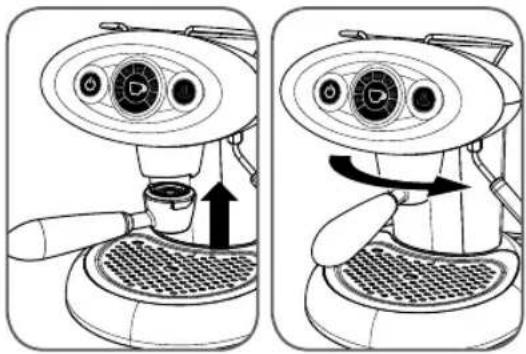
Two-step illustration of a coffee machine with a side view showing the process from feeding into a tray (no text or symbols present)- Insert the capsule holder in the brew head; turn the handle to the right until it locks into place.
- Check that the coffee button is lit.
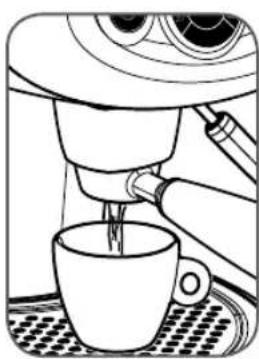
- Press and release the coffee button; the machine will brew the programmed quantity of coffee. To stop the flow in advance, press the button again.
To make other coffees, remove the used capsule and repeat the above steps.
Warning:
- The capsules are single-dose and cannot be used to make two coffees.
- To ensure greater safety, the machine automatically stops flow after approximately one minute.
- Remember to empty and clean the drip tray frequently.
SETTING THE QUANTITY OF COFFEE IN A CUP
The X7.1 machine allows you to brew the desired quantity of coffee in two modes: automatic and manual.
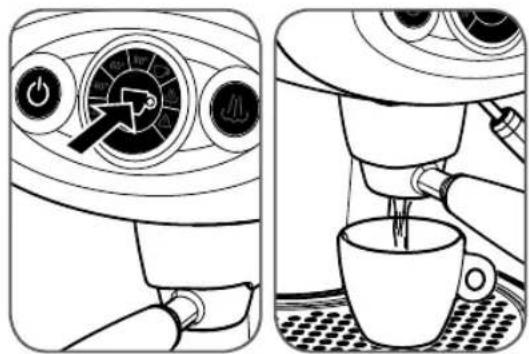
AUTOMATIC MODE - to set and memorise the quantity of coffee to be brewed, carry out the following steps:
- Insert a capsule into the capsule holder and then fit the latter to the brew head.
- Place a cup beneath the capsule holder.
19
- Press the coffee button and keep it pressed until the coffee has reached the desired level. Release the button. The machine is now programmed.
MANUAL MODE - to set the machine to work in the manual mode, carry out the following steps:
- Insert a capsule into the capsule holder and then fit the latter to the brew head.
- Place a cup beneath the capsule holder.
- Press the coffee button and keep it pressed until the machine automatically stops dispensing coffee. Release the button. In this case the programming has been cancelled.
Note: in the automatic mode it is also possible to make coffee using the manual procedure.
- Press the coffee button for about 3 seconds;
- Press the coffee button again to stop the flow;
- In this manner you will not change the quantity of coffee initially programmed.
Note: when the machine is set for MANUAL MODE of the quantity of coffee, after you start brewing it will be necessary to press the coffee button again when the coffee has reached the desired level in the cup in order to stop the flow.
PREPARING CAPPUCCINO
The machine features a steam wand for frothing the amount of milk necessary to prepare one or more cappuccinos.
Prepare one or more cups of coffee following the instructions in the previous section.
Froth the milk as follows:
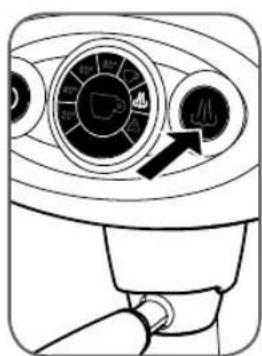
Press the steam button 📂 the steam icon in the central circle will light up to signal that the machine is getting ready to dispense steam.
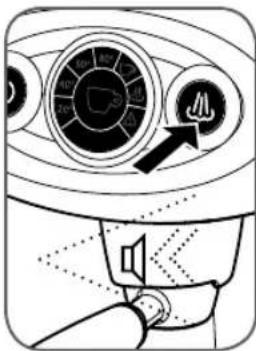
When the machine reaches the right temperature, the button will light up.
At this point the machine will emit a brief beep.
natural_image
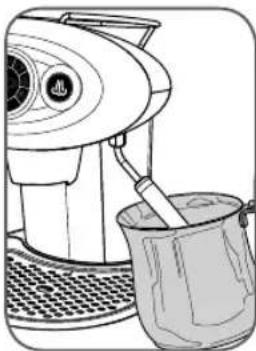
Line drawing of a kitchen mixer with a bucket (no text or symbols)Place a suitable empty container (preferably a metal pitcher) beneath the steam wand and press the button to discharge any residual water; when only steam comes out press the button again.
Note: while steam is being dispensed the 🎩 button will fl ash.
- Pour refrigerated milk into a suitable container (preferably a metal pitcher).
Note: For an optimal result: pour 75ml of cold whole milk taken directly from the fridge into a container (preferably a metal pitcher) and keep the steam wand submerged in the milk for a maximum of 25 seconds.
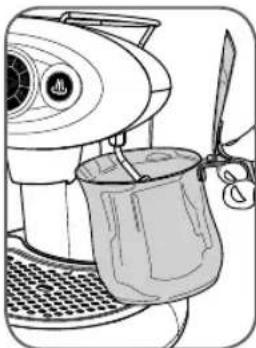
natural_image
Line drawing of a hand using a blender with a cup and knife (no text or symbols)Submerge the steam wand com- pletely into the milk.
Press the 🎩 button and wait for the milk to froth.
On reaching the desired result, press the 🎩 button again.
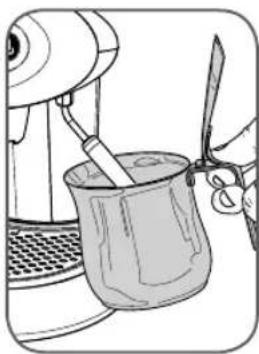
- After each use, you should thoroughly clean the steam wand of milk residue:
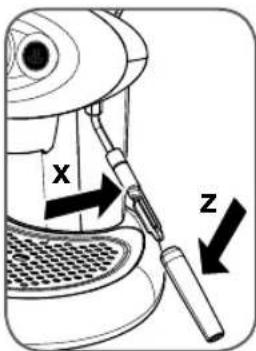
Press the 🎩 button for a few seconds.
Then press the 🎩 button again.
Wait a few minutes for the wand to cool down.
Remove the outer part Z and wash it under running water.
Wipe the inside part X clean with a wet cloth.
Note: The two end parts of the steam wand can also be washed in a dishwasher; in this case also remove the inside part from the metal tube. After cleaning, fi t the inside part X all the way onto the steam wand; then fi t the outer part Z.
Warning:
- Contact with steam and with the steam wand may cause severe burns.
- If no steam is dispensed, after about 5 minutes the machine will automatically switch back to the coffee brewing mode; a minute before this occurs the 🎩 button will flash. If you want to dispense more steam, press the button.
- While the machine is warming up and as long as it remains in the steam mode, it carries out heating cycles in the boiler which may cause small amounts of steam to be discharged from the capsule holder: therefore, keep limbs and other parts of the body away from the coffee brew zone in order to avoid scalding.
PREPARING HOT WATER
The steam wand of the machine can also be used to dispense hot water for making tea and infusions.
Check that the coffee button 📋 is lit.
Carry out the following steps:
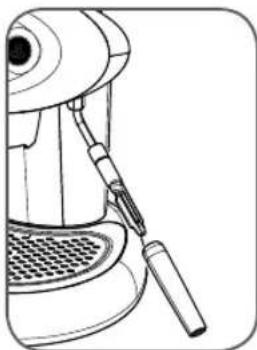
natural_image
Line drawing of a hand tool applying material to a mechanical device (no text or symbols)Clean the steam wand of any milk residues.
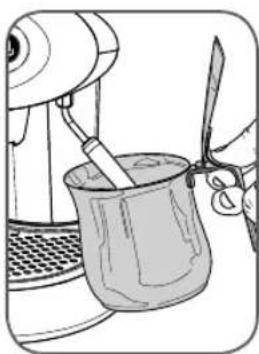
natural_image
Illustration of a hand using a kitchen mixer to handle a cup (no text or symbols visible)Place a metal pitcher beneath the steam wand.
EN
21
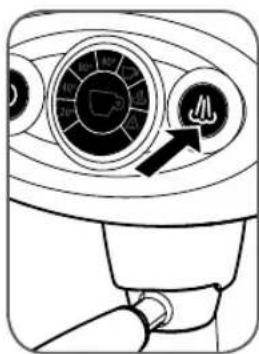
Press the steam button 🎯 at least 3 seconds.
The machine will start dispensing hot water; the steam button "will fl ash rapidly.
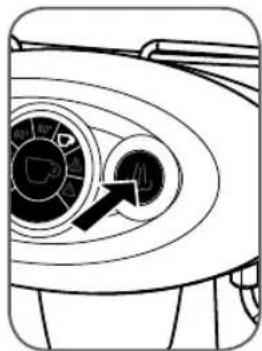
natural_image
Diagram of a washing machine fan with a circular dial and an arrow pointing to the inner dial (no text or symbols present)Keep the steam button pressed down for 3 seconds.
A programmed quantity of hot water will be dispensed; the flow will stop automatically.
Press the steam button 🎩 gain on reaching the desired quantity of water.
PREPARING COFFEE AFTER GENERATING STEAM
It is very important to avoid making coffee right after dispensing steam because the water generated by the thermo block is too hot and will impair the flavor of the coffee.
For this reason the coffee button is disabled when the thermo block temperature is too high.
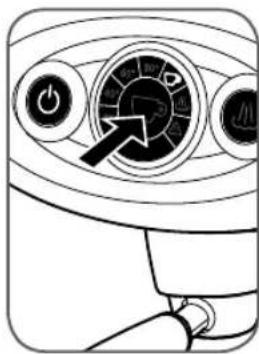
natural_image
Line drawing of a control panel with buttons and a dial (no text or symbols)To switch the machine back to the coffee mode, press the coffee button and wait until the button lights up; during this cooling down phase (approximately 10 minutes), the cup icon in the central circle will flash.
To switch the machine back to the coffee mode quickly (approximately 1 minute), carry out the following steps:
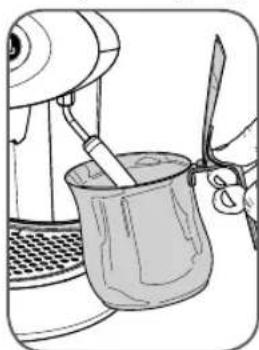
natural_image
Illustration of a hand using a kitchen mixer to handle a cup (no text or symbols visible)Place a metal pitcher beneath the steam wand.
DESCALING
The formation of limescale is a natural consequence of using of the machine.
The machine features an automatic program designed to optimise cleaning and remove limescale residues from inside the machine.
Note: use only descaling products intended for coffee machines. Please follow the procedure described below, not the instructions on the label of the descaling product.
natural_image
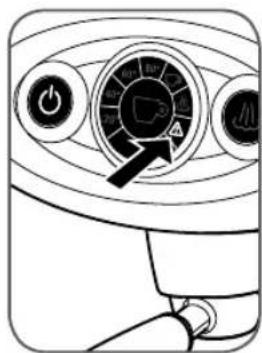
Line drawing of a car dashboard with control buttons and a rotary dial (no text or symbols)If the ⚠️ in the central circle fl ashes (1 fl ash every two seconds) proceed as follows:
Starting the procedure:
natural_image
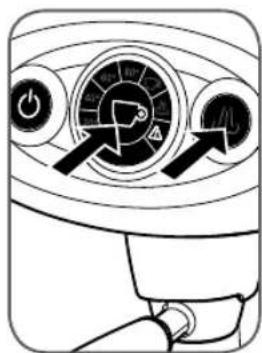
Diagram of a car air conditioner control panel with rotary buttons and indicator lights (no text or labels)Keep the coffee button and steam button dressed down together for at least 5 seconds.
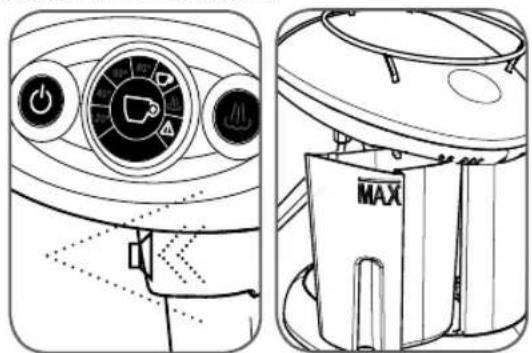
The 🔊 and Buttons and the icon in the circle will fl ash simultaneously to signal that the automatic descaling cycle has been selected.
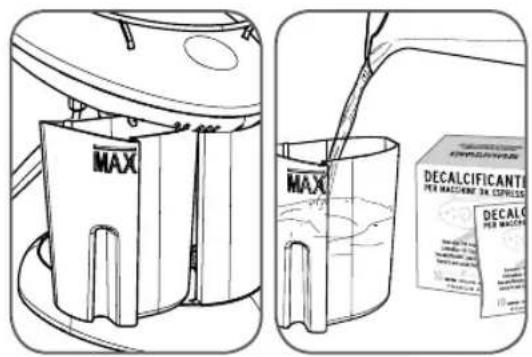
- Take out and fill the tank with 1 litre of water (up to the MAX level).
- Introduce the descaling product supplied with the machine into the tank full of water; wait for it to dissolve.
- Remove the capsule and capsule holder.
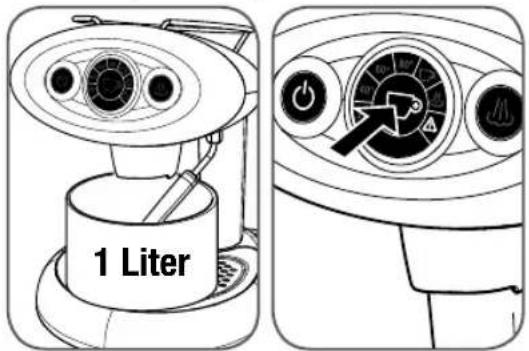
- Place an empty container with a capacity of at least 1 litre beneath the brew head.
- Turn the steam wand toward the container; water will flow out both from the brew head and the steam wand.
- Press the button.
The ⏻ button and the ⚠ on in the circle will fl ash simultaneously to signal the beginning of the descaling cycle, which lasts about 30 minutes.
natural_image
Technical line drawings of a gasifier and its internal components (no text or symbols)- At the end of the cycle the machine will emit a beep The button and the button in the circle will start flashing together with the other signals already present.
At this point it is necessary to clean the internal water circuit of the machine of any residues of the descaling agent.
22
That is, the machine must be run through a rinse cycle; carry out the following steps:
- Remove the tank and clean it thoroughly; fill it with 1 litre of fresh water (up to the MAX level).
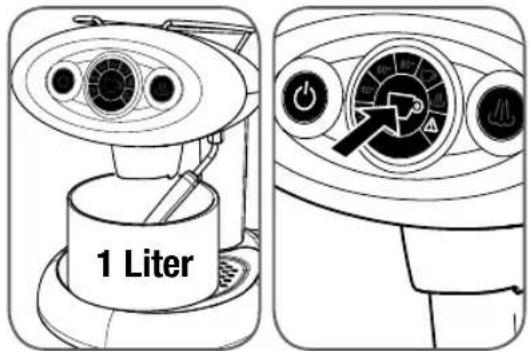
- Place an empty container with a capacity of at least 1 litre beneath the brew head.
- Turn the steam wand toward the container; water will flow out both from the brew head and the steam wand.
- Press the button.
The ⏻ button and the ⚠ on in the circle will fl ash simultaneously to signal the beginning of the cycle for rinsing the internal water circuit of the machine.
natural_image
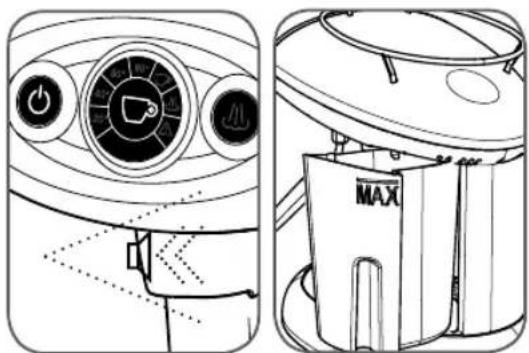
Technical line drawing of a portable air conditioner unit with control panel and MAX branding (no text or symbols)- At the end of the rinse cycle all the flashing signals will go off and a beep will be emitted.
- Remove the water collection container from beneath the brew head and wash it thoroughly.
- Refi II the water tank again.
- Now the machine is ready for use.
WARNING:
- Should a mains power failure occur during the descaling procedure, it will be necessary to repeat the cycle from the start.
- If descaling is not performed as needed, scale build-up may cause malfunctioning not covered by the warranty. It is advisable to use the descaling agent supplied with the machine.
- Do not use vinegar, lye, salt or formic acid because they may damage the machine.
The descaling solution must be disposed of in accordance with the applicable laws and regulations.
CLEANING AND MAINTENANCE
The machine and its components must be cleaned at least once a week.
Keep the water in the tank fresh; wash the tank and fill it daily with fresh drinking water.
Do not use ethyl alcohol, solvents, abrasive sponges and/or aggressive chemicals.
Caution: do not dry the machine and/or it components in a microwave or conventional oven.
To clean the machine, carry out the following steps:
natural_image
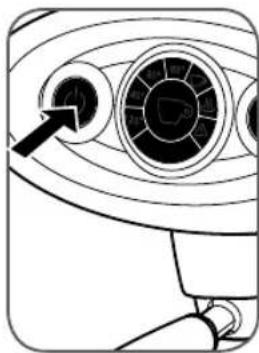
Diagram of a device's front view showing circular components and a pointer (no text or symbols)Switch the machine off and disconnect the plug from the power outlet.
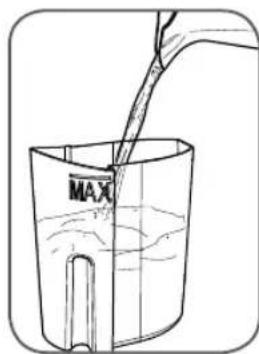
Remove the water tank and wash it under running water.
natural_image
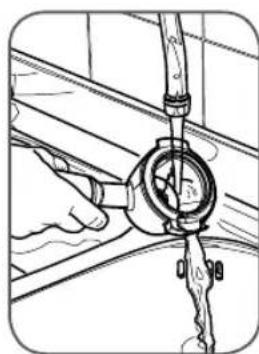
Technical line drawing of a mechanical assembly with no visible text or symbolsEmpty out the capsule holder and wash it under running water.
natural_image
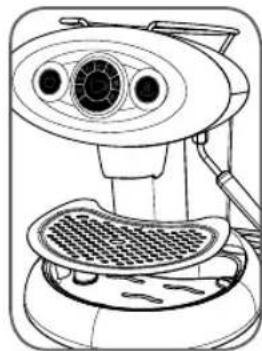
Line drawing of a kitchen appliance with a grater and fan (no text or symbols)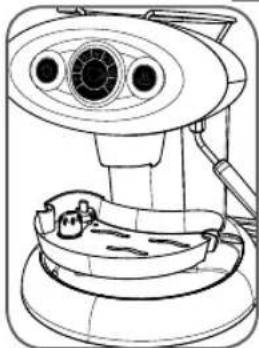
natural_image
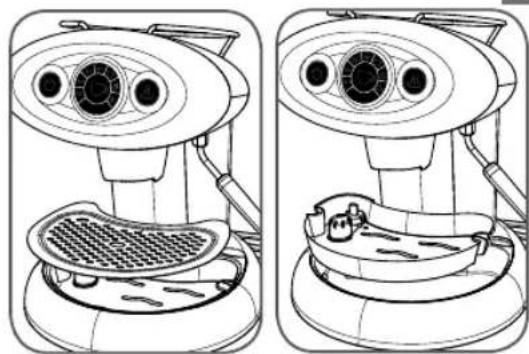
Line drawing of a medical imaging device with no visible text or symbols- Remove the grill and wash it with warm water.
- Remove the drip tray and wash it with warm water.
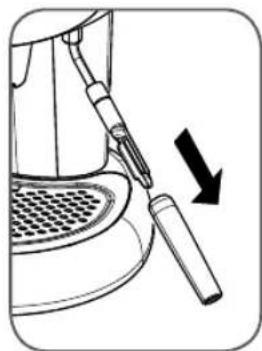
natural_image
Diagram of a sewing machine tool with a black arrow indicating direction (no text or symbols)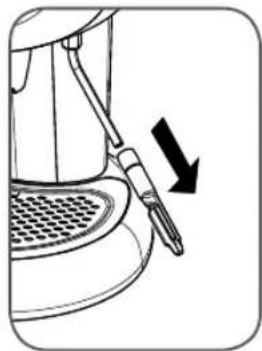
natural_image
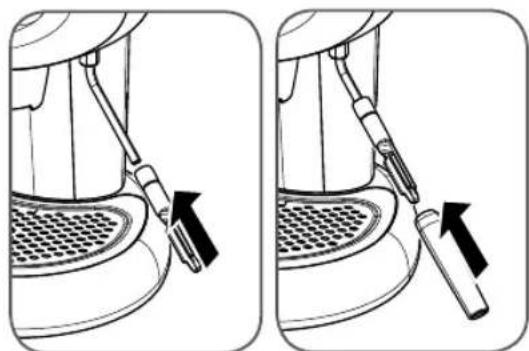
Line drawing of a coffee machine with a spoon and straw, showing a downward arrow indicating motion (no text or symbols)- Remove the outer end part of the steam wand.
- Remove the inside part of the steam wand from the metal tube.
- After separating the two components, wash them separately with warm water.
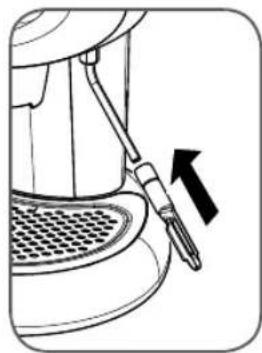
natural_image
Line drawing of a mechanical device with a lever and arrow indicating direction (no text or symbols)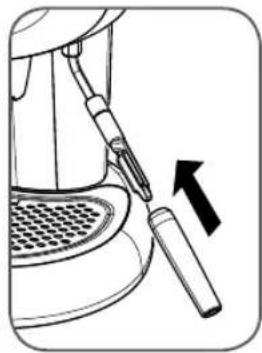
natural_image
Line drawing of a mechanical device with a tool inserted, showing a press or screwdriver inserted (no text or symbols present)- After washing the components fi t the inside part on the metal tube and then fi t the outer part.
Note: when you refi t the inside and outer end parts of the steam wand, make sure to push them up all the way.
TROUBLESHOOTING
| You press the button but it does not light up. | Check the mains electrical connection; check the status of the circuit breakers protecting the home electrical system. | |
| The machine does not make coffee. | Carry out the following operations:- Fill the water tank; make sure it is fitted completely into place.- Remove the capsule holder from the coffee brew head.- Wait until the circle button lights up (machine ready to brew).- Place a container underneath the brew head and press the coffee button.- Dispense water for a few seconds.- Stop the flow.- Insert a new capsule in the capsule holder and fit to the brew head; proceed with making coffee. | |
| You press the mouse button and the machine does not dispense steam.Steam comes out but it does not froth the milk. | Case a) If the steam icon in the circle is lit, wait until the steam button lights up. | |
| Case b) | If the steam icon in the circle is not lit, press the steam button and wait until the steam button lights up (machine warming up). | |
| Case c) | Possible clogging of the steam wand: switch off the machine; wait for it to cool down (at least an hour); remove any obstructions from the outlet holes of the steam wand. | |
| Water leaks out of the brew head during brewing. | Insert a new capsule in the capsule holder and fit to the brew head; proceed with making coffee. | |
| Fast beeps and fl ashing triangular icon. | Carry out the following operations:- Switch off the machine.- Fill the tank.- Place a container under the steam wand and press the mouse button.- Switch on the machine and wait about 10 seconds for the mouse button to light up. | |
| angular icon fl ashing rapidly. | Carry out a descaling cycle. | |
| Water leaks from the inside of the machine. | Switch off the machine and unplug it. | |
| Water leaks from the tank after you have filled it. | Empty the tank; press on the transparent rubber gasket of the coupling valve inside the tank. | |
| Some drops of coffee come out of the capsule during the first seconds of brewing. | Any dripping that occurs during the first seconds of brewing is to be considered normal. | |
Note: If the problem persists, contact an authorised service center.
RECOMMENDATIONS
To enjoy a high quality espresso, remember to:
- Change the water in the tank at least once a week.
- If possible use water with a low calcium content to reduce scale build-up inside the machine.
- Used warmed cups.
This appliance is intended to be used in household and similar applications such as:
- staff kitchen areas in shops, offices and other working environments;
- farm houses;
- by client in hotels, motels and other residential type environments;
- bed and breakfast type environments.
WARRANTY LIMITATIONS
The warranty does not cover damage or malfunctions caused by:
- failure to carry out periodic descaling.
- operation with a voltage that differs from the rating shown on the data plate (see chapter MACHINE PARTS).
- improper use or use that is not compliant with the instructions.
- internal modifi cations.
The warranty does not cover the costs of repairing machines that have been handled by non-authorised service centers.
Such costs shall be completely borne by the customer.
It is recommended:
- not to place the drip tray in a dishwasher
- to always keep the bottom of the inside of the column supporting the tank dry.
Failure to follow these recommendations may cause damage to the machine body which is not covered by the warranty.
WARNING:
It is advisable to keep the original packaging (at least for the duration of the warranty period) in order to ship the machine to a service center for repair if necessary.
Any damage caused by transport without adequate packaging will not be covered by the warranty.
Disposal of end-of-life electric and electronic equipment by private households in the European Union.
The WEEE symbol used on this product means that it must not be disposed of together with other domestic waste and should be collected separately. Consumers have the opportunity to hand in their used appliance to distributors free of charge on a 1:1 basis when they purchase a new product..
For further information about the collection of appliances to be scrapped, please contact the local authority in your town of residence, the local waste disposal service or the retailer where the product was purchased. Consumers are responsible for disposing of end-of-life appliances in accordance with the current provisions of law and non-compliance therewith may be subject to fi nes and criminal sanctions.
The correct disposal of this product will contribute to protecting the environment, natural resources and human health.

RÈGLES GÉNÉRALES POUR L'UTILISATION DE LA MACHINE
MESURES DE SÉCURITÉ IMPOR- TANTES
natural_image
Diagram of a vintage camera with concentric rings and a pointer indicating the lens (no text or symbols present)natural_image
Line drawing of a coffee machine with a downward arrow indicating compression or disassembly (no text or symbols present)natural_image
Two-step diagram showing a coffee machine being opened, with no text or symbols present.natural_image
Illustration of a portable coffee maker with MAX label and side view showing liquid being poured into a container (no text or symbols)natural_image
Line drawing of a portable kitchen appliance with a VAX label and internal components (no text or symbols beyond the label)natural_image
Two identical line drawings of a refrigerator control panel with circular gauges and indicator lights (no text or symbols)natural_image
Line drawing of a coffee maker pouring liquid into a cup on a patterned surface (no text or symbols)natural_image
Diagram of a surveillance camera with concentric lens and control knob (no text or symbols)natural_image
Line drawing of a washing machine fan with control panel and rotary dial (no text or symbols)natural_image
Two-step illustration of a coffee machine being opened, showing the side and side views with no text or symbols.natural_image
Two-step illustration showing a hand mixer with control panel and coffee cup pouring liquid (no text or symbols)natural_image
Line drawing of a kitchen mixer with a bucket (no text or symbols)natural_image
Line drawing of a blender with a cup and spatula (no text or symbols)natural_image
Line drawing of a hand tool applying material to a mechanical device (no text or symbols)natural_image
Line drawing of a kitchen mixer with a spatula and bowl (no text or symbols)natural_image
Diagram of a washing machine fan with a circular dial and control knob (no text or symbols)natural_image
Line drawing of a car air conditioner control panel with buttons and a dial (no text or symbols)natural_image
Illustration of a hand using a stand mixer to handle a cup (no text or symbols visible)natural_image
Line drawing of a car air conditioner control panel with rotary buttons and indicator lights (no text or symbols)natural_image
Technical line drawing of a two-part device showing front and side views of the dashboard and air purifier (no text or symbols)natural_image
Technical line drawings of a two-part appliance, one showing front view with control panel and buttons, the other showing side view with MAX device (no text or symbols)natural_image
Diagram of a camera or radar system with concentric circles and an arrow pointing to the center (no text or symbols present)natural_image
Technical line drawing of a mechanical assembly with a dial and lever (no text or symbols)natural_image
Line drawings of two identical views of a medical or laboratory device with no visible text or symbolsnatural_image
Illustration of a sewing machine tool with a black arrow indicating direction (no text or symbols)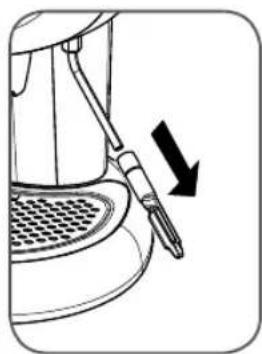
natural_image
Line drawing of a sewing machine with a needle inserted, showing a downward arrow indicating compression or disassembly (no text or symbols present)natural_image
Diagram of a coffee maker's side panel with an arrow indicating motion (no text or symbols present)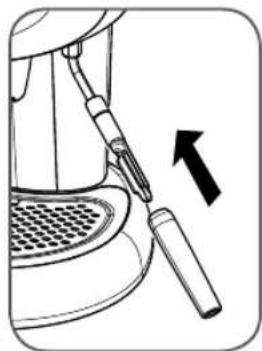
natural_image
Diagram of a sewing machine tool with an arrow indicating direction (no text or symbols present)natural_image
Diagram of a car's airfoil with concentric circles and a pointer indicating the airfoil (no text or symbols present)natural_image
Line drawing of a coffee machine with a downward arrow indicating compression or disassembly (no text or symbols present)natural_image
Two-step diagram of a coffee machine with a side view showing the press and usage mechanism (no text or symbols)natural_image
Line drawing of a coffee maker with a labeled component (no text or symbols present)natural_image
Two identical line drawings of a washing machine control panel with circular gauges and indicator lights (no text or symbols)natural_image
Line drawing of a coffee maker pouring liquid into a cup on a patterned surface (no text or symbols)natural_image
Diagram of a surveillance camera with concentric rings and a black arrow pointing to the lens (no text or symbols present)natural_image
Line drawing of a washing machine fan with control panel and rotary dial (no text or symbols)natural_image
Two-step illustration of a coffee machine being opened, showing the side and side views with no text or symbols.natural_image
Two-step illustration of a coffee machine with control panel and cup pouring liquid (no text or symbols)natural_image
Line drawing of a kitchen mixer with a bucket (no text or symbols)natural_image
Line drawing of a kitchen mixer with a cup and spatula (no text or symbols)natural_image
Line drawing of a hand pump with a mesh base and handle (no text or symbols)natural_image
Illustration of a hand using a kitchen mixer to handle a cup with scissors (no text or symbols)natural_image
Line drawing of a device control panel with buttons and a dial (no text or symbols)natural_image
Illustration of a kitchen mixer with a spatula and a cup (no text or symbols)natural_image
Diagram of a washing machine dial with a circular control knob and arrow pointing to the dial (no text or symbols present)natural_image
Line drawing of a car air conditioner front panel with rotary buttons and dials (no text or symbols)natural_image
Technical line drawing of a two-part appliance showing front and side views of the dashboard and air purifier (no text or symbols)natural_image
Technical line drawings of a two-part appliance control panel, showing front and side views with no text or symbols.natural_image
Diagram of a camera or radar system with concentric circles and a black arrow pointing to the center (no text or symbols)natural_image
Technical line drawing of a mechanical assembly with no visible text or symbolsnatural_image
Line drawings of a medical or laboratory device with two views: top shows a circular dial and plate, bottom shows a bowl with a small object (no text or symbols)natural_image
Two-step diagram showing a tool interacting with a device, one with a downward arrow and the other with an arrow (no text or symbols)natural_image
Two-step diagram showing a mechanical device with a tool inserted, no text or symbols presentnatural_image
Diagram of a car's air intake system with concentric circles and a pointer indicating the direction (no text or labels)- Antes de desconectar el enchufe, controlar
natural_image
Line drawing of a coffee maker with a downward arrow indicating compression or disassembly (no text or symbols present)natural_image
Two-step diagram of a coffee machine being opened, showing the press and side view with arrows indicating motion (no text or symbols)natural_image
Two line drawings of a portable food organizer with MAX label, showing internal components and water flow (no text or symbols)natural_image
Line drawing of a kitchen grater with a VAX label and internal components (no text or symbols beyond label)natural_image
Two identical line drawings of a car air conditioner unit with control knobs and fan gauges (no text or symbols)natural_image
Line drawing of a hand pouring liquid into a cup on a saucer (no text or symbols)natural_image
Diagram of a surveillance camera with an arrow pointing to the lens (no text or symbols present)natural_image
Line drawing of a washing machine fan with control panel and rotary dial (no text or symbols)natural_image
Two-step illustration of a coffee machine with a side view showing the process from feeding into a tray (no text or symbols present)natural_image
Two-step illustration showing a hand mixer with control panel and coffee cup pouring liquid (no text or symbols)natural_image
Line drawing of a kitchen mixer with a bucket (no text or symbols)natural_image
Line drawing of a kitchen mixer with a cup and knife (no text or symbols)natural_image
Line drawing of a hand tool applying material to a mechanical device (no text or symbols)natural_image
Illustration of a hand using scissors to cut a cup of food using a kitchen mixer (no text or symbols visible)natural_image
Line drawing of a car dashboard with control knob and indicator lights (no text or symbols)natural_image
Line drawing of a device control panel with buttons and a dial (no text or symbols)natural_image
Illustration of a hand using a kitchen mixer to handle a cup (no text or symbols visible)natural_image
Diagram of a washing machine dial with a circular control knob and an arrow pointing to the dial (no text or symbols present)natural_image
Diagram of a device control panel with directional arrows and circular gauges (no text or symbols)natural_image
Technical line drawings of a gas stove fan and its internal components (no text or symbols)natural_image
Technical line drawings of a two-part appliance showing front and side views (no text or symbols)natural_image
Diagram of a surveillance camera with an arrow pointing to the lens (no text or symbols present)natural_image
Line drawing of a hand operating a valve on a structural panel (no text or symbols)natural_image
Line drawings of two identical medical or laboratory equipment setups with no visible text or symbolsnatural_image
Two-step diagram showing a tool interacting with a device, one with a downward arrow indicating motion (no text or symbols present)natural_image
Two-step diagram showing a foot with a screwdriver inserted into a seat, with arrows indicating direction (no text or symbols)MEDIDAS DE SEGURANÇA IM- PORTANTES
natural_image
Diagram of a camera with concentric rings and a pointer pointing to the center (no text or symbols)natural_image
Line drawing of a coffee machine with a downward arrow indicating compression or disassembly (no text or symbols present)natural_image
Two-step diagram of a coffee machine with a side view showing the process from feeding to adding a weight (no text or symbols present)natural_image
Line drawing of a portable kitchen appliance with a MAX label and internal components (no text or symbols beyond the label)natural_image
Line drawings of two identical air purifier enclosures showing rotary controls and gauges (no text or symbols)natural_image
Line drawing of a hand pouring liquid into a cup on a saucer (no text or symbols)natural_image
Diagram of a surveillance camera with an arrow pointing to the lens (no text or symbols present)natural_image
Line drawing of a washing machine fan with circular dial and power button (no text or symbols)Para preparar o café, proceder como segue:
natural_image
Two-step illustration of a coffee machine with a side view showing the process from feeding to adding a cup (no text or symbols present)natural_image
Two-step illustration of a coffee machine: one with a speedometer and control buttons, the other pouring liquid into a cup on a patterned surface (no text or symbols)natural_image
Line drawing of a kitchen mixer with a bucket (no text or symbols)natural_image
Line drawing of a kitchen mixer with a cup and spatula (no text or symbols)Imergir totalmente o bico de vapor no leite.
natural_image
Line drawing of a hand tool inserted into a device, no text or symbols presentLimpar o bico de fornecimento de vapor, retirando eventuais resíduos de leite.
natural_image
Illustration of a hand using a stand mixer to handle a cup of liquid (no text or symbols visible)natural_image
Line drawing of a hand holding a device with a dial and control knob (no text or symbols)natural_image
Diagram of a washing machine fan with a circular dial and pointer (no text or symbols)natural_image
Line drawing of a car air conditioner control panel with buttons and dials (no text or symbols)natural_image
Line drawing of a kitchen mixer with a ladle and spatula (no text or symbols)natural_image
Line drawing of a car air conditioner control panel with buttons and dials (no text or symbols)natural_image
Line drawing of a car dashboard with three circular gauges and directional arrows (no text or symbols)natural_image
Technical line drawing of a two-part industrial device showing front and side views with control knobs and gauges (no text or symbols)natural_image
Technical line drawings of a two-part appliance showing front and side views (no text or symbols)natural_image
Diagram of a surveillance camera with an arrow pointing to the lens (no text or symbols present)natural_image
Technical line drawing of a mechanical assembly with no visible text or symbolsnatural_image
Line drawings of two views of a medical or laboratory device with circular components and a mesh base (no text or symbols)natural_image
Two-step diagram showing a tool interacting with a device, one with a downward arrow indicating motion (no text or symbols present)- Extrair a ponta externa do bico de fornecimento de vapor.
- Extrair a parte interna do bico de fornecimento de vapor do tubo metálico.
natural_image
Two-step diagram showing a device with a screwdriver inserted into a base, no text or symbols present.Waterreservoir: 1,0 liter
Pomp: 15 bar
BELANGRIJKE VEILIGHEIDS- MAATREGELEN
natural_image
Diagram of a car's air vent with three circular gauges and a pointer indicating the air direction (no text or labels)natural_image
Line drawing of a coffee machine with a downward arrow indicating compression or disassembly (no text or symbols present)natural_image
Two-step diagram of a coffee machine being opened, showing the press and side view with arrows indicating motion (no text or symbols)natural_image
Line drawings of a two-part appliance: one with MAX lid and internal components, the other showing water being poured into a container (no text or symbols)natural_image
Line drawing of a portable kitchen appliance with a MAX label and internal components (no text or symbols beyond the label)natural_image
Line drawings of two identical air purifier enclosures showing rotary controls and fan gauges (no text or symbols)natural_image
Line drawing of a hand pouring liquid into a cup on a saucer (no text or symbols)natural_image
Diagram of a surveillance camera with an arrow pointing to the lens (no text or symbols present)natural_image
Line drawing of a washing machine fan with control panel and rotary dial (no text or symbols)natural_image
Line drawing of a coffee machine with a hand operating the menu (no text or symbols)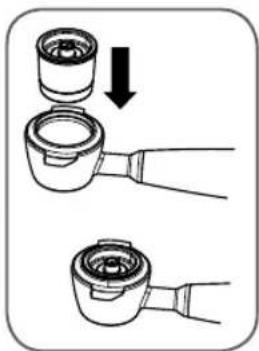
natural_image
Diagram showing two steps of a mechanical device with a downward arrow indicating motion (no text or symbols present)natural_image
Two-step illustration of a coffee machine with a side view showing the process from feeding to adding a cup (no text or symbols present)natural_image
Two-step illustration of a coffee machine: one with a dial and control buttons, the other pouring liquid into a mug (no text or symbols)natural_image
Line drawing of a kitchen mixer with a bucket (no text or symbols)natural_image
Line drawing of a coffee maker with a cup and scissors, no text or symbols presentnatural_image
Line drawing of a hand tool applying material to a mechanical device (no text or symbols)natural_image
Illustration of a kitchen mixer with a bowl and knife (no text or symbols)natural_image
Line drawing of a car dashboard with circular gauges and a hand holding the knob (no text or symbols)natural_image
Line drawing of a device control panel with buttons and a dial (no text or symbols)natural_image
Illustration of a hand using a spatula to clean or brush inside a container (no text or symbols visible)natural_image
Diagram of a washing machine fan dial with a circular dial and an arrow pointing to the dial (no text or symbols present)natural_image
Diagram of a car air conditioner unit with directional arrows and control buttons (no text or symbols)natural_image
Technical line drawing of a two-part device showing front and side views of the dashboard and air purifier (no text or symbols)natural_image
Technical line drawings of a portable air conditioner unit and its internal components (no text or symbols)natural_image
Diagram of a surveillance camera with an arrow pointing to the lens (no text or symbols present)natural_image
Technical line drawing of a mechanical assembly with no visible text or symbolsnatural_image
Line drawings of two identical medical or laboratory equipment setups, one with a grater and circular ports, the other with a bowl and bulb (no text or symbols)natural_image
Two-step diagram showing a tool interacting with a device, one with a pencil and arrow indicating direction (no text or symbols)natural_image
Two-step diagram showing a tool interacting with a device, one with an arrow indicating direction (no text or symbols)VIGTIGE SIKKERHEDSVEJLED- NINGER.
natural_image
Diagram of a circular target with concentric rings and a pointer arrow pointing to the center (no text or symbols)INSTALLATION OG KLARG∅RING AF MASKINEN
natural_image
Line drawing of a coffee machine with a downward arrow indicating compression or disassembly (no text or symbols present)natural_image
Line drawing of a coffee machine with two views showing the process: one with an upward arrow, the other with a curved arrow (no text or symbols)natural_image
Line drawings of a two-part appliance: one with MAX lid and internal components, the other showing water being poured into a container (no text or symbols)natural_image
Line drawing of a portable kitchen appliance with a MAX label and internal components (no text or symbols beyond the label)natural_image
Line drawings of two identical air purifier gauges with control knobs and indicator lights (no text or symbols)natural_image
Line drawing of a hand pouring liquid into a cup using a blender (no text or symbols)natural_image
Diagram of a surveillance camera with concentric rings and a black arrow pointing to the lens (no text or symbols present)natural_image
Line drawing of a washing machine fan with circular dial and power button (no text or symbols)natural_image
Two-step illustration of a coffee machine with a side view showing the process from feeding to adding a cup (no text or symbols present)natural_image
Two-step line drawing showing a hand washing a coffee maker's side view and pouring liquid into a cup (no text or symbols)natural_image
Line drawing of a kitchen mixer with a bucket (no text or symbols)natural_image
Line drawing of a hand mixer with a cup and blade (no text or symbols)natural_image
Line drawing of a hand tool inserted into a cylindrical device (no text or symbols)natural_image
Illustration of a hand using a stand mixer to handle a cup (no text or symbols visible)Anbring en beholder af metal under damphanen.
93
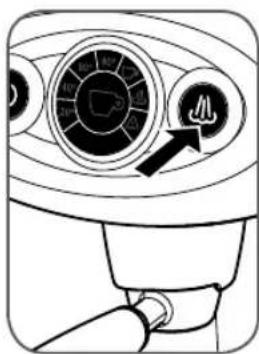
Hold knappen for damp Mykket nede i min. 3 sekunder.
natural_image
Diagram of a washing machine fan with a circular dial and a pointer indicating the air direction (no text or symbols present)Hold knappen for damp kket nede i 3 sekunder.
natural_image
Line drawing of a control panel with buttons and a dial (no text or symbols)natural_image
Illustration of a hand using scissors to clean or brush a cup of food (no text or symbols visible)Anbring en beholder af metal under damphanen.
AFKALKNING
natural_image
Line drawing of a car air conditioner control panel with buttons and dials (no text or symbols)natural_image
Diagram of a car air conditioner unit with rotary dial and indicator lights (no text or labels)Hold knappen for kaffe knappen for damp nede samtidigt i min. 5 sekunder.
natural_image
Technical line drawings of a two-part appliance showing front and side views (no text or symbols)natural_image
Technical line drawings of a two-part appliance showing front and side views (no text or symbols)natural_image
Diagram of a surveillance camera with an arrow pointing to the lens (no text or symbols present)natural_image
Technical line drawing of a mechanical assembly with no visible text or symbolsTøm kapselholderen, og afvask den under rindende vand.
natural_image
Line drawings of two views of a medical or laboratory device with circular gauges and a meshed base (no text or symbols)natural_image
Two-step diagram showing a tool interacting with a device, one with a pencil and arrow indicating direction (no text or symbols)- Fjern damphanens hylster.
- Fjern damphanens indvendige del fra metalrøret.
- Adskil de to dele, og afvask dem hver for sig med lunkent vand.
natural_image
Two-step diagram showing a foot pressing a tool on a mechanical component, with no text or symbols present.natural_image
Diagram of a car with circular components and an arrow pointing to one (no text or symbols)natural_image
Line drawing of a hand pump assembly with a downward arrow indicating motion (no text or symbols)natural_image
Illustration of a coffee machine with two views showing the process of adding a cup (no text or symbols present)natural_image
Line drawing of a portable kitchen appliance with a MAX label and internal structure (no text or symbols beyond the label)natural_image
Line drawing of a hand pump with labeled ports (D, O) and a textured base (no text or symbols beyond labels)natural_image
Line drawings of two identical industrial air conditioner unit designs with control knobs and gauges (no text or symbols)natural_image
Line drawing of a hand pouring liquid into a cup on a machine (no text or symbols)natural_image
Diagram of a surveillance camera with concentric lens and control knob (no text or symbols)natural_image
Line drawing of a washing machine fan with control panel and rotary dial (no text or symbols)natural_image
Line drawing of a coffee machine with a downward arrow indicating rotation or movement (no text or symbols)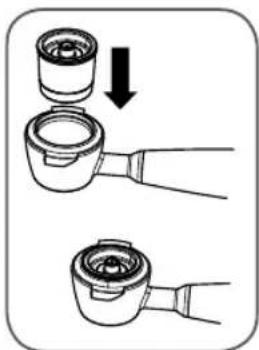
natural_image
Diagram showing two hands operating a mechanical component with a downward arrow indicating motion (no text or symbols)natural_image
Two-step illustration of a coffee machine being opened, showing the press and side view (no text or symbols)natural_image
Two-step illustration showing a hand washing a coffee machine with a water drop and a cup pouring liquid (no text or symbols)natural_image
Line drawing of a kitchen blender with a bucket (no text or symbols)natural_image
Line drawing of a kitchen mixer with a cup and spatula (no text or symbols)natural_image
Line drawing of a hand tool interacting with a mechanical device (no text or symbols)natural_image
Illustration of a kitchen mixer blending liquid into a container with a knife (no text or symbols)natural_image
Diagram of a car air conditioner control panel with a hand operating the button (no text or symbols visible)natural_image
Line drawing of a device control panel with buttons and a dial (no text or symbols)natural_image
Illustration of a kitchen mixer with a cup and tool (no text or symbols)natural_image
Diagram of a washing machine fan dial with a circular control knob and an arrow pointing to the dial (no text or symbols present)natural_image
Line drawing of a car dashboard with rotary controls and a dial indicator (no text or symbols)natural_image
Line drawing of a car air conditioner front panel with buttons and dials (no text or symbols)natural_image
Technical line drawings of a gas stove and its internal components (no text or symbols)natural_image
Technical line drawings of a two-part appliance showing front and side views with control knobs and gauges (no text or symbols)natural_image
Diagram of a camera or radar system with concentric circles and a pointer, no text or symbols presentnatural_image
Technical line drawing of a mechanical device with a dial and lever mechanism (no text or symbols)natural_image
Technical line drawings of a dual-camera device with no visible text or symbolsnatural_image
Illustration of a robotic arm gripping a device, shown in two sequential views (no text or symbols)natural_image
Two-step diagram showing a foot pressing down on a device, with arrows indicating the motion direction (no text or symbols present)Declares under its sole responsibility that the following appliance conforms to the CE directive health and safety provisions as regards design, construction and use thereof.
This declaration shall cease to be valid if the appliance is modified without out explicit authorisation.