
WR184E - Robot mower WORX - Free user manual and instructions
Find the device manual for free WR184E WORX in PDF.


User questions about WR184E WORX
0 question about this device. Answer the ones you know or ask your own.
Ask a new question about this device
Download the instructions for your Robot mower in PDF format for free! Find your manual WR184E - WORX and take your electronic device back in hand. On this page are published all the documents necessary for the use of your device. WR184E by WORX.
USER MANUAL WR184E WORX
| Owner's manual | EN | P04 |
| Benutzerhandbuch | D | P22 |
| Mode d'emploi | F | P41 |
| Manuale d'uso | I | P60 |
| Manual del propietario | ES | P79 |
| Gebruikershandleiding | NL | P98 |
| Instrukcja obsługi | PL | P116 |
| Návod k použití | CZ | P136 |
| Návod na použitie | SK | P154 |
| Navodila za uporabo | SL | P172 |
| Manual de utilizador | PT | P190 |
| Felhasználói kézikönyv | HU | P209 |
| Manual utilizator | RO | P229 |
| Priručnik za upotrebu | HR | P249 |
| Ejerens instruktionsbog | DK | P268 |
| Käyttäjänopas | FIN | P287 |
| Brukermanuel | NOR | P305 |
| Bruksanvisning | SV | P323 |
| Original Instructions | EN |
| Übersetzung der Originalbetriebsanleitung | D |
| Traduction de l'instruction originale | F |
| Traduzione dell'istruzione originale | I |
| Traducción del manual original | ES |
| Vertaling van de oorspronkelijke gebruiksaanwijzing | NL |
| Tłumaczenie oryginalnej instrukcji | PL |
| Překlad originálního návodu | CZ |
| Preklad originálneho návodu | SK |
| Prevod izvirnih navodil | SL |
| Tradução da instrução original | PT |
| Fordítás az eredeti utasítások | HU |
| Traducerea instructiunilor originale | RO |
| Prijevod originalnih uputa | HR |
| Oversættelse af den originale brugsanvisning | DK |
| Käännös alkuperäisestä ohjeiden | FIN |
| Oversettelse av den opprinnelige beskrivelsen | NOR |
| Översättning av originalinstruktioner | SV |
1. PRODUCT SAFETY
1.1. GENERAL & ADDITIONAL SAFETY INSTRUCTION
⚠ WARNING: Read all safety warnings and all instructions. Failure to follow the warnings and instructions may result in electric shock, fire and/or serious injury.
Carefully read the instructions for the safe operation of the machine.
Save all warnings and instructions for future reference.
-This appliance is not intended for use by persons (including children) with reduced physical, sensory or mental capabilities, or lack of experience and knowledge, unless they have been given supervision or instruction concerning use of the appliance by a person responsible for their safety. -Children should be supervised to ensure that they do not play with the appliance.
-The appliance is only to be used with the power supply unit provided with the appliance.
WARNING: To reduce the risk of injury to persons and damage to the machine, do not remove battery pack before switching off the machine.
IMPORTANT
READ CAREFULLY BEFORE USE KEEP FOR FUTURE REFERENCE
Safe operation practices
Training
a) Read the instructions carefully. Make sure you understand the instructions and be familiar with the controls and the proper use of the appliance.
b) Never allow people unfamiliar with these instructions or children to use the appliance. Local regulations can restrict the age of the operator.
c) The operator or user is responsible for accidents or hazards occurring to other people or their property.
Preparation
a) Ensure the correct installation of boundary wire as instructed.
b) Periodically inspect the area where the appliance is to be used and remove all stones, sticks, wires, bones, and other foreign objects.
c) Periodically visually inspect to see that the blades, blade bolts and cutter assembly are not worn or damaged. Replace worn or damaged blades and bolts in sets to preserve balance.
d) On multi-spindle appliances, take care as rotating one blade can cause other blades to rotate.
e) WARNING! The lawnmower shall not be operated without the guard in place.
Operation
1. General
a) Never operate the appliance with defective guards, or without safety devices, for example, deflectors, in place.
b) Do not put hands or feet near or under rotating parts. Keep clear of the discharge opening at all times.
c) Never pick up or carry an appliance while the motor is running.
d) Operate the disabling device from the appliance.
- Before clearing a blockage;
- Before checking, cleaning or working on the appliance.
e) It is not permitted to modify the original design of robotic lawnmower. All modifications are made at your own risk.
f) Start robotic lawnmower according to the instructions. When the power key is switched on, make sure you keep your hands and feet away from the rotating blades. Never put your hands and feet under the mower.
g) Never lift up robotic lawnmower or carry it when the power key is switched on.
h) Do not let persons who do not know how robotic lawnmower works and behaves use the mower.
i) Do not put anything on top of robotic lawnmower or its charging station.
j) Do not allow robotic lawnmower to be used with a defective blade disc or body. Neither should it be used with defective blades, screws, nuts or cables.
k) Always switch off robotic lawnmower when you do not intend to use the mower. Robotic lawnmower can only start when the power key is switched on and the correct PIN code has been entered.
I) Keep your hands and feet away from the rotating blades. Never place your hands or feet close to or under the body when robotic lawnmower is in operation.
m) To avoid using the machine and its peripherals in bad weather conditions especially when there is a risk of lightning.
n) Not to touch moving hazardous parts before these have come to a complete stop.
o) For machines used in public areas, that warning signs shall be placed around the working area of the machine. They shall show the substance of the following text:
Warning! Automatic lawnmower! Keep away from the machine! Supervise children!
2. Additionally when the appliance is operating automatically
a) Do not leave the machine to operate unattended if you know that there are pets, children or people in the vicinity.
Maintenance and storage
WARNING! When the mower is turned upside down the power key must always be switched off.
The power key should be switched off during all work on the mower's underframe, such as cleaning or replacing the blades.
a) Keep all nuts, bolts and screws tight to be sure the appliance is in safe working condition.
b) Inspect the robotic lawnmower each week and replace worn or damaged parts for safety.
c) Check especially that the blades and blade disc are not damaged. Replace all blades and screws at the same time if necessary so that the rotating parts are balanced.
d) Ensure that only replacement cutting means of the right type are used.
e) Ensure that batteries are charged using the correct charger recommended by the manufacturer. Incorrect use may result in electric shock, overheating or leakage of corrosive liquid from the battery.
f) In the event of leakage of electrolyte flush with water/neutralizing agent, seek medical help if it comes into contact with the eyes etc.
g) Servicing of the appliance should be according to manufacturers' instructions.
Recommendation
To connect the machine and/or its peripherals only to a supply circuit protected by a residual current device (RCD) with a tripping current of not more than 30 mA.
Residual risks
To avoid injuries, wear protective gloves when replacing the blades.
Transport
The original packaging should be used when transporting robotic lawnmower over long distances.
To safely move form or within the working area:
a) Press the STOP button to stop the mower.
You select the four digit PIN code when you start the mower for the first time.
b) Always switch off robotic lawnmower if you intend to carry the mower.
c) Carry the mower by the handle at the front under the mower. Carry the mower with the blade disc away from the body.
RF exposure requirements
To satisfy RF exposure requirements, a separation distance of 200mm or more should be maintained between this device and persons during device operation.
To ensure compliance, operations at closer than this distance is not recommended. The antenna used for this transmitter must not be co-located in conjunction with any other antenna or transmitter.
Safety Warnings for battery pack
a) Do not dismantle, open or shred cells or battery pack. b) Do not short-circuit a battery pack. Do not store battery packs haphazardly in a box or drawer where they may short-circuit each other or be short-circuited by conductive materials. When battery pack is not in use, keep it away from other metal objects, like paper clips, coins, keys, nails, screws or other small metal objects, that can make a connection from one terminal to another. Shorting the battery terminals together may cause burns or a fire.
c) Do not expose battery pack to heat or fire. Avoid storage in direct sunlight.
d) Do not subject battery pack to mechanical shock.
e) In the event of battery leaking, do not allow the liquid to come into contact with the skin or eyes. If contact has been made, wash the affected area with copious amounts of water and seek medical advice.
f) Seek medical advice immediately if a cell or battery pack has been swallowed.
g) Keep battery pack clean and dry.
h) Wipe the battery pack terminals with a clean dry cloth if they become dirty.
i) Battery pack needs to be charged before use. Always refer to this instruction and use the correct charging procedure.
j) Do not maintain battery pack on charge when not in use.
k) After extended periods of storage, it may be necessary to charge and discharge the battery pack several times to obtain maximum performance.
I) Battery pack gives its best performance when it is operated at normal room temperature (20 °C ± 5 °C).
m)When disposing of battery packs, keep battery packs of different electrochemical systems separate from each other.
n) Recharge only with the charger specified by WORX. Do not use any charger other than that specifically provided for use with the equipment. A charger that is suitable for one type of battery pack may create a risk of fire when used with another battery pack.
o) Do not use any battery pack which is not designed for use with the equipment.
p) Keep battery pack out of the reach of children.
q) Retain the original product literature for future reference.
r) Remove the battery from the equipment when not in use.
s) Dispose of properly.
t) Do not mix cells of different manufacture, capacity, size or type within a device.
u) Do not remove battery pack from its original packaging until required for use.
v) Observe the plus (+) and minus (−) marks on the battery and ensure correct use.
WARNING – robotic lawnmower can be dangerous if incorrectly used. Read through the Operator's manual carefully and understand the content before using your robotic lawnmower.
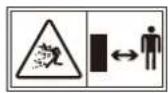
WARNING - Keep a safe distance from the machine when operating.
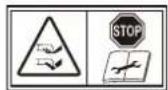
WARNING – Operate the disabling device before working on or lifting the machine.
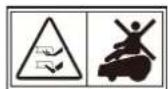
WARNING - Do not ride on the machine.

Do not dispose of batteries. Return exhausted batteries to your local collection or recycling point.
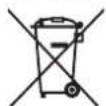

Do not burn

Batteries may enter water cycle if disposed improperly, which can be hazardous for ecosystem. Do not dispose of waste batteries as unsorted municipal waste.

Do not wash the machine with a high pressure washer
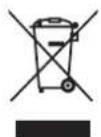
Waste electrical products must not be disposed of with household waste. Please recycle where facilities exist. Check with your local authorities or retailer for recycling advice.

Class III appliance
Your Android can be used with other WORX functional accessories. Visit www.worxlandroid.com to learn more about these available accessory options.
IMPORTANT SAFETY INSTRUCTIONS.
KEEP FOR FUTURE REFERENCE.
Attention: read all safety warnings and all instructions for the safe operation of the machine. Failure to follow the warnings and instructions may result in electric shock, fire and/or serious injury.
- Android is not intended for use by persons (including children) with reduced physical, sensory or mental capabilities, or lack of experience and knowledge, unless they have been given supervision or instruction concerning use of the appliance by a person responsible for their safety
- Children should be supervised to ensure that they do not play with Android
- Android is only to be used with the power supply unit provided with it
Safety guidance before use
- Read the instructions carefully. Make sure you understand the instructions and be familiar with the controls and the proper use of Android
- Never allow people unfamiliar with these instructions or children to use Android
- The operator or user is responsible for accidents or hazards occurring to other people or their property
Preparation before use
- Ensure the correct installation of boundary wire as instructed
- Periodically inspect the area where Android is to be used and remove all stones, sticks, wires, bones, and other foreign objects
- Periodically visually inspect to see that the blades, blade bolts and cutter assembly are not worn or damaged. Replace worn or damaged blades and bolts in sets
- Turn off Android, remove the battery, wear protectives gloves and take care when inspecting blades, as rotating one blade can cause other blades to rotate
WARNING! The lawnmower should not be operated without the guard in place
Safe Operation
- Never operate the appliance with defective guards or without the guard in place
- Do not put hands or feet near rotating parts
- Never pick up or carry Android while it is running
- Turn off the machine and remove the battery before clearing a blockage and before checking, cleaning or working on Android
- It is not permitted to modify the original design of Android. All modifications are made at your own risk
- Start Android according to the instructions. When the power key is switched on, make sure you keep your hands and feet away from the rotating blades.
- Never lift up Android or carry it when the power is switched on
- Do not put anything on top of Android or its charging station
- Do not allow Landroid to be used with a defective blade disc or body. Neither should it be used with defective blades, screws, nuts or cables
- Switch off Android when you do not intend to use it for a long period of time
- Android can only start when the power is switched on and the correct PIN code has been entered
- Avoid using Landroid in bad weather conditions especially when there is a risk of lightning
13.Do not touch moving hazardous parts before these have come to a complete stop - Do not leave Android to operate unattended if you know that there are pets, children or people in the vicinity
MAINTENANCE AND STORAGE
Attention: When the mower is turned upside down the power key must always be switched off. The power key should be switched off and the battery removed during all work on the mower's under frame, such as cleaning or replacing the blades.
- Do not wash Android with a pressure washer—due to the high pressure, water can go inside Android and damage the electronic circuit
- To avoid injuries, wear protective gloves when replacing the blades
- Keep all nuts, bolts and screws tight to be sure Android is in safe working condition
- Inspect Android each week and replace worn or damaged parts for safety
- Ensure that only replacement blades of the right type are used
- Ensure that batteries are charged with Android's charging station. Incorrect use may result in electric shock or overheating of the battery
- Servicing of Android should be according to manufacturers' instructions
Recommendation
Please only connect Android and/or its peripherals to a supply circuit protected by a residual current device (RCD) with a tripping current of not more than 30 mA.
Safe transport
- The original packaging should be used when transporting Android over long distances
- To safely move Landroid within the working area:
- press the STOP button to stop the mower
- carry the mower by the handle at the rear under the mower
- carry the mower with the blade disc away from the body
Battery safety
- Do not dismantle, open or shred battery pack
- Do not short-circuit the battery pack. Do not store battery packs haphazardly in a box or drawer where they may short-circuit each other or be short-circuited by conductive materials
- When the battery pack is not in use, keep it away from metal objects, like paper clips, coins, keys, nails, screws or other small metal objects that can make a connection from one terminal to another. Shorting the battery terminals together may cause burns or a fire
- Do not expose the battery pack to heat or fire. Avoid storage in direct sunlight
- Do not subject the battery pack to mechanical shock
- Seek medical advice immediately if a cell or battery pack has been swallowed
- Keep the battery pack clean and dry
- The battery pack gives its best performance when it is operated at temperature around 20^
-
When disposing of battery packs, keep battery packs of different electrochemical systems separate from each other
-
Recharge only with the charger specified by Worx. Do not use any charger other than that specifically provided for use with Android. A charger that is suitable for one type of battery pack may create a risk of fire when used with another battery pack
-
Do not use any battery pack which is not designed for use with the equipment
- Keep the battery pack out of the reach of children
- Dispose of battery properly. Return exhausted batteries to your local collection or recycling point
Class III appliance
- Waste electrical products must not be disposed of with household waste. Please recycle where facilities exist. Check with your local authorities or retailer for recycling advice
WARNING! Android can be dangerous if incorrectly used. Read through the Operator's Manual carefully and understand the content before using your Android
⚠ WARNING! Keep a safe distance from the machine when operating
WARNING! Turn the machine off and remove the battery before working on or lifting the machine
⚠ WARNING! Do not ride on the machine
The picture is only for reference
A Worx Landroid
B Wire repair connectors
C Spare blades kits
D Hex key
E Charging base
F Screws
G Wire pegs
H Power supply
Boundary wire
J 20V battery
K Boundary wire distance gauges
L Bertelsen ruler
M Manuals
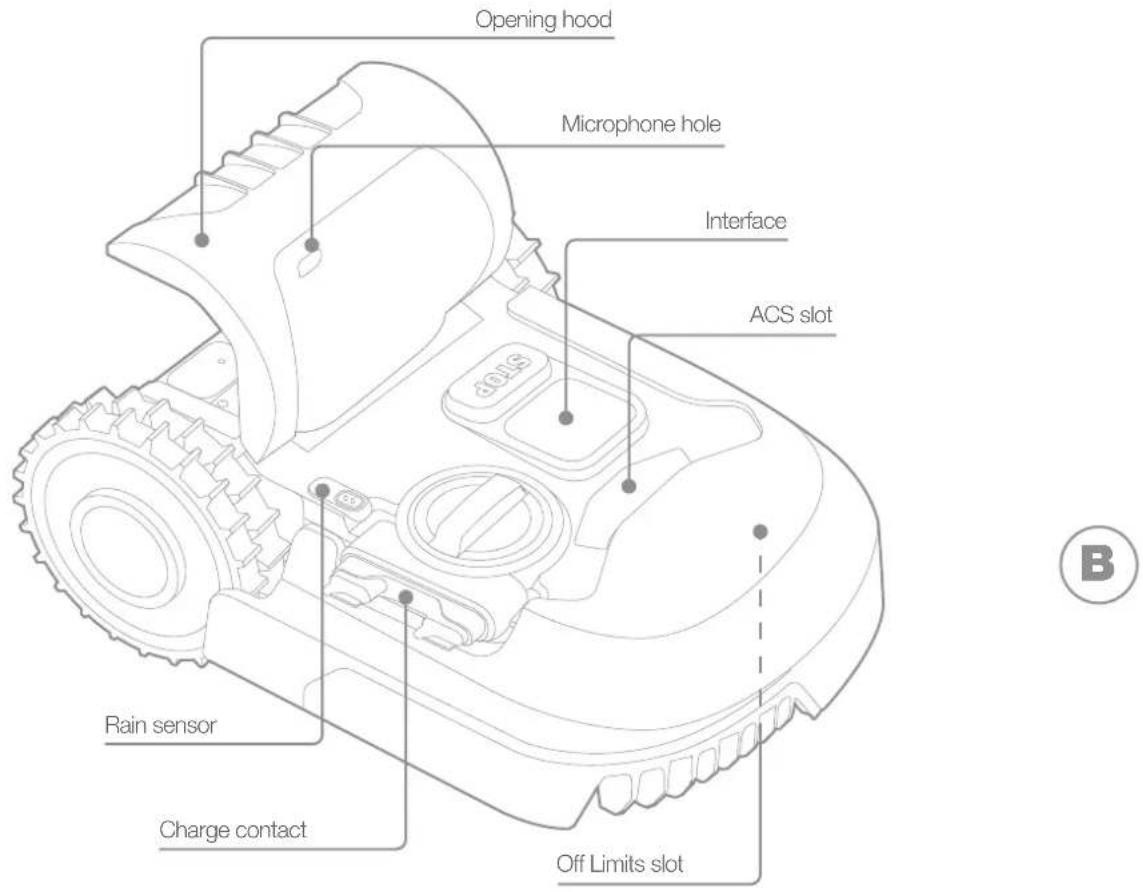
The picture is only for reference
3. TECHNICAL DATA
Type WR184E WR141E (100-199 - designation of machinery, representative of Robotic Lawnmower)
| WR184E WR141E | ||
| Rated voltage 20 V Max.* | --- | |
| No load speed (/min) 2800 2800 | ||
| Cutting area (m2) 400 500 | ||
| Cutting diameter (cm) 18 18 | ||
| Cutting height (mm) 20-50 30-60 | ||
| Cutting height positions 4 | 4 | |
| Battery type | Lithium-ion | |
| Battery model | WA3551.3 / WA3551.1 | |
| Charging time approx. (hrs) | 1.5 | |
| Charger model | WA3750.1 / WA3755.1 | |
| Charger rating | Input: 100-240 V~50/60 Hz, 38 W,Output: 20 V ---, 1.5 A | |
| Machinery weight (kg) | 8.0 | 9.1 |
| Protection degree | III | |
| App | Y | |
| Frequency band of embedded WLAN module | 2.412GHz-2.472GHz | |
| Max. radio-frequency power of embedded WLAN module | 802.11b:+16±2dBm(@11Mbps)802.11g:+14±2dBm(@54Mbps)802.11n:+13±2dBm(@HT20,MCS7) | |
| Frequency band of inductive loop systems | 77 Hz | |
| Max. radio-frequency power of inductive loop systems | 82 dBμA/m | |
*Voltage measured at no load. Initial battery voltage reaches maximum of 20 volts. Nominal voltage is 18 volts.
4. NOISE DATA
| WR184E WR141E | ||
| A weighted sound pressure | L_pA = 44.2 dB(A) L | _pA = 45.5 dB(A) |
| K_PA = 0.4 dB(A) K | _PA = 0.6 dB(A) | |
| A weighted sound power | L_wA = 64.2 dB(A) L | _wA = 65.5 dB(A) |
| K_wA = 0.4 dB(A) K | _wA = 0.6 dB(A) | |
| Wear ear protection when sound pressure is over 80 dB (A). | ||
A degree of noise from the machine is not avoidable. Route noisy work is to be licensed and limits for certain periods. Keep rest periods and they may need to restrict the working hours to a minimum. For their personal protection and protection of people working nearby, an appropriate hearing protection shall be worn.
ACCESSORIES
| WR184E WR141E | ||
| Screw 9 9 | ||
| Charging base 1 1 | ||
| Charging base fixing nails 7 8 | ||
| Boundary wire 100m 130m | ||
| Wire pegs 130 180 | ||
| Hex key | 1 1 | |
| Boundary wire distance gauge | 2 2 | |
| Blade | 9 9 | |
| Connector | 2 2 | |
| Battery pack (WA3551.3 / WA3551.1) 1 1 | ||
| Charger (WA3750.1 / WA3755.1) | 1 1 |
We recommend that you purchase genuine accessories listed in the above list from the same store that sold you the tool. Refer to the accessory packaging for further details. Store personnel can assist you and offer advice.
INTENDED USE
The garden product is intended for domestic lawn mowing. It is designed to mow often, maintaining a healthier and better looking lawn than ever before. Depending on the size of your lawn, your Android may be programmed to operate at any time or frequency. It is impossible for digging, sweeping or snow cleaning.
5. MAINTENANCE
Your Android works hard and needs to be cleaned and checked from time to time. This section of our guide helps you keep Android in good shape so it can last for years without troubles. Here's how to take care of your Android .Switch off the machine before carrying out any service or maintenance.
5.1 Keep it sharp
Landroid does not cut grass like other mowers. Its cutting blades are razor sharp on 2 edges and rotate in both directions for maximum cutting capacity.
A. The blade turning disc makes a clockwise and counterclockwise rotation at random to use both cutting edges and minimize the frequency of replacing the blades
B. Each cutting blade will last up to 2 months when it is programmed to mow every day
C. Always check to see if the blades are chipped or damaged and replace them if they are
D. When the cutting blades are dull and worn out, they should be replaced with the spare blades provided with your Android. Spare blades are also available at your nearest Android retailer
WARNING! Before cleaning, adjusting, or replacing the blades, turn your Android OFF and remove the battery. Always wear protective gloves.
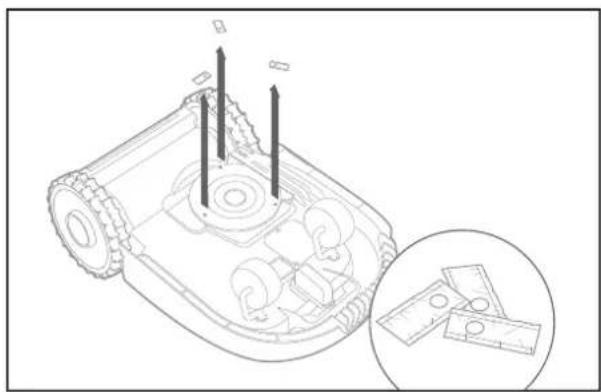
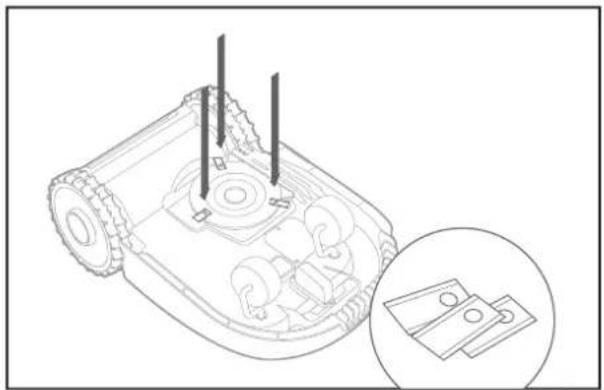
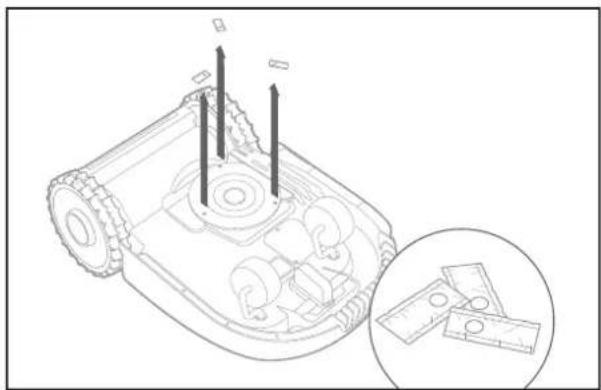
5.1.1 Replacing the Blades
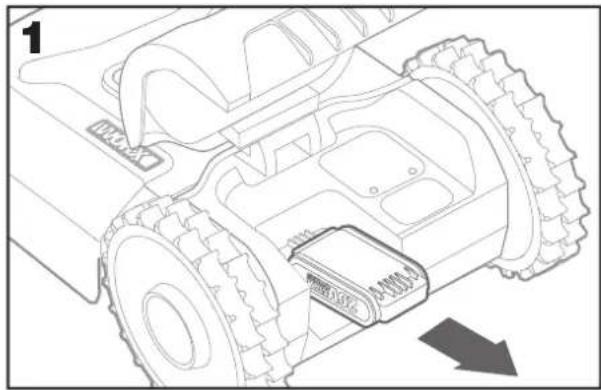
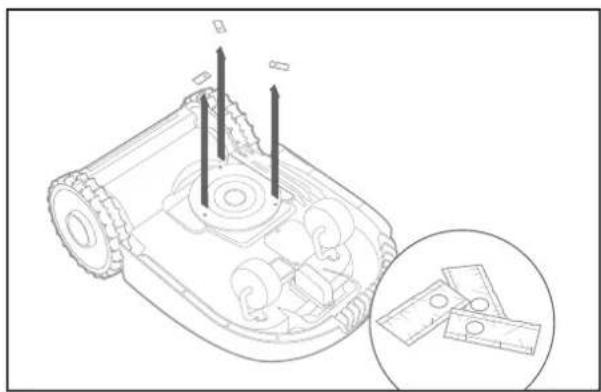
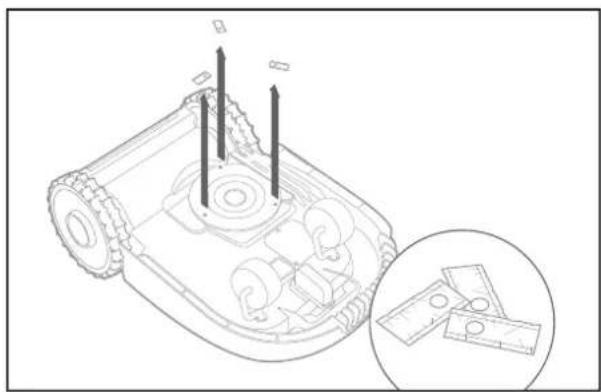
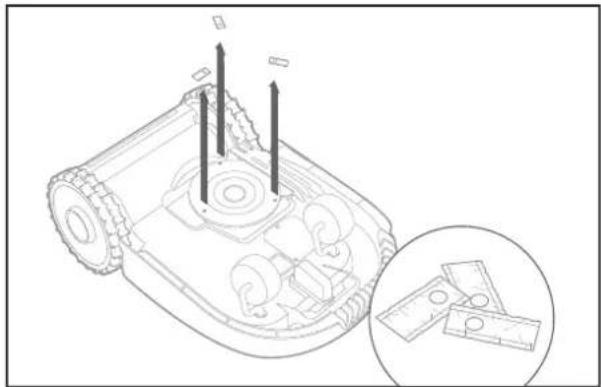
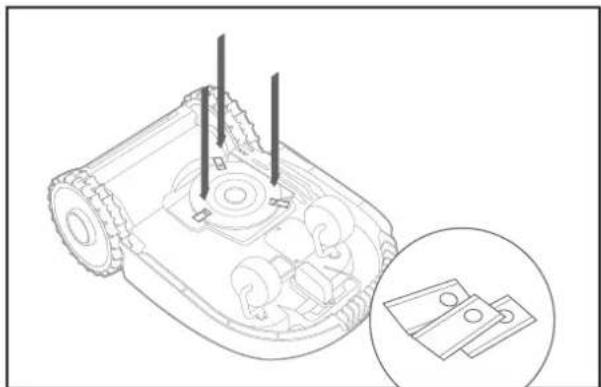
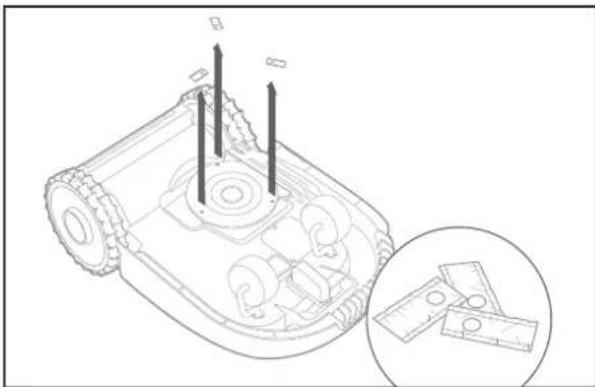
Remove the battery (fig. 1) and gently flip the Landroid over (fig.2)
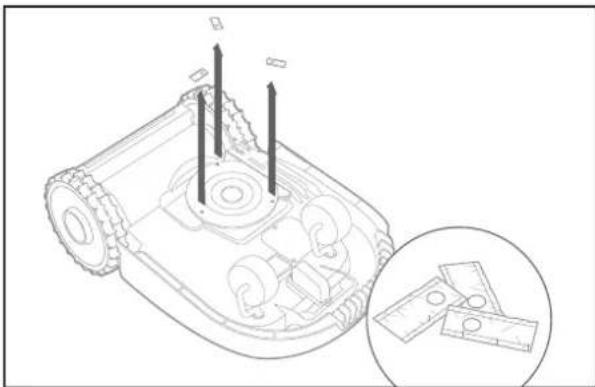
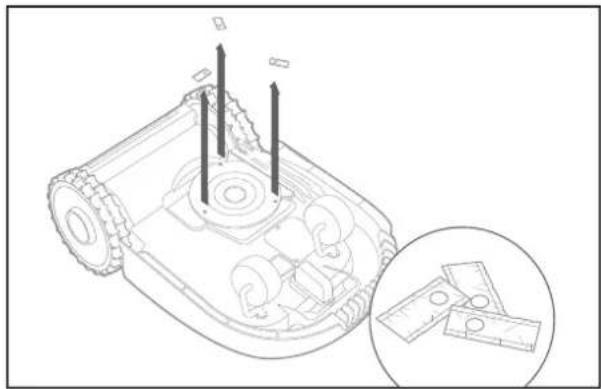
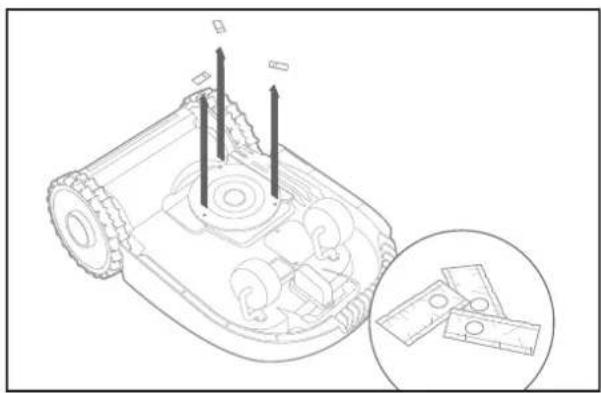
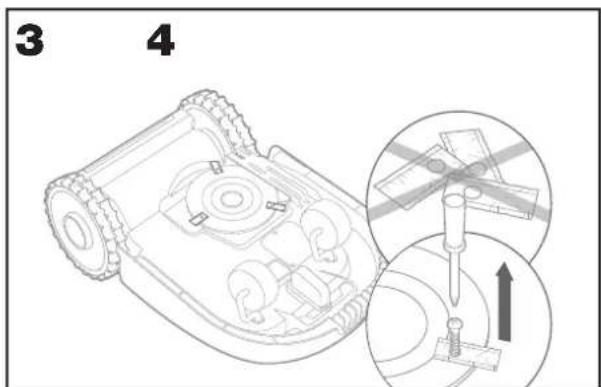
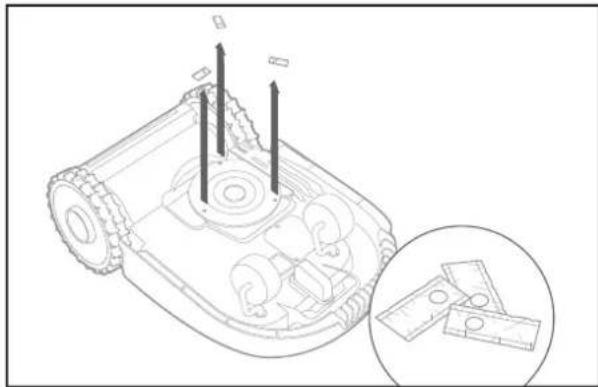
Take the screws off the blades with a screwdriver (fig. 3 - 4)
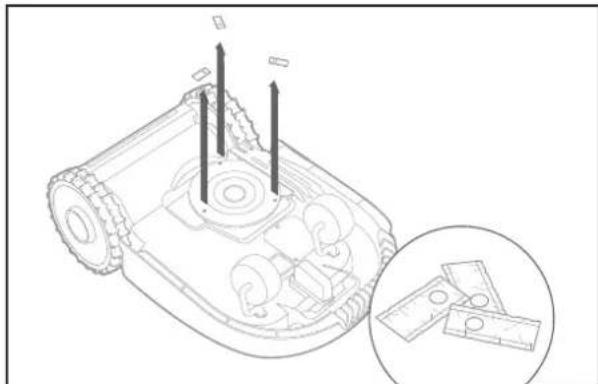
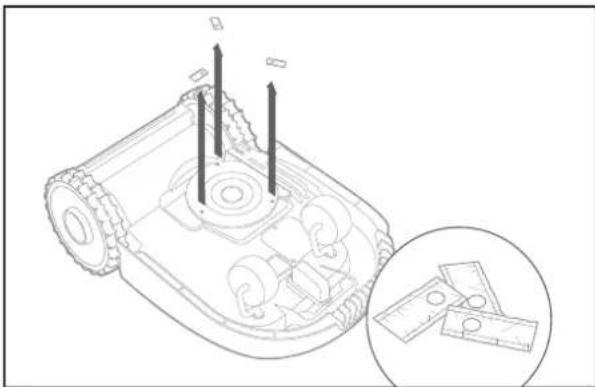
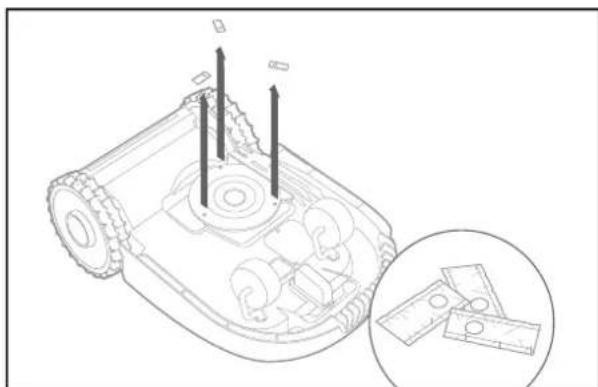
Firmly screw on the new blades (fig. 5 - 6)
natural_image
Technical line drawing of a mechanical assembly with gears and a base component (no text or symbols)
natural_image
Diagram of a robotic arm with an arrow indicating rotational motion (no text or symbols present)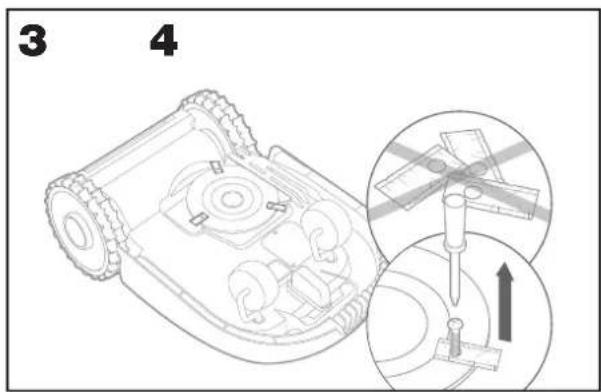
natural_image
Technical line drawing of a robotic vehicle showing internal components and a close-up inset of a small electronic component (no text or symbols)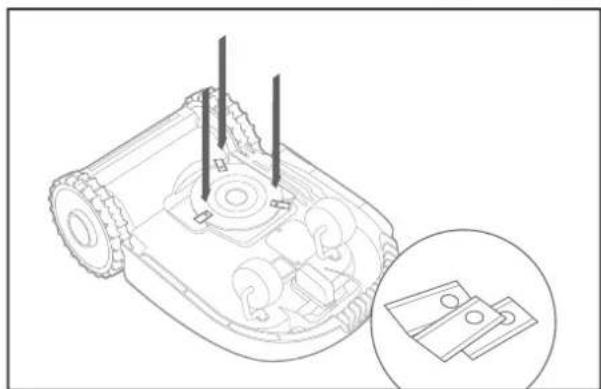
natural_image
Technical line drawing of a robotic device with internal components and a magnified inset showing two hardware parts (no text or symbols)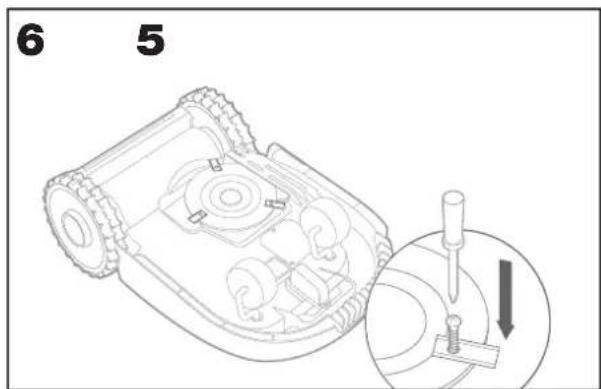
Attention: When fitting new blades, make sure you replace ALL the blades.
Always use new screws when fitting blades. This is important to ensure blade retention and balance the blade turning disc. Failure to use new screws could cause serious injury
Important: After screwing the blade to the blade disc, make sure the blade is able to spin freely
5.2 Keep it clean
Your Android should be cleaned regularly. This helps keep it in good condition, especially removing dirt, debris and the build-up of grass from daily mowing. Turn Android off before cleaning it. For extra safety, remove the battery.
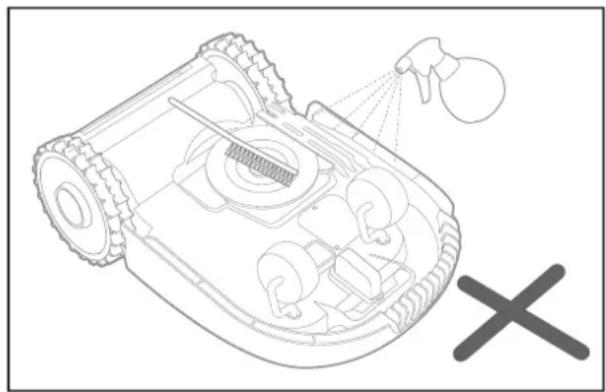
⚠ WARNING! DO NOT use a hose, high pressure washer or otherwise pour running water on your Landroid. High pressure water can go inside the sealings and damage electronic and mechanical parts.
natural_image
Technical line drawing of a robotic vehicle showing internal components and spray nozzle (no text or symbols)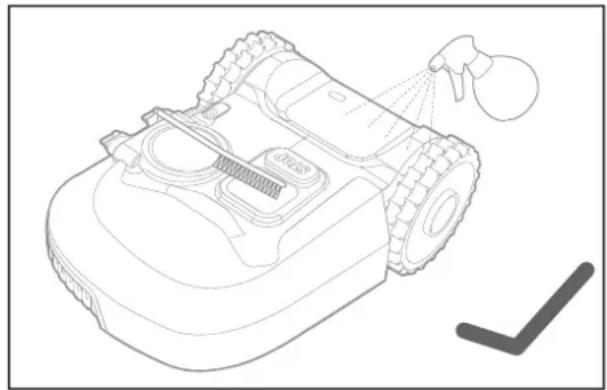
natural_image
Line drawing of a robotic vacuum cleaner with spray nozzle and cleaning tool (no text or symbols)5.2.1 .Cleaning the upper body
A. Clean with a spray bottle filled with water. Don't use solvents or polishers
B. Use a brush or a clean cloth to remove built-up dirt
5.2.2. Cleaning the Bottom
A. Flip Android upside down
B. Remove debris and grass clippings using a brush to remove
C. Be careful not to touch the blades with your hands. Wear gloves for protection
D. Clean the blade disc, the chassis and the front wheel(s) thoroughly with a soft brush or moist rag
E. Rotate the blade disc to ensure it rotates freely. Remove any obstructions. Remove any lodged debris so that they don't cause a crack in the blade disk. Even the tiniest crack effects mowing performance
F. Check the blades spin freely around the fixing screws. Remove any obstructions
5.2.3. Cleaning the drive wheels
A. Remove mud from wheels with a brush in order to ensure good grip of the tread
5.2.4. Clearing the charging contacts
A. Clean the contact pins located on the charging base and the charging strips located on the Landroid using a cloth
B. Periodically remove any build-up of grass clippings or debris around the contact pins and the charging strips to ensure Android successfully charges each time
5.3. Keep it charged
The heart of Android is its 20V Li-Ion Worx Powershare Battery.
A. For the proper storage of the battery, make sure it is fully charged and kept in a cool dry place.
B. The recommended Android operation temperature is between 0-55°C
C. The life-span of Landroid's battery depends on hours of usage and the length of use per day during the mowing season
5.3.1. Landroid can be charged manually without the boundary wire
A. Connect the charging base to a suitable power supply. The green light on the charging base will turn on
B. Manually dock Android into the charging base while Android is powered off
C. The green light on the charging base will flash and Android will begin to charge
5.4. Keep it stored over the winter
Although Android is designed and built to survive the most severe weather conditions, we recommend storing it in your shed or garage during the winter. To prepare it for winter hibernation:
A. Clean it thoroughly
B. Fully charge the battery
C. Turn the power off
5.4.1 Getting back to work in the Spring
When it is time to re-start Landroid for the new season, please perform the following checks:
A. Update the time and date settings via the app
B. If you notice signs of oxidation on the charging contacts of Landroid and the charging station, clean these with a fine grade emery cloth
C. Full charge Android's battery before operating
5.5 Keep it updated
Landroid is always improving and new software versions are made available for free. Always keep Android software updated to make the most of your machine.
5.5.1 Over-the-Air (OTA) updates
If your Android is connected to your Wi-Fi network, you will be notified that new software is available via the app. Once you confirm, the update will happen automatically Over-the-Air.
5.5.2 Check which software version you have
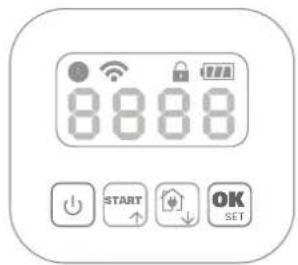
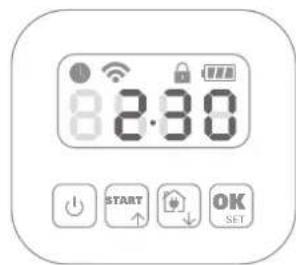
If you want to see the software version number:
A. Power off firstly
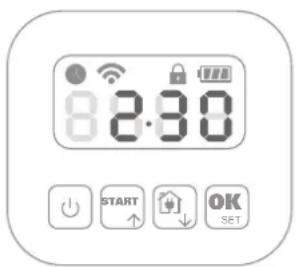
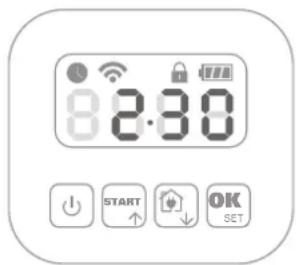
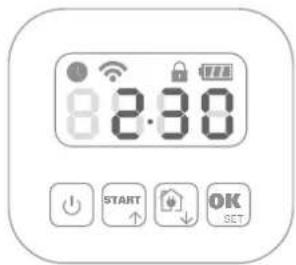
B. Please press and hold the Power and OK buttons together.
C. A beep will sound.
D. Then a number will appear on the display
E. This is the version number.
5.5.3 .Manual updates
A. If your Android is not connected to your Wi-Fi network, you can still update it to the latest software version with a USB stick
B. Regularly visit the Worx Android website to check if any new version is available. If you subscribed to Android email list, you will be notified when a new version is available
C. Download the latest software version at our website
D. Take a blank USB stick formatted in FAT32
E. Save the zip file and extract the content to your USB stick
F. Place Android on a secure and level surface
G. Turn off Android
H. Go to the rear of the Landroid to access the USB port.
I. Insert the USB stick in the port
J. Place the Android on the lawn again, inside the working area delimited by the boundary wire
K. Turn on Landroid
L. Without lifting Landroid, remove the USB stick when 'USB' is displayed
M. The update will begin automatically and may take a while. Landroid will restart automatically after the update is completed
NOTE: Make sure Android is within the boundary when restarting Android.
6. ERROR MESSAGES
Sometimes things can go wrong. Fortunately Android is smart enough to tell you if it is encountering an issue, so you can fix it. If in doubt, please visit our website where you will find useful videos and further support.
| MESSAGE CAUSE ACTION | ||
| EE Error unknown. Please contact Customer Services. | ||
| F1 Rain delay. Your Android will start after the rain stops and the rain delay has expired. | ||
| E1 Boundary wire missing OR Landroid outside wire. | 1. If Android is actually outside its working area: turn power off, take Android inside its working area. Turn power on. Press .2. If the Android is inside its working area, check if the LED on the charging base is green. If not, verify that the charging base is properly connected to the charger and that the charger is connected to a suitable power supply. If they are properly connected, the boundary wires are clamped incorrectly and must be reversed.3. Reverse the boundary wire ends. | |
| E2 Motor wheels fault. Turn power off and take | Landroid to an area free from obstacles.Turn power on. Press start.If the error message is still displayed, turn power off. Turn Android upside-down and check if there's anything preventing the wheels from rotating. Remove any obstruction, turn Android upright, turn power on. | |
| E3 Motor blade fault. Turn power off. | Turn Android upside down, put on safety gloves to prevent injury and check if there's anything preventing the blade disc to rotate.Remove any obstruction.Turn Android upright and take it to an area with short grass or adjust the cutting height;Turn power on. Press start. | |
| E4 Error trapped. Turn power off. | Take Android to an area in your lawn free of obstacles, turn power on. Press start.If the error message is still displayed: turn power off, turn Android upside-down. Check if there is anything preventing the wheels from rotating. Remove any obstruction, turn the Android upright, turn power on. | |
| E5. Error lifted. Turn power off. | Take Android to a lawn area clear of obstacles, turn power on. Press start. If the error message is still displayed: turn power off, turn Android upside-down and check there's anything that can cause Android to be lifted up. Remove any possible object, turn Android upright, turn power on. | |
| E6 Error Upside Down (tilted). Turn Landro d upright. | ||
| E7 | Battery charge error. | 1) Battery's temperature is too high (more than 55°C) when charging. Place the charging base in a shady area or wait until the temperature has cooled down.2) Battery's temperature is too low. The outside temperature doesn't allow your Android to work. It's time to recover it for winter time.3) Poor connection: check the connection between the contact pins located on the charging base and the charging strip and that the charging base is on a perfect flat ground.4) Power supply is broken: please contact Customer Services. |
| E8 | Error find home timeout. | 1) Charging base is badly placed (not on a flat ground), Android doesn't find pins and doesn't stop. Check the base.2) Android runs out of battery before reaching the charging base. The extended boundary wire should not exceed 350 meters. |
| E9 With the ‘Lock Function’ enabled, if yourLandroid does not receive a signal from your Wi-Fi router for 3 days, then it gets locked as a security measure.This could be because your router lost its power or because you changed your Wi-Fi router or network provider. | Please reconnect Android to the Wi-Fi networkk it has been originally paired with.If this is not possible, contact Cutomer Service. |
| Er:60 - Er:61 - Er:62 - Er:63 - Er:64 | Module software update failure occurs. Please check that the module is correctly connected.Check that the file copied in the USB stick is not damaged.Turn power off, then turn it on and try the software update again. |
| Er:50 - Er:51 - Er:52 - Er:80 - Er:81 - Er:82 - Er:83 - Er:84 - EF:80 | Software update failure occurs. Please try the software update again or contact Customer Service |
NOTES
A. Before turning power on, always check Android is inside its working area.
B. If for any reason—i.e. a party, children playing...—you want to park your Android in the charging base: press home then OK. Android will go to its base and stay there. Please note Android will now wait until the next scheduled mowing session. If you want to re-start it at anytime, press start then OK to start your Android
C. If an error repeatedly occurs in the same area of your lawn, you might have a problem with the boundary wire so please refer to the installation instructions and check your set up is correct with its help
D. If your lawn is divided in two separated areas, connected by a corridor less than 1m wide, one of which is not provided with the charging base: when Android runs out of charge, take it manually to the charging base
E. If Android runs abnormally once in a while, please reset it by turning it off and removing the battery for 30 seconds, then restart it. If the problem cannot be solved, please contact our Customer Service for help
7. TROUBLE SHOOTING
If your Android does not work correctly, follow the trouble shooting guide below. If the fault persists, contact Customer Service.
| SYMPTOM CAUSE SOLUTION | ||
| The LED light on the charging base does not turn on. | There is no power. Check the charging base is connected properly to the charger and the charger is connected to a suitable power supply. | |
| Red light on the charging base. | The boundary wire isn't connected. | Check that the boundary wire has been connected correctly to the charging base. Check there are no breaks in the boundary wire. |
| Landroid turns on, but the blade disc does not spin. | Landroid is searching for the charging base. | This is normal: when Landroid needs to recharge, the blade disc does not rotate while it is searching for the charging base automatically. |
| Landroid vibrates. The blade disc is unbalanced.Blades may be damaged. | Check the blades and replace them if damaged.Remove debris and foreign objects from the blades and blade disc. | |
| Grass is being cut unevenly. | Landroid does not work enough hours per day to cut the grass. | Try adding more hours to the mowing schedule. |
| Mowing area is too big for the size of Landroid you have. | Try decreasing the size of the mowing area or increasing working time. | |
| The blades are dull and not sharp. | Change all the blades and screws in order to balance the bade disc. | |
| The cutting height is set too low for the length of the grass. | Raise the cutting height and then gradually lower. | |
| Grass or another object has wrapped around the blade disc. | Check the blade disc and remove any grass or other objects that might prevent it spinning. | |
| There is a build-up of grass in the blade disc or motor frame box. | Make sure the blade disc rotates easily. If need be, you may take off the blade disc and then remove the debris. | |
| Your Android is inside its working area and the boundary wire is connected, but ‘- E1 -’ is displayed. | The boundary wire ends are clamped incorrectly. | Reverse the boundary wire ends and reconnect to the charging station. |
| The charging time is far more than the rated charging time. | Poor connection caused by debris on the charging strip. | Clean the contact pins located on the charging base and the charging strip on Android using a cloth. |
| The charging protection program is activated due to high temperature. | Place the charging base in a shady area or wait until the temperature has cooled down. | |
| The mower does not charge. There is no power. Check the power cord is connected properly to the charger and the charger is connected to a suitable power supply.Make sure both the charging strips on the mower touch the centre of the contact strips on the charging base. | ||
| Landroid is starting to have shorter run-times between charges. | Something is clogging in the blade disc creating friction and increasing power consumption. | Take off the blade disc and clean it. Maybe the grass is too high and too thick. |
| Landroid is shaking heavily because the blade disc is unbalanced. | Check the blade disc and blades, remove debris and foreign objects from the blades and blade disc.Replace the blades with a new set. | |
| The battery may be exhausted or old. Replace battery. | ||
| The working time is up reset the working time | ||
| Landroid is not operating at the correct time. | The clock is not set to the correct time. Set the clock to the correct time. | |
| Programmed cutting times for Android are not correct. | Change the time settings for the mower to start and stop. | |
| the percentage of weekly operating time set through APP has changed. | set the correct percentage through APP. | |
| Landroid cannot correctly dock with the charging base. | Environmental influences. Restart Android. | |
| Poor connection caused by debris on the charging strip. | Clean the contact pins located on the charging base and the charging strip on Android using a cloth. | |
| The green light on the charging base turns on before charging is complete. | the charging base is overheating or overcooling | Place the charging base in a shady area or wait until it reaches the normal temperature |
| Landroid wheels skid or repeatedly slip. | Foreign obstacles, such as twigs and branches may be lodged under Android. | Remove foreign objects from underside of Android. |
| The lawn is too wet. Wait until lawn has dried. | ||
| Landroid runs outside the boundary wire.Landroid does not mow an area within a boundary wire zone.Landroid reverses or rotates erratically near the boundary wire. | The boundary wire of another Android or robotic mower is positioned too closely. | Ensure at least 1m clearance is provided in between your boundary wire and that of your neighbor. |
| In wet conditions, the boundary wire electric signal may leak where the wire has been joined or repaired incorrectly. | Check boundary wire joints. Insulate to provide a fully waterproof connection. | |
| There is boundary wire electric signal leakage due to broken insulation. | Repair damaged boundary wire with the wire connectors supplied. | |
| Landroid slips out of its working area going down a hill. | Low grip of Android drive wheels. Please check the wheels are clean and free of mud in order to have the maximum grip possible. | |
| Landroid operative system crashes when charging or on standby. | Software or display fault. Restart Android. | |
| Landroid shuts off when docking in the charging base. | Landroid fails to charge due to over temperature protection and is powered off. | Place the charging base in a shady area or wait until the temperature has cooled down. |
| Poor connection. Check the LED light on the charging base. | Check the connection between the contact pins located on the charging base and the charging strip. | |
| Landroid stops in the working area. | There is an obstacle in the working area. | Remove the obstacle from Android's working area. |
| The cutting height is set too low for the length of the grass or the grass is too dense. | Raise the cutting height and then gradually lower. | |
| The extended boundary wire should not exceed 350m or it may cause signal problem. | Reduce the lenght of the boundary wire. | |
| The distance between the center of the lawn and the boundary wire should not exceed 25m or it may cause signal attenuation. | Reduce the distance between the center of the lawn and the boundary wire perimeter within 25m. | |
| Landroid flips over. There is an inclined obstacle on the lawn. | Exclude the obstacle from Android's working area. | |
| Landroid fails to connect to the internet. | Please check your router has the correct settings. | Make sure your router is 2.4GHz. If your router has two settings, please enable the 2.4GHz band.Make sure your router is set to 802.11 mode and wireless setting is b/g/n mixed.Make sure your router has the SSID Broadcast function enabled when you connect the machine with the app.You can close it after you connect successfully.Make sure DHCP function is enabled.If you changed your Wi-Fi network, you need to connect Android to the new network.If you have a “Fritz!box” router, please make sure activate “Allow communication between devices in same network” in the settings. |
| Please check whether the router is disconnected or WIFI SSID is changed | Make sure the router is connected and WIFI SSID is correct | |
Environmental protection

Waste electrical products should not be disposed of with household waste. Please recycle where facilities exist. Check with your Local Authority or retailer for recycling advice.
DECLARATION OF CONFORMITY
We,
Positec Germany GmbH
Postfach 32 02 16, 50796 Cologne, Germany
Declare that the product,
Description Robotic Lawnmower
Type WR184E WR141E (100-199 - designation of machinery, representative of Robotic Lawnmower) (Serial number is placed on the back page) with battery charger WA3750.1 / WA3755.1 and charging base WA0510 / WA4002.1
Function Cutting grass
Complies with the following Directives,
2006/42/EC, 2014/30/EU, 2014/35/EU, 2011/65/EU&(EU)2015/863, 2000/14/EC amended by 2005/88/EC, 2014/53/EU
WR184E:
2000/14/EC amended by 2005/88/EC
- Conformity Assessment Procedure as per Annex V
- Measured Sound Power Level 64.2 dB (A)
- Declared Guaranteed Sound Power Level 65 dB (A)
WR141E:
2000/14/EC amended by 2005/88/EC
- Conformity Assessment Procedure as per Annex V
- Measured Sound Power Level 65.5 dB (A)
- Declared Guaranteed Sound Power Level 67 dB (A)
The notified body involved
Name: Intertek, Semko AB (notified body0413)
Address: Torshamnsgatan 43164 22 Kista Sweden
Certification No.: SE-RED-2200106
Standards conform to,
EN 60335-1:2012+A11:2014+A13:2017+A1:2019+A2:2019+A14:2019,
EN 50636-2-107:2015+A1:2018+A2:2020, EN 60335-2-29:2004+A2:2010+A11:2018,
EN 62233:2008, EN IEC 55014-1:2021, EN IEC 55014-2:2021, EN IEC 61000-3-2:2019,
EN 61000-3-3:2013+A1:2019, EN ISO 3744:2005,
EN 300 328 V2.2.2, EN 301 489-1 V2.2.3, EN 301 489-17 V3.2.4, EN IEC 62311:2020,
EN 55011:2016, EN 303 447 V1.1.1
The person authorized to compile the technical file,
Name Marcel Filz
Address Positec Germany GmbH Postfach 32 02 16, 50796 Cologne, Germany


2022/11/18
Allen Ding
Deputy Chief Engineer, Testing & Certification
Positec Technology (China) Co., Ltd
18, Dongwang Road, Suzhou Industrial
Park, Jiangsu 215123, P. R. China
natural_image
Technical line drawing of a mechanical assembly with visible gears and a component, no text or symbols present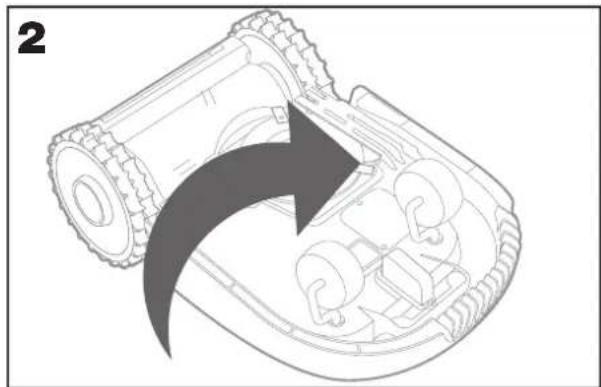
natural_image
Diagram of a robotic arm with an arrow indicating rotational motion (no text or symbols present)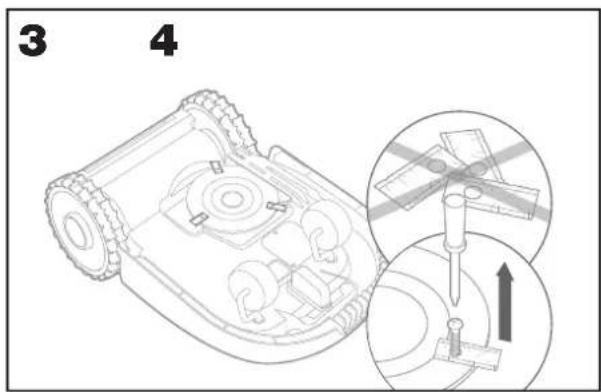
natural_image
Technical line drawing of a robotic vehicle with internal components and a magnified inset showing a small component detail (no text or symbols)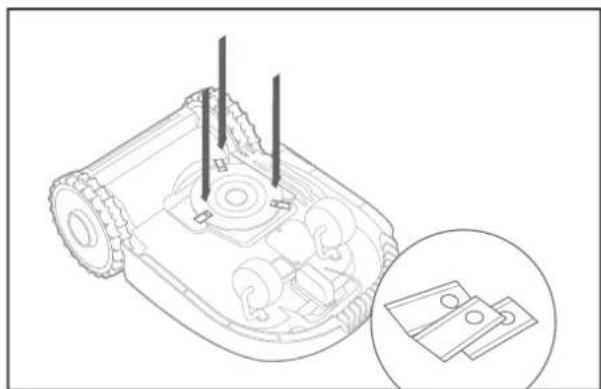
natural_image
Line drawing of a robotic device with internal components and a magnified inset showing two hardware parts (no text or symbols)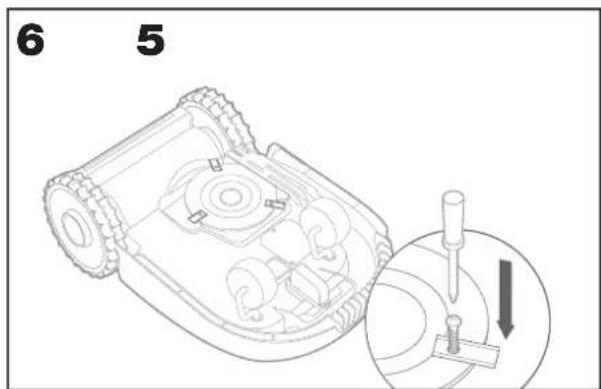
natural_image
Technical line drawing of a robotic vehicle showing internal components and spray nozzle (no text or symbols)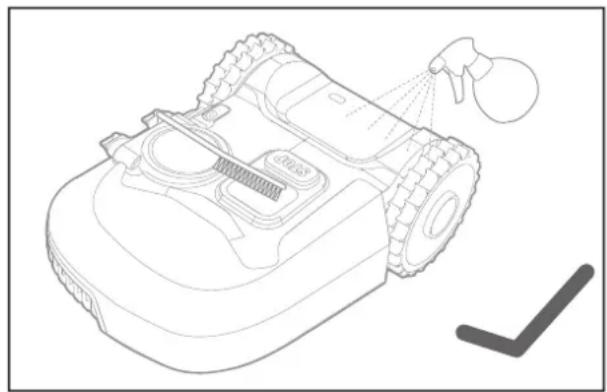
natural_image
Line drawing of a robotic vacuum cleaner with spray nozzle and cleaning tool (no text or symbols)
5.5.3 Manuelle Updates
18, Dongwang Road, Suzhou Industrial
Park, Jiangsu 215123, P. R. China
1. SÉCURITÉ DU PRODUIT
1.1 MISES EN GARDE GÉNÉRALES ET COMPLÉMENTAIRES
4. INFORMATIONS RELATIVES AU BRUIT
| WR184E WR141E | ||
| Niveau de pression acoustique | L_pA = 44.2 dB(A) L | _pA = 45.5 dB(A) |
| K_pA = 0.4 dB(A) K | _pA = 0.6 dB(A) | |
| Niveau de puissance acoustique | L_wA = 64.2 dB(A) L | _wA = 65.5 dB(A) |
| K_wA = 0.4 dB(A) K | _wA = 0.6 dB(A) | |
| Porter des protections auditives lorsque la pression sonore est supérieure à 80 dB(A). | ||
natural_image
Technical line drawing of a mechanical assembly with visible gears and a component, no text or symbols present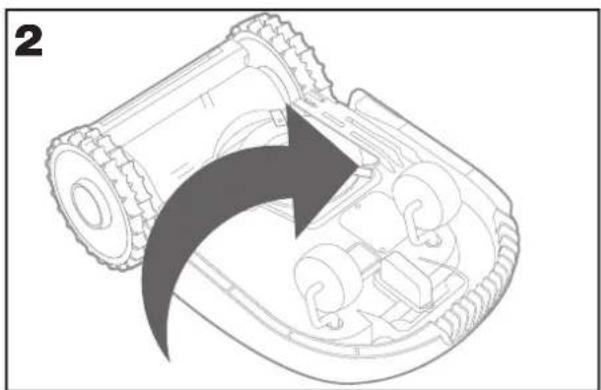
natural_image
Diagram of a robotic device with an arrow indicating rotation or assembly process (no text or symbols present)natural_image
Technical line drawing of a mechanical device with internal components and an inset showing two parts (no text or symbols)natural_image
Technical line drawing of a robotic device with internal components and a magnified inset showing two small electronic components (no text or symbols)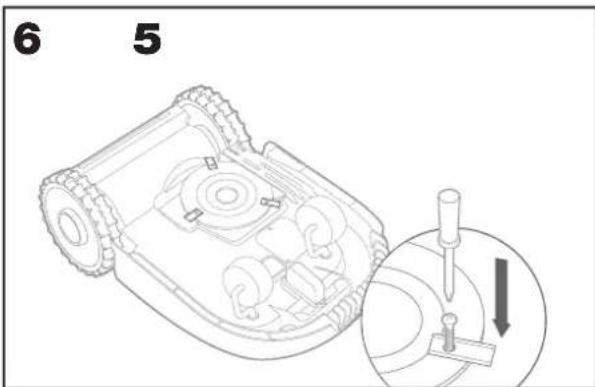
natural_image
Technical line drawing of a robotic device with visible gears and spray nozzle (no text or symbols)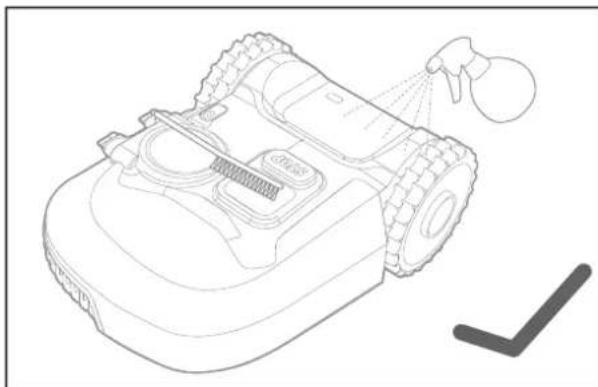
natural_image
Line drawing of a robotic vacuum cleaner with spray gun and cleaning tool (no text or symbols)
DÉCLARATION DE CONFORMITÉ
Nous,
Positec Germany GmbH
Postfach 32 02 16, 50796 Cologne, Germany
18, Dongwang Road, Suzhou Industrial
Park, Jiangsu 215123, P. R. China
1. SICUREZZA DEL PRODOTTO
1.1. AVVISI GENERALI PER LA SICUREZZA DEGLI UTENSILI A MOTORE
natural_image
Technical line drawing of a mechanical assembly with visible gears and a component, no text or symbols present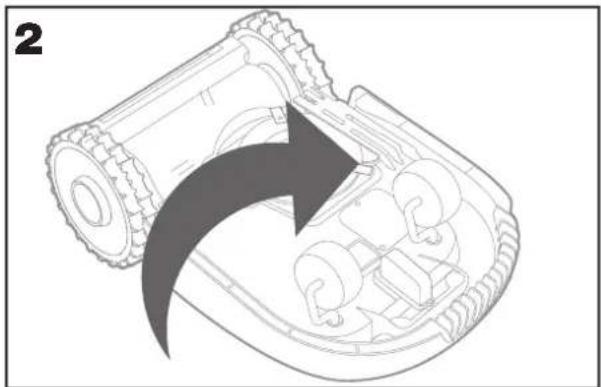
natural_image
Diagram of a robotic arm with an arrow indicating rotational motion (no text or symbols present)natural_image
Technical line drawing of a mechanical device with internal components and an inset showing two parts (no text or symbols)natural_image
Technical line drawing of a robotic device with internal components and a magnified inset showing two circular components (no text or symbols)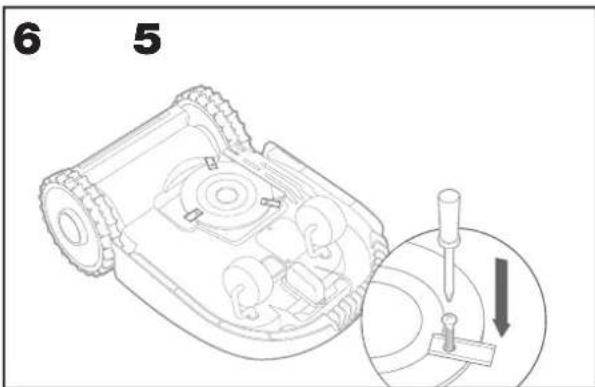
natural_image
Technical line drawing of a robotic vacuum cleaner with spray nozzle and no visible text or symbols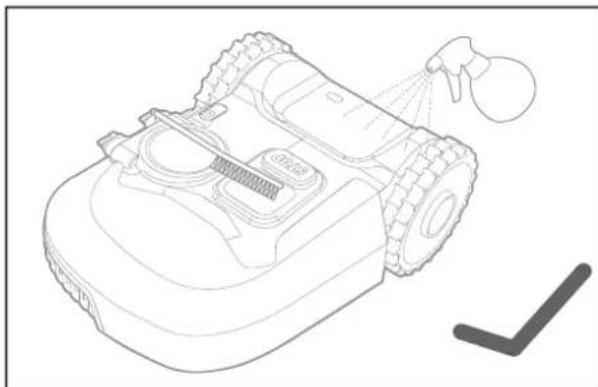
natural_image
Line drawing of a robotic vacuum cleaner with spray nozzle and handle (no text or symbols)Landroid is always improving and new software versions are made available for free. Always keep Android software updated to make the most of your machine.
Complies with the following Directives,
2006/42/EC, 2014/30/EU, 2014/35/EU, 2011/65/EU&(EU)2015/863, 2000/14/EC amended by 2005/88/EC, 2014/53/EU
WR184E:
Deputy Chief Engineer, Testing & Certification
Positec Technology (China) Co., Ltd
18, Dongwang Road, Suzhou Industrial
Park, Jiangsu 215123, P. R. China
1. SEGURIDAD DEL PRODUCTO
1.1 INSTRUCCIONES GENERALES Y ADICIONALES DE SEGURIDAD
natural_image
Technical line drawing of a mechanical assembly with gears and a housing (no text or symbols)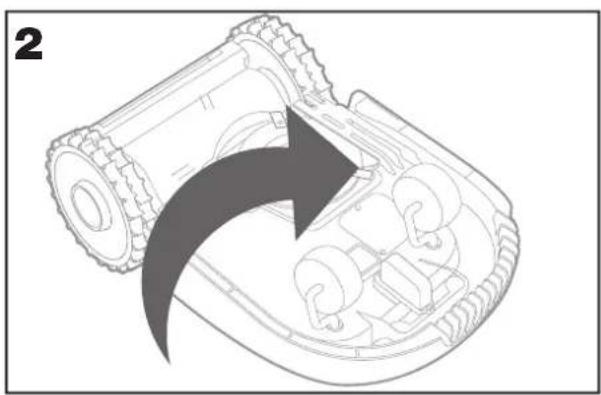
natural_image
Diagram of a robotic device showing internal components and a curved arrow indicating rotation (no text or symbols)natural_image
Technical line drawing of a mechanical device with internal components and a magnified inset showing two parts (no text or symbols)natural_image
Technical line drawing of a robotic device with internal components and a magnified inset showing two circular components (no text or symbols)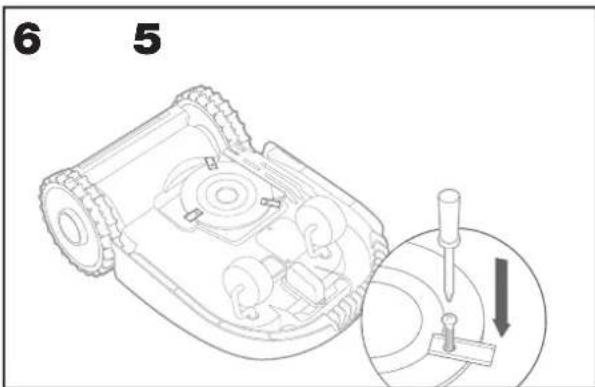
natural_image
Technical line drawing of a robotic lawn mower with spray nozzle and no visible text or symbols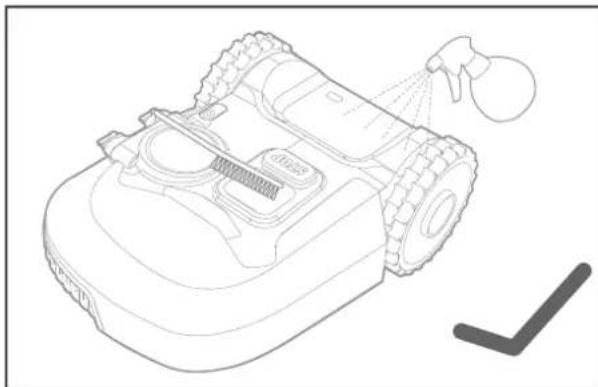
natural_image
Line drawing of a robotic vacuum cleaner with spray nozzle and handle (no text or symbols)
18, Dongwang Road, Suzhou Industrial
Park, Jiangsu 215123, P. R. China
1. PRODUCTVEILIGHEID
1.1. ALGEMENE & EXTRA VEILIGHEIDSINSTRUCTIE
natural_image
Technical line drawing of a mechanical assembly with visible gears and a component, no text or symbols present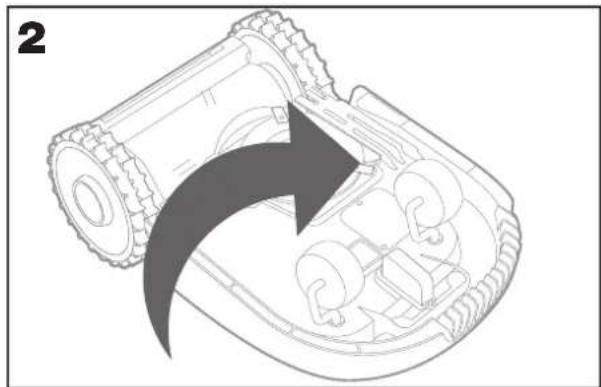
natural_image
Diagram of a robotic arm with an arrow indicating rotational motion (no text or symbols present)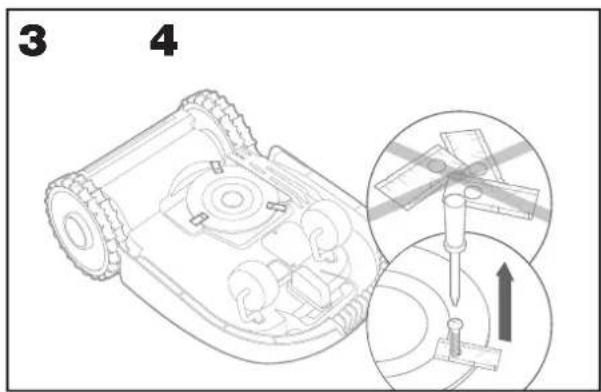
natural_image
Technical line drawing of a robotic vehicle showing internal components and a close-up inset of a small electronic component (no text or symbols)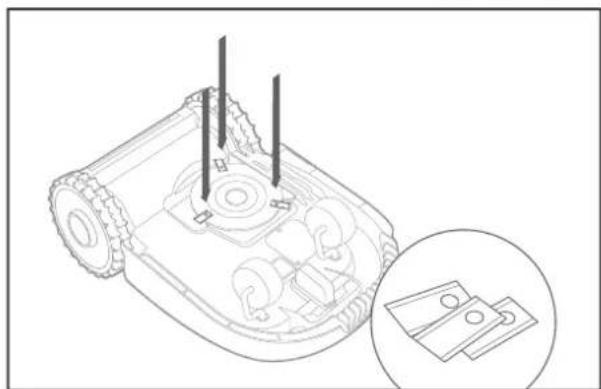
natural_image
Line drawing of a robotic device with internal components and a magnified inset showing two hardware parts (no text or symbols)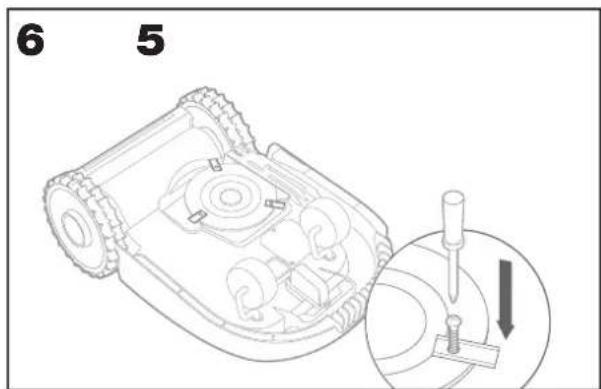
natural_image
Technical line drawing of a robotic vehicle with spray gun and no visible text or symbols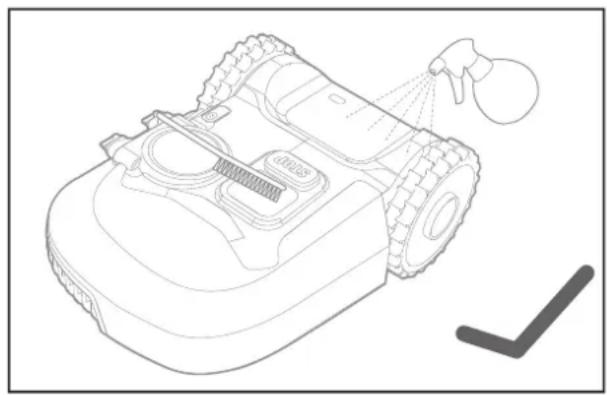
natural_image
Line drawing of a robotic vacuum cleaner with spray nozzle and cleaning tool (no text or symbols)
5.5.3 Handmatige updates
7. PROBLEEMOPLOSSING
18, Dongwang Road, Suzhou Industrial
Park, Jiangsu 215123, P. R. China
1. BEZPIECZEŃSTWO PRODUKTU
1.1 OGÓLNE I DODATKOWE INSTRUKCJE BEZPIECZEŃSTWA
natural_image
Technical line drawing of a mechanical assembly with gears and a labeled component (no text or symbols)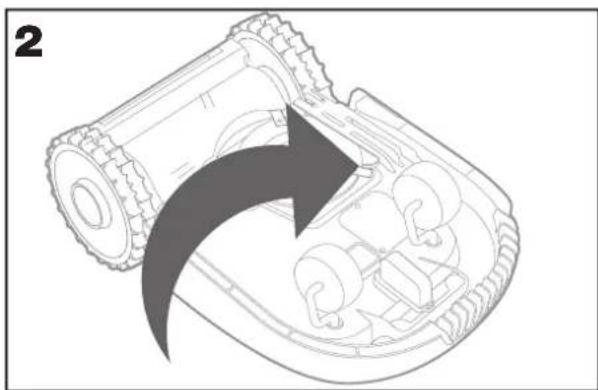
natural_image
Diagram of a robotic arm with a curved arrow indicating motion or force direction (no text or symbols present)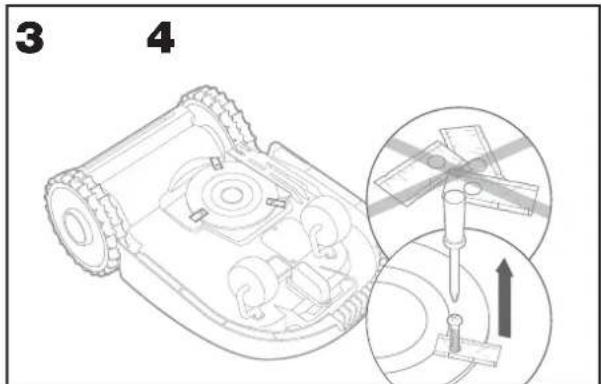
natural_image
Technical line drawing of a mechanical device with internal components and an inset showing two plastic parts (no text or symbols)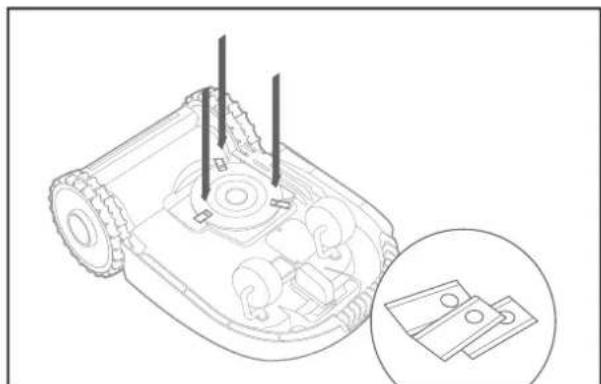
natural_image
Line drawing of a robotic device with internal components and a close-up inset showing two hardware parts (no text or symbols)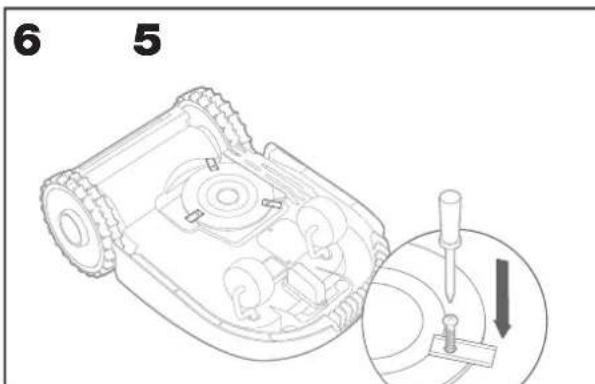
natural_image
Technical line drawing of a robotic lawn mower with spray nozzle and no visible text or symbols
natural_image
Line drawing of a robotic vacuum cleaner with spray nozzle and handle (no text or symbols)
18, Dongwang Road, Suzhou Industrial
Park, Jiangsu 215123, P. R. China
1.BEZPEČNOST VÝROBKU 1.1ZÁKLADNÍ A DOPLŇKOVÉ BEZPEČNOSTNÍ POKYNY
natural_image
Technical line drawing of a mechanical assembly with gears and a labeled component (no text or symbols)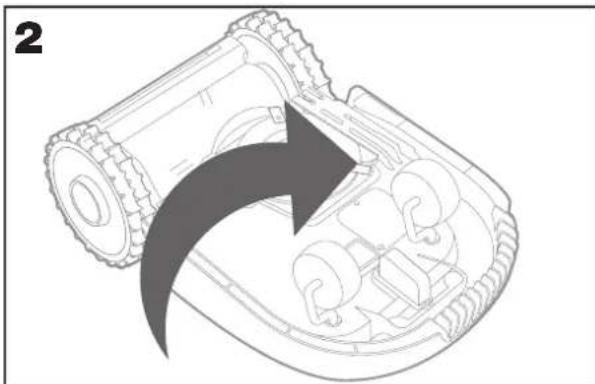
natural_image
Diagram of a mechanical device showing internal components and a curved arrow indicating rotation (no text or symbols)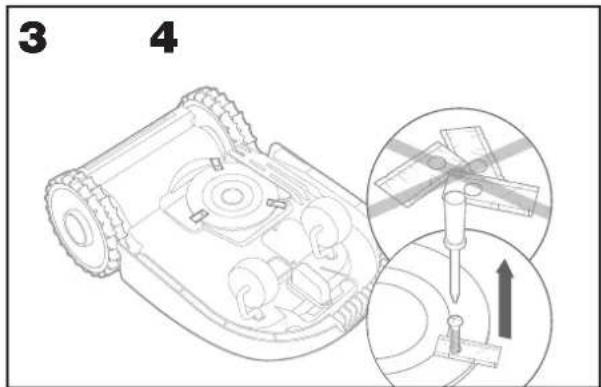
natural_image
Technical line drawing of a mechanical device with internal components and an inset showing two parts (no text or symbols)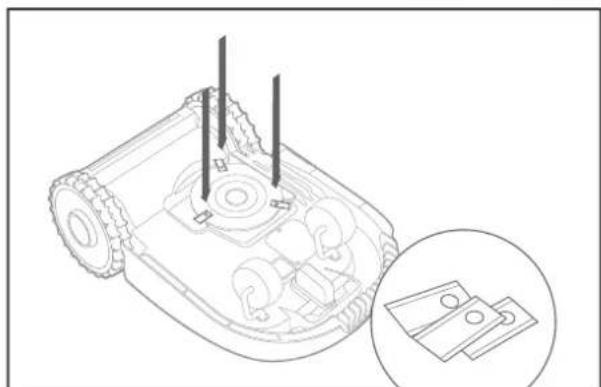
natural_image
Technical line drawing of a robotic device with internal components and a magnified inset showing two labeled parts (no text or symbols present)
natural_image
Technical line drawing of a robotic vehicle showing internal components and spray nozzle (no text or symbols)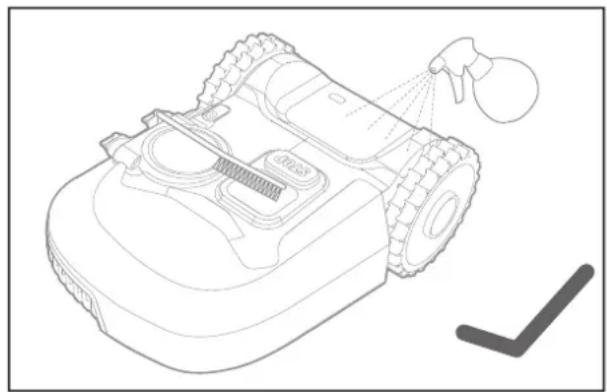
natural_image
Line drawing of a robotic vacuum cleaner with spray nozzle and cleaning tool (no text or symbols)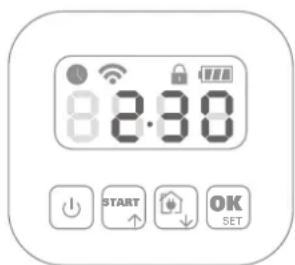
18, Dongwang Road, Suzhou Industrial
Park, Jiangsu 215123, P. R. China
1. BEZPEČNOST VÝROBKU
1.1. ZÁKLADNÉ A DOPLNKOVÉ BEZPEČNOSTNÉ POKYNY
DÔLEŽITÉ BEZPEČNOSTNÉ POKYNY.
ODLOŽTE PRE PRÍPAD POTREBY V BUDÚCNOSTI.
natural_image
Technical line drawing of a mechanical assembly with gears and a labeled component (no text or symbols)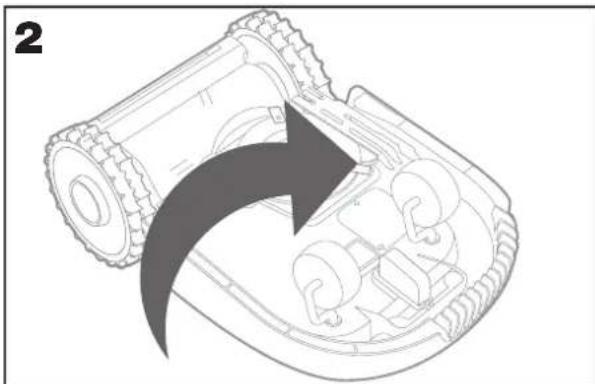
natural_image
Diagram of a robotic device showing internal components and a curved arrow indicating rotation (no text or symbols)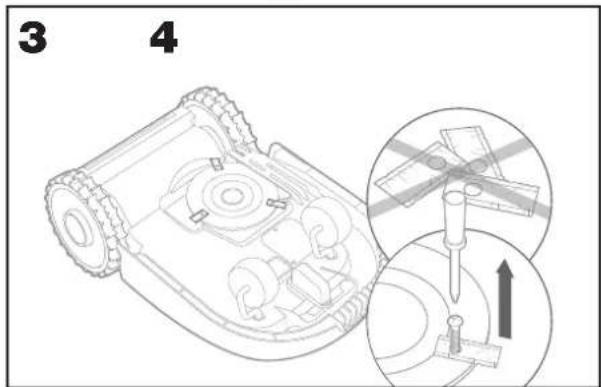
natural_image
Technical line drawing of a mechanical device with internal components and an inset showing two parts (no text or symbols)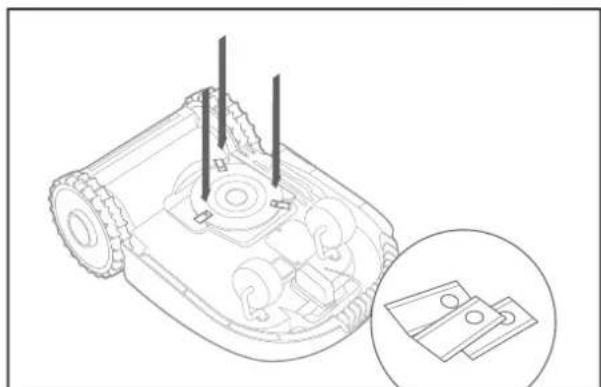
natural_image
Technical line drawing of a robotic device with internal components and a magnified inset showing two labeled parts (no text or symbols present)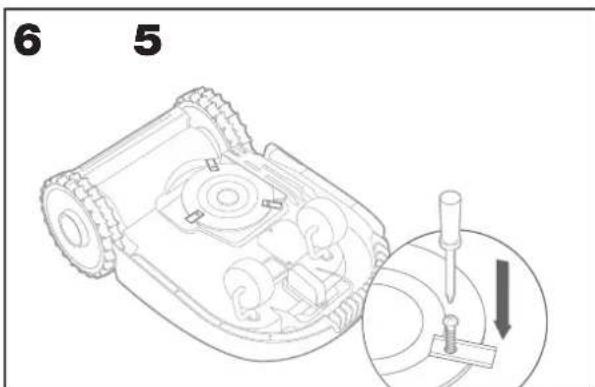
natural_image
Technical line drawing of a robotic vehicle showing internal components and spray nozzle (no text or symbols)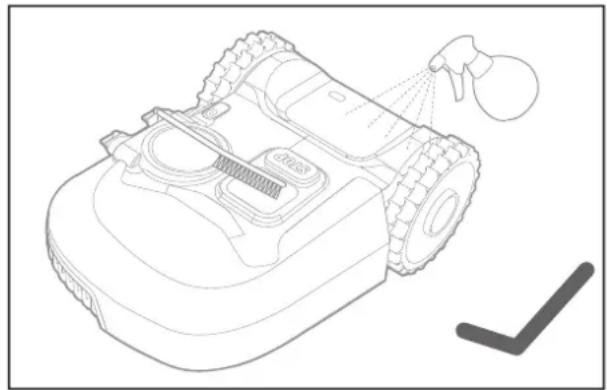
natural_image
Line drawing of a robotic vacuum cleaner with spray nozzle and cleaning tool (no text or symbols)
18, Dongwang Road, Suzhou Industrial
Park, Jiangsu 215123, P. R. China
1. VARNOST IZDELKA
1.1. SPLOŠNA IN DODATNA VARNOSTNA NAVODILA
natural_image
Technical line drawing of a mechanical assembly with tire and housing components (no text or symbols)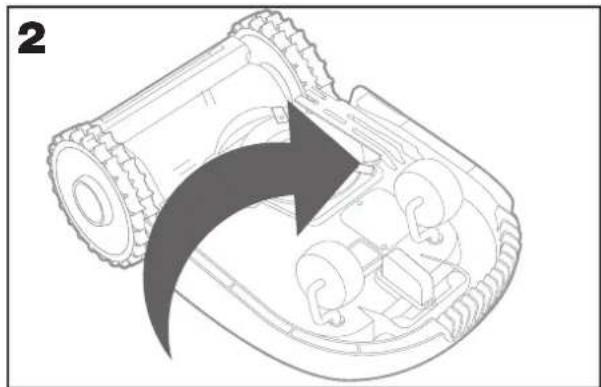
natural_image
Diagram of a robotic arm with an arrow indicating rotational motion (no text or symbols present)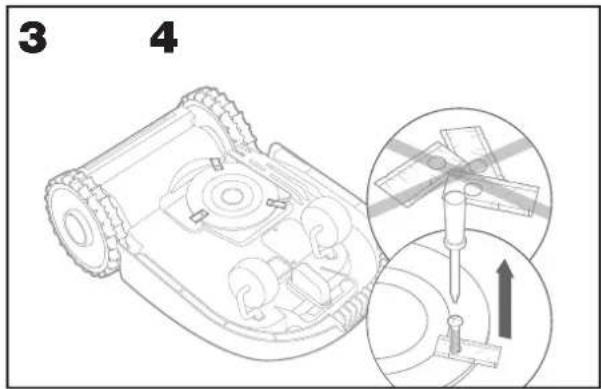
natural_image
Technical line drawing of a robotic vehicle showing internal components and a magnified inset of a small electronic component (no text or symbols)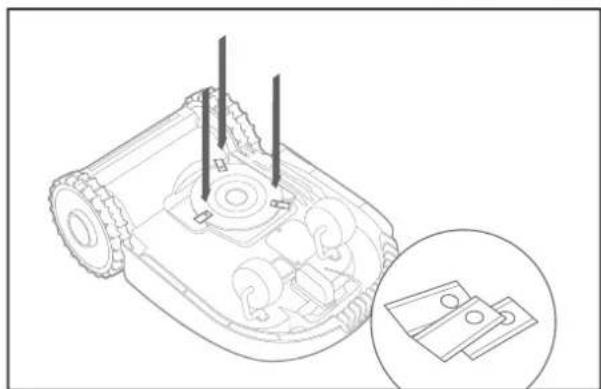
natural_image
Technical line drawing of a robotic device with internal components and a magnified inset showing two hardware parts (no text or symbols)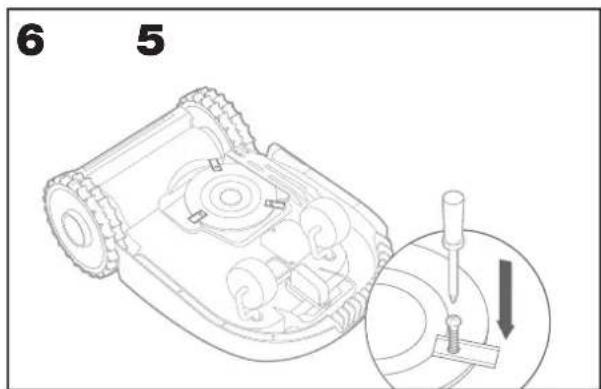
natural_image
Technical line drawing of a robotic vehicle showing internal components and spray nozzle (no text or symbols)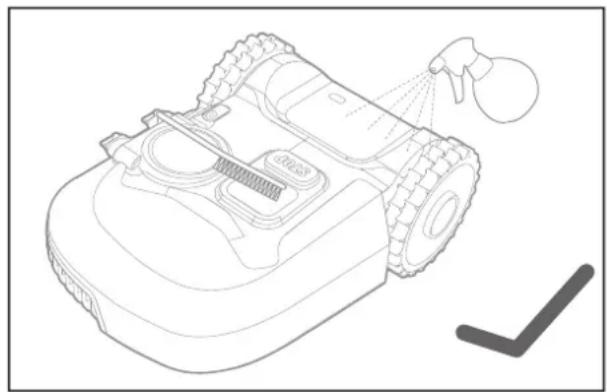
natural_image
Line drawing of a robotic vacuum cleaner with spray nozzle and cleaning tool (no text or symbols)
18, Dongwang Road, Suzhou Industrial
Park, Jiangsu 215123, P. R. China
SEGURANÇA DO PRODUTO INSTRUÇÕES DE SEGURANÇA GERAIS E ADICIONAIS
natural_image
Technical line drawing of a mechanical assembly with tire and housing components (no text or symbols)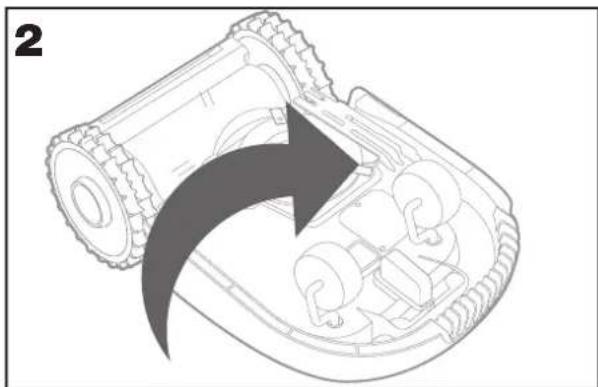
natural_image
Diagram of a robotic arm with a curved arrow indicating motion or force (no text or symbols present)natural_image
Technical line drawing of a robotic vehicle showing internal components and a close-up inset of a mechanical part (no text or symbols)Aparafuse firmemente as novas lâminas (fig. 5 - 6)
natural_image
Technical line drawing of a robotic device with internal components and a magnified inset showing a small component detail (no text or symbols)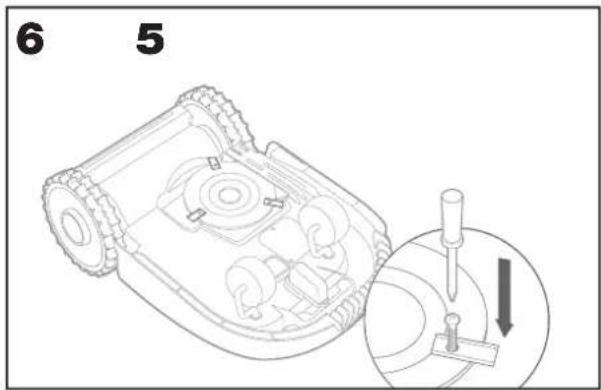
natural_image
Technical line drawing of a robotic arm with spray gun and no visible text or symbols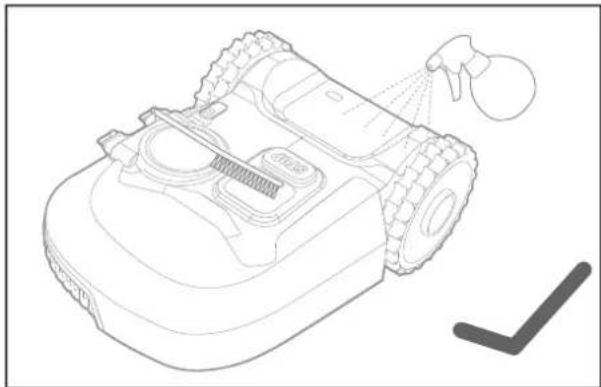
natural_image
Line drawing of a robotic vacuum cleaner with spray nozzle and cleaning tool (no text or symbols)5.2.1 Limpar a parte superior
5.2.3 Limpar as rodas motrizes
18, Dongwang Road, Suzhou Industrial
Park, Jiangsu 215123, P. R. China
1. BIZTONSÁGI ÓVINTÉZKEDÉSEK
1.1 ÁLTALÁNOS & KIEGÉSZÍTŐ BIZTONSÁGI ÓVINTÉZKEDÉSEK
natural_image
Technical line drawing of a mechanical assembly with gears and a component, no visible text or symbols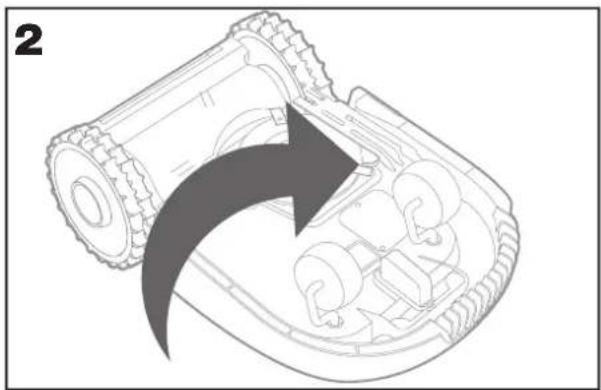
natural_image
Diagram of a robotic arm with gear and internal components, showing a curved arrow indicating motion (no text or symbols present)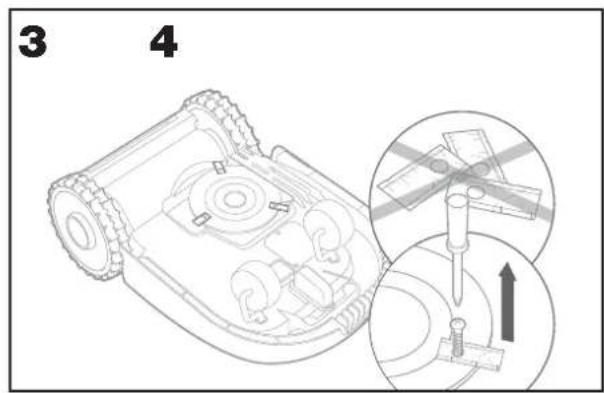
natural_image
Technical line drawing of a robotic vehicle showing internal components and a magnified inset of a small electronic component (no text or symbols)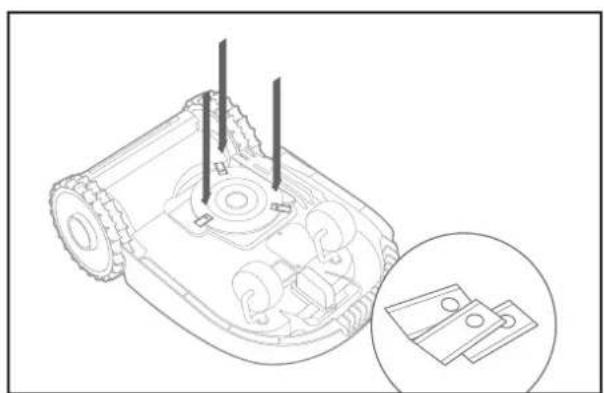
natural_image
Technical line drawing of a mechanical device with internal components and a magnified inset showing two labeled parts (no text or symbols present)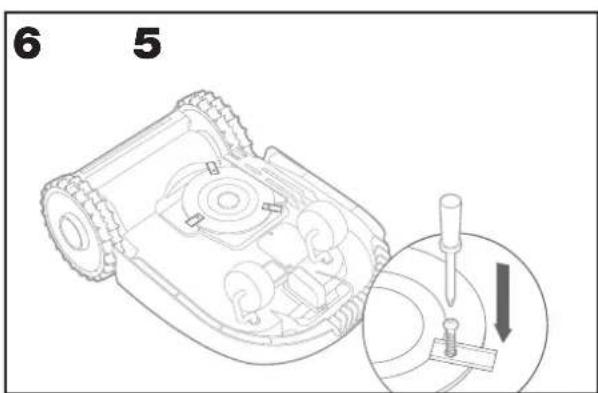
natural_image
Technical line drawing of a robotic vehicle showing internal components and spray bottle (no text or symbols)
natural_image
Line drawing of a robotic vacuum cleaner with spray nozzle and handle (no text or symbols)
18, Dongwang Road, Suzhou Industrial
Park, Jiangsu 215123, P. R. China
1. SECURITATEA PRODUSULUI
1.1 INSTRUCTIUNI GENERALE ŞI SUPLIMENTARE DE SIGURANTĂ
natural_image
Technical line drawing of a mechanical assembly with gears and a base component (no text or symbols)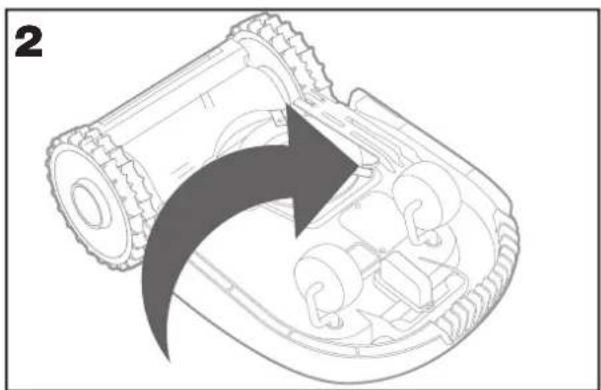
natural_image
Diagram of a robotic arm with a curved arrow indicating motion or force direction (no text or symbols present)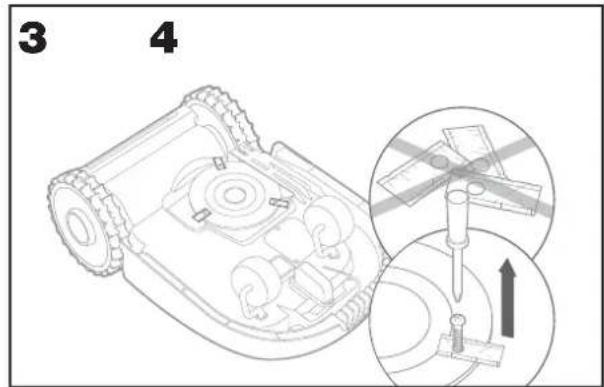
natural_image
Technical line drawing of a robotic vehicle showing internal components and a close-up inset of a component detail (no text or symbols)
natural_image
Technical line drawing of a robotic device with internal components and a magnified inset showing two labeled parts (no text or symbols present)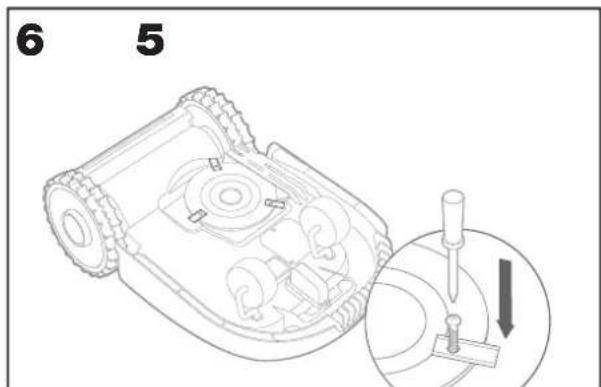
natural_image
Technical line drawing of a robotic vehicle with spray gun and no visible text or symbols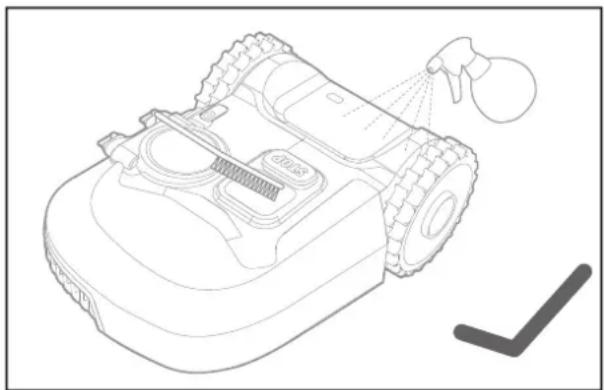
natural_image
Line drawing of a robotic vacuum cleaner with spray nozzle and cleaning tool (no text or symbols)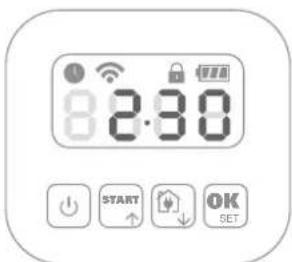
Adresă Positec Germany GmbH Postfach 32 02 16, 50796 Cologne, Germany

2022/11/18
Allen Ding
Adjunct Inginer Şef, Testare si certificare
Positec Technology (China) Co., Ltd
18, Dongwang Road, Suzhou Industrial
Park, Jiangsu 215123, P. R. China
1. SIGURNOST PROIZVODA
1.1 OPĆE I DODATNE SIGURNOSNE UPUTE
⚠ UPOZORENJE: Treba pročitati sve napomene o sigurnosti i upute. Ako se ne bi poštivale napomene o sigurnosti i upute to bi moglo uzrokovati strujni udar, požar i/ili teške ozljede.
Slika je samo ilustrativne naravi
A Worx Landroid
natural_image
Technical line drawing of a mechanical assembly with tire and housing components (no text or symbols)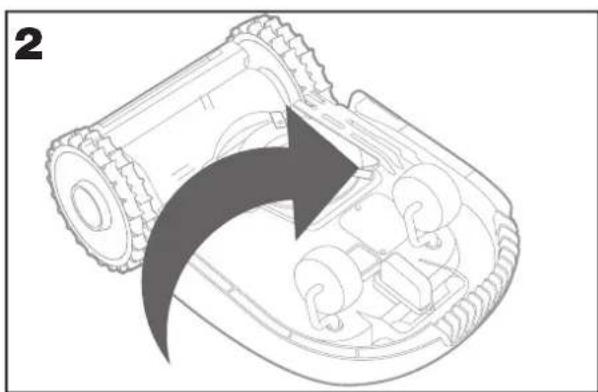
natural_image
Diagram of a robotic device with an arrow indicating rotational motion (no text or symbols present)Uklonite vijke s oštrica pomoću odvijača (sl. 3 - 4)
natural_image
Line drawing of a robotic vehicle with internal components and a magnified inset showing two parts (no text or symbols)Nove oštrice čvrsto pritegnite vijcima (sl. 5 - 6)
natural_image
Technical line drawing of a robotic device with internal components and a magnified inset showing two circular components (no text or symbols)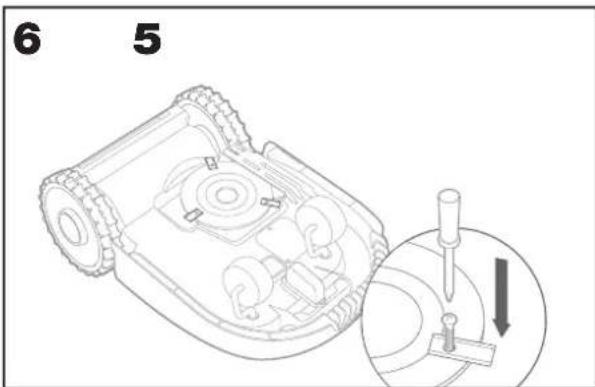
natural_image
Technical line drawing of a robotic lawn mower with visible mechanical components and spray nozzle (no text or labels)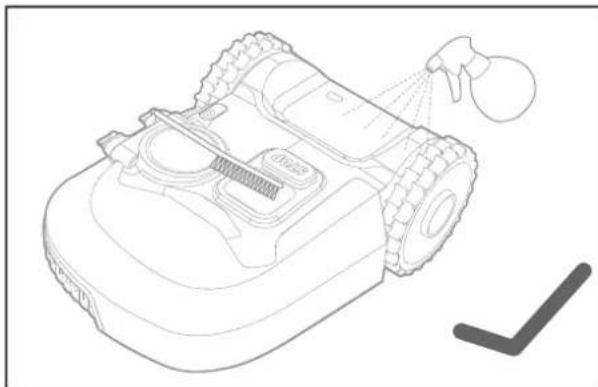
natural_image
Line drawing of a robotic vacuum cleaner with spray nozzle and handle (no text or symbols)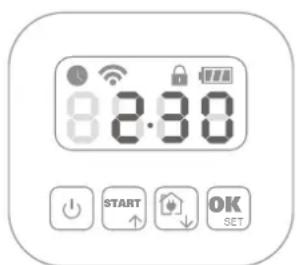
5.5.3. Ručna ažuriranja
18, Dongwang Road, Suzhou Industrial
Park, Jiangsu 215123, P. R. China
1. PRODUKTSIKKERHED
1.1 GENERELLE OG YDERLIGERE SIKKERHEDSVEJLEDNINGER
natural_image
Technical line drawing of a mechanical assembly with gears and a component, no visible text or symbols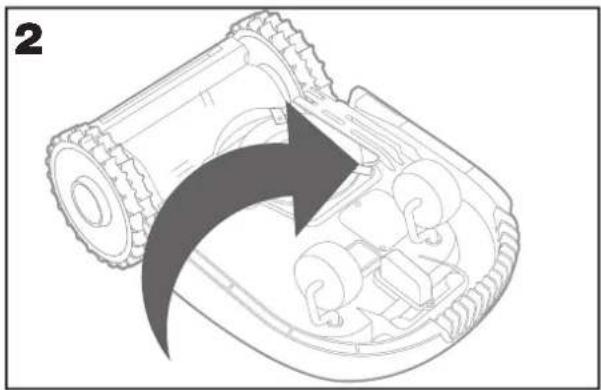
natural_image
Diagram of a robotic arm with a curved arrow indicating motion or force direction (no text or symbols present)natural_image
Technical line drawing of a robotic device with internal components and a magnified inset showing two parts (no text or symbols)natural_image
Technical line drawing of a robotic device with internal components and a magnified inset showing two circular components (no text or symbols)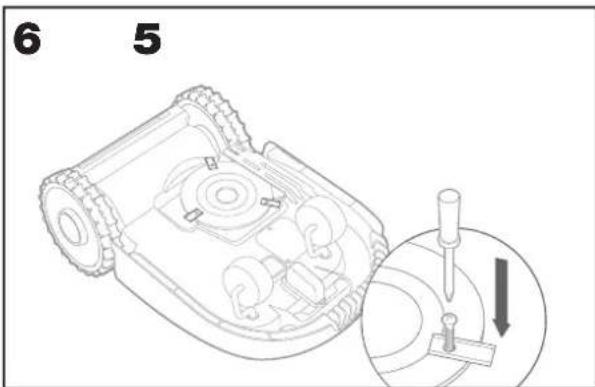
natural_image
Line drawing of a robotic vacuum cleaner with spray nozzle and internal components (no text or symbols)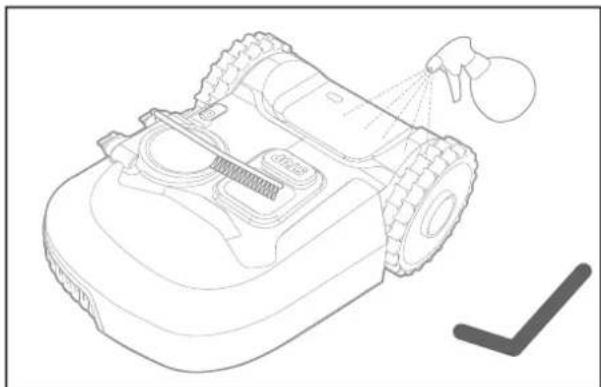
natural_image
Line drawing of a robotic vacuum cleaner with spray bottle and handle (no text or symbols)5.2.4. Clearing the charging contacts
5.5.3 Manuel opdatering
18, Dongwang Road, Suzhou Industrial
Park, Jiangsu 215123, P. R. China
1. TUOTETURVALLISUUS
1.1 YLEISET OHJEET JA TURVAOHJEET
natural_image
Technical line drawing of a mechanical assembly with visible gears and a component labeled '无机车' (no text or symbols on the diagram itself)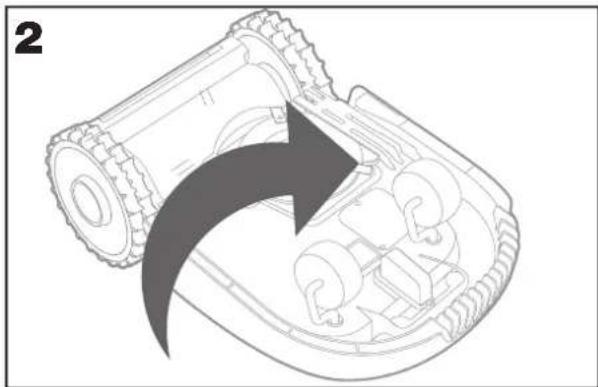
natural_image
Diagram of a robotic arm with an arrow indicating motion or force direction (no text or symbols present)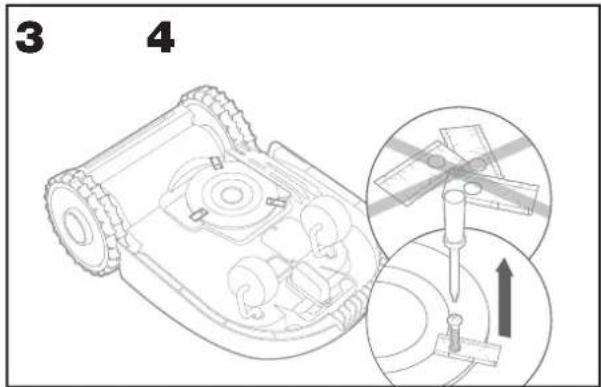
natural_image
Technical line drawing of a robotic vehicle showing internal components and a magnified inset of a small component (no text or symbols)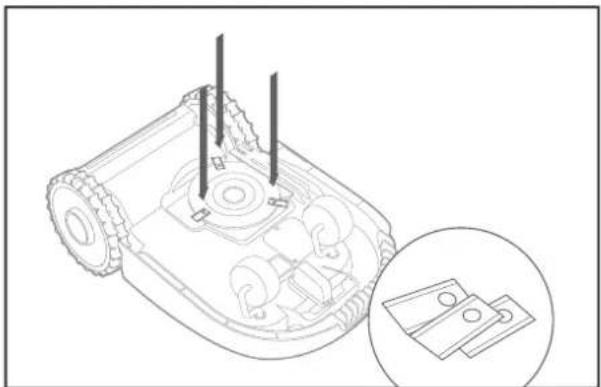
natural_image
Technical line drawing of a mechanical device with internal components and a magnified inset showing two hardware parts (no text or symbols)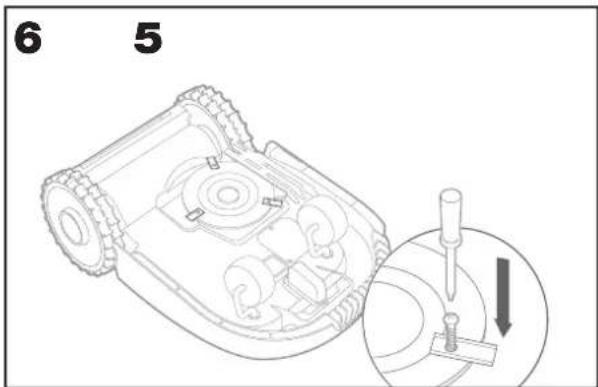
natural_image
Technical line drawing of a robotic vehicle showing internal components and spray bottle (no text or symbols)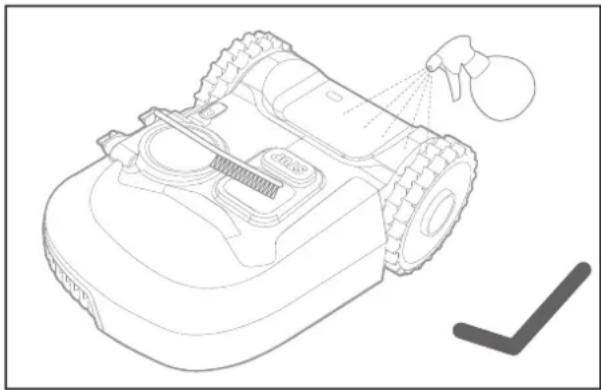
natural_image
Line drawing of a robotic vacuum cleaner with spray nozzle and cleaning tool (no text or symbols)
18, Dongwang Road, Suzhou Industrial
Park, Jiangsu 215123, P. R. China
1. SIKKERHETSANVISNINGER
1.1 GENERELLE OG SPESIFIKKE SIKKERHETSADVARSLER
Rutiner for trygg bruk
Opplæring
VEDLIKEHOLD OG LAGRING
natural_image
Technical line drawing of a mechanical assembly with gears and a base component (no text or symbols)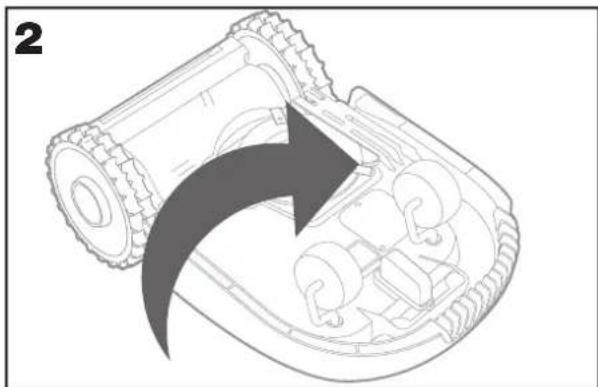
natural_image
Diagram of a robotic arm with gear and internal components, showing a curved arrow indicating motion (no text or symbols present)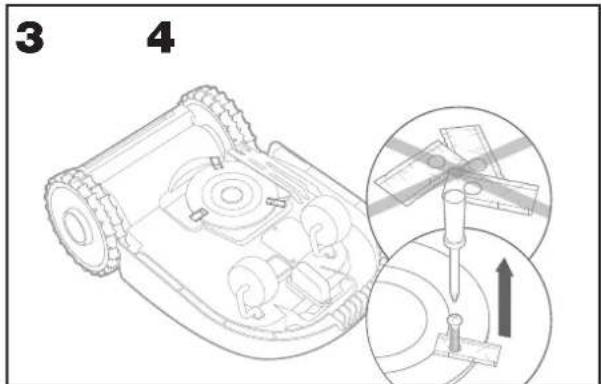
natural_image
Technical line drawing of a robotic vehicle with internal components and a magnified inset showing a small component (no text or symbols)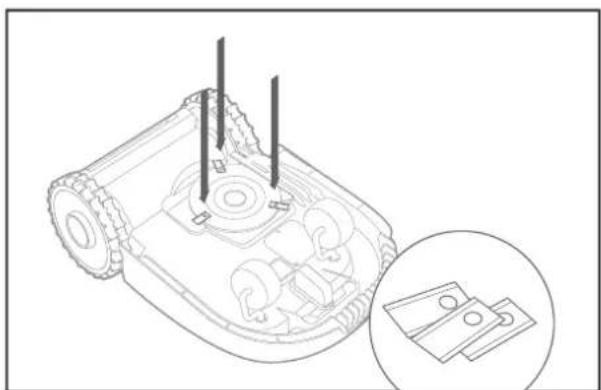
natural_image
Technical line drawing of a robotic device with internal components and a magnified inset showing two hardware parts (no text or symbols)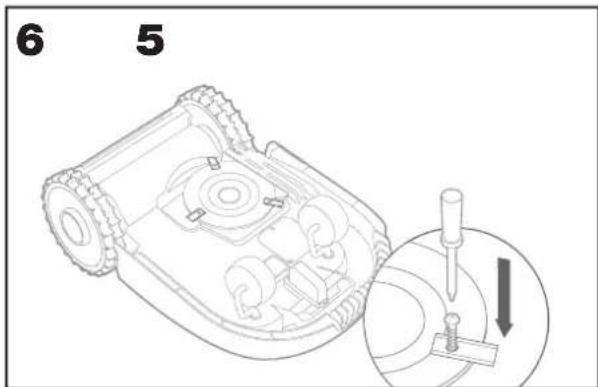
⚠ OBS: Sørg for å erstatte ALLE knivbladene når du bytter blader.
natural_image
Technical line drawing of a robotic vehicle showing internal components and spray application (no text or symbols)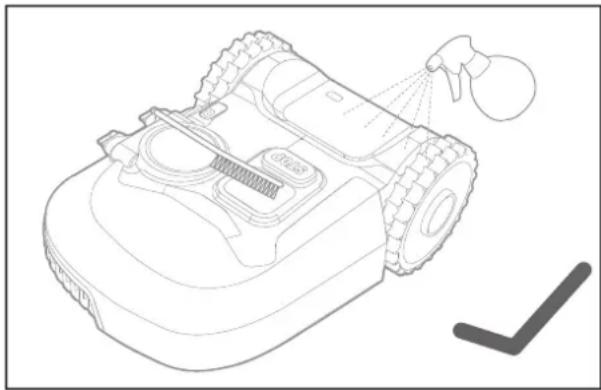
natural_image
Line drawing of a robotic vacuum cleaner with spray nozzle and cleaning tool (no text or symbols)5.3 HOLD DEN OPPLADET
Hjertet i Landroid er dens 20 V Li-Ion Worx Powershare -batteri.
18, Dongwang Road, Suzhou Industrial
Park, Jiangsu 215123, P. R. China
1 SÄKERHETSINSTRUKTIONER
1.1 ALLMÄNNA & SPECIFIKA SÄKERHETSINSTRUKTIONER
natural_image
Technical line drawing of a mechanical assembly with gears and a labeled component (no text or symbols)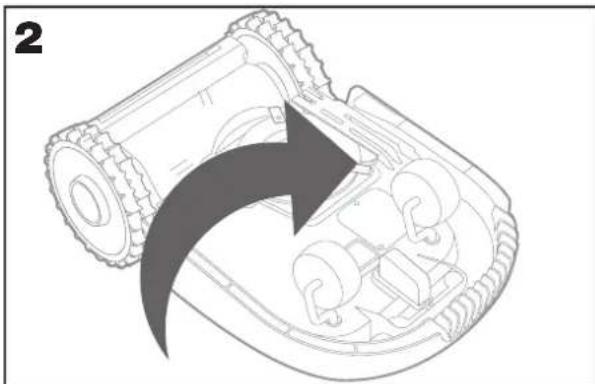
natural_image
Diagram of a robotic device with an arrow indicating rotational motion (no text or symbols present)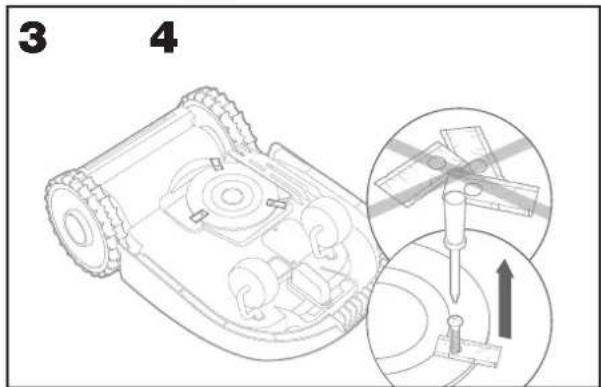
natural_image
Technical line drawing of a mechanical device with internal components and an inset showing two parts (no text or symbols)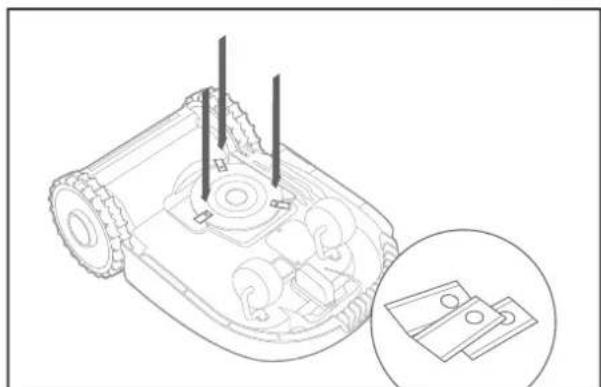
natural_image
Technical line drawing of a mechanical device with internal components and a magnified inset showing two labeled parts (no text or symbols present)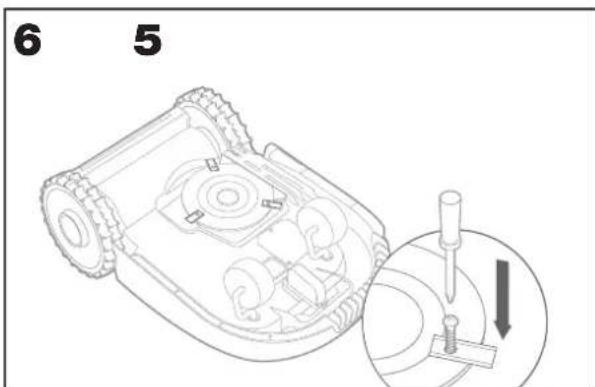
natural_image
Technical line drawing of a robotic vehicle showing internal components and spray application (no text or symbols)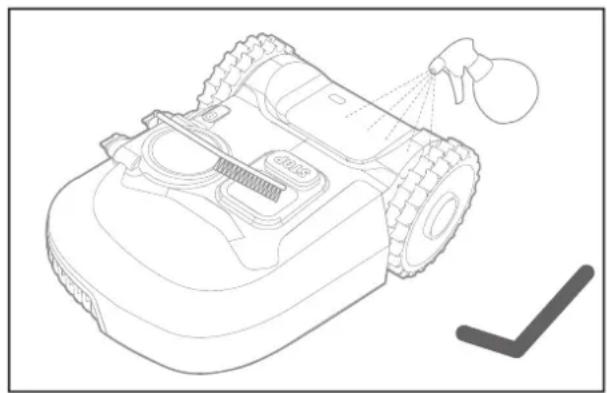
natural_image
Line drawing of a robotic vacuum cleaner with spray nozzle and cleaning tool (no text or symbols)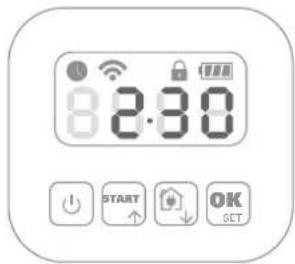
18, Dongwang Road, Suzhou Industrial
Park, Jiangsu 215123, P. R. China