
PG9933 - Smoke detector DSC - Free user manual and instructions
Find the device manual for free PG9933 DSC in PDF.


| Product Type | Wireless Carbon Monoxide Detector |
| Brand | DSC |
| Model | PG9933 |
| Detection Technology | Electrochemical Sensor |
| Operating Frequency | 915 MHz |
| Power Supply | 1 Panasonic CR123A 3V Lithium Battery (included) |
| Battery Life | 1 year minimum |
| Low Battery Threshold | 2.85 V |
| Dimensions | 125.3 mm x 48.0 mm |
| Weight | 197 g |
| Operating Temperature Range | 4.4 °C to 37.8 °C |
| Operating Humidity Range | 15 to 93% RH non-condensing |
| Alarm Sound Level | 85 dBA min at 3 m |
| Detector Lifespan | 5 years (date printed on back) |
| Compatibility | DSC panels with wireless receiver (HS2xxx, WS900-19, etc.) |
| Certifications | UL 2075, CSA 6.19, FCC, IC |
| Main Features | CO detection, audible and visual alarm, anti-tamper protection, test/silence, wireless communication |
| Maintenance and Cleaning | Weekly test; dust monthly with a vacuum cleaner |
| Safety | Do not paint, do not expose to dampness, use only indoors |
| Warranty | 12 months against manufacturing defects |
Frequently Asked Questions - PG9933 DSC
User questions about PG9933 DSC
0 question about this device. Answer the ones you know or ask your own.
Ask a new question about this device
Download the instructions for your Smoke detector in PDF format for free! Find your manual PG9933 - DSC and take your electronic device back in hand. On this page are published all the documents necessary for the use of your device. PG9933 by DSC.
USER MANUAL PG9933 DSC
PG9933 (915MHz) Wireless Carbon Monoxide Detector
Installation and Operating Instructions
ATTENTION: Read these instructions thoroughly before installation and use of the PG9933. Keep the instructions for future reference.
The PG9933 is designed to monitor the CO gas level in residential dwelling and give NOT designed to detect smoke, fire or other gases until early warning before dangerous levels are detected. This device is intended to be investigated and determined to comply with applicable requirements with a compatible wireless alarm system. The detector consists of an MEARNINGCal To comply with FCC and ISED Canada RF exposure compliance carbon monoxide sensor assembly coupled to a wireless transmitter. Requirements, the device should be located at a distance of at least 20 The Wireless Carbon Monoxide Alarm communicates with the control panels aduring an normal operation. The antennas used for this product must not send alarm, tamper and battery condition messages to the system received or operated in conjunction with any other antenna or transmitter.
CAUTION: The detector expiry date is stamped on the detector. After the expiry date, the detector should not be used - do not wait for end of life. Wireless CO Detector ation!
CAUTION: Unauthorized removal of the unit from the mounting bracket will initiate a tamper alert.
Warnings:
The PG9933 wireless Carbon Monoxide detector shall be installed and environment that provides the pollution degree max 2 and overvoltages NON HAZARDOUS LOCATIONS, indoor only. The equipment is designed installed by SERVICE PERSONS only; (SERVICE PERSON is defined having the appropriate technical training and experience necessary to be ards to which that person may be exposed in performing a task and imize the risks to that person or other persons.) Failure to properly install, test and maintain a CO detector may cause culting in loss of life. Installation of the CO detector should not be for proper installation, use and maintenance of fuel burning appliances, appropriate ventilation and exhaust systems.
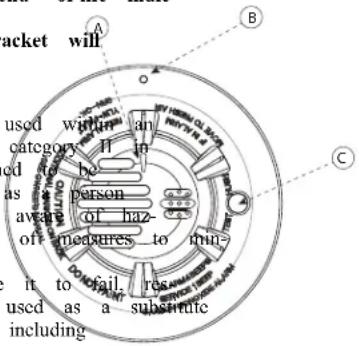
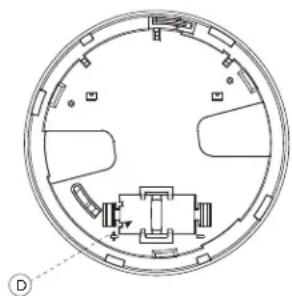
This carbon monoxide detector is designed for indoor use only. Do not expose it to rain or moisture. Do not knock or drop the detector. Do not open of a tappen with (see Table 1 for LED indications) detector as this could cause malfunction. The detector will not protect Bagafampere release opening of carbon monoxide poisoning if not properly installed. CAUTION: This device will only indicate the presence of carbon monoxide Battery compartment sensor. Carbon monoxide gas may be present in other areas. This carbon Breakaway tab (see Figure 3) alarming device is designed to detect carbon monoxide gas from ANY source of
natural_image
Cross-sectional diagram of a circular mechanical or architectural component with internal components and no visible text or symbolsInstallation Instructions
6 Mount and test the detector. See Testing the CO detector for informa testing the device. In addition, see the alarm systems Installation Ma the device is enrolled on for other test procedures that are required
Battery Installation
To replace the battery:
- Remove the detector from its mounting base by twisting it Remove and dispose of the battery according to your local
- To ensure proper power-down sequence, wait a minimum of installing the new battery.
-
Install a new, 3-volt CR123A Panasonic lithium battery in the partment observing correct polarity. If the battery is incorrectly gently with a flathead screwdriver and correctly reinsert.
-
Reinstall the detector onto the mounting bracket by turning it clockwise.
- After the power-up sequence, the green LED blinks once every 12 seconds indicate normal operation. If the battery is not installed correctly, the detector will not operate and the battery may be damaged.
Enrollment
The 7-digit serial number located on the back of the CO detector housing must be enrolled on the alarm systems control panel. See the Receiver Installation Manual follow the enrollment procedure. For placement tests remove the detector from its backplate for one second (tamper) and then reattach. Wait at least 30 seconds if test result before activating again.
A general description of the procedure is provided in the following
Step Procedure
1 See the Installation Manual for the alarm system that the device enrolled on to ensure that the proper steps are used.
2 Enter the Device Enrollment option through the specified method appropriate option to add the new device.
3 Enroll the device by inserting the batteries to power up the device Device ID. For example, ID No. 222-XXXX.
4 Select the desired Zone Number.
5 Configure any device parameters that are required. Enter the DEV SETTINGS menu and select the required options to configure the
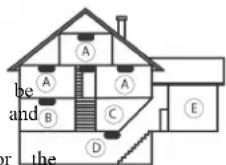
Legend
A: Bedroom
B: Living Room
C: Kitchen
D: Basement
E: Garage
For added protection, install additional CO detectors in every bedroom and flowchart of your home. If your bedroom hallway is longer than 14 meters a CO detector at BOTH ends of the hallway. Install an additional detect (20 feet) away from the furnace or fuel burning heat source. For maxim is being the detector should also be located outside primary sleeping areas or at your home. Mount the detector on a firm wall or ceiling. and DOeleNOTheinstall CO detectors:
- In locations where the normal ambient temperature is below 40 °F (4.4 exceeds 100 °F (37.8 °C), unless the device has been found acceptable and enter at a higher or lower ambient temperature..
- In locations where humidity is below 10% or above 93% RH non-cond
- Near paint thinner fumes.
-
Near air conditioners, furnaces, stoves, fireplaces and any other ventilation that may interfere with CO gas entering the detector.
In locations where furniture or draperies may obstruct the air flow. • In exhaust streams from gas engines, vents, flues or chimneys. -
Where dirt or dust could collect and block the sensor and prevent
• In locations that can be reached by children.
• In turbulent air from ceiling fans. - In close proximity to an automobile exhaust pipe - this will dama
inadecontamporkingsistant, insert an appropriate tool into the tamper release of ated on the detector housing (marked B in Figure 1). Press and hold wultaneously turning the detector counterclockwise.
Owner's Instructions
Mounting
The detector can be mounted on a wall or ceiling.
The CO detector must be mounted with its bracket (when it is atta
the tamper switch is pressed and the detector automatic reset is performed
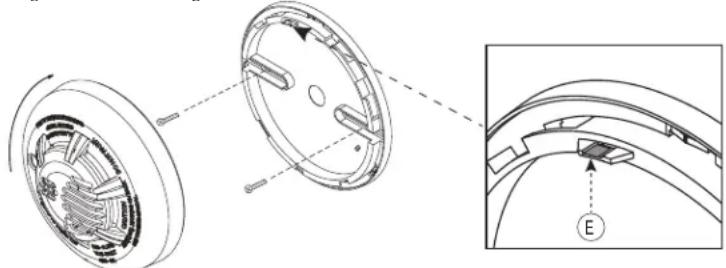
- Refer to Figure 3 and install using screw locations as required.
mounting bracket so the screws are at the elbow of the screw - Fit the detector inside the mounting bracket by aligning it as sh (detector's alignment notch should be slightly offset from the mou
tamper release tab), then turn the detector in a clockwise direction into place. - Test the detector after completing the installation (as described in Detector section of this manual) and refer to the alarm control manual for additional information concerning the use of wireless o
Figure 3: Mounting the Detector
natural_image
Technical diagram of a mechanical component with cross-sectional view and detail view (no text or symbols)Testing the CO Detector
NOTE: it Performing a CO detector system test will generate an alarm mission. Notify the central station before testing.
Mandover theCO detector system test by pressing the Test/Hush button for slots seconds. red LED flashes and the sounder emits a temporal 4 pa
Worfoom Figure O 3 detector local test by pressing the Test/Hush button for a taegonbracke the sounder will emit 2 short beeps.
NOTE: it The least button does not function when the detector is in low dition.
the Testing the Maintenance and installation
Test the detector weekly to ensure proper operation of the detector. When vices, is indicated (see Table 1 and Specifications) immediately replace the battery month, use a vacuum cleaner to keep the air vents free of dust.
Go-No-Go Test
This test will set the system into alarm when carbon monoxide is sprayed. The procedure is as follows:
- Press the TEST button until 2 chirps are heard.
- Spray CO gas (use Solo C6 CO Detector Tester).
- If CO is detected, temporal 4 is sounded for approximately 30 secor
NOTE: Go-No-Go test does not function when the detector is in low ba
Tamper Protection
The PG9933 includes a tamper resistant feature that prevents removal from the mounting bracket without the use of a tool. To engage the tamper resistant feature, cut the small breakaway tab (marked E in Figure 3) located on the mounting bracket and then install the detector. To remove the detector from the mounting bracket once it has been
Audible and Visual Indications
The tri-colored LED (green, yellow, red) and a sounder on the detector visual and audible indication of the detector's status as listed in Table
NOTE: The sounder and LED are not synchronized.
Table 1: Detector Status and Indication
| Status LEDs Sounder | Radio Signalling | ||
| Normal | Green flash every seconds | 12 Off | Normal (none) |
| Alarm/Test | Red flash every 12 seconds | 2 ANSI S3.41 temporal 4 (press button to hush for 5 minutes) | Alarm |
| Detector Trouble | Yellow flash every seconds | One 100 ms chirp every 45 seconds | Fault |
| Low Battery | Yellow flash every 12 seconds | One 100 ms chirp every 45 seconds (press button to hush 12 hours) | Low for battery |
| Detector End of Life | Yellow flash every 23 seconds | Two chirps every 45 seconds | Fault |
| Power up | Green, yellow, red flash sequence every 12 seconds | One 100 ms chirp at end up sequence | of power-None |
| Tamper | Green, yellow, red flash sequence every 12 seconds | Off Tamper | |
Specifications
| Epid of life: 5 years (see date stamped on back of detector) | |
| Operating frequency: 915 MHz | |
| Audible signal (temporal 4 tone): 85 dBA min. in alarm (at 10 ft) | |
| Operating current: 16 μA | |
| Temperature range: | 4.4 °C to 37.8 °C (40 °F to 100 °C) |
| Operating humidity range: | 15% to 93% Relative Humidity, non- |
| Transmitted messages: | CO gas alarm, low battery, tamper, trou message as a result of sensor end of sensor trouble, supervision. |
| Power source: | One 3-volt CR123A Panasonic lithium ba (included) |
| Battery supervision: | Automatic transmission of battery status c part of any transmitted message. |
| Battery life expectancy: | Minimum 1 year. NOTE: Constant expo temperature or humidity extremes may re battery life. |
| Low battery threshold: | 2.85 V |
| Dimension: | 125.3 mm x 48.0 mm (4.9 in x 1.9 |
| Weight: | 197 g (7 oz) |
You should know about Carbon Monoxide.
Carbon monoxide, also known as "CO" by the chemical form, is considered to be a highly dangerous poisonous gas, because it is colorless, odorless, tasteless and very toxic. In general, biochemistry phenomena have shown that the presence of CO gas inhibits the blood's capacity to transport oxygen throughout the body, which
eventually lead to brain damage. In any enclosed space (home, office), accumulation of CO gas can be quite dangerous. Although many produce bustion can cause discomfort and adverse health effects, it is CO gas the greatest threat to life.
Carbon monoxide is produced by the incomplete combustion of fuels su gas, propane, heating oil, kerosene, coal, charcoal, gasoline, or wood. T combustion of fuel can occur in any device which depends on burning heat such as furnaces, boilers, room heaters, hot water heaters, stoves, any gasoline powered vehicle or engine (e.g., generator set, lawnmower). smoke also adds CO to the air you breathe. When properly installed your natural gas furnace and hot water heater do not pollute your air
Natural gas is known as a “clean burning” fuel because under correct ditions, the combustion products are water vapor and carbon dioxide (C not toxic. The products of combustion are exhausted from furnaces and to the outside by means of a fuel duct or chimney. Correct operation equipment requires two key conditions:
a. An adequate supply of air for complete combustion.
b. Proper ventilation of the products of combustion from the furnace chimney, vent or duct to the outside.
Typical carbon monoxide gas problems are summarized here:
a. Equipment problems, due to defects, poor maintenance, damaged and heat exchangers.
b. Collapsed or blocked chimneys/flues, dislodged, disconnected or damage
c. Downdraft in chimneys or flues. This can be caused by very long flue runs, improper location of flue exhaust or wind conditions.
d. Improper installation or operation of equipment, chimney or vents.
c. Airtight homes with inadequate flow of fresh air for the combustio f. Inadequate exhaust of space heaters or appliances.
g. Exhaust ventilation/fireplace competing for air supply.
Potential sources of carbon monoxide in your home or office include wood stove, wood or gas fireplace, automobile and garage, gas water balance, gas or kerosene heater, gas or oil furnace, and cigarette smoke.
This device is designed to protect individuals from the acute effects of ide exposure. It will not fully safeguard individuals with specific medical
in doubt consult a medical practitioner.
More a real information about conditions which result in transient situations:
which presents 1. Excessive spillage or reverse venting of fuel burning appliances caused a Outdoor ambient conditions such as wind direction and or velocity, with natural gas, gusts of wind; heavy air in the vent pipes (cold humid air periods between cycles).
Tobacco, 100 gm. Negative pressure differential resulting from the use of exhaust fans grills, and simultaneous operation of several fuel burning appliances competing with internal air. and maintained pipe connection vibrating loose from clothes dryers, furnaces, space heaters, CO.
operating obstructions in unconventional vent pipe designs which amplify the O2), which is
water Poorlys designed or maintained chimneys and/or vents.
2of Extended operation of unventilated fuel burning devices (oven, fireplace,
3. Temperature inversions which can trap exhaust gases near the ground.
4. Car idling in an open or closed attached garage, or near a home.
through the Possible Symptoms of Carbon Monoxide Poisoning
Carbon monoxide is colorless, odorless, tasteless, and very toxic. When inh reduces an effect known as chemical asphyxiation. Injury is due to the co-cracked with the available hemoglobin in the blood, lowering the oxygen-carrying of the blood. In the presence of CO gas, the body is quickly affected by ventilation. The following symptoms are related to CO poisoning and should be with all members of the household:
a. Mild exposure: slight headache, nausea, vomiting, fatigue (often describe on "blus-like" symptoms), drowsiness, shortness of breath, "flu-like" symptoms (without fever), and impaired motor functions (like difficulty walking olems with balance).
clogg: Medium exposure: severe throbbing headache, drowsiness, confusion, fast theater rate, gas displess, nausea and vomiting, chest pain, poor vision, and diffi ing.
f ecarbotremonexposure: unconsciousness, convulsions, cardiorespiratory failure, c al conditiodeathIf
d. Many cases of reported CARBON MONOXIDE POISONING indicate that while victims are aware they are not well, they become so disorient
unable to save themselves by either exiting the building or calling for Astart following steps 1 - 3, if your alarm reactivates within a 24-h Young children and household pets are typically the first affected. repeat steps 1 - 3 and call a qualified technician (Tel. No. ....
e. When flu-like symptoms with fever are experienced, ensure that the possibility of sources of CO gas from fuel burning equipment and CO poisoning is not automatically ruled out. Many cases of reported carbon inspect for proper operation of this equipment. If problems are i monoxide poisoning indicate that while victims are aware they are not well, they inspection, have the equipment serviced immediately. Note any become so disoriented they are unable to save themselves by either excitation or equipment not inspected by the technician and consult the main building or calling for assistance.
instructions, or contact the manufacturers directly, for more information
Action to Take When Alarm Sounds
WARNING: Actuation of this device indicates the presence of carbon monoxide. (CO) which can KILL YOU. WARNING: CO gas can be extremely fatal and can come from sever sources. This detector only indicates the presence of CO gas near the
If temporal 4 alarm signal sounds:
Action to be Taken After the Problem has been Corrected
- Immediately move to fresh air - outdoors or by an open windonce CheckCO gas presence in the premises has been corrected, the detect that all persons are accounted for. Do not re-enter the premises should move off. After waiting for 10 minutes, push the Test/Hush button away from the open door/window until the emergency services responder is functioning properly.
have arrived, the premises have been aired out, and your alarm remains in its normal condition.
- Call your emergency local service Tel. No. 911. (fire department not designed to measure compliance with Occupational Safety and Health Administration, (OSHA) commercial or industrial standards
In case harmful levels of CO gas are detected, your detector will go into continuous. The detector will only indicate the presence of carbon monoxide full alarm. Try to take the following necessary actions immediately: the sensor. Carbon monoxide gas may be present in other areas.
- Push the detector Test/Hush switch to silence the alarm. Warning: Not individuals with medical problems may consider using warning devices that the battery to silence the alarm. Removing the battery removes your problems and visual signals for carbon monoxide concentrations under 30 Pushing the Test/Hush button mutes the alarm for 5 minutes. After 5 minutes, including the sensor, is not to be located within 1.5m (5 alarm resumes if CO levels remain high. Call your emergency service cooking appliance.
Emergency Services:
Tel. No. Tel. No.
- Immediately move to fresh air - outdoors or by opening door/window. The CO gas detector is not suitable as a smoke detector or fire detect count to check that all persons are accounted for. Do not reenter the premises nor move away from the open door/window until the emergency services responders have arrived, the premises have been aired out, and your alarm remains in normal condition. The detector may not protect people who are at special risk fro
monoxide exposure by reason of age, pregnancy or medical condition. Thf PG-9284b, Wireless Carbon Monoxide Alarm has been designed to provide consult your medical practitioner. based on various exposure times at different levels of carbon monoxide
- CO detectors may wear out because they contain electronic parts that asfaiperoverL 2034 standard: This CO alarm PG9933 meets the following r time. Test your detector at least every week. response times: At 70 ppm, the unit must alarm within 60 to 240 min
- Instruct children never to play with the detector.
- Never use detergents or other solvents to clean the detector.
- Avoid spraying air fresheners, hair spray, paint or other aerosols near the detector.
- Do not paint the detector. Paint will seal the detectors vents and interfere with detecting CO gas. Limited Warranty Digital Security Controls warrants that for a period of twelve months from the date of purchase, he first of defense in materials and muscularity under normal use and that is fulfilled of our
NOTE: For repair return to the place of purchase, or return to: Visonic H. Guarza 24, Tel-Aviv 6971032, Israel.
Detailed information on conditions which can result in CO situations:
- Excessive spillage or reverse venting of fuel burning appliances caused by whether expressed or implied and of all other obligations or liabilities on the part of Dig
a. Outdoor ambient conditions such as wind direction and/or velocities, including high gusts of wind; heavy air in the vent pipes (cold/husband air with extended periods between cycles). In no event shall Digital Security Controls be liable for any direct, indirect or consequential damage
b. Negative pressure differential resulting from the use of exhaust fans. c. Simultaneous operation of several fuel burning appliances competing for a buyer in connection with the p - Limited internal air
- "Warning" Digital Security Controls recommends that the entire system be completely tested on a regular basis.
d. Vent pipe connection vibrating loose from clothes dryers, furnacable for this product to fail to perform as expected. However, despite frequent testing, and due to, but not limited to, criminal tampering or electrical disruption, it is pos
water heaters. Important Information: Changes or modifications not expressly approved by Digital Security Controls could void
e. Obstructions in or unconventional vent pipe designs which amplify the user's authority to operate this equipment.
EULA
-
Extended operation of unvented fuel burning devices (range, oven, in place, 1983). IMPORTANT - READ CAREFULLY: DSC Software purchased with or without Products and Comp enough and is purchased under the following license terms: This End-User License Agreement ("HUA") is a legal agreement between You (the company, indiv etc.).
-
Temperature inversions which can trap exhaust gases near the ground entity who acquired the Software and any related Hardware) and Digital Security Controls, a division
-
Car idling in an open or closed attached garage, or near a homeSafety Products Canada Ltd. ("DSC"), the manufacturer of the integrated security systems and the Never disassemble the CO Alarm; there are no user serviceable parts inside of the military-related products or components ("HARDWARE") which You acquired. You may only remove the CO Alarm from the mounting bracket to replace the battery. If the DSC software product ("SOFTWARE PRODUCT" or "SOFTWARE") is intended to be accom Hardware and is NOT accompanied by new HARDWARE. You may not use, copy or install if not serviced by an installer. When replacing the battery, follow the productions The SOFTWARE PRODUCT includes computer software, and may include associated med cified within the Installation Instructions, Installing/Replacing battery.
CAUTION: This product uses a lithium battery. Improper handling in HEAT, EXPLOSION or FIRE causing personal injury. DO NOT teries. Follow the battery manufacturer's safety instructions. Dispose batteries in accordance with the regulations in your area.
Never paint the unit. Paint may prevent CO gas from entering the unit.
IMPORTANT - READ CAREFULLY: DSC Software purchased with or without Products and Compor righted and is purchased under the following license terms:
This End-User License Agreement ("EULA") is a legal agreement between You (the company, indiv
Entity who acquired the Software and any related Hardware) and Digital Security Controls, a division
Safety Products Canada Ltd. ("DSC"), the manufacturer of the integrated security systems and the
made off the unitary related products or components ("HARDWARE") which You acquired. If the DSC software product ("SOFTWARE, PRODUCT" or "SOFTWARE") is intended to be seen
New hardware, and is NOT accompanied by new HARDWARE. You may not use, copy or install PD solutions. The SPE SOFTWARE PRODUCT includes computer software, and may include associated med materials, and “online” or electronic documentation.
Any software provided along with the SOFTWARE PRODUCT that is associated with a separate c agreement is licensed to You under the terms of that license agreement.
mechange, babying, downloading, storing, accessing or otherwise using the SOFTWARE PRODUCT functionally to be bound by the terms of this EULA, even if this EULA is deemed to be previous arrangement or contract. If You do not agree to the terms of this EULA, DSC is unw SOFTWARE PRODUCT to You, and You have no right to use it.
SOFTWARE PRODUCT LICENSE
The SOFTWARE PRODUCT is protected by copyright laws and international copyright treaties, intellectual property laws and treaties. The SOFTWARE PRODUCT is licensed, not sold.
- GRANT OF LICENSE This EULA grants You the following rights:
Software Installation and Use - For each license You acquire, You may have only one copy of the SOFTWARE PRODUCT installed.
Storage/Network Use - The SOFTWARE PRODUCT may not be installed, accessed, displayed, run, shared or used concurrently on or from different computers, including a workstation, terminal or other device ("Device"). In other words, if You have several workstations, You will have to acquire workstation where the SOFTWARE will be used.
Backup Copy - You may make back-up copies of the SOFTWARE PRODUCT, but You may only have one copy per license installed at any given time. You may use the back-up copy solely for archival expressly provided in this EULA, You may not otherwise make copies of the SOFTWARE the printed materials accompanying the SOFTWARE.
2. DESCRIPTION OF OTHER RIGHTS AND LIMITATIONS
Limitations on Reverse Engineering, Decompilation and Disassembly - You may not reverse engineer, decompile, or disassemble the SOFTWARE PRODUCT, except and only to the extent that such mitted by applicable law notwithstanding this limitation. You may not make any changes or Software, without the written permission of an officer of DSC. You may not remove any marks or labels from the Software Product. You shall institute reasonable measures to ensure terms and conditions of this EULA.
Separation of Components - The SOFTWARE PRODUCT is licensed as a single product. Its component parts may not be separated for use on more than one HARDWARE unit.
Single INTEGRATED PRODUCT - If You acquired this SOFTWARE with IIARDWARE, then PRODUCT is licensed with the IIARDWARE as a single integrated product. In this case, the PRODUCT may only be used with the IIARDWARE as set forth in this EULA. Rental- You may not rent, lease or lend the SOFTWARE PRODUCT. You may not make it available to others or post it on a server or web site.
Software Product Transfer - You may transfer all of Your rights under this EULA only as part of a permanent sale or transfer of the HARDWARE, provided You retain no copies. You transfer all of the PRODUCT (including all component parts, the media and printed materials, any upgrades and provided the recipient agrees to the terms of this EULA. If the SOFTWARE PRODUCT is fer must also include all prior versions of the SOFTWARE PRODUCT.
Termination - Without prejudice to any other rights, DSC may terminate this EULA if You fail to comply with the terms and conditions of this EULA. In such event, You must destroy all copies of the SOI all of its component parts.
Trademarks - This EULA does not grant You any rights in connection with any trademarks or service marks of DSC or its suppliers.
3. COPYRIGHT
All title and intellectual property rights in and to the SOFTWARE PRODUCT (including but images, photographs, and text incorporated into the SOFTWARE PRODUCT), the accompanying items, and any copies of the SOFTWARE PRODUCT, are owned by DSC or its suppliers. Yeted materials accompanying the SOFTWARE PRODUCT. All title and intellectual property rights content which may be accessed through use of the SOFTWARE PRODUCT are the property owner and may be protected by applicable copyright or other intellectual property laws at EULA grants You no rights to use such content. All rights not expressly granted under this DSC and its suppliers.
EXPORT RESTRICTIONS - You agree that You will not export or re-export the SOFTWARE PR country, person or entity subject to Canadian export restrictions.
CHOICE OF LAW - This Software License Agreement is governed by the laws of the Province Canada.
ARBITRATION - All disputes arising in connection with this Agreement shall be determined by fi arbitration in accordance with the Arbitration Act, and the parties agree to be bound by the arbi The place of arbitration shall be Toronto, Canada, and the language of the arbitration shall be E
gLIMITEDRONI WARRANTY
NO WARRANTY. DSC PROVIDES THE SOFTWARE "AS IS" WITHOUT WARRANTY. DSC I WARRANT THAT THE SOFTWARE WILL MEET YOUR REQUIREMENTS OR THAT OPERATION THE SOFTWARE WILL BE UNINTERRUPTED OR ERROR-FREE.
PHANGES IN OPERATING ENVIRONMENT - DSC shall not be responsible for problems cause PRODUCT, including characteristics of the HARDWARE, or for problems in the interaction of the SOI PRODUCT with non-DSC-SOFTWARE or II HARDWARE PRODUCTS.
LIMITATION OF LIABILITY; WARRANTY REFLECTS ALLOCATION OF RISK - IN ANY THIS STATE IMPLIES WARRANTIES OR CONDITIONS NOT STATED IN THIS LICENSE & AGREEMENTS, ASSETS ENTIRE LIABILITY UNDER ANY PROVISION OF THIS LICENSE AGREEMENTS BEFORE LIMITED TO THE GREATER OF THE AMOUNT ACTUALLY PAID BY YOU TO OTHER SOFTWARE PRODUCT AND FIVE CANADIAN DOLLARS (CAD\$5.00). BECAUSE SOME PROCESITIONS DO NOT ALLOW THE EXCLUSION OR LIMITATION OF LIABILITY FOR CONSEQUENTIAL OR INCIDENTAL DAMAGES, THE ABOVE LIMITATION MAY NOT APPLY THE YOU.
DISCLAIMER OF WARRANTIES - THIS WARRANTY CONTAINS THE ENTIRE WARRANTY A SHEAL SOFTWARE IN LIEU OF ANY AND ALL OTHER WARRANTIES, WHETHER EXPRESSED OR (SOCUMBER) ALL IMPLIED WARRANTIES OF MERCHANTABILITY OR FITNESS FOR A PARTI PURPOSE) AND OF ALL OTHER OBLIGATIONS OR LIABILITIES ON THE PART OF DSC. I NO OTHER WARRANTIES. DSC NEITHER ASSUMES NOR AUTHORIZES ANY OTHER PERSON PURPORTING TO ACT ON ITS BEHALF TO MODIFY OR TO CHANGE THIS WARRANTY. I ASSUME FOR IT ANY OTHER WARRANTY OR LIABILITY CONCERNING THIS SOFTWARE F SOFTWARE REMEDY AND LIMITATION OF WARRANTY - UNDER NO CIRCUMSTANCES S (HSDC UPL.) LIABLE FOR ANY SPECIAL, INCIDENTAL, CONSEQUENTIAL OR INDIRECT DAMAGE AND REFERENCE BY BREACH OF WARRANTY, BREACH OF CONTRACT, NEGLIGENCE, STRICT LIA OR ANY OTHER LEGAL THEORY. SUCCH DAMAGES INCLUDE, BUT ARE NOT LIMITED TO PROFITS, LOSS OF THE SOFTWARE PRODUCT OR ANY ASSOCIATED EQUIPMENT, COST O COST OF SPECIFICATE OR REPLACEMENT EQUIPMENT, FACILITIES OR SERVICES, DOWN TI PURCHASERS TIME, THE CLAIMS OF THIRD PARTIES, INCLUDING CUSTOMERS, AND INJUR PROPERTY.
DSC recommends that the entire system be completely tested on a regular basis. However, despite and due to, but not limited to, criminal tampering or electrical disruption, it is possible for this product to perform as expected.
Regulatory Information
in and to the
OL Notes of the respective con
For U-IP installations use this device only in conjunction with compatible DSC wireless receivers: II to I breeds HS2016 control units when connected to HSM2HOST9 wireless receiver, HS2LCDRF(P)9, HS (P)9 keypads with integrated receiver, PG9920 repeater, and Wireless Alarm Systems WS900-19, and Transmissions occur at approximately 915 MHz (912 MHz to 919 MHz).
UL 2075 listed.
FCC Compliance Statement
CAUTION: Changes or modifications to this equipment not expressly approved by DSC could void your authority to operate this equipment.
This equipment has been tested and found to comply with the limits for a Class B digital device, pursuant to part 15 of the FCC Rules. These limits are designed to provide reasonable protection against harmful interference in a residential installation. This equipment generates, uses and can radiate radio frequency energy and, if not installed and used in accordance with the instructions, may cause harmful interference to radio communications. However,
there is no guarantee that interference will not occur in a particular installation. If this equipment does cause harmful interference to radio or television reception, which can be determined by turning the equipment off and on, the user is encouraged to try to correct the interference by one or more of the following measures:
• Re-orient or relocate the receiving antenna.
- Increase the separation between the equipment and the receiver.
- Connect the equipment into an outlet on a circuit different from that to which the receiver is connected.
- Consult the dealer or an experienced radio/TV technician for help.
FCC ID: F5317PG9933
Innovation, Science and Economic Development Canada Statement:
IC: 160A-PG9933
The letters “IC:” indicate that this is an Innovation, Science and Economic Development Canada’s certification number.
This device complies with FCC Rules Part 15 and with ISED Canada licence-exempt RSS standard(s). Operation is subject to the following two conditions: (1) this device may not cause interference, and (2) this device must accept any interference, including interference that may cause undesired operation of the device.
This Class B digital apparatus complies with Canadian ICES-003.
WARNING! To comply with FCC and IC RF exposure compliance requirements, the device should be located at a distance of at least 20~cm from all persons during normal operation. The antennas used for this product must not be co-located or operated in conjunction with any other antenna or transmitter.
© 2018 Tyco Security Products. All Rights Reserved.
Tech Support: 1-800-387-3630 (Canada & U.S.)
This Class B digital apparatus complies with Canadian ICES-003.
HS2LCDRF(P)9, From Tyco Security Products
29010012R001
natural_image
Top-down schematic of a circular mechanical or architectural component with internal compartments and mounting features (no text or symbols)Leyenda
From Tyco Security Products

29010012R001
From Tyco Security Products

- PG9933 (915MHz) Wireless Carbon Monoxide Detector
- Warnings:
- Installation Instructions
- Battery Installation
- Enrollment
- Step Procedure
- Legend
- Owner's Instructions
- Mounting
- Testing the CO Detector
- Go-No-Go Test
- Tamper Protection
- Audible and Visual Indications
- You should know about Carbon Monoxide.
- through the Possible Symptoms of Carbon Monoxide Poisoning
- Action to Take When Alarm Sounds
- Action to be Taken After the Problem has been Corrected
- Emergency Services:
- Detailed information on conditions which can result in CO situations:
- EULA
- SOFTWARE PRODUCT LICENSE
- DESCRIPTION OF OTHER RIGHTS AND LIMITATIONS
- COPYRIGHT
- gLIMITEDRONI WARRANTY
- Regulatory Information
- in and to the
- FCC Compliance Statement
- Innovation, Science and Economic Development Canada Statement:
- Leyenda
Brand : DSC
Model : PG9933
Category : Smoke detector