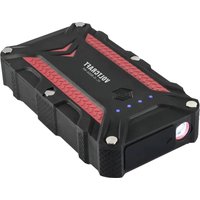
VC-JS-800A-WP - Battery charger VOLTCRAFT - Free user manual and instructions
Find the device manual for free VC-JS-800A-WP VOLTCRAFT in PDF.


| Product Type | 3-in-1 jump starter (external battery, starter, LED light) |
| Brand | Voltcraft |
| Model | VC-JS-800A-WP |
| Category | Battery charger |
| Dimensions | 168 x 92 x 38 mm |
| Weight | 520 g |
| Battery capacity | 10000 mAh (37 Wh), non-removable Li-ion |
| Battery voltage | 14,8 V |
| Micro-USB charging input | 5 V DC 2.0 A |
| USB-C charging input | Not specified (cable included) |
| USB-A output ×2 | 5 V/3 A, 9 V/2 A, 12 V/1.5 A (18 W max.) |
| Starting current (peak) | 400 A (800 A) |
| Compatible engines | Gasoline ≤6.0 L, Diesel ≤4.0 L (12 V system) |
| Number of emergency starts | Approximately 15 (depending on conditions) |
| Protection rating | IP68 (socket cover closed) |
| LED lighting | Modes: on, SOS, flashing, off |
| Operating temperature | Cover closed: -20 to +60 °C; cover open: +20 to +60 °C |
| Storage temperature | 0 to +45 °C |
| Integrated protections | Polarity reversal, overheating, overcurrent, short circuit, excessive discharge |
| Package contents | Product, MicroUSB-USB-A cable, USB-C-USB-A cable, Smart jump cables, storage case, user manual |
Frequently Asked Questions - VC-JS-800A-WP VOLTCRAFT
User questions about VC-JS-800A-WP VOLTCRAFT
0 question about this device. Answer the ones you know or ask your own.
Ask a new question about this device
Download the instructions for your Battery charger in PDF format for free! Find your manual VC-JS-800A-WP - VOLTCRAFT and take your electronic device back in hand. On this page are published all the documents necessary for the use of your device. VC-JS-800A-WP by VOLTCRAFT.
USER MANUAL VC-JS-800A-WP VOLTCRAFT
GB Operating Instructions
VC-JS-800A-WP
IP68 3-in-1 Jump Starter
Item no: 2812940
CE

1 Intended use
The product is a fast charging power bank (max. 18W) and vehicle jump start system for petrol (max. 6L) and diesel (max. 4L) engines.
This product must only be used with vehicles that have 12V systems.
The product has an integrated LED light with SOS mode.
Important:
– The product has an IP68 ingress protection rating and is protected from dust and strong jets of water from any direction.
- The product is suitable for outdoor use. Do not submerge the product in water.
- The product is only protected when the sockets cover is closed. Contact with moisture must be avoided under all circumstances if the sockets cover is open.
If you use the product for purposes other than those described, the product may be damaged.
Improper use can result in short circuits, fires, or other hazards.
The product complies with the statutory national and European requirements.
For safety and approval purposes, you must not rebuild and/or modify the product.
Read the operating instructions carefully and store them in a safe place. Make this product available to third parties only together with the operating instructions.
All company names and product names are trademarks of their respective owners. All rights reserved.
USB4®, USB Type-C® and USB-C® are registered trademarks of USB Implementers Forum.
2 Delivery contents
Product
"Smart" starter cables
USB-C® to USB-A charger cable
■ MicroUSB to USB-A charger cable
Storage case
- Operating instructions
3 Latest product information
Download the latest product information at www.conrad.com/downloads or scan the QR code shown. Follow the instructions on the website.
4 Description of symbols
The following symbols are on the product/appliance or are used in the text:

The symbol warns of hazards that can lead to personal injury.

The symbol warns of dangerous voltage that can lead to personal injury by electric shock.

Read the operating instructions carefully.
5 Safety instructions

Read the operating instructions carefully and especially observe the safety information. If you do not follow the safety instructions and information on proper handling, we assume no liability for any resulting personal injury or damage to property. Such cases will invalidate the warranty/guarantee.
5.1 General
The product is not a toy. Keep it out of the reach of children and pets.
Do not leave packaging material lying around carelessly. This may become dangerous playing material for children.
If you have questions which remain unanswered by this information product, contact our technical support service or other technical personnel.
- Maintenance, modifications and repairs must only be completed by a technician or an authorised repair centre.
5.2 Handling
- Handle the product carefully. Jolts, impacts or a fall even from a low height can damage the product.
5.3 Operating environment
- Do not place the product under any mechanical stress.
- Protect the appliance from extreme temperatures, strong jolts, flammable gases, steam and solvents.
■ Protect the product from direct sunlight.
5.4 Operation
Consult an expert when in doubt about the operation, safety or connection of the product.
If it is no longer possible to operate the product safely, take it out of operation and protect it from any accidental use. DO NOT attempt to repair the product yourself. Safe operation can no longer be guaranteed if the product:
– is visibly damaged,
– is no longer working properly,
– has been stored for extended periods in poor ambient conditions or
– has been subjected to any serious transport-related stresses.
5.5 Li-ion battery
The rechargeable battery is permanently built into the product and cannot be replaced.
■ Never damage the rechargeable battery. Damaging the casing of the rechargeable battery might cause an explosion or a fire!
■ Never short-circuit the contacts of the rechargeable battery. Do not throw the battery or the product into fire. There is a danger of fire and explosion!
Charge the rechargeable battery regularly, even if you do are not using the product. Due to the rechargeable battery technology being used, you do not need to discharge the rechargeable battery first.
■ Never charge the rechargeable battery of the product unattended.
- When charging, place the product on a surface that is not heat-sensitive. It is normal that a certain amount of heat is generated during charging.
5.6 LED light
- Do not look directly into the LED light!
- Do not look into the beam directly or with optical instruments!
5.7 Photosensitive epilepsy
People suffering from photosensitive epilepsy are susceptible to seizures or loss of consciousness if exposed to flashing lights or light patterns.
5.8 Connected devices
Also observe the safety and operating instructions of any other devices which are connected to the product.
5.9 Electrical safety
■ Switch off the vehicle engine and electronics before connecting the product.
- Clean the battery terminals to maintain proper contact and prevent short circuits.
- Avoid electric shock! Do not operate the product with wet hands and check the battery clamp and cable insulation is not damaged.
■ Remove metal jewelry (e.g., necklaces, rings) when working with batteries to reduce the risk of short circuits, electric shocks, or burns.
5.10 Personal safety
- Wear eye protection to prevent injuries from explosions or corrosive chemicals while working with lead-acid batteries.
Risk of explosion! Never operate the product in areas where flammable fumes or gases are present (e.g. petrol stations).
Risk of burns - Allow engine compartments to cool down as they can reach high temperatures. - Keep away from moving engine parts like belts, pulleys and fans.
Risk of entanglement and burns! Loose clothing and jewelry can get caught or entangled in moving or hot parts. - Explosive / noxious gases may be produced / present during use. Always use the product in a well-ventilated area.
■ Have someone nearby in case there is an emergency.
5.11 Lead-acid battery
- Keep fresh water, soap and eyewash within reach.
- If battery acid contacts skin or clothes, wash immediately with soap and water.
- Avoid touching eyes. If acid enters eyes, flush with water for 10 minutes and seek medical help immediately.
6 Product Overview
6.1 Product
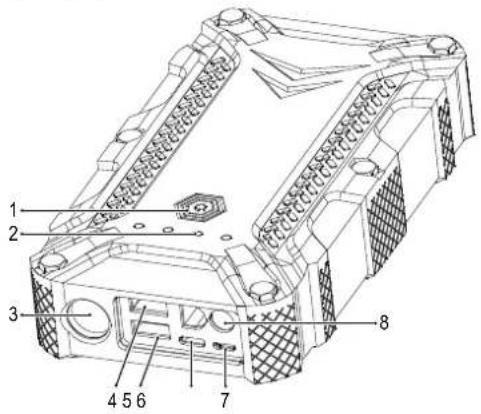
1 Power button 2 Battery level indicators
3 LED light 4
Output 1: USB-A charging
5 Output 2: USB-A charging
6 Input 2: USB-C® charging
7 Input 1: MicroUSB charging
8 Starter cables socket
6.2 Starter cables
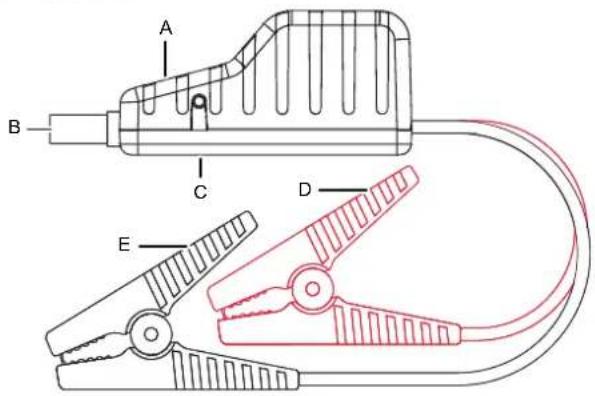
A Starter status indicator B Starter cables plug
C Force start button D Red starter clip (+)
E Black starter clip (-)
7 Charge the product battery
Important:
- Do not charge the power bank using the USB-A ports on a computer. The current supplied by these ports may not be sufficient and can damage the computer.
- To prolong the battery life, it is recommended to fully charge the battery every 3 - 6 months.
- Do not jump start the vehicle while recharging the product!
The status display will indicate the level of charge.
The battery level indicators will indicate the level of charge: (● = 25%, ●● = 50%, ●●● = 75%, ●●●● = 100%).
■ Short press the Power button to check the battery level.
To recharge the battery, connect one end of the charging cable to a power supply and the other end to a charging input on the product.
– Battery level indicators flashing: charging in progress
– Battery level indicators constant on: fully charged.
8 Power bank
Preconditions:
To use this product as a power bank you will need a suitable charging cable.
- Connect one end of the charging cable to your mobile device, and the other end to a charger output on the product.
- Press the Power button to start charging.
9 LED light
- Press and hold the Power button (approx. 3 secs) to switch the LED ON/OFF.
- Press the Power button repeatedly to cycle through modes: constant ON → SOS → flashing → OFF.
10 Quick starting system
Important:
- Only use the included starter cables.
- Clean corroded or dirty vehicle battery terminals before connecting the cables.
- Do not use if a cable or clip is damaged.
- To prevent damage to the product, only use with 12 V vehicle onboard systems.
- Never short circuit the two pole terminals e.g. Do not clamp both cables together or to the same piece of conductive material.
10.1 Before jump starting the vehicle
Prepare vehicle for ignition. Place gear in park/neutral and engage the emergency brake.
■ Switch off all vehicle electronics e.g. air conditioner, heater, radio, and lights.
■ Make sure there is at least 50% charge in the starter.
10.2 Normal starting method
Important:
If ignition fails after 3 attempts, disconnect the quick start system, wait 5 mins then try the Force starting method [▶ 5].
- Connect the starter cables plug to the starter cables socket.
- Clip the red and black cables to the electrodes of the vehicle battery in the following sequence.
- Red clamp to positive (+).
- Black clamp to negative (-).
- Check the starter status indicator:
- Alternating red/green flashing (normal) proceed to step 4.
-
Other LED status: see section Status indicators.
-
Attempt to start the vehicle.
-
Do not start the ignition for more than 3 secs at a time.
-
Allow the starter to cool down for 30 secs between each start attempt.
– Maximum 3 attempts within 2 mins. -
If the engine starts, disconnect the black terminal followed by the red terminal. Replace the sockets cover.
Let the vehicle run for approx. 30 mins to recharge the battery.
10.3 Force starting method
Important:
Use this method if the normal starting method fails.
If ignition fails after 3 attempts, disconnect the quick start system and contact a specialist workshop.
- Connect the starter cables plug to the starter cables socket.
- Clip the red and black cables to the electrodes of the vehicle battery in the following sequence.
- Red clamp to positive (+)
- Black clamp to negative (-)
- Check the starter status indicators:
- Alternating red/green flashing (normal) proceed to step 4.
-
Other LED status: see section Status indicators.
-
Press and hold the Force Start Button for 3 secs until the status LED lights solid green.
-
Start the vehicle within 30 seconds after the LED lights solid green.
- Attempt to start the vehicle. Do not start ignition for more than 3 secs at a time.
-
Allow the starter to cool down for 30 secs between each start attempt.
– Maximum 3 attempts within 2 mins. -
If the engine starts, disconnect the quick start system and replace the sockets cover.
Let the vehicle run for approx. 30 mins to recharge the battery.
11 Status indicators
11.1 Normal
| Status indicator Status | |
| Alternating red/green flashing Quick start system is ready/starting in progress. | |
| Green steady on Force start mode is activated. | |
11.2 Protection mode
| Status indicator Status | |
| Red steady/red flashing | Connection error. Please check all contacts. |
| Red on/alarm sound on | ■ Reversed polarity: check if the clamps are connected the wrong way around.■ Short-circuit: Both cables are clamped together or clamped to the same piece of conductive metal. |
| Red steady on | ■ Reverse charging protection is triggered. Voltage of the connected battery is >12.6 V.■ The jump starter is not needed as the vehicle battery is enough to start the vehicle. |
| Red flashing quickly Over | temperature: Clamp >65 (±5) °C. Remove the clips until the starter status indicator returns to normal (alternating red/green flashing). |
| Green flashing slowly Quick start battery charge is too low, recharge it. | |
12 Cleaning and care
Important:
- Do not use aggressive cleaning agents, rubbing alcohol or other chemical solutions. They damage the housing and can cause the product to malfunction.
-
Do not immerse the product in water.
-
Disconnect the product from the power supply.
-
Clean the product with a dry, fibre-free cloth.
13 Disposal

This symbol must appear on any electrical and electronic equipment placed on the EU market. This symbol indicates that this device should not be disposed of as unsorted municipal waste at the end of its service life.
Owners of WEEE (Waste from Electrical and Electronic Equipment) shall dispose of it separately from unsorted municipal waste. Spent batteries and accumulators, which are not enclosed by the WEEE, as well as lamps that can be removed from the WEEE in a non-destructive manner, must be removed by end users from the WEEE in a non-destructive manner before it is handed over to a collection point.
Distributors of electrical and electronic equipment are legally obliged to provide free take-back of waste. Conrad provides the following return options free of charge (more details on our website):
in our Conrad offices
at the Conrad collection points
at the collection points of public waste management authorities or the collection points set up by manufacturers or distributors within the meaning of the ElektroG
End users are responsible for deleting personal data from the WEEE to be disposed of.
It should be noted that different obligations about the return or recycling of WEEE may apply in countries outside of Germany.
14 Technical data
14.1 General
Charging input (Micro-USB) ..... 5 V/DC 2.0 A
recharge time 6 hrs
Charging input (USB-C®).... 5 V/DC 2.0 A
recharge time 6 hrs
Rechargeable battery .... 14.8 V 37 Wh, Li-ion (non-removeable), 10000 mAh (4x type 606080)
LED light modes .... Constant ON → SOS → flashing → OFF
Ingress protection..... IP68
Protection mechanisms .... Over temperature:
- discharging: 60 °C ±5 °C
- recharging: 60 °C ±5 °C
Low temperature:
- discharging: -20 °C ±5 °C
- recharging: -20 °C ±5 °C
Overvoltage (USB inputs): max. 6 V
Overcharge: 16.6 V
Over discharge:
- software protection: ≤13 V ±0.3 V 12.5 V - 13 V
- hardware protection: 10.8 V - 11 V
Overcurrent: 3.4 - 3.7 A
Operating conditions.... Sockets cover open: -20 to +60 °C, 20 – 85 % RH (non-condensing)
Sockets cover closed: -20 to +60 °C
Storage conditions.... Sockets cover open: 0 to +45 °C, 20 – 85 % RH (non-condensing) Sockets cover closed: 0 to +45 °C
Dimensions (L x W x H).... 168 x 92 x 38 mm
Weight 520 g
14.2 Power bank
Output 1 (USB-A) .... 5 V/DC 3 A, 9 V/DC 2 A, 12 V/DC 1.5 A (max. 18 W)
Output 2 (USB-A) .... 5 V/DC 3 A, 9 V/DC 2 A, 12 V/DC 1.5 A (max. 18 W)
14.3 Jump starter
Vehicle on-board system.... 12 V/DC
Start current (peak value).... 400 A (800 A)
Jump starts.... approx. 15 (affected by factors such as ambient temperature, size, and mechanical condition of the engine)
Suitable engine types .... Petrol (displacement ≤6.0 L), Diesel (displacement ≤4.0 L)
This is a publication by Conrad Electronic SE, Klaus-Conrad-Str. 1, D-92240 Hirschau (www.conrad.com).
All rights including translation reserved. Reproduction by any method (e.g. photocopying, microfilming or the capture in electronic data processing systems) requires prior written approval from the editor. Reprinting, also in part, is prohibited. This publication reflects the technical status at the time of printing.
Copyright by Conrad Electronic SE.
*2812940_V2_0823_dh_mh_en 9007200149572235-2 I2/O2 en
VOLTCRAFT
F Mode d'emploi
VC-JS-800A-WP
Entrée de charge (USB-C®).... 5 V/CC 2,0 A
Copyright by Conrad Electronic SE.
*2812940_V2_0823_dh_mh_fr 9007200149572235-3 I2/O2 en
VOLTCRAFT
IP68 3-in-1 jumpstarter
Bestelnr.: 2812940
CE

1 Beoogd gebruik
- Intended use
- Important:
- Delivery contents
- Latest product information
- Description of symbols
- Safety instructions
- General
- Handling
- Operating environment
- Operation
- Li-ion battery
- LED light
- Photosensitive epilepsy
- Connected devices
- Electrical safety
- Personal safety
- Lead-acid battery
- Product Overview
- Product
- Starter cables
- Charge the product battery
- Power bank
- Preconditions:
- LED light
- Quick starting system
- Before jump starting the vehicle
- Normal starting method
- Force starting method
- Status indicators
- Normal
- Cleaning and care
- Disposal
- Technical data
- General
- Power bank
- Jump starter
- VOLTCRAFT
- Beoogd gebruik
Brand : VOLTCRAFT
Model : VC-JS-800A-WP
Category : Battery charger