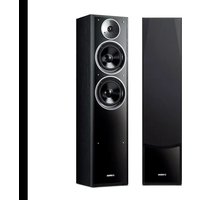
NS-F71 - Speaker YAMAHA - Free user manual and instructions
Find the device manual for free NS-F71 YAMAHA in PDF.


User questions about NS-F71 YAMAHA
0 question about this device. Answer the ones you know or ask your own.
Ask a new question about this device
Download the instructions for your Speaker in PDF format for free! Find your manual NS-F71 - YAMAHA and take your electronic device back in hand. On this page are published all the documents necessary for the use of your device. NS-F71 by YAMAHA.
USER MANUAL NS-F71 YAMAHA
Please read the following operating precautions before use. Yamaha will not be held responsible for any damage and/or injury caused by not following the cautions below.
- To assure the finest performance, please read this manual carefully. Keep it in a safe place for future reference.
- Install the speakers in a cool, dry, clean place – away from windows, sources of heat, sources of excessive vibration, dust, moisture or cold. Avoid sources of electrical humming (e.g., transformers and motors). To prevent fire or electric shock, do not expose the speakers to rain or water.
- To prevent the enclosure from warping or discoloring, do not expose the speakers to direct sunlight or excessive humidity.
- Avoid installing the speakers where foreign objects may fall onto them and/or where they may be exposed to liquid dripping or splashing.
-
Do not place the following objects on top of the speakers:
-
Other components, as they might damage or discolor the surface of the speakers.
– Burning objects (e.g., candles), as they might cause fire, damage to the speakers or personal injury. -
Containers of liquid, as they might spill and cause electric shock to the user or damage to the speakers.
-
Do not place the speakers where they are liable to be knocked over or struck by falling objects. Stable placement will also ensure better sound performance.
- Placing the speakers on the same shelf or rack as the turntable can result in feedback.
- Do not insert a hand or object into the port or pick up the speaker by holding the port, as it may cause personal injury or damage to the speaker.
- Any time you note distortion, reduce the volume control on your amplifier to lower setting. Never allow your amplifier to be driven into “clipping”. Otherwise, the speakers may be damaged.
- When using an amplifier with a rated output power higher than the nominal input power of the speakers, care should be taken not to exceed the maximum input of the speakers.
- Do not attempt to clean the speakers with chemical solvents as this might damage the finish. Use a clean, dry cloth.
- Do not attempt to modify or fix the speakers. Contact qualified Yamaha service personnel when service is needed. The cabinet should never be opened for any reason.
- As this unit is heavy, whenever it is moved, two people are required to transport it safely.
- Secure placement or installation is the owner's responsibility. Yamaha is not liable for accidents caused by improper placement or installation of speakers.
Supplied accessory
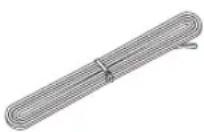
Speaker cable 4 m (13.1 ft.) x 2
Information for Users on Collection and Disposal of Old Equipment

This symbol on the products, packaging, and/or accompanying documents means that used electrical and electronic products should not be mixed with general household waste.
For proper treatment, recovery and recycling of old products, please take them to applicable collection points, in accordance with your national legislation and the Directives 2002/96/EC.
By disposing of these products correctly, you will help to save valuable resources and prevent any potential negative effects on human health and the environment which could otherwise arise from inappropriate waste handling.
For more information about collection and recycling of old products, please contact your local municipality, your waste disposal service or the point of sale where you purchased the items.
[Information on Disposal in other Countries outside the European Union]
This symbol is only valid in the European Union. If you wish to discard these items, please contact your local authorities or dealer and ask for the correct method of disposal.
Contents
Supplied accessory ....i
Placing the speakers.... 1
Connecting to your amplifier 2
Removing / Attaching the grille.... 3
Specifications.... 3
Placing the speakers
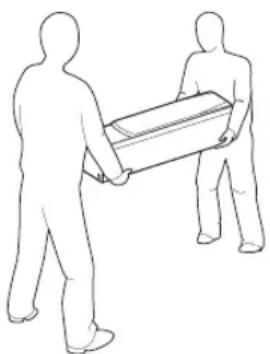
natural_image
Two stylized human figures carrying a large cylindrical object (no text or symbols)Note
- Be sure to have another person support it.
- Pay extra attention to avoid scratching the speaker's surface.
- Be careful not to apply force to the side of the speaker, otherwise the speaker may fall causing damage to the speaker or personal injury.
- To avoid accidents resulting from tripping over loose speaker cables, affix them to the floor.
- This unit features a magnetically shielded design. However, there is still a chance that placing it too close to a CRT-type TV set might impair picture color. Should this happen, move this unit away from the TV set.
Precautions when positioning the speakers

natural_image
Illustration of a device with an exclamation mark inside a circle (no text or symbols)The speaker is constructed with the majority of the weight located in its upper portion, and is thus susceptible to falling over if proper care is not taken to ensure its stability. If the speaker tips over, the speaker
or other personal property may be damaged or an individual may be injured (possibly even fatally injured).
For safe and proper use of the speaker:
- Position the speaker in a location that is solid, level, smooth, and low (with respect to the floor).
- Do not push or apply pressure to the side of the speaker when moving, or lean objects against the side of the speaker.
- Do not sit on or set objects on top of the speaker. Vibrations or jolts associated with earthquakes and other phenomena or activities may cause the speaker to fall over. For safety reasons, using commercially-available products that increase stability of the speaker is recommended (metal fittings or chains, etc.).
■Using as 2ch stereo speakers
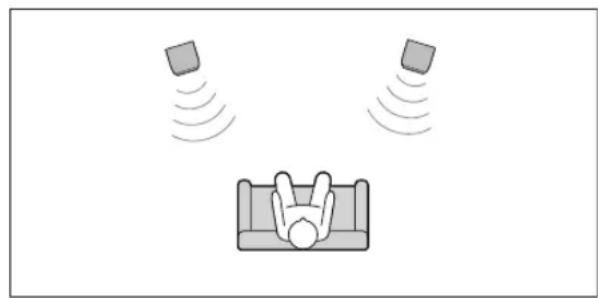
natural_image
Illustration of a person lying on a couch with floating objects above, no text or symbols presentBetter stereo images will be obtained when the speakers are slightly angled in towards the listener.
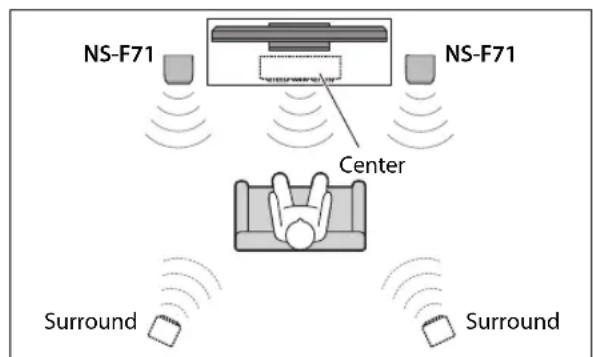
■Using as front speakers in a multi-channel system
text_image
NS-F71 NS-F71 Center Surround SurroundPosition the speakers on both sides of the TV. The positioning of speakers is important, since this dictates the overall sound quality of the multi-channel system. Set up the speakers on the basis of your listening position by following the owner's manual supplied with your amplifier.
Connecting to your amplifier
Before making connections, make sure that the amplifier is switched off.
■Connections
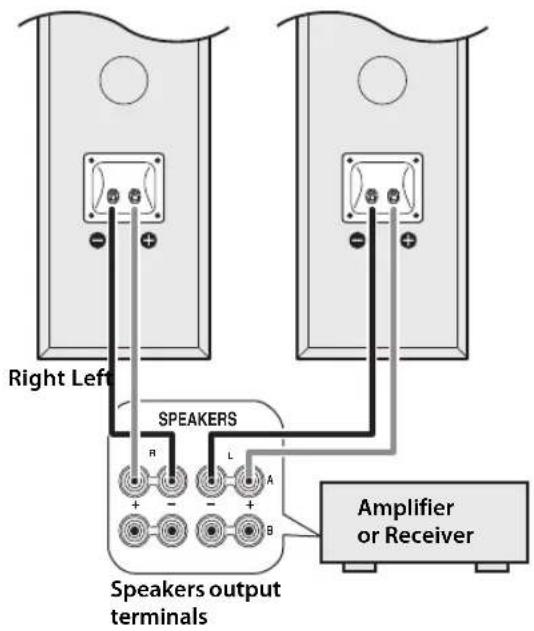
Connect one speaker to the left (marked L) terminals of your amplifier or receiver, and another speaker to the right (marked R) terminals. Please refer to the owner's manual that came with your amplifier or receiver.
Note
- Make sure you connect the speakers with the correct polarity—positive (+) terminals to positive (+) terminals, and negative (−) terminals to negative (−) terminals. If you get them crossed over, the sound will be unnatural and lack bass.
- In your AV receiver's speaker size settings, specify small (or "S") for all of the speakers.
- The speaker may be damaged if certain sounds are continuously output at high volume level. For example, if sine waves from a test disc, bass sounds from electronic instruments, etc., are continuously output, or when the stylus of a turntable touches the surface of a disc, reduce the volume level to prevent the speaker from being damaged.
- Once you have connected all of the speakers, plug the amplifier and other AV components into suitable AC wall outlets.
- When using an amplifier with a rated output power higher than the nominal input power of the speaker, care should be taken never to exceed the speaker's maximum input.
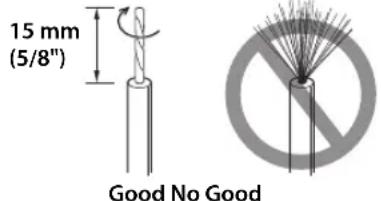
■Preparing the speaker cables
text_image
15 mm (5/8") Good No Good1 Remove about 15mm (5/8") of insulation from the end of each speaker cable.
2 Twist the bare wires tightly.
Note
- Do not bundle or roll up excess cable.
- Twist the bare wires tightly so the individual strands are not splayed.
- Be careful not to injure yourself while preparing the speaker cables.
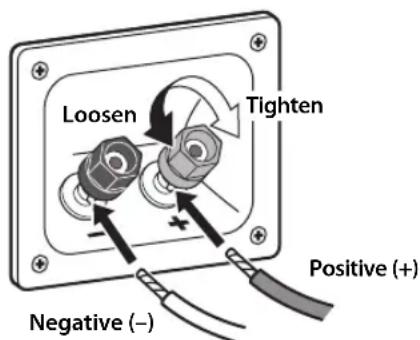
■Operating the speaker terminals
text_image
Loosen Tighten Negative (–) Positive (+)1 Rotate the speaker terminal counterclockwise to loosen it.
2 Insert the bare wire.
3 Rotate the speaker terminal clockwise to tighten it.
4 Test the security of the connection by pulling gently on the cable.
Note
- Make sure the terminal is gripping the bare wire, not the insulation.
- Make sure the bare wires do not touch each other, as this could damage the speaker or amplifier.
- If the connections are faulty, you will hear no sound from the speakers.
■Connecting to an amplifier
text_image
Right Left SPEAKERS R L A + - + - B Speakers output terminals Amplifier or ReceiverConnect each speaker to the appropriate speaker terminals on your amplifier by using the cables you prepared earlier. Please refer to the owner's manual that came with your amplifier or receiver.
When using a banana plug
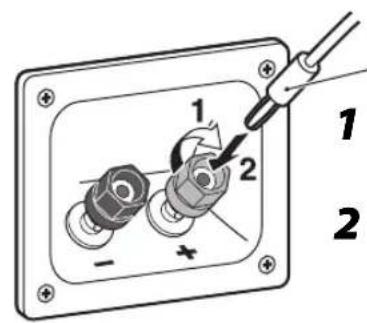
text_image
1 2 - + 1 2Banana plug
1 Tighten the terminal knob.
2 Simply insert the banana plug into the terminal.
Removing / Attaching the grille
The grille is fastened to the enclosure at six points and can be removed if desired. To remove the grille, hold on to both sides and slowly pull straight away from the speaker. To reattach, line up the six holes on the inner surface of the grille with the six corresponding pegs on the speaker and push gently.
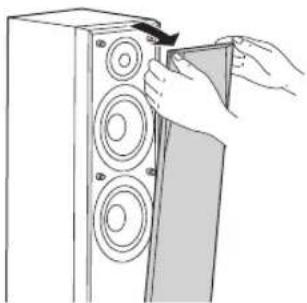
natural_image
Illustration of hands installing a CD into a speaker tower (no text or symbols)Note
- When removing or attaching the grille, be careful not to touch the drive units, and not to exert excessive force with any tools.
- Do not touch or apply impact to the speaker's diaphragm. Otherwise, the speaker may malfunction.
- To avoid damaging the grille, never apply excessive force, and be sure to use its frame, never pull or push the surface, for removing or attaching the grille.
Specifications
Type....2-way bass reflex Magnetic shielding type
Driver ....Woofer: 16 cm (6-1/2") cone type x 2 Tweeter: 3 cm (1") soft dome type
Nominal input power 80 W
Maximum input power 240 W
Impedance Nominal 6 Ω
Frequency response 43 Hz - 26 kHz
Sensitivity....89 dB/2.83 V, 1 m
Dimensions (W x H x D) .....233 x 974 x 258 mm (9-1/8" x 38-3/8" x 10-1/8")
Weight.... 13.7 kg (30.2 lbs)
* The contents of this manual apply to the latest specifications as of the printing date. To obtain the latest manual, access the Yamaha website then download the manual file.
Taking care of the speaker
When you wipe this unit, do not use chemical solvents (e.g., alcohol or thinners, etc.): this might damage the finish. Use a clean, dry cloth. For difficult soils, dampen a soft cloth in water, wring it out, and then wipe with the cloth.
(For polish-finished model) Bumping the surface of the instrument with metal, porcelain, or other hard objects can cause the finish to crack or peel.
Précautions
natural_image
Line drawing of two human figures carrying a cylindrical object (no text or symbols)Remarque
natural_image
Black and white icon of a smartphone with an exclamation mark, enclosed in a circle (no text or symbols)natural_image
Illustration of a person relaxing on a couch with floating objects emitting sound waves (no text or symbols)text_image
NS-F71 NS-F71 Centre Surround Surroundnatural_image
Line drawing of a hand inserting a CD into a speaker into a speaker tower (no text or symbols)Remarque
natural_image
Line drawing of two human figures carrying a cylindrical object (no text or symbols)Hinweis
natural_image
Simple line drawing of a device with an exclamation mark inside a circle (no text or symbols)natural_image
Illustration of a person relaxing on a couch with floating objects emitting sound waves (no text or symbols)text_image
NS-F71 NS-F71 Center Surround Surroundnatural_image
Line drawing of a hand inserting a CD into a speaker into a speaker tower (no text or symbols)Hinweis
natural_image
Line drawing of two human figures carrying a cylindrical object (no text or symbols)Nota
natural_image
Simple line drawing of a device with an exclamation mark inside, enclosed in a circle (no text or symbols)natural_image
Illustration of a person lying on a couch with floating objects emitting sound waves (no text or symbols)text_image
NS-F71 NS-F71 Central Surround Surroundtext_image
15 mm Bien Maltext_image
Diagram showing a mechanical assembly with labeled parts and directional arrows, likely illustrating a valve or switch mechanism.Clavija banana
1 Apriete la perilla del terminal.
natural_image
Illustration of hands installing a CD into a speaker tower (no text or symbols)Nota
natural_image
Line drawing of two human figures carrying a cylindrical object (no text or symbols)Примечание
natural_image
Illustration of a smartphone with an exclamation mark inside a circle (no text or symbols)natural_image
Illustration of a person relaxing on a couch with floating objects emitting sound waves (no text or symbols)text_image
Diagram showing a switch or connector assembly with labeled parts and directional arrows indicating rotation or movement.natural_image
Line drawing of a hand inserting a CD into a speaker tower (no text or symbols)Примечание
Important Notice: Guarantee Information for customers in EEA\* and Switzerland
English
For detailed guarantee information about this Yamaha product, and Pan-EEA* and Switzerland warranty service, please either visit the website address below (Printable file is available at our website) or contact the Yamaha representative office for your country. * EEA: European Economic Area
Manual Development Department
© 2016 Yamaha Corporation
Published 12/2015 IP-A0
Printed in Indonesia
ZT81420