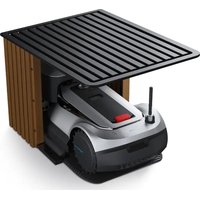
GOAT G1-2000 - Robot mower ECOVACS - Free user manual and instructions
Find the device manual for free GOAT G1-2000 ECOVACS in PDF.


| Product type | Robot vacuum and mop |
| Brand | ECOVACS |
| Model | GOAT G1-2000 (DLX34) |
| Power supply | Adapter 100-240 V ~ 50/60 Hz, output 20 V === 1.2 A |
| Battery | Lithium-ion 14.4 V, 4800 mAh (8 cells max.) |
| Charging time | Approximately 4 to 5 hours |
| Charging station | Model CH2331 |
| Main sensors | Laser ranging (TrueMapping, range 8 m), infrared anti-drop, carpet/rug detection (ultrasound 300 kHz), anti-collision |
| Cleaning functions | Suction, mopping (with washable mop pad), spot cleaning (1.5 x 1.5 m), scheduled cleaning, automatic return to station |
| Connectivity | Wi-Fi 2.4 GHz / 2.4/5 GHz, ECOVACS HOME app |
| Voice control | Via app and built-in speaker |
| Package contents | Robot, charging station, mop pad plate, washable mop pad, side brush, adapter, user manual, screw bag |
| Recommended maintenance | Filter and main brush: weekly; side brush: every 2 weeks; mop pad: after each mopping; charging contacts: weekly |
| Wear parts and replacement | Mop pad: 1 to 2 months; side brush: 3 to 6 months; main brush: 6 to 12 months; filter: 3 to 6 months |
| Safety | Anti-drop sensors, bumper, child lock, Do Not Disturb mode, automatic stop on obstacles |
| Wi-Fi module power | Less than 100 mW |
| Operating temperature | 0 °C to 40 °C |
| Country of origin | China (ECOVACS Robotics Co., Ltd.) |
| Standards and certifications | CE, UKCA, RoHS, Radio Equipment Directive 2014/53/EU, Class 1 laser |
Frequently Asked Questions - GOAT G1-2000 ECOVACS
User questions about GOAT G1-2000 ECOVACS
0 question about this device. Answer the ones you know or ask your own.
Ask a new question about this device
Download the instructions for your Robot mower in PDF format for free! Find your manual GOAT G1-2000 - ECOVACS and take your electronic device back in hand. On this page are published all the documents necessary for the use of your device. GOAT G1-2000 by ECOVACS.
USER MANUAL GOAT G1-2000 ECOVACS
For the Instruction Manual in further languages, visit: https://www.ecovacs.com.
Important Safety Instructions
IMPORTANT SAFETY INSTRUCTIONS
When using an electrical Appliance, basic precautions should always be followed, including the following:
READ ALL INSTRUCTIONS BEFORE USING THIS APPLIANCE SAVE THESE INSTRUCTIONS
- This Appliance can be used by children aged from 8 years and above and persons with reduced physical, sensory or mental capabilities or lack of experience and knowledge if they have been given supervision or instruction concerning use of the Appliance in a safe way and understand the hazards involved. Children shall not play with the Appliance. Cleaning and user maintenance shall not be made by children without supervision.
- Clear the area to be cleaned. Remove power cords and small objects from the floor that could entangle the Appliance. Tuck rug fringe under the rug base, and lift items such as curtains and tablecloths off the floor.
- If there is a drop off in the cleaning area due to a step or stairs, you should operate the Appliance to ensure that it can detect the step without falling over the edge. It may become necessary to place a physical barrier at the edge to keep the unit from falling. Make sure the physical barrier is not a trip hazard.
- Only use as described in this manual. Only use attachments recommended or sold by the manufacturer.
-
Please make sure your power supply source voltage matches the power voltage marked on the Charging Dock (Docking Station).
-
For INDOOR household use ONLY. Do not use the Appliance in outdoor, commercial or industrial environments.
- Use only the original rechargeable battery and Charging Dock provided with the Appliance from the manufacturer. Non-rechargeable batteries are prohibited.
- Do not use without dust bin and/or filters in place.
- Do not operate the Appliance in an area where there are lit candles or fragile objects.
- Do not use in extremely hot or cold environments (below -5^/23^ or above 40^/104^ )
- Keep hair, loose clothing, fingers, and all parts of body away from any openings and moving parts.
- Do not operate the Appliance in a room where an infant or child is sleeping.
- Do not use Appliance on wet surfaces or surfaces with standing water.
- Do not allow the Appliance to pick up large objects like stones, large pieces of paper or any item that may clog the Appliance.
- Do not use Appliance to pick up flammable or combustible materials such as gasoline, printer or copier toner, or use in areas where they may be present.
- Do not use Appliance to pick up anything that is burning or smoking, such as cigarettes, matches, hot ashes, or anything that could cause a fire.
- Do not put objects into the suction intake. Do not use if the suction intake is blocked. Keep the intake clear of dust, lint, hair, or anything that may reduce air flow.
- Take care not to damage the power cord. Do not pull on or carry the Appliance or Charging Dock by the power cord, use the power cord as a handle, close a door on the power cord, or pull power cord around sharp edges or corners. Do not run Appliance over the power cord. Keep power cord away from hot surfaces.
-
If the power cord is damaged, it must be replaced by the manufacturer or its service agent in order to avoid a hazard.
-
Do not use the Charging Dock if it is damaged. The power supply is not to be repaired and not to be used any longer if it is damaged or defective.
- Do not use with a damaged power cord or receptacle. Do not use the Appliance or Charging Dock if it is not working properly, has been dropped, damaged, left outdoors, or come in contact with water. It must be repaired by the manufacturer or its service agent in order to avoid a hazard.
- Turn OFF the power switch before cleaning or maintaining the Appliance.
- The plug must be removed from the receptacle before cleaning or maintaining the Charging Dock.
- Remove the Appliance from the Charging Dock, and turn OFF the power switch to the Appliance before removing the battery for disposal of the Appliance.
- The battery must be removed and discarded according to local laws and regulations before disposal of the Appliance.
- Please dispose of used batteries according to local laws and regulations.
- Do not incinerate the Appliance even if it is severely damaged. The batteries can explode in a fire.
- When not using the Charging Dock for a long period of time, please unplug it.
- The Appliance must be used in accordance with the directions in this Instruction Manual. Ecovacs Robotics Co., Ltd. cannot be held liable or responsible for any damages or injuries caused by improper use.
- The Robot contains batteries that are only replaceable by skilled persons. To replace the Robot's battery, please contact Customer Service.
- If the Robot will not be used for a long time, power OFF the Robot for storage and unplug the Charging Dock.
- WARNING: For the purposes of recharging the battery, only use the detachable supply unit CH2331 provided with the Appliance. The lithium battery type suitable for CH2331 is Max.
8 cells, max. nominal voltage DC14.4V, rated capacity 4,800mAh. The battery must be removed and discarded according to local laws and regulations before disposal of the Appliance. To satisfy RF exposure requirements, a separation distance of 20 cm or more should be maintained between this device and persons during device operation. To ensure compliance, operations at closer than this distance is not recommended. The antenna used for this transmitter must not be co-located in conjunction with any other antenna or transmitter.
Device Update
Typically, some devices are updated bi-monthly, but not always so specific.
Some devices, especially those that went on sale more than three years ago, will only be updated if a critical vulnerability is found and fixed.
 | For indoor use only. |
 | Direct current. |
 | Alternating current. |
 | This product conforms to the applicable EC Directives. |
 | Before charging, read the instructions. |
 | This product conforms to the applicable UK legislation. |
 | CLASS 1 LASER PRODUCT. |
For EU Countries
For EU Declaration of Conformity information, visit https://www.ecovacs.com/global/compliance.
For UK
For UK Declaration of Conformity information, visit https://www.ecovacs.com/global/compliance.
Correct Disposal of this Product
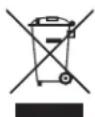
This marking indicates that this product should not be disposed of with other household waste throughout the EU. To prevent possible harm to the environment or human health from uncontrolled waste disposal, recycle it responsibly to promote the sustainable reuse of material resources. To recycle your used device, please use the return and collection systems or contact the retailer where the product was purchased. They can safely recycle this product.
The remote surveillance is for the absolute private use of non-public, private owned places for the pure selfprotection and single control intended only. Please be aware of the local data protection based legal obligations in case of use. No surveillance of public places, especially with clandestine intent and/or on the part of the employer without justified reasons. Such not justified use is in the risk and responsibility of the user only.
European Union Compliance Statement
Information on Disposal for Users of Waste Electrical & Electronic Equipment
This symbol on the product or on its packaging indicates that used electrical and electronic products should not be mixed with unsorted municipal waste. For proper treatment, it is your responsibility to dispose of your waste equipment by arranging to return it to designated collection points.
Disposing of this product correctly will help save valuable resources and prevent any potential negative effects on human health and the environment, which could otherwise arise from inappropriate waste handling.
To return your used device, please use the return and collection systems or contact the retailer where the product was purchased, which is free of charge, please contact your local authority for further details of your nearest designated collection point.
Penalties may be applicable for incorrect disposal of this waste, in accordance with your national legislation.
Information on Disposal for Users of used Batteries

This symbol means that batteries and accumulators, at their end-of-life, should not be mixed with unsorted municipal waste. Your participation is an important part of the effort to minimize the impact of batteries and accumulators on the environment and on human health.
For proper recycling you can return this product or the batteries or accumulators it contains to your supplier or to a designated collection point, which is free of charge.
Disposing of this product correctly will help save valuable resources and prevent any potential negative effects on human health and the environment, which could otherwise arise from inappropriate waste handling.
Penalties may be applicable for incorrect disposal of this waste, in accordance you're your national .legislation. there are separate collection systems for used batteries and accumulators.
Please, dispose of batteries and accumulators correctly at your local community waste collection/recycling center.
Restriction of the use of certain hazardous substances (RoHS) Directive
Ecovacs Robotics Co., Ltd. Hereby declares the whole product including parts (cables, cords, and so on) meets the requirements of RoHS Directive 2011/65/EU and amendment Commission Delegated Directive (EU) 2015/863 on the restriction of the use of certain hazardous substances in electrical and electronic equipment ("RoHS recast" or "RoHS 2.0").
Radio Equipment Directive
Ecovacs Robotics Co., Ltd. Hereby declares that the product listed in this section comply with the essential requirements and other relevant provisions of the Radio Equipment Directive 2014/53/EU.
Europe Authorised Representative:

Ecovacs Robotics Co., Ltd. Hereby declares that the product comply with the essential requirements and other relevant provisions of the RoHS Directive 2011/65/EU and amendment Commission Delegated Directive (EU) 2015/863, the Radio Equipment Directive 2014/53/EU. The declaration of conformity can be viewed at the following address: https://www.ecovacs.com/global/compliance.
1. PACKAGE CONTENTS
1.1 Package content
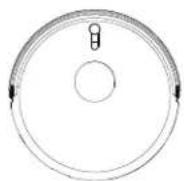
Robot Charging Dock Mopping Pad Plate
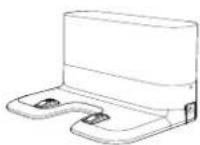
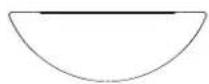
Washable Mopping Pad
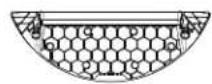
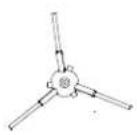
Side Brush Adapter Instruction Manual
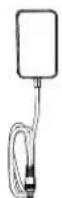

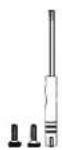
Screw Bag
* Note: Figures and illustrations are for reference only and may differ from actual product appearance. Product design and specifications are subject to changes without notice.
EN18
1.2 PRODUCT DIAGRAM
Robot
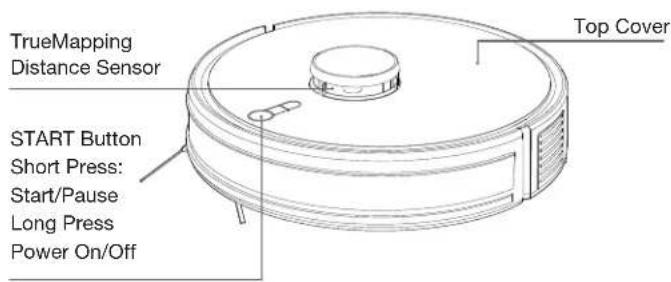
Charging Button:
Short Press: Go To Charge
Long Press: Reset
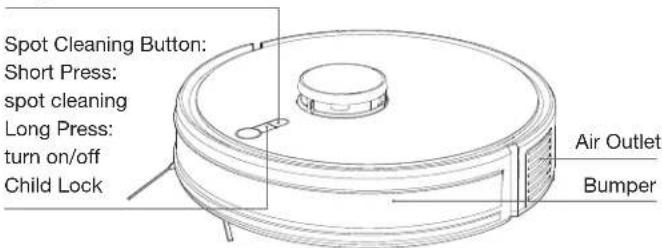
- In Child Lock mode, buttons and smart speakers are disabled, preventing potential dangers from accidental operations by children.
- Restore to factory settings: Long press the charging button for 10-15s.
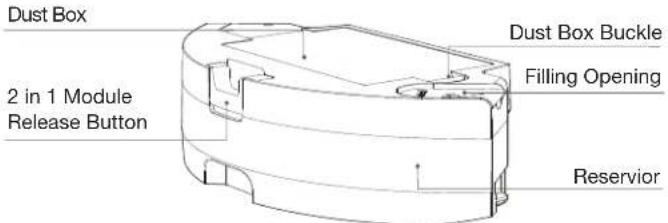
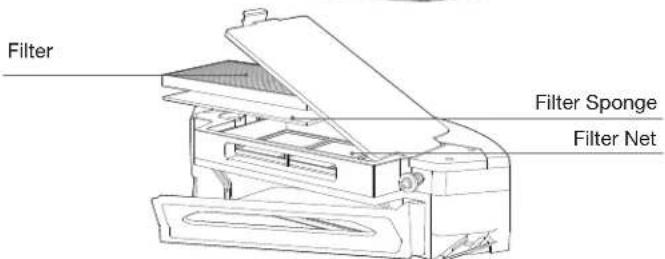
2 in 1 Module
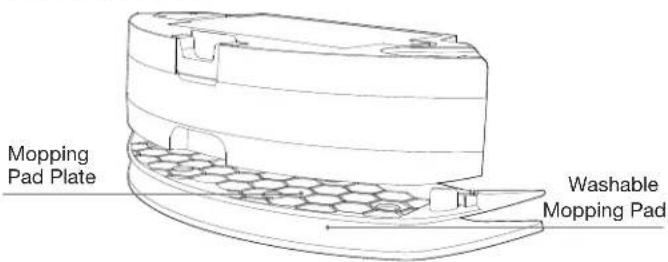
Mopping Pad Module
Bottom View Charging Dock
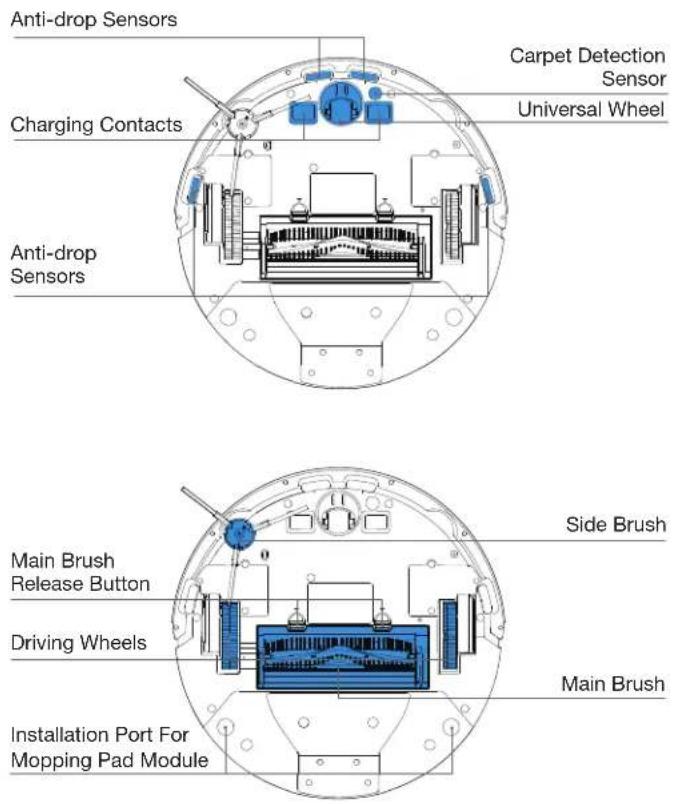
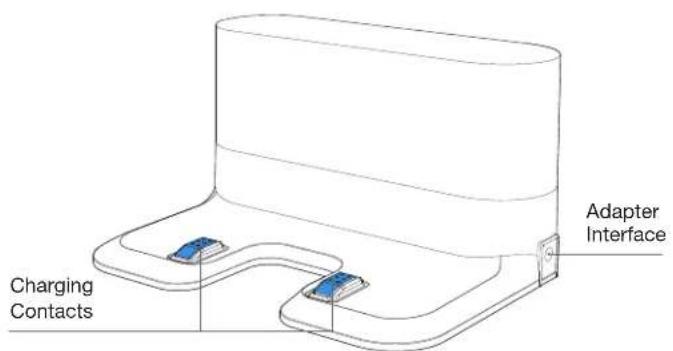
1.3 TrueMapping Distance Sensor
| Name Functional Description | |
| TrueMapping Distance Sensor | With Laser Ranging-measuring the distance between the device and surroundings through the time difference of reflection, it can map according to the objects around while the device is moving. Detection of 8m. |
| Anti-drop Sensor | With Infrared Ranging-detecting the distance between the bottom of the device and ground by Infrared Sensor at the bottom, the device will not move forward when there are stairs in front (For example: White ground height greater than 30mm) or the identified distance exceeds the present one, realizing the Anti-drop. |
| Carpet Detection Sensor | The ultrasound probe can emit ultrasonic waves with a frequency of 300KHZ. The energy of the ultrasonic waves is absorbed by the carpet. If the reflected energy is below the threshold, the device recognizes the presence of the carpet. |
| Anti-collision Sensor | When the transmitted signal is blocked by an obstacle, the signal receiver will not be able to receive the signal. With this principle, the device will avoid obstacles when colliding with them. |
2. Operations
2.1 Notes Before Cleaning
Tidy up the area to be cleaned by putting furniture, such as chairs, in their proper place.
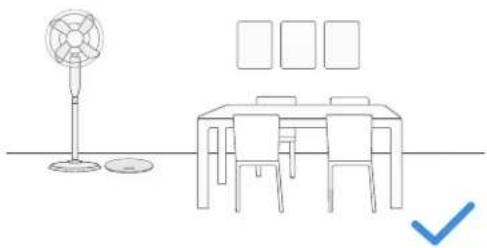
natural_image
Line drawing of a dining table with a fan, seatbelt, and checkmark (no text or symbols)It may be necessary to place a physical barrier at the edge of a drop to stop the unit from falling over the edge.
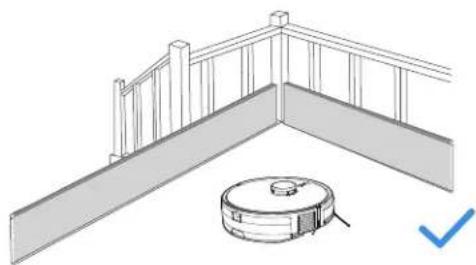
natural_image
Architectural diagram of a balcony with railing and a circular robotic vacuum cleaner (no text or symbols)EN | 12
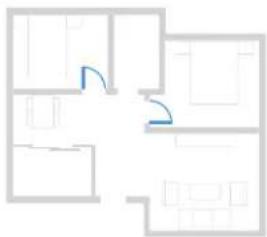
During the first use, make sure each room door is open to help Robot fully explore your house.
natural_image
Floor plan diagram with room layouts and a highlighted section (no text or labels)
Put away objects including cables, cloths and slippers, etc. on the floor to improve the cleaning efficiency.

Before using the product on a rug with tasseled edges, please fold the rug edges under.

Please do not stand in narrow spaces, such as hallways, and make sure not to block the camera.
2.2 Quick Start
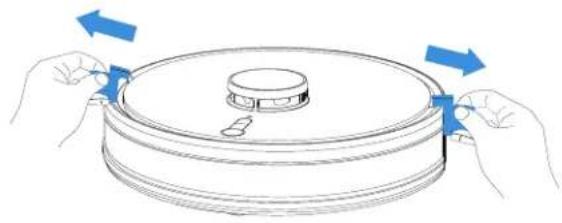
* Before using the product, please remove all protective materials.
natural_image
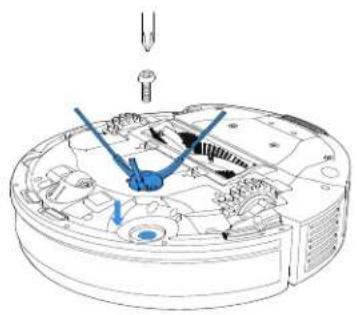
Diagram of hands holding a circular object with blue arrows indicating rotation or movement (no text or symbols)* Before using the product, please take the screwdriver and screws out of the screw pack for installation.
natural_image
Technical line drawing of a mechanical assembly with no visible text or symbols2.3 Download and Connect ECOVACS HOME App
To enjoy all available features, it is recommended to control your Robot via the ECOVACS HOME App.
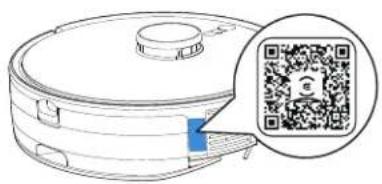
Method 1: Scan the QR code on the Robot or Instruction Manual to download the App.
natural_image
Illustration of a robotic vacuum cleaner with a QR code overlay (no text or symbols on the device itself)Method 2: Search the ECOVACS HOME to download the App.

flowchart
graph LR
    A["Download on the App Store"] --> C["ECOVACS HOME"]
    B["Get it on Google Play"] --> C["ECOVACS HOME"]
Connect Robot with App via Wi-Fi.
Note:
- Robot should be fully charged and turned on.
- Wi-Fi indicator is on.
- Turn off the mobile network.
Wi-Fi Network Requirements:
- You are using a 2.4GHz or 2.4/5 GHz mixed network.
- Your router supports 802.11b/g/n and IPv4 protocol.
- Do not use a VPN (Virtual Private Network) or Proxy Server.
- Do not use a hidden network.
- WPA and WPA2 using TKIP, PSK, AES/CCMP encryption.
- WEP EAP (Enterprise Authentication Protocol) is not supported.
- Use Wi-Fi channels 1-11 in North America and channels 1-13 outside North America (refer to local regulatory agency).
- If you are using a network extender/repeater, the network name (SSID) and password are the same as your primary network.
- Please enable the WPA2 on your router.
Please be aware that the realization of intelligent functions such as remote startup, voice interaction, 2D/3D map display and control settings, and personalized cleaning (depending on different products) requires users to download and use ECOVACS HOME App, which is constantly updated. You need to agree to our Privacy Policy and User Agreement before we can process some of your basic and necessary information and enable you to operate the product. If you do not agree with our Privacy Policy and User Agreement, some of the aforementioned intelligent functions cannot be realized through ECOVACS HOME App, but you can still use the basic functions of this product for manual operation.
2.4 Charging Robot
1 Connect the Power Cord.
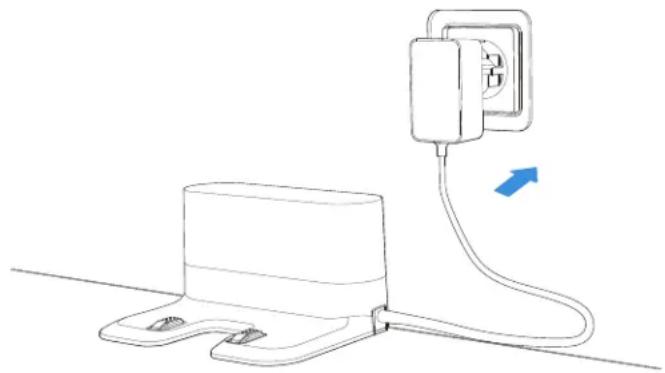
natural_image
Line drawing of a wall-mounted electrical outlet connected to a base, with a blue arrow indicating direction (no text or symbols)
Place the Charging Dock
The Charging Dock should be placed against a wall on a flat ground, and no items should be placed within a range of (0.5m to left and right sides) and (1.5m to the front).
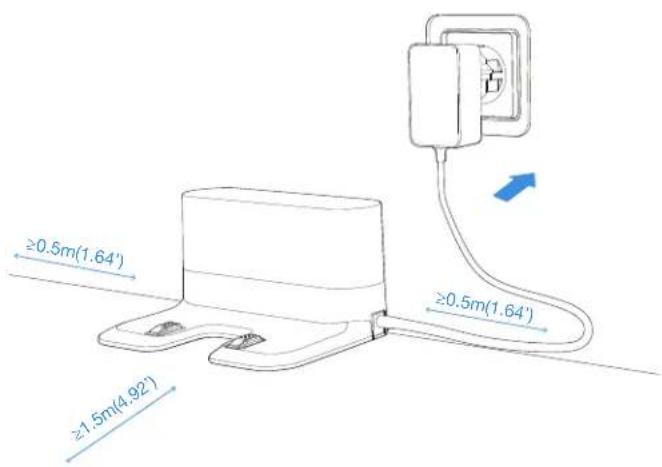
* It is recommended to place the Charging Dock on the hard floor to experience complete functions of the Robot.

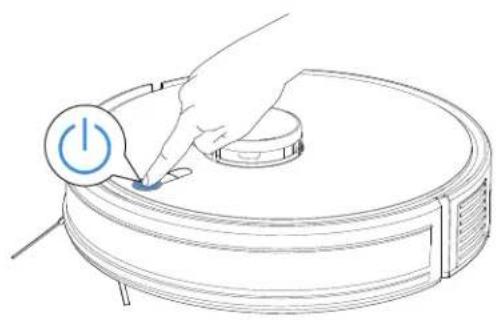
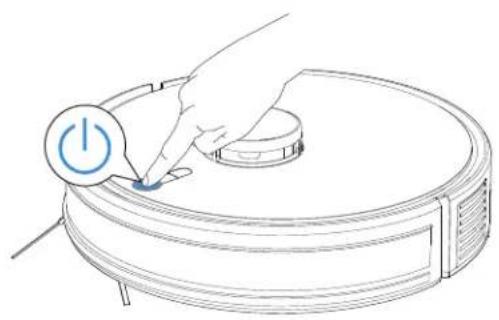
Power ON
Long press the START Button for 3 seconds to turn on the Robot.
natural_image
Line drawing of a robotic vacuum cleaner with a hand inserting a power button (no text or symbols)
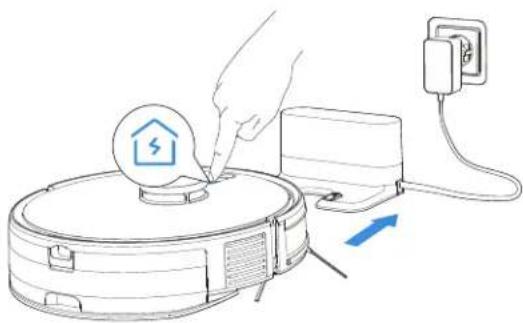
Charging
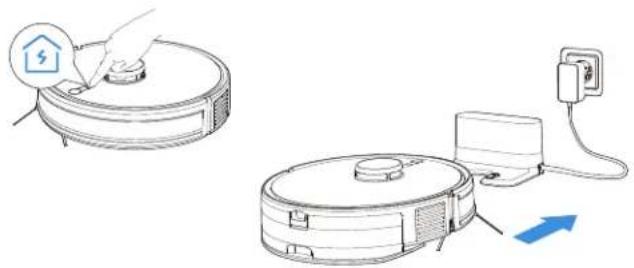
Short press the Charging button to make Robot return for charging.
natural_image
Illustration of a hand inserting a device into a device with an electrical outlet, showing a lightning bolt and power cord (no text or symbols)* It is recommended that Robot start cleaning from the Charging Dock. Do not move the Charging Dock while cleaning.
EN | 16
2.5 Start Cleaning
1 Create a map
When creating a map for the first time, please follow Robot to help eliminate some minor issues.
For example, the Robot may get stuck under low furniture. Take following solutions for reference.
① Lift up the furniture if possible
② Cover the bottom of the furniture to prevent Robot from entering.
③ Set up Virtual Boundary via the App to prevent the Robot from entering.
2 Start Cleaning
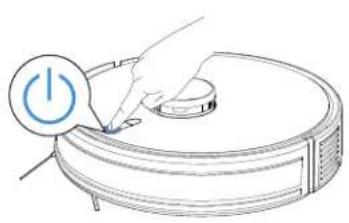
Before first vacuuming, please make sure the Robot is in the Charging Dock and fully charged. Short press ⏻ to start cleaning and create a map at the same time.
natural_image
Line drawing of a robotic vacuum cleaner with a hand pressing a button (no text or symbols)3 Pause
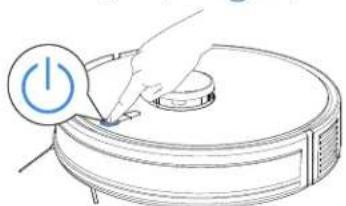
When Robot is in working, shot press ⏻ to pause.
natural_image
Illustration of a hand pressing a button on a robotic vacuum cleaner (no text or symbols)4 Wake up
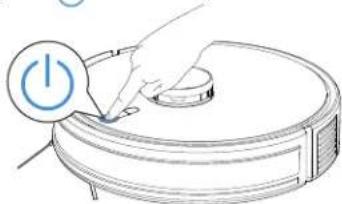
The indicator light will go out after the Robot is paused for a few minutes. Short press (1) to wake it up.
natural_image
Illustration of a hand pressing a button on a robotic vacuum cleaner (no text or symbols)5 Spot Cleaning
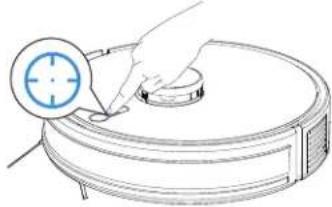
Short press ⚙ key, it will clean the area 1.5*1.5m with its position as center.
natural_image
Line drawing of a robotic vacuum cleaner with a hand holding the lid and a circular button, no text or symbols present.6 Charging
Shot press 🤒 to pause, Robot goes to charge.
natural_image
Illustration of a robotic vacuum cleaner with a hand inserting a device to clean the air (no text or symbols present)* It is recommended that Robot start cleaning from the Charging Dock. Do not move the Charging Dock while cleaning.
2.6 Start Mopping
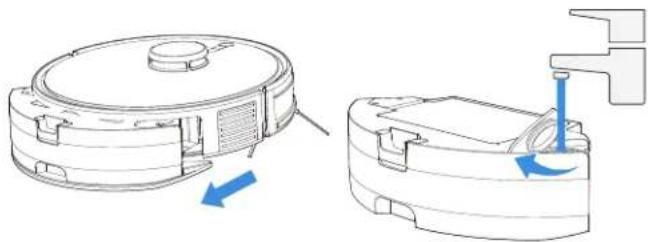
1 Add Water
Take out the 2 in 1 Module, open the Filling Opening and add water.
natural_image
Technical illustration of a robotic vacuum cleaner with blue directional arrows indicating motion (no text or symbols)EN | 18
2 Install Mopping Pad and Mopping Pad Module
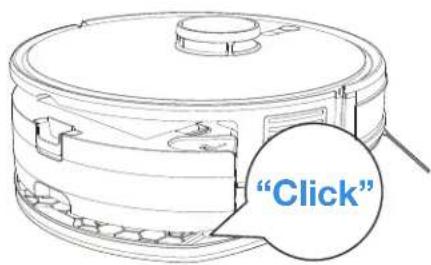
Stick the white side of the Mopping Pad onto the velcro of the Mopping Pad Plate. Insert the protruded part of the Mopping Pad Plate into the installation port. The sound of Click indicates proper installation.
3 Start Mopping
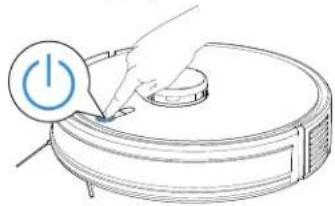
Short press ⏻ to start mopping.
natural_image
Illustration of a robotic vacuum cleaner with a power button icon (no text or symbols)Notes:
Do not frequently remove Washable Mopping Pad.
Do not use a rag or any other object to scratch the Moping Pad Plate.
Please empty the reservoir after Robot finishes mopping.
3. Maintenance
3.1 Maintenance frequency
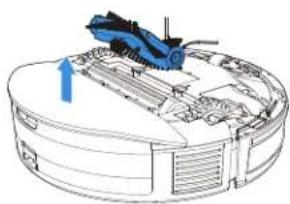
To keep Robot running at peak performance, perform maintenance tasks and replace parts with the following frequencies:
| Part Maintenance frequency Replacement frequency | ||
| Washable Mopping Pad | every cleaning | every 1-2 months |
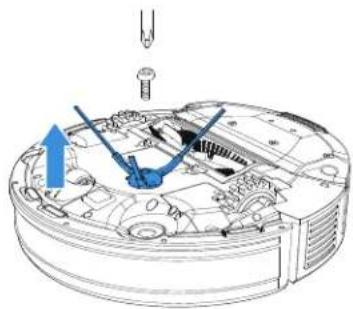
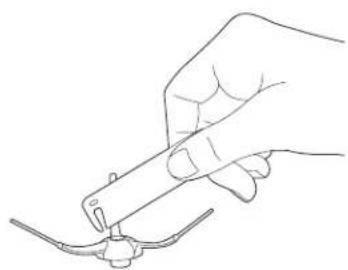
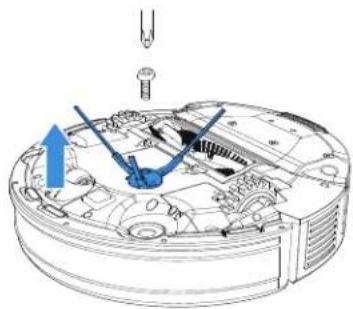
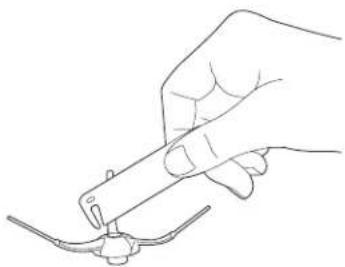
| Side Brush | every 2 weeks | every 3-6 months |
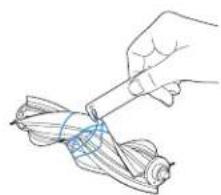
| Main Brush | every week | every 6-12 months |
| Filter | every week | every 3-6 months |
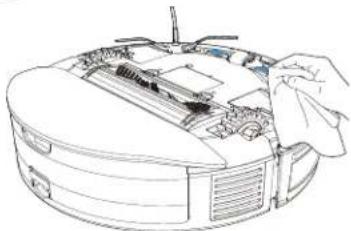
| TrueMapping Distance Sensor Universal Wheel Anti-drop Sensors Bumper Charging Contacts | every week | / |
Warm note: If you want to buy accessories, please visit ECOVACS HOME App store or https://www.ecovacs.com/global.
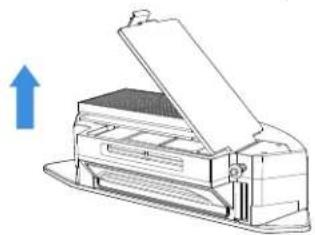
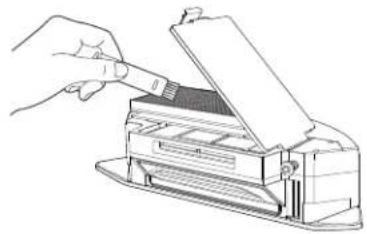
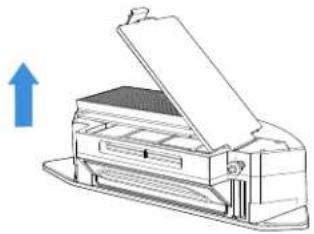
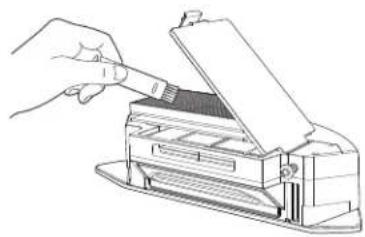
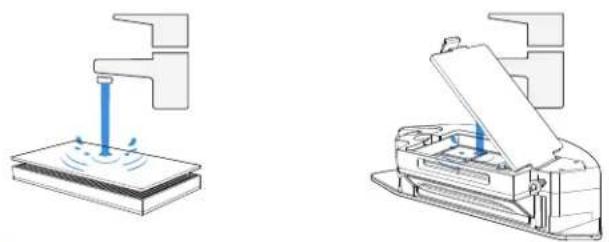
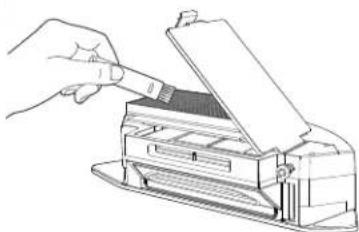
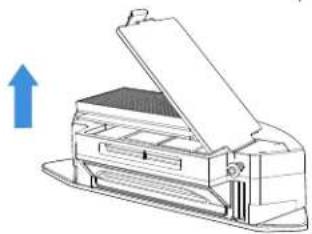
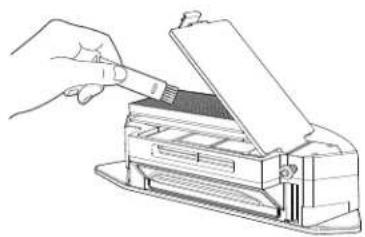
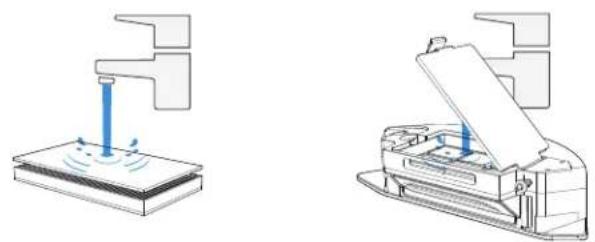
3.2 Maintain Dust Box
1
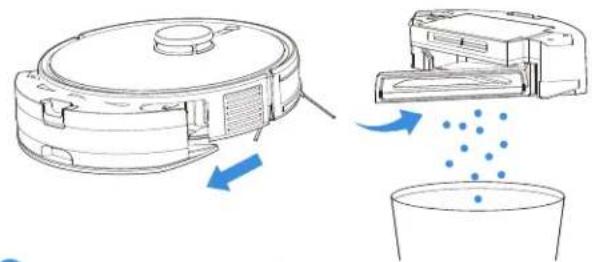
2
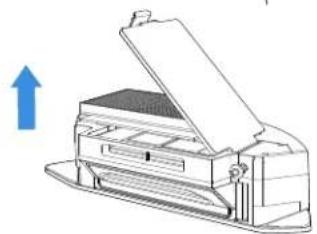
natural_image
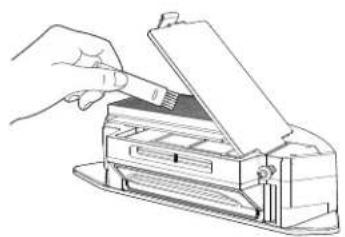
Line drawing of a printer with an open lid and paper feed, showing no text or symbols3
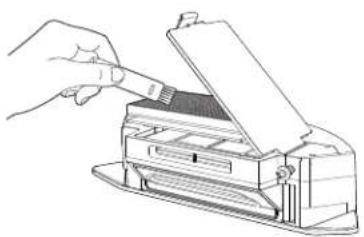
natural_image
Line drawing of a hand using a tool to press or export a printer into a paper (no text or symbols visible)4
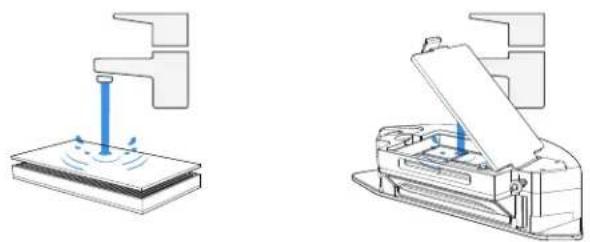
natural_image
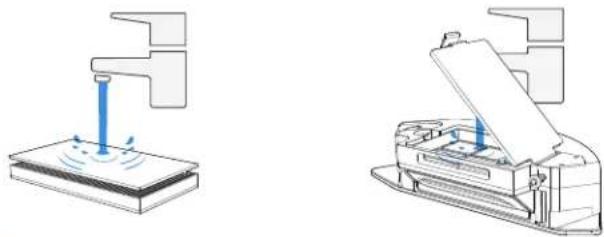
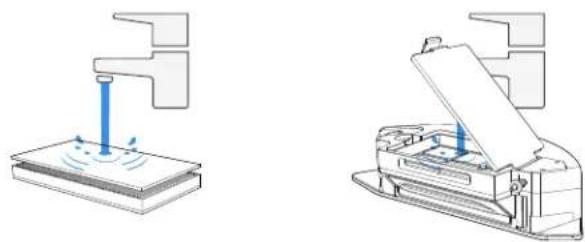
Two technical diagrams showing a printer and its internal structure, with no visible text or symbols.Note:
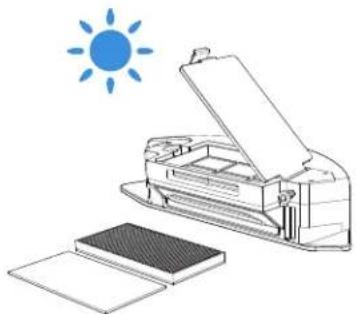
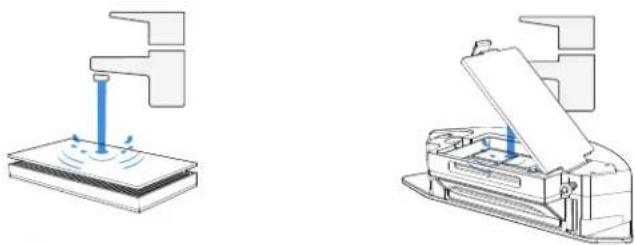
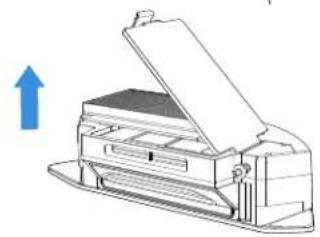
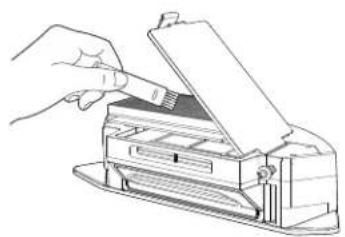
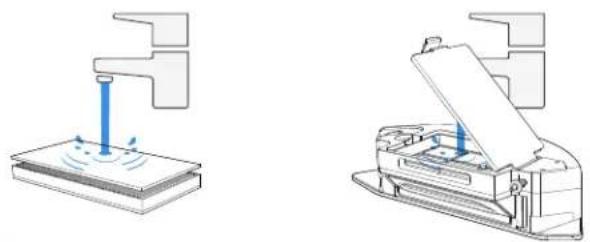
Do not use finger or brush to clean the filter.
5
natural_image
Illustration of a printer with an open lid and a stack of sheets, under a blue sun (no text or symbols)Note: Completely dry the filter before use.
Explore more accessories at ECOVACS HOME App or at https://www.ecovacs.com/global.
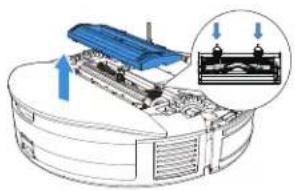
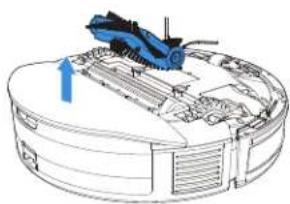
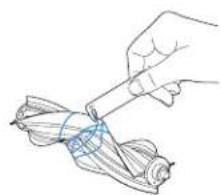
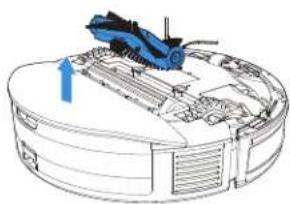
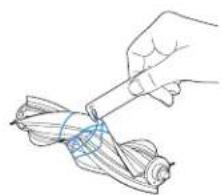
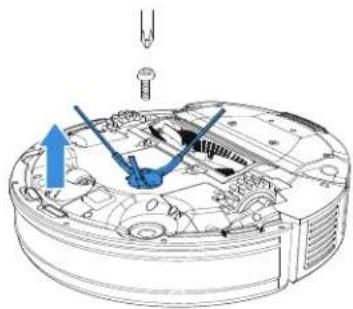
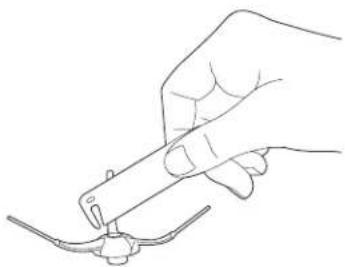
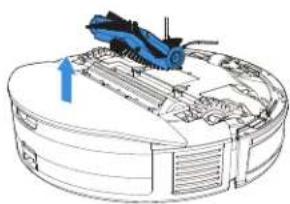
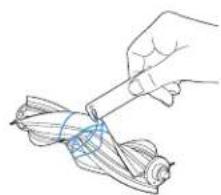
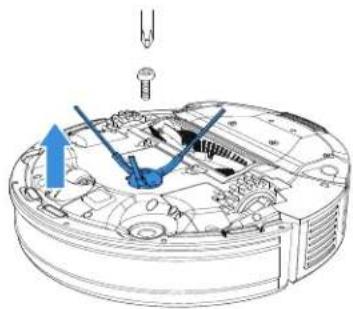
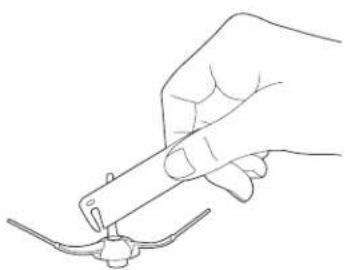
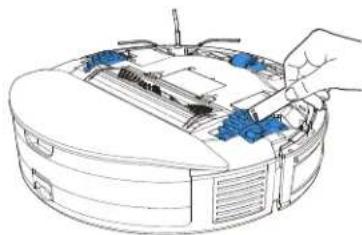
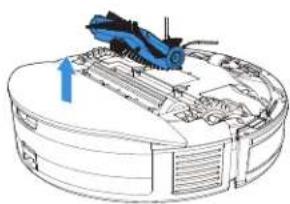
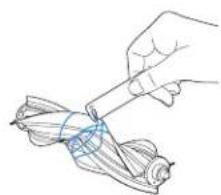
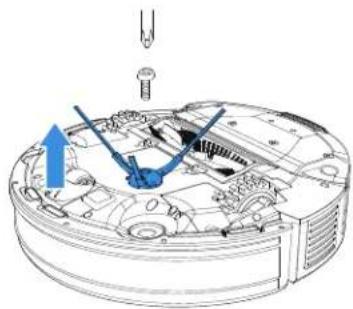
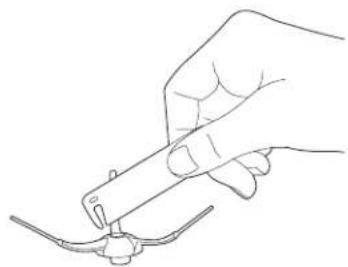
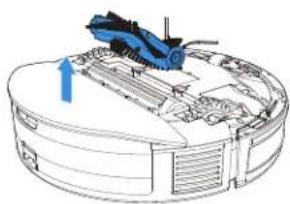
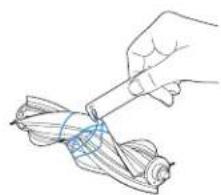
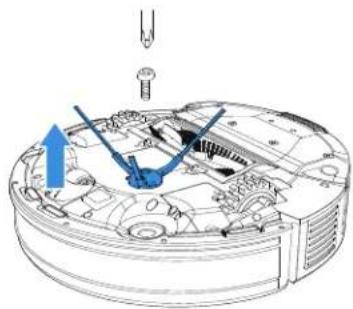
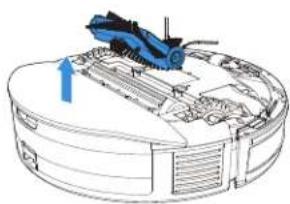
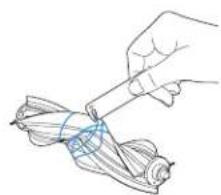
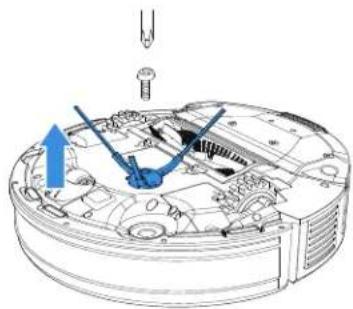
3.3 Maintain Main Brush and Side Brush
Main Brush
1
natural_image
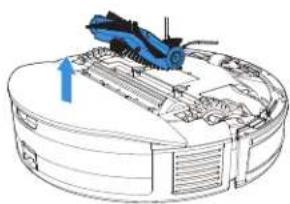
Diagram of a mechanical assembly with a blue component and a magnified inset showing internal components (no text or symbols)2
natural_image
Technical diagram of a mechanical assembly with a blue tool and directional arrow (no text or labels)3
natural_image
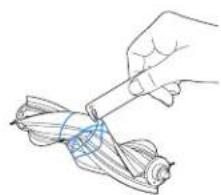
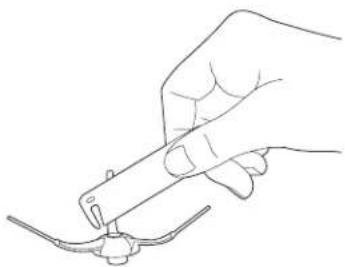
Illustration of a hand holding a tool over a folded ribbon or cable (no text or symbols)Side Brush
1

natural_image
Technical diagram of a mechanical assembly with no visible text or symbols2
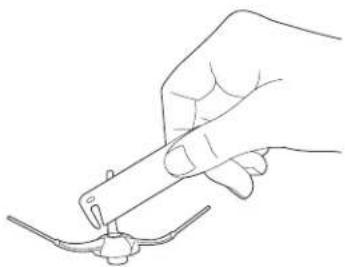
natural_image
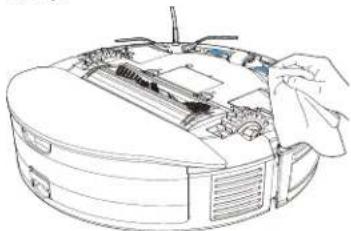
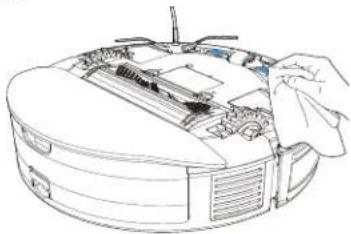
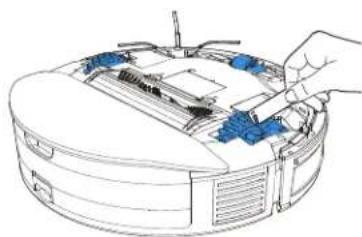
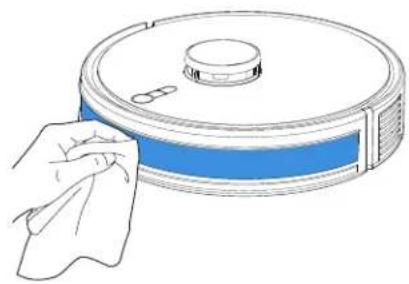
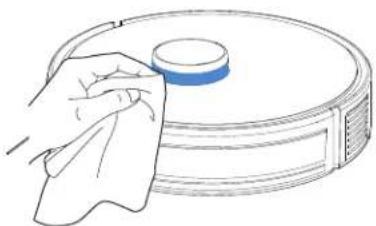
Line drawing of a hand holding a tool with a small object near the tip (no text or symbols)3.4 Maintain Other Parts
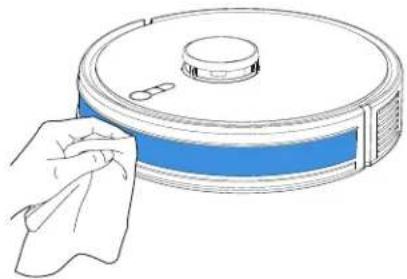
Bumper
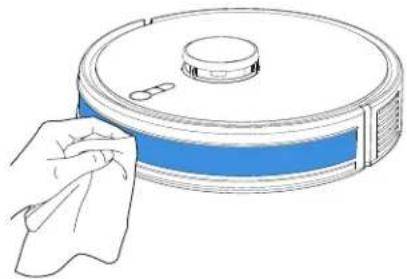
natural_image
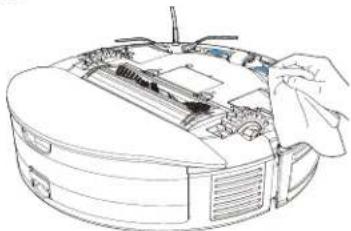
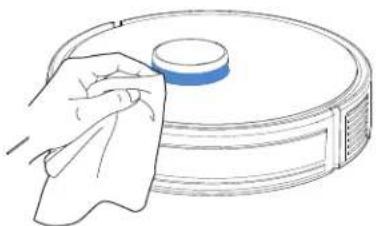
Line drawing of a robotic vacuum cleaner with a cloth, no text or symbols presentTrueMapping Distance Sensor
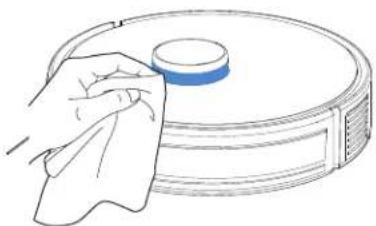
natural_image
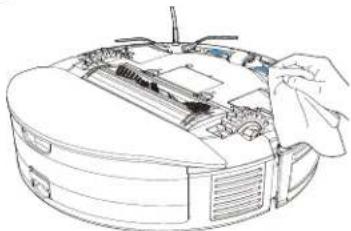
Line drawing of a hand cleaning a circular object with a blue lid (no text or symbols)Note: Wipe the components with a clean, dry cloth. Avoid using cleaning sprays or detergents.
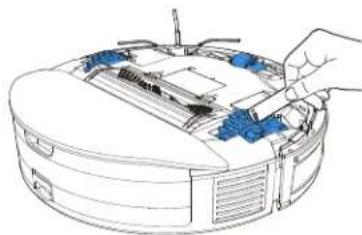
Anti-drop Sensor
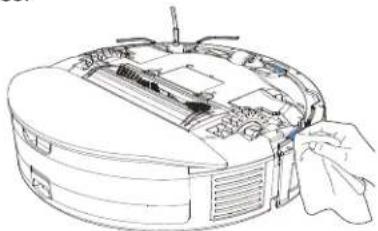
natural_image
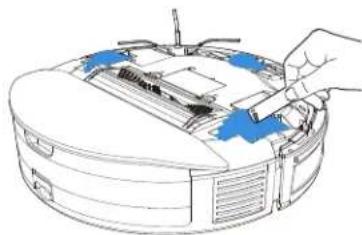
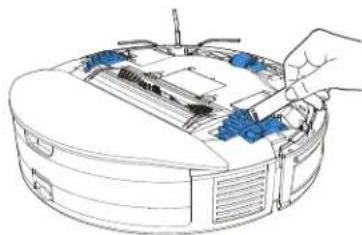
Line drawing of a robotic vacuum cleaner with internal components and a hand inserting a component (no text or symbols)Charging Contacts
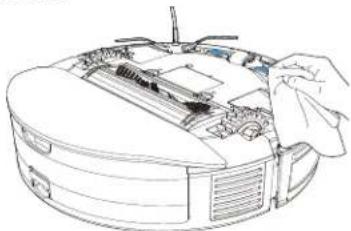
natural_image
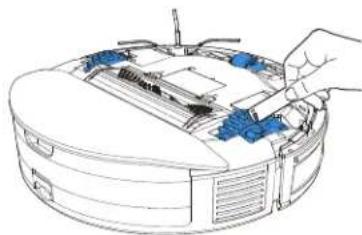
Line drawing of a computer monitor with an open rear panel and a hand adjusting the screen (no text or symbols)Wheels
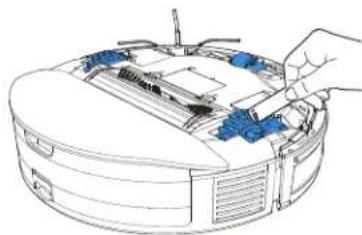
natural_image
Line drawing of a computer monitor with a hand adjusting the top panel (no text or symbols)Note: Do not clean Charging Contacts with wet cloths.
3.5 Storage
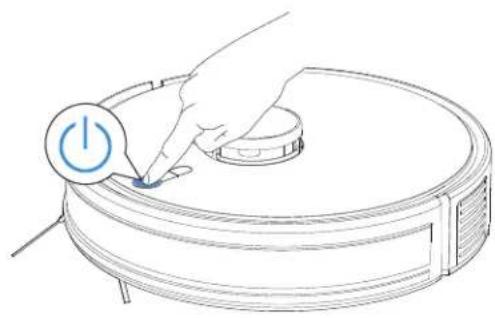
Long press ⏻ for 5 seconds to power off the Robot. Please fully charge and switch OFF the Robot before storage. Please recharge it every 1.5 months to prevent the battery from over-discharge.
natural_image
Line drawing of a robotic vacuum cleaner with a hand inserting a power button (no text or symbols)
Robot can't be charged when the power is turned off.
- If the battery is over-discharged or not used for a long time, the Robot may not be charged. Please contact ECOVACS for help. Do not disassemble by yourself.
- Troubleshooting
| No. | Malfunction Possible Causes Solutions | ||
| 1 | Robot can't connect to APP. | The router user name and password are incorrect. | Configure the router network and make sure that the "user name" and "password" of the router are correct. |
| The Robot is not within the network signal coverage of the router. | Ensure the Robot is within the network signal coverage of the router. | ||
| Robot is not in the configuration state. | Make sure Robot is connected to the power supply and turned on. Press Charging Button and Spot Cleaning Button at the same time for 3 seconds. Robot will enter the configuration state when you hear a voice prompt. | ||
| Not use 2.4GHz or 2.4/5GHz network. | The Robot doesn't support 5G network at present. Please choose 2.4GHz or 2.4/5GHz. | ||
| Download the wrong APP. | Please scan the code or download the ECOVACS HOME App in store. | ||
| 2 | Map lost. | It is possible to lose the map if move the Robot manually. | Try to recover by moving the Robot into Charging Dock. Find the stored map in APP map storage, and press "use map" to recover. If this problem persists after trying the above solutions, please restart mapping. |
| 3 | Can't creat maps in APP. | The Robot doesn't start working from Charging Dock. | The Robot must start cleaning from Charging Dock. |
| Move the Robot when it is working. Don't move | the Robot when it is working. | ||
| Cleaning is not finished. | Allow the Robot return to Charging Dock when it finishes cleaning. | ||
| 4 | Unable to return to Charging Dock. | The position of Charging Dock is incorrect. | Please place the Charging Dock correctly according to the chapter “Charging Robot” in user manual. |
| The Charging Dock is powered off or moved by people. | Please ensure the Charging Dock is powered on, and don't move the Charging Dock during the cleaning. | ||
| The Robot doesn't start working from the the Charging Dock. | It is recommended that Robot start cleaning from the Charging Dock. | ||
| The charging route is blocked. For example, the door of the room with the Charging Dock is closed. | Keep the charging route clear. | ||
| 5 | Robot returns to the Charging Dock before it has finished cleaning. | The room is so large that Robot needs to return to recharge. | Please enable Continuous Cleaning. For more details, please follow the App instruction. |
| Robot is unable to reach certain areas blocked by furniture or barriers. | Tidy up the area to be cleaned by putting furniture and small objects in their proper place. | ||
| 6 | Robot is unable to charge. | Charging Dock is not connected to power supply. | Ensure Charging Dock is connected to power and the indicator is on. |
| Robot's Charging Contacts are not connected to the Charging Dock Charging Contacts. | Make sure that the Robot's Charging Contacts have connected to the Charging Dock Charging Contacts and START Button flashes.Check whether Robot's Charging Contacts and Charging Dock Charging Contacts are dirty.Please clean these parts according to the instructions in the charpt Maintenance. | ||
| Battery temperature is too high or too low. | Please charge and operate the Robot in the temperature between 0-40 degree. | ||
| Extended periods of non-use may lead to over-discharge of the battery. | We recommend using the product regularly. If extended periods of non-use result in charging issues, please contact customer service for assistance. | ||
| 7 | Abnormal noise during cleaning. | Side brush and Main Brush are entangled.Dust Box and filter are blocked. | It is recommended to clean the side brush, main box,dust box, filter, etc. regularly. |
| The Robot is in max mode. | Change to standard mode . | ||
| 8 | Robot gets stuck while working and stops. | Robot is tangled with something on the floor (electrical wires, curtains, carpet fringing,etc.). | Robot will try various ways to free itself. If it is unsuccessful, manually remove the obstacles and restart. |
| Robot might be stuck under furniture with an entrance of similar height. | Please set a physical barrier, or set a Virtual Boundary in the ECOVACS HOME App. | ||
| 9 | The following problems appear when Robot is working: disordered cleaning route, deviation from the cleaning route, repeated cleaning, or missing of small areas to be cleaned. (If there is a large area that has not been cleaned temporarily, Robot will automatically clean the missing area.). | The wires, slippers and other objects placed on the ground affect the normal work of the Robot. | Please tidy up the scattered objects on the ground such as wires, slippers before cleaning. If there is any area missing, Robot will clean the missing area by itself, please do not interfere (such as moving Robot or blocking the route). |
| When the Robot climbs the steps, threshold and door strip, the driving wheel slipped with the ground, which will affect Robot's judgment on the environment of the whole house. | It is recommended to close the door of the area and clean the area separately. After cleaning, it will return to the starting point. Please rest assured to use it. | ||
| Work on freshly waxed and polished floors or smooth tiles, resulting in less friction between the Driving Wheels and the floor. | It is recommended that you wait for the floor wax to dry before using. | ||
| Due to the different house environment, the Robot can not enter some areas. | It is suggested to tidy up the home environment to ensure that the Robot can enter for cleaning. | ||
| The TrueMapping Distance Sensor is dirty or covered. | Clean the TrueMapping Distance Sensor or uncover the objects on it. | ||
| 10 | Dust leakage occurs during working. | The outlet of dust box is blocked. Take out the 2 | in 1 Module, and clean the dust box mouth. |
| 11 | Robot reservoir drops out of place during use. | The reservoir is not correctly installed. Make sure | Robot reservoir clicks into place when installing. |
| 12 | Driving wheels are blocked. | Driving wheels are blocked by foreign objects. | Please rotate and press the driving wheels to check whether there is any foreign object wrapped or stuck. If there is any foreign object, please clean it in time. If this problem persists, please contact Customer Care for help. |
| 13 | Robot does not clean automatically at the scheduled time. | Time Scheduling function is cancelled. Reset appointment. | |
| The Robot is out of power. Charge the Robot. | |||
| The Robot is in Do Not Disturb mode. | In Do Not Disturb mode, Robot does not perform scheduled cleaning. | ||
| 14 | Robot does not perform Continuous Cleaning. | The Robot is in Do Not Disturb mode. | In Do Not Disturb mode, Robot does not perform Continuous Cleaning. |
| The Robot did not automatically return to the Charging Dock last time. | Continuous Cleaning is not performed when you manully recharge Robot or move it to Charging Dock. | ||
If you cannot solve the issues by following the above instructions, please contact after-sales service.
5. TECHNICAL SPECIFICATIONS
| Model | DLX34 |
| Rated input | 20V === 1.2A |
| Charging time | About 4-5h |
| Adapter | KA24D-2001200EU |
| Rated input | 100-240V ~ 50-60Hz 0.65A Max |
| Rated output | 20V === 1.2A |
| Charing Dock CH2331 | |
| Laser Lidar | 5V === 200 mA 940 nm |
Output power of the Wi-Fi module is less than 100mW.
Note: Technical and design specifications may be changed for continuous product improvement.
Explore more accessories at https://www.ecovacs.com/global.
natural_image
Line drawing of a dining table with a fan, seatbelt, and checkmark (no text or symbols)natural_image
Architectural diagram of a balcony with railing and a circular robotic vacuum cleaner (no text or symbols)natural_image
Floor plan diagram with room layouts and a highlighted section (no text or labels)
natural_image
Diagram of hands holding a circular object with blue arrows indicating rotation or movement (no text or symbols)natural_image
Technical line drawing of a mechanical assembly with no visible text or symbolsDE | 40
natural_image
Illustration of a robotic vacuum cleaner with a QR code overlay (no text or symbols on the device itself)natural_image
Line drawing of a wall-mounted electrical outlet connected to a base, with a blue arrow indicating direction (no text or symbols)natural_image
Line drawing of a hand inserting a power button into a vacuum cleaner's vacuum cleaner (no text or symbols)
Aufladen
natural_image
Illustration of a hand inserting a device into a device with an electrical outlet, showing a house icon and power connection (no text or symbols)natural_image
Illustration of a hand pressing a button on a vacuum cleaner's lid (no text or symbols)3 Pausieren
natural_image
Line drawing of a robotic vacuum cleaner with a power button, no text or symbols presentnatural_image
Illustration of a hand pressing a button on a circular device (no text or symbols)5 Punktreinigung
natural_image
Line drawing of a robotic vacuum cleaner with a hand holding the lid and a circular button, no text or symbols present.6 Aufladen
natural_image
Illustration of a robotic vacuum cleaner with a hand inserting a component, connected to a power outlet (no text or symbols present)natural_image
Technical illustration of a robotic vacuum cleaner with blue directional arrows indicating motion (no text or symbols)natural_image
Line drawing of a robotic vacuum cleaner with a hand pressing a button (no text or symbols)Hinweise:
2
natural_image
Line drawing of a printer with an open lid and paper feed, showing no text or symbols.3
natural_image
Line drawing of a hand using a tool to press or adjust an open device (no text or symbols visible)4
natural_image
Two technical diagrams showing a printer and a mechanical device with a spring-loaded component (no text or symbols present)natural_image
Illustration of a printer with an open lid and a stack of sheets, under a blue sun (no text or symbols)natural_image
Diagram of a mechanical assembly with a blue component and a magnified inset showing internal components (no text or symbols)2
natural_image
Technical diagram of a mechanical assembly with a blue tool and directional arrow (no text or labels)3
natural_image
Illustration of a hand holding a tool over a folded paper or cable (no text or symbols visible)Seitenbürste
1
natural_image
Technical diagram of a mechanical assembly with no visible text or symbols2
natural_image
Line drawing of a hand holding a tool with a small object near the tip (no text or symbols)natural_image
Line drawing of a robotic vacuum cleaner with a cloth cleaning the lid (no text or symbols)natural_image
Line drawing of a hand cleaning a circular object with a blue lid (no text or symbols)natural_image
Line drawing of a robotic vacuum cleaner with handle and internal components (no text or symbols)Ladekontakte
natural_image
Line drawing of a computer monitor with an open rear panel and a hand adjusting the screen (no text or symbols)Räder
natural_image
Illustration of a robotic vacuum cleaner with blue cleaning tools and a hand adjusting the component (no text or symbols)natural_image
Line drawing of a robotic vacuum cleaner with a power button, no text or symbols present
natural_image
Line drawing of a dining table with a fan, seatbelt, and checkmark (no text or symbols)natural_image
Architectural diagram of a balcony with railing and a circular base, no text or symbols presentnatural_image
Floor plan outline with a highlighted curved path (no text or labels)
natural_image
Line drawing of hands holding a circular object with blue arrows indicating rotation or movement (no text or symbols)natural_image
Technical line drawing of a mechanical device with internal components and a blue arrow indicating a specific part (no text or symbols present)natural_image
Illustration of a robotic vacuum cleaner with a QR code overlay (no text or symbols on the device itself)natural_image
Line drawing of a wall-mounted electrical outlet connected to a base, with a blue arrow indicating direction (no text or symbols)natural_image
Line drawing of a robotic vacuum cleaner with a power button, no text or symbols presentnatural_image
Illustration of a hand placing a house-shaped component into a device with an attached power outlet (no text or symbols)natural_image
Illustration of a hand pressing a button on a vacuum cleaner's lid (no text or symbols)3 Pause
natural_image
Illustration of a robotic vacuum cleaner with a power button, no text or symbols present4 Réactiver
natural_image
Illustration of a hand pressing a button on a robotic vacuum cleaner's lid (no text or symbols)natural_image
Illustration of a robotic vacuum cleaner with a hand holding a circular component (no text or symbols)natural_image
Illustration of a robotic vacuum cleaner with a hand inserting a device, connected to a power outlet (no text or symbols present)natural_image
Technical line drawing showing two views of a robotic vacuum cleaner with blue directional arrows indicating motion (no text or symbols)FR | 72
natural_image
Illustration of a hand pressing a button on a robotic vacuum cleaner's lid (no text or symbols)Remarques :
2
natural_image
Line drawing of a printer with an open lid and paper holder, showing no text or symbols.3
natural_image
Line drawing of a hand inserting a component into an open device (no text or symbols)4
natural_image
Two technical diagrams showing a mechanical device with a spring and a printer with a lid (no text or symbols present)natural_image
Illustration of a printer with an open lid under a blue sun (no text or symbols)natural_image
Diagram of a mechanical assembly with blue components and directional arrows, no visible text or symbols2
natural_image
Technical diagram of a mechanical assembly with a blue tool inserted, showing internal components and a blue arrow indicating direction (no text or labels present)3
natural_image
Line drawing of a hand holding a tool over a folded paper or fiber (no text or symbols)Brosse latérale
1
natural_image
Technical diagram of a mechanical assembly with no visible text or symbols2
natural_image
Line drawing of a hand using a tool to apply a small object onto a curved surface (no text or symbols)natural_image
Line drawing of a robotic vacuum cleaner with a cloth cleaning the lid (no text or symbols)natural_image
Line drawing of a hand cleaning a circular object with a blue lid (no text or symbols)natural_image
Line drawing of a robotic vacuum cleaner with internal components and a hand inserting a component (no text or symbols)Contacts de charge
natural_image
Line drawing of a computer monitor with an open rear panel and a hand adjusting the screen (no text or symbols)Roues
natural_image
Line drawing of a computer monitor with a hand adjusting the top panel (no text or symbols)natural_image
Line drawing of a robotic vacuum cleaner with a power button, no text or symbols presentnatural_image
Line drawing of a dining table with a fan, seatbelt, and checkmark (no text or symbols)natural_image
Architectural diagram showing a balcony railing and a circular vacuum cleaner (no text or symbols)natural_image
Floor plan diagram with room layouts and a highlighted area (no text or labels)
natural_image
Diagram of hands holding a circular object with blue arrows indicating rotation or movement (no text or symbols)natural_image
Technical line drawing of a mechanical assembly with no visible text or symbolsnatural_image
Diagram of a robotic vacuum cleaner with a QR code overlay (no text or symbols on the device itself)natural_image
Line drawing of a wall-mounted electrical outlet connected to a base, with a blue arrow indicating direction (no text or symbols)natural_image
Line drawing of a hand pressing a button on a vacuum cleaner's lid (no text or symbols)
Ricarica
natural_image
Illustration of a hand placing a house icon into a device with an electrical plug, showing wiring and directional arrows (no text or symbols)natural_image
Illustration of a hand pressing a button on a vacuum cleaner's lid (no text or symbols)3 Pausa
natural_image
Illustration of a hand pressing a button on a vacuum cleaner's lid (no text or symbols)4 Riattivazione
natural_image
Illustration of a hand pressing a button on a circular device with a power button icon (no text or symbols)5 Pulizia mirata
natural_image
Illustration of a robotic vacuum cleaner with a hand holding a circular component (no text or symbols)6 Ricarica
natural_image
Illustration of a robotic vacuum cleaner with a hand inserting a component, connected to a power outlet (no text or symbols present)natural_image
Technical line drawing of a vacuum cleaner assembly with blue arrows indicating motion (no text or symbols)natural_image
Illustration of a hand pressing a button on a robotic vacuum cleaner's lid (no text or symbols)Note:
natural_image
Diagram of a mechanical assembly with blue components and directional arrows, no visible text or symbols2
natural_image
Technical diagram of a mechanical assembly with a blue tool and directional arrow (no text or labels)3
natural_image
Hand holding a tool interacting with a rolled-up corn kernel (no text or symbols visible)Spazzola laterale
1
natural_image
Technical diagram of a mechanical assembly with no visible text or symbols2
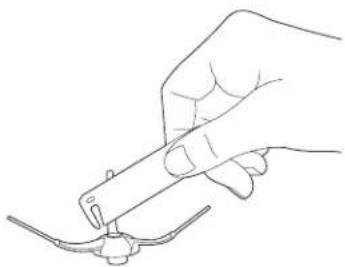
natural_image
Line drawing of a hand holding a tool with a small object near the tip (no text or symbols)natural_image
Line drawing of a robotic vacuum cleaner with a cloth, no text or symbols presentnatural_image
Line drawing of a hand cleaning a circular object with a blue lid (no text or symbols)natural_image
Line drawing of a robotic vacuum cleaner with internal components and a hand inserting a component (no text or symbols)natural_image
Line drawing of a computer monitor with an open rear panel and a hand adjusting the screen (no text or symbols)Ruote
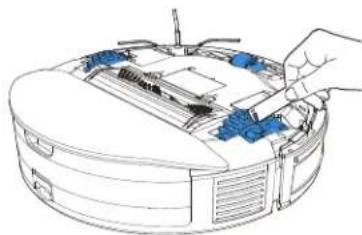
natural_image
Line drawing of a computer monitor with a hand adjusting the top panel (no text or symbols)natural_image
Line drawing of a robotic vacuum cleaner with a hand inserting a power button (no text or symbols)natural_image
Line drawing of a dining table with a fan, seatbelt, and checkmark (no text or symbols)natural_image
Architectural diagram showing a balcony railing and a circular vacuum cleaner (no text or symbols)natural_image
Floor plan diagram with room layouts and a highlighted curved line (no text or labels)
natural_image
Diagram of hands holding a circular object with blue arrows indicating rotation or movement (no text or symbols)natural_image
Technical line drawing of a mechanical assembly with no visible text or symbolsnatural_image
Illustration of a robotic vacuum cleaner with a QR code overlay (no text or symbols on the device itself)natural_image
Line drawing of a wall-mounted electrical outlet connected to a base, with a blue arrow indicating direction (no text or symbols)natural_image
Line drawing of a hand pressing a button on a vacuum cleaner's lid (no text or symbols)
Laddar
natural_image
Illustration of a hand using a power plug to press a device on a device (no text or symbols present)natural_image
Line drawing of a robotic vacuum cleaner with a hand pressing a button (no text or symbols)3 Pausa
natural_image
Illustration of a robotic vacuum cleaner with a power button, no text or symbols present4 Väcka
natural_image
Illustration of a robotic vacuum cleaner with a power button (no text or symbols)5 Fläckrengöring
natural_image
Illustration of a robotic vacuum cleaner with a hand holding a circular component and a target symbol (no text or labels)
Laddar
natural_image
Illustration of a robotic vacuum cleaner with a hand inserting a device to its back, connected to a power outlet (no text or symbols present)natural_image
Technical line drawing showing a robotic vacuum cleaner inside a housing and its internal component with a valve (no text or symbols)
natural_image
Illustration of a hand pressing a button on a robotic vacuum cleaner (no text or symbols)Anmärkningar:
2
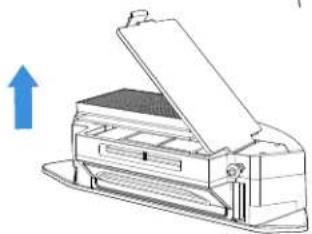
natural_image
Diagram of a printer with an open lid and arrow indicating upward motion (no text or symbols)3
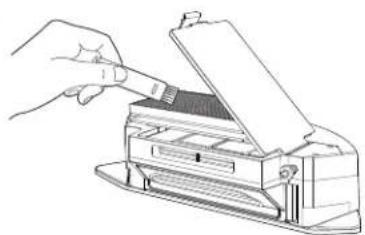
natural_image
Line drawing of a hand inserting a component into a printer (no text or symbols)4
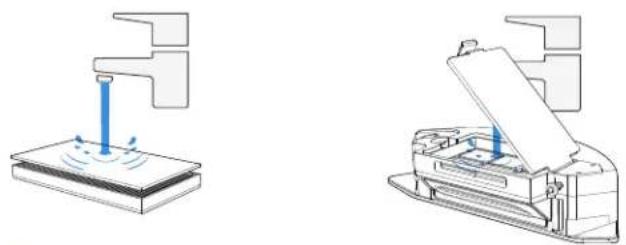
natural_image
Two technical diagrams showing a printer with liquid being inserted into a base and the same device being open (no text or symbols present)natural_image
Illustration of a printer with an open lid and a solar symbol above it, alongside a stack of sheets (no text or symbols present)natural_image
Diagram of a mechanical device with blue components and an inset showing a close-up of a component (no text or symbols present)2
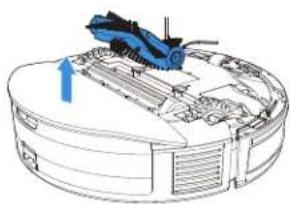
natural_image
Technical diagram of a mechanical assembly with a blue tool and directional arrow (no text or labels)3
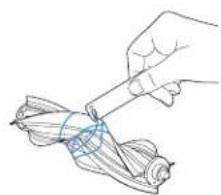
natural_image
Illustration of a hand holding a tool over a folded ribbon or cable (no text or symbols)Sidborste
1
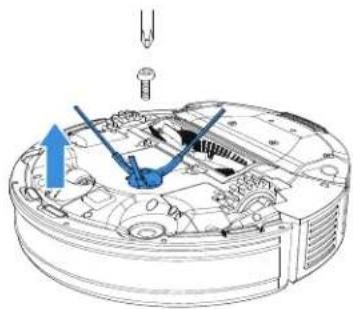
natural_image
Technical diagram of a mechanical assembly with no visible text or symbols2
natural_image
Line drawing of a hand holding a tool over a small object (no text or symbols)natural_image
Line drawing of a robotic vacuum cleaner with a cloth cleaning the lid (no text or symbols)natural_image
Line drawing of a hand cleaning a circular object with a blue lid (no text or symbols)natural_image
Line drawing of a robotic vacuum cleaner with handle and internal components (no text or symbols)Laddkontakter
natural_image
Line drawing of a mechanical device with a hand operating the top component (no text or symbols)Hjul
natural_image
Line drawing of a robotic vacuum cleaner with blue components and a hand adjusting the part (no text or symbols)natural_image
Line drawing of a robotic vacuum cleaner with a power button, no text or symbols present
natural_image
Line drawing of a dining table with a fan, seatbelt, and checkmark (no text or symbols)natural_image
Architectural diagram of a balcony with railing and a circular robotic vacuum cleaner (no text or symbols)natural_image
Floor plan diagram with room layouts and a highlighted section (no text or labels)
natural_image
Line drawing of hands holding a circular object with blue arrows indicating rotation or movement (no text or symbols)natural_image
Technical line drawing of a mechanical assembly with no visible text or symbolsNO | 148
2.3 Laste ned og koble til ECOVACS HOME-appen
natural_image
Illustration of a robotic vacuum cleaner with a QR code overlay (no text or symbols on the device itself)natural_image
Line drawing of a wall-mounted electrical outlet connected to a base, with a blue arrow indicating direction (no text or symbols)2 Plasser den automatiske Ladedokking
* For at Roboten skal fungere optimalt, anbefales det at Ladedokking står på hardt gulv.
3 Slå på
Hold inne START-knappen i 3 sekunder for å slå på Roboten.
natural_image
Line drawing of a hand pressing a button on a vacuum cleaner's lid (no text or symbols)
Lading
natural_image
Line drawing of a robotic vacuum cleaner with a hand inserting a device into the air gap (no text or symbols)natural_image
Illustration of a hand pressing a button on a circular device (no text or symbols)3 Pause
natural_image
Illustration of a hand pressing a button on a robotic vacuum cleaner (no text or symbols)4 Vekke
natural_image
Illustration of a hand pressing a button on a vacuum cleaner's lid (no text or symbols)natural_image
Illustration of a robotic vacuum cleaner with a hand holding a circular component (no text or symbols)
Lading
natural_image
Illustration of a robotic vacuum cleaner with a hand inserting a device to its back, connected to a power outlet (no text or symbols present)natural_image
Technical illustration of a robotic vacuum cleaner with blue directional arrows indicating motion (no text or symbols)
natural_image
Illustration of a hand pressing a button on a robotic vacuum cleaner (no text or symbols)Merknader:
2

natural_image
Line drawing of a printer with an open lid and paper feed, showing no text or symbols3
natural_image
Line drawing of a hand inserting a component into a printer (no text or symbols)4
natural_image
Two technical diagrams showing a mechanical device and a printer, both without any text or symbols.natural_image
Illustration of an open printer with a sun symbol above it, alongside a stack of sheets and a grid on the base (no text or symbols present)natural_image
Diagram of a mechanical device with an inset showing a blue component being inserted into a housing (no text or symbols present)2
natural_image
Technical diagram of a mechanical assembly with a blue tool and directional arrow (no text or labels)3
natural_image
Illustration of a hand holding a tool over a folded paper or cable (no text or symbols visible)Sidebørste
1
natural_image
Technical diagram of a mechanical assembly with no visible text or symbols2
natural_image
Line drawing of a hand holding a tool with a small object attached (no text or symbols)3.4 Vedlikeholde andre deler
Beskyttelsespanel
natural_image
Line drawing of a robotic vacuum cleaner with a cloth, no text or symbols presentnatural_image
Line drawing of a hand cleaning a circular object with a blue lid (no text or symbols)natural_image
Line drawing of a robotic vacuum cleaner with internal components and a hand inserting a component (no text or symbols)Ladekontakter
natural_image
Line drawing of a computer monitor with an open rear panel and a hand adjusting the screen (no text or symbols)Hjul
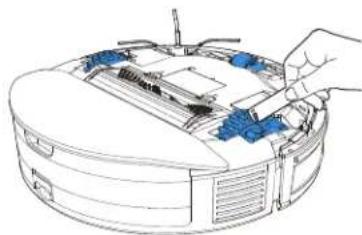
natural_image
Line drawing of a computer monitor with a hand adjusting the top panel (no text or symbols)natural_image
Line drawing of a robotic vacuum cleaner with a hand interacting with the power button (no text or symbols)
This symbol on the product or on its packaging indicates that used electrical and electronic products should not be mixed with unsorted municipal waste. For proper treatment, it is your responsibility to dispose of your waste equipment by arranging to return it to designated collection points.
Disposing of this product correctly will help save valuable resources and prevent any potential negative effects on human health and the environment, which could otherwise arise from inappropriate waste handling.
To return your used device, please use the return and collection systems or contact the retailer where the product was purchased, which is free of charge, please contact your local authority for further details of your nearest designated collection point.
Penalties may be applicable for incorrect disposal of this waste, in accordance with your national legislation.
natural_image
Simple line drawing of a dining table with a fan, seatbelt, and checkmark icon (no text or symbols)natural_image
Architectural diagram of a balcony with railing and a circular base, no text or symbols presentDK | 174
natural_image
Floor plan outline with a blue curved line indicating a specific area (no text or labels)
natural_image
Diagram of hands holding a circular object with blue arrows indicating rotation or movement (no text or symbols)natural_image
Technical line drawing of a mechanical assembly with no visible text or symbols2.3 Download og forbind ECOVACS HOME-app
natural_image
Illustration of a robotic vacuum cleaner with a QR code overlay (no text or symbols on the device itself)Metode 2: Søg i ECOVACS HOME for at downloade appen.

flowchart
graph LR
    A["Download on the App Store"] --> C["ECOVACS HOME"]
    B["Get it on Google Play"] --> C["ECOVACS HOME"]
natural_image
Line drawing of a wall-mounted electrical outlet connected to a base, with a blue arrow indicating direction (no text or symbols)natural_image
Line drawing of a hand inserting a power button into a vacuum cleaner's circular device (no text or symbols)
Oplader
natural_image
Illustration of a hand placing a house icon into a device with an attached power outlet (no text or symbols)natural_image
Illustration of a hand pressing a button on a robotic vacuum cleaner's rack (no text or symbols)3 Pause
natural_image
Illustration of a hand pressing a button on a robotic vacuum cleaner's lid (no text or symbols)4 Opvågning
natural_image
Illustration of a hand pressing a button on a circular device (no text or symbols)5 Pletrengøring
Ved kort tryk på 🌐 tasten, vil den rense området 1,5*1,5 m med sin position som centrum.
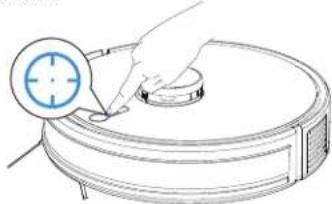
natural_image
Illustration of a hand holding a circular object with a target symbol, next to a circular device (no text or symbols present)
Oplader
Skudt tryk 📋 for at pause, Robotten går til opladning.
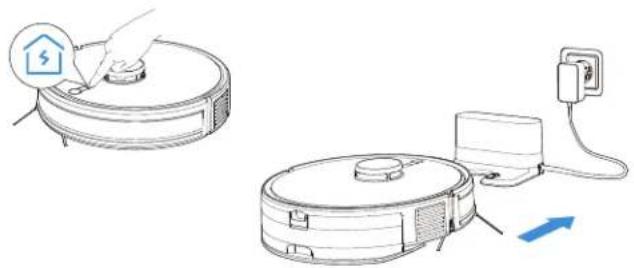
natural_image
Illustration of a robotic vacuum cleaner with a hand inserting a device, connected to a power outlet (no text or symbols present)natural_image
Technical illustration of a robotic vacuum cleaner with blue directional arrows indicating motion (no text or symbols)DK | 180

natural_image
Illustration of a robotic vacuum cleaner with a power button icon (no text or symbols)Noter:
2
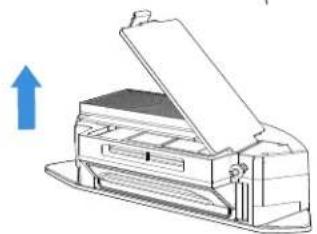
natural_image
Line drawing of a printer with an open lid and paper holder, showing no text or symbols3
natural_image
Line drawing of a hand inserting a card into a printer (no text or symbols)4
natural_image
Two technical diagrams showing a printer and its internal structure with no visible text or symbols.natural_image
Illustration of a printer with an open lid and a stack of sheets, under a blue sun (no text or symbols)natural_image
Diagram of a mechanical device with blue components and directional arrows, no visible text or symbols2
natural_image
Technical diagram of a mechanical assembly with a blue tool and directional arrow (no text or labels)3
natural_image
Line drawing of a hand holding a tool over a folded paper or cable (no text or symbols)Sidebørste
1
natural_image
Technical diagram of a mechanical assembly with no visible text or symbols2

natural_image
Line drawing of a hand using a tool to apply a small object onto a curved surface (no text or symbols)3.4 Vedligeholdelse af andre dele
Stødliste
natural_image
Line drawing of a robotic vacuum cleaner with a cloth cleaning the lid (no text or symbols)TrueMapping-afstandssensoren
natural_image
Line drawing of a hand cleaning a circular object with a blue lid (no text or symbols)natural_image
Line drawing of a robotic vacuum cleaner with handle and internal components (no text or symbols)natural_image
Line drawing of a mechanical device with a hand operating the component (no text or symbols)Hjul
natural_image
Line drawing of a computer monitor with a hand adjusting the top panel (no text or symbols)natural_image
Line drawing of a robotic vacuum cleaner with a power button, no text or symbols presenthttps://www.ecovacs.com/global/compliance.
https://www.ecovacs.com/global/compliance.
natural_image
Line drawing of a dining table with a fan, seatbelt, and checkmark (no text or symbols)natural_image
Architectural diagram of a balcony with railing and a circular robotic vacuum cleaner (no text or symbols)natural_image
Floor plan diagram with room layouts and a highlighted section (no text or labels)
natural_image
Line drawing of two hands holding a circular object with blue arrows indicating rotation or movement (no text or symbols)natural_image
Technical line drawing of a mechanical device with blue components and a screwdriver (no text or symbols)F1 | 202
natural_image
Diagram of a robotic vacuum cleaner with a circular inset showing its QR code (no text or symbols on the device itself)natural_image
Line drawing of a wall-mounted electrical outlet connected to a base, with a blue arrow indicating direction (no text or symbols)
natural_image
Line drawing of a hand inserting a power button into a vacuum cleaner's circular device (no text or symbols)
Lataaminen
natural_image
Illustration of a hand placing a house icon on a device next to an electrical plug, with no text or symbols present.natural_image
Illustration of a hand pressing a button on a vacuum cleaner's lid (no text or symbols)3 Tauko
natural_image
Illustration of a robotic vacuum cleaner with a power button, no text or symbols present4 Herätys
natural_image
Illustration of a hand pressing a button on a vacuum cleaner's lid (no text or symbols)natural_image
Illustration of a robotic vacuum cleaner with a hand holding a circular component (no text or symbols)
Lataaminen
natural_image
Illustration of a robotic vacuum cleaner with a hand inserting a component, connected to a power outlet (no text or symbols present)natural_image
Technical illustration of a robotic vacuum cleaner with blue directional arrows indicating motion (no text or symbols)
natural_image
Illustration of a robotic vacuum cleaner with a power button icon (no text or symbols)Huomautuksia:
2
natural_image
Line drawing of a printer with an open lid and paper filter, showing no text or symbols3
natural_image
Line drawing of a hand using a tool to open a printer (no text or symbols present)4
natural_image
Two technical diagrams showing a mechanical device and a printer, both without any text or symbols.natural_image
Illustration of a printer with an open lid under a blue sun (no text or symbols)natural_image
Diagram of a mechanical device with blue components and an inset showing a close-up of a component (no text or symbols present)2
natural_image
Technical diagram of a mechanical assembly with a blue tool and directional arrow (no text or labels)3
natural_image
Illustration of a hand holding a tool over a folded ribbon or cable (no text or symbols)Sivuharja
1
natural_image
Technical diagram of a mechanical assembly with no visible text or symbols2
natural_image
Line drawing of a hand holding a tool with a small object near the tip (no text or symbols)F1 | 210
natural_image
Line drawing of a robotic vacuum cleaner with a cloth cleaning the lid (no text or symbols)natural_image
Line drawing of a hand cleaning a circular object with a blue lid (no text or symbols)natural_image
Line drawing of a robotic vacuum cleaner with internal components and a hand inserting a component (no text or symbols)Latausliitännät
natural_image
Line drawing of a computer monitor with an open rear panel and a hand adjusting the screen (no text or symbols)Pyörät
natural_image
Line drawing of a robotic vacuum cleaner with blue components and a hand adjusting the part (no text or symbols)natural_image
Line drawing of a robotic vacuum cleaner with a power button, no text or symbols present
https://www.ecovacs.com/global/compliance.
https://www.ecovacs.com/global/compliance.
natural_image
Line drawing of a dining table with a fan, seatbelt, and checkmark (no text or symbols)natural_image
Architectural diagram of a balcony railing with an adjustable vacuum cleaner (no text or symbols)TR | 228
natural_image
Floor plan diagram with room layouts and a highlighted section (no text or labels)
natural_image
Diagram of two hands holding a circular object with blue arrows indicating rotation or movement (no text or symbols)natural_image
Technical line drawing of a mechanical assembly with no visible text or symbolsnatural_image
Diagram of a robotic vacuum cleaner with a QR code overlay (no text or symbols on the diagram itself)natural_image
Line drawing of a wall-mounted electrical outlet connected to a base, with a blue arrow indicating direction (no text or symbols)natural_image
Line drawing of a hand pressing a button on a vacuum cleaner's lid (no text or symbols)natural_image
Line drawing of a robotic vacuum cleaner with a hand using a tool to press the air, connected to an electrical outlet (no text or symbols)natural_image
Line drawing of a robotic vacuum cleaner with a hand pressing a button (no text or symbols)3 Duraklatma
natural_image
Illustration of a hand pressing a button on a vacuum cleaner's lid (no text or symbols)4 Uyanma
natural_image
Illustration of a hand pressing a button on a circular vacuum cleaner (no text or symbols)5 Leke Temizleme
natural_image
Illustration of a robotic vacuum cleaner with a hand holding a circular component (no text or symbols)6 Şarj Etme
natural_image
Illustration of a robotic vacuum cleaner with a hand inserting a device to its lid, connected to a power outlet (no text or symbols present)natural_image
Technical illustration of a robotic vacuum cleaner with blue directional arrows indicating motion (no text or symbols)TR | 234
natural_image
Illustration of a robotic vacuum cleaner with a power button icon (no text or symbols)Notlar:
2
natural_image
Line drawing of a printer with an open lid and arrow indicating upward motion (no text or symbols)3
natural_image
Line drawing of a hand inserting a card into a printer (no text or symbols)4
natural_image
Two technical diagrams showing a printer and its internal structure, with no visible text or symbols.natural_image
Illustration of a printer with an open lid under a blue sun (no text or symbols)natural_image
Diagram of a mechanical device with blue components and an inset showing a close-up of a component (no text or symbols present)2
natural_image
Technical diagram of a mechanical assembly with a blue tool inserted, showing internal components and a blue arrow indicating direction (no text or labels present)3
natural_image
Hand holding a tool interacting with a rolled-up corn kernel (no text or symbols visible)Yan Fırça
1
natural_image
Technical diagram of a mechanical assembly with no visible text or symbols2
natural_image
Line drawing of a hand holding a tool over a curved object (no text or symbols)natural_image
Line drawing of a robotic vacuum cleaner with a cloth cleaning the lid (no text or symbols)TrueMapping Mesafe Sensörü
natural_image
Line drawing of a hand cleaning a circular object with a blue lid (no text or symbols)natural_image
Line drawing of a robotic vacuum cleaner with internal components and a hand inserting a component (no text or symbols)natural_image
Line drawing of a computer monitor with an open rear panel and a hand adjusting the screen (no text or symbols)Tekerlekler
natural_image
Line drawing of a computer monitor with a hand adjusting the top panel (no text or symbols)natural_image
Line drawing of a robotic vacuum cleaner with a hand interacting with the power button (no text or symbols)No.518 Songwei Road, Wusongjiang Industry Park, Guoxiang Street, Wuzhong District, Suzhou, Jiangsu, China.