
MFTVB1 - TV Stand SANUS - Free user manual and instructions
Find the device manual for free MFTVB1 SANUS in PDF.


User questions about MFTVB1 SANUS
0 question about this device. Answer the ones you know or ask your own.
Ask a new question about this device
Download the instructions for your TV Stand in PDF format for free! Find your manual MFTVB1 - SANUS and take your electronic device back in hand. On this page are published all the documents necessary for the use of your device. MFTVB1 by SANUS.
USER MANUAL MFTVB1 SANUS
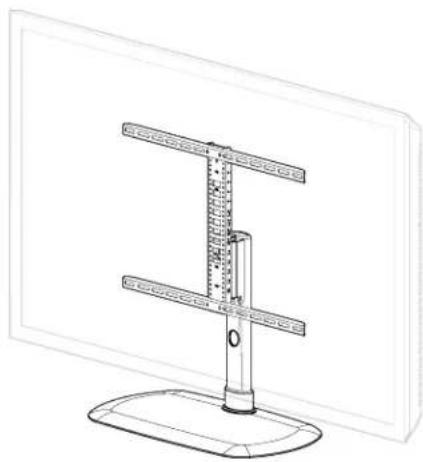
Compatible with Amazon Fire TV 4-series and Fire TV Omni Series up to 65"
Fits VESA patterns 100 × 100 - 600 × 400
INSTRUCTION MANUAL
WE'RE HERE TO HELP
Want to watch a video that shows how easy this DIY project will be?
Watch it now at: SANUS.com/3048

Our install experts are standing by to help.
Call us at: US: +1 (800) 359-5520 EMEA: +31 (0) 495 580 852 UK: +44 (0) 800 056 2853
IMPORTANT SAFETY INSTRUCTIONS - PLEASE READ ENTIRE MANUAL PRIOR TO USE - SAVE THESE INSTRUCTIONS
Before getting started, let's make sure this mount is perfect for you!
1 Does your TV (including accessories) weigh more than 60 lbs (27.2kg)?
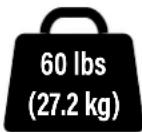
No - Perfect!
Yes - This mount is NOT compatible. Visit SANUS.com or customer service to find a compatible mount.
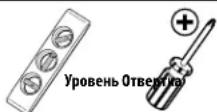
2 Do you have the tools needed?
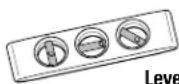
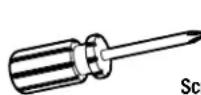

Screwdriver
3 Ready to begin?
Please read through these instructions completely to be sure you're comfortable with this easy install process. Also check your TV owner's manual to see if there are any special requirements for mounting your TV.
If you do not understand these instructions or have doubts about the safety of the installation, assembly or use of this product, contact Customer Service.
CAUTION: Avoid potential personal injuries and property damage! Manufacturer is not responsible for damage or injury caused by incorrect assembly or use.
WARNING: Exceeding the weight capacity can result in serious personal injury or damage to equipment! It is the installer's responsibility to make sure the weight of the display (including accessories) does not exceed 60 lbs (27.2 kg). Use with heavier televisions may result in instability causing tip over resulting in death or serious injury!
WARNING: Use this mounting system only for its intended use as described in these instructions. Do not use attachments not recommended by the manufacturer.
WARNING: Death or serious injury may occur when children climb on audio and/or video equipment furniture. A remote control or toys placed on the furnishing may encourage a child to climb on the furnishing and as a result the furnishing may tip over onto the child.
WARNING: Relocating audio and/or video equipment to furniture not specifically designed to support audio and/or video equipment may result in death or serious injury due to the furnishing collapsing or overturning onto a child.
NOTE: This product has no user serviceable parts.
Dimensions
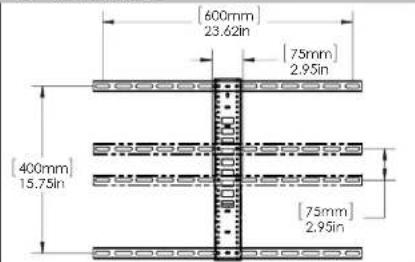
TV INTERFACE
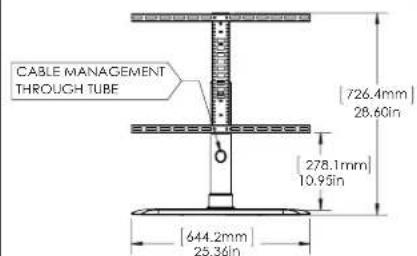
FRONT VIEW - MAXIMUM HEIGHT
FRONT VIEW - MINIMUM HEIGHT
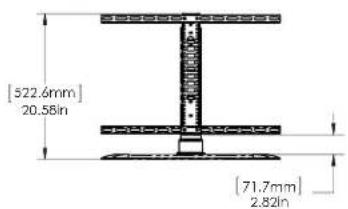
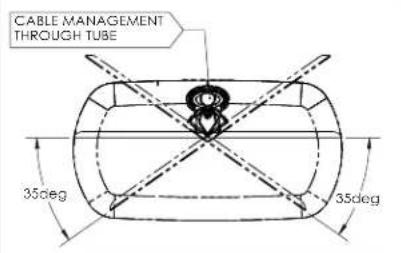
TOP VIEW-SWIVEL
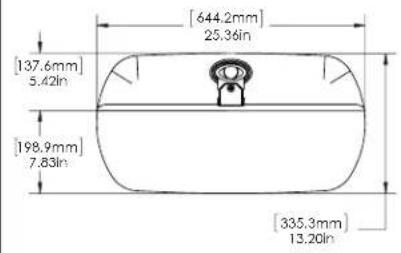
TOP VIEW-MAX DIMENSIONS
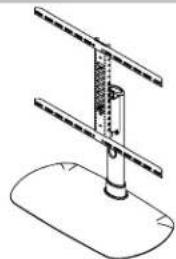
3-D
Supplied Parts and Hardware
WARNING: This product contains small items that could be a choking hazard if swallowed.
Before starting assembly, verify all parts are included and undamaged. If any parts are missing or damaged, do not return the damaged item to your dealer; contact Customer Service. Never use damaged parts!
NOTE: Not all hardware included will be used.
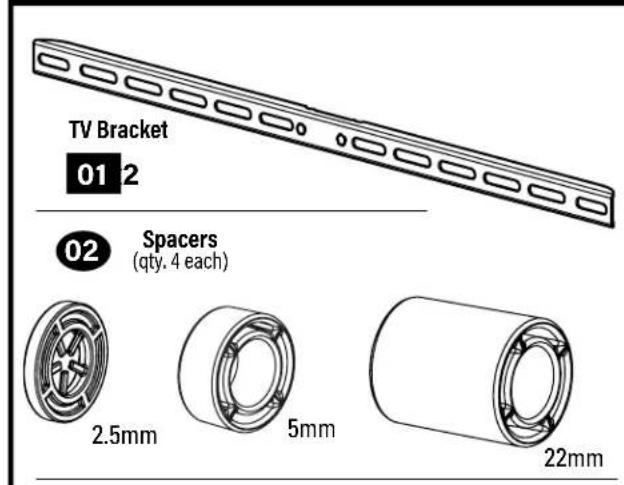
STEP1 Parts and Hardware

Washers
(qty. 4 each)


M6/M8M4

04
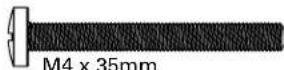
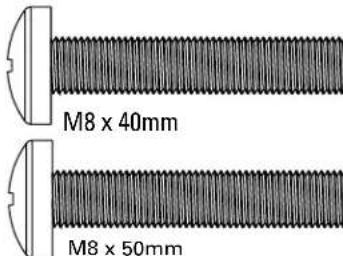
TV Screws (qty. 4 each)
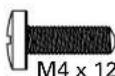
M4
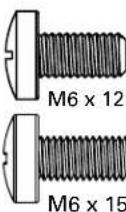
M6
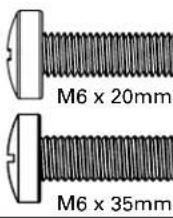
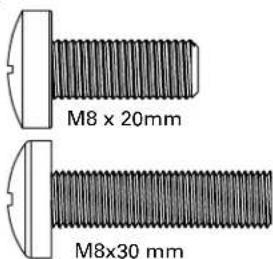
M8
Vertical Height
Adjustment
Bracket

STEP2 Parts and Hardware

Interface Screws
(Vertical Height
Adjustment Bracket)

10-32 x 3/8 in.


STEP3 Parts
STEP3 and 4 Hardware
Lock Screws
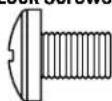
1/4-20 × 3/8 in.


STEP1 Attach TV Brackets to TV
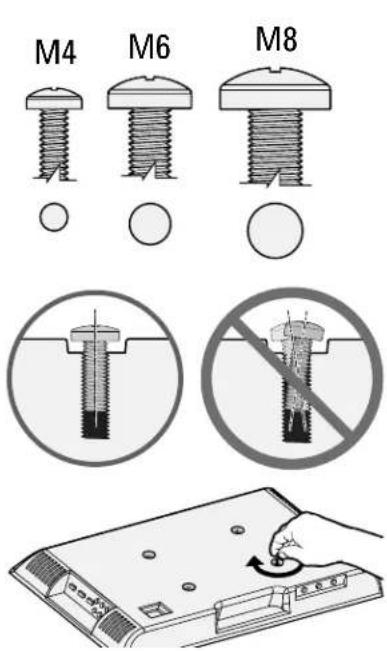
1.1 Select TV Screw Diameter
Test the three TV screw diameters (M4, M6, or M8) in the threaded inserts on the back of your TV to determine which screw diameter fits your TV.
1.2 Select TV Screw Length
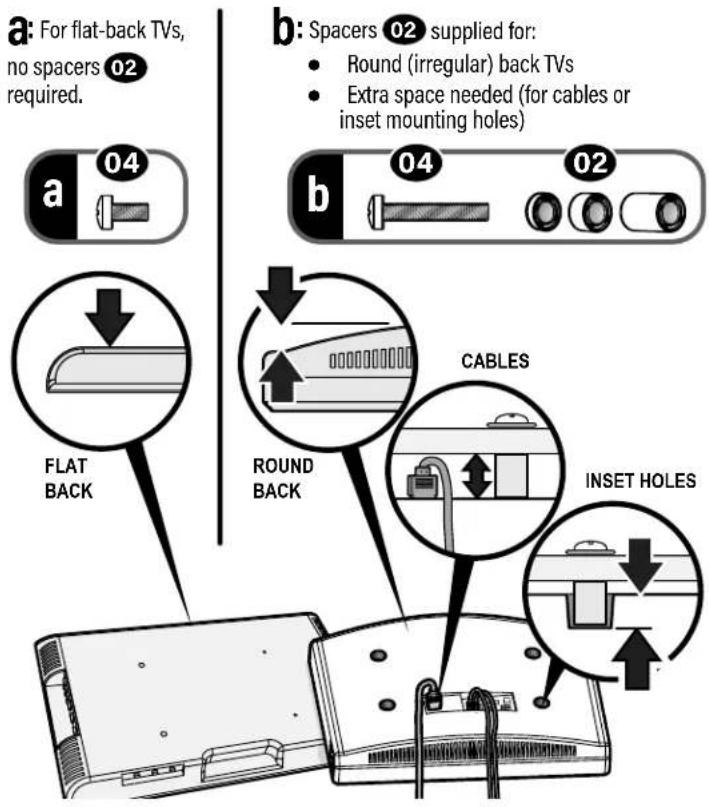
Standard configurations are shown. For special applications, or if you are uncertain about your hardware selection, contact Customer Service
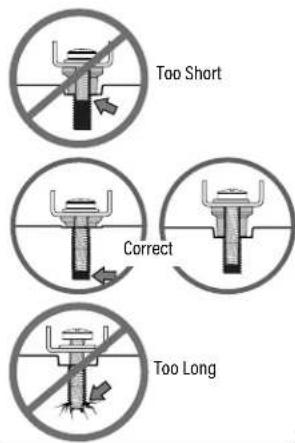
CAUTION:
Verify adequate thread engagement with your screw/washer/spacer combination AND TV bracket. - Too short will not hold the TV. - Too long will damage the TV.
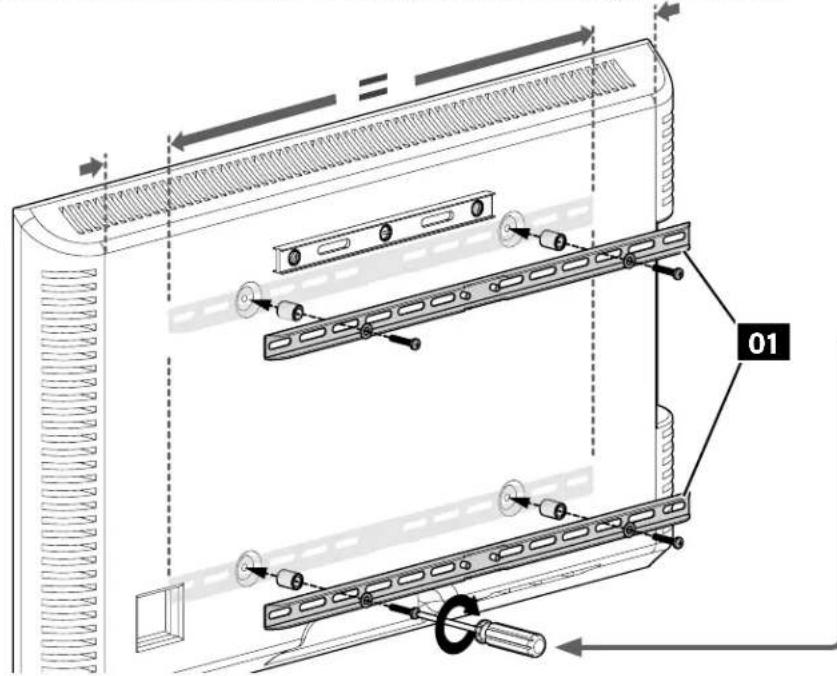
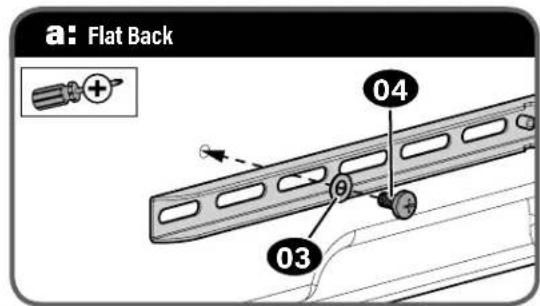
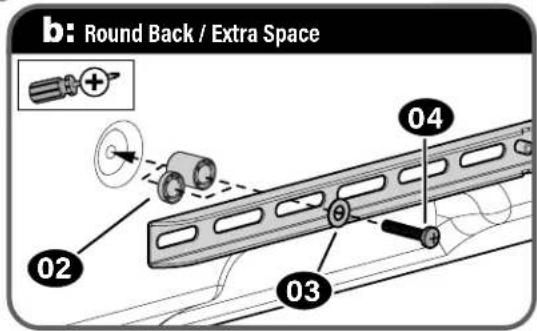
1.3 Attach Horizontal Brackets
Position your TV brackets 01 over your TV hole pattern - making sure the brackets are centered. Secure TV brackets 01 using your selection for screw/washer (a: Flat Back) or screw/washer/spacer (b: Round Back / Extra Space).
CAUTION: Avoid potential personal injuries and property damage! DO NOT use power tools for this step. Tighten the screws only enough to secure the TV bracket to the TV. DO NOT overtighten the screws.
IMPORTANT: Ensure TV brackets are securely fastened before moving on to the next step.
STEP2 Attach Vertical Bracket
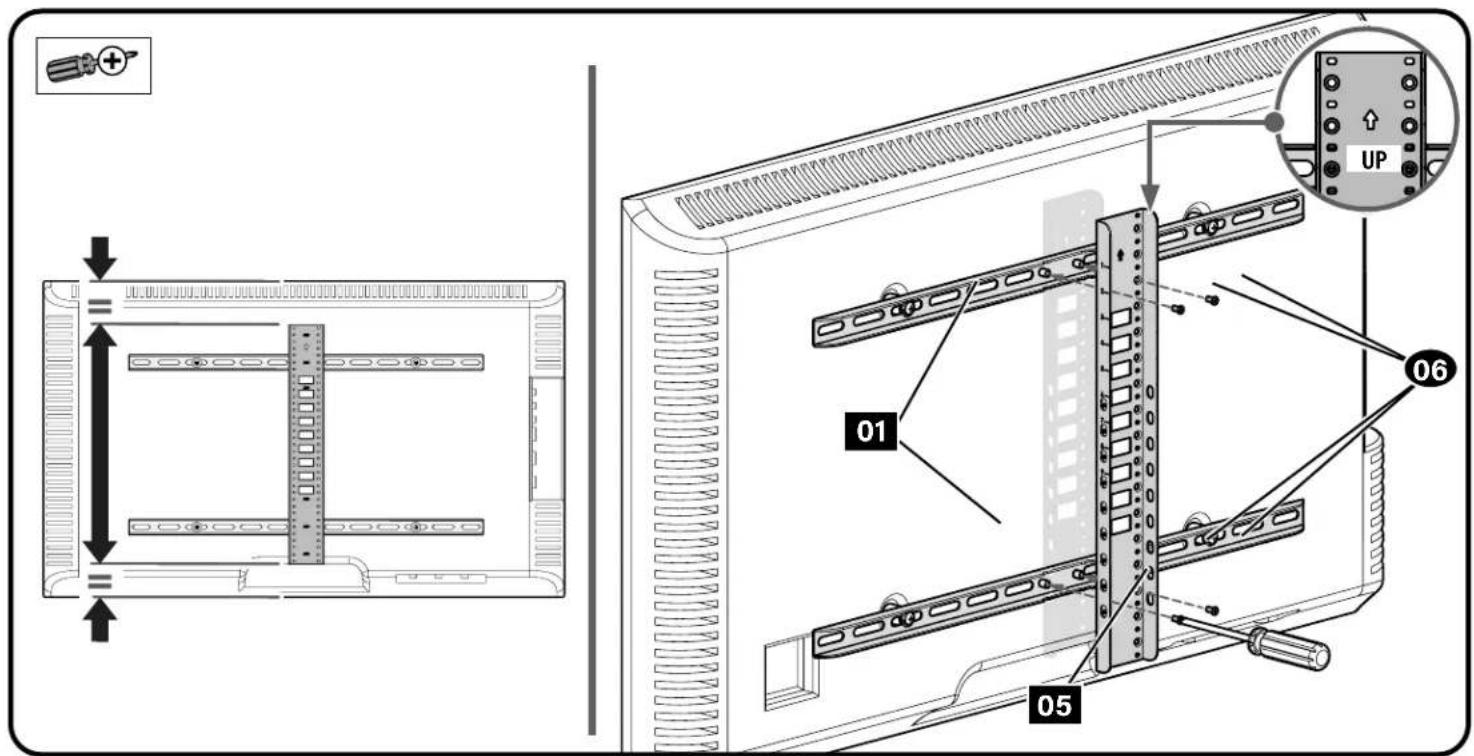
Make sure the vertical height adjustment bracket 05 is CENTERED on the TV and secure using interface screws 06
10 important: Ensure all brackets are securely fastened before moving on to the next step.
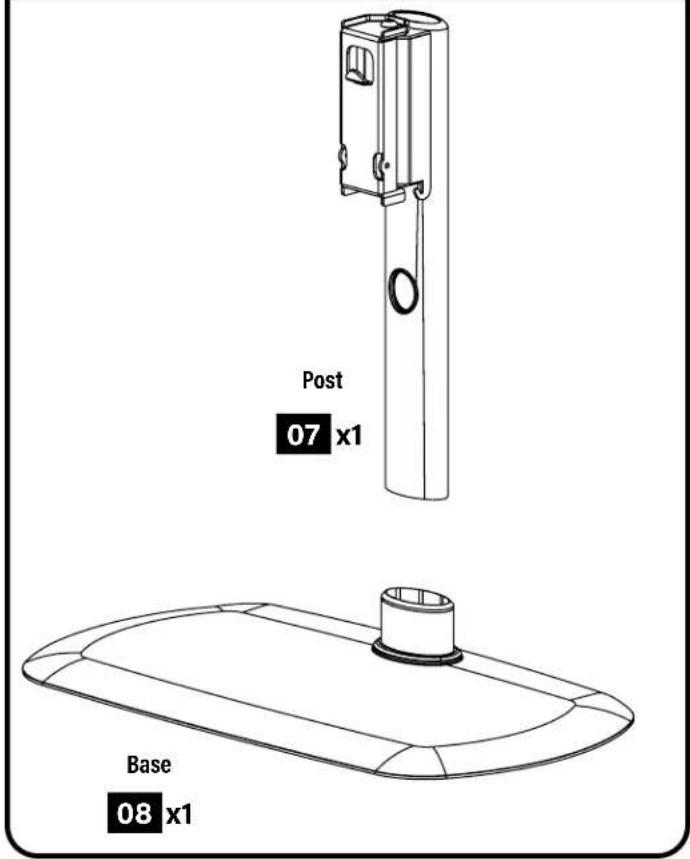
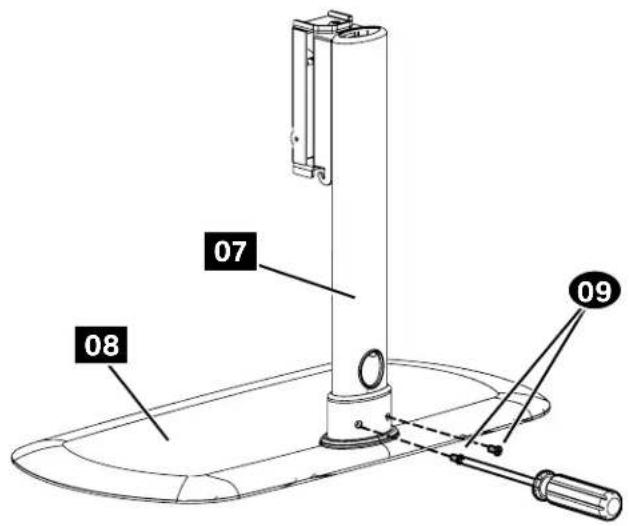
STEP 3 Attach Post to Base
1
2
STEP 4 Attach TV to Post
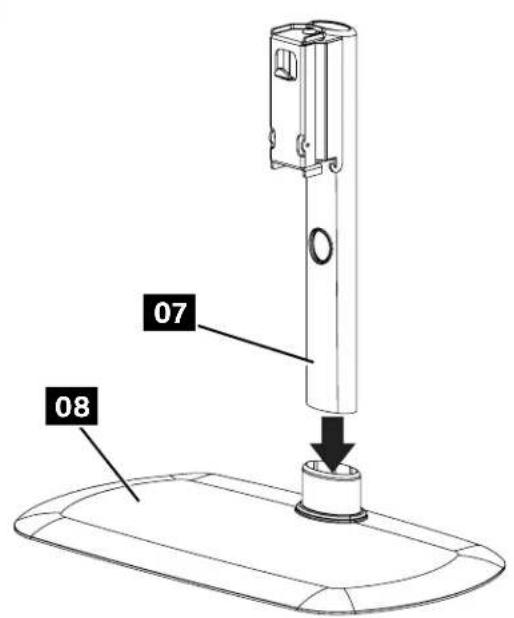
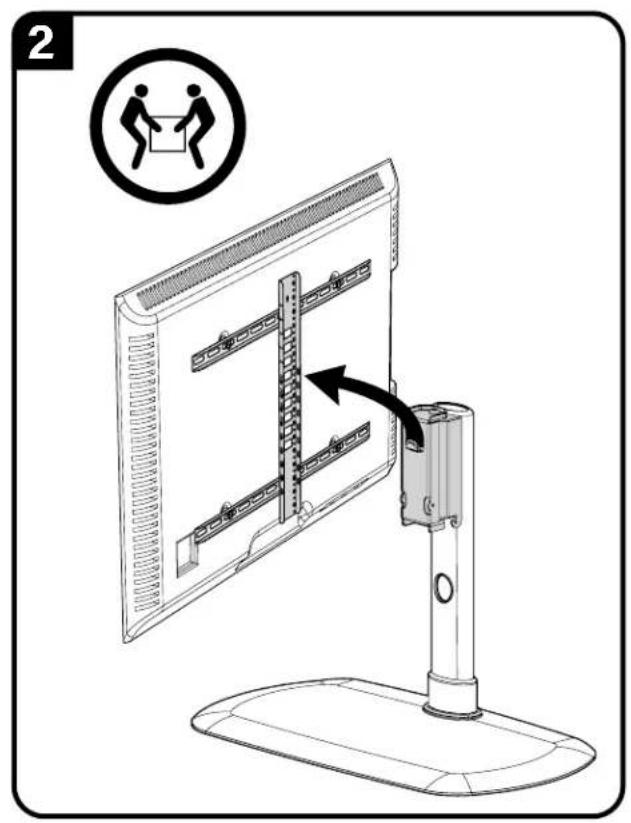
Determine the height from the base 08 that you would like your TV to hang.

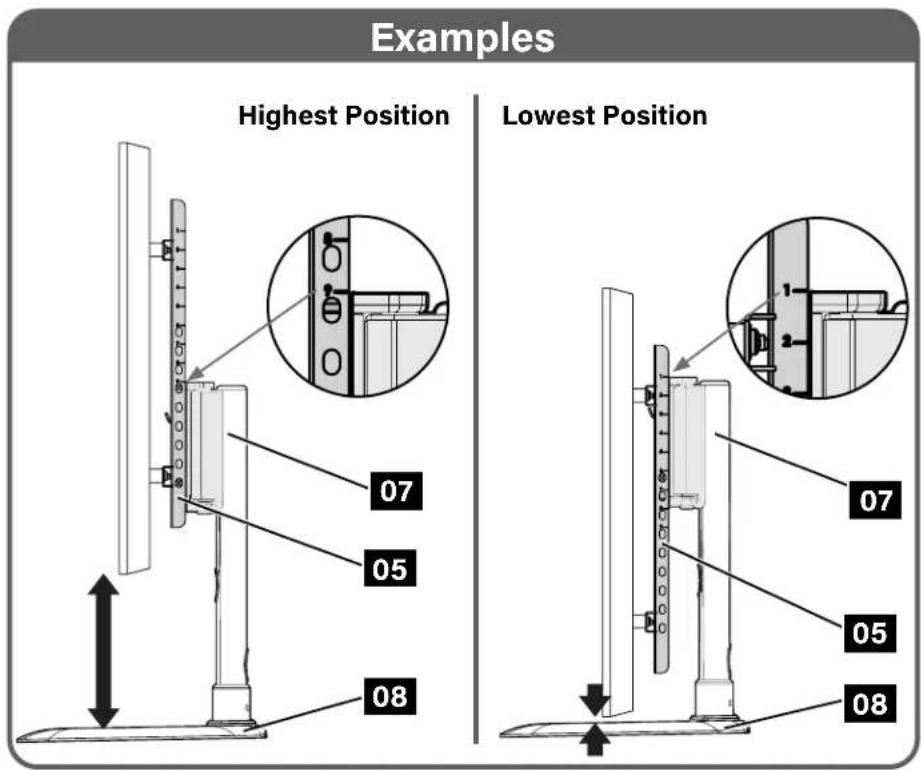
Hang the TV/bracket assembly (at your desired height) onto the post 07.
NOTE: Leave enough space under your TV, for any accessories that you may want to place on the shelf.
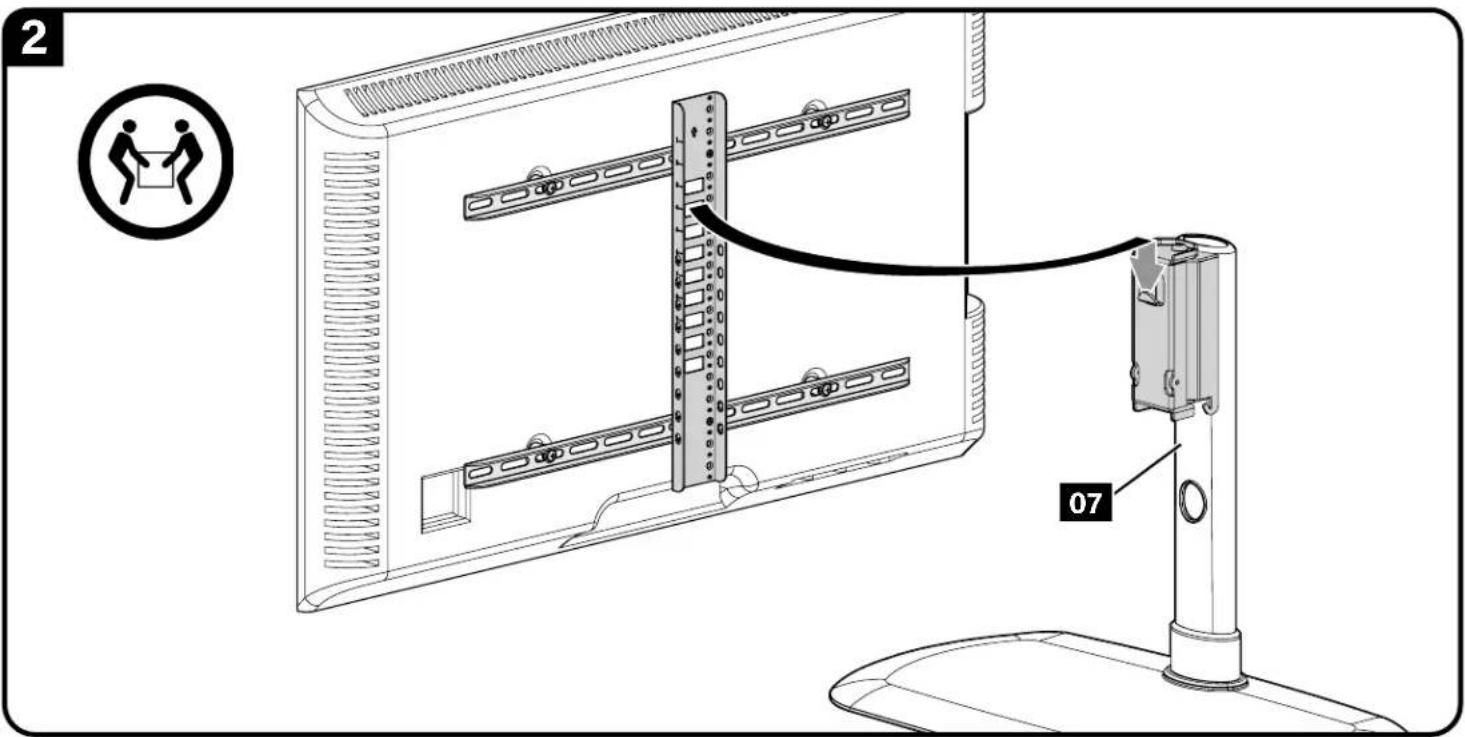
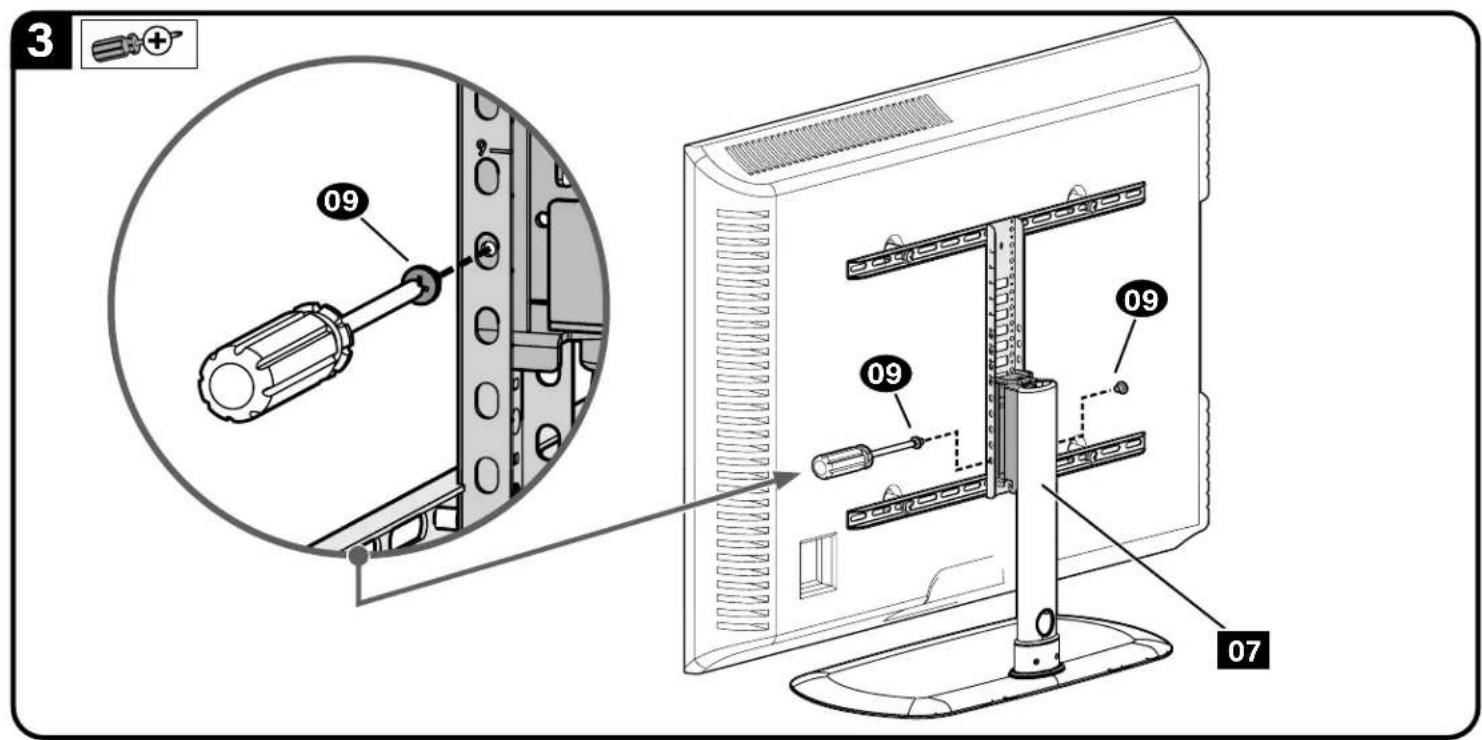
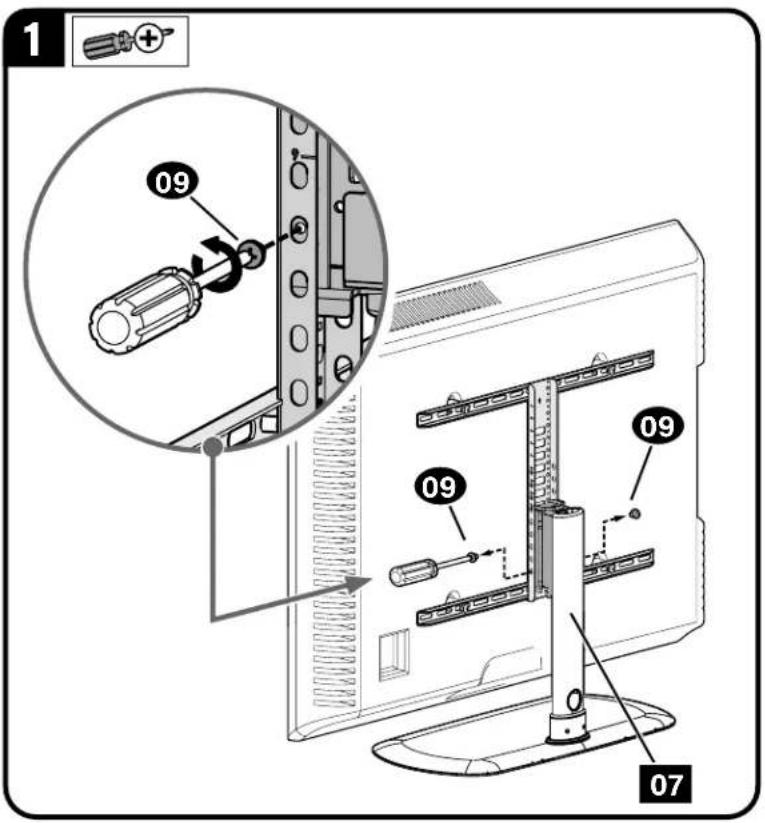
Secure the TV/bracket assembly to post 07 with two lock screws 09
IMPORTANT: Keep the base clear while installing TV.
IMPORTANT: Ensure TV/bracket assembly is securely fastened to post 07 before moving on to the next step.
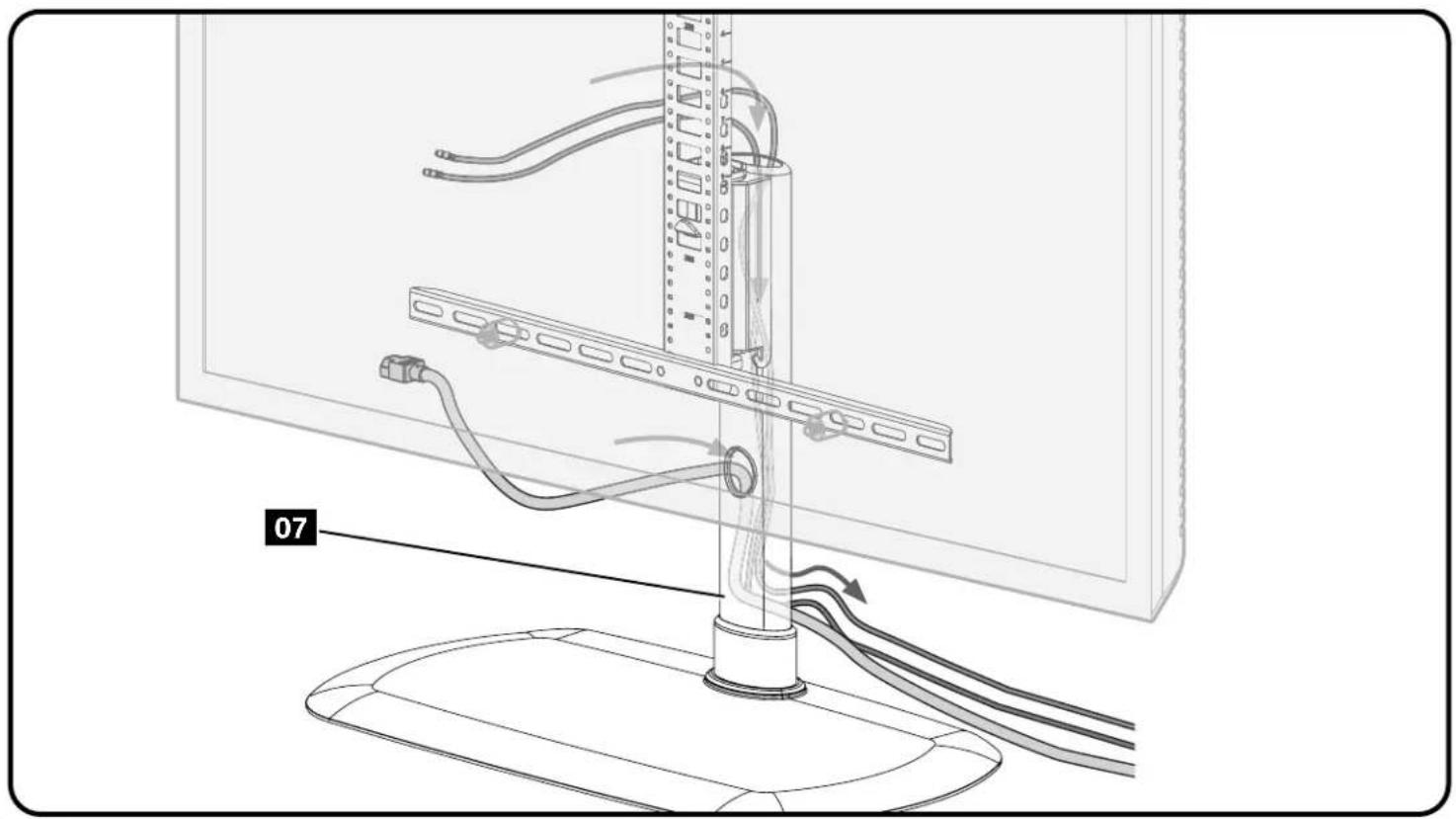
Cable Management
To Remove Your TV
ESPANOL
EcTb Jn y Bac BCE HeoOxOaMlbI uHCTpyMeHTbl?
2 | ToTOBblHaayatb?
IpoHTte daHnyIO HCTpyKmIO NOHCTbIO, Yo6bI yBepHHO I CnERKOCTbIO BbINOLNHbYcTAHOBY. Cm. cneuaJIbHbIE Tpe6oBaHnK YcTAHOBKe TeneBn3Opa B INHTpyKmIK TeneBn3Opy. ECNI bI He NoHNMaTe npHeDeHHBe IHCTpyKmIMn He yBepHbI, YTO DaHHOe N3dJeNcYcTAHOBNeHo, CObaHO Nnn EKcnNyaTnpyeTc8e30NaChBM o6paTtncBcB ceHTp 0cbNyKBAHm KInENTOB no TenefoHy.
BHUMAHNE! Co6nOaIe octOpOxHocTb BO 36EkaHne NOnyueHn TpaBm NOBpeXeHn HMyuecTa! PpO3BOJnteB He Hecet OTBcTBeHHocTn 3a NobpeXeHme N3dEInn NIOyueHne N0b3oBATElem H3dEInn TpaBmNo pNmuHne erO HnpeBnHbHO C6opKm NIN EKcPiYatauim.
I PEPYIPEXKDEHNE! IpeBbIeHHe Harpy3KN NO Becy MoTeT pNMBCTN K cepbe3bIM TpaBMaM N nobpeXdeHIO 6OpDyOBaHN! IInO, BbINHOooye yTaHOBY6eHTBCB TOM, qTO Be DCnCnner CnObMM AkecccyapAMn He nePBbIaet 27,2 Kr (60 yHTOB). Mcnolb3oBaHne 6Oee TeJeKbIX TeEbn3OpB MoTe CTaTb npuHHo n oTep m yToohBOCTM ONPOKdIBaHNA, YTO MOeT pNBcETN K TKeJIbIM TpaBMaM Nm CMePTN.
PNEYIPKJENHEI!NcnoB3yTe DaHHy KpEnexHy CnCTeMy TOnbKO No Ha3HaueHHo, B COOTBeTCTBm C npeDncaHnMn DaHHo HnCHTpykU. 3aPpeaetcNcNoB30BaTb DOnnoHtEhBi He peKoMeHDoBaHhBi npO3BOuTeNeM.
PPEyPExEHEHe pa3peaHaeTeTAM 3ane3aTB HaIOCTABKpyIaN yAINO-NBn BIDoeo6OpOBAHn, 3TO MOeT pINBecTN K TAKeBN TM PabMaM NIM CMEPTn. Pa3MeueHHe HnoCTABKe npbTa nctAHNOHHOro ynpabNEHn IIN rpywek MoeT cPiPOuONPOBaTB pe6eHa 3ane3b Ha IOCTABKBy, B pe3yntate Yero IOCTABKa MOeT OpiOKHHTBCa Hpe6eHa.
PNEYIPEXJEHNE! Pa3meueHne ayno- mnn BnDoo6OpOboaHna Ha noCTabKe, he paccuHTaHNO cneMaIbHO Ha Maccy daHoro aymo- mnn BMDeo6OpObaHna, moKet npBecTH K TJeBbIM TpaBMam Hm CMEPTN B pe3yNbTaTe NOnOMKn NpCTabKn Hn ee OnpOKMbHaHn Ha pe6eHa.
NPMEUHHE.BMOJIN MFTVB1OTCYTCTBYOT Detann, KOtOpbIE MOYPTeMOHTNPOBaTBcNoIb3OBaTeJIEM.
Pa3mepbl Kpenexhbni nHTeppeic TeneBu3opa
ctp.3-4
Noctablaemble kOMnneKtIyoUne I KpeneXhBle 3JeMeHTbl
ctp.5-6
PYCCKM
PNEyIPEXJEHNE! B coCTabe H3dEINb eCTb MeNkne DeTANH, KOtOpBte MOyT Bb3BaTb ydyuBpe npn pnpraNaBbAHH.
Pepen6cbpoky6bEmtce, 0to Bce Detanm HMeKOTcB HnunHn He NobpeckdeHb. Ecnk KaKaJ-NIOo Detanb OTCytCTByET Nm NobpeckdeHa, He Bo3BaauTte K3dne MeNlepy; opaatntecb B cHTp 6cbnymbaHna KInmToB. He knohbyTe NOpeckdeHbte Detann!
PINPMEYAHNE. PnMOHTaKe IcNIOJIb3yOHTe HCe BkIIOUChHbIe B KOMNIIEKT NIOCTABKn KpCENKHeB 3JEMEHtbl.
UAT 1 KpennneHne KpOnuTeiHOB Ha TeNeBn3op
ctp.7
1.1 Bb6op dHaMeTpBa BnHtOB dIa TeneBn3opa
Nonpo6yIe BBepyTb BnHTb By cTaHOBOUHbE OTBepCTMa Cpe3b6oHa 3aDHe NaneHn TeneBnOpa DnOnpeDEnHc COOTBETCTBYIOero DnaMeTp a BNHTa (M4, M6 nn M8).
1.2 Bb6op dHHbBHTOB nTeNeBn3opa
EIN BAA TEEBHN3OP HMEET NIOCKYIO 3aHIOIO CTENK, I BbI XOTNE YCTAHOBNT TEEBN30P 6NIXe K UAPHMPOI RONOBKE KPNIIEMHA, MNOIB3yIe 6OJIe KOPOTKHE BHTbl.
BtynkC60oneeHHbMMBHTaMnPpeHa3NauchbIyTCTAHOBK.
TeneBn3OpOB C BbIyNkIOH HEPoBH 3aDHe TcEHKO
TeneBn30PbCyrrny6neHnMnDnMOHTaXhBxOTBcPCTm
KordaIaIka6eneItpe6yETcIdoonHHTenbHOe npoctpaHCTBO
1.3 KpenenneHne rohp3oHTaNbHbIX KpOnuTeHOB
BAXHO!IpeaHauJIoMa6oTbCHNMMTe Bce pncOeMHHeHHBe CTOKKn DnTeBHe30pa!
Haiokhtke KpoohTeiHbI dIa KpenneHnTeeBHe3Op 01 NOBepx CxembMOHTaxhBxOTBePcTmYybeNTMnBbEeTcB,TOKPOHHTeHbIOUeHTpnpBaHbNIOBepTKaJIINbBbIpOBeHb.3aKpenTe KpoHtWeHbI dIa KpenHeH
TeneB30pa 1 Cnmoiuh Bb6paHbix BHTOB u 466 (NIOCKA 3aHRA CTENKA) HIN BTYNOK, BHTOB u 466 (BbNYKNA 3aHRA CTENKA HIN Tpe6yeTc DOONHITenbHO npoCTpAHCTBO). (Cm. War 1.2 Ha CTP.7.)
BAXHO!IpeK TEm KAK peeHtK CNEdyuOeMy 8y, y6eHTeCb, yTO TEeBn3MOHHe KPOHtHeHb HaekxO 3aKpennHeHb.
UAT 2. PnKpennTe BepTknBhbI KpoHsTeH
CTp.9
y6eintcbe,HToBcTnKaIbHbI KPOHtTeH dIapeYrnpOBKn BbcOTb05 OTOeHTpPBOAH OTHOCTeHbHO TeneBn3Opa.
3aKpenHTe BepTKaIbHbI KPOHIteH IIN peryuipOBKn BbICOTb 05 CnOMOoiBIO COEHNHTeBbHX BNHTOB 08
BAXHO! Npea TEM KAK nepeuT K CnEduoMeMy aay, y6eHTecb, TTO BCE KPOHtneHb HAdEeH0 3aKepeHb.
WAT3KpeHnHeCtOKn KochOBaHMo
ctp.10
IAT4KpeHHeHTeNEBn3OpaKCTOKe
ctp.11
- OnpeDenne nnonoKeHHe BepTKaJIbHO rKpOHTeHa dIe peryIMPOBKn Bbcotb
2.Onpeennte BbICOTy HAD OCHOBAHmE, HA KOTOpYIO BbXOTHTe NOBecHTb TeneBn3Op.
PIMMEYAHNE. OCTaBte DoCTaTOH MoCtA DnI npHaJNeKHOCTe, KOToPbIe HUxHO NIOMeCTNb HA NOnKy.
3.3akpenTe TeneBnOp C kPOHHTeHOM B c60pe Ha aapHnPHo RONOBKe 07 DByMa PkCNpyuMm BNHTAMN 09
BAXHO! Bo Bpemr yctahOBkTeneBn3opa oChOBaHMe DoJHKo 6bItb OTKpbIto.
BHIMAHHE!Y6eHTeBc,HToTeNEBnOp cKPOHtEeHOM BcOpe HAdEeKHO pNkPeIeHb K WapHnPHoR rONoBKe 07, MpeHnTc K CneJyooMe yarly.
PpoknaKa Ka6eien
crp.14
Chrtne TeleBn3opa
ctp.15

Thank you for choosing SANUS!
Please take a moment to let us know how we did:
Legrand AV Inc.
6436 City West Parkway
Eden Prairie, MN 55344 USA
US: +1 (800) 359-5520
Legrand AV Netherlands B.V.
Franklinstraße 14
6003 DK Weert Netherlands
EMEA: +31 (0) 495 580 852
UK: +44 (0) 800 056 2853
Authorized Representative for the UK:
Starline Holding Technology Ltd.
Unit C Island Road
Reading RG2 ORP

Email us: info@sanus.com

Find us on Facebook: SANUS

Leave a review: SANUS.com

Follow us on Twitter @sanussystems
©2022 Legrand AV Inc. All rights reserved. SANUS is a brand of Legrand. SANUS and the SANUS logo are registered trademarks of Legrand. Amazon, Fire, and all related marks are trademarks of Amazon.com, Inc. or its affiliates.
Legrand AV Inc. - 6436 City West Parkway - Eden Prairie, MN 55344 USA
6901-602978 00


