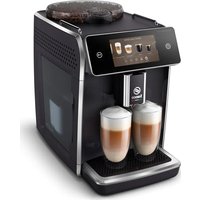
Saeco GranAroma Deluxe SM6680 - Coffee machine PHILIPS - Free user manual and instructions
Find the device manual for free Saeco GranAroma Deluxe SM6680 PHILIPS in PDF.

 FR
FR
 AZ
AZ
 BG
BG
 CS
CS
 DA
DA
 DE
DE
 EL
EL
 EN
EN
 ES
ES
 ET
ET
 FI
FI
 HE
HE
 HU
HU
 HY
HY
 IT
IT
 KA
KA
 KK
KK
 KY
KY
 LT
LT
 LV
LV
 MK
MK
 NL
NL
 NO
NO
 PL
PL
 PT
PT
 RO
RO
 RU
RU
 SK
SK
 SL
SL
 SQ
SQ
 SV
SV
 TG
TG
 TK
TK
 UK
UK
 UZ
UZ
| Product type | Fully automatic coffee machine |
| Brand | Philips |
| Model | Saeco GranAroma Deluxe SM6680 |
| Dimensions (W x H x D) | 262 x 383 x 448 mm |
| Weight | 8.3 – 8.8 kg |
| Power supply | 230 V, 50 Hz, 1450 W (estimated) |
| Water tank capacity | 1.8 L |
| Bean hopper capacity | 300 g |
| Coffee grounds container capacity | 12 servings |
| Milk tank capacity | 600 ml |
| Adjustable dispensing spout height | 87 – 147 mm |
| Water filter | AquaClean (activation required) |
| Connectivity | Wi-Fi 2.4 GHz 802.11 b/g/n |
| Special functions | CoffeeEqualizer Touch, CoffeeMaestro, ExtraShot, HygieSteam, Profile menu |
| Grinder | 12 grind settings, ceramic burrs |
| Maintenance | Descaling, cleaning the brew group, lubrication every 2 months |
| Included accessories | Cleaning brush, grease tube, measuring spoon, water hardness test strip, AquaClean filter |
| Safety | Automatic shut-off, safety system (error codes) |
| Descaling | Integrated procedure with Philips descaling solution |
Frequently Asked Questions - Saeco GranAroma Deluxe SM6680 PHILIPS
User questions about Saeco GranAroma Deluxe SM6680 PHILIPS
0 question about this device. Answer the ones you know or ask your own.
Ask a new question about this device
Download the instructions for your Coffee machine in PDF format for free! Find your manual Saeco GranAroma Deluxe SM6680 - PHILIPS and take your electronic device back in hand. On this page are published all the documents necessary for the use of your device. Saeco GranAroma Deluxe SM6680 by PHILIPS.
USER MANUAL Saeco GranAroma Deluxe SM6680 PHILIPS
natural_image
Modern coffee machine with two glass cups filled with brown liquid, displayed on a silver counter (no visible text or symbols)EN USER MANUAL
C
English 6
Azərbaycanca 25
Čeština 45
Crnogorski 65
Dansk 86
Deutsch 106
Eesti 129
Español 149
Français 170
Hrvatski 191
Italiano 212
Latviešu 234
Lietuviškai 254
Magyar 274
Nederlands 295
Norsk 316
O'zbek 336
Polski 357
Português 378
Română 399
Shqip 419
Slovenščina 440
Slovensky 460
Srpski 481
Suomi 502
Svenska 522
Türkmençe 542
Ελληνικά 562
Български 585
Кыргызча 607
Македонски 630
Русский 653
Точикй 677
Українська 700
Қазақша 722
Ruijtntu 743
phosphorus 767
790
Contents
Machine overview (Fig. A) 6
Introduction 7
Adjusting machine settings 11
AquaClean water filter 12
Removing and inserting the brew group 13
Cleaning and maintenance 13
Descaling procedure 16
Error codes 17
Ordering accessories 18
Software updates 18
Troubleshooting 19
Technical specifications 24
Declaration of Conformity 24
Wi-Fi 24
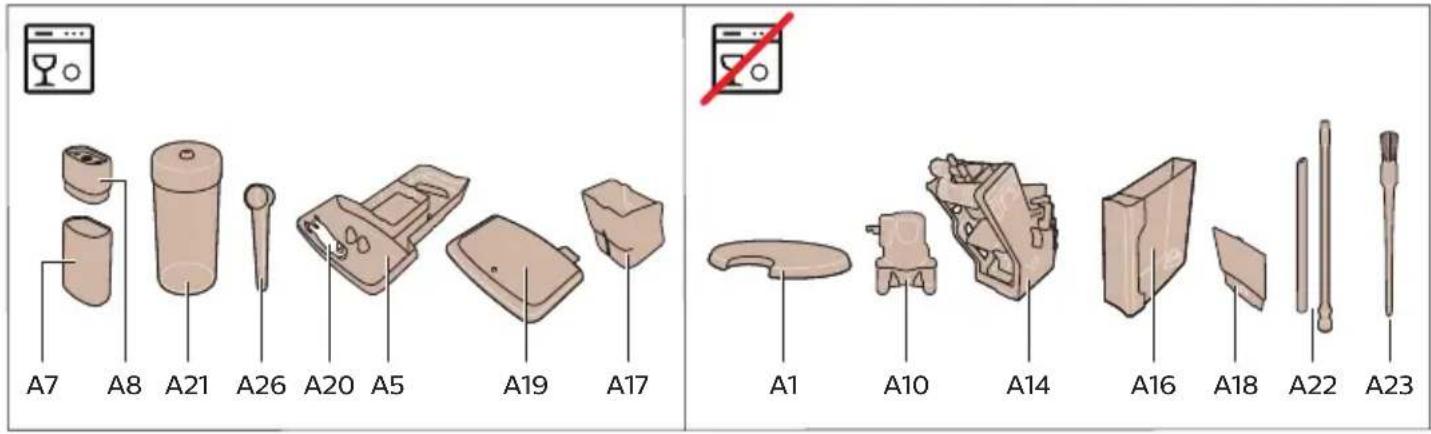
Machine overview (Fig. A)
A1 Lid of bean hopper
A2 Lid of pre-ground coffee compartment
A3 Control panel
A4 Socket for cord
A5 Drip tray
A6 Drip tray release grip
A7 HygieSteam container
A8 HygieSteam cover with milk tube holder
A9 Height-adjustable coffee and milk dispensing spout
A10 Internal cappuccinatore
A11 Power cord with plug
A12 Grind setting knob (to learn more, visit www.saeco.com/care)
A13 Bean hopper
A14 Brew group (to learn more, visit www.saeco.com/care)
A15 Service door
A16 Water tank
A17 Coffee grounds container
A18 Front panel of coffee grounds container
A19 Drip tray cover
A20 'Drip tray full' indicator
Accessories
A21 Milk container
A22 Milk tube
A23 Cleaning brush
A24 Grease tube
A25 AquaClean filter
A26 Measuring spoon
A27 Water hardness test strip
Control panel
Refer to figure B for an overview of all icons. Below you can find the descriptions.
B1 On/off icon
B2 Drinks
B3 Drinks menu
B4 Personal profiles
B5 Machine settings
B6 Status menu
B7 Shop
B8 Start/stop icon
Introduction
Congratulations on your purchase of a Saeco full-automatic coffee machine! To fully benefit from the online support that Saeco offers, you can use the control panel to register your machine via the built-in Wi-Fi connection, or go to www.saeco.com/MyCoffeeMachine and register your product there.
Read the separate safety booklet carefully before you use the machine for the first time and save it for future reference.
Your Saeco full-automatic coffee machine allows you to connect with your Wi-Fi network to enhance your coffee experience.
By connecting your machine to your Wi-Fi network, you will be able to:
- enjoy regular software updates to enhance your user experience
- make use of the shop functionality, if available in your country
- you can link your machine to your Amazon account for accessory replenishment, if this option is available in your country
- connect to your Alexa home device to make use of voice control, if available in your country
Note: This machine has been tested with coffee. Although it has been carefully cleaned, there may be some coffee residues left. We guarantee, however, that the machine is absolutely new.
Switching on the machine
Tap the 'on' icon and follow the step-by-step instructions on the control panel.
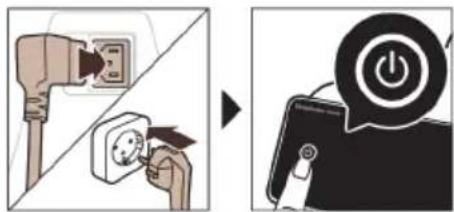
⚠️ Please connect and update the machine at first installation and regularly check for manual updates.
Connecting to Wi-Fi
Connect your coffee machine to a 2.4 GHz 802.11 b/g/n home Wi-Fi network.
i Connecting your coffee machine to your home Wi-Fi network, provides you with an enhanced user experience.
i Make sure that the coffee machine and the Wi-Fi router are within range of each other.
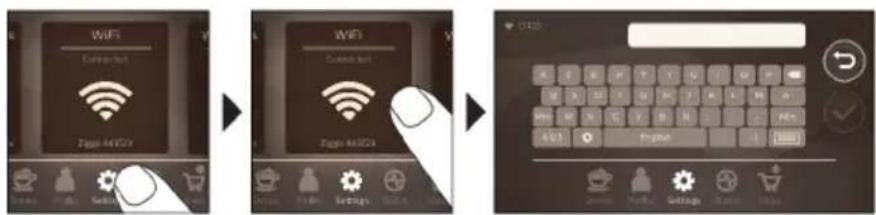
Follow the steps below to connect your coffee machine to your Wi-Fi network.
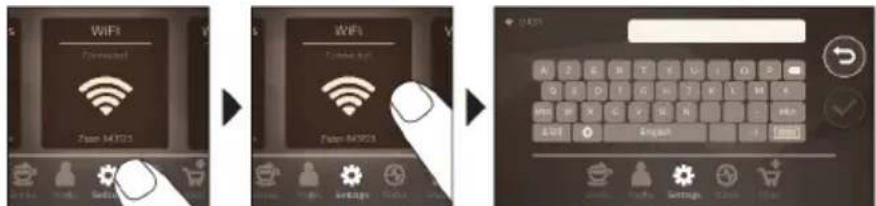
1 Tap the Settings icon and swipe from left to right to find the Wi-Fi icon.
2 Tap the Wi-Fi icon.
3 Follow the steps on the screen to connect your machine to your Wi-Fi network.
You are now ready to start your connected experience.
The machine will perform the automatic rinsing cycle when it is switched on and off via voice control and when the machine has been inactive for a while and switches off. Please make sure that the environment of the machine is safe.
Special functions
Special function Purpose
 | With CoffeeMaestro you can personalize your coffee by selecting a pre-set taste profile (Delicato, Intenso, Forte) for your beverage instead of changing the settings yourself. |
 | HygieSteam function automatically cleans the milk system, removing microorganisms: use it after brewing cappuccino or other milk-based drinks. |
 | Our durable grinder is made from 100% ceramic to be exceptionally hard and precise. It can be adjusted to your taste with 12-step levels. |
 | The Maintenance Dashboard gives you a helpful overview and notifies you with status information on things like that the AquaClean is running low. |
Brewing drinks
General steps
To brew a drink, you need to follow a few simple steps.

flowchart
graph LR
    A["Select your drink"] --> B["Make a coffee cup"]
    B --> C["Make a coffee maker with key controls"]
    C --> D["Close the coffee maker with key actions"]
    D --> E["Close the coffee maker with key actions"]
    E --> F["Close the coffee maker with key actions"]
    F --> G["Close the coffee maker with key actions"]
1 Fill the water tank with tap water and fill the bean hopper with beans.
2 Place one or two cups under the height-adjustable dispensing spout. Slide the dispensing spout up or down to adjust the height to the size of the cup or glass you are using.
3 Tap the Drinks 🎨 icon to enter the 'Drinks' menu. Swipe from left to right to select your drink by tapping on it.
- Tap the '2x' icon if you want to brew two cups. The machine automatically carries out two grinding cycles in sequence of the selected drinks.
i The '2x' icon is not available for all drinks.
4 After selecting a drink you can adjust the settings to your preference by swiping the adjustable bars up and down.
5 Press the start/stop icon to start brewing the selected drink.
Do not use caramelized or flavored coffee beans.
Support on drink parameters
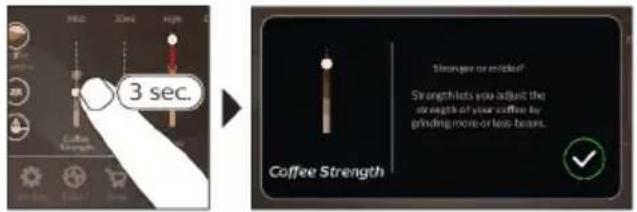
To get additional information about a specific drink parameter, press and hold an item for 3 seconds.
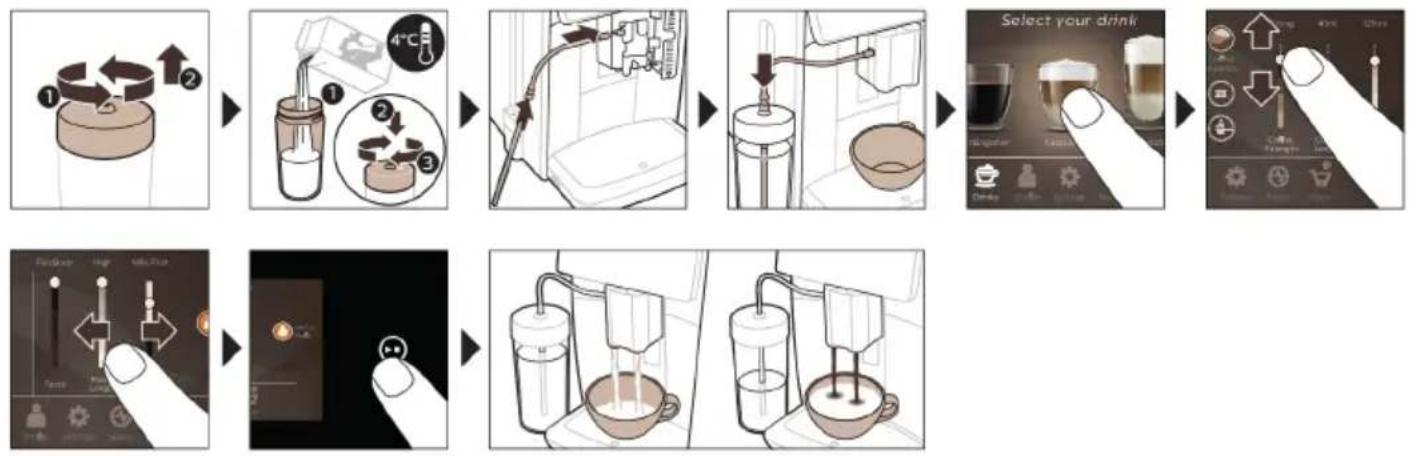
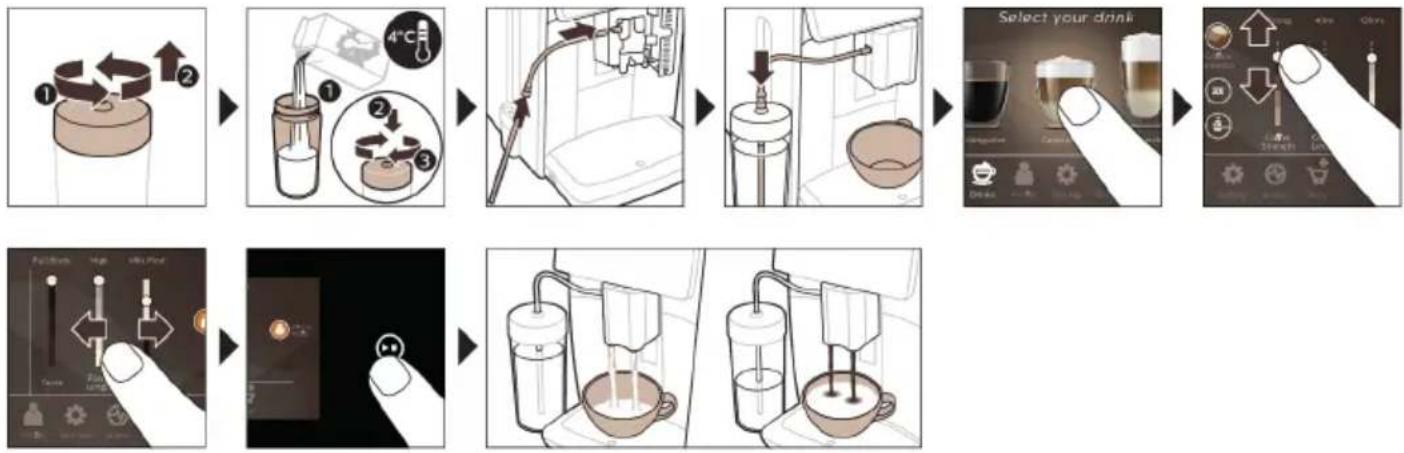
Brewing milk-based drinks
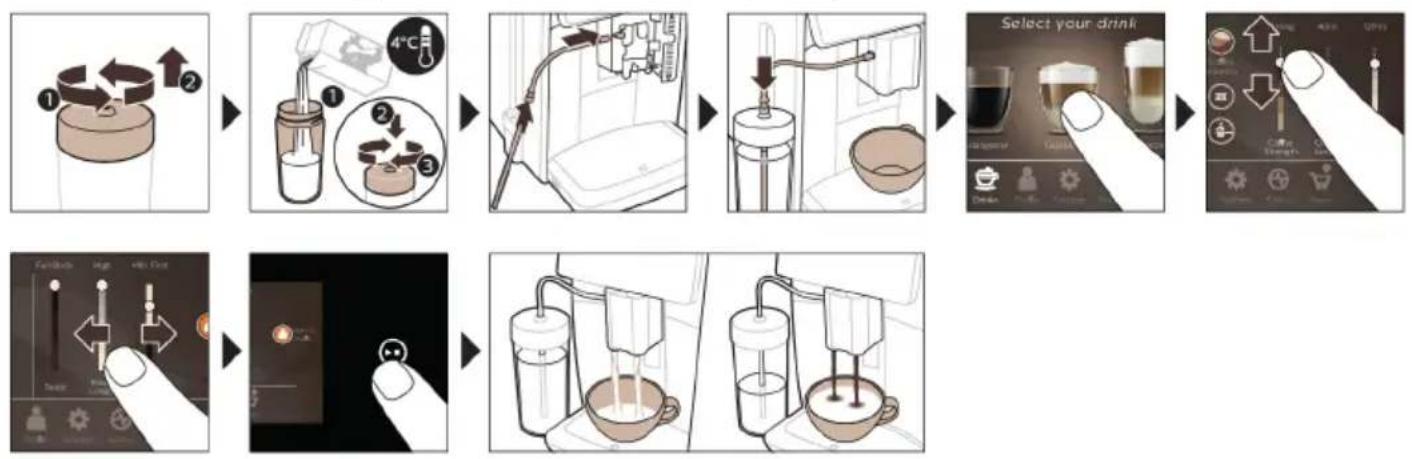
To brew milk-based drinks, you need to follow a few simple steps.
flowchart
graph TD
    A["1: Cover with 4°C"] --> B["2: Stacking into a bottle"]
    B --> C["3: Stacking into a lamp"]
    C --> D["4°C is added to the refrigerator"]
    D --> E["5: Stacking into a tube"]
    E --> F["6: Stacking into a sink"]
    F --> G["7: Stacking into a cup"]
    G --> H["8: Stacking into a glass container"]
    H --> I["9: Stacking into a coffee cup"]
    I --> J["10: Stacking into a glass container"]
    J --> K["11: Stacking into a cup"]
    K --> L["12: Stacking into a glass container"]
    L --> M["13: Stacking into a cup"]
    M --> N["14: Stacking into a glass container"]
    N --> O["15: Stacking into a cup"]
    O --> P["16: Stacking into a glass container"]
    P --> Q["17: Stacking into a cup"]
    Q --> R["18: Stacking into a glass container"]
    R --> S["19: Stacking into a cup"]
    S --> T["20: Stacking into a glass container"]
1 Fill the water tank with tap water and fill the bean hopper with beans.
2 Unscrew the lid of the milk container and fill the milk container with milk.
Always use milk coming directly from the fridge for optimal results.
3 Connect the flexible milk tube to the cappuccinatore.
4 Place the metal milk tube in the container.
5 Tap the Drinks icon, scroll and select the milk-based drink icon of your choice.
6 You can adjust the settings to your preference by swiping the adjustable bars up and down.
7 Press the start/stop▶icon at any time to start brewing the selected drink.
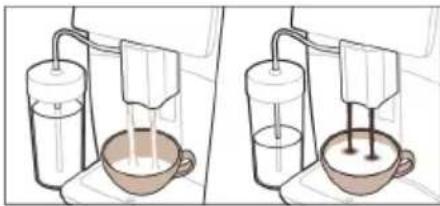
- For specific drinks, the machine first dispenses milk and then coffee. For a number of other drinks this is the other way around, the machine will first dispense coffee and then milk.
- To stop dispensing milk before the machine has dispensed the preset amount, press the start/stop icon.
- To stop dispensing the complete drink (milk and coffee) before the machine is finished, press and hold the start/stop icon.
Directly after dispensing the milk, the 'HygieSteam Shot' is performed. The machine shoots steam through the internal milk system to rinse it quickly. The metal part of the milk tube may become hot. To avoid the risk of burns, let it cool down first.
Tip: You can also use a regular milk carton to brew your milk-based drinks. Place the metal milk tube directly into the milk carton.
Brewing coffee with pre-ground coffee
To brew coffee with pre-ground coffee, you need to follow a few simple steps.
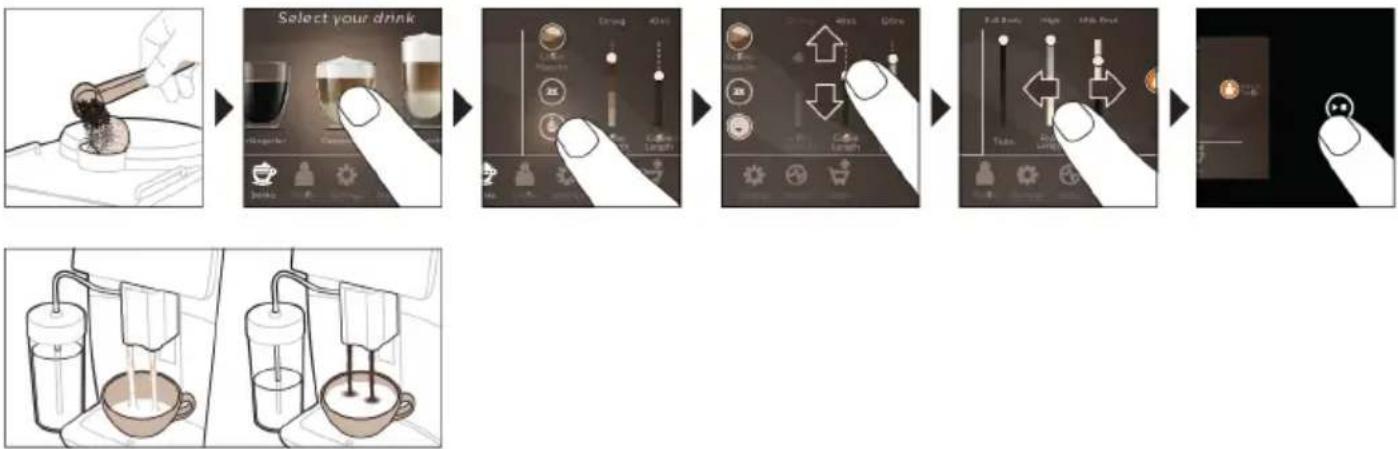
1 Open the lid of the pre-ground coffee compartment and pour one measuring spoon of pre-ground coffee into it. Then close the lid.
2 Tap the Drinks icon, scroll from left to right and select your drink.
3 Tap the pre-ground coffee icon.
4 You can adjust the settings to your preference by swiping the adjustable bars up and down.
5 Press the start/stop▶icon to start brewing the selected drink.
i If you select pre-ground coffee, you cannot adjust the coffee strength or brew more than one drink at the same time.
Dispensing hot water
1 Make sure that the internal cappuccinatore is correctly attached to the machine (Fig. 1).
2 Place a cup under the spout.
3 Tap 'Hot Water' (Fig. 2).
4 Slide the adjustable bars up and down to adjust the hot water quantity or temperature to your preference (Fig. 3).
5 Press the start/stop▶icon.
6 To stop dispensing hot water before the machine is finished, press the start/stop▶■ icon again.
Personalization
The machine allows you to adjust the settings of a drink to your own preference and to store the adjusted drink in a personal profile. You can choose your own icon and your own profile name.
Speed up with CoffeeMaestro
Your machine offers the possibility to select taste profiles instead of adjusting all settings separately with the CoffeeMaestro function. You can choose between Delicato, Intenso and Forte. To select a CoffeeMaestro taste profile:
1 Tap the drink icon of your choice (Fig. 4).
2 Tap the CoffeeMaestro icon repeatedly (Fig. 5).
- The main settings of the drink are now adjusted accordingly.
3 Press the start/stop▶icon to start brewing the drink.
Personalize your drink with the CoffeeEqualizer Touch function
After selecting a drink, the CoffeeEqualizer Touch function is activated automatically, allowing you to adjust the drink settings. Long press on each of the items on the display to activate the help function and receive further information.
With the CoffeeEqualizer Touch function you can adjust the following settings:
1 Aroma strength
5 Drink temperature
2 Coffee quantity
6 Foam amount
3 Milk quantity
7 You can also decide to prepare 1 or 2 cups
4 Water quantity
8 The order of first dispensing coffee or milk
Note: It depends on the drink you choose which settings you can adjust.
Save your favorite drinks in a profile
The machine allows you to adjust the settings of a drink to your own preference and to store the adjusted drink in a personal profile. You can select a profile and store a recipe using the profiles.
You can create a profile and add a drink using the profile 🖱con.
1 Tap the profile icon on the main menu (Fig. 6).
2 Tap the Plus icon (Fig. 7).
3 Type your name and select your favorite icon.
4 You are ready to add a drink. Tap the drink icon of your choice.
5 Personalize the drink via the CoffeeEqualizer Touch or the CoffeeMaestro function.
6 Tap on the 'Safe to profile' icon to store it in your personal profile (Fig. 8).
Extra shot (ExtraShot)
Your machine offers you the possibility to add an extra shot of Ristretto to your coffee and milk drinks, for example if you want to have a stronger coffee.
1 Place a cup under the spout.
2 Tap one of the one-touch drinks icons to select a drink (Fig. 4).
3 Slide the adjustable bar up to set the strength to the top level and select the ExtraShot function (Fig. 9).
4 Then press the start/stop icon to start brewing the drink.
5 To stop dispensing the drink before the machine has finished, press the start/stop ▶■ icon again.
When you have selected the ExtraShot function, you can only brew one coffee at the time.
i The extra shot function is not available for all drinks.
Adjusting machine settings
You can adjust most machine settings by tapping the Settings icon and follow the steps on the screen.
For online support (frequently asked questions, movies etc.), scan the QR code on the cover of this booklet or visit www.saeco.com/care
Setting the water hardness
We advise you to adjust the water hardness setting to the water hardness level in your region for optimal performance and a longer lifetime of the machine. This also prevents you from having to descale the machine too often. The default water hardness setting is 4: hard water.
Use the water hardness test strip supplied in the box to determine the water hardness in your region:
1 Immerse the water hardness test strip in tap water or hold it under the tap for 1 second (Fig. 10).
2 Wait 1 minute. The number of squares on the test strip that turn red indicate the water hardness (Fig. 11).
Set the machine to the correct water hardness:
1 Tap the Settings icon and scroll from left to right to select 'Water hardness'.
2 Select the water hardness level. The number of red squares selected on the display should be the same as the number of red squares on the test strip (Fig. 12).
3 When you have set the correct water hardness, tap the confirmation icon to confirm.
Adjusting the grind setting
You can change the coffee strength with the grind setting knob inside the bean container. The lower the grind setting, the finer the coffee beans are ground and the stronger the coffee becomes. There are 12 different grind settings you can choose from.
The machine has been set up to get the best taste out of your coffee beans. Therefore we advise you not to adjust the grind setting until you have brewed 100-150 cups (approx. 1 month of use).
i You need to brew 2 to 3 drinks before you can taste the full difference.
Do not turn the grind setting knob more than one notch at a time to prevent damage to the grinder.
1 Tap the Settings icon in the main menu.
2 Tap on "Grinder".
3 Watch the how to video.
Restoring factory settings
The machine offers you the possibility to restore the factory settings at any moment.
1 Tap the Settings icon.
2 Scroll from left to right to select 'Factory settings'. Confirm by tapping the confirmation √ icon.
- The settings are now restored.
i The following factory settings are restored to default: water hardness, standby time, display brightness, sound, front illumination, profiles, measure/units, home screen settings, Wi-Fi credentials, software update preferences, Saeco credentials, Amazon credentials.
AquaClean water filter
Your machine is AquaClean enabled. You can place the AquaClean water filter in the water tank to preserve the taste of your coffee. It also diminishes the need for descaling by reducing limescale build-up in your machine. You can purchase an AquaClean water filter from your local or online retailer or from authorized service centers.
AquaClean filter status indication
The status of the AquaClean filter is always visible in the 'Status' menu as a percentage.
- If the status of the AquaClean filter is 10% or less, the screen shows a message for 2 seconds each time you switch on the machine. This message advises you to buy a new filter.
- If the status of the filter is 0%, the machine asks you to replace the AquaClean filter every time you switch on the machine.
Activating the AquaClean water filter (5 min.)
i The machine does not automatically detect that a filter has been placed in the water tank. Therefore you need to activate each new AquaClean water filter that you install in the 'Status' menu.
When the machine stops showing the filter activation message, you can still activate an AquaClean water filter, but you will need to descale the machine first.
Your machine has to be completely limescale-free before you start using the AquaClean water filter.
Before activating the AquaClean water filter, it has to be prepared by soaking it in water as described below. If you don't do this, air might be drawn into the machine instead of water, which makes a lot of noise and prevents the machine from being able to brew coffee.
1 Tap the 'Status' icon and scroll from left to right to select 'AquaClean'.
2 Tap the confirmation √ icon again when the activation screen appears. Follow the instructions on the screen.
Replacing the AquaClean water filter (5 min.)
After 95 liters of water have flowed through the filter, the filter will cease to work. The AquaClean status indicator drops to 0% to remind you to replace the filter. If you do not replace the AquaClean water filter in time, you can still replace the filter but you first need to descale the machine.
When the AquaClean status indicator drops to 0% or when the machine reminds you to replace the AquaClean filter:
1 take out the old AquaClean water filter.
2 install a new filter and activate it as described in chapter 'Activating the AquaClean water filter (5 min).'
i Replace the AquaClean water filter at least every 3 months, even if the machine does not yet indicate that replacement is required.
Removing and inserting the brew group
Go to the 'Status' menu on the screen and select 'Brew group clean' or visit www.saeco.com/care for detailed video instructions on how to remove, insert and clean the brew group.
Removing the brew group from the machine
1 Remove the water tank and open the service door (Fig. 13).
2 Press the PUSH handle (Fig. 14) and pull at the grip of the brew group to remove it from the machine (Fig. 15).
When you remove the brew group from the machine, make sure to empty the drip tray and the coffee grounds container.
Reinserting the brew group
Before you slide the brew group back into the machine, make sure it is in the correct position.
1 Check if the brew group is in the correct position. The arrow on the yellow cylinder on the side of the brew group has to be aligned with the black arrow and N (Fig. 16).
- If they are not aligned, push down the lever until it is in contact with the base of the brew group (Fig. 17).
2 Slide the brew group back into the machine along the guiding rails on the sides (Fig. 18) until it locks into position with a click (Fig. 19). Do not press the PUSH button.
3 Close the service door and place back the water tank.
Cleaning and maintenance
Your machine will advise you when to perform cleaning and maintenance.
Regular cleaning and maintenance keeps your machine in top condition and ensures good-tasting coffee for a long time with a steady coffee flow.
Consult the table below for a detailed description of when and how to clean all detachable parts of the machine. You can find more detailed information and video instructions on www.saeco.com/care. See figure C for an overview of which parts can be cleaned in the dishwasher.
Item When to clean How to find in the control panel/
What to do
| AquaClean filter When the machine asks you or every three months. | STATUS->CLEANING->AQUACLEAN. Follow the steps to activate the AquaClean filter. |
| i The machine does not automatically detect that a filter has been placed in the water tank. Therefore you need to activate each new AquaClean filter that you install in the 'Status' menu. | |
| i Your machine has to be completely limescale-free before you start using the AquaClean filter. | |
| i Replace the AquaClean filter at least every 3 months, even if the machine does not yet indicate that replacement is required. | |
| Brew group Weekly STATUS -> PERFORMANCE ->BREW GROUP | |
| CLEAN. Follow the steps to remove and clean the brew group. | |
| i When you remove the brew group from the machine, make sure to empty the drip tray and the coffee grounds container. | |
| i Before you slide the brew group back into the machine, make sure it is in the correct position.The arrow on the yellow cylinder on the side of the brew group has to be aligned with the black arrow and N (Fig. 16). | |
| Monthly STATUS -> PERFORMANCE ->COFFEE OIL | |
| REMOVAL. Follow the steps of the self-cleaning process to automatically remove coffee oil residues from the brew group. | |
| Milk system/internal cappuccinatore | After every day of use STATUS -> HYGIESTEAM. Follow the steps of the self-cleaning process to clean the milk system. Wipe the outside of the metal milk tube with a damp cloth before placing it into the milk tube holder. |
| Weekly Remove and disassemble the internal cappuccinatore. Rinse all parts under the tap with some washing-up liquid. | |
| Monthly STATUS -> HYGIESTEAM -> DEEP MILK CLEAN. Follow the steps of the self-cleaning process to clean the milk system. | |
| Milk container Weekly Disassemble the milk container (Fig. 20) and push out the ball using the pin of the milk tube (Fig. 21). Clean all parts of the milk container under the tap or in the dishwasher. | |
| HygieSteam container (milk tube holder) | Weekly or when the machine reminds you Remove the HygieSteam container from the machine (Fig. 22) and remove the HygieSteam cover (Fig. 23). Clean the HygieSteam container and cover under the tap or in the dishwasher. Let the container and cover air-dry and place them back into the machine. |
Item When to clean How to find in the control panel/
| What to do | ||
| Pre-ground coffee compartment | Check the pre-ground coffee compartment weekly to see if it is clogged | Unplug the machine and remove the brew group. Open the lid of the pre-ground coffee compartment and insert the spoon handle into it. Move the handle up and down until the clogged ground coffee falls down (Fig. 24). Go to www.saeco.com/care for detailed video instructions. |
| Coffee grounds container | Empty the coffee grounds container when prompted by the machine. Clean it weekly | Remove the coffee grounds container while the machine is switched on. Clean it under the tap with some washing-up liquid or in the dishwasher.Note: The front panel of the coffee grounds container is not dishwasher proof. |
| Drip tray Empty the drip tray daily or as soon as the red 'drip tray full' indicator pops up through the drip tray (Fig. 25). Clean the drip tray weekly | Remove the drip tray (Fig. 26) and clean it under the tap with some washing-up liquid or in the dishwasher. | |
| Lubrication of the brew group | Every 2 months Lubricate the brew group with the by-packed grease (see 'Lubricating the brew group'). Go to www.saeco.com/care for detailed video instructions. | |
| Water tank Weekly Rinse the water tank under the tap. | ||
| Machine front Weekly Clean with a non-abrasive cloth. | ||
| Descaling of the machine | When the machine asks you to descale | STATUS -> DESCALING. Follow the steps to descale the machine. When descaling is needed, the machine asks you to descale it, press the OK icon to start and follow the steps. |
Cleaning the brew group
Regular cleaning of the brew group prevents coffee residues from clogging up the internal circuits. Go to the 'Status' menu on the screen and select 'Brew group clean' or visit www.saeco.com/care for support videos on how to remove, insert and clean the brew group.
Cleaning the brew group under the tap
1 Tap the 'Status' icon and scroll to select 'Brew group clean'.
2 Tap the confirmation icon to confirm and then follow the instructions on the screen.
Cleaning the brew group with the coffee oil remover tablets
Only use Philips coffee oil remover tablets.
1 Tap the 'Status' icon and scroll to select 'Brew group clean'.
2 Tap the confirmation icon to confirm and then follow the instructions on the screen.
Lubricating the brew group
To improve your machine's performance, we suggest that you lubricate the brew group every 2 months, to ensure that the moving parts continue to move smoothly.
1 Apply a thin layer of grease on the piston (grey part) of the brew group (Fig. 27).
2 Apply a thin layer of grease around the shaft (grey part) in the bottom of the brew group (Fig. 28).
3 Apply a thin layer of grease to the guiding rails on both sides (Fig. 29).
Cleaning programs for the internal cappuccinatore
i The machines tells you when to clean the internal cappuccinatore.
The machine has three programs to clean the internal cappuccinatore:
- 'HygieSteam Shot': during the preparation of a milk-based drink, the machine automatically shoots steam through the internal cappuccinatore to rinse it quickly.
- 'HygieSteam': the machine thoroughly cleans the internal milk system with steam. Make sure that the HygieSteam container is correctly assembled (Fig. 30) and attached to the machine (Fig. 31). Place the milk tube in the milk tube holder (Fig. 32) and follow the instructions on the screen.
- 'Deep Milk Clean': Perform the 'Deep Milk Clean' procedure with the Philips milk circuit cleaner for a thorough cleaning of the internal milk system.
Cleaning the internal cappuccinatore under the tap
1 Open the door of the internal cappuccinatore (Fig. 33).
2 Remove the internal cappuccinatore by pulling it down (Fig. 34).
3 Disassemble the internal cappuccinatore by pulling the bottom part off the top part (Fig. 35).
4 Disassemble all parts (Fig. 36) and clean them under the tap.
5 Reassemble the internal cappuccinatore.
6 To place back the internal cappuccinatore, put it in upright position and make sure the holes are aligned with the two tubes on the machine. Then move the internal cappuccinatore upwards until it locks into place (Fig. 1).
7 Close the door.
Visit www.saeco.com/care for detailed video instructions.
Descaling procedure
Please use Philips descaler only. Under no circumstances should you use a descaler based on sulfuric acid, hydrochloric acid, sulfamic or acetic acid (vinegar) as this may damage the water circuit in your machine and will not dissolve the limescale properly. Not using the Philips descaler will void your warranty. Failure to descale the appliance will also void your warranty. You can buy Philips descaler from your local or online retailer or from authorized service centers.
1 When the machine asks you to descale it, tap the confirmation √ icon to start. To start descaling without being prompted by the machine, tap the 'Status' icon and select 'Descale'.
2 Remove the drip tray, the coffee grounds container and the HygieSteam container (Fig. 22), empty them and put them back into place.
3 Remove the water tank and empty it. Then remove the AquaClean filter.
4 Pour the whole bottle of Philips descaler into the water tank and then fill it with water up to the CALC CLEAN level (Fig. 37). Then place the water tank back into the machine.
5 Place a large container (1.5 l) under the coffee dispensing spout.
6 Make sure that the HygieSteam container is correctly assembled (Fig. 30) and attached to the machine (Fig. 31). Place the milk tube in the milk tube holder.
7 Follow the instructions on the screen to start the descaling procedure. The descaling procedure lasts approx. 30 minutes and consists of a descaling cycle and a rinsing cycle.
8 Once the descaling cycle is finished, you need to rinse the water tank and water circuit. Follow the instructions on the screen.
9 Place a new AquaClean filter in the water tank and activate it (see 'Activating the AquaClean water filter (5 min).').
Tip: Using the AquaClean filter reduces the need for descaling!
What to do if the descaling procedure is interrupted
You can exit the descaling procedure by pressing the on/off icon on the control panel. If the descaling procedure is interrupted before it is completely finished, some descaling liquid may remain in the water tank or the water circuit. In that case, do the following:
1 Empty and rinse the water tank thoroughly.
2 Fill the water tank with fresh water up to the CALC CLEAN level indication and switch the machine back on. The machine will heat up and perform an automatic rinsing cycle.
3 Before brewing any drinks, perform a manual rinsing cycle. To perform a manual rinsing cycle, first dispense half a water tank of hot water and then brew 2 cups of pre-ground coffee without adding ground coffee.
Note: If the descaling procedure was not completed, the machine will require another descaling procedure as soon as possible.
Error codes
Below you find a list of the error codes showing problems that you can solve yourself. Video instructions are available on www.saeco.com/care. If another error code appears, please contact the Consumer Care Center in your country. For contact details, see the warranty leaflet.
Error code Problem Possible solution
| 01 The coffee funnel is clogged. | Switch off the machine and unplug it. Remove the brew group. Then open the lid of the pre-ground coffee compartment and insert the spoon handle. Move the handle up and down until the clogged ground coffee falls down. Visit www.saeco.com/care for detailed video instructions. |
| 03 The brew group is dirty or not well-greased. | Switch off the machine. Rinse the brew group with fresh water, let it air-dry and then lubricate it (see 'Lubricating the brew group'). Consult chapter 'Cleaning the brew group' or visit www.saeco.com/care for detailed video instructions. Then switch the machine on again. |
| 04 The brew group is not positioned correctly. | Switch off the machine. Remove the brew group and reinsert it. Make sure that the brew group is in the correct position before you insert it. Consult chapter 'Handling the brew group' or visit www.saeco.com/care for detailed video instructions. Then switch the machine on again. |
| 05 There is air in the water circuit. | Restart the machine by switching it off and on again. If this works, dispense 2-3 cups of hot water. Descale the machine if you have not done so for a longer period of time. |
Error code Problem Possible solution
| The AquaClean filter was not prepared properly before installation or it is clogged. | Remove the AquaClean filter and try to brew a coffee again. If this works, make sure that the AquaClean filter is prepared properly before you place it back (see 'Activating the AquaClean water filter (5 min.)'). Put the AquaClean filter back into the water tank. If this still does not work, the filter might be clogged and needs to be replaced. | |
| 11 | The machine needs to adjust to room temperature | Allow some time for the machine to adjust from transport/outdoor temperature to room temperature. Switch off the machine for 30 minutes and switch it on again. If this does not work, contact the Consumer Care Center in your country. For contact details, see the warranty leaflet. |
| 14 | The machine is overheated. | Switch off the machine and switch it back on after 30 minutes. |
| 19 | The machine is not connected to the wall socket properly. | Make sure that the small plug of the power cord is properly connected to the socket on the back of the machine. |
Ordering accessories
To clean and descale the machine, only use Philips maintenance products. These products can be purchased by enabling Amazon Smart Reorders, from your local or online retailer or from authorized service centers.
i To be able to use Amazon Smart Reorders, you first need to activate this service on Amazon. Then follow the steps on the screen of your machine to connect your Amazon account to your Saeco account. After you have completed these steps, you can use the Amazon Smart Reorder service.
In the 'Shop' menu on the control panel of the machine you can view the availability of Philips maintenance products and accessories at local retailers.
To find a full list of spare parts online, enter the type number of your machine. You can find the type number on the inside of the service door.
Maintenance products and type numbers:
- Descaling solution CA6700
- AquaClean filter CA6903
- Brew group grease HD5061
- Coffee oil remover tablets CA6704
- Milk circuit cleaner CA6705
- Maintenance kit CA6707
Software updates
Updating is essential to safeguard your privacy and proper functioning of your coffee machine. You can set whether you want to update your machine manually or whether you want it to be done automatically.
When you have selected automatic updates, make sure that the machine is also plugged in at night and Wi-Fi is enabled, so that the machine can receive the software updates overnight.
i Updates are made available when there are software improvements, new features for the machine and to prevent a possible security issue.
i Mandatory firmware updates are started automatically when the coffee machine is in stand-by mode. During a firmware update the coffee machine cannot be used.
Troubleshooting
This chapter summarizes the most common problems you could encounter with the machine. Support videos and a complete list of frequently asked questions are available on www.saeco.com/care. If you are unable to solve the problem, contact the Consumer Care Center in your country. For contact details, see the warranty leaflet.
Problem Cause Solution
| There are some coffee residues inside my new coffee machine. | This machine has been tested with coffee. | Although it has been carefully cleaned, there may be some coffee residues left. However, the machine is absolutely new. |
| The machine is in DEMO mode. | You pressed the standby icon for more than 8 seconds. | Switch the machine on and off by unplugging the power cord and then plugging it in again. |
| The drip tray fills up quickly / there is always some water in the drip tray. | This is normal. The machine uses water to rinse the internal circuit and brew group. Some water flows through the internal system directly into the drip tray. | Empty the drip tray daily or as soon as the red 'drip tray full' indicator pops up through the drip tray cover. Tip: place a cup under the dispensing spout to collect rinsing water that comes out of it. |
| The 'empty coffee grounds container' icon remains on. | You emptied the coffee grounds container while the machine was unplugged from the wall socket, or you placed it back too fast. | Remove the coffee grounds container, wait at least 5 seconds and then insert it again. |
| The machine prompts to empty the coffee grounds container even though the container is not full. | The machine did not reset the counter the last time you emptied the coffee grounds container. | Always wait approx. 5 seconds when you place back the coffee grounds container. In this way, the coffee pucks counter will be reset to zero and the number of coffee pucks is counted correctly. |
| The coffee grounds container is too full and the 'empty coffee grounds container' icon did not appear on the display. | You removed the drip tray without emptying the coffee grounds container. | When you remove the drip tray, also empty the coffee grounds container even if it contains only a few coffee pucks. This ensures that the coffee pucks counter is reset to zero and that the number of coffee pucks is counted correctly. |
| I cannot remove the brew group. | The brew group is not in the correct position. | Reset the machine in the following way: close the service door and place back the water tank. Switch the machine off and back on again and wait for the lights in the drink icons to come on. Try to remove the brew group again. See chapter 'Removing and inserting the brew group' for step-by-step instructions. |
Problem Cause Solution
| I cannot insert the brew group. | The brew group is not in the correct position. | Reset the machine in the following way: close the service door and place back the water tank. Leave the brew group out. Switch off the machine and unplug it. Wait for 30 seconds and then plug the machine back in, switch it on and wait for the lights in the drink icons to come on. Then put the brew group in the correct position and reinsert it into the machine. See chapter 'Removing and inserting the brew group' for step- by-step instructions. |
| The coffee is watery. The brew group is dirty or needs to be lubricated. | Remove the brew group, rinse it under the tap and leave it to dry. Then lubricate the moving parts (see 'Lubricating the brew group'). | |
| The machine is performing its self-adjustment procedure. This procedure is started automatically when you use the machine for the first time, when you change to another type of coffee beans or after a long period of non-use. | Brew 5 cups of coffee initially to allow the machine to complete its self-adjustment procedure. | |
| The grinder is set to a too coarse setting. | Set the grinder to a finer (lower) setting. Brew 2 to 3 drinks to be able to taste the full difference. | |
| The coffee is not hot enough. | The temperature is set too low. Set the temperature to the maximum setting (Fig. 38). | |
| A cold cup reduces the temperature of the drink. | Preheat the cups by rinsing them with hot water. | |
| Adding milk reduces the temperature of the drink. | Regardless of whether you add hot or cold milk, adding milk always reduces the temperature of the coffee. Preheat the cups by rinsing them with hot water. | |
| Coffee does not come out or coffee comes out slowly. | The AquaClean water filter was not prepared properly for installation. | Remove the AquaClean filter and dispense some hot water. If this works, the AquaClean filter was not installed properly. Reinstall and activate the AquaClean filter and follow all steps in chapter 'AquaClean water filter'. |
| After a long period of non-use, you need to prepare the AquaClean water filter for use again and dispense 2-3 cups of hot water. | ||
| The AquaClean water filter is clogged. | Replace the AquaClean water filter every 3 months. A filter that is older than 3 months can become clogged. | |
Problem Cause Solution
| The grinder is set to a too fine setting. | Set the grinder to a coarser (higher) setting. Note that this will impact the coffee taste. |
| The brew group is dirty. Remove the brew group and rinse it under the tap (see 'Cleaning the brew group under the tap'). | |
| The coffee dispensing spout is dirty. | Clean the coffee dispensing spout and its holes with a pipe cleaner or needle. |
| The pre-ground coffee compartment is clogged | Switch off the machine and remove the brew group. Open the lid of the pre-ground coffee compartment and insert the spoon handle into it. Move the handle up and down until the clogged ground coffee falls down (Fig. 24). |
| The machine circuit is blocked by limescale. | Descale the machine with Philips descaler (see 'Descaling procedure'). Always descale when the machine prompts you. |
| The milk does not froth. The internal cappuccinatore is dirty or not inserted correctly. | Clean the internal cappuccinatore and make sure that you position and insert it correctly (see 'Cleaning the internal cappuccinatore under the tap'). |
| The type of milk used is not suitable for frothing. | Different types of milk result in different amounts of froth and different froth qualities. |
| The milk is splashing. The milk you use is not cold enough. | Make sure you use cold milk coming directly from the fridge. |
| The flexible milk tube is not connected properly. | Open the door of the coffee dispensing spout (Fig. 33) and check if the flexible milk tube is fully connected to the cappuccinatore (Fig. 39). Note that the cappuccinatore and milk tubes may be hot. Let the cappuccinatore and the tubes cool down before you touch them. |
| The cappuccinatore and milk tubes are not clean. | Remove and disassemble the internal cappuccinatore (see 'Cleaning the internal cappuccinatore under the tap'). Rinse all parts under the tap. For thorough cleaning, use Philips milk circuit cleaner and perform the Deep Milk Clean procedure via the 'Status' and 'Hygiesteam' menu. Note that if the parts have been cleaned in the dishwasher, they may have become clogged by food particles or detergent residues. A visual check that they are not obstructed is also recommended. |
Problem Cause Solution
| We advise you to perform the HygieSteam program every day: 1) Press 'Status' on the control panel. 2) Select 'HygieSteam'. 3) Then confirm all steps on the display. | ||
| The milk tubes are clogged. Always store the milk container without the milk tubes in the refrigerator. Leftover milk could accumulate inside the milk tubes and block the flow of milk through the tubes. Rinse the milk tubes before storage. | ||
| The machine seems to be leaking. | The machine uses water to rinse the internal circuit and brew group. This water flows through the internal system directly into the drip tray. This is normal. | Empty the drip tray every day or as soon as the 'drip tray full' indicator pops up through the drip tray cover. Tip: Place a cup under the dispensing spout to collect rinsing water and reduce the amount of water in the drip tray. |
| The drip tray is too full and has overflowed which makes it look like the machine is leaking. | Empty the drip tray every day or as soon as the 'drip tray full' indicator pops up through the drip tray cover. | |
| The water tank is not fully inserted, some water is leaking out of the water tank and air is drawn into the machine. | Make sure the water tank is in the correct position: remove it and reinsert it into the machine as far as possible. | |
| The brew group is dirty/clogged. Rinse the brew group. | ||
| The machine is not placed on a horizontal surface. | Place the machine on a horizontal surface so that the drip tray does not overflow and the 'drip tray full' indicator works properly. | |
| I cannot activate the AquaClean water filter and the machine asks for descaling. | The filter has not been installed or replaced in time after the screen showed the AquaClean reminder. This means your machine is not completely free of limescale anymore. | Descale your machine first and then install the AquaClean water filter. |
| The new water filter does not fit. | You are trying to install another filter than the AquaClean water filter. | Only the AquaClean water filter fits into the machine. |
| The rubber ring on the AquaClean water filter is not in place. | Place back the rubber ring on the AquaClean water filter. | |
| The machine is making a loud noise. | It is normal that your machine makes some noise during use. | If the machine starts to make a different kind of noise, clean the brew group and lubricate it (see 'Lubricating the brew group'). |
Problem Cause Solution
| The AquaClean water filter was not prepared properly and air is now drawn into the machine. | Remove the AquaClean water filter from the water tank and prepare it for use properly before you place it back. See chapter 'AquaClean water filter' for step-by-step instructions. | |
| The water tank is not fully inserted and air is drawn into the machine. | Make sure the water tank is in the correct position: remove it and reinsert it by pushing it into the machine as far as possible. | |
| When I try to connect the machine to Wi-Fi for the first time, the machine cannot connect to the Wi-Fi network. | Your Wi-Fi name and password are not correct. | Check your Wi-Fi name and password. |
| The coffee machine and the Wi-Fi router are not within range of each other. | Ensure that the coffee machine and the Wi-Fi router are within range of each other.or use a Wi-Fi repeater. | |
| The machine is not able to find the home Wi-Fi network. | The Wi-Fi router is not working properly. | Please make sure that the Wi-Fi router is working properly and is connected to the internet. |
| The machine is not within range of the router. | Make sure the machine is within range of the router. You can also use a Wi-Fi signal repeater. | |
| The router your coffee machine is trying to connect to is 5 GHz dual-band and your coffee machine is not trying to connect to a 2.4 GHz network. | 5 GHz networks are not supported.Temporarily switch off the 5 GHz band in your router and try to pair your coffee machine again to another band of the same router (2.4 GHz). Switch on your 5 GHz band again after successful pairing | |
| I cannot use Alexa and Amazon Smart Reorders yet. | You have not yet connected to your Amazon to your Saeco account. | Please follow the instructions on the control panel of the machine to connect your Amazon account to your Saeco account to be able to use Alexa voice control and Amazon Smart Reorders.Note: To be able to use these features you need to have an Alexa app or an Alexa device and you need to enable the Smart Reorders service on Amazon. |
| The Wi-Fi connectivity of the machine used to work but is not working anymore. | Your Wi-Fi name and/or password has changed. | Follow the instructions of section 'Connecting to Wi-Fi' and choose the network with the new Wi-Fi name to connect to. |
| The Wi-Fi password has changed. | Follow the instructions of section 'Connecting to Wi-Fi' and enter the new Wi-Fi password. |
Problem Cause Solution
| Your Wi-Fi router is not working properly. | Check the router and make sure it is working. | |
| The Wi-Fi connectivity can be interrupted by electromagnetic or other interferences. | Keep the appliance away from other electronic devices that may cause interferences. | |
| None of the solutions mentioned above work. | Switch off the machine and unplug it, then plug the machine back in and switch it on to recheck the Wi-Fi connection. |
Technical specifications
The manufacturer reserves the right to improve the technical specifications of the product. All the preset quantities are approximate.
Description Value
| Size (w x h x d) 262 x 383 x 448 mm |
| Weight 8.3 - 8.8 kg |
| Power cord length 1200 mm |
| Water tank 1.8 liters |
| Bean hopper capacity 300 g |
| Coffee grounds container capacity 12 pucks |
| Milk container capacity 600 ml |
| Height-adjustable spout height 87 - 147 mm |
| Nominal voltage - Power rating - Power supply See data label on inside of service door |
| Wi-Fi frequency band 2.4 GHz 802.11 b/g/n |
Declaration of Conformity
Hereby, DAP B.V. declares that the fully automatic espresso machines SM6685, SM6682 and SM6680 are in compliance with Directive 2014/53/EU.
The full text of the EU declaration of conformity is available at the following internet address:
https://www.saeco.com.
The fully automatic espresso machines SM6685, SM6682 and SM6680 are equipped with a Wi-Fi module, 2.4 GHz 802.11 b/g/n (channels 1..13). Maximum transmitting power <100 mW(20 dBm).
Wi-Fi
The machine is a networked equipment, in compliance with reg. (EU) No 801/2013, and it is intended to be used permanently connected to a 2.4 GHz 802.11 b/g/n network.
Mündəricat
flowchart
graph LR
    A["Select your drink"] --> B["Make a coffee cup"]
    B --> C["Make a coffee mixer with control buttons"]
    C --> D["Close-up of coffee into the mixer"]
    D --> E["End with a coffee mixer icon"]
flowchart
graph TD
    A["1: Mixing with 4°C"] --> B["2: Cooling with 4°C"]
    B --> C["3: Stabilization with 4°C"]
    C --> D["4°C is added to a washing machine"]
    D --> E["5: Insert into a washing bottle"]
    E --> F["6: Remove a glass tube"]
    F --> G["7: Select your drink in a glass with 4°C and 5°C"]
    G --> H["8: Replace the product with 4°C and 5°C"]
    H --> I["9: Add liquid to a washing bottle"]
    I --> J["10: Remove a cup on a washing bottle"]
    J --> K["11: Add liquid to a cup on a washing bottle"]
    K --> L["12: Remove a cup on a washing bottle"]
flowchart
graph LR
    A["Start: Tap with coffee cup"] --> B["Select your drink"]
    B --> C["Hold inside, maintain, lock, etc."]
    C --> D["Close, maintain, hold, etc."]
    D --> E["Hold, maintain, hold, etc."]
    E --> F["Close, maintain, hold, etc."]
    F --> G["Close, maintain, hold, etc."]
    G --> H["End: Tap with coffee cup in hand holding coffee cup"]
flowchart
graph TD
    A["1: Stirmer with 4°C"] --> B["2: Stimulation with 2°C"]
    B --> C["3: Stabilization with 2°C"]
    C --> D["4: Washing Machine with 4°C"]
    D --> E["5: Dish cleaning with 4°C"]
    E --> F["6: Washing Machine with 4°C"]
    F --> G["7: Discharge with 4°C"]
    G --> H["8: Washing Machine with 4°C"]
    H --> I["9: Dish cleaning with 4°C"]
    I --> J["10: Washing Machine with 4°C"]
    J --> K["Select your drink in a glass with 4°C"]
    K --> L["11: Hand press with 4°C"]
    L --> M["12: Discharge with 4°C"]
    M --> N["13: Washing Machine with 4°C"]
    N --> O["14: Dish cleaning with 4°C"]
    O --> P["15: Washing Machine with 4°C"]
A7 HygieSteam posuda
Povežite i ažurirajte aparat prilikom prve instalacije i redovno provjeravajte postoje li ručna ažuriranja.
1 Dodirnite ikonu Settings ⚙ (Podešavanja) i povucite prstom slijeva nadesno da pronadete ikonu „Wi-Fi“.
2 Dodirnite ikonu „Wi-Fi”.
3 Pratite korake na ekranu da povežete aparat s Wi-Fi mrežom.
Sada ste spremni da započnete rad u povezanom okruženju.
Aparat će obaviti ciklus automatskog ispiranja kada se uključi i isključi putem glasovne kontrole i ako je neko vrijeme bio neaktivan, pa se isključi. Pazite da okolina aparata bude bezbjedna.
Posebne funkcije
flowchart
graph LR
    A["Select your drink"] --> B["User interface: 100% zoom"]
    B --> C["User interface: 20% zoom"]
    C --> D["User interface: 30% zoom"]
    D --> E["User interface: 40% zoom"]
    E --> F["User interface: 50% zoom"]
    F --> G["User interface: 60% zoom"]
    G --> H["User interface: 70% zoom"]
    H --> I["User interface: 80% zoom"]
    I --> J["User interface: 90% zoom"]
    J --> K["User interface: 100% zoom"]
1 Napunite rezervoar vodom iz česme i napunite posudu za kafu zrnima kafe.
2 Stavite jednu ili dvije šolje ispod mlaznika za ispuštanje koji je podesiv po visini. Prevucite nagore ili nadole mlaznik za ispuštanje da biste prilagodili njegovu visinu veličini šolje ili čaše koju koristite.
3 Dodirnite ikonu Drinks 🚙️ (Napici) da biste pristupili meniju „Drinks” (Napici). Prevucite prstom slijeva nadesno i izaberite napitak tako što ćete ga dodirnuti.
- Dodirnite ikonu „2x“ ako želite da skuvate dvije šolje. Aparat automatski obavlja dva ciklusa mljevenja u nizu za izabrane napitke.
Kuvanje napitaka na bazi mlijeka
Da biste napravili napitke na bazi mlijeka, morate da slijedite nekoliko jednostavnih koraka.
flowchart
graph TD
    A["Raw Material Mixing"] --> B["4°C & 3% preparation"]
    B --> C["Recovery tube setup"]
    C --> D["Water washing machine"]
    D --> E["Close-up of bottle with liquid"]
    E --> F["Select your drink"]
    F --> G["Product display with color gradient and icons"]
    G --> H["Final packaging with hand gesture"]
COFFEE OIL REMOVAL (UKLANJANJE
MASNOĆE OD KAFE). Slijedite korake procesa samočišćenja kako biste automatski uklonili tragove ulja iz kafe iz bloka za kuvanje.
Stavka Kada se čisti Kako da pronadete na komandnoj tabli/
flowchart
graph LR
    A["Select your drink"] --> B["Make a coffee cup"]
    B --> C["Make a coffee maker with key controls"]
    C --> D["Close the coffee maker with key controls"]
    D --> E["Close the coffee maker with key controls"]
    E --> F["Close the coffee maker with key controls"]
flowchart
graph TD
    A["Step 1: Mixing with 4°C"] --> B["Step 2: Cooling in a bottle"]
    B --> C["Step 3: Washing in a refrigerator"]
    C --> D["Step 4: Air vent tube inside refrigerator"]
    D --> E["Step 5: Insert into sink with stopper"]
    E --> F["Step 6: Select your drink in a glass container"]
    F --> G["Step 7: Hand press with hand icons for cleaning"]
    G --> H["Step 8: High temperature control via hand icon"]
    H --> I["Step 9: Refrigeration test with hand icon"]
    I --> J["Step 10: Refrigeration test using hand tool"]
flowchart
graph LR
    A["Select your drink"] --> B["Hand gesture: 100% of coffee cup"]
    B --> C["Hand gesture: 100% of coffee cup with hand gesture"]
    C --> D["Hand gesture: 100% of coffee cup with hand gesture"]
    D --> E["Hand gesture: 100% of coffee cup with hand gesture"]
    E --> F["Hand gesture: 100% of coffee cup with hand gesture"]
    F --> G["Hand gesture: 100% of coffee cup with hand gesture"]
flowchart
graph TD
    A["1: Feed & Reaction"] --> B["2: Stabilization"]
    B --> C["3: Cooling & Receiving"]
    C --> D["4°C Control Panel"]
    D --> E["5: Dish Washing"]
    E --> F["6: Cover & Wash"]
    F --> G["7: Refrigeration & Storage"]
    G --> H["8: Color Adjustment & Process"]
    H --> I["9: Taste & Taste Control Panel"]
    I --> J["10: Refrigeration & Storage & Packaging"]
    J --> K["11: Color & Noise & Noise Control Panel"]
    K --> L["12: Water & Water Use & Recycling"]
natural_image
HygieSteam logo with circular design and wavy line inside (no text or symbols beyond the logo)natural_image
Simple line drawing of a ceramic grinder with gear and handle (no text or symbols)flowchart
graph LR
    A["Select your drink"] --> B["Make a coffee cup"]
    B --> C["Click the coffee machine on screen"]
    C --> D["Check up and drop in coffee speed"]
    D --> E["Take 30% of coffee speed to select"]
    E --> F["Close-up of coffee machine"]
    F --> G["Next step: click coffee speed again"]
flowchart
graph TD
    A["1: Cover with 4°C"] --> B["2: Bag holding a bottle"]
    B --> C["3: Bag being inverted with a funnel"]
    C --> D["4: Outlet of refrigerator with liquid"]
    D --> E["5: Dish cleaning with glass"]
    E --> F["6: Watch the water using a cup"]
    F --> G["7: Discharge into sink with filter"]
    G --> H["8: Flush the water using a cup"]
    H --> I["9: Discharge into sink with filter"]
    I --> J["Select your drink in the refrigerator with glass"]
flowchart
graph LR
    A["select your drink"] --> B["Close the cup"]
    B --> C["Check for coffee using a coffee machine"]
    C --> D["Check for coffee using a coffee machine"]
    D --> E["Check for coffee using a coffee machine"]
    E --> F["Check for coffee using a coffee machine"]
    F --> G["Check for coffee using a coffee machine"]
B2 Drinks (Boissons)
B3 Drinks menu (Menu des boissons)
B4 Personal profiles (Profils personnels)
flowchart
graph LR
    A["Start: Tap with coffee cup"] --> B["Select your drink"]
    B --> C["Step 1: Mid/High/Decisions"]
    C --> D["Step 2: Mid/High/Decisions"]
    D --> E["Step 3: Mid/High/Decisions"]
    E --> F["End: Tap with coffee cup"]
B8 Start/stop icon (Ikona
Spojite i ažurirajte uredaj pri prvoj instalaciji i redovito provjeravajte jesu li dostupna ručna ažuriranja.
1 Dodirnite ikonu Settings ⚙️ (Postavke) i prijedite prstom slijeva udesno da biste pronašli ikonu Wi-Fi.
2 Dodirnite ikonu Wi-Fi.
3 Za povezivanje uredaja s Wi-Fi mrežom slijedite korake navedene na zaslonu. Spremni ste za početak povezivanja.
flowchart
graph TD
    A["Raw Material Mixing"] --> B["4°C Control"]
    B --> C["Receiving Dish with Pipette"]
    C --> D["Close-up of Dish with Pipette"]
    D --> E["Select your drink"]
    E --> F["Product Handling with Drink"]
    F --> G["Final Packaging with Bag and Lamp"]
1 Napunite spremnik za vodu vodom iz slavine i napunite lijevak za zrna kave zrnima kave.
flowchart
graph LR
    A["Start: Click cup on refrigerator"] --> B["Select your drink"]
    B --> C["Check up coffee machine"]
    C --> D["Check up coffee maker"]
    D --> E["Check down coffee maker"]
    E --> F["Check down coffee maker"]
    F --> G["End: Click maker with mouse icon"]
flowchart
graph TD
    A["1: Feed & Reaction"] --> B["2: Stimulation & Cooling"]
    B --> C["3: Reuse & Compression"]
    C --> D["4°C & 5°C Control"]
    D --> E["5: Water Drop & Storage"]
    E --> F["6: Process & Collection"]
    F --> G["7: Color Adjustment & Mask"]
    G --> H["8: Select your drink"]
    H --> I["9: Hand Press & Display"]
    I --> J["10: Final Packaging & Packaging"]
flowchart
graph LR
    A["Start: Click cup on laptop"] --> B["Select your drink"]
    B --> C["Add coffee weight"]
    C --> D["Switch: High, Low, Medium"]
    D --> E["Make coffee machine"]
    E --> F["End: Capture icon"]
flowchart
graph TD
    A["1: Feed & Washing"] --> B["2: Stimulation & Cooling"]
    B --> C["3: Pressure Gauge & Refrigerator"]
    C --> D["4°C & 100% / 50% / 100%"]
    D --> E["5: Water Drop & Washing"]
    E --> F["6: Air Condition & Washing"]
    F --> G["7: Air Condition & Washing"]
    G --> H["8: Air Condition & Washing"]
    H --> I["9: Air Condition & Washing"]
    I --> J["Select your drink"]
flowchart
graph LR
    A["Start: Tap with coffee cup"] --> B["Select your drink"]
    B --> C["Check up product with icons like 'Red' and 'Blue' on screen"]
    C --> D["Check up product with icons like 'Green' and 'Red' on screen"]
    D --> E["Check up product with icons like 'Orange' and 'Red' on screen"]
    E --> F["Check up product with icons like 'Orange' and 'Red' on screen"]
    F --> G["End: Tap with coffee cup icon"]
Gèrimù pieno pagrindu virimas
Norèdami virti gérimus pieno pagrindu, turite atlikti kelis paprastus veiksmus.
flowchart
graph TD
    A["Raw Material Mixing"] --> B["4°C Control"]
    B --> C["Receiving Washing Machine"]
    C --> D["Close-up of Dish with Top Cover"]
    D --> E["Select your drink"]
    E --> F["Product Monitoring System"]
    F --> G["Hand Visiting with Bagasse"]
    G --> H["Final Product Collection"]
flowchart
graph TD
    A["1: Feed & jar with 4°C"] --> B["2: Stacking into a bottle with 2% cycle"]
    B --> C["3: Stopping into a washing machine with liquid"]
    C --> D["4: Cover in a refrigerator with liquid"]
    D --> E["5: Stopping into a glass with liquid"]
    E --> F["6: Cover in a coffee cup with liquid"]
    F --> G["7: Stopping into a hand holding a cup with liquid"]
    G --> H["8: Cover in a water bath with liquid"]
    H --> I["9: Stopping into a hand holding a cup with liquid"]
    I --> J["Select your drink via color palette"]
flowchart
graph TD
    A["1: Cover with 4°C"] --> B["2: Insert a bottle into a glass tube"]
    B --> C["3: Capture a bottle with liquid"]
    C --> D["4: Process washing machine with inlet/outlet"]
    D --> E["5: Remove a glass with liquid"]
    E --> F["6: Select your drink with container, brush, and fan icons"]
    F --> G["7: Process cleaning with hand, brush, and fan icons"]
    G --> H["8: Replace water with a bag, brush, and fan icons"]
Extra shot (ExtraShot)
A7 HygieSteam beholder
A8 HygieSteam deksel med melkerørholder
A9 Høydejusterbar kaffe- og melketut
A10 Integrert, automatisk melkeskummer
A11 Strømledning med kontakt
A12 Innstillingsknapp for kverning (du kan gå til www.saeco.com/care)
A13 Bønnetrakt
B8 Start/stop icon (Ikon for B8 Start/stopp)
Innledning
flowchart
graph LR
    A["Select your drink"] --> B["Make a coffee cup"]
    B --> C["Make a coffee maker with key controls"]
    C --> D["Close the coffee maker with key actions"]
    D --> E["Close the coffee maker with key actions"]
    E --> F["Close the coffee maker with key actions"]
    F --> G["Close the coffee maker with key actions"]
AquaClean-vannfilter
A Birinchi marta o'rnatishda mashinani ulang va yangilang hamda qo'llanma yangilanishlarini muntazam ravishda tekshirib turing.
Wi-Fi tarmog'iga ulanish
i Qahva mashiningizni 2,4 GGs 802,11 b/g/n uy Wi-Fi tarmog'iga ulang.
i Qahva mashinangizni uy Wi-Fi tarmog'iga ulash sizga yaxshilangan foydalanuvchi taassurotini taqdim etadi.
i Qahva mashinasi va Wi-Fi router bir-birining diapazonida ekanini tekshiring.
Qahva mashinangizni Wi-Fi tarmoqqa ulash uchun quyidagi ko'rsatmalarni bajaring.
1 Sozlamalar belgisini bosing va Wi-Fi belgisini topish uchun chapdan o'ngga suring.
2 Wi-Fi belgisini bosing.
3 Mashinangizni Wi-Fi tarmoqqa ulash uchun ekrandagi ko'rsatmalarni bajaring.
flowchart
graph LR
    A["Input: Cup with teapot"] --> B["Select your drink"]
    B --> C["Check up a coffee cup with icons"]
    C --> D["Check up a coffee cup with icons"]
    D --> E["Check up a coffee cup with icons"]
    E --> F["Check up a coffee cup with icons"]
    F --> G["Check up a coffee cup with icons"]
    G --> H["Check up a coffee cup with icons"]
    H --> I["Check up a coffee cup with icons"]
    I --> J["Check up a coffee cup with icons"]
    J --> K["Check up a coffee cup with icons"]
    K --> L["Check up a coffee cup with icons"]
    L --> M["Check up a coffee cup with icons"]
    M --> N["Check up a coffee cup with icons"]
    N --> O["Check up a coffee cup with icons"]
    O --> P["Check up a coffee cup with icons"]
    P --> Q["Check up a coffee cup with icons"]
    Q --> R["Check up a coffee cup with icons"]
    R --> S["Check up a coffee cup with icons"]
    S --> T["Check up a coffee cup with icons"]
    T --> U["Check up a coffee cup with icons"]
    U --> V["Check up a coffee cup with icons"]
    V --> W["Check up a coffee cup with icons"]
    W --> X["Check up a coffee cup with icons"]
    X --> Y["Check up a coffee cup with icons"]
    Y --> Z["Check up a coffee cup with icons"]
    Z --> AA["Check up a coffee cup with icons"]
    AA --> AB["Check up a coffee cup with icons"]
    AB --> AC["Check up a coffee cup with icons"]
    AC --> AD["Check up a coffee cup with icons"]
    AD --> AE["Check up a coffee cup with icons"]
    AE --> AF["Check up a coffee cup with icons"]
    AF --> AG["Check up a coffee cup with icons"]
    AG --> AH["Check up a coffee cup with icons"]
    AH --> AI["Check up a coffee cup with icons"]
    AI --> AJ["Check up a coffee cup with icons"]
    AJ --> AK["Check up a coffee cup with icons"]
    AK --> AL["Check up a coffee cup with icons"]
    AL --> AM["Check up a coffee cup with icons"]
    AM --> AN["Check up a coffee cup with icons"]
    AN --> AO["Check up a coffee cup with icons"]
    AO --> AP["Check up a coffee cup with icons"]
    AP --> AQ["Check up a coffee cup with icons"]
    AQ --> AR["Check up a coffee cup with icons"]
    AR --> AS["Check up a coffee cup with icons"]
    AS --> AT["Check up a coffee cup with icons"]
    AT --> AU["Check up a coffee cup with icons"]
    AU --> AV["Check up a coffee cup with icons"]
    AV --> AW["Check up a coffee cup with icons"]
    AW --> AX["Check up a coffee cup with icons"]
    AX --> AY["Check up a coffee cup with icons"]
1 Suv idishini vodoprovod suvi bilan, qahva donlari idishini esa qahva donlari bilan to'ldiring.
2 Balandligi sozlanadigan chiqarish jo'mragi ostiga bir yoki ikki finjonni qo'ying. Balandlikni siz foydalanadigan finjon yoki stakanning o'lchamiga sozlash uchun dispenserni yuqoriga yoki pastga suring.
3 "Ichimliklar" menyusiga kirish uchun Ichimliklar belgisini bosing. Ichimligingizni unga bosish orqali tanlash uchun chapdan o'ngga suring.
- Agar ikki finjon qahva tayyorlamoqchi bo'lsangiz, "2x" belgisini bosing. Mashina tanlangan ichimliklar ketma-ketligida yanchish siklini avtomatik bajaradi.
Sutli ichimliklar damlash
Sutli ichimliklar damlash uchun quyidagi oddiy amallarni bajaring.
flowchart
graph TD
    A["1: Feed & jar with 4°C"] --> B["2: Stacking & stirring"]
    B --> C["3: Refrigeration & cooling system"]
    C --> D["4: Dish cleaning and washing"]
    D --> E["5: Discharge & liquid transfer"]
    E --> F["6: Select your drink with glass, coffee, etc."]
    F --> G["7: Display screen with icons for color, size, and filter"]
    G --> H["8: Access to clean water, lock, and drain"]
    H --> I["9: Process hand holding hands, clean water, and sink"]
1 Suv idishini vodoprovod suvi bilan, qahva donlari idishini esa qahva donlari bilan to'ldiring.
2 Sut idishining qopqog'ini burab oching va idishni sut bilan to'Idiring.
Maqbul natijalar uchun har doim bevosita sovitkichdan olingan sut ishlating.
3 Egiluvchan sut naychasini kapuchinatorga ulang.
4 Metal sut naychasini idishga soling.
5 Ichimliklar belgisini bosing, aylantiring va xohishingizga qarab sutli ichimlik belgisini bosing.
6 Boshqariladigan chiziqlarni yuqoriga va pastga surish orqali sozlamalarni xohishingizga moslashingiz mumkin.
7 Tanlangan ichimlikni damlashni boshlash uchun har qaysi vaqtda start/stop-belgisini bosing.
flowchart
graph LR
    A["Start: Hand holding cup with beer"] --> B["Select your drink"]
    B --> C["Add weight gain, color change, color change"]
    C --> D["Hold down, drop down, drop down"]
    D --> E["Close up, close up, close up"]
    E --> F["Hold up, drop down, drop down"]
    F --> G["Close up, drop down, drop down"]
    G --> H["Hold up, drop down, drop down"]
    H --> I["Close up, drop down, drop down"]
    I --> J["Hold up, drop down, drop down"]
natural_image
Two identical diagrams showing a mixing machine with liquid and a bowl, no text or symbols present.1 Yanchilgan qahva bo'linmasining qopqog'ini oching va ichiga bir o'lchovli qoshiqda yanchilgan qahva soling. Keyin qopqoqni yoping.
2 Ichimliklarbelgisini bosing, chapdan o'ngga suring va ichimlikni tanlang.
3 Yanchilgan qahva bo'linmasi-belgisini bosing.
4. Boshqariladigan chiziqlarni yuqoriga va pastga surish orqali sozlamalarni xohishingizga moslashingiz mumkin.
5 Tanlangan ichimlikni damlashni boshlash uchun start/stop-belgisini bosing.
i Agar birlamchi yanchilgan qahvani tanlasangiz, qahva qattiqligini sozlay olmaysiz va bir vaqtda bir finjondan ortiq qahva damlay olmaysiz.
Qaynoq suv quyish
1 Ichki kapuchinator mashinaga to'g'ri biriktirilganini tekshiring (Rasm 1).
2 Finjonni jo'mrak tagiga qo'ying.
3 "Qaynoq suv" bandini bosing (Rasm 2).
4 Qaynoq suv miqdori yoki haroratini o'zingiz istagandek o'zgartirish uchun sozlanuvchi panelni yuqoriga va pastga suring (Rasm 3).
5 Start/Stop▶belgisini bosing.
6 Mashina ishni yakunlaguncha qaynoq suv quyishni to'xtatmoqchi bo'lsangiz, start/stop▶■ belgisini yana bosing.
Moslashtirish
B7 Sklep B8 Start/stop icon (Ikona
flowchart
graph LR
    A["Start: Tap with coffee mug"] --> B["Select your drink"]
    B --> C["Check up with 'High' and 'Low' icons"]
    C --> D["Check up with 'High' and 'Low' icons"]
    D --> E["Check up with 'High' and 'Low' icons"]
    E --> F["End: Tap with coffee cup icon"]
flowchart
graph TD
    A["1: Feed & jar with 4°C"] --> B["2: Stacking into sink"]
    B --> C["3: Stopping into refrigerator"]
    C --> D["4: Refrigeration in refrigerator"]
    D --> E["5: Cover in sink with liquid"]
    E --> F["6: Stopping into hand"]
    F --> G["7: Packaging with glass and coffee cup"]
    G --> H["8: Stopping into hand"]
    H --> I["9: Packaging with glass and coffee cup"]
    I --> J["Select your drink"]
A7 Recipiente HygieSteam
flowchart
graph LR
    A["select your drink"] --> B["High: Coffee Single"]
    B --> C["Low: Coffee Single"]
    C --> D["High: Coffee Single"]
    D --> E["Low: Coffee Single"]
    E --> F["High: Coffee Single"]
    F --> G["Low: Coffee Single"]
flowchart
graph TD
    A["1: Feed & Reaction"] --> B["2: Stimulation & Cooling"]
    B --> C["3: Reuse & Compression"]
    C --> D["4°C & 4°C Control"]
    D --> E["5: Washing & Dish & Refrigerator"]
    E --> F["6: Color & White & Dark"]
    F --> G["7: Process & Storage & Cover & Dish & Beverage"]
    G --> H["8: Select your drink with color adjustment"]
    H --> I["9: Handheld & Screen & Mask & Display"]
    I --> J["10: Final Packaging & Packaging & Recycling"]
Encomendar acessórios
A7 Recipient HygieSteam
www.saeco.com/MyCoffeeMachine.
flowchart
graph LR
    A["select your drink"] --> B["Close the cup"]
    B --> C["Check for coffee using a coffee machine"]
    C --> D["Check for coffee using a coffee machine"]
    D --> E["Check for coffee using a coffee machine"]
    E --> F["Check for coffee using a coffee machine"]
    F --> G["Check for coffee using a coffee machine"]
flowchart
graph TD
    A["Raw Material Mixing"] --> B["4°C Control"]
    B --> C["Receiving Dish with Pipette"]
    C --> D["Close-up of Dish with Pipette"]
    D --> E["Select your drink"]
    E --> F["Product Handling with Paper"]
    F --> G["Final Packaging & Packaging"]
flowchart
graph TD
    A["1: Cover with 4°C"] --> B["2: Stabilizing cup"]
    B --> C["3: Bag holding inside refrigerator"]
    C --> D["4: Process washing bottle"]
    D --> E["5: Refrigeration tank"]
    E --> F["6: Cover with liquid"]
    F --> G["7: Packaging with glass"]
    G --> H["8: Cover with water"]
    H --> I["9: Storage tank with cup"]
    I --> J["Select your drink"]
flowchart
graph LR
    A["Start: Tap with coffee mug"] --> B["Select your drink"]
    B --> C["Calculate 30ml high volume coffee in the glass"]
    C --> D["Set 20ml high volume coffee in the glass"]
    D --> E["Make 100% coffee in the glass"]
    E --> F["End: Tap with coffee cup icon"]
flowchart
graph TD
    A["1: Breakfast with 4°C"] --> B["2: Process with 4°C and 3°C"]
    B --> C["3: Refrigeration with 2°C and 2°C"]
    C --> D["4°C above the refrigerator"]
    D --> E["5: Water filtration unit with inlet/outlet"]
    E --> F["6: Refrigeration with 2°C and 2°C"]
    F --> G["7: Water filtration unit with inlet/outlet"]
    G --> H["8: Water filtration unit with inlet/outlet"]
    H --> I["9: Water filtration unit with inlet/outlet"]
    I --> J["Select your drink in a glass container"]
    J --> K["10: Display screen with icons for color, size, and status"]
Vodni filter AquaClean
www.saeco.com/MyCoffeeMachine.
flowchart
graph LR
    A["select your drink"] --> B["Close the cup"]
    B --> C["Check for coffee using a coffee machine"]
    C --> D["Check for coffee using a coffee machine"]
    D --> E["Check for coffee using a coffee machine"]
    E --> F["Check for coffee using a coffee machine"]
    F --> G["Check for coffee using a coffee machine"]
flowchart
graph TD
    A["1: Round-over with 4°C"] --> B["2: Stabilizing with 4°C"]
    B --> C["3: Stabilizing with 4°C"]
    C --> D["4°C is open in the refrigerator"]
    D --> E["5: Stabilizing with 4°C"]
    E --> F["6: Stabilizing with 4°C"]
    F --> G["7: Stabilizing with 4°C"]
    G --> H["8: Stabilizing with 4°C"]
    H --> I["9: Stabilizing with 4°C"]
    I --> J["10: Stabilizing with 4°C"]
    J --> K["11: Stabilizing with 4°C"]
    K --> L["12: Stabilizing with 4°C"]
    L --> M["13: Stabilizing with 4°C"]
    M --> N["14: Stabilizing with 4°C"]
    N --> O["15: Stabilizing with 4°C"]
    O --> P["16: Stabilizing with 4°C"]
    P --> Q["17: Stabilizing with 4°C"]
    Q --> R["18: Stabilizing with 4°C"]
    R --> S["19: Stabilizing with 4°C"]
    S --> T["20: Stabilizing with 4°C"]
A7 HygieSteam posuda
A8 HygieSteam poklopac sa držačem cevi za mleko
Povežite se i ažurirajte aparat prilikom prve instalacije i redovno proveravajte da li postoje ručne ispravke.
1 Dodirnite ikonu Postavke prevucite sleva nadesno da biste pronašli Wi-Fi ikonu.
2 Dodirnite Wi-Fi ikonu.
3 Sledite korake na ekranu da biste povezali aparat sa Wi-Fi mrežom.
Sada ste spremni da započnete svoj povezani doživljaj.
flowchart
graph LR
    A["select your drink"] --> B["Close the cup"]
    B --> C["Check for coffee using a coffee machine"]
    C --> D["Check for coffee using a coffee machine"]
    D --> E["Check for coffee using a coffee machine"]
    E --> F["Check for coffee using a coffee machine"]
    F --> G["Check for coffee using a coffee machine"]
1 Napunite rezervoar vodom iz česme i napunite posudu za kafu zrnima kafe.
2 Stavite jednu ili dve šolje ispod grlića za ispuštanje podesive visine. Da biste prilagodili visinu grlića za ispuštanje veličini šolje ili čaše koju koristite, prevucite ga nagore ili nadole.
3 Dodirnite ikonu „Napici“ da biste otvorili meni „Drinks“ (Napici). Prevucite sleva nadesno da biste izabrali napitak dodirom na njega.
- Dodirnite ikonu „2x“ ako želite da skuvate dve šolje. Aparat automatski obavlja dva ciklusa mlevenja u nizu za izabrane napitke.
flowchart
graph TD
    A["1: Cover with 4°C"] --> B["2: Stabilizing into tank"]
    B --> C["3: Stabilizing in refrigerator"]
    C --> D["4: Process washing bottle"]
    D --> E["5: Cover with liquid"]
    E --> F["6: Select your drink"]
    F --> G["7: Process cleaning panel with color palette"]
    G --> H["8: Packaging with hand icons"]
    H --> I["9: Cover with glass, color palette, etc."]
1 Napunite rezervoar vodom iz česme i napunite posudu za kafu zrnima kafe.
2 Odvojte poklopac sa posude za mleko i sipajte mleko u posudu.
flowchart
graph LR
    A["Start: Tap with coffee cup"] --> B["Select your drink"]
    B --> C["Make a coffee cup with icons like 'Red', 'Green', 'Blue', 'Orange', 'Red', 'Green', 'Orange', 'Blue', 'Orange', 'Green', 'Orange', 'Blue'"] --> D["Close-up of hands interacting with the product"]
    D --> E["Take steps to select and display coffee prices"]
    E --> F["End: Tap with coffee cup and icon of a coffee cup with 'Orange' button"]
flowchart
graph TD
    A["1: Cover"] --> B["2: Reuse"]
    B --> C["3: Cooling"]
    C --> D["4°C"]
    D --> E["5: Washing"]
    E --> F["6: Dish & Bottle"]
    F --> G["7: Clearing"]
    G --> H["8: Select your drink"]
    H --> I["9: Handheld with 30% humidity"]
    I --> J["10: Refrigeration with 10% humidity"]
    J --> K["11: Bagging with 10% humidity"]
    K --> L["12: Washing with 10% humidity"]
    L --> M["13: Clearing with 10% humidity"]
    M --> N["14: Refrigeration with 10% humidity"]
    N --> O["15: Bagging with 10% humidity"]
    O --> P["16: Clearing with 10% humidity"]
    P --> Q["17: Refrigeration with 10% humidity"]
    Q --> R["18: Bagging with 10% humidity"]
    R --> S["19: Clearing with 10% humidity"]
    S --> T["20: Refrigeration with 10% humidity"]
B8 Start/stop icon (Start/stopp-ikon)
Inledning
flowchart
graph LR
    A["Start: Tap with coffee cup"] --> B["Select your drink"]
    B --> C["Make a coffee cup with icons like 'Red', 'Green', 'Blue', 'Orange', 'Red', 'Green', 'Orange', 'Blue', 'Orange', 'Green', 'Orange', 'Blue'"] --> D["Close-up of hands interacting with the product"]
    D --> E["Take steps to select and display coffee prices"]
    E --> F["Next step: Click inside coffee cup with icons like 'Red', 'Green', 'Blue', 'Orange', 'Red', 'Green', 'Orange'"]
    F --> G["End: Tap with coffee cup holding coffee cup"]
Gaýnadyjyny birinji gezek gurnanyňyzda birikdiriň we täzelään, täzelenmeleri yzygiderli görnüşde elde barlap duruň.
Wi-Fi-a birikmek
i Kofe gaýnadyjyňyzy 2,4 GHz 802.11 b/g/n home Wi-Fi toruna birikdiriň.
i Kofe gaýnadyjyňyzy öýdäki Wi-Fi toruňyza birikdirmeklik size ulanyjy tejribănizi güýçlendirmäge mümkinçilik beryär.
i Kofe gaýnadyjysy bilen Wi-Fi routeriň birek-birege arabaglanyşyk çâklerinde bolmagyna üns beriň. Kofe gaýnadyjyňzy Wi-Fi toruňyza birikdirmek üçin aşağıdaki ädimlere eýeriň.
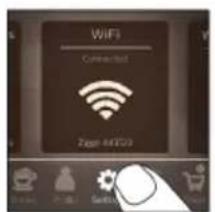

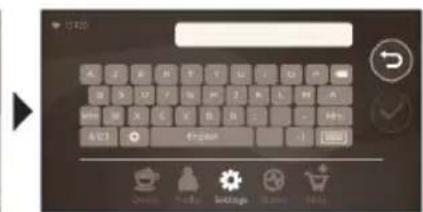
1 Sazlamalar şekiljigine değin we Wi-Fi; ekiljigini tapmak üçin çepden saga tarap gaýdyryň.
2 Wi-Fi sekiljigine deqiň.
3 Gaýnadyjyňyzy Wi-Fi toruňyza birikdirmek üçin ekrandaky ädimlere eýeriň.
flowchart
graph TD
    A["1: Round-over with 4°C"] --> B["2: Stabilizing with hot pot"]
    B --> C["3: Stabilizing with liquid"]
    C --> D["4: Process washing machine"]
    D --> E["5: Cover with glass"]
    E --> F["6: Select your drink"]
    F --> G["7: Process cleaning with color gradient"]
    G --> H["8: Packaging with color gradient"]
    H --> I["9: Cover with glass"]
1 Guw gabyny kran suwundan dolduryp, däne konteýnerini däneden dolduryň.
2 Süýt gabynyň gapagyny towlap açyň we süýt gabyny süýt bilen dolduryň.
Optimal netijeler üçin, hemişe göni sowadyjydan alnan süyt ulanyň.
flowchart
graph LR
    A["Start: Click cup on phone"] --> B["Select your drink"]
    B --> C["Check hands for cooking"]
    C --> D["Check 3x4 times high resolution"]
    D --> E["Check 2x3 times high resolution"]
    E --> F["Check 1x2 times high resolution"]
    F --> G["Check 0x1 times high resolution"]
    G --> H["End: Take user click coffee maker"]
flowchart
graph TD
    A["1: Stirmer with 4°C"] --> B["2: Wash bottle with 2°C"]
    B --> C["3: Flush tube with 2°C"]
    C --> D["4: Outlet of refrigerator with 4°C"]
    D --> E["5: Dish cleaning with 2°C"]
    E --> F["6: Washing unit with 2°C"]
    F --> G["7: Air filter with 2°C"]
    G --> H["8: Free water bath with 2°C"]
    H --> I["9: Air filter with 2°C"]
    I --> J["Select your drink in a glass with 2°C"]
    J --> K["10: Hand holding hand with 2°C"]
    K --> L["11: Water filter with 2°C"]
    L --> M["12: Air filter with 2°C"]
natural_image
Two identical diagrams showing a mixing machine with liquid and a bowl, no text or symbols present.natural_image
Simple line drawing of a gear and grinding wheel on a brown background (no text or symbols)flowchart
graph LR
    A["Start: Tap with coffee cup"] --> B["Select your drink"]
    B --> C["Check up menu, High/High/High"]
    C --> D["Check up menu, High/High/High"]
    D --> E["Check up menu, High/High/High"]
    E --> F["Check up menu, High/High/High"]
    F --> G["End: Tap with coffee cup icon"]
flowchart
graph TD
    A["1: Round-over with 4°C"] --> B["2: Stacking into a bottle"]
    B --> C["3: Stacking into a cup with 2°C"]
    C --> D["4: Stacking into a refrigerator with 1°C"]
    D --> E["5: Stacking into a sink with 1°C"]
    E --> F["6: Stacking into a coffee cup with 1°C"]
    F --> G["7: Stacking into a water bath with 1°C"]
    G --> H["8: Stacking into a glass with 1°C"]
    H --> I["9: Stacking into a coffee cup with 1°C"]
    I --> J["10: Stacking into a coffee cup with 1°C"]
    J --> K["11: Stacking into a water bath with 1°C"]
    K --> L["12: Stacking into a glass with 1°C"]
    L --> M["13: Stacking into a coffee cup with 1°C"]
    M --> N["14: Stacking into a water bath with 1°C"]
    N --> O["15: Stacking into a glass with 1°C"]
    O --> P["16: Stacking into a coffee cup with 1°C"]
    P --> Q["17: Stacking into a water bath with 1°C"]
    Q --> R["18: Stacking into a glass with 1°C"]
    R --> S["19: Stacking into a coffee cup with 1°C"]
    S --> T["20: Stacking into a water bath with 1°C"]
natural_image
HygieSteam logo with circular design and wavy line inside, no text or symbols on backgroundnatural_image
Simple line drawing of a gear and a doughnut on a brown background (no text or symbols)flowchart
graph LR
    A["Select your drink"] --> B["Add coffee cup"]
    B --> C["Combine mix: coffee maker"]
    C --> D["Divine: coffee maker with color gradient"]
    D --> E["Final conversion: coffee maker with color gradient icon"]
flowchart
graph TD
    A["1: Feed & Washing"] --> B["2: Reuse & Cooling"]
    B --> C["3: Refrigeration & Washing"]
    C --> D["4°C Control"]
    D --> E["5: Dish Washing"]
    E --> F["6: Air Condition & Washing"]
    F --> G["7: Air Condition & Washing"]
    G --> H["8: Air Condition & Washing"]
    H --> I["9: Air Condition & Washing"]
    I --> J["Select your drink"]
natural_image
Simple line drawing of a ceramic grinder with gear and blade (no text or symbols)flowchart
graph LR
    A["Start: Hand with Drink"] --> B["Select your drink"]
    B --> C["Check for Beverage"]
    C --> D["Check for Color"]
    D --> E["Check for Thickness"]
    E --> F["Check for Thickness"]
    F --> G["Check for Thickness"]
    G --> H["Check for Thickness"]
    H --> I["Check for Thickness"]
    I --> J["End: Touch to 📞 icon"]
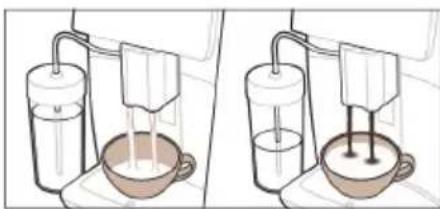
natural_image
Illustration of two experimental setups with a beaker and a stand mixer, no text or symbols present| Maintenance Dashboard |
flowchart
graph LR
    A["Start: Tap with coffee cup"] --> B["Select your drink"]
    B --> C["Check up 30% high accuracy"]
    C --> D["Check up 30% high accuracy"]
    D --> E["Check up 30% high accuracy"]
    E --> F["Check up 30% high accuracy"]
    F --> G["End: Tap with coffee cup and lock icon"]
flowchart
graph TD
    A["1: Round-over with 4°C"] --> B["2: Stacking into a bottle"]
    B --> C["3: Stacking into a cup with 2°C"]
    C --> D["4°C is added to the refrigerator"]
    D --> E["5: Stacking into a sink with a lamp"]
    E --> F["6: Stacking into a coffee cup with a glass"]
    F --> G["7: Stacking into a hand holding a coffee cup with a spoon"]
    G --> H["8: Stacking into a water bath with a cup holding a spoon"]
    H --> I["9: Stacking into a hand holding a coffee cup with a spoon"]
    I --> J["10: Stacking into a hand holding a coffee cup with a spoon"]
    J --> K["11: Stacking into a hand holding a coffee cup with a spoon"]
    K --> L["12: Stacking into a hand holding a coffee cup with a spoon"]
    L --> M["13: Stacking into a hand holding a coffee cup with a spoon"]
    M --> N["14: Stacking into a hand holding a coffee cup with a spoon"]
    N --> O["15: Stacking into a hand holding a coffee cup with a spoon"]
    O --> P["16: Stacking into a hand holding a coffee cup with a spoon"]
    P --> Q["17: Stacking into a hand holding a coffee cup with a spoon"]
    Q --> R["18: Stacking into a hand holding a coffee cup with a spoon"]
    R --> S["19: Stacking into a hand holding a coffee cup with a spoon"]
    S --> T["20: Stacking into a hand holding a coffee cup with a spoon"]
flowchart
graph LR
    A["Start: Hand holding cup on glass"] --> B["Select your drink"]
    B --> C["Step 1: Insert or drop glass with weights and color palette"]
    C --> D["Step 2: Insert or drop light with color palette and control buttons"]
    D --> E["Step 3: Insert or drop light with color palette and control buttons"]
    E --> F["Step 4: Insert or drop light with color palette and control buttons"]
    F --> G["End: Touch with mouse icon and lock icon"]
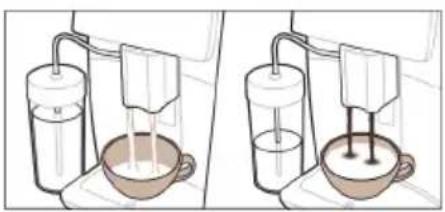
natural_image
Two identical diagrams showing a hand washing a cup of liquid from a water dispenser, with no text or symbols present.flowchart
graph LR
    A["Start: Click cup on phone"] --> B["Select your drink"]
    B --> C["Check up menu, turn down, click actions"]
    C --> D["Check up menu, click actions"]
    D --> E["Check up menu, click actions"]
    E --> F["Close-up of coffee machine with 'OK' button"]
    F --> G["End: Take user to press coffee into machine"]
flowchart
graph TD
    A["1: Feed mixture"] --> B["2: Stimulation with 4°C"]
    B --> C["3: Cooling process"]
    C --> D["4: Washing unit"]
    D --> E["5: Dish cleaning"]
    E --> F["6: Washing unit with liquid"]
    F --> G["7: Clearing glass"]
    G --> H["8: Select your drink"]
    H --> I["9: Hand press with icons for color, size, and texture"]
    I --> J["10: Water filtration with hand icon"]
    J --> K["11: Refrigeration with hand icon"]
    K --> L["12: Washing unit with liquid"]
    L --> M["13: Clearing glass with hand icon"]
    M --> N["14: Fresh water filter with hand icon"]
    N --> O["15: Refrigeration with hand icon"]
    O --> P["16: Clearing glass with hand icon"]
    P --> Q["17: Fresh water filter with hand icon"]
    Q --> R["18: Refrigeration with hand icon"]
    R --> S["19: Clearing glass with hand icon"]
flowchart
graph LR
    A["Start: Hand Stamped Drink"] --> B["Select your drink"]
    B --> C["Check for Drink"]
    C --> D["Control Signals"]
    D --> E["Close & Close"]
    E --> F["Adjustment to Drink"]
    F --> G["End: Touch & Cancel"]
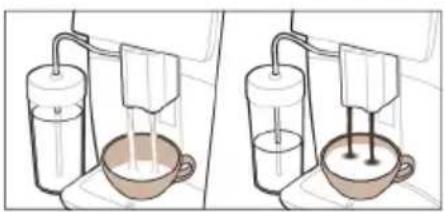
natural_image
Two identical diagrams showing a hand washing a cup of liquid, with no text or symbols present.natural_image
Simple line drawing of a gear and a tool icon labeled 'Ceramic Grinder' (no additional text or symbols)flowchart
graph LR
    A["Start: Click cup on refrigerator"] --> B["Select your drink"]
    B --> C["Add hot pot, reduce cold pot"]
    C --> D["Add hot pot, reduce cold pot"]
    D --> E["End: Capture in coffee brush"]
flowchart
graph TD
    A["1: Feed & Roast"] --> B["2: Reuse & Cooling"]
    B --> C["3: Reuse & Washing"]
    C --> D["4°C Control"]
    D --> E["5: Process with Air Condition"]
    E --> F["6: Refrigeration & Washing"]
    F --> G["7: Refrigeration & Dish & Cover"]
    G --> H["8: Discharge & Washing"]
    H --> I["9: Discharge & Dish & Cover & Refrigeration"]
    I --> J["Select your drink"]
flowchart
graph LR
    A["Start: Hand Gesture"] --> B["Select your drink"]
    B --> C["Add Cold Brew to Drink"]
    C --> D["Close Cold Brew to Drink"]
    D --> E["Hold Cold Brew to Drink"]
    E --> F["Close Cold Brew to Drink"]
    F --> G["Hold Cold Brew to Drink"]
    G --> H["Close Cold Brew to Drink"]
    H --> I["Hold Cold Brew to Drink"]
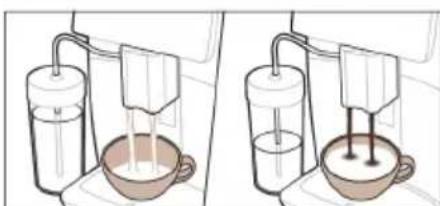
natural_image
Two diagrams showing a milk feeding into a bowl using a pump, with no text or symbols present.Sthuuhlywuw punipawqntn 765
765
Wi-Fi 766
Utptuwjh wlywny (Uwn A)
A1 Unipah hwnhlyutnh unnuhh ywwwnhg
A2 Unwgwð unipǎh pudwùnìuph yuìhwphs
A3 Чинии childhood childhood
A4 Lwnh hwúwn púhy
A5 ۴۶۸۹۵۱۷۱۶۱۷۰۲۳۷۶
A6 Чушрэhlwljhù consuminglyh wǔgwinnúwù lynǎwù
A7 HygieSteam qnlnn2ni wnàwlniú lynùntjutn
A8 HygieSteam qnlnn2ni wnàwyniw lwwihwnhş' lwwah hunnnlwuh pnùhznul
A9 Uninǎh lù ywīh úwùnwúwùnúwù δnnuì pwnànníjwù ywnqwúnnúwù hùwnwúnníjwùp
A10 Utnphü ywwynişhüwwunn
A11 3nuwuph [wn` hunngwlnu]
A12 Unwgúwù lwnqwùnnúwù prùwù (lnwgnighs untntlywùnúnjānìu unwùwùnì huúwùn wjgtībp www.saeco.com/care)
A13 Unipah hwnhylutph unnuh
2tn uwnpn Wi-Fi gwughu shwgutni 2unnhhul npip lquwnnnwuuup.
- uunwùwì dǎnwqnwjhù wùwuhnúlúwù wùnptínwlywù jāwnúwgniútún` oqunwuhhng zhnnàwuhnuajniúŋ nǔnjiwjǔtínì huuíwùn
- oqunulti hwwùnujah qnnòwùnnjāutīng, tīpā ınwūp ātīn tŋynniú hwwuutīh tǔ
- uwnpn ywwuwlygti ǎtn Amazon hw2yhu li hwúwinti wùhnwdt2un wwnnwquuttn, tpat wju hùwnwulnnniajniùn hwwuutih ṭ átn tnlynniú
- ǔhwǔwì àtn Alexa unwù uwnphù l oqunwqqnòti àwjùwjhù ywnwùwnúwù qnnδwnnyjæutīŋ, tṛāt wju hǔwnwùlnnniŋniùn huuwùtīh ṭ àtn tṛlnynniú
^12 nu ^1 Uju utptiu wu chnpawnyulti 5 unipǎnu: Otlu wju huiwupnu utwpnulti 5, huiwnwyn 5, nn unipǎh utwgnnnutn uuwgwδ jhutù: Ujuniwutiuwjǔhy, utup tnω2huwynnniu tūp, nn utptiu wu pwgwnawlywwytu ünn 5:
Utptuwu uhwgutln
Snhtp «úhwùtì» ywwlnytnwyn l u htunutp ywnwqwnúwù ywhwùwgh tynwùhù hwjunùynn úwùnwúwuu hnuwhwùqutnhù:
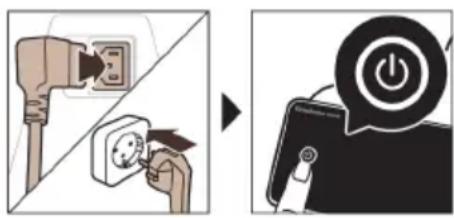
⚠ Uhwqntp uwnpn l u pwnúwqntp wnwghù untwnwnpúwù dwúwúwly: Twnptwnpwwn uunniqtp nş wülnnúwin pwnúwgniúutnh wnlywjniəjniūn:
Wi-Fi gwughu uhwuwln
i Unātūh útptùwù úhwgntp unwù 2,4 93g 802.11 b/g/n Wi-Fi gwǔghù:
i Unātūh útāptùwù unwù Wi-Fi gwùghù lwwuwwgǔlǐn nùàtīnnuǐ lì nùŋljuìluò qnnòwnnyàutnhg oqunútǐni hùwnwùqnnuǎjniù:
i 3wúnqúp, np unátuh útþtǔwù l Wi-Fi tʃnənɪŋhʒn qunúlniú tǔ úhújwùg huuwùtʃnɪpəjwù uwhúwùtʃpniú:
Чwinwntp uunnpl úlywnwqnluwð qnpönnniŋniúuttn` átın unătüh uwnpn Wi-Fi gwùghù úhwgùtlni hwúwn:
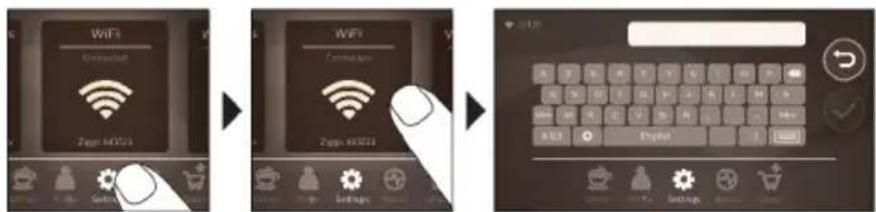
1 Snhtp Yuqnqwulnnniutn*quwnlytnwyn lu uwnn uwhtgntp dwhuhg wg' Wi-Fi wwwunlytnwyn qnutjni hwiun:
2 Snyhtp Wi-Fi wwwunlytnwnyn:
3 4wunwntp 5ynwuhu gnigwnpunn qnnδnnnjuŋniùuttn` δttn unǎtsh uwnpn Wi-Fi gwǔghù úhwǔgūlnhwiúwn:
^7 nip wjdú wwnnwnun tþ lwwwulgólni hwiugwǔghù:
2wjuwjhu ywnwujunwu huwuwwnqh uhngnu uhwiwnni ywu wugwinultini, huzwtu iwu nnn2 dwuwuwu nz wynhul jhutini wwnawwnu wugwinultini ntwpniú utptiwu ywwunwnh wunnuwun wwnqwgnuwu ghyl: 3wúnqutip, nn utptiwu qnuiuniú t wwwwnu uhgwuwjnniu:
| Maintenance Dashboard |
CoffeeMaestro qnpòwnnyjāh oqùnijāwūp lqunnn tīp wùhwùnwlywùwgūtī unipǎh wwwinnwùnniún: Ujǔ jānyl ṭ unwīhu lqunqwùlnpnìuūtnù hùpùnīnnjiù lquinnwntī nǐnhwunptǔ nùunptī lǚwhuwutu uwhúwùluwǒ hwiúwjhù wynn\$hl (Delicato, Intenso, Forte):
HygieSteam \$niùlghwù wùnnúwùn yītnwùn lùwpnniú t yuwrāh hūwúwùwnqì hīnwǔtīnú lùhynnonqwùhqùtān: oqunwqnndāp wjù yuwwnighùn yuú yuwrāh yuò hhuúuwaǒ wjj núwīhpùtn wjuunnwauhtīng htānn:
Utn nhúwglyniù upǎwnwgn wjuinnwuiinluwǒt 100% lqnwhuhwjhg, nnwtaqh wjù jhùh pwgwnzwwbu lyn2un uǎ2qnhn: Ujù lqwnn n hwnúwntgulti àtn āw2wlyhù 12 yhniuwung úwlywnnwylutnnu:
Sbhuuwwuwnhuiwù ywhuwlyn àtbq unnwuwnnniú t oqnwlwn untntywnunlnjniú u ðwünigniú uwnph unwnptn pwnwnnhyutnh ywnqwuhǎwlyh úwuhù (onhùwú` AquaClean qunhzh yhnhuwnhǔuwù wǔhnudt2unnjajwù úwuhù):
Cuiythputnh wwnnwnnniu
Cunhwùnín qnnònnημημιμίμη
Cuiwthp wwnnwnuntni hwiwn nniq wtunp 5 ih puuh wwnq qnndnnniajniu lwwunntip:

flowchart
graph LR
    A["Select your drink"] --> B["Make a coffee cup"]
    B --> C[Click 2x 3x 4x 5x 6x 7x 8x 9x 10x 11x 12x 13x 14x 15x 16x 17x 18x 19x 20x 21x 22x 23x 24x 25x 26x 27x 28x 29x 30x 31x 32x 33x 34x 35x 36x 37x 38x 39x 40x 41x 42x 43x 44x 45x 46x 47x 48x 49x 50x 51x 52x 53x 54x 55x 56x 57x 58x 59x 60x 61x 62x 63x 64x 65x 66x 67x 68x 69x 70x 71x 72x 73x 74x 75x 76x 77x 78x 79x 80x 81x 82x 83x 84x 85x 86x 87x 88x 89x 90x 91x 92x 93x 94x 95x 96x 97x 98x 99x
1 2nh pwn lgntp dnnwuh gnu, huy unipah hwnhlyutph unnuh` unipah hwnhlyutpnu:
2 -middle utility utility utility power of utility utility utility utility utility utility utility utility utility utility utility utility utility utility utility utility utility utility utility utility utility utility utility utility utility utility utility utility utility utility utility utility utility utility utility utility utility utility utility utility utility utility utility utility utility utility utility utility utility utility utility utility utility utility utility utility utility utility utility utility utility utility utility utility utility utility utility utility utility utility utility utility utility utility utility utility utility utility utility utility utility utility utility utility utility utility utility utility utility utility utility utility utility utility utility utility utility utility utility utility utilities
3 Snhtp Cúwthpútn» «Cúwthpútn» pùnnwguìy úninp qnndtīn huuw: Uwun
uwhtgntp àwhhg wq l pùnhtp wùhnpdtzun púwthpn` wju unnhtni úhqngnu:
- Snhtp «2x» ywnlytnwn, tpat gwülywünü tb tihti tnyni powdwy: Uptiuwi wylnnüwin ytnwnu lwwwnnni f wnwni tnyni hwgnnywuwghyl nunnluwö nüwtihputnhu hwiwwwwunwuhwu:
«2x» wwwunlytnwyn hwwuwutgh 5 n2 pninn püwuthputnh hwúwn:
4 Cúwúhpu nùunptinig htunn lwwnn tþ lwwunwnti lwwqwlnnniútn pnu n átn ùwwjuwwhnniŋniútnh' lwwqwlnnniúu uwwnnwútnp útnu lwwú útnpu uwhtgutini úhongnu:
5 Utnútp útlyüwnyh/ywùqh▶wwunlytnwyn` nùnnuìwǒ núwǔhph wwwunwwunniún ulyutāni huuāwn:
Uh oqunwqnnpap lwnwutjwgulw6 lywi pninwultun uninah hwnhlyutn:
Cuiwthph hwnwwhthh htn lwwlwd wgwlnjniu
Cuiwthph nnn2wlyh wwnwutunnh uwwuhu jnwgnighz utnhtlywnunjnyajniu utnwuwini hwuwn utnhtp lu 3 lwwjnywuu utnhtwdo wwhtp wju:
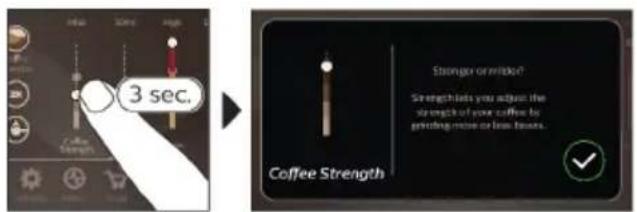
Чупёшjhù húpnu núwthputnh wwnnwnnniún
flowchart
graph TD
    A["1: Feed & Reaction"] --> B["2: Stabilization"]
    B --> C["3: Reuse & Cooling"]
    C --> D["4°C & 4°C Interface"]
    D --> E["5: Process & Washing"]
    E --> F["6: Refrigeration & Dish & Cover"]
    F --> G["7: Packaging & Finishing"]
    G --> H["8: Storage & Recycling"]
    H --> I["9: Press & Paper & Paper"]
    I --> J["Select your drink with Beverage & Watchers"]
1 2nh pwwn lgntip dnnwuh qnnu, huy uninah hwnhylutph nniuhn` uninah hwnhylutpnu:
2 3bwngntp lywph unwnwjh ywhwnhgh winnwnwluttn l ywph unwnwù lgntp lywpanl:
Luwwqnjù wnnjniúpútn uunwúwini huuún oqnuwqnótúp úhwjù uwnzúwnwúhg huúwó lwa:
3 4wph ayniu hunnuwr uhwgntp ywwnishuwunnh:
4 Swnwjh utg ntp ywah utunwnwluyu hunnywyn:
5 Snyhtp Cúwtyhpùtnóywnlytynwyn, www nǐnntp l u nǔunntp àtn tǔwjuŋuynwò ywjaǔwjhù núwtyhp:
6 4wnn np ywnwnti ywnqwlnnniuutn nuu atn uwhuwhnupniutnh' ywnqwlnnuu uwnnwlyutnp utnu ywu utnpu uwhtgutini shngny:
7 Swuylwgwδ wuhh utnútp úbyùwnlyh/luwqh▶wunnytnwyn` pùnnyuδ núwtihph wjuinnwutnniŋ ulyutini huuún:
natural_image
Two identical illustrations of a hand washing a cup with liquid, no text or symbols present.1 Puugtp wnugw# uninoh pudw#uniuph ywhwnhzn u qnu utg uty qnu wunugw# unină lgntp (zwh#u# qnu#n): Uww ywhutp ywhwnhzn:
2 Snhtp Cuiwthputn wwnytnwn, uwnn uwhtgntp dwuhg wg u nuntp atn uwhunwnw dnuwlhp:
3 Snhtp wnugwð unipah wwwunlytnwyn:
4 ৬৭৭৭৭৭৭৭৭৭৭৭৭৭৭৭৭৭৭৭৭৭৭৭৭৭৭৭৭৭৭৭৭৭৭৭৭৭৭৭৭৭৭৭৭৭৭৭৭৭৭৮
5 Utnútp útlúwnyh/ywúqh▶wwunlytnwyn` núunnúwó núwtíhph wwwnnwwunnún ulyutíni hawúwn:
i Lwhwwyu wunwugd uninau pwnntini ntwnpniu nnp stp ywnnnwuw lwnqwunnti nuwlthph wunnipjniun lywú uhwduwuiwú uh swihwpuduhg wulti unină wwnnnwunti:
Swp qnh distinguwynnwniun
1 3wúnqutp, nn utnphù ywwnishùwnnnn ǎh2n ʒ uhwgulwó útptùwjhù (Uy. 1):
2 Όρημήν υπων υπωνητρ ρωδυγ:
3 Tap «Swp gni» wwwlytnwyn (Uy. 2):
4 ৬৭০১৭৭৭৭৭৭৭৭৭৭৭৭৭৭৭৭৭৭৭৭৭৭৭৭৭৭৭৭৭৭৭৭৭৭৭৭৭৭৭৭৭৭৭৭৭৭৭৭৭৭৮
5 Utnútp útlyùwnyh/ywùqh▶ywwunytnwyn:
6 Члчнш утнштр утышынл/чшчх►шкунлгтншп, нштбчншквнтгітр имр өнн үнншүйншт үштбчншт үштбчншт үштбчншт үштбчншт үштбчншт
Utuhwnwlywuwgniu
Utiptuwù jānji t unwīhu ywnqwptnti núwtihph ywnqwulnnniuttn ðtn hú ywhuwuhnnjējniùutnh hwúwàwju u ywhtl hwnúwntgylwð núwtihpn wùàuwlywù wnn\hniú: ζniρ ywnnn tρ nùunntl ðtn utihwlywù wwnnytnwyn l ðtn utihwlywù wnn\hiḥ wùniùn:
Unwq nùnnnìjniù CoffeeMaestro \$niùlghwjh úhɒngnu
2tn ubptuwu wnwqwnynui t hwuh wnn\hiutn npuntini hwwnwlnnnijniu CoffeeMaestro \niulghwjh uhngnu' pnnn ywnqwlnnniwutnp wnwudhu-wnwudhu ywnqwptntini ynhwuntu: 7nip ywnnn tpr npunpti Delicato, Intenso u Forte: CoffeeMaestro hwuh wnn\$hiu npuntini hwuwn.
1 3wtp dtn uwhununnw# puwthph wwnlytnwlh# (Uy. 4):
2 Члчнш huqup CoffeeMaestro wwwlnytnwlyhù (Uy. 5):
- Cúwqíhph hhuìuwlywù ywnqwulnpniúutnù wjdú ywnqwptnluwǒ tǔ huúwwywinwuhuìwùwpàn:
3 Utnútp útyiwnlyh/ŋwnwnh▶wwwnytwnlyn` núwblph wwwnnwunnniún ulyutni hwiúwn:
Uthwnwlywùwgntp àtn núwtyhpn CoffeeEqualizer Touch qnnðwnnyjah úhɒngnu
Cúwthpù pùnntīng htūn wùnnúwùn lǐnwùn lǐwùnhùwùnǚ lì CoffeeEqualizer Touch qnnðwnnyjān, nnp àq pòuǐ lì unwìhu uwhúwǔl púwthph lǐwùnwùnnuìtāpn: tǐyùn utnútp lǐnwùhù gnigwùnnuìn jìnwpwùyīn unwnnp` oqúníəjwiù qnnðwnnyjēu wùnhúwgùtīn lì jìnɡnighs utnǐtywùnjuìjniù uunwùwīn hwiúwn:
CoffeeEqualizer Touch qnpdwnnyah oqunipwup lwnnn tpr uwhuwutl htnluyw lwnquwnnuiutqn.
1 Cúwúlph wùnniŋniùn
2 Uninah puuwnyn
3 4wphpwuwyn
4 2nh pwiwnyn
5 Cúwǔhph gānúwūunhǎwùn
6 Φημηνηρωμωνη
7 ۴۷۰۹۸ tṛ p l w u l y w u n w n t l n u n n i j n i 1 y w u 2 p w d w y w w u n p w u n t i n i u h o
8 Unipah / ywah uwinwlpwnwnuwu htpnwlpwnlprjnlun
^12 nù 4whuìwǒ t àtn pùnnwǒ núwǔhphg, pà nn lyuànquǐnnuǎutn lyuānn bīp lyuànqūptnti:
^1 whwutp uwhpunntgh nuwthputn atn wnphiniu
Utptuwu panyl t unwihu yhnhutl nuwthph ywnquwnniuttn pwn atn uwhuwuhnnjntiutnh u wwhuwutl wihwnwnlywuwgluw dnuwthp wuduwlyw uwn\hniu: ywnnn tpr nunntl wnn\hl n wwhuwutl nnwuniu puwnwnwnnnu:
4wnnn bp uuntnδt1 wnn\hl u nnwünw wultiwgutl núwtjhp` oqnwnqnδtlnl wnn\hlh 🚫wwunytnwyn:
1 Snhtp wnn\$hh ywwunytnwyn hhuuwlyu njuunwgwulyniu (Uy. 6):
2 Snyhtp 9niuwntlni u2wuh wwwunytnwnyn (Uy. 7):
3 Uninpwqntp atn wunlun u nunntp wwnlytnwyn:
4 Ujdú yunnn b.p wultiugutl núwthpn: Snhtp wühnwdt2n núwthph wwnytnwnyn:
5 Uthwnwlywuwgntip nuwbhpn CoffeeEqualizer Touch lywú CoffeeMaestro qnnðwnnyjh uhongnu:
6 Snhtp «‘Iwhwùtì wnn\hǐnǚ» wwwunltnwyn’ wju àtn wùàtwlywù wnn\hǐniú wwhwùtǐnhwúwn (Uy. 8):
Lnwgnighs zwhwpwdhù (ExtraShot)
2tn unǎtúh útptíuwù unnwúwnnniú ʒ unipǎh u lǚwah núwtíhpútnh útg Ñhuunntunnjh jnuqnighs zwhwpudhù wútlwgútínì hùwnwúlnnniəjniú, onhùwú’ tiqā ınip wultíh whùn unipǎ tīp ǔwuhnūwnnniú:
1 Όρημήν υνων υπημητρ ρωδων:
2 Snyhtp úty hwniúny núunnpunn núwytjhpùtnh wwwunlytnwylútnhg útlyn' wühnwdt2n núwytjhp núunnptini hwniúwn (Uy. 4):
3 ۱۲۰۹۷۵۱۶۸۱۴۵۱۶۸۱۶۸۱۶۸۱۶۸۱۶۸۱۶۸۱۶۸۱۶۸۱۶۸۱۶۸۱۶۸۱۶۸۱۶۸۱۶۸۱۶۸۱۶۸۱۶۸۱۳۵
10 10 10 10 10 10 10 10 10 10 10 10 10 10 10 10 10 10 10 10 10 10 10 10 10 10 10 10 10 10 10 10 10 10 9:
4 Uww utnútp útyuwnlyh/luwqh uwwnytnwyn' nuwtihph wwwnnwunniún ulyutni hwuwn:
5 4nlyhù utnútip útlyüwnpIh/ywúqh 4wwunlytnwIyn, nnwytuqh 7wnwuntgútip núwytIph wnnnwúnniún 4wwhpuwà uwnph w2hwunnwúph wülwnunn:
i ExtraShot qnnδωηγημει ημηταίνη ηθωρηύ υħωσωύωωλγ hùωπωύης ωωυπωυται υπαή υħωμύ υτιχωρωψι:
i Lnwgnighs zwwhwpwduh qnndwnnyipn hwwwutih 5 nε pninn púwuthputph hwwuyn:
Utptuwjh ywnqwynnniutph ywnwnniu
Ubptüwjh ywnqwynnniwutnh utð uwwn lynn n tip hwnüwntguti` hwtinu 4wnqwynnniwutn * wwnytnwuhu u htunutinu tynwuh pwjltnhu:
Ungwug wgwugnijawu hwuw (hwawhuih unpunn hwngtn, untuwujniatn u wjj), uqwuwjntip wju qqnyluh ywwqh unwjh QR lnnn ywu wjgtltp www.saeco.com/care
A11 gradescence imaging
▶
▶
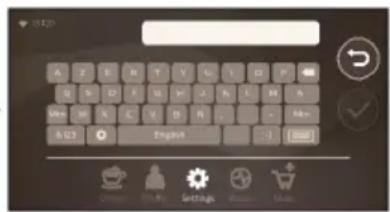
natural_image
HygieSteam logo with circular design and wavy line inside (no text or symbols beyond the logo)natural_image
Simple line drawing of a gear and a tool icon labeled 'Ceramic Grinder' (no additional text or symbols)ΗΣΩΒη ΘΑΔΦΩΥ ΒΣΩΓΣΩΝ, ΦΜΔΩΓΩΝΥ ΦΟΔΒΩΥΩΓΩΓΩΝΟ 100% ζΩΜΔΩΝζηλβσδ, ΘΑΔΜΗΗΥΩΓΩΝΟ ΥΔΥΜΠΟ ΦΟ θΥΙΦΗΝ. ηΛ ΔΥΩΝΔΜΩΣ ΦΟΜΗΩΥΩΓΩΝΦΩΓΟ ΜΩΣΩΒη ΘΑΔΜΣΒΩΓΩΝΟ ΔηΒΩΓΩΝΟ 12 ΒΣΩΓΒΥΓΜΠΟ ΦΟΜΒΩΓΩ.

natural_image
Simple line drawing of a mug placed on a shelf next to a wall-mounted cabinet (no text or symbols)

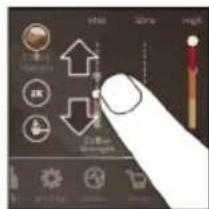

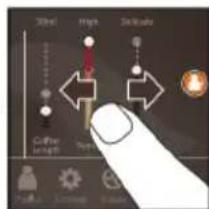

natural_image
Close-up of a finger pointing at a glowing circular icon on a dark screen (no text or symbols visible)
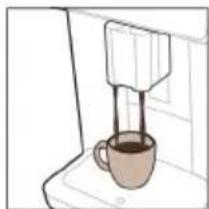
natural_image
Simple line drawing of a coffee maker with a cup on a counter (no text or symbols)CoffeeEqualizer Touch grades of the 2018-2020 Coffee Equalizer Touch
1 అమారున్న లాదాగ్య
2 yuzn bumubn
3 რის რაოდენობა
4 -by-mn-l-mm-gb-md
6 จุ๊ะกับ มีสมรูปย์
7 თქვენ ასევე მეგიძლით გადანუვიტოთ 1
ან 2 დინწრს მომგადება
8 үүзүлү үб өндүлү үздүмүбдүлү өнзбднадүүзгімдү
AquaClean -by-mn-2-0-0-0-0
AquaClean grades of the quality of the quality of the quality of the quality of the quality of the quality of the quality of the quality of the quality of the quality of the quality of the quality of the quality of the quality of the quality of the quality of the quality of the quality of the quality of the quality of the quality of the quality of the quality of the quality of the quality of the quality of the quality of the quality of the quality of the quality of the quality of the quality of the quality of the quality
2 Uzbekistan, Thailand, Egypt, Bosnia, Myanmar, Jordan, Ghana (Egypt, Nigeria, Bangladesh), United States, China, Indonesia (U.S., 28).
3 Uzbekistan objung gub bujuzon dnddsmzgng qayd8g mn3g dbuqgu (luqm. 29).
azimuth, DAP B.V. azimuth, mem azimuth, azimuth, SM6685, SM6682, SM6680 azimuth 2014/53/EU azimuth
g3m3g3dn5n g6b3b5on g2s0s0n1m0n g2s0g0 1m7m5o b3m0n1s63qmdns g2d0g0 n6fj6b6d- dnl6d5m08g: https://www.saeco.com.
796 AquaClean D'Or D'Or
797
797 ____
800 ____
801
801 ____
802 ____
802 ____ 71777179
806 ____ ☐הכלה 906
807 ____
807 Wi-Fi
www.saeco.com/MyCoffeeMachine

1.Wi-F
2.Wi-F
3.770
natural_image
Simple line drawing of a gear and a tool icon labeled 'Ceramic Grinder' (no additional text or symbols)תָאַלְרִי בְּרִי
תְּרָה בְּרָה
flowchart
graph LR
    A["Input: Breakfast with coffee cup"] --> B["Select your drink"]
    B --> C["Add 30ml high volume"]
    C --> D["Add 30ml high volume with coffee cup"]
    D --> E["Add 30ml high volume with coffee cup"]
    E --> F["Add 30ml high volume with coffee cup"]
    F --> G["Add 30ml high volume with coffee cup"]
natural_image
Two identical diagrams showing a mixing machine with liquid and a bowl, no text or symbols present.
- nodo
2.770 - אַרְשָׁ
4.תְשָׁ - כְרָה:
.(9) ExtraShot-2017. 3
- n7e
5.7nc
הכלה. Among all three states, they will be the first state.
: AquaClean 10% - 7% - 7% - 7% - 7% - 7% - 7% - 7% - 7% - 7% - 7% - 7% - 7% - 7% - 7% - 7% - 7% - 7% - 7% - 7% - 7% - 7% - 7% - 7% - 7% - 7% - 6% - 6% - 6% - 6% - 6% - 6% - 6% - 6% - 6% - 6% - 6% - 6% - 6% - 6% - 6% - 6% - 6% - 6% - 6% - 6% - 6% - 6% - 6% - 6% - 6%
1.Aql
2. ^1 (πι _1
.הכלההוּרָהוּרָהוּרָהוּרָהוּרָהוּרָהוּרָהוּרָהוּרָהוּרָהוּרָהוּרָהוּרָהוּרָהוּרָה: www.saeco.com/care
.הכלההוּרָה,הכלההוּרָה
natural_image
Illustration of a medical or laboratory procedure showing a container with a magnified view of a dark circular object (no text or symbols present)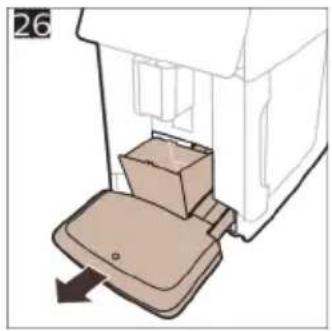
natural_image
Diagram of a mechanical device with a box and lever, showing no text or symbols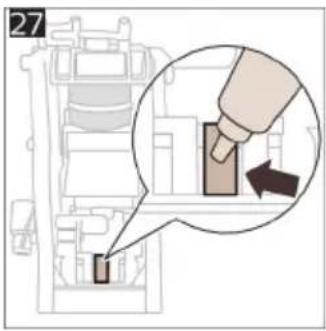
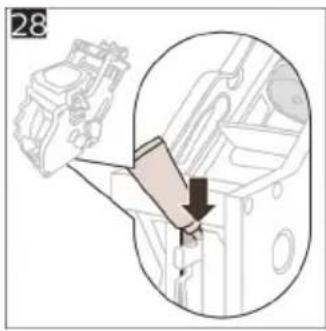
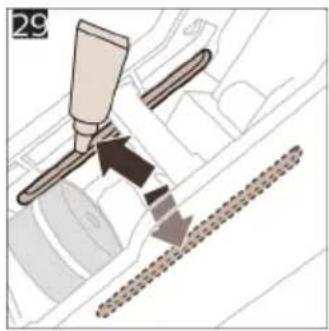
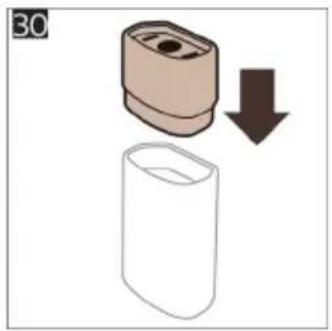
natural_image
Illustration of a cylindrical object with a downward arrow indicating process (no text or symbols)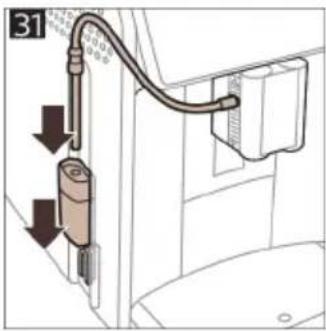
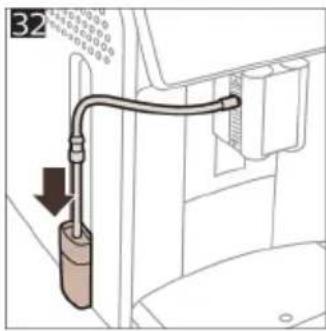
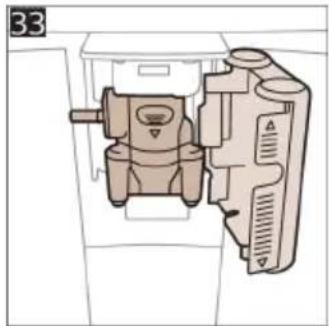
natural_image
Technical diagram of a mechanical device with internal components (no text or symbols visible)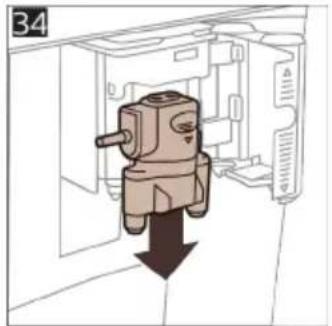
natural_image
Diagram of a mechanical component with a downward arrow indicating force or direction (no text or symbols present)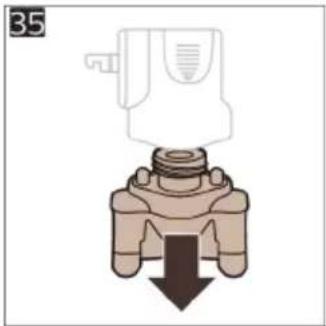
natural_image
Diagram of a valve mechanism with a downward arrow indicating force or direction (no text or symbols present)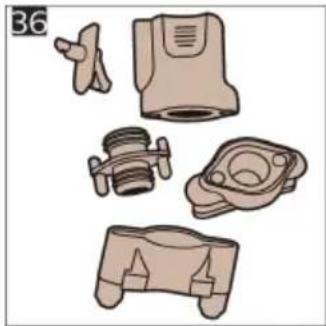
natural_image
Illustration of various mechanical components including a valve, pump, and housing (no text or symbols)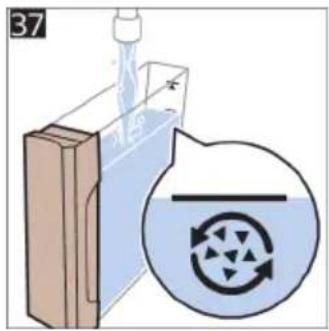
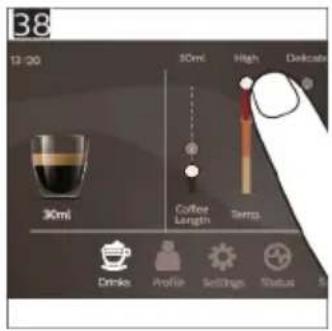
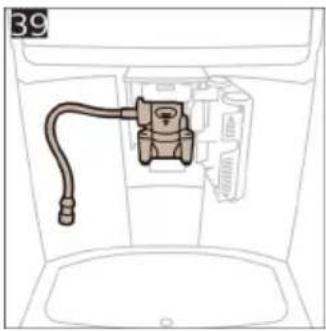
natural_image
Diagram of a mechanical component with a hose inserted into a container (no text or symbols)
natural_image
Diagram showing three panels of a folded paper or panel with arrows indicating direction (no text or symbols)4219.450.3077.2 (5/2022) rev.00

421945030772
www.saeco.com/care


75% recycled paper
75% papier recyclé
