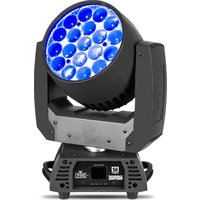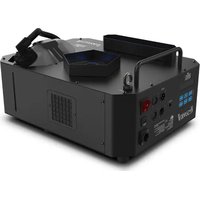
Vesuvio II - Professional spotlight Chauvet - Free user manual and instructions
Find the device manual for free Vesuvio II Chauvet in PDF.


| Product Type | Fog machine and LED light projector |
| Brand | Chauvet |
| Model | Vesuvio II |
| Power Supply | 120 VAC, 60 Hz or 230 VAC, 50 Hz (depending on model) |
| Power Consumption | Not specified (estimated: ~500 W) |
| DMX Channels | 15 DMX channels |
| DMX Connector | 3 or 5-pin |
| Tank Capacity | Not specified (estimated: 1 liter) |
| Recommended Fluid | Chauvet fog fluid (QDF) |
| Maximum Ambient Temperature | 45 °C (113 °F) |
| IP Rating | IP20 (indoor use only) |
| Mounting | Omega brackets (x2), safety cable required |
| Weight | Not specified (estimated: 5 kg) |
| Dimensions | Not specified |
| Main Functions | Fog with timer, LED colors (2 zones), strobe effect, dimmer |
| Warm-up Time | Approximately 10 minutes |
| Maintenance | Empty tank before transport, do not open the device |
| Safety | Do not touch the nozzle, keep 50 cm distance from surfaces, use a circuit breaker |
| Warranty | Limited warranty, see Chauvet website for terms |
| Included Accessories | Omega bracket (x2), Seetronic Powerkon IP65 power cable, warranty card, reference manual |
Frequently Asked Questions - Vesuvio II Chauvet
User questions about Vesuvio II Chauvet
0 question about this device. Answer the ones you know or ask your own.
Ask a new question about this device
Download the instructions for your Professional spotlight in PDF format for free! Find your manual Vesuvio II - Chauvet and take your electronic device back in hand. On this page are published all the documents necessary for the use of your device. Vesuvio II by Chauvet.
USER MANUAL Vesuvio II Chauvet
natural_image
Line drawing of a laboratory instrument with labeled components (no text or symbols)Intentionally Left Blank Page
About This Guide
The Vesuvio II Quick Reference Guide (QRG) has basic product information such as connection, mounting, menu options, and DMX values. Download the User Manual from www.chauvetprofessional.com for more details.
Disclaimer
The information and specifications contained in this QRG are subject to change without notice.
LIMITED WARRANTY
FOR WARRANTY REGISTRATION AND COMPLETE TERMS AND CONDITIONS PLEASE VISIT OUR WEBSITE.
For Customers in the United States and Mexico: www.chauvetlighting.com/warranty-registration.
For Customers in the United Kingdom, Republic of Ireland, Belgium, the Netherlands, Luxembourg, France, and Germany: www.chauvetlighting.eu/warranty-registration.
Chauvet warrants that this product shall be free from defects in material and workmanship under normal use, for the period specified in, and subject to the exclusions and limitations set forth in the full limited warranty on our website. This warranty extends only to the original purchaser of the product and is not transferable. To exercise rights under this warranty, you must provide proof of purchase in the form of an original sales receipt from an authorized dealer that shows the product name and date of purchase. THERE ARE NO OTHER EXPRESS OR IMPLIED WARRANTIES. This warranty gives you specific legal rights. You may also have other rights that vary from state to state and country to country. This warranty is valid only in the United States, United Kingdom, Republic of Ireland, Belgium, the Netherlands, Luxembourg, France, Germany and Mexico. For warranty terms in other countries, please consult your local distributor.
Safety Notes
Depending on the amount of fog generated, all fog machines may set off smoke detectors.
- Drain the tank before transporting the product.
- This product is not intended for permanent installation.
- This product is for indoor use only! (IP20) To prevent risk of fire or shock, do not expose this product to rain or moisture.
- Do not operate this product if the housing, fluid tank, or cables appear damaged.
• In the event of a serious operating problem, stop using immediately. - DO NOT open this product. It contains no user-serviceable parts.
- Do not use for space heating purposes.
• Never disconnect this product from power by pulling on the cord.
• Mount this product in a location with adequate ventilation, at least 20 in (50 cm) from adjacent surfaces.
- USE a safety cable when mounting this product overhead.
- Do not touch the output nozzle on this product. It is very hot during operation and it may remain hot for several hours after turning the product off.
- Do not leave any flammable material within 50 cm of this product while operating or connected to power.
- Only use Chauvet (QDF) fog fluid.
- Do not add anything to the fog liquid.
- Do not drink the fog liquid.
- Do not allow the fog liquid to touch your skin or eyes.
- Do not connect this product to a dimmer or rheostat.
- Only connect this product to a grounded and protected circuit.
- Only use the handles to carry this product.
• The maximum ambient temperature is 113 °F (45 °C). Do not operate this product at higher temperatures.
- To eliminate unnecessary wear and improve its lifespan, during periods of non-use completely disconnect the product from power via breaker or by unplugging it.
- CAUTION: When transferring product from extreme temperature environments, (e.g. cold truck to warm humid ballroom) condensation may form on the internal electronics of the product. To avoid causing a failure, allow product to fully acclimate to the surrounding environment before connecting it to power.
Contact
Outside the U.S., United Kingdom, Ireland, France, Germany, Mexico, or Benelux contact your distributor to request support or return a product. Visit www.chauvetprofessional.com for contact information.
What is Included
- Vesuvio II
- Omega Brackets (x2)
- Seetronic Powerkon IP65 power cord
- Quick Reference Guide
AC Power
This product has a fixed voltage power supply and it can work with an input voltage of either 120 VAC, 60 Hz or 230 VAC 50 Hz, depending on the specific model.
AC Plug
| Connection | Wire (U.S.) | Wire (Europe) | Screw Color |
| AC Live Black Brown Yellow/Brass | |||
| AC Neutral White Blue Silver | |||
| AC Ground Green/Yellow Green/Yellow | Green | ||

To eliminate unnecessary wear and improve its lifespan, during periods of non-use completely disconnect the product from power via breaker or by unplugging it.
Resetting the Breaker
This product is equipped with a resettable circuit breaker. If the breaker trips, all sections of this product will lose power.
- Remove the power cord from main power.
- Allow unit to cool for 15 minutes.
- After 15 minutes, you may attempt to reset the breaker by pressing the button with your finger.
- Plug the product's power cord into the power outlet and continue using as recommended.
DMX Linking
The Vesuvio II will work with a DMX controller using a 3- or 5-pin DMX data connection for its 15-channel DMX personality. A DMX Primer is available from www.chauvetprofessional.com
DMX Connection
The Vesuvio II uses a 3- or 5-pin DMX data connection for its 15-channel DMX personality. See the User Manual for information about connecting and configuring the product for DMX operation.
Preparing for Operation
To prepare the Vesuvio II for operation:
- Pull out the fluid tank and remove the cap.
- Verify that the two plastic hoses attached to the inside of the cap are in place and in good condition.
- Pour Chauvet (QDF) fog fluid inside the tank, and re-cap.
- Make sure that the plastic hose that goes from the cap to the fogger is not bent.
- Reinsert the tank.
- Plug in power and wait approximately 7 minutes for warm-up to complete.

When storing the product, ALWAYS be sure to store the fluid tank with the cap up as seen on the Product Mounting Diagram before installing the front cover to avoid tube damage that may cause leakage.

Only use Chauvet approved (QDF) fog fluid. Otherwise, you might not have satisfactory results. In addition, unapproved fluid can damage the Vesuvio II or cause harm to humans or animals.
Mounting
Before mounting this product, read the Safety Notes. Use at least one mounting point per product. Make sure the mounting clamps are capable of supporting the weight of the product. For our CHAUVET Professional line of mounting clamps, go to http://trusst.com/products.
Mounting Diagram
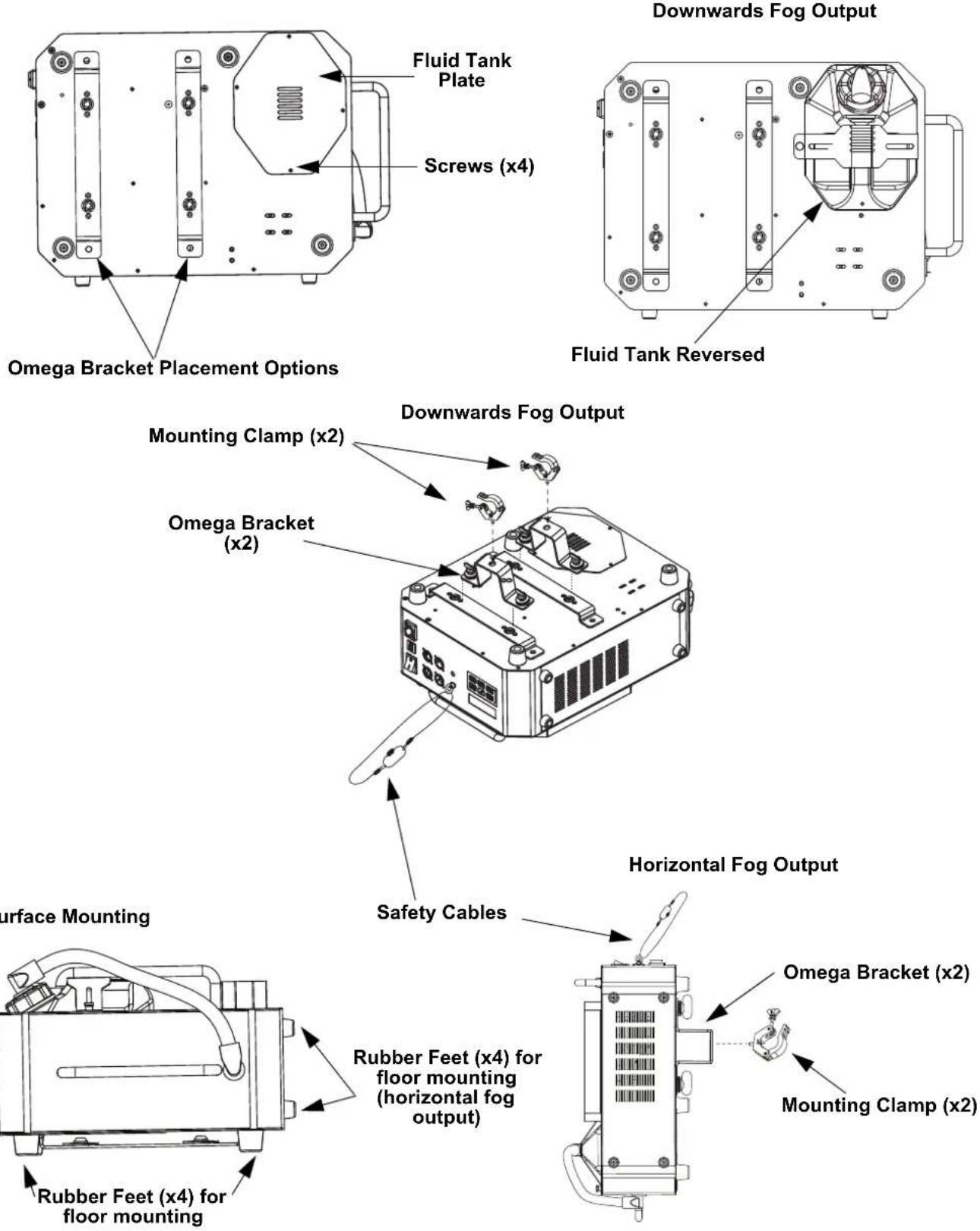
Downwards Fog Output
Surface Mounting
Control Panel Description
| Button/Knob Function | |
| Enters the programming mode | |
| Navigates upwards through the menu list and increases the numeric value when in a function | |
| Navigates downwards through the menu list and decreases the numeric value when in a function | |
| Starts the timer controlled operation | |
| Controls the output as a switch. Press once for full output and press again to turn off. | |
| Manual fog output | |
Menu Map
| Main Level Programming Levels Description | ||
| Interval Set 10-200 Seconds Sets the interval between fog output | ||
| Duration Set 1-10 Seconds Sets the duration of the fog output | ||
| Color | OFF | No color output |
| 1 | Red | |
| 2 | Green | |
| 3 | Blue | |
| 4 | Amber | |
| 5 | Ultraviolet | |
| 6 | Hot pink | |
| 7 | Magenta | |
| 8 | Yellow | |
| 9 | Cyan | |
| 10 | White | |
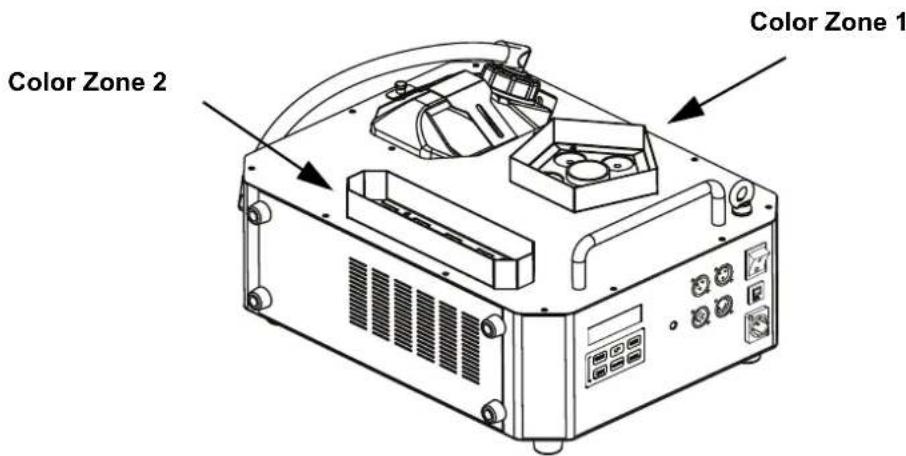
| 11 | Zone 1 red, zone 2 green | |
| 12 | Zone 1 red, zone 2 blue | |
| 13 | Zone 1 green, zone 2 red | |
| 14 | Zone 1 green, zone 2 blue | |
| 15 | Zone 1 blue, zone 2 red | |
| 16 | Zone 1 blue, zone 2 green | |
| 17 | Zone 1 magenta, zone 2 amber | |
| 18 | Zone 1 magenta, zone 2 blue | |
| 19 | Zone 1 amber, zone 2 magenta | |
| 20 | Zone 1 blue, zone 2 hot pink | |
| 21 | Random color output | |
| DMX | 001-512 | Selects the DMX starting address |
Color Zones
DMX Values
15 CH
| Channel Function Value Percent/Setting | |||
| 1 Fog | 000 ⇔ 009 No function | ||
| 010 ⇔ 255 Fog on | |||
| 2 | R e d | 000 ⇔ 014 No function | e 1 |
| 015 ⇔ 255 0-100% | |||
| 3 Green zone 1 | 000 ⇔ 014 No function | ||
| 015 ⇔ 255 0-100% | |||
| 4 Blue zone 1 | 000 ⇔ 014 No function | ||
| 015 ⇔ 255 0-100% | |||
| 5 | A m b e | 000 ⇔ 014 No function | o n e 1 |
| 015 ⇔ 255 0-100% | |||
| 6 UV zone 1 | 000 ⇔ 014 No function | ||
| 015 ⇔ 255 0-100% | |||
| 7 | R e d | 000 ⇔ 014 No function | e 2 |
| 015 ⇔ 255 0-100% | |||
| 8 Green zone 2 | 000 ⇔ 014 No function | ||
| 015 ⇔ 255 0-100% | |||
| 9 Blue zone 2 | 000 ⇔ 014 No function | ||
| 015 ⇔ 255 0-100% | |||
| 10 Amber zone 2 | 000 ⇔ 014 No function | ||
| 015 ⇔ 255 0-100% | |||
| 11 UV zone 2 | 000 ⇔ 014 No function | ||
| 015 ⇔ 255 0-100% | |||
| 12 Color Mixing | 000 ⇔ 009 No function | ||
| 010 ⇔ 255 Color Mixing | |||
| 13 Auto Speed | 000 ⇔ 009 No function | ||
| 010 ⇔ 255 Speed, slow to fast | |||
| 14 Strobe | 000 ⇔ 009 No function | ||
| 010 ⇔ 255 Speed, slow to fast | |||
| 15 Dimmer | 000 ⇔ 014 No function | ||
| 015 ⇔ 255 0-100% | |||
Acerca de Esta Guía
Intentionally Left Blank Page
Contact Us
General Information Technical Support
Chauvet World Headquarters
Address: 3360 Davie Rd. Voice: (844) 393-7575
Davie, FL 33314 Fax: (954) 756-8015
Voice: (954) 577-4455 Email: chauvetcs@chauvetlighting.com
Fax: (954) 929-5560
Toll Free: (800) 762-1084 Website: www.chauvetprofessional.com
Chauvet U.K.
Address: Pod 1 EVO Park Email: UKtech@chauvetlighting.eu
Little Oak Drive, Sherwood Park
Nottinghamshire, NG15 0EB Website: www.chauvetprofessional.eu
UK
Voice: +44 (0) 1773 511115
Fax: +44 (0) 1773 511110
Chauvet Benelux
Address: Stokstraat 18 Email: BNLtech@chauvetlighting.eu
9770 Kruishoutem
Belgium Website: www.chauvetprofessional.eu
Voice: +32 9 388 93 97
Chauvet France
Address: 3, Rue Ampère
91380 Chilly-Mazarin
Email: FRtech@chauvetlighting.fr
France Website: www.chauvetprofessional.eu
Voice: +33 1 78 85 33 59
Chauvet Germany
(Entrance by Calle 2)
Email: servicio@chauvet.com.mx
Zona Industrial Lerma Website: www.chauvetprofessional.mx
Visit the applicable website above to verify our contact information and instructions to request support. Outside the U.S., United Kingdom, Ireland, France, Germany, Mexico or Benelux, contact the dealer of record.


UL 1573
CSA C22.2 No. 166
E113093

RoHS