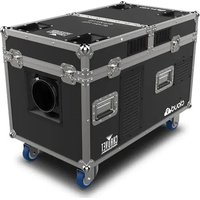
Cloud 9 - Effect machine Chauvet - Free user manual and instructions
Find the device manual for free Cloud 9 Chauvet in PDF.


| Product Type | Fog / Haze Machine |
| Brand | Chauvet |
| Model | Cloud 9 |
| Power Supply | 120 VAC, 60 Hz or 230 VAC, 50 Hz depending on model |
| Power Consumption (120 V) | Over 20 A (requires two separate circuits) |
| Water Tank Capacity | 20 L (5 gallons) |
| Fog Liquid Tank Capacity | 3.5 L (1 gallon) |
| Warm-up Time | Approximately 4 minutes |
| Max Ambient Temperature | 40 °C (104 °F) |
| IP Rating | IP20 (indoor use only) |
| DMX Channels | 2 channels (fan speed, fog volume) |
| DMX Address | 1 to 512 |
| Local Control | Control panel with display and buttons (Menu, UP, DOWN, ENTER, TIMER, VOLUME, STOP) |
| Operating Modes | Manual, Timer, DMX |
| Recommended Fog Fluid | CHAUVET water-based fog fluid (HDF or PHF) |
| Cleaning | Use FCQ (Fog Cleaner Quart) every 90 days max. |
| Safety Device | Safety shutdown on low water level; resettable circuit breaker |
| Included Accessories | Seetronic Powerkon power cord, directional hose with clamp, reference manual |
| Warranty | Limited warranty (see Chauvet website for terms) |
| Usage | Indoor only, flat surface, well-ventilated (50 cm from adjacent surfaces) |
Frequently Asked Questions - Cloud 9 Chauvet
User questions about Cloud 9 Chauvet
0 question about this device. Answer the ones you know or ask your own.
Ask a new question about this device
Download the instructions for your Effect machine in PDF format for free! Find your manual Cloud 9 - Chauvet and take your electronic device back in hand. On this page are published all the documents necessary for the use of your device. Cloud 9 by Chauvet.
USER MANUAL Cloud 9 Chauvet
natural_image
Technical line drawing of a mechanical device with wheels and mounting brackets (no text or symbols)About This Guide
The Cloud 9 Quick Reference Guide (QRG) has basic product information such as connection, mounting, menu options, and DMX values. Download the User Manual from www.chauvetprofessional.com for more details.
Disclaimer
The information and specifications contained in this QRG are subject to change without notice.
LIMITED WARRANTY
FOR WARRANTY REGISTRATION AND COMPLETE TERMS AND CONDITIONS PLEASE VISIT OUR WEBSITE.
For Customers in the United States and Mexico: www.chauvetlighting.com/warranty-registration.
For Customers in the United Kingdom, Republic of Ireland, Belgium, the Netherlands, Luxembourg, France, and Germany: www.chauvetlighting.eu/warranty-registration.
Chauvet warrants that this product shall be free from defects in material and workmanship under normal use, for the period specified in, and subject to the exclusions and limitations set forth in the full limited warranty on our website. This warranty extends only to the original purchaser of the product and is not transferable. To exercise rights under this warranty, you must provide proof of purchase in the form of an original sales receipt from an authorized dealer that shows the product name and date of purchase. THERE ARE NO OTHER EXPRESS OR IMPLIED WARRANTIES. This warranty gives you specific legal rights. You may also have other rights that vary from state to state and country to country. This warranty is valid only in the United States, United Kingdom, Republic of Ireland, Belgium, the Netherlands, Luxembourg, France, Germany and Mexico. For warranty terms in other countries, please consult your local distributor.
Safety Notes
These Safety Notes include important information about installation, use, and maintenance.
- Depending on the amount of fog generated, all fog machines may set off smoke detectors.
- The voltage of the outlet to which you are connecting this product must be within the range stated on the decal or rear panel of the product.
- This product is for indoor use only! (IP20) To prevent risk of fire or shock, do not expose this product to rain or moisture.
• Always place this product in a location with adequate ventilation, at least 20 in (50 cm) from adjacent surfaces.
- Be sure that no ventilation slots on the unit's housing are blocked.
- Never connect this product to a dimmer or rheostat.
- ONLY use the carry handles to carry this product.
• The maximum ambient temperature is 104 °F ( 40 °C ). Do not operate this product at higher temperatures.
• In the event of a serious operating problem, stop using immediately.
- DO NOT open this product. It contains no user-serviceable parts.
- Do not use for space heating purposes.
- Use only CHAUVET water-based fog fluid.
- Drain the tank before transporting or storing the product.
- To eliminate unnecessary wear and improve its lifespan, during periods of non-use completely disconnect the product from power via the breaker or by unplugging it.
- This product is not intended for permanent installation.
- ONLY connect this product to a grounded and protected circuit.
- Always disconnect from power before resetting the breaker.
- Make sure the power cord is not crimped or damaged.
• Never disconnect this product from power by pulling on the cord.
• DO NOT touch this product when it is operating because it may be hot.
- Do not set this product on a flammable surface (linoleum, carpet, wood, paper, carton, plastic, etc.).
- Condensation may form on the bottom of the product, creating damp or wet conditions under and around the Cloud 9. Use caution! Surfaces around the product may become slippery.
- Ensure all valves are closed prior to filling the product with fluids.
- Do not touch the output nozzle on this product. It is very hot during operation and it may remain hot for several hours after turning the unit off.
Contact
Outside the U.S., United Kingdom, Ireland, Benelux, France, Germany, or Mexico contact your distributor to request support or return a product. Visit www.chauvetprofessional.com for contact information.
What is Included
- Cloud 9
• Seetronic Powerkon power cord
• Directional hose and clamp - Quick Reference Guide
AC Power
This product has a fixed voltage power supply and it can work with an input voltage of either 120 VAC, 60 Hz or 230 VAC, 50 Hz, depending on the specific model purchased.

To eliminate unnecessary wear and improve its lifespan, during periods of non-use completely disconnect the product from power via breaker or by unplugging it.

The 120V version of the Cloud 9 consumes more than 20A of power, and thus requires 2 power cords, with each on its own circuit to operate.
Resetting the Breaker
This product is equipped with a resettable circuit breaker. If the breaker trips, all sections of this product will lose power.
- Remove the power cord from mains power.
- Allow unit to cool for 15 minutes.
- After 15 minutes, attempt to reset the breaker by pressing the button.
- Plug the product's power cord into the power outlet and continue using as recommended.
Floor Mounting Diagram

Floor Mounting

Condensation may form on the bottom of the product, creating damp or wet conditions under and around the Cloud 9. Use caution! Surfaces around the product may become slippery.
Hose Attachment
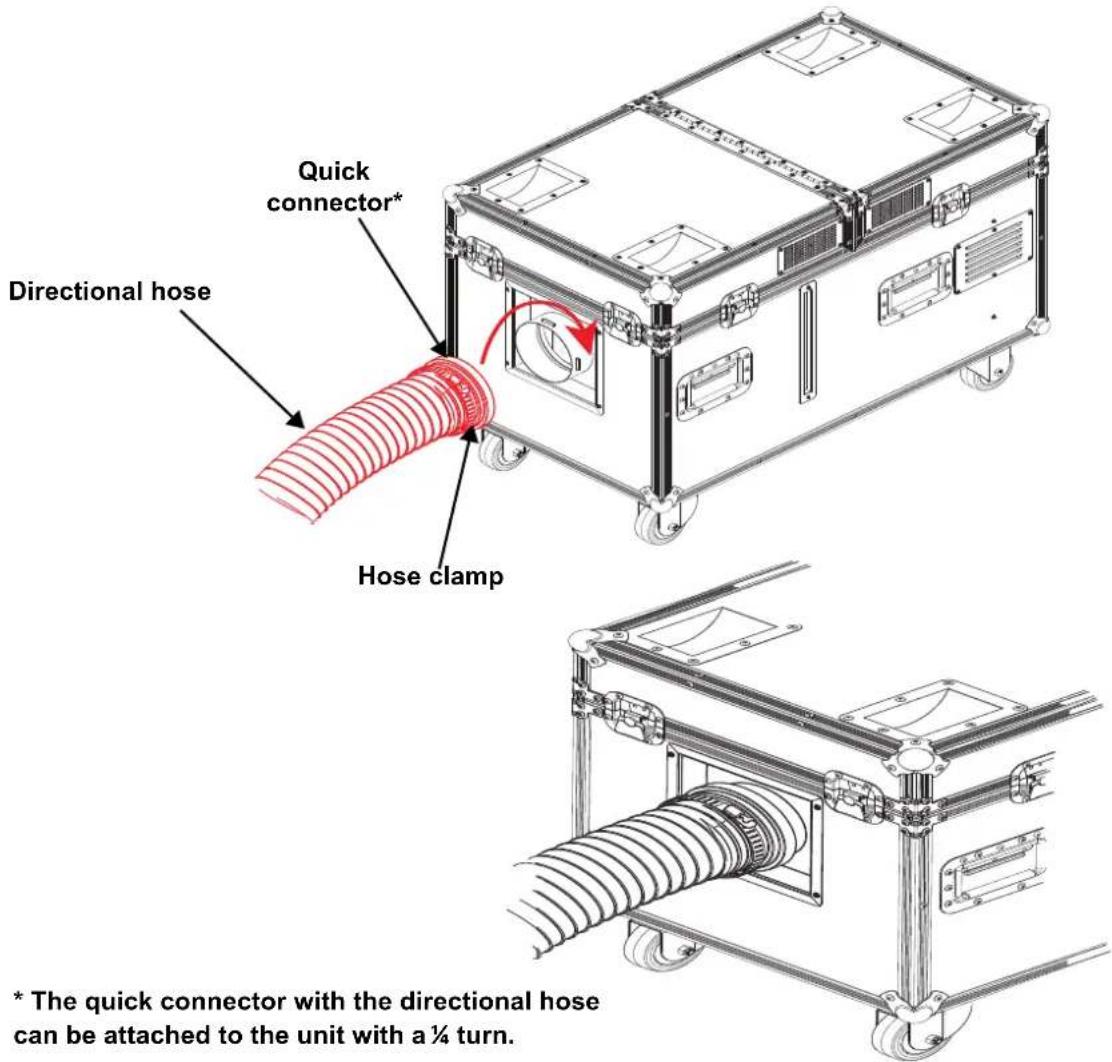
* The quick connector with the directional hose can be attached to the unit with a 14 turn.

This product may NOT be tilted. This product should be level when on a surface.
While operating the Cloud 9, make sure there is adequate fog fluid and water in the machine to prevent pump and heater damage. When the fog fluid/water level becomes low, simply add more fog fluid to continue using the Cloud 9.
Preparation for Operation
To prepare the Cloud 9 for operation:
- Open the flight case.
- Pull out the fluid tank and remove the cap.
- Pour Chauvet fog fluid inside the tank, and re-cap.
- Reinsert the tank.
- Make sure that the plastic hose that goes from the cap to the fogger is not bent.
-
Plug in power and wait approximately 4 minutes for warm-up to complete.
-
Verify that the two plastic hoses attached to the inside of the cap are in place and in good condition.

When storing the product, ALWAYS be sure to store the fluid tank with the cap up (see Floor Mounting Diagram) before installing the front cover to avoid tube damage that may cause leakage.

Only use Chauvet-approved fog fluid. Otherwise, you might not have satisfactory results. In addition, unapproved fluid can damage the Cloud 9 or cause harm to humans or animals.

FCQ (Fog Cleaner Quart) was specifically developed by Chauvet to clean your Cloud 9. Make sure you use FCQ regularly, no longer than 90 days between cleanings, to increase the life of your product.
Operation
- Place the machine on a level surface. Plug the power cord into the wall.
- Remove the top lid.
- Fill the water tank with distilled water to the maximum fill line located on the inside of the tank. The container can hold up to 5.3 gal or (20 l).
- Fill the fluid tank with CHAUVET haze or fog fluid to the maximum fill line located on the outside of the tank. The container can hold up to 1 gal (3.5 l). Haze or fog fluid options for the Cloud 9:
- High-Density Fog Fluid (HDF) - Best overall performance for a medium to large coverage area. Fog dissipates after lifting into the air.
-
Premium Haze Fluid (PHF) - Creates a dual purpose effect. Good coverage area; fog lifts into the air to become haze.
-
Turn the product on using the power switch on the back panel. Make sure the fans are operating properly.
-
Using the control panel, set the product to the desired operating mode.

- Filling the distilled water tank above the maximum fill line will reduce the performance of the product. To ensure optimal performance, drain any excess water via the overfill drain prior to use.
- Due to water evaporation, you may need to refill the Cloud 9 with water to continue triggering the machine.
- The Cloud 9 is fitted with a safety shutoff feature, which prevents the unit's heaters from turning on when the water level is too low. If this safety shutoff feature has been engaged, simply add more water to continue using the Cloud 9.

- The Cloud 9 can operate with the top lid on or off.
- HDF will provide the best overall performance for a medium to large coverage area. Fog dissipates after lifting into the air.
- PHF creates a dual purpose effect. Good coverage area; fog lifts into the air to become haze.
Programming
Refer to the Menu Map to understand the menu options. The menu map shows the main level and a variable number of programming levels for each option.
- To go to the desired main level, press
repeatedly until the option shows on the display. This will take you to the first programming level for that option.
• To select an option or value within the current programming level, pressor until the option shows on the display. If there is another programming level, you will see that first option, or you will see the selected value. - Press
repeatedly to exit to the previous main level.
Control Panel Description
| Exits from the current menu or function | |
| UP navigates upwards through the menu list and increases the numeric value when in a function.TIMER starts the timer controlled operation | |
| DOWN navigates downwards through the menu list and decreases the numeric value when in a function.VOLUME triggers the pump to modify the output volume | |
| ENTER enables the currently displayed menu or sets the currently selected value into the selected function.STOP turns the fog output off. | |

If the product is turned off while in timer mode, the product will still be in timer mode when the product is turned back on.
Menu Map
| MODE PROGRAMMING LEVELS DESCRIPTION | ||
| Interval Set 5-200S Sets the interval between fog output | ||
| Duration Set 5-200S Sets the duration of the fog output | ||
| Timer Out 1-100% Sets the output volume in timer mode | ||
| Volume Out 1-100% Fog volume 1-100% | ||
| Fan Speed 1-100% Fan speed (slow to fast) | ||
| Fluid Sensor | ON/OFF | Turns the fluid sensor ON or OFF |
| DMX512 Address | 1-512 | Selects the DMX starting address |
| Direct Timer | NO/YES | Enables/disables the timer |
DMX Linking
The Cloud 9 will work with a DMX controller using a 3- or 5-pin DMX data connection for its 2-channel DMX personality. A DMX Primer is available from www.chauvetprofessional.com.
DMX Connection
The Cloud 9 uses a 3- or 5-pin DMX data connection for its 2-channel DMX personality. See the User Manual for information about connecting and configuring the product for DMX operation.
DMX Value
2Ch
| CHANNEL | FUNCTION | VALUE | PERCENT/SETTING |
| 1 | Fan Speed | 000 ⇔ 010 | No function |
| 011 ⇔ 512 | 1–100% | ||
| 2 | Fog Output | 000 ⇔ 010 | No function |
| 011 ⇔ 512 | 1–100% |
Acerca de Esta Guía
General Information Technical Support
Chauvet World Headquarters
Address: 5200 NW 108th Ave. Voice: (844) 393-7575
Sunrise, FL 33351 Fax: (954) 756-8015
Voice: (954) 577-4455 Email: chauvetcs@chauvetlighting.com
Fax: (954) 929-5560
Toll Free: (800) 762-1084 Website: www.chauvetprofessional.com
Chauvet Europe Ltd
Address: Unit 1C Email: UKtech@chauvetlighting.eu
Brookhill Road Industrial Estate
Pinxton, Nottingham, UK Website: www.chauvetprofessional.eu
NG16 6NT
Voice: +44 (0) 1773 511115
Fax: +44 (0) 1773 511110
Chauvet Europe BVBA
Address: Stokstraat 18 Email: BNLtech@chauvetlighting.eu
9770 Kruishoutem
Belgium Website: www.chauvetprofessional.eu
Voice: +32 9 388 93 97
Chauvet France
Address: 3, Rue Ampère
91380 Chilly-Mazarin
Email: FRtech@chauvetlighting.fr
France Website: www.chauvetprofessional.eu
Voice: +33 1 78 85 33 59
Chauvet Germany
(Entrance by Calle 2)
Zona Industrial Lerma
Visit the applicable website above to verify our contact information and instructions to request support. Outside the U.S., United Kingdom, Ireland, Benelux, France, Germany, or Mexico, contact the dealer of record.
Cloud 9 QRG Rev. 8 ML6
© Copyright 2019 Chauvet
All rights reserved
Printed in the P.R.C.

RoHS