Rogue R1 BeamWash - Lamp Chauvet - Free user manual and instructions
Find the device manual for free Rogue R1 BeamWash Chauvet in PDF.


User questions about Rogue R1 BeamWash Chauvet
0 question about this device. Answer the ones you know or ask your own.
Ask a new question about this device
Download the instructions for your Lamp in PDF format for free! Find your manual Rogue R1 BeamWash - Chauvet and take your electronic device back in hand. On this page are published all the documents necessary for the use of your device. Rogue R1 BeamWash by Chauvet.
USER MANUAL Rogue R1 BeamWash Chauvet
natural_image
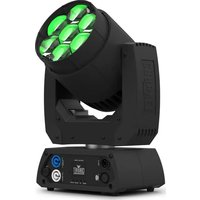
Exterior view of a black Chauvet professional lighting fixture with green LED light beams (no text or symbols on main body)Model ID: ROGUER1BEAMWASH
About This Guide
The Rogue R1 Beam Wash Quick Reference Guide (QRG) has basic product information such as connection, mounting, menu options, and DMX values. Download the User Manual from www.chauvetprofessional.com for more details.
Disclaimer
The information and specifications contained in this QRG are subject to change without notice.
LIMITED WARRANTY
FOR WARRANTY REGISTRATION AND COMPLETE TERMS AND CONDITIONS PLEASE VISIT OUR WEBSITE.
For Customers in the United States and Mexico: www.chauvetlighting.com/warranty-registration.
For Customers in the United Kingdom, Republic of Ireland, Belgium, the Netherlands, Luxembourg, France, and Germany: www.chauvetlighting.eu/warranty-registration.
Chauvet warrants that this product shall be free from defects in material and workmanship under normal use, for the period specified in, and subject to the exclusions and limitations set forth in the full limited warranty on our website. This warranty extends only to the original purchaser of the product and is not transferable. To exercise rights under this warranty, you must provide proof of purchase in the form of an original sales receipt from an authorized dealer that shows the product name and date of purchase. THERE ARE NO OTHER EXPRESS OR IMPLIED WARRANTIES. This warranty gives you specific legal rights. You may also have other rights that vary from state to state and country to country. This warranty is valid only in the United States, United Kingdom, Republic of Ireland, Belgium, the Netherlands, Luxembourg, France, Germany and Mexico. For warranty terms in other countries, please consult your local distributor.
Safety Notes
These Safety Notes include important information about installation, use, and maintenance.
- The luminaire should be positioned so that prolonged staring into the luminaire at a distance closer than 21.65 ft (6.6 m) is not expected.
- If the external flexible cable or cord of this luminaire is damaged, it shall be replaced by a special cord or cord exclusively available from the manufacturer or his service agent.
- The light source contained in this luminaire shall only be replaced by the manufacturer or his service agent or a similar qualified person.
- The luminaire is intended for professional use only.
- DO NOT open this product. It contains no user-serviceable parts.
- DO NOT look at the light source when the product is on.
- To eliminate unnecessary wear and improve its lifespan, during periods of non-use completely disconnect the product from power via breaker or by unplugging it.
- CAUTION: When transferring product from extreme temperature environments, (e.g. cold truck to warm humid ballroom) condensation may form on the internal electronics of the product. To avoid causing a failure, allow product to fully acclimate to the surrounding environment before connecting it to power.
- CAUTION: This product's housing may be hot when lights are operating.
• Mount this product in a location with adequate ventilation, at least 20 in (50 cm) from adjacent surfaces.
• DO NOT leave any flammable material within 50 cm of this product while operating or connected to power. - USE a safety cable when mounting this product overhead.
• DO NOT operate this product outdoors or in any location where dust, excessive heat, water, or humidity may affect it. (IP20) - DO NOT operate this product if the housing, lenses, or cables appear damaged.
- DO NOT connect this product to a dimmer or rheostat.
- ONLY connect this product to a grounded and protected circuit.
- ONLY use the hanging/mounting bracket or the handles to carry this product.
- In the event of a serious operating problem, stop using immediately.
• The maximum ambient temperature is 113 °F (45 °C). Do not operate this product at higher temperatures.
FCC Compliance
This device complies with Part 15 Part B of the FCC Rules. Operation is subject to the following two conditions:
- This device may not cause harmful interference, and
- This device must accept any interference received, including interference that may cause undesired operation.
Any changes or modifications not expressly approved by the party responsible for compliance could void the user's authority to operate the equipment.
Contact
Outside the U.S., U.K., Ireland, Benelux, France, Germany, or Mexico, contact your distributor to request support or return a product. Refer to Contact Us at the end of this QRG for contact information.
What is Included
• Rogue R1 Beam Wash
• N e ^® powerCON ^® ipovker cord
- Omega bracket with mounting hardware
- Quick Reference Guide
AC Power
This product has an auto-ranging power supply that can work with an input voltage range of 100–240 VAC, 50/60 Hz.
Power Linking
It is possible to power link up to 4 Rogue R1 Beam Wash products at 100 V, 5 products at 120 V, 8 products at 208 V, 9 products at 230 V, or up to 10 products at 240 V. Never exceed this number. Power-linking cables can be purchased separately.
AC Plug
| Connection | Wire (U.S.) | Wire (Europe) | Screw Color |
| AC Live Black Brown Yellow/Brass | |||
| AC Neutral White Blue Silver | |||
| AC Ground Green/Yellow Green/Yellow | Green | ||

To eliminate unnecessary wear and improve its lifespan, during periods of non-use completely disconnect the product from power via breaker or by unplugging it.
Replacing the Fuse
- Disconnect the product from power.
- Using a flat head screwdriver, unscrew the fuse holder cap from the housing.
- Remove blown fuse and replace with a good fuse of the same type and rating.
- Screw the fuse holder cap back in place and reconnect power.
DMX Linking
The Rogue R1 Beam Wash will work with a DMX controller using a 5-pin DMX serial connection. A DMX Primer is available from www.chauvetprofessional.com.
DMX Connection
The Rogue R1 Beam Wash uses a 5-pin DMX data connection for its DMX personalities: 14CH, 15CH, 19CH, and 21CH. See the User Manual for information about connecting and configuring the product for DMX operation.
RDM (Remote Device Management)
Remote Device Management, or RDM, is a standard for allowing DMX-enabled devices to communicate bi-directionally along existing DMX cabling. Check the DMX controller's User Manual or with the manufacturer as not all DMX controllers have this capability. The Rogue R1 Beam Wash supports RDM protocol that allows feedback to make changes to menu map options. Download the User Manual from www.chauvetprofessional.com for more details.
Mounting
Before mounting this product, read the Safety Notes. Use at least one mounting point per product. Make sure the mounting clamps are capable of supporting the weight of the product. For our Chauvet line of mounting clamps, go to http://trusst.com/productcategory/truss-clamps/.
Mounting Diagram
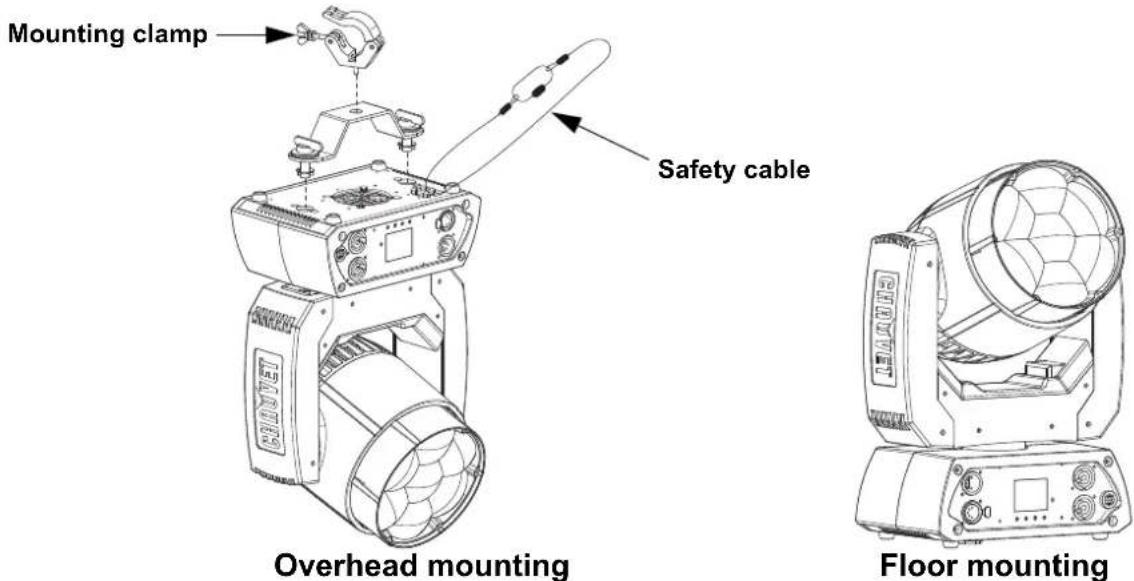

When using only one mounting clamp, be sure to use a clamp with a captive bolt to prevent accidental loosening.
Control Panel Description
| Button Function | |
| Exits from the current menu or function | |
| Enables the currently displayed menu or sets the currently selected value into the selected function | |
| Navigates upwards through the menu list and increases the numeric value when in a function | |
| Navigates downwards through the menu list and decreases the numeric value when in a function | |
Menu Map
Refer to the Rogue R1 Beam Wash product page on www.chauvetprofessional.com for the latest menu map.
| Main Level Programming Levels Description | ||||
| Address 001-512 Sets the starting address | ||||
| Run Mode | DMX | 14CH | Selects the DMX personality | |
| 15CH | ||||
| 19CH | ||||
| 21CH | ||||
| Auto Test Auto test all functions | ||||
| Manual Test | Pan | 000-255 | Manually control and test all settings through the control panel | |
| Tilt | ||||
| Dimmer | ||||
| Shutter | ||||
| Red | ||||
| Green | ||||
| Blue | ||||
| White | ||||
| Zoom | ||||
| Setup | Pan Reverse | OFF Normal pan | ||
| ON Reversed pan | ||||
| Tilt Reverse | OFF Normal tilt | |||
| ON Reversed tilt | ||||
| Pan Angle | 540 540° pan range | |||
| 360 360° pan range | ||||
| 180 180° pan range | ||||
| Tilt Angle | 230 230° tilt range | |||
| 180 180° tilt range | ||||
| 90 | 90° tilt range | |||
| Fans | Auto | Fan speed according to product temperature | ||
| ECO | Quiet mode | |||
| Full | Fan speed set on high | |||
| Display | OFF Display turns off | |||
| ON Display stays on | ||||
| Screen Rev | OFF Normal display | |||
| ON Inverted display | ||||
| Dimmer Curve | Linear | Set the dimmer curve | ||
| Square | ||||
| I Squa | ||||
| SCurve | ||||
| Dimmer Speed | Smooth | Smooth dimmer speed | ||
| Fast | Fast dimmer speed | |||
| Main Level | Programming Levels | Description | |||
| Setup (cont.) | PWM Option | 600Hz | Sets the Pulse Width Modulation frequency | ||
| 1200Hz | |||||
| 4000Hz | |||||
| 6000Hz | |||||
| 15000Hz | |||||
| LED R POWER | 050-100 Sets red LED power | ||||
| LED G POWER | 050-100 Sets green LED power | ||||
| LED B POWER | 050-100 Sets blue LED power | ||||
| LED W POWER | 050-100 Sets white LED power | ||||
| Red Shift | On Enables/disables red shift(On automatically sets White Mode and Color calibration to On) | ||||
| Off | |||||
| White Mode | On Calibrates white to 7500K | ||||
| Off Uses maximum output values | |||||
| Custom | RED | 000-255 | Sets red LED maximum value | ||
| GREEN Sets green LED maximum value | |||||
| BLUE Sets blue LED maximum value | |||||
| WHITE Sets white LED maximum value | |||||
| Color calibration | On Uses factory default white setting | ||||
| Off Uses maximum output values | |||||
| Custom | RED | 100-255D maximum value | Sets red LED maximum value | ||
| GREEN Sets blue LED maximum value | |||||
| BLUE Sets blue LED maximum value | |||||
| Reset Function | Pan/Tilt | NO | Reset individual functions or all functions from start-up | ||
| YES | |||||
| Zoom | NO | ||||
| YES | |||||
| All | NO | ||||
| YES | |||||
| Factory Set Reset to factory default settings | |||||
| Sys Info | System Information | Ver V_Shows firmware version | |||
| Running Mode ____ Shows current running mode | |||||
| DMX Address ____ Shows current starting address | |||||
| Temperature ____ | Shows current product temperature in °C | ||||
| Fixture Time | ---- | Shows number of hours product has been powered on | |||
| UID: | ---- | Shows product UID | |||
DMX Values
| 14CH | 15CH | 19CH | 21CH | Function | Value | Percent/Setting |
| 1 | 1 | 1 | 1 | P a n | 000 ⇔ 255 | 0–100% |
| 2 | 2 | 2 | 2 | Fine Pan | 000 ⇔ 255 | Fine control (16-bit) |
| 3 | 3 | 3 | 3 | T i l t | 000 | ⇔ 255 0–100% |
| 4 | 4 | 4 | 4 | Fine Tilt | 000 ⇔ 255 | Fine control (16-bit) |
| 5 | 5 | 5 | 5 | Pan/Tilt Speed | 000 ⇔ 255 | Fast to slow |
| 6 | 6 | 6 | 6 | Dimmer | 000 ⇔ 255 | 0–100% |
| - | 7 | 7 | 7 | Fine Dimmer | 000 ⇔ 255 | Fine control (16-bit) |
| 7 | 8 | 8 | 8 | S t r o | 000 ⇔ 019 | Off |
| 020 ⇔ 024 | On | |||||
| 025 ⇔ 064 | Strobe, fast to slow | |||||
| 065 ⇔ 069 | On | |||||
| 070 ⇔ 084 | Strobe 100-0%, fast to slow | |||||
| 085 ⇔ 089 | On | |||||
| 090 ⇔ 104 | Strobe 0-100%, fast to slow | |||||
| 105 ⇔ 109 | On | |||||
| 110 ⇔ 124 | Random strobe, fast to slow | |||||
| 125 ⇔ 129 | On | |||||
| 130 ⇔ 144 | Random strobe 100-0%, fast to slow | |||||
| 145 ⇔ 149 | On | |||||
| 150 ⇔ 164 | Random strobe 0-100%, fast to slow | |||||
| 165 ⇔ 169 | On | |||||
| 170 ⇔ 184 | Pulse strobe, fast to slow | |||||
| 185 ⇔ 189 | On | |||||
| 190 ⇔ 204 | Random pulse strobe, fast to slow | |||||
| 205 ⇔ 209 | On | |||||
| 210 ⇔ 224 | Strobe 100-0-100% (fast to slow) | |||||
| 225 ⇔ 229 | On | |||||
| 230 ⇔ 244 | Pulse strobe, fast to slow | |||||
| 245 ⇔ 255 | On | |||||
| 8 | 9 | 9 | 9 | Red | 000 ⇔ 255 | 0–100% |
| - | - | 10 | 10 | Fine Red | 000 ⇔ 255 | Fine control (16-bit) |
| 9 | 10 | 11 | 11 | Green | 000 ⇔ 255 | 0–100% |
| - | - | 12 | 12 | Fine Green | 000 ⇔ 255 | Fine control (16-bit) |
| 10 | 11 | 13 | 13 | Blue | 000 ⇔ 255 | 0–100% |
| - | - | 14 | 14 | Fine Blue | 000 ⇔ 255 | Fine control (16-bit) |
| 11 | 12 | 15 | 15 | White | 000 ⇔ 255 | 0–100% |
| - | - | 16 | 16 | Fine White | 000 ⇔ 255000 ⇔ 004 | Fine control (16-bit)No function |
| 005 ⇔ 009 | Color 1 | |||||
| 010 ⇔ 014 | Color 2 | |||||
| 015 ⇔ 019 | Color 3 | |||||
| 020 ⇔ 024 | Color 4 | |||||
| 025 ⇔ 029 | Color 5 | |||||
| 030 ⇔ 034 | Color 6 | |||||
| 035 ⇔ 039 | Color 7 | |||||
| 040 ⇔ 044 | Color 8 | |||||
| 045 ⇔ 049 | Color 9 | |||||
| 050 ⇔ 054 | Color 10 | |||||
| 055 ⇔ 059 | Color 11 | |||||
| 060 ⇔ 064 | Color 12 | |||||
| 065 ⇔ 069 | Color 13 | |||||
| 070 ⇔ 074 | Color 14 | |||||
| 075 ⇔ 079 | Color 15 | |||||
| 080 ⇔ 084 | Color 16 | |||||
| 085 ⇔ 089 | Color 17 | |||||
| 090 ⇔ 094 | Color 18 | |||||
| 095 ⇔ 099 | Color 19 | |||||
| 100 ⇔ 104 | Color 20 | |||||
| 105 ⇔ 109 | Color 21 | |||||
| 110 ⇔ 114 | Color 22 | |||||
| 115 ⇔ 119 | Color 23 | |||||
| 120 ⇔ 124 | Color 24 | |||||
| 125 ⇔ 129 | Color 25 | |||||
| 130 ⇔ 134 | Color 26 | |||||
| 135 ⇔ 139 | Color 27 | |||||
| 140 ⇔ 144 | Color 28 | |||||
| 145 ⇔ 149 | Color 29 | |||||
| 150 ⇔ 154 | Color 30 | |||||
| 155 ⇔ 159 | Color 31 | |||||
| 160 ⇔ 164 | Color 32 | |||||
| 165 ⇔ 169 | Color 33 | |||||
| 170 ⇔ 174 | Color 34 | |||||
| 175 3200K | ||||||
| 176 4000K | ||||||
| 177 5600K | ||||||
| 178 6500K | ||||||
| 179 No function | ||||||
| 180 ⇔ 201 | Color scroll, fast to slow | |||||
| 202 ⇔ 207 | Hold | |||||
| 208 ⇔ 229 | Reverse color scroll, fast to slow | |||||
| 230 ⇔ 234 | No function | |||||
| 235 ⇔ 249 | Color snap, fast to slow | |||||
| 250 ⇔ 255 | No function | |||||
| 13 14 18 18 | Zoom | 000 ⇔ 255 0–100% | ||||
| -- - 19 Movement Macros | 000 ⇔ 007 | No function | ||||
| 008 ⇔ 023 | Movement macro 1 | |||||
| 024 ⇔ 039 | Movement macro 2 | |||||
| 040 ⇔ 055 | Movement macro 3 | |||||
| 056 ⇔ 071 | Movement macro 4 | |||||
| 072 ⇔ 087 | Movement macro 5 | |||||
| 088 ⇔ 103 | Movement macro 6 | |||||
| 104 ⇔ 119 | Movement macro 7 | |||||
| 120 ⇔ 135 | Movement macro 8 | |||||
| 136 ⇔ 151 | Movement macro 9 | |||||
| 152 ⇔ 167 | Movement macro 10 | |||||
| 168 ⇔ 183 | Movement macro 11 | |||||
| 184 ⇔ 199 | Movement macro 12 | |||||
| 200 ⇔ 215 | Movement macro 13 | |||||
| 216 ⇔ 231 | Movement macro 14 | |||||
| 232 ⇔ 247 | Movement macro 15 | |||||
| 248 ⇔ 255 | Movement macro 16 | |||||
| - | - | - | 2 | Movement Macro Speed | 000 ⇔ 255 | Movement macro speed, fast to slow |
| 14 15 19 21 | Control(5 second activation delay) | 000 ⇔ 009 | No function | |||
| 010 ⇔ 014 | Blackout during pan/tilt | |||||
| 015 ⇔ 049 | No function | |||||
| 050 ⇔ 054 | Pan reset | |||||
| 055 ⇔ 059 | Tilt reset | |||||
| 060 ⇔ 064 | Zoom reset | |||||
| 065 ⇔ 069 | No function | |||||
| 070 ⇔ 074 | Reset all | |||||
| 075 ⇔ 079 | No function | |||||
| 080 ⇔ 084 | Reverse pan and tilt movement | |||||
| 085 ⇔ 089 | Reverse pan movement | |||||
| 090 ⇔ 094 | Reverse tilt movement | |||||
| 095 ⇔ 099 | Normal pan movement | |||||
| 100 ⇔ 104 | Normal tilt movement | |||||
| 105 ⇔ 109 | Normal pan and tilt movement | |||||
| 110 ⇔ 114 | Red shift on | |||||
| 115 ⇔ 119 | Red shift off | |||||
| 120 ⇔ 124 | Fan ECO mode | |||||
| 125 ⇔ 129 | Fan full speed | |||||
| 130 ⇔ 134 | Fan auto mode | |||||
| 135 ⇔ 139 | Fast dimmer curve | |||||
| 140 ⇔ 144 | Smooth dimmer curve | |||||
| 145 ⇔ 149 | Linear curve | |||||
| 150 ⇔ 154 | Square curve | |||||
| 155 ⇔ 159 | I Square curve | |||||
| 160 ⇔ 164 | SCurve | |||||
| 165 ⇔ 169 | White mode on | |||||
| 170 ⇔ 174 | White mode off (full mode) | |||||
| 175 ⇔ 179 | Color calibration off (single color) | |||||
| 180 ⇔ 184 | Color calibration on (single color) | |||||
| 185 ⇔ 239 | No function | |||||
| 240 ⇔ 247 | Color calibration on | |||||
| 248 ⇔ 255 | Color calibration off | |||||
Acerca de Esta Guía
RDM (Remote Device Management)
General Information Technical Support
World Headquarters
Address: 5200 NW 108th Ave. Voice: (844) 393-7575
Sunrise, FL 33351 Fax: (954) 756-8015
Voice: (954) 577-4455 Email: chauvetcs@chauvetlighting.com
Fax: (954) 929-5560
Toll Free: (800) 762-1084 Website: www.chauvetprofessional.com
U.K.
Address: Unit 1C Email: UKtech@chauvetlighting.eu
Brookhill Road Industrial Estate
Pinxton, Nottingham, UK Website: www.chauvetprofessional.eu
NG16 6NT
Voice: +44 (0) 1773 511115
Fax: +44 (0) 1773 511110
Benelux
Address: Stokstraat 18 Email: BNLtech@chauvetlighting.eu
9770 Kruishoutem
Belgium Website: www.chauvetprofessional.eu
Voice: +32 9 388 93 97
France
Address: 3, Rue Ampère
91380 Chilly-Mazarin
Email: FRtech@chauvetlighting.fr
France Website: www.chauvetprofessional.eu
Voice: +33 1 78 85 33 59
Germany
(Entrance by Calle 2)
Zona Industrial Lerma Website: www.chauvetprofessional.mx
Visit the applicable website above to verify our contact information and instructions to request support. Outside the US, UK, Ireland, Mexico, France, Germany, or Benelux, contact the dealer of record.

UL 1573
® CSA C22.2 No. 166
us E113093



RoHS