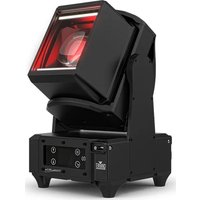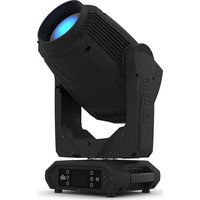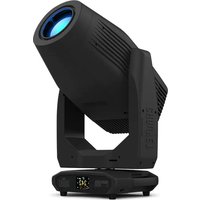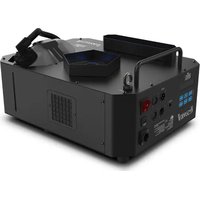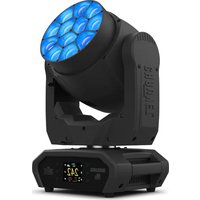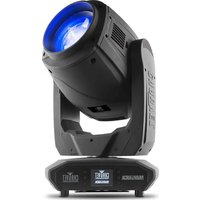
Maverick MK1 Hybrid - Professional spotlight Chauvet - Free user manual and instructions
Find the device manual for free Maverick MK1 Hybrid Chauvet in PDF.


| Product Type | Professional hybrid light projector |
| Brand | Chauvet |
| Model | Maverick MK1 Hybrid |
| Power | 100-240 V AC, 50/60 Hz (universal) |
| Consumption | Not specified (estimated 1000 W) |
| Light source | Lamp (on/off via menu or DMX) |
| Control | DMX (27 or 30 channels), Art-Net, sACN, WDMX |
| DMX Connectivity | 3 or 5 pin XLR, etherCON RJ45 (Art-Net/sACN) |
| Movement angles | Pan: 540°/360°/180°; Tilt: 270°/180°/90° |
| Color wheels | 3 wheels (CMY + fixed colors) |
| Gobos | 1 static wheel (18 patterns) + 1 rotating wheel (6 patterns) |
| Prisms | 2 rotating prisms |
| Additional functions | Zoom, focus, frost, animation, shutter, dimmer |
| Protection | IP20 |
| Max ambient temperature | 45 °C |
| Mounting | Omega bracket provided; safety cable mandatory |
| Display | Touchscreen with lock and calibration |
| Maintenance | Fuse replacement accessible; lens cleaning with suitable product |
| Safety | Do not open; do not look at source; min. distance 50 cm from surfaces |
| Spare parts | Lamp, fuse, cables; repair by qualified technician |
Frequently Asked Questions - Maverick MK1 Hybrid Chauvet
User questions about Maverick MK1 Hybrid Chauvet
0 question about this device. Answer the ones you know or ask your own.
Ask a new question about this device
Download the instructions for your Professional spotlight in PDF format for free! Find your manual Maverick MK1 Hybrid - Chauvet and take your electronic device back in hand. On this page are published all the documents necessary for the use of your device. Maverick MK1 Hybrid by Chauvet.
USER MANUAL Maverick MK1 Hybrid Chauvet
natural_image
Technical line drawing of a mechanical device with no visible text or symbolsAbout This Guide
The Maverick MK1 Hybrid Quick Reference Guide (QRG) has basic product information such as connection, mounting, menu options, and DMX values. Download the User Manual from www.chauvetprofessional.com for more details.
Disclaimer
The information and specifications contained in this QRG are subject to change without notice.
Safety Notes
• DO NOT open this product. It contains no user-serviceable parts.
- To eliminate unnecessary wear and improve its lifespan, during periods of non-use completely disconnect the product from power via breaker or by unplugging it.
• DO NOT look at the light source when the product is on.
CAUTION: This product's housing may be hot when lights are operating.
- Mount this product in a location with adequate ventilation, at least 20 in (50 cm) from adjacent surfaces.
- DO NOT leave any flammable material within 50 cm of this product while operating or connected to power.
- CAUTION: When transferring product from extreme temperature environments, (e.g. cold truck to warm humid ballroom) condensation may form on the internal electronics of the product. To avoid causing a failure, allow product to fully acclimate to the surrounding environment before connecting it to power.
• The product is not intended for permanent installation.
• USE a safety cable when mounting this product overhead.
• DO NOT operate this product outdoors or in any location where dust, excessive heat, water, or humidity may affect it. (IP20)
• DO NOT operate this product if the housing, lenses, or cables appear damaged.
• DO NOT connect this product to a dimmer or rheostat.
• ONLY connect this product to a grounded and protected circuit.
- ONLY use the handles or yoke to carry this product. Do not carry by the moving head.
• In the event of a serious operating problem, stop using immediately.
- The maximum ambient temperature is 113 °F (45 °C). Do not operate this product at higher temperatures.
Contact
From inside the U.S., UK, Ireland, Mexico, or Benelux, use the information i Contact Us at the end of this QRG. Outside the U.S., United Kingdom, Ireland, Mexico, or Benelux, contact your distributor to request support or return a product.
What Is Included
- Maverick MK1 Hybrid
- Warranty Card
• Power Input Cord
- Quick Reference Guide
• Omega Bracket w/ mounting hardware
AC Power
This product has an auto-ranging power supply that can work with an input voltage range of 100–240 VAC, 50/60 Hz.
AC Plug
| Connection | Wire (U.S.) | Wire (Europe) | Screw Color |
| AC Live | Black | Brown | Yellow/Brass |
| AC Neutral | White | Blue | Silver |
| AC Ground | Green/Yellow | Green/Yellow | Green |

To eliminate unnecessary wear and improve its lifespan, during periods of non-use completely disconnect the product from power via breaker or by unplugging it.
Replacing The Fuse
- Disconnect this product from power.
- Using a Phillips #2 head screwdriver, unscrew the fuse holder cap from the housing.
- Remove blown fuse and replace with a good fuse of the same type and rating.
- Screw the fuse holder cap back in place and reconnect power.
DMX Linking
The Maverick MK1 Hybrid will work with a DMX controller using a 3- or 5-pin DMX serial connection. A DMX Primer is available from www.chauvetprofessional.com.
DMX Connection
The Maverick MK1 Hybrid uses a 3- or 5-pin DMX data connection for its DMX personalities: 27 and 30. See the User Manual for information about connecting and configuring the product for DMX operation.
Signal Connections
You can link the Maverick MK1 Hybrid to controller software using an Etherne connection. If using other Art-Net ^™ or sACN-compatible products with the Maverick MK1 Hybrid, you can control each individually on a single network. Se the User Manual for information about how to connect and configure the product for these signals.
Art-Net™ Connection
Art-Net™ is an Ethernet protocol that uses TCP/IP which transfers a large amount of DMX512 data using an Neutrik® etherCON® RJ45 connection over a large network. An Art-Net™ protocol document is available from www.chauvetprofessional.com. Chauvet Professional recommends using unicast Art-Net™ for best results.
Art-Net™ designed by and copyright Artistic License Holdings Ltd.
sACN Connection
Also known as ANSI E1.31, Streaming-ACN is an Ethernet protocol that uses the layering and formatting of Architecture for Control Networks to transport DMX512 data over IP or any other ACN compatible network. ACN is maintained by the Professional Lighting and Sound Association (PLASA).
Mounting
Before mounting this product, read the Safety Notes. Use at least one mounting point per product. Make sure the mounting clamps are capable of supporting the weight of the product. For our CHAUVET Professional line of mounting clamps, go to http://trusst.com/products/.
Product Mounting Diagram
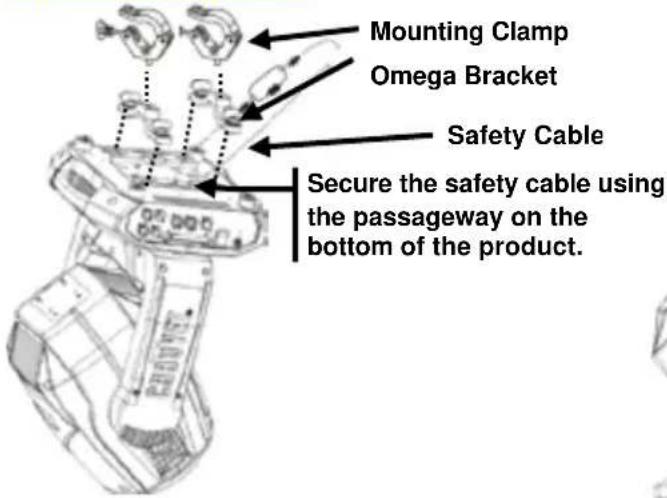
Overhead Mounting
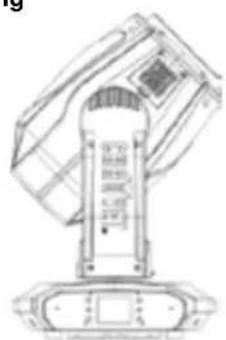
natural_image
Technical line drawing of a mechanical device with no visible text or symbolsFloor Mounting
Touchscreen Control Panel
The Maverick MK1 Hybrid has a touchscreen display as well as 6 control button. The touchscreen can be locked and calibrated through the Setup options in the menu.
Control Panel Description
| Button | Function |
| Navigates upwards through the menu list or increases the numeric value when in a function | |
| Exits from the current menu or function | |
| Navigates downwards through the menu list or decreases the numeric value when in a function | |
| Navigates leftwards through the menu list | |
| Enables the currently displayed menu or sets the currently selected value into the selected function | |
| Navigates rightwards through the menu list |
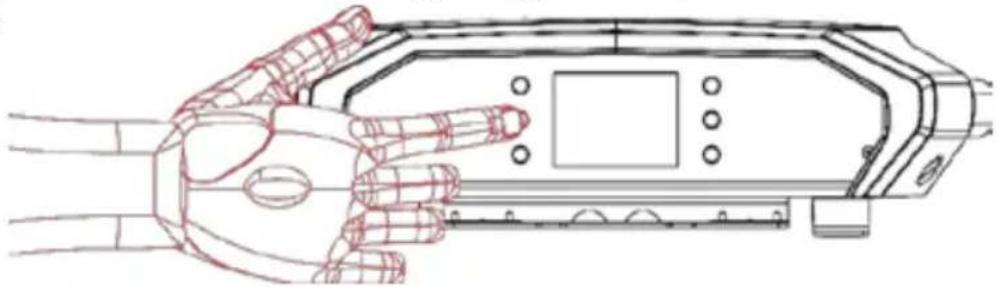
Battery Powered Display
Press and hold until menu screen appears (approx 15 sec.).
natural_image
Line drawing of a robotic hand interacting with a device panel (no text or symbols)Menu Map
| Main Level | Programming Levels | Description | |
| Address | 000-512 | Network Setting | |
| Art-Net Setup | IP Mode | Manual | Selection of IP mode |
| DHCP | |||
| Static | |||
| Universe | 0 ~ 255 | Set the Universe | |
| ArtNetIp | 002.243.075.222 | IP setting | |
| SubMask | 255.000.000.000 | Subnet Mask | |
| Personality | DMX 27CH | YES | Choose 27 Channels of DMX |
| NO | |||
| DMX 30CH | YES | Choose 30 Channels of DMX | |
| NO | |||
| Settings | Control Mode | DMX | Signal Selection |
| WDMX | |||
| ArtNet | |||
| sACN | |||
| Pan Reverse | YES | Reverse the Pan | |
| NO | |||
| Tilt Reverse | YES | Reverse the Tilt | |
| NO | |||
| Screen Reverse | NO | Manually or automatically reverse the screen | |
| YES | |||
| AUTO | |||
| Pan Angle | 540 | Change the Pan angle | |
| 360 | |||
| 180 | |||
| Tilt Angle | 270 | Change the Tilt angle | |
| 180 | |||
| 90 | |||
| BL. O. P/T Move | YES | Enable/disable XY blackout | |
| NO | |||
| BL. O. Color Move | YES | Enable/disable color blackout | |
| NO | |||
| BL. O. Gobo Move | YES | Enable/disable gobo blackout | |
| NO | |||
| Calibration | YES | Turn on Calibration | |
| NO | |||
Menu Map (Cont.)
| Main Level | Programming Levels | Description | ||
| Settings(Continued) | Touchscreen Lock | YES | Lock the touchscreen | |
| NO | ||||
| Swap X/Y | YES | Swap the pan and tilt | ||
| NO | ||||
| X/Y Mode | Fast | Pan and tilt speed | ||
| Slow | ||||
| WDMX Reset | YES | Reset the wireless DMX | ||
| NO | ||||
| Backlight Timer | 30S | Set the backlight to turn off automatically after a chosen time | ||
| 1M | ||||
| 5M | ||||
| ON | ||||
| Loss of Data | Hold | Loss of data setting | ||
| Close | ||||
| Safety Beam | OFF | Safety Beam Mode | ||
| ON | ||||
| Lamp Setting | On/Off | OFF | Lamp On or Off | |
| ON | ||||
| State/Power On | OFF | Lamp status shown when lamp on | ||
| ON | ||||
| Off Via DMX | NO | Control the lamp with DMX | ||
| YES | ||||
| On If DMX On | NO | Lamp On when DMX is On | ||
| YES | ||||
| Off If DMX Off | NO | Lamp Off when DMX is Off | ||
| YES | ||||
| Ignition Delay | 10 ~ 255 | Set delay time for lamp ignition | ||
| Low Power Delay | 0 ~ 255 | Low power delay time | ||
| Reset Lamp Time | NO | Reset the remaining lamp time | ||
| YES | ||||
| Special Set | Interval | 10 ~ 250 | Lamp maintenance reminder set | |
| Remain Time | 10 ~ 250 | Remaining lamp time | ||
| Preset Select | PRESET A | Recorded preset menu options | ||
| PRESET B | ||||
| PRESET C | ||||
| Settings(Continued) | Preset Sync | NO | Allows recorded preset menu options to be transferred to other Maverick MK1 Hybrids in the DMX daisy chain | |
| YES | ||||
| Reset Function | Pan/Tilt | YES/NO | Reset individual functions to factory | |
| Head | ||||
| All | ||||
| Factory Settings | NO | Reset all functions to factory | ||
| YES | ||||
| Test | Auto Test | Auto test the product | ||
| Manual Test | Pan | 0 ~ 255 | Individually test each function/channel | |
| Pan Fine | ||||
| Tilt | ||||
| Tilt Fine | ||||
| P/T Speed | ||||
| Cyan | ||||
| Magenta | ||||
| Yellow | ||||
| Color1 | ||||
| Color2 | ||||
| Color3 | ||||
| Shutter | ||||
| Dimmer | ||||
| Dimmer Fine | ||||
| Gobo | ||||
| Animation | ||||
| Animation Rotate | ||||
| Gobo | ||||
| Gobo Rotate | ||||
| Gobo Rotate Fine | ||||
| Prism | ||||
| Prism1 Rotate | ||||
| Prism2 Rotate | ||||
| Frost | ||||
| Test(Continued) | Auto Test | Frost | 0 ~ 255 | Individually test each function/channel |
| Zoom | ||||
| Focus | ||||
| Fine Focus | ||||
| Beam Mode | ||||
| Special Function | ||||
| Information | Fixture Information | Ver V1 | Current Version | |
| Running Mode DMX | Current Mode | |||
| DMX Address 001 | ||||
| Temperature 025 | Current Temperature | |||
| Fixture Hours 00000 | Current active hours | |||
| ArtNetlp 002.243.075.222 | Current IP address | |||
| SubMask 255.000.000.000 | Current subnet mask | |||
| MAC 00.04.a3.08.00.00 | MAC address | |||
| Fan Information | Base Fan1 Speed 2000rpm | View speed setting | ||
| Base Fan2 Speed 2000rpm | View speed setting | |||
| Head Fan1 Speed 2000rpm | View speed setting | |||
| Head Fan2 Speed 2000rpm | View speed setting | |||
| Error Information | ---- | Will appear on screen | ||
| Channel Information | Frequency | 0Hz | Status of individual channel | |
| Pan | 0 ~ 255 | |||
| Pan Fine | ||||
| Tilt | ||||
| Tilt Fine | ||||
| P/T Speed | ||||
| Cyan | ||||
| Magenta | ||||
| Yellow | ||||
| Color1 | ||||
| Color2 | ||||
| Color3 | ||||
| Shutter | ||||
| Dimmer | ||||
| Dimmer Fine | ||||
| Gobo | ||||
| Animation | ||||
| Animation Rotate | ||||
| Information (continued) | Channel Information (continued) | Gobo | 0 ~ 255 | Status of individual channel |
| Gobo Rotate | ||||
| Gobo Rotate Fine | ||||
| Prism | ||||
| Prism1 Rotate | ||||
| Prism2 Rotate | ||||
| Frost | ||||
| Zoom | ||||
| Focus | ||||
| Fine Focus | ||||
| Beam Mode | ||||
| Special Function | ||||
Gobo Designs
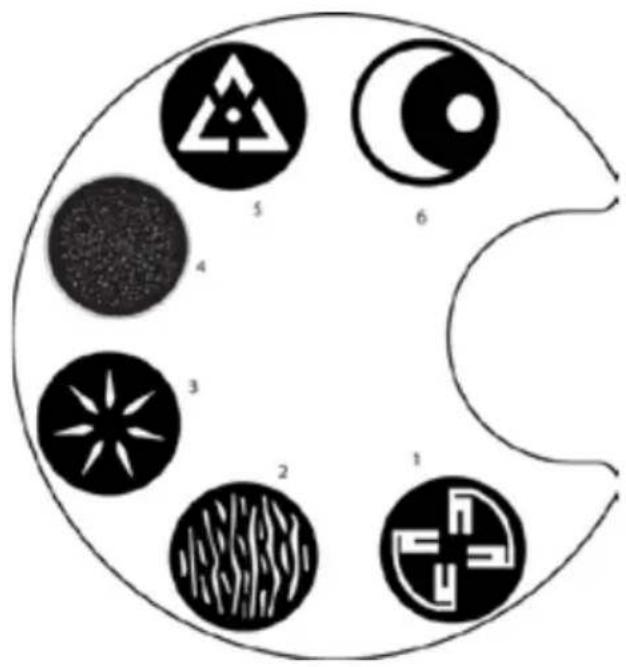
Rotating Gobo Wheel
| 1. Turning Forks |
| 2. Wavy Breakup |
| 3. Radial Star |
| 4. Star Field |
| 5. Broken Triangle |
| 6. Half Moon and Sun |
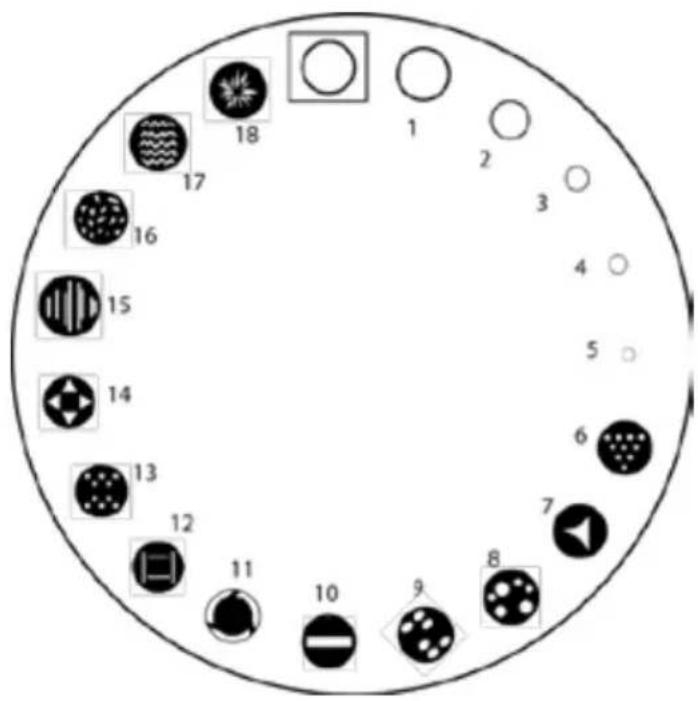
Static Gobo Wheel
| 1. Aperture 5/6 |
| 2. Aperture 2/3 |
| 3. Aperture 1/2 |
| 4. Aperture 1/3 |
| 5. Full Aperture |
| 6. Triangle Dots |
| 7. Curvy Triangle |
| 8. Random Dots |
| 9. Symmetric Dots |
| 10. Line |
| 11. Laser Circle |
| 12. Square Lines |
| 13. Brick Out |
| 14. Triangle Square |
| 15. Shades |
| 16. Crunch Bar |
| 17. 5 Wave |
| 18. Burst |
DMX Values
| 30CH Channel | Function | Value | Percent/Setting |
| 1 | Pan | 000Ü 255 | 0-100% |
| 2 | Fine Pan | 000Ü 255 | 0-100% |
| 3 | Tilt | 000Ü 255 | 0-100% |
| 4 | Fine Tilt | 000Ü 255 | 0-100% |
| 5 | Pan/Tilt Speed | 000Ü 255 | 0-100% |
| 6 | Dimmer | 000Ü 255 | 0-100% |
| 7 | Fine Dimmer | 000Ü 255 | 0-100% |
| 8 Shutter | 000Ü 007 | Closed | |
| 008Ü 015 | Open | ||
| 016Ü 131 | Slow to fast | ||
| 132Ü 167 | Fast close, slow open | ||
| 168Ü 203 | Slow close, fast open | ||
| 204Ü 239 | Pulse effect from slow to fast | ||
| 240Ü 247 | Random effect from slow to fast | ||
| 248Ü 255 | Open | ||
| 9 | Cyan | 000Ü 255 | 0-100% |
| 10 | Magenta | 000Ü 255 | 0-100% |
| 11 | Yellow | 000Ü 255 | 0-100% |
| 12 Color Wheel 1 | 000 | White | |
| 028 | White + Beam Softener | ||
| 050 | Beam Softener | ||
| 080 | Beam Softener + Lavender | ||
| 100 | Lavender | ||
| 129 | Lavender + CTO 3200K | ||
| 150 | CTO 3200K | ||
| 181 | CTO 3200K + (UV) | ||
| 200 | (UV) | ||
| 235 | (UV) + CTO 2500K | ||
| 255 | CTO 2500K | ||
| 13 | Color Wheel 2 | 000 | White |
| 028 | White + Beam Softener | ||
| 050 | Beam Softener | ||
| 080 | Beam Softener + Dark Green | ||
| 100 | Dark Green | ||
| 129 | Dark Green + Dark Red | ||
| 150 | Dark Red | ||
| 181 | Dark Red + Dark Blue | ||
| 200 | Dark Blue | ||
| 235 | Dark Blue + Minus Green | ||
| 255 | Minus Green | ||
| 14 Color Wheel 3 | 000 | White | |
| 028 | White + Beam Softener | ||
| 050 | Beam Softener | ||
| 080 | Beam Softener + Dark Orange | ||
| 100 | Dark Orange | ||
| 129 | Dark Orange + Light Orange | ||
| 150 | Light Orange | ||
| 181 | Light Orange + Light Green | ||
| 200 | Light Green | ||
| 235 | Light Green + Pink | ||
| 255 | Pink | ||
| 15 | Gobo Wheel 1[Gobo Designs] | 000 | Open |
| 004 | Gobo 1 (Aperture 5/6) | ||
| 008 | Gobo 2 (Aperture 2/3) | ||
| 012 | Gobo 3 (Aperture 1/2) | ||
| 016 | Gobo 4 (Aperture 1/3) | ||
| 019 | Gobo 5 (Full Aperture) | ||
| 023 | Gobo 6 (Triangle dots) | ||
| 027 | Gobo 7 (Curvy triangle) | ||
| 031 | Gobo 8 (Random dots) | ||
| 035 | Gobo 9 (Symmetric dots) | ||
| 038 | Gobo 10 (Line) | ||
| 042 | Gobo 11 (Laser Circle) | ||
| 046 | Gobo 12 (Square Lines) | ||
| 050 | Gobo 13 (Brick Out) | ||
| 054 | Gobo 14 (Triangle square) | ||
| 057 | Gobo 15 (Shades) | ||
| 061 | Gobo 16 (Crunch Bar) | ||
| 065 | Gobo 17 (5 Wave) | ||
| 069 | Gobo 18 (Burst) | ||
| 072Ü 113 | Clockwise gobo scroll, fast to slow | ||
| 114Ü 117 | stop | ||
| 118Ü 159 | Counter-clockwise gobo scroll, slow to fast | ||
| 160Ü 165 | Gobo 1 Shaking | ||
| 166Ü 170 | Gobo 2 Shaking | ||
| 171Ü 175 | Gobo 3 Shaking | ||
| 176Ü 181 | Gobo 4 Shaking | ||
| 182Ü 186 | Gobo 5 Shaking | ||
| 187Ü 191 | Gobo 6 Shaking | ||
| 192Ü 197 | Gobo 7 Shaking | ||
| 198Ü 202 | Gobo 8 Shaking | ||
| 203Ü 207 | Gobo 9 Shaking | ||
| 208Ü 214 | Gobo 10 Shaking | ||
| 215Ü 218 | Gobo 11 Shaking | ||
| 219Ü 223 | Gobo 12 Shaking | ||
| 224Ü 229 | Gobo 13 Shaking | ||
| 230Ü 234 | Gobo 14 Shaking | ||
| 235Ü 239 | Gobo 15 Shaking | ||
| 240Ü 245 | Gobo 16 Shaking | ||
| 246Ü 250 | Gobo 17 Shaking | ||
| 251Ü 255 | Gobo 18 Shaking | ||
| 16 | Gobo Wheel 2[Gobo Designs] | 000Ü 018019Ü 037038Ü 056057Ü 074075Ü 092093Ü 111112Ü 129130Ü 150151Ü 171172Ü 192193Ü 213214Ü 234235Ü 255 | WhiteGobo 1 (Turning Forks)Gobo 2 (Wavy Breakup)Gobo 3 (Radial Star)Gobo 4 (Star Field)Gobo 5 (Broken Triangle)Gobo 6 (Half Moon and Sun)Gobo 1 ShakingGobo 2 ShakingGobo 3 ShakingGobo 4 ShakingGobo 5 ShakingGobo 6 Shaking |
| 17 | Gobo Wheel 1 Rotation | 000Ü 021022Ü 042043Ü 063064Ü 084085Ü 105106Ü 127128Ü 190191Ü 192193Ü 255 | 0-90 position90-180 position180-270 position270-360 position360-450 position450-540 positionClockwise rotating, slow to fastStopCounter-clockwise rotating, slow to fast |
| 18 | Gobo Indexing 16-bit | 000Ü 255 | 16-bit adjustable |
| 19 | Animation Wheel | 000Ü 255 | Effect wheel |
| 20 | Animation Wheel Rotation | 000Ü 124125Ü 130131Ü 255 | Clockwise rotating, slow to fastStopCounter-clockwise rotating, slow to fast |
| 21 Prism 1 | 000Ü 010011Ü 255 | No FunctionPrism Effect | |
| 22 Prism 1 Rotation | 000Ü 021022Ü 042043Ü 063064Ü 084085Ü 105106Ü 127128Ü 190191Ü 192193Ü 255 | 0-90 position90-180 position180-270 position270-350 position360-450 position450-540 positionClockwise rotating, slow to fastStopCounter-clockwise rotating, slow to fast | |
| 23 Prism 2 | 000Ü 010011Ü 255 | No FunctionPrism Effect | |
| 24 | Prism 2 Rotation | 000Ü 021022Ü 042043Ü 063064Ü 084085Ü 105106Ü 127128Ü 190191Ü 192193Ü 255 | 0-90 position90-180 position180-270 position270- 360 position360-450 position450-540 positionClockwise rotating, slow to fastStopCounter-clockwise rotating, slow to fast |
| 25 | Frost | 000Ü 255 | 0–100% |
| 26 | Zoom | 000Ü 255 | 0–100% |
| 27 | Focus | 000Ü 255 | 0–100% |
| 28 | Fine Focus | 000Ü 255 | 0–100% |
| 29 Beam Mode | 000Ü 010011Ü 255 | No FunctionBeam Mode | |
| 30 Control | 000Ü 029030Ü 039040Ü 049050Ü 059060Ü 069070Ü 079080Ü 089090Ü 099100Ü 109110Ü 119120Ü 129130Ü 139140Ü 149150Ü 159160Ü 169170Ü 179180Ü 189190Ü 199200Ü 209210Ü 219220Ü 229230Ü 239240Ü 245246Ü 250251Ü 255 | No functionXY swap onXY swap offZoom/auto focus mode onZoom/auto focus mode offXY blackout enableXY blackout disableColor blackout enableColor blackout disableGobo blackout enableGobo blackout disableLamp OnXY resetHead resetAuto soft filter onAuto soft filter offNo functionNo functionAll resetAll blackout enableAll blackout disableLamp OffNo functionNo functionNo function | |
27CH
| Channel | Function | Value | Percent/Setting |
| 1 | Pan | 000Ü 255 | 0–100% |
| 2 | Fine Pan | 000Ü 255 | 0–100% |
| 3 | Tilt | 000Ü 255 | 0–100% |
| 4 | Fine Tilt | 000Ü 255 | 0–100% |
| 5 | Pan/Tilt Speed | 000Ü 255 | 0–100% |
| 6 | Dimmer | 000Ü 255 | 0–100% |
| 7 Shutter | 000Ü 007 | Closed | |
| 008Ü 015 | Open | ||
| 016Ü 131 | Slow to fast | ||
| 132Ü 167 | Fast close, slow open | ||
| 168Ü 203 | Slow close, fast open | ||
| 204Ü 239 | Pulse effect from slow to fast | ||
| 240Ü 247 | Random effect from slow to fast | ||
| 248Ü 255 | Open | ||
| 8 | Cyan | 000Ü 255 | 0–100% |
| 9 | Magenta | 000Ü 255 | 0–100% |
| 10 | Yellow | 000Ü 255 | 0–100% |
| 11 Color Wheel 1 | 000 | White | |
| 028 | White + Beam Softener | ||
| 050 | Beam Softener | ||
| 080 | Beam Softener + Lavender | ||
| 100 | Lavender | ||
| 129 | Lavender + CTO 3200K | ||
| 150 | CTO 3200K | ||
| 181 | CTO 3200K + (UV) | ||
| 200 | (UV) | ||
| 235 | (UV) + CTO 2500K | ||
| 255 | CTO 2500K | ||
| 12 Color Wheel 2 | 000 | White | |
| 028 | White + Beam Softener | ||
| 050 | Beam Softener | ||
| 080 | Beam Softener + Dark Green | ||
| 100 | Dark Green | ||
| 129 | Dark Green + Dark Red | ||
| 150 | Dark Red | ||
| 181 | Dark Red + Dark Blue | ||
| 200 | Dark Blue | ||
| 235 | Dark Blue + Minus Green | ||
| 255 | Minus Green | ||
| 27CH Channel | Function | Value | Percent/Setting |
| 13 Color Wheel 3 | 000 | White | |
| 028 | White + Beam Softener | ||
| 050 | Beam Softener | ||
| 080 | Beam Softener + Dark Orange | ||
| 100 | Dark Orange | ||
| 129 | Dark Orange + Light Orange | ||
| 150 | Light Orange | ||
| 181 | Light Orange + Light Green | ||
| 200 | Light Green | ||
| 235 | Light Green + Pink | ||
| 255 | Pink | ||
| 14 | Gobo Wheel 1[Gobo Designs] | 000 | Open |
| 004 | Gobo 1 (Aperture 5/6) | ||
| 008 | Gobo 2 (Aperture 2/3) | ||
| 012 | Gobo 3 (Aperture 1/2) | ||
| 016 | Gobo 4 (Aperture 1/3) | ||
| 019 | Gobo 5 (Full Aperture) | ||
| 023 | Gobo 6 (Triangle dots) | ||
| 027 | Gobo 7 (Curvy triangle) | ||
| 031 | Gobo 8 (Random dots) | ||
| 035 | Gobo 9 (Symmetric dots) | ||
| 038 | Gobo 10 (Line) | ||
| 042 | Gobo 11 (Laser Circle) | ||
| 046 | Gobo 12 (Square Lines) | ||
| 050 | Gobo 13 (Brick Out) | ||
| 054 | Gobo 14 (Triangle square) | ||
| 057 | Gobo 15 (Shades) | ||
| 061 | Gobo 16 (Crunch Bar) | ||
| 065 | Gobo 17 (5 Wave) | ||
| 069 | Gobo 18 (Burst) | ||
| 070Ü 113 | Clockwise gobo scroll, fast to slow | ||
| 114Ü 117 | Stop | ||
| 118Ü 159 | Counter-clockwise gobo scroll, slow to fast | ||
| 160Ü 165 | Gobo 1 Shaking | ||
| 166Ü 170 | Gobo 2 Shaking | ||
| 171Ü 175 | Gobo 3 Shaking | ||
| 176Ü 181 | Gobo 4 Shaking | ||
| 182Ü 186 | Gobo 5 Shaking | ||
| 187Ü 191 | Gobo 6 Shaking | ||
| 192Ü 197 | Gobo 7 Shaking | ||
| 198Ü 202 | Gobo 8 Shaking | ||
| 203Ü 207 | Gobo 9 Shaking | ||
| 208Ü 214 | Gobo 10 Shaking | ||
| 215Ü 218 | Gobo 11 Shaking | ||
| 219Ü 223 | Gobo 12 Shaking | ||
| 224Ü 229 | Gobo 13 Shaking | ||
| 230Ü 234 | Gobo 14 Shaking | ||
| 235Ü 239 | Gobo 15 Shaking | ||
| 240Ü 245 | Gobo 16 Shaking | ||
| 246Ü 250 | Gobo 17 Shaking | ||
| 251Ü 255 | Gobo 18 Shaking | ||
| 15 | Gobo Wheel 2[Gobo Designs] | 000Ü 018019Ü 037038Ü 056057Ü 074075Ü 092093Ü 111112Ü 129130Ü 150151Ü 171172Ü 192193Ü 213214Ü 234235Ü 255 | WhiteGobo 1 (Turning Forks)Gobo 2 (Wavy Breakup)Gobo 3 (Radial Star)Gobo 4 (Star Field)Gobo 5 (Broken Triangle)Gobo 6 (Half Moon and Sun)Gobo 1 ShakingGobo 2 ShakingGobo 3 ShakingGobo 4 ShakingGobo 5 ShakingGobo 6 Shaking |
| 16 | Gobo Wheel 2Rotation | 000Ü 021022Ü 042043Ü 063064Ü 084085Ü 105106Ü 127128Ü 190191Ü 192193Ü 255 | 0-90 position90-180 position180-270 position270-360 position360-450 position450-540 positionClockwise rotating, slow to fastStopCounter-clockwise rotating, slow to fast |
| 17 | Animation Wheel | 000Ü 255 | Effect wheel |
| 18 | Animation WheelRotation | 000Ü 124125Ü 130131Ü 255 | Clockwise rotating, slow to fastStopCounter-clockwise rotating, slow to fast |
| 19 Prism 1 | 000Ü 010011Ü 255 | No FunctionPrism Effect | |
| 20 Prism 1 Rotation | 000Ü 021022Ü 042043Ü 063064Ü 084085Ü 105106Ü 127128Ü 190191Ü 192193Ü 255 | 0-90 position90-180 position180-270 position270-350 position360-450 position450-540 positionClockwise rotating, slow to fastStopCounter-clockwise rotating, slow to fast | |
| 21 Prism 2 | 000Ü 010011Ü 255 | No FunctionPrism Effect | |
| 22 | Prism 2 Rotation | 000Ü 021022Ü 042043Ü 063064Ü 084085Ü 105106Ü 127128Ü 190191Ü 192193Ü 255 | 0-90 position90-180 position180-270 position270-330 position360-450 position450-540 positionClockwise rotating, slow to fastStopCounter-clockwise rotating, slow to fast |
| 23 | Frost | 000Ü 255 | 0–100% |
| 24 | Zoom | 000Ü 255 | 0–100% |
| 25 | Focus | 000Ü 255 | 0–100% |
| 26 Beam Mode | 000Ü 010011Ü 255 | No FunctionBeam Mode | |
| 27 Control | 000Ü 029030Ü 039040Ü 049050Ü 059060Ü 069070Ü 079080Ü 089090Ü 099100Ü 109110Ü 119120Ü 129130Ü 139140Ü 149150Ü 159160Ü 169170Ü 179180Ü 189190Ü 199200Ü 209210Ü 219220Ü 229230Ü 239240Ü 245246Ü 250251Ü 255 | No functionXY swap onXY swap offZoom/auto focus mode onZoom/auto focus mode offXY blackout enableXY blackout disableColor blackout enableColor blackout disableGobo blackout enableGobo blackout disableLamp OnXY resetHead resetAuto soft filter onAuto soft filter offNo functionNo functionAll resetAll blackout enableAll blackout disableLamp OffNo functionNo functionNo function | |
Acerca de esta Guía
natural_image
Technical line drawing of a mechanical device with no visible text or symbolsMontaje en el suelo
natural_image
Line drawing of a robotic hand interacting with a device panel (no text or symbols)Mapa de menú
Rueda de gobo giratorio
natural_image
Technical line drawing of a mechanical device with no visible text or symbolsFixation au sol
natural_image
Line drawing of a robotic hand interacting with a device panel (no text or symbols)Plan du menu
natural_image
Circular diagram with six symbolic icons (triangle, circle, star, cross, crescent, gear) arranged around a curved line (no text or labels)natural_image
Technical line drawing of a mechanical device with no visible text or symbolsnatural_image
Line drawing of a robotic hand interacting with a device panel (no text or symbols)MenuMap
| Hoofdniveau | Programmeerniveaus | Beschrijving | |
| Address | 000–255 | Netwerkinstelling | |
| Art-Net Setup | IP Mode | Manual | Selectie van IP-modus |
| DHCP | |||
| Static | |||
| Universe | 0 ~ 255 | Instellen van de Universe | |
| ArtNetIp | 002.243.075.222 | IP-instelling | |
| SubMask | 255.000.000.000 | Subnet Mask | |
| Personality | DMX 27CH | YES | Kies 27 DMX-kanalen |
| NO | |||
| DMX 30CH | YES | Kies 30 DMX-kanalen | |
| NO | |||
| Settings | Control Mode | DMX | Signaalselectie |
| WDMX | |||
| ArtNet | |||
| sACN | |||
| Pan Reverse | YES | Zwenking omkeren | |
| NO | |||
| Tilt Reverse | YES | Kanteling omkeren | |
| NO | |||
| Screen Reverse | NO | Het scherm automatisch of handmatig omkeren | |
| YES | |||
| AUTO | |||
| Pan Angle | 540 | Wijzig de zwenkhoek | |
| 360 | |||
| 180 | |||
| Tilt Angle | 270 | Wijzig de kantelhoek | |
| 180 | |||
| 90 | |||
| BL. O. P/T Move | YES | XY-verduistering inschakelen/uitschakelen | |
| NO | |||
| BL. O. Color Move | YES | Kleurverduistering inschakelen/uitschakelen | |
| NO | |||
| BL. O. Gobo Move | YES | Goboverduistering inschakelen/uitschakelen | |
| NO | |||
| Calibration | YES | Kalibratie inschakelen | |
| NO | |||
Gobowiel roteren
Address: 5200 NW 108th Avenue
Sunrise, FL 33351
Voice: (954) 577-4455
Fax: (954) 929-5560
Toll free:(800) 762-1084
Technical Support
Voice: (844) 393-7575
Fax: (954) 756-8015
Email: chauvetcs@chauvetlighting.com
World Wide Web
www.chauvetlighting.com
EUROPE
General Information - Chauvet Europe BVBA
Brookhill Road Industrial Estate
Pinxton, Nottingham, UK
NG16 6NT
Voice: +44 (0)1773 511115
Fax: +44 (0)1773 511110
Technical Support
Email: uktech@chauvetlighting.com
World Wide Web
www.chauvetlighting.co.uk
MEXICO
General Information - Chauvet Mexico
(Entrance by Calle 2)
Lerma, Edo. de Mexico C.P. 52000
Voice: +52 (728) 690-2010
Technical Support
Email: servicio@chauvet.com.mx
World Wide Web
www.chauvet.com.mx
Visit the applicable website above to verify our contact information and instructions to request support. Outside the U.S., United Kingdom, Ireland, Mexico, or Benelux contact the dealer of record.

®
us
UL 1573
CSA C22.2 No. 166
E113093




ETHERNET