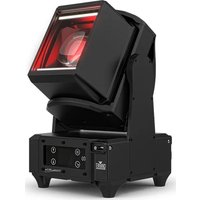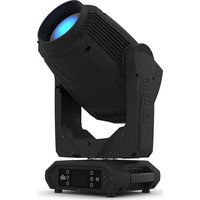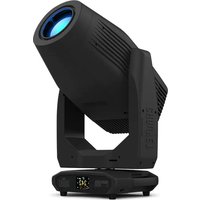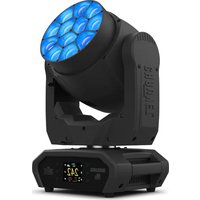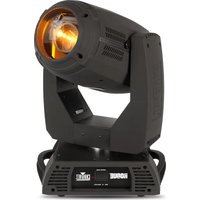
Rogue RH1 Hybrid - Professional spotlight Chauvet - Free user manual and instructions
Find the device manual for free Rogue RH1 Hybrid Chauvet in PDF.


| Product Type | Professional light projector |
| Brand | Chauvet |
| Model | Rogue RH1 Hybrid |
| Power Supply | 100-240 VAC, 50/60 Hz (universal) |
| DMX Personality | 20CH and 25CH |
| DMX Connection | 3 or 5 pins |
| Pan Angle | 540°, 360° or 180° (configurable) |
| Tilt Angle | 270°, 180° or 90° (configurable) |
| Main Functions | Pan/Tilt, Dimmer, Shutter, Color wheel, 2 gobo wheels, Zoom, Focus, 2 prisms, Frost, Beam Deflection, Movement macros |
| Control Screen | With navigation menu |
| Lamp | Replaceable, with specific ventilation |
| Fuse | Replaceable, specific type and amperage |
| Mounting | Omega brackets, safety cable mandatory |
| Maximum Ambient Temperature | 45°C |
| Protection Rating | IP20 (indoor use only) |
| Safety | Do not open, do not look at the light source, use a safety cable, do not connect to a dimmer |
| Maintenance | Lamp replacement, lens cleaning, fuse checking |
Frequently Asked Questions - Rogue RH1 Hybrid Chauvet
User questions about Rogue RH1 Hybrid Chauvet
0 question about this device. Answer the ones you know or ask your own.
Ask a new question about this device
Download the instructions for your Professional spotlight in PDF format for free! Find your manual Rogue RH1 Hybrid - Chauvet and take your electronic device back in hand. On this page are published all the documents necessary for the use of your device. Rogue RH1 Hybrid by Chauvet.
USER MANUAL Rogue RH1 Hybrid Chauvet
natural_image
Line drawing of a Chavet industrial radar or optical instrument (no text or symbols on the device itself)About This Guide
The Rogue™ RH1 Hybrid Quick Reference Guide (QRG) has basic product information such as connection, mounting, menu options, and DMX values Download the User Manual from www.chauvetprofessional.com for more details.
Disclaimer
The information and specifications contained in this QRG are subject to change without notice.
Safety Notes
• DO NOT open this product. It contains no user-serviceable parts.
- To eliminate unnecessary wear and improve its lifespan, during periods of non-use completely disconnect the product from power via breaker or by unplugging it. - CAUTION: When transferring product from extreme temperature environments, (e.g. cold truck to warm humid ballroom) condensation may form on the internal electronics of the product. To avoid causing a failure, allow product to fully acclimate to the surrounding environment before connecting it to power.
• DO NOT look at the light source when the product is on.
CAUTION: This product's housing may be hot when lights are operating.
- Mount this product in a location with adequate ventilation, at least 20 in (50 cm) from adjacent surfaces.
- DO NOT leave any flammable material within 50 cm of this product while operating or connected to power.
• USE a safety cable when mounting this product overhead.
- DO NOT operate this product outdoors or in any location where dust, excessive heat, water, or humidity may affect it. (IP20)
- DO NOT operate this product if the housing, lenses, or cables appear damaged.
• DO NOT connect this product to a dimmer or rheostat.
• ONLY connect this product to a grounded and protected circuit.
- ONLY use mounting brackets or the handles to carry this product. Do not carry by the moving head.
• In the event of a serious operating problem, stop using immediately.
- The maximum ambient temperature is 113 °F (45 °C). Do not operate this product at higher temperatures.
Contact
• From outside the U.S., UK, Ireland, Mexico, or Benelux, contact the distributor of record to request support or return a product.
- From inside the U.S., UK, Ireland, Mexico, or Benelux, use the information in Contact Us at the end of this QRG.
What Is Included
- Rogue™ RH1 Hybrid
- Neutrik® powerCON® power cord
- Warranty Card
• 2 Omega brackets with mounting hardware
- Quick Reference Guide
AC Power
This product has an auto-ranging power supply that can work with an input voltage range of 100–240 VAC, 50/60 Hz.

To eliminate unnecessary wear and improve its lifespan, during periods of non-use completely disconnect the product from power via breaker or by unplugging it.
AC Plug
| Connection | Wire (U.S.) | Wire (Europe) | Screw Color |
| AC Live | Black | Brown | Yellow/Brass |
| AC Neutral | White | Blue | Silver |
| AC Ground | Green/Yellow | Green/Yellow | Green |
Replacing The Fuse
- Disconnect this product from power.
- Using a Phillips #2 head screwdriver, unscrew the fuse holder cap from the housing.
- Remove blown fuse and replace with a good fuse of the same type and rating.
- Screw the fuse holder cap back in place and reconnect power.
Lamp Replacement
- Turn the fixture off and disconnect it from power.
- Wait at least 15 minutes for the lamp to cool down.
- Loosen 2 Phillips-head 1/4-turn screws on rear panel of the head.
- Take note as to the orientation of the lamp. Vent holes on the front of the lam should align horizontally with the air vents on the lamp frame. Orient the product so that the lamp power wires are coming from the lower right corner as you are looking at the rear head.
- Using the lamp base, push the lamp down against the spring clips located on the bottom, then roll the lamp out the top.
- Pull the 2 wires connected to the lamp by the spade terminals.
- Reverse the steps above to install the new lamp.

Please refer to the User Manual for more detailed instructions with images.
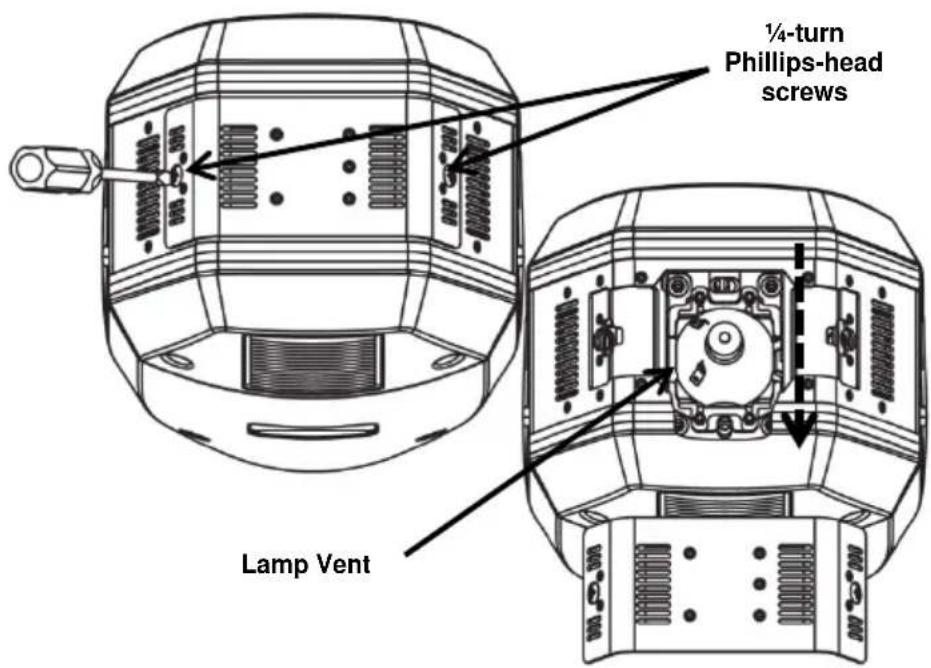
RISK OF LAMP EXPLOSION! Vent holes on the front of the lamp should align horizontally with the air vents on the lamp frame. This is extremely important for lamp cooling.
DMX Linking
The Rogue™ RH1 Hybrid will work with a DMX controller using a 3- or 5-pin DMX serial connection. A DMX Primer is available from www.chauvetprofessional.com.
DMX Connection
The Rogue™ RH1 Hybrid uses a 3- or 5-pin DMX data connection for its DMX personalities: 20CH and 25CH. See the User Manual for information about connecting and configuring the product for DMX operation.
Mounting
Before mounting this product, read the Safety Notes. Use at least one mounting point per product. Make sure the mounting clamps are capable of supporting the weight of the product. For our Chauvet line of mounting clamps, go to www.trusst.com/productcategory/accessories-clamps/.
Product Mounting Diagram
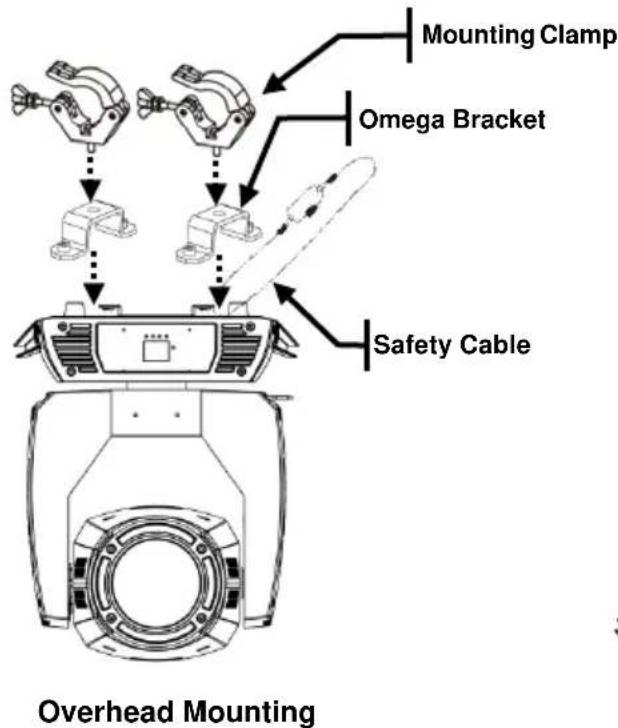
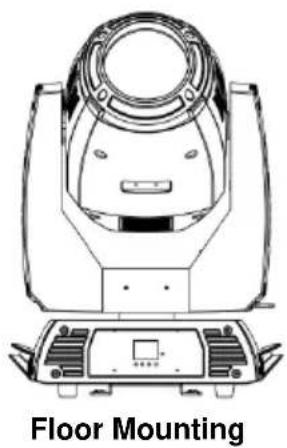
natural_image
Line drawing of a mechanical device with labeled 'Floor Mounting' at the bottom (no other text or symbols)Control Panel Description
| Button | Function |
| Exits from the current menu or function | |
| Enables the currently displayed menu or sets the currently selected value into the selected function | |
| Navigates upwards through the menu list or increases the numeric value when in a function | |
| Navigates downwards through the menu list or decreases the numeric value when in a function |
Menu Map
| Main Level | Programming Levels | Description | ||
| Address | 001-512 | Sets the DMX starting address | ||
| Run Mode | DMX | 20CH | Selects the DMX mode | |
| 25CH | ||||
| Auto Test | Runs the product's test sequence | |||
| Manual Test | Pan | 000-255 | Allows manual control of all settings from the control panel | |
| Pan Fine | ||||
| Tilt | ||||
| Tilt Fine | ||||
| P/T Speed | ||||
| Dimmer | ||||
| Dimmer Fine | ||||
| Shutter | ||||
| Color | ||||
| Gobo2 | ||||
| Gobo | ||||
| Gobo Rot | ||||
| Focus | ||||
| Focus Fine | ||||
| Zoom | ||||
| Zoom Fine | ||||
| Prism1 | ||||
| Prism1 Rot | ||||
| Prism2 | ||||
| Prism2 Rot | ||||
| Frost1 | ||||
| Frost2 | ||||
| P/T Macro | ||||
| P/T Ma.Speed | ||||
| Special Function | ||||
| Setup | Pan Reverse | YES | Reverse pan operation | |
| NO | Normal pan operation | |||
| Tilt Reverse | YES | Reverse tilt operation | ||
| NO | Normal tilt operation | |||
| Screen Reverse | YES | Rotates control screen view 180° | ||
| NO | Normal control screen view | |||
| Pan Angle | 540 | Selects the 540° pan angle range | ||
| 360 | Selects the 360° pan angle range | |||
| 180 | Selects the 180° pan angle range | |||
| Tilt Angle | 270 | Selects the 270° tilt angle range | ||
| 180 | Selects the 180° tilt angle range | |||
| 90 | Selects the 90° tilt angle range | |||
| BL.O.P/T Move | YES | Defines the pan/tilt move-in-black delay | ||
| NO | ||||
| BL.O.ColorMove | YES | Defines the color change move-in-black delay | ||
| NO | ||||
| BL.O.GoboMove | YES | Defines the gobo change move-in-black delay | ||
| NO | ||||
| Lamp Settings | On/Off | ON | Turns lamp on/off | |
| OFF | ||||
| State/Power on | ON | Defines the status of lamp when powering up product | ||
| OFF | ||||
| Off Via Dmx | YES | Turns off the unit via DMX controller | ||
| NO | ||||
| On If Dmx On | YES | Turns lamp on when DMX signal is detected | ||
| NO | ||||
| Off If Dmx Off | YES | Turns lamp off when DMX signal is lost | ||
| NO | ||||
| Ignition Delay | 000–255 | Selects duration of delay between product power on and lamp power on | ||
| Low Power Delay | 000–255 | Selects the duration of delay when shutter is closed and lamp enters lower power state | ||
| Reset Lamp Time | YES | Resets lamp timer to 0 | ||
| NO | Leaves lamp time unchanged | |||
| Setup (Cont.) | Maintenance Timer | Interval 10-250 | Defines amount of hours between maintenance | |
| Remaining Time | NO | Shows amount of time remaining in maintenance cycle | ||
| RESET | Resets the time back to the beginning | |||
| Reset Function | Pan/Tilt | YES | Resets pan/tilt functions to the home position | |
| NO | ||||
| Shutter/Prism | YES | Resets all shutter/prism functions to the home position | ||
| NO | ||||
| Color | YES | Resets all color functions to the home position | ||
| NO | ||||
| Gobo | YES | Resets all gobo functions to the home position | ||
| NO | ||||
| Zoom/Frost/Focus | YES | Resets the zoom, frost, and focus functions to the home position | ||
| NO | ||||
| All | YES | Resets all functions to the home position | ||
| NO | ||||
| Factory Settings | YES | Reverts the product back to the original factory settings | ||
| NO | ||||
| Sys Info | Ver: | Displays the software version | ||
| Running Mode: | Displays the current running mode | |||
| Dmx Address: | Displays the current DMX address | |||
| Temperature: | Displays the product's temperature in Celsius | |||
| Lamp On Time: | Displays the amount of time the lamp has been on (provided the counter has been reset upon installation of new lamp) | |||
| Remain Time: | Shows amount of time remaining in maintenance cycle | |||
DMX Values
| 25CH Channel | Function | Value | Percent/Setting |
| 1 | Pan | 000Ü 255 | 0–100% |
| 2 | Fine Pan | 000Ü 255 | Fine control (16-bit) |
| 3 | Tilt | 000Ü 255 | 0–100% |
| 4 | Fine Tilt | 000Ü 255 | Fine control (16-bit) |
| 5 | Pan/Tilt Speed | 000Ü 255 | 0–100% |
| 6 | Dimmer | 000Ü 255 | 0–100% |
| 7 | Fine Dimmer | 000Ü 255 | Fine control (16-bit) |
| 8 Shutter | 000Ü 007 | Closed | |
| 008Ü 015 | Open | ||
| 016Ü 131 | Slow to fast | ||
| 132Ü 167 | Fast close, slow open (slow to fast) | ||
| 168Ü 203 | Slow close, fast open (slow to fast) | ||
| 204Ü 239 | Pulse effect from slow to fast | ||
| 240Ü 247 | Random effect from slow to fast | ||
| 248Ü 255 | Open | ||
| 9 Color Wheel | 000Ü 003 | Open | |
| 004Ü 007 | Red | ||
| 008Ü 011 | Orange | ||
| 012Ü 015 | Cyan | ||
| 016Ü 019 | Light green | ||
| 020Ü 023 | Light yellow | ||
| 024Ü 027 | Green | ||
| 028Ü 031 | Magenta | ||
| 032Ü 035 | Dark Blue | ||
| 036Ü 039 | Dark yellow | ||
| 040Ü 043 | Blue | ||
| 044Ü 047 | CTO 5600 K | ||
| 048Ü 051 | CTO 6500 K | ||
| 052Ü 059 | UV | ||
| 060Ü 187 | Split colors | ||
| 188Ü 219 | Clockwise color scroll, fast to slow | ||
| 220Ü 223 | Stop | ||
| 224Ü 255 | Counter-clockwise color scroll, slow to fast | ||
DMX Values (Cont.)
| 25CH (Cont.) | Channel | Function | Value | Percent/Setting |
| 000Ü 003 | Open | |||
| 004Ü 006 | Gobo 1 | |||
| 007Ü 009 | Gobo 2 | |||
| 010Ü 012 | Gobo 3 | |||
| 013Ü 015 | Gobo 4 | |||
| 016Ü 018 | Gobo 5 | |||
| 019Ü 021 | Gobo 6 | |||
| 022Ü 024 | Gobo 7 | |||
| 025Ü 027 | Gobo 8 | |||
| 028Ü 030 | Gobo 9 | |||
| 031Ü 033 | Gobo 10 | |||
| 034Ü 036 | Gobo 11 | |||
| 037Ü 039 | Gobo 12 | |||
| 040Ü 042 | Gobo 13 | |||
| 043Ü 059 | Open | |||
| 10 Gobo Wheel 1 | 060Ü 063 | Gobo shake 1, slow to fast | ||
| 064Ü 067 | Gobo shake 2, slow to fast | |||
| 068Ü 071 | Gobo shake 3, slow to fast | |||
| 072Ü 075 | Gobo shake 4, slow to fast | |||
| 076Ü 079 | Gobo shake 5, slow to fast | |||
| 080Ü 083 | Gobo shake 6, slow to fast | |||
| 084Ü 087 | Gobo shake 7, slow to fast | |||
| 088Ü 091 | Gobo shake 8, slow to fast | |||
| 092Ü 095 | Gobo shake 9, slow to fast | |||
| 096Ü 099 | Gobo shake 10, slow to fast | |||
| 100Ü 103 | Gobo shake 11, slow to fast | |||
| 104Ü 107 | Gobo shake 12, slow to fast | |||
| 108Ü 111 | Gobo shake 13, slow to fast | |||
| 112Ü 127 | Open | |||
| 128Ü 189 | Clockwise gobo scroll, fast to slow | |||
| 190Ü 193 | Stop | |||
| 194Ü 255 | Counter-clockwise gobo scroll, slow to fast | |||
| 11 Gobo Wheel 2 | 000 | Open | ||
| 001Ü 005 | Open (aperture sets to Spot mode) | |||
| 006Ü 011 | Gobo 1 | |||
| 012Ü 017 | Gobo 2 | |||
| 018Ü 023 | Gobo 3 | |||
| 024Ü 029 | Gobo 4 | |||
| 030Ü 035 | Gobo 5 | |||
| 036Ü 041 | Gobo 6 | |||
| 042Ü 047 | Gobo 7 | |||
| 048Ü 053 | Gobo 8 | |||
| 054Ü 063 | Gobo 9 | |||
| 064Ü 073 | Gobo shake 1, slow to fast | |||
| 074Ü 079 | Gobo shake 2, slow to fast | |||
| 080Ü 085 | Gobo shake 3, slow to fast | |||
| 086Ü 091 | Gobo shake 4, slow to fast | |||
| 092Ü 097 | Gobo shake 5, slow to fast | |||
| 098Ü 103 | Gobo shake 6, slow to fast | |||
| 104Ü 109 | Gobo shake 7, slow to fast | |||
| 110Ü 115 | Gobo shake 8, slow to fast | |||
| 116Ü 121 | Gobo shake 9, slow to fast | |||
| 122Ü 127 | Open | |||
| 128Ü 191 | Clockwise gobo scroll, fast to slow | |||
| 192Ü 255 | Counter-clockwise gobo scroll, slow to fast | |||
| 12 | Gobo Wheel 2 Rotate | 000Ü 063 | Gobo index | |
| 064Ü 147 | Clockwise rotation, slow to fast | |||
| 148Ü 231 | Counter-clockwise rotation, fast to slow | |||
| 232Ü 255 | Clockwise rotation/counter-clockwise rotation | |||
| 13 | Focus | 000Ü 255 | 0–100% | |
| 14 | Fine Focus | 000Ü 255 | Fine control (16-bit) | |
| 15 | Zoom | 000Ü 255 | 0–100% | |
| 16 | Fine Zoom | 000Ü 255 | Fine control (16-bit) | |
| 17 Prism 1 | 000Ü 004 | No function | ||
| 005Ü 255 | Prism insert | |||
| 18 Prism 1 Rotate | 000Ü 127 | Prism index | ||
| 128Ü 189 | Clockwise rotation, fast to slow | |||
| 190Ü 193 | Stop | |||
| 194Ü 255 | Counter-clockwise rotation, slow to fast | |||
| 19 Prism 2 | 000Ü 004 | No function | ||
| 005Ü 255 | Prism insert | |||
| 20 Prism 2 Rotate | 000Ü 127 | Prism index | ||
| 128Ü 189 | Clockwise rotation, fast to slow | |||
| 190Ü 193 | Stop | |||
| 194Ü 255 | Counter-clockwise rotation, slow to fast | |||
| 21 | Frost | 000Ü 255 | 0–100% | |
| 22 | Beam Defraction | 000Ü 255 | 0–100% | |
| 000Ü 007 | No function | |||
| 008Ü 015 | Effect 1 | |||
| 016Ü 023 | Effect 2 | |||
| 024Ü 031 | Effect 3 | |||
| 032Ü 039 | Effect 4 | |||
| 040Ü 047 | Effect 5 | |||
| 048Ü 055 | Effect 6 | |||
| 056Ü 063 | Effect 7 | |||
| 064Ü 071 | Effect 8 | |||
| 072Ü 079 | Effect 9 | |||
| 080Ü 087 | Effect 10 | |||
| 088Ü 095 | Effect 11 | |||
| 096Ü 103 | Effect 12 | |||
| 104Ü 111 | Effect 13 | |||
| 112Ü 119 | Effect 14 | |||
| 120Ü 127 | Effect 15 | |||
| 23 Movement Macros | 128Ü 135 | Effect 16 | ||
| 136Ü 143 | Effect 17 | |||
| 144Ü 151 | Effect 18 | |||
| 152Ü 159 | Effect 19 | |||
| 160Ü 167 | Effect 20 | |||
| 168Ü 175 | Effect 21 | |||
| 176Ü 183 | Effect 22 | |||
| 184Ü 191 | Effect 23 | |||
| 192Ü 199 | Effect 24 | |||
| 200Ü 207 | Effect 25 | |||
| 208Ü 215 | Effect 26 | |||
| 216Ü 223 | Effect 27 | |||
| 224Ü 231 | Effect 28 | |||
| 232Ü 239 | Effect 29 | |||
| 240Ü 247 | Effect 30 | |||
| 248Ü 255 | Effect 31 | |||
| 24 | Movement Macro Speed | 000Û 255 | 0–100% | |
| 25 Control | 000Û 029 | No function | ||
| 030Û 039 | Dimmer conventional mode | |||
| 040Û 049 | Dimmer linear mode | |||
| 050Û 059 | Pan/Tilt fast mode | |||
| 060Û 069 | Pan/Tilt normal mode | |||
| 070Û 079 | Blackout during pan/tilt (3 sec hold) | |||
| 080Û 089 | Disable pan/tilt blackout (3 sec hold) | |||
| 090Û 099 | Blackout while color wheel moving (3 sec hold) | |||
| 100Û 109 | Disable color wheel blackout (3 sec hold) | |||
| 110Û 119 | Blackout while gobo wheels moving (3 sec hold) | |||
| 120Û 129 | Disable gobo wheel blackout (3 sec hold) | |||
| 130Û 139 | Lamp on | |||
| 140Û 149 | Pan/Tilt reset | |||
| 150Û 159 | Color wheel reset | |||
| 160Û 169 | Gobo wheel reset | |||
| 170Û 179 | Shutter/prism reset | |||
| 180Û 189 | No function | |||
| 190Û 199 | Frost/focus/zoom reset | |||
| 200Û 209 | All reset | |||
| 210Û 219 | Blackout all function during pan/tilt | |||
| 220Û 229 | Disable blackout all functions during pan/tilt | |||
| 230Û 239 | Lamp off | |||
| 240Û 247 | Pan/Tilt movement ramp speed, increase on | |||
| 248Û 255 | Pan/Tilt movement ramp speed, increase off | |||
| 20CH Channel | Function | Value | Percent/Setting | |
| 1 | Pan | 000Ü 255 | 0–100% | |
| 2 | Fine Pan | 000Ü 255 | Fine control (16-bit) | |
| 3 | Tilt | 000Ü 255 | 0–100% | |
| 4 | Fine Tilt | 000Ü 255 | Fine control (16-bit) | |
| 5 | Pan/Tilt Speed | 000Ü 255 | 0–100% | |
| 6 | Dimmer | 000Ü 255 | 0–100% | |
| 7 Shutter | 000Ü 007 | Closed | ||
| 008Ü 015 | Open | |||
| 016Ü 131 | Slow to fast | |||
| 132Ü 167 | Fast close, slow open (slow to fast) | |||
| 168Ü 203 | Slow close, fast open (slow to fast) | |||
| 204Ü 239 | Pulse effect from slow to fast | |||
| 240Ü 247 | Random effect from slow to fast | |||
| 248Ü 255 | Open | |||
| 8 Color Wheel | 000Ü 003 | Open | ||
| 004Ü 007 | Red | |||
| 008Ü 011 | Orange | |||
| 012Ü 015 | Cyan | |||
| 016Ü 019 | Light green | |||
| 020Ü 023 | Light yellow | |||
| 024Ü 027 | Green | |||
| 028Ü 031 | Magenta | |||
| 032Ü 035 | Dark Blue | |||
| 036Ü 039 | Dark yellow | |||
| 040Ü 043 | Blue | |||
| 044Ü 047 | CTO 5600 K | |||
| 048Ü 051 | CTO 6500 K | |||
| 052Ü 059 | UV | |||
| 060Ü 187 | Split colors | |||
| 188Ü 219 | Clockwise color scroll, fast to slow | |||
| 220Ü 223 | Stop | |||
| 224Ü 255 | Counter-clockwise color scroll, slow to fast | |||
DMX Values (Cont.)
| 20CH (Cont.) | Channel | Function | Value | Percent/Setting |
| 000Ü 003 | Open | |||
| 004Ü 006 | Gobo 1 | |||
| 007Ü 009 | Gobo 2 | |||
| 010Ü 012 | Gobo 3 | |||
| 013Ü 015 | Gobo 4 | |||
| 016Ü 018 | Gobo 5 | |||
| 019Ü 021 | Gobo 6 | |||
| 022Ü 024 | Gobo 7 | |||
| 025Ü 027 | Gobo 8 | |||
| 028Ü 030 | Gobo 9 | |||
| 031Ü 033 | Gobo 10 | |||
| 034Ü 036 | Gobo 11 | |||
| 037Ü 039 | Gobo 12 | |||
| 040Ü 042 | Gobo 13 | |||
| 043Ü 059 | Open | |||
| 9 Gobo Wheel 1 | 060Ü 063 | Gobo shake 1, slow to fast | ||
| 064Ü 067 | Gobo shake 2, slow to fast | |||
| 068Ü 071 | Gobo shake 3, slow to fast | |||
| 072Ü 075 | Gobo shake 4, slow to fast | |||
| 076Ü 079 | Gobo shake 5, slow to fast | |||
| 080Ü 083 | Gobo shake 6, slow to fast | |||
| 084Ü 087 | Gobo shake 7, slow to fast | |||
| 088Ü 091 | Gobo shake 8, slow to fast | |||
| 092Ü 095 | Gobo shake 9, slow to fast | |||
| 096Ü 099 | Gobo shake 10, slow to fast | |||
| 100Ü 103 | Gobo shake 11, slow to fast | |||
| 104Ü 107 | Gobo shake 12, slow to fast | |||
| 108Ü 111 | Gobo shake 13, slow to fast | |||
| 112Ü 127 | Open | |||
| 128Ü 189 | Clockwise gobo scroll, fast to slow | |||
| 190Ü 193 | Stop | |||
| 194Ü 255 | Counter-clockwise gobo scroll, slow to fast | |||
| 10 Gobo Wheel 2 | 000 | Open | ||
| 001Ü 005 | Open (aperture sets to Spot mode) | |||
| 006Ü 011 | Gobo 1 | |||
| 012Ü 017 | Gobo 2 | |||
| 018Ü 023 | Gobo 3 | |||
| 024Ü 029 | Gobo 4 | |||
| 030Ü 035 | Gobo 5 | |||
| 036Ü 041 | Gobo 6 | |||
| 042Ü 047 | Gobo 7 | |||
| 048Ü 053 | Gobo 8 | |||
| 054Ü 063 | Gobo 9 | |||
| 064Ü 073 | Gobo shake 1, slow to fast | |||
| 074Ü 079 | Gobo shake 2, slow to fast | |||
| 080Ü 085 | Gobo shake 3, slow to fast | |||
| 086Ü 091 | Gobo shake 4, slow to fast | |||
| 092Ü 097 | Gobo shake 5, slow to fast | |||
| 098Ü 103 | Gobo shake 6, slow to fast | |||
| 104Ü 109 | Gobo shake 7, slow to fast | |||
| 110Ü 115 | Gobo shake 8, slow to fast | |||
| 116Ü 121 | Gobo shake 9, slow to fast | |||
| 122Ü 127 | Open | |||
| 128Ü 191 | Clockwise gobo scroll, fast to slow | |||
| 192Ü 255 | Counter-clockwise gobo scroll, slow to fast | |||
| 11 | Gobo Wheel 2 Rotate | 000Ü 063 | Gobo index | |
| 064Ü 147 | Clockwise rotation, slow to fast | |||
| 148Ü 231 | Counter-clockwise rotation, fast to slow | |||
| 232Ü 255 | Clockwise rotation/counter-clockwise rotation | |||
| 12 | Focus | 000Ü 255 | 0-100% | |
| 13 | Zoom | 000Ü 255 | 0-100% | |
| 14 Prism 1 | 000Ü 004 | No function | ||
| 005Ü 255 | Prism insert | |||
| 15 Prism 1 Rotate | 000Ü 127 | Prism index | ||
| 128Ü 189 | Clockwise rotation, fast to slow | |||
| 190Ü 193 | Stop | |||
| 194Ü 255 | Counter-clockwise rotation, slow to fast | |||
| 16 Prism 2 | 000Ü 004 | No function | ||
| 005Ü 255 | Prism insert | |||
| 17 Prism 2 Rotate | 000Ü 127 | Prism index | ||
| 128Ü 189 | Clockwise rotation, fast to slow | |||
| 190Ü 193 | Stop | |||
| 194Ü 255 | Counter-clockwise rotation, slow to fast | |||
| 18 | Frost | 000Ü 255 | 0-100% | |
| 19 | Beam Defraction | 000Ü 255 | 0-100% | |
| 20 Control | 000Ü 029 | No function | ||
| 030Ü 039 | Dimmer conventional mode | |||
| 040Ü 049 | Dimmer linear mode | |||
| 050Ü 059 | Pan/Tilt fast mode | |||
| 060Ü 069 | Pan/Tilt normal mode | |||
| 070Ü 079 | Blackout during pan/tilt (3 sec hold) | |||
| 080Ü 089 | Disable pan/tilt blackout (3 sec hold) | |||
| 090Ü 099 | Blackout while color wheel moving (3 sec hold) | |||
| 100Ü 109 | Disable color wheel blackout (3 sec hold) | |||
| 110Ü 119 | Blackout while gobo wheels moving (3 sec hold) | |||
| 120Ü 129 | Disable gobo wheel blackout (3 sec hold) | |||
| 130Ü 139 | Lamp on | |||
| 140Ü 149 | Pan/Tilt reset | |||
| 150Ü 159 | Color wheel reset | |||
| 160Ü 169 | Gobo wheel reset | |||
| 170Ü 179 | Shutter/prizm reset | |||
| 180Ü 189 | No function | |||
| 190Ü 199 | Frost/focus/zoom reset | |||
| 200Ü 209 | All reset | |||
| 210Ü 219 | Blackout all function during pan/tilt | |||
| 220Ü 229 | Disable blackout all functions during pan/tilt | |||
| 230Ü 239 | Lamp off | |||
| 240Ü 247 | Pan/Tilt movement ramp speed, increase on | |||
| 248Ü 255 | Pan/Tilt movement ramp speed, increase off | |||
Acerca de esta Guía
natural_image
Line drawing of a mechanical device with no visible text or symbolsMontaje en el Suelo
natural_image
Line drawing of a mechanical device with top and bottom views, labeled 'Montage au Sol' below (no other text or symbols)natural_image
Line drawing of a mechanical device with top and side views (no text or symbols)Toll free: (800) 762-1084
Technical Support
Voice: (954) 577-4455 (Press 4)
Fax: (954) 756-8015
Email: tech@chauvetlighting.com
World Wide Web
www.chauvetlighting.com
UNITED KINGDOM AND IRELAND - Chauvet Europe Ltd.
General Information
Address: Unit 1C
Brookhill Road Industrial Estate
Pinxton, Nottingham, UK
NG16 6NT
Voice: +44 (0)1773 511115
Fax: +44 (0)1773 511110
Technical Support
Email: uktech@chauvetlighting.com
World Wide Web
www.chauvetlighting.co.uk
MEXICO - Chauvet Mexico
General Information
Address: Av. Santa Ana 30
Parque Industrial Lerma
Lerma, Mexico C.P. 52000
Voice: +52 (728) 285-5000
Technical Support
Email: servicio@chauvet.com.mx
World Wide Web
www.chauvet.com.mx
CHAUVET EUROPE - Chauvet Europe BVBA
General Information
Outside the U.S., United Kingdom, Ireland, Mexico, or Benelux, contact your dealer. Follow their instructions to request support or to return a product. Visit our website for contact details.


UL 1573
CSA C22.2 No. 166
E113093