8COMBI - Speaker Party light & sound - Free user manual and instructions
Find the device manual for free 8COMBI Party light & sound in PDF.


User questions about 8COMBI Party light & sound
0 question about this device. Answer the ones you know or ask your own.
Ask a new question about this device
Download the instructions for your Speaker in PDF format for free! Find your manual 8COMBI - Party light & sound and take your electronic device back in hand. On this page are published all the documents necessary for the use of your device. 8COMBI by Party light & sound.
USER MANUAL 8COMBI Party light & sound
With battery & LED light effect
ENCEINTE 8"/20CM
natural_image
Black Party electronic device with a circular fan and digital display (no visible text or symbols)ACTIVE ILLUMINATED SPEAKERBOXWITH BATTERY & LED LIGHT EFFECT
INSTRUCTION MANUAL
Please read the manual carefully and keep it for future reference.
Important Safety instructions and danger warnings
All safety instructions and warnings must be adhered to. They are part of the manual and must be kept with the manual.
Any guarantee claims are rendered invalid if damage occurs due to non-observance of these operating instructions. We assume no liability for any consequent damage.
We assume no liability for personal injury or damage to property caused by incorrect handling or non-observance of the safety instructions. Any guarantee claims expire in such cases.
- Unauthorized conversions and/or modifications of the appliance are not permitted for safety and licensing reasons (CE).
The appliance is approved for operation in dry, closed rooms only ⏻. Do not operate the device nearby water, such as in bathrooms or nearby swimming pools.
The appliance may not be exposed to extreme temperatures ( < +5^ / > +35^ ) in operation.
The appliance may not be subjected to strong vibrations or heavy mechanical strain.
The appliance may not be exposed to excessive moisture (due to dripping or sprayed water, for example).
Do not place any recipients filled with liquids, such as glasses or vases, on top of or directly next to the appliance. They could fall over, causing water to enter the appliance. Never pour out liquids above the appliance. Do not place any small objects, such as coins or paper clips, on the appliance since they could fall inside the appliance.
Do not leave the appliance unattended while operating it.
Never place the appliance on an unstable or movable surface. Persons could be injured or the appliance damaged by it falling down.
Do not place any naked flames such as those of burning candles on or next to the appliance.
Do not place the appliance on soft surfaces such as carpets or beds. Do not cover the air vents of the appliance. Do not obstruct the air circulation with objects such as magazines, table cloths or curtains. This prevents the dissipation of heat from the appliance and can result in overheating.
Only use the appliance in a moderate climate, not in tropical environments.
If you are not sure about the correct connection or if questions arise which are not answered by the operating instructions, please do not hesitate to contact support or a specialist of your choice. Consult a specialist if you are in doubt the operating principle or the safety of the product.
Contents of the carton
1 x Bluetooth Party speaker
1 x Aux in Cable
1 x Micro USB Charging Cable
1 x User Manual
Prior to using the system for the first time, plug the small connector of the supplied micro-USB charging cable into the micro-USB charging port (9).
Plug the large connector into a USB charging device or a 5V USB adapter (not included) and plug into a wall socket. The LED indicator on the speaker will turn RED while charging and turn OFF when fully charged.
When the speaker is low on power, a voice prompt will be say "Low Power" indicating that the battery needs to be recharged.
NOTE: Please shut down the power switch after you have finished using the system.
IMPORTANT NOTE ON LITHIUM-ION BATTERIES
- PRIOR to using the unit for the first time, please charge fully the battery
- Charge the battery regularly after each use. Don't wait until it is discharged!
- DON'T allow the battery to discharge completely, otherwise it will lose 20% of its capacity or even be totally damaged!
If the voltage becomes too low, the internal circuits are not powered anymore and it will become impossible to recharge the battery!
- If you don't use the unit for a longer period of time, it is recommended to charge it at 40% of its capacity and check/charge it once per month.
** BATTERIES ARE NOT COVERED BY THE WARRANTY **
We cannot be held responsible for damaged batteries further to the non-observance of these basic rules.
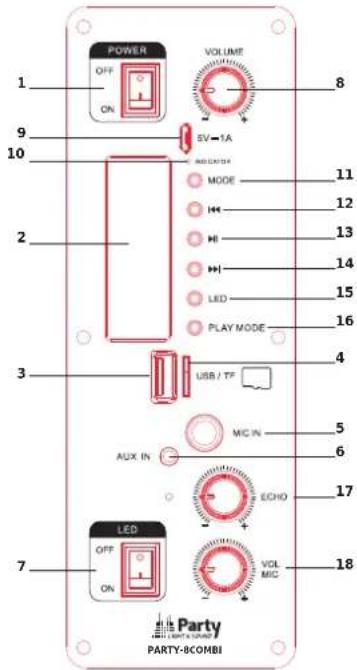
Location of Controls
- [POWER] : Power speaker ON/OFF
- The LED screen: show the playing mode of the speaker
- USB stick input
- TF card input
- [MIC IN]:6.5mm Microphone Input Jack
- [AUX IN]:3.5mm Auxiliary Audio Input Jack
- [LED] : Turns the upper Derby light effect ON/OFF
- VOLUME:Speaker Volume Knob
- Micro USB Charging Port
- [INDICATOR]: Charging LED Indicator
- MODE: Switch input mode (Bluetooth, Aux in, USB, TF)
- [◀]: Press to select previous song
- ▶ II: Press to play / pause song
- [▶]: Press to select next song
- [LED]: Turns the speaker LED lights ON/OFF
- [PLAY MODE]: Select among repeat one song, all songs or random play
- [ECHO]: Mic Echo Knob
- VOL MIC: Mic Volume Knob
Using the speaker
Flip the on/off switch to the ON position to switch the speaker on. A tone will be heard, and the speaker will enter into Bluetooth pairing mode. The speaker will automatically re-connect to any nearby, previously-paired device when the Bluetooth function is enabled. Flip the on/off switch to the OFF position to switch the speaker off.
Playing Music
To play music, you must be connected to a Bluetooth-enabled device or connected via an AUX cable (See the chapters "Bluetooth Pairing" and "Use with a Wired Device" of this user manual). Once connected, audio playback and volume adjustment can be controlled via your paired media-playing device.
Bluetooth Pairing
- Power the speaker ON. A voice prompt "Power On" will be heard and the LED display will show BLUE.
- Enable the Bluetooth search function on your mobile device. Select "PARTY-COMBI" in the list of found devices.
- After successful pairing, a voice prompt will say "Bluetooth device is connected successfully".
Use with Wired Device
Insert one connector of a 3.5 mm auxiliary cable into the 3.5mm auxiliary input port on the back of the speaker. Insert the other connector into the headphone jack of your media-playing device.
Press the mode button
The LED screen will show AUX. Now you can use the controls on your connected device for playback and volume adjustment
text_image
POWER OFF ON VOLUME 8 9 10 SV-1A MODE 11 12 13 14 LED 15 PLAY MODE 16 3 USB / TF 4 MIC IN 5 6 AUX IN ECHO 17 7 LED OFF ON VOL MHC 18 PARTY LIGHT STAND PARTY-8COMBIUSING THE MIC INPUT
Insert a standard 6.5mm connector of a wired microphone (not included) into the microphone input jack. Use the mic volume knob to adjust the volume.
WARNING: It is recommended to turn the speaker's microphone echo knob to the left all the way. To prevent any feedback or loud pops when connecting the microphone.
MOUNTING THE SPEAKER
The speaker can be mounted on any conventional stand mount with a maximum shaft diameter of 1.45". Unscrew the butterfly screw, insert the rod of the stand into the shaft hole and tighten until secure. Make sure that the stand is capable of supporting up to 6.8kg.
Specifications
| Input voltage | 5V= 1A via supplied USB charging lead |
| Built-in battery Lithium 3.7V= 2000mAh | |
| Play time at 100% volume with LEDs on 2 hours | |
| Play time at 80% volume with LEDs off 4 hours | |
| Signal-to-noise ratio >70dB | |
| Frequency response 80Hz - 18kHz | |
| BT frequency 2402-2480MHz | |
| Bluetooth version 5.0 | |
| Max. RF transmission power 0.998dBm | |
| Dimensions 235 x 210 x 385mm | |
| Weight 2.4kg |
Correct disposal of the product

This marking indicates that this product should not be disposed with other household wastes throughout the EU. To prevent possible harm to the environment or human health from uncontrolled waste disposal, recycle it responsibly to promote the sustainable reuse of material resources. To return your used device, please use the return and collection systems or contact the retailer where the product was purchased. They can take this product for environmental safe
recycling.
ENCEINTE 20CM AVEC BATTERIE & ANIMATIONS LUMINEUSES
MANUEL D'INSTRUCTION
EU Declaration of Conformity
Hereby we, LOTRONIC SA
Avenue Zénobe Gramme, 9
1480 SAINTES
Belgique
+32.2.390.91.91
Certify and declare under our sole responsibility that the following product:

text_image
Party LIGHT & SOUNDTrade name:
Product name: Portable sound system with Bluetooth, USB and battery
Type or model: PARTY-8COMBI
Conforms to the essential requirements of the:
RED directive 2014/53/EU, 2011/65/EU RoHS directive and the Commission Delegated Directive (EU) 2015/863
based on the following standards applied:
EN62368-1:2014+A11:2017
EN62479:2010
ETSI EN301 489-1 V2.2.0 : 2017-03
Place and date of issue:
Saintes (Belgium), on 09/09/2019
Manuel De Sousa
Quality Manager