DISCO4 - Speaker Party light & sound - Free user manual and instructions
Find the device manual for free DISCO4 Party light & sound in PDF.


| Product type | Portable Bluetooth speaker |
| Brand | Party light & sound |
| Model | DISCO4 |
| Dimensions | 112 x 85 x 455 mm |
| Weight | 0.952 kg |
| Output power | 40 W |
| Frequency response | 100 Hz - 20 kHz |
| Signal-to-noise ratio | > 80 dB |
| Total harmonic distortion | < 1 % |
| Power supply | Li-ion battery 800 mAh / 3.7 V (charges via micro USB 5 V / 800 mA) |
| Battery life | Not specified in manual, estimated at a few hours depending on usage |
| Audio sources | Bluetooth, USB, micro-SD, AUX input (3.5 mm mini jack), FM tuner |
| Supported formats | MP3 (on USB and micro-SD) |
| LED lighting | Yes, integrated into the speaker |
| Speakers | 4 x 3 inches (8 cm) |
| Connectivity | Micro USB port (charging/AUX), standard USB port, micro-SD port, AUX input mini jack 3.5 mm |
| Maintenance and cleaning | Clean with a dry, soft cloth. Do not use solvents or abrasive products. |
| Safety | Do not expose to water, splashes, excessive heat or frost. Do not open the device. |
| Batteries | Internal Li-ion battery not user-replaceable. Fully charge before first use. |
| Included accessories | Micro USB to USB cable, AUX cable (3.5 mm mini jack), user manual |
Frequently Asked Questions - DISCO4 Party light & sound
User questions about DISCO4 Party light & sound
0 question about this device. Answer the ones you know or ask your own.
Ask a new question about this device
Download the instructions for your Speaker in PDF format for free! Find your manual DISCO4 - Party light & sound and take your electronic device back in hand. On this page are published all the documents necessary for the use of your device. DISCO4 by Party light & sound.
USER MANUAL DISCO4 Party light & sound
natural_image
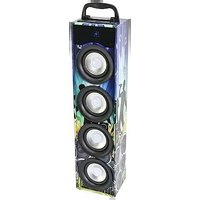
Stacked speakers with reflective packaging, no visible text or symbolsRef. PARTY-DISCO1/2/4
INSTRUCTION MANUAL
This product is a portable audio system supporting Bluetooth, USB, TF card, external sound source input and FM radio.
Precautions
Read the manual prior to first using the product and keep it for further reference.
For best sound performances, keep the unit away from water, moisture, direct sunlight, extreme temperatures.
Place the unit in such a way that it can't fall down.
- Never disassemble the unit. Otherwise, it may invalidate the warranty.
:

Warning:
The apparatus shall not be exposed to dripping or splashing and no objects filled with liquids, such as vases, shall be placed on the apparatus to avoid any accident.

To prevent fire or electric shock, please check the compliance of the voltage of power grid with the specified supply voltage of this unit.
Appliances containing Lithium-ion batteries
- PRIOR to using the unit for the first time, please charge fully the battery
- Charge the battery regularly after each use. Don't wait until it is discharged!
- DON'T allow the battery to discharge completely, otherwise it will lose 20% of its capacity or even be totally damaged!
If the voltage becomes too low, the internal circuits are not powered anymore and it will become impossible to recharge the battery! - If you don't use the unit for a longer period of time, it is recommended to charge it at 40% of its capacity and check/charge it once per month.
The life time of the battery depends on the observance of these recommendations.
\*\* BATTERIES ARE NOT COVERED BY THE WARRANTY \*\*
We cannot be held responsible for damaged batteries further to the non-observance of these basic rules.
Accessories
Unit
User Manual
Mini-USB to USB & 3.5mm Jack lead
Features
USB & Micro-SD player (MP3 file formats)
FM tuner
Bluetooth
AUX input
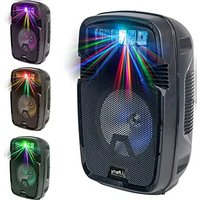
LED illuminated speaker cone
Built-in Li-ion battery
Top handle
Supplied with USB charging lead
Description of the Control panel
-
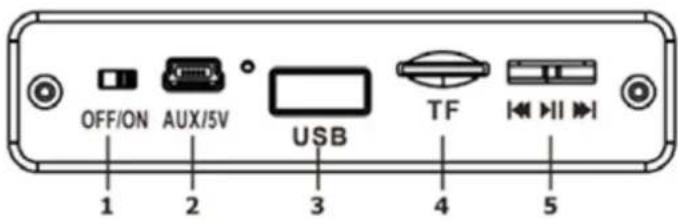
Power ON/OFF
-
AUX/5V: Charging port for the built-in battery. Connect the mini USB connector of the charger lead to this connector and the USB connector to a USB port on a PC.
AUX input: Connect the mini USB connector of the charger lead to this connector and the 3.5mm Jack to
the headphones connector of a PC, MP3 player, smartphone or Walkman.
text_image
OFF/ON AUX/5V USB TF I/O I 1 2 3 4 5-
USB port: Connect a USB source to this connector and enjoy music in MP3 format.
-
TF port: Connect a micro SD card and listen to music in MP3 format.
-
MP3 controls: Short slide to the left: Select previous song in TF, USB or Bluetooth mode; go to previous radio station in FM mode. Long slide = volume reduction.
Short slide to the right: Select next song in TF, USB or Bluetooth mode; go to next radio station in FM mode. Long slide = volume increase.
Short click in the middle: Play, pause, or automatic search for frequencies in radio mode.
Long click in the middle: to switch mode among FM, TF CARD, USB, Bluetooth and audio input.
BLUETOOTH CONNECTION
-
Power on the speaker. The blue LED will blink.
-
Select PARTY-DISCO in the list of found devices.
-
The device will automatically pair.
Specifications
| PARTY-DISCO1 PARTY-DISCO2 PARTY-DISCO4 | |||
| Speakers 1 x 3"/8cm 2 x 3"/8cm 4 x 3"/8cm | |||
| Output power: 10W 20W 40W | |||
| Frequency range 100Hz - 20kHz | |||
| S/N ratio >80dB | |||
| THD <1% | |||
| Micro USB input 5V/800mAh | |||
| Battery 800mAh DC 3.7V lithium-ion battery | |||
| Dimensions: | 112 x 85 x 155mm | 112 x 85 x 255mm | 112 x 85 x 455mm |
| Weight | 0,336kg | 0,56kg | 0.952kg |
The product design and specifications may be changed without prior notice!

Electric products must not be put into household waste. Please bring them to a recycling centre. Ask your local authorities or your dealer about the way to proceed.
MANUEL D'UTILISATION
Imported from China by LOTRONIC S.A.
Avenue Zénobe Gramme 9
B-1480 Saintes
CE
EU Declaraon of Conformity
Hereby we, LOTRONIC SA
Avenue Zénobe Gramme, 9
1480 SAINTES
Belgique
+32.2.390.91.91
Cerfy and declare under our sole responsibility that the following product:
Trade name: PARTY LIGHT & SOUND
Product name: BLUETOOTH "DISCO" SPEAKER
Type or model: PARTY-DISCO1 / PARTY-DISCO2 / PARTY-DISCO4
Conforms to the essenal requirements of the:
RED direcve 2014/53/EU
Based on the following specicaons applied:
EN60950-1: 2006+A11:2009+A1:2010+A12:2011+A2:2013
EN62479:2010
ETSI EN301 489-1 V2.1.1
ETSI EN301 489-17 V3.2.0
ETSI EN300 328 V2.1.1
Place and date of issue: Saintes (Belgium), on 10/08/2017
Guive Akbar
Responsible technique GG
LOTRONIC SA Av. Zenobe Gramme 9 1480 Saintes - Belgium Tel. +32.2.390.91.91 Fax +32.2.390.93.19 info@lotronic.net www.lotronic.com

CE
Responsible technique
LOTRONIC SA Av. Zenobe Gramme 9 1480 Saintes - Belgium Tel. +32.2.390.91.91 Fax +32.2.390.93.19 info@lotronic.net www.lotronic.com