
TVÄTTAD 604.940.65 - Washing machine IKEA - Free user manual and instructions
Find the device manual for free TVÄTTAD 604.940.65 IKEA in PDF.
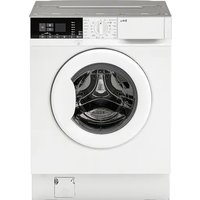


| Product type | Washer-dryer |
| Brand | IKEA |
| Model | TVÄTTAD 604.940.65 |
| Dimensions (W × H × D) | 59.6 cm × 81.9 cm × 55.3 cm |
| Power supply | 230 V ~ 50 Hz, 2000 W, 10 A |
| Protection rating | IPX4 |
| Water pressure | 0.5 to 10 bar (0.05 to 1.0 MPa) |
| Max washing capacity | 8 kg (cotton) |
| Max drying capacity | 4 kg (cotton), 3 kg (synthetics) |
| Max spin speed | 1600 rpm |
| Washing programs | Eco 40-60, Cotton, Synthetics, Delicates, Steam, Mixed, Sport, Denim, Express Care, Wool, 20 min/3 kg, Rinse, Spin/Drain, Drum Clean |
| Options | FlexTime, Extra Rinse, Delayed Start, Child Lock, Prewash, Rinse Hold, No Spin |
| Drying functions | Automatic drying (Ready to Iron, Ready to Store, Extra Dry), Timed drying |
| Detergent type | Powder or liquid depending on program |
| Warranty | 5 years (IKEA) |
| Maintenance | Regular cleaning of filter, drum, gasket, descaling |
| Safety | Child Lock, door lock, load detection (AutoAdjust System) |
| Spare parts | Available for 10 years after model discontinuation |
Frequently Asked Questions - TVÄTTAD 604.940.65 IKEA
User questions about TVÄTTAD 604.940.65 IKEA
0 question about this device. Answer the ones you know or ask your own.
Ask a new question about this device
Download the instructions for your Washing machine in PDF format for free! Find your manual TVÄTTAD 604.940.65 - IKEA and take your electronic device back in hand. On this page are published all the documents necessary for the use of your device. TVÄTTAD 604.940.65 by IKEA.
USER MANUAL TVÄTTAD 604.940.65 IKEA
Please refer to the last page of this manual for the full list of IKEA appointed After Sales Service Provider and relative national phone numbers.
| Safety information 5 | Daily use - Washing & Drying 30 | |
| Safety instructions 8 | Daily use - Drying only 31 | |
| Product description 10 | Fluff in the fabrics 32 | |
| Technical Data 11 | Hints and tips 32 | |
| Inspection check list 12 | Care and cleaning 35 | |
| First use 13 | Troubleshooting 39 | |
| Control panel 14 | Consumption values 43 | |
| Programmes 19 | Environmental concerns | 45 |
| Settings 24 | IKEA guarantee | 46 |
| Daily use 25 |
Subject to change without notice.

Safety information
Before the installation and use of the appliance, carefully read the supplied instructions. The manufacturer is not responsible for any injuries or damage that are the result of incorrect installation or usage. Always keep the instructions in a safe and accessible location for future reference.
Children and vulnerable people safety

Warning!
Risk of suffocation, injury or permanent disability.
- This appliance can be used by children aged from 8 years and above and persons with reduced physical, sensory or mental capabilities or lack of experience and knowledge if they have been given supervision or instruction concerning the use of the appliance in a safe way and understand the hazards involved.
- Children between 3 and 8 years of age and persons with very extensive and complex disabilities shall be kept away from the appliance unless continuously supervised.
- Children of less than 3 years of age should be kept away from the appliance unless continuously supervised.
- Children should be supervised to ensure that they do not play with the appliance.
- Keep all packaging away from children and dispose of it appropriately.
- Keep detergents away from children.
- Keep children and pets away from the appliance when the door is open.
- If the appliance has a child safety device, it should be activated.
- Children shall not carry out cleaning and user maintenance of the appliance without supervision.
General Safety
- Do not change the specification of this appliance.
- This appliance is intended to be used in household and similar applications such as:
- staff kitchen areas in shops, offices and other working environments;
- by clients in hotels, motels, bed & breakfast and other residential type environments;
- areas for communal use in blocks of flats or in launderettes.
- Do not install the appliance behind a lockable door, a sliding door or a door with a hinge on the opposite side, that would prevent the appliance door from being fully open.
- Connect the mains plug to the mains socket only at the end of the installation process. Make sure that the mains plug is accessible after installation.
- The ventilation opening in the base must not be covered by a carpet, mat, or any floor covering.
- WARNING: The appliance must not be supplied through an external switching device, such as a timer, or connected to a circuit that is regularly switched on and off by a utility.
- Ensure good air ventilation in the room where the appliance is installed to avoid the backflow of unwanted gases into the room from appliances burning gas or other fuels, including open fires.
- Exhaust air must not be discharged into a flue that is used for exhausting fumes from appliances burning gas or other fuels.
- The operating water pressure at the water inlet must be between 0.5 bar (0.05 MPa) and 10 bar (1.0 MPa).
- The maximum load of the appliance is 8 kg. Do not exceed the maximum load for each programme (refer to the "Programmes" chapter). The appliance must be connected to the water mains using the new hose sets supplied, or other new hose sets supplied by the Authorised Service Centre.
- Old hose sets must not be reused.
- If the mains power supply cable is damaged, it must be replaced by the manufacturer, its Authorised Service Centre, or similarly qualified persons to avoid an electrical hazard.
- Wipe away lint or packaging debris that has accumulated around the appliance.
- Items soiled with substances such as vegetable or mineral oil, acetone, alcohol, petrol, kerosene, spot removers, turpentine, waxes, and wax removers should be washed separately with an extra amount of detergent before being dried in the washer dryer.
- Do not use the appliance if items have been soiled with industrial chemicals.
- Do not dry unwashed items in the washer dryer.
- Items such as foam rubber (latex foam), shower caps, waterproof textiles, and rubber-backed articles and clothes,
or pillows fitted with foam rubber pads, should not be dried in the washer dryer.
- Fabric softeners or similar products should only be used as specified by the product manufacturer's instructions.
- Remove all objects from items that could be a source of fire ignition, such as lighters or matches.
- WARNING: Never stop the washer dryer before the end of the drying cycle unless all items are quickly removed and separated so that residual heat can dissipate. The final part of the washer dryer cycle takes place without heat (cool down cycle) to ensure that items reach a temperature that will not cause damage.
- Do not use high-pressure water sprays and/or steam to clean the appliance.
- Clean the appliance with a moist cloth. Use only neutral detergents. Do not use abrasive products, abrasive cleaning pads, solvents or metal objects.
- Before any maintenance operation, deactivate the appliance and disconnect the mains plug from the socket.
Safety instructions
Installation

The installation must comply with relevant national regulations.
- Follow the installation instructions supplied with the appliance.
- Do not use the appliance before installing it in the built-in structure due to safety manner.
- Do not install or use the appliance where the temperature can be less than 0°C or where it is exposed to the weather. Always keep the appliance vertical when it is being moved.
- Make sure that there is air circulation between the appliance and the floor.
- Remove all the packaging and the transit bolts.
- The floor area on which the appliance is to be installed must be flat, stable, heat resistant and clean.
- Keep the transit bolts in a safe place. If the appliance is to be moved in the future they must be reattached to lock the drum to prevent an internal damage. Always take care when moving the appliance as it is heavy. Always use safety gloves and enclosed footwear.
- Do not install or use a damaged appliance.
- Do not install the appliance where the appliance door cannot be fully opened.
- Adjust the feet to have the necessary space between the appliance and the flooring.
- When the appliance is in its permanent position, check if it is levelled correctly with the aid of a spirit level. If it is not, adjust the feet accordingly.
Electrical Connection

Warning! Risk of fire and electric shock.
• The appliance must be earthed. - Always use a correctly installed shockproof socket. - Do not use multi-plug adapters and extension cables. - Do not pull the mains cable to disconnect the appliance. Always pull the mains plug. - Do not touch the mains cable or the mains plug with wet hands.
Water Connection
• The inlet water shall not exceed 25 °C. - Do not cause damage to the water hoses. - Before connection to new pipes, pipes not used for a long time, where repair work has been carried out or new devices fitted (water meters, etc.), let the water flow until it is clean and clear. - Ensure that there are no visible water leaks during and after the first use of the appliance. - Do not use an extension hose if the inlet hose is too short. Contact the Authorised Service Centre for the replacement of the inlet hose. - When unpacking the appliance, It is possible to see water flowing from the drain hose. This is due to the testing of the appliance with the use of water in the factory. - You can extend the drain hose to maximum 400 cm. Contact the Authorised Service Centre for the other drain hose and the extension. - Make sure that there is access to the tap after the installation.
Use

Warning! Risk of injury, electric shock, fire, burns or damage to the appliance.
- Do not put flammable products or items that are wet with flammable products in, near or on the appliance.
- Do not touch the glass door while a programme operates. The glass can get hot.
- Do not dry damaged (torn, frayed) items that contain padding or fillings.
- If laundry has been washed with a stain remover, carry out an additional rinse cycle before starting a drying cycle.
- Make sure that all metal objects are removed from the laundry.
- Dry only fabrics that are suitable to dry in the appliance. Follow the cleaning instruction on the item label.
- Do not sit or stand on the open door of the appliance.
- Do not dry dripping wet clothes in the appliance.
- Do not let hot items touch the plastic parts of the appliance.
- Remove a detergent ball (if used) before starting a drying programme.
- Do not use a detergent ball if setting a non-stop programme.
Service
• To repair the appliance, contact the Authorised Service Centre. Use original spare parts only. - Please note that self-repair or non-professional repair can have safety consequences and might void the guarantee. - The following spare parts will be available for 10 years after the model has been discontinued: motor and motor brushes, transmission between motor and drum, pumps, shock absorbers and springs, washing drum, drum spider and related ball bearings, heaters and heating elements, including heat pumps, piping and related equipment including hoses,
valves, filters and aquastops, printed circuit boards, electronic displays, pressure switches, thermostats and sensors, software and firmware including reset software, door, door hinge and seals, other seals, door locking assembly, plastic peripherals such as detergent dispensers. Please note that some of these spare parts are only available to professional repairers, and that not all spare parts are relevant for all models.
- Concerning the lamp(s) inside this product and spare part lamps sold separately: These lamps are intended to withstand extreme physical conditions in household appliances, such as temperature, vibration, humidity, or are intended to signal information about the
operational status of the appliance. They are not intended to be used in other applications and are not suitable for household room illumination.
Disposal
- Disconnect the appliance from the mains electrical and water supplies.
- Cut off the mains electrical cable close to the appliance and dispose of it.
- Remove the door catch to prevent children or pets from becoming trapped in the drum.
Dispose of the appliance in accordance with local requirements for the disposal of Waste Electrical and Electronic Equipment (WEEE).
Product description
Appliance overview
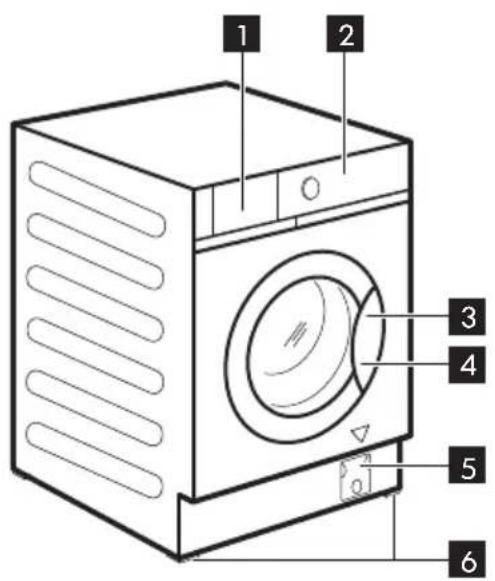
1 Detergent dispenser drawer 2 Control panel 3 Door handle 4 Rating plate 5 Drain pump filter
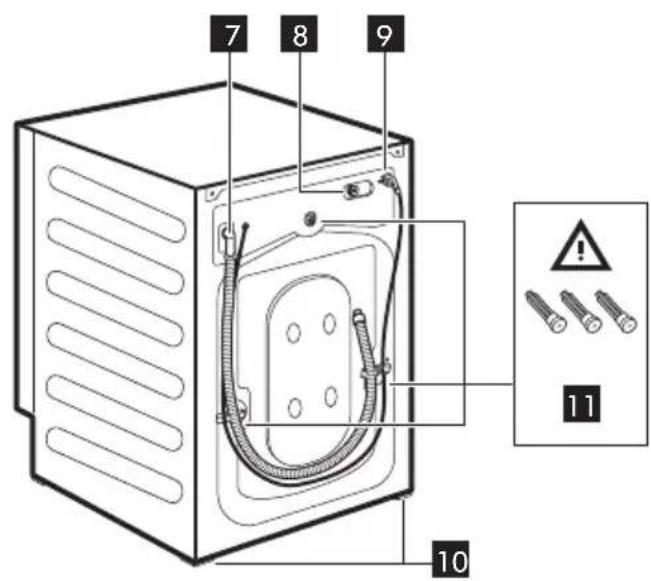
6 Front feet for levelling the appliance 7 Drain hose 8 Inlet hose connection 9 Mains cable 10 Back feet for levelling the appliance
11 Transit bolts
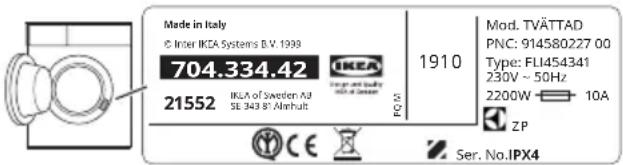
Rating plate position 4
The data in the following drawing are indicative only. Please check the rating plate of your appliance.
Warning! Before using the appliance, make sure that transit bolts 11 are removed.
Technical Data
| Dimension Width/ Height/ | Total depth | 59.6 cm /81.9 cm /55.3 cm |
| Electrical connection Voltage | Overall powerFuseFrequency | 230 V2000 W10 A50 Hz |
| Level of protection against ingress of solid particles and moisture ensured by the protective cover, except where the low voltage equipment has no protection against moisture | IPX4 | |
| Water supply 1) | Cold water | |
| Water supply pressure Minimum Maximum | 0.5 bar (0.05 MPa)10 bar (1.0 MPa) | |
| Maximum wash load Cotton 8 kg | ||
| Maximum dry load Cotton Synthetics | 4 kg3 kg | |
| Spin Speed Maximum spin speed | ||
1) Connect the water inlet hose to a water tap with a 3/4" thread.
Electrical connection
At the end of installation you can connect the mains plug to the mains socket.
The rating plate and the 'Technical Data' chapter indicate the necessary electrical ratings. Make sure that they are compatible with the mains power supply.
Check that your domestic electrical installation can take the maximum load required, also taking into account any other appliances in use.
Connect the appliance to an earthed socket.
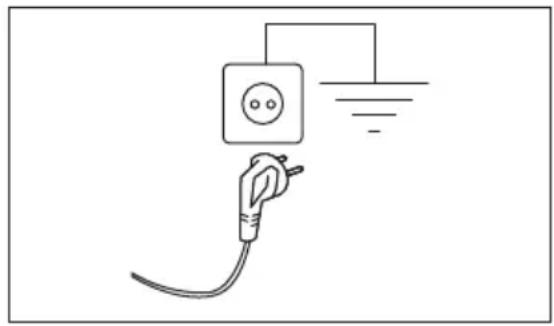
The power supply cable must be easily accessible after installing the appliance.
For any electrical work required to install this appliance, contact our Authorised Service Centre.
The manufacturer does not accept any responsibility for damage or injury through failure to comply with the above safety precaution.
Inspection check list

Warning! Refer to Safety chapters.
Please follow the inspection check list before using your appliance.
| Topics | If the answer is YES ☑ no action is needed | If the answer is NO, please |
| The appliance is built in the furniture following the assembly instructions. It is NOT positioned free-standings. | Install it in the furniture as required. Refer to assembly instruction. | |
| Open and close the detergent dispenser drawer: no collision with furniture. | Refer to 'Filling the detergent and additives' section. | |
| Drain hose correctly connected to the drainage. | Refer to hoses connection description in the assembly instruction. | |
| No water leakage around the hose connections. | Refer to water connection warning in the assembly instruction. | |
| The appliance is connected to an earthed socket. | Refer to 'Electrical connection' section. | |
| The appliance is stable and levelled properly. | Refer to 'Installation' section. | |
| Hoses and mains cable are not kinked. | Refer to 'Electrical connection' and 'Water connection' section. | |
| There is no carpet under the appliance. | Remove the carpet. |

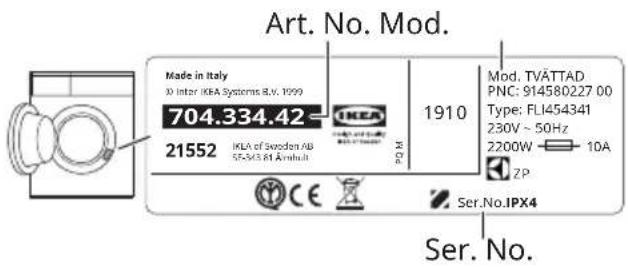
Please write down the product model name, article number and serial number here below and attach your receipt to this page.
Model (Mod.): ..... Article number (Art.No.): ..... Serial number (Ser.No.): ....
First use

During installation or before first use you may observe some water in the appliance. This is a residual water left in the appliance after a full functional test in the factory to ensure the appliance is delivered to customers in perfect working order and is no cause for concern.
- Make sure that the electrical power is available and the water tap is open.
- Pour 2 litres of water into the detergent compartment marked by 🐎 This action activates the drain system.
- Pour a small quantity of detergent into the compartment marked by 🐎
- Set and start a programme for cotton at the highest temperature without any laundry in the drum. This removes all possible dirt from the drum and the tub.
Control panel
Control panel description
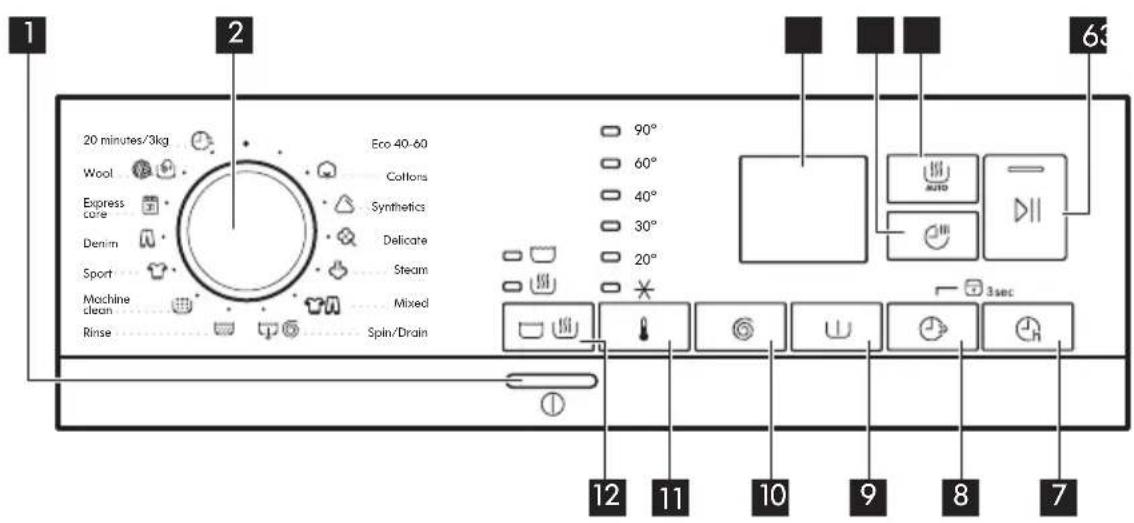
The options/functions are not available with all washing programmes. Check the compatibility between options/functions and washing programmes in the "Programme Chart". An option/function can exclude another one, in this case the appliance doesn't allow you to set incompatible options/functions.
| 1 | 1On/Off button | Press this button for a few seconds to activate or deactivate the appliance. Two different tunes sound while switching the appli-ance on or off.As the Stand-by function automatically deactivates the appliance after several minutes to reduce the energy consumption, press this button to activate the appliance again.For more details, refer to 'Stand-by function' paragraph in 'Daily Use' chapter. |
| 2 | Programme knob | Turn the selector knob to select the desired programme. |
| 3 | Display | 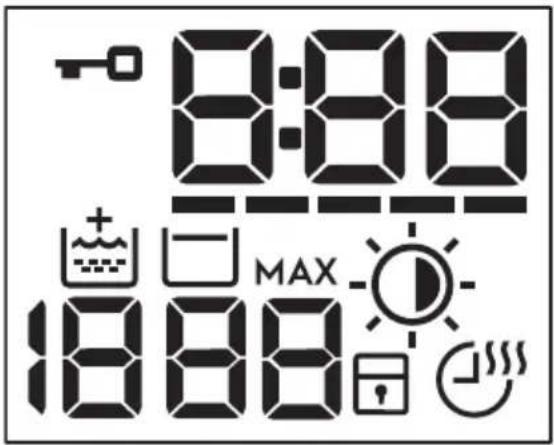 |
| Door locked indicator:- Indicator on: the door cannot be opened. The appliance is working or has stopped with water left in the tub.- Indicator off: the door can be opened. The programme is finished or the water has been emptied out.The digital indicator can show: reset position ( ); programme duration (e. g. washing and/or drying cycle); delay time (e. g. ; cycle end ( ); warning code (e.g.E20); error indicator (+). --FlexTime indicator.Extra Rinse indicator.Spin speed indicator.No Spin indicator. Spin phase is off.Rinse Hold indicator.After the AutoAdjust System detection, it flashes when the laundry load exceeds the maximum declared load of the selected programme. Refer to "The AutoAdjust System load detection" paragraph.Auto Dry indicator: Iron dry, Cup board dry, Extra dry.Child safety lock indicator.Time Dry and Non-Stop programme indicator. | ||
| 4 | Time Dry touch button | Touch this button to set the time that suits the fabrics you have to dry (refer to "Timed drying" table). The display shows the set value.Each time you touch this button the time value increases by 5 minutes. i You cannot set all time values for different types of fabrics. |
| 5 | Auto Dry touch button | Touch this button to set one the automatic dryness levels proposed by the appliance.On the display the relevant dryness indicator goes on:Iron dry: laundry to be ironed.Cupboard dry: laundry to be put in store.Extra dry: laundry to be fully dried.i You can not set all automatic levels for each type of fabrics. |
| 6 | Start/Pause touch button | This button allows you to start or to pause the selected washing programme. |
| 7 | Delay Start touch button | With this option you can delay the start of a programme to a more convenient time.Touch the button repeatedly to set the required delay. The time increases in steps of 1 hour up to 20 hours. |
| 8 | FlexTime touch buttonFlexTime touch button & Steam programme | This option reduces the programme duration depending on the load size and the degree of soiling.When you set a washing programme, the display shows the default duration and the dashes----Tap on this button to reduce the programme duration according to your needs. The display shows the new programme duration and a number of dashes will decrease accordingly:---- suitable for a full load of normally soiled garments.--- a quick cycle for a full load of lightly soiled garments.-- very quick cycle for a smaller lightly soiled load (max. half load recommended).-- the shortest cycle to freshen up a small amount of laundry.When setting a steam programme, this button allows to chose three steam levels and the programme duration is reduced accordingly:• : maximum.• : medium.• : minimum. |
| Permanent Child Lock option 3s | Hold pressed the button for 3 seconds to set the Child Lock option 3sThis option prevents children from playing with the control panel: all controls are disabled.To deactivate this option, hold this button pressed for 3 seconds. | |
 | [KT8]Prewash touch button | This option adds a pre-wash phase at 30 °C before the washing phase.This option is recommended for heavily soiled laundry, especially if containing sand, dust, mud and other solid particles. |
  | With this option you can permanently have an extra rinse when you set a new programme.To activate/deactivate this option, hold the button pressed for 3 seconds until the indicator comes on/goes off on the display.When it is activated, the appliance will default to this option after you switch it off or change/reset the programme.i This option increases the programme duration. | |
| 10 | Spin and additional options touch button | When you set a programme, the appliance automatically sets the maximum spin speed allowed, except for programme Denim. With this option you can decrease the default spin speed. Touch repeatedly this button to:Decrease the spin speed. The display shows only the spin speeds available for the set programme.Additional spin options No Spin ---. Set this option to deactivate all spin phases. The appliance performs the only draining phase of the selected washing programme. Set this option for very delicate fabrics. The rinses phase uses more water for some washing programmesActivate the Rinse Hold option.The final spin is not performed. The water of the last rinse is not drained out to prevent the fabrics from creasing. The washing programme ends with water in the drum.The indicator is on display. The door stays locked and the drum turns regularly to reduce creasing. You must drain the water to unlock the door.If you touch the button, the appliance performs the spinning phase and drains the water.The appliance empties the water out automatically after 18 hours approximately. |
| 11 | Temperature touch button | When you select a washing programme, the appliance automatically proposes a default temperature. With this option you can change the temperature.The indicator of the set temperature comes on.The indicator cold water. |
| 12 | Mode touch button | Thanks to this button, a cycle can perform:Only washing: indicator is on (default mode).Washing and drying: and indicators are on.Only drying: indicator is on. |
Multilingual badges
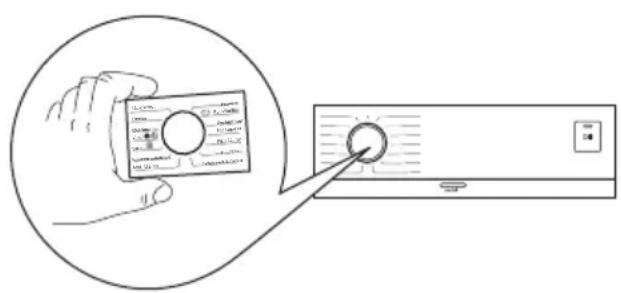
Adhesive badges in different languages are supplied with the appliance.
The desired badge can be glued around the programme knob.
Programmes
Programme Chart 1) According to Commission Regulation EU 2019/2023. This programme at default temperature and spin speed, in washing only mode, with rated capacity 8 kg is able to clean normally soiled cotton laundry declared to be washable at 40 °C or 60 °C, together in the same cycle.
| Programme Default temperature Temperature range | Reference spin speed Spin speed range (rpm) | Max. load | Programme description (Type of load and level of soiling) |
| Eco 40-60 (Wash only mode) 40 °C1) | 1600 rpm1600 rpm - 400 rpm | 8 kg | White cotton and fast-coloured cotton. Normally soiled items. |
| Eco 40-60 + Cupboard dry level (Wash & Dry mode) 40 °C2) 60 °C - 30 °C | 1600 rpm1600 rpm - 400 rpm | 4 kg | |
| Eco 40-60 + Cupboard dry level (Dry only mode) | - | 4 kg White cotton and fast-coloured cotton. | |
| [HOKT] Cottons40 °C90 °C - Cold | 1600 rpm(1600 - 400) | 8 kg White cotton and coloured cotton. Normal and heavy soil. | |
 Synthetics40 °C60 °C - Cold Synthetics40 °C60 °C - Cold | 1200 rpm(1200 - 400) | 3 kg Synthetic items or mixed fabric items. Normally soiled items. | |
| [700H] Delicate30 °C40 °C - Cold | 1200 rpm(1200 - 400) | 2 kg Delicate fabrics such as acrylics, viscose and mixed fabrics requiring gentler washing. Normally and lightly soiled items. | |
| [322A] Steam | - 1 kg Steam programme for cotton and synthetic items. This cycle removes odours from the laundry 3) . | ||
 Mixed30 °C40 °C - Cold Mixed30 °C40 °C - Cold | 1200 rpm(1200 - 400) | 3 kgSynthetic and mixed fabrics. Normally soiled items. | |
 Spin/Drain Spin/Drain | 1600 rpm(1600 - 400) | 8 kgAll fabrics, except woollens and delicate fabrics. To spin the laundry and to drain the water in the drum. | |
| [Y62Z]Rinse | 1600 rpm(1600 - 400) | 8 kgAll fabrics, except woollens and very delicate fabrics. Programme for rinsing and spinning the laundry. The default spin speed is the one used for cotton programmes. Reduce the spin speed according to the type of laundry. If necessary, set the Extra Rinse option to add rinses. With a low spin speed, the appliance performs delicate rinses and a short spin. | |
| (Z248)Machine Clean60 °C | 1200 rpm(1200 - 400) | - Maintenance cycle with hot water to clean and freshen the drum and to remove residue that may cause odour. For the best result use this cycle once a month. Before running this cycle, remove all items from the drum. In the WASH compartment of the detergent dispenser drawer, turn the flap in upward position. Pour a cup of chlorine bleach or a washing machine cleaner in the washing phase compartment.DO NOTuse both together. i After the drum cleaning, run a further rinse cycle with empty drum and no detergent to remove any residue of bleach. | |
| [K22Y]Sport30 °C40 °C - Cold | 1200 rpm(1200 - 400) | 3 kgSynthetic sport items. This programme is designed to gently wash modern outdoor sports-wear and is also suitable for gym, cycling or jogging clothes or similar. | |
| [A39Z]Denim30 °C40 °C - Cold | 800 rpm(1200 - 400) | 3 kgSpecial programme for Denim clothing with delicate washing phase to minimize colour fading and marks. For better care a reduced load size is recommended. | |
| 31Express care40 °C60 °C - Cold | 1200 rpm(1200 - 400) | 3 kgCottons and mixed fabrics. Lightly soiled items.Optimal washing results and perfect fabric care in a short time for your everyday laundry. | |
| Wool40 °C40 °C - Cold | 1200 rpm(1200 - 400) | 1.5 kgMachine washable wool, hand washable wool and other fabrics with «hand washing» care symbol4). | |
| 20 minutes/3kg30 °C40 °C - 30 °C | 1200 rpm(1200 - 400) | 3 kg A very short cycle for lightly soiled cotton and synthetic items or worn only once. | |

For the reached temperature in the laundry, the programme duration and other data, please refer to 'Consumption Values' chapter.
The most efficient programmes in terms of energy consumption are generally those that perform at lower temperatures and longer duration.
2) According to Commission Regulation EU 2019/2023. This programme at default temperature and spin speed, in washing and drying mode, with rated capacity 4 kg and with Cupboard dry level performs the wash and dry cycle able to clean normally soiled cotton laundry declared to be washable at 40 °C or 60 °C, together in the same cycle and, after drying phase, the laundry can be immediately stored in a cupboard. 3) Steam does not remove animal odours. 4) During this cycle the drum rotates slowly to ensure a gentle wash. It can seem that the drum doesn't rotate or doesn't rotate properly, but this is normal for this programme.
Programme options compatibility
Suitable detergents for each programme
| Programme | Universal powder1) | Liquid Universal | Liquid for coloureds | Delicates woollens | Special |
| Eco 40-60 ▲ ▲ | ▲ -- -- | ||||
| ▲ ▲ ▲ -- | |||||
| ▲ ▲ ▲ -- | |||||
| -- -- -▲ ▲ | |||||
| -- ▲ ▲ -- | |||||
| -- ▲ ▲ --▲ | |||||
| -- -▲ ▲▲ | |||||
| -- ▲ ▲ -- | |||||
| -- -- -▲ ▲ | |||||
| -- ▲ ▲ -- |
1) At temperatures higher than 60°C, the use of powder detergent is recommended. ▲ = Recommended -- = Not recommended
Automatic drying
| Dryness Level Type of fabric Load | ||
| Extra DryFor towelling materials | Cottons and Linen(bathrobes, bath towels, etc) | up to 4 kg |
| Denim garments up to 3 kg | ||
| Cupboard DryFor items to be stored | Cottons and Linen(bathrobes, bath towels, etc) | up to 4 kg |
| Synthetics and mixed fabrics(jumpers, blouses, underwear, household and bed linen) | up to 3 kg | |
| Delicate fabrics(acrylics, viscose and delicate mixed fabrics) | up to 2 kg | |
| Wool items(woollen jumpers) | up to 1 kg | |
| Denim garments up to 3 kg | ||
| Iron DrySuitable for ironing | Cottons and Linen(sheets, tablecloths, shirts, etc) | up to 4 kg |
Timed drying
| Dryness Level Type of fabric Load | (kg) | Spin speed (rpm) | Suggested duration (mins) | |
| Extra DryFor towelling materials | Cottons and Linen(bathrobes, bath towels, etc) 4 1600 | 170 - 190 | ||
| 2 1600 110 - 120 | ||||
| 1 1600 65 - 75 | ||||
| Denim garments | 3 1200 165 - 175 | |||
| 1 1200 75 - 85 | ||||
| Cupboard DryFor items to be stored | Cottons and Linen(bathrobes, bath towels, etc) | 4 | 1600 | 160 - 180 |
| 2 1600 100 - 110 | ||||
| 1 1600 55 - 65 | ||||
| Synthetics and mixed fabrics(jumpers, blouses, underwear, house-hold and bed linen) | 3 | 1200 | 135 - 150 | |
| 1 1200 45 - 55 | ||||
| Delicates(acrylics, viscose and delicate mixed fabrics) | 2 | 1200 | 155 - 165 | |
| 1 1200 95 - 105 | ||||
| Wool(woollen jumpers) | 1 | 1200 | 80 - 100 | |
| Denim garments 3 1200 155 - 165 | ||||
| 1 1200 65 - 75 | ||||
| Iron DrySuitable for ironing | Cottons and Linen(sheets, tablecloths, shirts, etc) | 4 | 1600 | 110 - 125 |
| 2 1600 65 - 75 | ||||
| 1 1600 40 - 50 | ||||
Settings
Acoustic signals
This appliance has different acoustic signals that operate when:
- You activate the appliance (special short tune).
- You deactivate the appliance (special short tune).
- You touch the buttons (click sound).
- You make an invalid selection (3 short sounds).
- The programme is completed (sequence of sounds for about 2 minutes).
- The appliance has a malfunction (sequence of short sounds for about 5 minutes).
To activate/deactivate the acoustic signals when the programme is completed, touch the ⚠ and Ⓤ buttons simultaneously for about 2 seconds. The display shows On or Off.

If you deactivate the acoustic signals, they continue to operate when the appliance has a malfunction.
Daily use

Warning! Refer to Safety chapters.
Activating the appliance
- Connect the mains plug to the mains socket.
- Open the water tap.
- Press the On/Off button for a few seconds to activate the appliance. A short tune sounds.
Setting a programme
- Turn the programme knob to select the desired washing programme. The indicator of Mode Wash button illuminates. The indicator of the Start/Pause ▷|| button flashes. The display shows an indicative programme duration.
- To change the temperature and/or the spin speed, touch the related buttons.
- If desired, set one or more options by touching the related buttons. The related indicators illuminate.

If a selection is not possible an acoustic signal sounds and the display shows ---.
Loading the laundry
- Open the appliance door.
- Empty the pockets and unfold the items before you put them in the appliance.
- Put the laundry in the drum, one item at a time. Do not exceed the maximum recommended load for each programme.
- Close the door firmly.
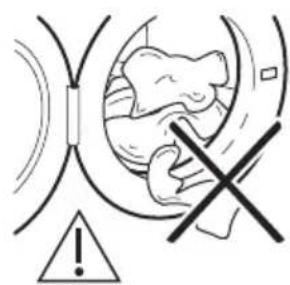
Make sure that no laundry gets caught between the seal and the door to avoid risk of water leakage and damage to the laundry.

Warning! Washing heavily oiled, greasy stains could cause damage to rubber parts of the washing machine.
Filling the detergent and additives
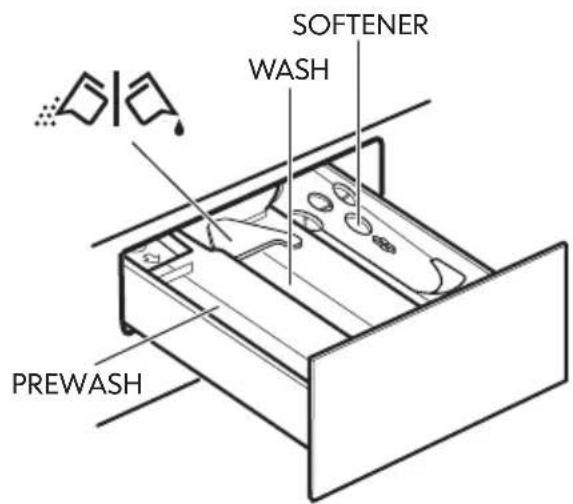
PREWASH - Compartment for prewash phase, soak programme or stain remover. The prewash and soak detergent is added at the beginning of the wash programme WASH - Compartment for washing phase.
SOFTENER - Compartment for fabric softener and other liquid treatments (fabric conditioner, starch).
MAX - Maximum level for quantity of liquid additives.

- Flap for powder or liquid detergent.

Follow the product manufacturer's recommendations on quantities to use and do not ever exceed the MAX in the detergent dispenser drawer. To measure out the right quantity of the detergent, see more details in "Degrees of water hardness". Any fabric softener or starching additives must be poured into the compartment before starting the wash programme.

After a washing cycle, if necessary, remove any detergent residue from the detergent dispenser drawer.
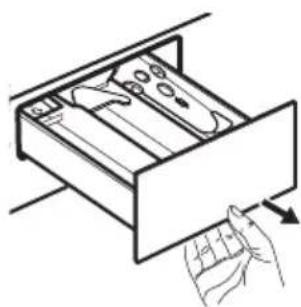
Pull out the detergent dispenser drawer until it stops.
Pour the detergent into the WASH compartment or in the appropriate compartment if it is required by the selected programme/option.
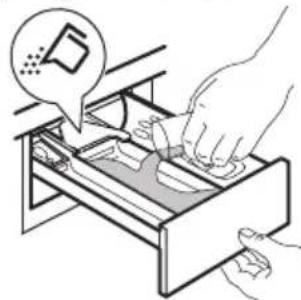
For powder detergent: flap turned upwards.
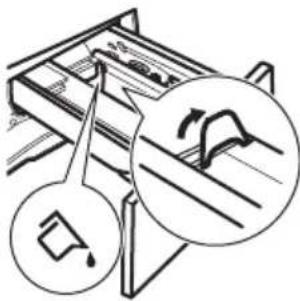
For liquid detergent: flap turned downwards.
With the flap is in the position for liquid detergent:
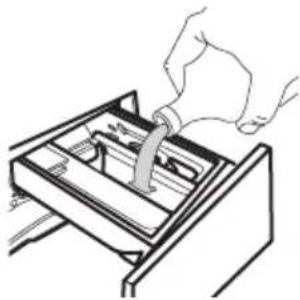
• Do not use gelatinous or thick liquid detergents. • Do not exceed to liquid detergent dose indicated on the flap. • Do not set the pre wash phase. • Do not set the delay start function.
Pour fabric softener into the compartment marked (do not exceed the MAX mark).
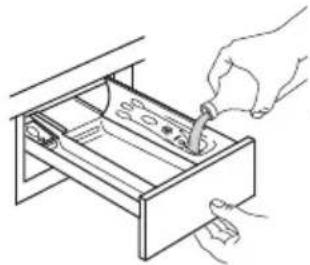
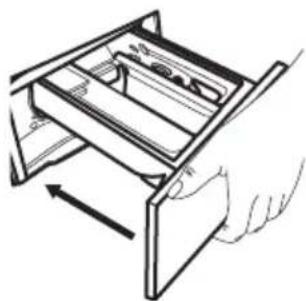
Carefully close the detergent dispenser drawer.
Make sure that the flap does not block the drawer when closing.
Setting a programme
- Turn the programme knob to select the desired washing programme.
The indicator of Mode Wash button illuminates.
The indicator of the Start/Pause ▷|| button flashes.
The display shows an indicative programme duration.
- To change the temperature and/or the spin speed, touch the related buttons.
- If desired, set one or more options by touching the related buttons. The related indicators illuminate.

If a selection is not possible an acoustic signal sounds and the display shows → --
Starting a programme
Touch the Start/Pause button to start the programme. The related indicator stops flashing and stays on. It is not possible to start the programme when the indicator of the button is off and doesn't flash (e.g. programme knob on a wrong position). The programme starts, the door is locked.
The display shows the indicator -0.

The drain pump can operate shortly before the appliance fills water.
Starting a programme with the delay start
- Touch the Delay Start button repeatedly until the display shows the desired delay time. On the display the indicator shows
- Touch the Start/Pause button. The appliance door locks and starts the countdown of the delay start. The display shows the indicator →.
When the countdown is completed, the programme starts automatically.
Cancelling the delay start after the countdown has started
To cancel the delay start:
- Touch the Start/Pause button to pause the appliance. The related indicator flashes.
- Touch the Delay Start ⏻ button repeatedly until the display shows and the indicator ⏻ goes off.
- Touch the Start/Pause button again to start the programme immediately.
Changing the delay start after the countdown has started
To change the delay start:
- Touch the Start/Pause button to pause the appliance. The related indicator flashes.
- Touch the Delay Start button repeatedly until the display shows the desired delay time.
- Touch the Start/Pause button again to start the new countdown.
The AutoAdjust System load detection

The programme duration in the display is referred to a medium/high load.
After touching the Start/Pause button, the maximum declared load indicator goes off, the AutoAdjust System starts the laundry load detection:
- The appliance detects the load in the first 30 seconds. In the programmes where FlexTime is available, during this phase the FlexTime bars placed below the time digits play a simple animation. The drum rotates shortly.
- The programme duration could be adjusted accordingly and could increase or decrease. After further 30 seconds, the water filling starts.
At the end of the load detection, in case of drum overload, the indicator MAX is flashing in the display:
In this case, for 30 seconds, it is possible to pause the appliance and remove the exceeding garments.
Once removed the exceeding garments, touch the Start/Pause button to start the programme again. The AutoAdjust phase can be repeated up to three times (see point 1).
Important! If the laundry amount will not be reduced, the washing programme starts anyway, despite the overload. In this case, it will be not possible to guarantee the best washing results.
About 20 minutes after the programme start, the programme duration could be adjusted again depending on the capacity of water absorption of the fabrics.
The AutoAdjust detection is carried out with complete washing programmes only and if the programme duration has not been reduced by means of the FlexTime button.
The AutoAdjust System is not available with all programmes such as: Wool, Rinse, Spin and programmes with short cycles.
Pausing a programme and changing options
When the programme is running, you can change only some options:
- Touch the Start/Pause button. The related indicator flashes.
- Change the options. The given information in the display changes accordingly.
- Touch the Start/Pause ▷|| button again. The washing programme continues.
Cancelling a running programme
- Press the button On/Off to cancel the programme and to deactivate the appliance.
- Press the button On/Off ① again to activate the appliance.
If the AutoAdjust System has completed and the water filling has already started, the new programme starts without repeating the AutoAdjust System. The water and the detergent are not drained out in order to avoid waste.
There is also an alternative way of cancelling: 1. Rotate the programme knob to the "Reset" position 2. Wait for 1 second. The display shows ... Now, you can set a new washing programme.
Opening the door
Warning! If the temperature and level of the water in the drum are too high and/or the drum is still rotating you should not open the door.
While a programme or the delay start operates, the appliance door is locked. The display shows the indicator :
- Touch the Start/Pause button. In the display the related door lock indicator goes off.
- Open the appliance door. If necessary, add or remove the garments. Close the door and touch the Start/Pause ▷∥ button. The programme or the delay start continues. The door can be opened when the programme is completed, or set the programme 📋 to drain the water and then touch the Start/Pause button.
End of the programme
When the programme has finished, the appliance stops automatically. The acoustic signals operate (if they are active). The display shows ☐☐☐
The indicator of the Start/Pause button goes off.
The door unlocks and the indicator goes off.
- Press button On/Off to deactivate the appliance.
After five minutes from the end of the programme, the energy saving function automatically deactivates the appliance.

When you activate the appliance again, the display shows the end of the previous programme. Turn the programme knob to set a new cycle.
- Remove the laundry from the appliance.
- Make sure that the drum is empty.
- Keep the door and the detergent dispenser drawer slightly ajar to prevent mildew and odours.
- Close the water tap.
Draining water out after end of cycle
If you have chosen a programme or an option that does not empty out the water of the last rinse, the programme is completed, but:
- The time area shows 0:00 and the display shows the door locked -0
- The indicator of the Start/Pause button starts flashing.
- The drum still turns at regular intervals to prevent creases in the laundry. • The door stays locked.
- You must drain the water to open the door:
- If necessary, touch the Spin Ⓞ button to decrease the spin speed proposed by the appliance.
- Press the Start/Pause ▷|| button: the appliance drains the water and spins.
The option indicator □ or 📋 goes off.
If you have set and the spin speed has not been changed, when you press the Start/Pause ▷|| button, the appliance only drains the water.
- When the programme is completed and the door locked indicator goes off, you can open the door.
- Press the On/Off button for a few seconds to deactivate the appliance.
- Close the water tap.
Stand-by function
The Stand-by function automatically deactivates the appliance to reduce the energy consumption when:
- You do not use the appliance for 5 minutes when no programme is running. Press the On/Off button to activate the appliance again.
- 5 minutes after the end of the washing programme.
Press the On/Off ① button to activate the appliance again.
The display shows the end of the last programme.
Turn the programme knob to set a new cycle.
If the programme knob is rotated to the "Reset" position •, the appliance automatically turns off in 30 seconds.
If you set a programme or an option that ends with water in the drum, the Stand-by function doesn't deactivate the appliance to remind you to drain the water.
Daily use - Washing & Drying

Warning! Refer to Safety chapters.

This appliance is an automatic washer dryer.
Complete wash&dry programme
In some washing programmes, you can combine the washing mode □ and the drying mode for running a complete wash&dry programme.
Proceed as follows:
- Press the On/Off button for some seconds to activate the appliance.
- Load the laundry one item at a time.
- Put the detergent and the additives in the appropriate compartment.
- Turn the programme dial to the washing programme. The appliance defaults to the washing only mode and the indicator of the ☐ button is on. The display shows the default temperature and spin. If necessary, change them according to your laundry.
- Set the desired options, if available.
- Press the Mode button once to activate the drying function as well. Both indicators are on. The indicator appears on the display.
Washing and Drying - Automatic levels
- Press the Auto Dry button repeatedly until the display shows the required dryness level. The indicators on the display illuminate accordingly:
a. Iron dry: for cotton items; b. Cupboard dry: for cotton and synthetic items; c. Extra dry: for cotton items.
The time value on the display is the duration of both cycles, washing and drying, calculated based on a default load size.

To achieve good drying results while using less energy and in a shorter time, the appliance does not allow you to set a spin speed that is too low for the items to be washed and dried.
- Press the Start/Pause button to start the programme. The AutoAdjust estimation begins.
The door locked indicator comes on in the display.
The display also shows the remaining programme time.
Washing and Timed Drying
- Press the Time Dry button repeatedly to set the desired time value (see the "Timed drying" table in the "Programmes" chapter). The drying level indicator goes off and the indicator comes on.
Each time you press this button, the time value increases by 5 minutes. The display shows the newly set time value.
- Press the Start/Pause button to start the programme. The AutoAdjust estimation begins.
The door locked indicator comes on in the display.
The display also shows the remaining programme time.
At the end of the drying programme
• The appliance stops automatically. - The acoustic signals operate (if they are active). - In the display comes on. • The indicator of the Start/Pause button goes off. The door locked indicator goes off and the door unlocks.

- Press the On/Off button for some seconds to deactivate the appliance.

After some minutes from the end of the programme, the energy saving function deactivates the appliance automatically.
- Remove the laundry from the appliance.
- Make sure that the drum is empty.

After drying phase, clean the drum, the seal and the inside of the door with a wet cloth.
Daily use - Drying only

Warning! Refer to Safety chapters.

This appliance is an automatic washer dryer.
Preparation to drying
- Press the On/Off button for some seconds to activate the appliance.
- Load the laundry one item at a time.
- Turn the programme dial to the programme suitable for the items to dry. The appliance defaults to the washing only mode and the indicator of the Mode Wash button is on.
- Tap the Mode button twice to perform drying only. The Drying Mode indicator illuminates and the Wash Mode indicator goes off. When drying a large amount of laundry, for good drying performance, ensure that the laundry is not rolled up and is evenly distributed in the drum.

Drying - Automatic levels
- Tap the Auto Dry button repeatedly until the display shows the required dryness level. The indicators on the display illuminate accordingly:
a. Iron dry: for cotton items; b. Cupboard dry: for cotton and synthetic items;
c. Extra dry: for cotton items.
The display shows the drying programme duration.
- Press the Start/Pause button to start the programme.
The door locked indicator comes on in the display.
The display also shows the remaining programme time.
Timed Drying
- Tap the Time Dry button repeatedly to set the desired time value (see the "Timed drying" table in the "Programmes" chapter). The drying level indicator goes off and the time indicator comes on.
Each time you tap this button, the time value increases by 5 minutes. The display shows the new set time value.
- Press the Start/Pause button to start the programme.
The door locked indicator comes on in the display.
The display also shows the remaining programme time.
At the end of the drying programme
• The appliance stops automatically. - The acoustic signals operate (if they are active). • In the display comes on.
- The indicator of the Start/Pause ▷|| button goes off. The door locked → 0 indicator goes off and the door unlocks.
- Press the On/Off button for some seconds to deactivate the appliance.
i After some minutes from the end of the programme, the energy saving function deactivates the appliance automatically.
- Remove the laundry from the appliance.
- Make sure that the drum is empty.
i After drying phase, clean the drum, the seal and the inside of the door with a wet cloth.
Fluff in the fabrics
During the washing and/or drying phase, some types of fabric, (sponge, wool, sweatshirt) could release fluff.
The released fluff could stick to the fabrics during the next cycle.
This inconvenient increases with technical fabrics.
To prevent the fluff in your laundry, we recommend that you:
• Do not wash dark fabrics after you have washed and dried light coloured fabrics (hand towel, wool, sweatshirt) and vice versa. • Dry this type of fabrics in the open air when they are washed for the first time. • Clean the drain filter. • After the drying phase, clean the empty drum, the gasket, and the door with a wet cloth.
To remove the fluff inside the drum, set a special programme:
- Empty the drum.
- Clean the drum, the gasket, and the door with a wet cloth.
- Set the Machine Clean programme and the Drying Mode together to activate the anti-fluff action.
- Touch the Start/Pause button to start the programme.
If the appliance is frequently used, carry out the cleaning programme regularly.
Hints and tips
Warning! Refer to Safety chapters.
The laundry load
- Sort the laundry as follows: white, coloured, synthetics, delicates, and wool.
- Follow the washing instructions on the laundry care labels.
- Do not wash white and coloured items together.
- Some coloured items can discolour with the first wash. We recommend that you wash them separately for the first couple of times.
- Button up pillowcases, close zippers, hooks and poppers. Tie up belts.
- Turn multilayered fabrics, wool and items with printed illustrations inside out. Pre-treat tough stains.
- Wash heavy soil stains with a special detergent.
- Be careful with curtains. Remove the hooks and put the curtains in a washing bag or pillowcase.
- Do not wash laundry without hems or with cuts.
- Use a washing bag to wash small and/or delicate items (e.g. underwired bras, belts, tights, etc.).
- Avoid washing garments full of long animal hair or poor quality garments releasing lots of fluff that could block the drain circuit and therefore requiring the Service assistance.
Stubborn stains
For some stains, water and detergent is not sufficient.
We recommend that you pre-treat these stains before you put the items in the appliance.
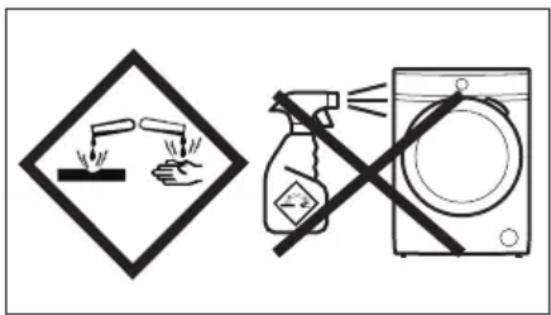
Special stain removers are available. Use the special stain remover that is applicable to the type of stain and fabric.
Do not spray stain remover on garments near the appliance as it is corrosive to the plastic parts.
Detergent type and quantity
The choice of detergent and use of correct quantities not only affects your wash performance, but also helps to avoid waste and protect the environment:
- Use only detergents and other treatments specially made for washing machines. First, follow these generic rules:
- powder detergents for all types of fabric, excluding delicate. Prefer
powder detergents containing bleach for whites and laundry sanitization,
- liquid detergents, preferably for low temperature wash programmes (60 °C max) for all types of fabric, or special ones for woollens only.
- The choice and quantity of detergent will depend on: type of fabric (delicates, woollens, cottons, etc), the colour of clothes, size of the load, degree of soiling, wash temperature and hardness of the water used.
- Follow the instructions that you find on packaging of the detergents or other treatments without exceeding the indicated maximum level (MAX).
- Do not mix different types of detergents.
- Use less detergent if:
- you are washing a small load,
- the laundry is lightly soiled,
- there is large amounts of foam during washing.
- When using detergent tabs or pods, always put them inside the drum, not in the detergent dispenser.
Insufficient detergent may cause:
• unsatisfactory washing results, • the wash load to turn grey, - greasy clothes, - mould in the appliance.
Excessive detergent may cause:
- sudsing,
- reduced washing effect,
- inadequate rinsing,
- a greater impact for the environment.
Ecological hints
To save water, energy and to help protect the environment, we recommend that you follow these tips:
- Normally soiled laundry may be washed without prewash in order to save detergent, water and time (the environment is protected too!).
- Loading the appliance to the maximum capacity indicated for each programme helps to reduce energy and water consumption.
- With adequate pre-treatment, stains and limited soiling can be removed; the laundry can then be washed at a lower temperature.
- To use the correct quantity of detergent, refer to the quantity suggested by the detergent producer and check the water hardness of your domestic system. Refer to 'Water hardness'.
- Set the maximum possible spin speed for the selected programme to save energy during the drying phase!
Degrees of water hardness
Water hardness is classified in so-called "degrees" of hardness. Information on the hardness of the water in your area can be obtained from the relevant water supply company, or from your local authority.
| Characteristic | Degrees of water hardness | |
| German °dH | French °T.H. | |
| Soft 0-7 0-15 | ||
| Medium 8-14 1 | 6-25 | |
| Hard 15-21 26-37 | ||
| Very hard >21 | >37 | |

A water softener must be added when water has a medium-high degree of hardness. Follow the manufacturer's instructions. The quantity of detergent can then always be adjusted (reduced) to a soft degree of hardness.
Prepare the drying cycle
- Open the water tap.
- Check if the drain hose is connected properly. Refer to the installation chapter for more information.
- For the maximum laundry load of the drying programmes, refer to the drying programmes table.
Items not suitable for drying
Do not set a drying programme for this laundry:
- Synthetic curtains.
- Pieces of clothing with metal inserts.
- Nylon stockings.
- Quilts.
- Bed covers.
- Duvets.
- Anoraks.
- Sleeping bags.
- Fabrics with residue of hair sprays, nail solvents or similar.
- Garments with foam-rubber or materials similar to foam-rubber.
Garment labels.
When you dry the laundry, obey the indications on the labels of the manufacturers:
• = The item can be tumble dried • = The drying cycle is at high temperature • = The drying cycle is at reduced temperature • = The item cannot be tumble dried.
Drying cycle duration.
The drying time can change depending on:
• speed of the last spin - dryness level - type of laundry - weight of the load
Additional drying.
If, at the end of the drying programme, the laundry is still damp, set a short drying cycle again.

Warning! To avoid creasing and shrinkage do not overdry the laundry.
General Tips
Refer to the "Drying programmes" table to find the average drying times.
Experience will help you to dry the laundry better. Take note of the duration of the cycles done before.
To avoid the static charge at the end of the drying cycle:
- Use fabric conditioner in the washing cycle.
- Use special fabric conditioner for tumble dryers. When the drying programme is completed remove the laundry promptly.
Care and cleaning

Warning! Refer to Safety chapters.
Periodic cleaning schedule
Periodic cleaning helps to extend the life of your appliance.
After each cycle, keep the door and the detergent dispenser slightly ajar to get air circulation and dry the humidity inside the appliance: this will prevent mildew and odours.
If the appliance is not used for a long time: close the water tap and unplug the appliance.
Indicative periodic cleaning schedule:
| Descaling | Twice a year |
| Maintenance wash Once | once a month |
| Clean door seal Every | two months |
| Clean drum Every two | months |
| Remove fluff inside the drum | Twice a month 1) |
| Clean detergent dispenser | Every two months |
| Clean drain pump filter | Twice a year |
| Clean the inlet hose and the valve filter | Twice a year |
1) Refer to "Fluff in the fabrics" chapter.
The following paragraphs explain how you should clean each part.
Removing foreign objects

Make sure that pockets are empty and all loose elements are tied up before running your cycle. Refer to 'The laundry load' in 'Hints and tips'.
Remove any foreign objects (such as metal clips, buttons, coins, etc.) that you may find in the door seal, the filters, and the drum. Refer to the 'Door seal with double lip trap', 'Cleaning the drum', 'Cleaning the drain pump', and 'Cleaning the inlet hose and the valve filter' paragraphs. If necessary, please contact the Authorised Service Centre.
External cleaning
Clean the appliance with mild soap and warm water only. Fully dry all surfaces. Do not use scouring pads or any scratching material.

Caution! Do not use alcohol, solvents, or chemical products.

Caution! Do not clean the metal surfaces with chlorine-based detergent.
Descaling
If the water hardness in your area is high or moderate, we recommend that you use a water descaling product for washing machines.
Regularly examine the drum to check for limescale.
Regular detergents already contain water softening agents, but we recommend running a cycle with an empty drum and a descaling product.
Always follow the instructions that you find on the packaging of the product.
Maintenance wash
The repeated and prolonged use of low temperature programmes can cause detergent deposits, fluff residues, and bacterial growth inside the drum and the tub. This could generate bad odours and mildew. To eliminate these deposits and clean the inner part of the appliance, run a maintenance wash regularly (at least once a month).
Refer to the "Cleaning the drum" paragraph.
Door seal
Regularly examine the seal of the door and remove all objects from the inner part.
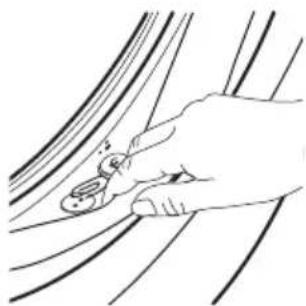
Cleaning the drum
Regularly examine the drum to prevent unwanted deposits.
Rust deposits in the drum may occur due to rusting foreign body in the washing or tap water containing iron
Clean the drum with special products for stainless steel.
Always follow the instructions that you find on the packaging of the product. Do not clean the drum with acidic descaling products, scouring products containing chlorine or iron or steel wool.
For a thorough clean:
- Remove all laundry from the drum.
- Run the Machine Clean programme. For more details, refer to washing programme table.
- Add a small quantity of powder detergent into the empty drum, in order to rinse out any left residues.
Cleaning the detergent dispenser drawer and the drawer recess
The detergent dispenser drawer should be cleaned regularly to remove possible deposits of dried detergent or clotted fabric softener and/or formation of mould. Proceed as follows:
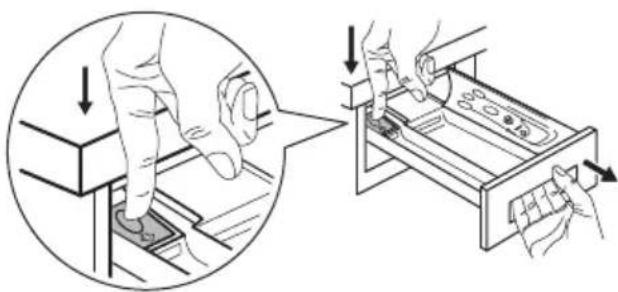
To remove the drawer, press the lever downwards and pull it out.
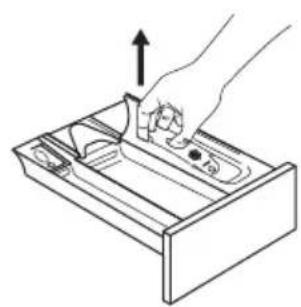
To aid cleaning, remove also the top part of the additive compartment.
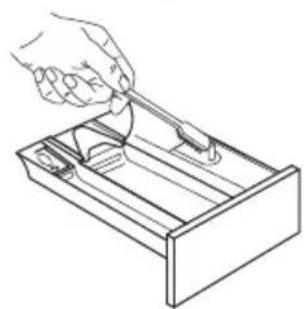
Use a stiff brush to clean and remove all washing powder residue.
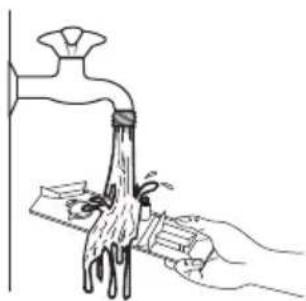
Flush out all the removed parts of the dispenser drawer under a tap to remove any traces of accumulated powder.
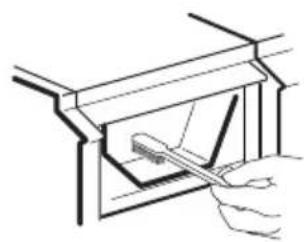
Use the previous brush to clean the recess, ensuring that upper and lower part of it is well cleaned.
After having cleaned the dispenser and the drawer recess, replace it and run a rinse programme without any laundry in the drum to flush away any residue.
Cleaning the drain pump

Warning! Disconnect the mains plug from the mains socket.

Regularly check the drain pump filter and make sure that it is clean.
Clean the drain pump if:
• The appliance does not drain the water. • The drum does not turn. • The appliance makes an unusual noise because of the blockage of the drain pump. • The display shows the alarm code

Warning!
- Do not remove the filter while the appliance operates.
- Do not clean the pump if the water in the appliance is hot. Wait until the water cools down
Proceed as follows to clean the pump:
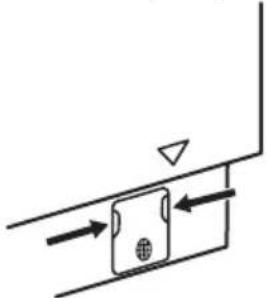
- Open the pump cover.
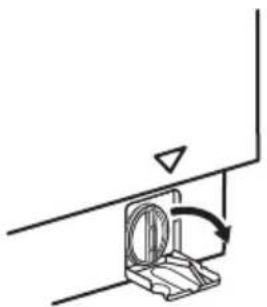
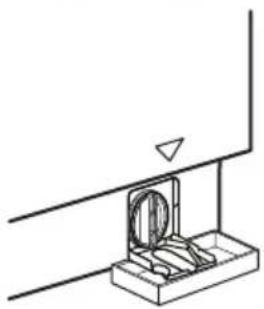
- Place a suitable bowl below the drain pump access to collect the water that flows out.
Always keep a rag nearby to dry up any water spillages when removing the filter.
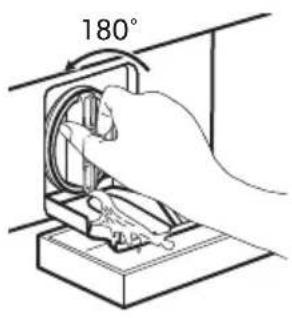
- Turn the filter 180 degrees in anti-clockwise direction to open it, without removing. Let the water flow out.
- When the bowl is full of water, turn the filter back and empty the container.
- Repeat steps 3 and 4 until the water stops flowing out.
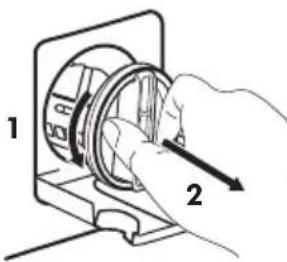
- Turn the filter anti-clockwise to remove it.
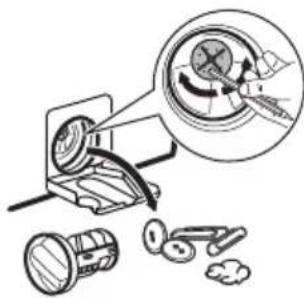
- If necessary, remove fluff and objects from the filter recess.
Make sure that the impeller of the pump can rotate. If it does not rotate, contact the Authorised Service Centre.
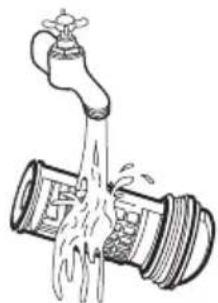
- Clean the filter under the water tap.
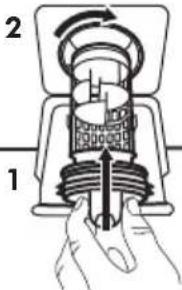
- Put the filter back into the special guides by turning it clockwise. Make sure that you tighten the filter correctly to prevent leakages.
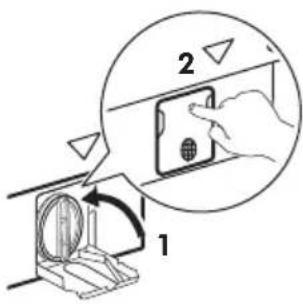
- Close the pump cover.
When you drain the water with the emergency drain procedure, you must activate the drain system again:
- Put 2 litres of water in the main wash compartment of the detergent dispenser drawer.
- Start the programme to drain the water.
Cleaning the inlet filter and the filter valve
If the appliance takes long to fill with water or doesn't fill, the starting button indicator flashes in red. Check if the water inlet filter and the valve filter are blocked (see chapter "Troubleshooting" for more details).
Proceed as follows:
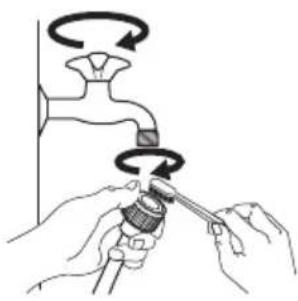
• Turn off the water tap. • Unscrew the hose from the tap. • Clean the filter in the hose with a stiff brush. • Screw firmly the inlet hose back onto the tap.
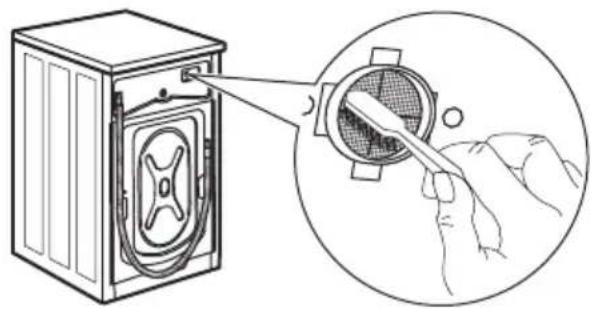
- Unscrew the hose from the appliance. Keep a rag nearby because some water may flow.
- Clean the filter in the valve with a stiff brush or with the piece of cloth.
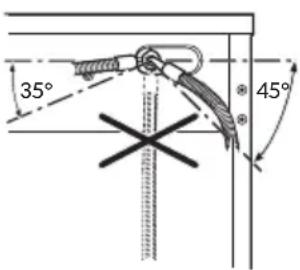
Screw the hose back to the appliance turning it to the left or the right to suit the installation. Tighten the locknut correctly to prevent water leaks.
Turn on the water tap.
Emergency drain
If the appliance cannot drain the water, carry out the same procedure, described in 'Cleaning the drain pump' paragraph. If necessary, clean the pump.
When you drain the water with the emergency drain procedure, you must activate the drain system again:
- Put 2 litres of water in the main wash compartment of the detergent dispenser drawer.
- Start the programme to drain the water.
Frost precautions
If the appliance is installed in an area where the temperature can reach values around 0°C or drop below, remove the remaining water from the inlet hose and the drain pump.
- Disconnect the mains plug from the mains socket.
- Close the water tap.
- Put the two ends of the inlet hose in a container and let the water flow out of the hose.
- Empty the drain pump. Refer to the emergency drain procedure.
- When the drain pump is empty, install the inlet hose again.

Warning! Make sure that the temperature is higher than 0 °C before you use the appliance again.
The manufacturer is not responsible for damages caused by low temperatures.
Troubleshooting

Warning! Refer to Safety chapters.
Introduction
The appliance does not start or it stops during operation.
First try to find a solution to the problem (refer to the table). If the problem persists, contact the Authorised Service Centre.

Warning! Deactivate the appliance before carrying out any check.
In case of major problems, the acoustic signals operate, the display shows an alarm code and the Start/Pause button may flash continuously:
- - The mains supply is unstable. Wait until the mains supply is stable.
- No communication between electronic elements of the appliance. Switch it off and switch on again. The programme was not finished properly or the appliance stopped too early. If the alarm code appears again, contact the Authorised Service Centre.
- The appliance does not fill with water properly. After the proper check, start the appliance again by pressing the Start/Pause button. The appliance tries to resume the cycle. If the error persists, the alarm code will appear again.
- The appliance does not drain the water.
- The appliance door is open or not closed correctly. Please check the door!
If the appliance is overloaded, remove some items from the drum and/or hold the door shut while touching the Start/Pause button until the indicator stops flashing (see the picture below).
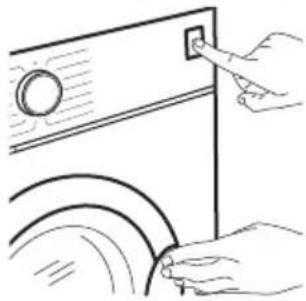
Possible failures
| Problem Possible solution | |
| The programme does not start. | Make sure that the mains plug is connected to the mains socket.Make sure that the appliance door is closed.Make sure that there is no damaged fuse in the fuse box.Make sure that the Start/Pause has been touched.If the delay start is set, cancel the setting or wait for the end of countdown.Deactivate the Child Lock function if it is on.Check the position of the knob on the selected programme. |
| The appliance does not fill with water properly.E 10 | Make sure that the water tap is open.Make sure that the pressure of the water supply is not too low. For this information, contact your local water authority.Make sure that the water tap is not clogged.Make sure that the inlet hose has no kinks, damages or bends.Make sure that the connection of the water inlet hose is correct.Make sure that the filter of the inlet hose and the filter of the valve are not clogged. Refer to 'Care and cleaning'. |
| Problem Possible | solution |
| The appliance fills with water and drains immediately. | Make sure that the drain hose is in the correct position. The hose may be positioned too low. Refer to "Installation instruction". |
| The appliance does not drain the water. E20 | Make sure that the sink spigot is not clogged.Make sure that the drain hose has no kinks or bends.Make sure that the drain filter is not clogged. Clean the filter, if necessary. Refer to "Care and cleaning".Make sure that the connection of the drain hose is correct.Set the drain programme if you set a programme without drain phase.Set the drain programme if you set an option which ends with water in the tub. |
| The spin phase does not operate or the washing cycle lasts longer than usual. | Set the spin programme.Make sure that the drain filter is not clogged. Clean the filter, if necessary. Refer to "Care and cleaning".Adjust manually the items in the tub and start the spin phase again. This problem may be caused by balance problems. |
| There is water on the floor. | Make sure that the couplings of the water hoses are tight and there is not water leakages.Make sure that the water inlet hose and the drain hose have no damages.Make sure you use the correct detergent and the correct quantity of it. |
| You cannot open the appliance door. | Make sure that a washing programme that ends with water in tub, has been selected.Make sure that the washing programme is finished.Set the drain or the spin programme if there is water in the drum.Make sure that the appliance receives electrical power.This problem may be caused by a failure of the appliance.Contact the Authorised Service Centre.If you need to open the door, please read carefully "Emergency door opening". |
| The appliance makes an unusual noise and vibrates. | Make sure the levelling of the appliance is correct. Refer to "Installation instruction".Make sure that the packaging and/or the transit bolts are removed. Refer to "Installation instruction".Add more laundry in the drum. The load may be too small.Refer to 'Opening the door' paragraph in 'Daily use' chapter. |
| The programme duration increases or decreases during programme execution. | · The AutoAdjust System is able to adjust the programme duration according to the type and the laundry load size. Refer to "The AutoAdjust System load detection" in "Daily Use" chapter. |
| The washing results are not satisfactory. | · Increase the detergent quantity or use a different detergent.· Use special products to remove the stubborn stains before you wash the laundry.· Make sure that you set the correct temperature.· Decrease the laundry load. |
| Too much foam in the drum during the washing cycle. | · Reduce the quantity of detergent. |
| After the washing cycle, there are some detergent residues in the detergent dispenser drawer. | · Make sure that the flap is in the correct position (UP for powder detergent - DOWN for liquid detergent).· Make sure you have used the detergent dispenser drawer according the indications given in this user manual. |
| The appliance does not dry or does not dry correctly. | · Turn the water tap on.· Make sure the drain filter is not clogged.· Reduce the laundry load.· Make sure you have set the correct cycle. if necessary, set again a short drying time. |
| The laundry is full of different colours fluff. | The fabrics washed in the previous cycle released fluff of a different colour:· The drying phase helps to eliminate some fluff.· Clean the clothes with a fluff remover. In case of an excessive amount of fluff in the drum run the special programme to clean it (refer to "Fluff in the fabrics" for more details). |
Emergency door opening
In case of power failure or functioning failure, the appliance door remains locked. The washing programme continues when the power is restored. If the door remains locked in case of failure, it is possible to open it using the emergency unlock function.
Before opening the door:
Caution! Risk of burns! Make sure that the water temperature is not too high and the laundry is not hot. If necessary, wait until they cool down.
Caution! Risk of injury! Make sure that the drum is not rotating. If necessary, wait until the drum stops rotating.
Make sure that the water level inside the drum is not too high. If necessary, proceed with an emergency drain (refer to «Emergency drain» in «Care and cleaning» chapter).
To open the door, proceed as follows:
- Press the On/Off button to switch the appliance off.
- Disconnect the mains plug from the mains socket.
- Pull the emergency unlock trigger downward once. Pull it once again, keep it tensed and, in the meanwhile, open the appliance door. The emergency unlock trigger is located where indicated by the following picture.
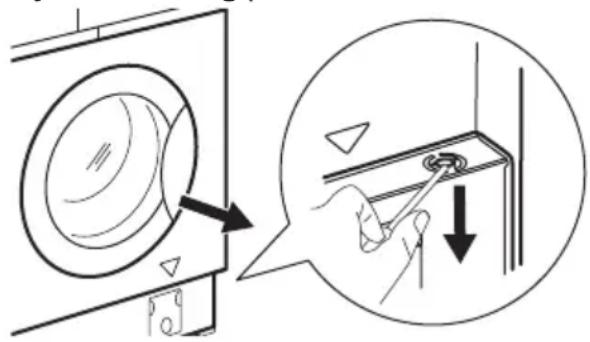
- Take out the laundry and then close the appliance door.
Service
We recommend the use of original spare parts. After the check, switch on the appliance and press the button to restart the programme.
If the problem remains, contact your Authorised Service Centre. The necessary data for the service centre is on the rating plate. Refer to 'Inspection check list' chapter.
Consumption values
Introduction
See the web link www.theenergylabel.eu for detailed information about Energy Label. The QR code on the energy label supplied with the appliance provides a web link to the information related to the performance of the appliance in the EU EPREL database. Keep the energy label for reference together with the user manual and all other documents provided with this appliance. It is also possible to find the same information in EPREL using the link https://eprel.ec.europa.eu and the model name and product number that you find on the rating plate of the appliance. Refer to 'Product description' chapter for the position of the rating plate.
Legend
| kg Laundry | dry load. h:mm Programme duration. | ||
| kWh Energy | consumption. °C Temperature in the laundry. | ||
| Litres Water consumption. rpm Spin speed. | |||
| % Remaining moisture at the end of the cycle. The higher is the spin speed, the higher is the noise and the lower is the remaining moisture at the end of washing cycle. | |||

Values and programme duration may differ depending on different conditions (e.g. room temperature, water temperature and pressure, load size and type of laundry, supply voltage) and also if you change the default setting of a programme.
According to Commission Regulation Eu 2019/2023
Washing only
| Eco 40-60 pro-gramme | kg kWh | Litres h: | mm % °C | rpm1) | |||
| Full load | 8 | 1.085 | 60 | 3:30 | 50 | 46 | 1551 |
| Half load | 4 | 0.675 | 45 | 2:40 | 50 | 40 | 1551 |
| Quarter load | 2 | 0.375 | 35 | 2:40 | 54 | 33 | 1551 |
1) Maximum spin speed.
Wash and dry cycle
| Eco 40-60 pro-gramme and Cup-board dry level | kg kWh | Litres h: mm % °C | rpm1) | ||||
| Full load | 4 | 3.215 | 68 | 6:15 | 0 | 41 | 1551 |
| Half load | 2 | 1.825 | 48 | 4:35 | 0 | 37 | 1551 |
1) Maximum spin speed.
Power consumption in different modes
| Off (W) | Stand-by (W) | Delay start (W) |
| 0.30 | 0.30 | 4.00 |
| Time to Off/Standby mode is 15 minutes maximum. | ||
Common programmes - Washing only

These values are indicative only.
| Programme | kg kWh | Litres h | mm % °C | rpm1) | |||
| Cottons 2)90°C | 8 1.75 | 85 3:45 44 | 85 1600 | ||||
| Cottons60°C | 8 0.75 | 80 3:30 44 | 55 1600 | ||||
| Cottons 3)20°C | 8 0.25 | 80 2:50 44 | 20 1600 | ||||
| Synthetics40°C | 3 0.65 | 75 2:20 35 | 40 1200 | ||||
| Delicate 4)30°C | 2 0.30 | 50 0:50 35 | 30 1200 | ||||
| Wool30°C | 1.5 0.25 | 60 1:05 30 | 30 1200 |
1) Reference indicator of the spin speed.
2) Suitable for washing heavily soiled textiles.
3) Suitable for washing lightly soiled cottons.
4) It also performs as quick washing cycle for lightly soiled laundry.
Common programmes - Wash and dry

These values are indicative only.
| Programme | kg kWh | Litres h: mm % °C | rpm1) | |||
| Synthetics40°C | 3 2.00 | 75 4:00 1 40 1200 |
1) Reference indicator of the spin speed.
Environmental concerns
Recycle materials with the symbol . Put the packaging in relevant containers to recycle it. Help protect the environment and
human health by recycling waste of electrical and electronic appliances. Do not dispose of appliances marked with the symbol ☒ with
the household waste. Return the product to your local recycling facility or contact your municipal office.
IKEA guarantee
How long is the IKEA guarantee valid?
This guarantee is valid for 5 years from the original date of purchase of your appliance at IKEA. The original sales receipt is required as proof of purchase. If service work is carried out under guarantee, this will not extend the guarantee period for the appliance.
Who will execute the service?
IKEA service provider will provide the service through its own service operations or authorized service partner network.
What does this guarantee cover?
The guarantee covers faults of the appliance, which have been caused by faulty construction or material faults from the date of purchase from IKEA. This guarantee applies to domestic use only. The exceptions are specified under the headline "What is not covered under this guarantee?" Within the guarantee period, the costs to remedy the fault e.g. repairs, parts, labour and travel will be covered, provided that the appliance is accessible for repair without special expenditure. On these conditions the EU guidelines (Nr. 99/44/EG) and the respective local regulations are applicable. Replaced parts become the property of IKEA.
What will IKEA do to correct the problem?
IKEA appointed service provider will examine the product and decide, at its sole discretion, if it is covered under this guarantee. If considered covered, IKEA service provider or its authorized service partner through its own service operations, will then, at its sole discretion, either repair the defective product or replace it with the same or a comparable product.
What is not covered under this guarantee?
• Normal wear and tear. - Deliberate or negligent damage, damage caused by failure to observe operating instructions, incorrect installation or by connection to the wrong voltage, damage caused by chemical or electro-chemical reaction, rust, corrosion or water damage including but not limited to damage caused by excessive lime in the water supply, damage caused by abnormal environmental conditions. - Consumable parts including batteries and lamps. • Non-functional and decorative parts which do not affect normal use of the appliance, including any scratches and possible color differences. - Accidental damage caused by foreign objects or substances and cleaning or unblocking of filters, drainage systems or soap drawers. - Damage to the following parts: ceramic glass, accessories, crockery and cutlery baskets, feed and drainage pipes, seals, lamps and lamp covers, screens, knobs, casings and parts of casings. Unless such damages can be proved to have been caused by production faults. - Cases where no fault could be found during a technician's visit. • Repairs not carried out by our appointed service providers and/or an authorized service contractual partner or where non-original parts have been used. - Repairs caused by installation which is faulty or not according to specification. - The use of the appliance in a non-domestic environment i.e. professional use. - Transportation damages. If a customer transports the product to their home or
other address, IKEA is not liable for any damage that may occur during transport. However, if IKEA delivers the product to the customer's delivery address, then damage to the product that occurs during this delivery will be covered by this guarantee.
- Cost for carrying out the initial installation of the IKEA appliance. However, if an IKEA service provider or its authorized service partner repairs or replaces the appliance under the terms of this guarantee, the service provider or its authorized service partner will re-install the repaired appliance or install the replacement, if necessary.
This restriction does not apply to fault-free work carried out by a qualified specialist using our original parts in order to adapt the appliance to the technical safety specifications of another EU country.
How country law applies
The IKEA guarantee gives you specific legal rights, which cover or exceed local demands. However, these conditions do not limit in any way consumer rights described in the local legislation.
Area of validity
For appliances which are purchased in one EU country and taken to another EU country, the services will be provided in the framework of the guarantee conditions normal in the new country. An obligation to carry out services in the framework of the guarantee exists only if the appliance complies and is installed in accordance with:
- the technical specifications of the country in which the guarantee claim is made; • the Assembly Instructions and User Manual Safety Information;
The dedicated After Sales Service for IKEA appliances:
Please do not hesitate to contact IKEA After Sales Service to:
- make a service request under this guarantee;
- ask for clarification on installation of the IKEA appliance in the dedicated IKEA kitchen furniture. The service won't provide clarifications related to: • the overall IKEA kitchen installation; • connections to electricity (if machine comes without plug and cable), to water and to gas since they have to be executed by an authorized service engineer.
- ask for clarification on user manual contents and specifications of the IKEA appliance.
To ensure that we provide you with the best assistance, please read carefully the Assembly Instructions and/or the User Manual section of this booklet before contacting us.
How to reach us if you need our service
Please refer to the last page of this manual for the full list of IKEA appointed contacts and relative national phone numbers.
In order to provide you with a quicker service, we recommend that you use the specific phone numbers listed at the end of this manual. Always refer to the numbers listed in the booklet of the specific appliance you need an assistance for. Before calling us, assure that you have to hand the IKEA article number (8 digit code) and the Serial Number (8 digit code that can be found on the rating plate) for the appliance of which you need our assistance.

SAVE THE SALES RECEIPT! It is your proof of purchase and required for the guarantee to apply. Note that the receipt reports also the IKEA article name and number (8 digit code) for each of the appliances you have purchased.
Do you need extra help?
For any additional questions not related to After Sales of your appliances, please contact our nearest IKEA store call centre. We recommend you read the appliance documentation carefully before contacting us.
Table of contents
For
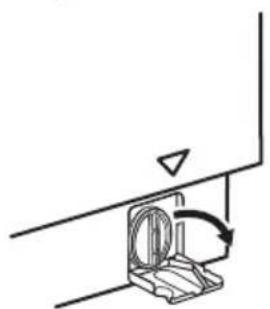
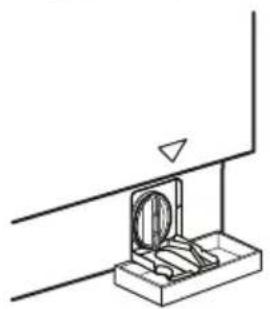

Possible malfunctions
IKEA warranty
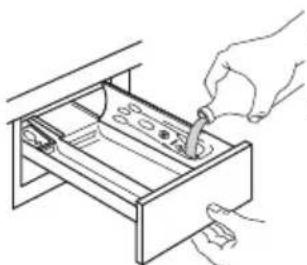
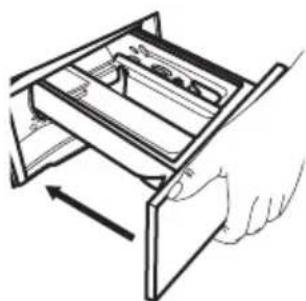
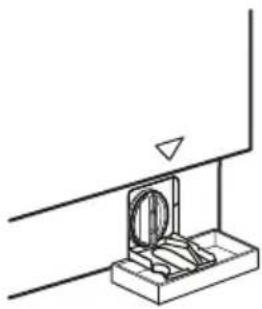
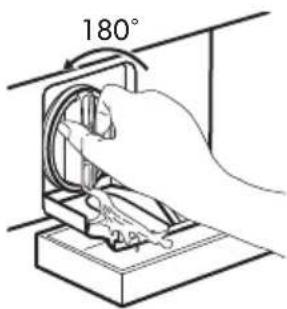
Possible malfunctions
IKEA WARRANTY - FRANCE
IKEA WARRANTY AND AFTER-SALES SERVICE CONTRACT
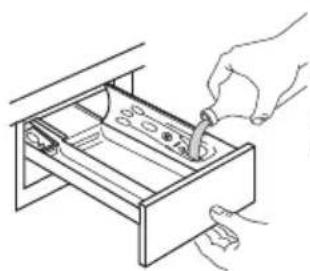

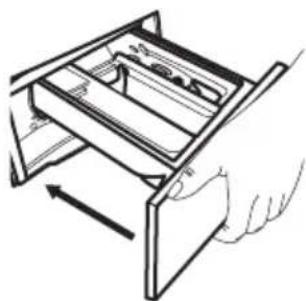
Cleaning the drum
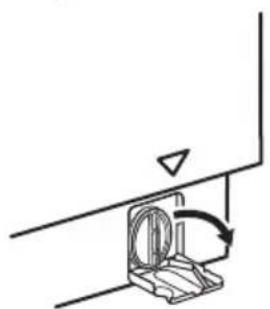
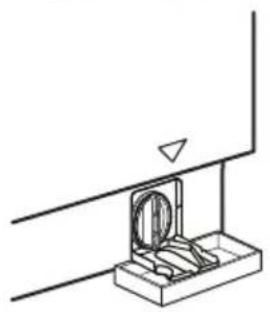
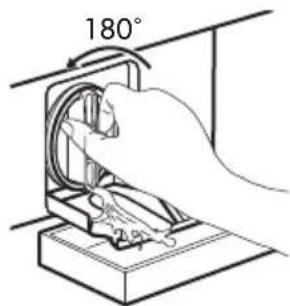
Possible malfunctions
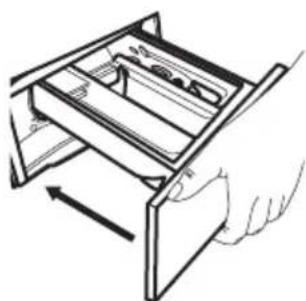
Cleaning the drum
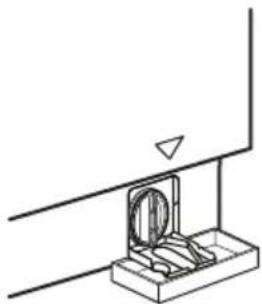
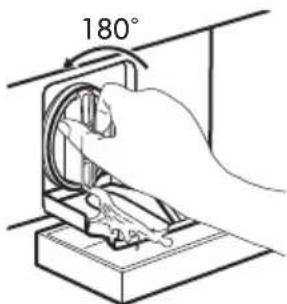
Possible malfunctions
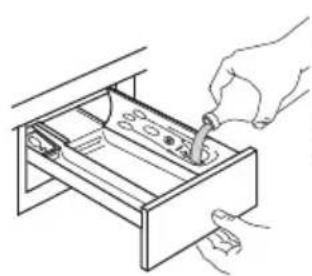
Cleaning the drum
Possible malfunctions
For liquid detergent: flap turned downwards.
Select a program
Clean the drum
- Close the pump cover.
Possible faults

- SAFETY INFORMATION
- CHILDREN AND VULNERABLE PEOPLE SAFETY
- WARNING
- GENERAL SAFETY
- SAFETY INSTRUCTIONS
- INSTALLATION
- ELECTRICAL CONNECTION
- WATER CONNECTION
- USE
- SERVICE
- DISPOSAL
- PRODUCT DESCRIPTION
- APPLIANCE OVERVIEW
- TRANSIT BOLTS
- RATING PLATE POSITION
- INSPECTION CHECK LIST
- FIRST USE
- CONTROL PANEL
- CONTROL PANEL DESCRIPTION
- MULTILINGUAL BADGES
- PROGRAMMES
- SETTINGS
- ACOUSTIC SIGNALS
- DAILY USE
- ACTIVATING THE APPLIANCE
- LOADING THE LAUNDRY
- FILLING THE DETERGENT AND ADDITIVES
- SETTING A PROGRAMME
- STARTING A PROGRAMME
- STARTING A PROGRAMME WITH THE DELAY START
- CANCELLING THE DELAY START AFTER THE COUNTDOWN HAS STARTED
- CHANGING THE DELAY START AFTER THE COUNTDOWN HAS STARTED
- THE AUTOADJUST SYSTEM LOAD DETECTION
- PAUSING A PROGRAMME AND CHANGING OPTIONS
- CANCELLING A RUNNING PROGRAMME
- OPENING THE DOOR
- END OF THE PROGRAMME
- DRAINING WATER OUT AFTER END OF CYCLE
- STAND-BY FUNCTION
- DAILY USE - WASHING & DRYING
- COMPLETE WASH&DRY PROGRAMME
- WASHING AND DRYING - AUTOMATIC LEVELS
- THE TIME VALUE ON THE DISPLAY IS THE DURATION OF BOTH CYCLES, WASHING AND DRYING, CALCULATED BASED ON A DEFAULT LOAD SIZE
- WASHING AND TIMED DRYING
- AT THE END OF THE DRYING PROGRAMME
- DAILY USE - DRYING ONLY
- PREPARATION TO DRYING
- DRYING - AUTOMATIC LEVELS
- TIMED DRYING
- FLUFF IN THE FABRICS
- HINTS AND TIPS
- THE LAUNDRY LOAD
- STUBBORN STAINS
- DETERGENT TYPE AND QUANTITY
- INSUFFICIENT DETERGENT MAY CAUSE
- EXCESSIVE DETERGENT MAY CAUSE
- ECOLOGICAL HINTS
- DEGREES OF WATER HARDNESS
- PREPARE THE DRYING CYCLE
- ITEMS NOT SUITABLE FOR DRYING
- DO NOT SET A DRYING PROGRAMME FOR THIS LAUNDRY
- GARMENT LABELS
- DRYING CYCLE DURATION
- ADDITIONAL DRYING
- GENERAL TIPS
- CARE AND CLEANING
- PERIODIC CLEANING SCHEDULE
- PERIODIC CLEANING HELPS TO EXTEND THE LIFE OF YOUR APPLIANCE
- REMOVING FOREIGN OBJECTS
- EXTERNAL CLEANING
- DESCALING
- MAINTENANCE WASH
- DOOR SEAL
- CLEANING THE DRUM
- CLEANING THE DETERGENT DISPENSER DRAWER AND THE DRAWER RECESS
- CLEANING THE DRAIN PUMP
- PROCEED AS FOLLOWS TO CLEAN THE PUMP
- CLEANING THE INLET FILTER AND THE FILTER VALVE
- EMERGENCY DRAIN
- FROST PRECAUTIONS
- TROUBLESHOOTING
- INTRODUCTION
- EMERGENCY DOOR OPENING
- CONSUMPTION VALUES
- ACCORDING TO COMMISSION REGULATION EU
- COMMON PROGRAMMES - WASHING ONLY
- COMMON PROGRAMMES - WASH AND DRY
- ENVIRONMENTAL CONCERNS
- IKEA GUARANTEE
- HOW LONG IS THE IKEA GUARANTEE VALID
- WHO WILL EXECUTE THE SERVICE
- WHAT DOES THIS GUARANTEE COVER
- WHAT WILL IKEA DO TO CORRECT THE PROBLEM
- WHAT IS NOT COVERED UNDER THIS GUARANTEE
- HOW COUNTRY LAW APPLIES
- AREA OF VALIDITY
- THE DEDICATED AFTER SALES SERVICE FOR IKEA APPLIANCES
- HOW TO REACH US IF YOU NEED OUR SERVICE
- DO YOU NEED EXTRA HELP
- FOR
- POSSIBLE MALFUNCTIONS
- IKEA WARRANTY
- IKEA WARRANTY - FRANCE
- IKEA WARRANTY AND AFTER-SALES SERVICE CONTRACT
- SELECT A PROGRAM
- CLEAN THE DRUM
Brand : IKEA
Model : TVÄTTAD 604.940.65
Category : Washing machine