
RENLIG IWM60 - Washing machine IKEA - Free user manual and instructions
Find the device manual for free RENLIG IWM60 IKEA in PDF.


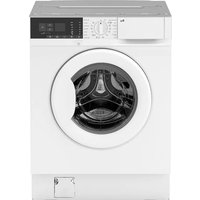
| Product type | Front-loading washing machine |
| Brand | IKEA |
| Model | RENLIG IWM60 |
| Dimensions (W x H x D) | 59.6 x 82 x 54 cm |
| Maximum capacity (cotton) | 6 kg |
| Maximum spin speed | 1200 rpm |
| Energy class | A+ |
| Washing class | A |
| Spin class | B |
| Washing noise | 54 dB(A) |
| Spinning noise | 76 dB(A) |
| Annual energy consumption | 204 kWh |
| Annual water consumption | 9000 liters |
| Water pressure | 0.5 - 8 bar |
| Programs | Cotton, Synthetics, Easy iron, Delicates, Wool, Hand wash, Rinses, Drain, Spin |
| Options | Spin reduction, Prewash, Quick, Extra rinse, Delay start (3/6/9h) |
| Child safety | Yes, door lock |
| Warranty | 5 years IKEA (except LAGAN series) |
| Maintenance | Regular cleaning of the detergent drawer, pump and water inlet filters |
Frequently Asked Questions - RENLIG IWM60 IKEA
User questions about RENLIG IWM60 IKEA
0 question about this device. Answer the ones you know or ask your own.
Ask a new question about this device
Download the instructions for your Washing machine in PDF format for free! Find your manual RENLIG IWM60 - IKEA and take your electronic device back in hand. On this page are published all the documents necessary for the use of your device. RENLIG IWM60 by IKEA.
USER MANUAL RENLIG IWM60 IKEA
Helpful hints and tips 12
Washing programmes 12
Consumption values 15
Subject to change without notice
Care and cleaning 15
What to do if... 18
Technical data 20
Installation 21
Electrical connection 22
Environment concerns 22
IKEA GUARANTEE 23
⚠ Safety information
For your safety and correct operation of the appliance, read this manual carefully before installation and use. Always keep these instructions with the appliance even if you move or sell it. Users must fully know the operation and safety features of the appliance.
The manufacturer is not responsible for damages caused by incorrect installation and use.
Children and vulnerable people safety
- Do not let persons, including children, with reduced physical, sensory, or mental capabilities, or lack of experience and knowledge, use the appliance. They must have supervision or instruction for the operation of the appliance by a person responsible for their safety.
- Keep all packaging well away from children. There is a risk of suffocation.
- Keep all detergents in a safe area. Do not let children touch the detergents.
- Make sure that children or pets do not climb into the drum. Please check the drum before using it. This appliance incorporates a special feature to prevent children and pets from becoming trapped inside the drum.

To activate this device, rotate the button clockwise (without pressing it) inside the door until the groove is horizontal. If necessary, use a coin.
To disable this device and restore the possibility of closing the door, rotate the button anticlockwise until the groove is vertical.
General safety
- Do not change the specifications or modify this product. There is a risk of injury and damage to the appliance.
- If the appliance is delivered in the winter months when there are minus temperatures, store it at room temperature for 24 hours before using it for the first time. Please read the "dangers of freezing" chapter.
- This appliance is designed for use in normal indoor temperatures. The manufacturer is not responsible for freezing damages.
- Always unplug the appliance and turn off the water supply after use, cleaning, and maintenance.
Installation
- A qualified and competent person must do the electrical and plumbing installation.
- This appliance is heavy. Take care when you move it.
- Make sure that the appliance is not damaged because of transport. Do not connect a damaged appliance. If necessary, contact the dedicated After Sales Service.
- Remove all packaging and transit bolts before first use. Serious damage can occur to the appliance or to neighbouring cabinets or furniture.
- Keep all transit devices so that they can be refitted if the appliance ever has to be transported again. Please refer to the relevant steps in the Assembly Instruction.
- Never place cardboard, wood or similar materials under the appliance to compensate for any unevenness in the floor.
Level accurately the appliance and tighten the lock nuts to prevent vibration, noise and displacement of the appliance during operation.
- If your appliance is installed on a carpeted floor, adjust the feet in order to ensure that the air must circulate freely under the appliance.
- Check that your appliance is not standing on the inlet and drain hose and the worktop or the back of the appliance is not pressing the electrical supply cable against the wall.
- Always be sure, that there is no water leakage from hoses and their connections after the installation.
- If the appliance is installed in a location subject to frost, please read the “dangers of freezing” chapter.
Use
- The appliance is only for domestic use. Do not use the appliance for commercial and industrial use or for other uses.
- Only an authorised service engineer can repair this appliance. Use only original spare parts.
- Refer to the instructions on the label of each item (garment) before washing.
- Do not overload the appliance. See the Washing Programme Table.
- Before washing, ensure that all pockets are empty and buttons and zips are fastened.
- Any objects such as coins, safety pins, nails, screws, stones or any other hard, sharp material can cause extensive damage and must not be placed into the appliance.
- Treat stains such as paint, ink, rust, and grass before washing.
- Only use the advised quantities of fabric softener and detergent. Damage to the fabric can ensue if you overfill. Refer to the manufacturer's recommendations of quantities.
- Wash small items such as socks, laces, washable belts etc. in a washing bag or pillow case as it is possible for such items to slip down between the tub and the inner drum.
- Do not use your appliance to wash articles with whalebones, items without hems, frayed and torn. Underwired bras must NOT be washed.
- Garments which have been in contact with volatile petroleum products should not be appliance washed. If volatile cleaning fluids are used, care should be taken to ensure that the fluid is removed from the garment before placing in the appliance.
- The water we use normally contains lime. It is a good idea to periodically use a water softening powder in the appliance. Do this without any laundry into the drum and according to the softening powder manufacturer's instructions. This will help to prevent the formation of lime deposits making your appliance more efficiency.
- Never pull the power supply cable to remove the plug from the socket; always take hold of the plug itself.
- Never use the appliance if the power supply cable, the control panel, the working surface or the base is damaged so that the inside of the appliance is accessible.
Water inlet
- This appliance must be connected to a cold water supply.
- Do not use connection hoses from an old appliance to connect it to the water supply.
- The water pressure must be in the limits (refer to the chapter «Technical data» table). Make sure that the local water authority gives you the average mains pressure in your area.
- Make sure that there are no kinks in the water inlet hose and that the water inlet hose is not squashed or entangled.
- Before connecting up the appliance to new pipework or to pipework that has not been used for some time, run off a reasonable amount of water to flush out any debris that may have collected in the pipes.
- Turn the inlet hose on the back of the appliance to the left or the right to suit the installation.
- The inlet hose must not be lengthened. If it is too short and you do not wish to move the tap, you will have to purchase a new, longer hose specially designed for this type of use.
- Before opening the water tap, be sure to tighten the ring nut well to prevent any leaks.
Water drainage
- Make sure the end of the drain hose cannot come unhooked when the appliance is emptying. This could be done by tying it to the tap with a piece of string or attaching it to the wall.
- The drain hose must be placed at a height of not less than 44 cm and not more than 90 cm. Please refer to the Assembly Instruction booklet.
Care and cleaning
- Before maintenance, switch off the appliance and disconnect the mains plug from the mains socket.
- Clean the exterior cabinet of the appliance with soap and water only, and then dry thoroughly.
- The washing powder and additive dispenser drawer should be cleaned regularly.
- Inspect the pump regularly and particularly if:
- the appliance does not empty and/or spin
- the appliance makes an unusual noise during draining due to objects such as safety pins, coins etc. blocking the pump.
- Never remove the pump cover during a wash cycle. Always wait until the appliance has drained out the water. If you have selected a high temperature washing programme, please wait until the water has cooled down.
- Ensure that the pump cover is securely re-tightened to prevent any leaks.
Product description

1 Detergent dispenser drawer 2 Control panel 3 Door opening handle 4 Rating Plate 5 Drain pump 6 Adjustable feet
ENGLISH
Detergent dispenser drawer
Compartment for detergent used for pre-wash and soak phase or for stain remover used during the stain action phase (if available). The prewash and soak detergent is added at the beginning of the wash programme. The stain remover is added during the stain action phase. Compartment for powder or liquid detergent used for main wash. If using liquid detergent, pour it just before starting the programme. Compartment for liquid additives (fabric softener, starch). Follow the product manufacturer's recommendations on quantities to use and do not ever exceed the «MAX» mark in the detergent dispenser drawer. Any fabric softener or starching additives must be poured
into the compartment before starting the wash programme.

Control panel
Below is a picture of the control panel. It shows the programme selector dial as well as the buttons and the indicator lights. These are presented by relevant numbers on the following pages.

1 Programme selector dial 2 Spin reduction button 3 Multi-Functions button 4 Extra Rinse button
5 Start/Pause button 6 Delay Start button 7 Programme Indicator lights
| Table of Symbol | |
| = Cottons | = On/Off - Reset |
| = Economy | = Rinse Hold |
| = Cold wash = Options | |
| = Synthetics = Prewash | |
| = Easy Iron = Quick Wash | |
| = Delicates = Extra Rinse | |
| = Wool = Delay Start | |
| = Handwash = Main Wash | |
| = Rinses = End Cycle | →I |
| = Drain = Start/Pause | DII |
| = Spin | |
| Programme selector dial | It allows you to switch the appliance On/Off and/or to select a programme. |
| Spin reduction button By pressing this button you can change the spin speed of the selected programme.Rinse Hold option: by selecting this option the water of the last rinse is not emptied out to prevent the fabrics from creasing.Before opening the door it will be necessary to empty out the water. To empty out the water, please read the paragraph «At the end of the programme». | |
| Multi-Functions button: By pressing this button, you can select only one of the options.The relevant light will light up.Prewash: by selecting this option the appliance performs a prewash cycle before the main wash phase. The washing time will be prolonged. This option is recommended for heavily soiled laundry.Super Quick: a very short cycle for slightly soiled items that have been worn for a short time. | |
| Extra Rinse button This appliance is designed for saving energy. If it necessary to rinse the laundry using an extra quantity of water (extra rinse), select this option. Some additional rinses will be performed. This option is recommended for people who are allergic to detergents, and in areas where the water is very soft. | |
| Start/Pause button | This button allows you to start or to interrupt the selected washing programme. |
| Delay Start button | This button allows you to delay the start of the programme by 3,6 or 9 hours. |
| Programme Indicator lights | |


When selecting a washing programme, both lights 7.1 and 7.2 illuminate.
When you have pressed button 5, the only light corresponding to the running phase stays on.
The appliance starts working and the door is locked.
The light 7.3 illuminates at the end of the washing cycle. After a few minutes the door can be opened.
Important! If the draining programme is selected, no light will illuminate.
First use
- Ensure that the electrical and water connections comply with the installation instructions.
- Remove any material from the drum.
- Pour 2 liters of water into the main wash compartment ⬤ of the detergent drawer in order to activate the ECO valve.
Select a cotton cycle at the highest temperature without any laundry in the appliance, to remove any manufacturing residue from the drum and tub.
Pour 1/2 a measure of detergent into the main wash compartment and start the appliance.
Daily use
Open the door
Open the door by carefully pulling the door handle outwards.
Load the laundry
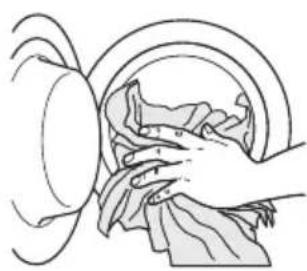
Place the laundry in the drum, one item at a time, shaking them out as much as possible.
By pushing the port-hole frame, close firmly the door.
Measure out detergent and fabric softener
1
Pour the detergent into the main wash compartment or in the appropriate compartment if the selected programme/option requires it (see more details in "Detergent dispenser drawer").
To pour the right quantity of the detergent, see more details in "Degrees of water hardness".
2 Pour fabric softener

into the compartment marked (must not exceed the «MAX» mark in the drawer).
Close the drawer gently
Select the required programme by turning the programme selector dial (1)
The appliance is now switched on. The indicator light of button 5 starts to blink.
At the end of the programme the selector dial must be turned to position O, to switch the appliance off.
For the description of each wash cycle, the compatibility among the washing programmes and the options, consult the chapter «Washing Programmes».
Caution! If you turn the programme selector dial to another programme when the appliance is working, the red indicator light of button 5 will blink 3 times to indicate a wrong selection. The appliance will not perform the new selected programme.
Reduce the spin speed by pressing button 2
By selecting a programme, the appliance proposes automatically the maximum spin speed provided for that programme.
Press button 2 repeatedly to change the spin speed, if you want your laundry to be spun at a different speed. The relevant light illuminates.
Select the available options by pressing buttons 2, 3 and 4
Depending on the programme, different functions can be combined. These must be selected after choosing the desired programme and before starting the programme.
When these buttons are pressed, the corresponding indicator lights illuminate. When they are pressed again, the indicator lights go out. If an incorrect option is selected, the integrated red indicator light of button 5 flashes 3 times.
For the compatibility among the washing programmes and the options, see the chapter «Washing Programmes».
Select the Delay Start by pressing button 6.
Before you start the programme, if you wish to delay the start, press button 6 repeatedly to select the desired delay. The relevant light illuminates.
You must select this option after you have set the programme and before you start the programme.
You can cancel or modify the delay time at any moment before you press button 5.
Selecting the delayed start:
- Select the programme and the required options.
- Select the delay start by pressing button 6.
- Press button 5:
– The appliance starts its countdown. - The programme will start after the selected delay has expired.
Cancelling the delayed start after having started the programme:
- Set the washing appliance to PAUSE by pressing button 5.
- Press button 6 once; the light relevant to the selected delay goes off.
- Press button 5 again to start the programme.
The Delay Start cannot be selected with the DRAIN programme.
Important! The selected delay can only be changed after selecting the washing programme again.
The door will be locked throughout the delay time. If you need to open the door, you must set the appliance to PAUSE (by pressing button 5) and then wait a few minutes. After you have closed the door, press button 5 again.
Start the programme by pressing button 5.
To start the selected programme, press button 5; the corresponding green indicator light stops blinking. The indicator light corresponding to the running phase illuminates. The appliance starts operating and the door is locked.
To interrupt a running programme, press button 5: the corresponding green indicator light starts blinking.
To restart the programme from the point at which it was interrupted, press button 5 again. If you have chosen a delayed start, the appliance will begin the countdown.
If an incorrect option is selected, the red indicator light of button 5 blinks 3 times.
Altering an option or a running programme.
It is possible to change some options before the programme carries them out.
Before making any change, you must PAUSE the appliance by pressing button 5.
Changing a running programme is possible only by resetting it. Turn the programme selector dial to ⬆ and then to the new programme position. Start the new programme by pressing button 5 again. The washing water in the tub will not be emptied out.
Interrupting a programme.
Press button 5 to interrupt a running programme; the corresponding green indicator light starts blinking.
Press the button again to restart the programme.
Cancelling a programme
Turn the selector dial to O to cancel a programme which is running.
You can select now a new programme.
Opening the door
After the programme has started the door is locked. If, for any reason, you need to open it, set firstly the appliance to PAUSE by pressing the button 5. After a few minutes it will be possible to open the door.
If the door remains locked, this means that the appliance is already heating or that the water level is too high. In any case, do not try to force the door!
If you cannot open the door but you need to open it you have to switch the appliance off by turning the selector dial to O. After a few minutes the door can be opened (pay attention to the water level and temperature!).
After closing the door, it is necessary to select the programme and options again and to press button 5.
At the end of the programme
The appliance stops automatically. The indicator light of button 5 and the indicator light corresponding to the just finished washing phase goes off. The light 7.3 illuminates. After a few minutes the door can be opened.
If a programme or an option that ends with water left in the tub has been selected, the light 7.3 illuminates but the door remains locked to indicate that the water must be emptied out before opening the door.
Follow the below instructions to empty out the water:
- Turn the programme selector dial to O.
- Select the draining or spinning programme.
- Reduce the spin speed if needed, by pressing button 2.
- Press button 5.
At the end of the programme, the door can now be opened. Turn the programme selector dial to O to switch the appliance off.
Remove the laundry from the drum and carefully check that the drum is empty. If you do not intend to carry out another wash, close the water tap. Leave the door open to prevent any mildew and unpleasant smells.
Stand by: once the programme has finished, the energy saving system is enabled with the pilot lights switched on. By pressing any button, the appliance will come out of the energy saving status.
Helpful hints and tips
Sorting out the laundry
Follow the wash code symbols on each garment label and the manufacturer's washing instructions. Sort the laundry as follows: whites, coloureds, synthetics, delicates, woollens.
Removing stains
Stubborn stains may not be removed by just water and detergent. It is therefore advisable to treat them prior to washing.
Blood: treat fresh stains with cold water. For dried stains, soak overnight in water with a stain remover product, then rub in the soap and water.
Oil based paint: moisten with benzine stain remover, lay the garment on a soft cloth and dab the stain; treat several times.
Dried grease stains: moisten with turpentine, lay the garment on a soft surface and dab the stain with the fingertips and a cotton cloth.
Rust: oxalic acid dissolved in hot water or a rust removing product used cold. Be careful with rust stains which are not recent since the cellulose structure will already have been damaged and the fabric tends to hole.
Mould stains: treat with bleach, rinse well (white cottons and fast coloureds only).
Grass: soap lightly and treat with bleach (white cottons and fast coloureds only).
Ball point pen and glue: moisten with acetone 1) , lay the garment on a soft cloth and dab the stain.
Lipstick: moisten with acetone as above, then treat stains with methylated spirits. Treat any residual marks with bleach.
Red wine: soak in water and detergent, rinse and treat with acetic or citric acid, then rinse. Treat any residual marks with bleach.
Ink: depending on the type of ink, moisten the fabric first with acetone 1) , then with acetic acid; treat any residual marks on white fabrics with bleach and then rinse thoroughly.
Tar stains: first treat with stain remover, methylated spirits or benzine, then rub with detergent paste.
Degrees of water hardness
Water hardness is classified in so-called “degrees” of hardness. Information on hardness of the water in your area can be obtained from the relevant water supply company, or from your local authority.
| Characteristic | Degrees of water hardness | |
| German °dH French °T.H. | ||
| Soft 0-7 0-15 | ||
| Medium 8-14 16-25 | ||
| Hard 15-21 26-37 | ||
| Very hard >21 >37 | ||
A water softener must be added when water has a medium-high degree of hardness. Follow the manufacturer's instructions. The quantity of detergent can then always be adjusted (reduced) to degree of hardness soft.
Washing programmes
i Please always refer to the care label symbol of your garment and select the washing programme based on what it says.
| Programme/ Temperature | Type of laundry | Cycle Description | Max. Load Red. Load1) | Available Options | Detergent Compartment |
| COTTONS 90°-60° | White cotton (heavy-normally soiled items). | Main wash Rinses Max. final spin at 1200 rpm | 6 kg 3\ kg1) | Spin Rinse Hold Prewash Super Quick Extra Rinse | U2) ※ |
| COTTONSECO 60° | White and fast coloured cotton economy, lightly-heavy soiled items, shirts, underwear. | Main wash Rinses Max. final spin at 1200 rpm | 6 kg | Spin Rinse Hold Prewash Extra Rinse | U2) ※ |
| COTTONS 40°-30°-Cold | Coloured cotton (normally-lightly soiled items). | Main wash Rinses Max. final spin at 1200 rpm | 6 kg 3\ kg1) | Spin Rinse Hold Prewash Super Quick Extra Rinse | U2) ※ |
| SYNTHETICS 60°-40°-30°-Cold | Synthetic or mixed fabrics: underwear, coloured garments, non-shrink shirts, blouses. | Main wash Rinses Max. final spin at 900 rpm | 3 kg 1.5\ kg1) | Spin Rinse Hold Prewash Super Quick Extra Rinse | U2) ※ |
| EASY IRON 40° | Synthetic fabrics: selecting this programme the laundry is gently washed and spun to avoid any creasing. In this way ironing is easier. Furthermore the appliance will perform additional rinses. | Main wash Rinses Max. final spin at 900 rpm | 1.5 kg | Spin Rinse Hold Prewash Extra Rinse | U2) ※ |
| DELICATES 40°-30°-Cold | Delicate fabrics: for example curtains. | Main wash Rinses Max. final spin at 700 rpm | 3 kg 1.5\ kg1) | Spin Rinse Hold Prewash Super Quick Extra Rinse | U2) ※ |
| WOOL 40° | Special programme for wool garments bearing the «Pure new wool, non-shrink, appliance washable» label. | Main wash Rinses Max. final spin at 900 rpm | 2 kg | Spin Rinse Hold | |
| HANDWASH 30°-Cold | Special programme for delicate fabrics with «hand washing» care symbol. | Main wash Rinses Max. final spin at 900 rpm | 2 kg | Spin Rinse Hold | |
| RINSES With this programme it is possible to rinse and spin cotton garments which have been washed by hand. The appliance performs some rinses, followed by a final long spin. The spin speed can be reduced. | Rinses Max. final spin at 1200 rpm | 6 kg | Spin Rinse Hold Extra Rinse | ||
| DRAIN For emptying out the water of the last rinse in programmes with the Rinse Hold option selected. | Draining of water | 6 kg | |||
| SPIN Separate spin for hand washed garments and after programmes with the Rinse Hold option selected. You can choose the spin speed by pressing the relevant button to adapt it to the fabrics to be spun. | Max. final spin at 1200 rpm | 6 kg | Spin | ||
1) If you select the SUPER QUICK option, we recommend you, to reduce the maximum load as indicated.
(Red. load = reduced load). Full loading is possible however with somewhat reduced cleaning results.
2) If using liquid detergents, a programme without PREWASH must be selected.
Consumption values
| Programme Energy consumption (KWh) | Water consumption (litres) | Programme duration (Minutes) 1) |
| White Cottons 90° 2 61 140 | ||
| Cottons 60° 1.3 58 125 | ||
| Cottons ECONOMY 60° 2) 1.02 45 155 | ||
| Cottons 40° 0.75 58 120 | ||
| Synthetics 40° 0.5 47 80 | ||
| Delicates 40° 0.55 58 70 | ||
| Wool 40° 0.45 55 60 | ||
| Handwash 30° 0.3 58 55 |
1) Without prewash option selected. 2) «Cottons Economy» at 60°C with a load of 6 kg is the reference programme for the data entered in the energy label, in compliance with CEI 456 standards.
The consumption data shown on this chart is to be considered purely indicative, as it may vary depending on the quantity and type of laundry, on the inlet water temperature and on the ambient temperature.
Care and cleaning

Warning! Switch the appliance off before you carry out any cleaning or
maintenance work.
Maintenance Wash
With the use of low temperature washes it is possible to get a build up of residues inside the drum.
We recommend that a maintenance wash be performed on a regular basis.
To run a maintenance wash:
• The drum should be empty of laundry. - Select the hottest cotton wash programme. - Use a normal measure of detergent, must be a powder with biological properties.
Cleaning the dispenser drawer and the drawer recess
1
To remove the drawer, press the catch downwards and pull it out.
ENGLISH
2 To aid cleaning, re-

move also the top part of the additive compartment.
3

Use a stiff brush to clean and remove all washing powder residue.
4

Flush out all the removed parts of the dispenser drawer under a tap to remove any traces of accumulated powder.
5

Use the previous brush to clean the recess, ensuring that upper and lower part of it is well cleaned. After having cleaned the dispenser and the drawer recess, replace it and run a rinse programme without any laundry in the drum to flush away any residue.
Cleaning the pump
Proceed as follows:
1

Place a container close to the pump (A), to collect any spillage.
2

Pull out the emergency emptying hose (B), place it in the container and remove its cover cap.

When no more water comes out, unscrew the pump cover (A) and remove it. Always keep a rag nearby to dry up spillage of water when removing the pump.

Remove any objects from the pump impeller by rotating it.
5 Use a pencil to check

whether the pump wheel right at the back of the pump housing can turn. (It is normal for the pumping wheel to turn jerkily.) If the pumping wheel cannot be turned, please contact the After Sales Service.

Put the cap back on the emergency emptying hose and place the latter back in its seat. Screw the pump fully in.
Cleaning the water inlet filters
If the appliance takes long to fill with water or doesn't fill, the starting button indicator light blinks in red. Check if the water inlet filters are blocked (see chapter "What to do if..." for more details).
Proceed as follows:

- Turn off the water tap.
- Unscrew the hose from the tap.
- Clean the filter in the hose with a stiff brush.
- Screw firmly the inlet hose back onto the tap.
2

- Unscrew the hose from the appliance. Keep a rag nearby because some water may flow.
- Clean the filter in the valve with a stiff brush or with the piece of cloth.
3

Screw the back to the appliance turning it to the left or the right to suit the installation. Tighten the lock-nut correctly to prevent water leaks. Turn on the water tap.
The dangers of freezing
If the appliance is exposed to temperatures below 0°C, certain precautions should be taken.
- Turn off the water tap.
- Unscrew the inlet hose.
- Place the end of the emergency emptying hose and that of the inlet hose in a bowl placed on the floor and let water drain out.
- Screw the water inlet hose back on and re-position the emergency emptying hose after having put the cap on again.
- When you intend to start the appliance up again, make sure that the room temperature is above 0°C.
Important! Every time you drain the water through the emergency emptying hose you must pour 2 litres of water into the main wash compartment of the detergent drawer and then run the drain programme. This will activate the ECO VALVE device avoiding that part of the detergent remains unused at next washing.
Emergency emptying out
If the water is not discharged, proceed as follows to empty out the appliance:
- Pull out the plug from the power socket.
- Close the water tap.
- If necessary, wait until the water has cooled down.
- Open the pump door.
- Place a bowl on the floor and place the end of the emergency emptying hose into the bowl. Remove its cap. The water should drain by gravity into the bowl. When the bowl is full, put the cap back on the hose. Empty the bowl. Repeat the procedure until water stops flowing out.
- Clean the pump if necessary as previously described.
- Replace the emergency emptying hose in its seat after having plugged it.
- Screw the pump cover again and close the door.
What to do if...
The appliance does not start or stops during operation. It is possible that the red indicator light of button 5 blinks to indicate that the appliance is not working.
Before contacting your local Service Centre, please carry out the checks listed below.
| Problem Possible | cause Solution | |
| The appliance does not start: | The door has not been closed (The red indicator light of button 5 blinks). | Close the door firmly. |
| The plug is not properly inserted in the power socket. | Insert the plug into the power socket. | |
| There is no power at the socket. Please check your domestic electrical installation. | ||
| The main fuse or the fuse in a plug has blown. | Replace the fuse. | |
| The programme selector dial is not correctly positioned and the button 5 has not been pressed. | Please turn the selector dial and press the button 5 again. | |
| The delay start has been selected. If the laundry are to be washed immediately, cancel the delay start. | ||
| The appliance does not fill: | The water tap is closed The red indicator light of button 5 blinks). | Open the water tap. |
| The inlet hose is squashed or kinked (The red indicator light of button 5 blinks). | Check the inlet hose connection. | |
| The filter in the inlet hose or the inlet valve filter are blocked (The red indicator light of button 5 blinks). | Clean the water inlet filters. (See "Cleaning the water inlet filters" for more details). | |
| The door is not properly closed (The red indicator light of button 5 blinks). | Close the door firmly. | |
| The appliance does not empty: | The drain hose is squashed or kinked (The red indicator light of button 5 blinks). | Check the drain hose connection. |
| The drain filter is clogged (The red indicator light of button 5 blinks). | Clean the drain filter. | |
| An option or a programme that ends with the water still in the tub or a that eliminates all the spinning phases has been selected. | Select the draining or spinning programme. | |
| The appliance spinning phase starts late or does not start: | The electronic unbalance detection device has cut in because the laundry is not evenly distributed in the drum. The laundry is redistributed by reverse rotation of the drum. This may happen several times before the unbalance disappears and normal spinning can resume. If, after 10 minutes, the laundry is still not evenly distributed in the drum, the appliance will not spin. | Redistribute the load manually or load more laundry and select the spin programme. |
| There is water on the floor: | Too much detergent or unsuitable detergent (creates too much foam) has been used. | Reduce the detergent quantity or use another one. |
| Check whether there are any leaks from one of the inlet hose fittings. It is not always easy to see this as the water runs down the hose; check to see if it is damp. | Check the water inlet hose connection. | |
| The drain or inlet hose is damaged. | Replace it with a new one (check with the After Sales Service the right spare part number). | |
| The cap on the emergency emptying hose has not been replaced or the filter has not been properly screwed in after cleaning action. | Refit the cap on the emergency emptying hose or screw the filter fully in. | |
| The door will not open: | The programme is still running. Wait the end of washing cycle. | |
| The door lock has not been released. Wait a few minutes before opening the door. | ||
| There is water in the drum. Select drain or spin programme to empty out the water. | ||
| The appliance produces an unusual noise | The transit bolts and packing have not been removed. | Check the correct installation of the appliance. |
| The support feet have not been adjusted | Check the correct levelling of the appliance. | |
| The drain pump could be blocked. Check the drain pump. (See "Cleaning the pump" for more details). | ||
| Unsatisfactory washing results: | Too little detergent or unsuitable detergent has been used. | Increase the detergent quantity or use another one. |
| Stubborn stains have not been treated prior to washing. | Use commercial products to treat the stubborn stains. | |
| The correct temperature was not selected. | Check if you have selected the correct temperature. | |
| Excessive laundry load. Reduce the laundry load in according to the Washing Programmes table. | ||
After the check, switch on the appliance and press button 5 to restart the programme. If the malfunction shows again, contact your After Sales Service.
The necessary data for the service centre is on the rating plate. We recommend that you write the data here:
Model description (MOD): ....
Product number (PNC): ....
Serial number (S.N.): ....

Technical data
| Dimensions Width (cm) 59,6 | ||
| Height (cm) 82 | ||
| Depth (cm) 54 | ||
| Water supply pressure1) | MinimumMaximum | 0,5 bar (0,05 MPa)8 bar (0,8 MPa) |
| Cotton max. load (kg) 6 | ||
ENGLISH
| Max. spin speed (rpm) 1200 | |
| Energy class A+ | |
| Washing class A | |
| Spinning class B | |
| Washing noise (dB(A)) 54 | |
| Spinning noise (db(A)) 76 | |
| Average annual energy consumption (kWh) 2) | 204 |
| Average annual water consumption (litres) 2) | 9000 |
1) If the pressure in your area is lower or higher, please contact your After Sales Service. 2) The data is based on the washing programme for test institutes assuming 220 cycles per a year.
i Information on the electrical connection, voltage and overall power is given on the rating plate, on the inner edge of the appliance door.
Installation
Caution! Refer to the assembly instructions, in order to proceed with the installation.
Warning! Make sure that mains plug is disconnected from the mains socket during installation.
Place the appliance on the floor and install it under a counter (kitchen worktop or sink). If a repair is necessary, the appliance must be easily accessible for the engineer. Put the appliance adjacent to a water tap and a drain. For the venting of the appliance only water fill, water drain and power supply cable openings are necessary.
Water inlet
1
Connect the hose to a tap with 3/4" thread.

Turn the inlet hose to the left or the right to suit the installation. Tighten the locknut correctly to prevent water leaks.
Caution! Do not place the inlet hose downwards.
The inlet hose must not be lengthened. If it is too short and you do not wish to move the tap, you will have to purchase a new, longer hose specially designed for this type of use.

Water drainage
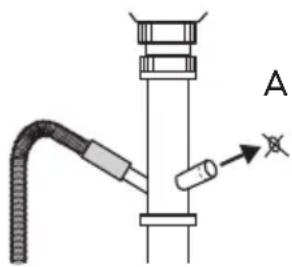
If you connect the water drain hose to a water trap under the sink, remove the plastic membrane (A). If you do not remove the membrane, detergent residue and clothes fluff can cause a blockage in the drain hose spigot.
Caution! Make sure that the water couplings are tight to prevent water leakage.
The drain hose may be extended to a maximum of 4 metres. An additional drain hose and joining piece is available from your local Service Centre.
Electrical connection
• The appliance must be earthed. - Make sure that the electrical information on the rating plate agrees with your domestic power supply. - Always use a correctly installed shockproof socket. - Do not use multi-way plugs, connectors and extension cables. There is a risk of fire. - Do not replace or modify the mains cable yourself. Contact the After Sales Service. - Make sure that the mains plug and cable is not squashed or damaged by the back of the appliance.
- Make sure that the mains plug is accessible after installation.
- Do not pull the mains cable to disconnect the appliance. Always pull the mains plug.
- This appliance complies with the E.E.C. Directives.

Environment concerns
The symbol ☒ on the product or on its packaging indicates that this product may not be treated as household waste. Instead it should be taken to the appropriate collection point for the recycling of electrical and electronic equipment. By ensuring this product is disposed of correctly, you will help prevent potential negative consequences for the environment and human health, which could otherwise be caused by inappropriate waste handling of this product. For more detailed information about recycling of this product, please contact your local council, your
household waste disposal service or the shop where you purchased the product.
Packaging materials
The materials with the symbol 📋 are recyclable. Dispose of the packaging in suitable collection containers to recycle it.
Disposal of the appliance
- To prevent the risk of physical injury or damage:
- Disconnect the mains plug from the mains socket. – Cut off the mains cable and discard it. – Discard the door catch. This prevents children or small animals from being closed inside the appliance. There is a risk of suffocation.
IKEA GUARANTEE
How long is the IKEA guarantee valid?
This guarantee is valid for five (5) years from the original date of purchase of your appliance at IKEA, unless the appliance is named LAGAN, in which case two (2) years of guarantee apply. The original sales receipt is required as proof of purchase. If service work is carried out under guarantee, this will not extend the guarantee period for the appliance.
Which appliances are not covered by the IKEA five (5) years guarantee?
The range of appliances named LAGAN and all appliances purchased in IKEA before 1st of August 2007.
Who will execute the service?
IKEA service provider will provide the service through its own service operations or authorized service partner network.
What does this guarantee cover?
The guarantee covers faults of the appliance, which have been caused by faulty construction or material faults from the date of purchase from IKEA. This guarantee applies to domestic use only. The exceptions are specified under the headline “What is not covered under this guarantee?” Within the guarantee period, the costs to remedy the fault, e.g. repairs, parts, labour and travel, will be covered, provided that the appliance is accessible for repair without special expenditure. On these conditions, the EU guidelines (Nr. 99/44/EG) and the respective local regulations are applicable. Replaced parts become the property of IKEA.
What will IKEA do to correct the problem?
IKEA's appointed service provider will examine the product and decide, at its sole discretion, if it is covered under this guarantee. If considered covered, the IKEA service provider or its authorized service partner, through its own service operations, will then, at its sole discretion, either repair the defective product or replace it with the same or a comparable product.
What is not covered under this guarantee?
- Normal wear and tear.
- Deliberate or negligent damage, damage caused by failure to observe operating instructions, incorrect installation, or connection to the wrong voltage, damage caused by chemical or electro-chemical reaction, rust, corrosion, or water damage including but not limited to damage caused by excessive lime in the water supply, damage caused by abnormal environmental conditions.
- Consumable parts including batteries and lamps. • Non-functional and decorative parts which do not affect normal use of the appliance, including any scratches and possible color differences.
- Accidental damage caused by foreign objects or substances and cleaning or unblocking of filters, drainage systems, or soap drawers.
- Damage to the following parts: ceramic glass, accessories, crockery and cutlery baskets, feed and drainage pipes, seals, lamps and lamp covers, screens, knobs, casings, and parts of casings. Unless such damages can be proved to have been caused by production faults.
- Cases where no fault could be found during a technician's visit.
- Repairs not carried out by our appointed service providers and/or an authorized service contractual partner, or where non-original parts have been used.
- Repairs caused by installation which is faulty or not according to specification.
- The use of the appliance in a non-domestic environment, i.e., professional use.
- Transportation damages. If a customer transports the product to their home or other address, IKEA is not liable for any damage that may occur during transport. However, if IKEA delivers the product to the customer's delivery address, then damage to the product that occurs during this delivery will be covered by this guarantee.
- Cost for carrying out the initial installation of the IKEA appliance. However, if the service provider or its authorized service partner repairs or replaces the appliance under the terms of this guarantee, the service provider or its authorized service partner will re-install the repaired appliance or install the replacement, if necessary.
This restriction does not apply to fault-free work carried out by a qualified specialist using our original parts in order to adapt the appliance to the technical safety specifications of another EU country.
How country law applies
The IKEA guarantee gives you specific legal rights, which cover or exceed local demands. However, these conditions do not limit in any way consumer rights described in the local legislation.
Area of validity
For appliances which are purchased in one EU country and taken to another EU country, the services will be provided in the framework of the guarantee conditions normal in the new country. An obligation to carry out services in the framework of the guarantee exists only if the appliance complies and is installed in accordance with:
- the technical specifications of the country in which the guarantee claim is made;
- the Assembly Instructions and User Manual Safety Information;
The dedicated After Sales Service for IKEA appliances:
Please do not hesitate to contact IKEA After Sales Service to:
- make a service request under this guarantee;
- ask for clarification on installation of the IKEA appliance in the dedicated IKEA kitchen furniture. The service won't provide clarifications related to: – the overall IKEA kitchen installation;
- connections to electricity (if machine is an IKEA model without plug and cable), to water and to gas since they have to be executed by an authorized service engineer.
- ask for clarification on user manual contents and specifications of the IKEA appliance.
To ensure that we provide you with the best assistance, please read carefully the Assembly Instructions and/or the User Manual section of this booklet before contacting us.
How to reach us if you need our service

Please refer to the last page of this manual for the full list of IKEA appointed contacts and relative national phone numbers.
Important! In order to provide You with a quicker service, we recommend that You use the specific phone numbers listed at the end of this manual. Always refer to the numbers listed in the booklet of the specific appliance You need an assistance for. Before calling us, assure that You have to hand the IKEA article number (8 digit code) for the appliance of which you need our assistance.
Important! SAVE THE SALES RECEIPT! It is Your proof of purchase and required for the guarantee to apply. Note that the receipt reports also the IKEA article name and number (8 digit code) for each of the appliances you have purchased.
Do You need extra help?
For any additional questions not related to After Sales of your appliances, please contact our nearest IKEA store call centre. We recommend you read the appliance documentation carefully before contacting us.
Summary
Control panel
⚠ IKEA GUARANTEE - FRANCE
IKEA GUARANTEE AND AFTER-SALES SERVICE CONTRACT
Control panel
Technical data

- ⚠ SAFETY INFORMATION
- CHILDREN AND VULNERABLE PEOPLE SAFETY
- GENERAL SAFETY
- INSTALLATION
- USE
- WATER INLET
- WATER DRAINAGE
- CARE AND CLEANING
- PRODUCT DESCRIPTION
- ENGLISH
- DETERGENT DISPENSER DRAWER
- CONTROL PANEL
- FIRST USE
- DAILY USE
- OPEN THE DOOR
- LOAD THE LAUNDRY
- MEASURE OUT DETERGENT AND FABRIC SOFTENER
- POUR FABRIC SOFTENER
- CLOSE THE DRAWER GENTLY
- SELECT THE REQUIRED PROGRAMME BY TURNING THE PROGRAMME SELECTOR DIAL (1)
- REDUCE THE SPIN SPEED BY PRESSING BUTTON
- SELECT THE AVAILABLE OPTIONS BY PRESSING BUTTONS 2, 3 AND
- SELECT THE DELAY START BY PRESSING BUTTON
- START THE PROGRAMME BY PRESSING BUTTON
- ALTERING AN OPTION OR A RUNNING PROGRAMME
- INTERRUPTING A PROGRAMME
- CANCELLING A PROGRAMME
- OPENING THE DOOR
- AT THE END OF THE PROGRAMME
- HELPFUL HINTS AND TIPS
- SORTING OUT THE LAUNDRY
- REMOVING STAINS
- DEGREES OF WATER HARDNESS
- WASHING PROGRAMMES
- MAINTENANCE WASH
- CLEANING THE DISPENSER DRAWER AND THE DRAWER RECESS
- CLEANING THE PUMP
- USE A PENCIL TO CHECK
- CLEANING THE WATER INLET FILTERS
- THE DANGERS OF FREEZING
- EMERGENCY EMPTYING OUT
- WHAT TO DO IF
- ELECTRICAL CONNECTION
- ENVIRONMENT CONCERNS
- PACKAGING MATERIALS
- DISPOSAL OF THE APPLIANCE
- IKEA GUARANTEE
- HOW LONG IS THE IKEA GUARANTEE VALID
- WHICH APPLIANCES ARE NOT COVERED BY THE IKEA FIVE (5) YEARS GUARANTEE
- WHO WILL EXECUTE THE SERVICE
- WHAT DOES THIS GUARANTEE COVER
- WHAT WILL IKEA DO TO CORRECT THE PROBLEM
- WHAT IS NOT COVERED UNDER THIS GUARANTEE
- HOW COUNTRY LAW APPLIES
- AREA OF VALIDITY
- THE DEDICATED AFTER SALES SERVICE FOR IKEA APPLIANCES
- HOW TO REACH US IF YOU NEED OUR SERVICE
- DO YOU NEED EXTRA HELP
- SUMMARY
- ⚠ IKEA GUARANTEE - FRANCE
- IKEA GUARANTEE AND AFTER-SALES SERVICE CONTRACT
Brand : IKEA
Model : RENLIG IWM60
Category : Washing machine