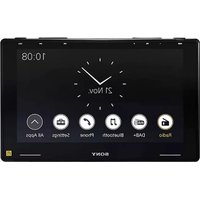
XAV-9550ES - Browser SONY - Free user manual and instructions
Find the device manual for free XAV-9550ES SONY in PDF.


| Brand | Sony |
| Model | XAV-9550ES |
| Product Type | Multimedia Navigator with Radio Receiver |
| Dimensions (W × H × D) | Approx. 271 mm × 171 mm × 247 mm |
| Mounting Dimensions | Approx. 182 mm × 53 mm × 160 mm |
| Weight | Approx. 2.5 kg |
| Power Supply | Vehicle battery 12 V DC (negative ground) |
| Rated Current Consumption | 10 A |
| Display | 10.1-inch (25.7 cm) color TFT LCD capacitive touchscreen, 1280 × 720 pixels |
| FM Radio | 87.5 – 108.0 MHz, tuner step 50/100 kHz switchable |
| AM Radio | 531 – 1,602 kHz |
| DAB/DAB+ | 174.928 – 239.200 MHz |
| Bluetooth | Version 5.0, profiles A2DP, AVRCP, HFP, PBAP, codecs SBC, AAC, LDAC |
| Wi-Fi | IEEE 802.11 a/n/ac, 5 GHz band |
| USB Port | USB Type-C (High Speed), max current 3.0 A |
| Audio Output Power | 55 W × 4 (at 4 Ω) |
| Camera Inputs | 2 camera inputs (CAMERA IN 1 and 2) + reverse camera input |
| Audio Outputs | Front, rear, subwoofer (SUB OUT) |
| Apple CarPlay Compatible | Yes (wireless and wired) |
| Android Auto Compatible | Yes (wireless and wired) |
| Voice Control | Via VOICE button for Apple CarPlay and Android Auto |
| Bluetooth Pairing | Via device settings or peripheral, passkey 0000 |
| Firmware Update | Via Sony support website or USB tethering |
| Operating Temperature | 0 °C to 40 °C |
| Package Contents | Main unit, cables, microphone, GPS antenna, installation kit |
Frequently Asked Questions - XAV-9550ES SONY
User questions about XAV-9550ES SONY
0 question about this device. Answer the ones you know or ask your own.
Ask a new question about this device
Download the instructions for your Browser in PDF format for free! Find your manual XAV-9550ES - SONY and take your electronic device back in hand. On this page are published all the documents necessary for the use of your device. XAV-9550ES by SONY.
USER MANUAL XAV-9550ES SONY
To cancel the demonstration (Demo Mode) display, see page 6.
To switch the FM tuning step, see page 6.
Operating Instructions
GB
Mode d'emploi
FR
Bedienungsanleitung
DE
XAV-9550ES(EUR)
https://rd1.sony.net/help/ev/xav-95/h_zz/

* 5 0 2 1 9 0 3 4 1 * (1)
Warning
For safety, be sure to install this unit in the dashboard of the car as the rear side of the unit becomes hot during use.
For details, see "Connection/Installation" (page 10).
Made in Thailand
The nameplate indicating operating voltage, etc., is located on the bottom of the chassis.
The validity of the CE marking is restricted to only those countries where it is legally enforced, mainly in the countries EEA (European Economic Area) and Switzerland. The validity of the UKCA marking is restricted to only those countries where it is legally enforced, mainly in the UK.
WARNING
To prevent fire or shock hazard, do not expose the unit to rain or moisture.
To avoid electrical shock, do not open the cabinet. Refer servicing to qualified personnel only.
Notice for customers: the following information is only applicable to equipment sold in countries applying EU directives and/or UK applying relevant statutory requirements
This product has been manufactured by or on behalf of Sony Corporation.
EU Importer: Sony Europe B.V.
Inquiries to the EU Importer or related to product compliance in Europe should be sent to the manufacturer's authorized representative, Sony Belgium, bijkantoor van Sony Europe B.V., Da Vincilaan 7-D1, 1930 Zaventem, Belgium.


Hereby, Sony Corporation declares that this equipment is in compliance with Directive 2014/53/EU.
The full text of the EU declaration of conformity is available at the following internet address:
https://compliance.sony.eu
Hereby, Sony Corporation declares that this equipment is in compliance with the UK relevant statutory requirements.
The full text of the declaration of conformity is available at the following internet address:
https://compliance.sony.co.uk
This equipment should be installed and operated keeping the radiator over 20 cm away from person's body.
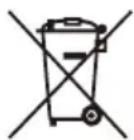
Disposal of waste batteries and electrical and electronic equipment (applicable in the European Union and other countries with separate collection systems)
This symbol on the product, the battery or on the packaging indicates that the product and the battery shall not be treated as household waste. On certain batteries this symbol might be used in combination with a chemical symbol. The chemical symbol for lead (Pb) is added if the battery contains more than 0.004% lead.
By ensuring that these products and batteries are disposed of correctly, you will help to prevent potentially negative consequences for the environment and human health which could be caused by inappropriate waste handling. The recycling of the materials will help to conserve natural resources.
In case of products that for safety, performance or data integrity reasons require a permanent connection with an incorporated battery, this battery should be replaced by qualified service staff only.
To ensure that the battery and the electrical and electronic equipment will be treated properly, hand over these products at end-of-life to the appropriate collection point for the recycling of electrical and electronic equipment.
For all other batteries, please view the section on how to remove the battery from the product safely. Hand the battery over to the appropriate collection point for the recycling of waste batteries.
For more detailed information about recycling of this product or battery, please contact your local Civic Office, your household waste disposal service or the shop where you purchased the product or battery.
Warning if your car's ignition has no ACC position
Do not install this unit in a car that has no ACC position. The display of the unit does not turn off even after turning the ignition off, and this causes battery drain.
Disclaimer regarding services offered by third parties
Services offered by third parties may be changed, suspended, or terminated without prior notice.
Sony does not bear any responsibility in these sorts of situations.
About Change of the Unit
For the latest functions, refer to "Help Guide" on the website.
The QR code and URL can be found on the front cover.
Important notice
Caution
IN NO EVENT SHALL SONY BE LIABLE FOR ANY INCIDENTAL, INDIRECT OR CONSEQUENTIAL DAMAGES OR OTHER DAMAGES INCLUDING, WITHOUT LIMITATION, LOSS OF PROFITS, LOSS OF REVENUE, LOSS OF DATA, LOSS OF USE OF THE PRODUCT OR ANY ASSOCIATED EQUIPMENT, DOWNTIME, AND PURCHASER'S TIME RELATED TO OR ARISING OUT OF THE USE OF THIS PRODUCT, ITS HARDWARE AND/OR ITS SOFTWARE.
Dear customer, this product includes a radio transmitter.
According to UNECE Regulation no. 10, a vehicle manufacturers may impose specific conditions for installation of radio transmitters into vehicles.
Please check your vehicle operation manual or contact the manufacturer of your vehicle or your vehicle dealer, before you install this product into your vehicle.
Emergency calls
This BLUETOOTH car handsfree and the electronic device connected to the handsfree operate using radio signals, cellular, and landline networks as well as user-programmed function, which cannot guarantee connection under all conditions.
Therefore do not rely solely upon any electronic device for essential communications (such as medical emergencies).
On BLUETOOTH communication
- Microwaves emitting from a BLUETOOTH device may affect the operation of electronic medical devices. Turn off this unit and other BLUETOOTH devices in the following locations, as it may cause an accident.
- where inflammable gas is present, in a hospital, train, airplane, or petrol station - near automatic doors or a fire alarm
- This unit supports security capabilities that comply with the BLUETOOTH standard to provide a secure connection when the BLUETOOTH wireless technology is used, but security may not be enough depending on the setting. Be careful when communicating using BLUETOOTH wireless technology.
- We do not take any responsibility for the leakage of information during BLUETOOTH communication.
If you have any questions or problems concerning your unit that are not covered in this manual, consult your nearest Sony dealer.
Main Unit and Remote Commander
Main unit
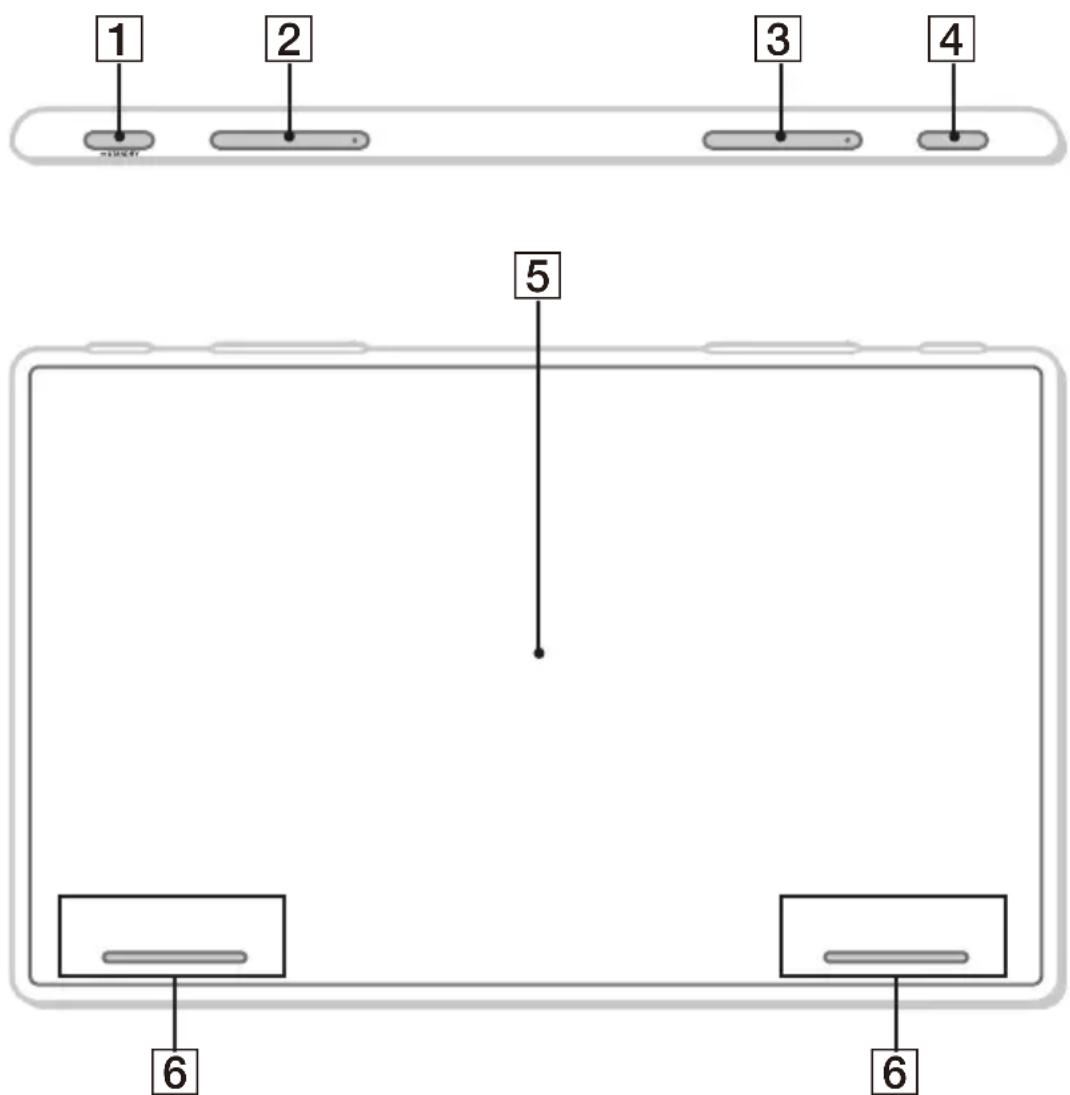
The VOL (volume) +/ ▶▶▶I (next) buttons have a tactile dot.
1 HOME
Displays the HOME screen (page 5).
STANDBY
Press and hold to turn off the unit.
Press and hold for more than 10 seconds to reset the unit.
2 VOL (vlame) +/-
3 ◀◀◀ /▶▶▶ (previous/next)
Functions differently depending on the selected source:
– [Radio]: select a preset station.
- [DAB+]: select a preset station.
- [USB]/[Bluetooth Audio]: move to the previous/next content.
– [Apple CarPlay]/[Android Auto]: move to the previous/next content.
Press and hold to:
– [Radio]: tune into a station automatically (SEEK+/SEEK−).
– [DAB+]: select a station from the Station List.
- [USB]/[Bluetooth Audio]: fast-reverse/fast-forward.
4 VOICE
Activates the voice command function for Apple CarPlay and Android Auto ^™ .
5 Display/touch screen
6 Custom Key 1/2
Registers functions (Mute, Disp. Off, Source Change, Home, Next, Previous, Vol +, Vol -, None).
To register, select [Settings] → [Customize] → [Custom Key].
Screen Displays
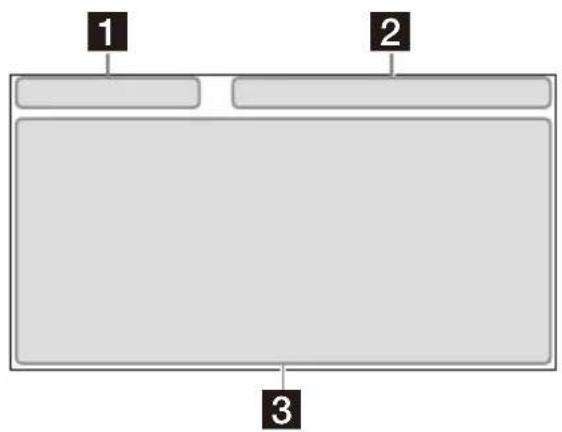
Playback screen:
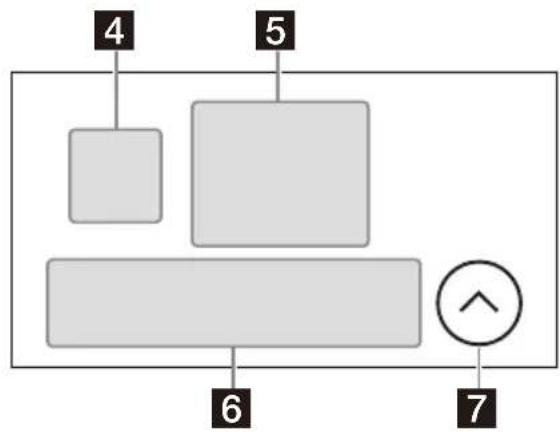
HOME1 screen:
flowchart
graph TD
    A["4"] --> B[" "]
    C["5"] --> D[" "]
    E["6"] --> F[" "]
    G["7"] --> H["↑"]
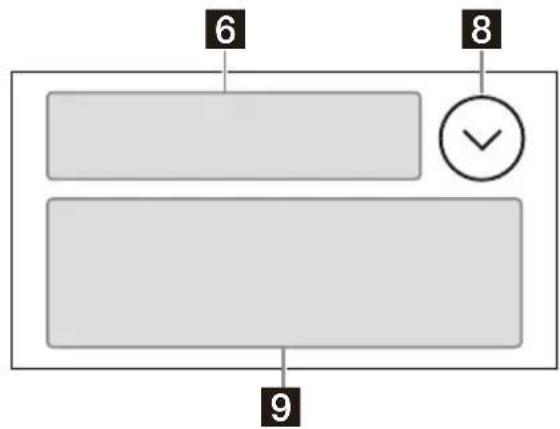
HOME2 screen:
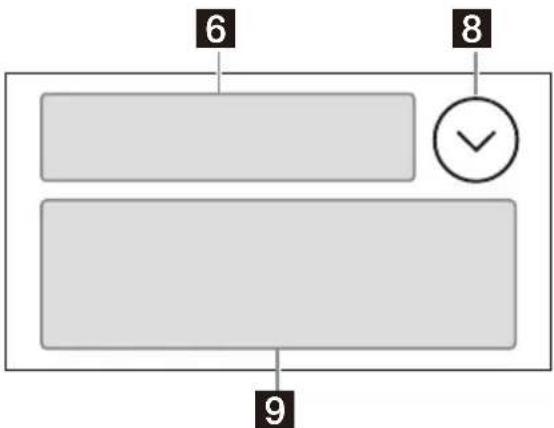
flowchart
graph TD
    A["6"] --> B[" "]
    C["8"] --> D["✓"]
    E["9"] --> F[" "]
1 Status indication (left side)
→ (back) Returns to the previous display.
≡(list) Opens the list. The available lists differ depending on the source.
2 Status indication (right side)
Clock Displays the time which was set on the Date/Time setting.
※(mute) Lights up when the sound is muted.
... (option) Opens the source option menu. The available items differ depending on the source.
☐ (device) Displays the device's name to connect to the unit.
(antenna) Indicates the signal strength status of the connected mobile phone.
(battery) Indicates the remaining battery status of the connected mobile phone.
3 Application specific area
Displays playback controls/indications or show the unit's status. Displayed items differ depending on the source.
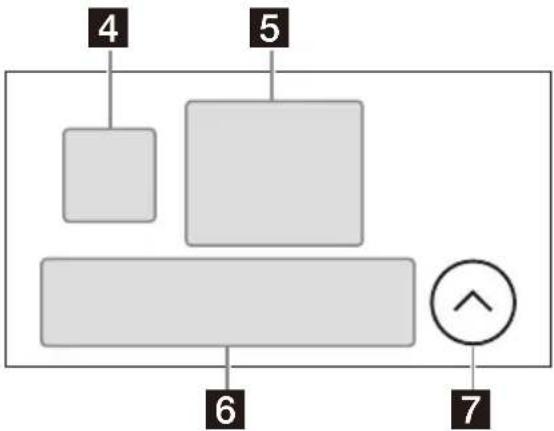
4 ©Apple CarPlay)/ (Android Auto)
Displays when connecting Apple CarPlay/Android Auto.
5 Clock
Displays the date and time which were set on the Date/Time setting.
6 Apps area (Favorite)
Up to 5 Apps can be set. Apps can be changed. You can set your Favorite Apps.
7 All Apps
Opens the HOME2 screen.
8 Close
Returns to the HOME1 screen.
9 Aps area
Displays all Apps except for Favorite Apps.
Apps icon list
| Android Auto | Apple CarPlay | Radio | |||
| DAB+ | Bluetooth | Phone | |||
| Settings | USB | RearCam | |||
| Camera 1 | Camera 2 | Devices |
Basic Operations
Switching the FM Tuning Step
Set the FM tuning step of your country or region.
1 Press HOME, touch [Settings] → [Application] → [Radio Tuning Steps], then set the radio frequency depending on the receiving area.
2 To exit the setup menu, touch (back) twice.
Note
When changing the FM tuning step, both FM and AM preset stations are reset.
Using Apple CarPlay Wirelessly
When using Apple CarPlay for the first time, device registration is required. Follow the procedure in "Pairing with a Bluetooth® Device" (page 6).
Note
Make sure the GPS antenna (aerial) is connected. For details, see "Installing the GPS antenna (aerial)" (page 16).
Using Android Auto
When using Android Auto wirelessly for the first time, device registration is required. Follow the procedure in "Pairing with a Bluetooth® Device" (page 6).
When using Android Auto with a USB cable, connect the Android Auto compatible Android ^™ phone to the unit with the USB cable.
Pairing with a Bluetooth® Device
When connecting a BLUETOOTH device for the first time, mutual registration (called "pairing") is required. Pairing enables this unit and other devices to recognize each other.


When turning on the unit, the unit sends the BLUETOOTH signal.
To pair from the settings of this unit
1 Press HOME, then touch [Settings].
If [Settings] is not set in the Favorite area, touch [All Apps] to display the HOME2 screen, then select [Settings].
2 Touch [Device Connection].
3 Touch [+Add New Device].
4 Operate the BLUETOOTH device according to its message on the [Add New Device] screen.
If a passkey input is required on the BLUETOOTH device, input [0000].
The registered device name appears on the [Device Connection] screen.
You can connect or disconnect the registered device on this screen.
To pair from the BLUETOOTH device
When setting the BLUETOOTH setting of the BLUETOOTH device to [ON], select "XAV-9550ES" on the setting screen of your BLUETOOTH device and then proceed to the pairing steps. Follow the instructions on the screen of the unit.
Canceling the Demonstration Mode
1 Press HOME, then touch [Settings].
If [Settings] is not set in the Favorite area, touch [All Apps] to display the HOME2 screen, then select [Settings].
2 Touch [System], then touch [Demo Mode] to set to [Off].
3 To exit the setup menu, touch (back) twice.
Updating the Firmware
To update the firmware, visit the support site, then follow the online instructions.
URL: https://www.sony.eu/support
To update the firmware with USB tethering mode
When using the smartphone with tethering function, you can update the firmware with USB tethering mode.
Connect your smartphone to the USB port, then follow the instructions on the screen of the unit.
Notes
- During the update with a USB connection, do not disconnect the USB cable or USB device.
- A network connection may be required, and high packet communication fees may be incurred.
Additional Information
Precautions
•Power antenna (aerial) extends automatically.
- When you transfer ownership or dispose of your car with the unit installed, initialize all the settings to the factory settings by performing the factory reset.
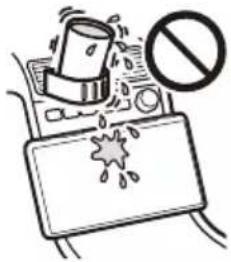
- Do not splash liquid onto the unit.
Notes on safety
- Comply with your local traffic rules, laws, and regulations.
- While driving
- Do not watch or operate the unit, as it may lead to distraction and cause an accident. Park your car in a safe place to watch or operate the unit.
- Do not use the setup feature or any other function which could divert your attention from the road.
- When backing up your car, be sure to look back and watch the surroundings carefully for your safety even if the rear view camera is connected. Do not depend on the rear view camera exclusively.
- While operating
- Do not insert your hands, fingers, or foreign objects into the unit as it may cause injury or damage to the unit.
- Keep small articles out of the reach of children.
- Be sure to fasten seatbelts to avoid injury in the event of sudden movement of the car.
Preventing an accident
Do not operate the unit or watch the monitor while driving.
Pictures appear only after you park the car and set the parking brake.
If the car starts moving during video playback, the following caution is displayed and you cannot watch the video.
[Video blocked for your safety]
Notes on LCD panel
- Do not get the LCD panel wet or expose it to liquids. This may cause a malfunction.
- Do not press down hard on the LCD panel as doing so can distort the picture or cause a malfunction (i.e., the picture may become unclear or the LCD panel may be damaged).
- Do not touch the panel with objects other than with your finger as it may damage or break the LCD panel.
- Clean the LCD panel with a dry soft cloth. Do not use solvents such as benzine, thinner, commercially available cleaners, or antistatic spray.
- Do not use the unit outside the temperature range 0^ to 40^ (32°F to 104°F).
- If your car was parked in a cold or hot place, the picture may not be clear. However, the monitor is not damaged and the picture will become clear after the temperature in your car becomes normal.
- Some stationary blue, red, or green dots may appear on the monitor. These are called "bright spots" and can happen with any LCD. The LCD panel is precision-manufactured with more than 99.99% of its segments functional. However, it is possible that a small percentage (typically 0.01% ) of the segments may not light up properly. This will not, however, interfere with your viewing.
Notes on the touch screen
- This unit uses a capacitive touch screen. Touch the screen directly with your fingertip.
- Multi-touch operation is not supported on this unit.
- Do not touch the screen with sharp objects such as a needle, pen, or fingernail. Operation with a stylus is not supported on this unit.
- Touching the screen with a gloved finger may cause the unit to operate incorrectly or not respond.
- Do not let any objects contact the touch screen. If the screen is touched by an object other than your fingertip, the unit may not respond correctly.
- Since glass material is used for the screen, do not subject the unit to strong shock. If cracking or chipping occurs on the screen, do not touch the damaged part as it may cause injury.
- Keep other electrical devices away from the touch screen. They may cause the touch screen to malfunction.
- If there are water droplets on the touch screen, or if you touch the screen with wet fingertips, the touch screen may not react correctly.
About iPhone
•Compatible iPhone models:
iPhone 11 Pro Max, iPhone 11 Pro, iPhone 11, iPhone XS Max, iPhone XS, iPhone XR, iPhone X, iPhone 8 Plus, iPhone 8, iPhone 7 Plus, iPhone 7, iPhone SE, iPhone 6s Plus, iPhone 6s, iPhone 6 Plus, iPhone 6, iPhone 5s
- Use of the Made for Apple badge means that an accessory has been designed to connect specifically to the Apple product(s) identified in the badge, and has been certified by the developer to meet Apple performance standards. Apple is not responsible for the operation of this device or its compliance with safety and regulatory standards.
Please note that the use of this accessory with an Apple product may affect wireless performance.
- Check the Apple CarPlay website for supported iOS versions. Update to the latest iOS version before use.
If you have any questions or problems concerning your unit that are not covered in this Operating Instructions, consult your nearest Sony dealer.
Specifications
Monitor section
Display type: Wide LCD color monitor
Dimensions: 25.7 cm/10.1 in
System: TFT active matrix
Number of pixels:
2,764,800 pixels (1280 × 3 (RGB) × 720)
Radio section
DAB/DAB+
Tuning range: 174.928 MHz - 239.200 MHz
Antenna (aerial) terminal:
External antenna (aerial) connector
FM
Tuning range:
87.5 MHz - 108.0 MHz (at 50 kHz step)
87.5 MHz - 108.0 MHz (at 100 kHz step)
FM tuning step:
50 kHz/100 kHz switchable
Usable sensitivity: 7 dBf
Signal-to-noise ratio: 70 dB (mono)
Separation at 1 kHz: 45 dB
AM
Tuning range: 531 kHz - 1,602 kHz
Sensitivity: 32 μV
USB player section
Interface: USB Type-C® (Hi-speed)
Maximum current: 3.0 A
BLUETOOTH section
Communication System:
BLUETOOTH Standard version 5.0
Output:
BLUETOOTH Standard Power Class 1
(EIRP 7.74 dBm)
Maximum communication range ^*1 :
Line of sight approx. 10 m (33 ft)
Frequency band:
2.4 GHz band (2.4000 GHz - 2.4835 GHz)
Modulation method: FHSS
Compatible BLUETOOTH Profiles ^2 :
A2DP (Advanced Audio Distribution Profile) 1.3.1
AVRCP (Audio Video Remote Control Profile) 1.6.1
HFP (Handsfree Profile) 1.7.1
PBAP (Phone Book Access Profile) 1.2
Corresponding codec: SBC, AAC, LDAC™
*1 The actual range will vary depending on factors such as obstacles between devices, magnetic fields around a microwave oven, static electricity, reception sensitivity, antenna (aerial) performance, operating system, software application, etc.
*2 BLUETOOTH standard profiles indicate the purpose of BLUETOOTH communication between devices.
Wi-Fi section
Compatible standards:
IEEE802.11 a/n/ac
Radio frequency:
5 GHz band (5.725 GHz - 5.850 GHz)
Output power:
EIRP 13.89 dBm
Frequency Tolerance: 20 ppm
Power amplifier section
Outputs: Speaker outputs
Speaker impedance: 4 Ω – 8 Ω
Maximum power output: 55 W × 4 (at 4 Ω)
General
Power requirements:
12 V DC car battery (negative ground (earth))
Rated current consumption: 10 A
Dimensions (maximum):
Approx. 271 mm × 171 mm × 247 mm
(10^3 / 4in× 6^3 / 4in× 9^3 / 4in)(w / h / d)
Mounting dimensions:
Approx. 182 mm × 53 mm × 160 mm
(7 ^1/4 in × 2 ^1/8 in × 6 ^3/8 in) (w/h/d)
Mass: Approx. 2.5 kg (5 lb 9 oz)
Package contents:
Main unit (1)
Parts for installation and connections (1 set)
Ask the dealer for detailed information.
Design and specifications are subject to change without notice.
Copyrights
The Bluetooth ^® word mark and logos are registered trademarks owned by Bluetooth SIG, Inc. and any use of such marks by Sony Group Corporation and its subsidiaries is under license. Other trademarks and trade names are those of their respective owners.
Windows Media is either a registered trademark or trademark of Microsoft Corporation in the United States and/or other countries.
This product is protected by certain intellectual property rights of Microsoft Corporation. Use or distribution of such technology outside of this product is prohibited without a license from Microsoft or an authorized Microsoft subsidiary.
Apple, iPhone, and Apple CarPlay are trademarks of Apple Inc., registered in the U.S. and other countries.
IOS is a trademark or registered trademark of Cisco in the U.S. and other countries and is used under license.
Android and Android Auto are trademarks of Google LLC.
To use Android Auto on your car display, you'll need an Android phone running Android 8 or higher, an active data plan, and the Android Auto app.
To wirelessly use Android Auto on your car display, you need a compatible Android smartphone with an active data plan. You can check which smartphones are compatible at g.co/androidauto/requirements.
The Wi-Fi CERTIFIED™ Logo is a certification mark of Wi-Fi Alliance®.
LDAC and LDAC logo are trademarks of Sony Corporation.
USB Type-C® and USB-C® are registered trademarks of USB Implementers Forum.
All other trademarks are trademarks of their respective owners.
Connection/Installation
Cautions
- Do not install this unit in a car that has no ACC position. The display of the unit does not turn off even after turning the ignition off, and this causes battery drain.
- Run all ground (earth) leads to a common ground (earth) point.
- Do not get the leads trapped under a screw or caught in moving parts (e.g., seat railing).
- Before making connections, turn the car ignition off to avoid short circuits.
- Connect the power supply leads ① to the e unit and speakers before connecting it to the auxiliary power connector.
- Be sure to insulate any loose unconnected leads with electrical tape for safety.
- Choose the installation location carefully so that the unit will not interfere with normal driving operations.
- Avoid installing the unit in areas subject to dust, dirt, excessive vibration, or high temperature, such as in direct sunlight or near heater ducts.
- Use only the supplied mounting hardware for a safe and secure installation.
- Be sure to use the supplied USB extension cables.
- This unit may not be installed properly depending on the car type. For details on the mounting space, see "Ensuring the mounting location of the unit" (page 11).
- To avoid injury, be careful not to drop the display during installation.
- When installing, be careful not to cut off your fingers with the metal parts of the brackets and mounting base.
- Do not pinch your fingers when attaching the display to the unit.
- Do not install the unit in a position where the unit interferes with driving operations (such as in positions where the shift lever hits the unit, or the hazard button cannot be pressed).
- When using the unit for a long period of time, there may be a possibility that the screws securing the display may come loose. Periodically tighten these screws.
- Do not make any changes or modifications to the unit other than those described in this manual.
Note on the power supply lead (yellow)
When connecting this unit in combination with other stereo components, the amperage rating of the car circuit to which the unit is connected must be higher than the sum of each component's fuse amperage rating.
Note on installing in cars with a start-stop system
The unit may restart when starting the engine from start-stop. In this case, turn off the start-stop system of your car.
Note on installing in cars with electric parking brake system
For cars with electric parking brakes, some related functions (such as video blocking function) may not work properly.
Mounting angle adjustment
Adjust the mounting angle to less than 30^ .
Ensuring the mounting location of the unit
Before installing the unit, consult the installer for details on the installation of the unit and the display.
- Make sure that the distance from the front surface (reference surface) of the mounted unit to the surface of your car's center cluster is within 22 mm (7/8 in). If exceeded, the unit cannot be installed properly.
Front surface of the unit (reference surface)
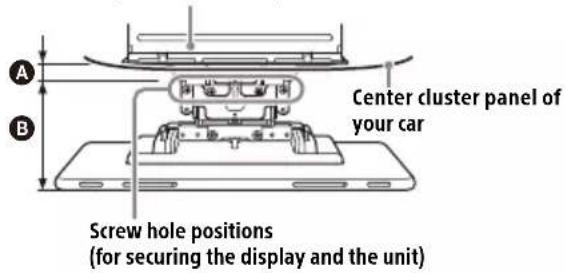
A 22 mm (7/8 in) B 42 mm to 62 mm (1 11/16 in to 2 1/2 in)
- For your safety, adjust the mounting location of the unit so that it does not interfere with driving operations such as button (switch) or shift lever operations.
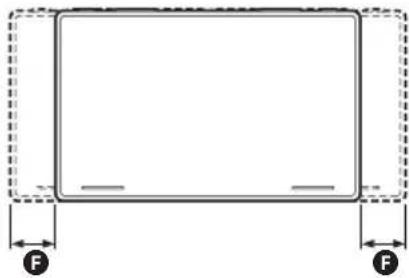
Hidden area even when the display is slid up or down
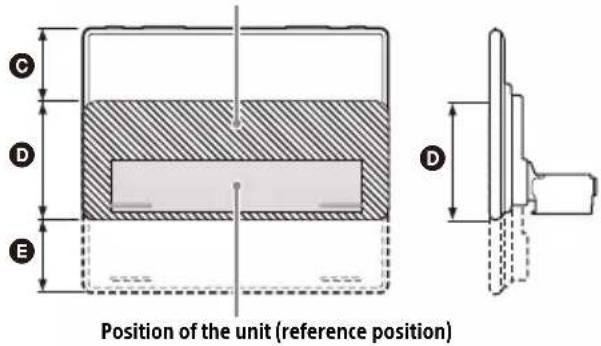
60 mm (2 3/8 in) 112 mm (4 1/2 in) 60 mm (23/8 in)
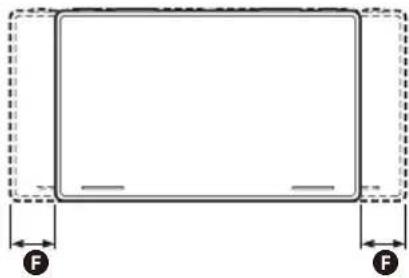
natural_image
Simple line drawing of a rectangular frame with dashed border and two labeled force arrows (F), no text or symbols present.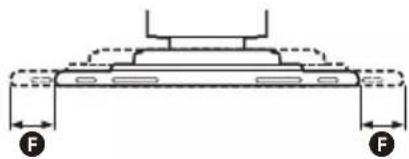
F 25 mm (1 in)
Parts List for Installation
① Power supply leads (1) ② Connection cables (Audio/Camera) (1)
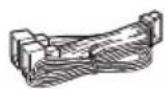
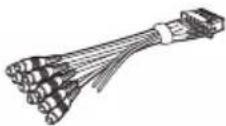
③ Mounting screw (5 × max. 9 mm (7/32 × max. 3/8 in)) (4)
④ Microphone (1)

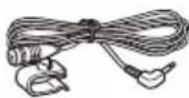
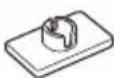
⑤ Flat-mount base (1) ⑥ Double-sided tape (1)

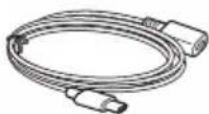
⑦ USB Type-C extension cable ⑧ USB cable holder (1) (1)
⑨ Screw for USB cable holder (1) ⑩ Trim ring (1)

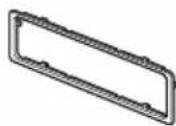
⑪ Fixing screw (for the joint cover) (3 × 8 mm (1/8 × 11/32 in)) (1) ⑫ Fixing screw (for the joint part) (4 × 6 mm (3/16 × 1/4 in)) (4)


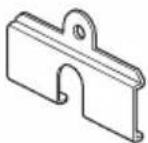
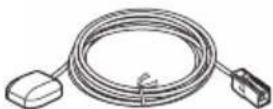
⑬ GPS antenna (aerial) (1) ⑭ Metal plate (1)
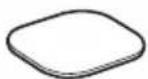
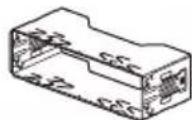
⑮ Rear panel cover (2) ⑯ Mounting sleeve (1)
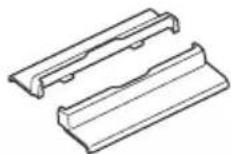
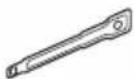
⑰ Release key (2)
- This parts list does not include all the package contents.
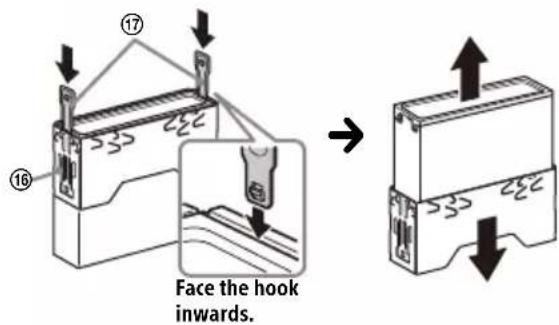
- The mounting sleeve ⑯ is attached to the unit before shipping. Before mounting the unit, use the release keys ⑰ to remove the mounting sleeve ⑱ from the unit. For details, see "⑪ Removing the trim ring and the mounting sleeve" (page 17).
- Keep the release keys ⑰ for future use as they are also necessary if you remove the unit from your car.
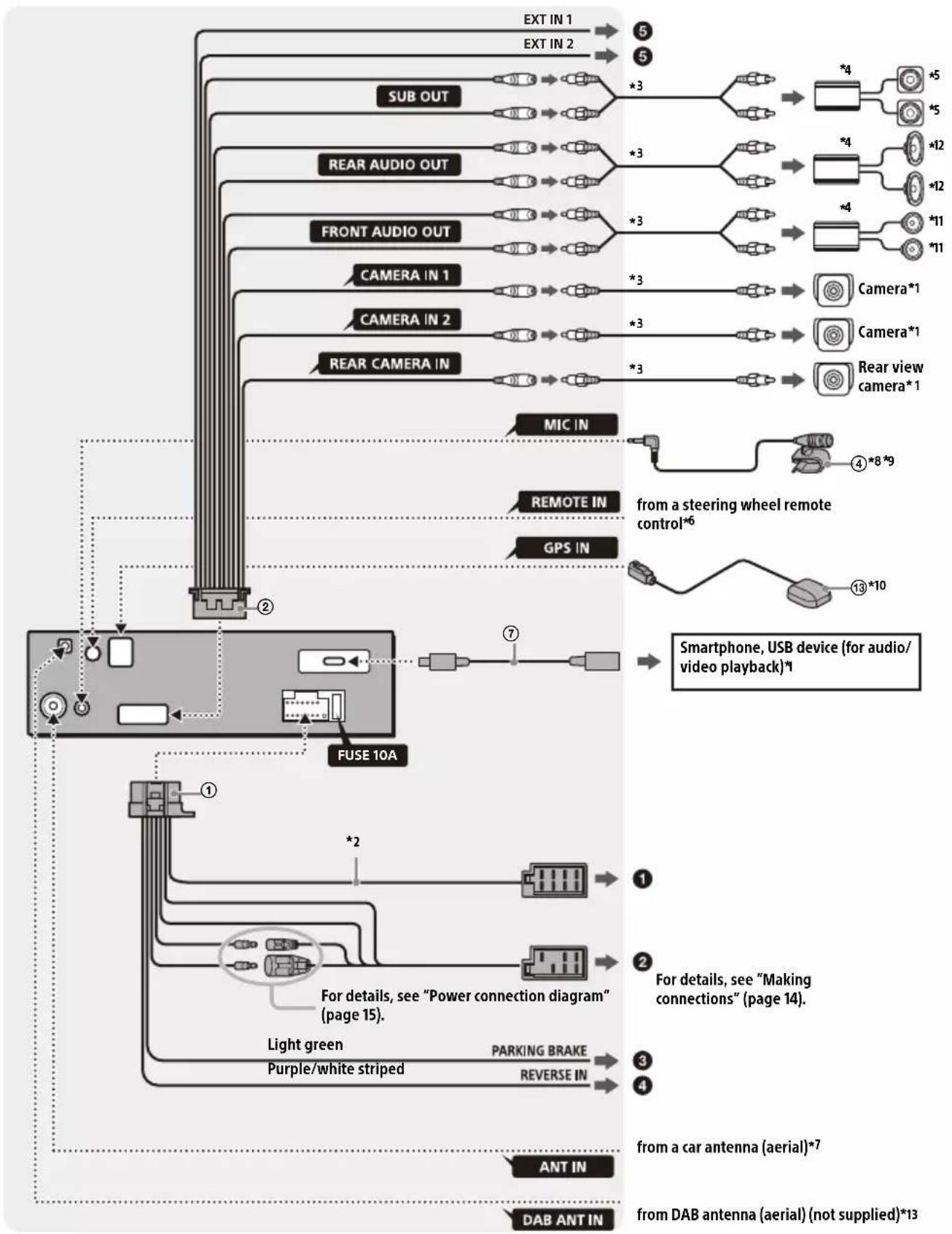
Connection
• To prevent short circuits, insulate leads with a cover or tape.
- Note that the unit may be damaged if it is connected incorrectly or by short circuits at the leads.
flowchart
graph TD
    A["EXT IN 1"] --> B["5"]
    C["EXT IN 2"] --> D["5"]
    E["SUB OUT"] --> F["*3"]
    G["REAR AUDIO OUT"] --> H["*3"]
    I["FRONT AUDIO OUT"] --> J["*3"]
    K["CAMERA IN 1"] --> L["*3"]
    M["CAMERA IN 2"] --> N["*3"]
    O["REAR CAMERA IN"] --> P["*3"]
    Q["MIC IN"] --> R["4*8*9"]
    S["REMOTE IN"] --> T["from a steering wheel remote control*6"]
    U["GPS IN"] --> V["13*10"]
    W["FUSE 10A"] --> X["7"]
    Y["Smartphone, USB device (for audio/video playback)*1"] --> Z["1"]
    AA["For details, see "Power connection diagram" (page 15)."] --> AB["2"]
    AC["Light green"] --> AD["3"]
    AE["PURPLE/WHITE striped"] --> AF["4"]
    AG["PARKING BRAKE"] --> AH["4"]
    AI["ANT IN"] --> AJ["from a car antenna (aerial)*7"]
    AK["DAB ANT IN"] --> AL["from DAB antenna (aerial) (not supplied)*13"]
*1 Not supplied
*2 Speaker impedance: 4 Ω to 8 Ω × 4
*3 RCA pin cord (not supplied)
*4 Power amplifier (not supplied)
*5 Subwoofer (not supplied)
*6 Depending on the type of car, use an adaptor for a steering wheel remote control (not supplied). For details on using the steering wheel remote control, see "Using the steering wheel remote control" (page 16).
*7 Depending on the type of car, use an adaptor (not supplied) if the antenna (aerial) connector does not fit.
*8 Whether in use or not, route the microphone input cord so it does not interfere with driving operations. Secure the cord with a clamp, etc., if it is installed around your feet.
*9 For details on installing the microphone, see "Installing the microphone" (page 15).
*10 Connect when using Apple CarPlay with a wireless connection.
*11 Front speaker/Front tweeter If [Speaker Configuration] in [Sound] is set to [Front & Rear], connect the front speaker. If [Speaker Configuration] in [Sound] is set to [Front 2-way], connect the front tweeter.
*12 Rear speaker/Front woofer If [Speaker Configuration] in [Sound] is set to [Front & Rear], connect the rear speaker. If [Speaker Configuration] in [Sound] is set to [Front 2-way], connect the front woofer.
*13 Set [Antenna Power] to [On] (default) or [Off] depending on the type of DAB antenna (aerial) (not supplied). Max. supply current 0.1 A
Making connections
If you have a power antenna (aerial) without a relay box, connecting this unit with the power supply leads ① may damage the antenna (aerial).
① To the car's speaker connector
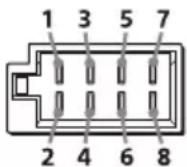
| 1 | Rear speaker(right) | ⊕ | Purple |
| 2 ⊖ | Purple/blackstriped | ||
| 3 | Front speaker(right) | ⊕ | Gray |
| 4 | ⊖ | Gray/black striped | |
| 5 | Front speaker(left) | ⊕ | White |
| 6 ⊖ | White/blackstriped | ||
| 7 | Rear speaker(left) | ⊕ | Green |
| 8 ⊖ | Green/blackstriped |
② To the car's power connector
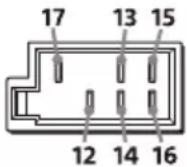
| 12 | continuous power supply | Yellow |
| 13 | power antenna (aerial) / power amplifier control (REM OUT) (MAX 0.4 A) | Blue/white striped |
| 14 | switched illumination power supply | Orange/white striped |
| 15 | switched power supply Red | |
| 16 | ground (earth) Black | |
| 17 | maintain the accurate location of your car when using Apple CarPlay with a wireless connection | Pink |
③ To the parking brake switch lead
The mounting position of the parking brake switch lead depends on your car. Be sure to connect the parking brake lead (light green) of the power supply leads ① to the parking brake switch lead.

Hand brake type Foot brake type
4 To the +12 V power terminal of the car's rear lamp lead (only when connecting the rear view camera)
⑤ To an interruption signal (+3.3 V to +12 V) to display the picture from CAMERA IN 1 and CAMERA IN 2
Note
REVERSE IN, EXT IN 1, and EXT IN 2 interrupt detections have the following priority levels.
REVERSE IN always has priority; if both EXT IN 1 and EXT IN 2 occur at the same time, EXT IN 1 has higher priority.
Camera Connection
Installation of cameras (not supplied) is required before use.
Connect the camera power cord (lead) to the accessory power terminal.
Memory hold connection
When the yellow power supply lead is connected, power will always be supplied to the memory circuit even when the ignition switch is turned off.
Speaker connection
- Before connecting the speakers, turn the unit off.
- Use speakers with an impedance of 4 to 8 , and with adequate power handling capacities to avoid damage.
- Set [Speaker Configuration] in [Sound] to [Front & Rear] or [Front 2-way] depending on your speaker system.
- When connecting a speaker system for the Front 2-way mode, do not set [Speaker Configuration] in [Sound] to [Front & Rear]. This may cause damage to the speakers.
Power connection diagram
Check your car's auxiliary power connector and match the connections of leads correctly depending on the car.
Auxiliary power connector
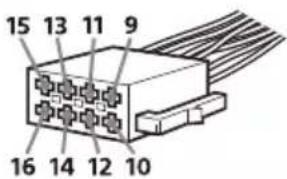
Common connection
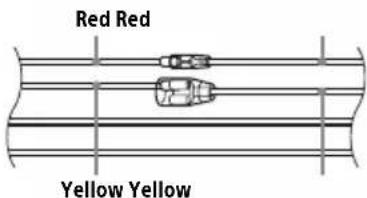
| 12 | continuous power supply | Yellow |
| 15 s | switched power supply Red |
When the positions of the red and yellow leads are inverted

| 12 s | witched power supply Yellow | |
| 15 | continuous power supply | Red |
For cars without ACC position
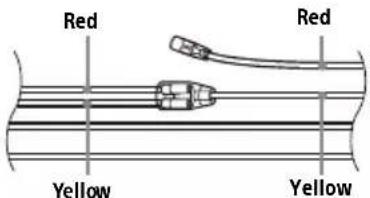
After matching the connections and switching power supply leads correctly, connect the unit to the car's power supply. If you have any questions and problems connecting your unit that are not covered in this manual, consult the car dealer.
Installing the microphone
To capture your voice during handsfree calling, you need to install the microphone ④.
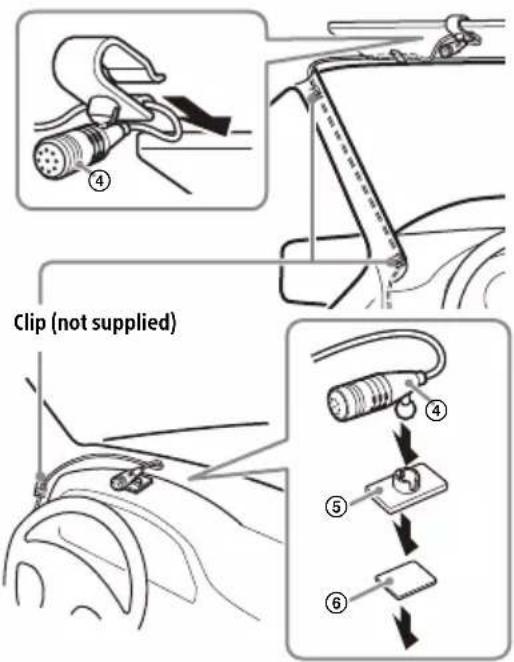
Cautions
- It is extremely dangerous if the cord becomes wound around the steering column or gearstick. Be sure to keep it and other parts from interfering with your driving operations.
- If airbags or any other shock-absorbing equipment are in your car, contact the store where you purchased this unit or the car dealer before installation.
Notes
- When mounting on the dashboard, remove the visor clip carefully from the microphone ④, then attach the flat-mount base ⑤ to the microphone ④.
- Before attaching the double-sided tape ⑥, clean the surface of the dashboard with a dry cloth.
Installing the GPS antenna (aerial)
- Choose a location where no obstacle blocks GPS satellite reception so as to achieve the best reception.
- Make sure the GPS antenna (aerial) ⑬ does not interfere with the operation of car equipment.
- Some types of front windshields (windscreens) block GPS satellite radio waves. Make sure the signal reception is not blocked.
- When using Apple CarPlay with a wireless connection, make sure the GPS antenna (aerial) ⑬ is connected.
1 Decide the installation location on the dashboard, then clean the attachment surface.
Choose a flat surface where:
- the GPS antenna (aerial) ⑬ carbe positioned horizontally.
— operation of the passenger-side airbag is not impeded.
— GPS satellite reception is not blocked by anything inside the car or the windshield (windscreen) wipers.
2 Remove the tape of the metal plate ⑭, then attach it on the dashboard.
3 Remove the tape of the GPS antenna (aerial) ⑬, then attach it on the metal plate ⑭.
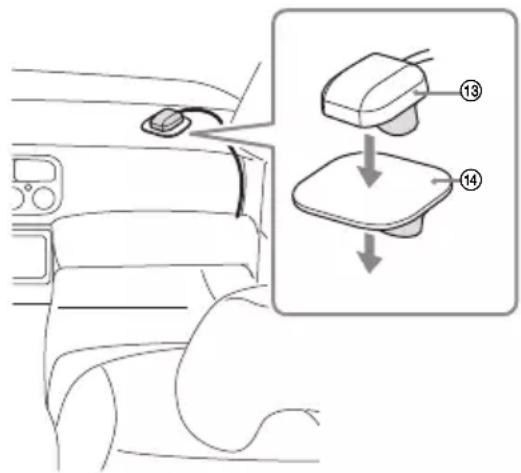
Cautions
- It is extremely dangerous if the cord becomes wound around the steering column or gearstick. Be sure to keep it and other parts from interfering with your driving operations.
- If airbags or any other shock-absorbing equipment are in your car, contact the store where you purchased this unit or the car dealer before installation.
Notes
- Be sure to use the metal plate ⑭, otherwise signal reception may be poor.
-
Do not install the GPS antenna (aerial) ⑬ close to other electrical equipment, otherwise signal reception may be unstable.
-
If the surface of the metal plate ⑭ is cold, the tape may not stick firmly. Warm up its surface with a hair dryer, etc., before applying the tape.
- If there is no flat surface on which to install the GPS antenna (aerial) ⑬, bend the metal plate ⑭ to fit a curved surface before installing.
Using the steering wheel remote control
When using the steering wheel remote control
Installation of the connection cable RC-SR1 (not supplied) is required before use.
1 Select [Settings] → [System] → [Steering Wheel Settings].
2 Set the [Custom] switch to [On].
You can make the registration to enable the steering wheel remote control. When the registration is complete, the steering wheel remote control becomes available.
Notes on installing the connection cable RC-SR1 (not supplied)
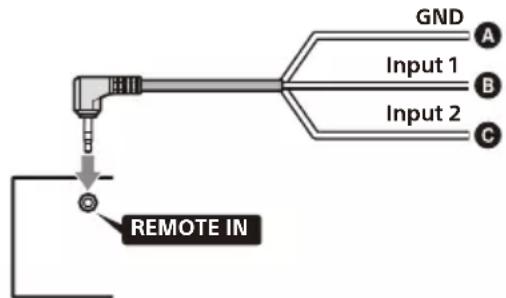
A Black
B Green
© Brown
- Refer to the support site for details, then connect each lead properly to the appropriate leads. Making an improper connection may damage the unit.
URL: https://www.sony.eu/support
- Consulting the dealer or an experienced technician for help is recommended.
- RC-SR1 may not be sold in your country or region.
When using an adaptor for the steering wheel remote control
Depending on the type of car, use an adaptor for the steering wheel remote control (not supplied).
1 Select [Settings] → [System] → [Steering Wheel Settings].
2 Set the [Custom] switch to [Off].
The adaptor for the steering wheel remote control is enabled.
Installation
To install the unit and the display securely, be sure to follow the steps ① to ⑥ in order.
① Removing the trim ring and the mounting sleeve (page 17)
② Before mounting the unit (page 17)
③ Mounting the unit in the dashboard (page 18)
④ Setting up the display (page 18)
⑤ Making sure the mounting positions of the display (page 21)
6 Attaching the display to the unit (page 21)
For your safety
After mounting the display to the unit, make sure that the display does not interfere with normal driving operations such as blocking the driver's view or getting the cables tangled.
① Removing the trim ring and the mounting sleeve
Before installing the unit, remove the trim ring ⑩ and the mounting sleeve ⑯ from the unit.
1 Pinch both edges of the trim ring ⑩, then pull it out.
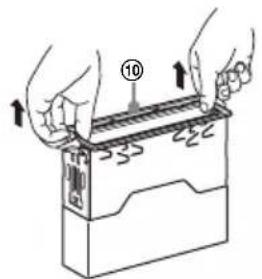
2 Insert both release keys ⑰ until they click, and pull down the mounting sleeve ⑱, then pull up the unit to separate.
② Before mounting the unit
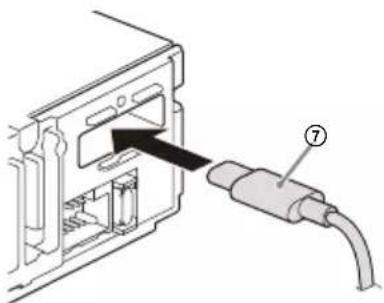
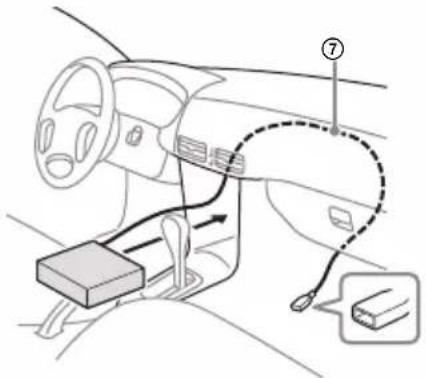
Before mounting the unit in the dashboard, arrange the USB extension cables.
1 Connect the USB Type-C extension cable ⑦ to the USB port.
natural_image
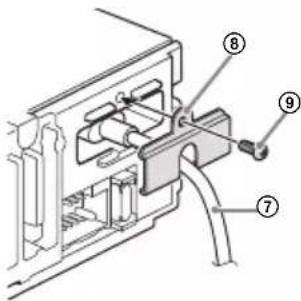
Diagram of a device with an attached cable and connector, showing internal components without any text or symbols.2 Tighten the screw ⑨ firmly on the USB cable holder ⑧ to secure the USB Type-C extension cable ⑦.
3 Route the USB Type-C extension cable ⑦ inside the dashboard.
③ Mounting the unit in the dashboard
Using the mounting brackets supplied with your car
You may not be able to install this unit in some makes of Japanese cars. In such a case, consult your Sony dealer.
Example
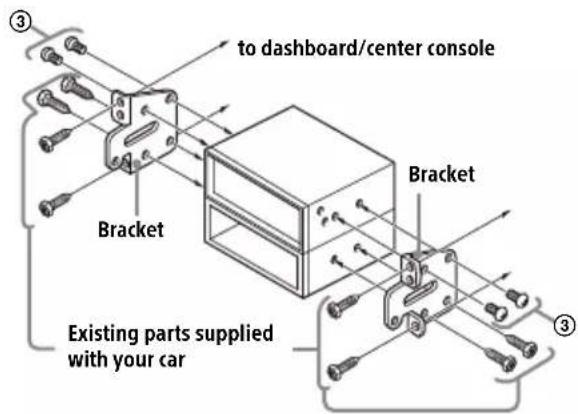
Note
To prevent malfunction, install only with the mounting screws ③.
④ Setting up the display
The mounting positions of the display can be adjusted.
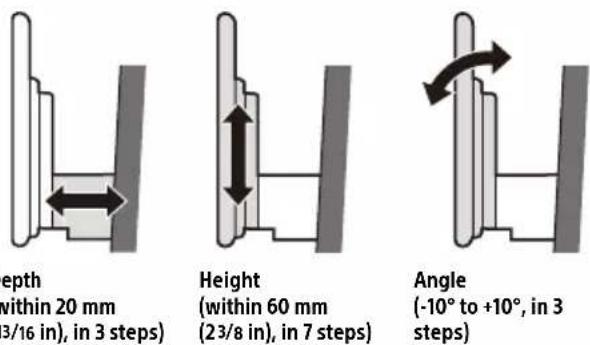
Depth
(within 20 mm
(13/16 in), in 3 steps)
Height
(within 60 mm
(23/8 in), in 7 steps)
Angle
(-10° to +10°, in 3
steps)
natural_image
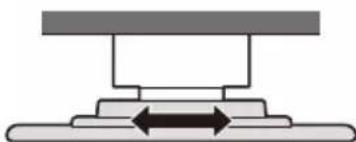
Pure mechanical diagram showing a lever and base with bidirectional arrows, no text or symbols presentWidth
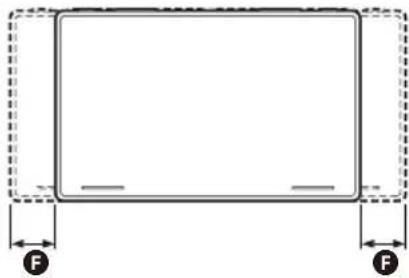
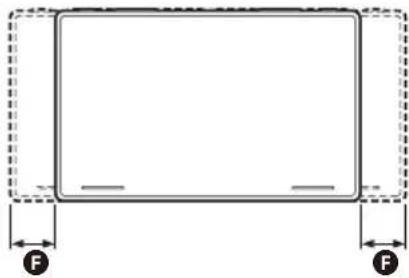
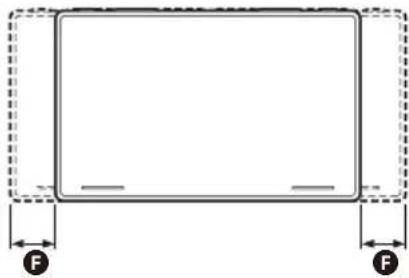
(within 25 mm (1 in), in 5 steps)
Adjusting the depth of the display position
1 Loosen the 3 pre-installed screws for depth adjustment (on top and both sides).
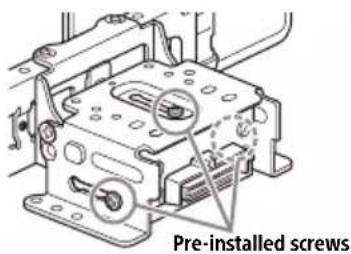
Slightly loosen the screws until you can slide the connector bracket. Do not remove the screws from the bracket. Doing so may damage the parts.
2 Slide the connector bracket to decide the appropriate depth position.
Adjustable depth: within 20 mm (13/16 in) (A), in 3 steps, in 10 mm (13/32 in) pitch (B).
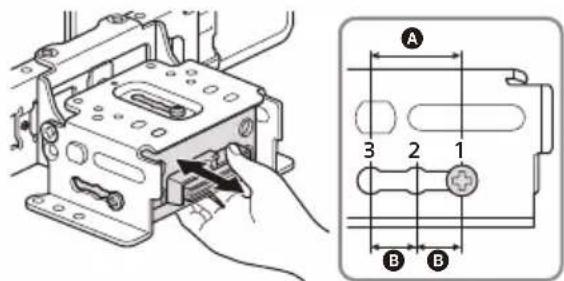
Bracket positions 1 to 3 for the display:
1: Slide-out position
2: Intermediate position
3: Slide-in position
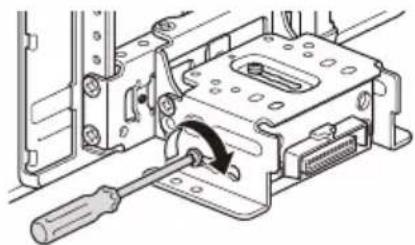
3 At the desired position, tighten the 3 screws firmly to secure the connector bracket.
natural_image
Mechanical assembly diagram showing a screwdriver inserted into a housing component (no text or symbols visible)Tighten the screws firmly.
When you tighten a screw, be careful not to apply too much torque as doing so may damage the screw (the torque value should be from 1.5 N•m to 2.0 N•m).
Adjusting the height of the display position
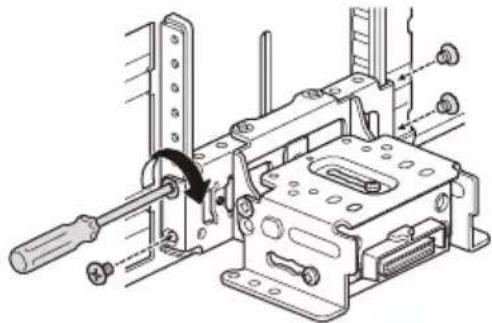
1 Remove the 4 pre-installed screws for height adjustment (on both sides).
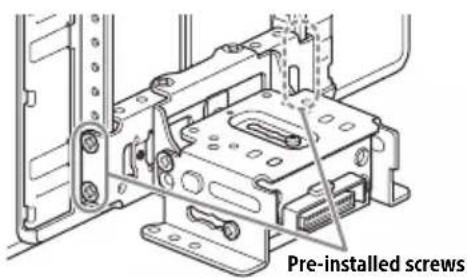
2 Slide the connector bracket up or down to decide the appropriate height position.
Adjustable height: within 60 mm (23/8 in) (A), in 7 steps, in 10 mm (13/32 in) pitch (B).
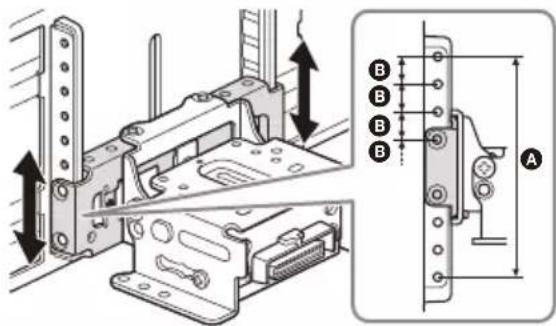
3 At the desired position, tighten the 4 screws firmly to secure the connector bracket.
natural_image
Technical line drawing of a mechanical assembly with no visible text or symbolsTighten the screws firmly. When you tighten a screw, be careful not to apply too much torque as doing so may damage the screw (the torque value should be from 1.5 N•m to 2.0 N•m).
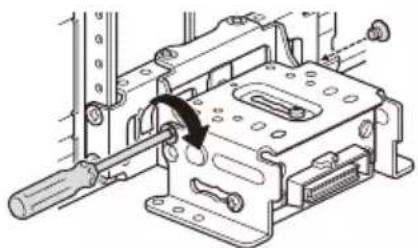
Adjusting the display angle (tilt)
1 Remove the 2 pre-installed screws for angle adjustment (on both sides).
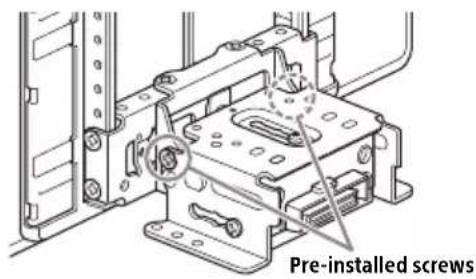
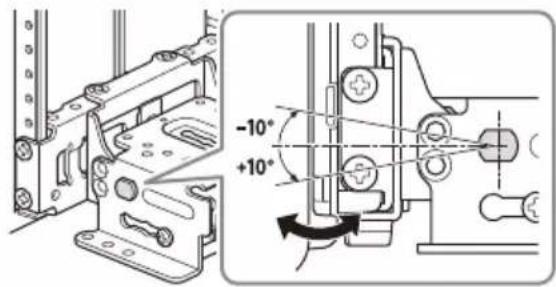
2 Adjust the display angle to decide the appropriate angle.
Adjustable angle: -10^ to +10^ , in 3 steps
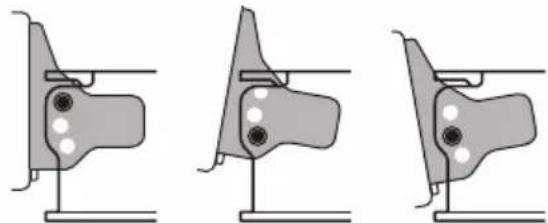
Screw holes to use:
$$ 0 ^ {\circ} (1 - A) - 1 0 ^ {\circ} (3 - B) + 1 0 ^ {\circ} (2 - B) $$
natural_image
Three identical diagrams showing mechanical joint configurations with mounting holes and alignment lines (no text or symbols)
3 At the desired angle, tighten the 2 screws through the screw holes (upper or lower) that match the display angle.
natural_image
Mechanical assembly diagram showing a lever mechanism with a curved arrow indicating motion (no text or symbols present)Tighten the screws firmly.
When you tighten a screw, be careful not to apply too much torque as doing so may damage the screw (the torque value should be from 1.5 N•m to 2.0 N•m).
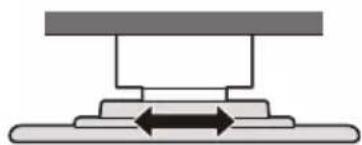
Adjusting the width of the display position
1 Remove the 2 pre-installed screws on the top side and loosen the 1 installed screw on the bottom side for left/right adjustment.
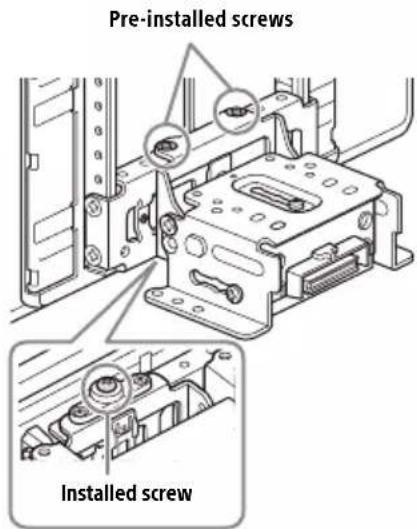
2 Slide the connector bracket to the left or right to decide the appropriate position.
Adjustable left/right: within 25 mm (1 in) (A), in 5 steps, in 12.5 mm (1/2 in) pitch (B).
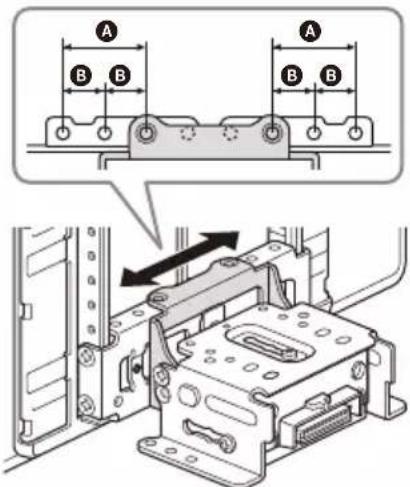
Be sure to adjust the appropriate position with the connector bracket in the same state as the illustration above.
If the connector bracket is upside down, it will be stuck by the screw on the bottom side and will not move left or right.
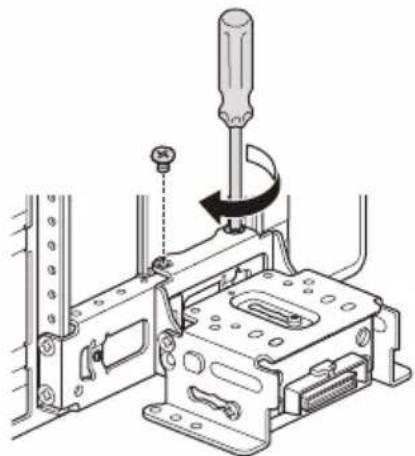
3 At the desired position, tighten the 2 screws on the top side firmly to secure the connector bracket.
natural_image
Technical line drawing of a mechanical assembly with a screwdriver inserted, showing no text or symbolsTighten the screws firmly.
When you tighten a screw, be careful not to apply too much torque as doing so may damage the screw (the torque value should be from 1.5 N•m to 2.0 N•m).
4 Turn the unit over, tighten the 1 screw firmly to secure the connector bracket.
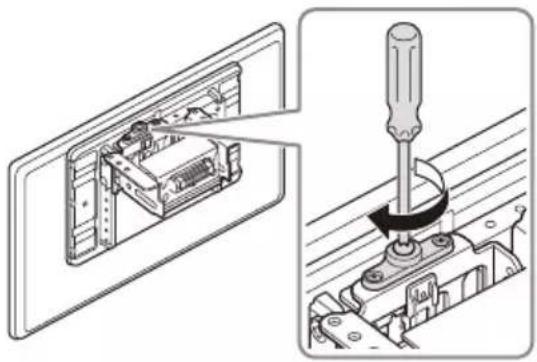
natural_image
Technical illustration showing a mechanical assembly with a screwdriver inserted into a housing component (no text or symbols present)Note
Be sure to tighten the screws on the top side first, then tighten the screw on the bottom side.
⑤ Making sure the mounting positions of the display
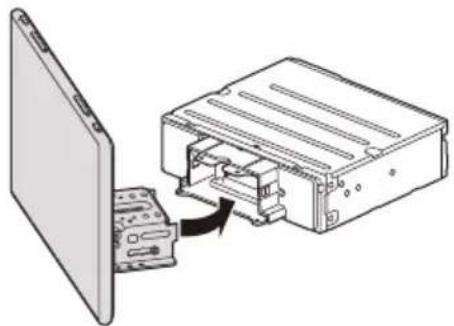
Be careful not to pinch your fingers or scratch the center cluster panel of your car when attaching the display to the unit.
1 Attach the display to the unit temporarily.
natural_image
Diagram showing a computer device with an open rear panel and a physical chassis inside, no text or symbols present.2 Confirm that the display does not block the driver's view or interfere with normal driving operations.
If further adjustment of the mounting position (depth, height, angle, width) is necessary, remove the display from the unit, then adjust it again accordingly.
⑥ Attaching the display to the unit
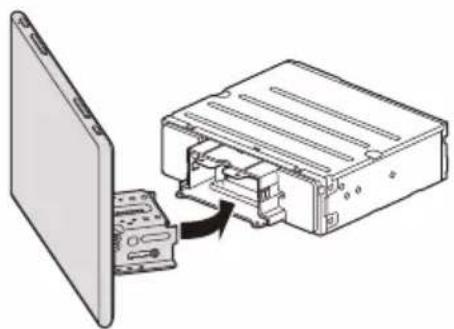
Be careful not to pinch your fingers or scratch the center c luster panel of your car when attaching the display to the unit.
1 Attach the display to the unit.
natural_image
Diagram showing a device being inserted into a computer chassis, with no visible text or symbols.Make sure that the connector brackets of the display is fully inserted to the unit.
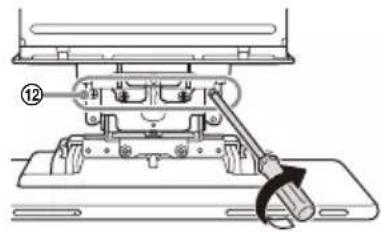
2 Tighten 4 screws ⑫ (on top) to secure the connector bracket to the unit.
natural_image
Mechanical assembly diagram showing a lever mechanism with a numbered component (12), no text or symbols present.Tighten the screws firmly.
When you tighten a screw, be careful not to apply too much torque as doing so may damage the screw (the torque value should be from 1.5 N•m to 2.0 N•m).
3 Slide the joint cover out to protect the mounting base of the display, then tighten the fixing screw ⑪ to secure the cover.
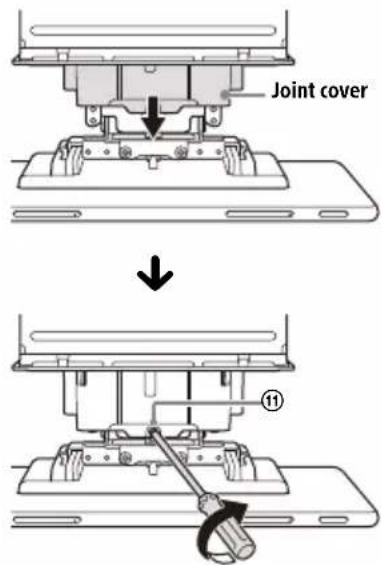
Tighten the screw firmly.
When you tighten a screw, be careful not to apply too much torque as doing so may damage the screw (the torque value should be from 1.5 N•m to 2.0 N•m).
4 Attach the rear panel covers ⑮ along the guides for protection.
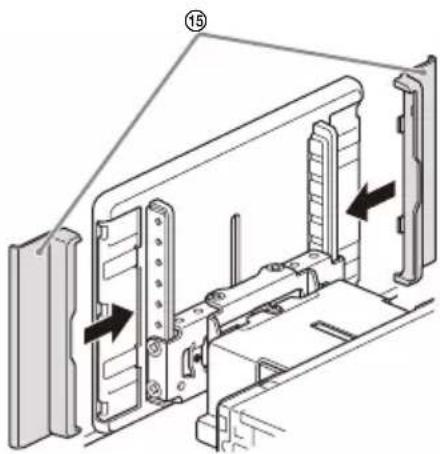
Notes
- Be sure to use the specified screws.
- If the display appears to rattle, tighten the screws periodically.
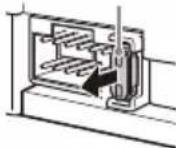
Fuse replacement
When replacing the fuse, be sure to use one matching the amperage rating stated on the original fuse. If the fuse blows, check the power connection and replace the fuse.
If the fuse blows again after replacement, there may be an
internal malfunction. In such a case, consult your nearest Sony dealer.
Fuse (10 A)
About License
END USER LICENSE AGREEMENT
IMPORTANT:
BEFORE USING THE SOFTWARE, PLEASE READ THIS END USER LICENSE AGREEMENT ("EULA") CAREFULLY. BY USING THE SOFTWARE YOU ARE ACCEPTING THE TERMS OF THIS EULA. IF YOU DO NOT ACCEPT THE TERMS OF THIS EULA, YOU MAY NOT USE THE SOFTWARE.
This EULA is a legal agreement between you and Sony Corporation ("SONY"). This EULA governs your rights and obligations regarding the AV Receiver firmware of SONY and/or its third party licensors (including SONY's affiliates) and their respective affiliates (collectively, the "THIRD-PARTY SUPPLIERS"), together with any updates/upgrades provided by SONY, any printed, on-line or other electronic documentation for such software, and any data files created by operation of such software (collectively, the "SOFTWARE").
Notwithstanding the foregoing, any software in the SOFTWARE having a separate end user license agreement (including, but not limited to, GNU General Public license and Lesser/Library General Public License) shall be covered by such applicable separate end user license agreement in lieu of the terms of this EULA to the extent required by such separate end user license agreement (“EXCLUDED SOFTWARE”).
SOFTWARE LICENSE
The SOFTWARE is licensed, not sold. The SOFTWARE is protected by copyright and other intellectual property laws and international treaties.
COPYRIGHT
All right and title in and to the SOFTWARE (including, but not limited to, any images, photographs, animation, video, audio, music, text and "applets" incorporated into the SOFTWARE) is owned by SONY or one or more of the THIRD-PARTY SUPPLIERS.
GRANT OF LICENSE
SONY grants you a limited license to use the SOFTWARE solely in connection with your compatible device ("DEVICE") and only for your individual, non-commercial use. SONY and the THIRD-PARTY SUPPLIERS expressly reserve all rights, title and interest (including, but not limited to, all intellectual property rights) in and to the SOFTWARE that this EULA does not specifically grant to you.
REQUIREMENTS AND LIMITATIONS
You may not copy, publish, adapt, redistribute, attempt to derive source code, modify, reverse engineer, decompile, or disassemble any of the SOFTWARE, whether in whole or in part, or create any derivative works from or of the SOFTWARE unless such derivative works are intentionally facilitated by the SOFTWARE. You may not modify or tamper with any digital rights management functionality of the SOFTWARE. You may not bypass, modify, defeat or circumvent any of the functions or protections of the SOFTWARE or any mechanisms operatively linked to the SOFTWARE. You may not separate any individual component of the SOFTWARE for use on more than one DEVICE unless expressly authorized to do so by SONY. You may not remove, alter, cover or deface any trademarks or notices on the SOFTWARE. You may not share, distribute, rent, lease, sublicense, assign, transfer or sell the SOFTWARE. The software, network services or other products other than SOFTWARE upon which the SOFTWARE'S performance depends might be interrupted or discontinued at the discretion of the suppliers (software suppliers, service suppliers, or SONY). SONY and such suppliers do not warrant that the SOFTWARE, network services, contents or other products will continue to be available, or will operate without interruption or modification.
EXCLUDED SOFTWARE AND OPEN SOURCE COMPONENTS
Notwithstanding the foregoing limited license grant, you acknowledge that the SOFTWARE may include EXCLUDED SOFTWARE. Certain EXCLUDED SOFTWARE may be covered by open source software licenses ("Open Source Components"), which means any software licenses approved as open source licenses by the Open Source Initiative or any substantially similar licenses, including but not limited to any license that, as a condition of distribution of the software licensed under such license, requires that the distributor make the software available in source code format. If and to the extent disclosure is required, please visit oss.sony.net/Products/Linux or other SONY-designated web site for a list of applicable OPEN SOURCE COMPONENTS included in the SOFTWARE from time to time, and the applicable terms and conditions governing its use. Such terms and conditions may be changed by the applicable third party at any time without liability to you. To the extent required by the licenses covering EXCLUDED SOFTWARE, the terms of such licenses will apply in lieu of the terms of this EULA. To the extent the terms of the licenses applicable to EXCLUDED SOFTWARE prohibit any of the restrictions in this EULA with respect to such EXCLUDED SOFTWARE, such restrictions will not apply to such EXCLUDED SOFTWARE. To the extent the terms of the licenses
applicable to Open Source Components require SONY to make an offer to provide source code in connection with the SOFTWARE, such offer is hereby made.
USE OF SOFTWARE WITH COPYRIGHTED MATERIALS
The SOFTWARE may be capable of being used by you to view, store, process and/or use content created by you and/or third parties. Such content may be protected by copyright, other intellectual property laws, and/or agreements. You agree to use the SOFTWARE only in compliance with all such laws and agreements that apply to such content. You acknowledge and agree that SONY may take appropriate measures to protect the copyright of content stored, processed or used by the SOFTWARE. Such measures include, but are not limited to, counting the frequency of your backup and restoration through certain SOFTWARE features, refusal to accept your request to enable restoration of data, and termination of this EULA in the event of your illegitimate use of the SOFTWARE.
CONTENT SERVICE
PLEASE ALSO NOTE THAT THE SOFTWARE MAY BE DESIGNED TO BE USED WITH CONTENT AVAILABLE THROUGH ONE OR MORE CONTENT SERVICES ("CONTENT SERVICE"). USE OF THE SERVICE AND THAT CONTENT IS SUBJECT TO THE TERMS OF SERVICE OF THAT CONTENT SERVICE. IF YOU DECLINE TO ACCEPT THOSE TERMS, YOUR USE OF THE SOFTWARE WILL BE LIMITED. You acknowledge and agree that certain content and services available through the SOFTWARE may be provided by third parties over which SONY has no control. USE OF THE CONTENT SERVICE REQUIRES AN INTERNET CONNECTION. THE CONTENT SERVICE MAY BE DISCONTINUED AT ANY TIME.
INTERNET CONNECTIVITY AND THIRD PARTY SERVICES
You acknowledge and agree that access to certain SOFTWARE features may require an Internet connection for which you are solely responsible. Further, you are solely responsible for payment of any third party fees associated with your Internet connection, including but not limited to Internet service provider or airtime charges. Operation of the SOFTWARE may be limited or restricted depending on the capabilities, bandwidth or technical limitations of your Internet connection and service. The provision, quality and security of such Internet connectivity are the sole responsibility of the third party providing such service.
EXPORT AND OTHER REGULATIONS
You agree to comply with all applicable export and re-export restrictions and regulations of the area or country in which you reside, and not to transfer, or authorize the transfer, of the SOFTWARE to a prohibited country or otherwise in violation of any such restrictions or regulations.
HIGH RISK ACTIVITIES
The SOFTWARE is not fault-tolerant and is not designed, manufactured or intended for use or resale as on-line control equipment in hazardous environments requiring fail-safe performance, such as in the operation of nuclear facilities, aircraft navigation or communication systems, air traffic control, direct life support machines, or weapons systems, in which the failure of the SOFTWARE could lead to death, personal injury, or severe physical or environmental damage ("HIGH RISK ACTIVITIES"). SONY, each of the THIRD-PARTY SUPPLIERS, and each of their respective affiliates specifically disclaim any express or implied warranty, duty or condition of fitness for HIGH RISK ACTIVITIES.
EXCLUSION OF WARRANTY ON SOFTWARE
You acknowledge and agree that use of the SOFTWARE is at your sole risk and that you are responsible for use of the SOFTWARE. The SOFTWARE is provided "AS IS," without warranty, duty or condition of any kind.
SONY AND EACH OF THE THIRD-PARTY SUPPLIERS (for purposes of this Section, SONY and each of the THIRD-PARTY SUPPLIERS shall be collectively referred to as "SONY") EXPRESSLY DISCLAIM ALL WARRANTIES, DUTIES OR CONDITIONS, EXPRESS OR IMPLIED, INCLUDING, BUT NOT LIMITED TO, THE IMPLIED WARRANTIES OF MERCHANTABILITY, NONINFRINGEMENT AND FITNESS FOR A PARTICULAR PURPOSE. SONY DOES NOT WARRANT OR MAKE ANY CONDITIONS OR REPRESENTATIONS (A) THAT THE FUNCTIONS CONTAINED IN ANY OF THE SOFTWARE WILL MEET YOUR REQUIREMENTS OR THAT THEY WILL BE UPDATED, (B) THAT THE OPERATION OF ANY OF THE SOFTWARE WILL BE CORRECT OR ERROR-FREE OR THAT ANY DEFECTS WILL BE CORRECTED, (C) THAT THE SOFTWARE WILL NOT DAMAGE ANY OTHER SOFTWARE, HARDWARE OR DATA, (D) THAT ANY SOFTWARE, NETWORK SERVICES (INCLUDING THE INTERNET) OR PRODUCTS (OTHER THAN THE SOFTWARE) UPON WHICH THE SOFTWARE'S PERFORMANCE DEPENDS WILL CONTINUE TO BE AVAILABLE, UNINTERRUPTED OR UNMODIFIED, AND (E) REGARDING THE USE OR THE RESULTS OF THE USE OF THE SOFTWARE IN TERMS OF ITS CORRECTNESS, ACCURACY, RELIABILITY, OR OTHERWISE.
NO ORAL OR WRITTEN INFORMATION OR ADVICE GIVEN BY SONY OR AN AUTHORIZED REPRESENTATIVE OF SONY SHALL CREATE A WARRANTY, DUTY OR CONDITION OR IN ANY WAY INCREASE THE SCOPE OF THIS WARRANTY. SHOULD THE SOFTWARE PROVE DEFECTIVE YOU ASSUME THE ENTIRE COST OF ALL NECESSARY SERVICING, REPAIR OR CORRECTION. SOME JURISDICTIONS DO NOT ALLOW THE EXCLUSION OF IMPLIED WARRANTIES, SO THESE EXCLUSIONS MAY NOT APPLY TO YOU.
LIMITATION OF LIABILITY
SONY AND EACH OF THE THIRD-PARTY SUPPLIERS (for purposes of this Section, SONY and each of the THIRD-PARTY SUPPLIERS shall be collectively referred to as "SONY") SHALL NOT BE LIABLE FOR ANY INCIDENTAL OR CONSEQUENTIAL DAMAGES FOR BREACH OF ANY EXPRESS OR IMPLIED WARRANTY, BREACH OF CONTRACT, NEGLIGENCE, STRICT LIABILITY OR UNDER ANY OTHER LEGAL THEORY RELATED TO THE SOFTWARE, INCLUDING, BUT NOT LIMITED TO, ANY DAMAGES ARISING OUT OF LOSS OF PROFITS, LOSS OF REVENUE, LOSS OF DATA, LOSS OF USE OF THE SOFTWARE OR ANY ASSOCIATED HARDWARE, DOWN TIME AND USER'S TIME, EVEN IF ANY OF THEM HAVE BEEN ADVISED OF THE POSSIBILITY OF SUCH DAMAGES. IN ANY CASE, EACH AND ALL OF THEIR AGGREGATE LIABILITY UNDER ANY PROVISION OF THIS EULA SHALL BE LIMITED TO THE AMOUNT ACTUALLY PAID FOR THE PRODUCT. SOME JURISDICTIONS DO NOT ALLOW THE EXCLUSION OR LIMITATION OF INCIDENTAL OR CONSEQUENTIAL DAMAGES, SO THE ABOVE EXCLUSION OR LIMITATION MAY NOT APPLY TO YOU.
ENTIRE AGREEMENT, WAIVER, SEVERABILITY
This EULA and SONY's privacy policy, each as amended and modified from time to time, together constitute the entire agreement between you and SONY with respect to the SOFTWARE. The failure of SONY to exercise or enforce any right or provision of this EULA shall not constitute a waiver of such right or provision. If any part of this EULA is held invalid, illegal, or unenforceable, that provision shall be enforced to the maximum extent permissible so as to maintain the intent of this EULA, and the other parts will remain in full force and effect.
GOVERNING LAW AND JURISDICTION
The United Nations Convention on Contracts for the International Sale of Goods shall not apply to this EULA. This EULA shall be governed by the laws of Japan, without regards to conflict of laws provisions. Any dispute arising out of this EULA shall be subject to the exclusive venue of the Tokyo District Court in Japan, and the parties hereby consent to the venue and jurisdiction of such courts.
EQUITABLE REMEDIES
Notwithstanding anything contained in this EULA to the contrary, you acknowledge and agree that any violation of or non-compliance with this EULA by you will cause irreparable harm to SONY, for which monetary damages would be inadequate, and you consent to SONY obtaining any injunctive or equitable relief that SONY deems necessary or appropriate in such circumstances. SONY may also take any legal and technical remedies to prevent violation of and/or to enforce this EULA, including, but not limited to, immediate termination of your use of the SOFTWARE, if SONY believes in its sole discretion that you are violating or intend to violate this EULA. These remedies are in addition to any other remedies SONY may have at law, in equity or under contract.
TERMINATION
Without prejudice to any of its other rights, SONY may terminate this EULA if you fail to comply with any of its terms. In case of such termination, you must: (i) cease all use, and destroy any copies, of the SOFTWARE; (ii) comply with the requirements in the section below entitled "Your Account Responsibilities".
AMENDMENT
SONY RESERVES THE RIGHT TO AMEND ANY OF THE TERMS OF THIS EULA AT ITS SOLE DISCRETION BY POSTING NOTICE ON A SONY DESIGNATED WEB SITE, BY EMAIL NOTIFICATION TO AN EMAIL ADDRESS PROVIDED BY YOU, BY PROVIDING NOTICE AS PART OF THE PROCESS IN WHICH YOU OBTAIN UPGRADES/UPDATES OR BY ANY OTHER LEGALLY RECOGNIZABLE FORM OF NOTICE. If you do not agree to the amendment, you should promptly contact SONY for instructions. Your continued use of the SOFTWARE after the effective date of any such notice shall be deemed your agreement to be bound by such amendment.
THIRD-PARTY BENEFICIARIES
Each THIRD-PARTY SUPPLIER is an express intended third-party beneficiary of, and shall have the right to enforce, each provision of this EULA with respect to the SOFTWARE of such party.
Should you have any questions concerning this EULA, you may contact SONY by writing to SONY at applicable contact address of each area or country.
Copyright © 2020 Sony Corporation
Notice on license
This product contains software that Sony uses under a licensing agreement with the owner of its copyright. We are obligated to announce the contents of the agreement to customers under requirement by the owner of copyright for the software.
For details on software licenses, select [Settings] → [System] → [Open Source Licenses].
Notice on GNU GPL/LGPL applied software
The software included in this product contains copyrighted software that is licensed under the GPLv2 and other licenses which may require access to source code. You may find a copy of the relevant source code as required under the GPLv2 (and other licenses) at
http://www.sony.net/Products/Linux/.
To download, please access the URL, then select the model name "XAV-9550ES."
You may obtain the source code as required by the GPLv2 on a physical medium from us for a period of three years after our last shipment of this product by applying through the form at http://www.sony.net/Products/Linux/.
This offer is valid to anyone in receipt of this information.
Please note that Sony cannot answer or respond to any inquiries regarding the content of the source code.
Avertissement
flowchart
graph TD
    A["1"] --> B["2"]
    B --> C["3"]
Écran HOME1 :
flowchart
graph TD
    A["4"] --> B[" "]
    C["5"] --> D[" "]
    E["6"] --> F[" "]
    G["7"] --> H[" "]
    style G fill:#fff,stroke:#000
    style H fill:#fff,stroke:#000
Écran HOME2 :
flowchart
graph TD
    A["6"] --> B["8"]
    B --> C["9"]
Raccordement/Installation
Attention
natural_image
Simple line drawing of a rectangular frame with dashed border and two labeled force arrows (F), no text or symbols present.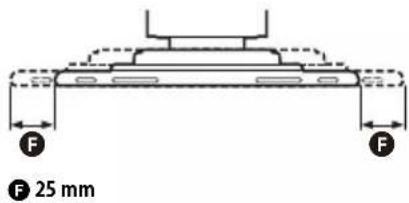
natural_image
Technical line drawing showing two mechanical assembly steps: one with a handle and cable, the other with a tool inserted into a bracket (no text or symbols)Attention
Attention
natural_image
Diagram showing a mechanical or structural component with an arrow indicating rotational motion (no text or symbols present)natural_image
Pure mechanical diagram showing a lever and base with bidirectional arrows indicating motion (no text or symbols)natural_image
Mechanical assembly diagram showing a screwdriver inserted into a housing component with a curved arrow indicating motion (no text or symbols present)natural_image
Technical line drawing of a mechanical assembly with tool and bracket (no text or symbols)natural_image
Three identical diagrams showing a mechanical component with mounting holes and mounting brackets, no text or symbols present.
natural_image
Mechanical assembly diagram showing a lever mechanism with no visible text or symbolsnatural_image
Technical line drawing of a mechanical assembly with a screwdriver inserted, showing no text or symbolsnatural_image
Technical illustration showing a mechanical assembly with a screwdriver inserted into a component, alongside a close-up of the internal structure (no text or symbols present)Remarque
natural_image
Diagram showing a device being inserted into a rack-mounted unit, with no visible text or symbols.natural_image
Diagram showing a device being inserted into an internal housing, with no visible text or symbols.natural_image
Mechanical assembly diagram showing a lever mechanism with no visible text or symbolsRemarques
Copyright © 2020 Sony Corporation
https://compliance.sony.eu
flowchart
graph TD
    A["6"] --> B["8"]
    B --> C["9"]
URL: https://www.sony.eu/support
PBAP (Phone Book Access Profile) 1.2
© 60 mm D 112 mm E 60 mm
natural_image
Simple line drawing of a rectangular frame with dashed border and two labeled force arrows (F), no text or symbols present.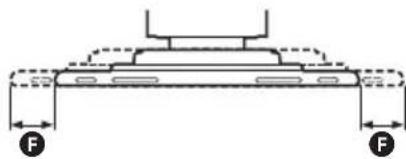
natural_image
Technical line drawing of a mechanical component with two force indicators (F) shown at the base and top, no text or symbols present.F 25 mm
Vorsichtsmaßnahmen
URL: https://www.sony.eu/support
natural_image
Diagram showing a vertical structure with an arrow indicating rotational motion (no text or symbols)natural_image
Pure mechanical diagram showing a beam supported at the base with two opposing arrows indicating bidirectional motion (no text or symbols)natural_image
Technical diagram of a mechanical device with multiple ports and a highlighted component (no text or symbols visible)natural_image
Mechanical assembly diagram showing a screwdriver inserted into a housing component with a curved arrow indicating motion (no text or symbols present)natural_image
Technical line drawing of a mechanical clamp or bracket assembly (no text or symbols)natural_image
Three identical diagrams showing mechanical joint configurations with mounting holes and alignment lines (no text or symbols)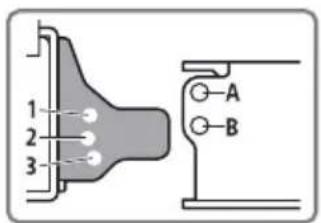
natural_image
Mechanical assembly diagram showing a lever mechanism with a curved arrow indicating motion (no text or symbols present)natural_image
Technical diagram of a mechanical assembly with a screwdriver inserted, showing no text or symbolsnatural_image
Technical illustration showing a mechanical assembly with a screwdriver inserted into a housing component (no text or symbols present)Hinweis
natural_image
Diagram showing a device being inserted into a rectangular housing, with no visible text or symbols.natural_image
Diagram showing a device being inserted into a rectangular housing, with no visible text or symbols.natural_image
Mechanical assembly diagram showing a lever mechanism with no visible text or symbolsnatural_image
Technical diagram of a mechanical assembly with directional arrows indicating movement or force (no text or symbols present)Hinweise
Copyright © 2020 Sony Corporation
Hinweise zur Lizenz
https://compliance.sony.eu
flowchart
graph TD
    A["6"] --> B["8"]
    B --> C["9"]
natural_image
Three simple icons: a smartphone with sound waves, a rectangular screen with no text or symbols, and a blank rectangular area (no text or symbols)© 60 mm D 112 mm E 60 mm
natural_image
Simple line drawing of a rectangular frame with dashed border and two labeled force arrows (F), no text or symbols present.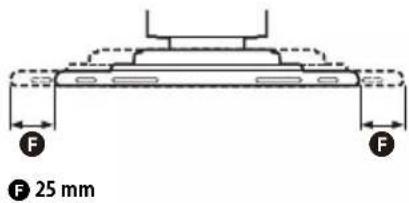
natural_image
Line drawing of a mechanical tool or pliers on a surface (no text or symbols)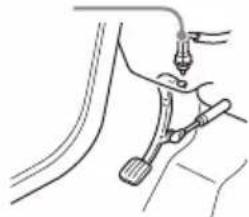
natural_image
Line drawing of a car tire being inserted into a brake pedal (no text or symbols)Tipo palanca Tipo pedal
Precauciones
URL: https://www.sony.eu/support
natural_image
Diagram showing a mechanical or structural component with an arrow indicating rotational motion (no text or symbols present)natural_image
Pure mechanical diagram showing a lever and base with bidirectional arrows indicating motion (no text or symbols)natural_image
Mechanical assembly diagram showing a screwdriver inserted into a housing component (no text or symbols visible)natural_image
Technical line drawing of a mechanical assembly with no visible text or symbolsnatural_image
Three identical diagrams showing mechanical joint configurations with no text or symbols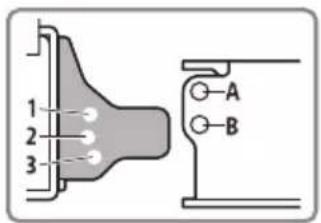
natural_image
Mechanical assembly diagram showing a lever mechanism with no visible text or symbolsnatural_image
Technical diagram of a mechanical assembly with a screwdriver inserted, showing no text or symbolsnatural_image
Technical illustration showing a mechanical assembly with a screwdriver inserted into a housing component (no text or symbols present)Nota
natural_image
Diagram showing a device being inserted into a computer chassis, with no visible text or symbols.natural_image
Diagram showing a device being inserted into a rack-mounted housing, with no visible text or symbols.Notas
Copyright © 2020 Sony Corporation
https://compliance.sony.eu
| Android Auto | [14A5] | Apple CarPlay | [S29C] |  | |
| [KCAH] | DAB+ Bluetooth | [420T] |  | ||
| [4489] | Instellingen | [S2KT] |  |  | |
| [74CZ] | Camera 1 Can | [266E] |  | [1408A] | |
Basishandelingen
URL: https://www.sony.eu/support
De firmware updaten via de USB-tetheringmodus
Interface: USB Type-C® (Hi-speed)
Maximale stroom: 3,0 A
BLUETOOTH
Communicatiesysteem:
PBAP (Phone Book Access Profile) 1.2
Overeenkomstige codec: SBC, AAC, LDAC™
© 60 mm D 112 mm E 60 mm
natural_image
Simple line drawing of a rectangular frame with dashed border and two labeled force arrows (F), no text or symbols present.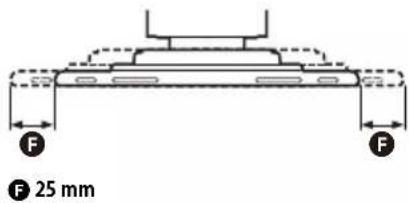
natural_image
Technical line drawing showing two mechanical assembly steps: one with a lever mechanism and the other with a tool inserted into a bracket (no text or symbols present)Type handrem Type voetrem
Waarschuwingen
URL: https://www.sony.eu/support
natural_image
Diagram of a device with an attached cable and connector, showing internal components without any text or symbols.natural_image
Diagram showing a mechanical or structural component with an arrow indicating rotational motion (no text or symbols present)Hoek (-10° tot +10°, in 3 stappen)
natural_image
Pure mechanical diagram showing a beam supported at the base with two opposing arrows indicating bidirectional motion (no text or symbols)Breedte (binnen 25 mm, in 5 stappen)
natural_image
Mechanical assembly diagram showing a screwdriver inserted into a housing component (no text or symbols visible)natural_image
Technical line drawing of a mechanical assembly with no visible text or symbolsnatural_image
Three identical diagrams showing a mechanical component with mounting holes and a base, no text or symbols present.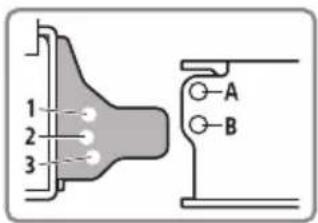
natural_image
Mechanical assembly diagram showing a lever mechanism with a curved arrow indicating motion (no text or symbols present)natural_image
Technical line drawing of a mechanical assembly with a screwdriver inserted, showing no text or symbolsnatural_image
Technical illustration showing a mechanical assembly with a screwdriver inserted into a housing component (no text or symbols present)Opmerking
natural_image
Diagram showing a device being inserted into a rectangular housing, with an arrow indicating the process (no text or symbols present)natural_image
Diagram showing a device being inserted into a computer chassis (no text or symbols present)Opmerkingen
Copyright © 2020 Sony Corporation
Opmerking over licenties
natural_image
Three rectangular devices with sound waves, no text or symbols present[Video blocked for your safety]
Om iPhone
•Kompatibla iPhone-modeller:
PBAP (Phone Book Access Profile) 1.2
Motsvarande kodec: SBC, AAC, LDAC™
© 60 mm D 112 mm E 60 mm
natural_image
Simple line drawing of a rectangular frame with dashed border and two labeled force arrows (F), no text or symbols present.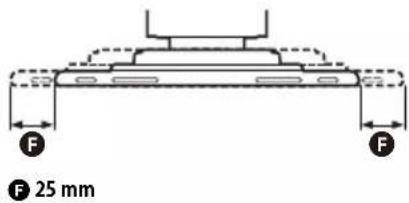
Försiktighet
URL: https://www.sony.eu/support
natural_image
Mechanical assembly diagram showing a screwdriver inserted into a housing component with a directional arrow indicating motion (no text or symbols present)natural_image
Technical line drawing of a mechanical assembly with no visible text or symbolsnatural_image
Three identical diagrams showing a mechanical component with mounting holes and a base, no text or symbols present.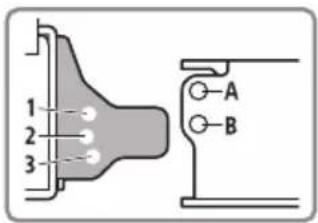
natural_image
Mechanical assembly diagram showing a lever mechanism with a curved arrow indicating motion (no text or symbols present)natural_image
Technical line drawing of a mechanical assembly with screwdriver and housing (no text or symbols)natural_image
Technical illustration showing a mechanical assembly with a screwdriver inserted into a housing (no text or symbols present)Obs!
natural_image
Diagram showing a device being inserted into a rack-mounted housing, with no visible text or symbols.natural_image
Diagram showing a device being inserted into a computer chassis, with no visible text or symbols.natural_image
Technical line drawing of a mechanical assembly with a lever and base plate (no text or symbols)Obs!
https://compliance.sony.eu
Hrvatski
Sony Corporation ovime izjavljuje da je ova oprema u skladu s Direktivom 2014/53/EU.
https://compliance.sony.eu
Česky
https://compliance.sony.eu
Dansk
https://compliance.sony.eu
Nederlands
https://compliance.sony.eu
English
Hereby, Sony Corporation declares that this equipment is in compliance with Directive 2014/53/EU.
The full text of the EU declaration of conformity is available at the following internet address:
https://compliance.sony.eu
Eesti keel
https://compliance.sony.eu
Suomi
https://compliance.sony.eu
Deutsch
https://compliance.sony.eu
Ελληνικά
https://compliance.sony.eu
Italiano
https://compliance.sony.eu
Latviešu
https://compliance.sony.eu
Lietuvių kalba
https://compliance.sony.eu
Norsk
Herved erklærer Sony Corporation at utstyrstypen er i samsvar med direktiv 2014/53/EU. EU-erklæring fulltekst finner du på Internett under: https://compliance.sony.eu
Polski
Register your product online now at: