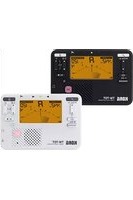
TM-70T - DJ Equipment KORG - Free user manual and instructions
Find the device manual for free TM-70T KORG in PDF.


| Product type | Electronic tuner and metronome combo for musical instruments |
| Weight | 79 g (without batteries) |
| Power supply | 2 AAA batteries (zinc-carbon or alkaline, 3 V) |
| Battery life (tuner only) | Approx. 250 h (backlight off), 150 h (Low), 85 h (Auto) (continuous A4 input, alkaline batteries) |
| Battery life (metronome only) | Approx. 200 h (off), 130 h (Low), 75 h (Auto) (tempo 120, 4 beats, max volume, alkaline batteries) |
| Tuner section | Chromatic 12 notes; detection range C1 (30.47 Hz) to C8 (4566.56 Hz) (sine wave); calibration range A4 = 410-480 Hz (1 Hz steps); accuracy > ±1 cent |
| Tuning methods | Display (needle + LED), Sound mode (reference note), Sound Back mode (pitch detection), Transposition function |
| Metronome section | Tempo ♩ = 30-252 bpm (pendulum steps or full steps); time signatures 0-9 beats, duplets, triplets, triplets with no middle beat, quadruplets, quadruplets with no middle beats; accuracy ±0.3% |
| Tap Tempo function | Allows setting the tempo by tapping the desired rhythm on the TAP button |
| Simultaneous use | Tuner and metronome can be used simultaneously (split display) |
| Backlight | 3 modes: Off, Low (permanently dim), Auto (brightens with sound or press; dims after 10s of inactivity) |
| Jacks | Input (3.5 mm mono mini-jack, unbalanced) for contact microphone; headphone output (3.5 mm stereo mini-jack, cuts speaker) |
| Speaker | 23 mm dynamic speaker |
| Included accessories | Quick start guide (TM-70T); contact microphone CM-400 (TM-70C only) |
| Optional accessories | Contact microphone CM-400 |
| Maintenance and cleaning | Wipe with a soft dry cloth. Do not use solvents. Remove batteries if not used for extended periods. |
| Safety | Use batteries of the same type. Do not expose to moisture or extreme temperatures. Turn off the device after use. |
| Spare parts and repairability | Easily replaceable batteries. For any repairs, contact an authorized Korg service center. |
| General information | Brand Korg, model TM-70T. Auto power off after 20 minutes of inactivity. Settings memory (calibration, reference note, etc.) retained even after power off, but resets when batteries are changed. |
Frequently Asked Questions - TM-70T KORG
User questions about TM-70T KORG
0 question about this device. Answer the ones you know or ask your own.
Ask a new question about this device
Download the instructions for your DJ Equipment in PDF format for free! Find your manual TM-70T - KORG and take your electronic device back in hand. On this page are published all the documents necessary for the use of your device. TM-70T by KORG.
USER MANUAL TM-70T KORG
Thank you for purchasing the Korg TM-70T/TM-70C COMBO TUNER METRONOME. To help you get the most out of your new instrument, please read this manual carefully.
Turning the power on and off....2
Using the tuner....3
Using the metronome....6
Using the tuner and metronome at the same time....7
Backlight....8
Specifications 8
Français
-
button
-
PITCH·A= (pitch/calibration) button
-
(sound out/sound back) button
-
TRANSPOSE (transpose) button
-
Display (LCD)
-
Speaker
-
Built-in mic
-
Tuning guide
-
-
- (volume)
-
-
(metronome) button
-
4·J (beat) buttons
-
J= (tempo) buttons
-
▶/■ (start/stop) button
-
(backlight) button
-
Ω (headphones) jack (3.5 mm, stereo)
-
♀ (input) jack (3.5 mm, monaural)
-
(tap tempo) button
a. Reference pitch
b. Note name
c. Tempo
d. Beat
Setup
Installing the batteries
Batteries are not included, so please obtain them separately.
-
Slide to remove the battery cover on the underside of the TM-70T/TM-70C.
-
Open the cover.
-
Insert the batteries while making sure that they face the correct way, and close the cover.
Use batteries of the same kind.

If the device malfunctions and you've tried turning the device on and off several times without success, remove and reinstall the batteries.
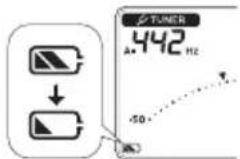
When the batteries become depleted, a battery icon
appears in the display. If you see the ▶ icon, turn the device off and install new batteries as soon as possible.
Making connections
Connect a pair of headphones or earphones (3.5 mm stereo plug, commercially available) to the ⏻ jack.
When plugged in, no sound is heard from the speaker.
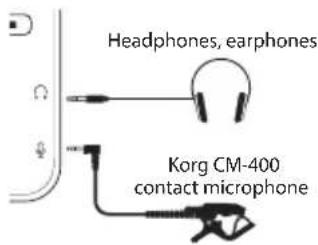
Use the -+ to adjust the volume of the earphones or speaker.
Connect a Korg CM-400 contact mic (sold separately, but included with the TM-70C) to the ♀ jack.
If a mic is not connected to the jack, the tuning is done with the built-in mic.
Using the stand
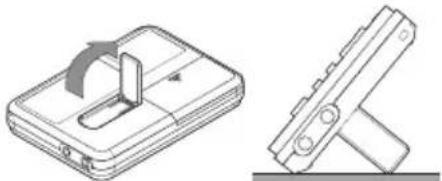
You can use the stand on the back of the TM-70T/ TM-70C to make the device stand up.
natural_image
Technical line drawing of a mechanical component with a cutaway view showing internal structure (no text or symbols)Turning the power on and off
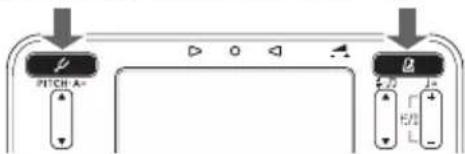
- Press either the button on the power. Press the button corresponding to the function you want to use.
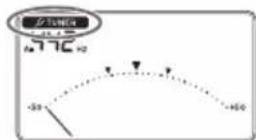
- Press the 🏠 button to turn on the tuner. TUNER appears on the display.
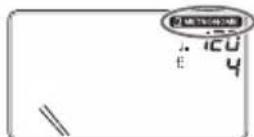
- Press the 📄 button to start the metronome. Metronome appears on the display.
The Buttons set into the
device, so that the power doesn't accidentally turn on when you store the TM-70T/TM-70C in your pocket, in a bag and so forth. To turn the device on or off, press the power button inward.
- When the tuner or metronome are on, press the
button (for the tuner) or the
(for the metronome) to turn them off.
This device automatically turns off if the tuner or metronome have stopped for 20 minutes.
Using the tuner
Tuning while checking the meter
Here's how to tune your instrument while checking the meter on the display.
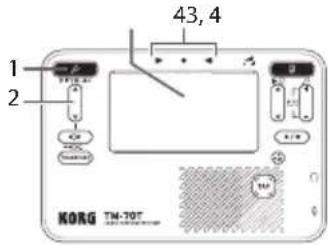
- Press the 📄 to turn the tuner on.
√ TUNER appears on the display along with the reference pitch.
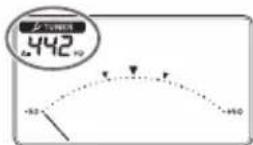
- To change the reference pitch (calibration), press ▲ and ▼ on the PITCH·A= button.
Each time you press the button, the reference pitch goes up or down in steps of 1 Hz.
Long-press the button to continuously change the reference pitch.
This setting is stored in memory even when you turn off the power.
- Play a single note on your instrument.
The pitch (note name) that's closest to the note you played is shown at the center of the display.
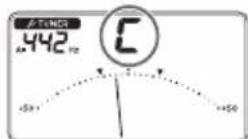
Tune your instrument to somewhere around the correct pitch, so that the desired note name appears.
If you're using the built-in mic, place your instrument as close as possible to the mic so that unwanted sound is not picked up while tuning.
- While playing a single note on your instrument, tune
it so that the meter lines up with the ▼ indication at the center, and the LED at the center of the tuning guide lights up.
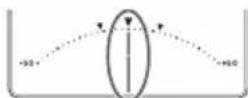
The left tuning guide LED lights up if the pitch of your instrument is flat, and the right tuning guide LED lights up the pitch is sharp.

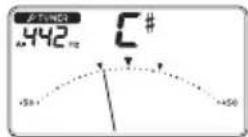
Tuning to a just major third above
If you want to tune to a just major third (C#) above A (0 cents), tune your instrument so that the meter lines up with the ▼ on the left side.
Tuning to a just minor third above
If you want to tune to a just minor third (C) above A (0 cents), tune your instrument so that the meter lines up with the ▶ on the right side.
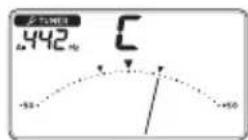
Tuning to a reference tone (Sound Out)
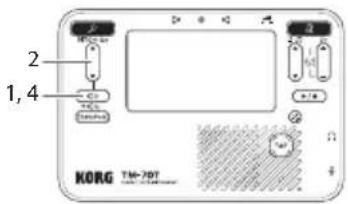
Use the Sound Out feature on this device to tune while hearing the sound that's output.
-
Press the button while the tuner is on. A reference tone is output from the headphones or speaker.
-
Press the ▲ buttons on the button CH·A= select the name of the target note to which you want to tune.
Each time you press the button, the output reference tone changes as follows.
This setting is stored even when the power is off.
-
Tune your instrument according to the reference tone. When using a contact mic or connecting a pair of headphones, you can tune while looking at the meter.
-
To turn the reference tone off, press the button.
Tuning while checking the pitch (Sound-Back)
The Sound-Back feature outputs the reference tone that's closest to the tone you're playing on your instrument (the input tone).
This is handy when you want to check whether the note you're playing is out of tune with the reference pitch and in other situations.
You can use this when either or both of the ♀ and ⏰ jacks are being used.
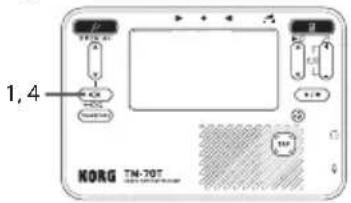
- Long-press the button while the tuner is on.
appears on the display.
- Input your instrument's sound via a contact mic plugged into the ♀ jack, or via the built-in mic.
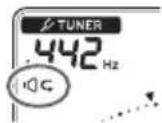
A reference tone is output from the headphones or speaker.
When using the built-in mic, connect only to the jack, not the jack.
-
Tune your instrument using the reference tone and meter.
-
To turn sound-back off, press the button.
Tuning using the Transpose function
Use the Transpose function on this device to conveniently tune to instruments with movable pitch (such as brass and wind instruments like trumpets and saxophones).
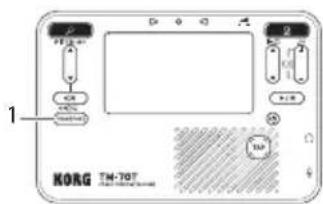
- Press the button to select the reference pitch. The reference pitch changes as follows.
$$ \mathrm{F} \rightarrow \mathrm{B}, \rightarrow \mathrm{E} \mid , \rightarrow \mathrm{C} \rightarrow \mathrm{F} \dots $$
The reference pitch you selected appears on the display
(in F, in B) This isn't shown when the reference pitch is C.
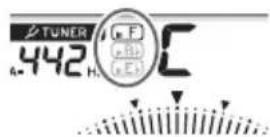
- While playing a single note on your instrument, tune it so that the meter lines up with the ▼ indication at the center.
Using the metronome
Setting the tempo and beat
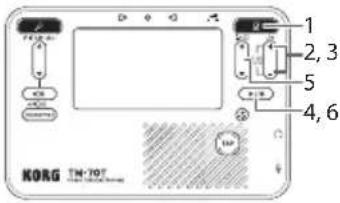
- Press the R to turn the metronome on.
METRONOME appears on the display.
- To select pendulum (pendulum of a mechanical metronome) steps or full steps, press + and - on the 🖌 button at the same time for about one second.
The default setting is pendulum steps.
- If pendulum steps is selected, appears on the display.
- If full steps is selected, ≡ appears on the display.
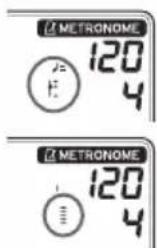
This setting is stored in memory even when you turn off the power.
- To set the tempo, press + and - on the 🖼 button.
The display indicates the numerical tempo value.
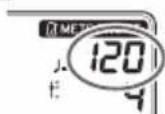
- With pendulum steps, when you press the ⏻ button, the tempo goes
up or down as shown below. This works the same as a mechanical metronome.
30 32 34 88 92 96 232 240 252 30
Long-press the button to increase or decrease the value continuously.
- With full steps, the tempo increases or decreases one beat per minute at a time when you press the button, through the range of 30 to 252.
Long-press the button to increase or decrease the value continuously.
You can also specify the tempo using the 📊 button. See “Setting the tempo via tap tempo” (p. 7) for details.
- Press the button to start the metronome.
The metronome pendulum swings from left to right in time with the tempo, and the ⏻ button blinks with the tempo.
- To change the beat, press ▲ ▼n the button.
The beat changes as follows.
0 ⇔ 1 ... 9 (9 beats) ⇔ ∫(quadruplet without the center beats) ⇔ ∫(quadruplet) ⇔ ∫(triplets without the center beat) ⇔ ∫(triplets) ⇔ ∫(duplet) ⇔ 0 ...
- To stop the metronome, press the button.
You can set the tempo by tapping it out.
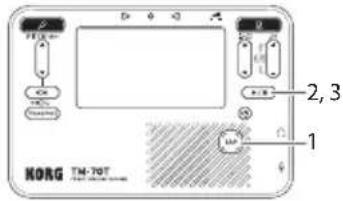
- While the metronome is on, press the button several times at regular intervals.
The metronome detects the BPM according to the interval at which you press the button, and sets the tempo accordingly. Also, the display indicates the tempo as a number.
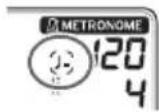
While the tempo is being detected, four curved lines appear on the display around the icon to the left of the tempo value.
- When the detected BPM is less than 30, "Lo" appears on the display, and the tempo is set to "30".
- When the detected BPM exceeds 252, "Hi" appears on the display, and the tempo is set to "252".
- Press the button to start the metronome.
The metronome pendulum swings from left to right in time with the tempo, and the 📄 button blinks with the tempo.
You can also input the tap tempo while using the metronome.
- To stop the metronome, press the button.
Using the tuner and metronome at the same time
The TM-70T/TM-70C lets you use the tuner and metro-nome simultaneously.
Press the and is respectively to turn the tuner and metronome on. The meter on the display is shown in two levels as shown below.
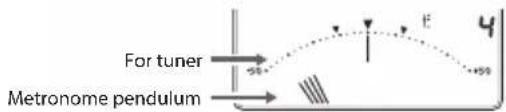
For more on using the tuner and metronome, refer to "Using the tuner" (p. 3) and "Using the metronome" (p. 6).
When using the tuner and metronome simultaneously, you can't select (quadruplet without the center beats), (quadruplet), (triplets without the center beat) or (triplets) as the beat.
Backlight
Each time you press the button, the backlight brightness changes as follows.
Soft Auto Off Soft ...
When the backlight is on, ✝ appears on the display.
- With the soft setting, the backlight is always dimmed to save battery power.
- With the auto setting, the backlight lights up brightly when sound is input or when a button is pressed.
When there is no sound input or button operation for around ten seconds, the backlight automatically dims to save battery power.
Specifications
Tuner section
Scale: 12-note equal temperament
Detection range*: C1 (30.47 Hz, A4=410 Hz)-C8 (4566.56 Hz, A4=480 Hz) for a sine wave
Reference tone: C3 (121.89 Hz, A4=410 Hz)-C6 (1141.64 Hz, A4=480 Hz), 3 octaves
Tuning function: Meter, sound out, sound-back, transpose
Calibration range: A4 = 410 Hz - 480 Hz (in units of 1 Hz)
Detection accuracy: Better than ±1 cent
Sound accuracy: Better than ±1 cent
* Even if the pitch is within the range of detection, the TM-70T/TM-70C may be unable to detect the pitch if the sound contains numerous overtones or has a rapid decay.
Metronome section
Tempo range: ♪ = 30-252 beats per minute (bpm)
Tempo settings: Pendulum step, full step, tap tempo
Time signatures: 0–9 beats, doubles, triplets, triplets without the center beat, quadruplets, quadruplets without the center beats
Tempo accuracy: ±0.3 %
Main specifications
Connections: Input jack (3.5 mm monaural mini-phone jack, unbalanced), headphones jack (3.5 mm stereo mini-phone jack)
Speaker: Dynamic speaker (23 mm)
Power supply: Two AAA batteries (3 V, zinc-carbon or alkaline)
Battery life: When using the tuner only Approx. 250/150/85 hours (backlight: Off/Soft/Auto, A4 continuous input, using alkaline batteries) When using the metronome only Approx. 200/130/75 hours (backlight: Off/Soft/Auto, tempo of 120, four beats, maximum volume, using alkaline batteries)
Dimensions (W x D x H):
$$ 1 0 7 \times 7 2 \times 1 8 \mathrm{mm} / 4. 2 1 ^ {\prime \prime} \times 2. 8 3 ^ {\prime \prime} \times 0. 7 1 ^ {\prime \prime} $$
Weight: 79 g / 2.79 oz (without batteries)
Included items: Quick Start Guide, CM-400 contact
microphone (TM-70C only)
Accessories (sold separately):
CM-400 contact microphone
The following settings are stored in memory even when you turn off the power. However when you exchange the batteries, these settings return to their default values.
| Setting Default values | |
| Calibration 442 Hz | |
| Reference tone | B♭4 |
| Transpose Off | |
| Step Pendulum steps | |
| Tempo 120 | |
| Beat 4 beats | |
| Backlight Off | |
- Specifications and appearance are subject to change without notice for improvement.
natural_image
Technical line drawings of a mechanical component with a cutaway view showing internal structure (no text or symbols)Dimensions (L x P x H):
107 × 72 × 18 mm
natural_image
Technical line drawings of a mechanical component with an arrow indicating direction (no text or symbols)Soft → Auto → Aus → Soft ...