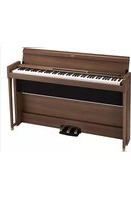
Poetry - Piano KORG - Free user manual and instructions
Find the device manual for free Poetry KORG in PDF.


| Product Type | Digital Piano |
| Brand | Korg |
| Model | Poetry |
| Keyboard | 88 keys (A0 – C8) with RH3 weighted action, 5 touch curves |
| Maximum Polyphony | 120 voices (varies by timbre) |
| Sounds | 30 (10 x 3 banks) |
| Effects | Brilliance, Reverb, Chorus (3 levels each) |
| Metronome | With tempo, time signature, tone and volume settings |
| Recorder | 2 tracks, up to 14,000 notes |
| Pedals | 3 (damper, sostenuto, soft) with half-pedaling support |
| Speakers | 10 cm x 2, amplification 25 W x 2 |
| Connections | MIDI IN/OUT, LINE OUT (stereo mini jack), 2 headphone jacks, DC 24 V input |
| Bluetooth | Audio (for use as speaker) |
| Power Supply | Included AC adapter, consumption 18 W |
| Weight | 36.7 kg (with stand) |
| Supplied Accessories | AC adapter, power cord, stand, speaker housing, pedal board, Chopin Piano Masterpieces, manual |
| Maintenance and Cleaning | Clean with a dry cloth; do not use benzene, thinner, or flammable substances |
| Safety | Avoid exposure to sunlight, heat, humidity, dust, vibration; use only the supplied adapter; auto power-off after 30 minutes of inactivity |
| Spare Parts and Repairability | Contact a Korg dealer; mounting screws may loosen; stabilization felts provided for adjustment |
| General Information | Compliant with EU Directive 2014/53; Compliant with Industry Canada CNR |
Frequently Asked Questions - Poetry KORG
User questions about Poetry KORG
0 question about this device. Answer the ones you know or ask your own.
Ask a new question about this device
Download the instructions for your Piano in PDF format for free! Find your manual Poetry - KORG and take your electronic device back in hand. On this page are published all the documents necessary for the use of your device. Poetry by KORG.
USER MANUAL Poetry KORG
Thank you for purchasing the Korg Poetry digital piano.
Owner's Manual
Using the unit in the following locations can result in a malfunction.
- In direct sunlight
- Locations of extreme temperature or humidity
- Excessively dusty or dirty locations
- Locations of excessive vibration
- Close to magnetic fields
Power supply
Please connect the designated AC adapter to an AC outlet of the correct voltage. Do not connect it to an AC outlet of voltage other than that for which your unit is intended.
Interference with other electrical devices
Radios and televisions placed nearby may experience reception interference. Operate this unit at a suitable distance from radios and televisions.
Handling
To avoid breakage, do not apply excessive force to the switches or controls.
Care
If the exterior becomes dirty, wipe it with a clean, dry cloth. Do not use liquid cleaners such as benzene or thinner, or cleaning compounds or flammable polishes.
Keep this manual
After reading this manual, please keep it for later reference.
Keeping foreign matter out of your equipment
Never set any container with liquid in it near this equipment. If liquid gets into the equipment, it could cause a breakdown, fire, or electrical shock.
Be careful not to let metal objects get into the equipment. If something does slip into the equipment, unplug the AC adapter from the wall outlet. Then contact your nearest Korg dealer or the store where the equipment was purchased.
THE FCC REGULATION WARNING (for USA)
NOTE: This equipment has been tested and found to comply with the limits for a Class B digital device, pursuant to Part 15 of the FCC Rules. These limits are designed to provide reasonable protection against harmful interference in a residential installation. This equipment generates, uses, and can radiate radio frequency energy and, if not installed and used in accordance with the instructions, may cause harmful interference to radio communications. However, there is no guarantee that interference will not occur in a particular installation. If this equipment does cause harmful interference to radio or television reception, which can be determined by turning the equipment off and on, the user is encouraged to try to correct the interference by one or more of the following measures:
Reorient or relocate the receiving antenna.
- Increase the separation between the equipment and receiver.
- Connect the equipment into an outlet on a circuit different from that to which the receiver is connected.
- Consult the dealer or an experienced radio/TV technician for help.
If items such as cables are included with this equipment, you must use those included items.
Unauthorized changes or modification to this system can void the user's authority to operate this equipment.
This transmitter must not be co-located or operated in conjunction with any other antenna or transmitter.
This device complies with Part 15 of the FCC Rules. Operation is subject to the following two conditions: (1) This device may not cause harmful interference, and (2) this device must accept any interference received, including interference that may cause undesired operation.
CANICES-3B/NMB-3B
This equipment complies with FCC radiation exposure limits set forth for an uncontrolled environment and meets the FCC radio frequency (RF) Exposure Guidelines. This equipment has very low levels of RF energy that it deemed to comply without maximum permissive exposure evaluation (MPE).
This device complies with Industry Canada licence - exempt RSS standard(s). Operation is subject to the following two conditions: (1) this device may not cause interference, and (2) this device must accept any interference, including interference that may cause undesired operation of the device.
This equipment complies with IC radiation exposure limits set forth for an uncontrolled environment and meets RSS-102 of the IC radio fre quency (RF) Exposure rules. This equipment has very low levels of RF energy that it deemed to comply without maximum permissive exposure evaluation (MPE).
European Union Directives Conformance Statement
Korg Inc. hereby declares that the product meets the requirements of Directive 2014/53/EU.
You can view the Declaration of Conformity (DoC) to Directive 2014/53/EU on the Downloads page under Support on the Korg website (www.korg.com).

SUPPLIER'S DECLARATION OF CONFORMITY (for USA)
Responsible Party: KORG USA INC.
Address: 316 SOUTH SERVICE ROAD, MELVILLE, NY
Telephone: 1-631-390-6500
Equipment Type: DIGITAL PIANO
Model: POETRY
This device complies with Part 15 of FCC Rules. Operation is subject to the following two conditions:
(1) This device may not cause harmful interference, and (2) this device must accept any interference received, including interference that may cause undesired operation.
Notice regarding disposal (EU only)

When this "crossed-out wheeled bin" symbol is displayed on the product, owner's manual, battery, or battery package, it signifies that when you wish to dispose of this product, manual, package or battery you must do so in an approved manner. Do not discard this product, manual, package or battery along with ordinary household waste. Disposing in the correct manner will pre
vent harm to human health and potential damage to the environment. Since the correct method of disposal will depend on the applicable laws and regulations in your locality, please contact your local administrative body for details. If the battery contains heavy metals in excess of the regulated amount, a chemical symbol is displayed below the "crossed-out wheeled bin" symbol on the battery or battery package.
IMPORTANT NOTICE TO CONSUMERS
This product has been manufactured according to strict specifications and voltage requirements that are applicable in country in which it is intended that this product should be used. If you have purchased this product via the internet, through mail order, and/or via a telephone sale, you must verify that this product is intended to be used in the country in which you reside.
WARNING: Use of this product in any country other than that for which it is intended could be dangerous and could invalidate the manufacturer's or distributor's warranty.
Please also retain your receipt as proof of purchase otherwise your product may be disqualified from the manufacturer's or distributor's warranty.
- Bluetooth is a registered trademark of Bluetooth SIG, Inc.
- All product names and company names are the trademarks or registered trademarks of their respective owners.
Introduction
Thank you for purchasing the Korg Poetry digital piano. To help you get the most out of your new instrument, please read this manual carefully.
The Poetry features the sound of a Pleyel piano, allowing you to better enjoy Romantic music such as Chopin, as well as the sound of an Italian grand piano, the pinnacle of the modern era.
Enjoy comparing them as you listen to or play along with the demo songs.
Table of Contents
Precautions 2
Introduction 3
Assembling the Stand 4
Caution during assembly 4
Other cautions 4
Assembly procedure 4
Check following assembly
Parts and their functions 7
Preparing to Play 8
Before You Begin 8
Listening to the Demos 9
Playing the Poetry 10
Playing a single sound (Single Mode) 10
Using pedals 11
Effects 11
Touch settings 12
Transpose 12
The metronome 12
Performance Modes 13
Playing two sounds at the same time (Layer Mode)-----13
Performing with another person
(Partner mode) 13
Recording/playing back a performance-14
Recording a Performance 14
Adding to a Recording 15
Playing Back a Recorded Performance 15
15
Other functions 16
Function Mode 16
Resetting the parameters 17
MIDI 18
Using as a Bluetooth Speaker 19
Appendix 20
Troubleshooting 20
Specifications 20
Sound Demo Song List, Piano Song List-98
MIDI Implementation Chart 99
Assembling the Stand
Warning
At least one other person must help you assemble the stand.
Caution during assembly
Make sure that you have the correct part in the correct orientation, and perform the assembly in the order given.
Other cautions
- Loosened screws
The screws may loosen as time passes after assembly. You should periodically check whether any screws have become loose. If you feel that the stand vibrates excessively, it is possible that screws have come loose. If so, re-tighten them.
- Moving the digital piano to another location
To move the assembled stand, remove the AC adapter cord from the stand, close the key cover, and then move it slowly with at least two people, keeping it as level as possible.
Disassembly
If you need to disassemble the stand, do so by reversing the steps of the assembly procedure. After disassembly, keep the screws and other parts in a safe place so that they are not lost.
Assembly procedure
You'll need a Phillips (+) screwdriver.
- Make sure that all of the following parts are available.
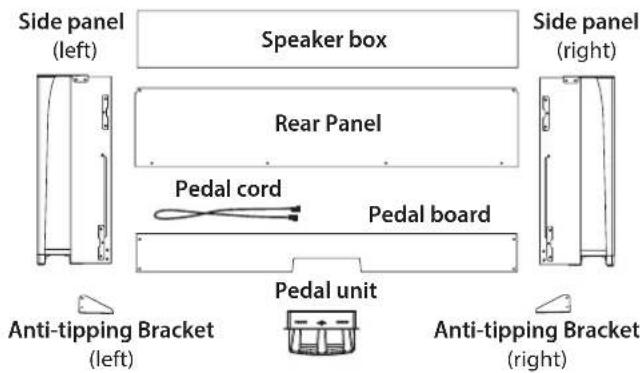
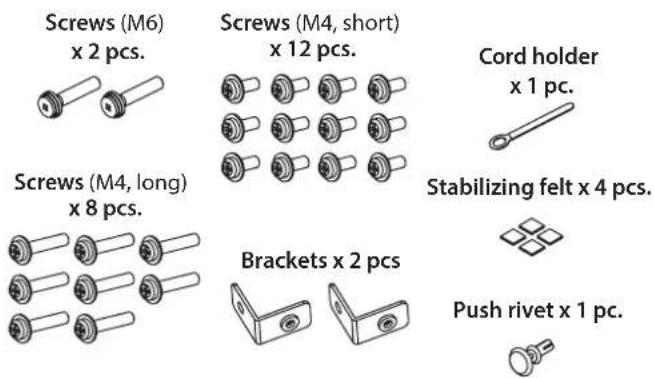
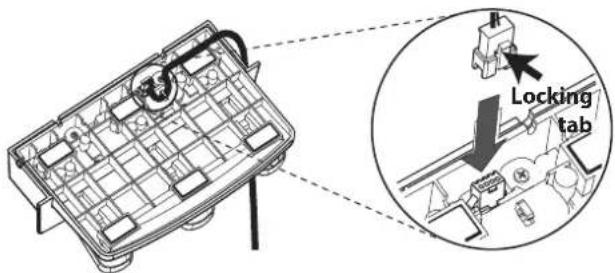
- Connect the attached pedal cord, observing the correct orientation, to the connector on the reverse side of the pedal unit, and then engage it with a slot in the pedal unit.
The pedal cord can be attached to or detached from the connector with its locking tab held down.
3. Insert the pedal unit into the pedal board, and then fasten it by pressing a push rivet into the hole (above the cutout) at the rear of the pedal board.
After pressing the push rivet into the hole, lift the pedal board to check that the pedal unit do not drop. The push rivet will prevent the pedal unit from falling out. Otherwise, it will not be fully fastened to the pedal board.
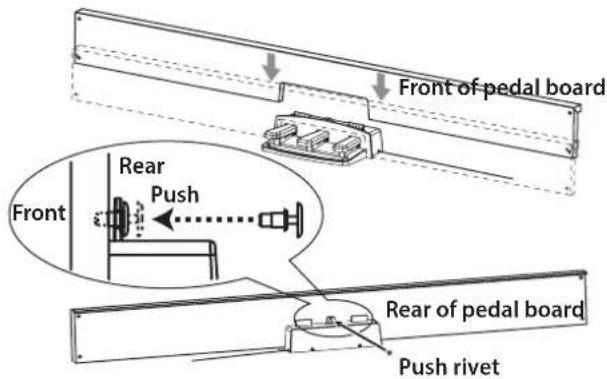
-
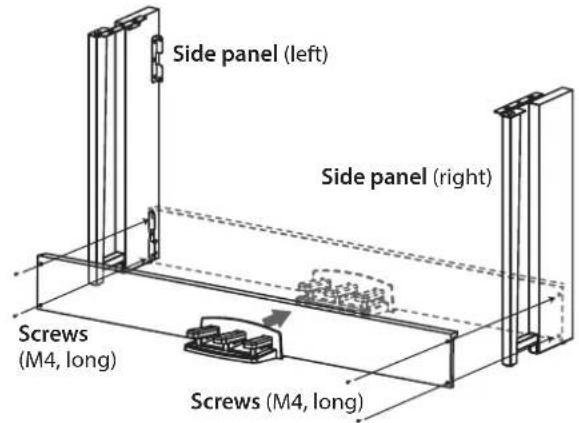
Using four screws (M4, long), temporarily fasten the pedal board (with the pedal unit attached) to the brackets at the bottom of the inside of the left and right side panels.
-
To temporarily tighten the screws is to tighten them leaving a clearance of about 2 mm.
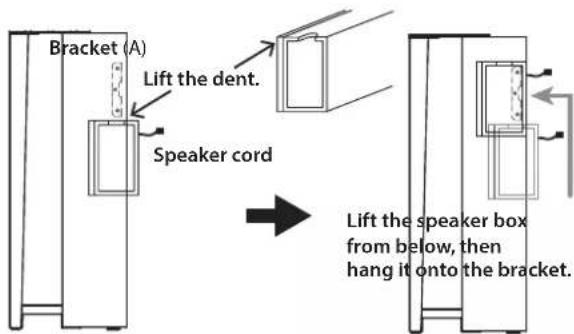
- Lift up the speaker box so that the brackets (A) on the left and right side panels pass through the dents in the speaker box. When the brackets (A) are fully hidden within the speaker box, push the speaker box forward so the rear of the speaker box is nearly flush with the edges of the side panels. Then, the speaker box can be released.
Lift the speaker box from below the bracket. Be careful not to pinch your fingers.
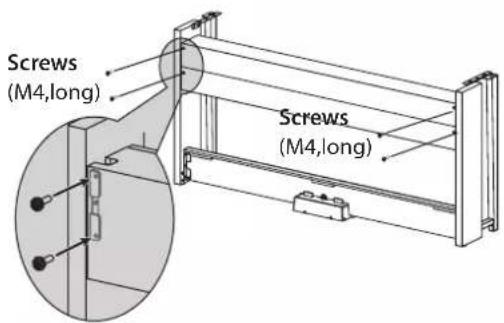
- Align the bracket holes in the left and right side panels with the holes in the speaker box, and then secure them with the four screws (M4, long) so the gaps on the left and right sides are equal.
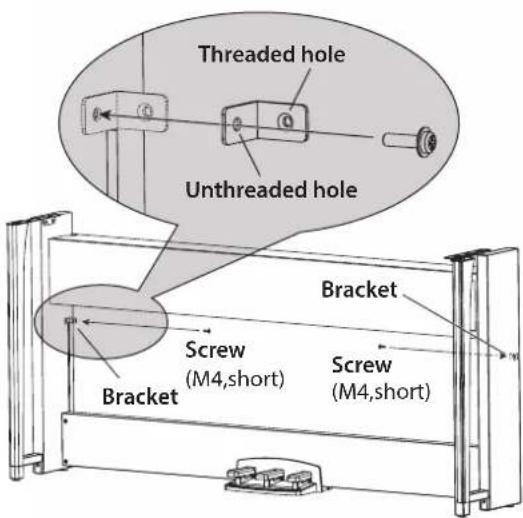
- Attach the brackets at the holes (under the speaker box) in the left and right side panels with the screws (M4, short).
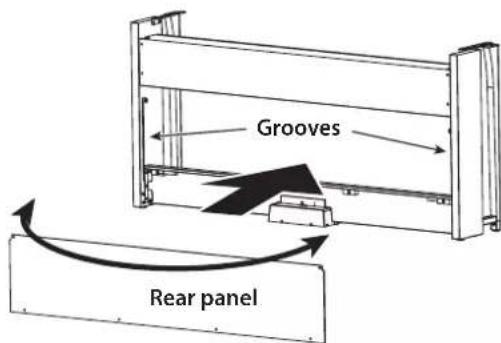
- Slightly bend the rear panel and insert it into the grooves in the left and right side panels.
Be careful not to pinch your fingers.
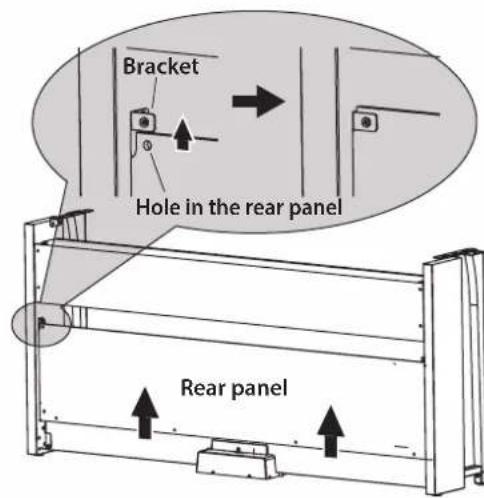
- Lift up the rear panel to align the holes in the rear panel and the brackets installed in step 7, and then temporarily fasten the bottom of the rear panel with the four screws (M4, short).
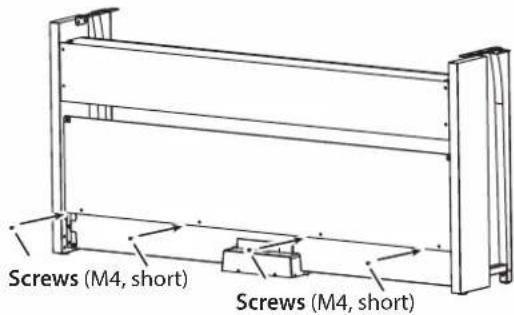
- Fasten the rear panel and the brackets (through the holes aligned in step 9) with two screws (M4, short).
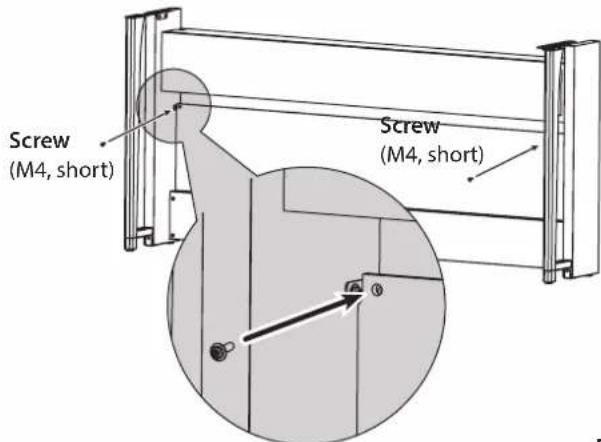
- Firmly tighten the speaker box screws temporarily tightened in step 4.
Make any vertical and horizontal adjustments necessary so that the left and right side panels are positioned equally. - Ensure that the stand has no gaps and is not tilted, and that all the screws are tightened firmly.
This completes the assembly of the stand. - Place the Poetry on the stand, make any vertical and horizontal adjustments, and then fasten them to each other from the bottom, using two screws (M6).
Position the Poetry so that it extends about 1mm from the rear of the stand.
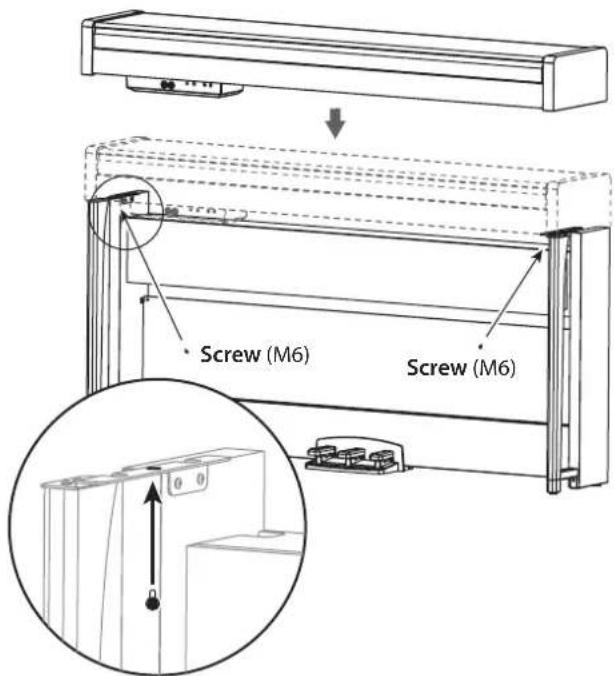
-
Make sure to attach the anti-tipping brackets behind both side panels, starting with the round hole at the bottom. When attaching the anti-tipping bracket on the left side, also attach the cord holder, as shown in the diagram.
-
Connect the pedal cord and the speaker cord to the connectors on the rear of the Poetry's connector box.
When connecting the pedal cord and the speaker cord, observe the correct orientations of the connectors.
The pedal cord or the speaker cord can be detached from the connector with its locking tab held down.
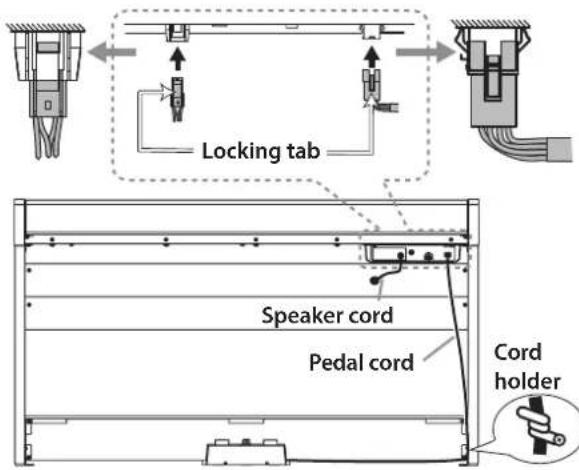
- Use the cord holder to hold the pedal cord.
After securing the cord with the cord holder, ensure that excess pressure is not applied to the connectors.
-
Connect the dedicated cord to the AC adapter. Then, plug the AC adapter into the DC 24V connector, and wrap the cord around the cord hook of the piano. For details, refer to "Connecting the Power" on page 8.
-
Place the Poetry where you intend to use it. Make sure to place it in a safe location where the floor is flat and stable.
When setting the digital piano in place, make sure that the stand does not rest on the AC adapter cable or pedal cable.
For greater safety, be sure to attach the anti-tipping brackets to the rear of the left and right side panels.
Check following assembly
Joints between the side panels and the attached anire any parts left over?
tipping brackets should be even (with no level difference left).
If any parts are left over, carefully review the assembly procedure to see where those parts should have been used.
Make sure that all screws are tight.
Depending on the condition of the floor at the installation location, the digital piano may shake back and forth. In that case, attach one or two pieces of stabilizing felt to the bottom of the anti-tipping brackets in order to reduce the shaking (see the diagram for step 14).
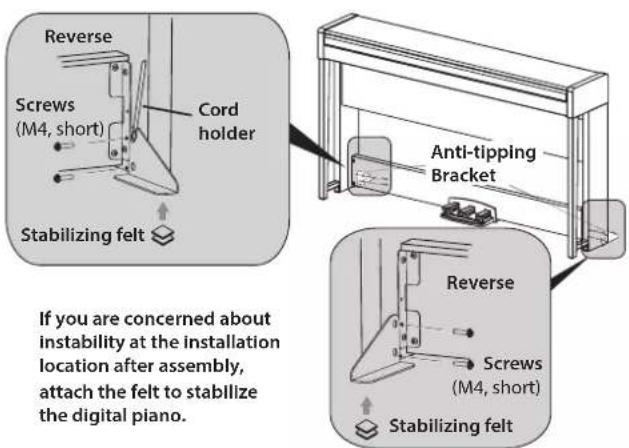
Parts and their functions
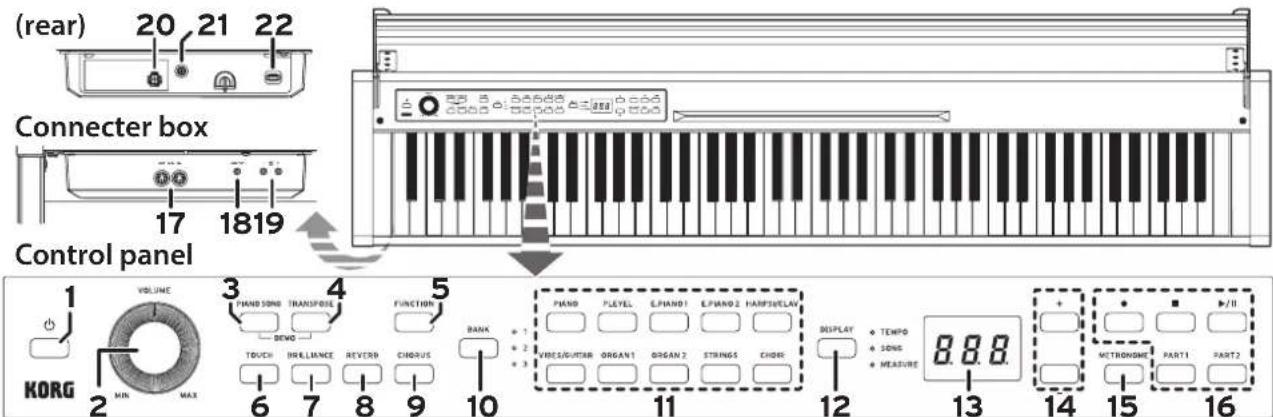
- Power button: Press this button to turn on the Poetry. At the same time, the display and sound buttons light up. To turn off the Poetry, hold down this button for about 1 second. The Poetry will turn off when the power button is released.

When the Poetry is turned off, all parameters turn to their factory default settings. However, the Poetry can be set to save the parameter settings (Refer to "Save parameter settings" on page 16).
Auto Power Off
The Poetry can be set to automatically turn off after a set period of time has passed with no keys being played or with no songs being played back. To disable this feature refer to "Auto power off" on page 16.
- VOLUME knob: This knob adjusts the volume for the speakers, the LINE OUT jack and the headphone jacks.
- PIANO SONG button: This button is used to enter Piano song mode. In that case, the button lights up. Simultaneously pressing this button and the TRANSPOSE button enters the Sound demo song mode.
- TRANSPOSE button: This button is used to adjust transposition. While transposing, the button lights up. Simultaneously pressing this button and the PIANO SONG button enters the Sound demo song mode.
- FUNCTION button: This button is used to enter the Function mode, where pitch, temperament and other settings can be specified. Hold down the button to enter the MIDI function mode, where MIDI settings can be specified. The button lights up when the Poetry enters the Function mode and blinks when it enters the MIDI function mode.
- TOUCH button: This button lets you select the keyboard sensitivity.
- BRILLIANCE button: This button is used to adjust the brightness of the tone.
- REVERB button: This button is used to turn on/off the reverb, which adds ambience to the sound. When this effect is on, the button will be lit up.
- CHORUS button: This button is used to turn on/off the chorus, which adds richness to the sound. When this effect is on, the button will be lit up.
-
BANK button, LEDs: This button is used to select the desired sound bank. The LED for the bank that's currently selected will light up.
-
Sound buttons: These buttons are used to select from 30 sounds (10× 3 banks). Two buttons can be pressed to play two sounds simultaneously (Layer mode).
- DISPLAY button, LEDs: This button is used to select the content of the multidisplay. The illuminated LED indicates the current content.
13.Display: The LED display shows various information as well as the selected setting for the metronome and Function Mode parameter. - +,- buttons: Use these buttons to specify a setting, value or song.
- METRONOME button: Use this button to start/stop the metronome. While the metronome is being used, the button is lit. In addition, hold down the button to enter the Metronome settings mode, where various neme settings can be specified (see page 12).
- Recorder buttons: Use these buttons to record (●), play back/pause (▶) and stop (▶) for performances as well as to select the part to be recorded/played back (PART1 and PART2).
- MIDI (IN, OUT) jacks: These jacks allow the Poetry to interact with other MIDI equipped devices—keyboards, drum machines, synthesizers, etc.
OUT (left): Sends MIDI data OUT of the Poetry to the MIDI IN of the other device.
IN (right): Receives MIDI data being sent from the MIDI Out of the other device.
- LINE OUT jack: This stereo mini phone jack is the main audio output jack. Using this jack, the output of the Poetry can be connected to the input of an external amplifier, powered speaker, audio interface or recorder, etc. The VOLUME knob controls the output volume.
- Headphone (N) jacks (front of connector box): Two stereo mini headphone jacks are located underneath the keyboard to the left-hand side. Plugging headphones into either of these jacks will mute the internal speakers.
- Speaker connector: The cord from the speaker box plugs into this connector (see "Assembling the Stand" on page 4).
21.DC 24V jack: Connect the included AC adapter here. - Pedal connector: The cord from the pedal unit plugs into this connector (see "Assembling the Stand" on page 4).
For the following terminals, use a cable of 3m or less to prevent malfunction.
MIDI (IN, OUT) jacks, Headphone () jacks
Preparing to Play
Before You Begin
Assembling the Poetry Piano
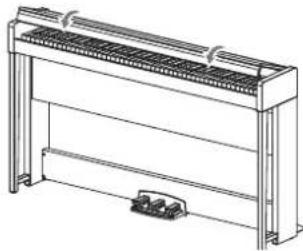
The Poetry includes the keyboard unit, the stand and antitipping brackets, pedal unit, and speaker system. Follow the instructions found on page 4 and fully assemble your Poetry before proceeding.
Connecting the Power
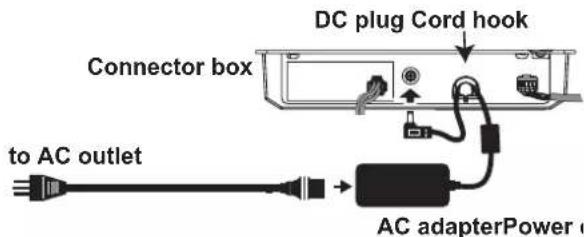
Fully insert the power cord into the AC adapter, then insert the DC plug into DC 24V jack on the connector box. Next, connect the power cord to an AC outlet.
Pass the AC adapter cord through the cord hook to prevent the DC plug from accidentally being disconnected. When you unhook the cord, don't pull on the cord with force.
Use only the AC adapter provided with your Poetry. Using a different adapter may cause malfunctions or other issues.
2 Be sure to plug the power cord into an outlet of the appropriate voltage.
Operating the Key Cover
Opening the key cover
- Using both hands, gently lift the key cover.
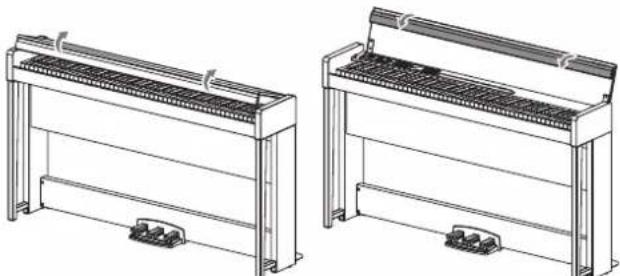
- Fold down the front edge of the key cover.
Closing the key cover
- Unfold the front edge of the key cover, and gently begin to lower it.
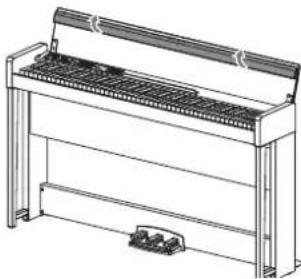
- When the key cover begins to close on its own, release it.
The key cover will continue to softly close on its own, from about mid-way down.
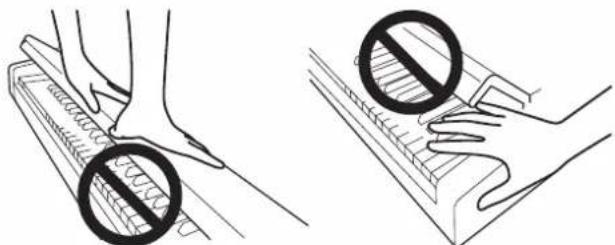
Do not forcibly pull the key cover or apply strong pressure while the key cover is closing. Doing so will damage the unit.
Be careful not to pinch your fingers or hands wl closing or opening the key cover.
Note The temperature and humidity will affect how fast the key cover automatically closes.
Note The key cover may make a faint clicking sound as it slowly closes. This is normal.
Using the music stand
The key cover serves as a convenient music stand.
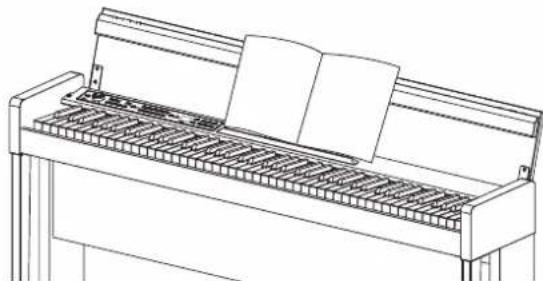
When placing opened music, do not apply strong pressure onto the key cover.
Headphone Effect
The effect (Stereo sound optimizer) that gives presence to the sound when the headphones are used can be turned on or off (Refer to "Stereo sound optimizer" on page 17).
Listening to the Demos
Built into the Poetry are 60 preprogrammed songs. Of these, 10 are Sound Demo Songs that highlight the quality of various internal sounds. The other 50 are familiar Piano Songs and etudes.
During playback of a sound demo song, you can play using the keyboard; however, the sound changed by using the sound buttons.
During playback of a sound demo song, the settings for effects (reverb and chorus) cannot be changed.
Listening to a Sound Demo Song
The Poetry features 10 built-in Sound Demo Songs that use different sounds. Listen to the Sound Demo Songs to hear their typical sounds. (Refer to "Sound Demo Song List" on page 98.)
- Simultaneously press the PIANO SONG button and the TRANSPOSE button.
The PIANO SONG button blinks, and the sound buttons are lit sequentially. In addition, the number for the sound demo song (d01) appears in the display.
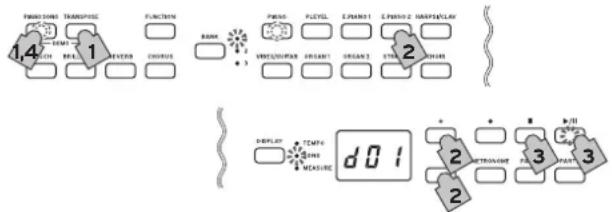
After about 3 seconds, the PIANO button Play/Pause button lights up, and playback of the Sound Demo Song begins.
When playback of Sound Demo Song d01 is finished, the remaining Sound Demo Songs will play back sequentially. When playback of d10 is finished, playback begins again with d01. At this time, the sound button for the song being played back blinks.
- When the sound buttons are blinking sequentially, press the sound button for the demo song that you want to hear.
If a different sound button is pressed, even while a song is being played, playback of the corresponding demo song will begin after a few seconds. In addition, a song can be selected by pressing the + or - button beside the display.
- Press the Stop button to end playback, and press the Play/Pause button to return to the beginning of the song.
While the song is stopped, the PIANO SONG blinks, and the sound buttons light up sequentially.
- Press the PIANO SONG button again to exit playback of Sound Demo Songs.
The tempo cannot be changed during playback of a Sound Demo Song. In addition, the metronome cannot be used.
The playback of a Sound Demo Song cannot be paused.
Listening to a Piano Song
Two types of performances have been prepared for each Piano Song: one with the Italian grand piano sound and one with the Pleyel piano sound. Listen to and compare the two performances.
Various functions useful for practice are available, such as changing the tempo or muting the right- or left-hand parts to focus on one hand. (Refer to "Piano Song List" on page 98.)
- Press the PIANO SONG button.
The PIANO SONG button lights up and the number for the piano song (001) appears in the display.
The PIANO button lights up and the PLEYEL blinks.

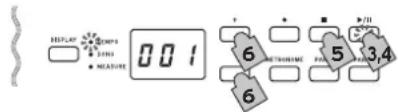
- Press the PIANO button or PLEYEL button to select the desired sound.
For the Italian grand piano sound, press the PIANO button; for the Pleyel piano sound, press the PLEYEL button.
The button for the selected sound lights up, and other button blinks.
Note You can select either the Italian grand piano sound, or the Pleyel piano sound. - Press the Play/Pause button to begin playback of the Piano Song.
When playback of the first piano song is finished, playback continues sequentially with the second, third, etc. When playback of the fortieth piano song is finished, playback begins again with the first piano song.
Note If no sound was selected in step 2, the Piano Song with the PIANO sound automatically begins to play back after about 3 seconds. - Use the Play/Pause button to toggle between playback (button lit) and pause (button blinks).
- Press the Stop button to end playback and return to the beginning of the song.
- Press the DISPLAY button, and then, after the SONG LED is lit, press the + or - button beside the display to select a song.
- To change the sound, press the PIANO button or PLEYEL button, and then press the Play/Pause button.
- Press the PIANO SONG button again to exit playback of Piano Songs.
Playback will begin automatically after the Piano Song number is changed. However, playback will not begin automatically after the sound (Piano or PLEYEL) is changed. In that case, press the Play/Pause button to begin playback of the Piano Song.
Changing the tempo
- Press the DISPLAY button, and then, after the TEMPO LED is lit, press the + or - button to change the tempo.
With Piano Songs, the tempo is displayed as a percentage of the original tempo. The setting range is -50% to +50% of the original.

The setting continues to change while the button is held down.
To restore the tempo to the original setting, simultaneously press the + and - buttons.
Each song is saved with its own tempo, so selecting a different song will automatically change the tempo to the one saved with that song, even if the tempo was changed for the previous song. In addition, the original tempo will be restored when the Poetry is turned off.
Practicing one hand at a time (left-hand/right-hand separation function)
With some Piano Songs, the left hand is usually assigned to Part 1 and the right hand to Part 2. By muting one of the parts, the Poetry will play only one of the parts—or hands—and you can play the muted part. The part you play is up to you. This function is available with Piano Songs 1 through 23.
- To mute the left-hand part, press the PART1 button; the button blinks in green. To mute the right-hand part, press the PART2 button; the button blinks in green.
- Play along with the playback of the song.
- To unmute a part that has been muted, press the button that is blinking.
The button lights up in green.

The muting level can be adjusted. Refer to "Functions for Piano Song Mode" on page 16.
Playing the Poetry
Playing a single sound (Single Mode)
You can select a sound from the thirty sounds supplied with the instrument (10 sounds x 3 banks).
- Press the sound button for the sound that you want to play.
The selected button will light up.
- Press the BANK button to select one of the three sounds.
Each press of the BANK button switches the bank in the order 1, 2, 3, 1, ..., and the corresponding LED to the right of the BANK button will light. For example, to select the Clav sound, press the HARP-SI/CLAV button, after which its button lights up. Then, press the BANK button twice to select bank 3 (Clav); the LED below and to the right of the BANK button will light up.
In addition, the bank selected for a sound button remains the same, even if a different sound button is pressed.

Note Each time the Poetry is turned on, the sound in bank 1 is selected for all sound buttons.
Playing the Poetry while using a single sound such as an acoustic piano is referred to as the Single Mode. The Poetry can also be played in Layer Mode or Partner Mode, which are characteristic of digital pianos.
For details on the various modes, refer to "Performance Modes" on page 13.
| Button Bank | Sound # | |||
| PIANO 1 Italian | Grand Piano 4 | |||
| 2 Classic Piano 4 | ||||
| 3 Jazz Piano 4 | ||||
| PLEYEL *1 | 1 | PLEYEL Piano | 4 | |
| 2 PLEYEL Ballad 4 | ||||
| 3 PLEYEL 1843 *2 4 | ||||
| E.PIANO1 1 Stage Electric Piano 1 | ||||
| 2 Bright Electric Piano 1 | ||||
| 3 Electric Grand Piano 1 | ||||
| E.PIANO2 1 Digital Electric Piano1 2 | ||||
| 2 Digital Electric Piano2 2 | ||||
| 3 60's Electric Piano 1 | ||||
| HARPSI/CLAV | 1 Harpsichord 1 | 2 | ||
| 2 Harpsichord 2 | 2 | |||
| 3 Clav | 2 | |||
| VIBES/GUITAR | 1 Vibraphone | 1 | ||
| 2 Marimba | 1 | |||
| 3 Acoustic Guitar | 2 | |||
| ORGAN1 | 1 | Jazz Organ1 | 2 | |
| 2 Jazz Organ2 | 2 | |||
| 3 Jazz Organ3 | 2 | |||
| ORGAN2 1 Pipe | Organ1 | 2 | ||
| 2 Pipe Organ2 2 | ||||
| 3 Positive Organ 2 | ||||
| STRINGS 1 Strings | 2 | |||
| 2 Cinema Strings 2 | ||||
| 3 Analog Strings | 2 | |||
| CHOIR | 1 Aah Choir | 2 | ||
| 2 | Ooh Voices | 2 | ||
| 3 Classical Choir | 3 | |||
The # column shows the number of oscillators, or voices, used to create a single note for that sound. (Refer to "About maximum polyphony" on page 20.)
*1: PLEYEL pianos manufactured in Chopin's era were tuned at 430 Hz (A4). Playing with the pitch of each PLEYEL sound set to 430 Hz therefore allows you to enjoy the ambiance of that era.
For details on changing the pitch, refer to "List of functions" on page 16 and "Additional Functions and Descriptions" on page 17.
*2: The Pleyel 1843 sound reproduces the 1843 Pleyel piano with 80 sound-producing keys. Keys A0 to B0 and G#7 to C8 do not produce sound.
In addition, the touch sensitivity for producing quiet notes is subtle.
Using pedals
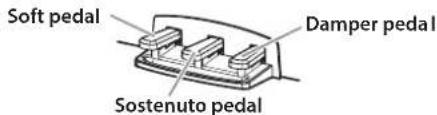
The Poetry includes all three of the pedals found on a grand piano. Using the pedals can add expression, control, and sophistication to any performance.
Soft pedal (left)
The Soft pedal slightly reduces the volume and softens the tone. Accurate half-pedaling allows you to control the depth of the effect by how far down the pedal is pressed. ("half-pedaling").
Sostenuto pedal (center)
This pedal provides a similar effect as the al-allowing notes to continue to sound after the key is released-but the effect only applies to the notes being held down when the Sostenuto pedal is pressed. New notes played after the Sostenuto pedal has been pressed will not sustain.
Damper pedal (right)
As mentioned above, the Damper pedal allows notes to continue to sound after the key has been released, adding a rich, resonant decay. You can also add damper resonance to the PIANO and PLEYEL sounds. Accurate half-pedaling allows you to control the depth of the effect by how far down the pedal is pressed. ("half-pedaling").
Effects
Brilliance
This effect changes the brightness of the tone.
The setting can be changed by holding down the BRIL-LIANCE button and pressing the + or - button beside the display.

The setting appears in the display with 003 producing brighter sound and 001 producing a less bright sound.

Brilliance cannot be turned off.

The same setting is applied to all sounds and remains applied until the Poetry is turned off. When the instrument is turned on, the default setting 002 is selected.

By performing the "Save parameter settings" (see page 6) operation before the Poetry is turned off, the new settings specified for each sound can be saved as the default settings.

rb
This effect adds ambience and depth to the sound, producing the sense of performing in a concert hall.
Each press of the REVERB button turns the reverb on (button lights up) or off (button turns off).
To change this setting, hold down the REVERB button and press the + or - button beside the display.

The setting appears in the display with 003 producing deep reverb effect and 001 producing a light reverb effect.

As a factory default, the on/off setting for this effect as well as this effect's setting are saved with each sound.

By performing the "Save parameter settings" (see page 6) operation before the sound is switched, the new settings specified for each sound can be saved as the default settings.

us
Chorus adds modulation to the sound, producing an expansively rich sound.
Each press of the CHORUS button turns the Chorus effect already (button lights up) or off (button turns off).
To change this setting, hold down the CHORUS button and press the + or - button beside the display.

The setting appears in the display with 003 producing deep chorus effect and 001 producing a light chorus effect.

As a factory default, the on/off setting for this effect as well as this effect's setting are saved with each sound.

By performing the "Save parameter settings" (see page 6) operation before the sound is switched, the new settings specified for each sound can be saved as the default settings.
Touch settings
The keyboard sensitivity, or touch, can be programmed. With the "Light" setting, loud notes will be produced even if the key is lightly pressed, and with the "Heavy" setting, loud notes will not be produced unless the key is strongly pressed.
To change the setting, hold down the TOUCH button and press the + or - button beside the display.
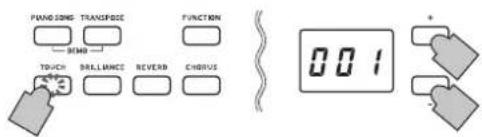
| Display | Touch sensitivity | |
| 001 Light Loud | notes can be produced even by pressing lightly, which produces a brighter sound. | |
| 002 Normal Normal piano touch, recommended with Poetry. | ||
| 003 Heavy | Loud notes can be produced only by pressing hard, which makes it easier to produce soft notes. Since this allows for a more expressive performance, it is intended for advanced players. | |
| 004 Stable | Sensitivity variations are reduced, and a relatively stable sound is produced. This makes playing easy, even for beginners and children. | |
| 005 Steady | Steady notes are produced, like with an organ, regardless of the force used to press the key. | |
Note The diagram below shows the relationship between how hard you press the key and how loud or quiet the notes sound.
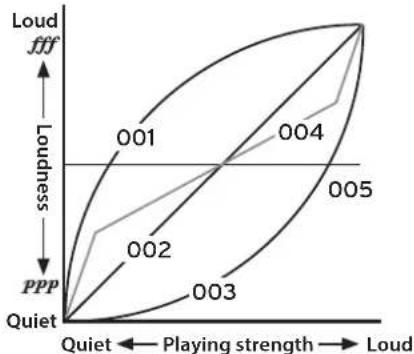
Note When the instrument is turned on, the touch setting is reset to 002 (Normal).
Note The settings are applied to all sounds.
Transpose
In some cases, a song may be written in a difficult key (e.g., many black keys), or you may wish to shift the pitch to match another instrument or vocalist. In such cases, you can transpose (shift the pitch) so that you can use an easier fingering, or use the same familiar fingering to play at a different pitch. This is called the Transpose function.
For example if you transpose upward by one semitone, playing the notes shown at the lower left will produce the pitches shown at the right.

While holding down the TRANSPOSE button, press the keyboard key (F#6-F7) for the desired transposition. If a keyboard key other than C7 is pressed, the TRANSPOSE button lights up to indicate that the keyboard is transposed. The pitch of the entire keyboard is transposed according to the pitch of the pressed keyboard key in relation to C7.
To return to the original pitches, hold down the TRANS-POSE button and press the C7 key.
The TRANSPOSE button turns off, and transposition is canceled.
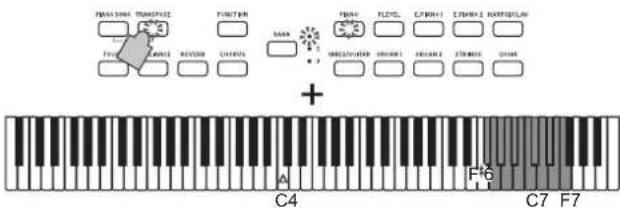
| key Effect | |
| F#6 - B6 | 6-1 semitones lower |
| C7 Standard pitch | |
| C#7 - F7 | 1-5 semitones higher |
Note When the instrument is turned on, the transposition is reset.
The metronome
The Poetry is equipped with a metronome, which can be changed to a bell sound. This is convenient for practicing.
Turning on/off the metronome
- Press the METRONOME button.
The button lights up, and the metronome starts.
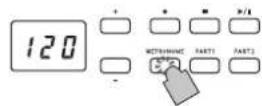
- To stop the metronome, press the METRONOME button again.
The button turns off.
Specifying the tempo
Regardless of whether the metronome is turned on or off, press the DISPLAY button, and then, after the TEMPO LED is lit, press the + or - button to change the tempo.
The setting range is = 40 - 240
To return to the default setting (120), simultaneously press the + and - buttons.
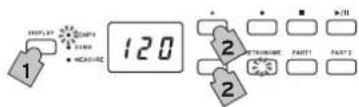
Note The tempo can also be specified in the Metronome Settings Mode.
Specifying the Time Signature, Volume, Accent Sound, Tempo and Sound
- Hold down the METRONOME button until the Metronome Settings Mode is entered.
The METRONOME button blinks.
- Press the appropriate button shown below to select a parameter and display its setting in the display, and then press the + or - button to change the setting.
To return the sound or volume to its default setting, simultaneously press the + and - buttons.
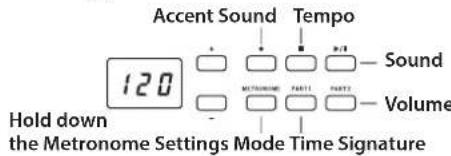
| Setting (Button) | Setting Range | Default setting |
| Accent Sound (●) | oFF (no accent sound), on1 (emphasized sound for the accent beat), on2 (bell sound for the accent beat) | off |
| Tempo (■) | 40-240 (same as tempo setting) 120 | |
| Sound (▶/■) | 1 (acoustic), 2 (electronic) 1 | |
| Time Signature (PARTI) | 02 (2/4), 03 (3/4), 04 (4/4), 06 (6/4) | 04 |
| Volume (PART2) | 01-13 | 10 |
- After changing the setting, press the METRONOME button to exit the Metronome Settings Mode.
When the Metronome Settings Mode is exited, the METRONOME button returns to its lighting status (lit or not lit) before the Metronome Settings Mode was entered.
Note By performing the "Save parameter settings" (see page 16) operation before the Poetry is turned off, the settings specified for the sound, accent sound and volume can be saved as the default settings.
Performance Modes
Playing two sounds at the same time (Layer Mode)
You can play two sounds at the same time on the keyboard. This is called the Layer Mode.
- While holding down the button of a sound to be layered, press another sound button.
The two selected sound buttons light up.

In order to use sounds in different banks, first select the banks in the Single mode for the sound buttons to be pressed.
For example, to play by layering the Italian Grand Piano and Jazz Organ 2 sounds, select bank 1 (Italian Grand Piano) for the PIANO button and bank 2 (Jazz Organ 2) for the ORGAN1 button, and then press both buttons simultaneously.
To adjust the volume balance of the two sounds, press the FUNCTION button, then the HARPSI/CLAV button, and then press the + or - button to adjust the setting. After selecting the setting, press the FUNCTION button again.
(Refer to "Layer Mode settings" below and "Function Mode" on page 16.)
- To return to Single Mode, press any single Sound Button.
When selecting Layer Mode, the total number of voices that can play at the same time is reduced, depending on the total number of oscillators used per voice by the selected sounds. (Refer to "About maximum polyphony" on page 20.)
Sounds accessed by the same Sound Button cannot be layered. For example, Italian Grand Piano and Jazz Piano are both accessed via the PIANO button and thus cannot be layered.
Layer Mode settings
In Layer Mode, the volume balance between sounds can be adjusted, the octave for each sound can be shifted, and the damper pedal can be enabled or disabled for each sound. (Refer to "Function Mode" on page 16.)
Note The leftmost or uppermost selected sound layer 1, and the other (rightmost or lowermost) one is layer 2 (see the diagram at the below).
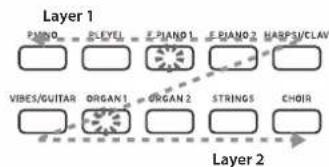
For example, if E.PIANO1 and ORGAN1 are selected, E.PIANO1 is layer 1 and ORGAN1 is layer 2.
Performing with another person (Partner mode)
Two people can play in the same range with the keyboard divided in half between them. This is called the Partner mode.
Entering Partner Mode
With the Poetry turned off, hold down the BANK button, and then press the Power button. When a dot appears in the lower-right corner of the display, release the BANK button. When the Poetry is in Partner Mode, a dot appears in the lower-right corner of the display.

The PIANO sound is used for both the left and right sides of the keyboard.
The right side of the keyboard, from E4 to C8, produces sounds two octaves lower in pitch (E2-C6).
The left side of the keyboard, from A0 to E4, produces sounds two octaves higher in pitch (A2-E6).
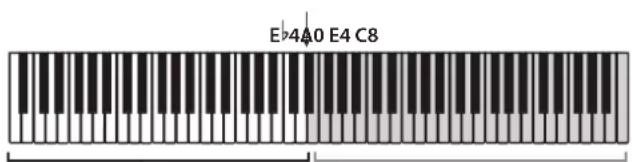
Pitches A2 to E6 for the player on the left side
Pitches E2 to C6 for the player on the right side
The left side of the keyboard will be output from the left speaker (L channel), and the right side of the keyboard will be output from the right speaker (R channel).
Changing the sound for both sides
Press a sound button. Both sides will change to the same sound.
Selecting sounds for the left and right sides
Simultaneously press the two sound buttons for the sounds to be used. The two pressed sound buttons light up.
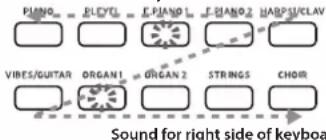
Sound for left side of keyboard
The leftmost or uppermost selected sound button is for the left side of the keyboard, and the other (rightmost or lowermost) one is for the right side of the keyboard. For example, if the sound from the E.PIANO1 button is to be applied to the left side and the sound from the ORGAN1 button is to be applied to the right side, hold down the E.PIANO1 button, and then press the ORGAN1 button.
In order to use sounds in different banks, banks in Single Mode before entering Partner Mode.
Damper Pedal Assignments
In Partner Mode, the Soft pedal acts as a damper pedal for the left side of the keyboard; the Damper pedal acts as the damper pedal for the right side of the keyboard.
The Sostenuto pedal has no function in Partner Mode.
The volume balance of the sounds for the left and right sides can be adjusted with "Volume balance for Layer Mode (or Partner Mode)" in "Function Mode" on page 16.
Exiting Partner Mode
Turn off the Poetry to exit Partner Mode.
When only the Power button is pressed to turn on the Poetry, it will be in the normal mode (Single Mode).
In Partner Mode, a demo song cannot be played back and a user song cannot be recorded or played back. In addition, no Function Mode settings other than the volume balance for Partner Mode and no MIDI function mode settings can be specified.
Recording/playing back a performance
The recorder of the Poetry allows you to easily record and play back keyboard performances. This is called a user song. A user song has two parts. You can separately record the right- and left-hand parts of a song, then play back the two parts at the same time.
If you record to a part where data has already been recorded, the previous performance data will be deleted and overwritten with the new data. Therefore, before recording to a part, be sure it does not contain any data that you wish to save.
In addition, you can check each part according to the lighting status of its button.
| Part button Status | |
| Not lit No recorded data | |
| Lit in green Playing back recorded data | |
| Blinks in green Recorded data, muted | |
| Lit in red Recording | |
| Blinks in red | Recording standby |
User Songs can be saved until the data storage space of the Poetry is full.
Recording a Performance
If the Poetry is turned off before the LED for the recorded part lights up in green, the recorded song data and stored settings may be corrupted.

-
Press a sound button to select the song to be recorded.
-
Press the Record button.
The Record button lights up. - Press the button for the part to be recorded until the button blinks in red.
- Recording starts when you start playing the keyboard.
selectThePlay/Pause button and the corresponding part button light up.
Recording can also be started by pressing down on any of the three pedals or by pressing a sound button.
Start recording with a count-off
Instead of playing the keyboard, press the Play/Pause
button to receive a two-measure count-off before recording starts.
- To stop recording, press the Stop or Play/Pause button.
When recording is finished, the Record button goes dark (not lit), and the performance data is automatically saved.
Changes made to the sound while recording are saved.
Changes made to the tempo while recording are saved. (If the tempo cannot be changed, enable the tempo setting during playback.)
- The time signature cannot be changed while recording.
- A maximum of 999 measures can be saved. When the number of saved measures exceeds 900, the Record button begins blinking. When 999 measures are saved, recording stops automatically.
- When the remaining space for recording is less than 1% , the Record button begins blinking. When no space remains, recording stops automatically.
Note The amount of space remaining for recording can be checked and a part can be deleted from the recording. Refer to "Function Mode" on page 16.
Adding to a Recording
Recording Over a Recorded Part
Example: Recording an addition to a previously recorded Part 1
Punch-in recording
- Press the Play/Pause button to start playback.
- Press the Record button.
The Poetry enters recording standby mode, and the Record button lights up.
- Press the PART1 button until it blinks in red.
- Start playing the keyboard when reaching the point where the recording is to be added.
The original recording is overwritten from where the keyboard is played.
the
Recording from a paused point
- Press the Play/Pause button to start playback.
-
Press the Play/Pause button when reaching the point where the recording is to be added.
-
Press the Record button.
The Poetry enters recording standby mode, and the Record button lights up.
- Press the PART1 button until it blinks in red.
- Press the Play/Pause button or start playing the keyboard to start recording.
The original recording is overwritten from where recording started.
the
Recording an Additional Part
Example: Recording Part 2 for a previously recorded Part 1
- Press the Record button.
The Poetry enters recording standby mode, and the Record button lights up.
- Press the PART2 button until it blinks in red.
- Press the PART1 button until it displays the desired lighting status.
For recording while Part 1 is played back, the PART1 button should light up in green.
For recording while Part 1 is muted, the PART1 button should blink in green.
- Press the Play/Pause button or start playing the keyboard to start recording.
Playing Back a Recorded Performance
Playing Back
- Press the Play/Pause button to start playing back the performance.
The Play/Pause button lights up.
A performance cannot be played back while the Poetry is in Piano Song Mode, Sound Demo Song Mode, Partner mode or Function Mode.
- Press the Play/Pause button during playback to pause it.
The Play/Pause button blinks.
- To resume playback from the point where it was paused, press the Play/Pause button again.
The Play/Pause button lights up.
Returning to the Beginning of the Song
- Press the Stop button during playback to stop playing back the performance.
- Press the Play/Pause button to start playing back the song from the beginning.
Skipping to a Specific Measure
- While the song is playing, stopped or paused, press the DISPLAY button; the MEASURE LED in the display lights up.
point The current measure appears in the display. - Press the + or - button to move to a specific measure.
If playback was stopped, it will be paused (the Play/ Pause button blinks) after moving to the specific measure. Pressing the Play/Pause button will start playback from that point.
To quickly return to the first measure (001), simultaneously press the + and - buttons.
Changing the Playback Tempo
Press the DISPLAY button, and then, after the TEMPO LED is lit, press the + or - button to change the tempo.
The setting continues to change while the button is down. To restore the tempo to the original setting, simultaneously press the + and - buttons.
Playing the Right- and Left-hand Parts Separately
As with Piano Songs, one part can be muted while the other is played back. Refer to "Practicing one hand at a time (left-hand/right-hand separation function)" on page 10.
Deleting a Recorded Performance
Each part of a recorded performance can be deleted.
- Press the FUNCTION button, then the ORGAN2 button.
- Press the + or - button to select the part to be deleted, and then press the Play/Pause button to delete the part.
- After the part is deleted, press the FUNCTION button again.
(Refer to "Function Mode" on page 16 and the "List of functions" on page 16.)
Other functions
Function Mode
The pitch as well as temperament settings etc. can be specified from the Function Mode. For the functions that can be set, refer to the "List of functions" below.
In Partner Mode, no settings other than the volume balance for Partner Mode can be specified.
Adjusting Parameter Settings in the Function Mode
1. Press the FUNCTION button.
The FUNCTION button and the PIANO button light.
2. Press the appropriate button shown below to select a parameter.
The pressed button lights up, and the current setting appears in the display.
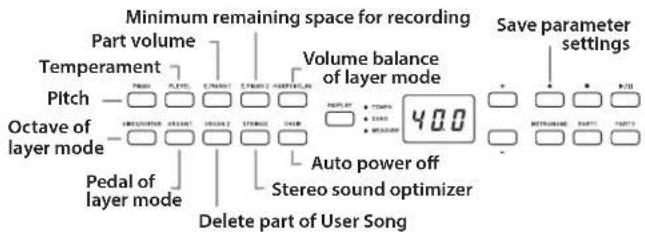
3. Press the + or - button to select a setting.
To restore the default setting, simultaneously press the + and - buttons.
Note The procedures for checking the amount of recording space remaining, for changing a layer octave and for saving parameter settings differ slightly.
4. To exit Function Mode, press the FUNCTION button.
The FUNCTION button goes dark.
Note The setting for the auto power off function when it is changed.
Note Normally, when the Poetry is turned off, all parameters return to their factory default settings. However performing the "Save parameter settings" (see page 16) operation before the Poetry is turned off, the tings specified for the pitch and part volume balance can be saved as the default settings.
Functions for Piano Song Mode
In Piano Song Mode, the FUNCTION button can be used to specify the muting level for each part of a Piano Song. The specified muting level is the same for both Part 1 and Part 2.
1. Press the FUNCTION button; the current muting level appears in the display.
The FUNCTION button lights up.
2. Press the + or - button to select a setting.
When muted with a setting of 0, there will be no sound, and with a setting of 12, the sound will be at full volume.
To restore the default setting (0), simultaneously press the + and - buttons.
3. After specifying the desired setting, press the FUNC- TION button.
The FUNCTION button goes dark.
List of functions
| Button Function | Setting Display | |
| Description [default setting] | ||
| PIANO Pitch*1 | 27.5...52.5 | |
| 427.5...430.0...440.0...452.5Hz [440.0] | ||
| In order to adapt the Poetry pitch to that of another instrument, you can adjust the pitch in steps of 0.5 Hz. | ||
| PLEYEL will | Temperament *2 | 00...02 |
| Equal...Werckmeister temperament [00: Equal] | ||
| Select from three temperaments, including the Equal temperament, Kirnberger temperaments and a Werckmeister temperament. | ||
| E.PIANO1 | Volume balance for parts | -12...00...12 |
| Only 2 layer...Both...Only 1 layer [00] | ||
| Specify the volume balance for parts during playback of a Piano Song. | ||
| E.PIANO2 | Minimum remaining space for recording | 100...000 |
| Remaining space of 100%...0% | ||
| HARPSI/CLAV | Volume balance of layer mode (or partner mode) | 1-9..9-1 |
| 1-9 (Layer 1 min.)...9-9 (Both max.)...9-1 (Layer 2 min.) [9-9] | ||
| Adjust the volume balance between the sounds for layer 1 (or left side) and layer 2 (or right side). | ||
| VIBES/GUITAR | Octave of layer mode (L1, L2)*3 | -01, 00, 01 |
| ±1 Octave [00] | ||
| Specify the sound range for layer 1 and layer 2. | ||
| ORGAN1 is saved by | Pedal of layer mode | o-_, o-o |
| Only 1, Only 2, Both layers [o-o] | ||
| Select the layer (or right side and left side) that the damper effect is applied to. | ||
| ORGAN2 set- | Delete part of User Song | P1, P2 |
| Part1, Part2: After selecting a part, press Play/Pause (▶/||) button to perform operation. | ||
| Delete the selected part of a User Song. | ||
| STRINGS | Stereo sound optimizer *4 | oFF, on |
| On, Off [oFF] | ||
| Turn on/off the effect that gives presence to the sound when the headphones are used. | ||
| CHOIR | Auto power off | oFF, on |
| Disable, 30 min [on] | ||
| Record (●) | Save parameter settings *5 | - |
| Press Record (●) button to perform operation. | ||
| Save the values and settings for parameters in the Function Mode. | ||
Additional Functions and Descriptions
*1: Pitch
Press the DISPLAY button to select 430Hz . Playing with the pitch of each PLEYEL sound set to 430Hz therefore allows you to enjoy the ambiance of that era. To return to 440Hz , simultaneously press the + and - buttons.
*2: Temperament
Temperament types
| Display | Temperament |
| 00 Equal temperament (default setting): Spacing all semitones at equal pitch intervals, this temperament is the most widely used. | |
| 01 Werckmeister: The Werckmeister III scale was created in the later Baroque period to allow relatively free transposition. | |
| 02 Kirnberger: The Kirnberger III scale is used mainly for tuning harpsichords. | |
About stretched tuning
In order to produce the most natural resonance, PIANO and PLEYEL sounds use a "stretched tuning" that makes the notes of the lower range slightly flatter than equal temperament, and the upper range slightly sharper. This is how an acoustic piano is normally tuned by professional tuners.
*3: Octave of layer mode (L1, L2)
Setting procedure
- Press the + or - button beside the display to select a layer.
L1 appears for layer 1, and L2 appears for layer 2.
- Press the Play/Pause button.
The octave setting (00) appears in the display.
- Press the + or - button beside the display to select an octave setting.
To restore the default setting, simultaneously press the + and - buttons.
To select the octave for the other layer, press the VIBES/GUITAR button to select the layer.

If the sound is in the Single mode, - - - appears in the display, and a setting cannot be specified.
*4: Stereo sound optimizer
This gives presence to the sound that is reproduced, as if playing an acoustic piano, even when headphones are used. When headphones are plugged into the headphone jack, enabled effects are applied to all sounds. The effects will be applied to the output from the LINE OUT jack.
*5: Save parameter settings
This operation will save the parameter settings in Function Mode (pitch and volume balance for parts), the metronome settings (accent sound, sound and volume) and the sound settings (reverb, chorus and brilliance) specified when the Record button was pressed.

The Record button lights up while the settings are being saved; do not turn off the Poetry until the button goes dark (not lit).
Resetting the parameters
To return all parameters to their factory default setting hold down the Play/Pause button and press the Power button until "8.8.8." appears in the display.

The User Songs will not be erased. To erase a User Song, perform the "Delete part of selected song" operation.
MIDI
What can you do with MIDI?
Thanks to MIDI, you can use the Poetry to control other instruments, use other instruments to control the Poetry, and use a sequencer to create complex musical pieces. When you use the Poetry keyboard or pedal, or select a sound, the notes, pedal activation and change in sound are transmitted to another instrument, or are recorded by a sequencer.
Connections
Commercially available MIDI cables are used to transfer MIDI data. Connect these cables from the MIDI jacks of the Poetry to the MIDI jacks of the external MIDI device that you want to exchange data with. There are two types of MIDI jack.
MIDI IN jack
This jack receives MIDI messages.
The MIDI IN jack lets you play the Poetry's sounds from an external MIDI device (e.g., MIDI keyboard or sequencer). Use a MIDI cable to connect the Poetry's MIDI IN jack to your external MIDI device's MIDI OUT jack.
MIDI OUT jack
This jack transmits MIDI messages.
The MIDI OUT jack lets you control an external MIDI device using the MIDI messages transmitted from the Poetry. Use a MIDI cable to connect the Poetry's MIDI OUT jack to your external MIDI device's MIDI IN jack.
MIDI function mode
When the Poetry is turned on, the MIDI parameters are set to transmission channel 1, all reception channels (1-16), Local On and Multi-Timbral On. These settings can be changed from the MIDI function mode.
Setting procedure for parameters in the MIDI function mode
- Hold down the FUNCTION button (for at least 3 seconds).
The FUNCTION button blinks and the PIANO button lights up.
- Press the appropriate button shown below to select a parameter.
The pressed button lights up, and the current setting appears in the display.
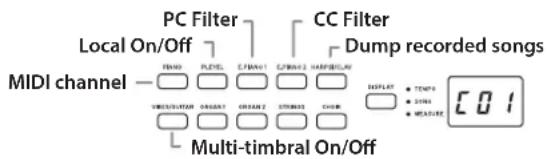
- Press the + or - button to select a setting.
- To exit Function Mode, press the FUNCTION button. The FUNCTION button goes dark.
Note All MIDI settings are applied to all sounds.
Note Normally, when the Poetry is turned off, all parameters return to their factory default settings.
List of MIDI functions
| Button Function | Setting Display | |
| Description [default setting] | ||
| PIANO MIDI | Channel *1 C01...C16 | |
| 1...16 [C01] | ||
| Specify the transmission channel for MIDI data. | ||
| PLEYEL | Local On/Off on, oFF | |
| Enabling (turn on)/disabling (turn off) the Poetry sound source [on] | ||
| Disable (turn off) in order to prevent echo back. | ||
| E.PIANO1 PC | Filter *2 on, oFF | |
| Enabling/disabling program change transmis-sion/reception filtering[oFF: transmission/reception] | ||
| If an incompatible program change number isreceived, the Poetry sound is not changed. | ||
| E.PIANO2 CC | Filter on, oFF | |
| Enabling/disabling control change transmis-sion/reception filtering [oFF: transmission/reception] | ||
| HARPSI/CLAV | Dump recorded songs *3 ddd | |
| Sending/receiving recorded song data | ||
| VIBES/GUITAR | Multi-timbral On/Off on, oFF | |
| Operating as a 16-part multi-timbral sound mod-ule [on: operating] | ||
*1: MIDI channel
In Layer Mode, this setting will be the transmission channel for layer 1, and the transmission channel for layer 2 will automatically be set to the following channel.
For example, if MIDI channel C07 is selected for layer 1, MIDI channel C08 will automatically be specified for layer 2. If MIDI channel C16 is selected for layer 1, MIDI channel C01 will be specified for layer 2.
*2: Table of sounds and corresponding program change numbers.
CC0: Bank Select (MSB) for all sounds is set to 121.
| Button | Bank | CC32 | PC | Sound |
| PIANO | 1 | 0 | 0 | Italian Grand Piano |
| 2 | 0 | 1 | Classic Piano | |
| 3 | 2 | 0 | Jazz Piano | |
| PLEYEL | 1 | 1 | 0 | PLEYEL Piano |
| 2 | 1 | 1 | PLEYEL Ballad | |
| 3 | 0 | 3 | PLEYEL 1843 | |
| E.PIANO1 | 1 | 0 | 4 | Stage Electric Piano |
| 2 | 1 | 4 | Bright Electric Piano | |
| 3 | 0 | 2 | Electric Grand Piano | |
| E.PIANO2 | 1 | 0 | 5 | Digital Electric Piano1 |
| 2 | 1 | 5 | Digital Electric Piano2 | |
| 3 | 2 | 4 | 60's Electric Piano | |
| HARPSI/CLAV | 1 | 0 | 6 | Harpsichord 1 |
| 2 | 1 | 6 | Harpsichord 2 | |
| 3 | 0 | 7 | Clav | |
| VIBES/ GUITAR | 1 | 0 | 11 | Vibraphone |
| 2 | 0 | 12 | Marimba | |
| 3 0 | 24 | Acoustic Guitar | ||
| ORGAN1 | 1 | 0 | 16 | Jazz Organ1 |
| 2 | 1 | 16 | Jazz Organ2 | |
| 3 | 0 | 17 | Jazz Organ3 | |
| ORGAN2 | 1 | 0 | 19 | Pipe Organ1 |
| 2 | 1 | 19 | Pipe Organ2 | |
| 3 | 2 | 19 | Positive Organ | |
| STRINGS | 1 | 0 | 48 | Strings |
| 2 0 | 50 | Cinema Strings | ||
| 3 1 | 50 | Analog Strings | ||
| CHOIR | 1 | 0 | 52 | Aah Choir |
| 2 | 1 | 52 | Ooh Voices | |
| 3 | 2 | 52 | Classical Choir | |
*3: Dump recorded songs
Recorded songs can be saved to a computer or songs saved to the computer can be imported onto the Poetry.
In order to dump recorded songs, MIDI data filer software (KORG MIDI Data Filer, available from www. korg.com) as well as a separately sold USB-MIDI interface are required.
Press the button; "ddd" appears in the display, and the Poetry enters send/receive standby mode.
Sending
Press the Play/Pause button to begin dumping.
While sending, the Play/Pause button blinks in red, and "---" appears in the display.
When sending is finished, the Play/Pause button goes dark (not lit), and "ddd" appears in the display.
Receiving
When sending begins from the computer, all recorded song data on the Poetry is erased.
While receiving, the Record button blinks in red, and " _ _ _ appears in the display.
When receiving is finished, the Record button goes dark (not lit), and "ddd" appears in the display.
To cancel sending/receiving, press the FUNCTION button to exit MIDI setting mode, or select a different MIDI parameter. However, if receiving is cancelled after it has already begun, all recorded song data on the Poetry will have been erased.
Recording to the Recorder
When the recorder of the Poetry is in recording standby mode, recording can be started with MIDI messages sent from an external MIDI keyboard, etc.
The performance is recorded only when Local Off is set.
- When Part 1 is in recording or recording standby mode: The performance is recorded when an event with the specified MIDI channel and a channel of +1 is received.
- When Part 2 is in recording or recording standby mode: The performance is recorded when an event with channels of +2 and +3 of the specified MIDI channel is received.
Using as a Bluetooth Speaker
If a computer, tablet, smartphone, audio player, etc., compatible with Bluetooth audio is connected, the Poetry can be used as a Bluetooth speaker.
Adjust the volume on the output from the device connected via Bluetooth audio. It cannot be adjusted with the VOLU-ME knob on the Poetry.
Note The auto power off function of the Poetry will not operate during playback of a device connected via Bluetooth audio.
Multiple devices cannot be connected at the same time.
Connecting a New Device (Pairing)
When a new device is connected, "pairing" (mutually registering connection information) must be performed.
Note The information for up to eight paired devices can be stored. When a ninth device is paired, the information for an existing device is deleted so that the new information can be stored.
Even if pairing failed, the information for that device may be stored on the Poetry. If the information for eight devices has already been stored, the information for an existing device is deleted.
In order to reconnect to the device whose information was deleted, delete the Poetry's information from that device, and then perform pairing again.
- When the Poetry is turned on, it enters the pairing standby mode.
Pairing is enabled for only 1 minute after "120" appears in the display when the Poetry is turned on.
- Turn on the Bluetooth function for the device to be connected, and then select "KORG Poetry" in the list of the settings screen that appears.
When a message appears, requesting permission for pairing, allow pairing.
When a passkey is requested, enter "0000".
Tip The passkey may also be called a PIN code, password, etc.
- If pairing is successful, the connected device enters a connection-ready mode and displays a connection with "KORG Poetry".
Since the displays differ depending on the device, refer to the manual of your device.
Reconnecting to a paired device
- If the Bluetooth function for the device to be connected was turned off when the Poetry was turned on. Turn on the Bluetooth function for the device to be connected.
- If the Bluetooth function for the device to be connected was turned on when the Poetry was turned on. Turn off the Bluetooth function for the device to be connected, and then turn it on again, or select "KORG Poetry" in the list of paired devices.
If a connection cannot be established again, turn off the Bluetooth function for the device, and then turn it on again. If a connection still cannot be established, cancel pairing or delete the information from the device, and then try performing the operation described above in "Connecting a New Device (Pairing)".
Cutting the Connection
Perform the operation by using the Bluetooth settings screen on the connected device.
If the Poetry is turned off while it is connected to device, it may be difficult for the connection to be re-established the next time.
Appendix
Troubleshooting
If any of the following problems should occur, carefully examine the instrument to see if you can discern what the trouble may be, and try resolving it by following the suggestions below. If the instrument still does not function properly, please contact your dealer.
The instrument will not turn on
- Check that the AC adapter is correctly connected to the piano and the outlet.
- Make sure that the power cord is fully plugged into the AC adapter.
No sound
- Is the cable from the speaker box connected securely to the speaker connector on the Poetry?
- Be sure that the volume is set to an adequate level, and not set to the MIN value.
- Make sure that the MIDI Local function is not set on OFF (see page 18). If it is, set it to ON (or turn the instrument off and then on again).
- Check to see that nothing is connected to the headphone jacks; any connection to either of these jacks will mute the internal speakers.
Notes are interrupted or sound generation is heavy
The maximum polyphony may have been exceeded; see "About maximum polyphony."
The sound has changed.
Effects such as reverb and chorus are saved with each sound.
The effect settings that are applied differ depending on the order that sounds are selected in Layer Mode or the sounds selected for a User Song; therefore, different nuances may be heard even with the same combination of sounds. Be careful when selecting sounds.
The pitch or tone of the piano sounds wrong in some key regions
The Poetry's piano sounds replicate the sound of an actual piano as faithfully as possible. This means that in some regions of the keyboard, you may feel that certain overtones seem stronger, affecting the pitch or tone. This is not a malfunction.
Your external MIDI device does not respond to MIDI data sent from the Poetry.
Make sure that all MIDI cables are correctly connected.
Make sure that the Poetry is transmitting MIDI data on the same channel that the MIDI device is receiving on.
About maximum polyphony
If the number of notes being played simultaneously exceeds the maximum polyphony, some notes will be lost. The Poetry is equipped with a mechanism that stops the first note played to give priority to notes played later. Some Poetry sounds, although they may be a single sound, are generated by two or more oscillators (one note of a sound-generating circuit). Sounds using just one oscillator, such as the bank 1 and 2 sounds of the VIBES/GUITAR button, have a maximum polyphony of 120 notes. Sounds using two oscillators, such as the bank 1 and 2 sounds of the E.PIANO2 button, have a maximum polyphony of 60 notes.
120 ÷ Number of sound oscillators = Maximum polyphony
Keep the maximum polyphony in mind and carefully choose sounds when using Layer Mode to play two sounds simultaneously or when using the damper pedal.
Specifications
Keyboard RH3 (Real weighted hammer action 3) 88 keys (A0-C8)
Touch Curves Five available
Pitch Control Transpose, Master tuning
Temperament Three types
Sound Generation Stereo PCM System
Polyphony 120 notes (max)
- The maximum polyphony varies depending on the sound.
Sounds 30 sounds (10 x 3 banks)
Effects Brilliance,Reverb,Chorus (3 levels each)
Recorder Two parts, maximum 14,000 notes (approximately 100KB
Demo Songs 60
(Sound Demo Song × 10 Piano Song × 50
Metronome Tempo, Time Signature, Accent, sound and Volume controls
Pedal
Damper, Sostenuto, Soft (*half-pedaling supported)
Connections
LINE OUT jack, Headphone () jack × 2 ,MIDI IN, OUT) jacks, Pedal connector, Speaker connector
Controls
Power button, VOLUME knob, PIANO SONG button, TRANSPOSE button, FUNCTION button, TOUCH button, BRILLIANCE button, REVERB button, CHORUS button, BANK button, Sound button × 10 DISPLAY button, + - buton, METRONOME button, play back/pause (口 / 口) button, stop (■) button, record (●) button, PART1 button, PART2 button
Wireless method:
Bluetooth (A2DP Sink)
Speakers 10cm× 2
Amplification 25W× 2
Power supply DC 24 V (C-C), AC adapter (included)
Power consumption 18 W
Dimensions (× × )
1346× 347× 770mm / 52.99× 13.66× 30.31 inches 1346× 347× 926mm / 52.99× 13.66× 36.46 inches (with the key cover opened)
Weight 36.7kg / 80.91 lbs. (including Stand)
Included Items
AC adapter, Power cord, Stand with Speaker Box & Pedal unit, Chopin Piano Masterpieces, Owner's Manual
- Specifications and appearance are subject to change without notice for improvement.
Précautions
Emplacement
Sound Demo Song List, Piano Song List-98
MIDI Implementation Chart 99
Introduction
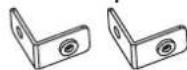
Supports de montage x2 pcs.

Rivet a pression x 1 pc.

Pitch Control Transposition, accordance fin
(IN, OUT), Prise PEDAL, Prise SPEAKER
Commandes
Bouton d'alimentation, Commande VOLUME, Bouton PIANO SONG, Bouton TRANSPOSE, Bouton FUNCTION, Bouton TOUCH, Bouton BRILLIANCE, Bouton REVERB, Bouton CHORUS, Bouton BANK, boutons de timbres × 10, Bouton DISPLAY, Boutons + -, Bouton METRONOME, Bouton de lecture/pause (▶/II), Bouton d'arrêt (■), Bouton d'enregistrement (●), Bouton PART1, Bouton PART2
Connexion sans fil:
Bluetooth [A2DP Sink]
Alimentation DC 24 V (OeO)
Dimensions (L x P x H)
1346× 347× 770mm
1346× 347× 926mm
- Specifications and appearance are subject to change with notice for improvement.
Vorsichtsmaßnahmen
Aufstellungssort
Sound Demo Song List, Piano Song List-98
MIDI Implementation Chart 99
Einführung
- Specifications and appearance are subject to change without notice for improvement.
Precauciones
Ubicación
Sound Demo Song List, Piano Song List-98
MIDI Implementation Chart 99
Introduccion
Consumoelectrico 18W
Dimensiones (Anch. x Prof. x Alt.)
1346× 347× 770mm
…·························································
Sound Demo Song List, Piano Song List
Sound Demo Song List
| Song No. | Sound Buttons Sound Title Composite | ||||
| d01 PIANO | Italian Grand Piano | Waltz in F major Op.34-3 "Valse Brillante" F.Chopin *1 | |||
| d02 PLEYEL | PLEYEL Piano 184 | Nocturne in B | minor Op.9-1 F.Chopin *2 | ||
| d03 E.PIANO | Stage Electric Piano | Piano Jam Session | Naoki Nishi | ||
| d04 | E.PIANO2 | Digital Electric Piano2 | In Memory | Michael Geisel | |
| d05 | HARPSI/CLAV | Harpsichord1 | Les Petis Moulins a vent | F.Couperin | *1 |
| d06 | VIBES/GUITAR | Vibraphone | Gekka-Bijin | Naoki Nishi | |
| d07 | ORGAN1 | Jazz Organ1 | Improvisation | Michael Geisel | |
| d08 | ORGAN2 | Pipe Organ1/Positive Organ | Prelude and Fugue in C Major, BWV 553 | J.S.Bach | |
| d09 STRINGS | Italian GrandPiano/Strings/Cinema Strings/Analog Strings | Prelude in E minor Op.28-4 | F.Chopin (arranged by Katsuhiro Oguri) | *1 | |
| d10 | CHOIR | Aah Choir | Autumn Flares | Michael Geisel | |
Piano Song List
All piano songs have been composed by F. Chopin.
| No. | Title | left-hand/right-hand separation function | No. | Title | left-hand/right-hand separation function | ||
| 1 | Etude in E major Op.10-3 "Chanson de l'adieu" | o | *1 | 26 Etude in C # minor Op.10-4 | x | *2 | |
| 2 | Waltz in D major Op.64-1 "Petit chien" | o | *1 | 27 Etude in A b major Op.25-1 "Aeolian Harp" | x | *2 | |
| 3 | Fantaisie-Impromptu in C # minor Op.66 | o | 28 Etude in E minor Op.25-5 | x | *2 | ||
| 4 | Nocturne in E b major Op.9-2 | o | 29 Etude in G b major Op.25-9 "Butterfly" | x | *2 | ||
| 5 | Mazurka in B b major Op.7-1 | o | 30 Etude in A minor Op.25-11 "Winter Wind" | x | *2 | ||
| 6 | Prelude in C major Op.28-1 | o | *1 | 31 Etude in C minor Op.25-12 "Ocean" | x | *2 | |
| 7 | Prelude in E minor Op.28-4 | o | *1 | 32 Prelude in B b minor Op.28-16 | x | *2 | |
| 8 | Prelude in B minor Op.28-6 | o | *2 | 33 Prelude in D minor Op.28-24 | x | *2 | |
| 9 | Prelude in A major Op.28-7 | o | *1 | 34 Mazurka in G major Op.67-1 | x | *2 | |
| 10 | Prelude in D b major Op.28-15 "Raindrop" | o | *1 | 35 Mazurka in G minor Op.67-2 | x | *2 | |
| 11 | Nocturne in B b minor Op.9-1 | o | *2 | 36 Mazurka in C major Op.67-3 | x | *2 | |
| 12 | Waltz in E b major Op.18 "Grand Valse Brillante" | o | *1 | 37 Mazurka in A minor Op.67-4 | x | *2 | |
| 13 | Waltz in A b major Op.34-1 "Valse Brillante" | o | *1 | 38 Ballade in G minor Op.23 | x | *2 | |
| 14 | Waltz in C # minor Op.64-2 | o | *1 | 39 Ballade in F minor Op.52 | x | *2 | |
| 15 | Waltz in F major Op.34-3 "Valse Brillante" | o | *1 | 40 Nocturne in D b major Op.27-2 | x | *1 | |
| 16 | Waltz in A b major Op.69-1 "L'adieu" (Op.posth) | o | *1 | 41 Nocturne in C # minor KK.IVa-16/Bl 49 (Op.posth) | x | *1 | |
| 17 | Waltz in B minor Op.69-2 (Op.posth) | o | *1 | 42 Polonaise in G minor KK.Ila-1 (Op.posth) | x | *1 | |
| 18 | Waltz in E minor KK.IVa-15 (Op.posth) | o | *1 | 43 Barcarolle in F # major Op.60 | x | *1 | |
| 19 | Waltz in A minor KK.IVb-11 (Op.posth) | o | *1 | 44 Sonate II in B b minor Op.35-3 | x | *1 | |
| 20 | Etude in G b major Op.10-5 "Black Keys" | o | 45 Sonate III in B minor Op.58-1 | x | *1 | ||
| 21 | Etude in C minor Op.10-12 "Revolutionary" | o | *2 | 46 Sonate III in B minor Op.58-2 | x | *1 | |
| 22 | Polonaise in A major Op.40-1 "Militaire" | o | *1 | 47 Sonate III in B minor Op.58-3 | x | *1 | |
| 23 | Polonaise in A b major Op.53 "Héroïque" | o | *2 | 48 Sonate III in B minor Op.58-4 | x | *1 | |
| 24 | Scherzo in B b minor Op.31 | x | *2 | 49 Berceuse in D b major Op.57 | x | *1 | |
| 25 | Etude in C major Op.10-1 "Water fall" | x | *2 | 50 Largo in E b major KK.IVb-5 | x | *1 |
1: Performed by Katsuhiro Oguri / 2: Performed by Aki Fujii
Piano Song data supervision: Katsuhiro Oguri
| Function... Transmitted | Recognized | Remarks | ||
| Basic Channel | Default | 1 | 1 | |
| Changed | 1-16 | 1-16 | ||
| Mode | Default | X | 3 | |
| Messages | X | X | ||
| Altered | ********** X | |||
| Note Number | True Voice | 3-125 | 0-127 | Reception range differs depending on sound. |
| ********** X | 0-127 | |||
| Velocity | Note On | O 9n, V=1-127 | O 9n, V=1-127 | |
| Note Off | X 8n, V=64 | X | ||
| After Touch | Key's | X | X | |
| Channel | X | O | ||
| Pitch Bend | X | O | ||
| Control Change | 0, 32 | O | O | Bank Select (MSB, LSB) *1 |
| 1 | X | O | Modulation *1 | |
| 5 | X | O | Portamento Time *1 | |
| 6 | X | O | Data Entry MSB *1 | |
| 7 | O | O | Volume *1 | |
| 10 | X | O | Pan *1 | |
| 11 | X | O | Expression *1 | |
| 38 | X | O | Data Entry LSB *1 | |
| 64, 66, 67 | O | O | Damper, Sostenuto, Soft *1 | |
| 65 | X | O | Portamento On/Off *1 | |
| 71 | X | O | Resonance *1 | |
| 72, 73 | X | O | EG Time (Release, Attack) *1 | |
| 74 | X | O | Brightness *1 | |
| 75, 76, 77, 78 | X | O | Decay Time, Vibrato Rate, Depth, Delay *1 | |
| 91, 93 | X | O | Reverb Send, Chorus Send *1 | |
| 100, 101 | X | O | RPN (LSB, MSB) *1 | |
| 120 | X | O | All Sounds Off *1 | |
| 121 | O | O | Reset All Controllers *1 | |
| Program Change | True Number | O 0-52 | O 0-52 | Only some values can be set. *2 |
| ********** X | 0,1,2,3,4,5,6,7,11,12, 16,17,19,24,48,50,52 | Used with Bank Select; all 30 sounds can be selected. | ||
| System Exclusive | O | O | *3 | |
| System Common | Song Position | X | X | |
| Song Select | X | X | ||
| Tune Request | X | X | ||
| System Real Time | Clock | X | X | |
| Commands | X | X | ||
| Aux Messages | Local On/Off | X | O | *1 |
| All Notes Off | O | O (123-125) | *1 | |
| Active Sensing | O | O | ||
| System Reset | X | X | ||
| Notes *1: Transmitted and received when CC filtering is disabled. *2: Transmitted and received when PC filtering is disabled. *3: Includes Inquiry and GM Mode On. Though GM Mode On is recognized, not all GM sounds are supported. | ||||
保证規定(必すお読み<だせ)
https://korg.com/support_j/

WARNING!
This Product is only suitable for sale in Japan. Properly qualified service is not available for this product if purchased elsewhere. Any unauthorised modification or removal of original serial number will disqualify this product from warranty protection.
- 一匕斯·せ夕一: