AirMini - Medical device ResMed - Free user manual and instructions
Find the device manual for free AirMini ResMed in PDF.


| Product Type | Auto-adjusting continuous positive airway pressure (CPAP) device for the treatment of obstructive sleep apnea (OSA) |
| Brand | ResMed |
| Model | AirMini |
| Indications | Treatment of OSA in patients weighing over 30 kg |
| Contraindications | Severe pulmonary bullous disease, pneumothorax, hypotension, dehydration, cerebrospinal fluid leak, recent cranial surgery |
| Operating Pressure | 4 to 20 cm H₂O (4 to 20 hPa) |
| Dimensions (W x D x H) | 136 mm x 84 mm x 52 mm |
| Weight | 300 g |
| Power Supply | 20 W power supply: input 100-240 V, 50-60 Hz; output 24 V, 0.83 A |
| Typical Power Consumption | 6.3 W; standby 1 W |
| Connectivity | Bluetooth Class 2 (2402-2480 MHz, max power +4 dBm) |
| Comfort Features | SmartStart, SmartStop, Ramp, Expiratory Pressure Relief (EPR) |
| Humidification | Waterless humidifier (HumidX, HumidX Plus, HumidX F20) – replace every 30 days after opening |
| Air Filter | Standard or hypoallergenic; replace every 6 months or more often if obstructed |
| Cleaning | Breathing circuit and connectors: warm soapy water, air dry; do not wash the humidifier |
| Operating Conditions | Temperature: 5 to 35 °C; humidity: 10-95% non-condensing; altitude: up to 2591 m |
| Storage | Temperature: -25 to 70 °C; humidity: 5-95% non-condensing |
| Classification | Class II (double insulation), Type BF, IP22 |
| Electromagnetic Compatibility | Complies with FCC, IC, and CE; portable RF equipment at more than 10 cm |
| Air Travel Use | Complies with FAA (RTCA/DO-160); set to airplane mode (Bluetooth off) |
| Warranty | Device and power supply: 2 years; masks and accessories: 6 months |
| Nominal Service Life | Device: 5 years; breathing circuit and connectors: 6 months |
| Repairability | Do not open; repair by authorized ResMed technician only |
Frequently Asked Questions - AirMini ResMed
User questions about AirMini ResMed
0 question about this device. Answer the ones you know or ask your own.
Ask a new question about this device
Download the instructions for your Medical device in PDF format for free! Find your manual AirMini - ResMed and take your electronic device back in hand. On this page are published all the documents necessary for the use of your device. AirMini by ResMed.
USER MANUAL AirMini ResMed
ResMed.com/AirMiniApp

Download on the
App Store

GET IT ON
Google Play
ENGLISH
Welcome
The ResMed AirMini™ system combines ResMed's AirMini self-adjusting pressure machine, masks and the AirMini by ResMed™ App.

WARNING
Read this entire guide before using the machine.
Indications for use
The AirMini self-adjusting system is indicated for the treatment of obstructive sleep apnea (OSA) in patients weighing more than 30 kg. It is intended for home and hospital use.
Clinical benefits
The clinical benefit of CPAP therapy is a reduction in apnoeas, hypopnoeas and sleepiness, as well as improved quality of life.
The clinical benefit of humidification is the reduction of positive airway pressure related side effects.
Contraindications
Positive airway pressure therapy may be contraindicated in some patients with the following pre-existing conditions:
• severe bullous lung disease
- pneumothorax
• pathologically low blood pressure
- dehydration
• cerebrospinal fluid leak, recent cranial surgery, or trauma.
Adverse effects
You should report unusual chest pain, severe headache, or increased breathlessness to your prescribing physician. An acute upper respiratory tract infection may require temporary discontinuation of treatment.
English 1
The following side effects may arise during the course of therapy with the machine:
- nosebleed
- bloating
- ear or sinus discomfort
- eye irritation
- skin rashes.
• drying of the nose, mouth, or throat
At a glance
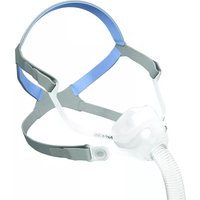
The AirMini system includes the AirMini machine, a power supply unit, a drawstring bag, and one of the following:
• AirMini setup pack - F30: air tubing and full face connector
- AirMini setup pack - F20: air tubing, full face connector and HumidX™ F20
- AirMini setup pack - N20: air tubing, N20 connector, HumidX and HumidX Plus
- AirMini mask pack for N30: air tubing, AirFit™ N30 for AirMini mask (M), N30 cushion (S), N30 cushion (SW), HumidX and HumidX Plus
- AirMini mask pack for P10: air tubing, AirFit P10 for AirMini mask (M), P10 cushion (S), P10 cushion (L), HumidX, HumidX Plus and AirFit P10 headgear clips
Your AirMini system
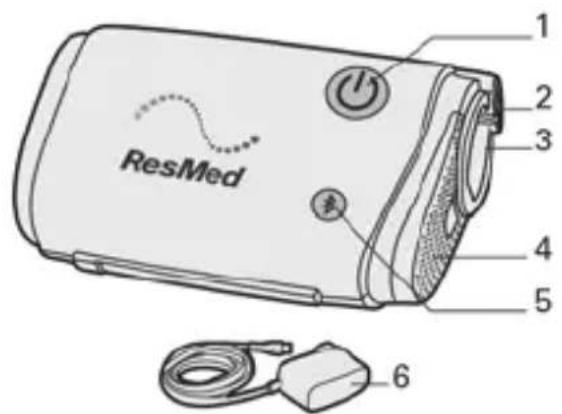
- Start/Stop button
- Power inlet
- Power outlet
- Air Filter cover
- Bluetooth button
- 20W Power supply unit
Your AirMini machine is designed to work with ResMed's AirMini app. However, the AirMini app is not essential to operate the machine. For more information on the AirMini app, refer to Using your machine with the AirMini app or the AirMini app Patient eHelp.
Make sure all parts and accessories used with the machine are compatible. For compatibility information, refer to ResMed.com.
Mask Connectors
The AirMini machine is compatible with ResMed masks. For a full list, see the Mask/Device Compatibility list on ResMed.com/downloads/masks.
Note: Not all masks are available in all regions.
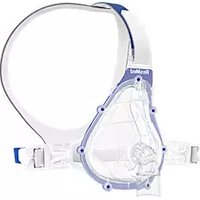
Full face mask connector (for use with compatible full face masks)
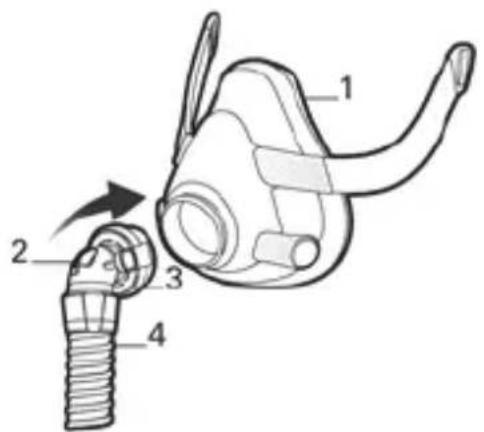
- Full face mask
- Anti-Asphyxia Valve (AAV)
- Vent
- AirMini tubing
English 3
Nasal mask connector (for use with compatible nasal masks)
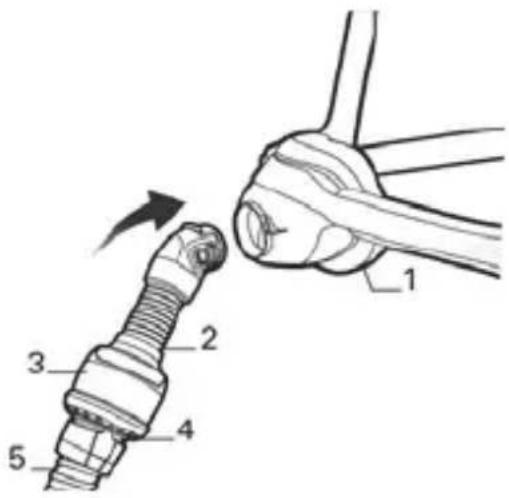
-
Nasal mask
-
Nasal connector
-
Vent module
-
Vent
-
AirMini tubing
AirFit N30 for AirMini
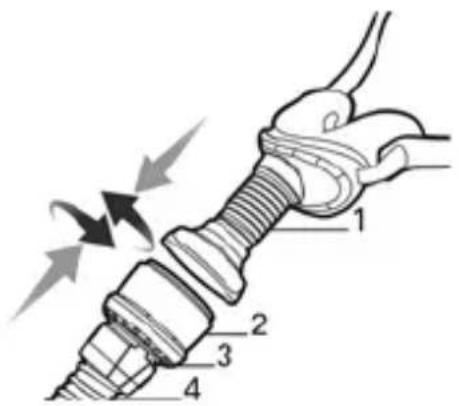
-
AirFit N30 for AirMini
-
Vent module
-
Vent
-
AirMini tubing
AirFit P10 for AirMini
-
AirFit P10 for AirMini
-
Vent module
-
Vent
-
AirMini tubing
Humidification
The AirMini system uses a waterless humidifier that is designed to provide more comfort to your therapy. This will improve the moisture level in the air you breathe and offer relief from possible dryness.
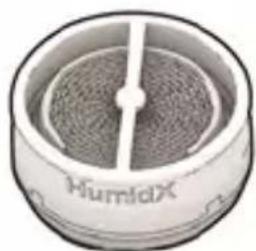
There are different types of waterless humidifiers that vary depending on the mask and therapy requirements:
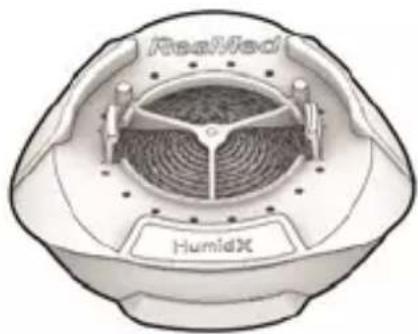
- HumidX F20 - used with the masks to provide more comfort during therapy.
natural_image
Close-up of a cylindrical electronic component with a mesh pattern and a central rod (no visible text or symbols)- HumidX™ (blue) - starting point for finding the right level of humidification.
- HumidX Plus (gray) - improves the humidity level further and is useful when the ambient humidity level is very low (eg high altitudes, on an aircraft).
Notes:
- The waterless humidifier should not be washed or immersed in water as this will affect the performance of therapy.
- The humidifier must be replaced within 30 days of opening the sealed pack.
- The humidifier is for single-patient, multiple-use only.
Setting up and starting therapy
Use your AirMini machine only as directed by your physician or healthcare provider. For information on fitting your mask, refer to the mask user guide.
Using the full face connector
natural_image
Diagram showing a mechanical component being inserted into a plug, with no visible text or symbols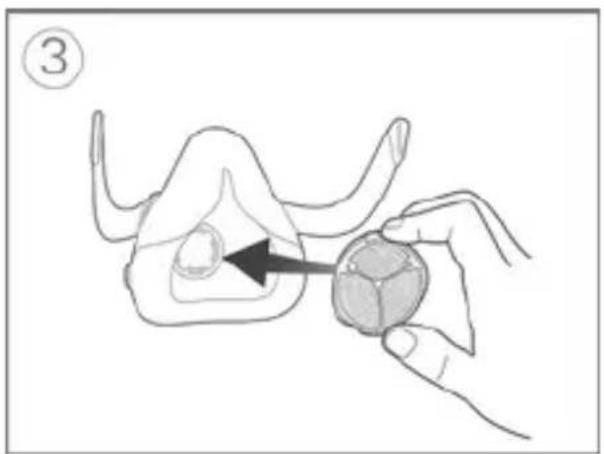
natural_image
Illustration of a hand holding a small animal model with an arrow pointing to the body area (no text or symbols)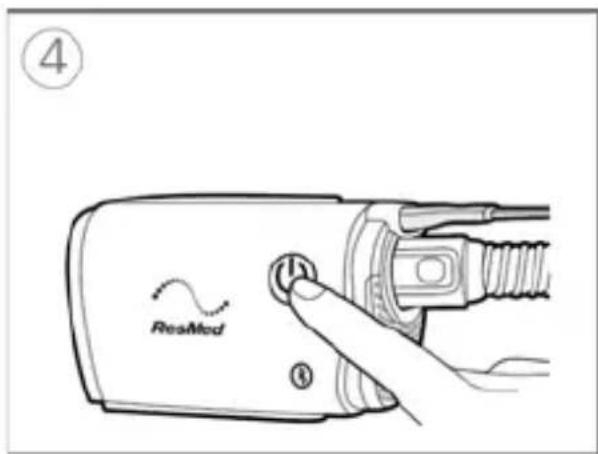
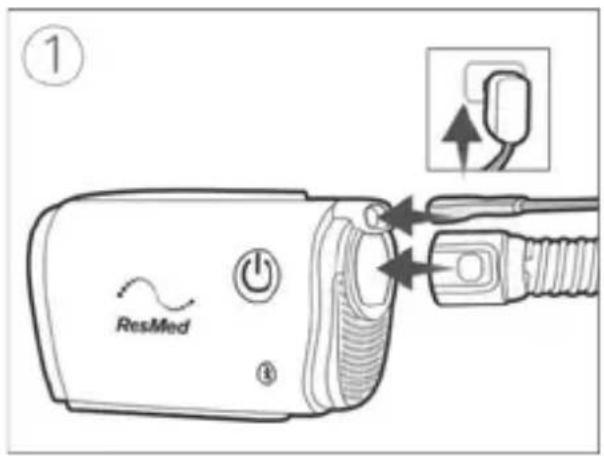
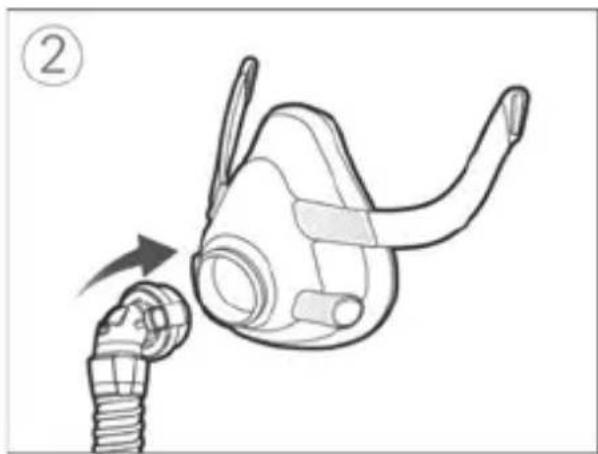
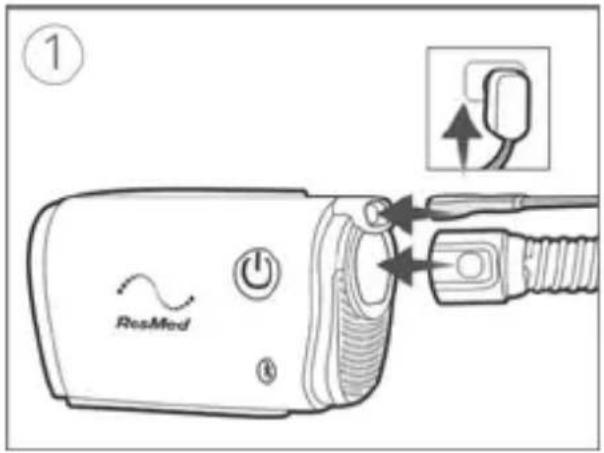
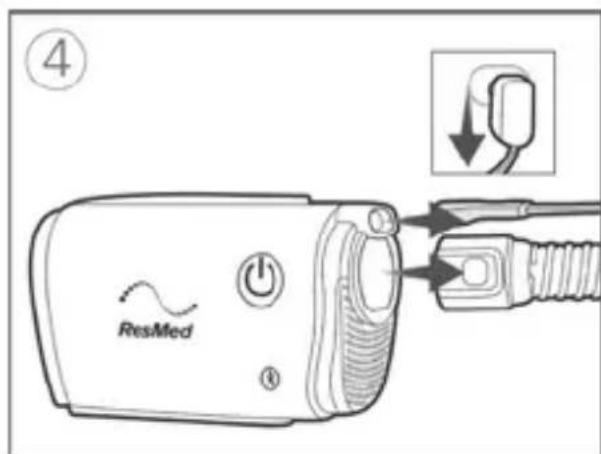
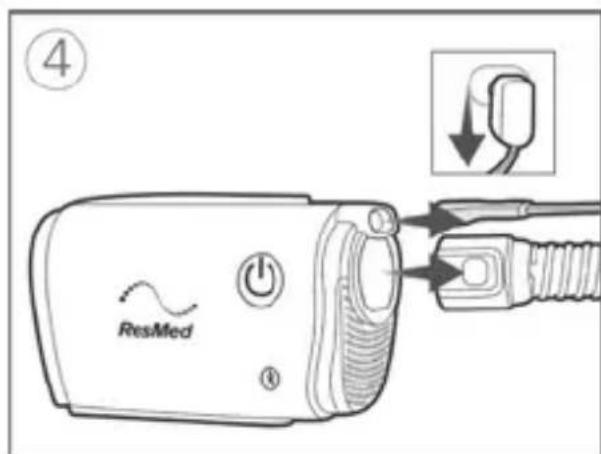
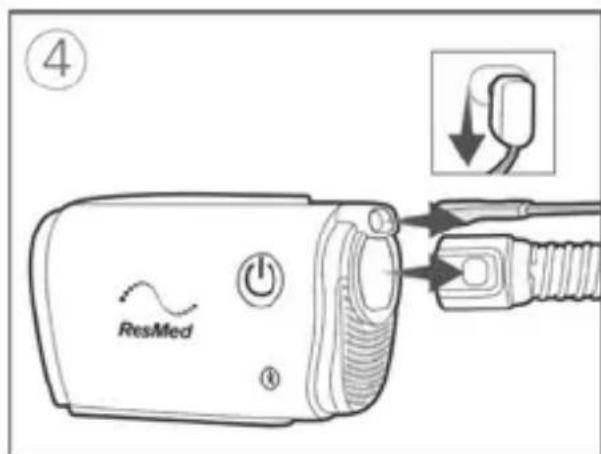
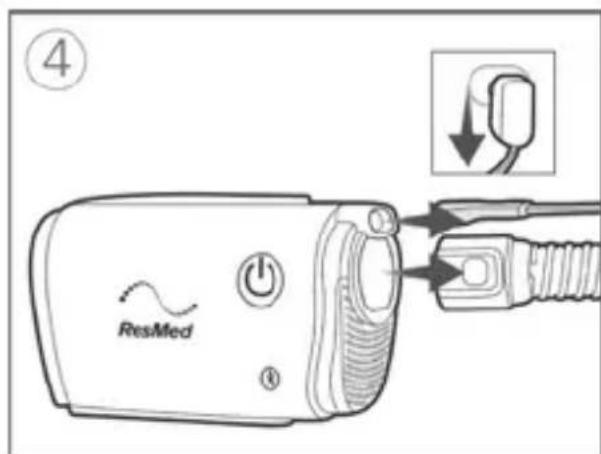
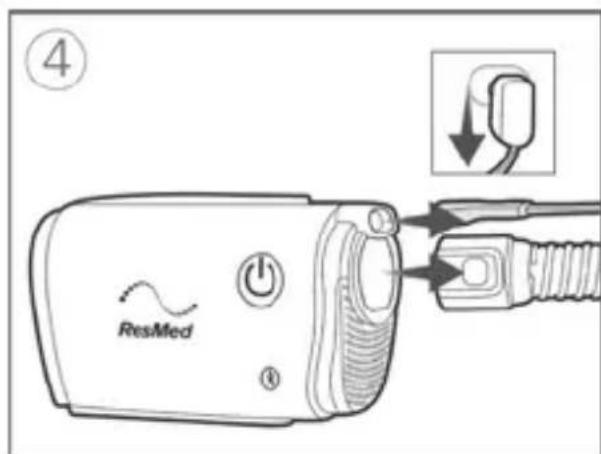
- Plug the power supply unit into the machine and power outlet. Connect the gray end of the AirMini tubing firmly to the air outlet.
- Attach the connector to your mask.
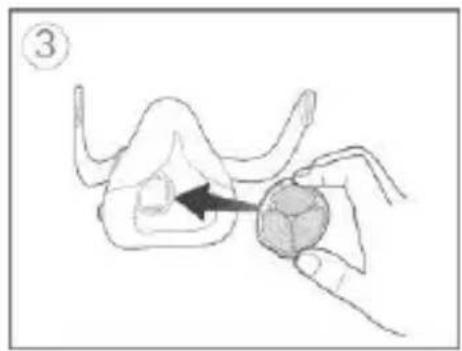
- To add optional humidification: With the ResMed logo facing away, insert the HumidX F20 into the air inlet of the F20 mask until it clicks in place.
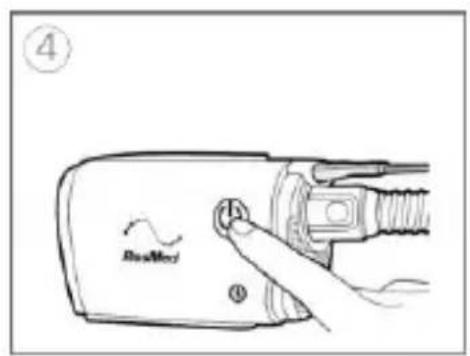
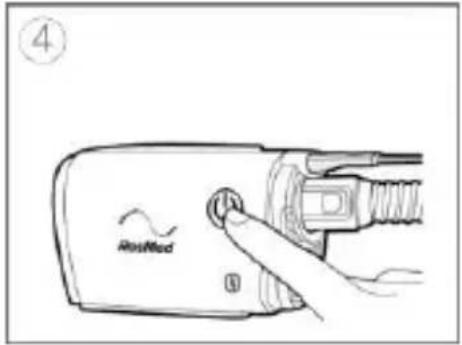
- Fit the mask as instructed in the mask user guide. Press the Start/Stop button or breathe normally if SmartStart™ is enabled.
Using the nasal or the pillows connector
natural_image
Illustration of two mechanical fasteners with arrows indicating motion (no text or symbols)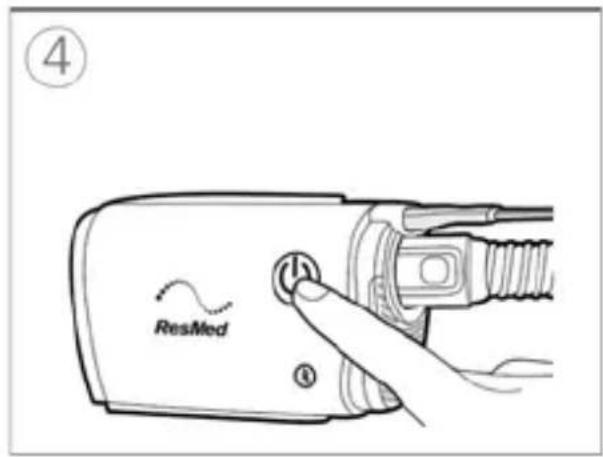
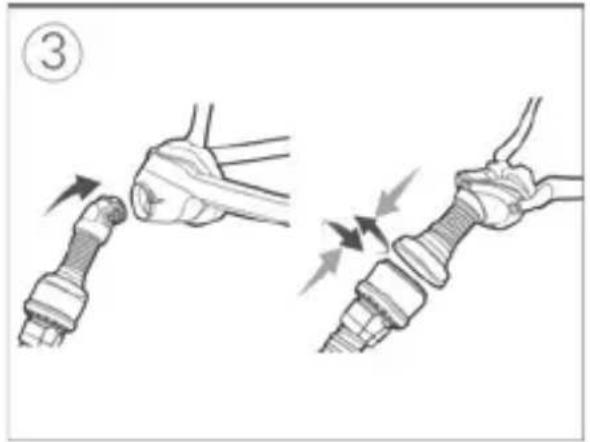
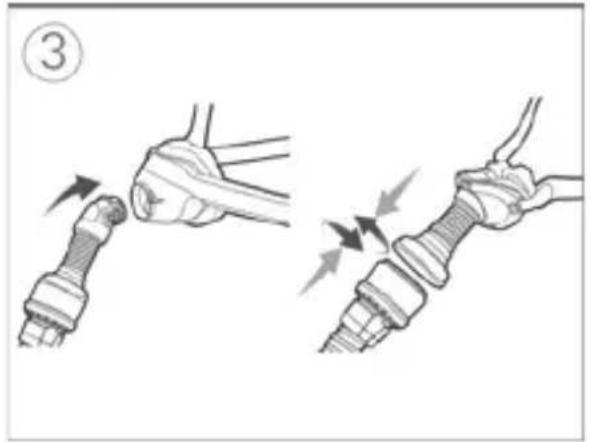
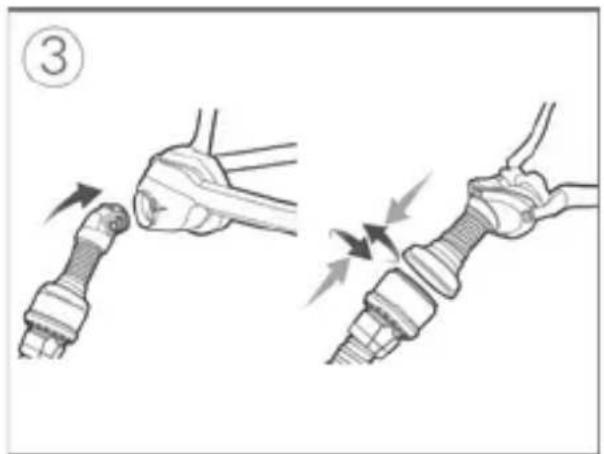
- Plug the power supply unit into the machine and power outlet. Connect the gray end of the AirMini tubing firmly to the air outlet.
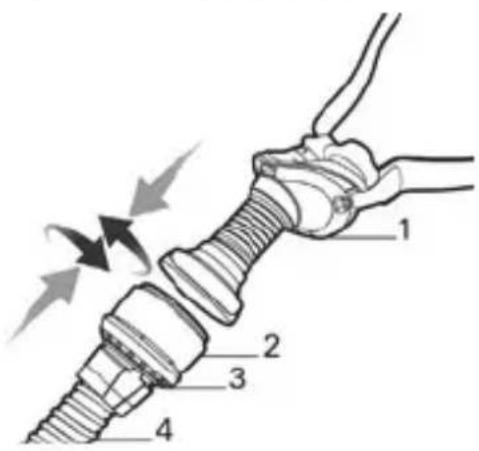
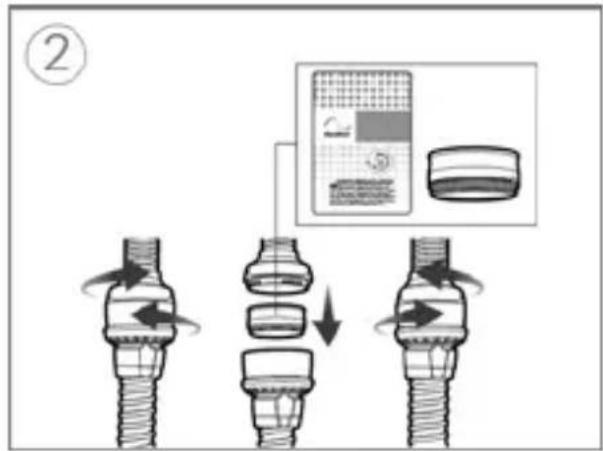
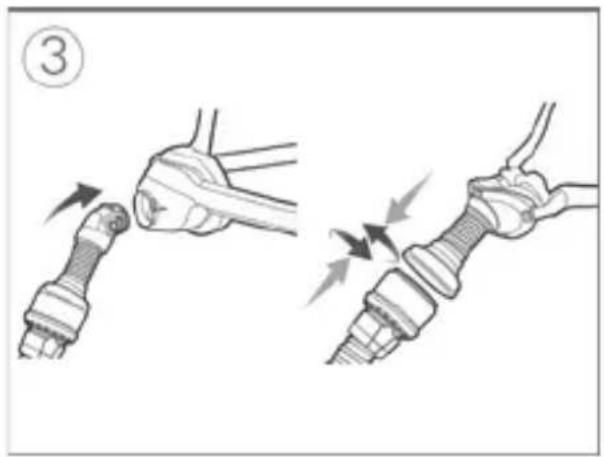
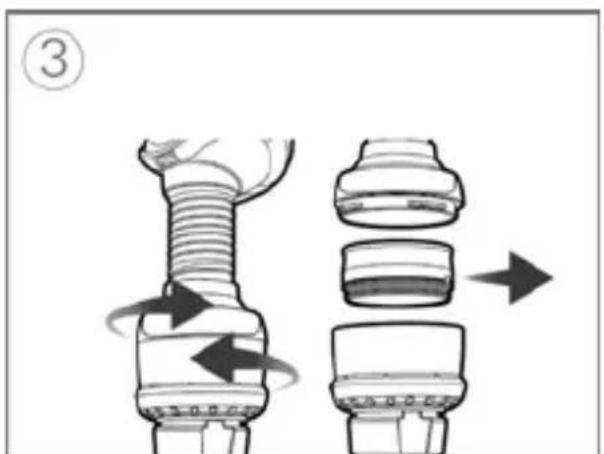
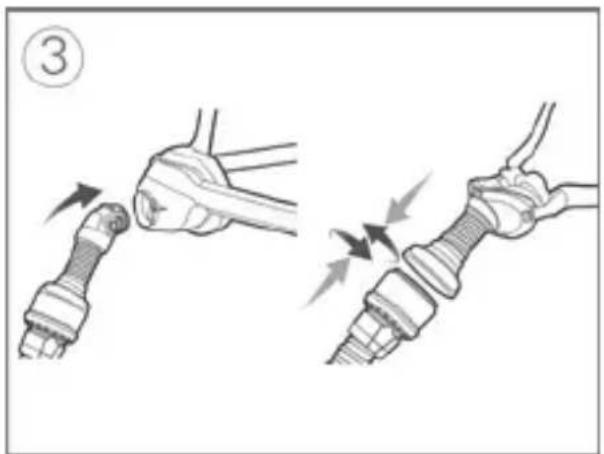
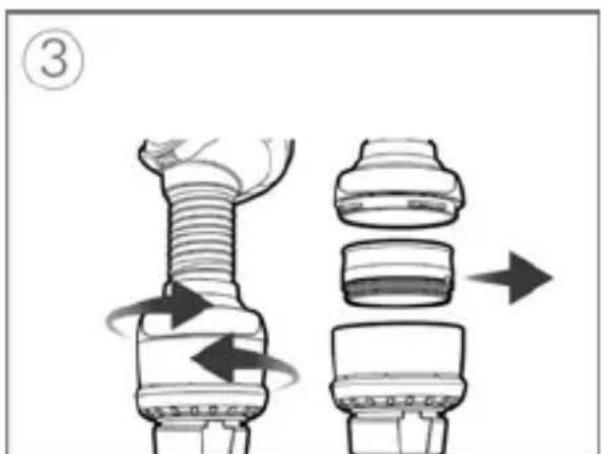
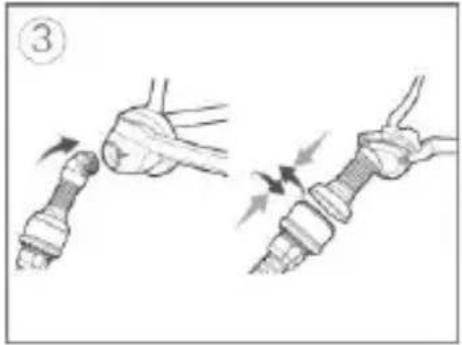
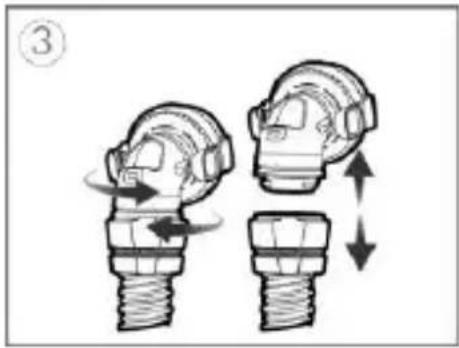
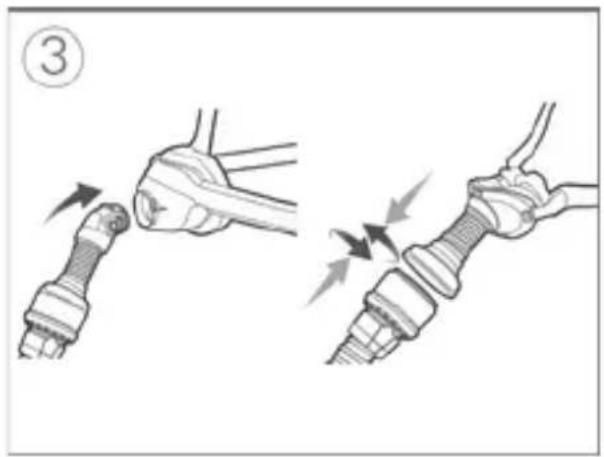
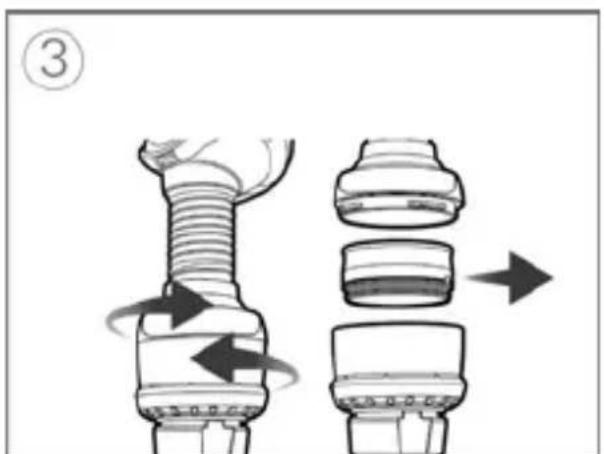
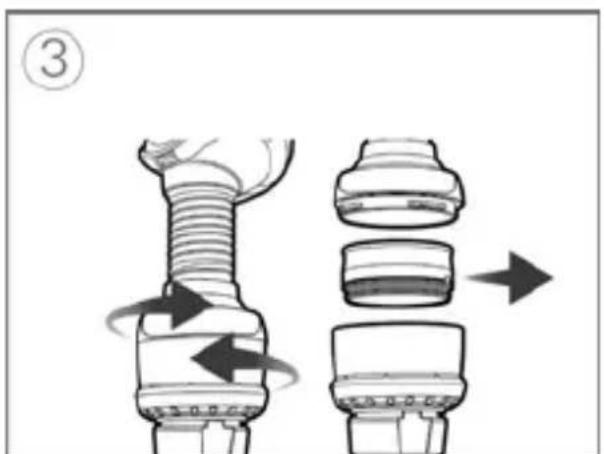
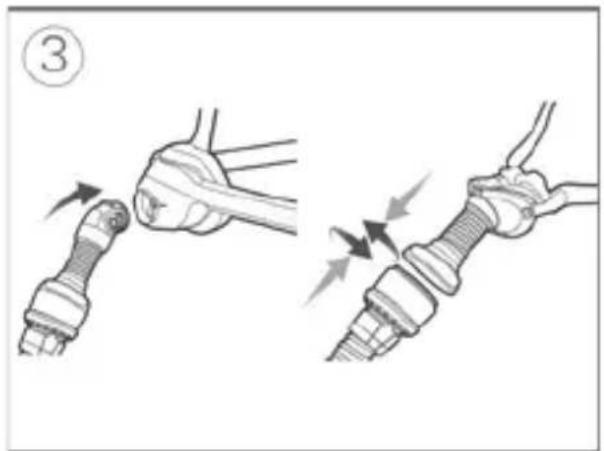
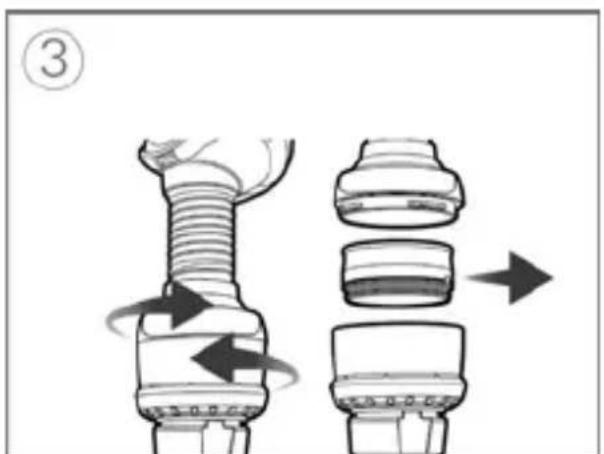
- To add optional humidification: Open the connector by gently twisting it. Hold the HumidX at the sides, colored side pointing downwards and insert it. Gently push together the connector and twist until it locks in place.
- Fit the mask as instructed in the mask user guide. Attach the connector to your mask.
- Press the Start/Stop button or breathe normally if SmartStart™ is enabled
Stop therapy
- Remove your mask.
- Press the Start/Stop button or wait until the machine stops if SmartStop is activated.
English 7
Comfort features
Ramp Time, Pressure Relief and SmartStart are enabled on your machine.
Ramp Time
Designed to make the beginning of therapy more comfortable, Ramp Time is the period during which pressure gradually increases from a lower start pressure to the prescribed treatment pressure.
SmartStart
When SmartStart is turned on, therapy starts automatically when you breathe into your mask.
SmartStop
When SmartStop is turned on, therapy stops automatically after a few seconds when you remove your mask.
Expiratory Pressure Relief
Designed to make therapy more comfortable, Expiratory Pressure Relief (EPR) maintains optimal treatment during inhalation and reduces the delivered mask pressure during exhalation.
Changing comfort features
Your AirMini machine has been set up for your needs by your provider, but you may find that you want to make small adjustments to comfort settings to make your therapy more comfortable.
For more information about comfort settings, or for information on changing these settings, refer to the AirMini app Patient eHelp.
Using your machine with the AirMini app
Your AirMini machine can be used with ResMed's AirMini app. Once you have paired and connected your machine to your smart device via Bluetooth, you can start and stop therapy, change comfort settings and view your therapy data via the AirMini app. Data sent via Bluetooth is encrypted to protect your privacy.
Connecting your machine and smart device
Before connecting the AirMini machine to a smart device, ensure that the latest version of the AirMini app is installed on the smart device. If not, download the app from the App Store ^SM or the Google Play store.
-
Ensure your machine is set up correctly and plugged into a power source.
-
On your smart device, enable Bluetooth.
-
Open the AirMini app.
The first time you open the AirMini app, you will be asked to:
• provide consent for the use of analytics
- accept ResMed's terms of use and privacy notice
• provide consent for the AirMini app to upload data to the cloud.
Select the necessary check boxes to provide consent and accept policies.
Notes:
- The check box for analytics consent is selected by default.
- From time to time, the terms of use may be updated and you may be required to provide consent again.
- If you agree to allow the AirMini app to upload your data to the cloud, it will be uploaded from the AirMini app to a secure server.
• There are two distinct data upload features:
Background data upload – allows the app to upload all data that has not already been uploaded to the cloud without any user interaction (ie, app automatically uploads data whenever new data is available and active internet connection is present). You must provide consent to enable this feature as it is disabled by default. This feature can be enabled or disabled anytime on the More screen.
On-demand data upload – clinician or patient-initiated feature that uploads all data that has not already been sent to the cloud. This feature can be used by clinician or patient regardless if background data upload consent has been provided. To use this feature, the app must have active Bluetooth connection with the AirMini.
For additional information, links are also provided on the Welcome page:
- Learn More – explanation of the way analytics are used
- Terms – ResMed's terms of use
- Privacy – ResMed's privacy notice
-
my data – information about data privacy.
-
Once selections are complete on the Welcome page, tap Continue.
-
On your machine, press the Bluetooth button ⚙ when prompted by the AirMini app.
When the light starts to flash blue ✦, Bluetooth is enabled on your AirMini machine and ready to connect.
- On your smart device, tap Connect.
When your AirMini machine is discovered, the machine name appears in the machine selection list.
-
Select the machine name from the list to connect.
-
The first time you pair your AirMini machine with your smart device, you will need to perform the authentication procedure.
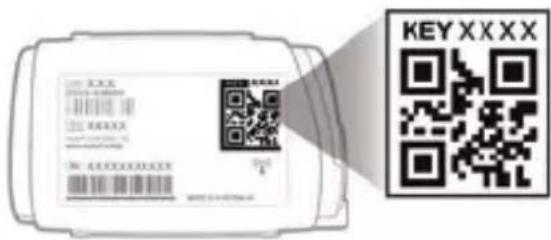
When prompted by the AirMini app, authenticate by entering the four-digit key located on the back of your machine.
Alternatively, you can tap Scan code. If permission has not been granted already, you will be prompted by the AirMini app to allow the use of your smart device's camera and then to position the machine's QR code within the camera's viewing frame.
Note: The QR code is located on the back of your AirMini machine.
When successfully connected, the Bluetooth connection icon ^* is displayed in the top right corner of the AirMini app.
Bluetooth status indicators

Bluetooth indicator light is flashing blue.
Your machine is in discoverable mode and ready for pairing.

Bluetooth indicator light is constantly blue.
Your machine is connected to your smartphone.

Bluetooth indicator light is constantly white (airplane mode).
Bluetooth on your machine is disabled.
Bluetooth indicator light is off.
Your machine is not connected to your smartphone.
Note: Once therapy starts, the indicator light will start to fade.
Cleaning and maintenance
It is important that you regularly clean your AirMini machine to make sure you receive optimal therapy. The following sections will help you with disassembly, cleaning and checking your machine.

WARNING
- As part of good hygiene, always follow cleaning instructions. Some cleaning products may damage the air tubing and affect its function, or leave harmful residual vapours that could be inhaled if not rinsed thoroughly.
- The AirMini connectors, AirFit P10 for AirMini and AirFit N30 for AirMini contain a vent system to prevent carbon dioxide build-up in the mask. The vent system must be kept clean and clear of contamination in order to function correctly. Blocking or modifying the vent system may result in excessive carbon dioxide rebreathing.
- Regularly clean your AirMini tubing, connectors and mask components to receive optimal therapy and to prevent the growth of germs that can adversely affect your health.
- Regularly inspect the humidifier and follow the cleaning and maintenance instructions to prevent the growth of germs that can adversely affect your health.

CAUTION
If any visible deterioration of a system component is apparent (cracking, discoloration, tears etc.), the component should be discarded and replaced.
Disassembling
Full face masks
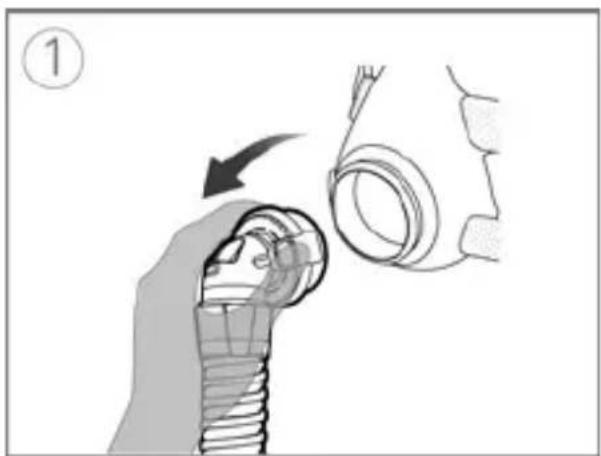
natural_image
Illustration of a hand holding a bolt with a magnified view of the bolt (no text or symbols)
natural_image
Illustration of a hand holding a small object with an arrow pointing to it, no text or symbols present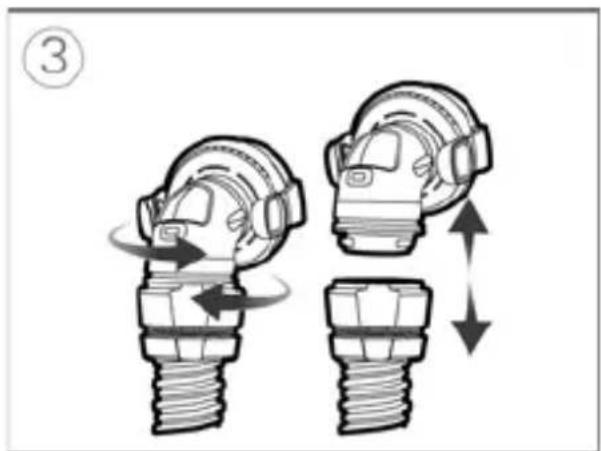
natural_image
Illustration of two mechanical components with directional arrows indicating motion (no text or symbols)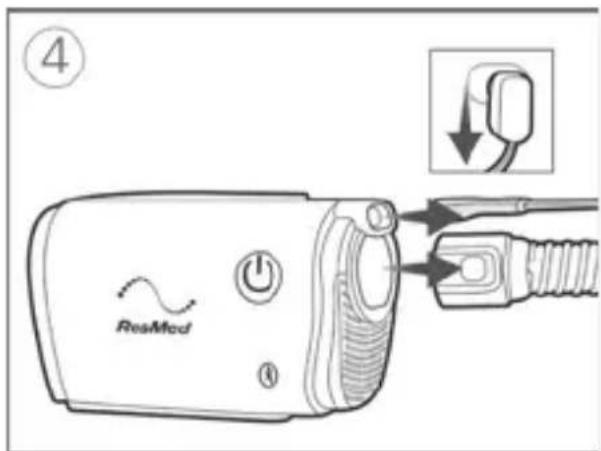
-
Squeeze the side buttons on the connector and detach from the mask.
-
Remove the HumidX F20 from the mask.
Note: The humidifier cannot be washed as this will affect the performance of therapy.
-
Disconnect the full face connector from the AirMini tubing by gently twisting and pulling it away.
-
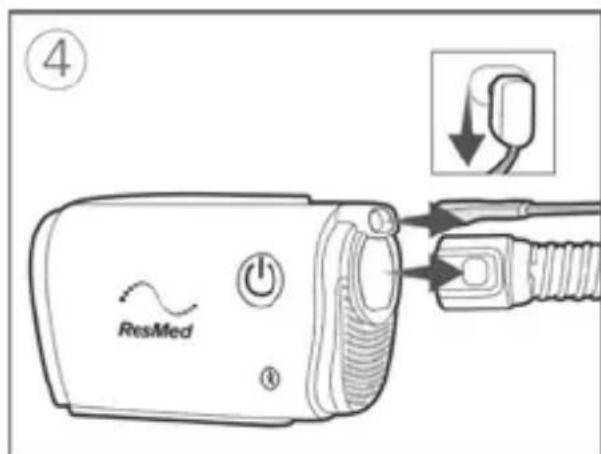
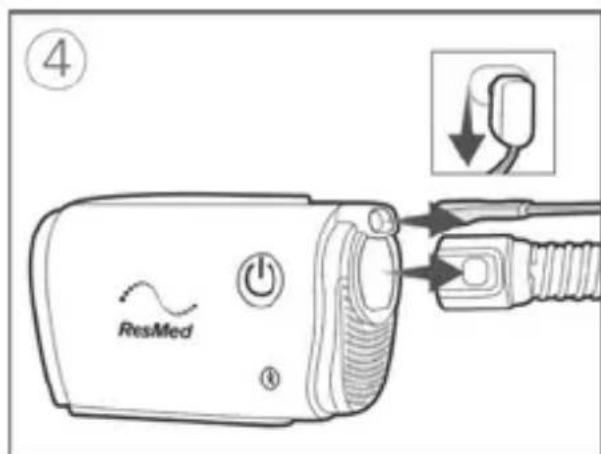
Disconnect the AirMini tubing from the machine by pressing the side buttons on the cuff and pulling it away. Unplug the power supply unit from the power outlet and the machine.
Nasal masks, AirFit P10 for AirMini, AirFit N30 for AirMini
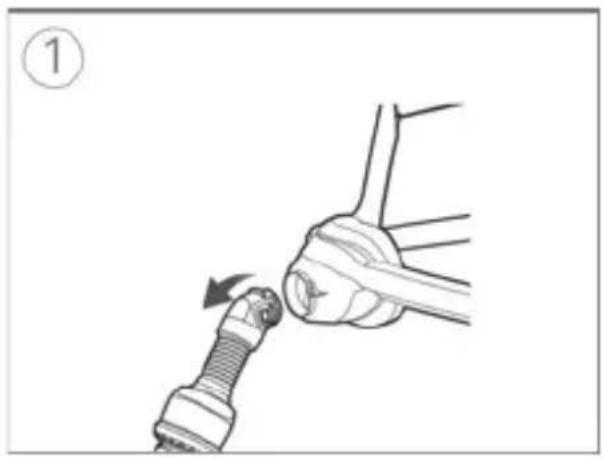
natural_image
Diagram of a hand holding a car tire with a valve, showing mechanical assembly (no text or symbols)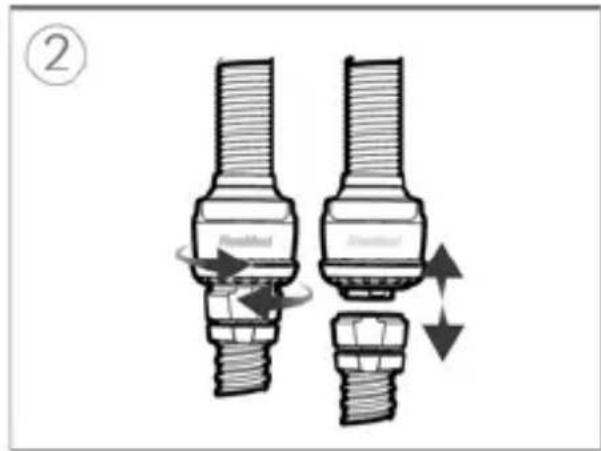
-
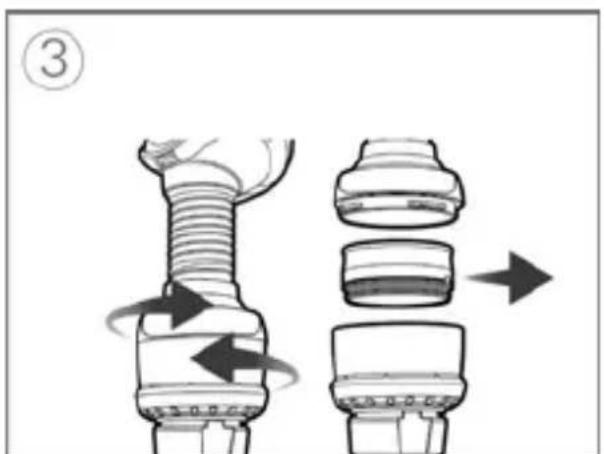
For nasal masks: squeeze the side buttons on the connector and detach from the mask.
-
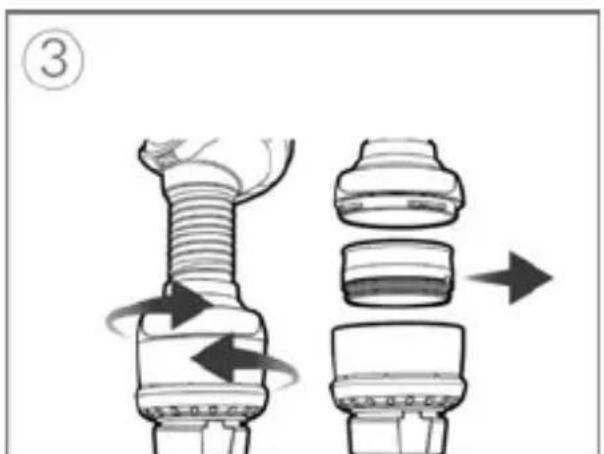
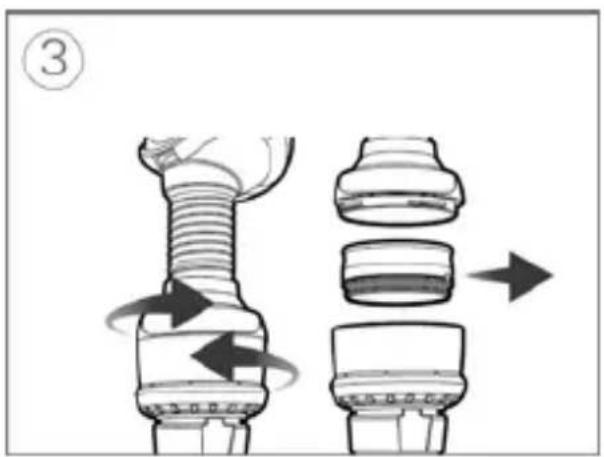
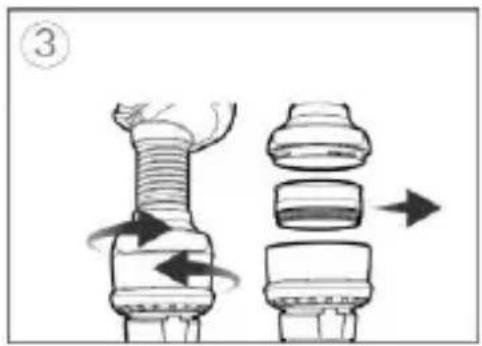
For nasal and pillow masks: disconnect the vent module from the air tubing by gently twisting it and pulling the two pieces apart.
-
Gently twist and pull the two pieces apart. If you are using the humidifier remove it from the vent module.
Note: The humidifier cannot be washed as this will affect the performance of therapy.
- Disconnect the AirMini tubing from the machine by pressing the side buttons on the cuff and pulling it away. Unplug the power supply unit from the power outlet and the machine.
Cleaning and replacing parts
Detach all components according to the disassembly instructions and make sure that the humidifier is removed and stored in a clean, dry location.
Inspect the waterless humidifier (HumidX, HumidX Plus, HumidX F20)
- Check daily for any signs of damage or blockages caused by dirt or dust.
- It must be replaced within 30 days after opening the sealed pack.
- When the humidifier is not being used, store it in a clean, dry location.
Note: The humidifier cannot be washed.
Clean the AirMini tubing
- Clean and check the air tubing each week. AirMini tubing should be replaced at least every six months.
- Wash the AirMini tubing in warm water using a mild liquid detergent.
- Rinse thoroughly and allow to dry out of direct sunlight and/or heat.
- Check the AirMini tubing and replace it if there are any holes, tears or cracks.
Note: Do not wash the AirMini tubing in a dishwasher or washing machine.
Clean the F20 connector for AirMini
- Clean and check the F20 connector daily. The connector should be replaced at least every six months.
- Wash in warm water using a mild liquid detergent.
- Clean with a soft bristle brush paying particular attention to the vent holes.
- Rinse well under running water. Shake to remove excess water and allow to dry out of direct sunlight.
- Check that there is no dirt or dust in the vent holes.
Note: Do not wash in a dishwasher or washing machine.
natural_image
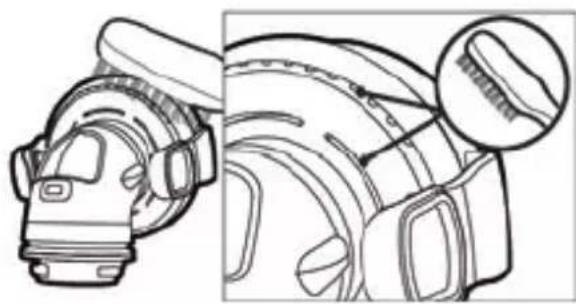
Technical line drawing of a mechanical component with cross-sectional view (no text or symbols)Clean the N20 connector for AirMini
- Clean and check the N20 connector daily. The connector should be replaced at least every six months.
- Wash the connector in warm water using a mild liquid detergent.
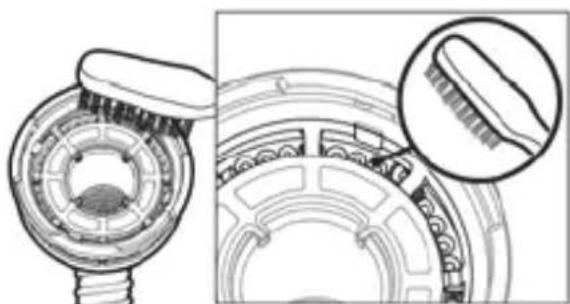
- Clean with a soft bristle brush paying particular attention to the vent holes inside the connector.
- Rinse well under running water. Shake to remove excess water and allow to dry out of direct sunlight.
- Check that there is no dirt or dust in the vent holes.
Note: Do not wash in a dishwasher or washing machine.
natural_image
Technical illustration of a mechanical component with cross-sectional view and magnified detail (no text or symbols)Cleaning the mask
Refer to the relevant mask user guide for instructions on cleaning the AirFit P10 for AirMini and AirFit N30 for AirMini masks.
Change the air filter
Replace at least every 6 months. It cannot be washed.
Check and replace it more often if there are any holes or blockages caused by dirt or dust.
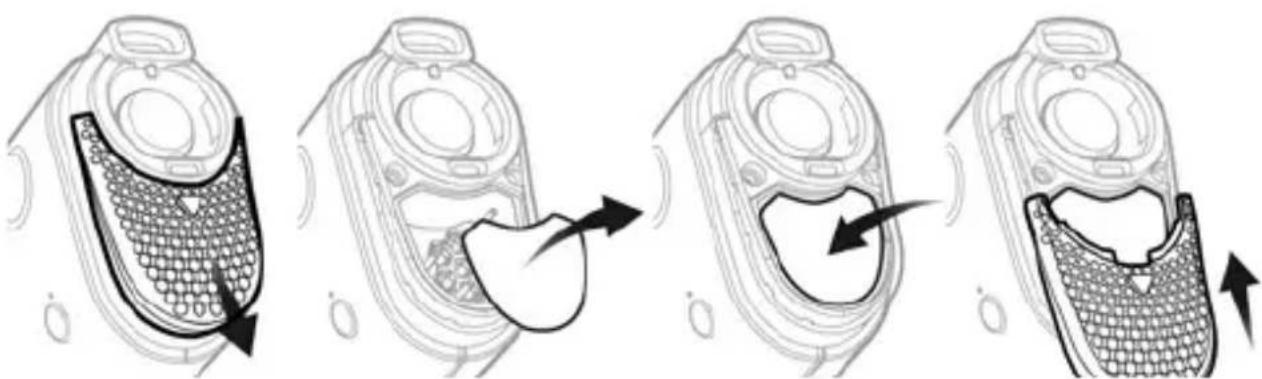
To change the air filter:
- Slide the air filter cover off and remove the old air filter.
- Insert a new air filter and replace the air filter cover.
natural_image
Four-step illustration of a mobile phone receiver with mesh casing and earpiece, showing internal components and movement arrows (no text or symbols)Notes:
- Make sure the air filter cover is fitted at all times to prevent water and dust from entering the machine.
- The use of ResMed approved hypoallergenic filter will result in a small reduction in the accuracy of the delivered pressure at high leaks.
English 17
Cleaning the machine
Wipe the exterior with a dry cloth each week.
For mask cleaning instructions, see your mask user guide.
Reprocessing
The AirMini tubing, AirMini connectors, vent module and waterless humidifiers must be discarded and replaced, as they cannot be disinfected and cannot be used between other patients.
Traveling
You can take your AirMini machine with you wherever you go. Make sure you have the appropriate power supply for the region you are traveling to. For information on purchasing, contact your care provider.
Traveling by airplane
For some airlines, medical devices do not count toward carry-on luggage limits. Please check with your airline for their policy regarding medical equipment.
You can use your AirMini machine on a plane as it meets the Federal Aviation Administration (FAA) requirements. Air travel compliance letters can be downloaded and printed from ResMed.com.
When using the machine on an airplane:
- When connected to power, disable Bluetooth (enter airplane mode) by pressing and holding the Bluetooth button* for at least ten seconds until the indicator light is white.
- Do not use the AirMini app.
- Use the Start/Stop button ⏻ on your machine to start therapy.
- To reconnect Bluetooth (exit airplane mode), press the Bluetooth button.
Troubleshooting
If you have any problems, have a look at the following troubleshooting topics. If you are not able to fix the problem, contact your care provider or ResMed. Do not try to open the machine.
| Problem/possible cause | Solution |
| Air is leaking from around my mask / Mask is too noisy | |
| Mask may be fitted incorrectly. | Make sure your mask is fitted correctly.See your mask user guide for fitting instructions or run the Mask Fit function using the AirMini app to check your mask fit and seal. |
| The AirMini system may be assembled incorrectly. | Make sure your AirMini system is correctly assembled. Refer to Setting up and starting therapy for more information. |
| Air pressure in my mask seems too low / It feels like I am not getting enough air | |
| Ramp may be in progress. | Using the AirMini app, confirm the Ramp function has been enabled. If so, wait for air pressure to build up or turn Ramp Time off using the AirMini app. |
| HumidX or vent might be blocked. | Inspect the HumidX and vent for blockages or damage. Refer to Cleaning and maintenance for more information. |
| HumidX may be wet. The HumidX should be dry when starting therapy. Check if HumidX is wet and replace as necessary. | |
| I cannot start therapy | |
| Power may not be connected. | Connect the power supply unit and make sure the plug is fully inserted. The green indicator light on the power supply unit should be illuminated.Check that the green indicator light above the Start/Stop button on the machine is also illuminated. |
| My therapy has stopped | |
| The air tubing may be disconnected. | Ensure that the air tubing is properly connected. Press the Start/Stop button to continue therapy. |
| You may have high leak and SmartStop enabled. | Make sure your mask is fitted correctly.Alternatively, disable SmartStop. |
| The Bluetooth indicator light is constantly white. I cannot pair to my machine | |
| Bluetooth is disabled. Press the Bluetooth button for 3 seconds.When the Bluetooth indicator light flashes blue, the machine is ready for pairing. | |
| I cannot scan the QR code to pair my machine | |
| The camera is not focused or broken, or the QR code label is damaged. | You can pair your machine manually by entering into your smart device the four-digit key found on the back of your machine. |
| The QR code label is unreadable. | Contact your care provider. |
| The light above the Start/Stop button is flashing green | |
| An error has occurred on the machine. | Unplug your machine. Wait a few seconds and then plug it back in.If the problem persists, contact your care provider. Do not open the machine. |
| I am experiencing dryness (dry or blocked nose) | |
| Mask may be fitted incorrectly | Adjust and refit your mask to improve seal.Check that there is no air leaking from the mask.If mask seal is good, try the HumidX Plus. |
| I am using a waterless humidifier and I am getting uncomfortable droplets of water on my nose, mask or air tubing | |
| Humidity level is too high If using the HumidX or HumidX F20:Remove the humidifier and try therapy without humidification.If using the HumidX Plus: Try the HumidX instead. This will help to reduce the water droplets.If you are still experiencing problems, contact your care provider.Note: You may need to use a waterless humidifier when ambient humidity conditions change. | |
| The AirMini is not automatically reconnecting to my smart phone | |
| Bluetooth connection has dropped out | Ensure that your phone is not paired with any other Bluetooth device. If your phone is connected to other devices, ensure your AirMini machine is switched on and select AirMini from the list of connected devices on your smart device. |
| If AirMini fails to reconnect to Bluetooth, turn the AirMini machine off at the wall socket and turn on again after 10 seconds. | |
| If your AirMini is still not pairing, repeat the instructions to connect your machine and smart device. | |
General warnings and cautions

WARNING
- Make sure that you arrange the air tubing so that it will not twist around the head or neck.
- Keep the power cord away from hot surfaces.
- Regularly inspect power cords, cables, and power supply for damage or signs of wear. Discontinue use and replace if damaged.
- If you notice any unexplained changes in the performance of the machine, if it is making unusual sounds, if the machine or the power supply are dropped or mishandled, or if the enclosure is broken, discontinue use and contact your care provider or your ResMed Service Center.
- Do not open or modify the machine. There are no user serviceable parts inside. Repairs and servicing should only be performed by an authorized ResMed service agent.
- Beware of electrocution:
- Do not immerse the machine, power supply or power cord in water.
- If liquids are spilled into or onto the machine, unplug the machine and let the parts dry.
- Always unplug the machine before cleaning and make sure that all parts are dry before plugging it back in.
- Do not use with oxygen. Any sources of oxygen must be located more than 1 m away from the machine to avoid risk of fire and burns.
- Do not perform any maintenance tasks while the machine is in operation.
- Use only AirMini (eg air filter), masks and accessories that allow for normal breathing to avoid asphyxiation.
- The use of accessories other than those specified for the machine is not recommended. This may result in increased electromagnetic emissions or decreased immunity of the machine and result in improper operation.
- The machine should not be used adjacent to or stacked with other equipment. If adjacent or stacked use is necessary, the machine should be observed to verify normal operation in the configuration in which it will be used.
- The AirMini mask systems and connectors are fitted with vents. The full face connector for AirMini is also fitted with an AAV. The AAV and vents have specific safety functions to prevent carbon dioxide build-up in the mask. The AAV and vents should be kept clean and not covered or blocked. The connectors should not be used if the vent or AAV are damaged as they will not be able to perform their safety functions. The connectors should be replaced if the valves of the vent or AAV are damaged, distorted or torn.
- The machine is not intended to be operated by persons (including children) with reduced physical, sensory or mental capabilities without adequate supervision by a person responsible for the patient's safety.
- The device has not been tested or certified for use in the vicinity of X-ray, CT or MRI equipment. Do not bring the device within 13 ft (4 m) of X-ray or CT equipment. Never bring the device into an MR environment.

CAUTION
- Use only ResMed AirMini parts (eg air inlet filter, battery, power supplies), masks and accessories with the machine. Non-ResMed AirMini parts may reduce the effectiveness of the treatment, may result in excess carbon dioxide rebreathing and/or damage the machine. For compatibility information, refer to ResMed.com for more information.
- Blocking the air tubing and/or air inlet of the machine while in operation could lead to overheating of the machine.
- Keep the area around the machine dry, clean and clear of anything (eg, clothes, pillows or bedding) that could block the air inlet or cover the power supply unit.
- Do not use bleach, chlorine, alcohol, or aromatic-based solutions, moisturizing or antibacterial soaps or scented oils to clean the machine or air tubing. These solutions may cause damage and reduce the life of the products. Exposure to smoke, including cigarette, cigar or pipe smoke, as well as ozone or other gases may damage the device. Damage caused by any of the foregoing will not be covered by ResMed's limited warranty.
- Do not insert any USB cable into the machine or attempt to plug the power supply unit into a USB device. This may cause damage to the machine or USB device.
Note: For any serious incidents that occur in relation to this device, these should be reported to ResMed and the competent authority in your country.
Technical specifications
Units are expressed in cm H_2O and hPa. 1 cm H_2O is equal to 0.98 hPa.
Power supply unit
| AC input range: | 100–240V, 50–60Hz, 0.5-0.3A |
| 115V, 400Hz for aircraft use, 0.4A | |
| DC output: | 24V 0.83A |
Typical power consumption: 6.3W
Peak power consumption: 27W
If power is interrupted during therapy, the machine will automatically restart therapy when power is restored.
AirMini power
| Standby power consumption: 1 W |
Environmental conditions
| Operating temperature: | +5°C to +35°CNote: Under extreme ambient temperature conditions (40°C) the air and parts of the tubing near the mask may reach temperatures up to 43°C. These parts of the tubing are not in contact with the user and the machine remains safe under these extreme conditions. |
| Operating humidity: | 10 to 95% relative humidity, non-condensing |
| Operating altitude: | Sea level to 2,591 m; air pressure range 1013 hPa to 738 hPa |
| Storage and transport temperature: | -25°C to +70°C |
| Storage and transport humidity: | 5 to 95% relative humidity, non-condensing |
Air filter
| Standard: | Material: Polyester non woven fiberAverage arrestance: >75% when tested to EN779 |
| Hypoallergenic: | Material: Blended synthetic fibers in a polypropylene carrierEfficiency: >80% (average) when tested to EN 13274-7 |
AirMini machine
| Dimensions: 136 mm (W) x 84 mm (D) x 52 mm (H) | |
| Weight: | 300 g |
| Housing construction: | Flame retardant engineering thermoplastic |
| Air outlet: | Proprietary connector, 16mm inner diameter. Not compatible with EN ISO 5356-1 connectors. |
AirMini air tubing
| Material: Flexible plastic | |
| Length: | 1.9 m |
| Inner diameter: 15 mm | |
Electromagnetic compatibility
The AirMini complies with all applicable electromagnetic compatibility requirements (EMC) according to IEC60601-1-2:2014, for residential, commercial and light industry environments. Portable and mobile RF communications equipment should be used no closer to any part of the machine, including cables, than the recommended 10 cm separation distance. The AirMini has been designed to meet EMC standards. However, should you suspect that the machine performance (eg, pressure or flow) is affected by other equipment, move the machine away from the possible cause of interference.
The AirMini complies with Part 15 of the FCC Rules and Industry Canada license-exempt RSS standards. Operation is subject to the following two conditions: This machine may not cause harmful interference, and this machine must accept any interference received, including interference that may cause undesired operation.
FCC ID: QOQBT121, IC: 5123A-BGTBT121
Additional information regarding the FCC Rules and IC compliance for this machine can be found on www.resmed.com/downloads/devices.
Declaration of Conformity (DoC to the Radio Equipment Directive)

ResMed declares that the AirMini device (models 381xx) is in compliance with the essential requirements and other relevant provisions of Directive 2014/53/EU (RED). A copy of the Declaration of Conformity (DoC) can be found on Resmed.com/productsupport
This radio equipment operates with the following frequency bands and maximum radio-frequency power: Bluetooth Class 2. 2402 to 2480 MHz, 4dB.
Aircraft use
ResMed confirms that machine meets the Federal Aviation Administration (FAA) requirements (RTCA/DO-160, section 21, category M) for all phases of air travel.
Wireless technology
Technology used: Bluetooth
Connection types: SPP, iAP2, GATT
Frequency: 2402 to 2480 MHz
Max RF power output: +4 dBm
Operating range: 10 m (Class 2)
It is recommended that the machine is at a minimum distance of 1.1cm from the body during operation. Not applicable to masks, air tubing or accessories.
IEC 60601-1 (Edition 3.1) classification
Class II (double insulation), Type BF, Ingress protection IP22.
Operating pressure range
AutoSet, AutoSet For Her, CPAP: 4 to 20 cm H_2O (4 to 20 hPa)
Maximum single fault steady pressure
Machine will shut down in the presence of a single fault if the steady state pressure exceeds 30 cm H_2O (30 hPa) for more than 6 seconds or 40 cm H_2O (40 hPa) for more than 1 second.
Pneumatic flow path
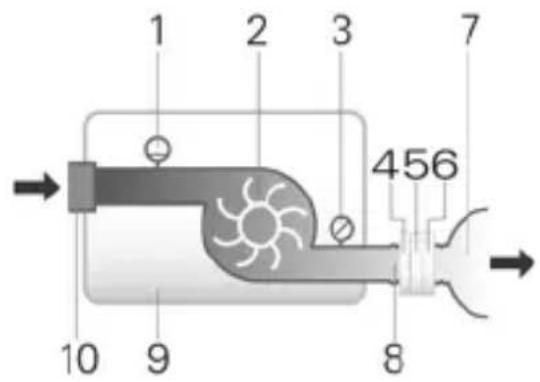
- Flow sensor
- Blower
- Pressure sensor
- AAV (F20 connector only)
- Vent
- HumidX (N20, N30 and P10 connectors only)
- Mask
- Air tubing
- Machine
- Inlet filter
Pressure accuracy
Maximum static pressure variation at 10 cm H _2 O (10 hPa) according to ISO 80601-2-70:2015:
Tested with full face mask: ±0.5 cm H₂O (0.5 hPa)
Maximum dynamic pressure variation according to ISO 80601-2-70:2015
| Machine with full face mask | |||
| Pressure[cm H2O (hPa)] | 10 BPM | 15 BPM | 20 BPM |
| 4 0.5 0.7 1.0 | |||
| 8 | 0.5 | 0.7 | 1.0 |
| 12 0.5 0.7 1.0 | |||
| 16 0.5 0.7 1.0 | |||
| 20 | 0.5 | 0.7 | 1.0 |
Flow (maximum) at set pressures
The following are measured accordingly to ISO 80601-2-70:2015 at the end of the specified air tubing:
| Pressure cm H2O (hPa) | AirMini machine and AirMini air tubing L/min (including uncertainty) |
| 4 | 119 |
| 8 116 | |
| 12 | 112 |
| 16 108 | |
| 20 | 105 |
Measurement system uncertainties
In accordance with ISO 80601-2-70:2015 the measurement uncertainty of the manufacturer's test equipment is:
| For measures of flow | ± 1.5 L/min or ± 2.7% of reading (whichever is greater) |
| For measures of static pressure | ± 0.15 cm H2O (hPa) |
| For measures of dynamic pressure | ± 0.27 cm H2O (hPa) |
| For measures of volume (< 100 mL) | ± 5 mL or 6% of reading (whichever is greater) |
| For measures of volume (≥ 100 mL) | ± 20 mL or 3% of reading (whichever is greater) |
| For measures of time | ± 10 ms |
Note: ISO 80601-2-70:2015 stated accuracies and test results provided in this manual for these items already include the relevant measurement uncertainty from the table above.
Sound
Declared dual-number noise emission values in accordance with ISO 4871:1996
| Pressure level measured according to ISO 80601-2-70:2015 (CPAP mode) | 29 dBA with uncertainty of 2 dBA |
| Power level measured according to ISO 80601-2-70:2015 (CPAP mode) | 37 dBA with uncertainty of 2 dBA |
The A-weighted sound pressure level measured according to ISO 17510:2015:
Air tubing connected to AirMini F20 connector with mask 19 dBA with uncertainty of 3 dBA
Air tubing connected to AirMini N20, N30 or P10 connectors with mask 15 dBA with uncertainty of 3 dBA
The A-weighted sound power level measured according to ISO 17510:2015:
Air tubing connected to AirMini F20 connector with mask 27 dBA with uncertainty of 3 dBA
Air tubing connected to the AirMini N20,N30 or 23 dBA with uncertainty of 3 dBA P10 connectors with mask
Pressure flow curve (ISO 17510:2015)
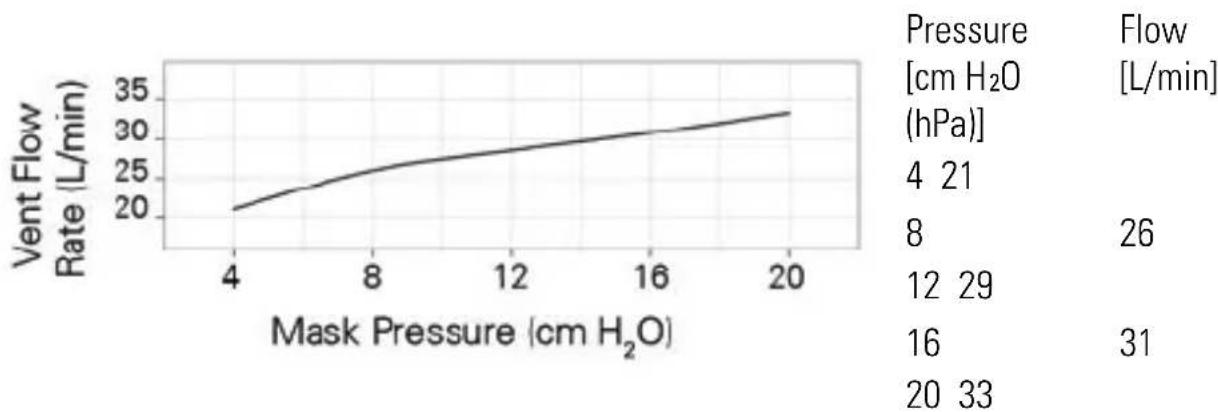
line
| Mask Pressure (cm H₂O) | Vent Flow Rate (L/min) | | ---------------------- | ---------------------- | | 4 | 20 | | 8 | 25 | | 12 | 27 | | 16 | 29 | | 20 | 31 |Resistance
| Inspiratory and expiratory resistance with AAV open to atmosphere (ISO 17510:2015) | F20 connector |
| Inspiration at 50L/min | 0.7 cm H_2O (hPa) |
| Expiration at 50L/min | 0.5 cm H_2O (hPa) |
| AAV Pressures (ISO 17510:2015) | F20 connector |
| Open-to-atmosphere pressure | 0.9 cm H_2O (hPa) |
| Closed-to-atmosphere pressure | 1.0 cm H_2O (hPa) |
| Design life | |
| Machine, power supply unit: | 5 years |
| Air tubing, connectors: 6 months | |
| HumidX: | 30 days |
| General | |
| The patient is an intended operator. |
Notes:
- The manufacturer reserves the right to change these specifications without notice.
- The mask system does not contain PVC, DEHP or phthalates.
• This product is not made with natural rubber latex.
Symbols
The following symbols may appear on the product or packaging.
Read instructions before use. (IEC 60601-1) Indicates a warning or caution. (IEC 60601-1) Follow instructions before use. (IEC 60601-1) Manufacturer. (ISO 15223-1) European
Authorized Representative. (ISO 15223-1) LOT Batch code. (ISO 15223-1) REF Catalog number. (ISO 15223-1) SN Serial number. (ISO 15223-1) DN Device number. On / Off. (IEC 60601-1)
IP22 Protected against finger sized objects and against dripping water when tilted up to 15 degrees from specified orientation. (IEC 60601-1-11) Direct current. (IEC 60601-1) Type BF applied part. (IEC 60601-1) Class II equipment. (IEC60601-1) Humidity limitation. (ISO 15223-1) Temperature limitation. (ISO 15223-1)
Non-ionising radiation. (IEC60601-1-2) Bluetooth. (Bluetooth Brand guide) Rx Only Prescription only (In the US, Federal law restricts these devices to sale by or on the order of a physician). (21 CFR 801) Operating altitude. Atmospheric pressure limitation. (ISO 15223-1) Complies with RTCA DO-160 section 21, category M.
MR unsafe (do not use in the vicinity of an MRI device). (ASTM

F2503) Replace 30 days after opening. Do not use if
package is damaged. (ISO 15223-1). MD Medical
device. Importer.
See symbols glossary at ResMed.com/symbols.
Environmental information (EU directive 2012/19/EE Waste Electrical and Electronic Equipment (WEEE))
This machine should be disposed of separately, not as unsorted municipal waste. To dispose of your machine, you should use appropriate collection, reuse and recycling systems available in your region. The use of these collection, reuse and recycling systems is designed to reduce pressure on natural resources and prevent hazardous substances from damaging the environment.
If you need information on these disposal systems, please contact your local waste administration. The crossed-bin symbol invites you to use these disposal systems. If you require information on collection and disposal of your ResMed machine please contact your ResMed office, local distributor or go to www.resmed.com/environment.
Servicing
The AirMini machine is intended to provide safe and reliable operation when operated in accordance with the instructions provided by ResMed. ResMed recommends that the AirMini machine be inspected and serviced by an authorized ResMed Service Centre if there is any sign of wear or concern with device function. Otherwise, service and inspection of the products generally should not be required during their design life.
Limited warranty
ResMed Pty Ltd (hereafter 'ResMed') warrants that your ResMed product shall be free from defects in material and workmanship from the date of purchase for the period specified below.
Product Warranty period
- Mask systems (including mask frame, cushion, headgear and tubing)—excluding single-use devices 90 days
• Accessories—excluding single-use devices - Batteries for use in ResMed internal and external battery systems 6 months
• CPAP machine (including external power supply units) 2 years
This warranty is only available to the initial consumer. It is not transferable.
During the warranty period, if the product fails under conditions of normal use, ResMed will repair or replace, at its option, the defective product or any of its components.
This limited warranty does not cover: a) any damage caused as a result of improper use, abuse, modification or alteration of the product; b) repairs carried out by any service organization that has not been expressly authorized by ResMed to perform such repairs; c) any damage or contamination due to cigarette, pipe, cigar or other smoke; d) any damage caused by exposure to ozone, activated oxygen or other gasses and e) any damage caused by water being spilled on or into an electronic device.
Warranty is void on product sold, or resold, outside the region of original purchase. For product purchased in a country in the European Union ("EU") or European Free Trade Association ("EFTA"), 'region' means the EU and EFTA.
Warranty claims on defective product must be made by the initial consumer at the point of purchase.
This warranty replaces all other expressed or implied warranties, including any implied warranty of merchantability or fitness for a particular purpose. Some regions or states do not allow limitations on how long an implied warranty lasts, so the above limitation may not apply to you.
ResMed shall not be responsible for any incidental or consequential damages claimed to have resulted from the sale, installation or use of any ResMed product. Some regions or states do not allow the exclusion or limitation of incidental or consequential damages, so the above limitation may not apply to you.
This warranty gives you specific legal rights, and you may also have other rights which vary from region to region. For further information on your warranty rights, contact your local ResMed dealer or ResMed office.
Visit ResMed.com for the latest information on ResMed's Limited Warranty.
Further information
If you have any questions or require additional information on how to use the machine, contact your care provider.
Willkommen
natural_image
Close-up of a cylindrical metallic component with textured surface and central rod (no visible text or symbols)natural_image
Diagram of a medical device with a surgical tool inserted, showing internal components and a magnified view (no text or labels)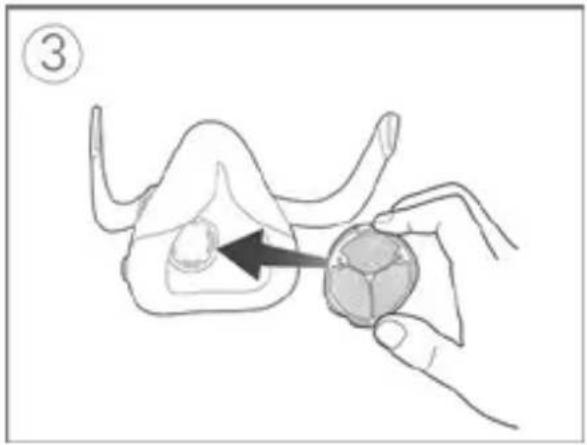
natural_image
Illustration of a hand holding a small animal model with an arrow pointing to the body (no text or symbols)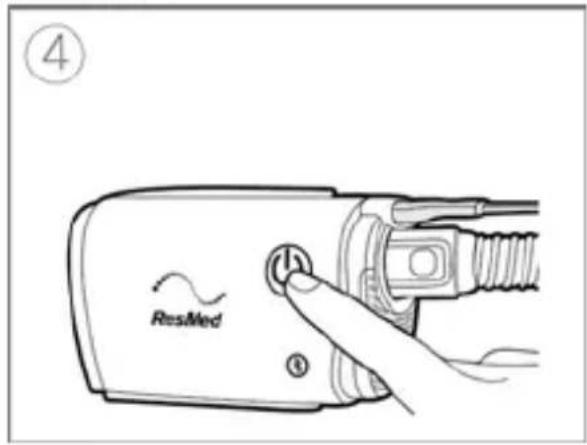
natural_image
Illustration of two hands holding a cable with arrows indicating force application (no text or symbols)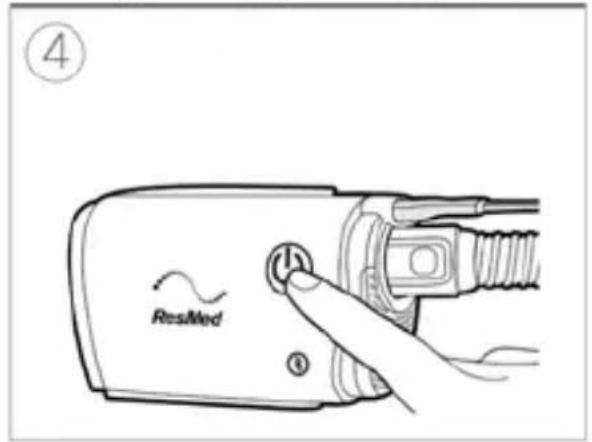
natural_image
Illustration of a hand holding a bolt with a magnified view of the bolt and nut (no text or symbols)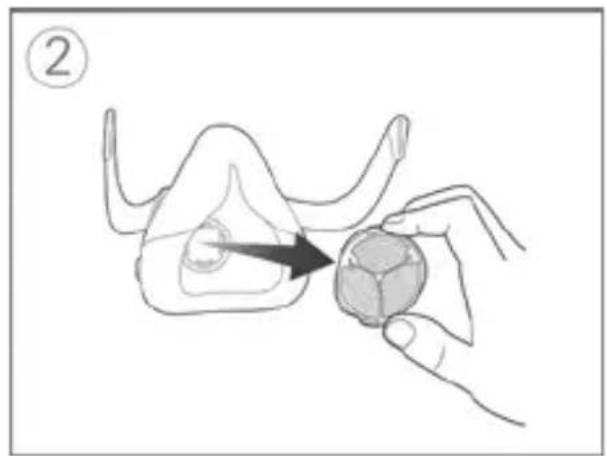
natural_image
Illustration of a hand holding a small object with an arrow pointing to it, no text or symbols present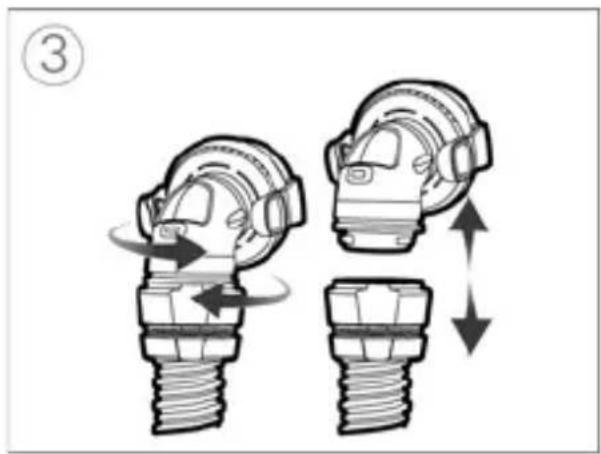
natural_image
Diagram showing two mechanical components with directional arrows indicating movement or force (no text or symbols)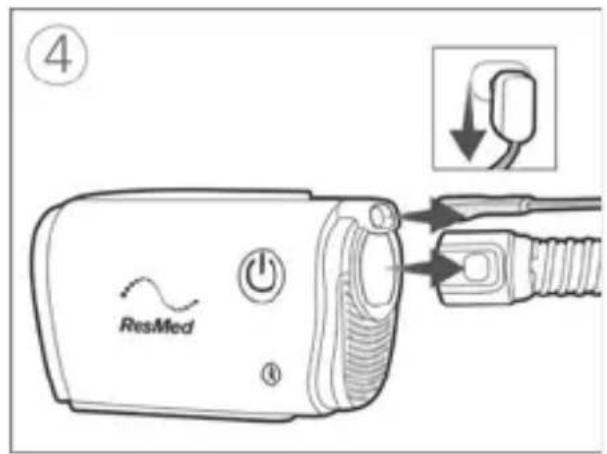
natural_image
Diagram of a hand holding a car tire with a valve, showing mechanical assembly (no text or symbols)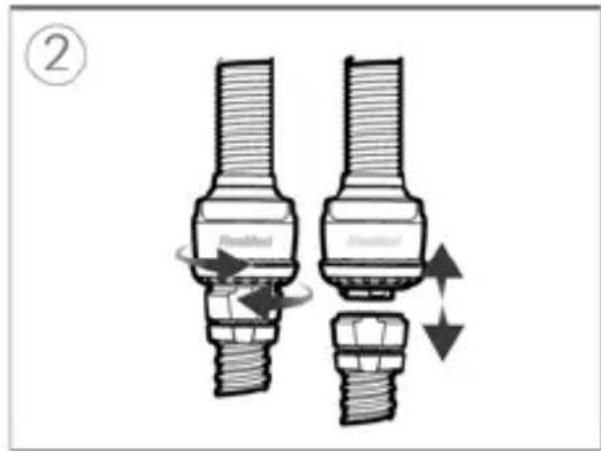
natural_image
Technical line drawing of a mechanical component with a magnified inset showing detail (no text or symbols)natural_image
Technical illustration of a mechanical component with cross-sectional view and magnified detail (no text or symbols)Die Maske reinigen
natural_image
Four-step illustration of a mobile phone receiver with mesh and ear components, showing internal structure and movement (no text or symbols)Hinweise:
Equipment Directive]) C€
Français 3
- Masque facial
- Valve anti-asphyxie (AAV)
- Évent
- Circuit respiratoire AirMini
natural_image
Close-up of a cylindrical electronic component with a central rod and textured surface, labeled 'HumidX' (no other text or symbols visible)natural_image
Diagram showing a mechanical component being inserted into a plug, with no visible text or symbols![ResMed AirMini - Equipment Directive]) C€ - 1](/content/2026/04/665857/images/9dd9149a09c1a5aa3be91707929069ac47ee8b4f1016c7ffc65b33dc40846a3a.jpg)
natural_image
Illustration of a hand holding a small object with an arrow pointing to it, no text or symbols present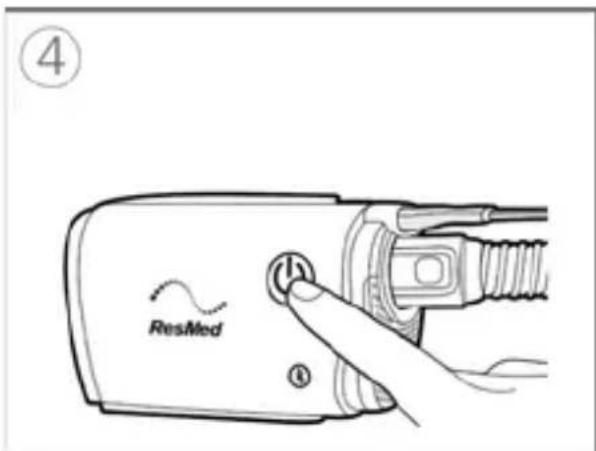
![ResMed AirMini - Equipment Directive]) C€ - 3](/content/2026/04/665857/images/a86e1d7b136b4fdc511503c8ac2b7812e57736682645ab80fe520d0f94b283b7.jpg)
natural_image
Illustration of two mechanical fasteners with arrows indicating motion (no text or symbols)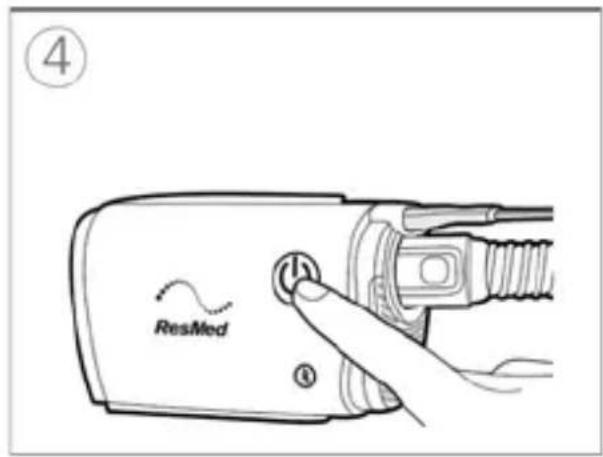
natural_image
Illustration of a hand holding a bolt with a magnified view showing the bolt tip (no text or symbols)![ResMed AirMini - Equipment Directive]) C€ - 5](/content/2026/04/665857/images/c531e4811368271500201577204551e542e169cdaebc066c78d685a3202f3c75.jpg)
natural_image
Illustration of a hand holding a small object with a black arrow pointing to it, no text or symbols present![ResMed AirMini - Equipment Directive]) C€ - 6](/content/2026/04/665857/images/107cb828e524db6421ae124d24f7f249c7f5bb911f8efb76a431d33f16bbd481.jpg)
natural_image
Illustration of two mechanical components with directional arrows indicating motion (no text or symbols)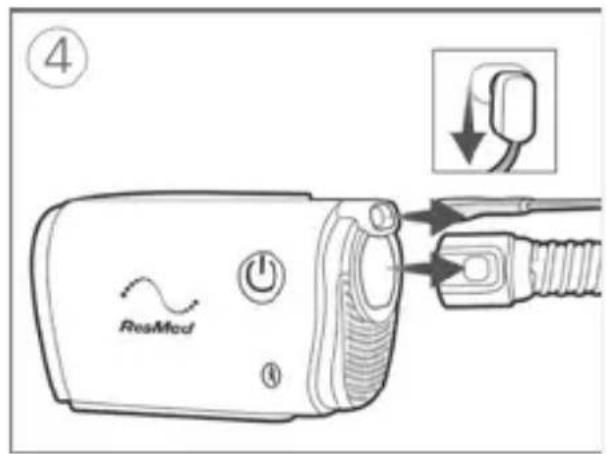
natural_image
Diagram showing a mechanical component being inserted into a pipe, with no visible text or symbols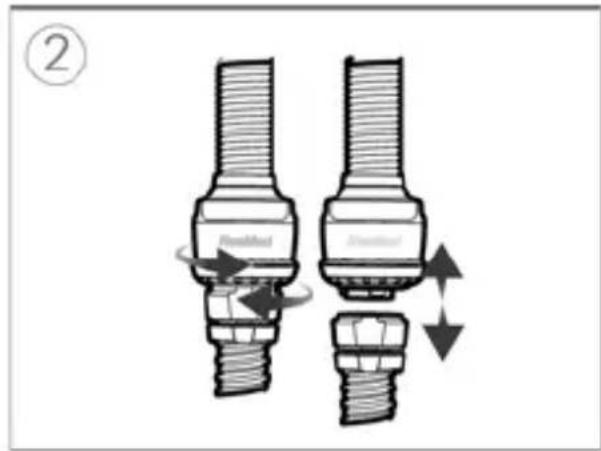
natural_image
Technical line drawing of a mechanical component with cross-sectional view (no text or symbols)natural_image
Technical illustration of a mechanical component with cross-sectional view and magnified detail (no text or symbols)Nettoyage du masque
natural_image
Four-step illustration of a mobile phone receiver with mesh insulation and ear closure, showing progressive mechanical steps (no text or symbols)Remarques :
AutoSet, AutoSet For Her, CPAP :
natural_image
Close-up of a cylindrical electronic component with a central rod and textured surface, labeled 'HumidX' (no other text or symbols visible)natural_image
Diagram of a medical device with a surgical tool inserted, showing internal components and a magnified view (no text or symbols)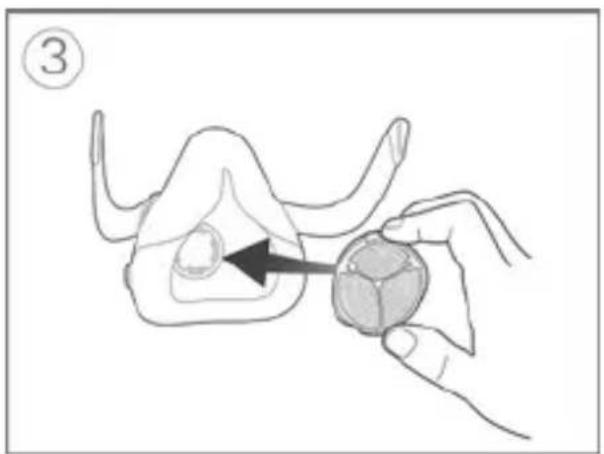
natural_image
Illustration of a hand holding a small animal model with an arrow pointing to the body area (no text or symbols)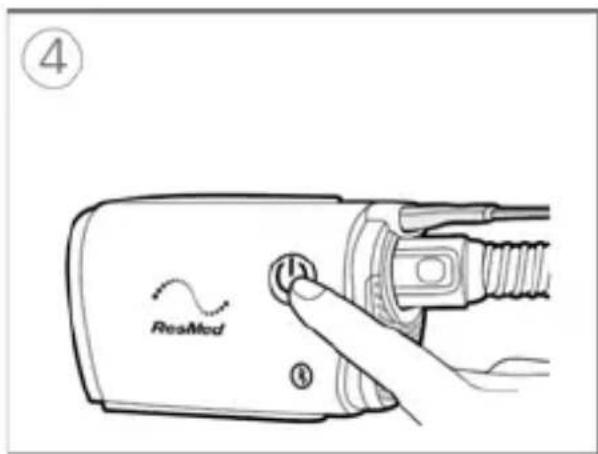
natural_image
Illustration of two mechanical components with arrows indicating motion, no text or symbols present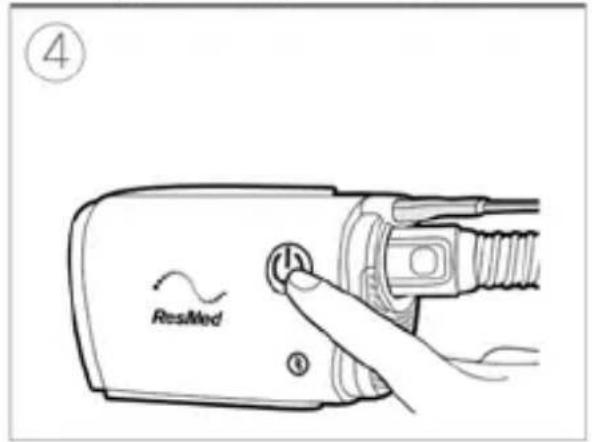
natural_image
Illustration of a hand holding a bolt with a magnified view showing the bolt tip (no text or symbols)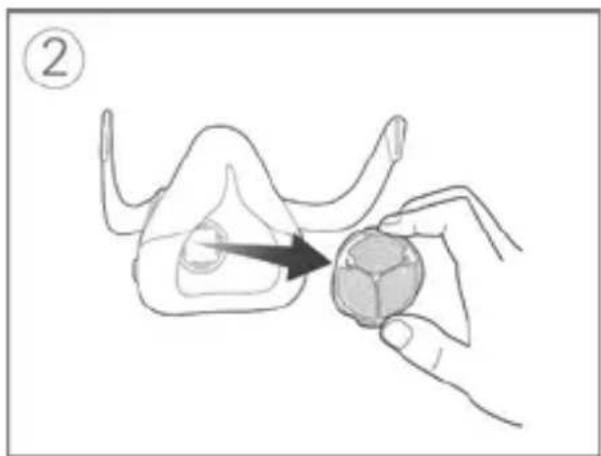
natural_image
Illustration of a hand holding a small object with a black arrow pointing to it, no text or symbols present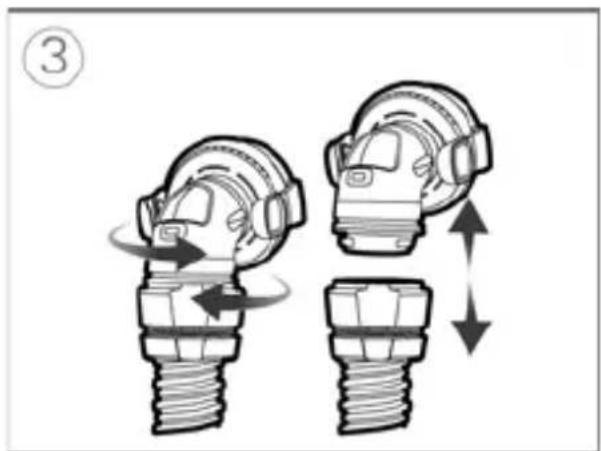
natural_image
Illustration of two mechanical components with directional arrows indicating motion (no text or symbols)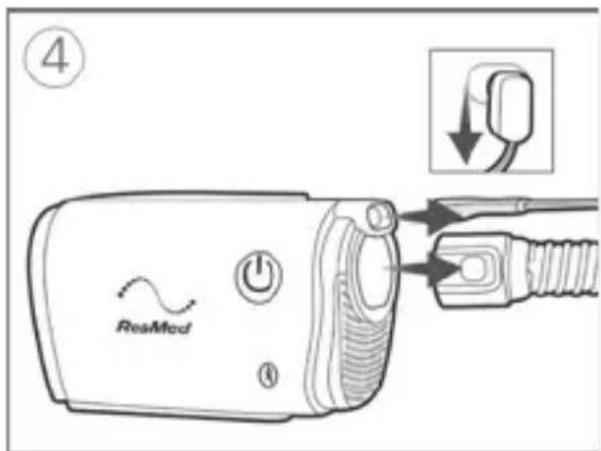
natural_image
Diagram showing a mechanical joint being inserted into a cable, with no visible text or symbols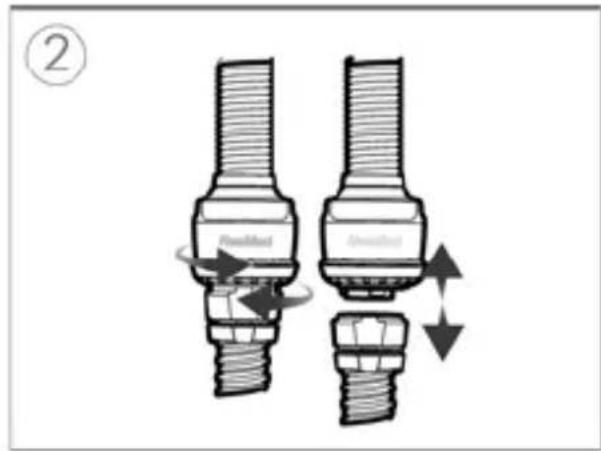

natural_image
Technical line drawing of a mechanical device with a magnified inset showing internal components (no text or symbols)natural_image
Technical illustration of a mechanical component with cross-sectional view and magnified detail (no text or symbols)natural_image
Four-step illustration of a mobile phone receiver with mesh and jawbone details, showing progressive shading and color changes (no text or symbols)Note:
Nederlands 3
-
Volgelaatsmasker
-
Anti-asfyxieklep (anti-asphyxia valve; AAV)
-
Ontluchtingsopening
-
AirMini-slang
- Neusmasker
- Neusconnector
- Ontluchtingsopeningmodule
- Ontluchtingsopening
- AirMini-slang
- AirFit P10 voorAirMini
- Ontluchtingsopeningmodule
- Ontluchtingsopening
- AirMini-slang
Bevochtiging
natural_image
Close-up of a cylindrical electronic component with a central shaft and textured surface, labeled 'HumidX' (no other text or symbols visible)natural_image
Diagram of a medical device with a surgical tool inserted, showing internal components and a magnified view (no text or labels)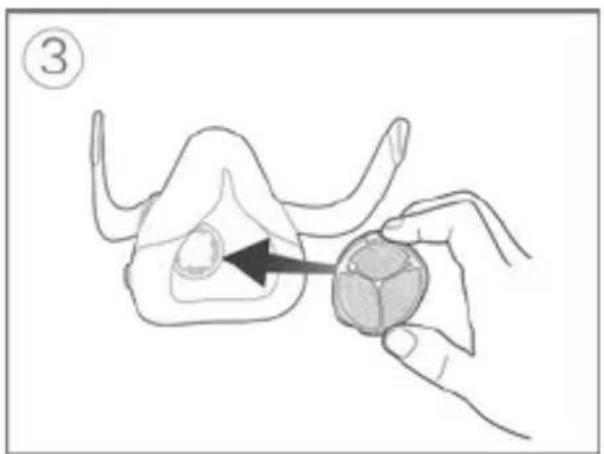
natural_image
Illustration of a hand holding a small animal model with an arrow pointing to the body area (no text or symbols)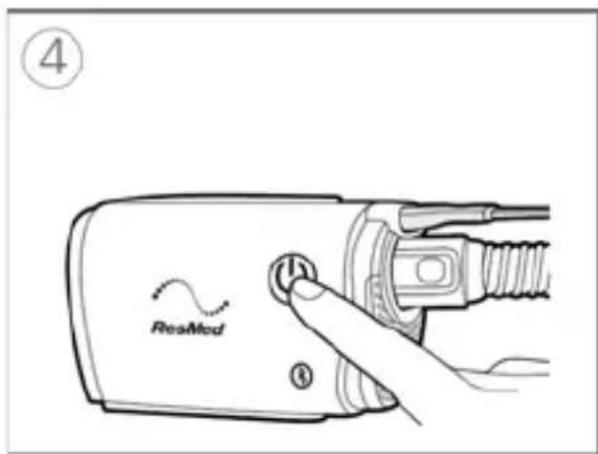
natural_image
Illustration of two mechanical fasteners with arrows indicating motion (no text or symbols)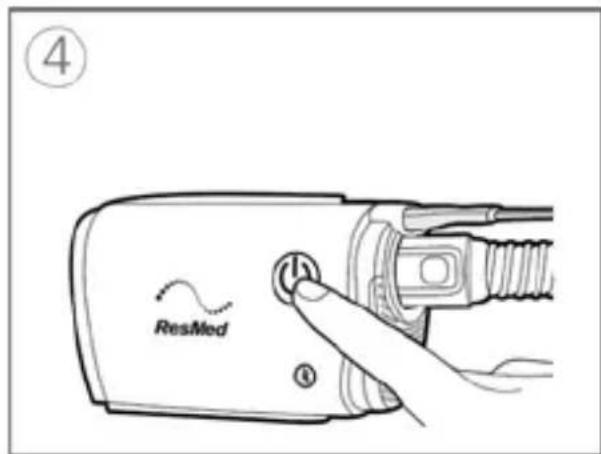
- Tik op Gereed.
natural_image
Illustration of a hand holding a bolt with a magnified inset showing the bolt tip (no text or symbols)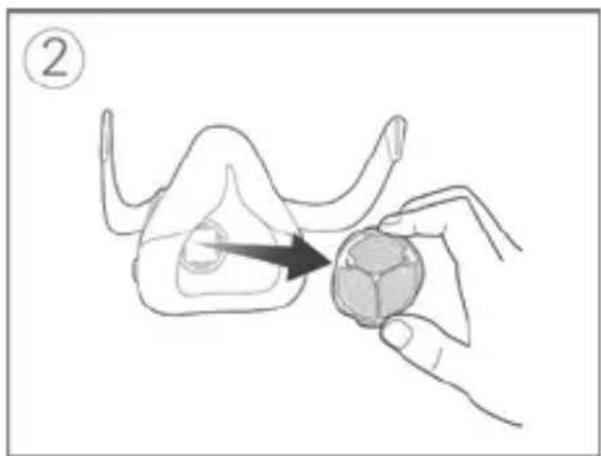
natural_image
Illustration of a hand holding a small object with an arrow pointing to it, no text or symbols present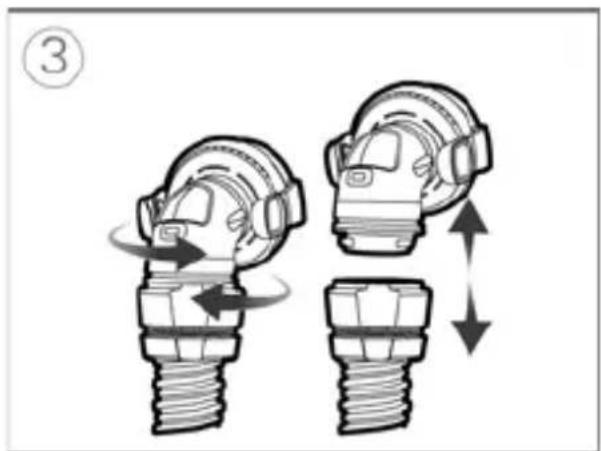
natural_image
Illustration of two mechanical components with directional arrows indicating motion (no text or symbols)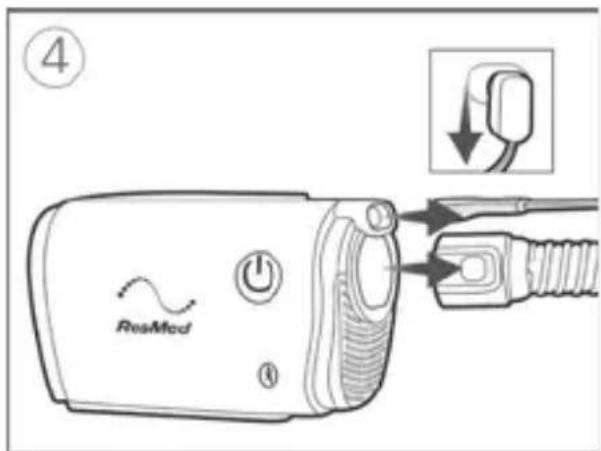
natural_image
Diagram of a hand holding a car tire with a valve, showing a force application (no text or symbols)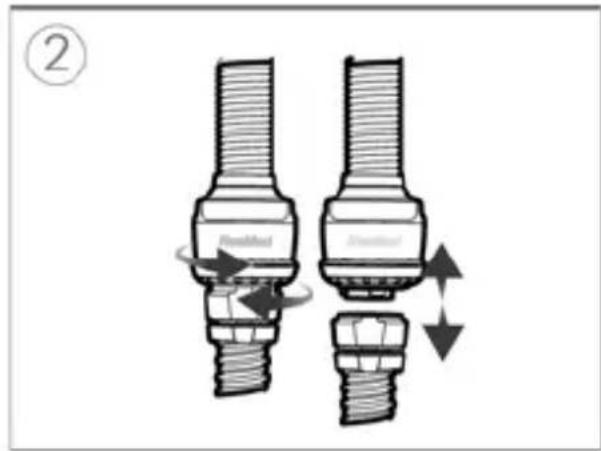
natural_image
Technical line drawing of a mechanical device with a magnified inset showing internal components (no text or symbols)natural_image
Technical illustration of a mechanical component with cross-sectional view and magnified detail (no text or symbols)Het masker reinigen
natural_image
Four-step illustration of a mobile phone receiver with mesh casing and earpiece, showing internal components and movement arrows (no text or symbols)Opmerkingen:
الトリ按键
natural_image
Circular object with textured surface and central vertical line, labeled 'HumidX' at bottom (no other text or symbols)ملاحظات:
natural_image
Diagram showing a mechanical component being inserted into a plug, with no visible text or symbols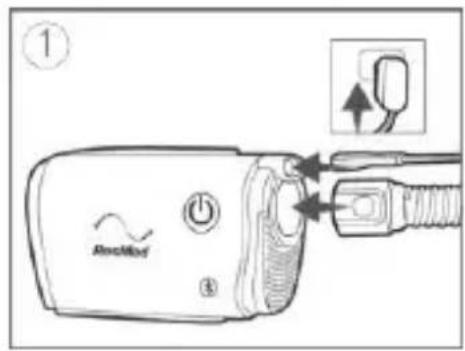
natural_image
Illustration of a hand holding a small object with an arrow indicating direction (no text or symbols)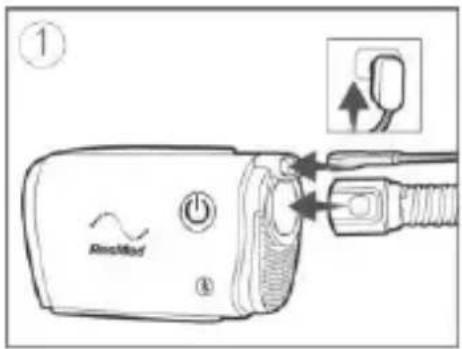
natural_image
Illustration of two mechanical components with arrows indicating motion, no text or symbols presentnatural_image
Illustration of a hand holding a small object with an arrow pointing to it, no text or symbols present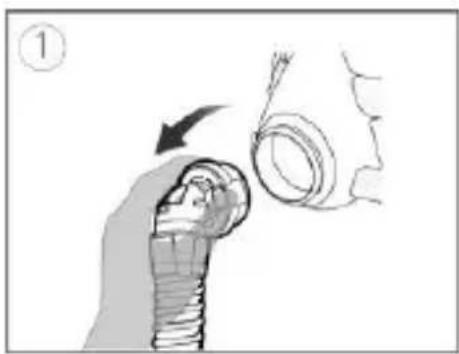
natural_image
Illustration of a hand holding a bolt with an arrow indicating force or direction (no text or symbols)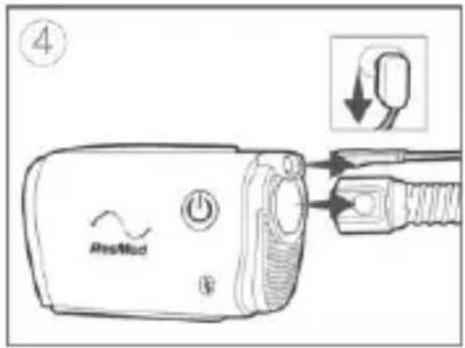
natural_image
Diagram showing two mechanical components with directional arrows indicating motion or movement (no text or symbols)rar الجا. 1
natural_image
Diagram of two mechanical components with directional arrows indicating movement or force (no text or symbols)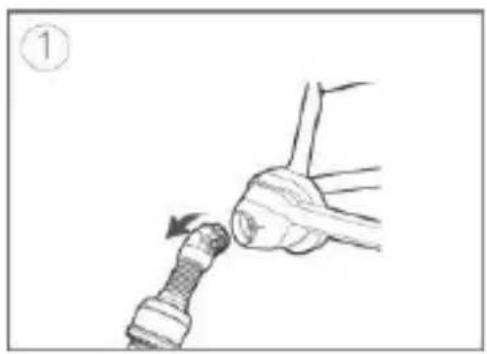
natural_image
Illustration of a hand holding a cable with a valve inserted, showing a force application (no text or symbols)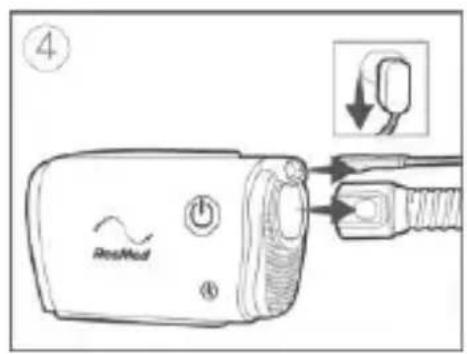
natural_image
Diagram showing a mechanical assembly with three stages of motion, no text or symbols presentnatural_image
Technical line drawing of a mechanical component with an inset close-up showing a detail (no text or symbols)natural_image
Technical illustration of a mechanical component with cross-sectional view and magnified detail (no text or symbols)natural_image
Four-step illustration of a dental implant procedure showing tooth penetration, jaw area, and tooth alignment (no text or symbols)ملاحظات:
- Hel ansiktsmaske
- Anti-asfyksiventil (AAV)
- Ventil
- AirMini-slange
Norsk 3
Nesemaskekontakt (for bruk med kompatible nesemasker)
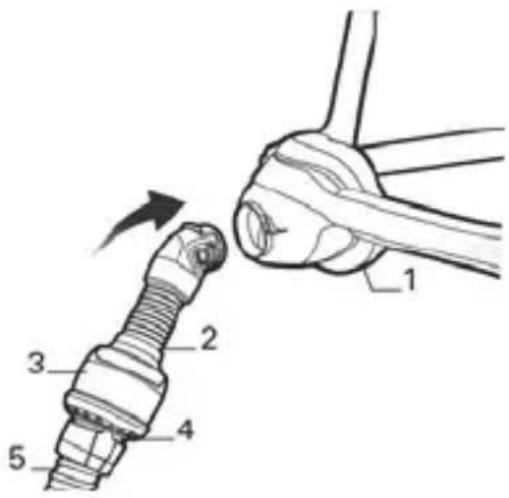
- Nesemaske
- Nesekontakt
- Ventilmodul
- Ventil
- AirMini-slange
AirFit N30 for AirMini
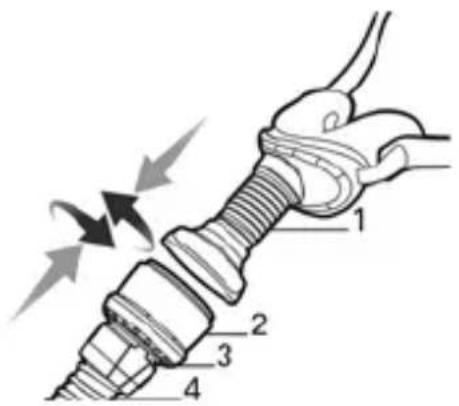
- AirFit N30 for AirMini
- Ventilmodul
- Ventil
- AirMini-slange
AirFit P10 for AirMini
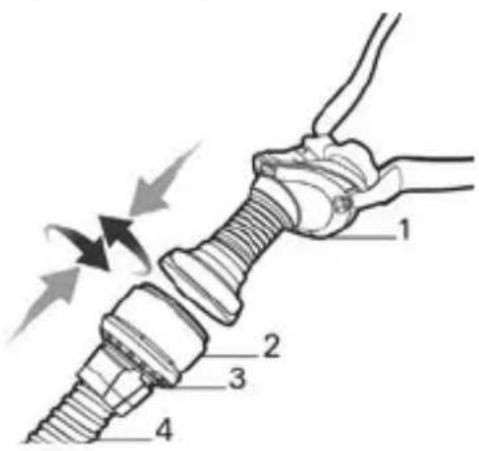
- AirFit P10 for AirMini
- Ventilmodul
- Ventil
- AirMini-slange
Fuktgjøring
natural_image
Close-up of a cylindrical electronic component with a central shaft and textured surface, labeled 'HumidX' (no other text or symbols visible)natural_image
Diagram of a medical device with a surgical tool inserted, showing internal components and a magnified view (no text or symbols)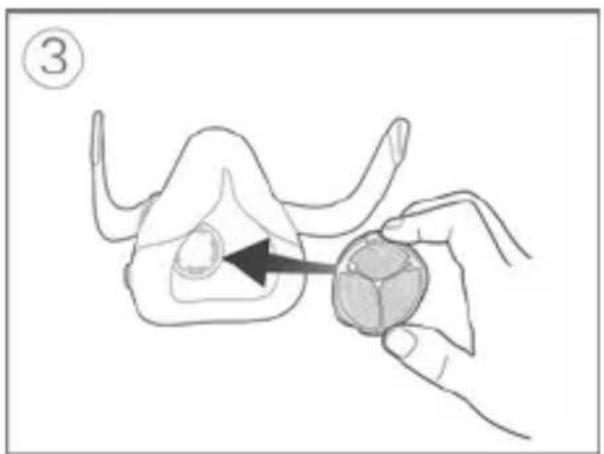
natural_image
Illustration of a hand holding a small animal model with an arrow pointing to the body area (no text or symbols)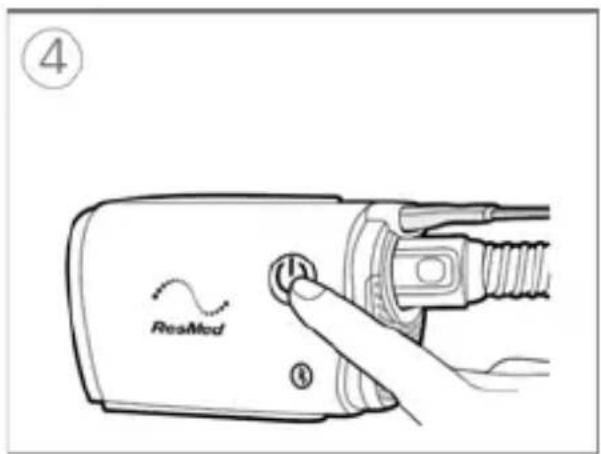
natural_image
Illustration of two mechanical fasteners with arrows indicating motion (no text or symbols)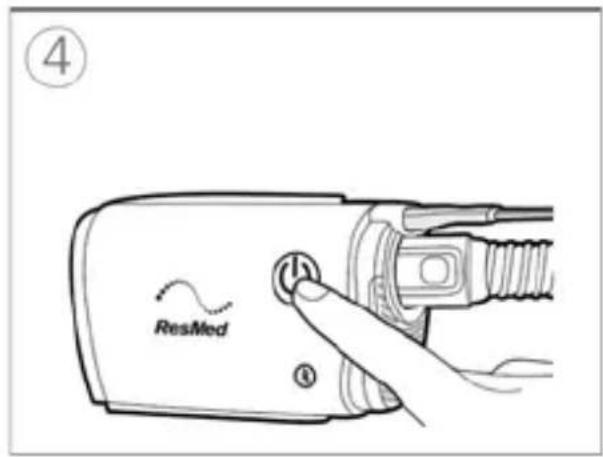
natural_image
Illustration of a hand holding a bolt with a magnified inset showing the bolt tip (no text or symbols)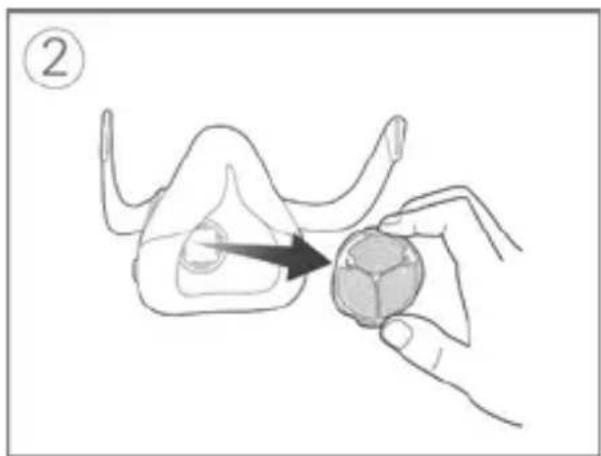
natural_image
Illustration of a hand holding a small object with an arrow pointing to it, no text or symbols present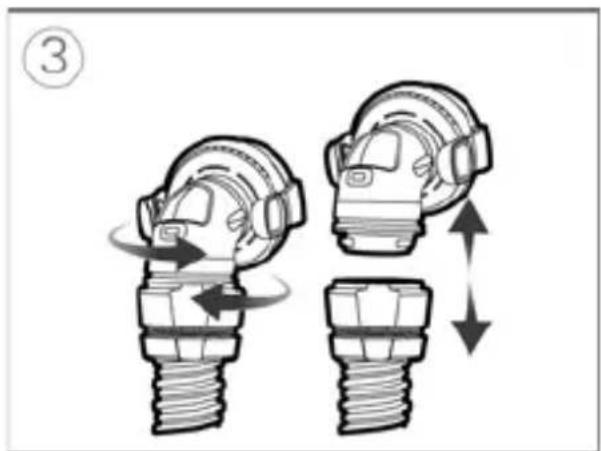
natural_image
Illustration of two mechanical components with directional arrows indicating motion (no text or symbols)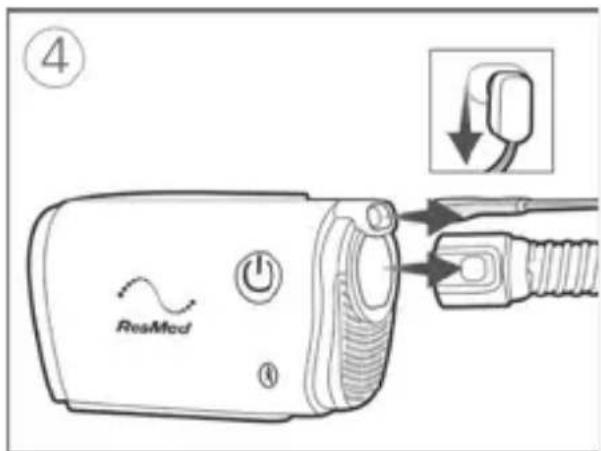
natural_image
Diagram of a hand holding a car tire with a valve, showing mechanical assembly (no text or symbols)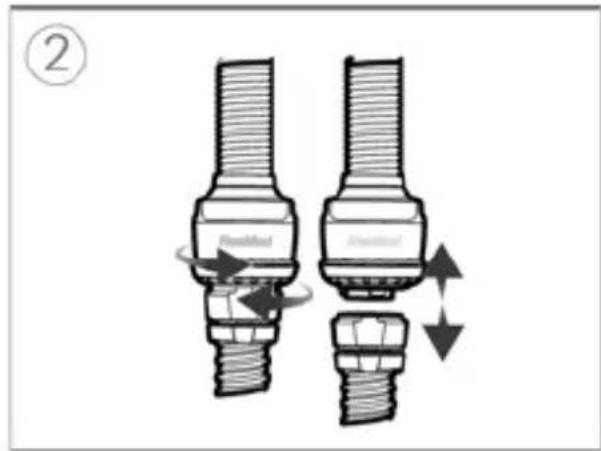
natural_image
Technical line drawing of a mechanical component with cross-sectional view (no text or symbols)Rengjør N20-koblingen for AirMini
natural_image
Technical illustration of a mechanical component with cross-sectional view and magnified detail (no text or symbols)natural_image
Four-step illustration of a mobile phone's ear and mouth, showing body positioning and ear contraction (no text or symbols)Merknader:
- Helmask
- Antiasfyxiventil (AAV)
- Ventilationsöppning
- AirMini-slang
- AirFit P10 for AirMini
- Ventilationsenhet
- Ventilationsöppning
- AirMini-slang
Befuktning
natural_image
Close-up of a HumidX humidity sensor component (no visible text or symbols on the device itself)natural_image
Diagram of a medical device with a surgical tool inserted, showing internal components and a magnified view (no text or symbols)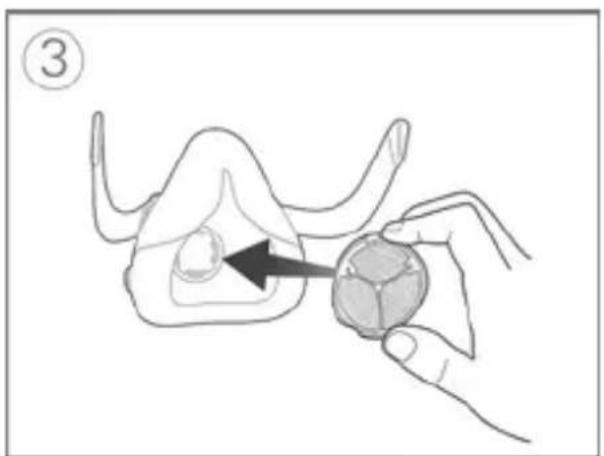
natural_image
Illustration of a hand holding a small animal-shaped object with an arrow pointing to it, labeled with number 3 (no text or symbols on the object itself)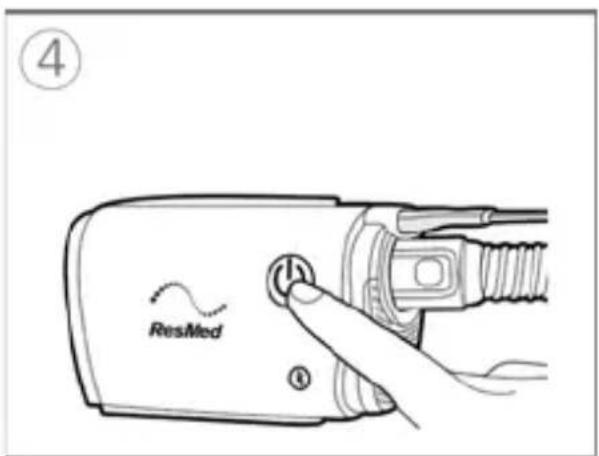
natural_image
Illustration of two mechanical fasteners with arrows indicating motion (no text or symbols)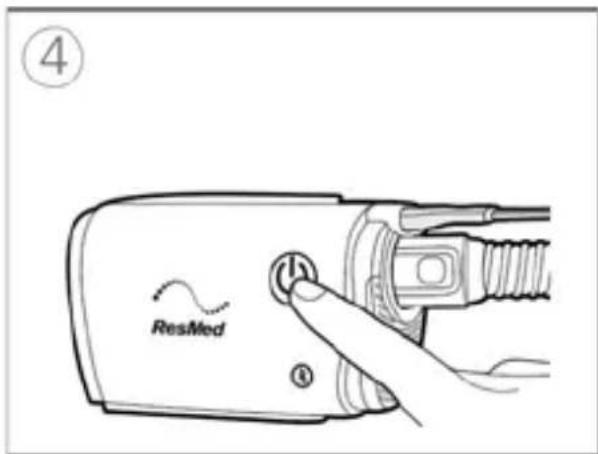
natural_image
Illustration of a hand holding a bolt with a magnified view of the bolt (no text or symbols)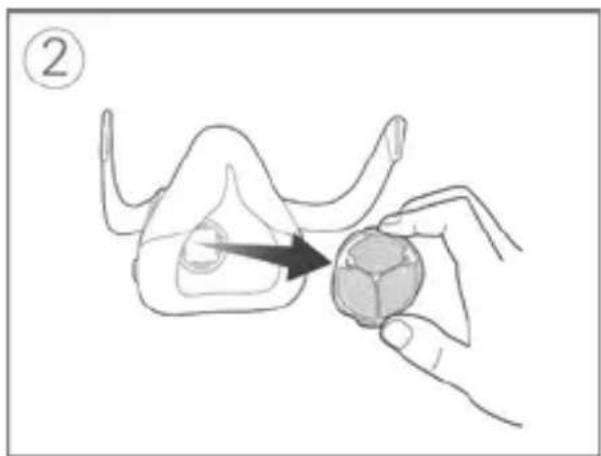
natural_image
Illustration of a hand holding a small object with an arrow pointing to it, no text or symbols present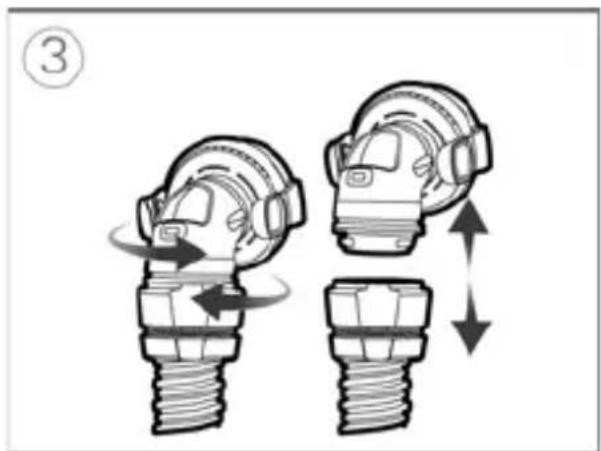
natural_image
Illustration of two mechanical components with directional arrows indicating motion (no text or symbols)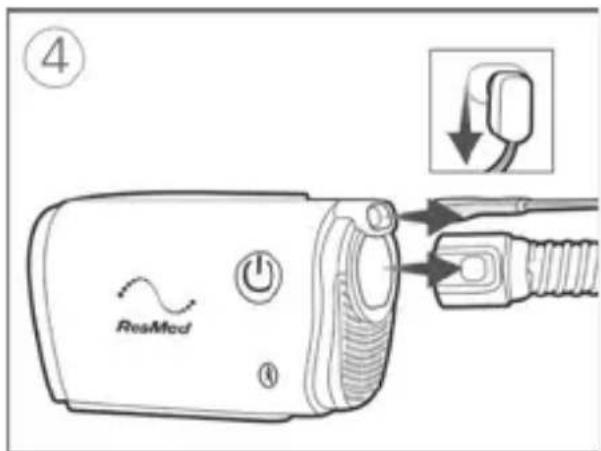
natural_image
Diagram of a hand holding a car tire with a valve, showing mechanical assembly (no text or symbols)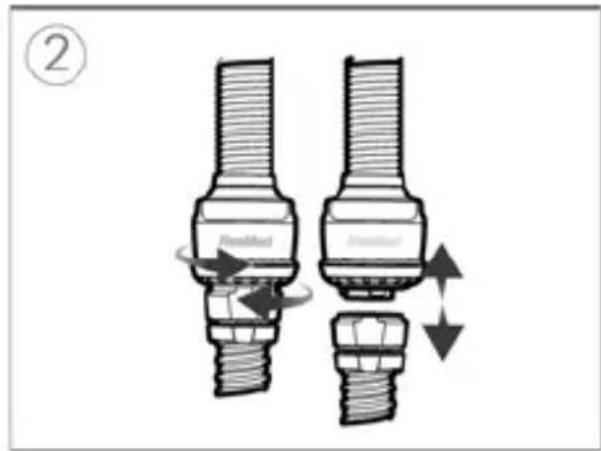
natural_image
Technical line drawing of a mechanical component with cross-sectional view (no text or symbols)natural_image
Technical illustration of a mechanical component with cross-sectional view and magnified detail (no text or symbols)Rengöra masken
natural_image
Four-step illustration of a mobile phone's ear and mouth, showing body positioning and color changes (no text or symbols)Obs!
Suomi 3
natural_image
Close-up of a HumidX humidity sensor component (no visible text or symbols on the device itself)natural_image
Diagram of a medical device with a surgical tool inserted, showing internal components and a magnified view (no text or labels)
natural_image
Illustration of a hand holding a small animal model with an arrow pointing to the body (no text or symbols)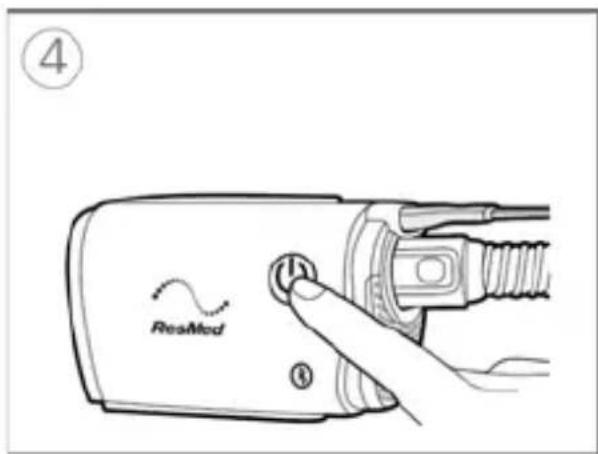
natural_image
Illustration of two mechanical fasteners with arrows indicating fastening or adjustment (no text or symbols present)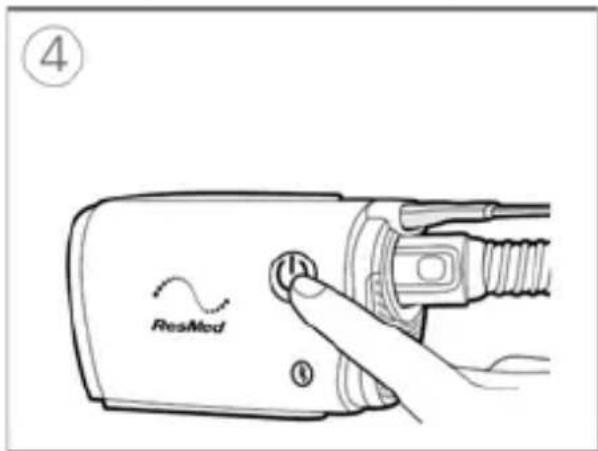
natural_image
Illustration of a hand holding a bolt with a magnified inset showing the bolt tip (no text or symbols)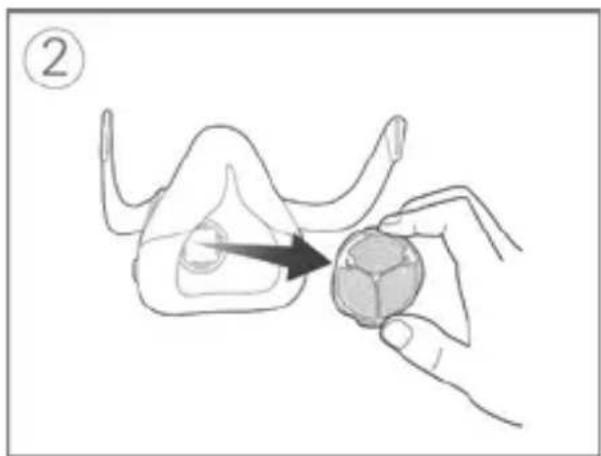
natural_image
Illustration of a hand holding a small object with an arrow pointing to it, no text or symbols present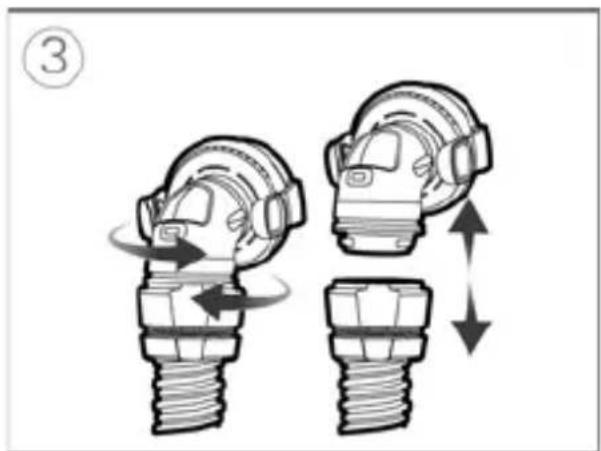
natural_image
Illustration of two mechanical components with directional arrows indicating motion (no text or symbols)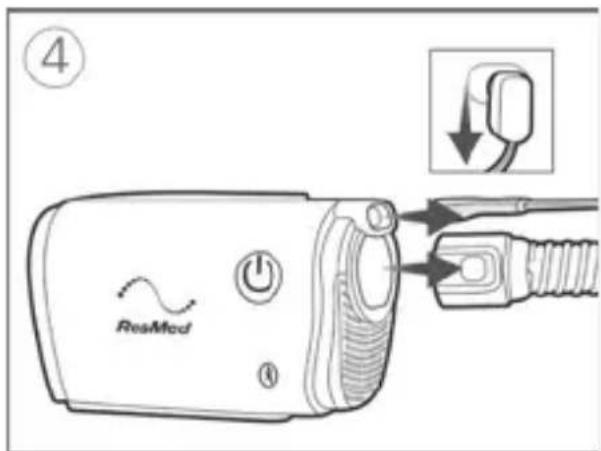
natural_image
Diagram showing a mechanical component being inserted into a pipe, with no visible text or symbols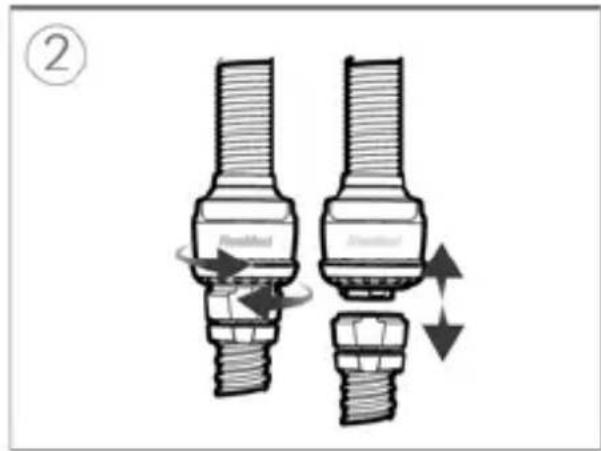
natural_image
Technical line drawing of a mechanical component with cross-sectional view (no text or symbols)natural_image
Technical illustration of a mechanical component with cross-sectional view and magnified detail (no text or symbols)natural_image
Four-step illustration of a dental implant procedure showing tooth penetration, jaw area, and jaw profile (no text or symbols)Huomautukset:
AutoSet, AutoSet For Her, CPAP: 4 – 20 cm H₂O (4–20 hPa)
natural_image
Simple curved dotted line with blue and red dots (no text or symbols)ResMed

Made for iPhone

ResMed Pty Ltd
1 Elizabeth Macarthur Drive Bella Vista NSW 2153 Australia
See ResMed.com for other ResMed locations worldwide. AirMini, AirFit, AutoSet, HumidX and SmartStart are trademarks and/or registered trademarks of the ResMed family of companies. For patent and other intellectual property information, see ResMed.com/ip. "Made for iPhone" means that an electronic accessory has been designed to connect specifically to iPhone and has been certified by the developer to meet Apple performance standards. Apple is not responsible for the operation of this device or its compliance with safety and regulatory standards. Please note that the use of this accessory with iPhone may affect wireless performance. Apple and the Apple logo are trademarks of Apple Inc., registered in the U.S. and other countries. App Store is a service mark of Apple Inc. IOS is a trademark of Cisco, licensed to Apple Inc. The Bluetooth® wordmark and logos are registered trademarks owned by Bluetooth SIG, Inc. Android, Google Play and the Google Play logo are trademarks of Google Inc. The Android robot is reproduced or modified from work created and shared by Google and used according to terms described in the Creative Commons 3.0 Attribution License. This product uses software developed by the ANTLR project (http://www.antlr2.org).
© 2020 ResMed 388135/1 2020-03