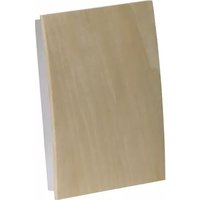
RCW3505N - Doorbells HONEYWELL - Free user manual and instructions
Find the device manual for free RCW3505N HONEYWELL in PDF.


| Product Type | Doorbell (Wired Decorative Chime) |
| Power Supply | 4 LR14 (C size) alkaline batteries or 16V 10VA transformer (Honeywell RCA900N) |
| Sound Level | 90 dBA at 1 m |
| Operating Temperature | 0 °C to +40 °C |
| Number of Doorbell Circuits | Up to 3 |
| Melodies | 6 melodies + alert tone (Ding Dong, St Clements, Westminster, Tubular Bells, Warm Brass, Fantasy) |
| Volume Control | Yes (button on chime) |
| Melody Selection | By button or programming from the doorbell |
| Programming Button | Yes (allows melody change without pressing doorbell, recall) |
| Compatible Doorbell Types | Wired, normally open, illuminated (with transformer) |
| Maximum Wire Length | 46 m (150 ft) |
| Battery Life | 12 months (for 5 uses per day) |
| Low Battery Indicator | Yes (flashing indicator) |
| Use | Indoor only |
| Warranty | 1 year |
| Box Contents | Chime, 2 mounting screws, 2 wall anchors |
| Required Tools | 4 mm Phillips screwdriver, small flathead screwdriver, 6 mm drill bit |
| Recommended Wire Type | Doorbell wire 20 AWG minimum |
| Cover Material | Wood (paintable, stainable) |
Frequently Asked Questions - RCW3505N HONEYWELL
User questions about RCW3505N HONEYWELL
0 question about this device. Answer the ones you know or ask your own.
Ask a new question about this device
Download the instructions for your Doorbells in PDF format for free! Find your manual RCW3505N - HONEYWELL and take your electronic device back in hand. On this page are published all the documents necessary for the use of your device. RCW3505N by HONEYWELL.
USER MANUAL RCW3505N HONEYWELL
Installation Instructions
RCW35 and RCW25 Series (51366SL)
Decorative Wired Chimes
RCW250N, RCW251N, RCW35N,
RCW3501N, RCW3502N, RCW3503N,
RCW3504N, RCW3505N, RCW3506N

69-2173EFS-03
Installation Instructions
Contents
Safety....3
Checking pack contents....4
Installation....5
Power supply 6
Mount the chime....7
Wiring - transformer powered 8
Wiring - battery powered....10
Operate Push 11
Volume control 11
Change tunes....12
Program button....14
Finishing the wood cover 15
Specifications....16
Troubleshooting 17
Disposal and recycling 18
Guarantee....18
Declaration 18
69-2173EFS-03 ii
RCW35 Series and RCW25 Series
1 69-2173EFS-03
Installation Instructions
Compatible with most bell pushes, with standard normally open contacts, including Honeywell wired pushes marked with "B."
Can work with up to 3 push circuits.
Illuminated bell push buttons can be used when the chime is powered by a transformer (Honeywell RCA900N).
69-2173EFS-03 2
69-2173EFS_B.indd 2 4/17/2008 11:15:45 AM

Safety
Before proceeding with the installation, please note the following safety warnings:
- Always follow the manufacturer's advice when using power tools and wear suitable protective equipment (e.g. safety goggles) when drilling holes, etc.
- Before drilling holes in walls, check for hidden electricity cables and water pipes. The use of a cable/pipe locator is advisable if in doubt.
- Chime is for indoor use only.
- Avoid mounting location which can expose chime to splashing or dripping liquid.
- Use UL approved transformer for connection to mains.
Batteries (battery pack or batteries installed) shall not be exposed to excessive heat such as sunshine, fire or the like; danger of damage if battery is incorrectly replaced. Replace only with the same or equivalent type.
3 69-2173EFS-03
Installation Instructions
Checking Pack Contents
- Chime
- 2 x fixing screws for chime
- 2 x wall plugs
You will need:
- Wired push
• 20 AWG minimum bell wire
• 4 mm cross-head screwdriver - A small flat bladed screwdriver
• 1/4-in. (6 mm) masonry drill bit - 4 x LR14 'C' Alkaline batteries OR transformer (16V 10 VA) Honeywell part number RCA900N
69-2173EFS-03 4
Installation
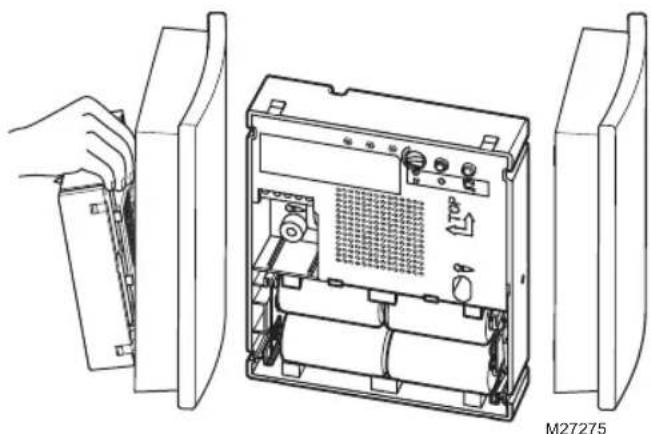
- Open the chime cover
natural_image
Technical line drawing of an open electronic device showing internal components and a hand holding a cable (no text or symbols)5 69-2173EFS-03
69-2173EFS_B.indd 5 4/17/2008 11:15:45 AM

Installation Instructions
Power Supply
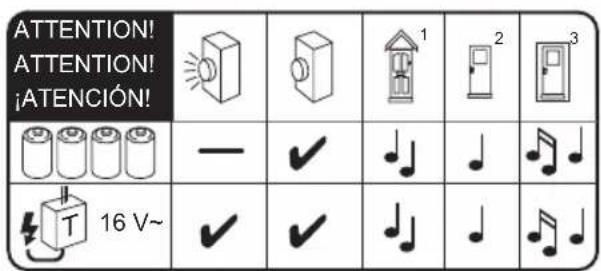
- Determine the type of power supply and type of wired push required to suit your installation. Use 4 x LR14 'C' size alkaline batteries; OR a 16V, 10VA transformer as recommended in the table below below:
M27276
69-2173EFS-03 6
69-2173EFS_B.indd 6 4/17/2008 11:15:45 AM

Mount the Chime
- Mounting holes are marked with a screw symbol.
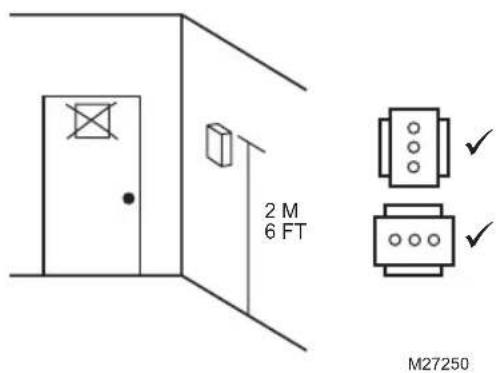
7 69-2173EFS-03
69-2173EFS_B.indd 7 4/17/2008 11:15:45 AM

Installation Instructions
Wiring
Connect the wires from door push and transformer (where used) to the chime terminals as detailed in step 4. The wires can be surface mounted or direct from opening in the wall and enter the rear of the chime housing using the wire guide channels provided.
4a. Transformer powered - Wiring for standard/lighted push via a 16V 10VA transformer.
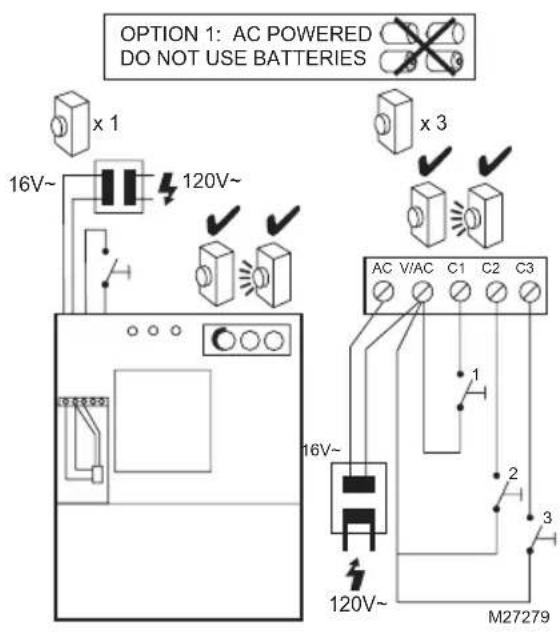
69-2173EFS-03 8
RCW35 Series and RCW25 Series
Note: Wire/cable length should not exceed 150 ft. (50 m).
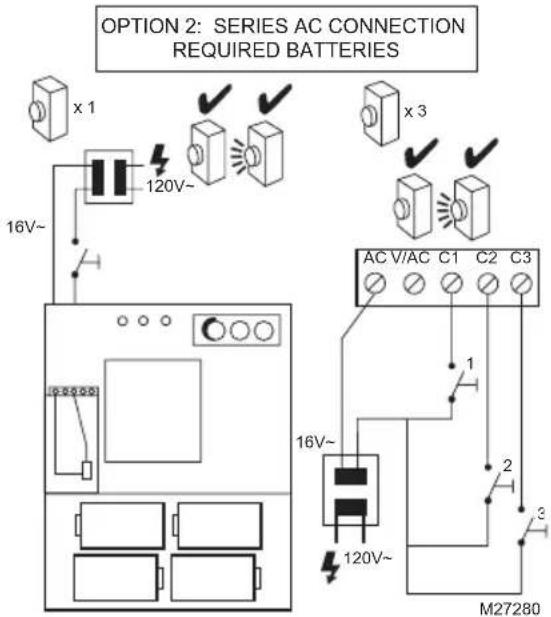
9 69-2173EFS-03
Installation Instructions
4b. Battery powered - Wiring for standard (non-lighted) push only.
Note: Wire/cable length should not exceed 150 ft. (50 m).
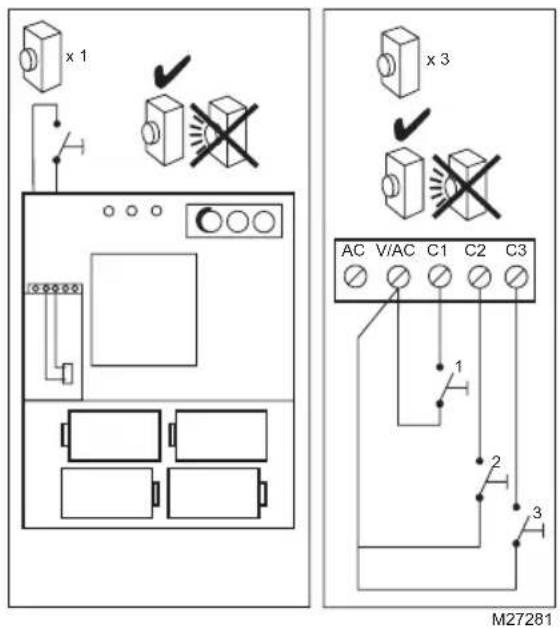
69-2173EFS-03 10
69-2173EFS_B.indd 10 4/17/2008 11:15:46 AM

Operate Push
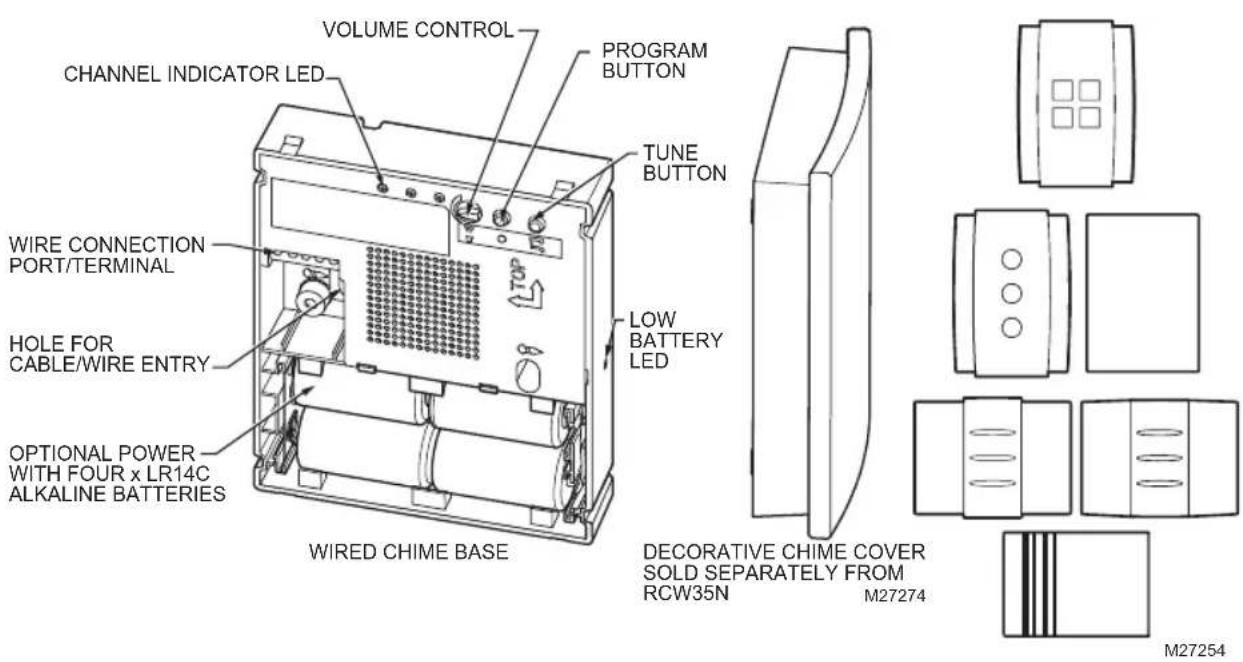
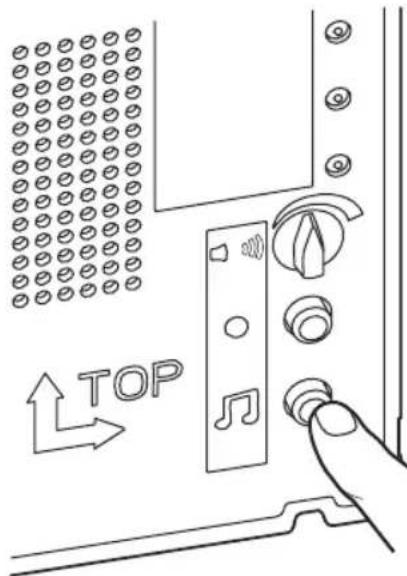
- Chime will play the default tune. The associated channel LED will illuminate.
- To adjust volume.
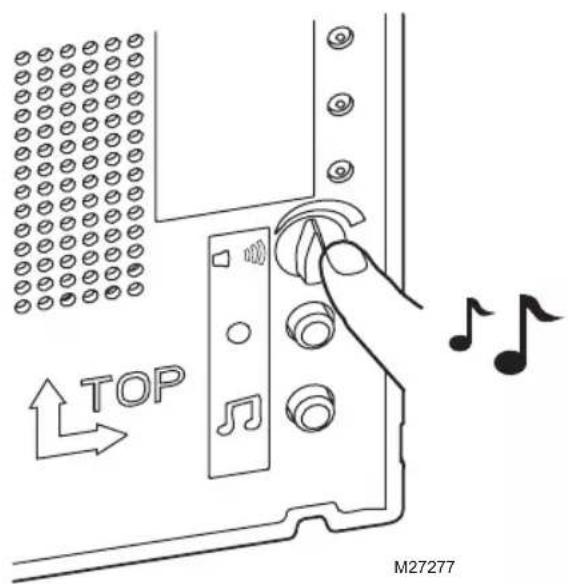
11 69-2173EFS-03
69-2173EFS_B.indd 11 4/17/2008 11:15:46 AM

Installation Instructions
To Change Tune
- Chime tunes are provided plus an additional alert tone.
| Tunes Table | |
| Ding Dong | |
| St Clements | |
| Westminster | |
| Tube Chime | |
| Warm Brass | |
| Fantasy | |
| ! | Alert |
69-2173EFS-03 12
RCW35 Series and RCW25 Series
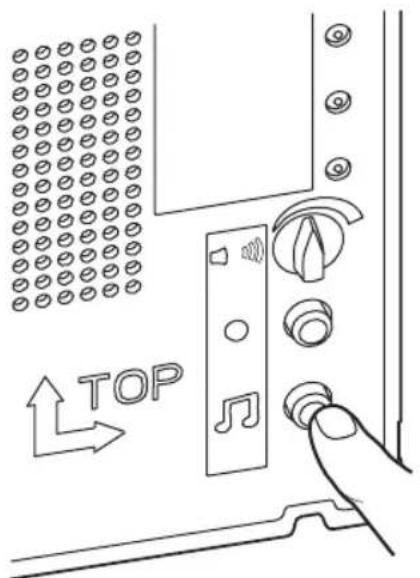
Press push button, chime will play tune, while the Channel LED on chime is flashing, press and release tune button ⏻. Press and release ⏻ button again to cycle through the available tunes until you hear the tune you want to play.
The last tune played will be stored after Channel LED stops flashing.
To confirm, press the push button and chime will play tune you want.

M27278
13 69-2173EFS-03

Installation Instructions
Program Button
- The Program button can be used to:
- Change the tune of the associated push without pressing the push button. Press and hold the program button ●. The channel LED will illuminate in sequence. Release the program button when channel LED for the related push illuminates. The chime will play the latest tune, channel LED will flash. While channel LED is flashing, tune can be changed using the tune select button
- Recall A short push of the program button ● will flash the Channel LED linked to the last push that was used.
69-2173EFS-03 14
-
Clip on the front cover.
-
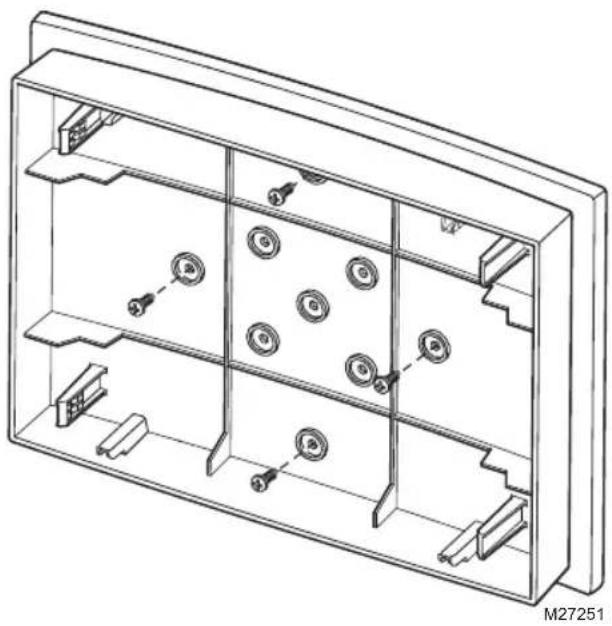
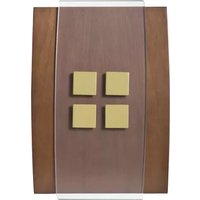
For customizable wood covers only: Choose your paint, wood stain/ varnish or wall paper and then apply to the cover. Follow manufacturers' advice on the paint/vanish.
It is possible to unscrew the four screws shown below for finishing. Ensure you screw it back with the same screws provided! Once completed, clip it onto the base.
natural_image
Technical line drawing of a multi-panel electronic device housing with mounting holes and internal compartments (no text or symbols)15 69-2173EFS-03
Installation Instructions
| Specification Chime | |
| Operating Temperature 32°F | to 104°F0°C to +40°C |
| Sound Level (typical) 90dBA | @ 3 ft (1m) |
| Power Supply 4 x LR14 C size | alkaline batteriesOR16V 10VA transformer (UL approved) Honeywell part numberRCA900N |
| Battery Life (if applicable)(5 operations/day) | 12 months |
69-2173EFS-03 16
Troubleshooting
When the illuminated bell push is operated, very dim / no light appears on the push... Check the power supply. You should use a 16V 10VA transformer connection for an illuminated push. Follow step 4.
The chime does not work...
- Check that the wiring is done correctly according to step 4, using minimum 20AWG wire. If using batteries:
- Check that the batteries are the correct type, LR14 'C' cells. Only use alkaline batteries.
- Check that the batteries are fitted correctly (with correct polarity).
- Check that batteries are not too low.
The chime does not sound...
- Check that the volume control is not at the minimum setting.
Low battery light flashes...
- When the chime battery is low, an amber LED located at the side of the chime will flash. Install new batteries in the chime, type LR14 'C' cells. Only use alkaline batteries.
The icons keep on flashing...
- The push associated with the icon is stuck. Check the push.
17 69-2173EFS-03
Installation Instructions
Disposal & Recycling
Batteries and waste electrical products should not be disposed of with household waste. Please recycle where these facilities exist. Check with your local authority or retailer for recycling advice.
Guarantee
Honeywell guarantees this product for 1 year from the date of purchase. Proof of purchase is required; this does not affect your statutory rights. If you require further information about your product, call the Honeywell helpline at 1-800-468-1502.
Declaration
Honeywell hereby declares that this product complies with Part 15 of the FCC rules and Industrial Canada standards. This device operation is subject to the following two conditions:
(1) This device may not cause harmful interference, and
(2) This device must accept any interference received, including interference that may cause undesired operation.
Caution:
Changes or modification not expressly approved by the party responsible for regulatory compliance could void the user's authority to operate the equipment.
RCW35 Series and RCW25 Series
19 69-2173EFS-03
69-2173EFS_B.indd 19 4/17/2008 11:15:46 AM


Honeywell International Inc.
ACS, Environmental and Combustion Controls
1985 Douglas Drive, Golden Valley, MN 55422
www.honeywell.com

Printed in U.S.A. on recycled
paper containing at least 10%
post-consumer paper fibers.
® U.S. Registered Trademark.
© 2008 Honeywell International Inc.
69-2173EFS—03 M.S. Rev. 04-08
69-2173EFS_B.indd 20 4/17/2008 11:15:47 AM
Honeywell

Honeywell
RCW250N, RCW251N, RCW35N,
RCW3501N, RCW3502N, RCW3503N,
RCW3504N, RCW3505N, RCW3506N
natural_image
Technical line drawing of an open electronic device showing internal components and a hand holding a package (no text or symbols)27 69-2173EFS-03
69-2173EFS_B.indd 27 4/17/2008 11:15:47 AM

29 69-2173EFS-03
69-2173EFS_B.indd 29 4/17/2008 11:15:47 AM

33 69-2173EFS-03
69-2173EFS_B.indd 33 4/17/2008 11:15:48 AM

natural_image
Technical line drawing of a multi-chamber electronic device with multiple slots and mounting holes (no text or symbols)37 69-2173EFS-03
The Class B digital apparatus complies with Canadian IECS-003.
Honeywell International Inc.
1985 Douglas Drive, Golden Valley, MN 55422
www.honeywell.com

Copyright © 2008 Honeywell International Inc.
69-2173EFS—03 M.S. Rev. 04-08
69-2173EFS_B.indd 42 4/17/2008 11:15:48 AM
Honeywell

Honeywell
RCW250N, RCW251N, RCW35N,
RCW3501N, RCW3502N, RCW3503N,
RCW3504N, RCW3505N, RCW3506N
RCW35 Series and RCW25 Series
natural_image
Technical line drawing of an open electronic device showing internal components and a hand holding a package (no text or symbols)49 69-2173EFS-03
69-2173EFS_B.indd 49 4/17/2008 11:15:49 AM

51 69-2173EFS-03
69-2173EFS_B.indd 51 4/17/2008 11:15:49 AM

55 69-2173EFS-03
69-2173EFS_B.indd 55 4/17/2008 11:15:49 AM

RCW35 Series and RCW25 Series
natural_image
Technical line drawing of a multi-chamber electronic enclosure with multiple slots and mounting hardware (no text or symbols)59 69-2173EFS-03
RCW35 Series and RCW25 Series
63 69-2173EFS-03
69-2173EFS_B.indd 63 4/17/2008 11:15:50 AM

RCW35 Series and RCW25 Series
65 69-2173EFS-03
69-2173EFS_B.indd 65 4/17/2008 11:15:50 AM


Honeywell International Inc.
ACS, Environmental and Combustion Controls
1985 Douglas Drive, Golden Valley, MN 55422
www.honeywell.com

© 2008 Honeywell International Inc.
69-2173EFS—03 M.S. Rev. 04-08
69-2173EFS_B.indd 66 4/17/2008 11:15:50 AM

Honeywell

- Installation Instructions
- Contents
- Safety
- Checking Pack Contents
- Installation
- Power Supply
- Mount the Chime
- Wiring
- Operate Push
- To Change Tune
- RCW35 Series and RCW25 Series
- Program Button
- Troubleshooting
- The chime does not work...
- The chime does not sound...
- Low battery light flashes...
- The icons keep on flashing...
- Disposal & Recycling
- Guarantee
- Declaration
- Caution:
- Honeywell
Brand : HONEYWELL
Model : RCW3505N
Category : Doorbells